Windows Server-   MRS

           -
        Amit.g@dario.co.il


SCOM 2012
& SCCM 2012
SCOM 2012
         Topology
          Simplification
         Expanding Visibility
         Network Monitoring
         Application Health
         Dashboards


Index                            SCCM 2012
                                  New Console
                                  Client Health
                                  Role-Based Security
                                  Application Lifecycle
                                  Device Management
                                  Software Updates
SCOM 2012
        Topology Simplification
        Expanding Visibility
        Network Monitoring
        Application Health
        Dashboards


SCOM
2012
Topology Simplification                       Challenges
                                              Addressed

               Operational
                             Data Warehouse
                Database


               X
Topology Simplification - Server Pool

                Operational
                              Data Warehouse
                 Database


                                 X
                                         Pool
                              Managed by a single HS
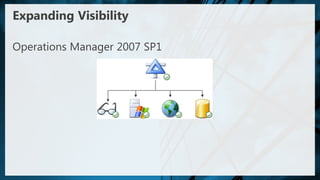
Expanding Visibility

Operations Manager 2007 SP1
Expanding Visibility

Operations Manager 2007 R2
Expanding Visibility

Operations Manager 2012
360 Holistic View of Health - Network Monitoring


               (Console, Web, SharePoint)
                                            End User Experience
                                            (Synthetic Transactions)


                     Consistent UX
                                            Application Monitoring
                                            (.NET, J2E)

                                            Infrastructure Monitoring
                                            (OS, SQL, IIS)
                                            Infrastructure Monitoring
                                            (Network)
Demo
Network Monitoring Features
 Out of the box discovery, monitoring, and reporting
 Server to network dependency discovery
 Multi-vendor support > 90 at RTM
 Multi protocol support
  SNMPv1/v2c/v3
  IPv4 and IPv6
 Robust platform for partners to build on
360 Holistic View of Health - Network Monitoring


               (Console, Web, SharePoint)
                                            End User Experience
                                            (Synthetic Transactions)


                     Consistent UX
                                            Application Monitoring
                                            (.NET, J2E)

                                            Infrastructure Monitoring
                                            (OS, SQL, IIS)
                                            Infrastructure Monitoring
                                            (Network)
Demo
Application Monitoring
 Out of box App Discovery and Monitoring
 Easy to understand Application failures via Resource View
 Useful Dev information for efficient escalation
 Increased time to value without custom MP authoring
Managing Complex Applications
                     End users
                                                       How do I know I have a problem?
                                                       How do I isolate the problem?
Smart clients                                          How do I diagnose the problem?


                Web servers


                                                                            Data servers
                                 Application servers
AVIcode’s Solution
 24x7 LOB applications monitoring
 No source code modifications
 Low overhead
 End-to-end transaction tracking
 360º application holistic view
 Application availability monitoring
 Problem management workflows
 End-user experience
 Intelligent analytics and reports
Application Availability Monitoring
 Volume-based health definition
 Easily define custom KPIs/critical
  transactions
 Monitor the health state of individual
  transactions
 Automatically calculate baseline
  performance levels
 Real-time dashboard and
  performance insight
 Alerts with root-cause information
Dashboards - Desktop Console
Dashboards - Web Console


                           Desktop Console
Dashboards - SharePoint


                          Desktop Console


                            Web Console
SCCM 2012
        New Console
        Client Health
        Role-Based Security
        Application Lifecycle
        Device Management
        Software Updates


SCCM
2012
Administrator Experience

 Common look and feel across
  System Center products
 Improve discoverability
 Only show what is relevant
 Complete scenarios within
  the console
 Simplified navigation
 Consolidated elements
Client Health
 Server-side metrics covering policy requests, HW & SW
  Inventory, Heartbeat, Data Discovery Record (DDRs) and
  Status Messages
 Customizable monitoring/remediation for:
  Client prerequisites
  SCCM client reinstallation
  Dependent Windows Services
  WMI Repository, Namespace, Class, and Instance health
   evaluation and repair
 In-console alerts when healthy/unhealthy ratio drops below
  configurable threshold
Role-Based
Administration Example

       Shushi as „ConfigMgr Admin‟ has rights to
       entire console


       Shushi assigns Application Deployment
       role to Shusha


       Shusha is responsible for deploying
       software

       Shusha has a limited view
Application Lifecycle
                                          Application
                                          Installation
                                          New Application


Remove Application                                                Update Application
Application                                                           Application
Uninstall                                                             Revision


                     Retire Application         Replace Application


                     Application                Application
                     Retirement                 Supersedence
On Demand Installation
Process Flow

     • User clicks “install” on Catalog item
 1


     • Web site checks user‟s permissions to install
 2

     • Web site requests Client ID from ConfigMgr client
 3     agent and passes it to Site server

     • Server creates policy for the specified client and
 4     app and passes it to client

     • Client agent evaluates requirements from the
 5     policy and initiates installation

     • Client agent completes installation process and
 6     reports status
Application Evaluation Flow

     New Policy   App Install   Schedule


                                           Dependencies installed
User Centric - Device Management
 Managing users means managing
 beyond desktops with “Single pane of
 glass” administration

 Reaching beyond Windows platforms
Software Updates
 State-based Update Groups
  Deploy updates individually or in groups
  Updates added to an update group automatically
  Deploy to collections targeted with the group
 Auto Deployment Rules
Planned OS Platforms Supported
21 Platforms supported at RTW

 AIX                                  Solaris
     Version 7.1 (Power)                Version 11(x86 and SPARC)
     Version 6.1 (Power)                Version 10 (x86 & SPARC)
     Version 5.3 (Power)                Version 9 (SPARC)
 HP-UX                                SUSE Linux Enterprise Server
    Version 11iv3 (IA64 & PA-RISC)
                                         Version 11 (x86 & x64)
    Version 11iv2 (IA64 & PA-RISC)
                                         Version 10 (x86 & x64)
 Red Hat Enterprise Linux               Version 9 (x86)
     Version 6 (x86 & x64)
     Version 5 (x86 & x64)
     Version 4 (x86 & x64)
SCOM 2012
           Network Monitoring
           Application Health
            with AVIcode
           Simplified
           Dashboards


In                               SCCM 2012
Summary                           New Console
                                  Application Lifecycle
                                  User Device Affinity
                                  End user experience
                                    Software Catalog
                                    Software Center
                                  Client Health
                                  Software Updates
Infrastructure & Management User Group
 Once a month
 Next Date – 31.1 @ 17:30 @ Microsoft Ra’anana
 Registration - http://infra.eventbrite.com
 Updates - http://www.linkedin.com/groupRegistration?gid=2389097
Windows Server-   MRS

           -
        Amit.g@dario.co.il


SCOM 2012
& SCCM 2012

SCOM 2012 & SCCM 2012

  • 1.
    Windows Server- MRS - Amit.g@dario.co.il SCOM 2012 & SCCM 2012
  • 2.
    SCOM 2012  Topology Simplification  Expanding Visibility  Network Monitoring  Application Health  Dashboards Index SCCM 2012  New Console  Client Health  Role-Based Security  Application Lifecycle  Device Management  Software Updates
  • 3.
    SCOM 2012  Topology Simplification  Expanding Visibility  Network Monitoring  Application Health  Dashboards SCOM 2012
  • 4.
    Topology Simplification Challenges Addressed Operational Data Warehouse Database X
  • 5.
    Topology Simplification -Server Pool Operational Data Warehouse Database X Pool Managed by a single HS
  • 6.
  • 7.
  • 8.
  • 9.
    360 Holistic Viewof Health - Network Monitoring (Console, Web, SharePoint) End User Experience (Synthetic Transactions) Consistent UX Application Monitoring (.NET, J2E) Infrastructure Monitoring (OS, SQL, IIS) Infrastructure Monitoring (Network)
  • 10.
  • 11.
    Network Monitoring Features Out of the box discovery, monitoring, and reporting  Server to network dependency discovery  Multi-vendor support > 90 at RTM  Multi protocol support  SNMPv1/v2c/v3  IPv4 and IPv6  Robust platform for partners to build on
  • 14.
    360 Holistic Viewof Health - Network Monitoring (Console, Web, SharePoint) End User Experience (Synthetic Transactions) Consistent UX Application Monitoring (.NET, J2E) Infrastructure Monitoring (OS, SQL, IIS) Infrastructure Monitoring (Network)
  • 15.
  • 16.
    Application Monitoring  Outof box App Discovery and Monitoring  Easy to understand Application failures via Resource View  Useful Dev information for efficient escalation  Increased time to value without custom MP authoring
  • 17.
    Managing Complex Applications End users How do I know I have a problem? How do I isolate the problem? Smart clients How do I diagnose the problem? Web servers Data servers Application servers
  • 18.
    AVIcode’s Solution  24x7LOB applications monitoring  No source code modifications  Low overhead  End-to-end transaction tracking  360º application holistic view  Application availability monitoring  Problem management workflows  End-user experience  Intelligent analytics and reports
  • 19.
    Application Availability Monitoring Volume-based health definition  Easily define custom KPIs/critical transactions  Monitor the health state of individual transactions  Automatically calculate baseline performance levels  Real-time dashboard and performance insight  Alerts with root-cause information
  • 20.
  • 21.
    Dashboards - WebConsole Desktop Console
  • 22.
    Dashboards - SharePoint Desktop Console Web Console
  • 23.
    SCCM 2012  New Console  Client Health  Role-Based Security  Application Lifecycle  Device Management  Software Updates SCCM 2012
  • 24.
    Administrator Experience  Commonlook and feel across System Center products  Improve discoverability  Only show what is relevant  Complete scenarios within the console  Simplified navigation  Consolidated elements
  • 25.
    Client Health  Server-sidemetrics covering policy requests, HW & SW Inventory, Heartbeat, Data Discovery Record (DDRs) and Status Messages  Customizable monitoring/remediation for:  Client prerequisites  SCCM client reinstallation  Dependent Windows Services  WMI Repository, Namespace, Class, and Instance health evaluation and repair  In-console alerts when healthy/unhealthy ratio drops below configurable threshold
  • 26.
    Role-Based Administration Example Shushi as „ConfigMgr Admin‟ has rights to entire console Shushi assigns Application Deployment role to Shusha Shusha is responsible for deploying software Shusha has a limited view
  • 27.
    Application Lifecycle Application Installation New Application Remove Application Update Application Application Application Uninstall Revision Retire Application Replace Application Application Application Retirement Supersedence
  • 28.
    On Demand Installation ProcessFlow • User clicks “install” on Catalog item 1 • Web site checks user‟s permissions to install 2 • Web site requests Client ID from ConfigMgr client 3 agent and passes it to Site server • Server creates policy for the specified client and 4 app and passes it to client • Client agent evaluates requirements from the 5 policy and initiates installation • Client agent completes installation process and 6 reports status
  • 29.
    Application Evaluation Flow New Policy App Install Schedule Dependencies installed
  • 30.
    User Centric -Device Management  Managing users means managing beyond desktops with “Single pane of glass” administration  Reaching beyond Windows platforms
  • 31.
    Software Updates  State-basedUpdate Groups  Deploy updates individually or in groups  Updates added to an update group automatically  Deploy to collections targeted with the group  Auto Deployment Rules
  • 32.
    Planned OS PlatformsSupported 21 Platforms supported at RTW  AIX  Solaris  Version 7.1 (Power)  Version 11(x86 and SPARC)  Version 6.1 (Power)  Version 10 (x86 & SPARC)  Version 5.3 (Power)  Version 9 (SPARC)  HP-UX  SUSE Linux Enterprise Server  Version 11iv3 (IA64 & PA-RISC)  Version 11 (x86 & x64)  Version 11iv2 (IA64 & PA-RISC)  Version 10 (x86 & x64)  Red Hat Enterprise Linux  Version 9 (x86)  Version 6 (x86 & x64)  Version 5 (x86 & x64)  Version 4 (x86 & x64)
  • 33.
    SCOM 2012  Network Monitoring  Application Health with AVIcode  Simplified  Dashboards In SCCM 2012 Summary  New Console  Application Lifecycle  User Device Affinity  End user experience  Software Catalog  Software Center  Client Health  Software Updates
  • 34.
    Infrastructure & ManagementUser Group  Once a month  Next Date – 31.1 @ 17:30 @ Microsoft Ra’anana  Registration - http://infra.eventbrite.com  Updates - http://www.linkedin.com/groupRegistration?gid=2389097
  • 35.
    Windows Server- MRS - Amit.g@dario.co.il SCOM 2012 & SCCM 2012