System Center Configuration Manager 2012Technical Overview (Beta 2)Amit GatenyoInfrastructure & Security Manager, DarioMicrosoft Regional Director – Windows Server & Security054-2492499Amit.g@dario.co.il2012
AgendaWhere is the focus in SCCM 2012?Embracing User-CentricNew Administrator ExperienceClient HealthSettings ManagementMobile Device ManagementCross Platform ManagementSoftware UpdatesOperating System DeploymentRemote ControlInfrastructure ChangesDemo
What is in SCCM 2012?
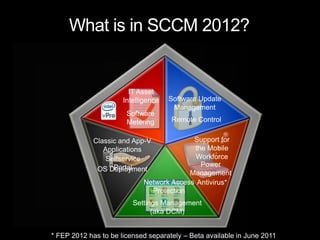
What is in SCCM 2012?IT AssetIntelligence Software Update Management Software MeteringRemote ControlSupport forthe Mobile WorkforceClassic and App-V Applications Selfservice PortalPower ManagementOS DeploymentNetwork Access ProtectionAntivirus*Settings Management(aka DCM)* FEP 2012 has to be licensed separately – Beta available in June 2011
Where is the focus on Configuration Manager 2012 ?
Configuration Manager 2012User Centric Client ManagementEMPOWERCONTROLUNIFYReduces the complexity and improves visibility into systems compliance Keeps assets available and helps keep the IT environment audit-ready Simplifies and automates  patch managementSimplifies and consolidates the IT infrastructure to provide a new operational cost modelIntegrates security to create unified client managementNew features around administrative control to reduce infrastructure Enables IT to provide a flexible work environment  Users can connect from anywhere, on any device they chooseAutomatically detects network conditions and device configurations to determine the most appropriate services
Embracing User-CentricThe End-User of the Future
System and User-Centric
Application Model DiagramKeep your apps organized and managedAdministrator PropertiesGeneral information about the software applicationEnd User MetadataThe “friendly” information for your usersApp-VWindows Script                Windows Installer (MSI)Mobile (CAB)Deployment TypeWorkhorse for applicationIs app installed?Detection MethodCommand line and optionsInstall CommandCan/cannot install appRequirement RulesApps that must be presentDependenciesSource files for the appContent
Embracing User Centric: End-User Promises“A Fitting End-User Experience”Web based software catalogEasily find and request softwareChoose software intelligently thanks to clear, consistent and concise information about applications and their impact“The ability to define their relationships to their software”User preferences control ConfigMgr behaviors (e.g. “my business hours”)Manage impact from software installation and system restarts
Application LifecycleApplication Installation(beta1)Application Revision(beta1)Application Uninstall(beta2)New ApplicationUpdate ApplicationRemove ApplicationApplication Retirement(beta1)Application Supersedence(beta2)Replace ApplicationRetire Application
App-V in ConfigMgr 2012
App-V in ConfigMgr 2012:  What’s changing?Integration requires App-V 4.6 clientNew Application Model, User-centric featuresEnable support for application dependenciesImproved update behaviors Selective publishing of componentsDynamic Suite SupportInstant icon gratification for unlock eventsIntegration with Remote Desktop Services (TS)Content ImprovementsStreaming improvementsReduce virtual app footprint when using Download and Execute
New Administrator Experience
Administrator ExperienceCommon look and feel across System Center products
Improve discoverability
Only show what is relevant
Complete scenarios within the console
Simplified navigation
Consolidated elementsRole-Based AdministrationSimplified administration of security permissionsSecurity RoleGroup sets of permissions together that collectively define an administrative span of controle.g. Read Program + Deploy Program + Read Collection + Advertise to Collection = Software Distribution Administrator Supports assignment of Security Roles to Users, once in a hierarchyAlso supports instance level controlsConfigMgr provides out-of-the-box Security RolesSupports custom Security RolesRemoves clutter from the consoleSupports “Show me what’s relevant to me” based on my Security Role and Scope
Role-Based Administration ExamplePeter assigns Application Deployment role to MegMeg is responsible for deploying softwareMeg has a limited view
Client Health
Client HealthServer-side metrics covering policy requests, HW & SW Inventory, Heartbeat, Data Discovery Record (DDRs) and Status MessagesCustomizable monitoring/remediation for:Client prerequisitesConfigMgr client reinstallationDependent Windows ServicesWMI Repository, Namespace, Class, and Instance health evaluation and repairIn-console alerts when healthy/unhealthy ratio drops below configurable threshold
Settings Management(aka DCM)
Features and ImprovementsUnified compliance-settings mgmt across servers, desktops laptops, and mobile devicesSimplify administrator experienceRole-based administration built in “Compliance Settings Management Role”Browse gold system when creating configuration itemsSimplified Baseline creation experience Re-use of settings across CI boundaryDeployment of Baselines User and Device targeting of Baselines Define compliance SLAs for Baseline deployments and generate Alerts True per user evaluation and remediation Monitoring Baseline deployment compliance statusIn Console monitoringUpdated reports to include remediation, conflict and error reportingAutomatic remediation (aka DCM “set”)CI revisioning and change controlMigration of existing Configuration Manager 2007 Baselines and CIs
Browse on gold system when creating CIsScenario: Simplify configuration item creation. Design principal: Admin can create DCM setting and rule without typing by browsing gold system registry and file system, eliminating human errors. Browse local / remote machineRegistry and File System only
Mobile Device Management
Mobile Device SupportNew: SCCM 2012 will supportthefollowingdevices:iPadsiPhonesSymbianAndroidWindows Phone 7
Managing users means managing beyond desktops with “Single pane of glass” administration Reaching beyond Windows platformsUser Centric – Device Management“Light”Provides basic management for all Exchange ActiveSync (EAS) connected devices“Depth”Broad feature setCommon administration model for mobile devices, desktops, and servers
Cross Platform Management
Who we are TargetingTargeting enterprises where: Windows clients and servers predominateUNIX/Linux management is important due to security, regulatory requirementsSimplification and cost drivers demand a unified management solutionTargeting servers & server scenarios, not desktops & client scenariosMost comprehensive solution for heterogeneous environments, but is not “best-of-breed” for a specific UNIX/Linux OS“Just a Check-Box”“Best-of-Breed”  ConfigMgr for UNIX/Linux
Planned Features for UNIX/Linux Servers
Planned OS Platforms Supported at (Release To Web) RTW21 Platforms supported at RTWAIX Version 7.1 (Power)Version 6.1 (Power)Version 5.3 (Power)HP-UXVersion 11iv3 (IA64 & PA-RISC)Version 11iv2 (IA64 & PA-RISC)Red Hat Enterprise LinuxVersion 6 (x86 & x64)Version 5 (x86 & x64)*Version 4 (x86 & x64)SolarisVersion 11(x86 and SPARC)Version 10 (x86 & SPARC*) Version 9 (SPARC)SUSE Linux Enterprise ServerVersion 11 (x86 & x64)Version 10 (x86 & x64)Version 9 (x86)* CTP Support for 3 Platforms
Software Updates
Software UpdatesState-based Update GroupsDeploy updates individually or in groupsUpdates added to an update group automatically deploy to collections targeted with the groupAuto Deployment RulesUse search criteria to identify class of updates to automatically deploy: category, products, language, date revised, article id, bulletin id, etc.Schedule content download and deployment based on sync schedule or define a separate schedule per rule
Operating System Deployment
Operating System DeploymentOffline Servicing of ImagesSupport for Component Based Servicing compatible updatesUses updates already approved Boot Media UpdatesHierarchy wide boot media – no longer need one per siteUnattended boot media mode – no longer need to press “next”Use pre-execution hooks to automatically select a task sequence – no longer see many optional task sequencesUSMT 4.0 - UI integration and support for hard-link, offline and shadow copy features
Remote Control
Remote ControlIS BACK!Send Ctrl-Alt-Del to host device to regain previous feature parity
Infrastructure Changes
Infrastructure PromisesModernizing ArchitectureMinimizing infrastructure for remote officesConsolidating infrastructure for primary sitesScalability and Data Latency ImprovementsCentral Administration Site is just for administration and reporting – Other work distributed to the primaries as much as possibleFile processing occurs once at the Primary Site and uses replication to reach other sites (no more reprocessing at each site in the hierarchy)System-generated data (HW Inventory and Status) can be configured to flow to the Central Administration Site directlyBe TrustworthyInteractions with SQL DBA are consistent with Configuration Manager 2007Configuration Manager admin can monitoring and troubleshoot new replication approach independently
Simplify Your HierarchyCentral SitePrimaryPrimary SitePrimaryPrimary SitePrimary SitePrimary SiteDistribution PointDistribution PointDistribution PointDistribution PointSecondary SiteSecondary SiteSecondary Site
Simplify Your HierarchyPrimaryPrimaryCentral Administration SiteDistribution PointDistribution PointDistribution PointSecondary SiteSecondary SiteSecondary Site
Infrastructure Changes: Modernizing our architecture

System Center Configuration Manager 2012 Overview

  • 1.
    System Center ConfigurationManager 2012Technical Overview (Beta 2)Amit GatenyoInfrastructure & Security Manager, DarioMicrosoft Regional Director – Windows Server & Security054-2492499Amit.g@dario.co.il2012
  • 2.
    AgendaWhere is thefocus in SCCM 2012?Embracing User-CentricNew Administrator ExperienceClient HealthSettings ManagementMobile Device ManagementCross Platform ManagementSoftware UpdatesOperating System DeploymentRemote ControlInfrastructure ChangesDemo
  • 3.
    What is inSCCM 2012?
  • 4.
    What is inSCCM 2012?IT AssetIntelligence Software Update Management Software MeteringRemote ControlSupport forthe Mobile WorkforceClassic and App-V Applications Selfservice PortalPower ManagementOS DeploymentNetwork Access ProtectionAntivirus*Settings Management(aka DCM)* FEP 2012 has to be licensed separately – Beta available in June 2011
  • 5.
    Where is thefocus on Configuration Manager 2012 ?
  • 6.
    Configuration Manager 2012UserCentric Client ManagementEMPOWERCONTROLUNIFYReduces the complexity and improves visibility into systems compliance Keeps assets available and helps keep the IT environment audit-ready Simplifies and automates patch managementSimplifies and consolidates the IT infrastructure to provide a new operational cost modelIntegrates security to create unified client managementNew features around administrative control to reduce infrastructure Enables IT to provide a flexible work environment Users can connect from anywhere, on any device they chooseAutomatically detects network conditions and device configurations to determine the most appropriate services
  • 7.
  • 8.
  • 9.
    Application Model DiagramKeepyour apps organized and managedAdministrator PropertiesGeneral information about the software applicationEnd User MetadataThe “friendly” information for your usersApp-VWindows Script Windows Installer (MSI)Mobile (CAB)Deployment TypeWorkhorse for applicationIs app installed?Detection MethodCommand line and optionsInstall CommandCan/cannot install appRequirement RulesApps that must be presentDependenciesSource files for the appContent
  • 10.
    Embracing User Centric:End-User Promises“A Fitting End-User Experience”Web based software catalogEasily find and request softwareChoose software intelligently thanks to clear, consistent and concise information about applications and their impact“The ability to define their relationships to their software”User preferences control ConfigMgr behaviors (e.g. “my business hours”)Manage impact from software installation and system restarts
  • 11.
    Application LifecycleApplication Installation(beta1)ApplicationRevision(beta1)Application Uninstall(beta2)New ApplicationUpdate ApplicationRemove ApplicationApplication Retirement(beta1)Application Supersedence(beta2)Replace ApplicationRetire Application
  • 12.
  • 13.
    App-V in ConfigMgr2012: What’s changing?Integration requires App-V 4.6 clientNew Application Model, User-centric featuresEnable support for application dependenciesImproved update behaviors Selective publishing of componentsDynamic Suite SupportInstant icon gratification for unlock eventsIntegration with Remote Desktop Services (TS)Content ImprovementsStreaming improvementsReduce virtual app footprint when using Download and Execute
  • 14.
  • 15.
    Administrator ExperienceCommon lookand feel across System Center products
  • 16.
  • 17.
    Only show whatis relevant
  • 18.
  • 19.
  • 20.
    Consolidated elementsRole-Based AdministrationSimplifiedadministration of security permissionsSecurity RoleGroup sets of permissions together that collectively define an administrative span of controle.g. Read Program + Deploy Program + Read Collection + Advertise to Collection = Software Distribution Administrator Supports assignment of Security Roles to Users, once in a hierarchyAlso supports instance level controlsConfigMgr provides out-of-the-box Security RolesSupports custom Security RolesRemoves clutter from the consoleSupports “Show me what’s relevant to me” based on my Security Role and Scope
  • 21.
    Role-Based Administration ExamplePeterassigns Application Deployment role to MegMeg is responsible for deploying softwareMeg has a limited view
  • 22.
  • 23.
    Client HealthServer-side metricscovering policy requests, HW & SW Inventory, Heartbeat, Data Discovery Record (DDRs) and Status MessagesCustomizable monitoring/remediation for:Client prerequisitesConfigMgr client reinstallationDependent Windows ServicesWMI Repository, Namespace, Class, and Instance health evaluation and repairIn-console alerts when healthy/unhealthy ratio drops below configurable threshold
  • 24.
  • 25.
    Features and ImprovementsUnifiedcompliance-settings mgmt across servers, desktops laptops, and mobile devicesSimplify administrator experienceRole-based administration built in “Compliance Settings Management Role”Browse gold system when creating configuration itemsSimplified Baseline creation experience Re-use of settings across CI boundaryDeployment of Baselines User and Device targeting of Baselines Define compliance SLAs for Baseline deployments and generate Alerts True per user evaluation and remediation Monitoring Baseline deployment compliance statusIn Console monitoringUpdated reports to include remediation, conflict and error reportingAutomatic remediation (aka DCM “set”)CI revisioning and change controlMigration of existing Configuration Manager 2007 Baselines and CIs
  • 26.
    Browse on goldsystem when creating CIsScenario: Simplify configuration item creation. Design principal: Admin can create DCM setting and rule without typing by browsing gold system registry and file system, eliminating human errors. Browse local / remote machineRegistry and File System only
  • 27.
  • 28.
    Mobile Device SupportNew:SCCM 2012 will supportthefollowingdevices:iPadsiPhonesSymbianAndroidWindows Phone 7
  • 29.
    Managing users meansmanaging beyond desktops with “Single pane of glass” administration Reaching beyond Windows platformsUser Centric – Device Management“Light”Provides basic management for all Exchange ActiveSync (EAS) connected devices“Depth”Broad feature setCommon administration model for mobile devices, desktops, and servers
  • 30.
  • 31.
    Who we areTargetingTargeting enterprises where: Windows clients and servers predominateUNIX/Linux management is important due to security, regulatory requirementsSimplification and cost drivers demand a unified management solutionTargeting servers & server scenarios, not desktops & client scenariosMost comprehensive solution for heterogeneous environments, but is not “best-of-breed” for a specific UNIX/Linux OS“Just a Check-Box”“Best-of-Breed” ConfigMgr for UNIX/Linux
  • 32.
    Planned Features forUNIX/Linux Servers
  • 33.
    Planned OS PlatformsSupported at (Release To Web) RTW21 Platforms supported at RTWAIX Version 7.1 (Power)Version 6.1 (Power)Version 5.3 (Power)HP-UXVersion 11iv3 (IA64 & PA-RISC)Version 11iv2 (IA64 & PA-RISC)Red Hat Enterprise LinuxVersion 6 (x86 & x64)Version 5 (x86 & x64)*Version 4 (x86 & x64)SolarisVersion 11(x86 and SPARC)Version 10 (x86 & SPARC*) Version 9 (SPARC)SUSE Linux Enterprise ServerVersion 11 (x86 & x64)Version 10 (x86 & x64)Version 9 (x86)* CTP Support for 3 Platforms
  • 34.
  • 35.
    Software UpdatesState-based UpdateGroupsDeploy updates individually or in groupsUpdates added to an update group automatically deploy to collections targeted with the groupAuto Deployment RulesUse search criteria to identify class of updates to automatically deploy: category, products, language, date revised, article id, bulletin id, etc.Schedule content download and deployment based on sync schedule or define a separate schedule per rule
  • 36.
  • 37.
    Operating System DeploymentOfflineServicing of ImagesSupport for Component Based Servicing compatible updatesUses updates already approved Boot Media UpdatesHierarchy wide boot media – no longer need one per siteUnattended boot media mode – no longer need to press “next”Use pre-execution hooks to automatically select a task sequence – no longer see many optional task sequencesUSMT 4.0 - UI integration and support for hard-link, offline and shadow copy features
  • 38.
  • 39.
    Remote ControlIS BACK!SendCtrl-Alt-Del to host device to regain previous feature parity
  • 40.
  • 41.
    Infrastructure PromisesModernizing ArchitectureMinimizinginfrastructure for remote officesConsolidating infrastructure for primary sitesScalability and Data Latency ImprovementsCentral Administration Site is just for administration and reporting – Other work distributed to the primaries as much as possibleFile processing occurs once at the Primary Site and uses replication to reach other sites (no more reprocessing at each site in the hierarchy)System-generated data (HW Inventory and Status) can be configured to flow to the Central Administration Site directlyBe TrustworthyInteractions with SQL DBA are consistent with Configuration Manager 2007Configuration Manager admin can monitoring and troubleshoot new replication approach independently
  • 42.
    Simplify Your HierarchyCentralSitePrimaryPrimary SitePrimaryPrimary SitePrimary SitePrimary SiteDistribution PointDistribution PointDistribution PointDistribution PointSecondary SiteSecondary SiteSecondary Site
  • 43.
    Simplify Your HierarchyPrimaryPrimaryCentralAdministration SiteDistribution PointDistribution PointDistribution PointSecondary SiteSecondary SiteSecondary Site
  • 44.