chrisest@microsoft.com
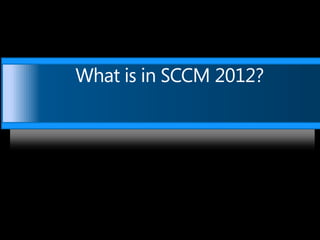
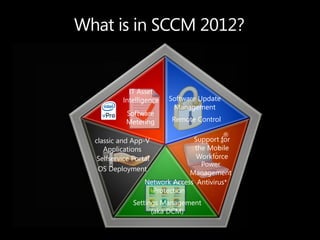
What is in SCCM 2012?


             IT Asset
           Intelligence   Software Update
                           Management
            Software
            Metering      Remote Control


  classic and App-V              Support for
     Applications                the Mobile
   Selfservice Portal             Workforce
                                   Power
   OS Deployment
                                Management
                   Network Access Antivirus*
                     Protection
               Settings Management
                     (aka DCM)
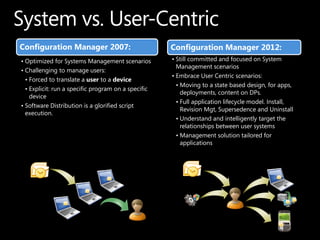
Configuration Manager 2007:                          Configuration Manager 2012:
• Optimized for Systems Management scenarios         • Still committed and focused on System
                                                       Management scenarios
• Challenging to manage users:
                                                     • Embrace User Centric scenarios:
  • Forced to translate a user to a device
                                                       • Moving to a state based design, for apps,
  • Explicit: run a specific program on a specific
                                                         deployments, content on DPs.
    device
                                                       • Full application lifecycle model. Install,
• Software Distribution is a glorified script
                                                         Revision Mgt, Supersedence and Uninstall
  execution.
                                                       • Understand and intelligently target the
                                                         relationships between user systems
                                                       • Management solution tailored for
                                                         applications
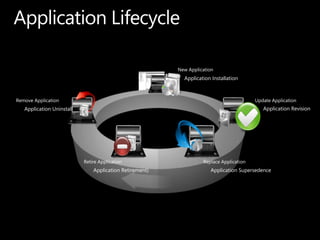
Application Installation


Application Uninstall                                                            Application Revision


                        Application Retirement)              Application Supersedence
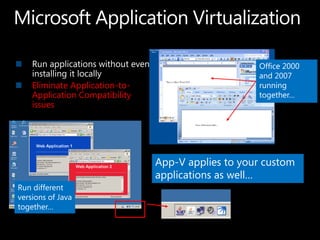
Office 2000
                                                    and 2007
    Eliminate Application-to-                       running
    Application Compatibility                       together…
    issues


                                App-V applies to your custom
                                applications as well…
Run different
versions of Java
together…
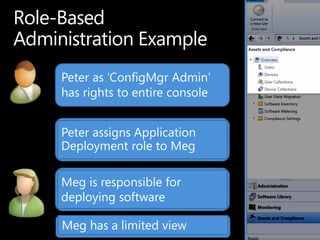
Peter as „ConfigMgr Admin‟
has rights to entire console


Peter assigns Application
Deployment role to Meg

Meg is responsible for
deploying software

Meg has a limited view
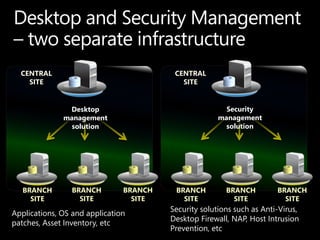
CENTRAL                                CENTRAL
    SITE                                   SITE


               Desktop                                  Security
              management                              management
                solution                                solution


   BRANCH       BRANCH         BRANCH    BRANCH         BRANCH         BRANCH
     SITE         SITE           SITE      SITE           SITE           SITE
                                        Security solutions such as Anti-Virus,
Applications, OS and application
                                        Desktop Firewall, NAP, Host Intrusion
patches, Asset Inventory, etc
                                        Prevention, etc
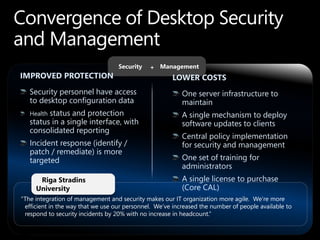
Security   + Management
IMPROVED PROTECTION                                   LOWER COSTS
   Security personnel have access                         One server infrastructure to
   to desktop configuration data                          maintain
   Healthstatus and protection                            A single mechanism to deploy
   status in a single interface, with                     software updates to clients
   consolidated reporting
                                                          Central policy implementation
   Incident response (identify /                          for security and management
   patch / remediate) is more
   targeted                                               One set of training for
                                                          administrators
      Riga Stradins                                       A single license to purchase
     University                                           (Core CAL)
“The integration of management and security makes our IT organization more agile. We‟re more
 efficient in the way that we use our personnel. We‟ve increased the number of people available to
 respond to security incidents by 20% with no increase in headcount.”
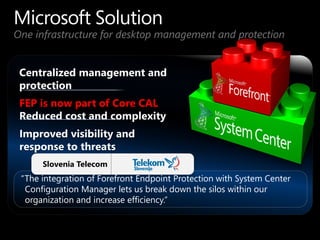
One infrastructure for desktop management and protection


 FEP is now part of Core CAL


      Slovenia Telecom
 “The integration of Forefront Endpoint Protection with System Center
  Configuration Manager lets us break down the silos within our
  organization and increase efficiency.”
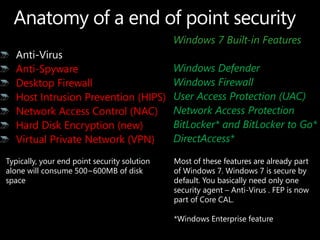
Windows 7 Built-in Features

   Anti-Spyware                               Windows Defender
   Desktop Firewall                           Windows Firewall
   Host Intrusion Prevention (HIPS)           User Access Protection (UAC)
   Network Access Control (NAC)               Network Access Protection
   Hard Disk Encryption (new)                 BitLocker* and BitLocker to Go*
   Virtual Private Network (VPN)              DirectAccess*

Typically, your end point security solution   Most of these features are already part
alone will consume 500~600MB of disk          of Windows 7. Windows 7 is secure by
space                                         default. You basically need only one
                                              security agent – Anti-Virus . FEP is now
                                              part of Core CAL.

                                              *Windows Enterprise feature
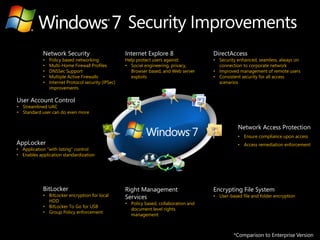
Network Security                         Internet Explore 8                  DirectAccess
            •   Policy based networking              Help protect users against:         • Security enhanced, seamless, always on
            •   Multi-Home Firewall Profiles         • Social engineering, privacy,        connection to corporate network
            •   DNSSec Support                         Browser based, and Web server     • Improved management of remote users
            •   Multiple Active Firewalls              exploits                          • Consistent security for all access
            •   Internet Protocol security (IPSec)                                         scenarios
                improvements

User Account Control
• Streamlined UAC
• Standard user can do even more


                                                                                                    Network Access Protection
                                                                                                    • Ensure compliance upon access
AppLocker                                                                                           • Access remediation enforcement
• Application “with listing” control
• Enables application standardization


            BitLocker                                Right Management                    Encrypting File System
            • BitLocker encryption for local         Services                            • User-based file and folder encryption
              HDD
                                                     • Policy based, collaboration and
            • BitLocker To Go for USB
                                                       document level rights
            • Group Policy enforcement
                                                       management


                                                                                                  *Comparison to Enterprise Version
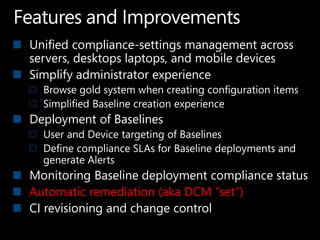
Unified compliance-settings management across
servers, desktops laptops, and mobile devices
Simplify administrator experience
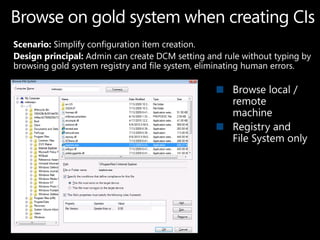
  Browse gold system when creating configuration items
  Simplified Baseline creation experience
Deployment of Baselines
  User and Device targeting of Baselines
  Define compliance SLAs for Baseline deployments and
  generate Alerts
Monitoring Baseline deployment compliance status
Automatic remediation (aka DCM “set”)
CI revisioning and change control
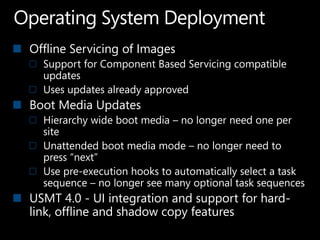
Offline Servicing of Images
  Support for Component Based Servicing compatible
  updates
  Uses updates already approved
Boot Media Updates
  Hierarchy wide boot media – no longer need one per
  site
  Unattended boot media mode – no longer need to
  press “next”
  Use pre-execution hooks to automatically select a task
  sequence – no longer see many optional task sequences
USMT 4.0 - UI integration and support for hard-
link, offline and shadow copy features
IS BACK!
https://connect.microsoft.com/Configuratio
nManagervnext

http://www.microsoft.com/sccm
Sccm 2012 overview - chris_estonina

Sccm 2012 overview - chris_estonina

  • 1.
  • 3.
    What is inSCCM 2012?
  • 4.
    What is inSCCM 2012? IT Asset Intelligence Software Update Management Software Metering Remote Control classic and App-V Support for Applications the Mobile Selfservice Portal Workforce Power OS Deployment Management Network Access Antivirus* Protection Settings Management (aka DCM)
  • 6.
    Configuration Manager 2007: Configuration Manager 2012: • Optimized for Systems Management scenarios • Still committed and focused on System Management scenarios • Challenging to manage users: • Embrace User Centric scenarios: • Forced to translate a user to a device • Moving to a state based design, for apps, • Explicit: run a specific program on a specific deployments, content on DPs. device • Full application lifecycle model. Install, • Software Distribution is a glorified script Revision Mgt, Supersedence and Uninstall execution. • Understand and intelligently target the relationships between user systems • Management solution tailored for applications
  • 7.
    Application Installation Application Uninstall Application Revision Application Retirement) Application Supersedence
  • 9.
    Office 2000 and 2007 Eliminate Application-to- running Application Compatibility together… issues App-V applies to your custom applications as well… Run different versions of Java together…
  • 12.
    Peter as „ConfigMgrAdmin‟ has rights to entire console Peter assigns Application Deployment role to Meg Meg is responsible for deploying software Meg has a limited view
  • 14.
    CENTRAL CENTRAL SITE SITE Desktop Security management management solution solution BRANCH BRANCH BRANCH BRANCH BRANCH BRANCH SITE SITE SITE SITE SITE SITE Security solutions such as Anti-Virus, Applications, OS and application Desktop Firewall, NAP, Host Intrusion patches, Asset Inventory, etc Prevention, etc
  • 15.
    Security + Management IMPROVED PROTECTION LOWER COSTS Security personnel have access One server infrastructure to to desktop configuration data maintain Healthstatus and protection A single mechanism to deploy status in a single interface, with software updates to clients consolidated reporting Central policy implementation Incident response (identify / for security and management patch / remediate) is more targeted One set of training for administrators Riga Stradins A single license to purchase University (Core CAL) “The integration of management and security makes our IT organization more agile. We‟re more efficient in the way that we use our personnel. We‟ve increased the number of people available to respond to security incidents by 20% with no increase in headcount.”
  • 16.
    One infrastructure fordesktop management and protection FEP is now part of Core CAL Slovenia Telecom “The integration of Forefront Endpoint Protection with System Center Configuration Manager lets us break down the silos within our organization and increase efficiency.”
  • 17.
    Windows 7 Built-inFeatures Anti-Spyware Windows Defender Desktop Firewall Windows Firewall Host Intrusion Prevention (HIPS) User Access Protection (UAC) Network Access Control (NAC) Network Access Protection Hard Disk Encryption (new) BitLocker* and BitLocker to Go* Virtual Private Network (VPN) DirectAccess* Typically, your end point security solution Most of these features are already part alone will consume 500~600MB of disk of Windows 7. Windows 7 is secure by space default. You basically need only one security agent – Anti-Virus . FEP is now part of Core CAL. *Windows Enterprise feature
  • 18.
    Network Security Internet Explore 8 DirectAccess • Policy based networking Help protect users against: • Security enhanced, seamless, always on • Multi-Home Firewall Profiles • Social engineering, privacy, connection to corporate network • DNSSec Support Browser based, and Web server • Improved management of remote users • Multiple Active Firewalls exploits • Consistent security for all access • Internet Protocol security (IPSec) scenarios improvements User Account Control • Streamlined UAC • Standard user can do even more Network Access Protection • Ensure compliance upon access AppLocker • Access remediation enforcement • Application “with listing” control • Enables application standardization BitLocker Right Management Encrypting File System • BitLocker encryption for local Services • User-based file and folder encryption HDD • Policy based, collaboration and • BitLocker To Go for USB document level rights • Group Policy enforcement management *Comparison to Enterprise Version
  • 20.
    Unified compliance-settings managementacross servers, desktops laptops, and mobile devices Simplify administrator experience Browse gold system when creating configuration items Simplified Baseline creation experience Deployment of Baselines User and Device targeting of Baselines Define compliance SLAs for Baseline deployments and generate Alerts Monitoring Baseline deployment compliance status Automatic remediation (aka DCM “set”) CI revisioning and change control
  • 26.
    Offline Servicing ofImages Support for Component Based Servicing compatible updates Uses updates already approved Boot Media Updates Hierarchy wide boot media – no longer need one per site Unattended boot media mode – no longer need to press “next” Use pre-execution hooks to automatically select a task sequence – no longer see many optional task sequences USMT 4.0 - UI integration and support for hard- link, offline and shadow copy features
  • 28.
  • 29.