SCOM – The Unsung Hero of
the System Center Suite
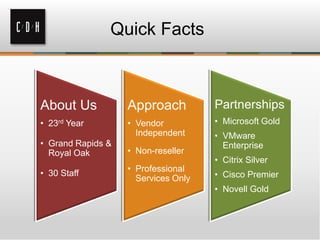
Quick Facts
About Us
• 23rd Year
• Grand Rapids &
Royal Oak
• 30 Staff
Approach
• Vendor
Independent
• Non-reseller
• Professional
Services Only
Partnerships
• Microsoft Gold
• VMware
Enterprise
• Citrix Silver
• Cisco Premier
• Novell Gold
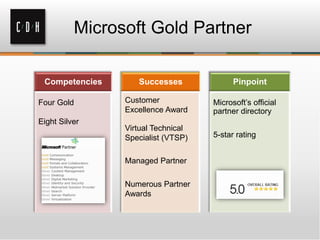
Microsoft Gold Partner
Competencies
Four Gold
Eight Silver
Successes
Customer
Excellence Award
Virtual Technical
Specialist (VTSP)
Managed Partner
Numerous Partner
Awards
Pinpoint
Microsoft’s official
partner directory
5-star rating
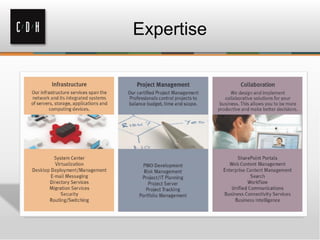
Expertise
Get Social with C/D/H
facebook.com/cdhtech@cdhtweetstech
www.linkedin.com/company/cdh
Today’s Agenda
• Brief overview of SCOM
• Some real-life experiences with SCOM
• Why SCOM is so rarely installed
• SCOM installation tips
• Setting up email alerting
• Monitoring services with SCOM
• Using Synthetic Transactions to monitor
website performance
• Global Services Monitoring
• System Center Advisor
• Network Monitoring
Your Presenter
Erik Gilreath
MCSE, MCITP, CNE, CCNA, CCDA, CCA, CCEA
• Consultant with C/D/H
• Currently focusing on System
Center, infrastructure and
virtualization
• Been with C/D/H since 1999
erikg@cdh.com
What is SCOM
What SCOM is NOT
Why SCOM is so rarely installed
• First iterations were less than stellar
• Easy to install poorly
• More complicated than it looks
• Poor planning
• Not understanding what SCOM really does
• Bad reputation from people who did it
wrong
Why it’s a mistake not to install:
SCOM in real life
• Notifications of system issues
• Notifications of possible problems
• Alerts of performance issues
• Correct issues with the use of scripts
• Generates help desk tickets
SCOM Installation Tips
• Decide ahead of time what MPs to install
– Exchange / IIS / SharePoint / SQL / etc
• Install one MP at a time
– Let it bake a week or two
– Start with Windows Core
– Create custom MP for each installed MP for
overrides
– Name each custom MP with the same starting
letters
• Alert Monitors vs. Alert Rules
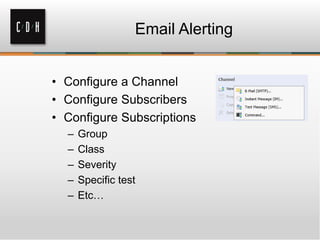
Email Alerting
• Configure a Channel
• Configure Subscribers
• Configure Subscriptions
– Group
– Class
– Severity
– Specific test
– Etc…
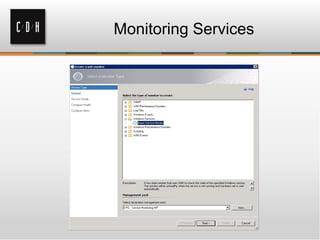
Monitoring Services
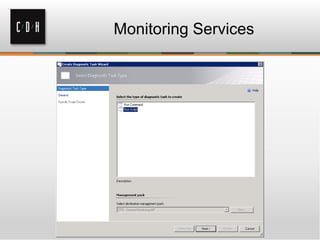
Monitoring Services
Synthetic Transactions
• Real time actions performed on monitored
objects
– Test website responsiveness
– Monitor database performance
– TCP port monitoring
Global Service Monitoring
• Azure based service that ties into SCOM
• Available free to any with Software
Assurance
• Monitors from both inside and outside
– Monitor applications from 15 different locations
• Two kinds of monitors
– Web Application Availability
– Visual Studio Web Tests
Global Service Monitoring -
Installation
• Signup for GSM:
https://orgaccount.microsoft.com/signup?offerIds=BE2A46EF-0639-43a4-8323-BB5E1D4340D3
• If doing Visual Studio tests, import the Alert
Attachment MP:
http://technet.microsoft.com/en-us/library/jj899889.aspx
• Import the GSM MPs into OpsMgr 2012 SP1
• Configure GSM in OpsMgr 2012 SP1 with
your GSM account
• Start configuring tests!
Web Application Availability Monitor
• Test is defined as one URL from one
Location
• One test every 5 minutes is the most
frequent interval
• Total tests = # tests * # locations
• Total tests cannot exceed 25 per
subscription
Visual Studio Web Tests
• Test is defined as one .webtest file
• One test every 5 minutes is the most
frequent interval
• Total tests = # tests times # locations
• Total tests cannot exceed 25 per
subscription
• Microsoft Visual Studio Ultimate 2012 or
Visual Studio Ultimate 2010 required to
view test results
System Center Advisor
• Cloud-based service that examines your
Microsoft-based installations
• Available free to everyone
• Alerts generated due to improper
configuration, potential issues, missing
patches, or simply straying from best
practices
• Remediation recommendations based on
a compilation of thousands of MS Support
cases
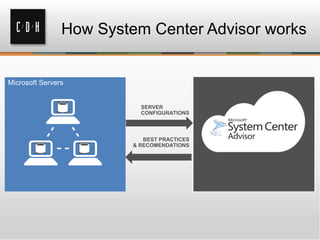
How System Center Advisor works
SERVER
CONFIGURATIONS
Microsoft Servers
BEST PRACTICES
& RECOMENDATIONS
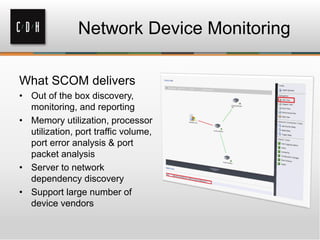
Network Device Monitoring
What SCOM delivers
• Out of the box discovery,
monitoring, and reporting
• Memory utilization, processor
utilization, port traffic volume,
port error analysis & port
packet analysis
• Server to network
dependency discovery
• Support large number of
device vendors
Royal Oak
306 S. Washington Ave.
Suite 212
Royal Oak, MI 48067
(248) 546-1800
Grand Rapids
15 Ionia SW
Suite 270
Grand Rapids, MI 49503
(616) 776-1600
Thank You
www.cdh.com

SCOM: The Unsung Hero of the System Center Suite April 24, 2013

  • 1.
    SCOM – TheUnsung Hero of the System Center Suite
  • 2.
    Quick Facts About Us •23rd Year • Grand Rapids & Royal Oak • 30 Staff Approach • Vendor Independent • Non-reseller • Professional Services Only Partnerships • Microsoft Gold • VMware Enterprise • Citrix Silver • Cisco Premier • Novell Gold
  • 3.
    Microsoft Gold Partner Competencies FourGold Eight Silver Successes Customer Excellence Award Virtual Technical Specialist (VTSP) Managed Partner Numerous Partner Awards Pinpoint Microsoft’s official partner directory 5-star rating
  • 4.
  • 5.
    Get Social withC/D/H facebook.com/cdhtech@cdhtweetstech www.linkedin.com/company/cdh
  • 6.
    Today’s Agenda • Briefoverview of SCOM • Some real-life experiences with SCOM • Why SCOM is so rarely installed • SCOM installation tips • Setting up email alerting • Monitoring services with SCOM • Using Synthetic Transactions to monitor website performance • Global Services Monitoring • System Center Advisor • Network Monitoring
  • 7.
    Your Presenter Erik Gilreath MCSE,MCITP, CNE, CCNA, CCDA, CCA, CCEA • Consultant with C/D/H • Currently focusing on System Center, infrastructure and virtualization • Been with C/D/H since 1999 erikg@cdh.com
  • 8.
  • 9.
  • 10.
    Why SCOM isso rarely installed • First iterations were less than stellar • Easy to install poorly • More complicated than it looks • Poor planning • Not understanding what SCOM really does • Bad reputation from people who did it wrong
  • 11.
    Why it’s amistake not to install: SCOM in real life • Notifications of system issues • Notifications of possible problems • Alerts of performance issues • Correct issues with the use of scripts • Generates help desk tickets
  • 12.
    SCOM Installation Tips •Decide ahead of time what MPs to install – Exchange / IIS / SharePoint / SQL / etc • Install one MP at a time – Let it bake a week or two – Start with Windows Core – Create custom MP for each installed MP for overrides – Name each custom MP with the same starting letters • Alert Monitors vs. Alert Rules
  • 13.
    Email Alerting • Configurea Channel • Configure Subscribers • Configure Subscriptions – Group – Class – Severity – Specific test – Etc…
  • 14.
  • 15.
  • 16.
    Synthetic Transactions • Realtime actions performed on monitored objects – Test website responsiveness – Monitor database performance – TCP port monitoring
  • 17.
    Global Service Monitoring •Azure based service that ties into SCOM • Available free to any with Software Assurance • Monitors from both inside and outside – Monitor applications from 15 different locations • Two kinds of monitors – Web Application Availability – Visual Studio Web Tests
  • 18.
    Global Service Monitoring- Installation • Signup for GSM: https://orgaccount.microsoft.com/signup?offerIds=BE2A46EF-0639-43a4-8323-BB5E1D4340D3 • If doing Visual Studio tests, import the Alert Attachment MP: http://technet.microsoft.com/en-us/library/jj899889.aspx • Import the GSM MPs into OpsMgr 2012 SP1 • Configure GSM in OpsMgr 2012 SP1 with your GSM account • Start configuring tests!
  • 19.
    Web Application AvailabilityMonitor • Test is defined as one URL from one Location • One test every 5 minutes is the most frequent interval • Total tests = # tests * # locations • Total tests cannot exceed 25 per subscription
  • 20.
    Visual Studio WebTests • Test is defined as one .webtest file • One test every 5 minutes is the most frequent interval • Total tests = # tests times # locations • Total tests cannot exceed 25 per subscription • Microsoft Visual Studio Ultimate 2012 or Visual Studio Ultimate 2010 required to view test results
  • 21.
    System Center Advisor •Cloud-based service that examines your Microsoft-based installations • Available free to everyone • Alerts generated due to improper configuration, potential issues, missing patches, or simply straying from best practices • Remediation recommendations based on a compilation of thousands of MS Support cases
  • 22.
    How System CenterAdvisor works SERVER CONFIGURATIONS Microsoft Servers BEST PRACTICES & RECOMENDATIONS
  • 23.
    Network Device Monitoring WhatSCOM delivers • Out of the box discovery, monitoring, and reporting • Memory utilization, processor utilization, port traffic volume, port error analysis & port packet analysis • Server to network dependency discovery • Support large number of device vendors
  • 24.
    Royal Oak 306 S.Washington Ave. Suite 212 Royal Oak, MI 48067 (248) 546-1800 Grand Rapids 15 Ionia SW Suite 270 Grand Rapids, MI 49503 (616) 776-1600 Thank You www.cdh.com