
HOW TO MANUALLY
INSERT DATA INTO A
TABLE using SQL
- Yasmin Banu A
Steps:
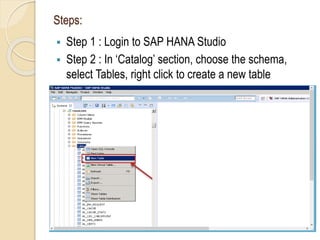
 Step 1 : Login to SAP HANA Studio
 Step 2 : In ‘Catalog’ section, choose the schema,
select Tables, right click to create a new table
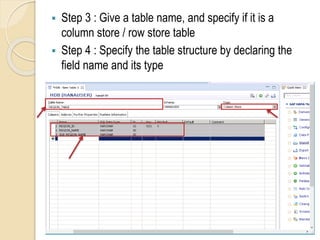
 Step 3 : Give a table name, and specify if it is a
column store / row store table
 Step 4 : Specify the table structure by declaring the
field name and its type
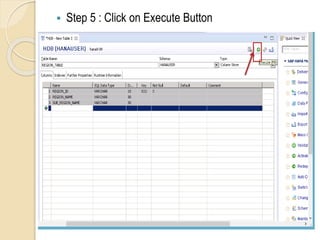
 Step 5 : Click on Execute Button
 Step 6 : Once executed, go to the tables and refresh
them so that the newly created table appears in the
list
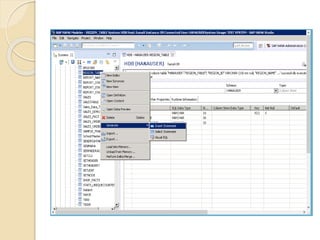
 Step 7 : After finding the created table, right click on it
-> Generate -> Insert Statement
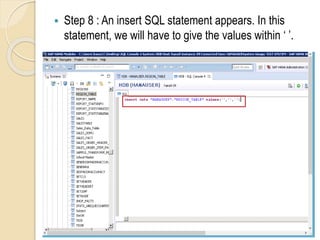
 Step 8 : An insert SQL statement appears. In this
statement, we will have to give the values within ‘ ’.
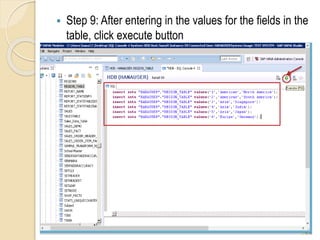
 Step 9: After entering in the values for the fields in the
table, click execute button
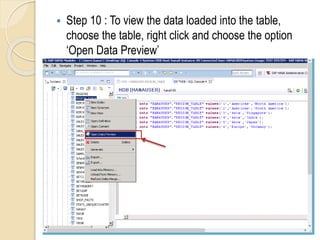
 Step 10 : To view the data loaded into the table,
choose the table, right click and choose the option
‘Open Data Preview’
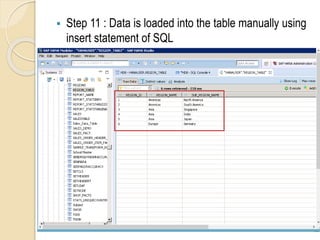
 Step 11 : Data is loaded into the table manually using
insert statement of SQL
THANK YOU

SAP HANA - Manually to insert_data_table

  • 1.
    HOW TO MANUALLY INSERTDATA INTO A TABLE using SQL - Yasmin Banu A
  • 2.
    Steps:  Step 1: Login to SAP HANA Studio  Step 2 : In ‘Catalog’ section, choose the schema, select Tables, right click to create a new table
  • 3.
     Step 3: Give a table name, and specify if it is a column store / row store table  Step 4 : Specify the table structure by declaring the field name and its type
  • 4.
     Step 5: Click on Execute Button
  • 5.
     Step 6: Once executed, go to the tables and refresh them so that the newly created table appears in the list  Step 7 : After finding the created table, right click on it -> Generate -> Insert Statement
  • 7.
     Step 8: An insert SQL statement appears. In this statement, we will have to give the values within ‘ ’.
  • 8.
     Step 9:After entering in the values for the fields in the table, click execute button
  • 9.
     Step 10: To view the data loaded into the table, choose the table, right click and choose the option ‘Open Data Preview’
  • 10.
     Step 11: Data is loaded into the table manually using insert statement of SQL
  • 11.