ABAP Advanced List Control Break Report ALV Report
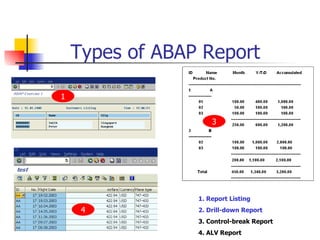
Types of ABAP Report 1. Report Listing 2. Drill-down Report 3. Control-break Report 4. ALV Report 1 3 4
Internal Table Processing Technique Control-Break Report
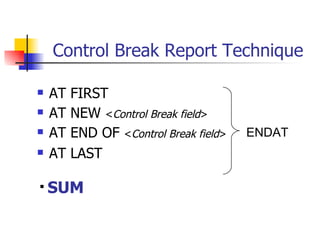
Control Break Report Technique AT FIRST AT NEW  < Control Break field > AT END OF  < Control Break field > AT LAST ENDAT SUM
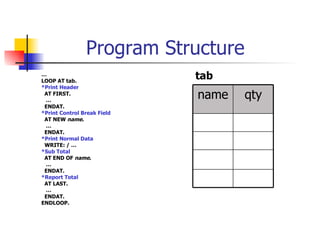
Program Structure … LOOP AT tab. *Print Header AT FIRST. … ENDAT. *Print Control Break Field AT NEW  name . … ENDAT. *Print Normal Data WRITE: / … *Sub Total   AT END OF  name . … ENDAT. *Report Total AT LAST. … ENDAT. ENDLOOP. tab qty name
Example I sales 20 A 30 A 5 B 10 B 10 A qty name
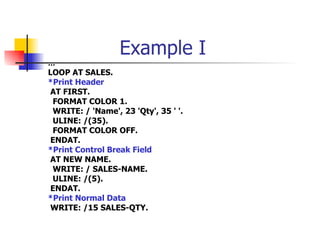
Example I … LOOP AT SALES. *Print Header AT FIRST. FORMAT COLOR 1. WRITE: / 'Name', 23 'Qty', 35 ' '. ULINE: /(35). FORMAT COLOR OFF. ENDAT. *Print Control Break Field AT NEW NAME. WRITE: / SALES-NAME. ULINE: /(5). ENDAT. *Print Normal Data WRITE: /15 SALES-QTY.
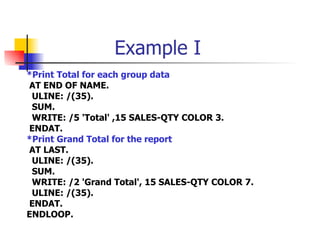
Example I *Print Total for each group data AT END OF NAME. ULINE: /(35). SUM. WRITE: /5 'Total' ,15 SALES-QTY COLOR 3. ENDAT. *Print Grand Total for the report AT LAST. ULINE: /(35). SUM. WRITE: /2 'Grand Total', 15 SALES-QTY COLOR 7. ULINE: /(35). ENDAT. ENDLOOP.
Example II sales 20 A 30 A 5 B 10 B 10 A qty name
Example II … LOOP AT SALES. AT FIRST. FORMAT COLOR 1. WRITE: / 'Name', 23 'Qty', 35 ' '. ULINE: /(35). FORMAT COLOR OFF. ENDAT. AT END OF NAME. SUM. WRITE: / SALES-NAME, 15 SALES-QTY. ULINE: /(35). ENDAT. AT LAST. SUM. WRITE: /5 'Total', 15 SALES-QTY. ULINE: /(35). ENDAT. ENDLOOP.
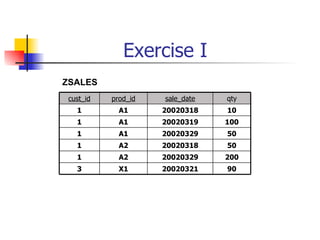
Exercise I ZSALES 50 20020329 A1 1 100 20020319 A1 1 50 20020318 A2 1 90 200 10 qty 20020321 X1 3 20020329 A2 1 20020318 A1 1 sale_date prod_id cust_id
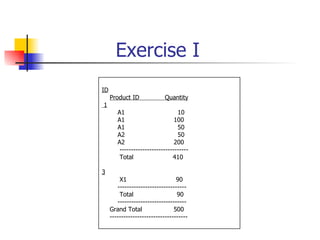
Exercise I ID Product ID  Quantity 1 A1   10 A1   100 A1   50 A2   50 A2   200 ------------------------------ Total  410 3 X1  90 ------------------------------ Total  90 ------------------------------ Grand Total  500 ----------------------------------
Example Data for Example III spfli BK NY BK cityto 250 SQ 0110 SQ 540  BK 0402 LH 100 NY 0400 LH distance Cityfrom Connid Carrid
Example III Data flight like spfli occurs 0 with Header line. Select * from spfli into table flight. loop at flight. at new carrid. write : / flight-carrid. endat. write flight-connid. at end of carrid. uline / (25). endat. endloop.   LH 0400 0402 ___________ SQ 0110 ___________
Internal Table Processing Example tab(internal table) 100.00 100.00 100.00 03 B 2 1,000.00 100.00 100.00 400.00 YTD 02 03 02 01 prodno 2,000.00 100.00 B 2 100.00 100.00 A 1 100.00 50.00 A 1 1,000.00 100.00 A 1 Accum Month Name ID
ID  Name  Month  Y-T-D  Accumulated Product No. ------------------------------------------------------------------------------------ A ----------------- 01  100.00  400.00  1,000.00 02  50.00  100.00  100.00 03  100.00  100.00  100.00 ---------------------------------------------------- 250.00  600.00  1,200.00 2  B ----------------- 02  100.00  1,000.00  2,000.00 03  100.00  100.00  100.00 ---------------------------------------------------- 200.00   1,100.00  2,100.00 ---------------------------------------------------- Total  450.00  1,340.00  3,200.00 ----------------------------------------------------
... loop at tab. at first. write: / ‘ID’ , 10 ‘Name’, 30 ‘Month’, 50 ‘Y-T-D’ , 70 ‘Accumulated’. write: /5 ‘Product No’. uline /. endat. on change of tab-id. write: / tab-id, 10 tab-name. uline: /(20). endon. write: /5 tab-prodno, 30 tab-month, 50 tab-ytd,  70 tab-accum. ABAP Program
at end of id. uline /30(60). sum. write: /30 tab-month, 50 tab-ytd, 70 tab-accum. skip. endat. at last. sum. uline /30(60). write: /10 ‘Total’, 30 tab-month, 50 tab-ytd, 70 tab-accum. uline /30(60). endat. endloop. ABAP Program
Exercise II ZSALES ZCUSTOMERS Singapore David 3 London Peter 2 New York John 1 city name id 50 20020329 A1 1 100 20020319 A1 1 50 20020318 A2 1 90 200 10 qty 20020321 X1 3 20020329 A2 1 20020318 A1 1 sale_date prod_id cust_id
Exercise II ID  Name ____ Product ID  Quantity 1  John A1   10 A1   100 A1   50 A2   50 A2  200 ---------------------------- Total  410 3  Peter X1    90 ---------------------------- Total  90 ---------------------------- Grand Total  500 -------------------------------
Control Break Report > 1 Level tab Loop at tab. … at new f1. … endat. at new f2. … endat. write: / …  “normal data at end of f2. … endat. at end of f1. … endat. … Endloop. sort tab by f1 f2. Group Header Level 1 Group Header Level 2 Sub Total Level 2 Sub Total Level 1 2 1 A 1 2 A 1 2 B 2 2 B 4 3 C 3 3 B 1 1 A f3 f2 f1
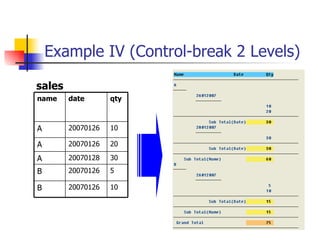
Example IV (Control-break 2 Levels) sales 20070126 20070126 20070128 20070126 20070126 date 20 A 30 A 5 B 10 B 10 A qty name
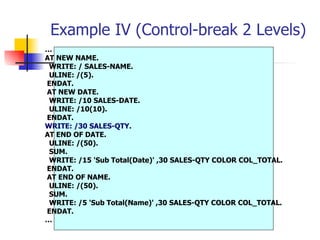
Example IV (Control-break 2 Levels) … AT NEW NAME. WRITE: / SALES-NAME. ULINE: /(5). ENDAT. AT NEW DATE. WRITE: /10 SALES-DATE. ULINE: /10(10). ENDAT. WRITE: /30 SALES-QTY. AT END OF DATE. ULINE: /(50). SUM. WRITE: /15 'Sub Total(Date)' ,30 SALES-QTY COLOR COL_TOTAL. ENDAT. AT END OF NAME. ULINE: /(50). SUM. WRITE: /5 'Sub Total(Name)' ,30 SALES-QTY COLOR COL_TOTAL. ENDAT. …
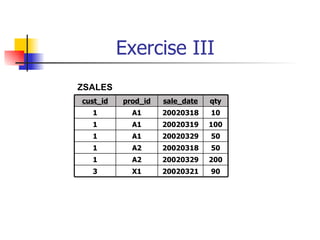
Exercise III ZSALES 50 20020329 A1 1 100 20020319 A1 1 50 20020318 A2 1 90 200 10 qty 20020321 X1 3 20020329 A2 1 20020318 A1 1 sale_date prod_id cust_id
Exercise III
ALV Report
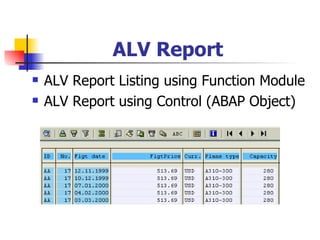
ALV Report ALV Report Listing using Function Module ALV Report using Control (ABAP Object)
ALV Grid Listing Call function ‘ REUSE_ALV_GRID_DISPLAY’
ALV Grid Listing Example REPORT ZALV01 NO STANDARD PAGE HEADING. * Internal table  DATA: GT_TAB LIKE  SFLIGHT  OCCURS 0 WITH HEADER   LINE . * Load Data from DB into internal table   SELECT * FROM  SFLIGHT  INTO TABLE GT_TAB.  * Call ABAP List Viewer function CALL FUNCTION 'REUSE_ALV_GRID_DISPLAY' EXPORTING I_STRUCTURE_NAME  = ' SFLIGHT ' TABLES T_OUTTAB  = GT_TAB.
ALV Example I List/Grid Display
ALV List/Grid Display REPORT ZALV02 NO STANDARD PAGE HEADING. PARAMETERS: list radiobutton group grp1, grid radiobutton group grp1. DATA: gt_tab LIKE sflight OCCURS 0 WITH HEADER LINE. START-OF-SELECTION. SELECT * FROM sflight INTO TABLE gt_tab. IF list = 'X'. * Call ALV List Viewer CALL FUNCTION 'REUSE_ALV_LIST_DISPLAY' EXPORTING I_STRUCTURE_NAME  = 'SFLIGHT' TABLES T_OUTTAB    = GT_TAB. ELSE. * Call ALV Grid Viewer CALL FUNCTION 'REUSE_ALV_GRID_DISPLAY' EXPORTING I_STRUCTURE_NAME  = 'SFLIGHT' TABLES T_OUTTAB  = GT_TAB. ENDIF..
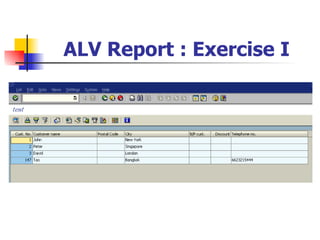
ALV Report : Exercise I
ALV Example II Using Field Catalog
ALV Field Catalog REPORT ZALV03 NO STANDARD PAGE HEADING. type-pools slis. types: begin of i_structure, carrid like sflight-carrid, connid like sflight-connid,  fldate like sflight-fldate, price  like sflight-price, end of i_structure. data: gt_fieldcat type slis_t_fieldcat_alv, gt_outtab type i_structure occurs 0 with header line. initialization. perform field_cat_init using gt_fieldcat[].
ALV Field Catalog FORM field_cat_init using rt_fieldcat type slis_t_fieldcat_alv. data: ls_fieldcat type slis_fieldcat_alv, pos type i value 1. clear LS_FIELDCAT. *Column 1 ls_fieldcat-col_pos  = pos. ls_fieldcat-fieldname  = ' CARRID '. ls_fieldcat-ref_fieldname  = ' CARRID '. ls_fieldcat-ref_tabname  = ' SFLIGHT '. ls_fieldcat-key  = 'X'. append ls_fieldcat to rt_fieldcat. clear ls_fieldcat. pos = pos + 1.
ALV Field Catalog *Column 2 ls_fieldcat-col_pos  = pos. ls_fieldcat-fieldname  = ' CONNID '. ls_fieldcat-ref_fieldname  = ' CONNID '. ls_fieldcat-ref_tabname  = ' SFLIGHT '. ls_fieldcat-key  = 'X'. append ls_fieldcat to rt_fieldcat. clear ls_fieldcat. pos = pos + 1. *Column 3 ls_fieldcat-col_pos  = pos. ls_fieldcat-fieldname  = ' FLDATE '. ls_fieldcat-ref_fieldname  = ' FLDATE '. ls_fieldcat-ref_tabname  = ' SFLIGHT '. ls_fieldcat-key  = 'X'. append ls_fieldcat to rt_fieldcat. clear ls_fieldcat. pos = pos + 1.
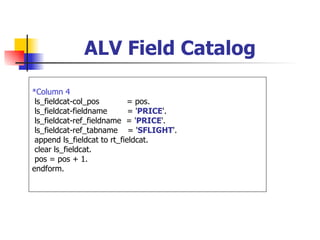
ALV Field Catalog *Column 4 ls_fieldcat-col_pos  = pos. ls_fieldcat-fieldname  = ' PRICE '. ls_fieldcat-ref_fieldname  = ' PRICE '. ls_fieldcat-ref_tabname  = ' SFLIGHT '. append ls_fieldcat to rt_fieldcat. clear ls_fieldcat. pos = pos + 1. endform.
ALV Field Catalog START-OF-SELECTION. SELECT  carrid connid fldate price   FROM  SFLIGHT   INTO TABLE GT_OUTTAB. CALL FUNCTION 'REUSE_ALV_GRID_DISPLAY' EXPORTING I_STRUCTURE_NAME  = 'I_STRUCTURE' IT_FIELDCAT  = gt_fieldcat[] TABLES T_OUTTAB  = gt_outtab.
ALV Field Catalog
ALV Report : Exercise II
ALV Example III Using Field Catalog  (Add Derived Column)
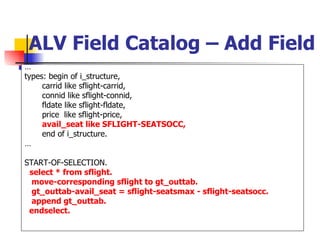
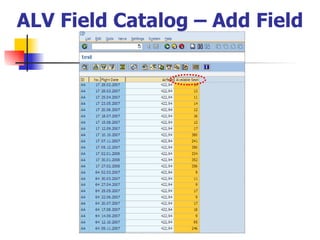
ALV Field Catalog – Add Field … types: begin of i_structure, carrid like sflight-carrid, connid like sflight-connid, fldate like sflight-fldate, price  like sflight-price, avail_seat like SFLIGHT-SEATSOCC, end of i_structure. … START-OF-SELECTION. select * from sflight. move-corresponding sflight to gt_outtab. gt_outtab-avail_seat = sflight-seatsmax - sflight-seatsocc. append gt_outtab. endselect.
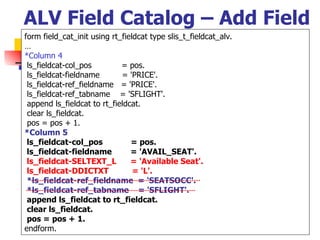
ALV Field Catalog – Add Field form field_cat_init using rt_fieldcat type slis_t_fieldcat_alv. … *Column 4 ls_fieldcat-col_pos  = pos. ls_fieldcat-fieldname  = 'PRICE'. ls_fieldcat-ref_fieldname  = 'PRICE'. ls_fieldcat-ref_tabname  = 'SFLIGHT'. append ls_fieldcat to rt_fieldcat. clear ls_fieldcat. pos = pos + 1. *Column 5 ls_fieldcat-col_pos  = pos. ls_fieldcat-fieldname  = 'AVAIL_SEAT'. ls_fieldcat-SELTEXT_L  = 'Available Seat'. ls_fieldcat-DDICTXT  = 'L'. *ls_fieldcat-ref_fieldname  = 'SEATSOCC'. *ls_fieldcat-ref_tabname  = 'SFLIGHT'. append ls_fieldcat to rt_fieldcat. clear ls_fieldcat. pos = pos + 1. endform.
ALV Field Catalog – Add Field
ALV Report : Exercise III
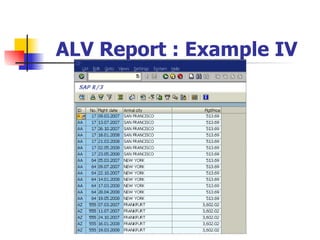
ALV Example IV Using Field Catalog  (SELECT … INNER JOIN…)
ALV Field Catalog – Select … Inner Join … … types: begin of i_structure, carrid  LIKE spfli-carrid, connid LIKE spfli-connid, fldate  LIKE sflight-fldate, cityto  LIKE spfli-cityto, price  LIKE sflight-price, end of i_structure. … START-OF-SELECTION. SELECT spfli~carrid spfli~connid sflight~fldate spfli~cityto sflight~price INTO TABLE gt_outtab FROM spfli INNER JOIN sflight ON spfli~carrid = sflight~carrid AND spfli~connid = sflight~connid.
ALV Field Catalog  form field_cat_init using rt_fieldcat type slis_t_fieldcat_alv. … *Column 4 ls_fieldcat-col_pos  = pos. ls_fieldcat-fieldname  = 'CITYTO'. ls_fieldcat-ref_fieldname  = 'CITYTO'. ls_fieldcat-ref_tabname  = 'SPFLI'. APPEND ls_fieldcat TO rt_fieldcat. CLEAR ls_fieldcat. pos = pos + 1. *Column 5 ls_fieldcat-col_pos  = pos. ls_fieldcat-fieldname  = 'PRICE'. ls_fieldcat-ref_fieldname  = 'PRICE'. ls_fieldcat-ref_tabname  = 'SFLIGHT'. APPEND ls_fieldcat TO rt_fieldcat. CLEAR ls_fieldcat. pos = pos + 1. ENDFORM.  &quot;field_cat_init
ALV Report : Example IV
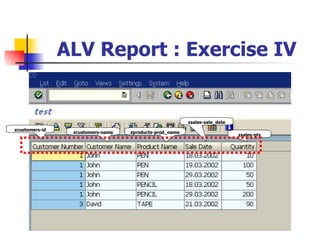
Exercise IV ZSALES ZCUSTOMERS ZPRODUCTS Singapore David 3 London Peter 2 New York John 1 city name id 50 20020329 A1 1 100 20020319 A1 1 50 20020318 A2 1 90 200 10 qty 20020321 X1 3 20020329 A2 1 20020318 A1 1 sale_date prod_id cust_id 125 Pencil A2 120 Tape X1 80 Ruler B1 100 Pen A1 on_hand prod_name p_id
ALV Report : Exercise IV zcustomers-id zcustomers-name zproducts-prod_name zsales-sale_date zsales-qty
ALV Technique
ALV : Variant
ALV : Variant REPORT ZALV06 NO STANDARD PAGE HEADING. type-pools slis. types: begin of i_structure, carrid like sflight-carrid, connid like sflight-connid,  fldate like sflight-fldate, price  like sflight-price, end of i_structure. data: gt_fieldcat type slis_t_fieldcat_alv, isvariant like DISVARIANT.  &quot;ADD gt_outtab type i_structure occurs 0 with header line. initialization. perform field_cat_init using gt_fieldcat[]. isvariant-report = 'ZALV06'.  &quot;ADD
ALV : Variant START-OF-SELECTION. SELECT carrid connid fldate price  FROM SFLIGHT  INTO TABLE GT_OUTTAB. CALL FUNCTION 'REUSE_ALV_LIST_DISPLAY' EXPORTING I_STRUCTURE_NAME  = 'I_STRUCTURE' IT_FIELDCAT  = gt_fieldcat[] IS_VARIANT  = isvariant  &quot;ADD I_SAVE  = 'A'  &quot;ADD   “  A = user&Global,U = user,X = global TABLES T_OUTTAB  = gt_outtab.
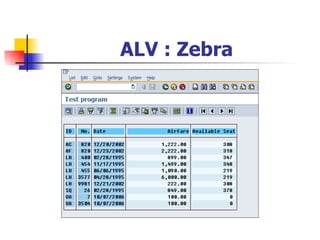
ALV : Zebra
ALV : Zebra REPORT ZALV2 NO STANDARD PAGE HEADING. type-pools slis. types: begin of i_structure, carrid like sflight-carrid, connid like sflight-connid,  fldate like sflight-fldate, price  like sflight-price, end of i_structure. data: gt_fieldcat type slis_t_fieldcat_alv, GT_LAYOUT TYPE SLIS_LAYOUT_ALV, &quot;ADD gt_outtab type i_structure occurs 0 with header line. initialization. perform field_cat_init using gt_fieldcat[]. GT_LAYOUT-ZEBRA = 'X'. &quot;ADD
ALV : Zebra START-OF-SELECTION. SELECT carrid connid fldate price  FROM SFLIGHT  INTO TABLE GT_OUTTAB. CALL FUNCTION 'REUSE_ALV_LIST_DISPLAY' EXPORTING I_STRUCTURE_NAME  = 'I_STRUCTURE' IT_FIELDCAT  = gt_fieldcat[] IS_LAYOUT  = GT_LAYOUT  &quot;ADD TABLES T_OUTTAB  = gt_outtab.
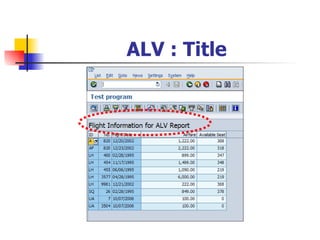
ALV : Title
ALV : Title REPORT ZALV2 NO STANDARD PAGE HEADING. type-pools slis. types: begin of i_structure, carrid like sflight-carrid, connid like sflight-connid,  fldate like sflight-fldate, price  like sflight-price, end of i_structure. data: gt_fieldcat type slis_t_fieldcat_alv, GT_GID_TITLE TYPE LVC_TITLE,  &quot;ADD gt_outtab type i_structure occurs 0 with header line. initialization. perform field_cat_init using gt_fieldcat[]. concatenate 'Flight Information' ' for ALV Report' into GT_GID_TITLE.  &quot;ADD
ALV : Title START-OF-SELECTION. SELECT carrid connid fldate price  FROM SFLIGHT  INTO TABLE GT_OUTTAB. CALL FUNCTION 'REUSE_ALV_LIST_DISPLAY' EXPORTING I_STRUCTURE_NAME  = 'I_STRUCTURE' IT_FIELDCAT  = gt_fieldcat[] I_GRID_TITLE  = GT_GID_TITLE  &quot;ADD TABLES T_OUTTAB  = gt_outtab.
Exercise
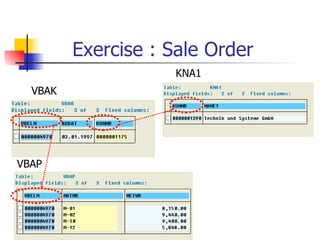
Exercise   : Sale Order VBAK KNA1 VBAP
Exercise : Control-break Report vbak-vbeln vbak-audat vbak-kunnr kna1-name1 vbap-matnr vbap-netwr
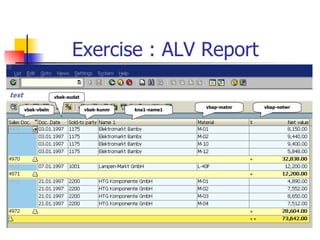
Exercise   : ALV Report vbak-vbeln vbak-audat vbak-kunnr kna1-name1 vbap-matnr vbap-netwr

ABAP Advanced List

  • 1.
    ABAP Advanced ListControl Break Report ALV Report
  • 2.
    Types of ABAPReport 1. Report Listing 2. Drill-down Report 3. Control-break Report 4. ALV Report 1 3 4
  • 3.
    Internal Table ProcessingTechnique Control-Break Report
  • 4.
    Control Break ReportTechnique AT FIRST AT NEW < Control Break field > AT END OF < Control Break field > AT LAST ENDAT SUM
  • 5.
    Program Structure …LOOP AT tab. *Print Header AT FIRST. … ENDAT. *Print Control Break Field AT NEW name . … ENDAT. *Print Normal Data WRITE: / … *Sub Total AT END OF name . … ENDAT. *Report Total AT LAST. … ENDAT. ENDLOOP. tab qty name
  • 6.
    Example I sales20 A 30 A 5 B 10 B 10 A qty name
  • 7.
    Example I …LOOP AT SALES. *Print Header AT FIRST. FORMAT COLOR 1. WRITE: / 'Name', 23 'Qty', 35 ' '. ULINE: /(35). FORMAT COLOR OFF. ENDAT. *Print Control Break Field AT NEW NAME. WRITE: / SALES-NAME. ULINE: /(5). ENDAT. *Print Normal Data WRITE: /15 SALES-QTY.
  • 8.
    Example I *PrintTotal for each group data AT END OF NAME. ULINE: /(35). SUM. WRITE: /5 'Total' ,15 SALES-QTY COLOR 3. ENDAT. *Print Grand Total for the report AT LAST. ULINE: /(35). SUM. WRITE: /2 'Grand Total', 15 SALES-QTY COLOR 7. ULINE: /(35). ENDAT. ENDLOOP.
  • 9.
    Example II sales20 A 30 A 5 B 10 B 10 A qty name
  • 10.
    Example II …LOOP AT SALES. AT FIRST. FORMAT COLOR 1. WRITE: / 'Name', 23 'Qty', 35 ' '. ULINE: /(35). FORMAT COLOR OFF. ENDAT. AT END OF NAME. SUM. WRITE: / SALES-NAME, 15 SALES-QTY. ULINE: /(35). ENDAT. AT LAST. SUM. WRITE: /5 'Total', 15 SALES-QTY. ULINE: /(35). ENDAT. ENDLOOP.
  • 11.
    Exercise I ZSALES50 20020329 A1 1 100 20020319 A1 1 50 20020318 A2 1 90 200 10 qty 20020321 X1 3 20020329 A2 1 20020318 A1 1 sale_date prod_id cust_id
  • 12.
    Exercise I IDProduct ID Quantity 1 A1 10 A1 100 A1 50 A2 50 A2 200 ------------------------------ Total 410 3 X1 90 ------------------------------ Total 90 ------------------------------ Grand Total 500 ----------------------------------
  • 13.
    Example Data forExample III spfli BK NY BK cityto 250 SQ 0110 SQ 540 BK 0402 LH 100 NY 0400 LH distance Cityfrom Connid Carrid
  • 14.
    Example III Dataflight like spfli occurs 0 with Header line. Select * from spfli into table flight. loop at flight. at new carrid. write : / flight-carrid. endat. write flight-connid. at end of carrid. uline / (25). endat. endloop. LH 0400 0402 ___________ SQ 0110 ___________
  • 15.
    Internal Table ProcessingExample tab(internal table) 100.00 100.00 100.00 03 B 2 1,000.00 100.00 100.00 400.00 YTD 02 03 02 01 prodno 2,000.00 100.00 B 2 100.00 100.00 A 1 100.00 50.00 A 1 1,000.00 100.00 A 1 Accum Month Name ID
  • 16.
    ID Name Month Y-T-D Accumulated Product No. ------------------------------------------------------------------------------------ A ----------------- 01 100.00 400.00 1,000.00 02 50.00 100.00 100.00 03 100.00 100.00 100.00 ---------------------------------------------------- 250.00 600.00 1,200.00 2 B ----------------- 02 100.00 1,000.00 2,000.00 03 100.00 100.00 100.00 ---------------------------------------------------- 200.00 1,100.00 2,100.00 ---------------------------------------------------- Total 450.00 1,340.00 3,200.00 ----------------------------------------------------
  • 17.
    ... loop attab. at first. write: / ‘ID’ , 10 ‘Name’, 30 ‘Month’, 50 ‘Y-T-D’ , 70 ‘Accumulated’. write: /5 ‘Product No’. uline /. endat. on change of tab-id. write: / tab-id, 10 tab-name. uline: /(20). endon. write: /5 tab-prodno, 30 tab-month, 50 tab-ytd, 70 tab-accum. ABAP Program
  • 18.
    at end ofid. uline /30(60). sum. write: /30 tab-month, 50 tab-ytd, 70 tab-accum. skip. endat. at last. sum. uline /30(60). write: /10 ‘Total’, 30 tab-month, 50 tab-ytd, 70 tab-accum. uline /30(60). endat. endloop. ABAP Program
  • 19.
    Exercise II ZSALESZCUSTOMERS Singapore David 3 London Peter 2 New York John 1 city name id 50 20020329 A1 1 100 20020319 A1 1 50 20020318 A2 1 90 200 10 qty 20020321 X1 3 20020329 A2 1 20020318 A1 1 sale_date prod_id cust_id
  • 20.
    Exercise II ID Name ____ Product ID Quantity 1 John A1 10 A1 100 A1 50 A2 50 A2 200 ---------------------------- Total 410 3 Peter X1 90 ---------------------------- Total 90 ---------------------------- Grand Total 500 -------------------------------
  • 21.
    Control Break Report> 1 Level tab Loop at tab. … at new f1. … endat. at new f2. … endat. write: / … “normal data at end of f2. … endat. at end of f1. … endat. … Endloop. sort tab by f1 f2. Group Header Level 1 Group Header Level 2 Sub Total Level 2 Sub Total Level 1 2 1 A 1 2 A 1 2 B 2 2 B 4 3 C 3 3 B 1 1 A f3 f2 f1
  • 22.
    Example IV (Control-break2 Levels) sales 20070126 20070126 20070128 20070126 20070126 date 20 A 30 A 5 B 10 B 10 A qty name
  • 23.
    Example IV (Control-break2 Levels) … AT NEW NAME. WRITE: / SALES-NAME. ULINE: /(5). ENDAT. AT NEW DATE. WRITE: /10 SALES-DATE. ULINE: /10(10). ENDAT. WRITE: /30 SALES-QTY. AT END OF DATE. ULINE: /(50). SUM. WRITE: /15 'Sub Total(Date)' ,30 SALES-QTY COLOR COL_TOTAL. ENDAT. AT END OF NAME. ULINE: /(50). SUM. WRITE: /5 'Sub Total(Name)' ,30 SALES-QTY COLOR COL_TOTAL. ENDAT. …
  • 24.
    Exercise III ZSALES50 20020329 A1 1 100 20020319 A1 1 50 20020318 A2 1 90 200 10 qty 20020321 X1 3 20020329 A2 1 20020318 A1 1 sale_date prod_id cust_id
  • 25.
  • 26.
  • 27.
    ALV Report ALVReport Listing using Function Module ALV Report using Control (ABAP Object)
  • 28.
    ALV Grid ListingCall function ‘ REUSE_ALV_GRID_DISPLAY’
  • 29.
    ALV Grid ListingExample REPORT ZALV01 NO STANDARD PAGE HEADING. * Internal table DATA: GT_TAB LIKE SFLIGHT OCCURS 0 WITH HEADER LINE . * Load Data from DB into internal table SELECT * FROM SFLIGHT INTO TABLE GT_TAB. * Call ABAP List Viewer function CALL FUNCTION 'REUSE_ALV_GRID_DISPLAY' EXPORTING I_STRUCTURE_NAME = ' SFLIGHT ' TABLES T_OUTTAB = GT_TAB.
  • 30.
    ALV Example IList/Grid Display
  • 31.
    ALV List/Grid DisplayREPORT ZALV02 NO STANDARD PAGE HEADING. PARAMETERS: list radiobutton group grp1, grid radiobutton group grp1. DATA: gt_tab LIKE sflight OCCURS 0 WITH HEADER LINE. START-OF-SELECTION. SELECT * FROM sflight INTO TABLE gt_tab. IF list = 'X'. * Call ALV List Viewer CALL FUNCTION 'REUSE_ALV_LIST_DISPLAY' EXPORTING I_STRUCTURE_NAME = 'SFLIGHT' TABLES T_OUTTAB = GT_TAB. ELSE. * Call ALV Grid Viewer CALL FUNCTION 'REUSE_ALV_GRID_DISPLAY' EXPORTING I_STRUCTURE_NAME = 'SFLIGHT' TABLES T_OUTTAB = GT_TAB. ENDIF..
  • 32.
    ALV Report :Exercise I
  • 33.
    ALV Example IIUsing Field Catalog
  • 34.
    ALV Field CatalogREPORT ZALV03 NO STANDARD PAGE HEADING. type-pools slis. types: begin of i_structure, carrid like sflight-carrid, connid like sflight-connid, fldate like sflight-fldate, price like sflight-price, end of i_structure. data: gt_fieldcat type slis_t_fieldcat_alv, gt_outtab type i_structure occurs 0 with header line. initialization. perform field_cat_init using gt_fieldcat[].
  • 35.
    ALV Field CatalogFORM field_cat_init using rt_fieldcat type slis_t_fieldcat_alv. data: ls_fieldcat type slis_fieldcat_alv, pos type i value 1. clear LS_FIELDCAT. *Column 1 ls_fieldcat-col_pos = pos. ls_fieldcat-fieldname = ' CARRID '. ls_fieldcat-ref_fieldname = ' CARRID '. ls_fieldcat-ref_tabname = ' SFLIGHT '. ls_fieldcat-key = 'X'. append ls_fieldcat to rt_fieldcat. clear ls_fieldcat. pos = pos + 1.
  • 36.
    ALV Field Catalog*Column 2 ls_fieldcat-col_pos = pos. ls_fieldcat-fieldname = ' CONNID '. ls_fieldcat-ref_fieldname = ' CONNID '. ls_fieldcat-ref_tabname = ' SFLIGHT '. ls_fieldcat-key = 'X'. append ls_fieldcat to rt_fieldcat. clear ls_fieldcat. pos = pos + 1. *Column 3 ls_fieldcat-col_pos = pos. ls_fieldcat-fieldname = ' FLDATE '. ls_fieldcat-ref_fieldname = ' FLDATE '. ls_fieldcat-ref_tabname = ' SFLIGHT '. ls_fieldcat-key = 'X'. append ls_fieldcat to rt_fieldcat. clear ls_fieldcat. pos = pos + 1.
  • 37.
    ALV Field Catalog*Column 4 ls_fieldcat-col_pos = pos. ls_fieldcat-fieldname = ' PRICE '. ls_fieldcat-ref_fieldname = ' PRICE '. ls_fieldcat-ref_tabname = ' SFLIGHT '. append ls_fieldcat to rt_fieldcat. clear ls_fieldcat. pos = pos + 1. endform.
  • 38.
    ALV Field CatalogSTART-OF-SELECTION. SELECT carrid connid fldate price FROM SFLIGHT INTO TABLE GT_OUTTAB. CALL FUNCTION 'REUSE_ALV_GRID_DISPLAY' EXPORTING I_STRUCTURE_NAME = 'I_STRUCTURE' IT_FIELDCAT = gt_fieldcat[] TABLES T_OUTTAB = gt_outtab.
  • 39.
  • 40.
    ALV Report :Exercise II
  • 41.
    ALV Example IIIUsing Field Catalog (Add Derived Column)
  • 42.
    ALV Field Catalog– Add Field … types: begin of i_structure, carrid like sflight-carrid, connid like sflight-connid, fldate like sflight-fldate, price like sflight-price, avail_seat like SFLIGHT-SEATSOCC, end of i_structure. … START-OF-SELECTION. select * from sflight. move-corresponding sflight to gt_outtab. gt_outtab-avail_seat = sflight-seatsmax - sflight-seatsocc. append gt_outtab. endselect.
  • 43.
    ALV Field Catalog– Add Field form field_cat_init using rt_fieldcat type slis_t_fieldcat_alv. … *Column 4 ls_fieldcat-col_pos = pos. ls_fieldcat-fieldname = 'PRICE'. ls_fieldcat-ref_fieldname = 'PRICE'. ls_fieldcat-ref_tabname = 'SFLIGHT'. append ls_fieldcat to rt_fieldcat. clear ls_fieldcat. pos = pos + 1. *Column 5 ls_fieldcat-col_pos = pos. ls_fieldcat-fieldname = 'AVAIL_SEAT'. ls_fieldcat-SELTEXT_L = 'Available Seat'. ls_fieldcat-DDICTXT = 'L'. *ls_fieldcat-ref_fieldname = 'SEATSOCC'. *ls_fieldcat-ref_tabname = 'SFLIGHT'. append ls_fieldcat to rt_fieldcat. clear ls_fieldcat. pos = pos + 1. endform.
  • 44.
    ALV Field Catalog– Add Field
  • 45.
    ALV Report :Exercise III
  • 46.
    ALV Example IVUsing Field Catalog (SELECT … INNER JOIN…)
  • 47.
    ALV Field Catalog– Select … Inner Join … … types: begin of i_structure, carrid LIKE spfli-carrid, connid LIKE spfli-connid, fldate LIKE sflight-fldate, cityto LIKE spfli-cityto, price LIKE sflight-price, end of i_structure. … START-OF-SELECTION. SELECT spfli~carrid spfli~connid sflight~fldate spfli~cityto sflight~price INTO TABLE gt_outtab FROM spfli INNER JOIN sflight ON spfli~carrid = sflight~carrid AND spfli~connid = sflight~connid.
  • 48.
    ALV Field Catalog form field_cat_init using rt_fieldcat type slis_t_fieldcat_alv. … *Column 4 ls_fieldcat-col_pos = pos. ls_fieldcat-fieldname = 'CITYTO'. ls_fieldcat-ref_fieldname = 'CITYTO'. ls_fieldcat-ref_tabname = 'SPFLI'. APPEND ls_fieldcat TO rt_fieldcat. CLEAR ls_fieldcat. pos = pos + 1. *Column 5 ls_fieldcat-col_pos = pos. ls_fieldcat-fieldname = 'PRICE'. ls_fieldcat-ref_fieldname = 'PRICE'. ls_fieldcat-ref_tabname = 'SFLIGHT'. APPEND ls_fieldcat TO rt_fieldcat. CLEAR ls_fieldcat. pos = pos + 1. ENDFORM. &quot;field_cat_init
  • 49.
    ALV Report :Example IV
  • 50.
    Exercise IV ZSALESZCUSTOMERS ZPRODUCTS Singapore David 3 London Peter 2 New York John 1 city name id 50 20020329 A1 1 100 20020319 A1 1 50 20020318 A2 1 90 200 10 qty 20020321 X1 3 20020329 A2 1 20020318 A1 1 sale_date prod_id cust_id 125 Pencil A2 120 Tape X1 80 Ruler B1 100 Pen A1 on_hand prod_name p_id
  • 51.
    ALV Report :Exercise IV zcustomers-id zcustomers-name zproducts-prod_name zsales-sale_date zsales-qty
  • 52.
  • 53.
  • 54.
    ALV : VariantREPORT ZALV06 NO STANDARD PAGE HEADING. type-pools slis. types: begin of i_structure, carrid like sflight-carrid, connid like sflight-connid, fldate like sflight-fldate, price like sflight-price, end of i_structure. data: gt_fieldcat type slis_t_fieldcat_alv, isvariant like DISVARIANT. &quot;ADD gt_outtab type i_structure occurs 0 with header line. initialization. perform field_cat_init using gt_fieldcat[]. isvariant-report = 'ZALV06'. &quot;ADD
  • 55.
    ALV : VariantSTART-OF-SELECTION. SELECT carrid connid fldate price FROM SFLIGHT INTO TABLE GT_OUTTAB. CALL FUNCTION 'REUSE_ALV_LIST_DISPLAY' EXPORTING I_STRUCTURE_NAME = 'I_STRUCTURE' IT_FIELDCAT = gt_fieldcat[] IS_VARIANT = isvariant &quot;ADD I_SAVE = 'A' &quot;ADD “ A = user&Global,U = user,X = global TABLES T_OUTTAB = gt_outtab.
  • 56.
  • 57.
    ALV : ZebraREPORT ZALV2 NO STANDARD PAGE HEADING. type-pools slis. types: begin of i_structure, carrid like sflight-carrid, connid like sflight-connid, fldate like sflight-fldate, price like sflight-price, end of i_structure. data: gt_fieldcat type slis_t_fieldcat_alv, GT_LAYOUT TYPE SLIS_LAYOUT_ALV, &quot;ADD gt_outtab type i_structure occurs 0 with header line. initialization. perform field_cat_init using gt_fieldcat[]. GT_LAYOUT-ZEBRA = 'X'. &quot;ADD
  • 58.
    ALV : ZebraSTART-OF-SELECTION. SELECT carrid connid fldate price FROM SFLIGHT INTO TABLE GT_OUTTAB. CALL FUNCTION 'REUSE_ALV_LIST_DISPLAY' EXPORTING I_STRUCTURE_NAME = 'I_STRUCTURE' IT_FIELDCAT = gt_fieldcat[] IS_LAYOUT = GT_LAYOUT &quot;ADD TABLES T_OUTTAB = gt_outtab.
  • 59.
  • 60.
    ALV : TitleREPORT ZALV2 NO STANDARD PAGE HEADING. type-pools slis. types: begin of i_structure, carrid like sflight-carrid, connid like sflight-connid, fldate like sflight-fldate, price like sflight-price, end of i_structure. data: gt_fieldcat type slis_t_fieldcat_alv, GT_GID_TITLE TYPE LVC_TITLE, &quot;ADD gt_outtab type i_structure occurs 0 with header line. initialization. perform field_cat_init using gt_fieldcat[]. concatenate 'Flight Information' ' for ALV Report' into GT_GID_TITLE. &quot;ADD
  • 61.
    ALV : TitleSTART-OF-SELECTION. SELECT carrid connid fldate price FROM SFLIGHT INTO TABLE GT_OUTTAB. CALL FUNCTION 'REUSE_ALV_LIST_DISPLAY' EXPORTING I_STRUCTURE_NAME = 'I_STRUCTURE' IT_FIELDCAT = gt_fieldcat[] I_GRID_TITLE = GT_GID_TITLE &quot;ADD TABLES T_OUTTAB = gt_outtab.
  • 62.
  • 63.
    Exercise : Sale Order VBAK KNA1 VBAP
  • 64.
    Exercise : Control-breakReport vbak-vbeln vbak-audat vbak-kunnr kna1-name1 vbap-matnr vbap-netwr
  • 65.
    Exercise : ALV Report vbak-vbeln vbak-audat vbak-kunnr kna1-name1 vbap-matnr vbap-netwr