SQL – Structured Query Language By: - Vikash Pandey Roll No: - 43 Bhavan’s Institute of Mgmt. Science 2008-2010
What is SQL? SQL stands for Structured Query Language. SQL lets you access and manipulate databases. SQL is an ANSI (American National Standards Institute) standard.
What Can SQL do? SQL can execute queries against a database. SQL can retrieve data from a database. SQL can insert records in a database. SQL can update records in a database. SQL can delete records from a database. SQL can create new databases. SQL can create new tables in a database. SQL can create stored procedures in a database. SQL can create views in a database. SQL can set permissions on tables, procedures, and views.
SQL is a Standard - BUT.... Although SQL is an ANSI (American National Standards Institute) standard, there are many different versions of the SQL language. However, to be compliant with the ANSI standard, they all support at least the major commands (such as SELECT, UPDATE, DELETE, INSERT, WHERE) in a similar manner.
SQL DML & DDL SQL can be divided into two parts: The Data Manipulation Language (DML) and the Data Definition Language (DDL). The query and update commands form the DML part of SQL: SELECT  - extracts data from a database UPDATE  - updates data in a database DELETE  - deletes data from a database INSERT INTO  - inserts new data into a database
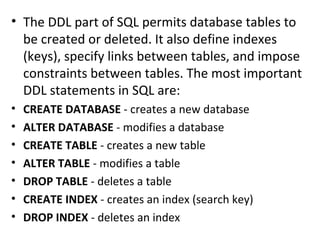
The DDL part of SQL permits database tables to be created or deleted. It also define indexes (keys), specify links between tables, and impose constraints between tables. The most important DDL statements in SQL are: CREATE DATABASE  - creates a new database ALTER DATABASE  - modifies a database CREATE TABLE  - creates a new table ALTER TABLE  - modifies a table DROP TABLE  - deletes a table CREATE INDEX  - creates an index (search key) DROP INDEX  - deletes an index
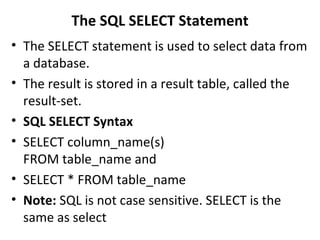
The SQL SELECT Statement The SELECT statement is used to select data from a database. The result is stored in a result table, called the result-set. SQL SELECT Syntax SELECT column_name(s) FROM table_name and SELECT * FROM table_name Note:  SQL is not case sensitive. SELECT is the same as select
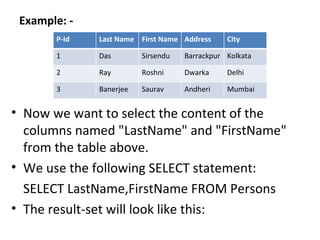
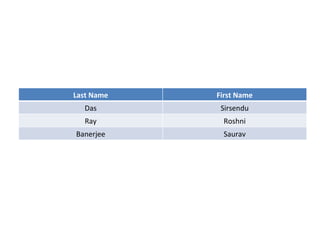
Example: - Now we want to select the content of the columns named "LastName" and "FirstName" from the table above. We use the following SELECT statement: SELECT LastName,FirstName FROM Persons The result-set will look like this: P-Id Last Name First Name Address City 1 Das Sirsendu Barrackpur Kolkata 2 Ray Roshni Dwarka Delhi 3 Banerjee Saurav Andheri Mumbai
Last Name First Name Das Sirsendu Ray Roshni Banerjee Saurav
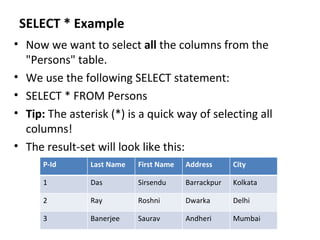
SELECT * Example Now we want to select  all  the columns from the "Persons" table. We use the following SELECT statement:  SELECT * FROM Persons  Tip:  The asterisk (*) is a quick way of selecting all columns! The result-set will look like this: P-Id Last Name First Name Address City 1 Das Sirsendu Barrackpur Kolkata 2 Ray Roshni Dwarka Delhi 3 Banerjee Saurav Andheri Mumbai
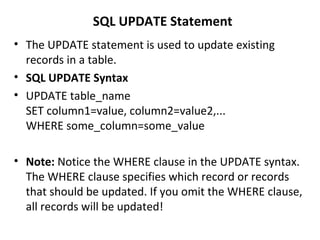
SQL UPDATE Statement The UPDATE statement is used to update existing records in a table. SQL UPDATE Syntax UPDATE table_name SET column1=value, column2=value2,... WHERE some_column=some_value  Note:  Notice the WHERE clause in the UPDATE syntax. The WHERE clause specifies which record or records that should be updated. If you omit the WHERE clause, all records will be updated!
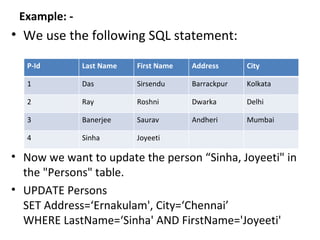
Example: - We use the following SQL statement: Now we want to update the person “Sinha, Joyeeti" in the "Persons" table. UPDATE Persons SET Address=‘Ernakulam', City=‘Chennai’ WHERE LastName=‘Sinha' AND FirstName='Joyeeti' P-Id Last Name First Name Address City 1 Das Sirsendu Barrackpur Kolkata 2 Ray Roshni Dwarka Delhi 3 Banerjee Saurav Andheri Mumbai 4 Sinha Joyeeti
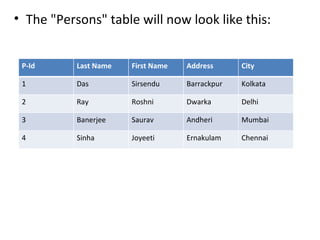
The "Persons" table will now look like this: P-Id Last Name First Name Address City 1 Das Sirsendu Barrackpur Kolkata 2 Ray Roshni Dwarka Delhi 3 Banerjee Saurav Andheri Mumbai 4 Sinha Joyeeti Ernakulam Chennai
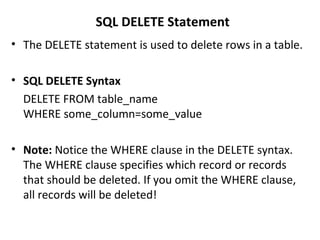
SQL DELETE Statement The DELETE statement is used to delete rows in a table. SQL DELETE Syntax DELETE FROM table_name WHERE some_column=some_value  Note:  Notice the WHERE clause in the DELETE syntax. The WHERE clause specifies which record or records that should be deleted. If you omit the WHERE clause, all records will be deleted!
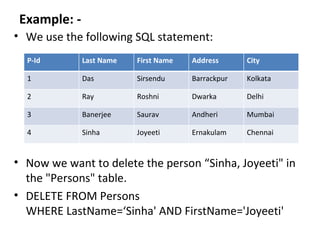
Example: - We use the following SQL statement: Now we want to delete the person “Sinha, Joyeeti" in the "Persons" table. DELETE FROM Persons WHERE LastName=‘Sinha' AND FirstName='Joyeeti' P-Id Last Name First Name Address City 1 Das Sirsendu Barrackpur Kolkata 2 Ray Roshni Dwarka Delhi 3 Banerjee Saurav Andheri Mumbai 4 Sinha Joyeeti Ernakulam Chennai
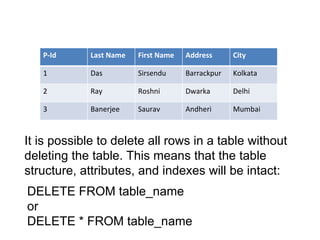
It is possible to delete all rows in a table without deleting the table. This means that the table structure, attributes, and indexes will be intact: DELETE FROM table_name or DELETE * FROM table_name P-Id Last Name First Name Address City 1 Das Sirsendu Barrackpur Kolkata 2 Ray Roshni Dwarka Delhi 3 Banerjee Saurav Andheri Mumbai
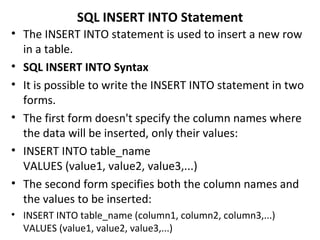
SQL INSERT INTO Statement The INSERT INTO statement is used to insert a new row in a table. SQL INSERT INTO Syntax It is possible to write the INSERT INTO statement in two forms.  The first form doesn't specify the column names where the data will be inserted, only their values: INSERT INTO table_name VALUES (value1, value2, value3,...) The second form specifies both the column names and the values to be inserted: INSERT INTO table_name (column1, column2, column3,...) VALUES (value1, value2, value3,...)
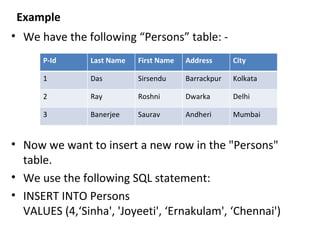
Example We have the following “Persons” table: - Now we want to insert a new row in the "Persons" table. We use the following SQL statement: INSERT INTO Persons VALUES (4,‘Sinha', 'Joyeeti', ‘Ernakulam', ‘Chennai') P-Id Last Name First Name Address City 1 Das Sirsendu Barrackpur Kolkata 2 Ray Roshni Dwarka Delhi 3 Banerjee Saurav Andheri Mumbai
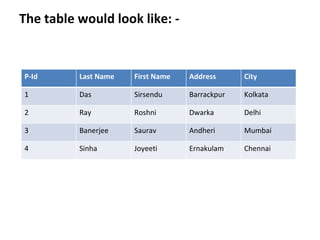
The table would look like: - P-Id Last Name First Name Address City 1 Das Sirsendu Barrackpur Kolkata 2 Ray Roshni Dwarka Delhi 3 Banerjee Saurav Andheri Mumbai 4 Sinha Joyeeti Ernakulam Chennai
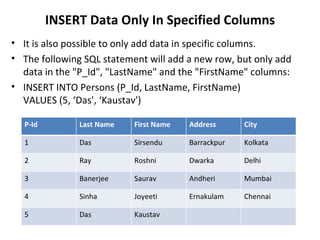
INSERT Data Only In Specified Columns It is also possible to only add data in specific columns. The following SQL statement will add a new row, but only add data in the "P_Id", "LastName" and the "FirstName" columns: INSERT INTO Persons (P_Id, LastName, FirstName) VALUES (5, ‘Das', ‘Kaustav') P-Id Last Name First Name Address City 1 Das Sirsendu Barrackpur Kolkata 2 Ray Roshni Dwarka Delhi 3 Banerjee Saurav Andheri Mumbai 4 Sinha Joyeeti Ernakulam Chennai 5 Das Kaustav

Sql – Structured Query Language

  • 1.
    SQL – StructuredQuery Language By: - Vikash Pandey Roll No: - 43 Bhavan’s Institute of Mgmt. Science 2008-2010
  • 2.
    What is SQL?SQL stands for Structured Query Language. SQL lets you access and manipulate databases. SQL is an ANSI (American National Standards Institute) standard.
  • 3.
    What Can SQLdo? SQL can execute queries against a database. SQL can retrieve data from a database. SQL can insert records in a database. SQL can update records in a database. SQL can delete records from a database. SQL can create new databases. SQL can create new tables in a database. SQL can create stored procedures in a database. SQL can create views in a database. SQL can set permissions on tables, procedures, and views.
  • 4.
    SQL is aStandard - BUT.... Although SQL is an ANSI (American National Standards Institute) standard, there are many different versions of the SQL language. However, to be compliant with the ANSI standard, they all support at least the major commands (such as SELECT, UPDATE, DELETE, INSERT, WHERE) in a similar manner.
  • 5.
    SQL DML &DDL SQL can be divided into two parts: The Data Manipulation Language (DML) and the Data Definition Language (DDL). The query and update commands form the DML part of SQL: SELECT - extracts data from a database UPDATE - updates data in a database DELETE - deletes data from a database INSERT INTO - inserts new data into a database
  • 6.
    The DDL partof SQL permits database tables to be created or deleted. It also define indexes (keys), specify links between tables, and impose constraints between tables. The most important DDL statements in SQL are: CREATE DATABASE - creates a new database ALTER DATABASE - modifies a database CREATE TABLE - creates a new table ALTER TABLE - modifies a table DROP TABLE - deletes a table CREATE INDEX - creates an index (search key) DROP INDEX - deletes an index
  • 7.
    The SQL SELECTStatement The SELECT statement is used to select data from a database. The result is stored in a result table, called the result-set. SQL SELECT Syntax SELECT column_name(s) FROM table_name and SELECT * FROM table_name Note: SQL is not case sensitive. SELECT is the same as select
  • 8.
    Example: - Nowwe want to select the content of the columns named "LastName" and "FirstName" from the table above. We use the following SELECT statement: SELECT LastName,FirstName FROM Persons The result-set will look like this: P-Id Last Name First Name Address City 1 Das Sirsendu Barrackpur Kolkata 2 Ray Roshni Dwarka Delhi 3 Banerjee Saurav Andheri Mumbai
  • 9.
    Last Name FirstName Das Sirsendu Ray Roshni Banerjee Saurav
  • 10.
    SELECT * ExampleNow we want to select all the columns from the "Persons" table. We use the following SELECT statement:  SELECT * FROM Persons Tip: The asterisk (*) is a quick way of selecting all columns! The result-set will look like this: P-Id Last Name First Name Address City 1 Das Sirsendu Barrackpur Kolkata 2 Ray Roshni Dwarka Delhi 3 Banerjee Saurav Andheri Mumbai
  • 11.
    SQL UPDATE StatementThe UPDATE statement is used to update existing records in a table. SQL UPDATE Syntax UPDATE table_name SET column1=value, column2=value2,... WHERE some_column=some_value Note: Notice the WHERE clause in the UPDATE syntax. The WHERE clause specifies which record or records that should be updated. If you omit the WHERE clause, all records will be updated!
  • 12.
    Example: - Weuse the following SQL statement: Now we want to update the person “Sinha, Joyeeti" in the "Persons" table. UPDATE Persons SET Address=‘Ernakulam', City=‘Chennai’ WHERE LastName=‘Sinha' AND FirstName='Joyeeti' P-Id Last Name First Name Address City 1 Das Sirsendu Barrackpur Kolkata 2 Ray Roshni Dwarka Delhi 3 Banerjee Saurav Andheri Mumbai 4 Sinha Joyeeti
  • 13.
    The "Persons" tablewill now look like this: P-Id Last Name First Name Address City 1 Das Sirsendu Barrackpur Kolkata 2 Ray Roshni Dwarka Delhi 3 Banerjee Saurav Andheri Mumbai 4 Sinha Joyeeti Ernakulam Chennai
  • 14.
    SQL DELETE StatementThe DELETE statement is used to delete rows in a table. SQL DELETE Syntax DELETE FROM table_name WHERE some_column=some_value Note: Notice the WHERE clause in the DELETE syntax. The WHERE clause specifies which record or records that should be deleted. If you omit the WHERE clause, all records will be deleted!
  • 15.
    Example: - Weuse the following SQL statement: Now we want to delete the person “Sinha, Joyeeti" in the "Persons" table. DELETE FROM Persons WHERE LastName=‘Sinha' AND FirstName='Joyeeti' P-Id Last Name First Name Address City 1 Das Sirsendu Barrackpur Kolkata 2 Ray Roshni Dwarka Delhi 3 Banerjee Saurav Andheri Mumbai 4 Sinha Joyeeti Ernakulam Chennai
  • 16.
    It is possibleto delete all rows in a table without deleting the table. This means that the table structure, attributes, and indexes will be intact: DELETE FROM table_name or DELETE * FROM table_name P-Id Last Name First Name Address City 1 Das Sirsendu Barrackpur Kolkata 2 Ray Roshni Dwarka Delhi 3 Banerjee Saurav Andheri Mumbai
  • 17.
    SQL INSERT INTOStatement The INSERT INTO statement is used to insert a new row in a table. SQL INSERT INTO Syntax It is possible to write the INSERT INTO statement in two forms. The first form doesn't specify the column names where the data will be inserted, only their values: INSERT INTO table_name VALUES (value1, value2, value3,...) The second form specifies both the column names and the values to be inserted: INSERT INTO table_name (column1, column2, column3,...) VALUES (value1, value2, value3,...)
  • 18.
    Example We havethe following “Persons” table: - Now we want to insert a new row in the "Persons" table. We use the following SQL statement: INSERT INTO Persons VALUES (4,‘Sinha', 'Joyeeti', ‘Ernakulam', ‘Chennai') P-Id Last Name First Name Address City 1 Das Sirsendu Barrackpur Kolkata 2 Ray Roshni Dwarka Delhi 3 Banerjee Saurav Andheri Mumbai
  • 19.
    The table wouldlook like: - P-Id Last Name First Name Address City 1 Das Sirsendu Barrackpur Kolkata 2 Ray Roshni Dwarka Delhi 3 Banerjee Saurav Andheri Mumbai 4 Sinha Joyeeti Ernakulam Chennai
  • 20.
    INSERT Data OnlyIn Specified Columns It is also possible to only add data in specific columns. The following SQL statement will add a new row, but only add data in the "P_Id", "LastName" and the "FirstName" columns: INSERT INTO Persons (P_Id, LastName, FirstName) VALUES (5, ‘Das', ‘Kaustav') P-Id Last Name First Name Address City 1 Das Sirsendu Barrackpur Kolkata 2 Ray Roshni Dwarka Delhi 3 Banerjee Saurav Andheri Mumbai 4 Sinha Joyeeti Ernakulam Chennai 5 Das Kaustav

Editor's Notes

  • #5 Note: Most of the SQL database programs also have their own proprietary extensions in addition to the SQL standard!