Introduction toRegular ExpressionsMatt Castohttp://google.com/profiles/mattcasto
Introduction toRegular ExpressionsMatt CastoQuick Solutionshttp://google.com/profiles/mattcasto
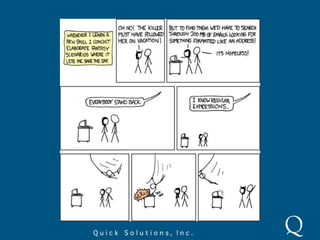
“Some people, when confronted with a problem, think “I know, I'll use regular expressions.      Now they have two problems.”- Jamie Zawinski, August 12, 1997
What are Regular Expressions?^\w+@[a-zA-Z_]+?\.[a-zA-Z]{2,3}$[\w-]+@([\w-]+\.)+[\w-]+^.+@[^\.].*\.[a-z]{2,}$^([a-zA-Z0-9_\-\.]+)@((\[[0-9]{1,3}\.[0-9]{1,3}\.[0-9]{1,3}\.)|(([a-zA-Z0-9\-]+\.)+))([a-zA-Z]{2,4}|[0-9]{1,3})(\]?)$
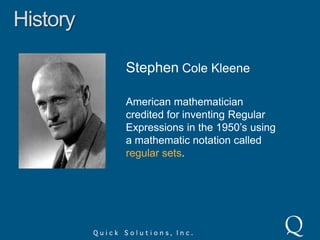
HistoryStephen Cole KleeneAmerican mathematician credited for inventing Regular Expressions in the 1950’s using a mathematic notation called regular sets.
HistoryKen ThompsonAmerican pioneer of computer science who, among many other things, used Kleene’s regular sets for searching in his QED and ed text editors.
HistorygrepGlobal Regular Expression Print
HistoryHenry SpencerWrote the regex library which is what Perl and Tcl languages used for regular expressions.
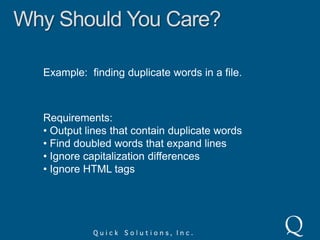
Why Should You Care?Example:  finding duplicate words in a file.Requirements: Output lines that contain duplicate words
 Find doubled words that expand lines
 Ignore capitalization differences
 Ignore HTML tags
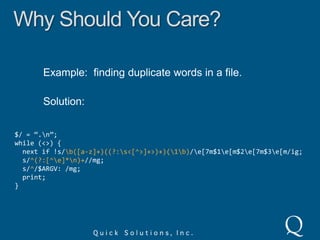
Why Should You Care?Example:  finding duplicate words in a file.Solution:$/ = “.\n”;while (<>) {  next if !s/\b([a-z]+)((?:\s<[^>]+>)+)(\1\b)/\e[7m$1\e[m$2\e[7m$3\e[m/ig;  s/^(?:[^\e]*\n)+//mg;  s/^/$ARGV: /mg;  print;}
Literal CharactersAny character except a small list of reserved characters.regexisJack is a boymatch in target string
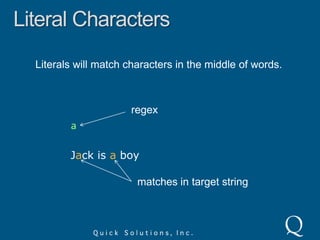
Literal CharactersLiterals will match characters in the middle of words.regexaJack is a boymatches in target string
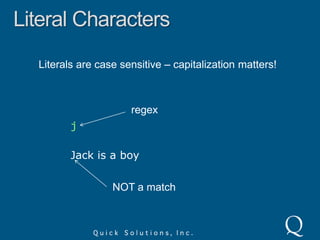
Literal CharactersLiterals are case sensitive – capitalization matters!regexjJack is a boyNOT a match
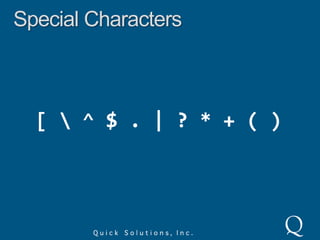
Special Characters[ \ ^ $ . | ? * + ( )
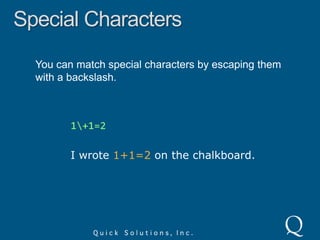
Special CharactersYou can match special characters by escaping them with a backslash.1\+1=2I wrote 1+1=2 on the chalkboard.
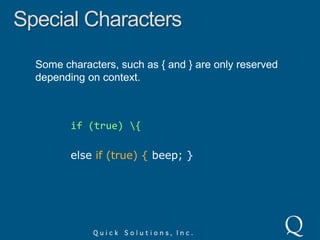
Special CharactersSome characters, such as { and } are only reserved depending on context.if (true) \{else if (true) { beep; }
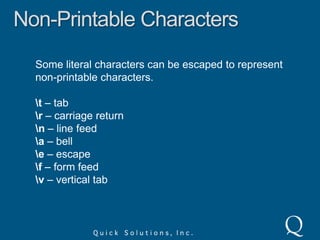
Non-Printable CharactersSome literal characters can be escaped to represent non-printable characters.\t – tab\r – carriage return\n – line feed\a – bell\e – escape\f – form feed\v – vertical tab
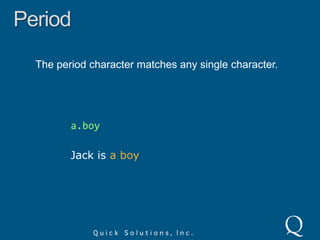
PeriodThe period character matches any single character.a.boyJack is a boy
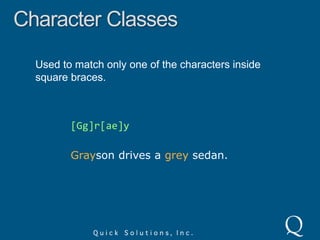
Character ClassesUsed to match only one of the characters inside square braces.[Gg]r[ae]yGrayson drives a grey sedan.
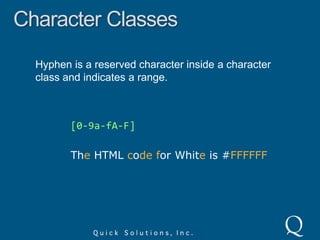
Character ClassesHyphen is a reserved character inside a character class and indicates a range.[0-9a-fA-F]The HTML codefor White is #FFFFFF
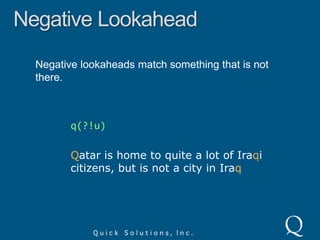
Character ClassesCaret inside a character class negates the match.q[^u]Qatar is home to quite a lot of Iraqi citizens, but is not a city in Iraq
Character ClassesNormal special characters are valid inside of character classes. Only ] \ ^ and – are reserved.[+*]6 * 7 and 18 + 24 both equal 42
Shorthand Character Classes\d – digit or [0-9]\w – word or [A-Za-z0-9_]\s – whitespace or [ \t\r\n] (space, tab, CR, LF)[\s\d]1 + 2 = 3
Shorthand Character Classes\D – non-digit or [^\d]\W – non-word or [^\w]\S – non-whitespace or [^\s][\D]1 + 2 = 3
RepetitionThe asterisk repeats the preceding character class 0 or more times.<[A-Za-z][A-Za-z0-9]*><HTML>Regex is <b>Awesome</b></HTML>
RepetitionThe plus repeats the preceding character class 1 or more times.<[A-Za-z0-9]+>Watch out for invalid <HTML> tags like <1> and <>!
RepetitionThe question mark repeats the preceding character class 0 or 1 times, in effect making it optional.</?[A-Za-z][A-Za-z0-9]*><HTML>Regex is <b>Awesome</b></HTML>
AnchorsThe caret anchor matches the position before the first character in a string.^vacvacation evacuation
AnchorsThe dollar sign anchor matches the position after the last character in a string.tion$vacation evacuation
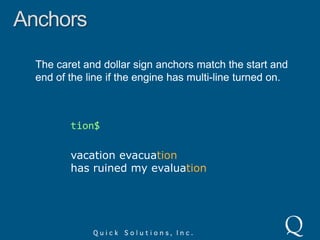
AnchorsThe caret and dollar sign anchors match the start and end of the line if the engine has multi-line turned on.tion$vacation evacuationhas ruined my evaluation
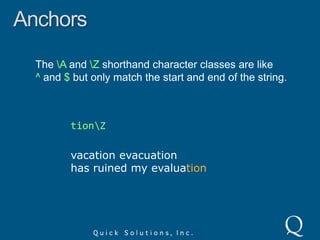
AnchorsThe \A and \Z shorthand character classes are like^ and $ but only match the start and end of the string.tion\Zvacation evacuationhas ruined my evaluation
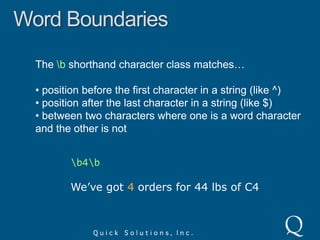
Word BoundariesThe \b shorthand character class matches… position before the first character in a string (like ^)
 position after the last character in a string (like $)
 between two characters where one is a word character and the other is not\b4\bWe’ve got 4 orders for 44 lbs of C4
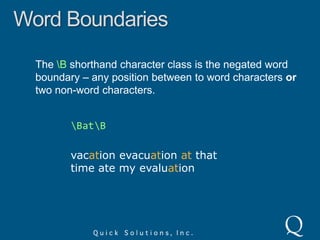
Word BoundariesThe \B shorthand character class is the negated word boundary – any position between to word characters or two non-word characters.\Bat\Bvacation evacuation at thattime ate my evaluation
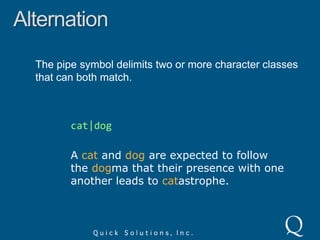
AlternationThe pipe symbol delimits two or more character classes that can both match.cat|dogA cat and dog are expected to followthe dogma that their presence with oneanother leads to catastrophe.
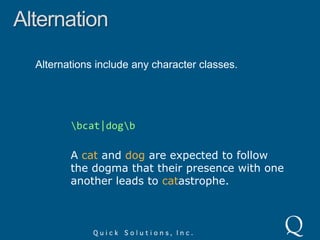
AlternationAlternations include any character classes.\bcat|dog\bA cat and dog are expected to followthe dogma that their presence with oneanother leads to catastrophe.
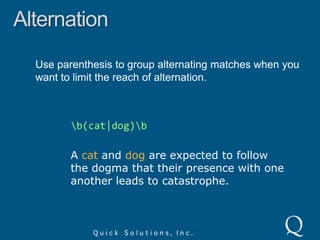
AlternationUse parenthesis to group alternating matches when you want to limit the reach of alternation.\b(cat|dog)\bA cat and dog are expected to followthe dogma that their presence with oneanother leads to catastrophe.
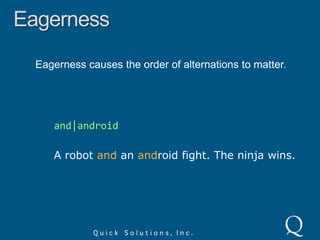
EagernessEagerness causes the order of alternations to matter.and|androidA robot and an android fight. The ninja wins.
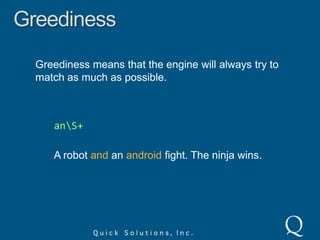
GreedinessGreediness means that the engine will always try to match as much as possible.an\S+A robot and an android fight. The ninja wins.
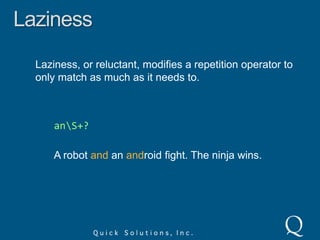
LazinessLaziness, or reluctant, modifies a repetition operator to only match as much as it needs to.an\S+?A robot and an android fight. The ninja wins.
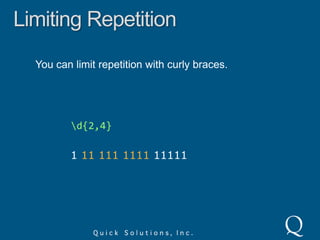
Limiting RepetitionYou can limit repetition with curly braces.\d{2,4}1 111111111 11111
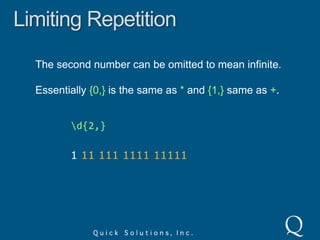
Limiting RepetitionThe second number can be omitted to mean infinite.Essentially {0,} is the same as * and {1,} same as +.\d{2,}1 11111111111111
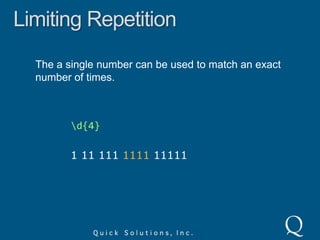
Limiting RepetitionThe a single number can be used to match an exact number of times.\d{4}1 11 111 1111 11111
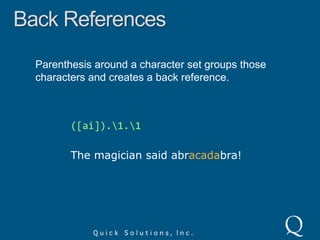
Back ReferencesParenthesis around a character set groups those characters and creates a back reference.([ai]).\1.\1The magician said abracadabra!
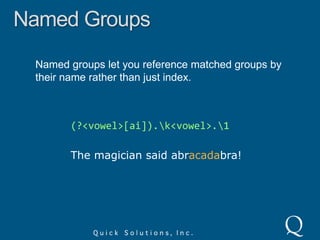
Named GroupsNamed groups let you reference matched groups by their name rather than just index.(?<vowel>[ai]).\k<vowel>.\1The magician said abracadabra!

Introduction to Regular Expressions

  • 1.
    Introduction toRegular ExpressionsMattCastohttp://google.com/profiles/mattcasto
  • 2.
    Introduction toRegular ExpressionsMattCastoQuick Solutionshttp://google.com/profiles/mattcasto
  • 3.
    “Some people, whenconfronted with a problem, think “I know, I'll use regular expressions. Now they have two problems.”- Jamie Zawinski, August 12, 1997
  • 5.
    What are RegularExpressions?^\w+@[a-zA-Z_]+?\.[a-zA-Z]{2,3}$[\w-]+@([\w-]+\.)+[\w-]+^.+@[^\.].*\.[a-z]{2,}$^([a-zA-Z0-9_\-\.]+)@((\[[0-9]{1,3}\.[0-9]{1,3}\.[0-9]{1,3}\.)|(([a-zA-Z0-9\-]+\.)+))([a-zA-Z]{2,4}|[0-9]{1,3})(\]?)$
  • 7.
    HistoryStephen Cole KleeneAmericanmathematician credited for inventing Regular Expressions in the 1950’s using a mathematic notation called regular sets.
  • 8.
    HistoryKen ThompsonAmerican pioneerof computer science who, among many other things, used Kleene’s regular sets for searching in his QED and ed text editors.
  • 9.
  • 10.
    HistoryHenry SpencerWrote theregex library which is what Perl and Tcl languages used for regular expressions.
  • 11.
    Why Should YouCare?Example: finding duplicate words in a file.Requirements: Output lines that contain duplicate words
  • 12.
    Find doubledwords that expand lines
  • 13.
  • 14.
  • 15.
    Why Should YouCare?Example: finding duplicate words in a file.Solution:$/ = “.\n”;while (<>) { next if !s/\b([a-z]+)((?:\s<[^>]+>)+)(\1\b)/\e[7m$1\e[m$2\e[7m$3\e[m/ig; s/^(?:[^\e]*\n)+//mg; s/^/$ARGV: /mg; print;}
  • 17.
    Literal CharactersAny characterexcept a small list of reserved characters.regexisJack is a boymatch in target string
  • 18.
    Literal CharactersLiterals willmatch characters in the middle of words.regexaJack is a boymatches in target string
  • 19.
    Literal CharactersLiterals arecase sensitive – capitalization matters!regexjJack is a boyNOT a match
  • 20.
    Special Characters[ \^ $ . | ? * + ( )
  • 21.
    Special CharactersYou canmatch special characters by escaping them with a backslash.1\+1=2I wrote 1+1=2 on the chalkboard.
  • 22.
    Special CharactersSome characters,such as { and } are only reserved depending on context.if (true) \{else if (true) { beep; }
  • 23.
    Non-Printable CharactersSome literalcharacters can be escaped to represent non-printable characters.\t – tab\r – carriage return\n – line feed\a – bell\e – escape\f – form feed\v – vertical tab
  • 24.
    PeriodThe period charactermatches any single character.a.boyJack is a boy
  • 25.
    Character ClassesUsed tomatch only one of the characters inside square braces.[Gg]r[ae]yGrayson drives a grey sedan.
  • 26.
    Character ClassesHyphen isa reserved character inside a character class and indicates a range.[0-9a-fA-F]The HTML codefor White is #FFFFFF
  • 27.
    Character ClassesCaret insidea character class negates the match.q[^u]Qatar is home to quite a lot of Iraqi citizens, but is not a city in Iraq
  • 28.
    Character ClassesNormal specialcharacters are valid inside of character classes. Only ] \ ^ and – are reserved.[+*]6 * 7 and 18 + 24 both equal 42
  • 29.
    Shorthand Character Classes\d– digit or [0-9]\w – word or [A-Za-z0-9_]\s – whitespace or [ \t\r\n] (space, tab, CR, LF)[\s\d]1 + 2 = 3
  • 30.
    Shorthand Character Classes\D– non-digit or [^\d]\W – non-word or [^\w]\S – non-whitespace or [^\s][\D]1 + 2 = 3
  • 31.
    RepetitionThe asterisk repeatsthe preceding character class 0 or more times.<[A-Za-z][A-Za-z0-9]*><HTML>Regex is <b>Awesome</b></HTML>
  • 32.
    RepetitionThe plus repeatsthe preceding character class 1 or more times.<[A-Za-z0-9]+>Watch out for invalid <HTML> tags like <1> and <>!
  • 33.
    RepetitionThe question markrepeats the preceding character class 0 or 1 times, in effect making it optional.</?[A-Za-z][A-Za-z0-9]*><HTML>Regex is <b>Awesome</b></HTML>
  • 34.
    AnchorsThe caret anchormatches the position before the first character in a string.^vacvacation evacuation
  • 35.
    AnchorsThe dollar signanchor matches the position after the last character in a string.tion$vacation evacuation
  • 36.
    AnchorsThe caret anddollar sign anchors match the start and end of the line if the engine has multi-line turned on.tion$vacation evacuationhas ruined my evaluation
  • 37.
    AnchorsThe \A and\Z shorthand character classes are like^ and $ but only match the start and end of the string.tion\Zvacation evacuationhas ruined my evaluation
  • 38.
    Word BoundariesThe \bshorthand character class matches… position before the first character in a string (like ^)
  • 39.
    position afterthe last character in a string (like $)
  • 40.
    between twocharacters where one is a word character and the other is not\b4\bWe’ve got 4 orders for 44 lbs of C4
  • 41.
    Word BoundariesThe \Bshorthand character class is the negated word boundary – any position between to word characters or two non-word characters.\Bat\Bvacation evacuation at thattime ate my evaluation
  • 42.
    AlternationThe pipe symboldelimits two or more character classes that can both match.cat|dogA cat and dog are expected to followthe dogma that their presence with oneanother leads to catastrophe.
  • 43.
    AlternationAlternations include anycharacter classes.\bcat|dog\bA cat and dog are expected to followthe dogma that their presence with oneanother leads to catastrophe.
  • 44.
    AlternationUse parenthesis togroup alternating matches when you want to limit the reach of alternation.\b(cat|dog)\bA cat and dog are expected to followthe dogma that their presence with oneanother leads to catastrophe.
  • 45.
    EagernessEagerness causes theorder of alternations to matter.and|androidA robot and an android fight. The ninja wins.
  • 46.
    GreedinessGreediness means thatthe engine will always try to match as much as possible.an\S+A robot and an android fight. The ninja wins.
  • 47.
    LazinessLaziness, or reluctant,modifies a repetition operator to only match as much as it needs to.an\S+?A robot and an android fight. The ninja wins.
  • 48.
    Limiting RepetitionYou canlimit repetition with curly braces.\d{2,4}1 111111111 11111
  • 49.
    Limiting RepetitionThe secondnumber can be omitted to mean infinite.Essentially {0,} is the same as * and {1,} same as +.\d{2,}1 11111111111111
  • 50.
    Limiting RepetitionThe asingle number can be used to match an exact number of times.\d{4}1 11 111 1111 11111
  • 51.
    Back ReferencesParenthesis arounda character set groups those characters and creates a back reference.([ai]).\1.\1The magician said abracadabra!
  • 52.
    Named GroupsNamed groupslet you reference matched groups by their name rather than just index.(?<vowel>[ai]).\k<vowel>.\1The magician said abracadabra!

Editor's Notes

  • #4 I just wanted to get this famous quote out of the way from the beginning. Like all great quotes, it has been falsely attributed all over the place. See http://regex.info/blog/2006-09-15/247 for a comprehensive investigation on where the quote originates.
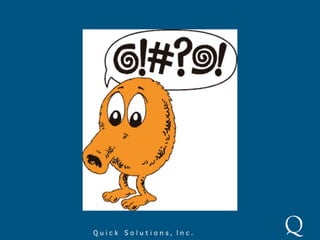
  • #5 If you’re never seen a regular expression before, it might look like Q*bert’s language to you.
  • #6 These are all examples of regular expressions. They were all created with the intent of matching email addresses. As you can see, they’re very different from one another.
  • #7 Regular expressions are often called a “write only language” and aren’t easily understood. To a novice they don’t even look like they have any meaning.
  • #8 Kleene is pronounced “clay-knee”
  • #9 Kenneth Lane Thompson, or just ‘ken’ in hacker circles, is often credited for creating the Unix operating system along with Dennis Ritchie
  • #10 Unix command line tool which borrowed Regular Expression pattern matching from the “ed” editor.
  • #11 Theregex library was eventually used to develop the PCRE library – Perl Compatible Reguarl Expressions. Most major programming languages these days use regular expressions based on the PCRE, including Java, .NET and Ruby.
  • #12 Without knowing regular expressions you could certainly accomplish this task, but it would take much longer, be more complex, and much more likely to contain bugs.
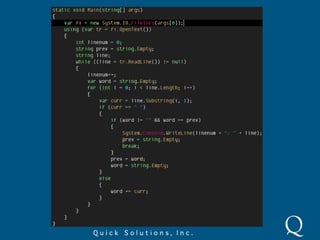
  • #13 Here’s some c# code that I threw together in a few minutes to parse a text file. There are bugs in the code and requirements that it doesn’t meet. Also, if requirements were to be added, this code would be more difficult to refactor than a regex.
  • #14 This solution is in Perl. I could have re-written it in c# for good comparison with my previous slide, but I decided that the original example solution looks much nicer. By the way, this example is taken from Mastering Regular Expressions by Jeffrey Friedl
  • #15 Knowing regular expressions won’t make you a hero, but you may feel like one when you’ve saved lots of time.
  • #16 The basics of regular expressions start with literal characters. Any character, except for a small list of reserved characters which will be covered next, is considered a literal character. This example has a regex “is” which is two literal characters.
  • #17 The regex “a” matches any letter “a” in the target string, even if its inside a word.
  • #18 Some regex engines have the option to turn off case sensitivity. Some engines may have this option on by default.
  • #19 These are all reserved characters, also known as meta-characters.
  • #20 Special characters can be escaped with a backslash, as demonstrated in the example.
  • #21 The curly brace characters are reserved, but only when in the context of a repetition modifier, and don’t need to be escaped otherwise. You can escape them without any side effects.
  • #22 There are other non-printable characters too, especially when you use unicode. You can also reference ASCII character codes, but I don’t see the need to show an example of this.
  • #23 The period, or dot, character matches any single character. There is an exception to this – if the engine is in single line mode (which used to be the only mode, but now is usually off by default) then the period will not match a new line. Javascript and VBScript don’t have a multi-line option, but [sS] works.The period is the most common meta-character, but that is because it is often mis-used.
  • #24 Also known as Character Sets match only one of the characters inside the square brackets.
  • #25 The hyphen, or dash, character inside a character class indicates a range of characters. The example would match any hexadecimal value. Note that the hyphen can be escaped inside a character class, but doesn’t need to be escaped if its at the beginning or end because its not a range in that context.
  • #26 A caret just inside a character negates the match. Note that the example won’t match the string “Iraq” because there is no character following the q. Also, “Qatar” isn’t matched because the Q is capitalized.
  • #27 The caret and hyphen characters are only reserved when they’re used in a context that could suggest a negation (for carets) or a range (for hyphens).
  • #28 These can be used inside and outside of character classes. All of these aren’t necessary, but are shortcuts that make it easier to write readable regular expressions – HA!Note that in the example the match includes the space before the numbers, but I couldn’t easily represent that with coloring.
  • #29 These are the negated versions of the shorthand character classes from the previous slide.
  • #30 Like the period, the asterisk is overused and dangerous.
  • #31 Like the period, the asterisk is overused and dangerous.
  • #32 The question mark can also modify a repetition symbol to make it non-greedy or lazy, but that’s a more advanced subject. Its all about context.
  • #33 Anchors don’t match a character, they match a position which could be before, after or between characters. In this example, the string only matches because there is no whitespace before the word “vacation”
  • #34 Note that anchors can result in a zero length match. For example, a regex of just “$” matches the position at the end of a line, but the match has no characters. This can be useful or cause issues in your code!
  • #36 Note that another exception is a new line at the end of a file will not be matched by $ or . The z shorthand character class will handle this circumstance.
  • #38 Note that the words “at”, “that” and “ate” don’t contain a match in the example.
  • #42 Regular expressions are eager, which means they match as soon as they can. This means that the order of similar character classes in an alternation can affect the result. In the example, the “and” match is found first, even though the full word “android” exists. If the character classes were switched, the whole “and” word would still match, but the whole “android” word would match instead of just the beginning of the word.
  • #43 Greediness causes the example to always match the full “android” instead of just “and” which is also a valid match.
  • #44 The ? mark after a repetition operator (*+?) makes it lazy.
  • #48 Using parenthesis, or round braces, to group a character set not only groups those characters together to apply repetition to them, but it also creates a back reference. A back reference stores the grouped part of the match for use later in the regex. Back references can also be used for replaces.In the example, “agici” doesn’t match because the group is “a” not “i”.
  • #49 The groups can be named with single parenthesis instead of greater/less than characters.
  • #50 This example matches a “q” not followed by a “u”. Unlike the example earlier in the presentation, this regex won’t match the character following the “q”.
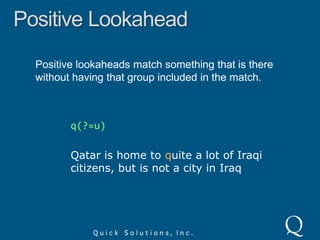
  • #51 This example matches a “q” followed by a “u”, but notice that the “u” is not included with that match.
  • #52 This example matches a “q” followed by a “u”, but notice that the “u” is not included with that match.