
Real Time Machine Learning
Visualization with Spark
Chester Chen, Ph.D
Sr. Manager, Data Science & Engineering
GoPro, Inc.
Hadoop Summit, San Jose 2016
Who am I ?
• Sr. Manager of Data Science & Engineering at GoPro
• Founder and Organizer of SF Big Analytics Meetup (4500+ members)
• Previous Employment:
– Alpine Data, Tinga, Clearwell/Symantec, AltaVista, Ascent Media, ClearStory Systems,
WebWare.
• Experience with Spark
– Exposed to Spark since Spark 0.6
– Architect for Alpine Spark Integration on Spark 1.1, 1.3 and 1.5.x
• Hadoop Distribution
– CDH, HDP and MapR
Growing data needs
Lightning-fast cluster computing
Real Time ML Visualization with Spark
http://spark.apache.org/
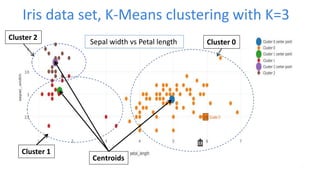
Iris data set, K-Means clustering with K=3
Cluster 2
Cluster 1
Cluster 0
Centroids
Sepal width vs Petal length
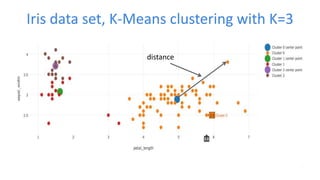
Iris data set, K-Means clustering with K=3
distance
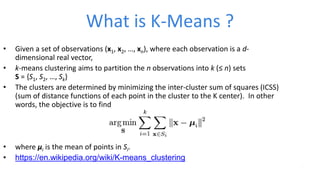
What is K-Means ?
• Given a set of observations (x1, x2, …, xn), where each observation is a d-
dimensional real vector,
• k-means clustering aims to partition the n observations into k (≤ n) sets
S = {S1, S2, …, Sk}
• The clusters are determined by minimizing the inter-cluster sum of squares (ICSS)
(sum of distance functions of each point in the cluster to the K center). In other
words, the objective is to find
• where μi is the mean of points in Si.
• https://en.wikipedia.org/wiki/K-means_clustering
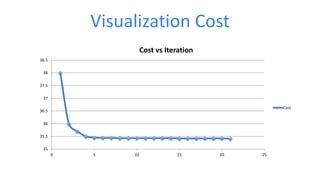
Visualization Cost
35
35.5
36
36.5
37
37.5
38
38.5
0 5 10 15 20 25
Cost vs Iteration
Cost
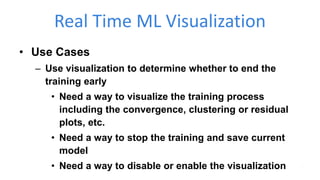
Real Time ML Visualization
• Use Cases
– Use visualization to determine whether to end the
training early
• Need a way to visualize the training process
including the convergence, clustering or residual
plots, etc.
• Need a way to stop the training and save current
model
• Need a way to disable or enable the visualization
Real Time ML Visualization with Spark
DEMO
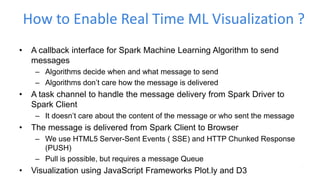
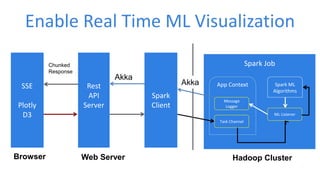
How to Enable Real Time ML Visualization ?
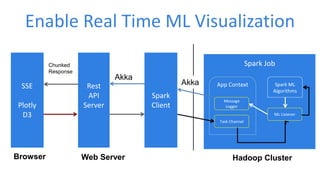
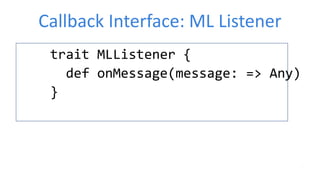
• A callback interface for Spark Machine Learning Algorithm to send
messages
– Algorithms decide when and what message to send
– Algorithms don’t care how the message is delivered
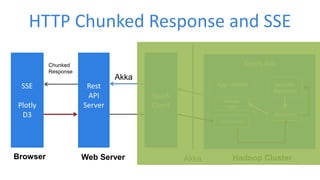
• A task channel to handle the message delivery from Spark Driver to
Spark Client
– It doesn’t care about the content of the message or who sent the message
• The message is delivered from Spark Client to Browser
– We use HTML5 Server-Sent Events ( SSE) and HTTP Chunked Response
(PUSH)
– Pull is possible, but requires a message Queue
• Visualization using JavaScript Frameworks Plot.ly and D3
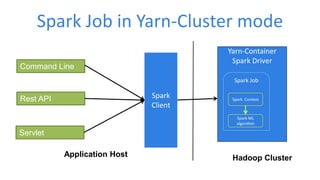
Spark Job in Yarn-Cluster mode
Spark
Client
Hadoop Cluster
Yarn-Container
Spark Driver
Spark Job
Spark Context
Spark ML
algorithm
Command Line
Rest API
Servlet
Application Host
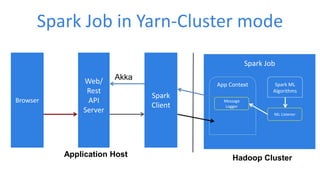
Spark Job in Yarn-Cluster mode
Spark
Client
Hadoop Cluster
Command Line
Rest API
Servlet
Application Host
Spark Job
App Context Spark ML
Algorithms
ML Listener
Message
Logger
Spark
Client
Hadoop ClusterApplication Host
Spark Job
App Context Spark ML
Algorithms
ML Listener
Message
Logger
Spark Job in Yarn-Cluster mode
Web/
Rest
API
Server
Akka
Browser
Enable Real Time ML Visualization
SSE
Plotly
D3
Browser
Rest
API
Server
Web Server
Spark
Client
Hadoop Cluster
Spark Job
App Context
Message
Logger
Task Channel
Spark ML
Algorithms
ML Listener
Akka
Chunked
Response
Akka
Enable Real Time ML Visualization
SSE
Plotly
D3
Browser
Rest
API
Server
Web Server
Spark
Client
Hadoop Cluster
Spark Job
App Context
Message
Logger
Task Channel
Spark ML
Algorithms
ML Listener
Akka
Chunked
Response
Akka
Machine Learning Listeners
Callback Interface: ML Listener
trait MLListener {
def onMessage(message: => Any)
}
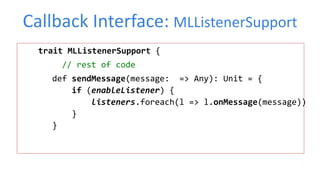
Callback Interface: MLListenerSupport
trait MLListenerSupport {
// rest of code
def sendMessage(message: => Any): Unit = {
if (enableListener) {
listeners.foreach(l => l.onMessage(message))
}
}
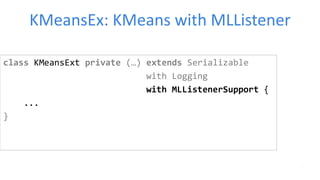
KMeansEx: KMeans with MLListener
class KMeansExt private (…) extends Serializable
with Logging
with MLListenerSupport {
...
}
KMeansEx: KMeans with MLListener
case class KMeansCoreStats (iteration: Int, centers: Array[Vector], cost: Double )
private def runAlgorithm(data: RDD[VectorWithNorm]): KMeansModel = {
...
while (!stopIteration &&
iteration < maxIterations && !activeRuns.isEmpty) {
...
if (listenerEnabled()) {
sendMessage(KMeansCoreStats(…))
}
...
}
}
KMeans ML Listener
class KMeansListener(columnNames: List[String],
data : RDD[Vector],
logger : MessageLogger) extends MLListener{
var sampleDataOpt : Option[Array[Vector]]= None
override def onMessage(message : => Any): Unit = {
message match {
case coreStats :KMeansCoreStats =>
if (sampleDataOpt.isEmpty)
sampleDataOpt = Some(data.takeSample(withReplacement = false, num=100))
//use the KMeans model of the current iteration to predict sample cluster indexes
val kMeansModel = new KMeansModel(coreStats.centers)
val cluster=sampleDataOpt.get.map(vector => (vector.toArray, kMeansModel.predict(vector)))
val msg = KMeansStats(…)
logger.sendBroadCastMessage(MLConstants.KMEANS_CENTER, msg)
case _ =>
println(" message lost")
}
KMeans Spark Job Setup
Val appCtxOpt : Option[ApplicationContext] = …
val kMeans = new KMeansExt().setK(numClusters)
.setEpsilon(epsilon)
.setMaxIterations(maxIterations)
.enableListener(enableVisualization)
.addListener(
new KMeansListener(...))
appCtxOpt.foreach(_.addTaskObserver(new MLTaskObserver(kMeans,logger)))
kMeans.run(vectors)
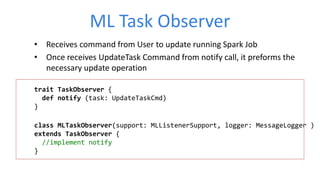
ML Task Observer
• Receives command from User to update running Spark Job
• Once receives UpdateTask Command from notify call, it preforms the
necessary update operation
trait TaskObserver {
def notify (task: UpdateTaskCmd)
}
class MLTaskObserver(support: MLListenerSupport, logger: MessageLogger )
extends TaskObserver {
//implement notify
}
Logistic Regression MLListener
class LogisticRegression(…) extends MLListenerSupport {
def train(data: RDD[(Double, Vector)]): LogisticRegressionModel= {
// initialization code
val (rawWeights, loss) = OWLQN.runOWLQN( …)
generateLORModel(…)
}
}
Logistic Regression MLListener
object OWLQN extends Logging {
def runOWLQN(/*args*/,mlSupport:Option[MLListenerSupport]):(Vector,
Array[Double]) = {
val costFun=new CostFun(data, mlSupport, IterationState(), /*other
args */)
val states : Iterator[lbfgs.State] =
lbfgs.iterations(
new CachedDiffFunction(costFun), initialWeights.toBreeze.toDenseVector
)
…
}
Logistic Regression MLListener
In Cost function :
override def calculate(weights: BDV[Double]): (Double, BDV[Double]) = {
val shouldStop = mlSupport.exists(_.stopIteration)
if (!shouldStop) {
…
mlSupport.filter(_.listenerEnabled()).map { s=>
s.sendMessage( (iState.iteration, w, loss))
}
…
}
else {
…
}
}
Task Communication Channel
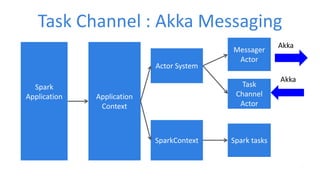
Task Channel : Akka Messaging
Spark
Application Application
Context
Actor System
Messager
Actor
Task
Channel
Actor
SparkContext Spark tasks
Akka
Akka
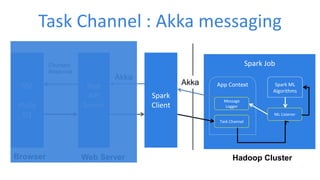
Task Channel : Akka messaging
SSE
Plotly
D3
Browser
Rest
API
Server
Web Server
Spark
Client
Hadoop Cluster
Spark Job
App Context
Message
Logger
Task Channel
Spark ML
Algorithms
ML Listener
Akka
Chunked
Response
Akka
Push To The Browser
HTTP Chunked Response and SSE
SSE
Plotly
D3
Browser
Rest
API
Server
Web Server
Spark
Client
Hadoop Cluster
Spark Job
App Context
Message
Logger
Task Channel
Spark ML
Algorithms
ML Listener
Akka
Chunked
Response
Akka
HTML5 Server-Sent Events (SSE)
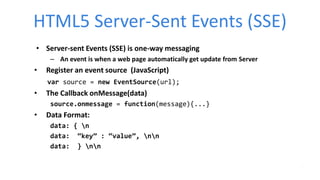
• Server-sent Events (SSE) is one-way messaging
– An event is when a web page automatically get update from Server
• Register an event source (JavaScript)
var source = new EventSource(url);
• The Callback onMessage(data)
source.onmessage = function(message){...}
• Data Format:
data: { n
data: “key” : “value”, nn
data: } nn
HTTP Chunked Response
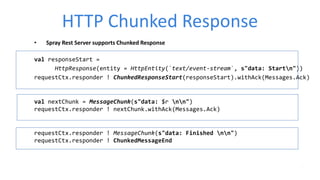
• Spray Rest Server supports Chunked Response
val responseStart =
HttpResponse(entity = HttpEntity(`text/event-stream`, s"data: Startn"))
requestCtx.responder ! ChunkedResponseStart(responseStart).withAck(Messages.Ack)
val nextChunk = MessageChunk(s"data: $r nn")
requestCtx.responder ! nextChunk.withAck(Messages.Ack)
requestCtx.responder ! MessageChunk(s"data: Finished nn")
requestCtx.responder ! ChunkedMessageEnd
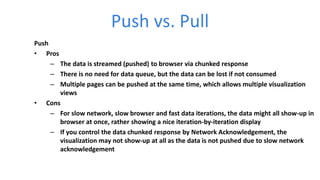
Push vs. Pull
Push
• Pros
– The data is streamed (pushed) to browser via chunked response
– There is no need for data queue, but the data can be lost if not consumed
– Multiple pages can be pushed at the same time, which allows multiple visualization
views
• Cons
– For slow network, slow browser and fast data iterations, the data might all show-up in
browser at once, rather showing a nice iteration-by-iteration display
– If you control the data chunked response by Network Acknowledgement, the
visualization may not show-up at all as the data is not pushed due to slow network
acknowledgement
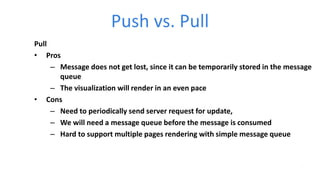
Push vs. Pull
Pull
• Pros
– Message does not get lost, since it can be temporarily stored in the message
queue
– The visualization will render in an even pace
• Cons
– Need to periodically send server request for update,
– We will need a message queue before the message is consumed
– Hard to support multiple pages rendering with simple message queue
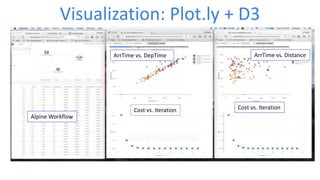
Visualization: Plot.ly + D3
Cost vs. IterationCost vs. Iteration
ArrTime vs. DistanceArrTime vs. DepTime
Alpine Workflow
Use Plot.ly to render graph
function showCost(dataParsed) {
var costTrace = { … };
var data = [ costTrace ];
var costLayout = {
xaxis: {…},
yaxis: {…},
title: …
};
Plotly.newPlot('cost', data, costLayout);
}
Real Time ML Visualization: Summary
• Training machine learning model involves a lot of experimentation,
we need a way to visualize the training process.
• We presented a system to enable real time machine learning
visualization with Spark:
– Gives visibility into the training of a model
– Allows us monitor the convergence of the algorithms during training
– Can stop the iterations when convergence is good enough.
Thank You
Chester Chen
chesterxgchen@yahoo.com
LinkedIn
https://www.linkedin.com/in/chester-chen-3205992
SlideShare
http://www.slideshare.net/ChesterChen/presentations
demo video
https://youtu.be/DkbYNYQhrao

Real Time Machine Learning Visualization with Spark

  • 1.
    Real Time MachineLearning Visualization with Spark Chester Chen, Ph.D Sr. Manager, Data Science & Engineering GoPro, Inc. Hadoop Summit, San Jose 2016
  • 2.
    Who am I? • Sr. Manager of Data Science & Engineering at GoPro • Founder and Organizer of SF Big Analytics Meetup (4500+ members) • Previous Employment: – Alpine Data, Tinga, Clearwell/Symantec, AltaVista, Ascent Media, ClearStory Systems, WebWare. • Experience with Spark – Exposed to Spark since Spark 0.6 – Architect for Alpine Spark Integration on Spark 1.1, 1.3 and 1.5.x • Hadoop Distribution – CDH, HDP and MapR
  • 4.
  • 5.
    Lightning-fast cluster computing RealTime ML Visualization with Spark http://spark.apache.org/
  • 6.
    Iris data set,K-Means clustering with K=3 Cluster 2 Cluster 1 Cluster 0 Centroids Sepal width vs Petal length
  • 7.
    Iris data set,K-Means clustering with K=3 distance
  • 8.
    What is K-Means? • Given a set of observations (x1, x2, …, xn), where each observation is a d- dimensional real vector, • k-means clustering aims to partition the n observations into k (≤ n) sets S = {S1, S2, …, Sk} • The clusters are determined by minimizing the inter-cluster sum of squares (ICSS) (sum of distance functions of each point in the cluster to the K center). In other words, the objective is to find • where μi is the mean of points in Si. • https://en.wikipedia.org/wiki/K-means_clustering
  • 9.
  • 10.
    Real Time MLVisualization • Use Cases – Use visualization to determine whether to end the training early • Need a way to visualize the training process including the convergence, clustering or residual plots, etc. • Need a way to stop the training and save current model • Need a way to disable or enable the visualization
  • 11.
    Real Time MLVisualization with Spark DEMO
  • 12.
    How to EnableReal Time ML Visualization ? • A callback interface for Spark Machine Learning Algorithm to send messages – Algorithms decide when and what message to send – Algorithms don’t care how the message is delivered • A task channel to handle the message delivery from Spark Driver to Spark Client – It doesn’t care about the content of the message or who sent the message • The message is delivered from Spark Client to Browser – We use HTML5 Server-Sent Events ( SSE) and HTTP Chunked Response (PUSH) – Pull is possible, but requires a message Queue • Visualization using JavaScript Frameworks Plot.ly and D3
  • 13.
    Spark Job inYarn-Cluster mode Spark Client Hadoop Cluster Yarn-Container Spark Driver Spark Job Spark Context Spark ML algorithm Command Line Rest API Servlet Application Host
  • 14.
    Spark Job inYarn-Cluster mode Spark Client Hadoop Cluster Command Line Rest API Servlet Application Host Spark Job App Context Spark ML Algorithms ML Listener Message Logger
  • 15.
    Spark Client Hadoop ClusterApplication Host SparkJob App Context Spark ML Algorithms ML Listener Message Logger Spark Job in Yarn-Cluster mode Web/ Rest API Server Akka Browser
  • 16.
    Enable Real TimeML Visualization SSE Plotly D3 Browser Rest API Server Web Server Spark Client Hadoop Cluster Spark Job App Context Message Logger Task Channel Spark ML Algorithms ML Listener Akka Chunked Response Akka
  • 17.
    Enable Real TimeML Visualization SSE Plotly D3 Browser Rest API Server Web Server Spark Client Hadoop Cluster Spark Job App Context Message Logger Task Channel Spark ML Algorithms ML Listener Akka Chunked Response Akka
  • 18.
  • 19.
    Callback Interface: MLListener trait MLListener { def onMessage(message: => Any) }
  • 20.
    Callback Interface: MLListenerSupport traitMLListenerSupport { // rest of code def sendMessage(message: => Any): Unit = { if (enableListener) { listeners.foreach(l => l.onMessage(message)) } }
  • 21.
    KMeansEx: KMeans withMLListener class KMeansExt private (…) extends Serializable with Logging with MLListenerSupport { ... }
  • 22.
    KMeansEx: KMeans withMLListener case class KMeansCoreStats (iteration: Int, centers: Array[Vector], cost: Double ) private def runAlgorithm(data: RDD[VectorWithNorm]): KMeansModel = { ... while (!stopIteration && iteration < maxIterations && !activeRuns.isEmpty) { ... if (listenerEnabled()) { sendMessage(KMeansCoreStats(…)) } ... } }
  • 23.
    KMeans ML Listener classKMeansListener(columnNames: List[String], data : RDD[Vector], logger : MessageLogger) extends MLListener{ var sampleDataOpt : Option[Array[Vector]]= None override def onMessage(message : => Any): Unit = { message match { case coreStats :KMeansCoreStats => if (sampleDataOpt.isEmpty) sampleDataOpt = Some(data.takeSample(withReplacement = false, num=100)) //use the KMeans model of the current iteration to predict sample cluster indexes val kMeansModel = new KMeansModel(coreStats.centers) val cluster=sampleDataOpt.get.map(vector => (vector.toArray, kMeansModel.predict(vector))) val msg = KMeansStats(…) logger.sendBroadCastMessage(MLConstants.KMEANS_CENTER, msg) case _ => println(" message lost") }
  • 24.
    KMeans Spark JobSetup Val appCtxOpt : Option[ApplicationContext] = … val kMeans = new KMeansExt().setK(numClusters) .setEpsilon(epsilon) .setMaxIterations(maxIterations) .enableListener(enableVisualization) .addListener( new KMeansListener(...)) appCtxOpt.foreach(_.addTaskObserver(new MLTaskObserver(kMeans,logger))) kMeans.run(vectors)
  • 25.
    ML Task Observer •Receives command from User to update running Spark Job • Once receives UpdateTask Command from notify call, it preforms the necessary update operation trait TaskObserver { def notify (task: UpdateTaskCmd) } class MLTaskObserver(support: MLListenerSupport, logger: MessageLogger ) extends TaskObserver { //implement notify }
  • 26.
    Logistic Regression MLListener classLogisticRegression(…) extends MLListenerSupport { def train(data: RDD[(Double, Vector)]): LogisticRegressionModel= { // initialization code val (rawWeights, loss) = OWLQN.runOWLQN( …) generateLORModel(…) } }
  • 27.
    Logistic Regression MLListener objectOWLQN extends Logging { def runOWLQN(/*args*/,mlSupport:Option[MLListenerSupport]):(Vector, Array[Double]) = { val costFun=new CostFun(data, mlSupport, IterationState(), /*other args */) val states : Iterator[lbfgs.State] = lbfgs.iterations( new CachedDiffFunction(costFun), initialWeights.toBreeze.toDenseVector ) … }
  • 28.
    Logistic Regression MLListener InCost function : override def calculate(weights: BDV[Double]): (Double, BDV[Double]) = { val shouldStop = mlSupport.exists(_.stopIteration) if (!shouldStop) { … mlSupport.filter(_.listenerEnabled()).map { s=> s.sendMessage( (iState.iteration, w, loss)) } … } else { … } }
  • 29.
  • 30.
    Task Channel :Akka Messaging Spark Application Application Context Actor System Messager Actor Task Channel Actor SparkContext Spark tasks Akka Akka
  • 31.
    Task Channel :Akka messaging SSE Plotly D3 Browser Rest API Server Web Server Spark Client Hadoop Cluster Spark Job App Context Message Logger Task Channel Spark ML Algorithms ML Listener Akka Chunked Response Akka
  • 32.
    Push To TheBrowser
  • 33.
    HTTP Chunked Responseand SSE SSE Plotly D3 Browser Rest API Server Web Server Spark Client Hadoop Cluster Spark Job App Context Message Logger Task Channel Spark ML Algorithms ML Listener Akka Chunked Response Akka
  • 34.
    HTML5 Server-Sent Events(SSE) • Server-sent Events (SSE) is one-way messaging – An event is when a web page automatically get update from Server • Register an event source (JavaScript) var source = new EventSource(url); • The Callback onMessage(data) source.onmessage = function(message){...} • Data Format: data: { n data: “key” : “value”, nn data: } nn
  • 35.
    HTTP Chunked Response •Spray Rest Server supports Chunked Response val responseStart = HttpResponse(entity = HttpEntity(`text/event-stream`, s"data: Startn")) requestCtx.responder ! ChunkedResponseStart(responseStart).withAck(Messages.Ack) val nextChunk = MessageChunk(s"data: $r nn") requestCtx.responder ! nextChunk.withAck(Messages.Ack) requestCtx.responder ! MessageChunk(s"data: Finished nn") requestCtx.responder ! ChunkedMessageEnd
  • 36.
    Push vs. Pull Push •Pros – The data is streamed (pushed) to browser via chunked response – There is no need for data queue, but the data can be lost if not consumed – Multiple pages can be pushed at the same time, which allows multiple visualization views • Cons – For slow network, slow browser and fast data iterations, the data might all show-up in browser at once, rather showing a nice iteration-by-iteration display – If you control the data chunked response by Network Acknowledgement, the visualization may not show-up at all as the data is not pushed due to slow network acknowledgement
  • 37.
    Push vs. Pull Pull •Pros – Message does not get lost, since it can be temporarily stored in the message queue – The visualization will render in an even pace • Cons – Need to periodically send server request for update, – We will need a message queue before the message is consumed – Hard to support multiple pages rendering with simple message queue
  • 38.
    Visualization: Plot.ly +D3 Cost vs. IterationCost vs. Iteration ArrTime vs. DistanceArrTime vs. DepTime Alpine Workflow
  • 39.
    Use Plot.ly torender graph function showCost(dataParsed) { var costTrace = { … }; var data = [ costTrace ]; var costLayout = { xaxis: {…}, yaxis: {…}, title: … }; Plotly.newPlot('cost', data, costLayout); }
  • 40.
    Real Time MLVisualization: Summary • Training machine learning model involves a lot of experimentation, we need a way to visualize the training process. • We presented a system to enable real time machine learning visualization with Spark: – Gives visibility into the training of a model – Allows us monitor the convergence of the algorithms during training – Can stop the iterations when convergence is good enough.
  • 41.

Editor's Notes

  • #5 Here’s what we saw… - Business was indeed growing, the product line was expanding in number and sophistication, BUT we were becoming more than a camera company. - We had a growing ecosystem of software and services - We had a rich media side of the business that was growing and in social and various media distribution channels - We’re moving now into advanced capture - And with drones, entirely new categories - This all lends and leads to the current Big Data landscape that we have today. So, we brought together the a team of bad assess for companies like LinkedIn, Apple, Oracle, and Splice Machine to tackle the problem Thus formed the Data Science and Engineering team at GoPro
  • #8 Steps : Choose centers Compute and min d = distance to centroid, choose new center Convergence when centroid is not changed
  • #22 Once we define the MLListener Support, we can gather stats at initial, iteration and final step and call: sendMessage(gatherKMeansStats(/*…*/))
  • #31 Turn into picture
  • #37 Two slides
  • #38 Two slides
  • #42 Share contact info? Link to slides again?