R12 Oracle Purchasing Features
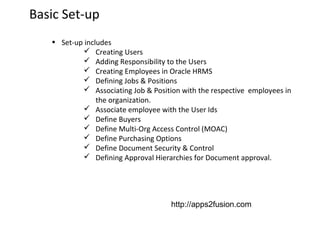
Basic Set-up
• Set-up includes
 Creating Users
 Adding Responsibility to the Users
 Creating Employees in Oracle HRMS
 Defining Jobs & Positions
 Associating Job & Position with the respective employees in
the organization.
 Associate employee with the User Ids
 Define Buyers
 Define Multi-Org Access Control (MOAC)
 Define Purchasing Options
 Define Document Security & Control
 Defining Approval Hierarchies for Document approval.

http://apps2fusion.com
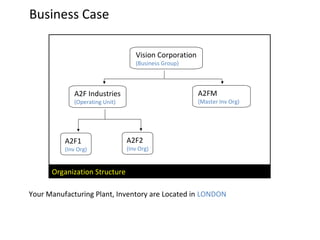
Business Case
Vision Corporation
(Business Group)

A2FM

A2F Industries

(Master Inv Org)

(Operating Unit)

A2F1

(Inv Org)

A2F2

(Inv Org)

Organization Structure
Your Manufacturing Plant, Inventory are Located in LONDON
Basic Set-up
• Set-up includes
 Define Document Styles
 Controlling Purchasing Periods
 Define UOM’s & Its Conversions
 Defining Items in Oracle Inventory.
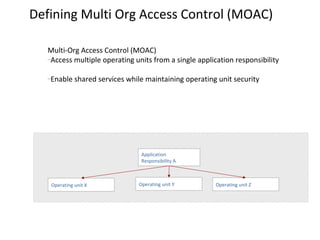
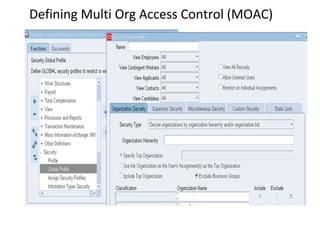
Defining Multi Org Access Control (MOAC)
Multi-Org Access Control (MOAC)
–Access multiple operating units from a single application responsibility
–Enable shared services while

maintaining operating unit security

Application
Responsibility A

Operating unit X

Operating unit Y

Operating unit Z
Defining Multi Org Access Control (MOAC)
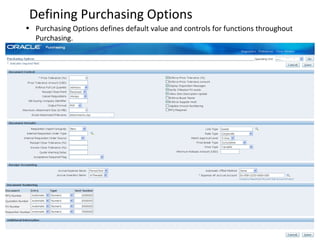
Defining Purchasing Options
• Purchasing Options defines default value and controls for functions throughout
Purchasing.
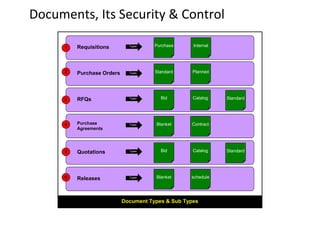
Documents, Its Security & Control
1

Requisitions

Types

Purchase

Internal

2

Purchase Orders

Types

Standard

Planned

3

RFQs

Types

Bid

Catalog

4

Purchase
Agreements

Types

Blanket

Contract

5

Quotations

Types

Bid

Catalog

6

Releases

Types

Blanket

schedule

Document Types & Sub Types

Standard

Standard
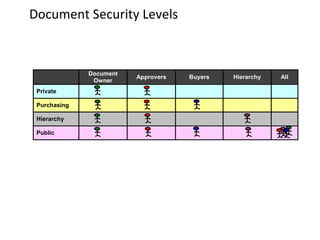
Document Security Levels

Document
Owner
Private
Purchasing
Hierarchy
Public

Approvers

Buyers

Hierarchy

All
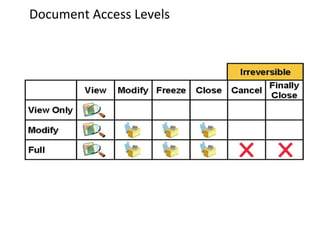
Document Access Levels
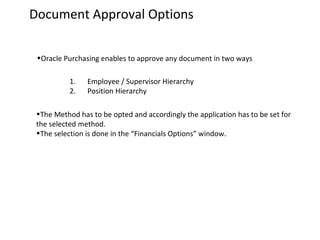
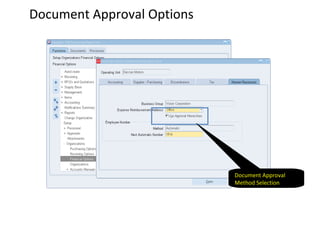
Document Approval Options
•Oracle Purchasing enables to approve any document in two ways
1.
2.

Employee / Supervisor Hierarchy
Position Hierarchy

•The Method has to be opted and accordingly the application has to be set for
the selected method.
•The selection is done in the “Financials Options” window.
Document Approval Options

Document Approval
Method Selection
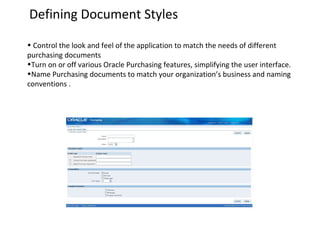
Defining Document Styles
• Control the look and feel of the application to match the needs of different
purchasing documents
•Turn on or off various Oracle Purchasing features, simplifying the user interface.
•Name Purchasing documents to match your organization’s business and naming
conventions .
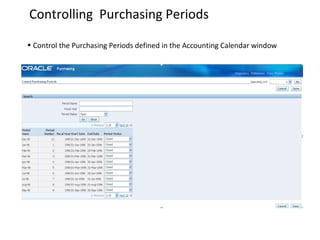
Controlling Purchasing Periods
• Control the Purchasing Periods defined in the Accounting Calendar window
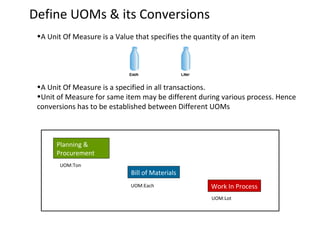
Define UOMs & its Conversions
•A Unit Of Measure is a Value that specifies the quantity of an item

•A Unit Of Measure is a specified in all transactions.
•Unit of Measure for same item may be different during various process. Hence
conversions has to be established between Different UOMs

Planning &
Procurement
UOM:Ton

Bill of Materials
UOM:Each

Work In Process
UOM:Lot
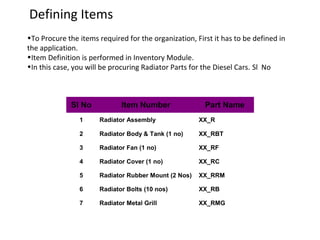
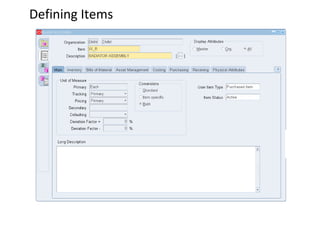
Defining Items
•To Procure the items required for the organization, First it has to be defined in
the application.
•Item Definition is performed in Inventory Module.
•In this case, you will be procuring Radiator Parts for the Diesel Cars. Sl No

Sl No

Item Number

Part Name

1

Radiator Assembly

XX_R

2

Radiator Body & Tank (1 no)

XX_RBT

3

Radiator Fan (1 no)

XX_RF

4

Radiator Cover (1 no)

XX_RC

5

Radiator Rubber Mount (2 Nos)

XX_RRM

6

Radiator Bolts (10 nos)

XX_RB

7

Radiator Metal Grill

XX_RMG
Defining Items
Supplier &
Supplier Lists
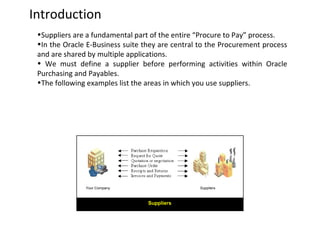
Introduction
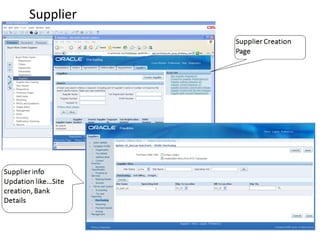
•Suppliers are a fundamental part of the entire “Procure to Pay” process.
•In the Oracle E-Business suite they are central to the Procurement process
and are shared by multiple applications.
• We must define a supplier before performing activities within Oracle
Purchasing and Payables.
•The following examples list the areas in which you use suppliers.

Your Company

Suppliers

Suppliers
Supplier
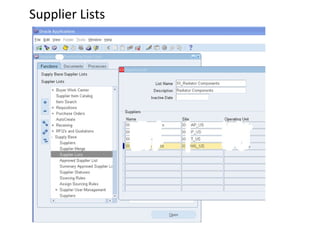
Supplier Lists
•Oracle Purchasing allows to create a supplier lists according to criteria we define,
such as an item, manufacturing category, geographic location, or others.
•We can combine supplier lists to produce many copies of our RFQ automatically.
•Defining a Supplier List is completely optional.
•If you routinely send RFQs to the same group of suppliers, it makes sense to set
up a Supplier List.
•When you create a RFQ, you can copy one or more of your suppliers defined in
your Supplier List to your RFQ
Supplier Lists
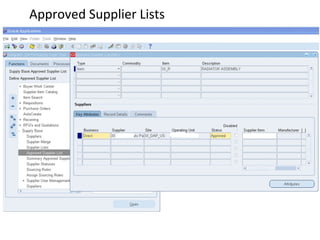
Approved Supplier Lists
•All procurement organizations maintain lists that associate the items and services
they buy with the companies who supply them, either formally or informally.
•Data stored in a controlled.
•Global repository containing relevant details about each ship-from/ ship-to/item
relationship, is knows as an Approved Supplier List (ASL).
•This repository includes information about all ASL suppliers with their business
status like Approved, Debarred or New
Approved Supplier Lists
Professional Buyer’s Work Center
Professional Buyer’s Work Center (PBWC)
The Professional Buyer’s Work Center is a web-based workbench from which
buyer can efficiently perform many of their daily tasks:
•View and act upon requisition demand
•Create and manage purchase orders
•Create and manage purchase agreements
•Run negotiation events including auctions and RFxs
•Manage supplier information
•Manage contract deliverables
PBWC - Benefits
Increase productivity:
•Optimized for shared service centers
•Streamlined interface increase efficiency
•Seeded views for faster access of information
•Custom views for access to information and to personally prioritize tasks
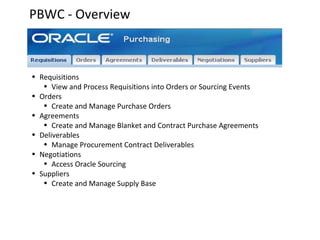
PBWC - Overview

• Requisitions
• View and Process Requisitions into Orders or Sourcing Events
• Orders
• Create and Manage Purchase Orders
• Agreements
• Create and Manage Blanket and Contract Purchase Agreements
• Deliverables
• Manage Procurement Contract Deliverables
• Negotiations
• Access Oracle Sourcing
• Suppliers
• Create and Manage Supply Base
PBWC – Requisition Management
A streamlined HTML user interface to look up and act upon requisitions:
•Create purchase orders and solicitations for bids
•Return requisition lines to requestors
•Reassign requisition lines to other buyers
•Split requisition lines in order to source from multiple suppliers
•Replace one-off non-catalog requests with catalog items
•View draft, approved, and processed requisitions
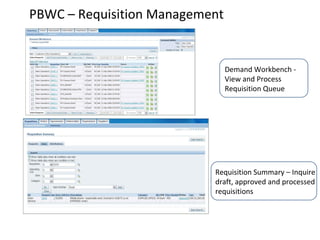
PBWC – Requisition Management

Demand Workbench View and Process
Requisition Queue

Requisition Summary – Inquire
draft, approved and processed
requisitions
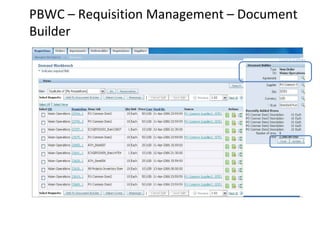
PBWC – Requisition Management – Document
Builder
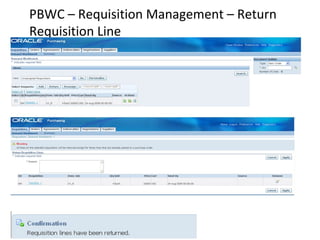
PBWC – Requisition Management – Return
Requisition Line
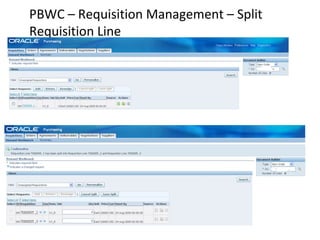
PBWC – Requisition Management – Split
Requisition Line
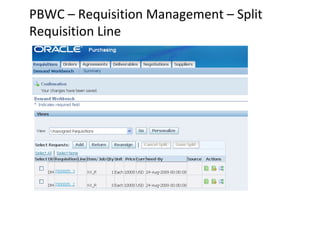
PBWC – Requisition Management – Split
Requisition Line
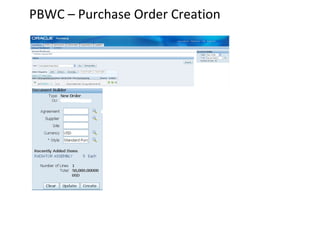
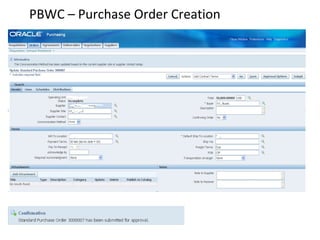
PBWC – Purchase Order Creation
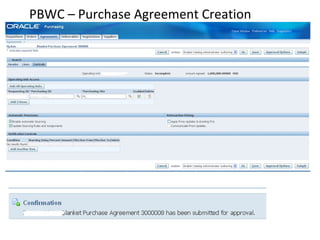
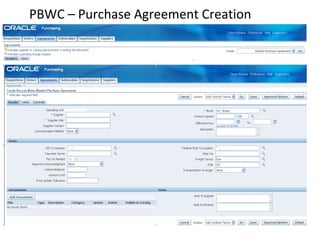
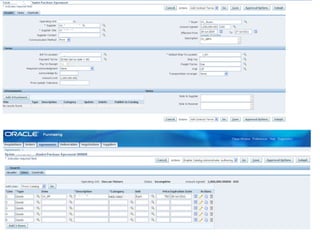
PBWC – Purchase Agreement Creation

R12 purchasing presentation oa

  • 1.
  • 2.
    Basic Set-up • Set-upincludes  Creating Users  Adding Responsibility to the Users  Creating Employees in Oracle HRMS  Defining Jobs & Positions  Associating Job & Position with the respective employees in the organization.  Associate employee with the User Ids  Define Buyers  Define Multi-Org Access Control (MOAC)  Define Purchasing Options  Define Document Security & Control  Defining Approval Hierarchies for Document approval. http://apps2fusion.com
  • 3.
    Business Case Vision Corporation (BusinessGroup) A2FM A2F Industries (Master Inv Org) (Operating Unit) A2F1 (Inv Org) A2F2 (Inv Org) Organization Structure Your Manufacturing Plant, Inventory are Located in LONDON
  • 4.
    Basic Set-up • Set-upincludes  Define Document Styles  Controlling Purchasing Periods  Define UOM’s & Its Conversions  Defining Items in Oracle Inventory.
  • 5.
    Defining Multi OrgAccess Control (MOAC) Multi-Org Access Control (MOAC) –Access multiple operating units from a single application responsibility –Enable shared services while maintaining operating unit security Application Responsibility A Operating unit X Operating unit Y Operating unit Z
  • 6.
    Defining Multi OrgAccess Control (MOAC)
  • 7.
    Defining Purchasing Options •Purchasing Options defines default value and controls for functions throughout Purchasing.
  • 8.
    Documents, Its Security& Control 1 Requisitions Types Purchase Internal 2 Purchase Orders Types Standard Planned 3 RFQs Types Bid Catalog 4 Purchase Agreements Types Blanket Contract 5 Quotations Types Bid Catalog 6 Releases Types Blanket schedule Document Types & Sub Types Standard Standard
  • 9.
  • 10.
  • 11.
    Document Approval Options •OraclePurchasing enables to approve any document in two ways 1. 2. Employee / Supervisor Hierarchy Position Hierarchy •The Method has to be opted and accordingly the application has to be set for the selected method. •The selection is done in the “Financials Options” window.
  • 12.
    Document Approval Options DocumentApproval Method Selection
  • 13.
    Defining Document Styles •Control the look and feel of the application to match the needs of different purchasing documents •Turn on or off various Oracle Purchasing features, simplifying the user interface. •Name Purchasing documents to match your organization’s business and naming conventions .
  • 14.
    Controlling Purchasing Periods •Control the Purchasing Periods defined in the Accounting Calendar window
  • 15.
    Define UOMs &its Conversions •A Unit Of Measure is a Value that specifies the quantity of an item •A Unit Of Measure is a specified in all transactions. •Unit of Measure for same item may be different during various process. Hence conversions has to be established between Different UOMs Planning & Procurement UOM:Ton Bill of Materials UOM:Each Work In Process UOM:Lot
  • 16.
    Defining Items •To Procurethe items required for the organization, First it has to be defined in the application. •Item Definition is performed in Inventory Module. •In this case, you will be procuring Radiator Parts for the Diesel Cars. Sl No Sl No Item Number Part Name 1 Radiator Assembly XX_R 2 Radiator Body & Tank (1 no) XX_RBT 3 Radiator Fan (1 no) XX_RF 4 Radiator Cover (1 no) XX_RC 5 Radiator Rubber Mount (2 Nos) XX_RRM 6 Radiator Bolts (10 nos) XX_RB 7 Radiator Metal Grill XX_RMG
  • 17.
  • 18.
  • 19.
    Introduction •Suppliers are afundamental part of the entire “Procure to Pay” process. •In the Oracle E-Business suite they are central to the Procurement process and are shared by multiple applications. • We must define a supplier before performing activities within Oracle Purchasing and Payables. •The following examples list the areas in which you use suppliers. Your Company Suppliers Suppliers
  • 20.
  • 21.
    Supplier Lists •Oracle Purchasingallows to create a supplier lists according to criteria we define, such as an item, manufacturing category, geographic location, or others. •We can combine supplier lists to produce many copies of our RFQ automatically. •Defining a Supplier List is completely optional. •If you routinely send RFQs to the same group of suppliers, it makes sense to set up a Supplier List. •When you create a RFQ, you can copy one or more of your suppliers defined in your Supplier List to your RFQ
  • 22.
  • 23.
    Approved Supplier Lists •Allprocurement organizations maintain lists that associate the items and services they buy with the companies who supply them, either formally or informally. •Data stored in a controlled. •Global repository containing relevant details about each ship-from/ ship-to/item relationship, is knows as an Approved Supplier List (ASL). •This repository includes information about all ASL suppliers with their business status like Approved, Debarred or New
  • 24.
  • 25.
  • 26.
    Professional Buyer’s WorkCenter (PBWC) The Professional Buyer’s Work Center is a web-based workbench from which buyer can efficiently perform many of their daily tasks: •View and act upon requisition demand •Create and manage purchase orders •Create and manage purchase agreements •Run negotiation events including auctions and RFxs •Manage supplier information •Manage contract deliverables
  • 27.
    PBWC - Benefits Increaseproductivity: •Optimized for shared service centers •Streamlined interface increase efficiency •Seeded views for faster access of information •Custom views for access to information and to personally prioritize tasks
  • 28.
    PBWC - Overview •Requisitions • View and Process Requisitions into Orders or Sourcing Events • Orders • Create and Manage Purchase Orders • Agreements • Create and Manage Blanket and Contract Purchase Agreements • Deliverables • Manage Procurement Contract Deliverables • Negotiations • Access Oracle Sourcing • Suppliers • Create and Manage Supply Base
  • 29.
    PBWC – RequisitionManagement A streamlined HTML user interface to look up and act upon requisitions: •Create purchase orders and solicitations for bids •Return requisition lines to requestors •Reassign requisition lines to other buyers •Split requisition lines in order to source from multiple suppliers •Replace one-off non-catalog requests with catalog items •View draft, approved, and processed requisitions
  • 30.
    PBWC – RequisitionManagement Demand Workbench View and Process Requisition Queue Requisition Summary – Inquire draft, approved and processed requisitions
  • 31.
    PBWC – RequisitionManagement – Document Builder
  • 32.
    PBWC – RequisitionManagement – Return Requisition Line
  • 33.
    PBWC – RequisitionManagement – Split Requisition Line
  • 34.
    PBWC – RequisitionManagement – Split Requisition Line
  • 35.
    PBWC – PurchaseOrder Creation
  • 36.
    PBWC – PurchaseOrder Creation
  • 37.
    PBWC – PurchaseAgreement Creation
  • 38.
    PBWC – PurchaseAgreement Creation
  • 39.
    PBWC – PurchaseAgreement Creation