Subinventory Transfers

(N)-> Navigation
(B)->Button
(M)->Menu

Responsibility: Inventory, Vision Operations USA

1.   (N) > Transactions > Subinventory Transfer

2.   Enter Subinventory Transfer as the Type.

3.   (B) Transaction Lines

4.   Enter the following transfer information:
             Item:                     AS18947
             Subinventory:             FGI
             Quantity:                 45
             To Subinventory:          Stores

5.   (M) File > Save

6.   (M) File > Close Form


                             InterOrg Transfers

Transacting Items

Responsibility: Inventory, Vision Operations USA

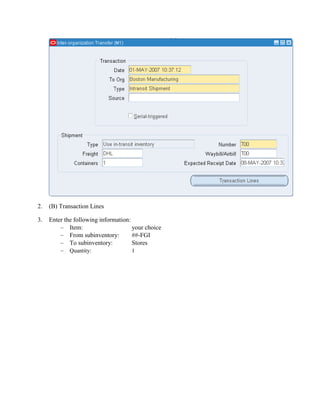
1.   Navigate to the Inter Organization Transfer Window.

        (N) Transactions > Inter-organization Transfer
            To Org:                         M2 Boston Manufacturing
            Transact Type:                  Intransit shipment
            Shipment Number:                T##
            Freight:                        DHL
            Waybill:                        T##
            Containers:                     1
            Expected Receipt date:          1 week from today.
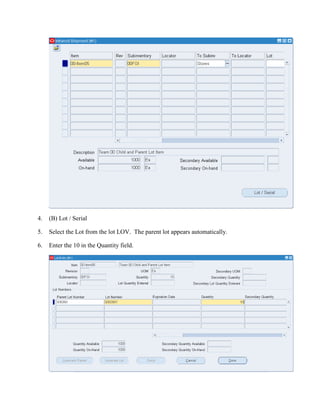
2.   (B) Transaction Lines

3.   Enter the following information:
             Item:                    your choice
             From subinventory:       ##-FGI
             To subinventory:         Stores
             Quantity:               1
4.   (B) Lot / Serial

5.   Select the Lot from the lot LOV. The parent lot appears automatically.

6.   Enter the 10 in the Quantity field.
7.   (B) Done

Viewing Transactions

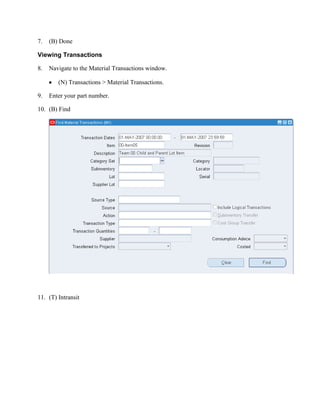
8.   Navigate to the Material Transactions window.

        (N) Transactions > Material Transactions.

9.   Enter your part number.

10. (B) Find


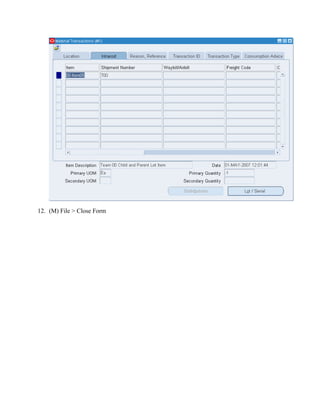
11. (T) Intransit
12. (M) File > Close Form

R12 subinventory transfer and inter org transfers

  • 1.
    Subinventory Transfers (N)-> Navigation (B)->Button (M)->Menu Responsibility:Inventory, Vision Operations USA 1. (N) > Transactions > Subinventory Transfer 2. Enter Subinventory Transfer as the Type. 3. (B) Transaction Lines 4. Enter the following transfer information: Item: AS18947 Subinventory: FGI Quantity: 45 To Subinventory: Stores 5. (M) File > Save 6. (M) File > Close Form InterOrg Transfers Transacting Items Responsibility: Inventory, Vision Operations USA 1. Navigate to the Inter Organization Transfer Window. (N) Transactions > Inter-organization Transfer To Org: M2 Boston Manufacturing Transact Type: Intransit shipment Shipment Number: T## Freight: DHL Waybill: T## Containers: 1 Expected Receipt date: 1 week from today.
  • 2.
    2. (B) Transaction Lines 3. Enter the following information: Item: your choice From subinventory: ##-FGI To subinventory: Stores Quantity: 1
  • 3.
    4. (B) Lot / Serial 5. Select the Lot from the lot LOV. The parent lot appears automatically. 6. Enter the 10 in the Quantity field.
  • 4.
    7. (B) Done Viewing Transactions 8. Navigate to the Material Transactions window. (N) Transactions > Material Transactions. 9. Enter your part number. 10. (B) Find 11. (T) Intransit
  • 5.
    12. (M) File> Close Form