R12 Upgrade Approach
        and
  Lessons Learned
 Brian Pellot, AXIA Consulting
Agenda
• Introductions

• R12 Example Projects

• The Upgrade Project

• Lessons Learned

• Major R12 Module Changes

   Please ask questions!!!!!
The Speaker
Founded in 2005, AXIA Consulting is an firm made up of Senior
Consultants averaging 15+ years of Systems Integration
experience.

AXIA has a core group of Oracle consultants currently working
with 6 clients in the region. AXIA also provides strategic
business services, project management and systems integration
services.

Brian Pellot is a senior consultant with 14 years of experience
implementing and upgrading the Oracle Applications. He is also
a past president of OVOAUG.
Current Status
•   Where is everyone now?
    • 11.5.10
    • Earlier versions

•   What modules?
    • Financials
    • Supply Chain
    • Manufacturing

•   How long have you been on Oracle?
     • >2 years
     • >5 years
     • >10 years

•   Who has been through an upgrade (i.e. 11i)?

•   Why upgrade?
    • Support
    • New functionality
    • Implementing additional modules
R12 Overview
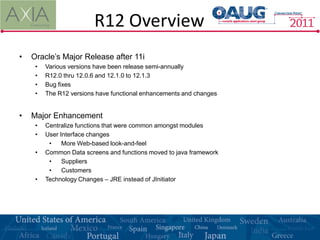
•   Oracle’s Major Release after 11i
     •   Various versions have been release semi-annually
     •   R12.0 thru 12.0.6 and 12.1.0 to 12.1.3
     •   Bug fixes
     •   The R12 versions have functional enhancements and changes


•   Major Enhancement
     •   Centralize functions that were common amongst modules
     •   User Interface changes
          •    More Web-based look-and-feel
     •   Common Data screens and functions moved to java framework
          •    Suppliers
          •    Customers
     •   Technology Changes – JRE instead of JInitiator
R12 Projects
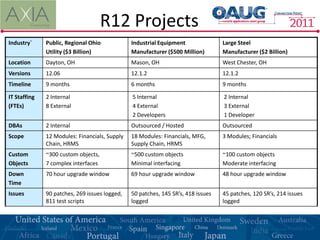
Industry`     Public, Regional Ohio            Industrial Equipment               Large Steel
              Utility ($3 Billion)             Manufacturer ($500 Million)        Manufacturer ($2 Billion)
Location      Dayton, OH                       Mason, OH                          West Chester, OH
Versions      12.06                            12.1.2                             12.1.2
Timeline      9 months                         6 months                           9 months

IT Staffing   2 Internal                       5 Internal                         2 Internal
(FTEs)        8 External                       4 External                         3 External
                                               2 Developers                       1 Developer
DBAs          2 Internal                       Outsourced / Hosted                Outsourced
Scope         12 Modules: Financials, Supply   18 Modules: Financials, MFG,       3 Modules; Financials
              Chain, HRMS                      Supply Chain, HRMS
Custom        ~300 custom objects,             ~500 custom objects                ~100 custom objects
Objects       7 complex interfaces             Minimal interfacing                Moderate interfacing
Down          70 hour upgrade window           69 hour upgrade window             48 hour upgrade window
Time
Issues        90 patches, 269 issues logged,   50 patches, 145 SR’s, 418 issues   45 patches, 120 SR’s, 214 issues
              811 test scripts                 logged                             logged
The GOAL
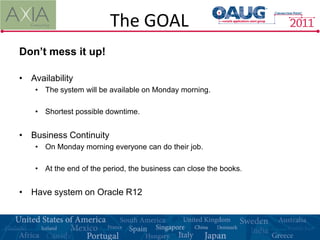
Don’t mess it up!

• Availability
    • The system will be available on Monday morning.

    • Shortest possible downtime.


• Business Continuity
    • On Monday morning everyone can do their job.

    • At the end of the period, the business can close the books.


• Have system on Oracle R12
The Approach
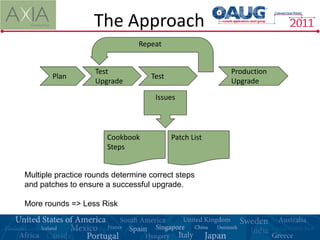
                                Repeat


                   Test                                Production
       Plan                        Test
                   Upgrade                             Upgrade

                                    Issues


                       Cookbook           Patch List
                       Steps


Multiple practice rounds determine correct steps
and patches to ensure a successful upgrade.

More rounds => Less Risk
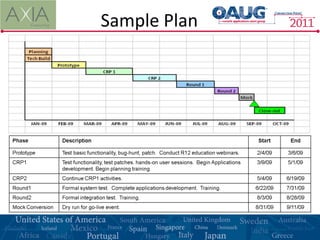
Sample Plan
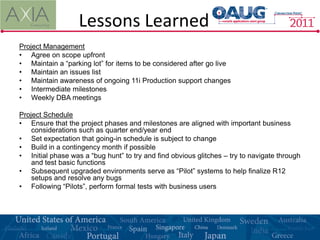
Lessons Learned
Project Management
• Agree on scope upfront
• Maintain a “parking lot” for items to be considered after go live
• Maintain an issues list
• Maintain awareness of ongoing 11i Production support changes
• Intermediate milestones
• Weekly DBA meetings

Project Schedule
• Ensure that the project phases and milestones are aligned with important business
    considerations such as quarter end/year end
• Set expectation that going-in schedule is subject to change
• Build in a contingency month if possible
• Initial phase was a “bug hunt” to try and find obvious glitches – try to navigate through
    and test basic functions
• Subsequent upgraded environments serve as “Pilot” systems to help finalize R12
    setups and resolve any bugs
• Following “Pilots”, perform formal tests with business users
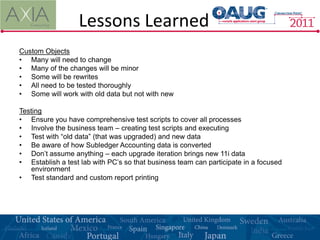
Lessons Learned
Custom Objects
• Many will need to change
• Many of the changes will be minor
• Some will be rewrites
• All need to be tested thoroughly
• Some will work with old data but not with new

Testing
• Ensure you have comprehensive test scripts to cover all processes
• Involve the business team – creating test scripts and executing
• Test with “old data” (that was upgraded) and new data
• Be aware of how Subledger Accounting data is converted
• Don’t assume anything – each upgrade iteration brings new 11i data
• Establish a test lab with PC’s so that business team can participate in a focused
   environment
• Test standard and custom report printing
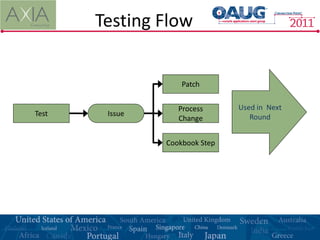
Testing Flow


                    Patch


                   Process      Used in Next
Test    Issue                      Round
                   Change


                Cookbook Step
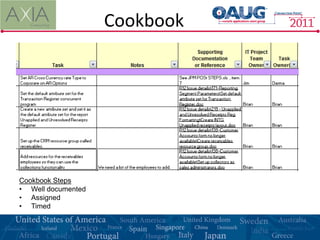
Cookbook


Cookbook Steps
• Well documented
• Assigned
• Timed
Lessons Learned
Patching
• Take the most recent CPC (critical patch collections) proactively at the start of the
   project
• Evaluate timing of other CPCs and new releases as the project progresses
• Track every patch applied in every environment
    - you won’t want to take all of them forward
    - Important to know what’s where if you have more than one instance
• Set a “patch freeze” date prior to the cutover event
• Be aware of patches for a single bug that might contain additional bug fixes. If “one
   off” patches are unavailable, you must re-test all affected files.
• List of specific patches for specific issues can be provided

Training
• Depends on number of users, number of testers, use of modules
• Some modules had no training – HR
• Some had full classroom training – AP, Inv
• Some fell in the middle – GL, AR
• Some do remedial training
Lessons Learned
If you have interfaces consider this carefully! Oracle will be (partially) down.

Interface Plan
• What systems will be affected by downtime?
      • Linked systems
      • Interface files to those systems.

•   ODBC links/users – turn them off – The DB will be up!

•   Process every file and every transaction
     • Once and
     • Only once
     • Will there be format changes or program changes?

•   Mitigate the impacts

•   Assign specific actions for each interface
     • Who will process files?
     • When will the files be processed?
     • Who needs to know about what affect to what systems?
Lessons Learned
Cutover Event
• Cutover planning starts early in the project
• Communicate, Communicate, Communicate –
     •   No surprises
     •   Assume nothing
•   “Cutover Plan” - instructions should be detailed enough that others could do the steps
    in someone’s absence
•   Assign the steps – consider passwords and responsibilities (security)
•   Practice the steps with each technical upgrade
•   Time the steps, automate if possible using Dataloader, SQL, FNDLOAD
•   Develop communication plan, fallback plan, 24x7 contact list (including key third-party
    vendors), Go/no-go decision support
•   Allow time for business team to do some basic testing before the system is open for
    business on the first day after cutover
•   Manage the impact to interfaced systems (inbound and outbound)

                 This is what we’ve
                 trained for people!
Lessons Learned
Experience
• Companies considering an upgrade have experienced Oracle Application teams.

•   Find someone experienced with the upgrade.

•   The upgrades get quicker and less risky as more upgrade experienced people
    become available to help.

•   Experienced people should provide a head start.
          • Cookbook
          • Patch lists
          • Key risk areas – what to test first
          • Coding change examples
          • XML Template examples (checks and other payment documents)
          • Templates for other project deliverables
              • Project plan
              • Impact documents
              • Starting points for cutover plan
Results
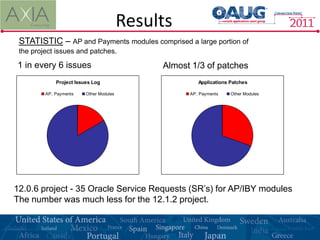
 STATISTIC – AP and Payments modules comprised a large portion of
 the project issues and patches.

1 in every 6 issues                           Almost 1/3 of patches
             Project Issues Log                        Applications Patches

         AP, Payments    Other Modules              AP, Payments    Other Modules


12.0.6 project - 35 Oracle Service Requests (SR’s) for AP/IBY modules
The number was much less for the 12.1.2 project.
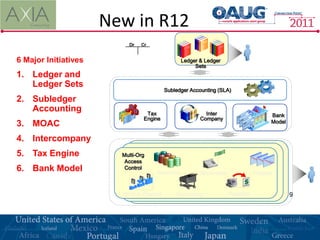
New in R12
                          Dr   Cr


6 Major Initiatives                              General & Ledger
                                                 Ledger Ledger
                                                       Sets
1. Ledger and
   Ledger Sets
                                          Subledger Accounting (SLA)
2. Subledger
   Accounting                    Tax                       Inter                      Bank
                                Engine                   Company
                                                                                      Model
3. MOAC
4. Intercompany
5. Tax Engine           Multi-Org
                         Access
6. Bank Model            Control
                                     Inventory           Receivables           Projects


                        Work in Process       Purchasing            Payables                  19
Major Changes
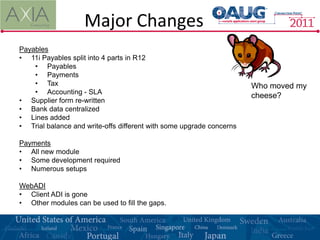
Payables
• 11i Payables split into 4 parts in R12
    • Payables
    • Payments
    • Tax                                                             Who moved my
    • Accounting - SLA
                                                                      cheese?
• Supplier form re-written
• Bank data centralized
• Lines added
• Trial balance and write-offs different with some upgrade concerns

Payments
• All new module
• Some development required
• Numerous setups

WebADI
• Client ADI is gone
• Other modules can be used to fill the gaps.
Major Changes
Subledger Accounting
• Create accounting process added to all financial modules
• Affects GL Drill-back
• Some date idiosyncrasies
• Powerful capabilities available (but not required)
• One accounting method change means full new method – decide early

EBTax
• Regime will upgrade but don’t use it!
    • Not supported
    • Not extendable
    • Difficult to use
• Set up a new regime
• Good time to go to a 3rd party provider
• Lots of power – lots of learning

Printing Architecture and BI Publisher
• PASTA is available but not exact
• Some reports need to be opened and printed from Adobe
Questions?

For more information, please contact:


                           Brian Pellot
                        AXIA Consulting
                 Brian.Pellot@axiaconsulting.net

                   http://www.axiaconsulting.net

Oracle R12 Upgrade Lessons Learned

  • 1.
    R12 Upgrade Approach and Lessons Learned Brian Pellot, AXIA Consulting
  • 2.
    Agenda • Introductions • R12Example Projects • The Upgrade Project • Lessons Learned • Major R12 Module Changes Please ask questions!!!!!
  • 3.
    The Speaker Founded in2005, AXIA Consulting is an firm made up of Senior Consultants averaging 15+ years of Systems Integration experience. AXIA has a core group of Oracle consultants currently working with 6 clients in the region. AXIA also provides strategic business services, project management and systems integration services. Brian Pellot is a senior consultant with 14 years of experience implementing and upgrading the Oracle Applications. He is also a past president of OVOAUG.
  • 4.
    Current Status • Where is everyone now? • 11.5.10 • Earlier versions • What modules? • Financials • Supply Chain • Manufacturing • How long have you been on Oracle? • >2 years • >5 years • >10 years • Who has been through an upgrade (i.e. 11i)? • Why upgrade? • Support • New functionality • Implementing additional modules
  • 5.
    R12 Overview • Oracle’s Major Release after 11i • Various versions have been release semi-annually • R12.0 thru 12.0.6 and 12.1.0 to 12.1.3 • Bug fixes • The R12 versions have functional enhancements and changes • Major Enhancement • Centralize functions that were common amongst modules • User Interface changes • More Web-based look-and-feel • Common Data screens and functions moved to java framework • Suppliers • Customers • Technology Changes – JRE instead of JInitiator
  • 6.
    R12 Projects Industry` Public, Regional Ohio Industrial Equipment Large Steel Utility ($3 Billion) Manufacturer ($500 Million) Manufacturer ($2 Billion) Location Dayton, OH Mason, OH West Chester, OH Versions 12.06 12.1.2 12.1.2 Timeline 9 months 6 months 9 months IT Staffing 2 Internal 5 Internal 2 Internal (FTEs) 8 External 4 External 3 External 2 Developers 1 Developer DBAs 2 Internal Outsourced / Hosted Outsourced Scope 12 Modules: Financials, Supply 18 Modules: Financials, MFG, 3 Modules; Financials Chain, HRMS Supply Chain, HRMS Custom ~300 custom objects, ~500 custom objects ~100 custom objects Objects 7 complex interfaces Minimal interfacing Moderate interfacing Down 70 hour upgrade window 69 hour upgrade window 48 hour upgrade window Time Issues 90 patches, 269 issues logged, 50 patches, 145 SR’s, 418 issues 45 patches, 120 SR’s, 214 issues 811 test scripts logged logged
  • 7.
    The GOAL Don’t messit up! • Availability • The system will be available on Monday morning. • Shortest possible downtime. • Business Continuity • On Monday morning everyone can do their job. • At the end of the period, the business can close the books. • Have system on Oracle R12
  • 8.
    The Approach Repeat Test Production Plan Test Upgrade Upgrade Issues Cookbook Patch List Steps Multiple practice rounds determine correct steps and patches to ensure a successful upgrade. More rounds => Less Risk
  • 9.
  • 10.
    Lessons Learned Project Management •Agree on scope upfront • Maintain a “parking lot” for items to be considered after go live • Maintain an issues list • Maintain awareness of ongoing 11i Production support changes • Intermediate milestones • Weekly DBA meetings Project Schedule • Ensure that the project phases and milestones are aligned with important business considerations such as quarter end/year end • Set expectation that going-in schedule is subject to change • Build in a contingency month if possible • Initial phase was a “bug hunt” to try and find obvious glitches – try to navigate through and test basic functions • Subsequent upgraded environments serve as “Pilot” systems to help finalize R12 setups and resolve any bugs • Following “Pilots”, perform formal tests with business users
  • 11.
    Lessons Learned Custom Objects •Many will need to change • Many of the changes will be minor • Some will be rewrites • All need to be tested thoroughly • Some will work with old data but not with new Testing • Ensure you have comprehensive test scripts to cover all processes • Involve the business team – creating test scripts and executing • Test with “old data” (that was upgraded) and new data • Be aware of how Subledger Accounting data is converted • Don’t assume anything – each upgrade iteration brings new 11i data • Establish a test lab with PC’s so that business team can participate in a focused environment • Test standard and custom report printing
  • 12.
    Testing Flow Patch Process Used in Next Test Issue Round Change Cookbook Step
  • 13.
    Cookbook Cookbook Steps • Welldocumented • Assigned • Timed
  • 14.
    Lessons Learned Patching • Takethe most recent CPC (critical patch collections) proactively at the start of the project • Evaluate timing of other CPCs and new releases as the project progresses • Track every patch applied in every environment - you won’t want to take all of them forward - Important to know what’s where if you have more than one instance • Set a “patch freeze” date prior to the cutover event • Be aware of patches for a single bug that might contain additional bug fixes. If “one off” patches are unavailable, you must re-test all affected files. • List of specific patches for specific issues can be provided Training • Depends on number of users, number of testers, use of modules • Some modules had no training – HR • Some had full classroom training – AP, Inv • Some fell in the middle – GL, AR • Some do remedial training
  • 15.
    Lessons Learned If youhave interfaces consider this carefully! Oracle will be (partially) down. Interface Plan • What systems will be affected by downtime? • Linked systems • Interface files to those systems. • ODBC links/users – turn them off – The DB will be up! • Process every file and every transaction • Once and • Only once • Will there be format changes or program changes? • Mitigate the impacts • Assign specific actions for each interface • Who will process files? • When will the files be processed? • Who needs to know about what affect to what systems?
  • 16.
    Lessons Learned Cutover Event •Cutover planning starts early in the project • Communicate, Communicate, Communicate – • No surprises • Assume nothing • “Cutover Plan” - instructions should be detailed enough that others could do the steps in someone’s absence • Assign the steps – consider passwords and responsibilities (security) • Practice the steps with each technical upgrade • Time the steps, automate if possible using Dataloader, SQL, FNDLOAD • Develop communication plan, fallback plan, 24x7 contact list (including key third-party vendors), Go/no-go decision support • Allow time for business team to do some basic testing before the system is open for business on the first day after cutover • Manage the impact to interfaced systems (inbound and outbound) This is what we’ve trained for people!
  • 17.
    Lessons Learned Experience • Companiesconsidering an upgrade have experienced Oracle Application teams. • Find someone experienced with the upgrade. • The upgrades get quicker and less risky as more upgrade experienced people become available to help. • Experienced people should provide a head start. • Cookbook • Patch lists • Key risk areas – what to test first • Coding change examples • XML Template examples (checks and other payment documents) • Templates for other project deliverables • Project plan • Impact documents • Starting points for cutover plan
  • 18.
    Results STATISTIC –AP and Payments modules comprised a large portion of the project issues and patches. 1 in every 6 issues Almost 1/3 of patches Project Issues Log Applications Patches AP, Payments Other Modules AP, Payments Other Modules 12.0.6 project - 35 Oracle Service Requests (SR’s) for AP/IBY modules The number was much less for the 12.1.2 project.
  • 19.
    New in R12 Dr Cr 6 Major Initiatives General & Ledger Ledger Ledger Sets 1. Ledger and Ledger Sets Subledger Accounting (SLA) 2. Subledger Accounting Tax Inter Bank Engine Company Model 3. MOAC 4. Intercompany 5. Tax Engine Multi-Org Access 6. Bank Model Control Inventory Receivables Projects Work in Process Purchasing Payables 19
  • 20.
    Major Changes Payables • 11iPayables split into 4 parts in R12 • Payables • Payments • Tax Who moved my • Accounting - SLA cheese? • Supplier form re-written • Bank data centralized • Lines added • Trial balance and write-offs different with some upgrade concerns Payments • All new module • Some development required • Numerous setups WebADI • Client ADI is gone • Other modules can be used to fill the gaps.
  • 21.
    Major Changes Subledger Accounting •Create accounting process added to all financial modules • Affects GL Drill-back • Some date idiosyncrasies • Powerful capabilities available (but not required) • One accounting method change means full new method – decide early EBTax • Regime will upgrade but don’t use it! • Not supported • Not extendable • Difficult to use • Set up a new regime • Good time to go to a 3rd party provider • Lots of power – lots of learning Printing Architecture and BI Publisher • PASTA is available but not exact • Some reports need to be opened and printed from Adobe
  • 22.
    Questions? For more information,please contact: Brian Pellot AXIA Consulting Brian.Pellot@axiaconsulting.net http://www.axiaconsulting.net