Purchasing Training Oracle Applications 11i.5.10 Dharmalingam K S
Topics to be covered Overview of Oracle Purchasing Setting Up Purchasing Requisitions   AutoCreate Request for Quotations / Quotations Purchase Orders Receiving  Supply Base Management Document Controls Purchase Encumbrance
Overview of Oracle Purchasing
Product Integration Overview Oracle Payables Oracle General Ledger Oracle Supplier Scheduling Oracle Assets Oracle Bill of Material Oracle Cost Management Oracle Inventory Oracle Master Scheduling/MRP Oracle Order Management Oracle Work in Process Oracle Human Resources Oracle Project Accounting Oracle Purchasing Oracle Self Service  Purchasing e-Commerce Gateway
Interface with other modules
Flexible Accounting Shared Human Resources information Seamless integration with other modules Automatic document Creation Comprehensive Security features with Flexible options Workflow enabled routing of Documents (Requisitions, Purchase Orders) Consolidation of Requisitions based on various parameters Ability to interface Electronic Price / Item Catalog Online Funds Check availability against Budgets External documents attachment to Requisition, PO’s, Receipts Purchasing Key Features
Purchasing Module -Features Comprehensive Procurement Solution Supports Centralized Purchasing Streamlined and Automated processing Reduction in paper flow as all purchasing documents can be routed online Integration with Oracle Inventory and Payables
Critical Steps in Purchasing Implementation Integration points with other Oracle products Required set up steps for Oracle Purchasing
Key Purchasing Dependencies Oracle Human Resources Oracle Purchasing Oracle Payables Oracle General Ledger Oracle Inventory
Required Setup Steps Common to all Oracle Applications Set Up System Administrator  Define Accounting Key Flexfields Set Up Calendars, Currencies, and Set of Books Define Human Resources Key Flexfields Define Locations Define Organizations and Organization Relationships
Required Setup Steps Common to all Manufacturing Applications Define Inventory Key Flexfields Define Units of Measure Define Item Attributes, Codes, and Templates Define Categories Set Up Personnel Set Up Oracle Workflow Open Inventory and Purchasing Accounting Periods
Purchasing Cycle Requisition Purchase Dept. Supplier Requestor Inventory Catalog Request for  Quotation Quotation Purchase Order
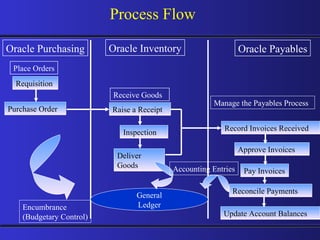
Process Flow  Oracle Purchasing Oracle Inventory Oracle Payables Requisition Purchase Order Raise a Receipt Inspection Deliver Goods Record Invoices Received Approve Invoices Pay Invoices Reconcile Payments Update Account Balances Place Orders Receive Goods  Manage the Payables Process Encumbrance (Budgetary Control) General Ledger Accounting Entries
Setting Up Purchasing
Define Human Resources Key Flexfields Accounting Set up Set Up Personnel Set Up Tax Codes Define Financial Options  Define Purchasing Options Define Receiving Options Set Up Approval Information Define Buyers  Important Setup Steps
Define Line Types  Payment Terms Define Document Types Purchased Item Attributes Set Up Transaction Managers and Resubmission Intervals Define Suppliers Look up Codes Set Up Automatic Sourcing Define System & User Profiles  Open Inventory and Purchasing Accounting Periods    Important Setup Steps
Shared information Integrating with Human Resources Define Job & Position Flexfields Oracle Human Resources Oracle Purchasing Employee information Jobs Positions
Set Up Personnel Define Jobs Define Positions Define Position  Hierarchies Fill Employee Hierarchy
Chief Executive Officer Vice President, Manufacturing Vice President, Engineering Director, Materials Management Director, Systems Design Manager, Mfg. Purchasing Manager, Inventory Control Engineer 1 Buyer/ Planner 1 Buyer/ Planner 2 Executive Officer Vice President Vice President Director Director Engineer Manager Manager Buyer/ Planner Buyer/ Planner Position Hierarchy Position Job Legend
Accounting Setup for Oracle Purchasing Types of accounting periods Defining your accounting calendar Define foreign currencies Creating types of conversion rates Entering daily conversion rates
Accounting Setup for Oracle Purchasing Set of books  Accrual options Defining accounts Charge accounts Receiving accrual account  Rate variance gain and loss accounts
Set Up Tax Codes Define Tax Name Provide Rate Provide Recovery Rate
Define Financial Options Accounting Supplier Entry Supplier- Purchasing Supplier- Payables Encumbrance Tax Human Resources
Define Purchasing Options Accrual Options Control Options Default Options Internal Requisition  Options Numbering Options Tax Default Options
Define Receiving Options  Receipt Date Control Over Receipt Control Miscellaneous  Options Receipt Routing Receipt Numbering Receipt Account
Purchasing Options Affecting Receiving Receiving Control Invoice Matching Invoice Close Tolerance Receipt Close Tolerance  Receipt Close Point Expense Accrual Point Purchasing Options Region Default Default Default Control Accrual
Set Up Approval Information Define Approval  Groups Assign Approval  Groups Define Document Controls
Document Approval: Approval Authorization Standard Purchase Order Blanket Agreement Internal Requisition Blanket Release Planned Purchase Order Contract Purchase Order Purchase Requisition Scheduled Release Position or Job Rule(s) Rule(s) Rule(s) Rule(s) Rule(s) Rule(s) Rule(s) Rule(s) Authorization Rules Document Total Account Range Item Category Range Item Range Location
Document Security: Security Level.. Private Purchasing Oracle Purchasing Buyers Designated Approvers Document Owner Document Owner Designated  Approvers Requisition RFQ Quotation Purchase Order
Document Security: Security Level Hierarchy Public Document Owner Document Owner All Employees Designated Approvers Security Hierarchy
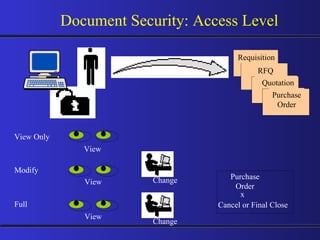
Document Security: Access Level View Only Modify Cancel or Final Close Change Full Change Purchase Order x View View View Requisition RFQ Quotation Purchase Order
Define Buyers Employee Item Category Ship-To-Location
Define Line Types Value Basis Defaults Category Receipt Required Receipt Closed
Payment Terms determines the due dates of an Invoice along with Term Date Basis Payment Terms also help in calculating the amount due, if discounts are applicable. Create multiple Payment Terms as per Business Requirement Define Split Payment Terms Payment Terms
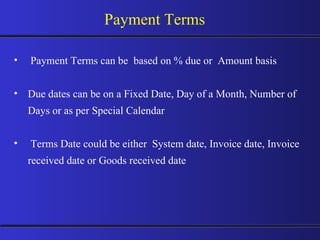
Payment Terms can be  based on % due or  Amount basis Due dates can be on a Fixed Date, Day of a Month, Number of Days or as per Special Calendar Terms Date could be either  System date, Invoice date, Invoice received date or Goods received date Payment Terms
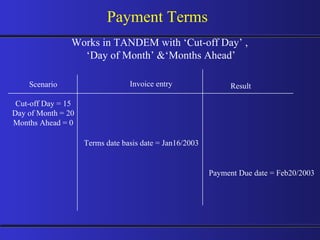
Payment Terms Scenario Cut-off Day = 15 Day of Month = 20 Months Ahead = 0 Works in TANDEM with ‘Cut-off Day’ ,  ‘ Day of Month’ &‘Months Ahead’ Payment Due date = Feb20/2003 Terms date basis date = Jan16/2003 Invoice entry Result
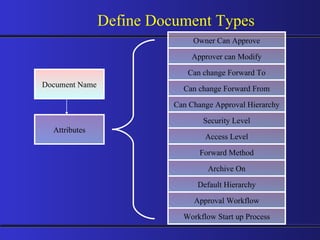
Define Document Types Document Name Attributes Approver can Modify Can change Forward To Owner Can Approve Approval Workflow Can change Forward From Default Hierarchy Archive On Forward Method Access Level Can Change Approval Hierarchy Security Level Workflow Start up Process
Setup of Inventory Item Attributes to be Used by Purchasing Purchased item Purchasable Default buyer List price Internal orders Market price Yes or No Yes  User defined User defined Yes User defined Attribute Values
Set Up Transaction Managers Receiving Transaction Manager Define  Resubmission Levels Document Approval Manager
Supplier Setup Supplier setup requirements and options enable you to: Define supplier data that will default to all documents Create lists from which to choose when entering data Setup requirements and options
Importance of Supplier Setup Supplier Payment Purchase order Request for quote (RFQ) Receipts Purchase requisition Quotation Returns
Paris Washington, D.C. Global Industries, Ltd. Overview of Suppliers Supplier Supplier Site Contact Chicago
Washington, D.C. Payment method Terms and conditions Supplier Sites Purchase & Pay site RFQ Only site Purchasing site Not available for ordering or payments. Payment method Terms and conditions Paris Chicago
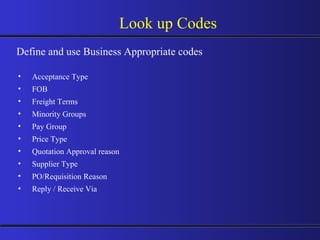
Look up Codes Acceptance Type FOB Freight Terms Minority Groups Pay Group Price Type Quotation Approval reason Supplier Type PO/Requisition Reason Reply / Receive Via  Define and use Business Appropriate codes
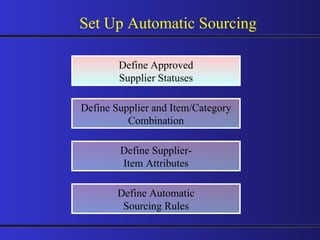
Define Approved Supplier Statuses Define Supplier and Item/Category Combination Set Up Automatic Sourcing Define Supplier- Item Attributes Define Automatic Sourcing Rules
Define Profile Options System Profiles User Profiles
Purchasing Periods share GL Calendar Purchasing Periods
Inventory Periods share GL Calendar Inventory Periods
Requisitions  Key Features Create, edit and review requisitions online. Review status and action history of your requisitions. Automatically source requisitions from open blanket purchase agreements and quotations. Utilize requisition templates for items you purchase frequently. Create internal requisitions. Distribute expenses across multiple cost centers. Route requisitions according to your approval structure.
Internal  order Where Requisitions Come From Oracle WIP Other systems Demand Manually  create Import requisitions Requesters Oracle  Inventory Oracle MRP Source? Requisitions Suppliers Oracle OM
Requisition Life Cycle
Req Document Details (Header) Preparer Document Number $200 Price Item Number/ Description Quantity $ Currency Source: Vendor / Inventory Request Details (Lines) Internal Deliver to  Locations Requestors NOV 21 Vendor Item Number Suggested Buyer Need by Date Requisition Components 1. 2. ------------------
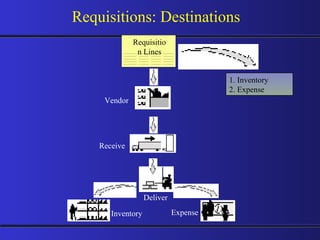
Requisitions: Destinations Requisition Lines 1. Inventory 2. Expense Vendor Receive Deliver Inventory Expense
Requisition /  Purchase Indent Enter Requisitions in the system Import Requisitions from Inventory Requisitions Requisition Pool
Requisition Preferences Preferences provide default values when creating requisitions. Speeds and simplifies creating requisitions. You can override defaults or preferences in the purchase requisition.  Preferences are only in effect for the current session.
Requisition Preferences Need-by-date Charge Account Justification Notes to Receiver/Buyer Requestor Organization Ship-to location Taxable Destination Type Project Information
Use requisition templates to simplify the process of requisitioning frequently requested items. Consists of items, pricing and Sourcing information. Requisition Templates Requisition template Requisitions
Mass Forwarding Use the Forward Documents window to forward all or selected documents awaiting approval from one approver to a new approver.  This lets you keep your documents moving when the original approver of a document is unavailable.
Internal Requisitions Enable you to request and transfer material from one inventory location to another inventory or expense location.  Requires Oracle Order Management, Oracle Shipping Execution, Oracle Inventory and Oracle Purchasing.  Oracle Purchasing Oracle  Order Mgmt
Internal Requisitions Process Flow Internal requisition Run Create Internal Sales Order Run OrderImport Internal sales order Schedule order  Pick release  Ship confirm Direct update In-transit update
AutoCreate
AutoCreate Features Complete Search Criteria Fast Purchase Order and RFQ Creation Create new / add to an existing document Split / Consolidate Requisition Lines Fast document Creation
Requisition Pool A U T O C R E A T E AutoCreate PO Release RFQ
Request for Quotations / Quotations
RFQ - Process Requisition Pool Supplier Lists Auto create Auto create Enter RFQ Print RFQ & Send to Suppliers Enter  Quotation PO RFQ Quotation
RFQ - Features Electronically Received Catalog Information Flexible Document Numbers Supplier Defaulting Supplier Purchasing Hold AutoCreating RFQ and Quotation Information Request for Quotation Requirement Supplier Lists Quote analysis & Quote approval
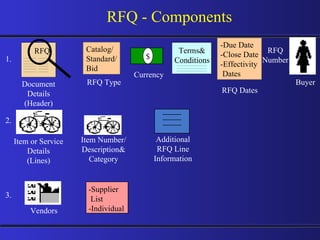
RFQ -   Components RFQ Document Details (Header) Buyer Item Number/ Description& Category $ Item or Service Details (Lines) RFQ Number RFQ Type Currency Catalog/ Standard/ Bid RFQ Dates -Due Date -Close Date -Effectivity Dates Additional RFQ Line Information Vendors -Supplier List -Individual 1. 2. 3. Terms& Conditions
RFQ and Quotation Flow Active supplier  quote  Request for quotation Quote repository Supplier 1 Supplier 2 Supplier 3 Supplier 4 Quote lines available for use in Purchase Orders
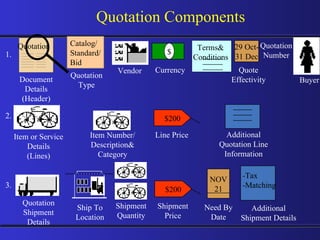
Quotation Components Quotation Document Details (Header) Item Number/ Description& Category Item or Service Details (Lines) Quotation Type Catalog/ Standard/ Bid Additional Quotation Line Information Buyer $ Quotation Number Terms& Conditions Vendor Currency 29 Oct- 31 Dec Quote Effectivity $200 Line Price NOV 21 Need By Date Ship To Location Shipment Quantity $200 Shipment Price Quotation Shipment Details Additional Shipment Details -Tax  -Matching 1. 2. 3. ------------------
Quotation Components Quotation Price Break Details Quantity Ship To Location $200 Unit Price Discount 4. ------------------
Quotation Approval Process Why ?  -  To have a Systematic Control of Approved Quote Usage - To Store Approved quotes in Supplier Catalog for future usage Enforce ?  -  Ensure Quote Approval Check   Control ?  -  Approve Quotes for Specific Usage with User defined Reason codes   Flexibility ?  -  Analyze Quotes received against Specific RFQ from different Suppliers and selectively approve Individual lines from each source
Purchase Orders
Purchase Order - Features Integrate Requisitions and Purchase Orders (PO) online Create one-time PO’s or long term agreements as required Purchase both stock  items and non-stock  items using a common process Create centralized PO’s for multiple sites and departments Support procurement strategies with foreign currency PO’s Online data management to minimize PO creation time Control PO activity Copy Purchasing Documents
Purchase Orders Sources Oracle WIP Other systems Demand Manually  created Automatically imported Create purchase orders Oracle  Inventory Oracle MRP Requisitions Requester Oracle WIP Other systems Oracle  Inventory Oracle MRP Oracle Order Mgmt
Purchase Orders Requisition Pool Auto create Enter PO Receive against PO Match Invoices In Accounts Payables PO
Purchase Order: Types A one-time commitment to purchase items or services from a single vendor. Standard  Purchase  Order Choose a standard purchase order when you require vendor commitment to  specific items/services, quantities and  delivery schedules, but a long term  agreement is not appropriate. Contract Purchase  Order A master ‘terms and  conditions’ document  for a single vendor. Associate contracts with standard purchase  order lines. Negotiate pricing on your entire volume of business. Use a contract to manage terms and conditions for this type of negotiation Document Type Description Suggested Use
Purchase Order: Types A long-term agreement allowing for stable pricing over the life of the contract  while also allowing flexible delivery schedules and order quantity commitments. Blanket agreements include items and associated price breaks. Blanket Purchase  Order Choose a blanket agreement when you’ve negotiated  volume discounts and want to create releases against these negotiated volumes, or when you commit to specific items, quantities or amounts. Planned Purchase  Order A long-term purchase agreement committing to buy items or services from a single vendor. It includes tentative delivery schedules and accounting distributions. Create scheduled release against planned purchase orders. Choose a planned purchase order when you want to encumber the order before creating releases. Also use to provide vendor scheduling for capacity management while issuing releases to confirm order commitment. Document  Type Description Suggested Use
Purchase Order: Types Document  Type Description Scheduled Release A release against a planned purchase order Blanket Release A release against a blanket purchase order
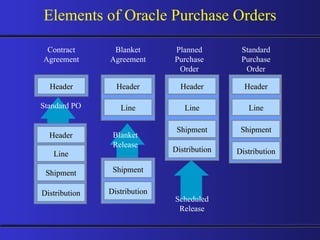
Elements of Oracle Purchase Orders Contract Agreement Header Header Line Header Line Shipment Distribution Blanket Agreement Planned Purchase Order Standard Purchase Order Shipment Distribution Blanket Release Standard PO Scheduled Release Header Line Shipment Distribution Header Line Shipment Distribution
Purchase Order Approval
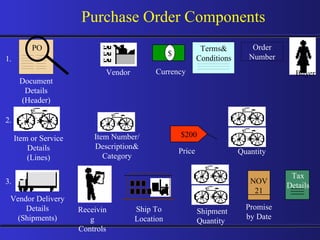
PO Document Details (Header) Buyer $200 Price Item Number/ Description& Category Quantity $ Item or Service Details (Lines) NOV 21 Promise by Date Order Number Vendor Currency Vendor Delivery Details (Shipments) Receiving Controls Ship To Location Shipment Quantity Purchase Order Components 2. 1. 3. Tax Details Terms& Conditions ------------------
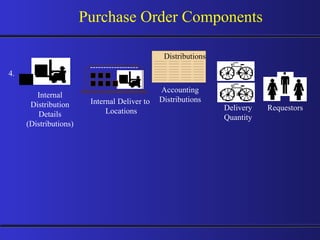
Purchase Order Components ------------------ Internal Deliver to  Locations Internal Distribution Details (Distributions) Distributions Accounting Distributions Delivery Quantity Requestors 4.
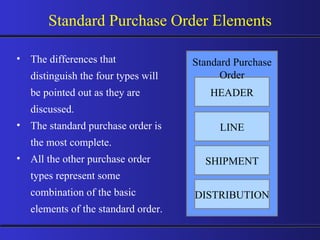
Standard Purchase Order Elements The differences that distinguish the four types will be pointed out as they are discussed. The standard purchase order is the most complete. All the other purchase order types represent some combination of the basic elements of the standard order. HEADER LINE SHIPMENT DISTRIBUTION Standard Purchase Order
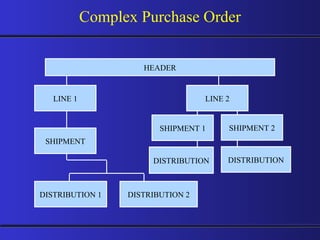
DISTRIBUTION 2 Complex Purchase Order HEADER LINE 1 SHIPMENT DISTRIBUTION 1 LINE 2 SHIPMENT 1 DISTRIBUTION SHIPMENT 2 DISTRIBUTION
Standard Purchase Order Usage One time purchases Know details of purchase: Specific goods or service Known pricing Quantity Delivery schedule Internal charges Short-term agreement Need to encumber the purchase immediately Standard Purchase Order
Purchase Orders: Preferences Preferences apply to individual users Preferences override standard defaults during entry of purchase orders Preferences are available for information in: Lines Shipments Distributions You can override defaults or preferences in the purchase order
Examples of Purchase Order Preferences Need-by-date Price type Contract number Organization Ship-to location Taxable Destination Type Requestor Charge Account Line (goods & services) Shipment Distribution
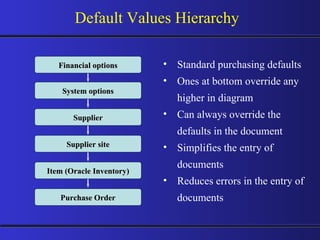
Default Values Hierarchy Standard purchasing defaults Ones at bottom override any higher in diagram Can always override the defaults in the document Simplifies the entry of documents Reduces errors in the entry of documents Financial options System options Supplier Supplier site Item (Oracle Inventory) Purchase Order
Entering Currency Information Identify the currency to be used for this order: Currency code Rate type Spot Corporate User-defined Rate date Rate
Standard P.O Header Information Identify the Terms and Conditions for this order: Payment terms Freight terms Freight carrier FOB Confirming order Acceptance required Notes to supplier & receiver
Contract Purchase Agreement Usage Details of goods or services to be purchased are not known Terms and conditions are specified with your supplier You reference contract purchase agreements directly on standard purchase order lines Contract purchase agreement Delivery 1 Standard PO 1 Delivery 2 Standard PO 2
Planned Purchase Orders Usage Dates of delivery tentatively scheduled Details of services or goods are known Actual purchases occur when a scheduled release is issued Tentative: June 1 Tentative: July 1 Planned purchase order Delivery 1 Release 1 Delivery 2 Release 2
Blanket Purchase Agreement Usage Long-term agreement: Effective date and expiration date Details of goods or services are known: Pricing Dates of delivery are not known Actual purchases occur when a blanket release is issued Header Lines Shipment Distribution Blanket Release Blanket Purchase Agreement
Purchase Order Amendments PO Revision and Re-approval Ship To Location / Bill To Location Cancel - Header / Line / Shipment Terms Line Price New Line / Shipment / Distribution Quantity - Line / Shipment / Distribution Promised / Need By Date Agreement - Contract Value Effective Dates
Overview of Receipt Types Direct Destination type: Inventory, expense, or shop floor Receive Standard Destination type: Receiving Final destination Final destination PO Receipts Location Location Location Inspection Inspection Inspection
PO Receipts INVENTORY PURCHASING RECEIPT Dr.  Inventory Cr. Accrual  A/c DIRECT DELIVERY SHIPMENT P.O.
PO Receipts Receiving Site Return Inventory STANDARD RECEIPT SHIPMENT P.O.
PO Receipts Receiving Site Inspection Return Inventory INSPECTION REQUIRED SHIPMENT P.O.
Matching Concept Match Approval Level Invoice Match Option 2-Way 3-Way 4-Way PO Receipt PO & Invoice Qty PO,Rec’d & Invoice Qty PO,Rec’d, Accepted&  Invoice Qty System holds for Invoice Processing are created systematically for any  deviations beyond the set tolerances
Matching Process Save Invoice Select purchase order or receipt and choose Match Enter supplier information Enter invoice date, number, and amount Complete Complete Complete If matching to PO distribution, choose Distribution and enter distribution quantity or match amount Enter invoice quantity and match amount Enter additional invoice header information Enter purchase order number Select purchase order or receipt Option A: Standard, Expense Report,  Mixed, Prepayment, Credit Memo, Debit Memo Option B: PO Default Option C: QuickMatch
Vendor Returns PO Receipts Unordered Receipts Return to Supplier Return to Receiving Transactions Actions Features :  PO available for Receipt Accounting Reversals Debit Memo Creation Automated optionally
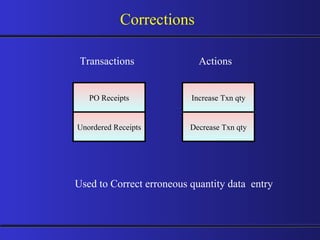
Corrections PO Receipts Unordered Receipts Decrease Txn qty Increase Txn qty Transactions Actions Used to Correct erroneous quantity data  entry
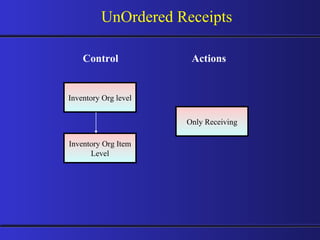
UnOrdered Receipts Inventory Org level Inventory Org Item Level Only Receiving Control Actions
UnOrdered Receipts Cycle Create Unordered  Receipt Receiving Destination Type Create PO / Release Input Supplier Item code,UOM,Qty Match Unordered Receipt to PO Unordered Receipt Purchase Order Deliver to Inventory
Supplier Item Catalog A Comprehensive single point source for all Purchasing information related to --- Prior Purchases Negotiated Sources Sourcing Rules Requisition Templates Features Can be accessed from Purchase orders , Requisitions Wide variety of search criteria
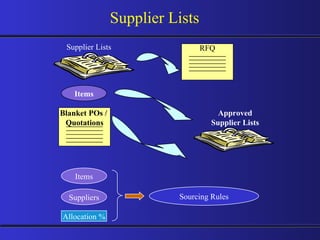
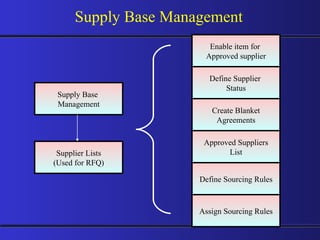
Define Supplier Lists for copying suppliers onto the RFQ  Maintain Approved Supplier List for selected items Supports supplier certification programmes Avoids supply base proliferation Links supplier item number with the internal item code Links source documents Define Flexible Sourcing Rules Utilise Sourcing rules to Create Automatic Purchase orders and Releases referring the Source document. Supply Base Management Features
Supplier Statuses Approved New Debarred Allow:   PO Approval Allow:   Sourcing Allow:   Schedule Confirmation  Allow:   Manufacturer Link x Allow:  PO Approval Allow:   Sourcing Prevent: Schedule Confirmation  Allow:   Manufacturer Link Prevent: PO Approval Prevent: Sourcing Prevent: Schedule Confirmation  Prevent: Manufacturer Link Supply Base Management
Supplier Definition and Control Withholding Tax Define Supplier Sites General - Site Uses Contacts Accounting Control Payment Tax Reporting Purchasing Bank Accounts
Supplier Lists Supplier Lists RFQ Items Blanket POs /  Quotations Approved Supplier Lists Items Suppliers Allocation % Sourcing Rules
Supply Base  Management Enable item for  Approved supplier Define Sourcing Rules Define Supplier  Status Create Blanket Agreements Approved Suppliers List Assign Sourcing Rules Supplier Lists (Used for RFQ) Supply Base Management
Document Controls
Document Controls: PO Action / Level Header   Release  Line  Shipment  Cancel Close Close for Invoicing Close for Receiving  Finally Close Freeze      On Hold      Open     Open for Invoicing     Open for Receiving        Release Hold     Unfreeze
Document Controls: Requisition Action / Level Header   Line  Cancel Finally Close
Receipt Accounting Purchasing Options determine Expense items accrual point  On Receipt - Accounting is created On Period End - Period end accrual Process creates Accounting Inventory Items are always Accrued on Receipt 1. Inventory item accounting on Receipt Account  Debit  Credit Receiving Inspection account @ PO price  XX Inventory A/P Accrual account @ PO price    XX Subinventory accounts @ standard cost  XX Receiving Inspection account @ PO price   XX Debit/Credit Purchase Price Variance if any
2. Expense item accounting on Receipt Account  Debit  Credit Receiving Inspection account @ PO price  XX Expense A/P Accrual account @ PO price  XX PO Distribution Charge accounts @ PO Price  XX Receiving Inspection account @ PO price  XX Receipt Accounting 3. Expense item accounting - Accrue on Period End Account  Debit  Credit Upon Receipt No Accounting entries Run Period end Accrual process PO Distribution Charge accounts @ PO Price  XX Expense A/P Accrual account @ PO price  XX Reverse the above GL entry in the subsequent period
Purchase Encumbrance
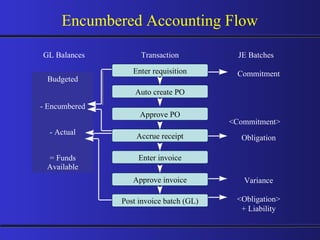
Purchase Encumbrance - Features Enable Budgetary Control for various Purchasing Activities Requisitions Purchase Orders PO Receipts Invoices Enforce Budgetary control for both Expense and Inventory purchases Track movement of Encumbered Funds
Post a Commitment Encumbrance  Journal Reverse the Commitment  and post an Obligation  Encumbrance Journal Reverse the Obligation  and post an Actual Payables Journal Set Of  Books 1) The user department creates a  requisition for new equipment Requisition -----  ----- ------  ----- 2) The Purchasing Department creates a Purchase Order to order the new equipment Purchase Order -----  ----- ------  ----- 3) The Purchasing Department receives an invoice for the  equipment from the vendor Invoice -----  ----- ------  -----
Encumbered Accounting Flow GL Balances JE Batches Budgeted - Encumbered - Actual = Funds Available Obligation Variance Transaction <Obligation> + Liability Commitment <Commitment> Enter requisition Auto create PO Approve PO Accrue receipt Enter invoice Approve invoice Post invoice batch (GL)

Purchasing 11i.5.10 Training

  • 1.
    Purchasing Training OracleApplications 11i.5.10 Dharmalingam K S
  • 2.
    Topics to becovered Overview of Oracle Purchasing Setting Up Purchasing Requisitions AutoCreate Request for Quotations / Quotations Purchase Orders Receiving Supply Base Management Document Controls Purchase Encumbrance
  • 3.
  • 4.
    Product Integration OverviewOracle Payables Oracle General Ledger Oracle Supplier Scheduling Oracle Assets Oracle Bill of Material Oracle Cost Management Oracle Inventory Oracle Master Scheduling/MRP Oracle Order Management Oracle Work in Process Oracle Human Resources Oracle Project Accounting Oracle Purchasing Oracle Self Service Purchasing e-Commerce Gateway
  • 5.
  • 6.
    Flexible Accounting SharedHuman Resources information Seamless integration with other modules Automatic document Creation Comprehensive Security features with Flexible options Workflow enabled routing of Documents (Requisitions, Purchase Orders) Consolidation of Requisitions based on various parameters Ability to interface Electronic Price / Item Catalog Online Funds Check availability against Budgets External documents attachment to Requisition, PO’s, Receipts Purchasing Key Features
  • 7.
    Purchasing Module -FeaturesComprehensive Procurement Solution Supports Centralized Purchasing Streamlined and Automated processing Reduction in paper flow as all purchasing documents can be routed online Integration with Oracle Inventory and Payables
  • 8.
    Critical Steps inPurchasing Implementation Integration points with other Oracle products Required set up steps for Oracle Purchasing
  • 9.
    Key Purchasing DependenciesOracle Human Resources Oracle Purchasing Oracle Payables Oracle General Ledger Oracle Inventory
  • 10.
    Required Setup StepsCommon to all Oracle Applications Set Up System Administrator Define Accounting Key Flexfields Set Up Calendars, Currencies, and Set of Books Define Human Resources Key Flexfields Define Locations Define Organizations and Organization Relationships
  • 11.
    Required Setup StepsCommon to all Manufacturing Applications Define Inventory Key Flexfields Define Units of Measure Define Item Attributes, Codes, and Templates Define Categories Set Up Personnel Set Up Oracle Workflow Open Inventory and Purchasing Accounting Periods
  • 12.
    Purchasing Cycle RequisitionPurchase Dept. Supplier Requestor Inventory Catalog Request for Quotation Quotation Purchase Order
  • 13.
    Process Flow Oracle Purchasing Oracle Inventory Oracle Payables Requisition Purchase Order Raise a Receipt Inspection Deliver Goods Record Invoices Received Approve Invoices Pay Invoices Reconcile Payments Update Account Balances Place Orders Receive Goods Manage the Payables Process Encumbrance (Budgetary Control) General Ledger Accounting Entries
  • 14.
  • 15.
    Define Human ResourcesKey Flexfields Accounting Set up Set Up Personnel Set Up Tax Codes Define Financial Options Define Purchasing Options Define Receiving Options Set Up Approval Information Define Buyers Important Setup Steps
  • 16.
    Define Line Types Payment Terms Define Document Types Purchased Item Attributes Set Up Transaction Managers and Resubmission Intervals Define Suppliers Look up Codes Set Up Automatic Sourcing Define System & User Profiles Open Inventory and Purchasing Accounting Periods Important Setup Steps
  • 17.
    Shared information Integratingwith Human Resources Define Job & Position Flexfields Oracle Human Resources Oracle Purchasing Employee information Jobs Positions
  • 18.
    Set Up PersonnelDefine Jobs Define Positions Define Position Hierarchies Fill Employee Hierarchy
  • 19.
    Chief Executive OfficerVice President, Manufacturing Vice President, Engineering Director, Materials Management Director, Systems Design Manager, Mfg. Purchasing Manager, Inventory Control Engineer 1 Buyer/ Planner 1 Buyer/ Planner 2 Executive Officer Vice President Vice President Director Director Engineer Manager Manager Buyer/ Planner Buyer/ Planner Position Hierarchy Position Job Legend
  • 20.
    Accounting Setup forOracle Purchasing Types of accounting periods Defining your accounting calendar Define foreign currencies Creating types of conversion rates Entering daily conversion rates
  • 21.
    Accounting Setup forOracle Purchasing Set of books Accrual options Defining accounts Charge accounts Receiving accrual account Rate variance gain and loss accounts
  • 22.
    Set Up TaxCodes Define Tax Name Provide Rate Provide Recovery Rate
  • 23.
    Define Financial OptionsAccounting Supplier Entry Supplier- Purchasing Supplier- Payables Encumbrance Tax Human Resources
  • 24.
    Define Purchasing OptionsAccrual Options Control Options Default Options Internal Requisition Options Numbering Options Tax Default Options
  • 25.
    Define Receiving Options Receipt Date Control Over Receipt Control Miscellaneous Options Receipt Routing Receipt Numbering Receipt Account
  • 26.
    Purchasing Options AffectingReceiving Receiving Control Invoice Matching Invoice Close Tolerance Receipt Close Tolerance Receipt Close Point Expense Accrual Point Purchasing Options Region Default Default Default Control Accrual
  • 27.
    Set Up ApprovalInformation Define Approval Groups Assign Approval Groups Define Document Controls
  • 28.
    Document Approval: ApprovalAuthorization Standard Purchase Order Blanket Agreement Internal Requisition Blanket Release Planned Purchase Order Contract Purchase Order Purchase Requisition Scheduled Release Position or Job Rule(s) Rule(s) Rule(s) Rule(s) Rule(s) Rule(s) Rule(s) Rule(s) Authorization Rules Document Total Account Range Item Category Range Item Range Location
  • 29.
    Document Security: SecurityLevel.. Private Purchasing Oracle Purchasing Buyers Designated Approvers Document Owner Document Owner Designated Approvers Requisition RFQ Quotation Purchase Order
  • 30.
    Document Security: SecurityLevel Hierarchy Public Document Owner Document Owner All Employees Designated Approvers Security Hierarchy
  • 31.
    Document Security: AccessLevel View Only Modify Cancel or Final Close Change Full Change Purchase Order x View View View Requisition RFQ Quotation Purchase Order
  • 32.
    Define Buyers EmployeeItem Category Ship-To-Location
  • 33.
    Define Line TypesValue Basis Defaults Category Receipt Required Receipt Closed
  • 34.
    Payment Terms determinesthe due dates of an Invoice along with Term Date Basis Payment Terms also help in calculating the amount due, if discounts are applicable. Create multiple Payment Terms as per Business Requirement Define Split Payment Terms Payment Terms
  • 35.
    Payment Terms canbe based on % due or Amount basis Due dates can be on a Fixed Date, Day of a Month, Number of Days or as per Special Calendar Terms Date could be either System date, Invoice date, Invoice received date or Goods received date Payment Terms
  • 36.
    Payment Terms ScenarioCut-off Day = 15 Day of Month = 20 Months Ahead = 0 Works in TANDEM with ‘Cut-off Day’ , ‘ Day of Month’ &‘Months Ahead’ Payment Due date = Feb20/2003 Terms date basis date = Jan16/2003 Invoice entry Result
  • 37.
    Define Document TypesDocument Name Attributes Approver can Modify Can change Forward To Owner Can Approve Approval Workflow Can change Forward From Default Hierarchy Archive On Forward Method Access Level Can Change Approval Hierarchy Security Level Workflow Start up Process
  • 38.
    Setup of InventoryItem Attributes to be Used by Purchasing Purchased item Purchasable Default buyer List price Internal orders Market price Yes or No Yes User defined User defined Yes User defined Attribute Values
  • 39.
    Set Up TransactionManagers Receiving Transaction Manager Define Resubmission Levels Document Approval Manager
  • 40.
    Supplier Setup Suppliersetup requirements and options enable you to: Define supplier data that will default to all documents Create lists from which to choose when entering data Setup requirements and options
  • 41.
    Importance of SupplierSetup Supplier Payment Purchase order Request for quote (RFQ) Receipts Purchase requisition Quotation Returns
  • 42.
    Paris Washington, D.C.Global Industries, Ltd. Overview of Suppliers Supplier Supplier Site Contact Chicago
  • 43.
    Washington, D.C. Paymentmethod Terms and conditions Supplier Sites Purchase & Pay site RFQ Only site Purchasing site Not available for ordering or payments. Payment method Terms and conditions Paris Chicago
  • 44.
    Look up CodesAcceptance Type FOB Freight Terms Minority Groups Pay Group Price Type Quotation Approval reason Supplier Type PO/Requisition Reason Reply / Receive Via Define and use Business Appropriate codes
  • 45.
    Define Approved SupplierStatuses Define Supplier and Item/Category Combination Set Up Automatic Sourcing Define Supplier- Item Attributes Define Automatic Sourcing Rules
  • 46.
    Define Profile OptionsSystem Profiles User Profiles
  • 47.
    Purchasing Periods shareGL Calendar Purchasing Periods
  • 48.
    Inventory Periods shareGL Calendar Inventory Periods
  • 49.
    Requisitions KeyFeatures Create, edit and review requisitions online. Review status and action history of your requisitions. Automatically source requisitions from open blanket purchase agreements and quotations. Utilize requisition templates for items you purchase frequently. Create internal requisitions. Distribute expenses across multiple cost centers. Route requisitions according to your approval structure.
  • 50.
    Internal orderWhere Requisitions Come From Oracle WIP Other systems Demand Manually create Import requisitions Requesters Oracle Inventory Oracle MRP Source? Requisitions Suppliers Oracle OM
  • 51.
  • 52.
    Req Document Details(Header) Preparer Document Number $200 Price Item Number/ Description Quantity $ Currency Source: Vendor / Inventory Request Details (Lines) Internal Deliver to Locations Requestors NOV 21 Vendor Item Number Suggested Buyer Need by Date Requisition Components 1. 2. ------------------
  • 53.
    Requisitions: Destinations RequisitionLines 1. Inventory 2. Expense Vendor Receive Deliver Inventory Expense
  • 54.
    Requisition / Purchase Indent Enter Requisitions in the system Import Requisitions from Inventory Requisitions Requisition Pool
  • 55.
    Requisition Preferences Preferencesprovide default values when creating requisitions. Speeds and simplifies creating requisitions. You can override defaults or preferences in the purchase requisition. Preferences are only in effect for the current session.
  • 56.
    Requisition Preferences Need-by-dateCharge Account Justification Notes to Receiver/Buyer Requestor Organization Ship-to location Taxable Destination Type Project Information
  • 57.
    Use requisition templatesto simplify the process of requisitioning frequently requested items. Consists of items, pricing and Sourcing information. Requisition Templates Requisition template Requisitions
  • 58.
    Mass Forwarding Usethe Forward Documents window to forward all or selected documents awaiting approval from one approver to a new approver. This lets you keep your documents moving when the original approver of a document is unavailable.
  • 59.
    Internal Requisitions Enableyou to request and transfer material from one inventory location to another inventory or expense location. Requires Oracle Order Management, Oracle Shipping Execution, Oracle Inventory and Oracle Purchasing. Oracle Purchasing Oracle Order Mgmt
  • 60.
    Internal Requisitions ProcessFlow Internal requisition Run Create Internal Sales Order Run OrderImport Internal sales order Schedule order Pick release Ship confirm Direct update In-transit update
  • 61.
  • 62.
    AutoCreate Features CompleteSearch Criteria Fast Purchase Order and RFQ Creation Create new / add to an existing document Split / Consolidate Requisition Lines Fast document Creation
  • 63.
    Requisition Pool AU T O C R E A T E AutoCreate PO Release RFQ
  • 64.
  • 65.
    RFQ - ProcessRequisition Pool Supplier Lists Auto create Auto create Enter RFQ Print RFQ & Send to Suppliers Enter Quotation PO RFQ Quotation
  • 66.
    RFQ - FeaturesElectronically Received Catalog Information Flexible Document Numbers Supplier Defaulting Supplier Purchasing Hold AutoCreating RFQ and Quotation Information Request for Quotation Requirement Supplier Lists Quote analysis & Quote approval
  • 67.
    RFQ - Components RFQ Document Details (Header) Buyer Item Number/ Description& Category $ Item or Service Details (Lines) RFQ Number RFQ Type Currency Catalog/ Standard/ Bid RFQ Dates -Due Date -Close Date -Effectivity Dates Additional RFQ Line Information Vendors -Supplier List -Individual 1. 2. 3. Terms& Conditions
  • 68.
    RFQ and QuotationFlow Active supplier quote Request for quotation Quote repository Supplier 1 Supplier 2 Supplier 3 Supplier 4 Quote lines available for use in Purchase Orders
  • 69.
    Quotation Components QuotationDocument Details (Header) Item Number/ Description& Category Item or Service Details (Lines) Quotation Type Catalog/ Standard/ Bid Additional Quotation Line Information Buyer $ Quotation Number Terms& Conditions Vendor Currency 29 Oct- 31 Dec Quote Effectivity $200 Line Price NOV 21 Need By Date Ship To Location Shipment Quantity $200 Shipment Price Quotation Shipment Details Additional Shipment Details -Tax -Matching 1. 2. 3. ------------------
  • 70.
    Quotation Components QuotationPrice Break Details Quantity Ship To Location $200 Unit Price Discount 4. ------------------
  • 71.
    Quotation Approval ProcessWhy ? - To have a Systematic Control of Approved Quote Usage - To Store Approved quotes in Supplier Catalog for future usage Enforce ? - Ensure Quote Approval Check Control ? - Approve Quotes for Specific Usage with User defined Reason codes Flexibility ? - Analyze Quotes received against Specific RFQ from different Suppliers and selectively approve Individual lines from each source
  • 72.
  • 73.
    Purchase Order -Features Integrate Requisitions and Purchase Orders (PO) online Create one-time PO’s or long term agreements as required Purchase both stock items and non-stock items using a common process Create centralized PO’s for multiple sites and departments Support procurement strategies with foreign currency PO’s Online data management to minimize PO creation time Control PO activity Copy Purchasing Documents
  • 74.
    Purchase Orders SourcesOracle WIP Other systems Demand Manually created Automatically imported Create purchase orders Oracle Inventory Oracle MRP Requisitions Requester Oracle WIP Other systems Oracle Inventory Oracle MRP Oracle Order Mgmt
  • 75.
    Purchase Orders RequisitionPool Auto create Enter PO Receive against PO Match Invoices In Accounts Payables PO
  • 76.
    Purchase Order: TypesA one-time commitment to purchase items or services from a single vendor. Standard Purchase Order Choose a standard purchase order when you require vendor commitment to specific items/services, quantities and delivery schedules, but a long term agreement is not appropriate. Contract Purchase Order A master ‘terms and conditions’ document for a single vendor. Associate contracts with standard purchase order lines. Negotiate pricing on your entire volume of business. Use a contract to manage terms and conditions for this type of negotiation Document Type Description Suggested Use
  • 77.
    Purchase Order: TypesA long-term agreement allowing for stable pricing over the life of the contract while also allowing flexible delivery schedules and order quantity commitments. Blanket agreements include items and associated price breaks. Blanket Purchase Order Choose a blanket agreement when you’ve negotiated volume discounts and want to create releases against these negotiated volumes, or when you commit to specific items, quantities or amounts. Planned Purchase Order A long-term purchase agreement committing to buy items or services from a single vendor. It includes tentative delivery schedules and accounting distributions. Create scheduled release against planned purchase orders. Choose a planned purchase order when you want to encumber the order before creating releases. Also use to provide vendor scheduling for capacity management while issuing releases to confirm order commitment. Document Type Description Suggested Use
  • 78.
    Purchase Order: TypesDocument Type Description Scheduled Release A release against a planned purchase order Blanket Release A release against a blanket purchase order
  • 79.
    Elements of OraclePurchase Orders Contract Agreement Header Header Line Header Line Shipment Distribution Blanket Agreement Planned Purchase Order Standard Purchase Order Shipment Distribution Blanket Release Standard PO Scheduled Release Header Line Shipment Distribution Header Line Shipment Distribution
  • 80.
  • 81.
    PO Document Details(Header) Buyer $200 Price Item Number/ Description& Category Quantity $ Item or Service Details (Lines) NOV 21 Promise by Date Order Number Vendor Currency Vendor Delivery Details (Shipments) Receiving Controls Ship To Location Shipment Quantity Purchase Order Components 2. 1. 3. Tax Details Terms& Conditions ------------------
  • 82.
    Purchase Order Components------------------ Internal Deliver to Locations Internal Distribution Details (Distributions) Distributions Accounting Distributions Delivery Quantity Requestors 4.
  • 83.
    Standard Purchase OrderElements The differences that distinguish the four types will be pointed out as they are discussed. The standard purchase order is the most complete. All the other purchase order types represent some combination of the basic elements of the standard order. HEADER LINE SHIPMENT DISTRIBUTION Standard Purchase Order
  • 84.
    DISTRIBUTION 2 ComplexPurchase Order HEADER LINE 1 SHIPMENT DISTRIBUTION 1 LINE 2 SHIPMENT 1 DISTRIBUTION SHIPMENT 2 DISTRIBUTION
  • 85.
    Standard Purchase OrderUsage One time purchases Know details of purchase: Specific goods or service Known pricing Quantity Delivery schedule Internal charges Short-term agreement Need to encumber the purchase immediately Standard Purchase Order
  • 86.
    Purchase Orders: PreferencesPreferences apply to individual users Preferences override standard defaults during entry of purchase orders Preferences are available for information in: Lines Shipments Distributions You can override defaults or preferences in the purchase order
  • 87.
    Examples of PurchaseOrder Preferences Need-by-date Price type Contract number Organization Ship-to location Taxable Destination Type Requestor Charge Account Line (goods & services) Shipment Distribution
  • 88.
    Default Values HierarchyStandard purchasing defaults Ones at bottom override any higher in diagram Can always override the defaults in the document Simplifies the entry of documents Reduces errors in the entry of documents Financial options System options Supplier Supplier site Item (Oracle Inventory) Purchase Order
  • 89.
    Entering Currency InformationIdentify the currency to be used for this order: Currency code Rate type Spot Corporate User-defined Rate date Rate
  • 90.
    Standard P.O HeaderInformation Identify the Terms and Conditions for this order: Payment terms Freight terms Freight carrier FOB Confirming order Acceptance required Notes to supplier & receiver
  • 91.
    Contract Purchase AgreementUsage Details of goods or services to be purchased are not known Terms and conditions are specified with your supplier You reference contract purchase agreements directly on standard purchase order lines Contract purchase agreement Delivery 1 Standard PO 1 Delivery 2 Standard PO 2
  • 92.
    Planned Purchase OrdersUsage Dates of delivery tentatively scheduled Details of services or goods are known Actual purchases occur when a scheduled release is issued Tentative: June 1 Tentative: July 1 Planned purchase order Delivery 1 Release 1 Delivery 2 Release 2
  • 93.
    Blanket Purchase AgreementUsage Long-term agreement: Effective date and expiration date Details of goods or services are known: Pricing Dates of delivery are not known Actual purchases occur when a blanket release is issued Header Lines Shipment Distribution Blanket Release Blanket Purchase Agreement
  • 94.
    Purchase Order AmendmentsPO Revision and Re-approval Ship To Location / Bill To Location Cancel - Header / Line / Shipment Terms Line Price New Line / Shipment / Distribution Quantity - Line / Shipment / Distribution Promised / Need By Date Agreement - Contract Value Effective Dates
  • 95.
    Overview of ReceiptTypes Direct Destination type: Inventory, expense, or shop floor Receive Standard Destination type: Receiving Final destination Final destination PO Receipts Location Location Location Inspection Inspection Inspection
  • 96.
    PO Receipts INVENTORYPURCHASING RECEIPT Dr. Inventory Cr. Accrual A/c DIRECT DELIVERY SHIPMENT P.O.
  • 97.
    PO Receipts ReceivingSite Return Inventory STANDARD RECEIPT SHIPMENT P.O.
  • 98.
    PO Receipts ReceivingSite Inspection Return Inventory INSPECTION REQUIRED SHIPMENT P.O.
  • 99.
    Matching Concept MatchApproval Level Invoice Match Option 2-Way 3-Way 4-Way PO Receipt PO & Invoice Qty PO,Rec’d & Invoice Qty PO,Rec’d, Accepted& Invoice Qty System holds for Invoice Processing are created systematically for any deviations beyond the set tolerances
  • 100.
    Matching Process SaveInvoice Select purchase order or receipt and choose Match Enter supplier information Enter invoice date, number, and amount Complete Complete Complete If matching to PO distribution, choose Distribution and enter distribution quantity or match amount Enter invoice quantity and match amount Enter additional invoice header information Enter purchase order number Select purchase order or receipt Option A: Standard, Expense Report, Mixed, Prepayment, Credit Memo, Debit Memo Option B: PO Default Option C: QuickMatch
  • 101.
    Vendor Returns POReceipts Unordered Receipts Return to Supplier Return to Receiving Transactions Actions Features : PO available for Receipt Accounting Reversals Debit Memo Creation Automated optionally
  • 102.
    Corrections PO ReceiptsUnordered Receipts Decrease Txn qty Increase Txn qty Transactions Actions Used to Correct erroneous quantity data entry
  • 103.
    UnOrdered Receipts InventoryOrg level Inventory Org Item Level Only Receiving Control Actions
  • 104.
    UnOrdered Receipts CycleCreate Unordered Receipt Receiving Destination Type Create PO / Release Input Supplier Item code,UOM,Qty Match Unordered Receipt to PO Unordered Receipt Purchase Order Deliver to Inventory
  • 105.
    Supplier Item CatalogA Comprehensive single point source for all Purchasing information related to --- Prior Purchases Negotiated Sources Sourcing Rules Requisition Templates Features Can be accessed from Purchase orders , Requisitions Wide variety of search criteria
  • 106.
    Define Supplier Listsfor copying suppliers onto the RFQ Maintain Approved Supplier List for selected items Supports supplier certification programmes Avoids supply base proliferation Links supplier item number with the internal item code Links source documents Define Flexible Sourcing Rules Utilise Sourcing rules to Create Automatic Purchase orders and Releases referring the Source document. Supply Base Management Features
  • 107.
    Supplier Statuses ApprovedNew Debarred Allow: PO Approval Allow: Sourcing Allow: Schedule Confirmation Allow: Manufacturer Link x Allow: PO Approval Allow: Sourcing Prevent: Schedule Confirmation Allow: Manufacturer Link Prevent: PO Approval Prevent: Sourcing Prevent: Schedule Confirmation Prevent: Manufacturer Link Supply Base Management
  • 108.
    Supplier Definition andControl Withholding Tax Define Supplier Sites General - Site Uses Contacts Accounting Control Payment Tax Reporting Purchasing Bank Accounts
  • 109.
    Supplier Lists SupplierLists RFQ Items Blanket POs / Quotations Approved Supplier Lists Items Suppliers Allocation % Sourcing Rules
  • 110.
    Supply Base Management Enable item for Approved supplier Define Sourcing Rules Define Supplier Status Create Blanket Agreements Approved Suppliers List Assign Sourcing Rules Supplier Lists (Used for RFQ) Supply Base Management
  • 111.
  • 112.
    Document Controls: POAction / Level Header Release Line Shipment Cancel Close Close for Invoicing Close for Receiving Finally Close Freeze On Hold Open Open for Invoicing Open for Receiving Release Hold Unfreeze
  • 113.
    Document Controls: RequisitionAction / Level Header Line Cancel Finally Close
  • 114.
    Receipt Accounting PurchasingOptions determine Expense items accrual point On Receipt - Accounting is created On Period End - Period end accrual Process creates Accounting Inventory Items are always Accrued on Receipt 1. Inventory item accounting on Receipt Account Debit Credit Receiving Inspection account @ PO price XX Inventory A/P Accrual account @ PO price XX Subinventory accounts @ standard cost XX Receiving Inspection account @ PO price XX Debit/Credit Purchase Price Variance if any
  • 115.
    2. Expense itemaccounting on Receipt Account Debit Credit Receiving Inspection account @ PO price XX Expense A/P Accrual account @ PO price XX PO Distribution Charge accounts @ PO Price XX Receiving Inspection account @ PO price XX Receipt Accounting 3. Expense item accounting - Accrue on Period End Account Debit Credit Upon Receipt No Accounting entries Run Period end Accrual process PO Distribution Charge accounts @ PO Price XX Expense A/P Accrual account @ PO price XX Reverse the above GL entry in the subsequent period
  • 116.
  • 117.
    Purchase Encumbrance -Features Enable Budgetary Control for various Purchasing Activities Requisitions Purchase Orders PO Receipts Invoices Enforce Budgetary control for both Expense and Inventory purchases Track movement of Encumbered Funds
  • 118.
    Post a CommitmentEncumbrance Journal Reverse the Commitment and post an Obligation Encumbrance Journal Reverse the Obligation and post an Actual Payables Journal Set Of Books 1) The user department creates a requisition for new equipment Requisition ----- ----- ------ ----- 2) The Purchasing Department creates a Purchase Order to order the new equipment Purchase Order ----- ----- ------ ----- 3) The Purchasing Department receives an invoice for the equipment from the vendor Invoice ----- ----- ------ -----
  • 119.
    Encumbered Accounting FlowGL Balances JE Batches Budgeted - Encumbered - Actual = Funds Available Obligation Variance Transaction <Obligation> + Liability Commitment <Commitment> Enter requisition Auto create PO Approve PO Accrue receipt Enter invoice Approve invoice Post invoice batch (GL)