NCOAUG 2009 iSupplier Ravi Sagaram
Agenda Introduction Key features Architecture Supplier Registration Key Processes PO Acknowledgement PO – Request for Changes by Supplier PO – Advance Shipment Notice PO – Invoice Info iSupplier Key Setups Questions and Answers
Introduction iSupplier Portal provides a platform for effective real time communication between Suppliers and Buyers The Portal improves communication and change management with the suppliers The portal reduces procurement time and procurement costs With the help of the portal, Suppliers can search, view, and respond to business transactions real time
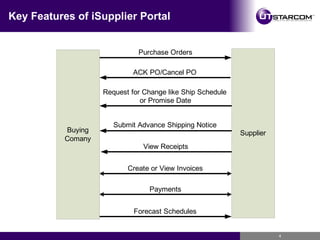
Key Features of iSupplier Portal
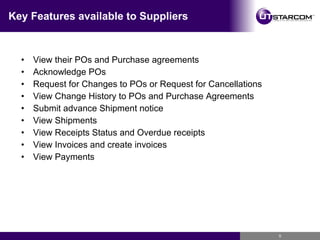
Key Features available to Suppliers View their POs and Purchase agreements Acknowledge POs Request for Changes to POs or Request for Cancellations View Change History to POs and Purchase Agreements Submit advance Shipment notice View Shipments View Receipts Status and Overdue receipts View Invoices and create invoices View Payments
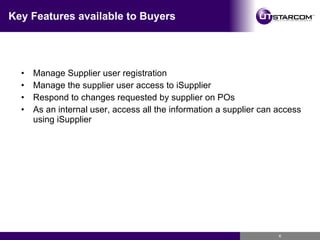
Key Features available to Buyers Manage Supplier user registration Manage the supplier user access to iSupplier Respond to changes requested by supplier on POs As an internal user, access all the information a supplier can access using iSupplier
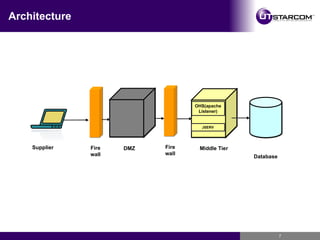
Architecture Firewall Firewall DMZ Middle Tier Database JSERV OHS(apache Listener) Supplier
Prerequisites The Purchasing Module should be implemented for the buying company as a prerequisite The Supplier should have access to internet and a browser to access the iSupplier Portal. The Supplier company should be registered as a supplier in oracle
Supplier Registration Supplier Registration
Supplier Registration Suppliers can submit a registration page by using a registration link. Buyers can provide the registration link on their web site or they can send exclusively to the supplier by a notification. The buying company receives a notification about the supplier request for registration. The buying company approves or rejects the supplier registration request A notification is sent to the supplier about the registration status
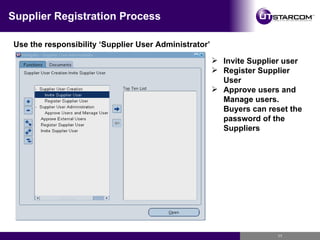
Supplier Registration Process Use the responsibility ‘Supplier User Administrator’ Invite Supplier user Register Supplier User Approve users and Manage users. Buyers can reset the password of the Suppliers
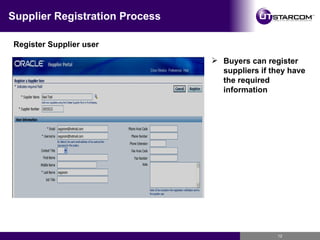
Supplier Registration Process Register Supplier user Buyers can register suppliers if they have the required information
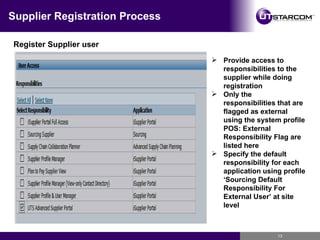
Supplier Registration Process Register Supplier user Provide access to responsibilities to the supplier while doing registration Only the responsibilities that are flagged as external using the system profile POS: External Responsibility Flag are listed here Specify the default responsibility for each application using profile ‘Sourcing Default Responsibility For External User’ at site level
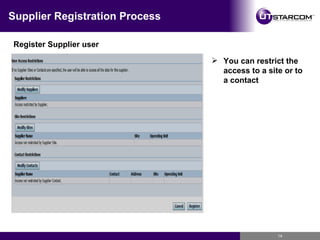
Supplier Registration Process Register Supplier user You can restrict the access to a site or to a contact
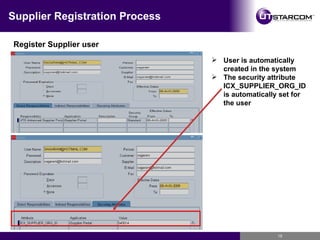
Supplier Registration Process Register Supplier user User is automatically created in the system The security attribute ICX_SUPPLIER_ORG_ID is automatically set for the user
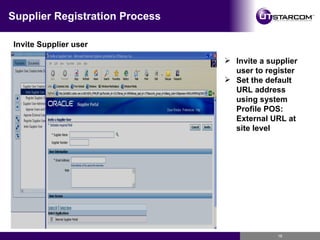
Supplier Registration Process Invite Supplier user Invite a supplier user to register Set the default URL address using system Profile POS: External URL at site level
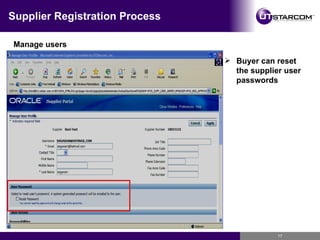
Supplier Registration Process Manage users Buyer can reset the supplier user passwords
PO Acknowledgement PO Acknowledgement
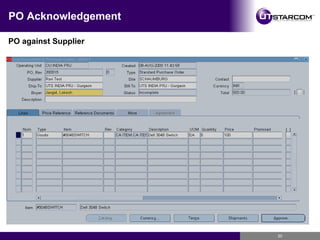
PO Acknowledgement Buyer creates PO against Supplier with Acknowledgement Option Supplier receives a notification on the PO Supplier can accept or reject the PO or PO Shipments Buyer gets a notification on the supplier action The supplier acceptance is recorded on the PO The process improves communication between buying company and supplier and records suppliers commitment. This helps for better planning.
PO Acknowledgement PO against Supplier
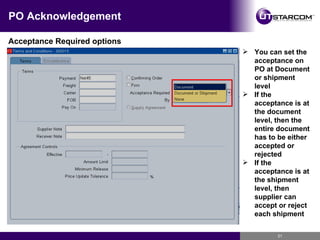
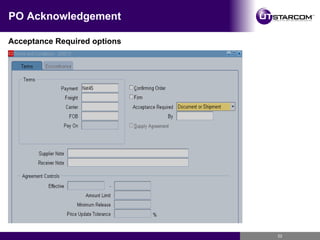
PO Acknowledgement Acceptance Required options You can set the acceptance on PO at Document or shipment level If the acceptance is at the document level, then the entire document has to be either accepted or rejected If the acceptance is at the shipment level, then supplier can accept or reject each shipment
PO Acknowledgement Acceptance Required options
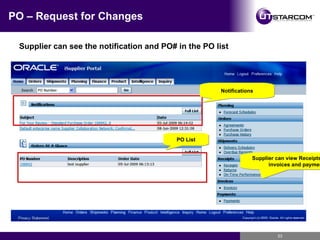
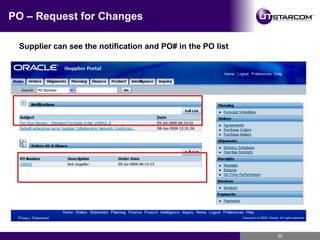
PO – Request for Changes Supplier can see the notification and PO# in the PO list Notifications PO List Supplier can view Receipts, returns, invoices and payments
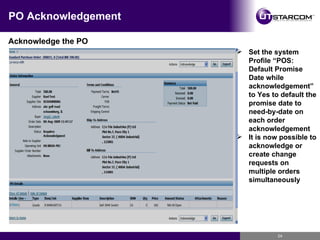
PO Acknowledgement Acknowledge the PO Set the system Profile “POS: Default Promise Date while acknowledgement” to Yes to default the promise date to need-by-date on each order acknowledgement It is now possible to acknowledge or create change requests on multiple orders simultaneously
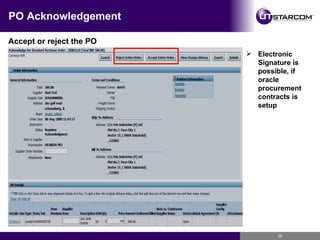
PO Acknowledgement Accept or reject the PO Electronic Signature is possible, if oracle procurement contracts is setup
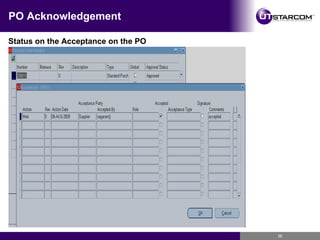
PO Acknowledgement Status on the Acceptance on the PO
PO – Request for Changes PO – Request for Changes by Supplier
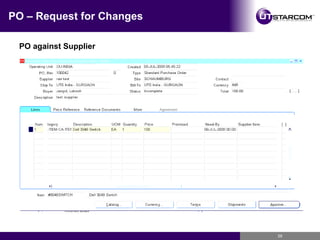
PO – Request for Changes Buyer creates a PO against Supplier  Supplier receives a notification on the PO Supplier can request for changes to the unit price on the lines Suppliers can request to change promise date, or quantity on the shipping schedules Suppliers can request for splitting the shipping schedule Buyer receives a notification on the supplier’s request for change Buyer can accept or reject the requests. Buyers action is communicated to the supplier by notification The communication between the buyer and supplier is a closed loop communication. Changes requested by supplier can be seen on real time and it helps buying company to plan for any delays in supplies
PO – Request for Changes PO against Supplier
PO – Request for Changes Supplier can see the notification and PO# in the PO list
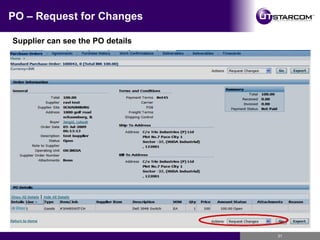
PO – Request for Changes Supplier can see the PO details
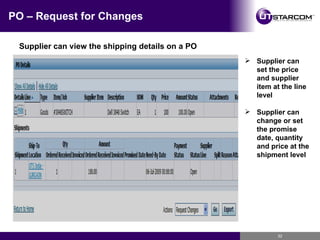
PO – Request for Changes Supplier can view the shipping details on a PO Supplier can set the price and supplier item at the line level Supplier can change or set the promise date, quantity and price at the shipment level
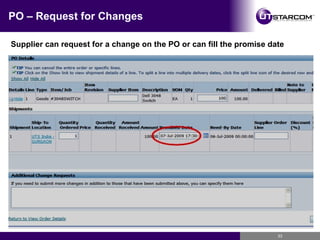
PO – Request for Changes Supplier can request for a change on the PO or can fill the promise date
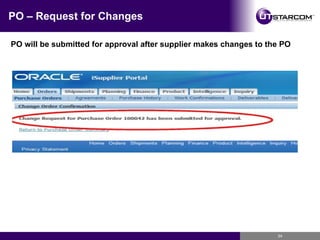
PO – Request for Changes PO will be submitted for approval after supplier makes changes to the PO
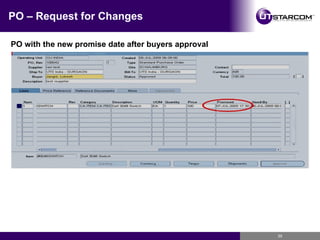
PO – Request for Changes PO with the new promise date after buyers approval
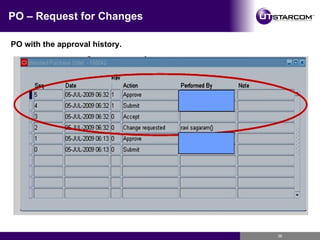
PO – Request for Changes PO with the approval history.
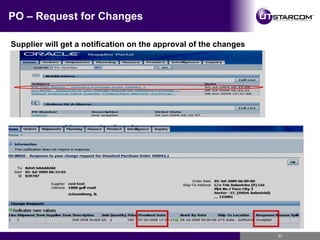
PO – Request for Changes Supplier will get a notification on the approval of the changes
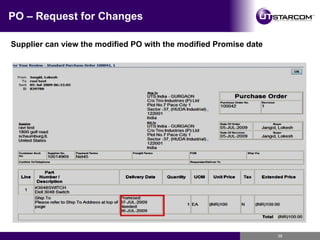
PO – Request for Changes Supplier can view the modified PO with the modified Promise date
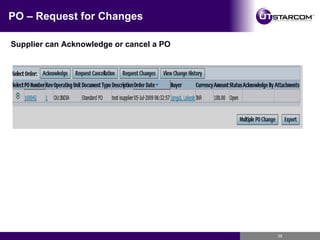
PO – Request for Changes Supplier can Acknowledge or cancel a PO
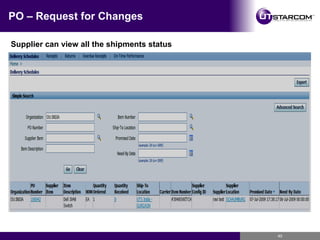
PO – Request for Changes Supplier can view all the shipments status
PO – Advanced Shipment Notice PO – Advanced Shipment Notice
PO – Advanced Shipment Notice Advance Shipments notice is provided by supplier to buyers  Buyers receive notification and details on the advance shipment notice  This helps buying company know about the incoming supplies
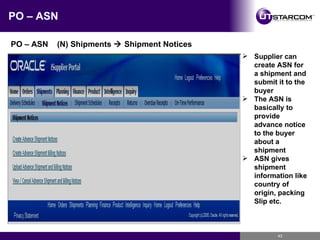
PO – ASN PO – ASN  (N) Shipments    Shipment Notices Supplier can create ASN for a shipment and submit it to the buyer The ASN is basically to provide advance notice to the buyer about a shipment ASN gives shipment information like country of origin, packing Slip etc.
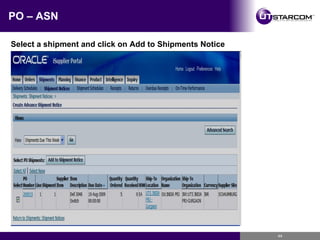
PO – ASN Select a shipment and click on Add to Shipments Notice
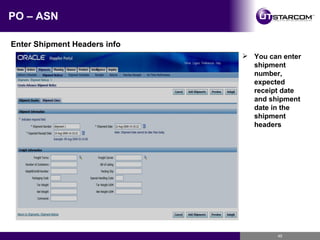
PO – ASN Enter Shipment Headers info You can enter shipment number, expected receipt date and shipment date in the shipment headers
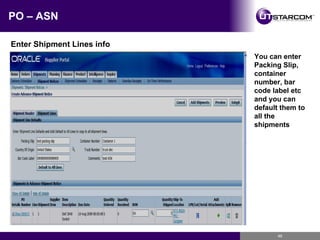
PO – ASN Enter Shipment Lines info You can enter Packing Slip, container number, bar code label etc and you can default them to all the shipments
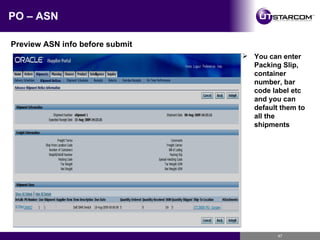
PO – ASN Preview ASN info before submit You can enter Packing Slip, container number, bar code label etc and you can default them to all the shipments
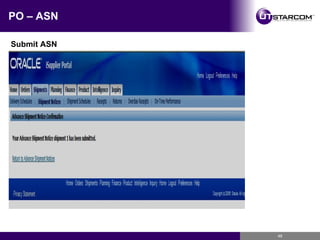
PO – ASN Submit ASN
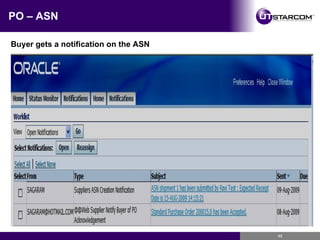
PO – ASN Buyer gets a notification on the ASN
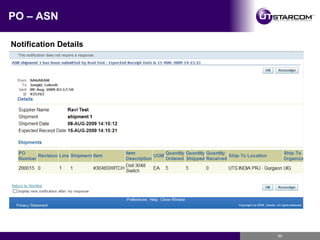
PO – ASN Notification Details
PO – Receipts and invoices PO – Receipts and Invoices
PO – Receipts and invoices Suppliers can view receipts for their shipments  Suppliers can also view any rejections to their shipments and take corrective action Suppliers can view over due shipments information Suppliers can create invoices against the receipts Suppliers can view invoices and payments Suppliers get real time information about their receipts, invoices and payments
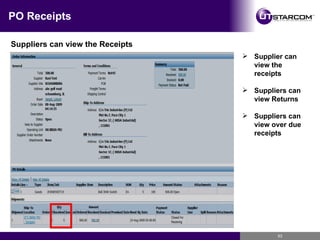
PO Receipts Suppliers can view the Receipts Supplier can view the receipts Suppliers can view Returns Suppliers can view over due receipts
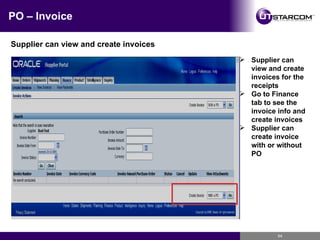
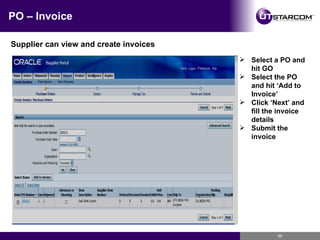
PO – Invoice Supplier can view and create invoices Supplier can view and create invoices for the receipts Go to Finance tab to see the invoice info and create invoices Supplier can create invoice with or without PO
PO – Invoice Supplier can view and create invoices Select a PO and hit GO Select the PO and hit ‘Add to Invoice’ Click ‘Next’ and fill the invoice details Submit the invoice
Key Setups Key Setups
Key Setups Assign responsibilities to internal users Apply securing attributes to custom responsibilities Enable Function Security Enable Profile Options Setup Workflows
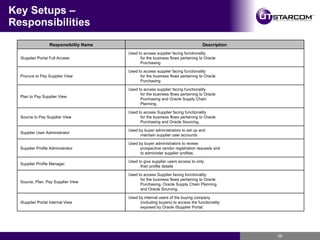
Key Setups – Responsibilities Used by internal users of the buying company (including buyers) to access the functionality exposed by Oracle iSupplier Portal. iSupplier Portal Internal View Used to access Supplier facing functionality for the business flows pertaining to Oracle Purchasing, Oracle Supply Chain Planning and Oracle Sourcing. Source, Plan, Pay Supplier View Used to give supplier users access to only their profile details Supplier Profile Manager Used by buyer administrators to review prospective vendor registration requests and to administer supplier profiles. Supplier Profile Administrator Used by buyer administrators to set up and maintain supplier user accounts Supplier User Administrator Used to access Supplier facing functionality for the business flows pertaining to Oracle Purchasing and Oracle Sourcing. Source to Pay Supplier View Used to access supplier facing functionality for the business flows pertaining to Oracle Purchasing and Oracle Supply Chain Planning. Plan to Pay Supplier View Used to access supplier facing functionality for the business flows pertaining to Oracle Purchasing Procure to Pay Supplier View Used to access supplier facing functionality for the business flows pertaining to Oracle Purchasing iSupplier Portal Full Access Description Responsibility Name
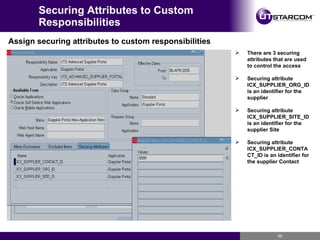
Securing Attributes to Custom Responsibilities Assign securing attributes to custom responsibilities There are 3 securing attributes that are used to control the access Securing attribute ICX_SUPPLIER_ORG_ID is an identifier for the supplier Securing attribute ICX_SUPPLIER_SITE_ID is an identifier for the supplier Site Securing attribute ICX_SUPPLIER_CONTACT_ID is an identifier for the supplier Contact
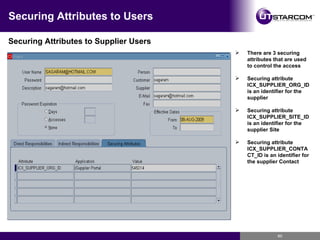
Securing Attributes to Users Securing Attributes to Supplier Users There are 3 securing attributes that are used to control the access Securing attribute ICX_SUPPLIER_ORG_ID is an identifier for the supplier Securing attribute ICX_SUPPLIER_SITE_ID is an identifier for the supplier Site Securing attribute ICX_SUPPLIER_CONTACT_ID is an identifier for the supplier Contact
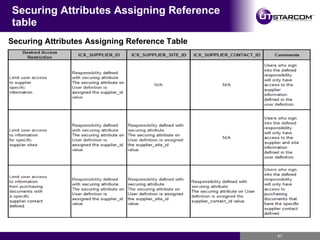
Securing Attributes Assigning Reference table Securing Attributes Assigning Reference Table
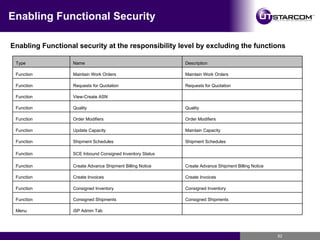
Enabling Functional Security Enabling Functional security at the responsibility level by excluding the functions   iSP Admin Tab Menu Consigned Shipments Consigned Shipments Function Consigned Inventory Consigned Inventory Function Create Invoices Create Invoices Function Create Advance Shipment Billing Notice Create Advance Shipment Billing Notice Function   SCE Inbound Consigned Inventory Status Function Shipment Schedules Shipment Schedules Function Maintain Capacity Update Capacity Function Order Modifiers Order Modifiers Function Quality Quality Function   View-Create ASN Function Requests for Quotation Requests for Quotation Function Maintain Work Orders Maintain Work Orders Function Description Name Type
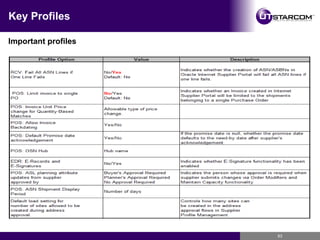
Key Profiles Important profiles
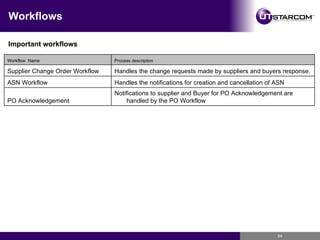
Workflows Important workflows Notifications to supplier and Buyer for PO Acknowledgement are handled by the PO Workflow  PO Acknowledgement Handles the notifications for creation and cancellation of ASN ASN Workflow Handles the change requests made by suppliers and buyers response. Supplier Change Order Workflow Process description Workflow  Name
Questions and answers Questions and Answers
Contact Information Ravi Sagaram [email_address] [email_address] 630-849-9888 mobile

iSupplier

  • 1.
  • 2.
    Agenda Introduction Keyfeatures Architecture Supplier Registration Key Processes PO Acknowledgement PO – Request for Changes by Supplier PO – Advance Shipment Notice PO – Invoice Info iSupplier Key Setups Questions and Answers
  • 3.
    Introduction iSupplier Portalprovides a platform for effective real time communication between Suppliers and Buyers The Portal improves communication and change management with the suppliers The portal reduces procurement time and procurement costs With the help of the portal, Suppliers can search, view, and respond to business transactions real time
  • 4.
    Key Features ofiSupplier Portal
  • 5.
    Key Features availableto Suppliers View their POs and Purchase agreements Acknowledge POs Request for Changes to POs or Request for Cancellations View Change History to POs and Purchase Agreements Submit advance Shipment notice View Shipments View Receipts Status and Overdue receipts View Invoices and create invoices View Payments
  • 6.
    Key Features availableto Buyers Manage Supplier user registration Manage the supplier user access to iSupplier Respond to changes requested by supplier on POs As an internal user, access all the information a supplier can access using iSupplier
  • 7.
    Architecture Firewall FirewallDMZ Middle Tier Database JSERV OHS(apache Listener) Supplier
  • 8.
    Prerequisites The PurchasingModule should be implemented for the buying company as a prerequisite The Supplier should have access to internet and a browser to access the iSupplier Portal. The Supplier company should be registered as a supplier in oracle
  • 9.
  • 10.
    Supplier Registration Supplierscan submit a registration page by using a registration link. Buyers can provide the registration link on their web site or they can send exclusively to the supplier by a notification. The buying company receives a notification about the supplier request for registration. The buying company approves or rejects the supplier registration request A notification is sent to the supplier about the registration status
  • 11.
    Supplier Registration ProcessUse the responsibility ‘Supplier User Administrator’ Invite Supplier user Register Supplier User Approve users and Manage users. Buyers can reset the password of the Suppliers
  • 12.
    Supplier Registration ProcessRegister Supplier user Buyers can register suppliers if they have the required information
  • 13.
    Supplier Registration ProcessRegister Supplier user Provide access to responsibilities to the supplier while doing registration Only the responsibilities that are flagged as external using the system profile POS: External Responsibility Flag are listed here Specify the default responsibility for each application using profile ‘Sourcing Default Responsibility For External User’ at site level
  • 14.
    Supplier Registration ProcessRegister Supplier user You can restrict the access to a site or to a contact
  • 15.
    Supplier Registration ProcessRegister Supplier user User is automatically created in the system The security attribute ICX_SUPPLIER_ORG_ID is automatically set for the user
  • 16.
    Supplier Registration ProcessInvite Supplier user Invite a supplier user to register Set the default URL address using system Profile POS: External URL at site level
  • 17.
    Supplier Registration ProcessManage users Buyer can reset the supplier user passwords
  • 18.
    PO Acknowledgement POAcknowledgement
  • 19.
    PO Acknowledgement Buyercreates PO against Supplier with Acknowledgement Option Supplier receives a notification on the PO Supplier can accept or reject the PO or PO Shipments Buyer gets a notification on the supplier action The supplier acceptance is recorded on the PO The process improves communication between buying company and supplier and records suppliers commitment. This helps for better planning.
  • 20.
    PO Acknowledgement POagainst Supplier
  • 21.
    PO Acknowledgement AcceptanceRequired options You can set the acceptance on PO at Document or shipment level If the acceptance is at the document level, then the entire document has to be either accepted or rejected If the acceptance is at the shipment level, then supplier can accept or reject each shipment
  • 22.
  • 23.
    PO – Requestfor Changes Supplier can see the notification and PO# in the PO list Notifications PO List Supplier can view Receipts, returns, invoices and payments
  • 24.
    PO Acknowledgement Acknowledgethe PO Set the system Profile “POS: Default Promise Date while acknowledgement” to Yes to default the promise date to need-by-date on each order acknowledgement It is now possible to acknowledge or create change requests on multiple orders simultaneously
  • 25.
    PO Acknowledgement Acceptor reject the PO Electronic Signature is possible, if oracle procurement contracts is setup
  • 26.
    PO Acknowledgement Statuson the Acceptance on the PO
  • 27.
    PO – Requestfor Changes PO – Request for Changes by Supplier
  • 28.
    PO – Requestfor Changes Buyer creates a PO against Supplier Supplier receives a notification on the PO Supplier can request for changes to the unit price on the lines Suppliers can request to change promise date, or quantity on the shipping schedules Suppliers can request for splitting the shipping schedule Buyer receives a notification on the supplier’s request for change Buyer can accept or reject the requests. Buyers action is communicated to the supplier by notification The communication between the buyer and supplier is a closed loop communication. Changes requested by supplier can be seen on real time and it helps buying company to plan for any delays in supplies
  • 29.
    PO – Requestfor Changes PO against Supplier
  • 30.
    PO – Requestfor Changes Supplier can see the notification and PO# in the PO list
  • 31.
    PO – Requestfor Changes Supplier can see the PO details
  • 32.
    PO – Requestfor Changes Supplier can view the shipping details on a PO Supplier can set the price and supplier item at the line level Supplier can change or set the promise date, quantity and price at the shipment level
  • 33.
    PO – Requestfor Changes Supplier can request for a change on the PO or can fill the promise date
  • 34.
    PO – Requestfor Changes PO will be submitted for approval after supplier makes changes to the PO
  • 35.
    PO – Requestfor Changes PO with the new promise date after buyers approval
  • 36.
    PO – Requestfor Changes PO with the approval history.
  • 37.
    PO – Requestfor Changes Supplier will get a notification on the approval of the changes
  • 38.
    PO – Requestfor Changes Supplier can view the modified PO with the modified Promise date
  • 39.
    PO – Requestfor Changes Supplier can Acknowledge or cancel a PO
  • 40.
    PO – Requestfor Changes Supplier can view all the shipments status
  • 41.
    PO – AdvancedShipment Notice PO – Advanced Shipment Notice
  • 42.
    PO – AdvancedShipment Notice Advance Shipments notice is provided by supplier to buyers Buyers receive notification and details on the advance shipment notice This helps buying company know about the incoming supplies
  • 43.
    PO – ASNPO – ASN (N) Shipments  Shipment Notices Supplier can create ASN for a shipment and submit it to the buyer The ASN is basically to provide advance notice to the buyer about a shipment ASN gives shipment information like country of origin, packing Slip etc.
  • 44.
    PO – ASNSelect a shipment and click on Add to Shipments Notice
  • 45.
    PO – ASNEnter Shipment Headers info You can enter shipment number, expected receipt date and shipment date in the shipment headers
  • 46.
    PO – ASNEnter Shipment Lines info You can enter Packing Slip, container number, bar code label etc and you can default them to all the shipments
  • 47.
    PO – ASNPreview ASN info before submit You can enter Packing Slip, container number, bar code label etc and you can default them to all the shipments
  • 48.
    PO – ASNSubmit ASN
  • 49.
    PO – ASNBuyer gets a notification on the ASN
  • 50.
    PO – ASNNotification Details
  • 51.
    PO – Receiptsand invoices PO – Receipts and Invoices
  • 52.
    PO – Receiptsand invoices Suppliers can view receipts for their shipments Suppliers can also view any rejections to their shipments and take corrective action Suppliers can view over due shipments information Suppliers can create invoices against the receipts Suppliers can view invoices and payments Suppliers get real time information about their receipts, invoices and payments
  • 53.
    PO Receipts Supplierscan view the Receipts Supplier can view the receipts Suppliers can view Returns Suppliers can view over due receipts
  • 54.
    PO – InvoiceSupplier can view and create invoices Supplier can view and create invoices for the receipts Go to Finance tab to see the invoice info and create invoices Supplier can create invoice with or without PO
  • 55.
    PO – InvoiceSupplier can view and create invoices Select a PO and hit GO Select the PO and hit ‘Add to Invoice’ Click ‘Next’ and fill the invoice details Submit the invoice
  • 56.
  • 57.
    Key Setups Assignresponsibilities to internal users Apply securing attributes to custom responsibilities Enable Function Security Enable Profile Options Setup Workflows
  • 58.
    Key Setups –Responsibilities Used by internal users of the buying company (including buyers) to access the functionality exposed by Oracle iSupplier Portal. iSupplier Portal Internal View Used to access Supplier facing functionality for the business flows pertaining to Oracle Purchasing, Oracle Supply Chain Planning and Oracle Sourcing. Source, Plan, Pay Supplier View Used to give supplier users access to only their profile details Supplier Profile Manager Used by buyer administrators to review prospective vendor registration requests and to administer supplier profiles. Supplier Profile Administrator Used by buyer administrators to set up and maintain supplier user accounts Supplier User Administrator Used to access Supplier facing functionality for the business flows pertaining to Oracle Purchasing and Oracle Sourcing. Source to Pay Supplier View Used to access supplier facing functionality for the business flows pertaining to Oracle Purchasing and Oracle Supply Chain Planning. Plan to Pay Supplier View Used to access supplier facing functionality for the business flows pertaining to Oracle Purchasing Procure to Pay Supplier View Used to access supplier facing functionality for the business flows pertaining to Oracle Purchasing iSupplier Portal Full Access Description Responsibility Name
  • 59.
    Securing Attributes toCustom Responsibilities Assign securing attributes to custom responsibilities There are 3 securing attributes that are used to control the access Securing attribute ICX_SUPPLIER_ORG_ID is an identifier for the supplier Securing attribute ICX_SUPPLIER_SITE_ID is an identifier for the supplier Site Securing attribute ICX_SUPPLIER_CONTACT_ID is an identifier for the supplier Contact
  • 60.
    Securing Attributes toUsers Securing Attributes to Supplier Users There are 3 securing attributes that are used to control the access Securing attribute ICX_SUPPLIER_ORG_ID is an identifier for the supplier Securing attribute ICX_SUPPLIER_SITE_ID is an identifier for the supplier Site Securing attribute ICX_SUPPLIER_CONTACT_ID is an identifier for the supplier Contact
  • 61.
    Securing Attributes AssigningReference table Securing Attributes Assigning Reference Table
  • 62.
    Enabling Functional SecurityEnabling Functional security at the responsibility level by excluding the functions   iSP Admin Tab Menu Consigned Shipments Consigned Shipments Function Consigned Inventory Consigned Inventory Function Create Invoices Create Invoices Function Create Advance Shipment Billing Notice Create Advance Shipment Billing Notice Function   SCE Inbound Consigned Inventory Status Function Shipment Schedules Shipment Schedules Function Maintain Capacity Update Capacity Function Order Modifiers Order Modifiers Function Quality Quality Function   View-Create ASN Function Requests for Quotation Requests for Quotation Function Maintain Work Orders Maintain Work Orders Function Description Name Type
  • 63.
  • 64.
    Workflows Important workflowsNotifications to supplier and Buyer for PO Acknowledgement are handled by the PO Workflow PO Acknowledgement Handles the notifications for creation and cancellation of ASN ASN Workflow Handles the change requests made by suppliers and buyers response. Supplier Change Order Workflow Process description Workflow Name
  • 65.
    Questions and answersQuestions and Answers
  • 66.
    Contact Information RaviSagaram [email_address] [email_address] 630-849-9888 mobile