Oracle Inventory
Copyright © 2005, Oracle. All rights reserved.
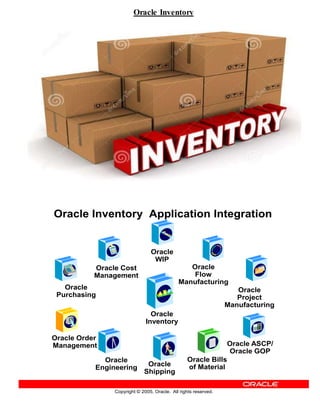
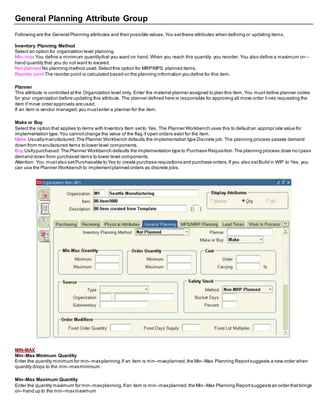
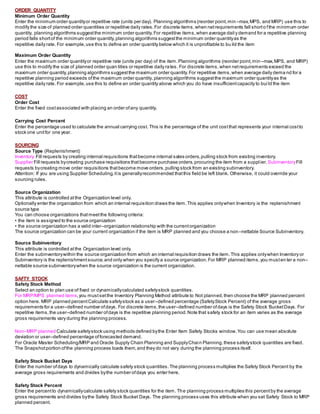
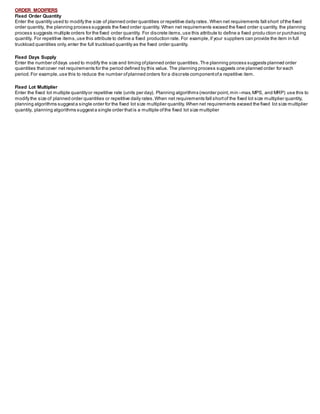
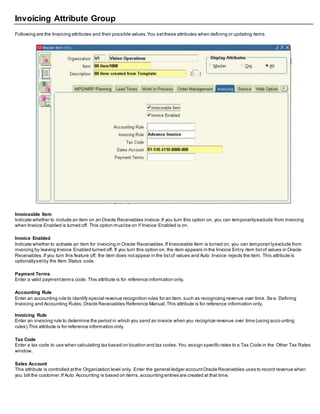
Oracle Inventory Application Integration
Oracle
Purchasing
Oracle
Inventory
Oracle
WIP
Oracle Cost
Management
Oracle
Engineering
Oracle Bills
of Material
Oracle Order
Management Oracle ASCP/
Oracle GOP
Oracle
Flow
Manufacturing
Oracle
Shipping
Oracle
Project
Manufacturing
Copyright © 2005, Oracle. All rights reserved.
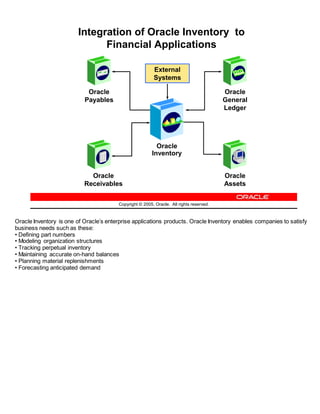
Integration of Oracle Inventory to
Financial Applications
Oracle
Assets
Oracle
Receivables
Oracle
Payables
Oracle
General
Ledger
Oracle
Inventory
External
Systems
Oracle Inventory is one of Oracle’s enterprise applications products. Oracle Inventory enables companies to satisfy
business needs such as these:
• Defining part numbers
• Modeling organization structures
• Tracking perpetual inventory
• Maintaining accurate on-hand balances
• Planning material replenishments
• Forecasting anticipated demand
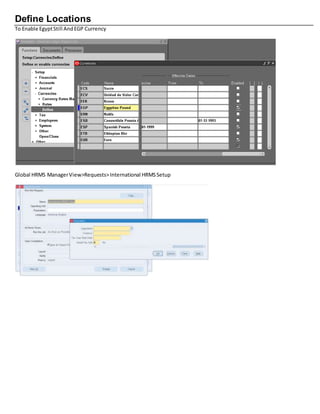
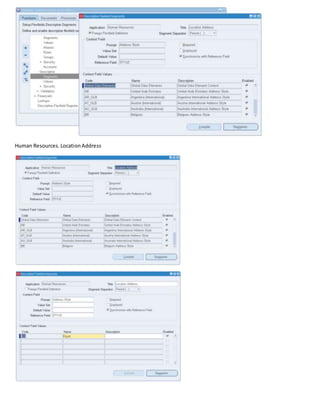
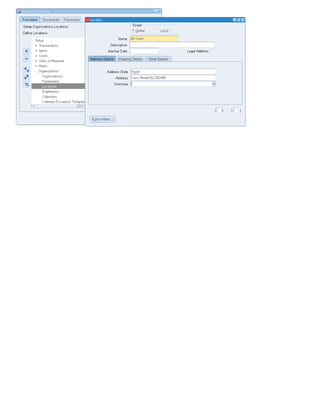
Define Locations
To Enable EgyptStill AndEGP Currency
Global HRMS ManagerView>Requests>International HRMSSetup
Human Resources. LocationAddress
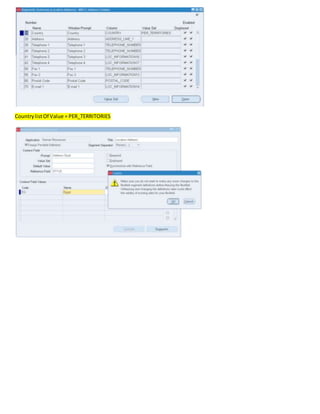
CountrylistOf Value = PER_TERRITORIES
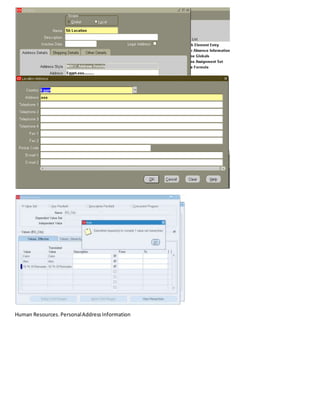
Human Resources. PersonalAddressInformation
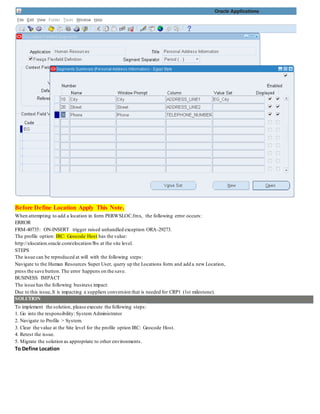
Before Define Location Apply This Note.
When attempting to add a location in form PERWSLOC.fmx, the following error occurs:
ERROR
FRM-40735: ON-INSERT trigger raised unhandled exception ORA-29273.
The profile option: IRC: Geocode Host has the value:
http://elocation.oracle.com/elocation/lbs at the site level.
STEPS
The issue can be reproduced at will with the following steps:
Navigate to the Human Resources Super User, query up the Locations form and add a new Location,
press the save button.The error happens on the save.
BUSINESS IMPACT
The issue has the following business impact:
Due to this issue,It is impacting a suppliers conversion that is needed for CRP1 (1st milestone).
SOLUTION
To implement the solution, please execute the following steps:
1. Go into the responsibility: System Administrator
2. Navigate to Profile > System.
3. Clear the value at the Site level for the profile option IRC: Geocode Host.
4. Retest the issue.
5. Migrate the solution as appropriate to other environments.
To Define Location
Implementation of Inventory
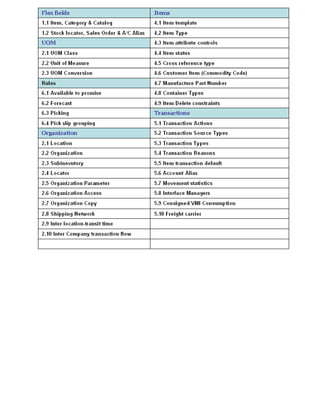
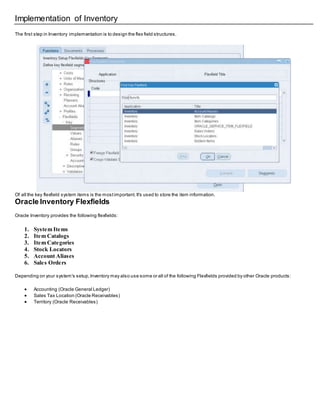
The first step in Inventory implementation is to design the flex field structures.
Of all the key flexfield system items is the mostimportant.It's used to store the item information.
Oracle Inventory Flexfields
Oracle Inventory provides the following flexfields:
1. System Items
2. Item Catalogs
3. Item Categories
4. Stock Locators
5. Account Aliases
6. Sales Orders
Depending on your system's setup,Inventory may also use some or all of the following Flexfields provided by other Oracle products:
 Accounting (Oracle General Ledger)
 Sales Tax Location (Oracle Receivables)
 Territory (Oracle Receivables)
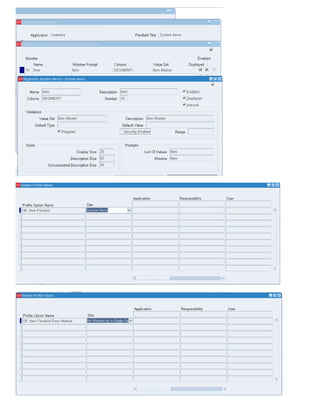
1. System Items
You can use the System Items Flexfield (also called the Item Flexfield) for recording and reporting your item information.
You mustdesign and configure your Item Flexfield before you can start defining items.
All Oracle Applications products thatreference items share the Item Flexfield and supportmultiple-segmentimplementations.However, This
flexfield supports only one structure.
You must setup your OE: Item Flexfield profile option to specify the Item Flexfield structure that you will use for your Oracle applications.
Users can also setup the OE: Item Flexfield Entry Method profile option to specify your preferred method of entry for this flexfield.
You can optionallyuse the item flexfield to defaultitem information for invoice, debitmemo,and credit memo lines or you c an enter your own
line information.
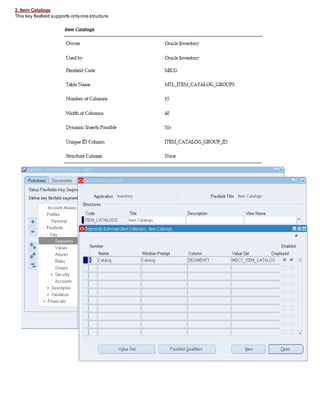
2. Item Catalogs
This key flexfield supports onlyone structure.
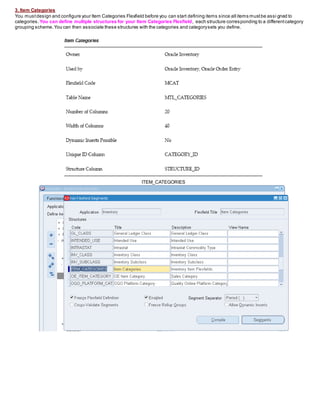
3. Item Categories
You mustdesign and configure your Item Categories Flexfield before you can start defining items since all items mustbe assi gned to
categories. You can define multiple structures for your Item Categories Flexfield, each structure corresponding to a differentcategory
grouping scheme.You can then associate these structures with the categories and categorysets you define.
ITEM_CATEGORIES
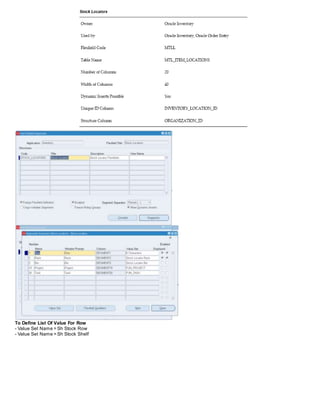
4. Stock Locators
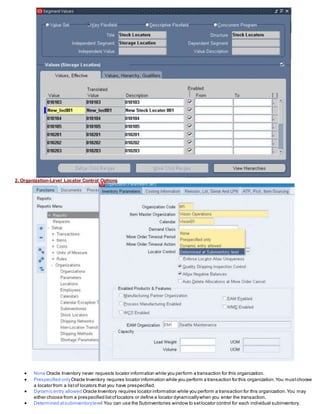
You can use the Stock Locators Flexfield to capture more information aboutstock locators in inventory. If you do not have Oracle Inventory
installed,or none of your items have locator control,it is not necessaryto setup this flexfield.
If you keep track of specific locators such as aisle,row,bin indicators for your items,you need to configure your Stock Locators Flexfield and
implementlocator control in your organization.
This key flexfield supports only one structure.
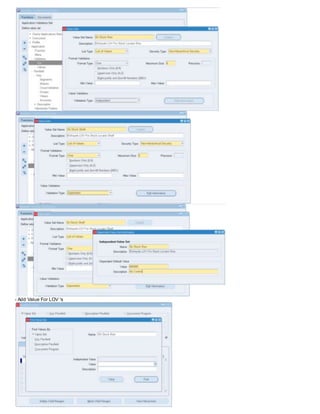
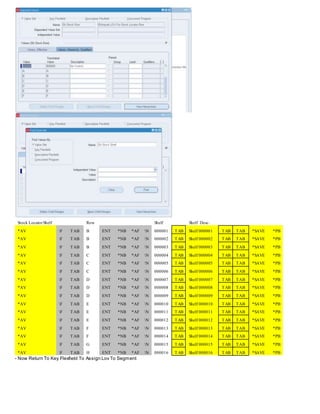
To Define List Of Value For Row
- Value Set Name = Sh Stock Row
- Value Set Name = Sh Stock Shelf
- Add Value For LOV 's
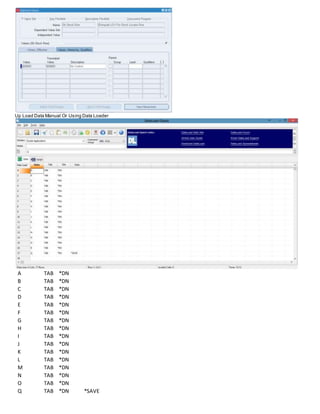
Up Load Data Manual Or Using Data Loader
A TAB *DN
B TAB *DN
C TAB *DN
D TAB *DN
E TAB *DN
F TAB *DN
G TAB *DN
H TAB *DN
I TAB *DN
J TAB *DN
K TAB *DN
L TAB *DN
M TAB *DN
N TAB *DN
O TAB *DN
Q TAB *DN *SAVE
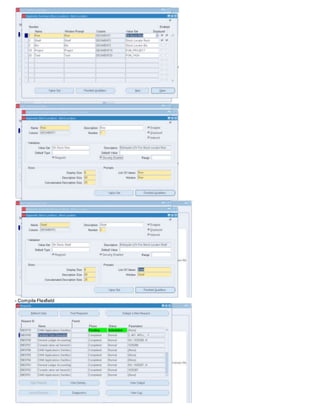
Stock LocatorShelf Row Shelf Shelf Desc.
*AV F TAB B ENT *NB *AF N 000001 TAB Shelf 000001 TAB TAB *SAVE *PB
*AV F TAB B ENT *NB *AF N 000002 TAB Shelf 000002 TAB TAB *SAVE *PB
*AV F TAB B ENT *NB *AF N 000003 TAB Shelf 000003 TAB TAB *SAVE *PB
*AV F TAB C ENT *NB *AF N 000004 TAB Shelf 000004 TAB TAB *SAVE *PB
*AV F TAB C ENT *NB *AF N 000005 TAB Shelf 000005 TAB TAB *SAVE *PB
*AV F TAB C ENT *NB *AF N 000006 TAB Shelf 000006 TAB TAB *SAVE *PB
*AV F TAB D ENT *NB *AF N 000007 TAB Shelf 000007 TAB TAB *SAVE *PB
*AV F TAB D ENT *NB *AF N 000008 TAB Shelf 000008 TAB TAB *SAVE *PB
*AV F TAB D ENT *NB *AF N 000009 TAB Shelf 000009 TAB TAB *SAVE *PB
*AV F TAB E ENT *NB *AF N 000010 TAB Shelf 000010 TAB TAB *SAVE *PB
*AV F TAB E ENT *NB *AF N 000011 TAB Shelf 000011 TAB TAB *SAVE *PB
*AV F TAB E ENT *NB *AF N 000012 TAB Shelf 000012 TAB TAB *SAVE *PB
*AV F TAB F ENT *NB *AF N 000013 TAB Shelf 000013 TAB TAB *SAVE *PB
*AV F TAB F ENT *NB *AF N 000014 TAB Shelf 000014 TAB TAB *SAVE *PB
*AV F TAB G ENT *NB *AF N 000015 TAB Shelf 000015 TAB TAB *SAVE *PB
*AV F TAB H ENT *NB *AF N 000016 TAB Shelf 000016 TAB TAB *SAVE *PB
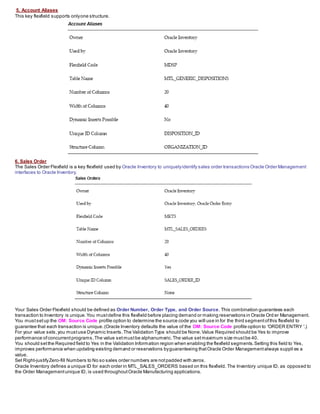
- Now Return To Key Flexfield To Assign Lov To Segment
- Compile Flexfield
5. Account Aliases
This key flexfield supports onlyone structure.
6. Sales Order
The Sales Order Flexfield is a key flexfield used by Oracle Inventory to uniquelyidentify sales order transactions Oracle Order Management
interfaces to Oracle Inventory.
Your Sales Order Flexfield should be defined as Order Number, Order Type, and Order Source. This combination guarantees each
transaction to Inventory is unique.You mustdefine this flexfield before placing demand or making reservations in Oracle Ord er Management.
You mustsetup the OM: Source Code profile option to determine the source code you will use in for the third segmentofthis flexfield to
guarantee that each transaction is unique.(Oracle Inventory defaults the value of the OM: Source Code profile option to 'ORDER ENTRY '.)
For your value sets,you mustuse Dynamic Inserts.The Validation Type should be None.Value Required should be Yes to improve
performance ofconcurrentprograms.The value setmustbe alphanumeric.The value setmaximum size mustbe 40.
You should setthe Required field to Yes in the Validation Information region when enabling the flexfield segments.Setting this field to Yes,
improves performance when updating existing demand or reservations byguaranteeing thatOracle Order Managementalways suppli es a
value.
Set Right-justifyZero-fill Numbers to No so sales order numbers are notpadded with zeros.
Oracle Inventory defines a unique ID for each order in MTL_SALES_ORDERS based on this flexfield. The Inventory unique ID, as opposed to
the Order Managementunique ID, is used throughoutOracle Manufacturing applications.
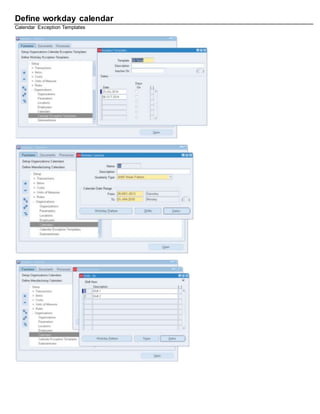
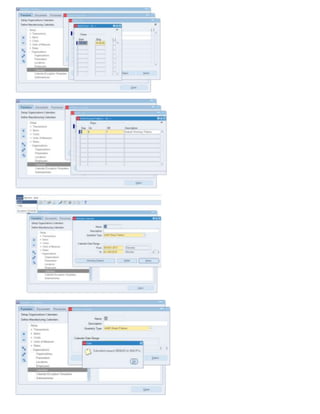
Define workday calendar
Calendar Exception Templates
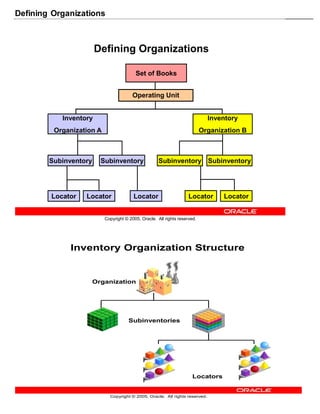
Defining Organizations
Copyright © 2005, Oracle. All rights reserved.
Defining Organizations
Inventory
Organization A
Set of Books
Locator Locator Locator Locator Locator
Subinventory Subinventory Subinventory Subinventory
Inventory
Organization B
Operating Unit
Copyright © 2005, Oracle. All rights reserved.
Inventory Organization Structure
Organization
Subinventories
Locators
Multi-org often refers to an Oracle Applications setup used to enable multiple business units in a single install.
With multi-org, a business enterprise may set up multiple business units with differing sets of books, operating units, and legal entities all within a single
instance.
With multi-org, goods my be sold out of one operating unit or legal entity and shipped out of another, and the systemwill process an intercompany sale to
properly account for it.
Multi-org, however, should not be mistaken for installs with multiple inventory organizations.
You do not have to use Oracle Applications multi-org to support multipleinventory organizations if all the inventory organizations share the same set of
books, operating unit, and legal entity.
Location: A location is simply a name and address, and is assigned to an organization or used to indicate delivery information on a purchase order.
You may define as many locations as you like, but only one location may be assigned to an inventory organization.
Business groupis a group of companies that does business in different markets under common administrative or financial control whose members are linked
by relations of interpersonal trust on the bases of similar personal ethnic or commercial background a business group.
Set of Books (SOB): Thefinancial entity that represents thechart of accounts, fiscal calendar, and base currency. The SOB is set up in theGeneral Ledger.
Legal Entity Organization: An entity used to represent alegal company. Fiscal and tax reporting are done at the Legal Entity level.
A legal employer is a legal entity that is responsible for employing peoplein a particular country. Therefore, if you employ peoplein a country, then you
must have at least one organization classified as a legal entity and a legal employer.
The Configuration Workbench classifies an organization as a GRE/Legal Entity where your enterpriseoperates in a country, and classifies it as an Employer
if you employ peoplein that country also. For example, you can have a legal entity in a country where you do business, but do not employ peoplein that
country.
Operating Unit Organization: A business unit that shares a common Purchasing, Accounts Payable, Order Entry and Accounts Receivable setup.
An operating unit may consist of multiple inventory organizations, with multiple manufacturing sites, distribution centers, and sales offices, but they share a
common sales order and purchase order system.
For example, a sales order may have lines shipping from different inventory organizations or a purchase order may have lines destined for different inventory
organizations.
Inventory Organization: An entity used to represent amanufacturing or distribution site.
Inventory organizations are where a user tracks on-hand balances, manufactures goods, and transacts thedaily ins and outs of material movement.
An inventory organization is thelowest level entity for costing goods, planning material requirements, and securing systemaccess.
Only a single address may be assigned to an Inventory Organization.
An inventory organization is assigned a Set of Books which determines the chart of accounts, fiscal calendar, and base currency for all financial and value
added activities that occur within the organization.
Inventory Organizations are also assigned to a Legal Entity Organization and an Operating Unit Organization.
A variation on the inventory organization is the master item organization.
Generally, with Oracle Applications asingle inventory organization is created and designated at the master organization. Items are defined first in the master
organization, then enabled in other inventory organizations as necessary.
Some of the item attributes are set as controlled at the master organization and therefore theattributevalues cannot be updated within individual inventory
organizations.
Category sets may also be designated as master organization level. Cross-references are also master level only or master level optionalas well.
Subinventory: Physicalor logical locations for storing inventory.
Subinventories are generally defined to represent themain stores area as well as stocking points on the production floor.
Additional subinventories may be used to specify supply closets or cabinets and thecage area for discrepant material.
Subinventories are flagged as to availability for planning (nettable), reservations, and available to promise checks, thereby determining the availability of the
material stored in the subinventory.
Subinventories are assigned material asset account numbers. As goods move in and out of a subinventory a transaction posts to theasset account.
Stock Locator: A physicalarea within a stockroom.
The stock locator is a key flexfield that is often defined as a multiple segment flexfield with thesegments representing the physicallayout of a stockroom.
For example, a stockroommay be laid out in rows of shelves with bins on the shelves, each numbered so that a row/shelf/bin combination would direct
someone to a particular material storage compartment.
Such an implementation would define a locator flexfield as a 3 segment flexfield with segments for row, shelf, and bin.
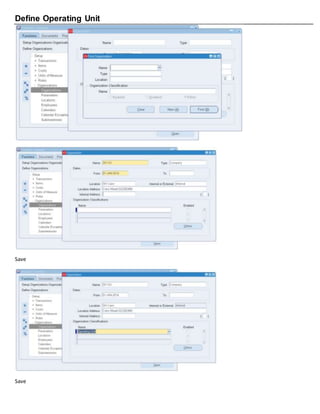
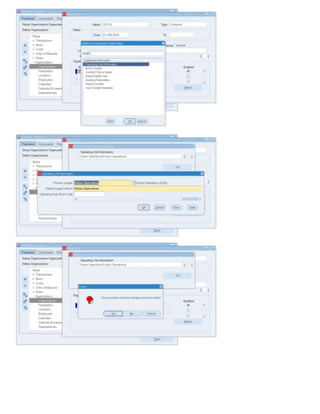
Define Operating Unit
Save
Save
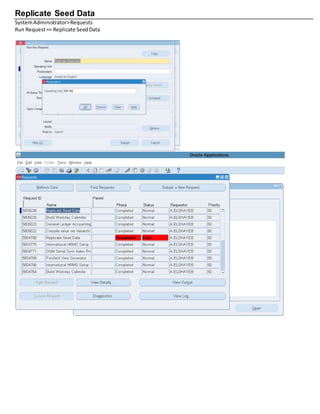
Replicate Seed Data
SystemAdministrator>Requests
Run Request== Replicate SeedData
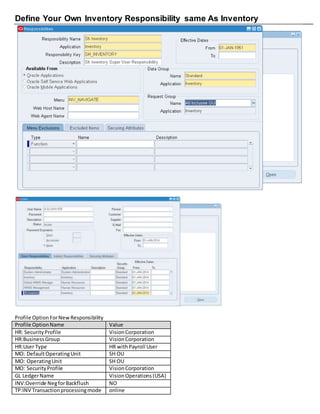
Define Your Own Inventory Responsibility same As Inventory
Profile OptionForNewResponsibility
Profile OptionName Value
HR: SecurityProfile VisionCorporation
HR:BusinessGroup VisionCorporation
HR:User Type HR withPayroll User
MO: DefaultOperatingUnit SH OU
MO: OperatingUnit SH OU
MO: SecurityProfile VisionCorporation
GL LedgerName VisionOperations(USA)
INV:Override NegforBackflush NO
TP:INV Transactionprocessingmode online
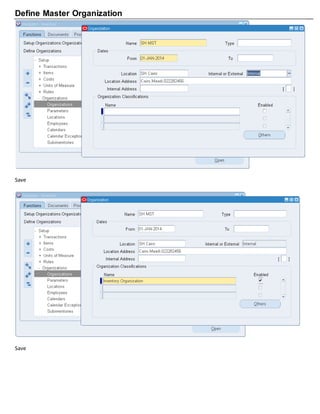
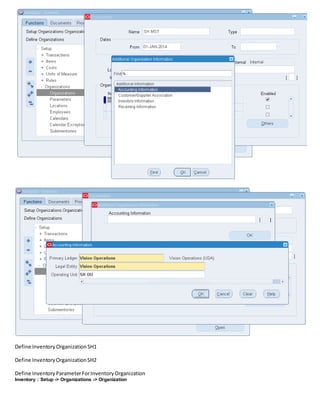
Define Master Organization
Save
Save
Define Inventory OrganizationSH1
Define InventoryOrganizationSH2
Define InventoryParameterForInventoryOrganization
Inventory : Setup -> Organizations -> Organization
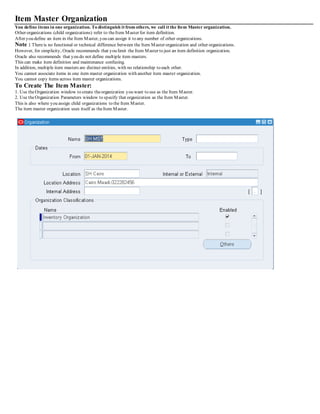
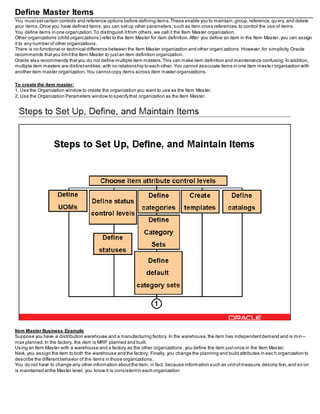
Item Master Organization
You define items in one organization. To distinguish it from others, we call it the Item Master organization.
Other organizations (child organizations) refer to theItem Master for item definition.
After you define an item in the Item Master, you can assign it to any number of other organizations.
Note : Thereis no functional or technical difference between the Item Master organization and other organizations.
However, for simplicity, Oracle recommends that you limit the Item Master to just an item definition organization.
Oracle also recommends that you do not define multiple item masters.
This can make item definition and maintenance confusing.
In addition, multiple item masters are distinct entities, with no relationship to each other.
You cannot associate items in one item master organization with another item master organization.
You cannot copy items across item master organizations.
To Create The Item Master:
1. Use theOrganization window to create theorganization you want to use as the Item Master.
2. Use theOrganization Parameters window to specify that organization as the Item Master.
This is also where you assign child organizations to the Item Master.
The item master organization uses itself as theItem Master.
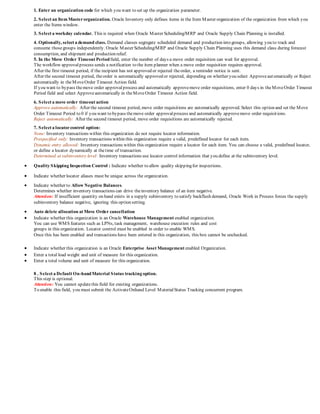
You can define and updatedefault inventory and costing parameters for your current organization in the following areas:
1. Inventory Parameters
2. Costing Information
3. Other Account Parameters
4. Revision, Lot, Serial, LPN Parameters
5. ATP, Pick, Item–Sourcing Parameters
6. Defining Inter–Organization Information
7. Defining Warehouse Parameters
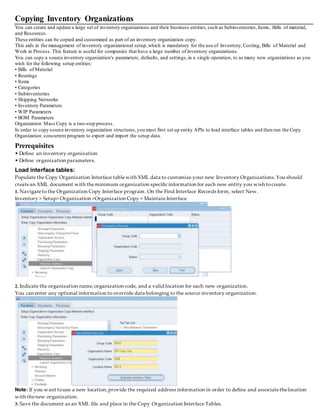
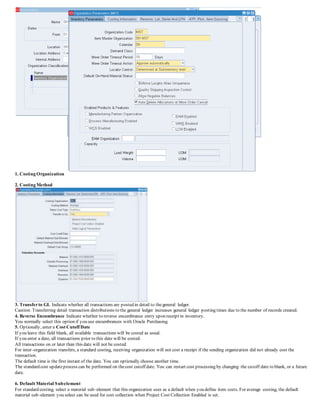
1. Enter an organization code for which you want to set up the organization parameter.
2. Select an Item Masterorganization. Oracle Inventory only defines items in the Item Master organization of the organization from which you
enter the Items window.
3. Select a workday calendar. This is required when Oracle Master Scheduling/MRP and Oracle Supply Chain Planning is installed.
4. Optionally, select a demand class. Demand classes segregate scheduled demand and production into groups, allowing you to track and
consume thosegroups independently. Oracle Master Scheduling/MRP and Oracle Supply Chain Planning uses this demand class during forecast
consumption, and shipment and production relief.
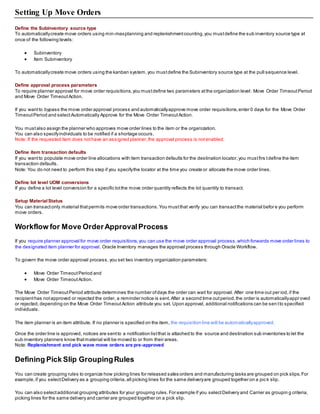
5. In the Move Order Timeout Periodfield, enter the number of days a move order requisition can wait for approval.
The workflow approvalprocess sends a notification to the item planner when a move order requisition requires approval.
After the first timeout period, if the recipient has not approved or rejected theorder, a reminder notice is sent.
After the second timeout period, theorder is automatically approved or rejected, depending on whether you select Approveautomatically or Reject
automatically in theMoveOrder Timeout Action field.
If you want to bypass themove order approvalprocess and automatically approvemove order requisitions, enter 0 days in theMoveOrder Timeout
Period field and select Approveautomatically in theMoveOrder Timeout Action field.
6. Select a move order timeout action
Approve automatically: After the second timeout period, move order requisitions are automatically approved. Select this option and set the Move
Order Timeout Period to 0 if you want to bypass themove order approvalprocess and automatically approvemove order requisitions.
Reject automatically: After the second timeout period, move order requisitions are automatically rejected.
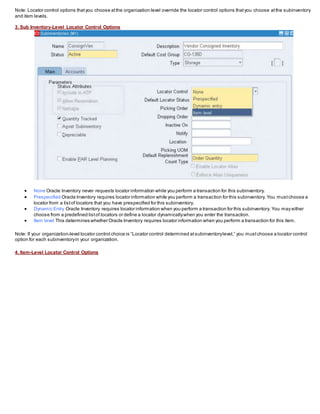
7. Select a locatorcontrol option:
None: Inventory transactions within this organization do not require locator information.
Prespecified only: Inventory transactions within this organization require a valid, predefined locator for each item.
Dynamic entry allowed: Inventory transactions within this organization require a locator for each item. You can choose a valid, predefined locator,
or define a locator dynamically at thetime of transaction.
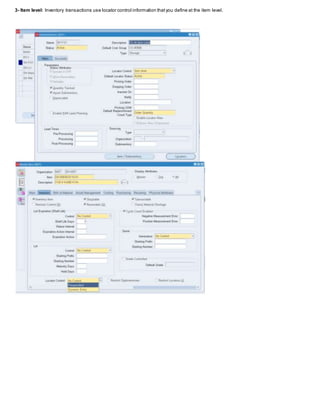
Determined at subinventory level: Inventory transactions use locator control information that you define at the subinventory level.
 Quality Skipping Inspection Control : Indicate whether to allow quality skippingfor inspections.
 Indicate whether locator aliases must be unique across the organization.
 Indicate whether to Allow Negative Balances.
Determines whether inventory transactions can drive theinventory balance of an item negative.
Attention: If insufficient quantity on hand exists in a supply subinventory to satisfy backflush demand, Oracle Work in Process forces the supply
subinventory balance negative, ignoring this option setting.
 Auto delete allocation at Move Order cancellation
 Indicate whether this organization is an Oracle Warehouse Management enabled organization.
You can use WMS features such as LPNs, task management, warehouse execution rules and cost
groups in this organization. Locator control must be enabled in order to enable WMS.
Once this has been enabled and transactions have been entered in this organization, this box cannot be unchecked.
 Indicate whether this organization is an Oracle Enterprise Asset Management enabled Organization.
 Enter a total load weight and unit of measure for this organization.
 Enter a total volume and unit of measure for this organization.
8 . Select a Default On-handMaterial Status tracking option.
This step is optional.
Attention: You cannot updatethis field for existing organizations.
To enable this field, you must submit the ActivateOnhand Level MaterialStatus Tracking concurrent program.
1. Costing Organization
2. Costing Method
3. Transferto GL Indicate whether all transactions are posted in detail to thegeneral ledger.
Caution: Transferring detail transaction distributions to the general ledger increases general ledger posting times due to the number of records created.
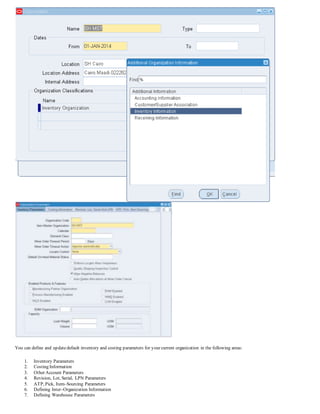
4. Reverse Encumbrance Indicate whether to reverse encumbrance entry upon receipt in inventory.
You normally select this option if you use encumbrances with Oracle Purchasing.
5. Optionally, enter a Cost Cutoff Date
If you leave this field blank, all available transactions will be costed as usual.
If you enter a date, all transactions prior to this date will be costed.
All transactions on or later than this date will not be costed.
For inter–organization transfers, a standard costing, receiving organization will not cost a receipt if the sending organization did not already cost the
transaction.
The default time is the first instant of the date. You can optionally choose another time.
The standard cost updateprocess can be performed on thecost cutoff date. You can restart cost processing by changing the cutoff date to blank, or a future
date.
6. Default Material Subelement
For standard costing, select a material sub–element that this organization uses as a default when you define item costs. For average costing, the default
material sub–element you select can be used for cost collection when Project Cost Collection Enabled is set.
7. Material Over headSubelement
Optionally, select a Default Material Overhead Sub–Element from the list of values. During the Supply Chain Rollup process, when costs are merged from
another organization, markup and shippingcosts will use this value.
The supply chain cost rollup will complete successfully, regardless of whether this field is populated. If the Cost Rollup identifies an organization with a
default material overhead sub–element not set up, a corresponding warning message will be printed in the log file.
8. Default Cost Group
Indicate thedefault cost group for the organization. This will default into theDefault Cost Group field for each subinventory. If theWMS cost group rules
engine fails to find a cost group, this cost group will be used.
9. Valuation Accounts
You choose a default valuation account when you define organization parameters. Under standard costing, theseaccounts are defaulted when you define
subinventories and can be overridden. Under average costing, these accounts (except for Expense) are used for subinventory transactions and cannot be
updated. For a detailed discussion of cost
elements.
Material An asset account that tracks material cost. For average costing, this account holds your inventory
and intransit values. Once you performtransactions, you cannot change this account.
Material OverheadAn asset account that tracks material overhead cost.
Resource An asset account that tracks resource cost.
Overhead An asset account that tracks resource and outsideprocessing overheads.
Outside processing An asset account that tracks outside processing cost.
Expense Theexpense account used when tracking a non–asset item.
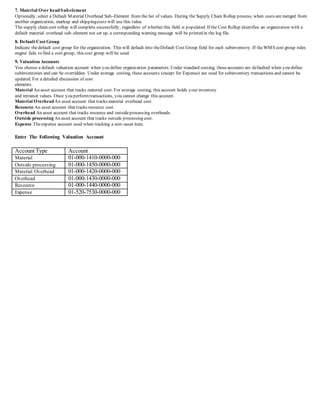
Enter The Following Valuation Account
Account Type Account
Material 01-000-1410-0000-000
Outside processing 01-000-1450-0000-000
Material Overhead 01-000-1420-0000-000
Overhead 01-000-1430-0000-000
Resource 01-000-1440-0000-000
Expense 01-520-7530-0000-000
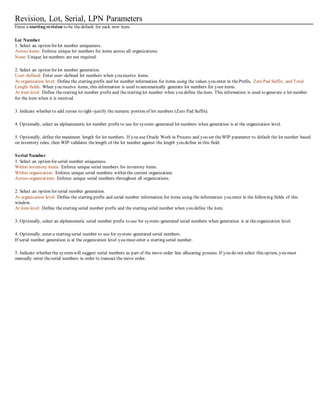
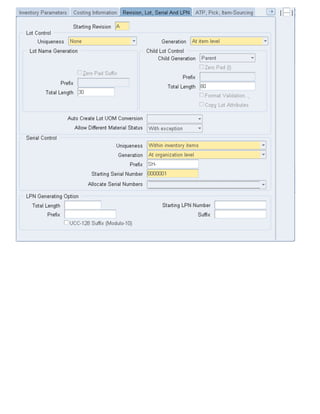
Revision, Lot, Serial, LPN Parameters
Enter a starting revision to be thedefault for each new item.
Lot Number
1. Select an option for lot number uniqueness.
Across items: Enforce unique lot numbers for items across all organizations.
None: Unique lot numbers are not required.
2. Select an option for lot number generation.
User–defined: Enter user–defined lot numbers when you receive items.
At organization level: Define the starting prefix and lot number information for items using the values you enter in thePrefix, Zero Pad Suffix, and Total
Length fields. When you receive items, this information is used to automatically generate lot numbers for your items.
At item level: Define thestarting lot number prefix and thestarting lot number when you define theitem. This information is used to generate a lot number
for the item when it is received.
3. Indicate whether to add zeroes to right–justify the numeric portion of lot numbers (Zero Pad Suffix).
4. Optionally, select an alphanumeric lot number prefix to use for system–generated lot numbers when generation is at the organization level.
5. Optionally, define the maximum length for lot numbers. If you use Oracle Work in Process and you set theWIP parameter to default the lot number based
on inventory rules, then WIP validates thelength of the lot number against the length you define in this field.
Serial Number
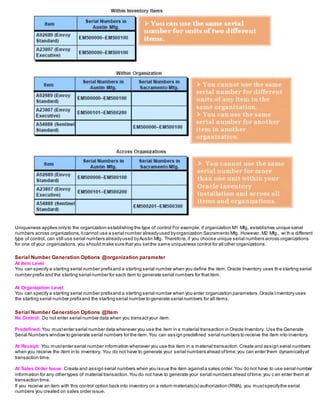
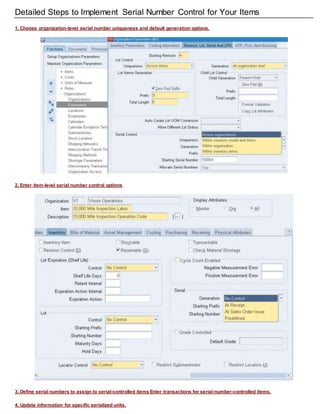
1. Select an option for serial number uniqueness.
Within inventory items: Enforce unique serial numbers for inventory items.
Within organization: Enforce unique serial numbers within the current organization.
Across organizations: Enforce unique serial numbers throughout all organizations.
2. Select an option for serial number generation.
At organization level: Define the starting prefix and serial number information for items using the information you enter in the following fields of this
window.
At item level: Define thestarting serial number prefix and the starting serial number when you define the item.
3. Optionally, select an alphanumeric serial number prefix to use for system–generated serial numbers when generation is at theorganization level.
4. Optionally, enter a starting serial number to use for system–generated serial numbers.
If serial number generation is at the organization level you must enter a starting serial number.
5. Indicate whether the systemwill suggest serial numbers as part of the move order line allocating process. If you do not select this option, you must
manually enter theserial numbers in order to transact the move order.
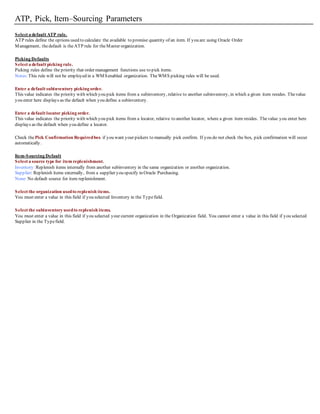
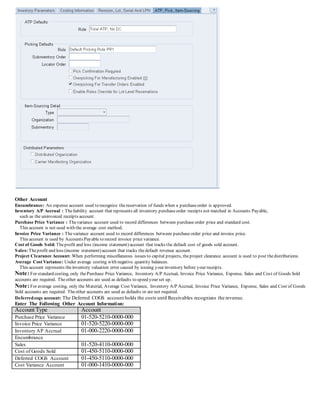
ATP, Pick, Item–Sourcing Parameters
Select a default ATP rule.
ATP rules define the options used to calculate the available to promise quantity of an item. If you are using Oracle Order
Management, thedefault is theATP rule for theMaster organization.
Picking Defaults
Select a default picking rule.
Picking rules define the priority that order management functions use to pick items.
Notes:This rule will not be employed in a WMSenabled organization. TheWMS picking rules will be used.
Enter a default subinventory picking order.
This value indicates the priority with which you pick items from a subinventory, relative to another subinventory, in which a given item resides. Thevalue
you enter here displays as the default when you define a subinventory.
Enter a default locator picking order.
This value indicates the priority with which you pick items from a locator, relative to another locator, where a given item resides. Thevalue you enter here
displays as the default when you define a locator.
Check thePick Confirmation Requiredbox if you want your pickers to manually pick confirm. If you do not check the box, pick confirmation will occur
automatically.
Item-Sourcing Default
Select a source type for item replenishment.
Inventory:Replenish items internally from another subinventory in the same organization or another organization.
Supplier: Replenish items externally, from a supplier you specify in Oracle Purchasing.
None: No default source for item replenishment.
Select the organization usedto replenish items.
You must enter a value in this field if you selected Inventory in the Typefield.
Select the subinventory usedto replenish items.
You must enter a value in this field if you selected your current organization in the Organization field. You cannot enter a value in this field if you selected
Supplier in the Typefield.
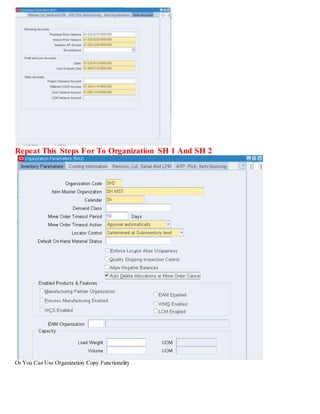
Other Account
Encumbrance: An expense account used to recognize thereservation of funds when a purchaseorder is approved.
Inventory A/P Accrual : Theliability account that represents all inventory purchaseorder receipts not matched in Accounts Payable,
such as the uninvoiced receipts account.
Purchase Price Variance : Thevariance account used to record differences between purchase order price and standard cost.
This account is not used with the average cost method.
Invoice Price Variance : Thevariance account used to record differences between purchase order price and invoice price.
This account is used by Accounts Payable to record invoice price variance.
Cost of Goods Sold: Theprofit and loss (income statement) account that tracks the default cost of goods sold account.
Sales: Theprofit and loss (income statement) account that tracks thedefault revenue account.
Project Clearance Account: When performing miscellaneous issues to capital projects, theproject clearance account is used to post thedistributions.
Average Cost Variance: Under average costing with negative quantity balances.
This account represents theinventory valuation error caused by issuing your inventory before your receipts.
Note:For standard costing, only thePurchase Price Variance, Inventory A/P Accrual, Invoice Price Variance, Expense, Sales and Cost of Goods Sold
accounts are required. Theother accounts are used as defaults to speed your set up.
Note:For average costing, only the Material, Average Cost Variance, Inventory A/P Accrual, Invoice Price Variance, Expense, Sales and Cost of Goods
Sold accounts are required. Theother accounts are used as defaults or are not required.
Deferredcogs account: The Deferred COGS account holds the costs until Receivables recognizes the revenue.
Enter The Following Other Account Information:
Account Type Account
Purchase Price Variance 01-520-5210-0000-000
Invoice Price Variance 01-520-5220-0000-000
Inventory AP Accrual 01-000-2220-0000-000
Encumbrance
Sales 01-520-4110-0000-000
Cost of Goods Sold 01-450-5110-0000-000
Deferred COGS Account 01-450-5110-0000-000
Cost Variance Account 01-000-1410-0000-000
Repeat This Steps For To Organization SH 1 And SH 2
Or You Can Use Organization Copy Functionality
Copying Inventory Organizations
You can create and update a large set of inventory organizations and their business entities,such as Subinventories,Items, Bills of material,
and Resources.
These entities can be copied and customized as part of an inventory organization copy.
This aids in the management of inventory organizational setup,which is mandatory for the use of Inventory,Costing, Bills of Material and
Work in Process. This feature is useful for companies that have a large number of inventory organizations.
You can copy a source inventory organization's parameters, defaults, and settings,in a single operation, to as many new organizations as you
wish for the following setup entities:
• Bills of Material
• Routings
• Items
• Categories
• Subinventories
• Shipping Networks
• Inventory Parameters
• WIP Parameters
• BOM Parameters
Organization Mass Copy is a two-step process.
In order to copy source inventory organization structures,you must first set up entity APIs to load interface tables and then run the Copy
Organization concurrent program to export and import the setup data.
Prerequisites
• Define an inventory organization
• Define organization parameters.
Load interface tables:
Populate the Copy Organization Interface tablewith XML data to customize your new Inventory Organizations.You should
createan XML document with theminimum organization specific information for each new entity you wish tocreate.
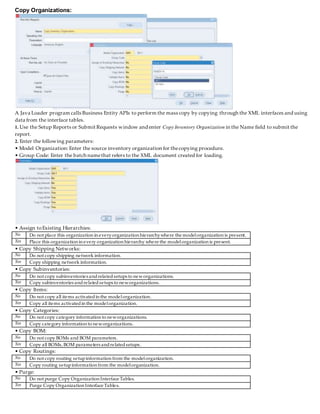
1. Navigateto the Organization Copy Interface program. On the Find Interface Records form, select New.
Inventory > Setup> Organization >Organization Copy > Maintain Interface
2. Indicate the organization name,organization code, and a valid location for each new organization.
You can enter any optional information to override data belonging to the source inventory organization.
Note: If you want touse a new location,provide the required address information in order to define and associatethelocation
with thenew organization.
3. Save the document as an XML file and place in the Copy Organization Interface Tables.
Copy Organizations:
A Java Loader program calls Business Entity APIs to perform the mass copy by copying through the XML interfaces and using
data from the interface tables.
1. Use the Setup Reports or Submit Requests window and enter Copy Inventory Organization in the Name field to submit the
report.
2. Enter the following parameters:
• Model Organization: Enter the source inventory organization for thecopying procedure.
• Group Code: Enter the batch namethat refers to the XML document created for loading.
• Assign toExisting Hierarchies:
No Do not place this organization in everyorganization hierarchywhere the modelorganization is present.
Yes Place this organization in every organization hierarchy where the modelorganization is present.
• Copy Shipping Networks:
No Do not copy shipping network information.
Yes Copy shipping network information.
• Copy Subinventories:
No Do not copy subinventories andrelatedsetups to neworganizations.
Yes Copy subinventories andrelatedsetups to neworganizations.
• Copy Items:
No Do not copy all items activatedin the modelorganization.
Yes Copy all items activatedin the modelorganization.
• Copy Categories:
No Do not copy category information to neworganizations.
Yes Copy category information to neworganizations.
• Copy BOM:
No Do not copy BOMs and BOM parameters.
Yes Copy all BOMs, BOM parameters andrelatedsetups.
• Copy Routings:
No Do not copy routing setupinformation from the modelorganization.
Yes Copy routing setupinformation from the modelorganization.
• Purge:
No Do not purge Copy Organization Interface Tables.
Yes Purge Copy Organization Interface Tables.
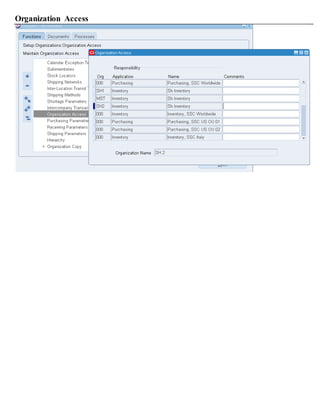
Organization Access
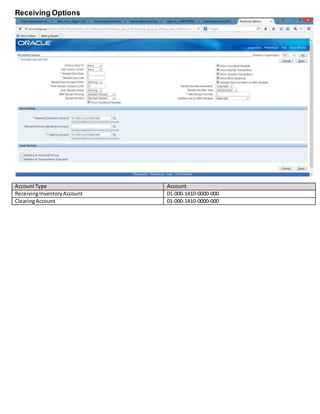
Receiving Options
AccountType Account
ReceivingInventoryAccount 01-000-1410-0000-000
ClearingAccount 01-000-1410-0000-000
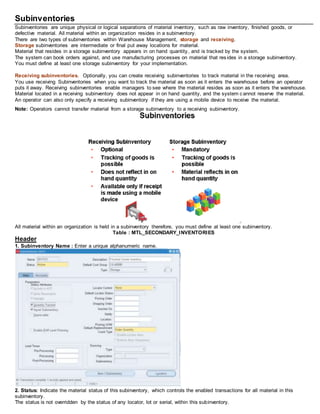
Subinventories
Subinventories are unique physical or logical separations of material inventory, such as raw inventory, finished goods, or
defective material. All material within an organization resides in a subinventory.
There are two types of subinventories within Warehouse Management, storage and receiving.
Storage subinventories are intermediate or final put away locations for material.
Material that resides in a storage subinventory appears in on hand quantity, and is tracked by the system.
The system can book orders against, and use manufacturing processes on material that resides in a storage subinventory.
You must define at least one storage subinventory for your implementation.
Receiving subinventories. Optionally, you can create receiving subinventories to track material in the receiving area.
You use receiving Subinventories when you want to track the material as soon as it enters the warehouse before an operator
puts it away. Receiving subinventories enable managers to see where the material resides as soon as it enters the warehouse.
Material located in a receiving subinventory does not appear in on hand quantity, and the system c annot reserve the material.
An operator can also only specify a receiving subinventory if they are using a mobile device to receive the material.
Note: Operators cannot transfer material from a storage subinventory to a receiving subinventory.
All material within an organization is held in a subinventory therefore, you must define at least one subinventory.
Table : MTL_SECONDARY_INVENTORIES
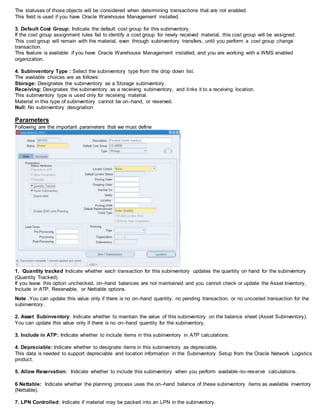
Header
1. Subinventory Name : Enter a unique alphanumeric name.
2. Status: Indicate the material status of this subinventory, which controls the enabled transactions for all material in this
subinventory.
The status is not overridden by the status of any locator, lot or serial, within this subinventory.
The statuses of those objects will be considered when determining transactions that are not enabled.
This field is used if you have Oracle Warehouse Management installed.
3. Default Cost Group: Indicate the default cost group for this subinventory.
If the cost group assignment rules fail to identify a cost group for newly received material, this cost group will be assigned.
This cost group will remain with the material, even through subinventory transfers, until you perform a cost group change
transaction.
This feature is available if you have Oracle Warehouse Management installed, and you are working with a WMS enabled
organization.
4. Subinventory Type : Select the subinventory type from the drop down list.
The available choices are as follows:
Storage: Designates the subinventory as a Storage subinventory.
Receiving: Designates the subinventory as a receiving subinventory, and links it to a receiving location.
This subinventory type is used only for receiving material.
Material in this type of subinventory cannot be on–hand, or reserved.
Null: No subinventory designation
Parameters
Following are the important parameters that we must define
1. Quantity tracked Indicate whether each transaction for this subinventory updates the quantity on hand for the subinventory
(Quantity Tracked).
If you leave this option unchecked, on–hand balances are not maintained and you cannot check or update the Asset Inventory,
Include in ATP, Reservable, or Nettable options.
Note .You can update this value only if there is no on–hand quantity, no pending transaction, or no uncosted transaction for the
subinventory.
2. Asset Subinventory: Indicate whether to maintain the value of this subinventory on the balance sheet (Asset Subinventory).
You can update this value only if there is no on–hand quantity for the subinventory.
3. Include in ATP: Indicate whether to include items in this subinventory in ATP calculations.
4. Depreciable: Indicate whether to designate items in this subinventory as depreciable.
This data is needed to support depreciable and location information in the Subinventory Setup from the Oracle Network Logistics
product.
5. Allow Reservation: Indicate whether to include this subinventory when you perform available–to–reserve calculations.
6 Nettable: Indicate whether the planning process uses the on–hand balance of these subinventory items as available inventory
(Nettable).
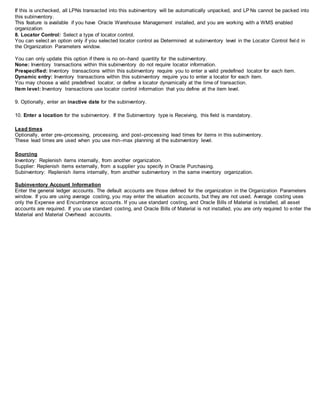
7. LPN Controlled: Indicate if material may be packed into an LPN in the subinventory.
If this is unchecked, all LPNs transacted into this subinventory will be automatically unpacked, and LPNs cannot be packed into
this subinventory.
This feature is available if you have Oracle Warehouse Management installed, and you are working with a WMS enabled
organization
8. Locator Control: Select a type of locator control.
You can select an option only if you selected locator control as Determined at subinventory level in the Locator Control fiel d in
the Organization Parameters window.
You can only update this option if there is no on–hand quantity for the subinventory.
None: Inventory transactions within this subinventory do not require locator information.
Prespecified: Inventory transactions within this subinventory require you to enter a valid predefined locator for each item.
Dynamic entry: Inventory transactions within this subinventory require you to enter a locator for each item.
You may choose a valid predefined locator, or define a locator dynamically at the time of transaction.
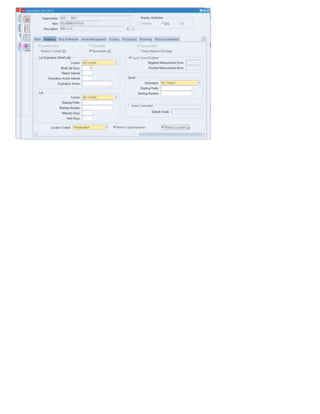
Item level: Inventory transactions use locator control information that you define at the item level.
9. Optionally, enter an inactive date for the subinventory.
10. Enter a location for the subinventory. If the Subinventory type is Receiving, this field is mandatory.
Lead times
Optionally, enter pre–processing, processing, and post–processing lead times for items in this subinventory.
These lead times are used when you use min–max planning at the subinventory level.
Sourcing
Inventory: Replenish items internally, from another organization.
Supplier: Replenish items externally, from a supplier you specify in Oracle Purchasing.
Subinventory: Replenish items internally, from another subinventory in the same inventory organization.
Subinventory Account Information
Enter the general ledger accounts. The default accounts are those defined for the organization in the Organization Parameters
window. If you are using average costing, you may enter the valuation accounts, but they are not used. Average costing uses
only the Expense and Encumbrance accounts. If you use standard costing, and Oracle Bills of Material is installed, all asset
accounts are required. If you use standard costing, and Oracle Bills of Material is not installed, you are only required to enter the
Material and Material Overhead accounts.
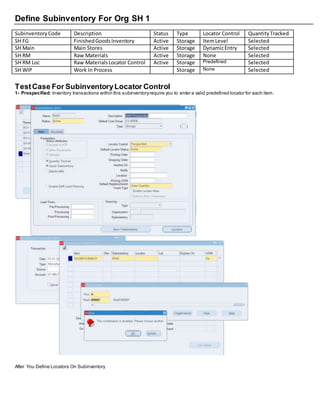
Define Subinventory For Org SH 1
SubinventoryCode Description Status Type Locator Control QuantityTracked
SH FG FinishedGoodsInventory Active Storage ItemLevel Selected
SH Main Main Stores Active Storage DynamicEntry Selected
SH RM Raw Materials Active Storage None Selected
SH RM Loc Raw MaterialsLocator Control Active Storage Predefined Selected
SH WIP Work In Process Storage None Selected
TestCase For SubinventoryLocator Control
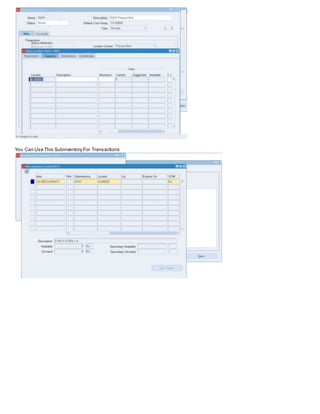
1- Prespecified: Inventory transactions within this subinventoryrequire you to enter a valid predefined locator for each item.
After You Define Locators On Subinventory
You Can Use This Subinventory For Transactions
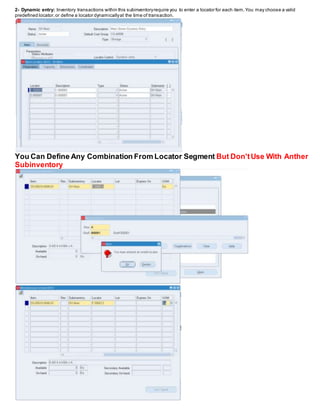
2- Dynamic entry: Inventory transactions within this subinventoryrequire you to enter a locator for each item.You may choose a valid
predefined locator,or define a locator dynamicallyat the time of transaction.
You Can Define Any Combination From Locator Segment But Don'tUse With Anther
Subinventory
3- Item level: Inventory transactions use locator control information thatyou define at the item level.
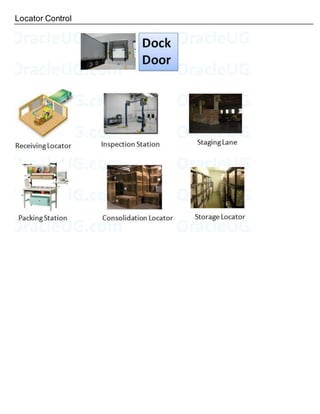
Locator Control
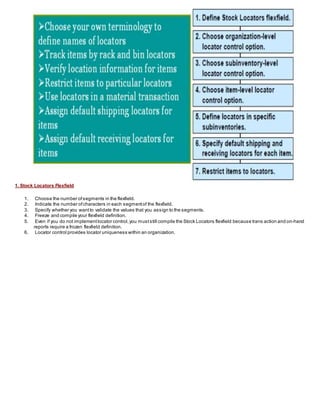
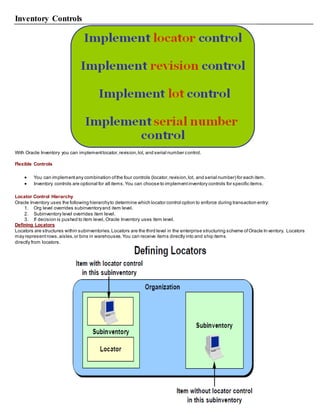
1. Stock Locators Flexfield
1. Choose the number ofsegments in the flexfield.
2. Indicate the number ofcharacters in each segmentof the flexfield.
3. Specify whether you wantto validate the values that you assign to the segments.
4. Freeze and compile your flexfield definition.
5. Even if you do not implementlocator control,you muststill compile the Stock Locators flexfield because trans action and on-hand
reports require a frozen flexfield definition.
6. Locator control provides locator uniqueness within an organization.
2. Organization-Level Locator Control Options
 None Oracle Inventory never requests locator information while you perform a transaction for this organization.
 Prespecified onlyOracle Inventory requires locator information while you perform a transaction for this organization.You mustchoose
a locator from a listof locators that you have prespecified.
 Dynamic entry allowed Oracle Inventory requires locator information while you perform a transaction for this organization.You may
either choose from a prespecified listoflocators or define a locator dynamicallywhen you enter the transaction.
 Determined atsubinventorylevel You can use the Subinventories window to setlocator control for each individual subinventory.
Note: Locator control options thatyou choose atthe organization level override the locator control options thatyou choose atthe subinventory
and item levels.
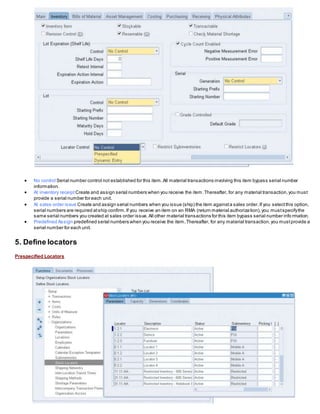
3. Sub Inventory-Level Locator Control Options
 None Oracle Inventory never requests locator information while you perform a transaction for this subinventory.
 Prespecified Oracle Inventory requires locator information while you perform a transaction for this subinventory. You mustchoose a
locator from a listof locators that you have prespecified for this subinventory.
 Dynamic Entry Oracle Inventory requires locator information when you perform a transaction for this subinventory. You may either
choose from a predefined listof locators or define a locator dynamicallywhen you enter the transaction.
 Item level This determines whether Oracle Inventory requires locator information when you perform a transaction for this item.
Note: If your organization-level locator control choice is “Locator control determined atsubinventorylevel,” you mustchoose a locator control
option for each subinventoryin your organization.
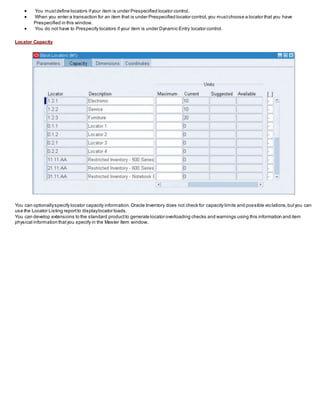
4. Item-Level Locator Control Options
 No control Serial number control not established for this item.All material transactions involving this item bypass serial number
information.
 At inventory receipt Create and assign serial numbers when you receive the item.Thereafter, for any material transaction,you must
provide a serial number for each unit.
 At sales order issue Create and assign serial numbers when you issue (ship) the item againsta sales order.If you selectthis option,
serial numbers are required atship confirm.If you receive an item on an RMA (return material authorization),you mustspecifythe
same serial numbers you created at sales order issue.All other material transactions for this item bypass serial number info rmation.
 Predefined Assign predefined serial numbers when you receive the item.Thereafter, for any material transaction,you mustprovide a
serial number for each unit.
5. Define locators
Prespecified Locators
 You mustdefine locators ifyour item is under Prespecified locator control.
 When you enter a transaction for an item that is under Prespecified locator control,you mustchoose a locator that you have
Prespecified in this window.
 You do not have to Prespecify locators if your item is under Dynamic Entry locator control.
Locator Capacity
You can optionallyspecify locator capacity information.Oracle Inventory does not check for capacity limits and possible vio lations,butyou can
use the Locator Listing reportto displaylocator loads.
You can develop extensions to the standard productto generate locator overloading checks and warnings using this information and item
physical information thatyou specify in the Master Item window.
Units of Measure
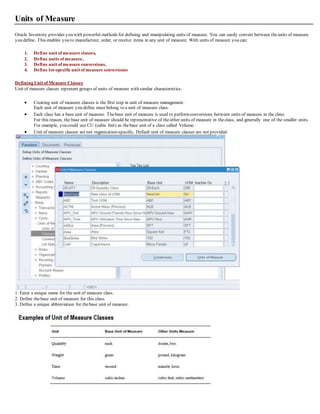
Oracle Inventory provides you with powerful methods for defining and manipulating units of measure. You can easily convert between theunits of measure
you define. This enables you to manufacture, order, or receive items in any unit of measure. With units of measure you can:
1. Define unit of measure classes,
2. Define units of measure,
3. Define unit of measure conversions,
4. Define lot-specificunit of measure conversions
Defining Unit of Measure Classes
Unit of measure classes represent groups of units of measure with similar characteristics.
 Creating unit of measure classes is the first step in unit of measure management.
Each unit of measure you define must belong to a unit of measure class.
 Each class has a base unit of measure. Thebase unit of measure is used to performconversions between units of measure in the class.
For this reason, the base unit of measure should be representative of theother units of measure in theclass, and generally one of the smaller units.
For example, you could use CU (cubic feet) as thebase unit of a class called Volume.
 Unit of measure classes are not organization-specific. Default unit of measure classes are not provided.
1. Enter a unique name for the unit of measure class.
2. Define thebase unit of measure for this class.
3. Define a unique abbreviation for thebase unit of measure.
Defining Units of Measure
Units of measure are used by a variety of functions and transactions to express the quantity of items.
 Defining units of measure is the second step in unit of measure management.
 The values defined in theUnits of Measure window provide the list of values available in unit of measure fields in other windows.
 Units of measure are not organization-specific.
Primary Unit of Measure
The primary unit of measure is the stocking unit of measure for an item in a particular organization.
The primary unit of measure is an item attributethat you specify when defining each item.
Prerequisites
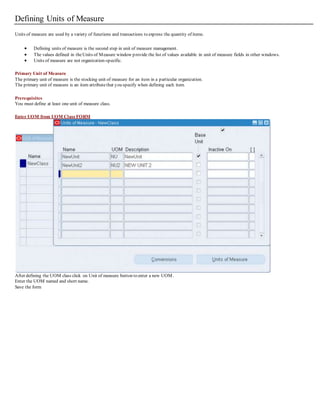
You must define at least one unit of measure class.
Enter UOM from UOM Class FORM
After defining the UOM class click on Unit of measure button to enter a new UOM.
Enter the UOM named and short name.
Save the form
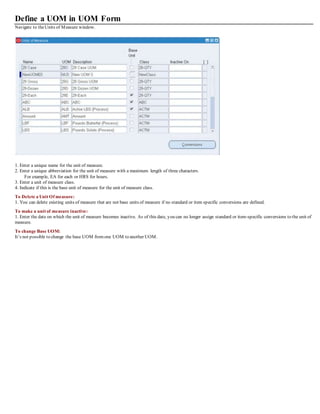
Define a UOM in UOM Form
Navigate to theUnits of Measure window.
1. Enter a unique name for the unit of measure.
2. Enter a unique abbreviation for the unit of measure with a maximum length of three characters.
For example, EA for each or HRS for hours.
3. Enter a unit of measure class.
4. Indicate if this is the base unit of measure for the unit of measure class.
To Delete a Unit Of measure:
1. You can delete existing units of measure that are not base units of measure if no standard or item specific conversions are defined.
To make a unit of measure inactive:
1. Enter the date on which the unit of measure becomes inactive. As of this date, you can no longer assign standard or item-specific conversions to the unit of
measure.
To change Base UOM:
It’s not possible to change the base UOM fromone UOM to another UOM.
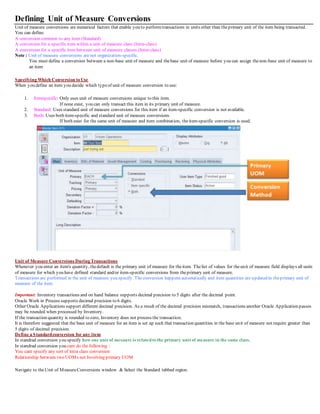
Defining Unit of Measure Conversions
Unit of measure conversions are numerical factors that enable you to performtransactions in units other than theprimary unit of the item being transacted.
You can define:
A conversion common to any item (Standard)
A conversion for a specific item within a unit of measure class (Intra-class)
A conversion for a specific item between unit of measure classes (Inter-class)
Note : Unit of measure conversions are not organization-specific.
You must define a conversion between a non-base unit of measure and thebase unit of measure before you can assign thenon-base unit of measure to
an item
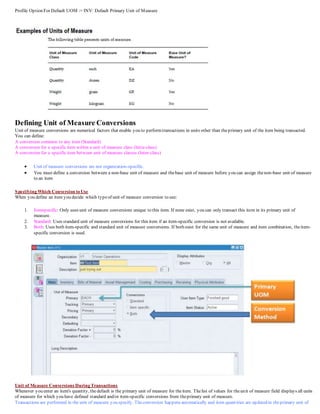
Specifying Which Conversion to Use
When you define an item you decide which typeof unit of measure conversion to use:
1. Itemspecific: Only uses unit of measure conversions unique to this item.
If none exist, you can only transact this item in its primary unit of measure.
2. Standard: Uses standard unit of measure conversions for this item if an item-specific conversion is not available.
3. Both: Uses both item-specific and standard unit of measure conversions.
If both exist for the same unit of measure and item combination, theitem-specific conversion is used.
Unit of Measure Conversions During Transactions
Whenever you enter an item's quantity, thedefault is the primary unit of measure for theitem. Thelist of values for theunit of measure field displays all units
of measure for which you have defined standard and/or item-specific conversions from theprimary unit of measure.
Transactions are performed in the unit of measure you specify. Theconversion happens automatically and item quantities are updated in theprimary unit of
measure of the item.
Important: Inventory transactions and on hand balance supports decimal precision to 5 digits after the decimal point.
Oracle Work in Process supports decimal precision to 6 digits.
Other Oracle Applications support different decimal precision. As a result of the decimal precision mismatch, transactions another Oracle Application passes
may be rounded when processed by Inventory.
If the transaction quantity is rounded to zero, Inventory does not process the transaction.
It is therefore suggested that the base unit of measure for an item is set up such that transaction quantities in the base unit of measure not require greater than
5 digits of decimal precision.
Define a Standardconversion for any item
In standrad conversion you specify how one unit of mesaure is relatedto the primary unit of measure in the same class.
In standrad conversion you cant do the following :
You cant specify any sort of intra class conversion
Relationship between two UOMs not Involving primary UOM
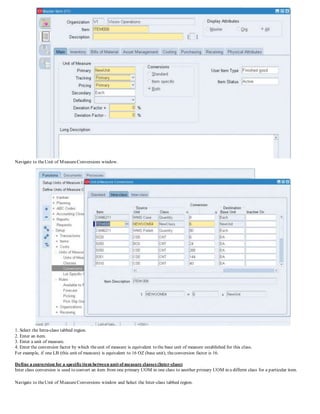
Navigate to theUnit of MeasureConversions window & Select the Standard tabbed region.
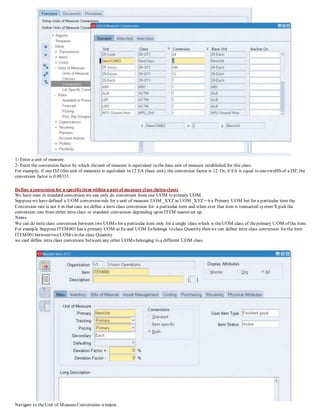
1- Enter a unit of measure.
2- Enter the conversion factor by which theunit of measure is equivalent to the base unit of measure established for this class.
For example, if one DZ (this unit of measure) is equivalent to 12 EA (base unit), the conversion factor is 12. Or, if EA is equal to one-twelfth of a DZ, the
conversion factor is 0.08333.
Define a conversion for a specificitem within a unit of measure class (Intra-class)
We have seen in standard conversion we can only do conversion from one UOM to primary UOM.
Supposewe have defined a UOM conversion rule for a unit of measure UOM_XYZ as UOM_XYZ = 6 x Primary UOM but for a particular item the
Conversion rate is not 6 in that case we define a intra class conversion for a particular item and when ever that item is transacted system'll pick the
conversion rate from either intra class or standard conversion depending upon ITEM master set up.
Notes
We can do intra class conversion between two UOMs for a particular item only for a single class which is theUOM class of theprimary UOM of the item.
For example SupposeITEM001 has a primary UOM as Ea and UOM Eabelongs to class Quantity then we can define intra class conversion for the item
ITEM001 between two UOMs in the class Quantity.
we cant define intra class conversion between any other UOMs belonging to a different UOM class.
Navigate to theUnit of MeasureConversions window.
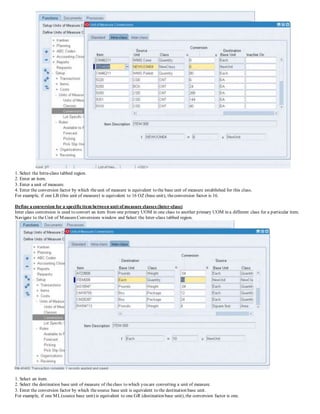
1. Select the Intra-class tabbed region.
2. Enter an item.
3. Enter a unit of measure.
4. Enter the conversion factor by which theunit of measure is equivalent to the base unit of measure established for this class.
For example, if one LB (this unit of measure) is equivalent to 16 OZ (base unit), theconversion factor is 16.
Define a conversion for a specificitem between unit of measure classes (Inter-class)
Inter class conversion is used to convert an item from one primary UOM in one class to another primary UOM in a different class for a particular item.
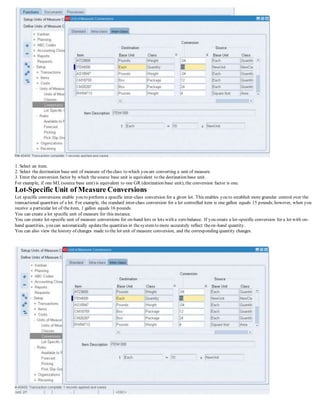
Navigate to theUnit of MeasureConversions window and Select the Inter-class tabbed region.
1. Select an item.
2. Select the destination base unit of measure of theclass to which you are converting a unit of measure.
3. Enter the conversion factor by which thesource base unit is equivalent to the destination base unit.
For example, if one ML(source base unit) is equivalent to one GR (destination base unit), the conversion factor is one.
Profile Option For Default UOM := INV: Default Primary Unit of Measure
Defining Unit of Measure Conversions
Unit of measure conversions are numerical factors that enable you to performtransactions in units other than theprimary unit of the item being transacted.
You can define:
A conversion common to any item (Standard)
A conversion for a specific item within a unit of measure class (Intra-class)
A conversion for a specific item between unit of measure classes (Inter-class)
 Unit of measure conversions are not organization-specific.
 You must define a conversion between a non-base unit of measure and thebase unit of measure before you can assign thenon-base unit of measure
to an item
Specifying Which Conversion to Use
When you define an item you decide which typeof unit of measure conversion to use:
1. Itemspecific: Only uses unit of measure conversions unique to this item. If none exist, you can only transact this item in its primary unit of
measure.
2. Standard: Uses standard unit of measure conversions for this item if an item-specific conversion is not available.
3. Both: Uses both item-specific and standard unit of measure conversions. If both exist for the same unit of measure and item combination, theitem-
specific conversion is used.
Unit of Measure Conversions During Transactions
Whenever you enter an item's quantity, thedefault is the primary unit of measure for theitem. Thelist of values for theunit of measure field displays all units
of measure for which you have defined standard and/or item-specific conversions from theprimary unit of measure.
Transactions are performed in the unit of measure you specify. Theconversion happens automatically and item quantities are updated in theprimary unit of
measure of the item.
Important: Inventory transactions and on hand balance supports decimal precision to 5 digits after thedecimal point. Oracle Work in Process supports
decimal precision to 6 digits. Other Oracle Applications support different decimal precision. As a result of the decimal precision mismatch, transactions
another Oracle Application passes may be rounded when processed by Inventory. If thetransaction quantity is rounded to zero, Inventory does not process
the transaction.
It is therefore suggested that the base unit of measure for an item is set up such that transaction quantities in the base unit of measure not require greater than
5 digits of decimal precision.
Define a Standardconversion for any item
In standrad conversion you specify how one unit of mesaure is relatedto the primary unit of measure in the same class.
In standrad conversion you cant do the following
You cant specify any sort of intra class conversion
Relationship between two UOMs not invloving primary UOM
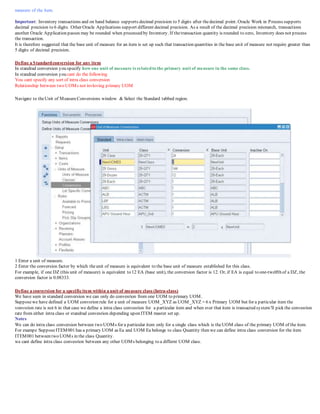
Navigate to theUnit of MeasureConversions window & Select the Standard tabbed region.
1 Enter a unit of measure.
2 Enter the conversion factor by which theunit of measure is equivalent to the base unit of measure established for this class.
For example, if one DZ (this unit of measure) is equivalent to 12 EA (base unit), the conversion factor is 12. Or, if EA is equal to one-twelfth of a DZ, the
conversion factor is 0.08333.
Define a conversion for a specificitem within a unit of measure class (Intra-class)
We have seen in standard conversion we can only do convesrion from one UOM to primary UOM.
Supposewe have defined a UOM convsrion rule for a unit of measure UOM_XYZ as UOM_XYZ = 6 x Primary UOM but for a particular item the
vonvsrion rate is not 6 in that case we define a intra class convesrion for a particular item and when ever that item is transacted system'll pick the convesrion
rate from either intra class or standrad convesrion depending upon ITEM master set up.
Notes
We can do intra class conversion between two UOMs for a particular item only for a single class which is theUOM class of the primary UOM of the item.
For exampe SupposeITEM001 has a primary UOM as Ea and UOM Ea belongs to class Quantity then we can define intra class conversion for the item
ITEM001 between two UOMs in the class Quantity.
we cant define intra class convesrion between any other UOMs belonging to a differnt UOM class.
Navigate to theUnit of MeasureConversions window.
1. Select the Intra-class tabbed region.
2. Enter an item.
3. Enter a unit of measure.
4. Enter the conversion factor by which theunit of measure is equivalent to the base unit of measure established for this class.
For example, if one LB (this unit of measure) is equivalent to 16 OZ (base unit), theconversion factor is 16.
Define a conversion for a specificitem between unit of measure classes (Inter-class)
Inter class conversion is used to convert an item from one primary UOM in one class to another primary UOM in a differnt class for a particular item.
Navigate to theUnit of MeasureConversions window and Select the Inter-class tabbed region.
1. Select an item.
2. Select the destination base unit of measure of theclass to which you are converting a unit of measure.
3. Enter the conversion factor by which thesource base unit is equivalent to the destination base unit.
For example, if one ML(source base unit) is equivalent to one GR (destination base unit), the conversion factor is one.
Lot-Specific Unit of Measure Conversions
Lot specific conversions enable you to perform a specific inter-class conversion for a given lot. This enables you to establish more granular control over the
transactional quantities of a lot. For example, the standard inter-class conversion for a lot controlled item is one gallon equals 15 pounds;however, when you
receive a particular lot of theitem, 1 gallon equals 16 pounds.
You can create a lot specific unit of measure for this instance.
You can create lot-specific unit of measure conversions for on-hand lots or lots with a zero balance. If you create a lot-specific conversion for a lot with on-
hand quantities, you can automatically updatethe quantities in thesystemto more accurately reflect theon-hand quantity.
You can also view the history of changes made to the lot unit of measure conversion, and the corresponding quantity changes.
1. Enter the item number in the Item field.
2. Enter the lot number in the Lot Number field.
3. Select the destination base unit of measure of theclass to which you are converting the unit of measure.
4. Enter the conversion factor by which thesource base unit is equivalent to the destination base unit.
For example, if 16 pounds (source base unit) is equivalent to 1 Gallon (destination base unit), the conversion factor is 16.
5. Optionally, enter an inactive date for theconversion. This is the date when the unit of measure conversion for the lot reverts back to the standard inter-
class conversion.
6. Optionally, enter a transaction reason for theconversion.
Introduction to Items
An item is a part or service that you purchase,sell,plan,manufacture,stock,distribute,or prototype. The following Oracl e Applications use
items:
• Oracle Inventory
• Oracle Purchasing
• Oracle Order Entry
• Oracle CostManagement
• Oracle Bills of Material
• Oracle Work in Process
• Oracle Master Scheduling/MRP
• Oracle Receivables
• Oracle Payables
• Oracle Services
• Oracle Engineering
• Oracle Quality
• Oracle Sales and Marketing
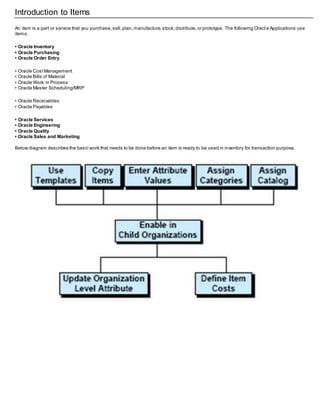
Below diagram describes the basic work that needs to be done before an item is ready to be used in inventory for transaction purpose.
Defining User Item Types
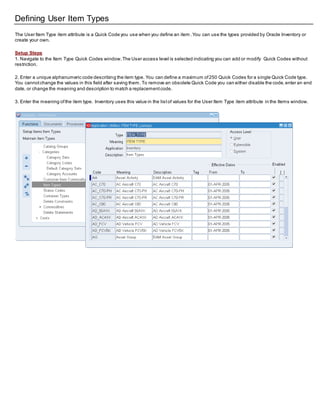
The User Item Type item attribute is a Quick Code you use when you define an item .You can use the types provided by Oracle Inventory or
create your own.
Setup Steps
1. Navigate to the Item Type Quick Codes window.The User access level is selected indicating you can add or modify Quick Codes without
restriction.
2. Enter a unique alphanumeric code describing the item type. You can define a maximum of250 Quick Codes for a single Quick Code type.
You cannotchange the values in this field after saving them. To remove an obsolete Quick Code you can either disable the code,enter an end
date, or change the meaning and description to match a replacementcode.
3. Enter the meaning ofthe item type. Inventory uses this value in the listof values for the User Item Type item attribute in the Items window.
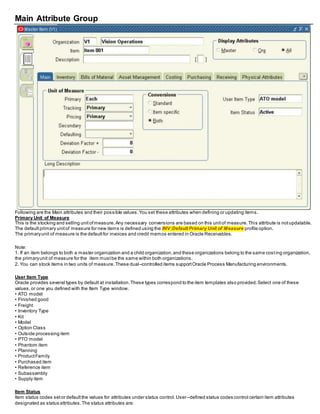
Item Attribute, Item Defining Attributes, Status Attributes & Item Status
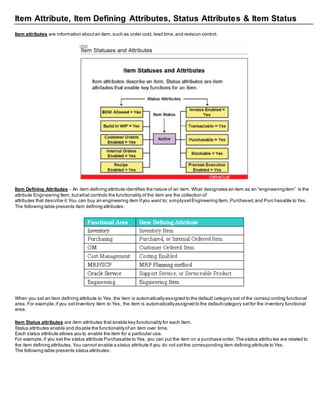
Item attributes are information aboutan item,such as order cost, lead time,and revision control.
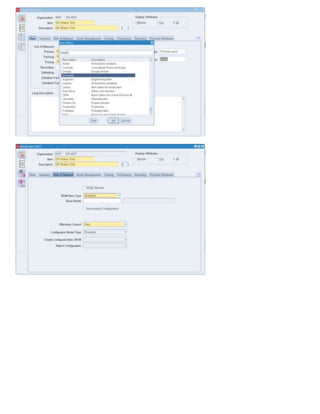
Item Defining Attributes - An item defining attribute identifies the nature of an item.What designates an item as an “engineeringitem” is the
attribute Engineering Item,butwhat controls the functionality of the item are the collection of
attributes that describe it.You can buy an engineering item ifyou want to; simplysetEngineering Item,Purchased,and Purc hasable to Yes.
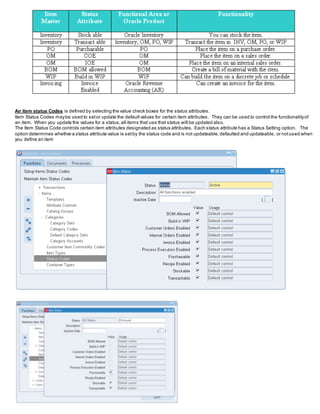
The following table presents item defining attributes:
When you set an item defining attribute to Yes, the item is automaticallyassigned to the default category set of the corresp onding functional
area. For example,if you setInventory Item to Yes, the item is automaticallyassigned to the defaultcategory setfor the inventory functional
area.
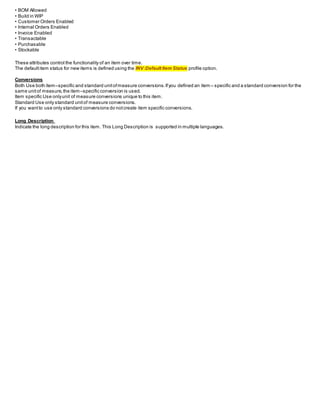
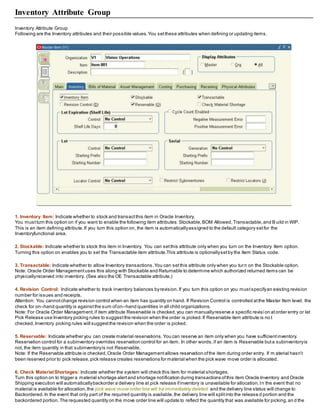
Item Status attributes are item attributes that enable key functionality for each item.
Status attributes enable and disable the functionalityof an item over time.
Each status attribute allows you to enable the item for a particular use.
For example,if you set the status attribute Purchasable to Yes, you can put the item on a purchase order.The status attribu tes are related to
the item defining attributes.You cannot enable a status attribute if you do not setthe corresponding item defining attribute to Yes.
The following table presents status attributes:
An item status Codes is defined by selecting the value check boxes for the status attributes.
Item Status Codes maybe used to setor update the defaultvalues for certain item attributes. They can be used to control the functionalityof
an item. When you update the values for a status,all items that use that status will be updated also.
The Item Status Code controls certain item attributes designated as status attributes. Each status attribute has a Status Setting option. The
option determines whether a status attribute value is setby the status code and is not updateable,defaulted and updateable, or notused when
you define an item
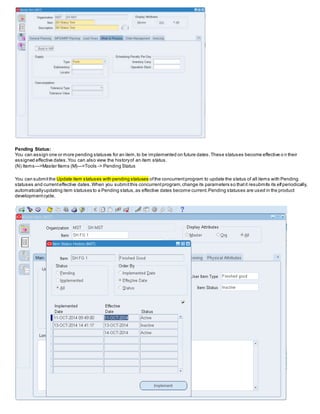
Pending Status:
You can assign one or more pending statuses for an item,to be implemented on future dates.These statuses become effective o n their
assigned effective dates.You can also view the historyof an item status.
(N) Items—>Master Items (M)—>Tools -> Pending Status
You can submitthe Update item statuses with pending statuses ofthe concurrentprogram to update the status of all items with Pending
statuses and currenteffective dates.When you submitthis concurrentprogram,change its parameters so thatit resubmits its elfperiodically,
automaticallyupdating item statuses to a Pending status,as effective dates become current.Pending statuses are used in the product
developmentcycle.
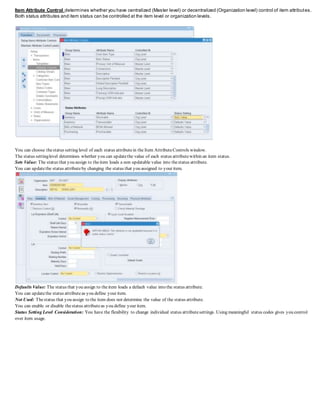
Item Attribute Control determines whether you have centralized (Master level) or decentralized (Organization level) control of item attributes.
Both status attributes and item status can be controlled at the item level or organization levels.
You can choose thestatus setting level of each status attributein the Item AttributeControls window.
The status settinglevel determines whether you can updatethe value of each status attributewithin an item status.
Sets Value: The status that you assign to theitem loads a non updatable value into thestatus attribute.
You can updatethe status attributeby changing the status that you assigned to your item.
Defaults Value: The status that you assign to theitem loads a default value into the status attribute.
You can updatethe status attributeas you define your item.
Not Used: Thestatus that you assign to the item does not determine the value of the status attribute.
You can enable or disable thestatus attributeas you define your item.
Status Setting Level Consideration: You have the flexibility to change individual status attributesettings. Using meaningful status codes gives you control
over item usage.
Defining Item Categories
Overview of Item Categories
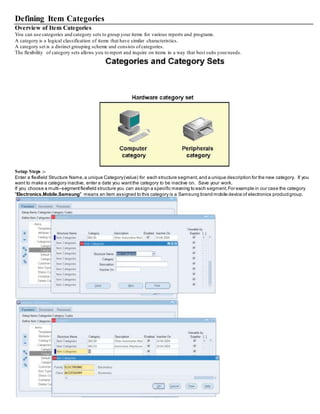
You can use categories and category sets to group your items for various reports and programs.
A category is a logical classification of items that have similar characteristics.
A category set is a distinct grouping scheme and consists ofcategories.
The flexibility of category sets allows you to report and inquire on items in a way that best suits yourneeds.
Setup Steps :-
Enter a flexfield Structure Name,a unique Category(value) for each structure segment,and a unique description for the new category. If you
want to make a category inactive, enter a date you wantthe category to be inactive on. Save your work.
If you choose a multi–segmentflexfield structure you can assign a specific meaning to each segment.For example in our case the category
"Electronics.Mobile.Samsung" means an item assigned to this category is a Samsung brand mobile device of electronics productgroup.
CategorySets
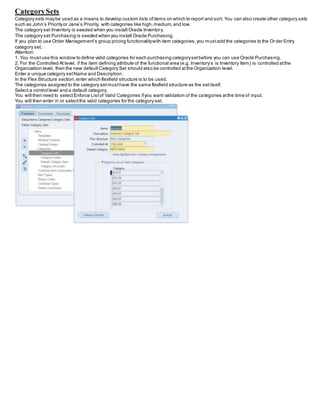
Category sets maybe used as a means to develop custom lists ofitems on which to report and sort. You can also create other category sets
such as John’s Priorityor Jane’s Priority, with categories like high,medium,and low.
The category set Inventory is seeded when you install Oracle Inventory.
The category set Purchasing is seeded when you install Oracle Purchasing.
If you plan to use Order Management’s group pricing functionalitywith item categories,you mustadd the categories to the Or der Entry
category set.
Attention:
1. You mustuse this window to define valid categories for each purchasing categorysetbefore you can use Oracle Purchasing.
2. For the Controlled At level, if the item defining attribute of the functional area (e.g. Inventory’s is Inventory Item) is controlled atthe
Organization level, then the new defaultCategory Set should also be controlled atthe Organization level.
Enter a unique category setName and Description.
In the Flex Structure section,enter which flexfield structure is to be used.
The categories assigned to the category setmusthave the same flexfield structure as the setitself.
Select a control level and a default category.
You will then need to selectEnforce Listof Valid Categories ifyou want validation of the categories atthe time of input.
You will then enter in or selectthe valid categories for the category set.
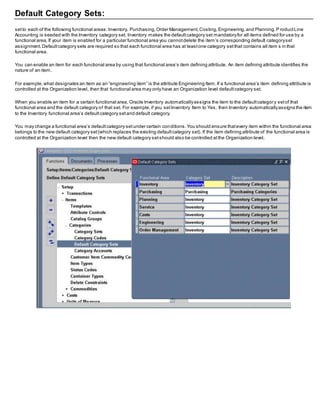
Default Category Sets:
setto each of the following functional areas:Inventory, Purchasing,Order Management,Costing,Engineering,and Planning.P roductLine
Accounting is seeded with the Inventory category set. Inventory makes the defaultcategory set mandatoryfor all items defined for use by a
functional area.If your item is enabled for a particular functional area you cannotdelete the item’s corresponding default categoryset
assignment.Defaultcategory sets are required so that each functional area has at leastone category setthat contains all item s in that
functional area.
You can enable an item for each functional area by using that functional area’s item defining attribute. An item defining attribute identifies the
nature of an item.
For example,what designates an item as an “engineering item” is the attribute Engineering Item.If a functional area’s item defining attribute is
controlled at the Organization level, then that functional area may only have an Organization level defaultcategory set.
When you enable an item for a certain functional area, Oracle Inventory automaticallyassigns the item to the defaultcategor y setof that
functional area and the default category of that set. For example,if you setInventory Item to Yes, then Inventory automaticallyassigns the item
to the Inventory functional area’s defaultcategory setand default category.
You may change a functional area’s defaultcategory setunder certain conditions.You should ensure thatevery item within the functional area
belongs to the new default category set(which replaces the existing defaultcategory set). If the item defining attribute of the functional area is
controlled at the Organization level then the new default category setshould also be controlled atthe Organization level.
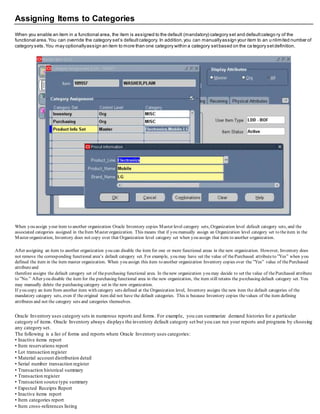
Assigning Items to Categories
When you enable an item in a functional area, the item is assigned to the default (mandatory) category set and defaultcatego ry of the
functional area.You can override the category set’s defaultcategory. In addition,you can manuallyassign your item to an u nlimited number of
category sets.You may optionallyassign an item to more than one category within a category setbased on the ca tegory setdefinition.
When you assign your item to another organization Oracle Inventory copies Master level category sets, Organization level default category sets, and the
associated categories assigned in theItem Master organization. This means that if you manually assign an Organization level category set to theitem in the
Master organization, Inventory does not copy over that Organization level category set when you assign that item to another organization.
After assigning an item to another organization you can disable the item for one or more functional areas in the new organization. However, Inventory does
not remove the corresponding functional area’s default category set. For example, you may have set the value of thePurchased attributeto ”Yes” when you
defined the item in the item master organization. When you assign this item to another organization Inventory copies over the ”Yes” value of thePurchased
attributeand
therefore assigns the default category set of thepurchasing functional area. In thenew organization you may decide to set the value of thePurchased attribute
to ”No.” After you disable the item for the purchasing functional area in the new organization, the item still retains the purchasing default category set. You
may manually delete the purchasing category set in the new organization.
If you copy an item from another item with category sets defined at the Organization level, Inventory assigns the new item the default categories of the
mandatory category sets, even if theoriginal item did not have the default categories. This is because Inventory copies thevalues of the item defining
attributes and not the category sets and categories themselves.
Oracle Inventory uses category sets in numerous reports and forms. For example, you can summarize demand histories for a particular
category of items. Oracle Inventory always displays the inventory default category set but you can run your reports and programs by choosing
any category set.
The following is a list of forms and reports where Oracle Inventory uses categories:
• Inactive items report
• Item reservations report
• Lot transaction register
• Material account distribution detail
• Serial number transaction register
• Transaction historical summary
• Transaction register
• Transaction source type summary
• Expected Receipts Report
• Inactive items report
• Item categories report
• Item cross-references listing
• Item definition detail
• Item definition summary
• Item demand history report
• Item relationships listing
• Item reservations report
• Item statuses report
• Forecast Comparison Report
• Forecast Detail Report
• Physical inventory accuracy analysis
• Physical inventory counts report
• Transaction historical summary
• Search Items
Item Catalog
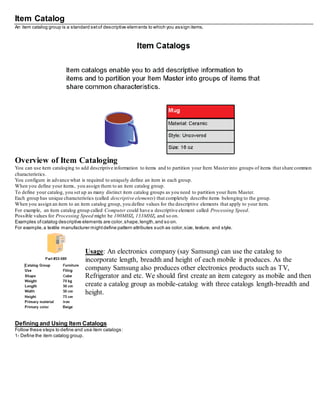
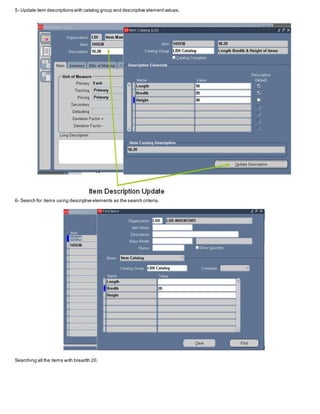
An item catalog group is a standard setof descriptive elements to which you assign items.
Overview of Item Cataloging
You can use item cataloging to add descriptive information to items and to partition your Item Masterinto groups of items that share common
characteristics.
You configure in advance what is required to uniquely define an item in each group.
When you define your items, you assign them to an item catalog group.
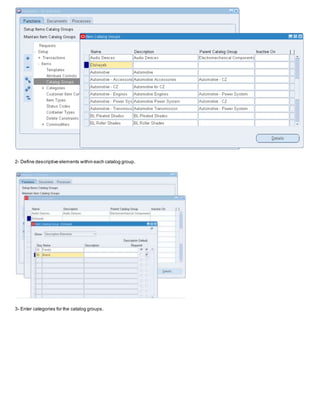
To define your catalog, you set up as many distinct item catalog groups as you need to partition your Item Master.
Each group has unique characteristics (called descriptive elements) that completely describe items belonging to the group.
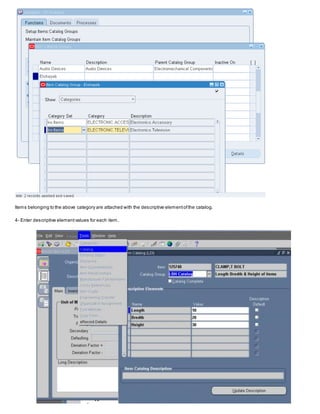
When you assign an item to an item catalog group, you define values for the descriptive elements that apply to your item.
For example, an item catalog group called Computer could have a descriptive element called Processing Speed.
Possible values for Processing Speed might be 100MHZ, 133MHZ, and so on.
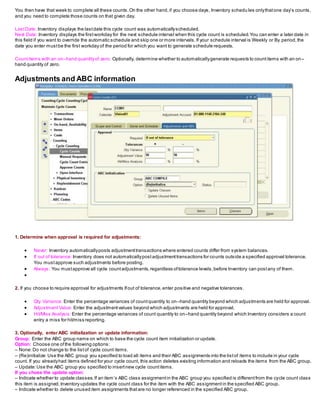
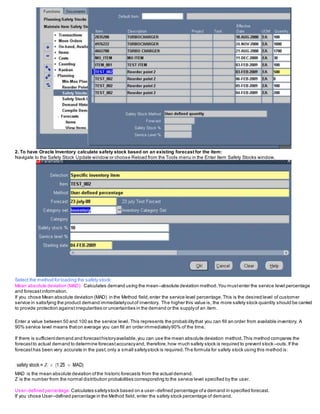
Examples ofcatalog descriptive elements are color,shape,length,and so on.
For example,a textile manufacturer mightdefine pattern attributes such as color,size, texture, and style.
Usage: An electronics company (say Samsung) can use the catalog to
incorporate length, breadth and height of each mobile it produces. As the
company Samsung also produces other electronics products such as TV,
Refrigerator and etc. We should first create an item category as mobile and then
create a catalog group as mobile-catalog with three catalogs length-breadth and
height.
Defining and Using Item Catalogs
Follow these steps to define and use item catalogs:
1- Define the item catalog group.
2- Define descriptive elements within each catalog group.
3- Enter categories for the catalog groups.
Items belonging to the above category are attached with the descriptive elementofthe catalog.
4- Enter descriptive elementvalues for each item.
5- Update item descriptions with catalog group and descriptive elementvalues.
6- Search for items using descriptive elements as the search criteria.
Searching all the items with breadth 20.
Define Master Items
You mustsetcertain controls and reference options before defining items.These enable you to maintain,group,reference,qu ery, and delete
your items.Once you have defined items,you can setup other parameters,such as item cross references,to control the use of items.
You define items in one organization.To distinguish itfrom others,we call it the Item Master organization.
Other organizations (child organizations) refer to the Item Master for item definition.After you define an item in the Item Master, you can assign
it to any number of other organizations.
There is no functional or technical difference between the Item Master organization and other organi zations.However,for simplicity,Oracle
recommends thatyou limitthe Item Master to justan item definition organization.
Oracle also recommends thatyou do not define multiple item masters.This can make item definition and maintenance confusing. In addition,
multiple item masters are distinctentities,with no relationship to each other. You cannot associate items in one item maste r organization with
another item master organization.You cannotcopy items across item master organizations.
To create the item master:
1. Use the Organization window to create the organization you want to use as the Item Master.
2. Use the Organization Parameters window to specifythat organization as the Item Master.
Item Master Business Example
Suppose you have a distribution warehouse and a manufacturing factory. In the warehouse,the item has independentdemand and is min –
max planned.In the factory, the item is MRP planned and built.
Using an Item Master with a warehouse and a factory as the other organizations ,you define the item justonce in the Item Master.
Next, you assign the item to both the warehouse and the factory. Finally, you change the planning and build attributes in eac h organization to
describe the differentbehavior of the items in those organizations.
You do not have to change any other information aboutthe item; in fact, because information such as unitofmeasure,descrip tion,and so on
is maintained atthe Master level, you know it is consistentin each organization
Main Attribute Group
Following are the Main attributes and their possible values.You set these attributes when defining or updating items.
Primary Unit of Measure
This is the stocking and selling unitofmeasure.Any necessary conversions are based on this unitof measure.This attribute is notupdatable.
The defaultprimary unitof measure for new items is defined using the INV:Default Primary Unit of Measure profile option.
The primaryunit of measure is the defaultfor invoices and credit memos entered in Oracle Receivables.
Note:
1. If an item belongs to both a master organization and a child organization,and these organizations belong to the same costing organization,
the primaryunit of measure for the item mustbe the same within both organizations.
2. You can stock items in two units of measure.These dual–controlled items supportOracle Process Manufacturing environments.
User Item Type
Oracle provides several types by default at installation.These types correspond to the item templates also provided.Select one of these
values,or one you defined with the Item Type window.
• ATO model
• Finished good
• Freight
• Inventory Type
• Kit
• Model
• Option Class
• Outside processing item
• PTO model
• Phantom item
• Planning
• ProductFamily
• Purchased item
• Reference item
• Subassembly
• Supply item
Item Status
Item status codes setor defaultthe values for attributes under status control.User–defined status codes control certain item attributes
designated as status attributes.The status attributes are:
• BOM Allowed
• Build in WIP
• Customer Orders Enabled
• Internal Orders Enabled
• Invoice Enabled
• Transactable
• Purchasable
• Stockable
These attributes control the functionality of an item over time.
The defaultitem status for new items is defined using the INV:Default Item Status profile option.
Conversions
Both Use both item–specific and standard unitofmeasure conversions.Ifyou defined an item – specific and a standard conversion for the
same unitof measure,the item–specific conversion is used.
Item specific Use onlyunit of measure conversions unique to this item.
Standard Use only standard unitof measure conversions.
If you wantto use only standard conversions do notcreate item specific conversions.
Long Description
Indicate the long description for this item. This Long Description is supported in multiple languages.
Inventory Attribute Group
Following are the Inventory attributes and their possible values.You setthese attributes when defining or updating items.
1. Inventory Item: Indicate whether to stock and transactthis item in Oracle Inventory.
You mustturn this option on if you want to enable the following item attributes:Stockable,BOM Allowed,Transactable,and B uild in WIP.
This is an item defining attribute.If you turn this option on, the item is automaticallyassigned to the default category setfor the
Inventoryfunctional area.
2. Stockable: Indicate whether to stock this item in Inventory. You can setthis attribute only when you turn on the Inventory Item option.
Turning this option on enables you to set the Transactable item attribute.This attribute is optionallysetby the Item Status code.
3. Transactable: Indicate whether to allow Inventory transactions.You can setthis attribute only when you turn on the Stockable option.
Note: Oracle Order Managementuses this along with Stockable and Returnable to determine which authorized returned items can be
physicallyreceived into inventory. (See also the OE Transactable attribute.)
4. Revision Control: Indicate whether to track inventory balances byrevision.If you turn this option on you mustspecifyan existing revision
number for issues and receipts.
Attention: You cannotchange revision control when an item has quantity on hand. If Revision Control is controlled atthe Master Item level, the
check for on–hand quantity is againstthe sum ofon–hand quantities in all child organizations.
Note: For Oracle Order Management,if item attribute Reservable is checked,you can manuallyreserve a specific revisi on atorder entry or let
Pick Release use Inventory picking rules to suggestthe revision when the order is picked.If Reservable item attribute is no t
checked,Inventory picking rules will suggestthe revision when the order is picked.
5. Reservable: Indicate whether you can create material reservations.You can reserve an item only when you have sufficientinventory.
Reservation control for a subinventory overrides reservation control for an item. In other words,if an item is Reservable buta subinventoryis
not, the item quantity in that subinventoryis not Reservable.
Note: If the Reservable attribute is checked,Oracle Order Managementallows reservation ofthe item during order entry. If m aterial hasn’t
been reserved prior to pick release,pick release creates reservations for material when the pick wave move order is allocated.
6. Check MaterialShortages: Indicate whether the system will check this item for material shortages.
Turn this option on to trigger a material shortage alertand shortage notification during transactions ofthis item Oracle Inventory and Oracle
Shipping execution will automaticallybackorder a delivery line at pick release ifinventory is unavailable for allocation.In the event that no
material is available for allocation,the pick wave move order line will be immediately deleted and the delivery line status will change to
Backordered.In the event that only part of the required quantity is available,the delivery line will splitinto the release d portion and the
backordered portion.The requested quantity on the move order line will update to reflect the quantity that was available for picking,an d the
move order line will close when the available quantity has been picked.The delivery line can be re –released
through the Shipping Transactions form,the Release Sales Orders for,or the Release Sales Orders SRS process.
LOT Details
Lot Control
No control Do not establish lotcontrol for the item.
Full control Track inventory balances bylot number.You mustspecifya lot number for issues and receipts.
You can establish lotnumber control onlyfor an item that has no quantity on hand.If Lot Control is controlled at the Maste r Item level, the
check for on–hand quantity is againstthe sum ofon–hand quantities in all child organizations.
Note: For Oracle Order Management,if an item is Reservable,you can manuallyreserve a specific lot at order entry or let pi ck release use
Inventory picking rules to suggestthe lot when the order is picked.If the item is not Reservable, Inventory picking rules will suggestthe lot
when the order is picked.
Attention: Oracle Work in Process recognizes either lotcontrol or serial number control for an item —butnot both. You cannottransactan item
into Work in Process ifit has both lot and serial control defined.
Starting Lot Prefix
Enter a starting prefix for all lot numbers you define for this item. When Lot Number Generation is At item level in the orga nization parameters,
this prefix is used when you define a lot number.
Starting Lot Number
Enter a starting numeric suffixfor this item only. When Lot Number Generation is At item level in the organization parameters,this starting
numeric suffixis used when you create a lot number.Thereafter, this number is incremented for each succeed ing lot.
Lot Expiration (Shelf Life) Control
Lot Expiration control governs how long items in a given lot remain available.
Shelf life days Specify a number ofdays for all lots of an item,beginning on the day you create the lot by receiving the item.You receive a
warning message thatthe lot expires after the specified number ofdays.
No control Shelf life control not established for this item User–defined Specifyan expiration date as you receive each lot. You receive a
warning butare not prevented from using the lot after expiration.
Attention: You cannotchange lot expiration control when an item has quantity on hand. If Lot Expiration is controlled at the Item level, the
check for on–hand quantity is againstthe sum ofon–hand quantities in all child organizations.
Shelf Life Days
Enter the number ofdays each lot is active. At receipt, the expiration date is determined byadding the shelflife days to the system date
(includes the day you define the lot). This is used only when you choose Shelf life days for Lot Expiration Control.
Lot Status Enabled
Indicate whether an item is subjectto status control at the Lot Level. For example,a lot may be In Test. A companymay have a policyof
allowing Lots In Test to be used in planning and reserved, butnot shipped.A lot may also be In Quarantine.For example,a company
may have a policy of not allowing lots In Quarantine to be used in planning.
If an item is lot–controlled,you can indicate the DefaultLot Status. For example,a lot of microprocessors maybe at the Quarantine status until
a soak testis complete.
Lot Split Enabled
Indicate whether a lot–controlled item maysplitinto manylots during the production of a batch.
Lot Merge Enabled
Indicate whether many lots of a lot–controlled item maymerge during the production ofa batch.
Lot Translate Enabled
Enables you to translate lots within a lot controlled item.
Lot Substitution Enabled
Enables you to substitute lots during a transaction.
SERIAL DETAILS
Serial Generation
At inventory receiptCreate and assign serial numbers when you receive the item.Thereafter, for any material transaction,you mustprovide a
serial number for each unit.
At sales order issue Create and assign serial numbers when you issue (ship) the item againsta sales order.If you selectthis option,serial
numbers are required atship confirm.If you receive an item on an RMA (return material authorization),you mustspecifythe same serial
numbers you created at sales order issue.All other material transactions for this item bypass serial number information.
No control Serial number control not established for this item.All material transactions involving this item bypass serial number information.
Predefined Assign predefined serial numbers when you receive the item.Thereafter, for any material transaction,you mustprovide a serial
number for each unit.
The following table presents conditions where you can change back and forth between certain options:
If Serial Generation is controlled at the Item level, the check for on–hand quantityis againstthe sum of on–hand quantities in all child
organizations.
Starting Serial Prefix
Enter a starting alpha prefix for all serial numbers you define.You mustenter a value when you choose Predefined and when S erial
Generation is At item level in the organization parameters.This prefixis used when you define your serialized units.
Starting Serial Number
Enter a starting numeric suffixfor all serial numbers for this item only.
You mustenter a value when you choose Predefined and when Serial Number Generation is At item level in the organization parameters.This
starting numeric suffixis used when you define your serialized units.
Thereafter, this number is incremented for each succeeding serial number.
Serial Status Enabled
Indicate whether an item is subjectto status control at the Serial Level.
For example,a companymay have a policy of allowing all functions on serial numbers thatare New, and a policy of allowing r eservations to
Reworked serial numbers,notincluding Reworked items.
If an item is serial–controlled,you can indicate the DefaultSerial Status. For example,a serial number ofanalytical equipmentmaybe at the
Quarantine status until a soak test is complete.
Locator Details
Locator Control
Dynamic entry Define locators when you use them,either as you receive or ship items.
No control Locator control not established.
Prespecified Defined locators before you use them.
Note: For Oracle Order Management,if an item is Reservable,you can manuallyreserve a specific locator at order entry or let pick release use
Inventory picking rules to suggestthe locator when the order is picked. If the item is not Reservable,Inventory picking rul es will suggestthe
locator when the order is picked.
Note: Locator control for an organization or for a subinventoryoverrides locator control for an item.
Attention: You cannotchange locator control when an item has quantity on hand.
Restrict Subinventories Indicate whether to restricttransactions ofthis item to or from a subinventory specified in a listyou define with the
Item/Subinventory
Information window. This option mustbe turned on if you choose to restrictlocators.
Restrict Locators Indicate whether to restricttransaction of this item to or from a locator specified in the listyou define with the
Item/Subinventory Information window.You cannotrestrict locators unless you also restrictsubinventories
Order Management Attribute Group
Following are the Order Managementattributes and their possible values. You set these attributes when defining or updating items.
Customer Ordered
Indicate whether to allow an item to be ordered by external customers. You can add any customer orderable items to price lists in Oracle
Order Management.This attribute mustbe turned off if the BOM Item Type attribute is setto Planning.
If you turn this attribute on, you can temporarilyexclude an item from being ordered by turning Customer Orders Enabled off. This is an item
defining attribute.If you turn this attribute on, the item is automaticallyassigned to the default category setfor the Oracle Order Management
functional area.
Customer Orders Enabled
Indicate whether an item is currently customer orderable.If you turn this attribute on you can specify the item in the Enter Orders window in
Oracle Order Management.
You can initially define an item with Customer Ordered Item turned on and Customer Orders Enabled turned off.This means pric es can be
defined for the item,but no orders can be placed for it.
Internal Ordered
Indicate whether to allow an item to be ordered on an internal requisition.
If you turn this attribute on, you can temporarilyexclude an item from being ordered on an internal requisition byturning Internal Orders
Enabled off.
This is an item defining attribute.If you turn this attribute on, the item is automaticallyassigned to the defaultcategory setfor the Oracle
Purchasing functional area.
Internal Orders Enabled
Indicate whether you can currently order an item internally. If you turn this attribute on, you can specify the item on an internal requisition,if
Internal Ordered Item is also on.
If you turn Internal Ordered Item on, you can temporarilyexclude an item from being ordered on an internal requisition bytu rning this attribute
off.
This attribute is optionallysetby the Item Status code.
Shippable
Indicate whether to ship an item to a customer. Shippable items are released byOracle Shipping Execution’s Pick Release program,creating
confirmable shipping lines,and are printed on the pick slip. A warning is issued ifyou change the value of this attribute when open sales order
lines exist.
This attribute mustbe turned off if the BOM Item Type attribute is set to Planning.
OE Transactable
Indicate whether demand can be placed for an item by Oracle Order Management,and whether shipmenttransactions are interfaced to Oracle
Inventory. Most items with Shippable turned on also have OE Transactable turned on. For items you do not ship,you may still wantOE
Transactable turned on if you use the items in forecasting or planning.
If you also wantto reserve the item, turn Reservable on.A warning is issued ifyou change the value of this attribute when open sales order
lines exist.You cannotturn this attribute off if demand exits.
Pick Components
Indicate whether an item has a bill of material with options,classes,or included items picked from finished goods inventory. Pick–to–order
items musthave this attribute turned on. Assemble–to–order items and items withouta bill of material musthave this attribute turned off.
Assemble to Order
Turn this attribute on if an item is generally builtfor sales order demand;a final assemblywork order is created based on sales order details.
You mustturn on this attribute if you auto create requisitions.
An item cannothave Pick Components turned on and this attribute turned on at the same time.
Returnable
Indicate whether to allow customers to return an item.If an item is returnable,you can enter it on the Returns window in Oracle Order
Management. Order Managementuses this attribute along with Stockable and Transactable to determine which authorized returned items
you can physically receive into inventory.
RMA Inspection Required
Indicate whether inspection is required for items returned by the customer.The item then mustbe separatelytransferred to inventory.
Credits are never automaticallygenerated by Oracle Order Managementfor customer return items awaiting inspection.
Financing Allowed
Indicate whether a customer can finance this item.
ORDER DETAILS
Check ATP
Select Check Material Only, Check Material and Resources,Check Resources Only, or None to indicate whether to check availabl e to promise
and/or capable to promise information when placing demand.
This attribute also determines whether you can view componentATP information for material requirements in Work in Process.
ATP Components
Indicate whether to include,in available to promise checking,additional components in the bill of material for ATO and PTO items.These
components are included in ATP checking if Check ATP for the componentis turned on.
ATP Rule
Enter a user–defined available to promise rule.ATP rules define supplyand demand sources,time–fence parameters,and available–to–
promise calculation methods.You can give ATP rules meaningful names,such as ATO ATP Rule.
If there is no ATP rule for the item,the organization’s defaultATP rule is used.
Default Shipping Organization
Enter the Oracle Shipping Execution primaryshipping organization.This organization defaults to the Enter Orders window if Item is the source
attribute of the Warehouse objectin the standard value rule set for the order. This organization defaults to the Enter Retur ns window ifa
receiving warehouse is notdefined on the customer or order type.
Default SO Source Type
This item attribute determines ifan item is to be drop–shipped.If the value is internal,the item will not be drop–shipped.Ifthe value is external,
the item will be drop–shipped.
Picking Rule
Enter the picking rule that defines the order in which subinventories,locators,lots,and revisions are picked.This rule will notbe employed in
WMS enabled organizations.Oracle Warehouse Managementpicking rules will be used.
Purchasing Attribute Group
Following are the Purchasing attributes and their possible values.You set these attributes when defining or updating items.
Purchased
Indicate whether to purchase and receive an item.Turning this option on allows you to set the Purchasable attribute.
This is an item defining attribute.If you turn this option on, the item is automaticallyassigned to the default category setfor the Oracle
Purchasing functional area.
If an item is vendor managed,you mustturn on this option.
Purchasable
Indicate whether to order an item on a purchase order.You can set this only when Purchased is turned on.
Turning Purchasable offallows you to temporarilyrestrictthe ability to buy. This attribute is optionallysetby the Item Status code.
RFQ Required
Indicate whether to require an item quotation when requesting an item.Oracle Purchasing defaults this value on requisition lines for this item.
Leave this field blank if you want Inventory to use the value defined in the Purchasing Options window for transactions invol ving this item.
Taxable
Indicate whether the supplier charges a tax. Oracle Purchasing uses the taxable status together with the tax code you associate w ith a location
to determine whether a purchase order shipmentis taxable,and what the tax code that applies to this shipmentis.L eave this field blank if you
want Inventory to use the value defined in the window for transactions involving this item.
Tax Code
Select the appropriate tax code for the item.The tax code shows the tax authorities and rates thatare available to use for this item.You must
selectthe taxable attribute to enable this field.
Receipt Required (Three–WayInvoice Matching)
Indicate whether you mustreceive an item before you can pay the invoice. Leave this field blank if you want Inventory to use the value defined
in the Purchasing Options window for transactions involving this item.
Inspection Required (Four–Way Invoice Matching)
Indicate whether to inspectan item upon receiptfrom the supplier,before paying the corresponding invoice.Leave this field blank if you want
Inventory to use the value defined in the Purchasing Options window for transactions involving this item.
Outside Processing Item
Indicate whether you can add the item to an outside processing purchase order line.You can turn this option on onl y if Purchased is also on.In
addition,this option controls whether you can attach an item to a resource in the Resource window.
Outside Processing Unit Type
Select an option to determine the quantity of an outside processing item you requisition,purchase and receive:
AssemblyYou purchase an outside processing item based on the number ofassemblies you ship to the supplier.
Resource You purchase an outside processing item based on the number ofassemblies times the resource usage rate or amount.
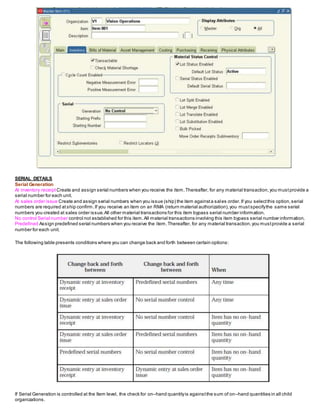
List Price
Enter the value that Oracle Purchasing uses as the defaultprice on a purchase order,requisition,RFQ, or quotation.Oracle Receivables uses
this value as the defaultunit selling price on a transaction.Note that this is the original inventory item price used by Purchasing and therefore
should be used as a guide only.
When performing supplier inventory replenishment,a ListPrice mustbe specified in order to automaticallygenerate a requisi tion.
Market Price
Enter the marketvalue for an item. Oracle Purchasing copies the marketprice to the purchase order lines you create.
Price Tolerance
Enter the price tolerance percent, the maximum price percentage over the normal price range for an item. For example,if the tolerance percent
is 5, the maximum acceptable price on a purchase order is 5% over the requisition price.Any purchase order price 5% above the requisition
price is unacceptable,and you cannotapprove the purchase order.
Receipt Close Tolerance
Enter the percentage tolerance Oracle Purchasing uses to automaticallyclose purchase order shipments.Oracle Purchasing automatically
closes a shipmentwhen your unreceived quantity is within the quantity tolerance percentage of the shipment.
For example,if the original shipmentquantityis 50, and you enter 10 here (10%), Oracle Purchasing automaticallycloses the shipmentfor
receiving when you receive 45 or more.
Closed for Receiving is a status change only. You can receive additional items againstthe shipmentlater.
Invoice Close Tolerance
Enter the percentage tolerance Oracle Purchasing uses to automaticallyclose purchase order shipments.Oracle Purchasing auto matically
closes a shipmentwhen your uninvoiced quantity is within the quantity tolerance percentage ofthe shipment.
For example, if the original shipmentquantityis 50, and you enter 10 here (10%), Oracle Purchasing automaticallycloses the shipmentfor
invoicing when you invoice match 45 or more.
Closed for Invoicing is a status change only. You can invoice match additional items againstthe shipmentlater.
Encumbrance Account
This attribute is controlled atthe Organization level only.
Enter the defaultencumbrance accountOracle Purchasing uses when an item is received.If the item encumbrance accountdoes n otexist,
Oracle Purchasing uses the subinventoryaccount.You encumber,or reserve againstfunds,when the purchase requisition or purchase order
is approved. When you deliver into a subinventoryyou reverse the encumbrance.The total receipts plus encumbrances equals yo ur total funds
spent.
Expense Account
This attribute is controlled atthe Organization level only. Enter the defaultinventory account for expense items.This attr ibute is used only
when Inventory AssetValue is turned off. Oracle Purchasing debits this account when you receive an item into inventory only if the item is
being expensed.If you receive into an expense subinventory,Oracle Purchasing uses the expense accountyou assigned to the s ubinventory
first; if you do not define the accounthere, Oracle Purchasing uses the expense accountassigned to the item.
Asset Category
Enter the assetcategoryto which the item belongs.Oracle Assets uses this to classifyyour fixed assets.All assets in a ca tegory share default
information,such as the accounts used when you postto the general ledger.You can enter this field only if you use Oracle Assets.
Receiving Attribute Group
Following are the Receiving attributes and their possible values.You setthese attributes when defining or updating items.
Receipt Date Action
None No receiptdate exception enforced.
RejectReject receipts when the receive date is outside the range defined by Days Early ReceiptAllowed or Days Late ReceiptAllowed.
Warning Displaya warning message ifyou attempt to receive an item outside the range defined by Days Early ReceiptAllowed or Days Late
ReceiptAllowed, but perform the receipt,anyway.
Receipt Days Early
Enter the number ofdays before the promise date you can receive an item without warning or rejection.For example,if you e nter 3 and the
promise date is a Friday, you can receive the item on Tuesday.
Note that Oracle Purchasing uses regular calendar days (including weekends and holidays) in this calculation.If the promise date does not
exist, Oracle Purchasing uses the need by date.
Receipt Days Late
Enter the number ofdays after the promise date you can receive an item without warning or rejection.For example,if you enter 2 and the
promise date is a Monday, you can receive the item on Wednesday.
Note that Oracle Purchasing uses regular calendar days (including weekends and holidays) in this calculation.If the promise date does not
exist, Oracle Purchasing uses the need by date
Overreceipt Quantity Control Action
None No over tolerance enforced.
RejectReject receipts over the tolerance quantity. You receive an error message and are prevented from receiving quantities exceeding the
order quantity by more than the Quantity Received Tolerance percent.
Warning A warning message displays ifyou acceptreceipts over the quantity determined bythe Overreceipt Quantity Control Tolerance
percent, but does perform the receipt.
Overreceipt Quantity Control Tolerance
Enter the quantity received tolerance percent, the maximum acceptable over–receiptpercentage,used bythe Overreceipt Quantity Control
Action attribute. For example,if the tolerance percentis 5, then the acceptable quantityon a receipt transaction is within 5% of the quantity you
order on a purchase order line.Any quantity more than 5% over the order quantity is unacceptable.
Allow Substitute Receipts
Indicate whether to allow receiptof defined substitutes in place ofthis item.You define valid substitutes with the Item Re lationships window.
Leave this field blank if
you wantInventory to use the value defined in the Receiving Options window for transactions involving this item.
Allow Unordered Receipts
Indicate whether you can receive an item withouta purchase order.If this option is on, you can later match the receiptto the appropriate
purchase order.If this option is off, all receipts for an item musthave a corresponding purchase order.Leave this field blank if you want
Inventory to use the value defined in the Receiving Options window for Items
transactions involving this item.
Allow Express Transactions
Indicate whether you can deliver all distributions for this item with one data entry transaction if the quantity to deliver equa ls the purchase order
line balance.If this option is turned off, you mustdeliver individual distributions separately.Leave this field blank if you want Inventory to use
the value defined in the Receiving Options window for
transactions involving this item.
Receipt Routing
Direct At receipt, deliver an item directly to its location.
Inspection Receive an item first, inspectit, then deliver.
Standard Receive an item first, then deliver withoutinspection.
Enforce Ship–To
Select an option to control whether the supplier can deliver to a location that differs from the ship–to location defined on the purchase order:
None No ship–to location enforced.
RejectPrevent receiptof items notreceived to their purchase order ship–to location.
Warning Displaya warning message ifyou attempt to receive an item to a location that differs from the purchase order ship –to location,but
perform the receipt,anyway.
Costing Attribute Group
Following are the Costing attributes and their possible values.You setthese attributes when defining or updating items.
Costing Enabled
Indicate whether to report, value, and accountfor any item costs.For example,you mightdisable costing for reference items,or for invoice
only (non–stock) items thatyou never ship and never hold in inventory.
Attention: Organizations using average costing always maintain their own item costs,regardless ofthe control le vel set for the Costing Enabled
attribute.
This is an item defining attribute.If you turn this option on, the item is automaticallyassigned to the default category se tfor the Oracle Cost
Managementfunctional area.3
Inventory Asset Value
Indicate whether to value an item as an assetin inventory. Turning this option off indicates an expense item.
Include in Rollup
Indicate whether to include an item in the costrollup.
Cost of Goods Sold Account
This attribute is controlled atthe Organization level only. Enter a general ledger accountto use as a source for the Costof Goods Sold
Account. The defaultcost of goods sold accountis setwhen you define organization parameters.
Standard Lot Size
Enter the standard lotsize Oracle Bills ofMaterial uses to calculate assemblylead times.Oracle CostManagementuses this value to calculate
unit costs for sub–elements with a Lot basis type. This lot size is separate from the lead time lot size.
Bills of MaterialAttribute Group
Following are the Bills ofMaterial attributes and their possible values.You setthese attributes when defining or updating items
BOM Allowed
Allows you to define a bill of material for an item,or to assign the item as a componenton a bill.
This attribute is optionallysetby the Item Status code.
BOM Item Type
This attribute is co
ntrolled at the Master level only.
Select a type to control bill functionality. You mustenter a value here if BOM Allowed is turned on.
Model The item’s bill ofmaterial lists option classes and options available when you place an order for the model item.
Option Class This item’s bill ofmaterial contains a listof related options.Option classes group like options together.Oracle Order Man agement
does notallow ordering of classes outside a model.
Planning This item’s bill ofmaterial contains a listof items and planning percentages.A planning item can representa productfamil yor
demand channel.Its bill of material facilitates master scheduling and/or material planning.The total componentplanning percentages on a
planning bill can exceed 100%. Oracle Order Managementdoes notallow ordering ofPlanning bills.
Product FamilyThis item can be used as a product familyfor planning atan aggregate level.
Standard Any item that can have a bill or be a componenton a bill,except planning,model,or option class items.Standard items include
purchased items,subassemblies,or finished products.
Notes
When to use Planning Bills or Product Families
Nesting Required:Use Planning Bill
End item mustbe forecasted via multiple parentforecastitems: Use Planning Bill
End items will be used with one parent: Use ProductFamily
Automated Planning item forecastconsumption:Use ProductFamily
Base Model
This attribute is controlled atthe Master level only.
Displays the model from which an ATO configuration was created.In Oracle Order Management,you can place an order for an ATO model,
choosing from the listof options.Oracle Bills of Material creates a new configuration item,bill,and routing that captures the chosen options.
The configuration item lists the ordered model item as its base model.
Configurator Model Type
This attributes determines the behavior of configurable models in configurator.
Standard
Container
Engineering Item
Indicates that the item was created using Oracle Engineering.This attribute is notupdatable.
Effectivity Control
This attribute is used by Oracle Bills of Material when calculating lead times from the Routings form.
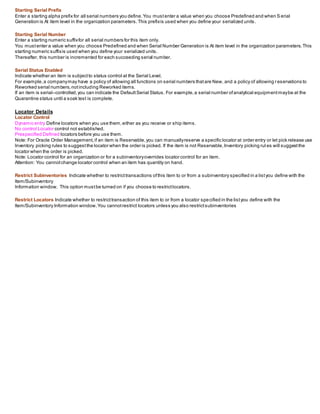
Date A concurrentprogram uses the date as the parameter.
Model/Unit Number A concurrentprogram uses the UnitNumber as the parameter.
Work In Process Attribute Group
Following are the Work In Process attributes and their possible values.You set these attributes when defining or updating items.
Build in WIP
Indicate whether to create discrete jobs or repetitive assemblies in Oracle Work in Process.See:Defining Discrete Jobs Manu ally,and
Defining Repetitive Schedules Manually,Oracle Work in Process User’s Guide.
This attribute mustbe turned off if the Inventory Item attribute is turned off or if the BOM Type attribute is not set to Standard.This attribute is
optionallysetby the Item Status code.
Supply Type
Select a supplytype for components.
Push
Assemblypull
operational pull
Bulk
Supplier
Phantom
Supply Subinventory
This attribute is controlled atthe Organization level only. Enter the primarysubinventoryfrom which to issue (push) or bac kflush (pull) an item
to work in process.
Supply Locator
This attribute is controlled atthe Organization level only. Enter the supplylocator from which to issue (push) or backflush (pull) an item to work
in process.You can also define a WIP supplylocator for any bill that uses this item;the bill supplylocator overrides the supplylocator you
define here. You mustenter a WIP supplysubinventorybefore you can enter a locator.
Overcompletion Tolerance Type
Select Percentor Amount, or leave the field blank.If you do not selectan Overcompletion Tolerance Type, the tolerance defa ults to the
tolerance that you setat the organization level. If you did not seta tolerance at the organization level, the default is Null,which signifies thatno
over–completions are allowed.
Overcompletion Tolerance Value
The value for this attribute is the number value for the Overcompletion Tolerance Type that you selected.It determines the acceptable percent
or quantity of assemblies thatyou will allow to be over–completed.For example,if you choose Percentas the Overcompletion Tolerance Type,
and enter 100 as the Overcompletion Tolerance Value, you allow over–completions up to 100 percent of the original job or schedule quantity.If
you did not selectan Overcompletion Tolerance Type, you will not be able to enter a value in this field.
Scheduling Penalty Inventory Carry
Specify, in units per day, an Inventory Carry penalty for jobs thatare not completed before they are scheduled to be finished.For example,the
Inventory Carry penalty for a job that is not completed for an item mightbe 10 per day.
Scheduling PenaltyOperation Slack
Specify, in units per day, the operation slack penaltyfor items having lag time between operations.
General Planning Attribute Group
Following are the General Planning attributes and their possible values.You setthese attributes when defining or updating items.
Inventory Planning Method
Select an option for organization level planning.
Min–max You define a minimum quantitythat you want on hand.When you reach this quantity, you reorder. You also define a maximum on –
hand quantity that you do not want to exceed.
Not planned No planning method used.Selectthis option for MRP/MPS planned items.
Reorder point The reorder point is calculated based on the planning information you define for this item.
Planner
This attribute is controlled atthe Organization level only. Enter the material planner assigned to plan this item.You mustdefine planner codes
for your organization before updating this attribute. The planner defined here is responsible for approving all move order li nes requesting the
item if move order approvals are used.
If an item is vendor managed,you mustenter a planner for the item.
Make or Buy
Select the option that applies to items with Inventory Item setto Yes. The Planner Workbench uses this to defaultan appropr iate value for
implementation type.You cannotchange the value of the flag if open orders exist for the item.
Make Usuallymanufactured.The Planner Workbench defaults the implementation type Discrete job. The planning process passes demand
down from manufactured items to lower level components.
Buy Usllypurchased.The Planner Workbench defaults the implementation type to Purchase Requisition.The planning process does no tpass
demand down from purchased items to lower level components.
Attention: You mustalso setPurchasable to Yes to create purchase requisitions and purchase orders.If you also setBuild in WIP to Yes, you
can use the Planner Workbench to implementplanned orders as discrete jobs.
MIN-MAX
Min–Max Minimum Quantity
Enter the quantity minimum for min–maxplanning.If an item is min–maxplanned,the Min–Max Planning Reportsuggests a new order when
quantity drops to the min–maxminimum.
Min–Max Maximum Quantity
Enter the quantity maximum for min–maxplanning.Ifan item is min–maxplanned,the Min–Max Planning Reportsuggests an order thatbrings
on–hand up to the min–maxmaximum
ORDER QUANTITY
Minimum Order Quantity
Enter the minimum order quantityor repetitive rate (units per day). Planning algorithms (reorder point,min –max,MPS, and MRP) use this to
modify the size of planned order quantities or repetitive daily rates.For discrete items,when netrequirements fall shorto fthe minimum order
quantity, planning algorithms suggestthe minimum order quantity.For repetitive items,when average dail y demand for a repetitive planning
period falls shortof the minimum order quantity,planning algorithms suggestthe minimum order quantityas the
repetitive daily rate. For example,use this to define an order quantity below which it is unprofitable to bu ild the item
Maximum Order Quantity
Enter the maximum order quantityor repetitive rate (units per day) of the item.Planning algorithms (reorder point,min –max,MPS, and MRP)
use this to modify the size of planned order quan tities or repetitive daily rates. For discrete items,when netrequirements exceed the
maximum order quantity,planning algorithms suggestthe maximum order quantity.For repetitive items,when average daily dema nd for a
repetitive planning period exceeds ofthe maximum order quantity,planning algorithms suggestthe maximum order quantityas the
repetitive daily rate. For example,use this to define an order quantity above which you do have insufficientcapacity to bui ld the item
COST
Order Cost
Enter the fixed costassociated with placing an order ofany quantity.
Carrying Cost Percent
Enter the percentage used to calculate the annual carrying cost. This is the percentage of the unit costthat represents your internal costto
stock one unitfor one year.
SOURCING
Source Type (Replenishment)
Inventory Fill requests by creating internal requisitions thatbecome internal sales orders,pulling stock from existing inventory.
Supplier Fill requests bycreating purchase requisitions thatbecome purchase orders,procuring the item from a suppl ier.SubinventoryFill
requests bycreating move order requisitions thatbecome move orders,pulling stock from an existing subinventory.
Attention: If you are using Supplier Scheduling,itis generallyrecommended thatthis field be left blank. Otherwise, it could override your
sourcing rules.
Source Organization
This attribute is controlled atthe Organization level only.
Optionally enter the organization from which an internal requisition draws the item.This applies onlywhen Inventory is the replenishment
source type
You can choose organizations thatmeetthe following criteria:
• the item is assigned to the source organization
• the source organization has a valid inter–organization relationship with the currentorganization
The source organization can be your current organization if the item is MRP planned and you choose a non–nettable Source Subinventory.
Source Subinventory
This attribute is controlled atthe Organization level only.
Enter the subinventorywithin the source organization from which an internal requisition draws the item.This applies onlywhen Inventory or
Subinventory is the replenishmentsource,and only when you specify a source organization.For MRP planned items,you musten ter a non–
nettable source subinventorywhen the source organization is the current organization.
SAFTY STOCK
Safety Stock Method
Select an option to plan use of fixed or dynamicallycalculated safetystock quantities.
For MRP/MPS planned items,you mustsetthe Inventory Planning Method attribute to Not planned,then choose the MRP planned percent
option here. MRP planned percentCalculate safetystock as a user–defined percentage (SafetyStock Percent) of the average gross
requirements for a user–defined number ofdays. For discrete items,the user–defined number ofdays is the Safety Stock BucketDays. For
repetitive items,the user–defined number ofdays is the repetitive planning period.Note that safety stock for an item varies as the average
gross requirements vary during the planning process.
Non–MRP planned Calculate safetystock using methods defined bythe Enter Item Safety Stocks window.You can use mean absolute
deviation or user–defined percentage offorecasted demand.
For Oracle Master Scheduling/MRP and Oracle Supply Chain Planning and SupplyChain Planning,these safetystock quantities are fixed.
The Snapshotportion ofthe planning process loads them,and they do not vary during the planning process itself.
Safety Stock Bucket Days
Enter the number ofdays to dynamically calculate safety stock quantities.The planning process multiplies the Safety Stock Percent by the
average gross requirements and divides bythe number ofdays you enter here.
Safety Stock Percent
Enter the percentto dynamicallycalculate safety stock quantities for the item. The planning process multiplies this percentby the average
gross requirements and divides bythe Safety Stock Bucket Days. The planning process uses this attribute when you set Safety Stock to MRP
planned percent.
ORDER MODIFIERS
Fixed Order Quantity
Enter the quantity used to modify the size of planned order quantities or repetitive daily rates. When net requirements fall short ofthe fixed
order quantity, the planning process suggests the fixed order quantity. When net requirements exceed the fixed order q uantity, the planning
process suggests multiple orders for the fixed order quantity. For discrete items,use this attribute to define a fixed produ ction or purchasing
quantity. For repetitive items,use this attribute to define a fixed production rate. For example,if your suppliers can provide the item in full
truckload quantities only,enter the full truckload quantity as the fixed order quantity.
Fixed Days Supply
Enter the number ofdays used to modify the size and timing ofplanned order quantities.The planning process suggests planned order
quantities thatcover net requirements for the period defined by this value. The planning process suggests one planned order for each
period.For example,use this to reduce the number ofplanned orders for a discrete componentofa repetitive item.
Fixed Lot Multiplier
Enter the fixed lot multiple quantityor repetitive rate (units per day). Planning algorithms (reorder point,min –max,MPS, and MRP) use this to
modify the size of planned order quantities or repetitive daily rates.When net requirements fall shortof the fixed lot size multiplier quantity,
planning algorithms suggesta single order for the fixed lot size multiplier quantity.When net requirements exceed the fixed lot size multiplier
quantity, planning algorithms suggesta single order thatis a multiple ofthe fixed lot size multiplier
Invoicing Attribute Group
Following are the Invoicing attributes and their possible values.You setthese attributes when defining or updating items
Invoiceable Item
Indicate whether to include an item on an Oracle Receivables invoice.If you turn this option on, you can temporarilyexclude from invoicing
when Invoice Enabled is turned off. This option mustbe on if Invoice Enabled is on.
Invoice Enabled
Indicate whether to activate an item for invoicing in Oracle Receivables.If Invoiceable Item is turned on, you can temporari lyexclude from
invoicing by leaving Invoice Enabled turned off. If you turn this option on, the item appears in the Invoice Entry item listof values in Oracle
Receivables.If you turn this feature off, the item does notappear in the listof values and Auto Invoice rejects the item. This attribute is
optionallysetby the Item Status code.
Payment Terms
Enter a valid paymentterms code. This attribute is for reference information only.
Accounting Rule
Enter an accounting rule to identify special revenue recognition rules for an item,such as recognizing revenue over time. Se e: Defining
Invoicing and Accounting Rules,Oracle Receivables Reference Manual,This attribute is for reference information only.
Invoicing Rule
Enter an invoicing rule to determine the period in which you send an invoice when you recognize revenue over time (using acco unting
rules).This attribute is for reference information only.
Tax Code
Enter a tax code to use when calculating tax based on location and tax codes.You assign specific rates to a Tax Code in the Other Tax Rates
window.
Sales Account
This attribute is controlled atthe Organization level only. Enter the general ledger accountOracle Receivables uses to record revenue when
you bill the customer.If Auto Accounting is based on items,accounting entries are created at that time.
Open First Inventory Period
Prefix TAB TYPE TAB YEAR TAB QUARTER TAB NUM TAB FROM DATE TAB TO DATE TAB *DN
JAN TAB Month TAB 2013 TAB 1 TAB 1 TAB 01-01-2013 TAB 31-01-2013 TAB *DN
FEB TAB Month TAB 2013 TAB 1 TAB 2 TAB 01-02-2013 TAB 29-02-2013 TAB *DN
MAR TAB Month TAB 2013 TAB 1 TAB 3 TAB 01-03-2013 TAB 31-03-2013 TAB *DN
APR TAB Month TAB 2013 TAB 2 TAB 4 TAB 01-04-2013 TAB 30-04-2013 TAB *DN
MAY TAB Month TAB 2013 TAB 2 TAB 5 TAB 01-05-2013 TAB 31-05-2013 TAB *DN
JUN TAB Month TAB 2013 TAB 2 TAB 6 TAB 01-06-2013 TAB 30-06-2013 TAB *DN
JUL TAB Month TAB 2013 TAB 3 TAB 7 TAB 01-07-2013 TAB 31-07-2013 TAB *DN
AUG TAB Month TAB 2013 TAB 3 TAB 8 TAB 01-08-2013 TAB 31-08-2013 TAB *DN
SEP TAB Month TAB 2013 TAB 3 TAB 9 TAB 01-09-2013 TAB 30-09-2013 TAB *DN
OCT TAB Month TAB 2013 TAB 4 TAB 10 TAB 01-10-2013 TAB 31-10-2013 TAB *DN
NOV TAB Month TAB 2013 TAB 4 TAB 11 TAB 01-11-2013 TAB 30-11-2013 TAB *DN
DEC TAB Month TAB 2013 TAB 4 TAB 12 TAB 01-12-2013 TAB 31-12-2013 TAB *DN
ADJ TAB Month TAB 2013 TAB 4 TAB 13 TAB 31-12-2013 TAB 31-12-2013 TAB *DN
JAN TAB Month TAB 2014 TAB 1 TAB 1 TAB 01-01-2014 TAB 31-01-2014 TAB *DN
FEB TAB Month TAB 2014 TAB 1 TAB 2 TAB 01-02-2014 TAB 28-02-2014 TAB *DN
MAR TAB Month TAB 2014 TAB 1 TAB 3 TAB 01-03-2014 TAB 31-03-2014 TAB *DN
APR TAB Month TAB 2014 TAB 2 TAB 4 TAB 01-04-2014 TAB 30-04-2014 TAB *DN
MAY TAB Month TAB 2014 TAB 2 TAB 5 TAB 01-05-2014 TAB 31-05-2014 TAB *DN
JUN TAB Month TAB 2014 TAB 2 TAB 6 TAB 01-06-2014 TAB 30-06-2014 TAB *DN
JUL TAB Month TAB 2014 TAB 3 TAB 7 TAB 01-07-2014 TAB 31-07-2014 TAB *DN
AUG TAB Month TAB 2014 TAB 3 TAB 8 TAB 01-08-2014 TAB 31-08-2014 TAB *DN
SEP TAB Month TAB 2014 TAB 3 TAB 9 TAB 01-09-2014 TAB 30-09-2014 TAB *DN
OCT TAB Month TAB 2014 TAB 4 TAB 10 TAB 01-10-2014 TAB 31-10-2014 TAB *DN
NOV TAB Month TAB 2014 TAB 4 TAB 11 TAB 01-11-2014 TAB 30-11-2014 TAB *DN
DEC TAB Month TAB 2014 TAB 4 TAB 12 TAB 01-12-2014 TAB 31-12-2014 TAB *DN
ADJ TAB Month TAB 2014 TAB 4 TAB 13 TAB 31-12-2014 TAB 31-12-2014 TAB *DN
JAN TAB Month TAB 2015 TAB 1 TAB 1 TAB 01-01-2015 TAB 31-01-2015 TAB *DN
FEB TAB Month TAB 2015 TAB 1 TAB 2 TAB 01-02-2015 TAB 28-02-2015 TAB *DN
MAR TAB Month TAB 2015 TAB 1 TAB 3 TAB 01-03-2015 TAB 31-03-2015 TAB *DN
APR TAB Month TAB 2015 TAB 2 TAB 4 TAB 01-04-2015 TAB 30-04-2015 TAB *DN
MAY TAB Month TAB 2015 TAB 2 TAB 5 TAB 01-05-2015 TAB 31-05-2015 TAB *DN
JUN TAB Month TAB 2015 TAB 2 TAB 6 TAB 01-06-2015 TAB 30-06-2015 TAB *DN
JUL TAB Month TAB 2015 TAB 3 TAB 7 TAB 01-07-2015 TAB 31-07-2015 TAB *DN
AUG TAB Month TAB 2015 TAB 3 TAB 8 TAB 01-08-2015 TAB 31-08-2015 TAB *DN
SEP TAB Month TAB 2015 TAB 3 TAB 9 TAB 01-09-2015 TAB 30-09-2015 TAB *DN
OCT TAB Month TAB 2015 TAB 4 TAB 10 TAB 01-10-2015 TAB 31-10-2015 TAB *DN
NOV TAB Month TAB 2015 TAB 4 TAB 11 TAB 01-11-2015 TAB 30-11-2015 TAB *DN
DEC TAB Month TAB 2015 TAB 4 TAB 12 TAB 01-12-2015 TAB 31-12-2015 TAB *DN
ADJ TAB Month TAB 2015 TAB 4 TAB 13 TAB 31-12-2015 TAB 31-12-2015 TAB *DN
JAN TAB Month TAB 2016 TAB 1 TAB 1 TAB 01-01-2016 TAB 31-01-2016 TAB *DN
FEB TAB Month TAB 2016 TAB 1 TAB 2 TAB 01-02-2016 TAB 28-02-2016 TAB *DN
MAR TAB Month TAB 2016 TAB 1 TAB 3 TAB 01-03-2016 TAB 31-03-2016 TAB *DN
APR TAB Month TAB 2016 TAB 2 TAB 4 TAB 01-04-2016 TAB 30-04-2016 TAB *DN
MAY TAB Month TAB 2016 TAB 2 TAB 5 TAB 01-05-2016 TAB 31-05-2016 TAB *DN
JUN TAB Month TAB 2016 TAB 2 TAB 6 TAB 01-06-2016 TAB 30-06-2016 TAB *DN
JUL TAB Month TAB 2016 TAB 3 TAB 7 TAB 01-07-2016 TAB 31-07-2016 TAB *DN
AUG TAB Month TAB 2016 TAB 3 TAB 8 TAB 01-08-2016 TAB 31-08-2016 TAB *DN
SEP TAB Month TAB 2016 TAB 3 TAB 9 TAB 01-09-2016 TAB 30-09-2016 TAB *DN
OCT TAB Month TAB 2016 TAB 4 TAB 10 TAB 01-10-2016 TAB 31-10-2016 TAB *DN
NOV TAB Month TAB 2016 TAB 4 TAB 11 TAB 01-11-2016 TAB 30-11-2016 TAB *DN
DEC TAB Month TAB 2016 TAB 4 TAB 12 TAB 01-12-2016 TAB 31-12-2016 TAB *DN
ADJ TAB Month TAB 2016 TAB 4 TAB 13 TAB 31-12-2016 TAB 31-12-2016 TAB *DN
JAN TAB Month TAB 2017 TAB 1 TAB 1 TAB 01-01-2017 TAB 31-01-2017 TAB *DN
FEB TAB Month TAB 2017 TAB 1 TAB 2 TAB 01-02-2017 TAB 29-02-2017 TAB *DN
MAR TAB Month TAB 2017 TAB 1 TAB 3 TAB 01-03-2017 TAB 31-03-2017 TAB *DN
APR TAB Month TAB 2017 TAB 2 TAB 4 TAB 01-04-2017 TAB 30-04-2017 TAB *DN
MAY TAB Month TAB 2017 TAB 2 TAB 5 TAB 01-05-2017 TAB 31-05-2017 TAB *DN
JUN TAB Month TAB 2017 TAB 2 TAB 6 TAB 01-06-2017 TAB 30-06-2017 TAB *DN
JUL TAB Month TAB 2017 TAB 3 TAB 7 TAB 01-07-2017 TAB 31-07-2017 TAB *DN
AUG TAB Month TAB 2017 TAB 3 TAB 8 TAB 01-08-2017 TAB 31-08-2017 TAB *DN
SEP TAB Month TAB 2017 TAB 3 TAB 9 TAB 01-09-2017 TAB 30-09-2017 TAB *DN
OCT TAB Month TAB 2017 TAB 4 TAB 10 TAB 01-10-2017 TAB 31-10-2017 TAB *DN
NOV TAB Month TAB 2017 TAB 4 TAB 11 TAB 01-11-2017 TAB 30-11-2017 TAB *DN
DEC TAB Month TAB 2017 TAB 4 TAB 12 TAB 01-12-2017 TAB 31-12-2017 TAB *DN
ADJ TAB Month TAB 2017 TAB 4 TAB 13 TAB 31-12-2017 TAB 31-12-2017 TAB *DN
Transaction Setup
You mustsetcertain controls and options before performing inventorytransactions.These include:
Setting transaction profile options:
Oracle Inventory provides you with the following transaction processing profiles:
• Enter ReplenishmentCount
• Inter–Organization Transfer
• Miscellaneous Issue and Receipt
• Transaction Processing Mode
• Transfer Between Subinventories
• Update Average Cost
• Server Side On–line Processing
• Allow Expense to AssetTransfer
• ProjectMiscellaneous Transaction Expenditure Type
• RPC Timeout
• RestrictReceiptof Serials
• Transaction Date Validation
• Use New Trx Manager for Processing
• Override negative for Blackflush
• Quantity Tree Timeoutfor Lock
• Maximum Number ofQuantity Trees
• Cycle CountApprovals
• Cycle CountEntries
Transaction Processing Mode
You can set processing control globallyfor all transactions or you can choose differentoptions for each type of transaction .You establish the
method of transaction processing bychoosing one ofthe following options when you set up your TP:INV Transaction ProcessingMod e profile:
On–line processing Processes transactions while you waitand returns control to you once it finishes.
Background processing Returns control immediatelyto you. With this option,Oracle Inventory processes transactions
on a periodic basis via the Inventory Transaction Manager.
Immediate concurrent processing Spawns a concurrentprocess when you committhe transaction and returns control immediatelyto you,
allowing you to continue working.
Form level processing Processes transactions using the processing control option you choose for that particular type of transaction.You
mustalso setthe Inventory profile options for Inter–Organization Transfer, Miscellaneous Issue and Receipt,
Receive Customer Return,Return to Customer,and Transfer Between Subinventories.If you are using Oracle Work–in–Process,you mustset
the WIP profile options Completion Material Processing, Completion Transaction Form,Material Transaction Form,Move Transaction,
Operation Backflush Setup,and Shop Floor Processing.
If you choose Form level processing for the Transaction Processing Mode profile you can set up differentprocessing controls for each type of
transaction.
On–line Processing If you use On–line processing,you can choose whether transactions are processed on the server or clientside by setting
the Server Side On–line Processing profile.The defaultvalue is server side processing.
Inventory Remote Procedure Manager Server side on–line processing uses the Inventory Remote Procedure Manager to allow a transaction
initiated on the client to process on the server. System managers maintain the Remote Procedure Manager.
Transaction Actions
A transaction action is a generic type of Material movement or cost update with no specificity regarding the source of the transaction.Along
with a transaction source type,a transaction action identifies a transaction type.Oracle Inventory provides the following transaction actions:
• Issue from stores
• Subinventory transfer
• Directorganization transfer
• Cycle count adjustment
• Physical inventory adjustment
• Intransitreceipt
• Intransitshipment
• Costupdate
• Receiptinto stores
• Delivery adjustments
• WIP assemblyscrap
• Assemblycompletion
• Assemblyreturn
• Negative componentissue
• Negative componentreturn
• Staging Transfer
Transaction Source Types
The relationship between transaction source type,transaction action and transaction type is shown in below picture.
1. A transaction source type is the type of entity againstwhich Oracle Inventory charges a transaction.Along with a transactionaction, it
uniquelyidentifies the type of transaction you perform.Oracle Inventory provides the following predefined transaction source types:
• Account
• Account Alias
• Cycle Count
• Internal Order
• Internal Requisition
• Inventory
• Job or Schedule
• Move Order
• Periodic CostUpdate
• Physical Inventory
• Purchase Order
• RMA (Return Material Authorization)
• Sales Order
• Standard CostUpdate
2. You can define additional transactionsource types in the Transaction Source Types window. You can then use these user–defined
transaction source types and predefined transaction actions to define a new transaction type. This user–defined transaction type is now a
customized form of tracking transactions with which you can group
and sort reports and inquiries.
3.When you perform a transaction,you specify a transaction type and a source. For example,for a PO receipt
transaction,the transaction source type is Purchase Order and the actual PO number is the source.
Transaction source type = Purchase Order
Transaction source = Purchase Order Number
Transaction Action = Receipt
Transaction type = PO Receipt
Transaction Types
A transaction type is the combination ofa transaction source type and a transaction action. It is used to classifya particular transaction for
reporting and querying purposes.Oracle Inventory also uses transaction types to identify certain transactions to include in historical usage
calculations for ABC analysis or forecasting.The following table presents predefined transaction types:
Use the Transaction Types window to define additional transaction types to customize transaction entry. A user–defined transaction type is a
combination ofa user–defined transaction source type and a predefined transaction action.For example,if you frequently donate items to
charity, you mightwantto define a transaction source type called ”Charity” and a transaction type called ”Issue to Charity”. In this case,the
transaction action would be Issue from Stores.You would then use the Miscellaneous Transactions window to actually issue an item to charity,
using the ”Issue to Charity” transaction type. You would also specifythe actual charity to which you are issuing,such as Goodwill,and the
expense accountthat specifies the source (Goodwill).
You define transaction types by combining transaction actions and transaction source types.You define transaction source types in the
Transaction Source Types window.Oracle Inventory provides the listof transaction actions.
You mustspecifya transaction type when you perform a miscellaneous receiptor issue,a subinventorytransfer, a WIP transaction,or an
inter–organization transfer.
Defining Transaction Reasons
A transaction reason is a standard means ofclassifying or explaining the reason for a transaction.Transaction reasons can b e used in all
transaction forms.
You can use these standard transaction reasons with anytype of material transaction.Oracle Inventory provides transaction reporting and
inquiring capabilities bytransaction reason.
In the reason type from the listof values. The available choices are as follows:
• Load
• Drop
• Receiving
• Replenishment
• Cycle Count
• Shipping
• Update Status
• QA Update Status
Note: The Replenishmentreason type is disabled.
If you selected Picking as the Reason Type, selecta Reason Contextfrom the listof values.The available choices are as follows:
• Curtail Pick: End the pick after picking a few LPNs or Lots and load the contents.
• LPN Exception: Pick partial quantity of the scanned fully consumable LPN.
• Pick None:End the pick without picking anything.
• Pick Over: Pick more than the requested quantity.
• Pick Partial:Split the pick and allow confirmation ofless than the requested quantity. You muststill pick the entire qua ntity, but can pick in
stages.
• Pick Short: Specify a quantity less than the requested quantity, and back order the rest of the required quantity.
• Change Source Locator:Change the location from which the material is picked.
• Change UOM: Change the transaction unitof measure for the task.
Defining Item Transaction Defaults
Use this form to define a default subinventoryand/or locator for an item for shipping,receiving,and move order transactions.Oracle Ship ping
Execution displays the defaultshipping information when you ship an item.Oracle Inventory displays the defaultreceiving in formation when
you receive an item. For Move orders,Oracle Inventory derives the defaultput away locator when you transactan item into a locator controlled
subinventoryif no locator was specified bythe creator of the move order.
1. Navigate to the Item Transaction Defaults window.
2. Select the Subinventories tabbed region
a. ITEM -
Enter an item for which you want to assign a defaulttransaction subinventory.
b. Default For -
Select the type of default:
Shipping:Assign a defaultshipping subinventoryto the item.
Receiving:Assign a defaultreceiving subinventoryto the item.
Move Order Receipt:Assign a default move order subinventoryto the item.
c. Subinventory -
Enter a subinventoryto use as the defaulttransaction subinventoryfor the item.If you restrictthe item to specific subinventories using
either the Subinventory Items window or the Item subinventories window,you can only choose those subinventories in this field.
d. LOCATOR -
Enter a locator to use as the defaulttransaction locator for the item in this subinventory.
Defining Account Aliases
An accountalias is an easilyrecognized name or label representing a general ledger accountnumber.You can view, report, and reserve
againstan accountalias.During a transaction,you can use the accountalias instead ofan account number to refer to the ac count.
To define an account alias:
1. Navigate to the Account Aliases window.
2. Enter a unique accountalias name derived from concatenated segments ofthe accountalias name key flexfield.
3. Enter the general ledger accountto which you charge all transactions thatuse this accountalias.You can change this acc ountonly if the
accountalias has notbeen referenced.
4. Enter the effective date on which the accountalias is enabled.Date mustbe greater than or equal to the currentdate.
5. Save your work.
To make an accountalias inactive:
Enter the date on which the accountalias becomes inactive.As of this date, you can no longer use the accountalias.Date mustbe greater
than or equal to both the effective date and the currentdate.
Define an Shorthand Alias
Transaction Managers
The transaction managers execute the following processes: material transaction,demand reservation,move transaction,resource cost
transaction,remote procedure call,and material costtransaction.These run atperiodic intervals you specify until you delete them with the
concurrentmanager. They control the number oftransaction workers,processing intervals,and number oftransactions processed byeach
worker during each interval. For descriptions ofthe available managers see:Transaction Managers.
 You do not have to launch these transaction managers ifyou decide to process all your transactions on-line and do notuse the
transaction interface.
 The use of multiple transaction workers enables parallel processing oftransactions.This is especiallyhelpful when processing a large
batch of transactions.
Material transaction
The material transaction manager immediatelyexecutes a material transaction after you save your changes in a transaction win dow.By
starting the transaction manager,you can determine how to execute transactions: immediatelythrough immediate concurrentrequest
submissions,or through periodic concurrentrequestsubmissions.You define this transaction mode for individual transaction windows in the
Personal Profile Values window.
Move transaction
The move transaction manager processes move transactions in Oracle Work in Process and move transactions you importfrom devices such
as portable bar code readers or your custom data entry forms using the Open Move Transaction Interface.
Resource cost transaction
The resource costtransaction manager processes resource transactions in Oracle Work in Process and resource transactions you importfrom
barcode readers,payroll systems,time cards,routing sheets,and custom data entry forms using the Open Resource Transaction Interface.
Material cost transaction
The material costtransaction manager costs material transactions in Oracle Inventory and Oracle Work in Process in the backg round.
To view and update the transaction managers
1. Navigate to the Interface Managers window.All existing transaction managers and their currentstatus are displayed.
2. Enter the maximum number ofrows to assign to the worker.
3. For WIP Move Transactions only:Specify the processing timeoutin hours and minutes.After this time the move transa ction manager no
longer processes pending transactions and marks them as an error.
4. Save your work.
To launch a transaction manager:
1. Select a transaction manager in the Interface Managers window.
2. Choose Launch Manager from the Tools menu.
The Launch Inventory Managers window appears displaying the transaction manager you choose as the process to be submitted.
Note: If the transaction manager is alreadyactive, Oracle Inventory displays a warning before displaying the new window.
3. Select a resubmitlevel.
You can enter the start date and time to resubmitthe transaction manager or an interval of time that the transaction manager polls the
interface table for pending transactions.
4. Choose Submit.
Transactions
Oracle Inventory, with Oracle Order Management,Oracle Purchasing,and Oracle Work in Process,provides you with a complete setof
transactions and reports for maintaining inventorycontrol. This allows you to control the flow of material from the time you receive items to the
time you ship finished goods to the customer.
Inventory transactions and on hand balance supports decimal precision to 5 digits after the decimal point.Oracle Work in Pro cess supports
decimal precision to 6 digits.Other Oracle Applications supportdifferent decimal precision.As a resultof the decimal precision mismatch,
transactions another Oracle Application passes maybe rounded when processed byInventory. If the transaction quantity is rou nded to zero,
Inventory does notprocess the transaction.It is therefore suggested thatthe base unit of measure for an item is setup such that transaction
quantities in the base unitof measure notrequire greater than 5 digits ofdecimal precision.
Performing Miscellaneous Transactions
With a miscellaneous transaction you can issue material to or receive material from general ledger accounts in your current organization.This
allows you to issue material to groups thatare not inventory, receiving, or work in process such as a research and developmentgroup or an
accounting department.You can also make manual adjustments to the general ledger by receiving material from one accountto inve ntory, and
then issuing thatmaterial from inventory to another account.
You can use your user–defined transaction types and sources to further classifyand name your transactions.You can use this feature to issue
items to individuals,departments,or projects;or to issue damaged items to expense accounts such as scrap.You can perform the receipts for
items thatwere acquired by means other than a purchase order from a supplier.You can also use this feature to load all item on–hand
quantities when you start implementing Oracle Inventory.
You will receive a material shortage alertwhile performing a miscellaneous transaction ifyou have enabled shortage alerts for the
miscellaneous transaction type being performed.Also,a miscellaneous transaction can trigger a shortage notification to be s entto various
pre–defined individuals.
Subinventory Transfer
You can transfer material within your current organization between subinventories,or between two locators within the same su binventory.You
can transfer from assetto expense subinventories,as well as from tracked to non–tracked subinventories.Ifan item has a restricted listof
subinventories,you can only transfer material from and to subinventories in thatlist.Oracle Inventory allows you to use us er–defined
transaction types when performing a subinventorytransfer.
To do a subinventorytransfer from expense to assetsubinventorysetthe profile option INV: Allow Expense to AssetTransfer to "Yes."
If it has notbeen set it to "Yes," it is possible to issue from an assetto an expense subinventory,but issue from an expense to asset
subinventoryis not possible.
Oracle Inventory expects the consumption ofmaterial atthe expense location. If you return an assetitem to an expense subinventory,
you mustbe firstissue itfrom the expense subinventory using the Miscellaneous
Transaction form and transfer it to the subinventoryexpense account. Then, no accounting occurs and you only transfer quantities .
To receive the asset item back to the assetsubinventory,perform the Miscellaneous Transaction accountreceiptusing the same expense
accountas the expense subinventory.
For receiving an ASSET item back, you use the Miscellaneous Transaction instead ofthe subinventory transfer.
Inventory Controls
With Oracle Inventory you can implementlocator,revision,lot, and serial number control.
Flexible Controls
 You can implementany combination ofthe four controls (locator,revision,lot, and serial number) for each item.
 Inventory controls are optional for all items.You can choose to implementinventory controls for specific items.
Locator Control Hierarchy
Oracle Inventory uses the following hierarchyto determine which locator control option to enforce during transaction entry:
1. Org level overrides subinventoryand item level.
2. Subinventory level overrides item level.
3. If decision is pushed to item level, Oracle Inventory uses item level.
Defining Locators
Locators are structures within subinventories.Locators are the third level in the enterprise structuring scheme ofOracle In ventory. Locators
may representrows,aisles,or bins in warehouses.You can receive items directly into and ship items
directly from locators.
You can structure your Oracle Inventory installation so thatsome ofthe subinventories and items have locator control while others do not.
Each locator you define mustbelong to a subinventory. Each subinventory can have multiple locators.
Defining Revision Quantity Control
A revision is a particular version of an item,bill of material,or routing.By using the revision quantity control option yo u can track item quantities
by item revision.To do so you mustspecifya revision for each material transaction.You can enable revision quantity contro l for items for
which you musttrack version changes or changes thatare significantenough to track but are not affecting the function and feature of the item
and therefore do not require an item change.
Defining Lot Control
A lot is a specific batch of an item that you receive and store in your organization.
Lot control is a technique for enforcing the use of lot numbers during material
transactions, thus enabling the tracking of batches of items throughout their
movement in and out of inventory. With Oracle Inventory you can establish lot
control for specific items in your organization.
Defining Serial Number Control
A serial number is an alphanumeric piece of information that you
assign to an individual unit of an item. A serialized unit is a
combination of an item and a serial number.
You can track individual units of items by using serial numbers.
Serial number control is a system technique for enforcing the use of
serial numbers during a material transaction. You can use serial
numbers to track items over which you want to maintain very tight
control.
6. Item Transaction Defaults
Default Shipping Locator
You can enter a defaultshipping locator for each item/subinventorycombination.Ifyou disable reservations for your system,Ora cle Order
Entry uses the defaultshipping subinventoryand locator in the pick release process.
You can override the default shipping locator atship confirm time.
Default Receiving Locator
You can enter a defaultreceiving locator for each item/subinventorycombination.When you deliver items to an inventory loca tion,if the source
documentdoes nothave subinventory/locator information,Oracle Purchasing uses the defaultreceiving
subinventoryand locator that you specify in Oracle Inventory.
You can override the default receiving locator if you decide to receive the item into another locator.
7. Restrict Items to Locators
Reasons to Restrict Items to Locators
 Security You may decide to restrict high-securityitems to specific aisle/bin locations in warehouses.
 Transaction entry You can limititems to specific locators to make the transaction entry process easier.
 Fixed storage All your items are always stocked in a particular range of bins and aisles.
Options to Restrict an Item to Specific Locators
 In the Inventory region of the Master Item window,selectthe RestrictSubinventories and RestrictLocators check boxes.
 In the Item Subinventories window,enter the listof restricted subinventories and locators for each item.
 You can restrict an item to a listof locators only if your locator control is Prespecified or “No Control.”
Revision Control
A revision is a particular version of an item,bill of material,or routing.
You use revision quantitycontrol to track item quantities byitem revision.To do so you mustspecifya revision for each ma terial transaction.
You can enable revision quantity control for items for which you musttrack version changes or changes thatare significantenough to track but
are not affecting the function and feature of the item and therefore do not require an item change.
Steps to Implement Revision Control for Items in Your Organization
1. Define a default starting revision for each organization.
2. Enable revision quantity control for items.
3. Define revision numbers to use for each revision-controlled item.
4. Enter revision numbers when you perform transactions.
Uses in Oracle Inventory
 Material Transactions You can enter revision numbers for revision-controlled items during inventorytransactions.
 Reservations You can place holds on specific revisions ofitems.
 Accuracy You can enter revision numbers for revision-controlled items whenever you enter physical inventory counts and cycle
counts.
 Reports and Inquiries Oracle Inventory reports and inquiry windows displayrevision information for revision -controlled items.
Starting Default Revision for an organization
You can define a starting revision that Oracle Inventory uses when creating items.Revisions can be in numerical or alphabetical order.Ifyou
do not enter a starting revision,Oracle Inventory makes the starting revision number zero.
When you save your item,Oracle Inventory assigns to the item the starting revision number from the Organization Parameters window.This is
the base revision ofyour item.If you introduce additional versions ofthe item,you mustfirstdefine them in the Item Revi sions window.
Enable Revision Control Attribute
Revision control is an item attribute. If you maintain the revision control attribute at the item master level, each item mus thave the same kind of
revision control in each organization that carries the item .If you maintain the revision control attribute at the organization level, each item may
have a different kind of revision control in each organization that carries the item.
Revision Quantity Control : If you selectthe Revision Control check box for an item,you mustenter a revision number when you enter
transactions for the item.
If you clear the Revision Control check box for an item,you do not have to enter revision information when you enter a mater ial transaction for
the item.You will not be able to track quantities ofeach different version of the item.
Defining Item Revisions
You can define multiple revision numbers and effective dates for each revision controlled item.You can assign revisions in sequence by
effective date. Revisions mustbe in alphabetical or numerical order,and you mustchoose one ofthe revision
numbers when you enter transactions,physical inventory counts,and cycle counts.You mustenter a revision number for each r evision-
controlled item that you transact.
Engineering Change Order
You can add a revision number when you enter an engineering change order or when you transfer items,bills,and routings from engineering
to manufacturing.Oracle Inventory displays the engineering change order thatadded the revision.
Oracle Inventory displays the date on which you entered the engineering change order or when you transferred the item using the Transfer to
Manufacturing window.
Defining Item Revisions
Navigate to the Item Revisions window from one ofthe following windows:
i. Master Items Summaryfolder or Master Item window
ii. Organization Items Summaryfolder or Organization Item window
iii. Bills ofMaterial window
iv. Engineering Change Orders window
You can use letters,numbers,and characters (such as *,&, and #) to label revisions.Letters are always in upper case and numbers may
include decimals.To ensure thatrevisions sortproperly,decimals should always be followed by a number.Valid revisions can include:A, B,
01, 02, A1, B1, 1A, 1B, 0.0, 0.1, A.0, A.1, and so on.
Revisions are sorted according to ASCII rules.Each revision mustbe greater than the previous revision.Therefore, you cannotuse revision 10
after revision 9 because,according to ASCII sorting,10 precedes 9.
The value you entered in the Starting Revision field in the Organization Param eters window displays as the starting revision for the item.For
revisions thathave the same effective date, the revisions sortin descending order starting with the lastrevision you enter ed.
Lot Control
A lot is a specific batch of an item that you receive and store in your organization.
Lot control is a technique for enforcing the use of lot numbers during material transactions,thus enabling the tracking of b atches ofitems
throughouttheir movementin and out of inventory.
Oracle Inventory enables you to establish lotcontrol for specific items in your organization.
Steps to Implement Lot and Shelf Life Control in Your Organization
1. Choose organization-level lotnumber generation and uniqueness options.
2. Enable lot and shelflife control for your items.
3. Perform transactions for lot-controlled items.
4. Update information for specific item lots.
Uses in Oracle Inventory
 Material transactions You can trace item movements bylot number.
 Reservations You can place holds on batches ofitems.
 Perishable items You can establish shelflife control to regulate the use of perishable items.
 Accuracy You can enter lot number information when you enter physical inventory counts and cycle counts for lot-controlled items.
 Reports and inquiries Oracle Inventory displays lotnumber information on reports and inquirywindows thatlistitem quantityand
transaction information.
Organization level lot number defaults
Uniqueness Level of Lot Numbers
 None : You can assign the same lotnumber to multiple partnumbers in the same organization and across organizations.
 Across items : You can assign a specific lotnumber to only one item in the same organization.
Lot Number Generation Options
 At Item Level You can specify a starting lot number prefix and a starting lot number when you define an item under lot control.
When you receive the item, Oracle Inventory uses this information to generate a defaultlot number for the item.
You can always override default lot numbers.
 At Organization Level You can specify the starting prefix and lot number information when you enter the organization parameters.
When you receive a lot controlled item,Oracle Inventory uses this information to generate a default lot number for the item.You can
always override defaultlot numbers.
 User-Defined Oracle Inventory does not generate a defaultlot number when you receive your item.
Enabling Lot Control Options
Full Control You can specify a lot number for the item whenever you enter a transaction for the item. You can establish lotnumber con trol for
an item only if that item has no quantity on hand.
Establishing Shelf Life Control
You can establish shelflife control for items under lotcontrol and use shelflife control to regulate the use of perishable items.
 Shelf Life Days All lots of this item have the number ofshelflife days you define.Oracle Inventory calculates the expiration date of
the lot by adding the shelflife days to the date on which you receive the item.
 User-defined You can enter an expiration date when you receive each lot and issue items from an expired lot to a scrap account.If
you perform any other transaction from an expired lot, Oracle Inventory displays a message warning you that the lot has expired.
Generate Lot Number For Items
Generate Child Lot Number For Items
- Define New Item Code With Child Lot Control
Enable Child Lot
Lot Number Entry
(N)Transactions—>Miscellaneous Transaction
(B) Transaction Lines—>Lot/Serial
Update LOT information
Viewing Existing Lots
You can query any lot number used in the organization.Oracle Inventory displays the item with which the lot is associated and its expirati on
date.
Disabling Lot
You can disable an item lotcombination ifyou no longer want to view the lot in a Listof Values.
Updating Expiration Dates
If necessary,you can update the expiration date and the lot number combination for an item.
Viewing Supplier Lot Information
If you entered the supplier lotnumber during your receipttransaction,you can use the Supplier Lots button to trace your lot number back to the
supplier lotnumber.
Item Lot Control
Oracle Inventory provides complete lotnumber supportfor inventory transactions.You can enable lotcontrol for specific ite ms in your
inventory. For items under lotcontrol, you assign lotnumbers to each receiptinto inventory and thereafter reference the same lots each time
you perform material transactions.This allows you to have tight control over batches of items in your inventory.
Assigning Lot Numbers
1. You mustassign lotnumbers whenever you receive items under lotcontrol into inventory. You can also add quantities to existing lot
numbers and splitan inventory receiptinto several lots,as necessary.
2. Inventory assists you in entering lot numbers bygenerating defaults using the defaultlot number generation method you chose in the
Organization Parameters window.
3. If the item you are receiving is also under User–defined expiration date LotExpiration (shelflife) Control, you mustspecifythe
expiration date for the lot.
Issuing Material from Inventory
When you issue items under lotcontrol from inventory, you mustspecifya lot number for that item. You can specify more than one lot
to cover the transaction quantity. If you attemptto transactan item to or from an expired lot, Inventory displays a warning message
but does notprevent you from using the lot.
Assigning Lot Numbers to Assemblies
When you complete an assemblyunder lotcontrol into inventory, you mustassign a lotnumber in the WIP Completion Transaction
form in Oracle Work in Process.For assemblycompletions on discrete jobs,Oracle Work in Process defaults the job’s lotnumb er.
Purging Lot Transactions
You can purge all lot transaction information from your currentorganization.Note that the transactions mustbe in closed accounting
periods.
Attention: Purging lot transactions eliminates information used in lotgenealogyreports and inquiries (Supplier LotTrace Re port, Job
Lot Composition Report,and Job Lot Composition Inquiry).
Maintaining Lot Number Information
You can use the Item Lots window to update the expiration date of lots for items under lot expiration (shelf–life) control.Inventory lets
you view all lots you created in your current organization and the supplier lotinformation associated with them.
Expired Lots
You can determine whether a lot has an expiration date by assigning a number oflot control shelflife days or by entering an lot
expiration date. The expiration date controls the availability of the lot for transacting and plannin g purposes.An expired lot:
• is not considered as on–hand supplywhen performing min–max,reorder pointor MRP planning calculations
• cannotbe reserved for a date beyond the expiration date
• can be transacted and is included in on–hand quantities
• is included in all inquiries and reports,including inventoryvaluation reports
• is included in a cycle count and count entry and adjustments are allowed
• is included in a physical inventory and tag entry and adjustments are allowed
Disabled Lots
Disabling a lotonly Prevents it from appearing in a list of values when performing receipt transactions. If you type in the lot
number itis valid and accepted even though it was notin the listof values. Disabling is used onlyfor tailoring this specific instance of
the listof values for lot numbers.A disabled lot:
• is included in available to transact, available to promise,and available to reserve calculations
• is included as on–hand supplywhen performing min–max,reorder pointor MRP planning calculations
• is included as on–hand in all inquiries and reports,including inventoryvaluation reports
• can be transacted with Inventory functions and the Transaction Open Interface
• can be reserved
Cycle Counting
Inventory includes the lotnumbers ofthe items to cycle countwhen it generates a cycle count listing.You mustassign lotn umbers to
all items under lotcontrol for which you enter counts.If there is a difference between the count quantity and the system on–hand
quantity, Inventory adjusts the item quantity in that lot.
Performing Physical Inventories
Inventory includes the lotnumbers ofthe items to count in your physical inventory when it generates tags.You mustassign lot
numbers to all items under lotcontrol for which you enter counts in the Physical Inventory Tag Counts window.If there is a difference
between the countquantity and the system on–hand quantity,Inventory adjusts the item quantity in that lot.
Lot Control Setup
Before using the lot control we need to have the following 3 setups
1. Lot information in inventory tab of item master
http://www.oracleug.com/user-guide/oracle-inventory/inventory-attribute-group
2. Lot information in Revision,Lot & Serial tab of organization parameter
http://www.oracleug.com/user-guide/oracle-inventory/revision-lot-serial-lpn-parameters
3. Use the Work in Process Parameters window to setup lot control in Oracle Work in Process.You choose the option by which Oracle Work
in Process defaults and verifies lotnumbers during backflush transactions.You also specifythe method by which Oracle Work in Process
defaults lotnumbers on discrete jobs for lotcontrolled assemblies.
Maintaining Item Lot Information
You can update the disable status and expiration date associated with item lotinformation.
1. To view lot GenealogyChoose the View Genealogybutton.
2. To view material transactions for an item lot, Selectan item and lot and choose the Transactions button.
Serial Number Control
A serial number is an alphanumeric piece ofinformation thatyou assign to an individual unitof an item.A serialized unitis a combi nation ofan
item and a serial number.You can track individual units ofitems by using serial numbers.Serial number control is a system technique for
enforcing the use of serial numbers during a material transaction.You use serial numbers to track items over which you want to maintain very
tight control.
Steps to Implement Serial Number Control for Your Items
1. Choose organization-level serial number uniqueness and defaultgeneration options.
2. Enter item-level serial number control options.
3. Define serial numbers to assign to serial-controlled items./Enter transactions for serial-number-controlled items.
4. Update information for specific serialized units.
Uses in Oracle Inventory
 Material Transactions:You can enter serial numbers when you use inventory transactions to move serialized units.
 Cycle Counts:You can enter cycle counts for items under serial number control.
 Physical Inventory: You can enter physical inventory counts for items under serial control.
 Reports and Inquiries:Oracle Inventory reports and inquiry windows displayserial number information for items and transacti ons.
Types of Serial Number Uniqueness
You can choose one of three types of serial number uniqueness control for your organization:
 Within inventory items
 Within organization
 Across organizations
Uniqueness applies onlyto the organization establishing the type of control For example, if organization M1 Mfg. establishes unique serial
numbers across organizations,itcannot use a serial number alreadyused byorganization Sacramento Mfg. However, M2 Mfg., wi th a different
type of control, can still use serial numbers alreadyused byAustin Mfg. Therefore,if you choose unique serial numbers across organizations
for one of your organizations,you should make sure thatyou setthe same uniqueness control for all other organizations.
Serial Number Generation Options @organization parameter
At Item Level
You can specify a starting serial number prefixand a starting serial number when you define the item.Oracle Inventory uses th e starting serial
number prefix and the starting serial number for each item to generate serial numbers for thatitem.
At Organization Level
You can specify a starting serial number prefixand a starting serial number when you enter organization parameters.Oracle Inventory uses
the starting serial number prefixand the starting serial number to generate serial numbers for all items.
Serial Number Generation Options @Item
No Control: Do not enter serial number data when you transactyour item.
Predefined: You mustenter serial number data whenever you use the item in a material transaction in Oracle Inventory. Use the Generate
Serial Numbers window to generate serial numbers for the item.You can assign predefined serial numbers to receive the item into inventory.
At Receipt: You mustenter serial number information whenever you use the item in a material transaction.Create and assign serial numbers
when you receive the item in to inventory. You do not have to generate your serial numbers ahead oftime;you can enter them dynamicallyat
transaction time.
At Sales Order Issue: Create and assign serial numbers when you issue the item againsta sales order.You do not have to use serial number
information for any other types of material transaction.You do not have to generate your serial numbers ahead oftime;you c an enter them at
transaction time.
If you receive an item with this control option back into inventory on a return materials(s) authorization (RMA), you mustspecifythe serial
numbers you created on sales order issue.
Item Serial Number
Oracle Inventory provides complete serial number supportfor inventory transactions.You can enable serial number control for specific items in
your inventory.
For items under serial number control,you assign unique serial numbers to individual units and thereafter reference the same serial numbers
each time you perform material transactions. This allows you to have tight control over every unit of every item in your inventory. If your item is
under dynamic entry At sales order issue,you can only assign serial numbers when you perform a shipmenttransaction in Oracl e Shipping
Execution.
Serial Number Validation
Oracle Inventory enables you to perform two optional validations for serial numbers thathave been used in Oracle Work in Pro cess.This
validation is enabled by setting the profile option, INV: RestrictReceiptof Serials to Yes.
• Validation of serialized components:
Enabling the profile option will validate that a given serial number for an item may not be received via purchase order recei pt,miscellaneous
receipt, or accountalias receipt,if that same serial number has been issued to Oracle Work In Process.
• Validation of serialized end–assemblies:
Enabling the profile option will validate that a given serial number for an end assemblyitem may not be completed into Oracl e Inventory for a
Discrete Job,Repetitive Schedule,Flow Schedule,and Work Order–less Completion,ifthat same serial number has a state of, Issued outof
stores.
Issuing Material from Inventory
If you issue items with a serial number control type of dynamic entry At inventory receipt or Predefined,you mustch oose from the listof
serialized units thatyou have already received into inventory. If you issue items with a serial number control type of dynam ic entry At sales
order issue,you mustassign serial numbers when you ship the item
againsta sales order.
Assigning Serial Numbers to Assemblies
When you receive into inventory a completed assemblywith a serial number control type of dynamic entry At inventory receipt or Predefined,
you mustassign a serial number in the WIP Completion Transaction window in Oracle Work in Process.You either accept the defaultserial
number or enter another valid one.
Returning Serialized Units to Suppliers
You can return serialized units to the supplier in the Enter Returns and Adjustments window.Oracle Inventory updates the serial number
information with the purchase order number and transaction date ofthe return so that the location of the serialized unitis known.
When you receive replacementunits,you can issue new serial numbers.When you receive repaired units,you s hould reference the original
serial numbers so thatOracle Inventory can properlyupdate the existing serial numbers
Detailed Steps to Implement Serial Number Control for Your Items
1. Choose organization-level serial number uniqueness and default generation options.
2. Enter item-level serial number control options
3. Define serial numbers to assign to serial-controlled items Enter transactions for serial-number-controlled items.
4. Update information for specific serialized units.
Setting Up Serial Number Control
1. Item master setup
http://www.oracleug.com/user-guide/oracle-inventory/inventory-attribute-group
2. Organization parameter
http://www.oracleug.com/user-guide/oracle-inventory/lot-control-setup
i. Uniqueness
You use the Organization Parameters window to choose a type of serial number uniqueness for your organization.You can choose to enforce
uniqueness Within inventoryitems,Within an organization,or Across organizations.The three levels for serial uniqueness are cumulative the
definitions are as follows:
• Within Inventory Items:Once you assign a serial number to a particular item you cannotassign the same serial number to the same item
regardless ofthe organization.For example if you assign serial number SN100 to item A, you cannotassign serial
number SN100 to any other instance ofitem A in any organization.This also includes CTOitems derrived from base model A. However you
could receive item B with serial number
SN100 in any organization.
• Within Organizations:In addition to the restrictions Within Inventory Items control,the same serial number cannotexisttwice within the same
organization.For example if you assign SN100 to item A, you will not be able to receive item B with the serial
number SN100 in the same organization.However,you could receive item B with the serial number SN100 i n any other organization.
• Across Organizations:In addition to the restrictions Within Organizations,you cannotassign the same serial number to any other item
regardless ofthe organization.For example if you assign SN100 to item A you will not be able to receive item B
with the serial number SN100 in any organization.If you assign Across Organization uniqueness to any organization it restric ts the serial
generation in all other organizations.If one organization dictates Across Organizations,all other organizations mustdo so.
ii. Generation
You can establish serial number control for an inventory item when you define it. You can choose from No control,Predefined serial numbers,
control At inventory receipt, or control At sales order issue.
If you specified Predefined as the serial number control type for an item, you mustpredefine serial numbers for that item using the Generate
Serial Numbers window.If you specified entry At inventory receiptor At sales order issue,you can optionallypredefine serial numbers for the
item.Oracle Inventory uses the starting serial number prefixand the starting serial number you specify in the Item window to load the number
of predefined serial numbers you request.You can load as many serial numbers as you want for any item under serial number control.
Generating & Assigning Serial Numbers
Generating Serial Numbers
If you specified Predefined as the serial number control type for an item, you mustpredefine serial numbers for that item.
If you specified entryAt inventory receipt or At sales order issue,you can optionallypredefine serial numbers for the item.The process of
generating serial numbers does notassign serial numbers to units in inventory, it simplyreserves specific serial numbers fo r an item,for later
use.When you run the serial generation program ifyou have the same serial prefixnumber across organizations,the concurren tprogram
searches across the organizations,and generates serial numbers using the higheststartnumber across the organiza tions.
Serial Number Assignment
You mustassign serial numbers whenever you receive items under serial number control into inventory. If an item is under Predefined control,
you can choose from the listof predefined serial numbers for that item.If an item is under dynamic entry At inventory receipt, you can choose
from a predefined listof serial numbers or enter any serial number,depending on the uniqueness control for your organizatio n.You can create
and assign serial numbers individuallyor as a range to speed up data entry. If your item is under dynamic entry At sales order issue,you can
only assign serial numbers when you perform a shipmenttransaction in Oracle Shipping Execution.
Once you assign a serial number to an item,the combination ofthe serial number and the item is an entity known as a serialized unit. From
that point on, Oracle Inventory tracks all movements and maintains the following information for each serialized unit:
• Receipt or Ship Date
The date on which you lastperformed a material transaction for your serialized unit.Material transactions update this
information when you move your serialized unit.
• Serial State
Oracle Inventory assigns one ofthe following states to your serialized unit: Defined butnot used,Resides in inventory, Issued outof inventory,
or Resides in intransit.
Status Codes
1 Defined but not used
3 Resides in stores
4 Issued outof stores
5 Resides in intransit
6 Pending status
7 Resides in receiving
8 Resides in WIP
Note : You can get a full listof the codes with the following SQL:
SELECT lookup_type, lookup_code, meaning
FROM mfg_lookups
WHERE lookup_type = 'SERIAL_NUM_STATUS'
ORDER BY lookup_type, lookup_code
• Location
The organization,subinventory, and locator in which the serialized unitcurrently resides.Material transactions update
this information when you transfer the serialized unit.
• Revision level
The revision of the item when you assign the serial number to the unit.
• Lot number
During material transactions,you first specifythe lot number and then the serial number.Oracle Inventory tracks the lot from which a specific
serialized unitoriginates.
Maintaining SerialNumber Information
You can view location,job and state information,as well as update supplier information associated with your serialized units.
1. Navigate to the Serial Numbers window.The Find Serials window appears.
2. Enter search criteria.If you do not enter criteria,a query for all serial numbers is performed.
3. Choose the Find button to displaythe serial number and item information in the Serial Numbers window.
Item Control
In this chapter we‘ll discuss some advance controls thatoracle provides on items
Item Relationships
You can define relationships between items.This allows you to search for items through these relationships.Except in Oracle Purchasing,
these relationships are for inquiry and reporting purposes only.
Item Relationships with Oracle Purchasing
Within Oracle Purchasing you can define acceptable substitute items for receiving.You mustdefine a listof substitutes before you receive a
substitute item in place of an originallyordered item.Attention: If you receive a substitute item,you musthave previously defined a unit of
measure conversion between the unitof measure on the purchase order and the unit of measure on the receipt.
Cross–Sell:This relationship indicates thatone item may be sold in lieu of another item.
Up–Sell:This relationship indicates thata newer version of the item exists,and can be sold in place of the older item.
Service: This relationship establishes service items for a repairable item.
Prerequisite:This relationship indicates thatyou mustpossess one ofthe items as a requirementto possessing the other ite m.
Collateral:This relationship indicates collateral,such as marketing brochures,thatyou possess for an item.
Superseded:This relationship indicates thatone item has replaced another item thatis no longer available.
Complimentary:This relationship indicates ifa customer purchases one item,the other item is received for free.
Impact: This relationship is used to relate items to each other but only under special conditions.
Conflict: This relationship indicates thatthese items maynever be used together.
Mandatory Charge:This relationship indicates a mandatorycharge if the customer purchases both items.
Optional Charge:This relationship indicates an optional charge ifthe customer purchases both items.
Promotional Upgrade:This relationship enables a customer to upgrade from one item to another item or equal or higher value, withoutan
additional charge.
Split: This relationship enables you to splitsupportfor an item so you do not have to manuallysplitsupportatcontract re newal.To use this
relationship,you mustbe in a planning enabled organization.
Merge: This relationship enables rules based consolidation ofcontracts.You may use the earliestor latesttarget end date for consolidation.
This allows you to choose how contracts are consolidated.To use this relationship,you mustbe in a planning enabled organization.
Migration: During contact renewal you are given the option of renewing contracts based on new licenses,or old licenses.To u se this
relationship,you mustbe in a planning enabled organization.
Repair to: You use the Repair to item relationship with field service operations thatuse spares managementfunctionality.If a part has been
superseded byanother part, the Repair to item relationship determines the replacementpart.
Assigning Subinventories to an Item
You can assign a listof subinventories to an item.You restrictan item to the listof subinventories bysetting the Restric tSubinventories
attribute when you define or update the item.
You also use the item/subinventoryrelationship to specify valid subinventories for zero quantity cycle counts for an item,and to specifyitems
for an ABC analysis performed atthe subinventory level. In these cases you do not have to setthe RestrictSubinventories attribute,only
establish the relationship between the item and subinventory.
You can also specifyplanning information and locators for the item in its assigned subinventories.This information is used to perform min–max
planning and replenishmentprocessing atthe subinventorylevel.
Assigning Items to a Subinventory
You can assign items to a given subinventory. Assigning items to a subinventory does notrestrict the subinventoryto that li stof items.Rather,
the items are restricted to that subinventory. Thus,you can always issue and receive unrestricted items to any subinventory,but you can only
issue and receive restricted items to their listof subinventories.You activate the listof subinventories for a restricted item by setting the
RestrictSubinventories attribute when defining or updating items.
You also use the item/subinventoryrelationship to specifyvalid subinventories for zero quantity cycle counts for an item,a nd to specifyitems
for an ABC analysis performed atthe subinventory level. In these cases you do not have to setthe Re strictSubinventories attribute,only
establish the relationship between the item and subinventory.
You can also specifyplanning information related to the items you assign to a given subinventory.
Notes:
1. Assigning items to subinventoryor subinventoryto item does the same thing i.e it 'll restrictthe item to those assigned subinventories if
restrictsubinventory option is enabled in item master inventory tab for that item.
When an item is restricted to a sub inventory, you 'll only get the restricted subinventories in LOV of subinventory while doing any transaction
2. While assigning subinventories to an item,go to the required organization parameter first.
3. If you attach an item to a subinventory in item/subinventorythen the subinventory’ll be available in assigned subinventories form for that
item in item master tool
Rules
Picking Rules
When you define an item you choose a picking rule to determine the order in which revisions,lots,subinventories,and locato rs are picked for
sales order.Oracle Shipping Execution submits requests to Oracle Inventory, which uses the information you enter in the Picking Ru les
window to generate pick lists for sales orders.
If you choose None for any of the criteria fields,Inventory ignores thatcriterion.For example,if you choose None for Revision,Inventory picks
units of an item withoutregard to revision levels.
Oracle Inventory looks at the picking criteria in the order in which they appear in the Picking Rules window.Then,Inventory looks atthe
options (except for None options) for each criterion in the order in which they appear beneath each criterion.
To define a picking rule
1. Navigate to the Picking Rules window.
2. Enter a unique name for the rule.
3. Select an option for revision order:
Revision: Pick mostrecentrevision.
Effective Date: Pick earliestrevision effective date.
None: Do not consider revision levels in the picking process.
4. Select an option for lot order:
Expiration Date: Pick earliestlotexpiration date.
Receipt Date: Pick earliestlotreceiptdate, the date you received items into their currentlocation.
Lot Number: Pick lowestlotnumber.
None: Do not consider lotnumbers in the picking process.
5. Select an option for subinventory order:
Subinventory: Pick by order defined for each subinventory.
Receipt Date: Pick earliestsubinventoryreceiptdate.
None: Do not consider subinventories in the picking process.
6. Select an option for locator order:
Locator: Pick items according to the picking order defined for each locator.
Receipt Date: Pick items according to the earliestlocator receiptdate.
None: Do not consider locators in the picking process.
After Save Your Work
To delete a picking rule
You can delete a picking rule if there are no references to it.
Move Orders
Move orders are requests for the movementofmaterial within a single organization.
They allow planners and facilitymanagers to requestthe movementofmaterial within a warehouse or facility for purposes like replenishment,
material storage relocations,and quality handling.
You can generate move orders either manuallyor automaticallydepending on the source type you use.
Note: Move orders are restricted to transactions within an organization.
If you are transferring material between organizations you mustuse the internal requisition process.
Managed Material Flow in a Facility:
Move orders allow you to distinguish between inventory management processes and the actual material transaction process.
This provides for thefollowing:
Quick response You can requesta transaction and forward the requestto a picker for transaction execution.
The requestis tracked in Oracle Inventory, which allows you to avoid manual systems, thus eliminating
inaccurate transfer of information .Also,Oracle Inventory replenishmentfunctionalitycan automatically
generate move orders withoutthe intervention of an item planner.
This results in faster inventory replenishment,with minimal human intervention.
Warehouse visibility Move orders use inventory picking rules to determine where to source material for a subinventoryor
accounttransfer. This ensures thatthe same mechanisms created to rotate material properlyfor deliveries
can be used to rotate material within the facility.
Tracking Move orders can be transacted through APIs.
This allows you to transactmaterial using mobile devices,giving you better material visibilityand accuracy.
Move orders can also be created to cross dock material to staging locations.
Move Order Source Types:
Oracle provides three types of move orders:
1) Move order requisitions,
2) Replenishmentmove orders
3) Pick wave move orders.
4) Manufacturing componentpick.
The move order type refers to the entity that created the move order. For all move orders,the final resultis one of the two supported
transactions:sub inventorytransfer or account issue.
Move Order Requisitions
A move order requisition is a manuallygenerated requestfor a move order.It is available for subinventory transfers and accounttransfers.
Once a requisition has been approved,itbecomes a move order.These requests can optionallygo through a workflow -based approval
process before they become move orders readyto be sourced and transacted.
Replenishment Move Orders
You can automaticallycreate pre-approved move orders using the following planning and replenishmentfunctions.These processes generate
move orders ifthe material is sourced from another inventory location within the organization.
Min-Max Planning:
ReplenishmentCounting
Kanban Replenishment
Pick Wave Move Orders
Pick wave move orders are pre-approved requests for sub inventory transfers to bring material from a source location in the warehouse to a
staging sub inventory. These move orders are generated automaticallyby the Oracle Shipping Execution pick release process.
Manufacturing Component Pick
Created my componentpick release in WIP
Workflow for Move Order Approval Process:
If you require planner approval for move order requisitions,you can use the move order approval process,which forwards move order lines to
the designated item planner for approval. Oracle Inventory manages the approval process through Oracle Workflow.
To govern the move order approval process,you set two inventory organization parameters: Move Order TimeoutPeriod and Move Order
TimeoutAction. The Move Order TimeoutPeriod attribute determines the number ofdays the order can wait for approval. After one time out
period,if the recipienthas not approved or rejected the order, a reminder notice is sent.After a second time outperiod,the order is
automaticallyapproved or rejected,depending on the Move Order TimeoutAction attribute you set. Upon approval,additional n otifications can
be sentto specified individuals.
The Item Planner is an item attribute. If no planner is specified on the item,the requisition line will be automaticallyapproved.
Once the order line is approved, notices are sentto a notification listthat is attached to the source and destination sub inventories to let the
sub inventory planners know thatmaterial will be moved to or from their areas.
Note: Replenishmentand pick wave move orders are pre-approved
Express Pick Release
Customers who use Oracle Inventory primarilyfor financial purposes as opposed to operational purposes can user express pick release to
enhance pick release performance.
The overall process for this method is as follows:
1. Create detailed reservations.
2. Pick release order.
3. Populate reservations in shipping deliverydetails.
4. Ship confirm order.
Express pick release makes the following assumptions:
• There are no locators in the warehouse.
• The same subinventoryis used for storing and staging shipped material.
• Detail level reservations are created before you run pick release,or during order or after order import.
• For plain and serial controlled items,the reservation mustspecifythe subinventory.
• For lot-controlled items,the reservation mustspecifythe subinventory and lot number.
• For revision controlled items,the reservation mustspecifythe revision.
If the above conditions are met,the logic in pick release is setto bypass creating ofmove order lines,quantitytree and reservations,and pick
confirm.
Setting Up Move Orders
Define the Subinventory source type
To automaticallycreate move orders using min-maxplanning and replenishmentcounting,you mustdefine the sub inventory source type at
once of the following levels:
 Subinventory
 Item Subinventory
To automaticallycreate move orders using the kanban system,you mustdefine the Subinventory source type at the pull sequence level.
Define approval process parameters
To require planner approval for move order requisitions,you mustdefine two parameters atthe organization level: Move Order TimeoutPeriod
and Move Order TimeoutAction.
If you wantto bypass the move order approval process and automaticallyapprove move order requisitions,enter 0 days for the Move Order
TimeoutPeriod and selectAutomatically Approve for the Move Order TimeoutAction.
You mustalso assign the planner who approves move order lines to the item or the organization.
You can also specifyindividuals to be notified if a shortage occurs.
Note: If the requested item does nothave an assigned planner,the approval process is notenabled.
Define item transaction defaults
If you wantto populate move order line allocations with item transaction defaults for the destination locator,you mustfirs tdefine the item
transaction defaults.
Note: You do not need to perform this step if you specifythe locator at the time you create or allocate the move order lines.
Define lot level UOM conversions
If you define a lot level conversion for a specific lotthe move order quantity reflects the lot quantity to transact.
Setup MaterialStatus
You can transactonly material thatpermits move order transactions.You mustthat verify you can transactthe material before you perform
move orders.
Workflow for Move OrderApprovalProcess
If you require planner approval for move order requisitions,you can use the move order approval process,which forwards move order lines to
the designated item planner for approval. Oracle Inventory manages the approval process through Oracle Workflow.
To govern the move order approval process, you set two inventory organization parameters:
 Move Order TimeoutPeriod and
 Move Order TimeoutAction.
The Move Order TimeoutPeriod attribute determines the number ofdays the order can wait for approval. After one time out per iod,if the
recipienthas notapproved or rejected the order, a reminder notice is sent.After a second time outperiod,the order is automaticallyapproved
or rejected,depending on the Move Order TimeoutAction attribute you set. Upon approval, additional notifications can be sen tto specified
individuals.
The item planner is an item attribute. If no planner is specified on the item, the requisition line will be automaticallyapproved.
Once the order line is approved, notices are sentto a notification listthat is attached to the source and destination sub inventories to let the
sub inventory planners know thatmaterial will be moved to or from their areas.
Note: Replenishment and pick wave move orders are pre-approved
Defining Pick Slip GroupingRules
You can create grouping rules to organize how picking lines for released sales orders and manufacturing tasks are grouped on pick slips.For
example,if you selectDelivery as a grouping criteria,all picking lines for the same deliveryare grouped together on a pic k slip.
You can also selectadditional grouping attributes for your grouping rules.For example if you selectDelivery and Carrier as groupin g criteria,
picking lines for the same delivery and carrier are grouped together on a pick slip.
Move OrderComponents
A move order comprises the following:
Move order header
Oracle Inventory uses the move order header to store the move order source type. This refers to the entity that created the m ove order.The
header also stores the defaultsource and destination (ifknown),the order number,and the requested date.
 Move Order Number
 Status
 Move Order Type
Move order lines
Move order lines are the requests on a move order.They store the item, requested quantity,completed quantity(if the move o rder has been
partially fulfilled),and source and destination (ifknown).The move order lines also include anyprojectand task references ifthe organiza tion
is Oracle ProjectManufacturing enabled.You can also requestspecific serial and lotnumbers on the move order line.
 Source
 Destination
 Control - Status
Move order line allocations
The line allocations are the transactions thatoccur to fulfill a particular move order line.
You can set up your system to have Oracle Inventory's picking engine automaticallyfill in the allocatio ns,or you can manuallyfill in the line
details and editthem before you transact. If the material is locator,lot, or serial controlled,the system fills in this in formation atthe line detail
level.
Move Order Process Flow
The move order process follows the following steps:
1.1. Create a move order for required material.You can manuallycreate a move order requisition or setup your system to automati cally
generate replenishmentor pick wave move orders.
1.2. Approve the move order lines.If the move order requisitions require approval,the item planner mustapprove the move order lines.
2. Allocate the move order. Once the move order is approved, you can allocate it, or cancel it. Allocating is the process thatu ses Oracle
Inventory picking rules to determine where to source the material to fulfill a requestline.The allocating process fills in the move order line
details with the actual transactions to be performed and allocates the material to the move order.
You can also cancel partiallyallocated move order requisitions and replenishmentmove orders.Oracle Inventory provides a profile option
INV: Fill & Kill Move Order which allows the system to cancel partially allocated and transacted move orders.
Note: 1. Allocating creates a pending transaction the will be executed when you transactthe line. It therefore decrements the available quantity
(i.e. it creates a soft reservation).
2. You can cancel move order lines thathave no allocations.You can selectan individual move order line,or multiple move order lines.It does
not matter if the move order lines belong to different move orders.
You can cancel move order lines only for move order requisitions and replenishmentmove orders.
3.1. Print a pick slip.Before you transactthe move order, you can print a pick slip or push the move order line allocations to mobile devices for
transaction through the move order APIs.
Print Move Order Pick Slips:
You can print move order pick slips before or after the move order transaction is committed.The Move Order Pick Slip report generates pick
slips for move order requisitions and replenishmentmove orders.
To generate a pick slip for pick wave move orders,you submitthe Oracle Shipping Execution Pick Slip report.
3.2. Transactmove order lines.You can either transactall the move order lines atonce or transactone allocation line at a time as the items
are moved.If you transactless than the requested quantity,the move order stays open until the total quantity is transacted or until the order is
closed or cancelled.You can cancel partially allocated and transacted Move Order Requisitions and ReplenishmentMove Order l ines.
On–hand and Availability
Oracle Inventory provides a variety of windows to view
1. on–hand quantities,
2. reservations,
3. supply/demand,
4. available to promise,
5. supplychain available to promise,
6. and capable to promise information.
The available to promise (ATP) features help you determine when you can committo fulfilling a customer’s request.
The ATP calculation determines the uncommitted portion ofyour company’s inventoryand planned supply.This enables you to determine ifa
requested item and quantity is available at a specified date.
The supply chain ATP feature provides a global view of material availabilityfor the requested demand.You can view all possible supply
sources for an order line,ship set,or configuration.
The capable to promise (CTP) feature lets you determine the availabilityof resources as well as material.
MaterialWorkbench
You use the material workbench to view on–hand quantities.The Material Workbench enables you to view on–hand balances for inventory
items by
• Location: Location information includes the subinventoryand associated locators.
You can also view subinventory quantities,including the packed and unpacked quantities.
• Cost Group: CostGroup information assigned to the item.
• Status: Status information thatincludes the statuses assigned to subinventories,locators,lots,and serials.
• Item: Item information includes the organization, item number,UOM, available quantity lot and serial number.
• LPN: If you are in a warehouse managementenabled organization you can view LPN information for the item.
• Serial: Serial information lists the serial numbers generated for an organization,and the items associated with the serial numbers.
• Lot: Lot information lists the lotnumbers generated for an organization and the items associated with the lotnumbers.
The Material Workbench enables you to query on–hand balances for inventory items by: location,project, costgroup, ownership,vendor,and
planning party.
You can also use the Material Workbench create move orders, request cycle counts, and change material statuses.
1.
The following information is available on the Quantity alternate region of the Material Workbench
Planning Party: The vendor that manages the inventory.
Owning Party: The third party owner of the inventory.
2. Item Availability
You can use the material workbench to view item availability. Item availability can be calculated for a given item at the subinventory, locator,lot
or revision.Availability cannotbe calculated by serial number.
You can view the following information in the Availability window:
• Organization:The organization where the item resides
• Item / Revision:The item and revision number
• Subinventory: The subinventory within the organization where an item resides.
• Locator:The row rack and bin where the item resides.
• Lot Number:The item lot number.
• CostGroup: The item costgroup.
• On Hand:The number of items available in the subinventory
• Available to Reserve:The available quantity of an item you can reserve across an organization.
• Available to Transact:The available quantity of an item you can transactacross an organization.
3. Item Status Information
You can use the Material Workbench to item view status information.You can view the Subinventory, Locator, Lot or Serial sta tus.You can
also see the allowed and Disallowed transaction types for the item.
Note: If you selected Cost Group as the displayoption,you cannot choose status.
You can view the following information in the effective status window.
• Subinventory Status: The subinventorystatus.
• Locator Status: The locator status.This field is blank if the item is not locator controlled.
• Lot Status:The lot status.This field is blank if the item is not lot controlled.
• Serial Status:The serial status.This field is blank if the item is not serial controlled.
• Transaction Types:The transaction types alternative region displays the allowed and disallowed transaction types for the
item.
4. Attribute Information
You can view the attributes of a particular lot, serial,or LPN (warehouse managementonly) from the Material Workbench. For lots or serials,
the system displays the item attributes and categories.For LPN’s the system displays the weightand volume of the selected LPN.
5. Material Workbench Transactions
You can use the Material Workbench tools menu to perform the following transactions:
• Mass Move: Moves the selected items to a new subinventory.
• Mass Issue: Enabled you to mass issue an item.
• Status Update: Enables you to change status information.
• CostGroup Transfer: Enables you to transfer the item to another costgroup.
• Cycle Counting: Enables you to initiate a cycle count for the selected subinventory.
Multi–OrganizationQuantity Report
Use the Multiple Organization Inventory Reportto show the inventory quantity on hand for items in more than one organization .The report has
no limitations on the number of organizations you can enter. The reportis sorted by inventory item for all of the organizations.You can inclu de
quantities thatare in transit. If you have revision control items,you can reporton the revision quantities individually(for each revision) or
summed for the item.You can run the report for all items,or you can specify a range of items.
Viewing Item Supply/Demand Information
You can view supply/demand information,and the current and projected available quantities ofan ite m.
Supply/Demand Type: The supplysource or demand source type,such as Account number,Purchase order,Sales order,and WIP discrete
job.
Identifier: The identifier for the supplysource or demand source,such as the purchase order number or work in pro cess discrete job number.
Quantity: The scheduled supplyquantity or demand quantityfor the item.Demand quantities are displayed as negative numbers. Supply
quantities are displayed as positive numbers.
Available Quantity: The projected on–hand quantityof the item,defined as CurrentAvailable plus all future sources ofsupplyand less all
future sources ofdemand
Inter–Organization Transfer
Inter–OrganizationInformation
Account Name Account
Transfer Credit 01-510-5290-0000-000
Purchase Price Variance 01-510-5210-0000-000
Receivable 01-000-1810-0000-000
Payable 01-000-2370-0000-000
IntransitInventory 01-000-1460-0000-000
Select an Inter–Organization Transfer Charge option.
None:Do not add transfer charges to a material transfer between organizations.
Predefined percent:Automatically add a predefined percentof the transaction value when you perform the inter–organization transfer.
Requested value:Enter the discrete value to add when you perform the inter–organization transfer.
Requested percent:Enter the discrete percentage ofthe transfer value to add when you perform the inter–organization transfer.
Inter–organization cost accounts
Enter defaultinter–organization costaccounts.These accounts are defaulted when you setup shipping information in the
Inter–Organization Shipping Networks window
Inter–Organization Shipping Network
Use the Inter–Organization Shipping Network window to define accounting information and the relationships thatexist between shipping and
destination organizations.
You can specify whether an organization is a shipping organization,a destination organization,or both.
For each organization relationship you create, you mustindicate whattype of shipment is used.
If you choose to use intransitinventory, Oracle Inventory moves material to intransitinventory before it reaches the destination organization
when you perform an inter-organization transfer.
Typically, you transfer material through intransitinventory when transportation time is significant. If you do not choose intransitinventory,
Oracle Inventory moves your material directlyto the destination organization when you perform an inter-organization transfer.
You mustalso specifywhether internal orders are required from the destination organization to perform inter-organization transfers.
Oracle Inventory does not allow you to perform inter-organization transfers using the Transfer Between Organizations window to an
organization that requires internal requisitions.See Overview of Internal Requisitions,Oracle Purchasing User's Guide.
If you choose to use intransitinventory, you mustspecifywhich organization has ownership ofthe inventory while intransit.You mustalso
specify the primaryreceiving routing: Standard receiptto a receiving location,standard receiptwith inspection,or Inventory Structure direct
receiptto the final destination.
Regardless ofthe intransittype, you mustdefine an inter-organization transfer charge type.
You can choose to add a predefined percentage ofthe transaction value,to enter a discrete percentage ofthe transfer value, to enter a
discrete value to add when you
perform the inter-organization transfer,or not to add transfer charges atall.
Also, you mustprovide general ledger accounts to record debits and credits involved in an inter-organization transfer.
Finally, you can optionallydefine shipping methods in the Ship Method Quick Codes window and then enter lead times for these shipping
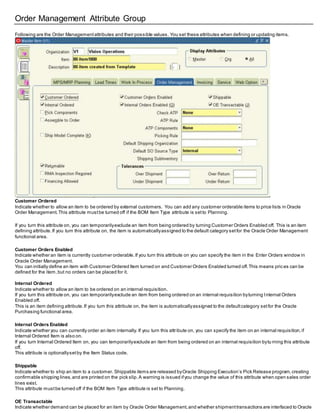
methods in the Inter-org Shipping Methods window.These lead times are used byMRP. See Defining Bills ofDistribution,
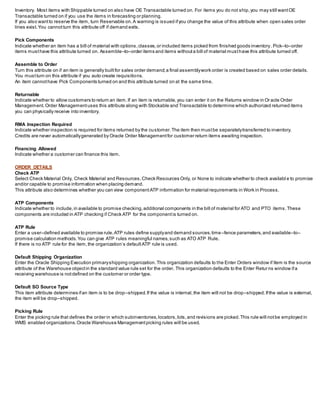
Oracle Master Scheduling /MRP and Oracle Supply Chain Planning User's Guide.
Oracle Inventory defaults the shipping information you entered in the Organization Parameters window when you create new organization
relationships in the Inter-Organization Shipping Network window.
Inter-organization shipping network information describes the relationships and accounting information thatexists between a shipping (from)
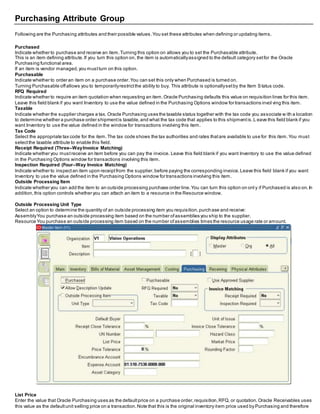
organization that ships inventory to a destination (to) organization.
Depending on the function securityassigned to your responsibility,you can define a shipping network between the currentorganization and
another organization or between any two organizations.
The function security assigned to your responsibilitydetermines whether you have the ability to define shipping networks for all organizations
or justthe current organization.
1. From-TO organization
Determine ifthe organization displayed is the To Organization, From Organization, or the From or To Organization.
Item is transferred from the 'From' organization to the 'To' Organization.
2. Transfer Type: (Intransit/Direct)
For each organization relationship you create, you mustindicate whattype of shipmentis used.If you choose to use intransitinventory, Oracle
Inventory moves material to intransitinventory before it reaches the destination organization when you perform an inter–organization transfer.
Typically, you transfer material through intransitinventory when transportation time is significant.If you do not choose intransitinventory,
Oracle Inventory moves your material directlyto the destination organization when you perform an inter–organization transfer.
For direct transfer type the FOB & receipt routing is disabled.
3. FOB (Shipment/Receipt)
Determines the ownership ofthe material.
If it is shipmentthen the ownership goes to 'To(receiving)'organization at the pointof shipping.
If it is receipt then the ownership is transferred from the 'From(Sending)'organization to the 'To(receiving)' organization when the material is
received at the receiving organization.
Note : Freight On Board (FOB)
The point or location wherethe ownership titleof goods is transferred from the seller to the buyer.
4. Receiving routing
If you selected Intransitin the Transfer Type field,selecta receiptrouting option:
Standard:Receive this item first, then deliver withoutinspection.
Direct: At receipt,deliver this item directly to its location.
Inspection:Receive this item first, inspectit, then deliver.
5. Internal orders enabled
You mustalso specifywhether internal orders are required from the destination organization to perform inter–organization
transfers.Oracle Inventory does not allow you to perform inter–organization transfers using the Transfer Between Organizations window to an
organization that requires internal requisitions.
6. inter–organization transfer charge
Select the inter–organization transfer charge type for calculating transfer charges:
None:Do not add transfer charges.
Predefined Percent: Automatically add a predefined percentofthe transaction value.
Requested Value: Enter a discrete value to add.
Requested Percent: Enter a discrete percentage of the transfer value to add.
The defaultvalue is the value you defined in the Organization Parameters window for the shipping organization.
7. Define account information
Also, you mustprovide general ledger accounts to record debits and credits involved in an inter–organization transfer.
1. Enter the general ledger transfer creditaccount used to collecttransfer charges for the shipping organization The defaultvalue is the
value you defined in the Organization Parameters window for the shipping organization.
2. Enter the general ledger accountused to collect the purchase price variance for inter–organization receipts into standard cost
organizations.You mustenter an accountif your receiving organization is using standard costing.
3. Enter the general ledger receivables accountused as an inter–organization clearing accountfor the shipping organization.
4. The inter–organization receivable accountfor the shipping organization should equal the inter–organization payables account for the
receiving organization.
Account Name Account
Transfer Credit 01-510-5290-0000-000
Purchase Price Variance 01-510-5210-0000-000
Receivable 01-000-1810-0000-000
Payable 01-000-2370-0000-000
IntransitInventory 01-000-1460-0000-000
8. Intransit lead time
Select Shipping Methods on the Tools menu to open the Inter–org Shipping Methods window.
Enter the shipping method for which you wantto associate an intransitlead time for the displayed from and to organizations and enter
the intransitlead time in days.
Inter–organization Transfers Transactions
You can define multiple inventories,warehouses,and manufacturing facilities as distinctorganizations.With Oracle Inventor y you can perform
inter–organization transfers as direct or intransitshipments.
Inter-Org transfers can be done within or across operating units butyou can not generate intercompanyinvoice with inter-org transfer.
Intercompanyinvoicing is possible for inter-org transfers oftype ‘In-transit’ only through ‘Internal sales Orders’.No intercompanyinvoicing is
possible ifyou perform org transfers between two inventory orgs belonging two differentoperating units without‘internal sales Orders’.Als o
note that intercompanyinvoice cannot be raised for inter-org transfers oftype ‘DirectTransfer’ through Internal sales Orders.
You can transfer one or more items in a single transaction.You can also transfer partial quantities ofthe same item to different subinventories
and locators in a single transaction.
Required Setups
1. The items you transfer mustexistin both organizations.You can also transfer expense and assetitems from one organization to another
using intransitinventory.
2. There mustexista shipping network(direct/intransit) between the two organizations.
Accountings
1. Direct Org Transfer
From org - Inter-org receivables debited
Inv valuation is cedited
To Org - Inv valuation debited
Inter-org payables credited
DirectInter–organizationTransfers
You can use a direct inter–organization transfer to move inventory directly from a shipping organization to a destination organization.
The validity of a transfer transaction depends on the controls you have defined in both the shipping and destination organiza tions for the items
you wantto transfer.
For example,you can transfer item A from organization X to organization Y, even though item A is under lot control only in organization X (you
can specifythe lot numbers for item A in organization X during the transfer transaction).However,you cannottransfer item B from organization
X to organization Y if item B is under lot control only in organization Y (you cannotspecify lot numbers for item B in the destination organization
because you are performing a direct transfer).
The following tables presentdirect,inter–organization transfers.(As given in oracle user guide)
Example For Lot Control Direct Transfer
Test Case NO Organization Item Code Lot Control From To Direct Org Availability
1 SH 1 SH2 Lot Control NO Control SH1 SH2 No
2 SH 2 SH2 Lot Control Full Control SH2 SH1 Yes
Case 1
The Item Not In LOV Available To Transact
Case 2
If destination is Asset/Serial controlled/Lotcontrolled/Revision Controlled then the source needs to be Asset/Serial contro lled/Lotcontrolled/
Revision Controlled
Inter–Organization Transfers via Intransit Inventory
You usuallytransfer material to intransitinventory when transportation time is significant.When you perform the transfer transaction,you do
not need to specify the delivery location.You only need to enter the subinventoryyou are shipping from,a shipmentnumber, the freight
information,and,depending on the inter–organization transfer charge thatapplies between the organizations,a percentage ofthe transaction
value or a discrete amountthatOracle Inventory uses to compute transfer charges.
If the FOB point is set to Receiptin the Shipping Networks window,the destination organization owns the shipmentwhen they receive it. If it is
setto Shipment,the destination organization owns the shipmentwhen the shipping organization ships it,and while it is intr ansit.
While your shipmentis intransit,you can update shipping information such as the freightcarrier or arrival date in the Maintain Shipments
window.
At the time of shipment,you mustdefine your receiving parameters for the destination organization.You can receive and deliver your shipment
in a single transaction or you can receive and store your shipmentatthe receiving dock.
The validity of a transfer transaction depends on the controls you have defined in both the shipping and destination organizations for the items
you wantto transfer.For example, you can transfer item A from organization X to organization Y, even though item A is under lot control only
in organization X (you can specify the lot numbers for item A in organization X during the transfer transaction).You can also transfer item B
from organization X to organization Y if item B is under lot control only in organization Y (you can specifylot numbers for item B in the
destination organization when you perform the receiving transaction).
1. The following tables presentinter–organization transfers via intransitinventory.
2. In case of inter organization transfer via Intransitwe required to put the shipment number
Before You Do This Steps You Must Define Financial Option ,Receiving Option And Purchasing Option For Your OU
Open Purchasing Period
After completing the inter org transfer, go to the receiving form of the 'to org' and receive the shipmentwith the shipment number.
Defining Intercompany Relations
Use the IntercompanyRelations window to define,query, and update intercompanyrelations between two operating units in a multi –
organization environment.These operating units are either the shipping organization and the selling organization,or the rec eiving and
purchasing organization.
When a sales order is entered in an operating unit,the shipping organization is often partof a separate operating unit,bel onging to a separate
setof books.Once the sales order is shipped to the customer,the inventory ass etaccountfor the shipping organization is credited and the
costof goods sold accountis debited.On the other hand,sales revenue mustbe recognized in the order entry organization.If the two
organizations belong to differentoperating units,the system mustperform accounting distributions to record the intercompanyrevenue,
receivable,and payable entries.
Oracle Inventory and Oracle Receivables mustbe installed before you can define intercompanyrelations.If Oracle Payables is notinstalled,
the fields in the AP Invoicing for Selling region are notrequired.
ABC Analysis and Cycle Count
An ABC analysis determines the relative value of a group of inventory items based on a user–specified valuation criterion.”ABC” refers to the
rankings you assign your items as a resultof this analysis,where ”A” items are ranked higher than ”B” items,and so on. You can optional lyuse
the ABC analyses you compile to drive your cycle counts,where you mightcountitems of high value (A items) very frequently, items oflower
value less frequently,and items of lowestvalue very infrequently.
Steps Involved in ABC Analysis
 Define ABC classes.
 Define and run an ABC compilation.
 Define Assignmentgroups.
 Assign items to ABC classes within a group.
 Update item assignments.
 Purge ABC information.
Cycle counting is the periodic counting of individual items throughoutthe course of the year to ensure the accuracy of inventory quantities
and values. Accurate system on–hand quantities are essential for managing supplyand demand,maintaining high service levels,and planning
production.
You can perform cycle counting instead oftaking complete physical inventories,or you can use both techniques side –by–side to verify
inventory quantities and values.Inventory supports s erialized cycle counting,and the following chapters discuss the steps involved.
Overview of Cycle Counting & Serialized Cycle Counting
1. Defining and Maintaining a Cycle Count
2. Cycle CountItems & Defining Cycle CountItems
3. Cycle CountScheduling
Generating Automatic Schedules
Entering Manual Schedule Requests
4.1 CountRequests
CountRequests for Items with Zero Count
Generating Cycle CountRequests
Requesting the Cycle Count List
4.2 Entering Cycle Counts
4.3 Approval Options and Tolerances
CountAdjustments and Approvals
Approving Cycle Count Adjustments
5. Purge Cycle Count
ABC Analysis
Defining ABC Classes
You use ABC classes to identify the value groupings to which your items belong.You define these classes using your own terminology.
For example,you mightdefine classes High,Medium,Low,and later assign your items ofhighestrank to the High class,those oflower rank to
the Medium class,and those of lowestrank to the Low class.You can add to the listof classes you have already defined.
Attention: You mustassign an ABC class to at leastone ABC group.
 You can use ABC classes to group items for a cycle count where you count “A” items more frequentlythan “B” items.When you u se
ABC classes in this way, you perform an ABC analysis and assign items to classes based on the results ofthat analysis.
 You can also use ABC classes to group items for planning purposes.For example,the Planning Detail Reportallows you to choo se
an ABC class to reporton.
To define an ABC class:
1. Navigate to the ABC Classes window
2. Enter a unique name for the class.
3. Save your work.
To delete an ABC class:
You can delete a class ifit is not in use in a cycle countor ABC assignmentgroup.
To make an ABC class inactive:
1. Enter a date on which the class becomes inactive.
2. As of this date, you can no longer assign the ABC class to an ABC group.
Defining and Running an ABC Compile
You can define and compile an ABC analysis for your entire organization or for a specific subinventorywithin your organization.
You choose the compilation criterion,the scope ofyour analysis,the costtype to use in determining item values,and anyad ditional
information thatmay be conditionallynecessary,based on your compilation criterion.The combination ofall these parameters constitutes an
ABC compile header,identified bythe ABC compile name.You use this name to identify any activity pertaining to this ABC ana lysis.
To define an ABC compile:
Navigate to the ABC Compiles folder window and choose New.The Define ABC Compile window appears.
1. Enter a unique name for the ABC compile.
2. Determine the scope of the analysis by selecting the contentlevel for items to include in the compile.If you use the entire organization,
Oracle Inventory includes all items defined for your current organization in the ABC compile,even those with zero costor zero quantity. If you
use a particular subinventory,Oracle Inventory includes all items for which you have defined an item/subinventoryrelationsh ip.
Attention: You cannotcompile an ABC analysis for a subinventorythat is defined as a non–quantitytracked subinventory. You can, however,
use non–asset(expense) subinventories for which you track quantities.
3. Select the valuation scope for determining the ranking ofitems.Ranking mustbe done at the Organization level if you did not selecta
subinventoryin the ContentScope field.
If you only want to include items in a subinventory but you want the ranking to be done based on the organization wide rank ing,select
Organization.
4. Select the compile criterion or method of ranking items in the ABC compile.
Oracle Inventory uses the compile criterion to value the items you include in your ABC compile.After determining each item’s compile value,
Oracle Inventory ranks all the items in your ABC compile.
4.2 Enter a costtype.
You can selecta value here only if you selected Currenton–hand quantity,Currenton–hand value, Forecasted usage quantity,Forecasted
usage value,MRP demand usage quantity,or MRP demand usage value
in the Criterion field.If you are compiling by quantity criterion,the cost type is used for reporting purposes only.
4.3 Select an MRP forecastname:You can selecta value here only if you selected Forecasted usage quantityor Forecas ted usage value in
the Criterion field.
4.4 Select an MRP plan name :You can enter a value here only if you enter MRP demand usage quantityor MRP demand usagevalue in the
Criterion field.
4.5 Enter a start (from) date: You mustenter a value in this field if you choose an option other than Current on–hand quantityor Currenton–
hand value in the Criterion field.
4.6 Enter an end (to) date : You mustenter a value in this field if you choose an option other than Currenton –hand quantity or Currenton–
hand value in the Criterion field
To view ABC Compile results:
1. Navigate to either the ABC Compiles window or the Define ABC Compile window.
2. Choose View Compile from the Tools menu.The ABC Compile Items window appears.
To print the ABC Descending Value Report:
1. Navigate to either the ABC Compiles window or the Define ABC Compile window.
2. Choose PrintCompile from the Tools menu.
Oracle Inventory uses the compile criterion to value the items you include in your ABC compile.After determining each item’s value,Oracle
Inventory ranks all the items in your ABC compile in descending order to produce the ABC Descending Value Report.
You can use this report as a guide in assigning your items to ABC classes.
ABC assignmentgroups link a particular ABC compile with a valid set of ABC classes.This allows you to selectivelyreduce or increase the
number ofABC classes you wantto use in your item assignments for a particular ABC compile.For example,you mighthave five classes,A,
B, C, D, and E, defined for your organization where you perform your ABC analysis by subinventory. The firstsubinventory is rather small.You
need only three classes in which to divide your items.You define
an ABC group,associating the ABC compile for the firstsubinventory with the classes A,B, and C. The second subinventoryfo r which you
compile an ABC analysis is much larger.There are five distinctvalue groupings ofitems.You define a second ABC group,associating the BC
compile for the second subinventorywith all five classes defined for your organization,A, B, C, D, and E.
Oracle Inventory uses these groups when you automaticallyassign your items to ABC classes.It ensures thatyou divide your items into the
exact number ofgroupings you specified in the ABC group.ABC assignmentgroups associate ABC classes with an ABC compile.Yo u assign
items to ABC classes within a particular group. This allows you to assign items to differentABC classes in differentgroups.
For example,suppose you define ABC groups “Cycle Counting” and “Planning”.You can assign differentABC classes to these two groups.
You can then assign an item to a different ABC class in each group.This allows you to prioritize items differentlyfor cycle counting and
planning.
You mustalso assign a sequence number to each class associated with the ABC group.The class with the lowestsequence number is
assumed to have the highestrank and will have higher rank items assigned to that class than the next higher sequence number.Using the ”A”,
”B”, and ”C” classes in the example above, you mightassign the ”A” class a sequence number of”1”, the ”B” class a sequence number of”2”,
and the ”C” class a sequence number of”3”. (Sequence numbers ”10”,”20”,and ”30” would give the same result.) When you later assign your
items to ABC classes,the first grouping ofitems in the descending value listare assigned to class ”A”, the next to ”B”, an d the lastto ”C”.
You may update an assignmentgroup to add new classes.However,you cannotdelete a class. If you need to delete a class,you mustcreate
a new assignmentgroup with only the desired classes.
Assign items to ABC classes within a group.
You can assign and update ABC classes to an ABC assignmentgroup where an ABC compile was also entered.From the ABC Descendi ng
Value Reportyou determine the cutoff points for assigning ABC classes.You can then use the classifications for other purpos es such as
determining how often you cycle count a given item.
To define ABC assignments:
1. Navigate to the Assign ABC Items window,or navigate to the ABC AssignmentGroups window and choose the Assign Items button.
2. Enter the ABC group for which to assign items to classes.Ifyou navigate from the ABC AssignmentGroups window this field is already
entered The Compile Name,Subinventory, Number ofItems,and Total Compile Value fields displayinformation for the compile u sed bythe
ABC Group.
3. Specify the cutoff pointfor each ABC class.Each ABC class musthave at leastone item assigned to it, and all items in the ABC compi le
mustbe assigned to an ABC class.You can use any of the following fields to determine the cutoff points:
Seq: You can enter the sequence number from the ABC Descending Value Reportfor the lastitem to be included in each ABC class.Oracle
Inventory automaticallycalculates this value ifyou choose to assign classes byanother method.Oracle Inventory displays th e lastsequence
number as the defaultfor the lastclass.
Inventory Value: You can enter the cumulative value from the ABC Descending Value Reportfor the lastitem to include in each ABC class.
Oracle Inventory automaticallycalculates the maximum value.This maximum value is restricted to the total inventory value compiled and is
displayed in the Total Compile Value field.Oracle Inventory displays the total inventory value as the default for the lastc lass.
% Items: You can enter the percentof number ofitems compiled from the ABC Descending Value Reportto include in each class.Oracle
Inventory automaticallycalculates this value ifyou choose to assign classes byanother method.
% Value: You can enter the percent of total compile value from the ABC Descending Value Reportto include in each class.Oracle Inventory
automaticallycalculates this value if you choose to assign classes byanother method.
Attention: It is possible to have several items in the ABC compile with zero value. If any item with zero value is in a class other than the last
class,you may only assign items using the sequence number or item percent.
For the Inventory Value, % Item, and % Value fields,if the value entered does notexactly match any item,Oracle Inventory chooses the first
item with a value greater than the value entered.
4. Choose the Assign button to launch the concurrentrequestto assign the items to the classes in the ABC group.
Updating ABC Item Assignments
If you are not satisfied with the class into which an item falls as a resultof the automatic ABC assignmentprocess,you can change it. For
example,assume you compiled your ABC analysis based on historical usage value.You have a relatively new item in your inventory that was
ranked toward the bottom of your ABC Descending Value Reportsince ithas very little transaction historyon record. Therefore, after the
assignmentprocess,this item was assigned to a class oflow rank.
However, you know that in the future, this item will have a high usage value and should reallybe classified as a high rank item.You use the
Update ABC Assignments form to reclassifythis item to now be a high rank item.
Attention: Whenever you recompile an ABC analysis or change the method by which you assign your ABC classifications,you lose any
changes you mighthave made to your item assignments. All items are reclassified based on their new ranks in the ABC Descending Value
Reportand the method you choose to determine cutoff points.
You can also update an ABC group to include those items that were not a part of the initial ABC compile.This allows you to expand the scope
of your existing ABC compiles withouthaving to rerun any processes.For example,if you start stocking a new item in your in ventory, you can
make it a part of your existing ABC groupings through the update process.Otherwise,you would have to start all over by recompiling your ABC
analysis and reassigning your items to ABC classes.With the whole process starting from the very beginning,you also run the risk of losing
any changes you mighthave made to your item assignments.
Purging ABC Information
You can submita requestto purge either ABC assignmentgroup or ABC compile information.
Purging an ABC group deletes all item assignments to ABC classes for the assignmentgroup you specify, as well as the ABC group itself.
Purging an ABC compile deletes all item values and rankings for the ABC compile you specify, as well as the ABC compile itsel f.You can
purge an ABC compile ifno ABC groups are using it.
Cycle Counting
Cycle counting is the periodic counting of individual items throughoutthe course ofthe year to ensure the accuracy of inventory q uantities and
values.Accurate system on–hand quantities are essential for managing supplyand demand,maintaining high service levels,and planning
production.
You can perform cycle counting instead oftaking complete physical inventories,or you can use both techniques side –by–side to verify
inventory quantities and values.Inventory supports serialized cycle counting,and the following modules discuss the steps involved.
Defining and Maintaining a Cycle Count
A combination ofparameters constitutes a cycle count header,identified by the cycle count name.You use this name to identi fy any activity
pertaining to this cycle count.
You can define and maintain an unlimited number ofcycle counts in Oracle Inventory. For example,you can define separate cycl e counts
representing differentsets ofsubinventories in your warehouse.
Prerequisites
❑ Define ABC classes.
❑ Define your workday calendar.
❑ When determining cycle count classes based on ABC analysis,you mustcompile an ABC analysis and assign your compiled items’ ABC
classes.
To define a new cycle count:
Navigate to the Cycle Count Summaryfolder window by selecting Cycle Counts on the menu and choose New to open the Cycle Counts
window.
1. Enter a unique name for the cycle count.
2. Enter the workday calendar to use for this cycle count. Inventory uses this calendar to determine the days on which to automa tically
schedule cycle counts.
3. Enter the general ledger accountto charge for cycle count adjustments.
4. Enter the Count Controls:
 Optionally, enter the date on which the cycle count becomes inactive.As of this date, you cannotgenerate schedules or perfo rm any
counting activities for this cycle count.
 Enter the number ofworkdays that can pass after the date the count requestwas generated,before a scheduled countbecomes a
late count.
 Enter the sequence number to use as the starting number in the next count request generator.The count sequence number uniquely
identifies a particular countand is used in ordering the cycle countlisting.
 Determine whether you can enter counts for items notscheduled to be counted (Unscheduled Entries).
 Determine whether to displaysystem on–hand quantities during countentry.
5. Determine whether Inventory automaticallyassigns a status ofRecountto out–of–tolerance counts and includes them in the next cycle
count listing.
If you turn this option on, navigate to the Maximum field and enter the maximum number oftimes Inventory can generate an automatic recount
request.Once this number is reached the adjustmentmustbe approved or rejected.
6. Determine the subinventories to include in the cycle count.
If you choose Specific subinventories,you can navigate to the Subinventory region and selectthe subinventories to include in the cycle count.
Serialnumber controland Auto schedule
Four options setin this window govern the handling ofserial controlled items:
Count
 Not Allowed: Serialized items are excluded from the cycle count.
 One Per Request: A separate countrequestis generated for each serial number.
 Multiple Per Request: Serial numbers for the same item/location are grouped in one countrequest.
Detail
 Quantity and Serial Numbers: Serial number and quantityare required and are validated when entering counts.
 Quantity Only: Serial number entry is required ifthe count quantity does not match the system quantity. Serial number entry is
optional if the countquantity matches the system quantity, regardless ofwhether the serial numbers match.If you do not enter serial
numbers,the countis marked as completed,and no adjustments are performed.If you do enter serial numbers,both quantityan d
serial numbers are validated when determining whether adjustments are required.
Adjustment
 Review All Adjustments: No automatic adjustments are attempted.Serialized items thatrequire adjustmentmustgo to an approver for
review.
 Adjust if Possible: If a discrepancyexists between the count quantity and system quantityor if the entered serial numbers do not
correspond to the serial numbers alreadyin the specified location,then the system will attemptto make adjustments ifthe a djustment
variance and value are within tolerances,as long as serial uniqueness constraints are notviolated. These adjustments consistof
receipts and issues ofthe appropriate serial numbers to and from the specified location and are applicable onlyto instances in which
new serial numbers or shipped serial numbers are counted.If the adjustmentquantityor value for a serialized item falls outside the
specified tolerances,the item is sentfor recount or approval,justlike a non–serialized item.
Discrepancy
 Allow Discrepancies: When a count includes a serial number alreadyassigned to the same item elsewhere in the system,an
adjustmentis created if it would be within tolerances.No adjustmentis ever allowed for counts including serial numbers alr eady
assigned to another item.
 Do Not Allow Discrepancies: Adjustments are notmade for items notfound in the specified location.
Automatic Scheduling
If you turn automatic scheduling on,enter the following information:
Frequency: Indicate whether to schedule cycle counts Daily, Weekly, or By period.Inventory uses this information,along with the count
frequency of each cycle count class,when performing automatic cycle count scheduling.The value you enter here dictates the window of time
within which you can enter counts againsta schedule bucket.
Schedule Interval Example
If you choose weeks as your schedule interval,Inventory schedules a week’s worth ofcounts each time the automatic scheduler executes.
You then have that week to complete all these counts.On the other hand,if you choose days, Inventory schedu les onlythatone day’s counts,
and you need to complete those counts on that given day.
LastDate: Inventory displays the lastdate this cycle count was automaticallyscheduled.
Next Date: Inventory displays the firstworkday for the next schedule interval when this cycle count is scheduled.You can enter a later date in
this field if you want to override the automatic schedule and skip one or more intervals.If your schedule interval is Weekly or By period,the
date you enter mustbe the first workday of the period for which you want to generate schedule requests.
Countitems with an on–hand quantityof zero: Optionally, determine whether to automaticallygenerate requests to countitems with an on–
hand quantity of zero.
Adjustments and ABC information
1. Determine when approval is required for adjustments:
 Never: Inventory automaticallyposts adjustmenttransactions where entered counts differ from system balances.
 If out of tolerance: Inventory does not automaticallypostadjustmenttransactions for counts outside a specified approval tolerance.
You mustapprove such adjustments before posting.
 Always: You mustapprove all cycle countadjustments,regardless oftolerance levels,before Inventory can postany of them.

2. If you choose to require approval for adjustments Ifout of tolerance,enter positive and negative tolerances.
 Qty Variance: Enter the percentage variances of countquantity to on–hand quantity beyond which adjustments are held for approval.
 AdjustmentValue: Enter the adjustmentvalues beyond which adjustments are held for approval.
 Hit/Miss Analysis: Enter the percentage variances of count quantity to on–hand quantity beyond which Inventory considers a count
entry a miss for hit/miss reporting.
3. Optionally, enter ABC initialization or update information:
Group: Enter the ABC group name on which to base the cycle count item initialization or update.
Option: Choose one ofthe following options:
– None:Do not change to the listof cycle count items.
– (Re)initialize:Use the ABC group you specified to load all items and their ABC assignments into the listof items to include in your cycle
count. If you alreadyhad items defined for your cycle count, this action deletes existing information and reloads the items from the ABC group.
– Update:Use the ABC group you specified to insertnew cycle countitems.
If you chose the update option:
– Indicate whether to update classes.If an item’s ABC class assignmentin the ABC group you specified is differentfrom the cycle count class
this item is assigned,Inventory updates the cycle count class for the item with the ABC assignmentin the specified ABC group.
– Indicate whether to delete unused item assignments thatare no longer referenced in the specified ABC group.
Defining Cycle Count Classes
You can enter ABC classes to include in your cycle count. You can also enter approval and hit/miss tolerances for your cycle countclasses.
To define cycle count classes
Navigate to the Cycle Count Summaryfolder window.
1. Select a cycle countand choose Open.
2. In the Cycle Counts window choose Classes.The Cycle CountClasses window appears.
3. Enter the name of the ABC class to use to define your cycle countclasses.
4. Enter the number of times per year you want to count each item in this class .
The counts per year for a class ensures thatall items in that class are scheduled atleastthat many items in a year.That is , if the counts per
year for a class is 10 and the class has 100 items,then each of the 100 items in the class are scheduled at least10 times.
5. Optionally, enter positive and negative tolerances.If you do not enter tolerances,Inventory uses the values you entered in the Cycle
Counts window.
 Quantity %: Enter the percentage variances of count quantity to on–hand quantity beyond which adjustments are held for approval.
 AdjustmentValue: Enter the adjustmentvalues beyond which adjustments are held for approval.
 Hit/Miss %: Enter the percentage variances of count quantity to on–hand quantity beyond which Inventory considers a countentry a
miss for hit/miss reporting.Note thatthe hit/miss percentage is based on the firstcount of an item,not recounts.
Cycle CountItems
You need to load items into your cycle count before you can schedule or countthem.There are two methods you can use to do this.The first
is to specify an existing ABC group from which to load your items.Oracle Inventory automaticallyincludes all items in the ABC group you
choose in your cycle count. Inventory also copies the ABC classes for thatABC group into the current cycle countclasses and maintains the
same classifications for the included items.You can then change the classifications ofyour items for your cycle count indep endentofthe ABC
classes.
Once you have generated your listof items to count from an ABC group,you can periodicallyrefresh the item listwith new or reclassified items
from a regenerated ABC group. Using the Cycle Counts window,you can choose whether to automaticallyupdate class information for
existing items in the cycle count based on the new ABC assignments.You can also choose to have any items thatare no longer in the ABC
group automaticallydeleted from the cycle count list.Any new items are added.
The second method ofmaintaining the cycle count item listis to manuallyenter, delete,or update the items you want
included/excluded using the Cycle CountItems window.You may want to use this form to load all your items for a cycle count, or to simplyadd
items as they are defined in the system rather than recompiling your ABC group and doing a complete reinitialization ofyour cycle count items.
Defining Control Group Items
When you choose the items to include in your cycle count, you can specifywhich items make up your control group.When you ge nerate
automatic schedules you can indicate whether to include items in your control group as a control measure.
Schedule Cycle Count
Automatic Scheduling
Oracle Inventory uses the number of items in each cycle count class,the count frequency of each class,and the workday ca lendar ofyour
organization to determine how manyand which items you need to count during the scheduling frequency.
In order for Inventory to perform automatic scheduling you must:
 Set the Cycle CountEnabled item attribute to Yes for the items you want to include in the cycle count.
 Enable automatic scheduling when you define your cycle count.
 Requestthe schedule using the Generate Automatic Schedule Requests window.
Each time the auto scheduler runs,itschedules counts onlyfor the schedule interval you defined for the cycle count header.So if your
schedule interval is weeks,Inventory schedules all items thatneed to be counted on all of the workdays in the current week. If your schedule
interval is days, then Inventory only schedules those items thatare due for counting on the current date.
To generate automatic schedules:
1) Navigate to Cycle Counts Summaryfolder window or the Cycle Counts window.
2) Select a cycle count and choose Cycle CountScheduler from the Tools menu.The Cycle CountScheduler Parameters window appears.
3) Indicate whether to include items belonging to the control group in the listof items for which to generate schedule reque sts.
4) Choose OK to submitthe requestto the concurrentmanager.
Logic for Cycle Count Auto Schedule (As given in metalink)
The first criteria of selecting the items to schedule,is whether these items are marked as a control group items or not and what is the criterion
on which the Cycle count scheduler is being run (Include Control Group Items is checked or not). Based on this the scheduler will selectthe
Control Group Items or Non Control Group Items to schedule counts.
The second criteria is Max items to Schedule,which is defined as:
MaxItemsToSchedule = (TotalItemsInClass * NWorkingDays) /ClassCountInterval + 1;
where,
TotalItemsInClass = the number ofitems defined in the class
NWorkingDays = BeginDate - EndDate + 1 (this will be printed in the concurrentlog file of the scheduler).
ClassCountInterval = NumWorkDaysThisYear /NumCountsPerYear (these will also be printed in the concurrentlog file of the scheduler).
Once MaxItemsToSchedule is calculated,these number ofitems are picked randomlyand will get scheduled and will be marked,s o thatthese
not picked in the scheduled run.
Now lets consider the following possible cases :
CASE : 1
No. of items in class = 100
Counts per year for class = 1
No. of working days in the year = 200 (taken, for easy calculation)
CountFrequency = Daily
Now since the countfrequency is 'Daily' you can run the scheduler on every working day.Using the above formula,Maximum Items to schedule
= ((100*1*1)/200)+1 = 0+1 = 1 The above formula has integer division and so instead of0.5+1 we have 0+1.
So, in this case all the 100 items in the class will be counted twice in a year. But, now if you change the count frequency from 'Daily' to 'Weekly'
as shown in Case 2.
CASE : 2
No. of items in class = 100
Counts per year for class = 1
No. of working days in the year = 200 (taken, for easy calculation)
CountFrequency = Weekly (say 5 work days in a week)
Maximum Items to schedule = ((100*1*5)/200)+1 = 3
Here, all the 100 items will be counted at leastonce,but some ofthe items maybe counted twice since in our formula we are doing the
ROUNDING off.In this case 80 items were counted only once and 20 items gotcounted twice.
If we do not do the rounding off (using integer division and adding 1),then in the above case we will have 2.5 items to sche dule.Now,we can
schedule either 2 or 3 items.So,if we schedule 2 items then all the 100 items will notbe scheduled atleastonce (20 items will be left out). So
we do the rounding off so that all the items are scheduled atleastonce.
You can see that by changing the countfrequency from 'Daily' to 'Weekly' the number ofitems that are getting counted twice have been
reduced from 100 as in Case 1, to 20 in Case 2.Since we are doing 'Rounding off' in the formula,some items ofthe class may be counted
more than the number of counts specified.But,as I have mentioned before,Counts per year is the minimum guaranteed number ofcounts per
year for all items in the class.
In cases where you have very few items and countfrequency is 'Daily', the magnitude ofthe difference between 'actual number ofcounts'and
'counts per year specified' will be much higher.In these cases,by changing the count frequency from 'Daily' to 'weekly/period', will reduce the
magnitude ofdifference.Also, we allow the user to change the 'Counts per year' at any pointin time in the year. So, once this value is changed
then all the items in the class are scheduled afresh,
irrespective of their scheduling before the change of value for counts per year.
The logic for Cycle counting is forwardlooking.
1. The counts per year for a class ensures thatall items in thatclass are scheduled atleastthatmany items in a year.That is,if the counts per
year for a class is 10 and the class has 100 items,then each of the 100 items in the class are scheduled atleast10 times.
2. In cases where you have very few items in the class and have high countfrequency (say Daily), there are chances that it will be counted
more number oftimes,then specified in its class.However,in those cases you would ideallylike to reduce the countfrequen cy (say, from
'daily' to 'weekly').
3. The counts per year for a class can be changed by the user at a later pointin time.Cycle counting does nottake into accoun tthe number of
counts that have already been done before the change of value for 'counts per year'. It now takes into account the new value of 'counts per
year' for all the items in the class.
Manual Scheduling
You can manuallyschedule counts in addition to,or instead ofthose generated with automatic scheduling.You can requestcou nts for specific
subinventories,locators,and items,and setthe count for any inventory date. For example,you could enter a requestto countitem A wherever
it can be found in subinventoryX. Or you could requestto count all item quantities in subinventoryY, locator B–100.
Since manuallyscheduled counts have no impacton automaticallyscheduled counts,you can potentiallycount some items more frequently
than you had initiallyplanned.
To manually schedule cycle count requests:
1) Navigate to the Manual Schedule Requests window or choose the Schedule button on the Cycle Counts Summaryfolder window.
2) Enter the cycle count name you are scheduling.
3) Select the item or location (subinventory) for counting.You can manuallyschedule specific items byentering values in
different combinations of the item, revision,lot, serial number,subinventory,and locator fields.
If you do not enter an item,you mustenter a subinventory.
Inventory schedules a countof all items stocked in this subinventory.If you enter an item and a subinventory, Inventory
schedules the item to be counted only in this subinventory.
4) Enter the date on which Inventory is to schedule the countyou have specified.The date you enter cannot be before today’s da te and must
be a valid workday as defined by the workday calendar for your cycle count.
5) Indicate whether to generate count requests for this item,revision,lot, serial number,subinventory,or locator combination even ifthe
system on–hand quantityis zero. This may be useful in performing exception–based counting to verify that the actual on–hand quantityis
indeed zero.
Physical Location Scheduling
You can use this feature to execute location–based cycle counting.You first need to generate a schedule for counting each subinventoryand
locator. You then need to enter the schedule requests for each locator,specifying the schedule date.
CountRequests
After you have successfullyscheduled your counts,you can submitthe process to generate countrequests.This process takes the outputof
the automatic scheduler and your manual schedule entries,and generates a countrequestfor each item number,revision,lotnumber,
subinventory, and locator combination for which on–hand quantities exist.These countrequests are ordered firstby subinventoryand locator,
then by item,revision,and lot. Oracle Inventory assigns a unique sequence number to each count requestthatcan be used for reporting ,
querying, and rapid count entry.
Because the count requests are derived from the state of on–hand balances atthe time the Generate Cycle Count Requests process is run,
you should waitto run it until you are ready to count.
Note: When you schedule an item to be counted using manual scheduling,some schedule requests mayhave overlapping
count requirements.The countrequestgenerator does notcreate duplicate countrequests,butinstead cross –references
one count requestback to each associated schedule request.
Count Requests for Items with Zero Count
By default Inventory does not automaticallygenerate requests to countitems with an on–hand quantityof zero. To include such items:
 Define all sourcing details and inventory controls for the item. For example,if an item is under predefined locator control, be sure it is
assigned to a subinventoryand locator.
 Select the Generate Zero Counts option when you define your cycle count.
The count requestgeneration process then automaticallycreates a count request.If a quantity is found and counted,an adjus tmentis made.
At countentry, you may receive a warning message stating,”Zero count, no adjustmentperformed.” Inventory generates this warning ifit
cannotfind all levels of inventory control defined for the item. In this situation,enter the count, but no adjustmentis pe rformed.To make an
adjustmentand update the missing information,enter an unscheduled countusing either the Cycle CountEntries or Approve Adjustments
window.
To submit a request set to perform a full cycle count
1. Navigate to Cycle Counts Summaryfolder window or the Cycle Counts window.
2. Choose Perform Full Cycle Count from the Tools menu.The set includes the following processes and report:
• Generate automatic schedule requests:Enter parameters for cycle countto use and indicate whether to include control items .
• Generate cycle countrequests:Enter parameters for cycle count to use.
• Cycle count listing:Enter parameters for cycle count to use,start and end dates,recounts,and subinventoryto count.
3. Choose Submit.
To submit the program to generate cycle count requests:
1. Navigate to Cycle Counts Summarywindow or the Cycle Counts window.
2. Choose Generate CountRequests from the Tools menu to submitthe process to the concurrentmanager.
Requesting the Cycle Count List
After you generate count requests you can submitthe requestfor the Cycle Count Listing report.This report lists all counts thatyou need to
perform within a given date range.
To requesta cycle count list:
1. Navigate to Cycle Counts Summaryfolder window or the Cycle Counts window.
You can also navigate to the ABC and Counting Reports window to submitthe listing.
2. Choose Cycle Count Listing Reportfrom the Tools menu.
3. Enter start and end dates for the list.Inventory reports counts falling on the startdate through the end date.
4. Enter the specific subinventoryfor which to report scheduled counts.
5. Indicate whether the cycle count listincludes onlyrecounts or scheduled counts and recounts.
6. Choose OK to submitthe requestto the concurrentmanager
CountAdjustments and Approvals
Submitted by Anony mous on Wed, 12/30/2009 - 13:02
Once you enter and save your cycle counts,Oracle Inventory determines whether anyadjustments need to be made depending on the
approval options and tolerances you set when you defined the cycle count.
Automatic Recounts
If you turned the Automatic Recountoption on when you defined your cycle count, Inventory automaticallysubmits recountrequests for items
that are outside the limits ofthe approval tolerances you specify. Inventory submits recounts as manytimes as necessary,li mited by the
maximum automatic recounts you specify for the cycle count. After you reach the maximum number ofrecounts,Inventory holds the countfor
approval. Any countrequestwith the Recountstatus automaticallyappears on the next cycle countlisting.
You can also manuallyrequestrecounts when you are approving adjustments.The count requestfor which you want a recountis also
automaticallyincluded in the next cycle count listing.
Attention: When generating the cycle countlisting,you mustinclude a from date far enough back to include the recount’s
original countdate, or it is not on the report.
Approving Cycle Counts Held for Approval
Employees with access to the Count Adjustments Approvals Summarywindow can query, requestthe recountof, or approve cycle counts
pending approval.When you selectthe Find button, you can query all counts or only those pending approval.You can then approve
adjustments,recountan item in question,rejectthe count or take no action until further investigation.
You can displaycount historyinformation or open the Count AdjustmentApprovals window.
To approve a count check:
Select Approved to approve the selected countentry and postthe adjustmentto the transaction manager for processing.
To reject a count check:
Select Rejected to rejectthe selected countrecord. An adjustmentis notposted.No further processing ofthis countentry take s place.
To request a recount check:
Select Recountto process a recountrequestfor the selected countrequest.An adjustmentis notposted.
To display count history information:
Select the CountHistory button to open the CountHistory window for the currentitem. For the current item,this window disp lays countand
variance information for the current, prior, and first counts.
To open the Count Adjustment Approvals window:
Select the Open button to open the CountAdjustmentApprovals window for the current line.This window is a combination block which you
can use to view and enter approval and adjustmentinformation for the current line instead ofusing the Count AdjustmentApprovals Summary
window.
Entering Cycle Counts
You can use the same window to enter counts of items requested via automatic or manual cycle countscheduling.Ifunscheduled count
entries are allowed for your cycle counts,you can enter those also.Oracle Inventory automaticallyqueries up all countrequests for which you
have not yet entered a count. You can use flexible search criteria to specifythe group of count requests for which you want counts entered to
speed up the countentry process.For example,you can specify a range of count requestsequences assigned to one person so th eycan be
entered in the same order they were printed on the count sheet.
To select the cycle count to use:
1. Navigate to the Cycle CountEntries window from the menu or choose Counts from the Cycle Counts Summaryfolder window.
2. Enter the name of the cycle count for which to enter counts.
This information is provided ifyou navigate from the Cycle Counts Summaryfolder window, and the Find button is not available.
3. Enter the date the cycle count was performed.
4. Enter the name of the employee who performed the cycle count.
5. Enter the general ledger accountto which to charge adjustments from this cycle count. The defaultis the adjustmentaccountyou entered
while defining your cycle count.
Inventory performs a cycle count adjustmentby creating a material transaction for the quantity and sign (plus or minus) ofthe adjustment.The
transaction debits or credits the adjustmentaccountdepending on the direction of the transaction.
6. Displaythe count requests you want to enter.
You can choose the Find button to query all open count requests.Ifyou choose notto query all open requests,you can either :
 Enter counts individuallyby entering existing sequence numbers.When you enter an existing sequence number the details for that
requestdisplay.You only need to enter the quantity counted.
 Use the find feature on the Query menu to query a subsetofcount requests matching the search criteria you enter. You can search
by any combination ofcountsequences,item,revision,subinventory,locator,or lot. You can also indicate whether to includ e
recounts.
To enter scheduled counts:
1. Select the Counttabbed region.
2. Enter the quantity that you counted for your item.Inventory uses this quantitywith the specified unitof measure to determine the value of
the cycle countadjustment.
Note: When you perform a recount, the quantity field on the adjustments tab is populated with the previously entered
count.
3. Save your work.
To enter unscheduled counts:
1. Navigate to the Cycle CountEntries window from the menu.
2. Choose the Find button and selectNo. This enables you to enter items and counts manually.
3. Enter the item for which you are entering counts.
4. If your item is under revision control, enter the revision for which you are entering counts.
5. Enter the subinventory for which you are entering counts.You can enter only subinventories thattrack quantity on hand.
6. If this item is under locator control, enter the locator for which you are entering counts.
Physical Inventory
Oracle Inventory provides a fully automated physical inventory feature that you can use to reconcile system –maintained item on–hand
balances with actual counts of inventory. Accurate system on–hand quantities are essential for managing supplyand demand,maintaining
high service levels, and planning production.
1. Define a physical inventory for your whole warehouse or subdivisions within your warehouse.
2. Take a snapshotofsystem on–hand quantities.You mustprocedurallycoordinate the snapshotofyour physical inventory with your actual
counting,and ensure that no transaction activity occurs in a particular location until after you have performed your adjustments.
3.1 Generate alphanumeric tags.
3.2 Countthe TAGs. Void unused or losttags.
3.3 Approve or reject physical inventory adjustments based on approval tolerances.
4. Automatically postadjustments to inventory balances and general ledger accounts.
5. Purge physical inventory information.
Defining a PhysicalInventory
You can define and maintain an unlimited number ofphysical inventories in Oracle Inventory. A physical inventory is identified by a unique
name you assign.You use this name to identify any activity, such as adjustments,pertaining to this physical inventory.
You can define multiple physical inventories to countselected portions ofyour inventory, or you can count your total inventory. For example,if
your warehouse has two large stockrooms,each represented bya subinventory, you can define two physical inventories,one for each
subinventory. You can then perform your physical inventory of the first stockroom,independentofthe second.
To define a physical inventory:
Navigate to the Physical Inventories Summaryfolder window and choose New.The Define Physical Inventory window appears.
1. Enter a unique physical inventory name.
2. Select approval requirements for adjustments.
Always: Require approval of all physical inventory adjustments.
If out of tolerance:Hold for approval those counts that are outside the limits ofthe positive and negative quantity varianc e or value tolerances.
Never: Allow any adjustmentto postwithoutapproval.
3. Enter positive and negative approval tolerances.
If approval is required for adjustments outof tolerance you must enter a value in at leastone of these fields.
You cannotupdate these values after you perform physical inventory adjustments.
Qty: Enter acceptable Positive and Negative limits (expressed as a percentage) for the difference between the system –tracked on–hand
quantity and the actual tag count quantity.
Value: Enter acceptable Positive and Negative limits for the total value of a physical inventory adjustment.
4. Select the scope of the physical inventory.
Determines whether the physical inventory is for all subinventories or for one or more specific subinventories.Only enter a quantity tracked
subinventory.
5. Indicate whether to allow dynamic entry of tags.
Determines whether you can dynamicallyenter tags you manuallycreated.If you choose not to allow dynamic tag entry all tags must
generated before use If you do not want to allow dynamic tag entry but you need blank tags,you can generate numbered blank tags for
counting miscellaneous items.
Takinga Snapshotof InventoryQuantities
Before you can generate tags for a physical inventory, you musttake a snapshotofall system on–hand quantities for your items.The
snapshot saves all currentitem on–hand quantities and costs.Oracle Inventory uses this information as the basis for all physical inventory
adjustments.All tag counts you enter for this physical inventory are compared with these static quantities. This allows you to resume normal
inventory operations after you have entered your counts butbefore you have authorized all final physical inventory adjustments. You can
perform your recounts or investigate certain results withoutholding up transaction processing.
Notes :
1. Oracle Inventory does notstop inventory processing during a physical inventory. Therefore, you mustprocedurallycoordinate the snapshot
of your physical inventory with your actual counting,and ensure thatno transaction activity occurs in a particular location until after you have
performed your adjustments.
2. It is recommended to clear the Pending Transactions and Transactions Open Interface,before taking a snapshotofinventory.
To freeze the system on–hand quantities
1. Navigate to the Physical Inventories Summaryfolder window.
2. Select the physical inventory you wantto use.
3. Choose Perform snapshotfrom the Tools menu.This launches the snapshotconcurrentprocess.
Note: You can also choose Snapshotfrom the Define Physical Inventory window.
4. When the concurrentprocess is finished,re–querythe physical inventory to see the effects of the snapshot.The effects include:
 The SnapshotComplete box is checked on the Physical Inventories Summaryfolder window.
 The SnapshotComplete box is checked,the SnapshotDate is updated,and the Tags button is enabled in the Define Physical
Inventory window.
Generating PhysicalInventory Tags
You use physical inventory tags to record the physical counts of inventory items.Physical inventory tags representactual hard copy tags that
some companies use to countinventory items. A tag contains the count for a group of a given item. Although you can record only one item
on a tag, multiple tags can reference the same item,with each tag referring to a unique physical location for an item.
Note: A tag representa single item number in a particular subinventory,locator with a given revision, lot, and serial number.
If we are not considering serial and lotnumber then the single TAG mighthave n number of items (in a particular sub -inventory, locator
combination)
Oracle Inventory can generate default or blank tags for your physical inventory.
If you choose to generate defaulttags for each item,specify the starting tag number and the incrementby which you want to increase each
digitin the tag number.Your tag numbers maybe alphanumeric,butyou can incrementonly the numeric portion.The alphabetic characte rs in
the tag number stayconstant. Inventory then uses these tag numbers to generate a tag for every unique combination of item number,
Subinventory , locator ,revision, lot, and serial number for which the system has an on–hand quantitynot equal to zero.
If you wantto have some emptytags handy to record counts for stock–keeping units for which Inventory has no on–hand quantity(and
therefore does not generate defaulttags),you can generate blank tags.Inventory assigns tag numbers to blank tags,butdoes notinclude any
item or location detail.You specify this information when you enter your tag counts.You can generate as man yblank tags as you want.
You can also exclusively use blank tags to perform a physical inventory. If you need to perform a complete wall –to–wall physical inventory,you
can go through your warehouse and attach blank tags to every item and/or location you see.As you perform the count, you record the item
and stock–keeping unitinformation along with the actual on–hand quantity.
You can Print Report : Physical inventory tag listing For Hard Copy To Record Counting
PI Tag Counts
Use the tags that you generated to record your physical counts.If you use default tags for your physical inventory, you can automatically
query all tags and fill in the counts. You can also query a subsetofyour tags by any combination oftag number,item,revis ion,subinventory,
locator, lot, and serial number.You would use this partial tag query feature if you prefer to enter your counts by location or item,or for a
particular tag number range.
If you use any blank tags in your physical inventory, you can query up the tags by tag number.You can then enter the necessaryitem,
revision,subinventory, locator,lot, and serial number information,as well as the actual countquantity and the name of the employee who
performed the count.
If you enable dynamic tag entry for your physical inventory, you can enter counts for any item and stock–keeping unitcombination withouta
pre–generated tag number.
Adjustments and Approval
Oracle Inventory uses the counts you enter for your tags to determine ifyour items need quantity adjustments;and ifso,whether you need to
approve them.
1. If you setyour approval option for your physical inventory to Not required for adjustments,you are ready to process your
adjustments.
2. If you setyour approval option to Required for adjustments outof tolerance,Oracle Inventory holds for approval all tags with counts that are
outside the limits ofthe quantity variance or adjustmentvalue tolerances.
3. If you setyour approval option to Required for all adjustments,Oracle Inventory holds all counts for approval.
Void Tags
It is importantfor auditing purposes to track the status ofeach physical inventory tag. Therefore, if you do not use one or more ofthe tags
Oracle Inventory generates,you should void them in the Physical Inventory Tag Counts window. A voided tag is not reported as a missing tag
in the Physical Inventory Missing Tag Listing.
If you generated a certain number of blank tags at the beginning ofyour physical inventory, and ended up not using all ofthem, you would void
the unused tags.When you run the Physical Inventory Missing Tag Listing for the whole range of tags you initially generated,the unused ones
are accounted for and appear as missing tags.
If you void a defaulttag, (i.e. a tag that identifies a stock–keeping unitfor which there is system on–hand quantity),Oracle Inventory adjusts
the quantity in that location to zero. This indicates thatyou did not use the tag in question,presumablybecause the stock –keeping unit
corresponding to the tag did not exist.
Entering and Voiding Physical Inventory Tag Counts
Navigate to the Physical Inventory Tag Counts window or choose the Counts button from the Physical Inventories Summaryfolder window.
1. Enter the physical inventory.
2. Enter the employee that performed the physical inventory in the DefaultCounter field. Oracle Inventory uses this value as the defaultfor the
Counted By field of each tag.
3. Enter or query the tag numbers for which to enter counts using one of the following options:
 Choose the Find button. Choose Yes or No to query all tags.If you choose No,you can either enter tag numbers individuallyor use
the Find feature on the Query menu to query a subsetoftags.
 Enter tag numbers individually.You can enter existing tags individually.When you enter a tag number the item information for that tag
appears.
 Use the Find feature on the Query menu.You can query a subsetoftags matching the search criteria you enter in the find win dow.
You can search by any combination oftag number,item,revision,subinventory,locator, lot, serial number,or tag status.With tag status you
can find voided or missing tags.
4. Enter counts for default tags: Since you generated defaulttags the item, revision,subinventory,locator, lot, and serial number information
for each item is displayed.You enter the countQuantity, unitof measure (UOM),and Counted By information.
5. Enter counts for blank or dynamic tags
 Enter the item associated with the tag.
 Enter the revision of the item.You can enter a value here if the item is under revision quantity control.
 Enter the subinventoryin which you counted the item.
 Enter the locator associated with the subinventory. You can enter a value here if the item is under locator control.
 Enter the count quantity (number counted) for the tag.
 Enter the count unitof measure (UOM).
 Enter the name of the employee who counted the item (Counted By).
 Enter the lot number associated with the item.This entry is required if the item is under lot number control.
 Enter the serial number associated with the item.This entry is required if the item is under serial number control.
6. Voiding Physical Inventory Tags
You can void tags that you deliberatelydiscarded during the physical inventory. Voiding tags allows you to accountfor all tags;thus, any tag
numbers thatappear on the missing tag reportare actually missing.
Approving PhysicalInventory Adjustments
Approval Tolerances
Oracle Inventory supports two types of physical inventory approval tolerances.For each type, you can specify a positive and a negative limit.
When a particular physical inventory tag count entry results in an adjustmentthatexceeds any one of these limits,you have a physical
inventory adjustmentthatexceeds approval tolerances.Based on the approval option you chose when you defined your physical inventory,
this adjustmentis or is not held for approval.
If you decide that approval is required for adjustments outoftolerance you mustenter at leastone positive or negative val ue for one type of
approval tolerance.The quantity variance tolerance is a user–defined limitfor the difference between the system–tracked on–hand quantity
and the actual tag countquantity. You express positive and negative quantity
variance tolerances as percentages ofthe system on–hand quantity.You enter these percentages when defining your physical inventory.
The adjustmentvalue tolerance is a user–defined limitfor the total value of a physical inventory adjustment:
adj value = (system on–hand qty – actual count qty) x current cost,
where:– Current costis the costat inventory snapshot.
You express positive and negative adjustmentvalue tolerances as amounts in your functional currency. You enter these toleran ces when
defining your physical inventory.
Approving Physical Inventory Adjustments
You can view, reject, or approve physical inventory adjustments pending approval.The adjustments you can view from this wind ow are
determined bythe approval option you defined for your physical inventory. If you approve a particular adjustment,the Process Physical
Inventory Adjustments program adjusts your inventory balance by that quantity. If you reject an adjustment,Oracle Inventory does notchange
the system on–hand quantity.
Notes:
1. Even after saving a count as approved/or rejected we can change the quantity in TAG count till the physical inventory adjustmentis
processed.
Example:we entered quantity 1 for item001 in tag countwindow and then saved it as approved in approve PI adjustment window.We can
again go back and change the quantity of item001 and save it. if we requry the item in adjustmentwindow then itwould be shown in None
status though previouslywe had saved it as approved.
Processing PhysicalInventoryAdjustments
After you finish entering all your tag counts and approving those adjustments thatneed approval, you can submitthe process that
automaticallyposts your physical inventory adjustments. Oracle Inventory automaticallycreates a material transaction adjusting the item
quantity and debiting or crediting the adjustmentaccountyou specify for your physical inventory.
 If the count of an item matches the snapshotsystem on–hand quantity,there is no adjustmenttransaction posted.
 Once you run the adjustmentprogram for your physical inventory, Oracle Inventory does notallow new tag generation or any further
updates oftag counts.You are no longer able to make any changes to that physical inventory.
 Due to the irreversible nature of this program,Oracle Inventory posts no physical inventory adjustments ifyou have any adjustments
that are still pending approval.You mustapprove or reject all of your adjustments before you can process them.
 You can preview your adjustments before actuallyposting them byrunning the Physical Inventory Adjustments Report.You can run
the actual adjustmentprogram after you have used the report to verify your tag quantities and the value impactof your adjus tments.
 Once the process "Perform physical inventory Adjustments" is complete one can verify the physical inventory adjustment
material transactions and corresponding distribution accountings in material distribution window.
Purging PhysicalInventory Information
Use this form to purge a physical inventory definition from the database.Oracle Inventory deletes all information associated with the physical
definition. However, the purge does notaffect any adjustments or adjustmenttransactions made using the physical definition .Those
adjustments are notchanged.You can also purge justtags if you made a mistake and wantto start over.
Consignment Inventory
ConsignmentInventory is inventory that is in the possession ofthe
customer,butis still owned by the supplier.In other words,the supplier places some ofhis inventory in his customer’s possession (in their
store or warehouse) and allows them to sell or consume directlyfrom his stock.The customer purchases the inventory only after he has resold
or consumed it.The key benefit to the customer should be obvious;he does nothave to tie up his capital in inventory. This does notmean that
there are no inventory carrying costs for the customer;he does still incur costs related to storing and managing the invento ry.
From the "Consigned inventoryfrom supplier"User's Guide:Consigned inventoryfrom supplier exists when inventory is in the possession of
one party (a dealer,agent, distributor,and so on), but remains the propertyof another party(such as the manufacturer or pr imarycontractor) by
mutual agreement.Consigned inventoryfrom Supplier refers to one type of consigned inventorypractice where you receive and maintain
goods belonging to one or more of your suppliers.Both suppliers and customers benefitthrough a consigned inventorystra tegy:
 Suppliers can compete on the basis ofavailability and delivery when finished goods are at the customer site,particularlywh en lead
times are lengthy.
 Holding material on consignmentreduces the lead time for items thatmightbe required to fill sales orders.
 Customers experience increased inventoryturns thus,reducing funds invested in inventory. Financial resources are free until
customer commitments are ensured,or items are used in production.
Consigned VMI with Customers Is defined as the process thatallows you to manage inventory at your customer sites (monitoring ofon-hand,
as well as the replenishment),and to operate a consigned inventory(pay-on-use) scenario where the material ownership remains with you until
it is consumed bythe customer.Traditionally,this process is highlylaborious and transactional oriented and provides little visibilityinto the
customer inventory and demand position.It is prone to stock outs and increased expediting costs.Whatyou want to do is move to a more
automated planning and execution process.
Benefits of consignment include:
Supplier:
1. Does not need to store material 2. Reduced delivery costs,less rush orders,transportation efficiencies 3.Material close r to pointof
sale Buyer
1. Reduced lead time 2. Reduced funds invested 3. Easier access to material
Consignment Inventory Buyer Prospective (With Supplier)
Currently, Purchasing does notallow encumbrance and consignmentto be active at the same time (they are mutuallyexclusive i n the same
Operating Unit)
Setups
1. Item : Nothing special here,justmake sure thatthe item is stockable and purchasable.
2. Define and assign a Sourcing Rule for this Item :
Create a Sourcing Rule specifying Both a Supplier and Supplier Site.Make sure the supplier site is a valid purchasing site. Assign the sourcing
rule to the Defaultassignmentset(as specified in MRP: DefaultSourcing AssignmentSet).
3. Create a Blanket Agreement (ASL source document)
Create a normal BlanketAgreementspecifying pricing for this Item as appropriate.
Take care that the supplier and supplier site used here mustbe the same as those in the sourcing rule and ASL.
4. Create ASL entry
Take care that you MUST specify a supplier site here otherwise you will not be able to enable cons ignmentfor this ASL entry. Also ensure that
the supplier and supplier site used here are the same as those in the BlanketAgreementand Sourcing Rule.
Specify the BlanketAgreementnumber.
If you are unable to selectthe BlanketAgreementyou have created here please check for the following :
A – The Blanket Agreementis not approved
B – The Supplier/Supplier Site combination on the BlanketAgreementis not the same as on the ASL entry
C – The Item on the Blanket Agreementis not the same as on the ASL entry
Now click on the Inventory tab. This is the part of the setup that is different from automatic sourcing.
Make sure to check the ‘Consigned from Supplier’ check box. This is the most important part of the setup.
Business Cycle
1. Create a standard PO
Even though we have created a Blanket Agreementas the source document, consignmentrequires a PO (and not a Release) to begin the
cycle.
Obviously the PO should contain the same Item,Supplier and Supplier Site as those in the BlanketAgreement, Sourcing Rule and ASL.
Approve the PO. Please note that no accounting is expected at this pointsince encumbrance is disabled (Encumbrance is notco mpatible with
consignment).
2. Receive the Goods
Receive the goods in the destination inventory.
Save the receipt.The goods are now in the specified subinventory.If this was a normal PO, the appropriate accounting transaction would have
been created
(Dr Receiving Area account/ Cr Inventory AP Accrual account). However, since this is a consigned PO, we do not expect any accounting
transaction to have been created.
we can receive the material w/o creating a standard POand bu justdoing a misc.receipt.The owning party should be selected as the
supplier.
3. Convert consigned goods to regular goods
Consigned stock is automaticallyconverted to regular stock when certain inventory transactions take place (e.g. shipping),h owever there is an
inventory process thatallows consigned stock to be transferred to regular stock (and vice versa). Once consigned stock has been converted to
regular stock,the receipt accounting transactions are generated.
To transfer consigned stock to regular stock navigate to Inventory Responsibility->Transactions->Consigned Transactions
Once you specifythe Item and Subinventory, the system will check the available and on-hand consigned stock in this subinventory.If you have
received the goods correctlythen there will be consigned stock which is eligible for transfer to regular stock.
Once this transaction is saved,the item is now regular stock. If you try to create a new transaction the consigned stock will have d ecreased
and if there is no consigned stock left,you will not be able to complete this transaction.Letus now check that the appropriate accounting
transaction has been created.
Navigate to Inventory Responsibility->Transactions->Material Transactions form and querythe Item.
Goods can also be automaticallytransferred to regular stock through other means.
From the Oracle Inventory Consigned Inventoryfrom Supplier Process Guide :
The system automaticallygenerates a Transfer to Regular transaction whenever consumption takes place.Consumption transactions are
performed either explicitly or implicitly. Explicit consumption is performed whenever the user specifies the external owning party (the
consignor) whose goods will be transferred to the internal organization.Explicit consumption is performed byusing the consi gnedtransactions
window and performing a transfer to regular transaction,or for example,by performing a miscellaneous issue and indicating the owning party
in the transaction line.Implicitconsumption refers to any type of consumption in which the system automaticallydetermines thatconsumption
is necessary,and selects the owning parties whose stock will be used up to complete the required transaction.
Some transactions always consume consigned materials.These transactions include the following:
1. Sales Order issues
2. WIP issues
3. Inter-organization transfers
4. Miscellaneous issues
Other transactions can be setup to consume according to rules in the Consumption Transaction Setup window —located in Oracle Inventory.
These transactions include SubinventoryTransfers,Move Orders,Backflush Transfers,and others.
4. Consumption advice
Once the goods have been consumed,the quantities consumed should be communicated to the supplier to provide the necessaryin formation
for billing.
Nav: Reports >Consigned Inventory (when you click on this you see a window open for you).
Once you selectall the parameters for example Supplier Item,item and Supplier and selectgo button. you will information be low thatpage and
you can drill down that information.This OAframework reportit not written in regular Oracle reports.
The normal invoicing and paymentcycles and cycle can take place once the supplier has sentthe invoice, with the only difference be ing that
invoices are matched to the consumption advice rather than the receipt.
Download the consignmentdemo from a buyer prospective @
http://www.forum4pmp.com/sites/default/files/consignment_buyer.swf
Available to Promise
Calculating the Available to Promise (ATP) is a method of checking the projected supplyof an item at a given time.
 The basic formula for ATP is ATP quantity = on-hand quantity + supply - demand.
 Oracle Inventory lets you define different rules that govern whatis considered supplyand demand.
 In oracle inventory you can view the earliestavailable date for a specific quantity of an item or a group of items and the available
quantity of an item for a specific date.
ATP Rule
To implementavailable to promise,you begin by defining your ATP rules.ATP rules letyou tailor the ATP calculation to suityour business
needs.Each rule is a combination of ATP computation options, time fence options, and supply and demand sources to use during an
ATP inquiry. You cannot delete an ATP rule, but you can rename or redefine existing rules by updating fields.
You can define multiple ATP rules to reflect th
e specific needs ofyour organization, and then use differentrules to calculate availabilityfor differentitems or groups o f items.Each time you
run an ATP check, the rule determines how existing supplyand demand are matched.You can choose one ofthe ATP rules you define as the
defaultATP rule for your organization. You can update the item attribute ATP Rule to specify a defaultATP rule for each ite m.
ATP Computation Options
You can choose a variety of computation options to suityour business needs.ATP computations use the consumption and accumulate
available features.Consumption resolves negative ATP after it is already determined thatthere is not enough available inven tory.
Accumulation uses excess inventoryfrom a period to determine where new demand can be placed.You can choose any combination of the
following options:
Backwardconsumption only
ATP calculates availabilityfor your item period by period.If the available supplyquantity for the period does notmeetthe existing demand for
that period,ATP works backward,period by period,and checks if the available supplywithin each period is sufficientto mee tthe excess
demand.ATP does notcombine the available quantities from multiple periods to meetan existing demand.
Backwardconsumption and accumulate available
ATP accumulates the excess supplyfrom period to period.When demand in a period exceeds supply,this accumulated quantityis dipped into
and reduced.When you perform an availability check, the accumulated quantityis available for your demand.
Forward consumption and backwardconsumption
ATP consumes backwards first.If the available supplyquantity for a period is not enough to meetthe period’s demand,ATP
steps back period by period to try to satisfydemand.If the demand cannotbe met,ATP then moves forward into future periods to check on
available supply.
Keep in mind that the ATP rule applies to existing demand and supply,and determines the quantity ava ilable on a period by period basis.Your
quantity check is done againstthe results.ATP does nottry to forward consume or backward consume your ATP check quantity.
ATP Time Fence Options
You can specify time fences for your ATP rules to restrict the use of both supplyand demand.Time fences help you filter the noise outof the
ATP calculation.You can implementthe following time fence options:
Past Due Demand Days
ATP does notinclude any demand orders with a due date before this time fence. ATP uses the number ofmanufacturing workdays you enter
for this fence to back off from the current system date and determine the pastdue time fence.
Use this time fence if you have sales orders,jobs,repetitive schedules,or other demand outstanding with pastdu e dates thatyou do not plan
to fill from existing or planned supply.If the due dates are before the time fence, ATP does notinclude these orders as dem and.
Past Due Supply Days
ATP does notinclude any supplyorders with a due date before this time fence. ATP uses the number of manufacturing workdays you enter for
this fence to back off from the current system date and determine the pastdue supplyfence.
Use this time fence if you have purchase orders,jobs,repetitive schedules or other supplyorders with pastdue dates that you do not wantto
rely on as a source of supplyfor your ATP calculations.Ifthe due dates are before the time fence, ATP does not include the se orders as
supply.
Infinite Supply Time Fence
Use this time fence to specifythe end of your ATP horizon. ATP considers anydemand thatfalls beyond this time fence as ava ilable.Use this
time fence as the practical lead time you need to acquire components and build anyquantity that a customer mayorder.You can choose from
the following options to determine the infinite supplytime fence:
• Cumulative manufacturing lead time
• Cumulative total lead time
• Item total lead time (does not include lead time ofcomponents)
• User–defined time fence (specifythe number ofsupplydays for your rule)
Accumulation Window
If you choose to accumulate expected surplus in one ATP period to the next, you can limitthis accumulation to a specific num ber ofworkdays.
Oracle Inventory does not treat excess supplyas available supplybeyond this accumulation window.Oracle Inventory also uses this option in
backward consumption calculations,preventing excess supplyfrom a period beyond the accumulation window from covering a shor tage in a
future period.
You can use the accumulation window to preventthe commitmentofsupplyto satisfydemand with requirementdates far into the future. This is
particularlyuseful if you have an item with high turnover and would likely be able to sell it quickly.
ATP Supply Source Options
You can choose the supply sources for each ATP rule. The ATP rule you use during the ATP inquiry then determines which source s ofsupply
to include in the ATP calculation.Note that supplythat falls on a non–manufacturing workdayis considered available on the next
manufacturing workday.All supply musthave a scheduled due date within the ATP rule’s pastdue supplydays window.
Inventory Planning and Replenishment
Oracle Inventory lets you manage your inventory levels using anycombination ofthe system’s planning and replenishmentfeatures,including
min–maxplanning,reorder pointplanning,kanban replenishment,and a replenishmentsystem for generating orders.
Inventory planning involves answering 3 questions:
When to Order?
Typically, you should order when:
on-hand quantity + supply- demand < minimum inventorylevel
The minimum level is a safety stock designed to be on an exception basis to meet
demand or inventory while waiting for replenishment.
How Much to Order?
Typically you should order a quantity that balances the costof placing an order with the costof carrying inventory while covering expected
demand.You then create a requisition to replenish inventoryfrom another organization or a supplier.
Which Planning Methods to use ?
• Reorder-pointplanning (organization)
• Min-max planning (organization and subinventory)
• ReplenishmentCounting
• Vendor managed
• Kanban planning
• Material-requirements planning:Master Production Scheduling/Master Demand Scheduling (organization)
Item Safety Stocks
Oracle Inventory uses item safetystocks in the reorder pointplanning process.Safety stock is a floor or base level of inve ntory from which
Oracle Inventory performs all planning.In other words,the item is planned as if the safety stock quantity for the period is the zero inventory
balance of the item.This ensures thatthe safety stock quantity remains in inventoryto cover any fluctuations in demand.
In businesses such as aerospace and defense manufacturing,or construction,it is normal to segrate supplies and demands byinventory
ownership.Safety stock definition in such environments can be projectspecific.You can enter your own safety stock quantiti es or letOracle
Inventory calculate them based on an existing forecastfor the item.
1. To manuallyenter a safty stock againstan item.
Navigate to Inventory ->Planning -> Safty stock
and enter the item and safty stock
2. To have Oracle Inventory calculate safety stock based on an existing forecast for the item:
Navigate to the Safety Stock Update window or choose Reload from the Tools menu in the Enter Item Safety Stocks window.
Select the method for loading the safety stock:
Mean absolute deviation (MAD): Calculates demand using the mean–absolute deviation method.You mustenter the service level percentage
and forecastinformation.
If you chose Mean absolute deviation (MAD) in the Method field,enter the service level percentage.This is the desired level of customer
service in satisfying the product demand immediatelyoutof inventory. The higher this value is, the more safety stock quantity should be carried
to provide protection againstirregularities or uncertainties in the demand or the supplyof an item.
Enter a value between 50 and 100 as the service level. This represents the probabilitythat you can fill an order from available inventory. A
90% service level means thaton average you can fill an order immediately90% of the time.
If there is sufficientdemand and forecasthistoryavailable,you can use the mean absolute deviation method.This method compares the
forecastto actual demand to determine forecastaccuracyand, therefore,how much safety stock is required to prevent stock–outs.If the
forecasthas been very accurate in the past,only a small safetystock is required.The formula for safety stock using this method is:
MAD is the mean absolute deviation ofthe historic forecasts from the actual demand.
Z is the number from the normal distribution probabilities corresponding to the service level specified by the user.
User–defined percentage: Calculates safetystock based on a user–defined percentage ofa demand in specified forecast.
If you chose User–defined percentage in the Method field, enter the safety stock percentage of demand.
To calculate safety stock as a percentage of forecastdemand,enter a forecastname and safety stock percent. Oracle Inventory calculates the
safety stock quantity for each forecasting time bucketby multiplying the two. For instance,if the forecastdemand for a particular period is 120
units and you specifya 10% safety stock buffer, the safety stock
level is setat 120 * 10% = 12 units.
Enter the starting date on or after which the existing safety stock
quantities are replaced by the results from the safety stock calculation.
Order Modifiers
When you define an item or an item–subinventoryrelationship,you can specify attributes that modify your order quantities.You can use them
to model supplier constraints thatrestrictthe size of an order or mandate a specific lotsize. You can sp ecify minimum and maximum order
quantities and fixed lot size modifiers.For replenishing subinventories,these same order modifiers can be setby item at th e subinventorylevel.
If an order is smaller than the minimum order quantity,Inventory modifies the order upward to the minimum order quantity.Likewise,ifthe
order is larger than the maximum order quantity, it modifies itdownward to the maximum order quantity.An order mustbe a mu ltiple ofthe
fixed lot size multiplier.If it is not, it is revised upward so that the order is such a multiple.
Kanban Replenishment
Kanban is a means ofsupporting pull–based replenishmentin manufacturing systems.A Kanban system is a self–regulating pullsystem that
leads to shorter lead times and reduced inventory. Kanban systems are typicallyapplied to items thathave relatively constantdemand and
medium–to–high production volume.
Kanbans representreplenishmentsignals thatare usuallymanual and highlyvisible,such as a color–coded card thatmoves with the material,
a lightthat goes on when replenishmentis required,or an empty bin that is moved to the supplylocation to trigger replenis hment.
The system includes an API that can be called by external systems,such as bar code readers,to trigger rep lenishmentsignals. Kanbans can
be replenished from an external supplier or an internal organization.
The four types of kanbans available in the system trigger transactions thatpull material from differentreplenishmentsource s.
Inter Org Creates internal requisitions
Intra Org Triggers material movementfrom a subinventory in the same organization
Production Creates or releases a production job (discrete job,repetitive schedule,or flow schedule)
Supplier Creates a purchase requisition
Kanbans are generallyreplenishable and cycle through the system from full to empty, remaining active until they are
withdrawn.One–time signals,called non–replenishable kanbans,are used primarilyto manage sudden spikes in demand.
Coined from the Japanese word kan which means “card”,and ban which means “signal”, kanban is simplydescribed as a system for “pull”
production control. When we talk of “pull”,it is more of a control measure to release materials into production “onlywhen they are needed.”
On the other hand,the “push” system is a transposition ofthe “pull’ production system. “Push” is therebyreleasing materials into production as
customers’ orders are processed and the materials become available.Material RequirementPlanning or Manufacturing Resource Planning
(MRP) modules are typical “push” systems.
Some may say that Kanban is more of a visual scheduling system.The emphasis here is thatKanban is not a system where everything is put
on schedule,itmustbe made clear that Kanban is a production control system intended to enable the process owner to easilyview production
requirements and ensure thatparts or supplies are ordered/procured onlyifnecessary.
Kanban is generallyused in two instructional forms:
1. A simple production instruction (shikake) indicating what,where and when it is needed,and where materials are coming from or going to;
and
2. The other form is for parts withdrawal (hikitori) or an illustrated piece to visuallycommunicate materials thathave been consumed and their
quantities thatneed to be replaced by upstream processes.
The purpose ofKanban is,therefore, to automate the inventory controls withoutthe need of analysis or planning.
Defining Pull Sequences
SOURCE TAB
For every kanban planned item,you mustdefine a pull s equence,which is a series ofkanban locations thatmodel the replenishmentnetwork
on the shop floor.A kanban location can be a subinventory or an inventory locator. The replenishmentsource for a kanban loc ation can be
another kanban location,a production line,or an external source.You can use locators even if locator control is turned off at the organization,
subinventory, and item levels.
Kanbans can be sourced from an external supplier or an internal organization.A Supplier Source Type kanban triggers a purchase requestto
the supplier,while an inter-org.Source Type kanban results in an interorganization transfer.
KANBAN TAB
Planning Only
Choose Planning Onlyif you want the program to perform the kanban calculations for you, but you will use a manual system to execute the
kanbans.You will be able to calculate kanban sizes butwill not be able to generate and print kanban cards or execute the re plenishmentcycle.
Auto Request
Select the Auto–Requestcheck box enable auto requests for the pull sequence.This calls the Auto Replenishmentfor manufacturing
concurrentrequest,which picks up the pull sequences and generates non–replenishable kanban cards for the pull sequences
Caluclate
Specify whatyou want the kanban system to calculate,it can either be Number of cards,Kanban size and do not calculate.
See next chapter for details
Kanban Size and Number of Kanban Cards
You will choose whatyou want the program to calculate:kanban size or kanban cards.The productof kanban size and number ofkanban
cards (or containers) will satisfythe demand atcapacity for the planning horizon.Kanban size refers to the number of items in each kanban
container.Each kanban container has one kanban card,so the number ofkanban cards is the same as the n umber ofkanbans for each item.
Enter Minimum Order Quantity (Optional)
Minimum Order Quantity represents the minimum number ofunits per kanban container.It is used when calculating kanban size o r during the
kanban execution process to aggregate kanbans smaller than the minimum order quantity.This field defaults from the Item Master window but
can also be overridden.
Replenishment Lead Time
The ReplenishmentLead Time mustbe expressed in days.This is how long it will take to physically replenish the ka nban.For example,if you
enter two days, the Kanban Planner will size the kanban to two times the average daily demand.If you leave the field blank, the program will
assume replenishmentis one day when calculating kanban sizes.
Additional Information: Production kanbans use the replenishmentlead time to calculate the size of the kanban but use the Lead Times on the
Item Master window to determine when to schedule jobs created by replenishing the production kanban.This allows you to add l ead time on
the pull sequence ofthe production item for transportation,or desired ”queue
time.”
Supplier and inter–org kanbans use the replenishmentlead time to calculate the size of the kanban and to schedule the ”need date” for the
purchase requisition.However,if you leave this field blank,the program will use one day to size the kanban and will use the lead time defined
in the Item Master window for the ”need date” on the requisition.(Need date = sysdate + pre–processing + processing + postprocessing timeif
the replenishmentlead time on the pull sequence is leftblank.)
Allocation Percent (Optional)
The allocation percentrepresents the percentofindependentdemand for the kanban item that is to be supplied from this pull sequence.
Lot Multiplier (Optional)
When kanban planning sizes the containers atthe location,it will size in multiples ofthis quantity. For example,if the sup plier sells wire in a roll
of 500 feet, then a multiplier of500 would resultin bin sizes of multiples of500 feet. If demand call ed for 510 feet, the kanban planner would
size the kanban for 1000 feet (500 + 500).
Safety Stock Days (Optional)
Safety Stock Days is the number of days demand thatwill be added to the kanban for safety stock. Kanban planning sizes kanbans to the
average daily demand ofthe forecasted period.
Kanban Calculation Formula
One of the mostimportanttasks ofa kanban planning system is determining the optimal number ofkanban cards.The kanban pla nning
software takes care of this calculation provided you enter correct values for kanban size, average daily demand for the kanban item,and the
lead time to replenish one kanban.
By default, the standard calculation is:
(C – 1) * S = D * A * (L + SSD)
where:
• C is the number ofkanban cards
• S is the kanban size
• D is the average daily demand
• A is the allocation percent
• L is the lead time (in days) to replenish one kanban
• SSD is the Safety Stock Days
In addition to this basic formula,when the calculation program calculates kanban size,it takes into accountthe values for the following order
modifiers (specified in the pull sequence),in the following order:
 Minimum Order Quantity
 Lot Multiplier
For example,suppose you’ve specified the Minimum Order Quantity for a particular item to be 50. You want the formula to calculate the
kanban size (S), so you enter values for C and L. Even though strictly based on the values you enter for C and L the formula should yield 40,
the actual kanban size will be 50 because ofthe Minimum Order Quantity. If a Lot Multiplier of 15 is specified,the kanban size is rounded to 60
in oder to meeth both the Minimum Order Quantity and Lot Multiplier order modifiers.
Note: The program uses order modifiers onlywhen calculating the kanban size.If you specify the kanban size and wantthe
program to calculate the number of kanban cards,the program does notuse order modifiers.
How the Program Determines Average Daily Demand
The program calculates the average daily demand byfollowing these steps:
 It identifies all the kanban items thatyou want to include in your kanban calculation,using the parameters you enter when you launch
a kanban calculation.
 It finds location information for each kanban item.
 For each kanban item,it identifies every BOM in which the item appears so thatit can explode the demand from the assemblies down
to the kanban item.
 Using the MDS, MPS, Actual Production,or forecastyou specifyin the Kanban Names window – it identifies all the demand entries
for each kanban item for which the demand is independent.For example,suppose thatfrom the forecastyou specified in Kanban
Names,the program finds independentdemand for 600 of kanban item A.
 It uses the Allocation Percentage specified in the pull sequence for each kanban item to determine how to distribute demand for the
item among its differentlocations.For example,if the allocation percentage for item A at location L1 is 20%, then the prog ram places
demand of120 (that is,20% of 600) at location L1.
 Using the MDS, MPS, Actual Production,or forecastyou specifyin the Kanban Names window – it calculates demand for each
kanban item for which demand is dependenton the demand for other items.It does so by using the following information:
– Quantity per Assembly.For example,if there are 2 of kanban item R per one assemblyof item K, and the demand for K is
10, then the demand for R is 20.
– ComponentYield.The program divides the demand for the child item by that item’s componentyield to determ ine the
actual demand for the child item. For example,if the componentyield for item R is 50%,the new demand for R is
40 (because 20 divided by 50% is 40).
– Reverse Cumulative Yield. The program further divides the demand for the child item by the Reverse Cumulative Yield
(specified in the operation sequence ofthe flow routing for the parentitem) to determine the actual demand for the child
item.For example,if the reverse cumulative yield for K is 10%, the new demand for R is 400 (because 40 divide d by
10% is 400). See and .
– Net Planning Percentage.The program then multiplies the demand for the child item by the Net Planning Percentage
(specified in the operation sequence ofthe flow routing for the parentitem) to determine the actual demand for the child
item.For example,if the net planning percentage for K is 80%, the new demand for R is 320 (because 400 multiplied by
80% is 320).
 Finally, the program sums up the demand entries thatfall within the kanban planning horizon for each kanban item at each location
and divides the demand for each item at each location by the number ofworkdays. For example,if the number ofworkdays on th e
planning horizon is 20,then the average daily demand for item A at location L1 is 6 (because the total demand for item A at location
L1 for the planning horizon is 120).The program prorates the demand from periodic forecasts for those days between the Deman d
window specified for the calculation program.
Using the Kanban Calculation Program
Calculating the kanban size or the number of kanban cards involves two steps:
1. telling the application whatdemand information to use - we do that by specifying the kanban name in work bench as shown in above
screenshot.
2. submitting a requestfor the calculation program.
Viewing and Updating Kanban Calculations
You can view the recommended kanban size for each item at each location.You can compare plans and update parts ofyour produ ction plan
with your kanban simulation plan.You can also re–launch the kanban calculation program to see the effects of changing one or more
variables,including kanban size,number ofkanban cards,and source types.
Defining/Generating/PrintingKanban Cards
Defining Kanban Cards
Use the Kanban Cards Summarywindow to view, define,and update kanban cards.You can also automaticallygenerate kanban cards with
the Generate Kanban Cards process.
Generating Kanban Cards
Use the Generate Kanban Cards process to automaticallygenerate kanban cards.You can generate cards for individual pull sequences in the
Pull Sequences Summaryand Pull Sequences windows.
Printing Kanban Cards
Use the Print Kanban Cards process to batch print kanban cards with card status Active and Hold. You can print cards individu allyin the
Kanban Cards window.
Replenishing Kanban Cards
When a kanban is empty, you can replenish itsystematically.This will change the card status to empty and will trigger the n ecessary
transactions to refill the kanban.
Prerequisites
❑ Generate kanban cards,with card status as Active and supplystatus as Full.
❑ Lot based jobs,To replenish lotbased jobs you mustcomplete the following prerequisites:
• The supplytype for the Kanban pull sequence equals production.
• The item is lot controlled.
• The primaryrouting for the kanban Item is network routing.
MasterItem: MPS/MRP Planning
Inventory: (N) Items—>Master Item
To define a kanban planned item,you mustsetthe Release Time Fence attribute in the MPS/MRP Planning attribute group to Kanban Item
(Do Not Release).Onlykanban planned items can be used in defining a pull sequence.
Process flow and KanbanCard status
Kanban cards are created for an item,subinventory, and locator (optional).They are uniquelyidentified by a kanban number. For cards
generated from a kanban pull sequence,the number is automaticallygenerated.For manuallydefined cards,both replenishable and non–
replenishable,you can enter an unused kanban number or letthe system create the number.
Card Status
Kanban cards are generated with a default Card Status of Active. When you define a card manually,you can initially give it e ither Active or
Hold status.
If the Supply Status is Full, you can temporarilypull a card out of the replenishmentchain bychanging the Card Status to Hold.You can later
change the status back to Active. You can terminate use ofa card by changing the Card Status to
Canceled,butyou cannotreverse this change.Only Canceled cards can be deleted.
Supply Status
All the following SupplyStatus codes can be seteither manuallyor automatically.
New The kanban has justbeen created and is not yet part of the replenishmentchain.
Empty The kanban is empty and a replenishmentsignal has been generated (available onlyfor Inter Org and Supplier source types).
Full The kanban has been replenished.
Wait The kanban is waiting until the minimum order quantityhas been metby the aggregation ofcards.
In–Process For the Supplier source type, the purchase order has been approved.For the Inter Org source type, the internal requisition has
been approved.
All cards are generated with a status of New. You can switch this status to Empty to trigger a kanban replenishmentsignal.D uring initial setup,
you can switch the status to Full if you are starting out with a full bin. When you are defining a card manually,you can create a card with a
status of Empty, Full, or New.
Min–Max Planning
You can use min–maxplanning to maintain inventorylevels for all of your items or selected items.With min–maxplanning,you specify
minimum and maximum inventorylevels for your items.When the inventory level for an item (on–hand quantities plus quantities on order)
drops below the minimum,Oracle Inventory suggests a new purchase requisition,internal requisition,move order,or job to bring the balance
back up to the maximum.
Oracle Inventory performs min–maxplanning for your items ateither the organization level or the sub inventory level. Sub inventory level
planning cannotgenerate jobs and does notconsider WIP jobs as supplyor WIP components as demand.
Requesting the Min–Max Planning Report
To requesta min–maxplanning reportyou define parameters for min–maxplanning calculation,choose the sorting criterion for the report, and
choose whether to create internal requisitions.The INV:Minmax Reorder Approval profile option governs the approval status ofinternal
requisitions created bythe Min–Max Planning Report.(Move Orders are automaticallyapproved.)
1. When you run the Min–Max Planning report, you can have Oracle Inventory create requisitions for buy items and unreleased jobs for make
items by answering Yes to Restock. You mustalso specifya location to serve as the defaultdeliver to location on the requisitions.
2.
Oracle Inventory creates purchase requisitions for Buy items when the item attribute ReplenishmentSource Type is setto Supplier.Oracle
Inventory creates internal requisitions for internal sales orders for Buy items when the item attribute ReplenishmentSource Type is setto
Inventory. For internal requisitions,Oracle Inventory uses the item attribute Source Organization to determine the organization from which the
internal requisition sources the item.
3. You can define a defaultitem source at the organization,subinventory, or item levels.Oracle Inventory uses the information from the lowest
level to determine the source from which to requisition the item.The ascending hierarchyis:
i) Item in a subinventory,
ii) Source in a subinventory,
iii) Item in an organization,
iv) Source in an organization.
Reorder Point Planning
Reorder pointplanning uses demand forecasts to decide when to order a new quantity to avoid dipping into safety stock.
Reorder pointplanning suggests a new order for an item when the available quantity—on–hand quantityplus planned receipts—drops below
the item’s safetystock level plus forecastdemand for the item during its replenishmentlead time.The suggested order quantityis an economic
order quantity that minimizes the total costof ordering and carrying inventory. Oracle Inventory can automaticallygenerate requisitions to
inform your purchasing departmentthata replenishmentorder is required to supplyyour organization.
When the sum ofonhad and planned receipts reaches the pointA( i.e. the reorder point) the system suggests thatwe should create a
requisition (or the system can automaticallycreate) of the value of reorder quantity. So, at the time (PointB) we receives the material in
inventory the total onhand would be at safety stock and after receiptthe total onhand would increase byreorder quantity(EOQ) to C.
Reorder-pointplanning uses the following pieces ofinformation:
• Available Quantity
• Reorder point
• Safety stock
• Item demand
• Replenishment lead time
• EOQ
• Order cost
• Carrying cost
Available Quantity
Its the sum of= Inventory On hand + Quantity on order
Quantity on Order: The sum ofpurchase order,requisition (internal and supplier),and intransitquantities owned bythe orga nization.Quantity
on order represents supplies thatyou have not received in your organization.
Reorder point
Timing of Reorders Reorder when the following is true:
(quantity on hand + quantity on order) < reorder point
where reorder point = safety stock + [(lead time) * (average demand during lead time)]
Safety Stock Safety stock for an item is the quantity of an item that you plan to have in inventory to protect againstfluctuations in demand and
supply.You can enter your own safety stock quantities,or Oracle Inventory can calculate safety stock based on an existing forecastfor the
item.
Item Demand The reorder pointplanning routine uses the average demand during the replenishmentlead time.Oracle uses forecast
information to calculate average demand.
On a normal circumstance its a summation ofall the forecats.
Replenishment Lead Time Replenishmentlead time is the total time between recognizing the need for items and the receiptof items.You
can enter three components oforder-processing lead times:
• Preprocessing lead time
• Processing lead time
• Postprocessing lead time
Oracle Inventory calculates reorder pointplanning lead time byadding all three components ofprocessing lead time.
EOQ/Reorder Quantity
Reorder quantity = Economic Order Quantity (EOQ)
The economic order quantityis the quantity that minimizes the total costof ordering and storing inventory.
EOQ = SQRT {[2 * (annual demand) * (order cost)]/(carrying cost percent *unit cost)}
Annual carrying cost= carrying cost percent*unitcost
Oracle Inventory calculates annual demand information from the forecast that you provide when you perform reorder pointplanning.
The EOQ increases as demand increases,since the costof carrying a larger order is smaller because the inventory is not carried as long.
EOQ also increases when the costof preparing an order increases.This is to avoid making too manyorders and thus incurring this costmore
often than necessary.On the other hand, the more it costs to carry inventory, the smaller the EOQ since it costs more to carry the excess
inventory.
You can constrain the reorder quantity by specifying the following information for each item:
• Fixed-lot multiplier
• Minimum order quantity
• Maximum order quantity
Order cost
The costassociated in ordering the item.
Carrying cost
The costassociated in carrying the item in inventory.
Shortage Parameters
You can enable the system to send material shortage alerts and shortage notifications when a material shortage occurs in an o rganization.A
material shortage occurs whenever unsatisfied demand exceeds available quantityfor incoming supplyof material.
Check Shortages: Indicates that the material shortage check is enabled for WIP.
Jobs and Schedules regions:
Released: Indicates that all jobs/schedules with status Released,whose scheduled startdate is overdue,are included in the material shortage
check. This parameter is separatelycontrolled for jobs and schedules.
Unreleased: Indicates that all jobs/schedules with status Unreleased,whose scheduled startdate is overdue, are included in the material
shortage check.This parameter is separatelycontrolled for jobs and schedules.
Days Overdue: Indicates how many days can go by after the jobs/schedules startdate until jobs/schedules with status Released or
Unreleased are included in the material shortage check.This parameter functions onlyifyou checked Released or Unreleased. This parameter
is separatelycontrolled for jobs and schedules.
Hold: Indicates that all jobs/schedules with status Hold are included in the material shortage check.This parameter can be separately
controlled for jobs and schedules.
Component Is Due subregions:
Based on required date: Indicates that the required date specified for each componentwill be used to determine whether the open
requirementis late.This parameter is separatelycontrolled for jobs and schedules.
If assigned operation is due: Indicates that all discrete jobs or repetitive schedules with a current operation that has assigned open material
requirements are included in the material shortage check.This parameter can be separatelycontrolled for jobs and schedules.
If operation before assigned operation is due: Indicates that all discrete jobs or repetitive schedules with a current operation before an
operation that has assigned open material requirements are included in the material shortage check.This parameter is separatelycontrolled
for jobs and schedules.
Exclusions region:
The shortage check looks atthe supplytype of components on the job or schedule.The supplytype may be Based on Bill or manually
overridden when jobs or schedules are created.
Bulk Components: Indicates that components with supplytype Bulk will be excluded in the material shortage check.
Supplier Components: Indicates that components supplied byvendor will be excluded in the material shortage check.
Pull Components: Indicates that pull components will be excluded in the material shortage check.
Notify region: Select who will receive a workflow notification aboutthe material shortage.
Oracle E-Business Suite R12.1 Inventory Essentials
Version: 4.0
You are moving items from locator A to locator B within the same Inventory organization. Which
two types of inventory transactions are required? (Choose two.)
A. Move Order
B. Locator transfer
C. Subinventory transfer
D. WIP component Issue
E. Miscellaneous Receipt
F. WIP assembly completion
G. Inter-organization transfer direct
Answer: A,C
What two conditions prevent you from reserving the Inventory? (Choose two.)
A. The inventory module is installed as Shared.
B. The items have a non reservable material status.
C. The Inventory is in a Standard Cost inventory organization.
D. The Inventory is in an Average Cost inventory organization.
E. The reservation will cause the on-hand quantity to be negative.
Answer: B,E
Which two functional areas have default category sets? (Choose two.)
A. Planning, Engineering, Costing
B. Purchasing, Payables, Inventory
C. Inventory, Purchasing, Bill of Materials
D. Order Management, Inventory, Purchasing
E. Inventory, Bill of Materials, Work in Process
F. Planning, Order Management, General Ledger
G. Order Management, Inventory, Work in Process
Answer: A,D
Your customer is planning to dose the accounting period in Inventory. Before closing the period,
the customer would like to view the total number of pending transactions in one form.
Which form would provide this Information?
A. Pending Status
B. View Material Transactions
C. Find Pending Transactions
D. Transaction Open Interface
E. Inventory Accounting Period
Answer: E
Beyond the shelf life days, active lots become expired lots. Expired lots______.
A. Canbe reserved
B. Are not allowed to do subinventory transfer
C. Are not included in Inventory valuation reports
D. Can not be transacted and included in on-hand quantities
E. Are not included in cycle and physical counting adjustments
F. Are not considered as on-hand supply for min-max and re-order point planning
Answer: F
What is the correct sequence when defining units of measure (UOM)?
A. UOM Class, UOM, UOM Conversions
B. UOM Class, UOM Conversions, UOM
C. UOM Conversions, UOM Class, UOM
D. UOM Conversions, UOM, UOM Class
E. UOM, UOM Class, UOM Conversions
Answer: A
Which three statements are true about the item master? (Choose three.)
A. It is possible to copy items across item master organizations.
B. The item master organization is the centralized repository for ail items in different organizations.
C. It is possible to associate items in one item master organization with another item master
organization.
D. When an attribute control is set at the item master level, updates are not allowed at the item or
organization level.
E. There is no functional or technical difference between the item master organization and other
organizations while transacting on an item.
F. When an attribute control is set at the item master level, updates can still be made at the item or
organization level but these updates would not propagate back up to the item master level.
Answer: B,D,E
For the profile option TP: INV Cycle Count Entries form to Background processing.
what are the system requirements for it to be effective? (Choose two.)
A. the Receiving Transaction manager must be active.
B. the Cost Manager Interface manager must be active.
C. the Move Transaction interface manager must be active.
D. the Material Transaction interface manager must be active.
E. the Lot Move Transaction interface manager must be active.
Answer: B,D
Select the true statement about Material Status Control.
A. The profile option "IMV: Default Item Status" must be set to Active at the site level to enforce
Material Status Control.
B. The profile option "INV: Material Status Support" must be set to Yes at the site level to enforce
Material Status Control.
C. The profile option "INV: Transaction Reasons Security" must be set to Yes at the site level to
enforce Material Status Control.
D. The profile option "INV: Allow Expense to Asset Transfer" must be set to Yes at the application
level to enforce Material Status Control.
Answer: B
The warehouse has received new stock from an internal distribution warehouse.
Which two receiving transactions can be used to put stock into the warehouse's inventory using
the In transit Inventory? (Choose two.)
A. Direct Receipt
B. Standard Receipt and Delivery
C. Inter organization Direct Receipt
D. Inter organization Receipt and Delivery
E. Inter organization Miscellaneous Receipt
Answer: C,D
An Item has its lot Control attribute set to Full Control.
The Active material status does not have any transaction types related to lot control enabled for
material status control, this status is assigned to all lot numbers associated with the item.
The subinventory where the Item's lot numbers are all located also has the Active material status.
How will the application respond when a user tries to submit a subinventory transfer transaction?
A. The transaction will be accepted.
B. An error message will be generated.
C. The transaction will be accepted, but will be registered as a transfer to and from the same
subinventory.
D. The transaction will be accepted, but the item cost update will have to be processed separately
by the user.
Answer: A
Which statement is true regarding inventory transactions?
A. Transaction reasons can be used in all transaction forms.
B. Work in Process would not affect inventory transactions.
C. Inventory adjustments are not part of inventory transactions.
D. You can designate, by transaction type, which transaction reasons are available.
E. You must create at least one user-defined transaction reason for each inventory organization,
Answer: A
What is the impact of setting the profile option INV: Override Neg for Backflush = Yes?
A. It would not allow inventory to be driven negative.
B. Backflush transactions would drive inventory negative.
C. Backflush transactions would not drive inventory negative.
D. Backflush and inventory transactions would drive inventory negative.
E. Backflush and inventory transactions would not drive inventory negative.
F. It would permit the driving of on-hand inventory negative for miscellaneous issue transactions.
Answer: B
A. Define segments, but do not compile.
B. Create at least one alias, compile, then disable the alias.
C. Ignore the account alias flexfield because it would not be required.
D. Compile the flexfield structure because it is required by Oracle Inventory.
E. Define default account aliases that can be used at a laterdatebut ensure they are disabled now.
Answer: D
The materials manager has noticed that several items were created and assigned to various
inventory organizations, but the analyst skipped the "Copy from Template" step. The manager
would like to know how to correct the items.
Which three statements are true? (Choose three.)
A. Apply the template in the organization item. It would automatically update the Master Item
window.
B. You can use the Item Attribute Copy form to update the value of an item attribute across
multiple organizations in a given organization hierarchy.
C. You can change an organization-level attribute with the Master Item window. If you do this, it
will update the organization-level attribute across all organizations.
D. You can use the Organization Item window to update organization-level item attributes. This
would update organization-level attributes in your current organization only.
E. To update master-level attributes, use the Master Item window. If an attribute is controlled at
the master level, the value of the attribute applies for all organizations to which the item is
assigned.
Answer: B,D,E
Two Customer Service Representatives each book a sales order for an item that is revision and lot
controlled. There are no other open, active sales orders for this Item.
Each Customer Service Representative pick releases their order to the same warehouse
independently.
The Pick Release Rule used by both includes Auto Allocation.
On the resulting Move Orders, Inventory has allocated all the requested quantity for one of the
sales orders, but only half the requested quantity on the second sales order was available to be
allocated.
Using the Transact Move Orders form, which action sequence can the warehouse person use to
reduce the allocation on the first Move Order so that both customer orders can be equally
satisfied?
A. 1. View/Update Allocations;
2. Change the allocated Revision and Quantity values, as appropriate.
B. 1. View/Update Allocations;
2. Change the allocated Revision and Quantity values;
3. Change the allocated Lot and Quantity values, as appropriate
C. 1. View/Update Allocations;
2. Change the allocated Lot and Quantity values, as appropriate;
3. Select the appropriate Missing Quantity Action.
D. 1. View/Update Allocations;
2. Change the allocated Revision and Quantity values, as appropriate;
3. Change the Destination Subinventory.
Answer: C
Identify three valid sources of Inventory Supply. (Choose three.)
A. Approved Requisition Lines
B. Miscellaneous Transactions
C. Scheduled CMRO Work Orders
D. Approved Purchase Order Lines
E. Sales Order Lines in Entered status
F. WIP Work Orders in Released status
G. Sales Orders Lines in Scheduled status
Answer: C,F,G
Company ABC is using serialization in all organizations that manage inventory. It wants each
organization to determine the proper levels of serial control. The products in each organization are
completely different, so having the same serial numbers on different products Is acceptable.
The only global requirement is that serial numbers be generated in advance, to prevent incorrect
serial number types from being created.
Using the table below, choose the cell that represents the correct parameter and attribute
combination to meet Company ABC's needs.
A. B
B. C
C. F
D. H
E. K
Answer: A
ABC Inc. is a semiconductor manufacturing organization. They have all possible inventory controls
items.
Which controls are validated on subinventory transfer transactions?
1. Lot control
2. Locator control
3. Serial Number control
4. Revision Quantity control
5. Subinventory and locator restrictions for specific items
A. l
B. 1 and 3
Q l, 3, and 5
C. 1, 2, and 3
D. 1 through 5
E. 1, 2, 3, and 5
F. 1, 2, 3, and 4
Answer: E
Vision Corporation is a semiconductor discrete manufacturing organization; it has its own
manufacturing and distribution centers located globally,
It has this operating units:
US - USA operating unit
CAN - Canadian operating unit
UK - UK operating unit
MX - Mexican operating unit
IND- India operating unit
SPA -Spain operating unit
FRA - France operating unit
NL - Netherlands operating Unit
GER -Germany operating unit
These are the inventory organizations that exist in each operating unit:
Inventory Org - Operating unit
VC (Master Org)-US
US1 (Child Org)- US
US2 (Child Org)-us
CA1 (Child Org)-CAN
MXl (Child Org)-MX
INI (Child Org)-IND
SP1 (Child Org)-SPA
FR1 (Child Org)-FRA
NLl (Child Org)- NL
GEl (Child Org)-GER
Which two statements are true? (Choose two.)
A. Master Organization VC cannot be shared across operating units.
B. Items cannot be assigned to inventory organizations across operating units.
C. All inventory organizations do not need to be in the same operating unit to assign items.
D. You can define an item in INI inventory organization and assign it to GEl inventory organization
E. Items defined in VC organization can be assigned to US1, US2, NLl, and MXl inventory
organizations.
Answer: C,E
Which two statements apply to a Physical Inventory Tag as defined by Inventory? (Choose two.)
A. Physical Inventory Tags cannot be bar coded.
B. It can contain a count for a group of a given Item.
C. It is produced and printed by the Generate Physical Inventory Tags function.
D. It is unique for every stock locator/item/lot number/serial number combination.
E. It is used to indicate to the warehouse staff that a count has been recorded for that location,
so that a duplicate count is not performed.
Answer: B,D
Identify four elements of the Inventory that can be assigned a Material Status. (Choose four)
A. Lot
B. Serial
C. Locator
D. Subinventory
E. Operating Unit
F. Inventory Sub-ledger
G. Inventory Organization
Answer: A,C,F,G
Which Inventory table stores reservations Information generated for sales orders?
A. MTL_DEMAND
B. MTL_SALES_ORDERS
C. OE_OBDER_LINES_ALL
D. MTL_GENRRIC DISPOSITIONS
Answer: A
Identify four functions that a user can perform using the Material Workbench. (Choose four)
A. Create move orders.
B. Create and save queries.
C. Change material statuses.
D. Perform miscellaneous issues.
E. Perform miscellaneous receipts.
F. Perform pick confirm transactions.
G. Perform ship confirms transactions.
H. View material in receiving, on-hand quantities, and intransit material.
Answer: A,B,C,H
You are implementing the inventory module for XYZ Shoe Manufacturing Company (XYZ).
XYZ wants to identify the finished goods (FG) items based on two major item characteristics: shoe
size and color. The company wants to capture all the FG item descriptions with these two
characteristics.
Which feature is used to capture the item characteristics and control it in the item description?
A. Categories
B. Item catalogs
C. Item key flexfleld
D. Item descriptive flexfield
E. Category Set and Categories
Answer: B
Identify the two statements that directly relate to material status control. (Choose two.)
A. A material status can be enabled or disabled as required.
B. The material status is defaulted when using Order Management.
C. A serial number can be assigned a status that excludes it from reservations.
D. A material status is a combination of transactions and planning actions that are allowed.
E. If status control is not enabled for a transaction type, the transaction type is always allowed.
Answer: D,E
Which two are supply sources for Supplier and Production inventory replenishment? (Choose
two.)
A. Discrete job
B. Intransft order
C. External sales order
D. Replenishment move order
E. Internal purchase requisition
F. External purchase requisition
Answer: A,F
You are defining the staging subinventory for your sales order pick release rule.
Which flag should be enabled (checked. for the rule to work properly?
A. Nettable
B. Depreciable
C. Locator Alias
D. D.Asset Subinventory
E. Allow Reservations
F. PAR (Periodic Automatic Replenishment) Level Planning
Answer: E
Which three statements are true when disabling lots? (Choose three.)
A. Lots are included as on-hand availability in reports.
B. Lots are not included as on-hand availability in reports.
C. Lots do not appear in the list of values during receipt transactions.
D. Lots appear in the list of values for receipts and ail other transactions.
E. Lots are considered as on-hand supply when you perform min-max or re-orderpointplanning.
F. Lots are not considered as on-hand supply when you perform min-max orre-orderpoint
planning.
G. Lots are not included in Available to Promise, Available to Reserve, and Available to transact
calculations.
Answer: A,C,E
ABC Inc. added a new Operating Unit to Its existing Multi-Org Access-enabled responsibility.
When users logged in using their existing responsibility, they could not see the new Operating Unit
in the fist of values.
What could be the cause?
A. Security List Maintenance was not run.
B. The Set MO: Operating Unit profile was not defined.
C. The Set Multi-Org Preferences profile was not defined.
D. The Set MO: Default Operating Unit profile was not defined.
E. The Set MO: Security profile was not defined for the responsibility.
Answer: A
You receive a request to create a new menu. Instead of creating a new menu, you modify an
existing menu and save it to a different User Menu Name.
What happens after saving the menu with a different User Menu Name?
A. There will be two menus.
B. The original menu is disabled.
C. The new menu will not contain any functions.
D. The new menu will overwrite the original menu
Answer: D
You have logged in to the Oracle E-Business Suite Release 12 Instance and accessed your
work list. You see four FYI notifications in your default Work list view.
You opened the first
notification and clicked the "OK" button after reviewing the content.
Identify three things that can happen after you return to your work list. (Choose three.)
A. You see four notifications in your work list.
B. You see three notifications in your work list.
C. Status of the first notification has been updated to "Delete."
D. Status of the first notification has been updated to "Closed."
E. you can view the first notification by choosing the "All Notifications" view from your worklist.
F. you can view the first notification by choosing the "FYI Notifications" view from your worklist.
Answer: B,D,E
Identify two features of an "Independent" valueset.(Choose two.)
A. There is a predefined list of values for a segment.
B. The values are stored in a product applications table.
C. The values are stored in an Oracle Application Object Library table.
D. You can enter a value other than those in the predefined list of values.
Answer: A,C
ABC Corp. has determined its Accounting Key Flexfleld structure for the Implementation of
Oracle E-Business Suite Release 12. The Accounting Key Flexfield structure contains five
Segments: Company ,Business Unit, Department, Account, and Product
They have the following requirements:
1)the Department values should be based on the Business Units,
2)They want to produce a quarterly Balance Sheet for each Company.
Which three statements are true? (Choose three.)
A. The Product Value Set is dependent on the Accounts.
B. The Business Unit Value Set is defined as Independent
C. The Account Segment has a Value Set with no Validation.
D. The Company Segment is qualified as the Balancing Segment.
E. The Department Segment is qualified as an Intercompany Segment
F. Cross validation rules are required to enforce dependency of Departments on theBusiness
Units.
Answer: B,D,F
Which two statements are true regarding partitioning of data by an application? (Choose two.)
A. General Ledger is partitioned by Ledgers.
B. Accounts Payable is partitioned by Ledgers.
C. Fixed Assets are partitioned by Operating Unit.
D. Accounts Receivable is partitioned by Operating Unit.
E. Order Management is partitioned by Inventory Organization.
Answer: A,D
A Ledger is a financial reporting entity. What is new in Oracle E-Business Suite Release 12 that
facilitates generation of accounting entries?
A. Ledger
B. Chart of Accounts
C. Multi-Org Structure
D. Accounting Convention
E. Financial Accounting Calendar
Answer: D
Which four options are determined by a responsibility in Oracle E-Business Suite Release 12?
(Choose four.)
A. inherited roles
B. accessible reports
C. applicable Ledgers
D. accessible Applications
E. accessible menus and forms
Answer: B,C,D,E
Which three statements are true about modifying flexfield values?
A. The values cannot be disabled.
B. The value description can be changed.
C. The effective dates for a value can be limited.
D. The values can be deleted after they are defined.
E. The values cannot be modified after they are defined.
Answer: B,C,E
Which two options would you use to restrict the functionality provided by a responsibility? (Choose
two.)
A. creating an appropriate role
B. creating an appropriate group
C. constructing a new menu hierarchy
D. defining rules to exclude specific functions
Answer: C,D
Identify three modules that can be secured using the Operating Unit in Oracle E-Business Suite
Release 12. (Choose three.)
A. Oracle Assets
B. Oracle Payables
C. Oracle Receivables
D. Oracle General Ledger
E. Oracle Cash Management
Answer: B,C,E
A global company uses Oracle E-Business Suite Release 12 for its operations in the U.S. and
Canada. The company is now adding Mexico to the Oracle E-Business Suite Release 12
Applications. As a system administrator, you need to set the MO: Operating Unit profile option for
Mexico. Customer is not using Multi-Org Access Control.
You set the MO: Operating Unit profile option at the _____ level.
A. Site
B. User
C. Application
D. Responsibility
Answer: D
Company X has three Operating Units: A, B, and C. Each Operating Unit has the MO: Security
Access profile option called ABC Security assigned. Operating Unit a has froth the MO: Operating
Unit profile option and the MO: Default Operating Unit profile option assigned to it.
Which statement is true?
A. Paul can create transactions for the A, B, and C Operating Units.
B. All transactions created by Paul are automatically assigned to the Operating Unit A.
C. Paul can report on data across A, B, and C Operating Units, but enter transactions only against A.
D. The profile option did not include Operating Unit B and Operating Unit C due to an error by the system
administrator.
E. The Payables responsibility is linked to the Operating Unit A by the
MO: Operating Unit profile option and can create transactions for that Operating Unit alone.
Answer: A
You are Involved In a project to upgrade to Oracle E-Business Suite, Release 12. You need more
information about the upgrade processes and paths.
Where would you find the upgrade guide for Oracle E-Business Suite?
A. Apps Net
B. Bug Database
C. Technical Forums
D. Meta Link Knowledge Base
E. Oracle Technology Network
F. Customer Knowledge Exchange
Answer: D
In the Descriptive Flexfield (DFF. implementation, the purpose of the "Synchronize with Reference
Field" check box is to synchronize_____.
A. The DFF Values with the Reference field
B. The DFF Contexts with the Reference field
C. The DFF Attributes with the Reference field
D. The DFF Segments with the Reference field
E. The DFF Value Sets with the Reference field
Answer: B
Identify the sequence of steps to determine the Descriptive Ffexfield name on a form In Oracle£
Business Suite Release 12 with Diagnostics enabled.
1) Select Help > Diagnostics > Examine.
2) The username of the DFF appears in the Value field.
3) Select the DFF name from the list of values in the "Field" field.
4) Select the "$DESOUPTTVE_FLEXFIELD$" value for the Block name.
A. 1, 2, 3, 4
B. 1, 4, 3, 2
C. 1, 3, 4, 2
D. 4, 3,1,2
Answer: B
Identify two features of a Value Set that has a validation type of "None." (Choose two.)
A. It has an approved list of values associated with it
B. The entered value must meet the formatting requirements.
C. The Flexfield value security rules cannot be used for a segment that uses this Value Set.
D. Users can enter any value that they want even if it does not meet formatting requirements.
Answer: B,C
Identify three features of Key Flexfields. (Choose three.)
A. Key Flexfields are used as Identifiers for entities.
B. The Key Flexfield structure comprises Segments.
C. A Key Flexfield structure consists of multiple code combinations.
D. Key Flexfields appear as a single-space field enclosed in brackets.
E. Each segment of a Key Flexfield usually contains meaningful information.
Answer: A,B,E
XYZ Corp. has acquired ABC Corp. XYZ operates with Mufti-Org Access Control. Consequently
XYZ Corp. needs to add additional Operating Units. Identify the statement that describes the
Oracle 1z0-519 Exam
"Pass Any Exam. Any Time." - www.actualtests.com 39
sequence for adding additional Operating Units.
A. It is not possible to add additional Operating Units.
B. Set the MO: Operating Unit profile option, run the Replicate Seed Data concurrent request,
create the Operating Unit, and create new responsibilities as necessary.
C. Set the MO: Security Profile profile option, run the Replicate Seed Data concurrent request,
createthe Operating Unit, and create new responsibilities as necessary.
D. Create the Operating Unit, run the Replicate Seed Data concurrent request, create new
responsibilities as necessary, and set up the MO: Default Operating Unit profile option.
E. Create the Operating Unit, run the Replicate Seed Data concurrent request, assign the
Operating Unit to a security hierarchy, run Security List maintenance concurrent program, create
new responsibilities as necessary, and set up the MO: Security Profile option.
Answer: E
A user has been assigned with five Operating Units in his or her security profile. The user
transacts In three of those Operating Units, the remaining two are used occasionally.
The user can limit the list of values available to the three Operating Units by_____.
A. setting the preferred Operating Units in user preferences
B. setting the values for the MO: Operating Unit at the user level profile option
C. setting the values for the MO: Default Operating Units at the user level profile option
D. requesting the system administrator, to update the Operating Units in the security profile
E. requesting the system administrator to set up MO: Default Operating Unit for the responsibility
Answer: A
In the Multi-Org model, which organization type Is the highest level that impacts accounting?
A. Ledger
B. Operating Unit
C. Business Group
D. GRE / Legal Entity
E. Inventory Organization
Answer: A
What are the four required fields when defining a request set? (Choose four.)
A. Set
B. Owner D
C. Set Code
D. Application
E. Description
F. Active Date
Answer: A,C,D,F
Employee information in Oracle E-Business Suite Release 12 is partitioned by
A. Legal Entity
B. Operating Unit
C. Business Group
D. HR Organization
E. Inventory Organization
Answer: C
You are the Human Resources lead for the ERP Implementation of ABC Corporation.
You have defined the employees in Oracle Human Resources. Select three activities that utilize the
employee record.(Choose three.)
A. Approvals
B. Asset assignment
C. Organization creation
D. Journal Entry creation
E. Auto Create Purchase Orders
Answer: A,B,E
Which three statements are true about Oracle Workflow and Oracle Alerts? (Choose three.)
A. Alerts can perform only one action.
B. Workflow can support complex conditional logic.
C. Alerts can be configured for any frequency of occurrence.
D. Workflows can wait for a user response during an activity.
E. Alerts can perform multiple actions In a sequence that you specify.
F. Alerts run only when a database record is either updated or created.
Answer: B,D,E
Identify two features of Oracle Workflow in Oracle E-Business Suite Release 12. (Choose two.)
A. enhances data security
B. helps you focus on managing individual business transactions
C. has each activity in a workflow as a PL/SQL function or a notification or a sub process
D. can integrate business functions only between business processes within a single company
E. can integrate business processes within an enterprise, as well as between different
organizations and different systems
Answer: C,E
Identify the two benefits of using Multi-Org Access Control. (Choose two.)
A. View asset information across multiple asset books.
B. Restrict access to users based on their Organization assignments.
C. Submit and view data across different Ledgers using a single responsibility.
D. Enter Payables invoices for different Operating Units using a single responsibility.
E. View Consolidated requisitions across Operating Units using a single responsibility.
Answer: D,E
Identify three true statements about defining actions In Oracle Alert. (Choose three.)
A. An alert can contain only one Action Set.
B. An alert can contain any number of Action Sets.
C. When multiple actions are defined they must be included In an Action Set.
D. Oracle Alert waits for user response before executing next action in an Action Set.
E. When multiple actions are defined, they do not need to be included in an Action Set.
F. Oracle Alert does not wait for user response before executing next action in an Action Set
Answer: B,C,F
You receive a request to create a new responsibility for US Payables Manager. The request states
that the new responsibility should have access to all menu items except Invoice Payments.
Identify two options that you would use to restrict the Invoice Payments option on the new US
Payables Manager responsibility. (Choose two.)
A. Remove the request group from the new US Payables Manager responsibility.
B. Create a Menu Exclusion for Invoice Payments on the US Payables Manager responsibility.
C. Create an Item Exclusion for Invoice Payments on the US Payables Manager responsibility.
D. Create a Security Attribute for Invoice Payments on the US Payables Manager responsibility.
E. Create a new menu excluding the Invoice Payments option and attach the new menu to
the responsibility.
Answer: B,E
What are the three elements involved in submitting a concurrent request? (Choose three.)
A. selecting Operating Unit
B. selecting report language
C. providing completion option
D. defining a submission schedule
E. selecting the request or request set to be submitted
Answer: C,D,E
Identify four tasks that you can perform using Oracle Workflow in Oracle E-Business Suite
Release 12. (Choose four.)
A. Automate business processes.
B. Generate account code combinations.
C. Approve standard business documents.
D. Send notifications using Advanced Queuing.
E. Generate inventory item numbers using item generator workflow.
F. Integrate with third party business systems that are not on a company network.
Answer: A,B,D,F

Oracle inventory R12 Setup Guide

  • 1.
    Oracle Inventory Copyright ©2005, Oracle. All rights reserved. Oracle Inventory Application Integration Oracle Purchasing Oracle Inventory Oracle WIP Oracle Cost Management Oracle Engineering Oracle Bills of Material Oracle Order Management Oracle ASCP/ Oracle GOP Oracle Flow Manufacturing Oracle Shipping Oracle Project Manufacturing
  • 2.
    Copyright © 2005,Oracle. All rights reserved. Integration of Oracle Inventory to Financial Applications Oracle Assets Oracle Receivables Oracle Payables Oracle General Ledger Oracle Inventory External Systems Oracle Inventory is one of Oracle’s enterprise applications products. Oracle Inventory enables companies to satisfy business needs such as these: • Defining part numbers • Modeling organization structures • Tracking perpetual inventory • Maintaining accurate on-hand balances • Planning material replenishments • Forecasting anticipated demand
  • 4.
    Define Locations To EnableEgyptStill AndEGP Currency Global HRMS ManagerView>Requests>International HRMSSetup
  • 5.
  • 6.
    CountrylistOf Value =PER_TERRITORIES
  • 7.
  • 8.
    Before Define LocationApply This Note. When attempting to add a location in form PERWSLOC.fmx, the following error occurs: ERROR FRM-40735: ON-INSERT trigger raised unhandled exception ORA-29273. The profile option: IRC: Geocode Host has the value: http://elocation.oracle.com/elocation/lbs at the site level. STEPS The issue can be reproduced at will with the following steps: Navigate to the Human Resources Super User, query up the Locations form and add a new Location, press the save button.The error happens on the save. BUSINESS IMPACT The issue has the following business impact: Due to this issue,It is impacting a suppliers conversion that is needed for CRP1 (1st milestone). SOLUTION To implement the solution, please execute the following steps: 1. Go into the responsibility: System Administrator 2. Navigate to Profile > System. 3. Clear the value at the Site level for the profile option IRC: Geocode Host. 4. Retest the issue. 5. Migrate the solution as appropriate to other environments. To Define Location
  • 10.
    Implementation of Inventory Thefirst step in Inventory implementation is to design the flex field structures. Of all the key flexfield system items is the mostimportant.It's used to store the item information. Oracle Inventory Flexfields Oracle Inventory provides the following flexfields: 1. System Items 2. Item Catalogs 3. Item Categories 4. Stock Locators 5. Account Aliases 6. Sales Orders Depending on your system's setup,Inventory may also use some or all of the following Flexfields provided by other Oracle products:  Accounting (Oracle General Ledger)  Sales Tax Location (Oracle Receivables)  Territory (Oracle Receivables)
  • 11.
    1. System Items Youcan use the System Items Flexfield (also called the Item Flexfield) for recording and reporting your item information. You mustdesign and configure your Item Flexfield before you can start defining items. All Oracle Applications products thatreference items share the Item Flexfield and supportmultiple-segmentimplementations.However, This flexfield supports only one structure. You must setup your OE: Item Flexfield profile option to specify the Item Flexfield structure that you will use for your Oracle applications. Users can also setup the OE: Item Flexfield Entry Method profile option to specify your preferred method of entry for this flexfield. You can optionallyuse the item flexfield to defaultitem information for invoice, debitmemo,and credit memo lines or you c an enter your own line information.
  • 13.
    2. Item Catalogs Thiskey flexfield supports onlyone structure.
  • 14.
    3. Item Categories Youmustdesign and configure your Item Categories Flexfield before you can start defining items since all items mustbe assi gned to categories. You can define multiple structures for your Item Categories Flexfield, each structure corresponding to a differentcategory grouping scheme.You can then associate these structures with the categories and categorysets you define. ITEM_CATEGORIES
  • 15.
    4. Stock Locators Youcan use the Stock Locators Flexfield to capture more information aboutstock locators in inventory. If you do not have Oracle Inventory installed,or none of your items have locator control,it is not necessaryto setup this flexfield. If you keep track of specific locators such as aisle,row,bin indicators for your items,you need to configure your Stock Locators Flexfield and implementlocator control in your organization. This key flexfield supports only one structure.
  • 16.
    To Define ListOf Value For Row - Value Set Name = Sh Stock Row - Value Set Name = Sh Stock Shelf
  • 17.
    - Add ValueFor LOV 's
  • 18.
    Up Load DataManual Or Using Data Loader A TAB *DN B TAB *DN C TAB *DN D TAB *DN E TAB *DN F TAB *DN G TAB *DN H TAB *DN I TAB *DN J TAB *DN K TAB *DN L TAB *DN M TAB *DN N TAB *DN O TAB *DN Q TAB *DN *SAVE
  • 19.
    Stock LocatorShelf RowShelf Shelf Desc. *AV F TAB B ENT *NB *AF N 000001 TAB Shelf 000001 TAB TAB *SAVE *PB *AV F TAB B ENT *NB *AF N 000002 TAB Shelf 000002 TAB TAB *SAVE *PB *AV F TAB B ENT *NB *AF N 000003 TAB Shelf 000003 TAB TAB *SAVE *PB *AV F TAB C ENT *NB *AF N 000004 TAB Shelf 000004 TAB TAB *SAVE *PB *AV F TAB C ENT *NB *AF N 000005 TAB Shelf 000005 TAB TAB *SAVE *PB *AV F TAB C ENT *NB *AF N 000006 TAB Shelf 000006 TAB TAB *SAVE *PB *AV F TAB D ENT *NB *AF N 000007 TAB Shelf 000007 TAB TAB *SAVE *PB *AV F TAB D ENT *NB *AF N 000008 TAB Shelf 000008 TAB TAB *SAVE *PB *AV F TAB D ENT *NB *AF N 000009 TAB Shelf 000009 TAB TAB *SAVE *PB *AV F TAB E ENT *NB *AF N 000010 TAB Shelf 000010 TAB TAB *SAVE *PB *AV F TAB E ENT *NB *AF N 000011 TAB Shelf 000011 TAB TAB *SAVE *PB *AV F TAB E ENT *NB *AF N 000012 TAB Shelf 000012 TAB TAB *SAVE *PB *AV F TAB F ENT *NB *AF N 000013 TAB Shelf 000013 TAB TAB *SAVE *PB *AV F TAB F ENT *NB *AF N 000014 TAB Shelf 000014 TAB TAB *SAVE *PB *AV F TAB G ENT *NB *AF N 000015 TAB Shelf 000015 TAB TAB *SAVE *PB *AV F TAB H ENT *NB *AF N 000016 TAB Shelf 000016 TAB TAB *SAVE *PB - Now Return To Key Flexfield To Assign Lov To Segment
  • 20.
  • 21.
    5. Account Aliases Thiskey flexfield supports onlyone structure. 6. Sales Order The Sales Order Flexfield is a key flexfield used by Oracle Inventory to uniquelyidentify sales order transactions Oracle Order Management interfaces to Oracle Inventory. Your Sales Order Flexfield should be defined as Order Number, Order Type, and Order Source. This combination guarantees each transaction to Inventory is unique.You mustdefine this flexfield before placing demand or making reservations in Oracle Ord er Management. You mustsetup the OM: Source Code profile option to determine the source code you will use in for the third segmentofthis flexfield to guarantee that each transaction is unique.(Oracle Inventory defaults the value of the OM: Source Code profile option to 'ORDER ENTRY '.) For your value sets,you mustuse Dynamic Inserts.The Validation Type should be None.Value Required should be Yes to improve performance ofconcurrentprograms.The value setmustbe alphanumeric.The value setmaximum size mustbe 40. You should setthe Required field to Yes in the Validation Information region when enabling the flexfield segments.Setting this field to Yes, improves performance when updating existing demand or reservations byguaranteeing thatOracle Order Managementalways suppli es a value. Set Right-justifyZero-fill Numbers to No so sales order numbers are notpadded with zeros. Oracle Inventory defines a unique ID for each order in MTL_SALES_ORDERS based on this flexfield. The Inventory unique ID, as opposed to the Order Managementunique ID, is used throughoutOracle Manufacturing applications.
  • 22.
  • 24.
    Defining Organizations Copyright ©2005, Oracle. All rights reserved. Defining Organizations Inventory Organization A Set of Books Locator Locator Locator Locator Locator Subinventory Subinventory Subinventory Subinventory Inventory Organization B Operating Unit Copyright © 2005, Oracle. All rights reserved. Inventory Organization Structure Organization Subinventories Locators
  • 25.
    Multi-org often refersto an Oracle Applications setup used to enable multiple business units in a single install. With multi-org, a business enterprise may set up multiple business units with differing sets of books, operating units, and legal entities all within a single instance. With multi-org, goods my be sold out of one operating unit or legal entity and shipped out of another, and the systemwill process an intercompany sale to properly account for it. Multi-org, however, should not be mistaken for installs with multiple inventory organizations. You do not have to use Oracle Applications multi-org to support multipleinventory organizations if all the inventory organizations share the same set of books, operating unit, and legal entity. Location: A location is simply a name and address, and is assigned to an organization or used to indicate delivery information on a purchase order. You may define as many locations as you like, but only one location may be assigned to an inventory organization. Business groupis a group of companies that does business in different markets under common administrative or financial control whose members are linked by relations of interpersonal trust on the bases of similar personal ethnic or commercial background a business group. Set of Books (SOB): Thefinancial entity that represents thechart of accounts, fiscal calendar, and base currency. The SOB is set up in theGeneral Ledger. Legal Entity Organization: An entity used to represent alegal company. Fiscal and tax reporting are done at the Legal Entity level. A legal employer is a legal entity that is responsible for employing peoplein a particular country. Therefore, if you employ peoplein a country, then you must have at least one organization classified as a legal entity and a legal employer. The Configuration Workbench classifies an organization as a GRE/Legal Entity where your enterpriseoperates in a country, and classifies it as an Employer if you employ peoplein that country also. For example, you can have a legal entity in a country where you do business, but do not employ peoplein that country. Operating Unit Organization: A business unit that shares a common Purchasing, Accounts Payable, Order Entry and Accounts Receivable setup. An operating unit may consist of multiple inventory organizations, with multiple manufacturing sites, distribution centers, and sales offices, but they share a common sales order and purchase order system. For example, a sales order may have lines shipping from different inventory organizations or a purchase order may have lines destined for different inventory organizations. Inventory Organization: An entity used to represent amanufacturing or distribution site. Inventory organizations are where a user tracks on-hand balances, manufactures goods, and transacts thedaily ins and outs of material movement. An inventory organization is thelowest level entity for costing goods, planning material requirements, and securing systemaccess. Only a single address may be assigned to an Inventory Organization. An inventory organization is assigned a Set of Books which determines the chart of accounts, fiscal calendar, and base currency for all financial and value added activities that occur within the organization. Inventory Organizations are also assigned to a Legal Entity Organization and an Operating Unit Organization. A variation on the inventory organization is the master item organization. Generally, with Oracle Applications asingle inventory organization is created and designated at the master organization. Items are defined first in the master organization, then enabled in other inventory organizations as necessary. Some of the item attributes are set as controlled at the master organization and therefore theattributevalues cannot be updated within individual inventory organizations. Category sets may also be designated as master organization level. Cross-references are also master level only or master level optionalas well. Subinventory: Physicalor logical locations for storing inventory. Subinventories are generally defined to represent themain stores area as well as stocking points on the production floor. Additional subinventories may be used to specify supply closets or cabinets and thecage area for discrepant material. Subinventories are flagged as to availability for planning (nettable), reservations, and available to promise checks, thereby determining the availability of the material stored in the subinventory. Subinventories are assigned material asset account numbers. As goods move in and out of a subinventory a transaction posts to theasset account. Stock Locator: A physicalarea within a stockroom. The stock locator is a key flexfield that is often defined as a multiple segment flexfield with thesegments representing the physicallayout of a stockroom. For example, a stockroommay be laid out in rows of shelves with bins on the shelves, each numbered so that a row/shelf/bin combination would direct someone to a particular material storage compartment. Such an implementation would define a locator flexfield as a 3 segment flexfield with segments for row, shelf, and bin.
  • 26.
  • 28.
  • 29.
    Define Your OwnInventory Responsibility same As Inventory Profile OptionForNewResponsibility Profile OptionName Value HR: SecurityProfile VisionCorporation HR:BusinessGroup VisionCorporation HR:User Type HR withPayroll User MO: DefaultOperatingUnit SH OU MO: OperatingUnit SH OU MO: SecurityProfile VisionCorporation GL LedgerName VisionOperations(USA) INV:Override NegforBackflush NO TP:INV Transactionprocessingmode online
  • 31.
  • 32.
    Define Inventory OrganizationSH1 DefineInventoryOrganizationSH2 Define InventoryParameterForInventoryOrganization Inventory : Setup -> Organizations -> Organization
  • 33.
    Item Master Organization Youdefine items in one organization. To distinguish it from others, we call it the Item Master organization. Other organizations (child organizations) refer to theItem Master for item definition. After you define an item in the Item Master, you can assign it to any number of other organizations. Note : Thereis no functional or technical difference between the Item Master organization and other organizations. However, for simplicity, Oracle recommends that you limit the Item Master to just an item definition organization. Oracle also recommends that you do not define multiple item masters. This can make item definition and maintenance confusing. In addition, multiple item masters are distinct entities, with no relationship to each other. You cannot associate items in one item master organization with another item master organization. You cannot copy items across item master organizations. To Create The Item Master: 1. Use theOrganization window to create theorganization you want to use as the Item Master. 2. Use theOrganization Parameters window to specify that organization as the Item Master. This is also where you assign child organizations to the Item Master. The item master organization uses itself as theItem Master.
  • 34.
    You can defineand updatedefault inventory and costing parameters for your current organization in the following areas: 1. Inventory Parameters 2. Costing Information 3. Other Account Parameters 4. Revision, Lot, Serial, LPN Parameters 5. ATP, Pick, Item–Sourcing Parameters 6. Defining Inter–Organization Information 7. Defining Warehouse Parameters
  • 35.
    1. Enter anorganization code for which you want to set up the organization parameter. 2. Select an Item Masterorganization. Oracle Inventory only defines items in the Item Master organization of the organization from which you enter the Items window. 3. Select a workday calendar. This is required when Oracle Master Scheduling/MRP and Oracle Supply Chain Planning is installed. 4. Optionally, select a demand class. Demand classes segregate scheduled demand and production into groups, allowing you to track and consume thosegroups independently. Oracle Master Scheduling/MRP and Oracle Supply Chain Planning uses this demand class during forecast consumption, and shipment and production relief. 5. In the Move Order Timeout Periodfield, enter the number of days a move order requisition can wait for approval. The workflow approvalprocess sends a notification to the item planner when a move order requisition requires approval. After the first timeout period, if the recipient has not approved or rejected theorder, a reminder notice is sent. After the second timeout period, theorder is automatically approved or rejected, depending on whether you select Approveautomatically or Reject automatically in theMoveOrder Timeout Action field. If you want to bypass themove order approvalprocess and automatically approvemove order requisitions, enter 0 days in theMoveOrder Timeout Period field and select Approveautomatically in theMoveOrder Timeout Action field. 6. Select a move order timeout action Approve automatically: After the second timeout period, move order requisitions are automatically approved. Select this option and set the Move Order Timeout Period to 0 if you want to bypass themove order approvalprocess and automatically approvemove order requisitions. Reject automatically: After the second timeout period, move order requisitions are automatically rejected. 7. Select a locatorcontrol option: None: Inventory transactions within this organization do not require locator information. Prespecified only: Inventory transactions within this organization require a valid, predefined locator for each item. Dynamic entry allowed: Inventory transactions within this organization require a locator for each item. You can choose a valid, predefined locator, or define a locator dynamically at thetime of transaction. Determined at subinventory level: Inventory transactions use locator control information that you define at the subinventory level.  Quality Skipping Inspection Control : Indicate whether to allow quality skippingfor inspections.  Indicate whether locator aliases must be unique across the organization.  Indicate whether to Allow Negative Balances. Determines whether inventory transactions can drive theinventory balance of an item negative. Attention: If insufficient quantity on hand exists in a supply subinventory to satisfy backflush demand, Oracle Work in Process forces the supply subinventory balance negative, ignoring this option setting.  Auto delete allocation at Move Order cancellation  Indicate whether this organization is an Oracle Warehouse Management enabled organization. You can use WMS features such as LPNs, task management, warehouse execution rules and cost groups in this organization. Locator control must be enabled in order to enable WMS. Once this has been enabled and transactions have been entered in this organization, this box cannot be unchecked.  Indicate whether this organization is an Oracle Enterprise Asset Management enabled Organization.  Enter a total load weight and unit of measure for this organization.  Enter a total volume and unit of measure for this organization. 8 . Select a Default On-handMaterial Status tracking option. This step is optional. Attention: You cannot updatethis field for existing organizations. To enable this field, you must submit the ActivateOnhand Level MaterialStatus Tracking concurrent program.
  • 36.
    1. Costing Organization 2.Costing Method 3. Transferto GL Indicate whether all transactions are posted in detail to thegeneral ledger. Caution: Transferring detail transaction distributions to the general ledger increases general ledger posting times due to the number of records created. 4. Reverse Encumbrance Indicate whether to reverse encumbrance entry upon receipt in inventory. You normally select this option if you use encumbrances with Oracle Purchasing. 5. Optionally, enter a Cost Cutoff Date If you leave this field blank, all available transactions will be costed as usual. If you enter a date, all transactions prior to this date will be costed. All transactions on or later than this date will not be costed. For inter–organization transfers, a standard costing, receiving organization will not cost a receipt if the sending organization did not already cost the transaction. The default time is the first instant of the date. You can optionally choose another time. The standard cost updateprocess can be performed on thecost cutoff date. You can restart cost processing by changing the cutoff date to blank, or a future date. 6. Default Material Subelement For standard costing, select a material sub–element that this organization uses as a default when you define item costs. For average costing, the default material sub–element you select can be used for cost collection when Project Cost Collection Enabled is set.
  • 37.
    7. Material OverheadSubelement Optionally, select a Default Material Overhead Sub–Element from the list of values. During the Supply Chain Rollup process, when costs are merged from another organization, markup and shippingcosts will use this value. The supply chain cost rollup will complete successfully, regardless of whether this field is populated. If the Cost Rollup identifies an organization with a default material overhead sub–element not set up, a corresponding warning message will be printed in the log file. 8. Default Cost Group Indicate thedefault cost group for the organization. This will default into theDefault Cost Group field for each subinventory. If theWMS cost group rules engine fails to find a cost group, this cost group will be used. 9. Valuation Accounts You choose a default valuation account when you define organization parameters. Under standard costing, theseaccounts are defaulted when you define subinventories and can be overridden. Under average costing, these accounts (except for Expense) are used for subinventory transactions and cannot be updated. For a detailed discussion of cost elements. Material An asset account that tracks material cost. For average costing, this account holds your inventory and intransit values. Once you performtransactions, you cannot change this account. Material OverheadAn asset account that tracks material overhead cost. Resource An asset account that tracks resource cost. Overhead An asset account that tracks resource and outsideprocessing overheads. Outside processing An asset account that tracks outside processing cost. Expense Theexpense account used when tracking a non–asset item. Enter The Following Valuation Account Account Type Account Material 01-000-1410-0000-000 Outside processing 01-000-1450-0000-000 Material Overhead 01-000-1420-0000-000 Overhead 01-000-1430-0000-000 Resource 01-000-1440-0000-000 Expense 01-520-7530-0000-000
  • 38.
    Revision, Lot, Serial,LPN Parameters Enter a starting revision to be thedefault for each new item. Lot Number 1. Select an option for lot number uniqueness. Across items: Enforce unique lot numbers for items across all organizations. None: Unique lot numbers are not required. 2. Select an option for lot number generation. User–defined: Enter user–defined lot numbers when you receive items. At organization level: Define the starting prefix and lot number information for items using the values you enter in thePrefix, Zero Pad Suffix, and Total Length fields. When you receive items, this information is used to automatically generate lot numbers for your items. At item level: Define thestarting lot number prefix and thestarting lot number when you define theitem. This information is used to generate a lot number for the item when it is received. 3. Indicate whether to add zeroes to right–justify the numeric portion of lot numbers (Zero Pad Suffix). 4. Optionally, select an alphanumeric lot number prefix to use for system–generated lot numbers when generation is at the organization level. 5. Optionally, define the maximum length for lot numbers. If you use Oracle Work in Process and you set theWIP parameter to default the lot number based on inventory rules, then WIP validates thelength of the lot number against the length you define in this field. Serial Number 1. Select an option for serial number uniqueness. Within inventory items: Enforce unique serial numbers for inventory items. Within organization: Enforce unique serial numbers within the current organization. Across organizations: Enforce unique serial numbers throughout all organizations. 2. Select an option for serial number generation. At organization level: Define the starting prefix and serial number information for items using the information you enter in the following fields of this window. At item level: Define thestarting serial number prefix and the starting serial number when you define the item. 3. Optionally, select an alphanumeric serial number prefix to use for system–generated serial numbers when generation is at theorganization level. 4. Optionally, enter a starting serial number to use for system–generated serial numbers. If serial number generation is at the organization level you must enter a starting serial number. 5. Indicate whether the systemwill suggest serial numbers as part of the move order line allocating process. If you do not select this option, you must manually enter theserial numbers in order to transact the move order.
  • 40.
    ATP, Pick, Item–SourcingParameters Select a default ATP rule. ATP rules define the options used to calculate the available to promise quantity of an item. If you are using Oracle Order Management, thedefault is theATP rule for theMaster organization. Picking Defaults Select a default picking rule. Picking rules define the priority that order management functions use to pick items. Notes:This rule will not be employed in a WMSenabled organization. TheWMS picking rules will be used. Enter a default subinventory picking order. This value indicates the priority with which you pick items from a subinventory, relative to another subinventory, in which a given item resides. Thevalue you enter here displays as the default when you define a subinventory. Enter a default locator picking order. This value indicates the priority with which you pick items from a locator, relative to another locator, where a given item resides. Thevalue you enter here displays as the default when you define a locator. Check thePick Confirmation Requiredbox if you want your pickers to manually pick confirm. If you do not check the box, pick confirmation will occur automatically. Item-Sourcing Default Select a source type for item replenishment. Inventory:Replenish items internally from another subinventory in the same organization or another organization. Supplier: Replenish items externally, from a supplier you specify in Oracle Purchasing. None: No default source for item replenishment. Select the organization usedto replenish items. You must enter a value in this field if you selected Inventory in the Typefield. Select the subinventory usedto replenish items. You must enter a value in this field if you selected your current organization in the Organization field. You cannot enter a value in this field if you selected Supplier in the Typefield.
  • 41.
    Other Account Encumbrance: Anexpense account used to recognize thereservation of funds when a purchaseorder is approved. Inventory A/P Accrual : Theliability account that represents all inventory purchaseorder receipts not matched in Accounts Payable, such as the uninvoiced receipts account. Purchase Price Variance : Thevariance account used to record differences between purchase order price and standard cost. This account is not used with the average cost method. Invoice Price Variance : Thevariance account used to record differences between purchase order price and invoice price. This account is used by Accounts Payable to record invoice price variance. Cost of Goods Sold: Theprofit and loss (income statement) account that tracks the default cost of goods sold account. Sales: Theprofit and loss (income statement) account that tracks thedefault revenue account. Project Clearance Account: When performing miscellaneous issues to capital projects, theproject clearance account is used to post thedistributions. Average Cost Variance: Under average costing with negative quantity balances. This account represents theinventory valuation error caused by issuing your inventory before your receipts. Note:For standard costing, only thePurchase Price Variance, Inventory A/P Accrual, Invoice Price Variance, Expense, Sales and Cost of Goods Sold accounts are required. Theother accounts are used as defaults to speed your set up. Note:For average costing, only the Material, Average Cost Variance, Inventory A/P Accrual, Invoice Price Variance, Expense, Sales and Cost of Goods Sold accounts are required. Theother accounts are used as defaults or are not required. Deferredcogs account: The Deferred COGS account holds the costs until Receivables recognizes the revenue. Enter The Following Other Account Information: Account Type Account Purchase Price Variance 01-520-5210-0000-000 Invoice Price Variance 01-520-5220-0000-000 Inventory AP Accrual 01-000-2220-0000-000 Encumbrance Sales 01-520-4110-0000-000 Cost of Goods Sold 01-450-5110-0000-000 Deferred COGS Account 01-450-5110-0000-000 Cost Variance Account 01-000-1410-0000-000
  • 42.
    Repeat This StepsFor To Organization SH 1 And SH 2 Or You Can Use Organization Copy Functionality
  • 43.
    Copying Inventory Organizations Youcan create and update a large set of inventory organizations and their business entities,such as Subinventories,Items, Bills of material, and Resources. These entities can be copied and customized as part of an inventory organization copy. This aids in the management of inventory organizational setup,which is mandatory for the use of Inventory,Costing, Bills of Material and Work in Process. This feature is useful for companies that have a large number of inventory organizations. You can copy a source inventory organization's parameters, defaults, and settings,in a single operation, to as many new organizations as you wish for the following setup entities: • Bills of Material • Routings • Items • Categories • Subinventories • Shipping Networks • Inventory Parameters • WIP Parameters • BOM Parameters Organization Mass Copy is a two-step process. In order to copy source inventory organization structures,you must first set up entity APIs to load interface tables and then run the Copy Organization concurrent program to export and import the setup data. Prerequisites • Define an inventory organization • Define organization parameters. Load interface tables: Populate the Copy Organization Interface tablewith XML data to customize your new Inventory Organizations.You should createan XML document with theminimum organization specific information for each new entity you wish tocreate. 1. Navigateto the Organization Copy Interface program. On the Find Interface Records form, select New. Inventory > Setup> Organization >Organization Copy > Maintain Interface 2. Indicate the organization name,organization code, and a valid location for each new organization. You can enter any optional information to override data belonging to the source inventory organization. Note: If you want touse a new location,provide the required address information in order to define and associatethelocation with thenew organization. 3. Save the document as an XML file and place in the Copy Organization Interface Tables.
  • 44.
    Copy Organizations: A JavaLoader program calls Business Entity APIs to perform the mass copy by copying through the XML interfaces and using data from the interface tables. 1. Use the Setup Reports or Submit Requests window and enter Copy Inventory Organization in the Name field to submit the report. 2. Enter the following parameters: • Model Organization: Enter the source inventory organization for thecopying procedure. • Group Code: Enter the batch namethat refers to the XML document created for loading. • Assign toExisting Hierarchies: No Do not place this organization in everyorganization hierarchywhere the modelorganization is present. Yes Place this organization in every organization hierarchy where the modelorganization is present. • Copy Shipping Networks: No Do not copy shipping network information. Yes Copy shipping network information. • Copy Subinventories: No Do not copy subinventories andrelatedsetups to neworganizations. Yes Copy subinventories andrelatedsetups to neworganizations. • Copy Items: No Do not copy all items activatedin the modelorganization. Yes Copy all items activatedin the modelorganization. • Copy Categories: No Do not copy category information to neworganizations. Yes Copy category information to neworganizations. • Copy BOM: No Do not copy BOMs and BOM parameters. Yes Copy all BOMs, BOM parameters andrelatedsetups. • Copy Routings: No Do not copy routing setupinformation from the modelorganization. Yes Copy routing setupinformation from the modelorganization. • Purge: No Do not purge Copy Organization Interface Tables. Yes Purge Copy Organization Interface Tables.
  • 45.
  • 46.
    Receiving Options AccountType Account ReceivingInventoryAccount01-000-1410-0000-000 ClearingAccount 01-000-1410-0000-000
  • 47.
    Subinventories Subinventories are uniquephysical or logical separations of material inventory, such as raw inventory, finished goods, or defective material. All material within an organization resides in a subinventory. There are two types of subinventories within Warehouse Management, storage and receiving. Storage subinventories are intermediate or final put away locations for material. Material that resides in a storage subinventory appears in on hand quantity, and is tracked by the system. The system can book orders against, and use manufacturing processes on material that resides in a storage subinventory. You must define at least one storage subinventory for your implementation. Receiving subinventories. Optionally, you can create receiving subinventories to track material in the receiving area. You use receiving Subinventories when you want to track the material as soon as it enters the warehouse before an operator puts it away. Receiving subinventories enable managers to see where the material resides as soon as it enters the warehouse. Material located in a receiving subinventory does not appear in on hand quantity, and the system c annot reserve the material. An operator can also only specify a receiving subinventory if they are using a mobile device to receive the material. Note: Operators cannot transfer material from a storage subinventory to a receiving subinventory. All material within an organization is held in a subinventory therefore, you must define at least one subinventory. Table : MTL_SECONDARY_INVENTORIES Header 1. Subinventory Name : Enter a unique alphanumeric name. 2. Status: Indicate the material status of this subinventory, which controls the enabled transactions for all material in this subinventory. The status is not overridden by the status of any locator, lot or serial, within this subinventory.
  • 48.
    The statuses ofthose objects will be considered when determining transactions that are not enabled. This field is used if you have Oracle Warehouse Management installed. 3. Default Cost Group: Indicate the default cost group for this subinventory. If the cost group assignment rules fail to identify a cost group for newly received material, this cost group will be assigned. This cost group will remain with the material, even through subinventory transfers, until you perform a cost group change transaction. This feature is available if you have Oracle Warehouse Management installed, and you are working with a WMS enabled organization. 4. Subinventory Type : Select the subinventory type from the drop down list. The available choices are as follows: Storage: Designates the subinventory as a Storage subinventory. Receiving: Designates the subinventory as a receiving subinventory, and links it to a receiving location. This subinventory type is used only for receiving material. Material in this type of subinventory cannot be on–hand, or reserved. Null: No subinventory designation Parameters Following are the important parameters that we must define 1. Quantity tracked Indicate whether each transaction for this subinventory updates the quantity on hand for the subinventory (Quantity Tracked). If you leave this option unchecked, on–hand balances are not maintained and you cannot check or update the Asset Inventory, Include in ATP, Reservable, or Nettable options. Note .You can update this value only if there is no on–hand quantity, no pending transaction, or no uncosted transaction for the subinventory. 2. Asset Subinventory: Indicate whether to maintain the value of this subinventory on the balance sheet (Asset Subinventory). You can update this value only if there is no on–hand quantity for the subinventory. 3. Include in ATP: Indicate whether to include items in this subinventory in ATP calculations. 4. Depreciable: Indicate whether to designate items in this subinventory as depreciable. This data is needed to support depreciable and location information in the Subinventory Setup from the Oracle Network Logistics product. 5. Allow Reservation: Indicate whether to include this subinventory when you perform available–to–reserve calculations. 6 Nettable: Indicate whether the planning process uses the on–hand balance of these subinventory items as available inventory (Nettable). 7. LPN Controlled: Indicate if material may be packed into an LPN in the subinventory.
  • 49.
    If this isunchecked, all LPNs transacted into this subinventory will be automatically unpacked, and LPNs cannot be packed into this subinventory. This feature is available if you have Oracle Warehouse Management installed, and you are working with a WMS enabled organization 8. Locator Control: Select a type of locator control. You can select an option only if you selected locator control as Determined at subinventory level in the Locator Control fiel d in the Organization Parameters window. You can only update this option if there is no on–hand quantity for the subinventory. None: Inventory transactions within this subinventory do not require locator information. Prespecified: Inventory transactions within this subinventory require you to enter a valid predefined locator for each item. Dynamic entry: Inventory transactions within this subinventory require you to enter a locator for each item. You may choose a valid predefined locator, or define a locator dynamically at the time of transaction. Item level: Inventory transactions use locator control information that you define at the item level. 9. Optionally, enter an inactive date for the subinventory. 10. Enter a location for the subinventory. If the Subinventory type is Receiving, this field is mandatory. Lead times Optionally, enter pre–processing, processing, and post–processing lead times for items in this subinventory. These lead times are used when you use min–max planning at the subinventory level. Sourcing Inventory: Replenish items internally, from another organization. Supplier: Replenish items externally, from a supplier you specify in Oracle Purchasing. Subinventory: Replenish items internally, from another subinventory in the same inventory organization. Subinventory Account Information Enter the general ledger accounts. The default accounts are those defined for the organization in the Organization Parameters window. If you are using average costing, you may enter the valuation accounts, but they are not used. Average costing uses only the Expense and Encumbrance accounts. If you use standard costing, and Oracle Bills of Material is installed, all asset accounts are required. If you use standard costing, and Oracle Bills of Material is not installed, you are only required to enter the Material and Material Overhead accounts.
  • 50.
    Define Subinventory ForOrg SH 1 SubinventoryCode Description Status Type Locator Control QuantityTracked SH FG FinishedGoodsInventory Active Storage ItemLevel Selected SH Main Main Stores Active Storage DynamicEntry Selected SH RM Raw Materials Active Storage None Selected SH RM Loc Raw MaterialsLocator Control Active Storage Predefined Selected SH WIP Work In Process Storage None Selected TestCase For SubinventoryLocator Control 1- Prespecified: Inventory transactions within this subinventoryrequire you to enter a valid predefined locator for each item. After You Define Locators On Subinventory
  • 51.
    You Can UseThis Subinventory For Transactions
  • 52.
    2- Dynamic entry:Inventory transactions within this subinventoryrequire you to enter a locator for each item.You may choose a valid predefined locator,or define a locator dynamicallyat the time of transaction. You Can Define Any Combination From Locator Segment But Don'tUse With Anther Subinventory
  • 53.
    3- Item level:Inventory transactions use locator control information thatyou define at the item level.
  • 55.
  • 56.
    1. Stock LocatorsFlexfield 1. Choose the number ofsegments in the flexfield. 2. Indicate the number ofcharacters in each segmentof the flexfield. 3. Specify whether you wantto validate the values that you assign to the segments. 4. Freeze and compile your flexfield definition. 5. Even if you do not implementlocator control,you muststill compile the Stock Locators flexfield because trans action and on-hand reports require a frozen flexfield definition. 6. Locator control provides locator uniqueness within an organization.
  • 57.
    2. Organization-Level LocatorControl Options  None Oracle Inventory never requests locator information while you perform a transaction for this organization.  Prespecified onlyOracle Inventory requires locator information while you perform a transaction for this organization.You mustchoose a locator from a listof locators that you have prespecified.  Dynamic entry allowed Oracle Inventory requires locator information while you perform a transaction for this organization.You may either choose from a prespecified listoflocators or define a locator dynamicallywhen you enter the transaction.  Determined atsubinventorylevel You can use the Subinventories window to setlocator control for each individual subinventory.
  • 58.
    Note: Locator controloptions thatyou choose atthe organization level override the locator control options thatyou choose atthe subinventory and item levels. 3. Sub Inventory-Level Locator Control Options  None Oracle Inventory never requests locator information while you perform a transaction for this subinventory.  Prespecified Oracle Inventory requires locator information while you perform a transaction for this subinventory. You mustchoose a locator from a listof locators that you have prespecified for this subinventory.  Dynamic Entry Oracle Inventory requires locator information when you perform a transaction for this subinventory. You may either choose from a predefined listof locators or define a locator dynamicallywhen you enter the transaction.  Item level This determines whether Oracle Inventory requires locator information when you perform a transaction for this item. Note: If your organization-level locator control choice is “Locator control determined atsubinventorylevel,” you mustchoose a locator control option for each subinventoryin your organization. 4. Item-Level Locator Control Options
  • 59.
     No controlSerial number control not established for this item.All material transactions involving this item bypass serial number information.  At inventory receipt Create and assign serial numbers when you receive the item.Thereafter, for any material transaction,you must provide a serial number for each unit.  At sales order issue Create and assign serial numbers when you issue (ship) the item againsta sales order.If you selectthis option, serial numbers are required atship confirm.If you receive an item on an RMA (return material authorization),you mustspecifythe same serial numbers you created at sales order issue.All other material transactions for this item bypass serial number info rmation.  Predefined Assign predefined serial numbers when you receive the item.Thereafter, for any material transaction,you mustprovide a serial number for each unit. 5. Define locators Prespecified Locators
  • 60.
     You mustdefinelocators ifyour item is under Prespecified locator control.  When you enter a transaction for an item that is under Prespecified locator control,you mustchoose a locator that you have Prespecified in this window.  You do not have to Prespecify locators if your item is under Dynamic Entry locator control. Locator Capacity You can optionallyspecify locator capacity information.Oracle Inventory does not check for capacity limits and possible vio lations,butyou can use the Locator Listing reportto displaylocator loads. You can develop extensions to the standard productto generate locator overloading checks and warnings using this information and item physical information thatyou specify in the Master Item window.
  • 61.
    Units of Measure OracleInventory provides you with powerful methods for defining and manipulating units of measure. You can easily convert between theunits of measure you define. This enables you to manufacture, order, or receive items in any unit of measure. With units of measure you can: 1. Define unit of measure classes, 2. Define units of measure, 3. Define unit of measure conversions, 4. Define lot-specificunit of measure conversions Defining Unit of Measure Classes Unit of measure classes represent groups of units of measure with similar characteristics.  Creating unit of measure classes is the first step in unit of measure management. Each unit of measure you define must belong to a unit of measure class.  Each class has a base unit of measure. Thebase unit of measure is used to performconversions between units of measure in the class. For this reason, the base unit of measure should be representative of theother units of measure in theclass, and generally one of the smaller units. For example, you could use CU (cubic feet) as thebase unit of a class called Volume.  Unit of measure classes are not organization-specific. Default unit of measure classes are not provided. 1. Enter a unique name for the unit of measure class. 2. Define thebase unit of measure for this class. 3. Define a unique abbreviation for thebase unit of measure.
  • 62.
    Defining Units ofMeasure Units of measure are used by a variety of functions and transactions to express the quantity of items.  Defining units of measure is the second step in unit of measure management.  The values defined in theUnits of Measure window provide the list of values available in unit of measure fields in other windows.  Units of measure are not organization-specific. Primary Unit of Measure The primary unit of measure is the stocking unit of measure for an item in a particular organization. The primary unit of measure is an item attributethat you specify when defining each item. Prerequisites You must define at least one unit of measure class. Enter UOM from UOM Class FORM After defining the UOM class click on Unit of measure button to enter a new UOM. Enter the UOM named and short name. Save the form
  • 63.
    Define a UOMin UOM Form Navigate to theUnits of Measure window. 1. Enter a unique name for the unit of measure. 2. Enter a unique abbreviation for the unit of measure with a maximum length of three characters. For example, EA for each or HRS for hours. 3. Enter a unit of measure class. 4. Indicate if this is the base unit of measure for the unit of measure class. To Delete a Unit Of measure: 1. You can delete existing units of measure that are not base units of measure if no standard or item specific conversions are defined. To make a unit of measure inactive: 1. Enter the date on which the unit of measure becomes inactive. As of this date, you can no longer assign standard or item-specific conversions to the unit of measure. To change Base UOM: It’s not possible to change the base UOM fromone UOM to another UOM.
  • 64.
    Defining Unit ofMeasure Conversions Unit of measure conversions are numerical factors that enable you to performtransactions in units other than theprimary unit of the item being transacted. You can define: A conversion common to any item (Standard) A conversion for a specific item within a unit of measure class (Intra-class) A conversion for a specific item between unit of measure classes (Inter-class) Note : Unit of measure conversions are not organization-specific. You must define a conversion between a non-base unit of measure and thebase unit of measure before you can assign thenon-base unit of measure to an item Specifying Which Conversion to Use When you define an item you decide which typeof unit of measure conversion to use: 1. Itemspecific: Only uses unit of measure conversions unique to this item. If none exist, you can only transact this item in its primary unit of measure. 2. Standard: Uses standard unit of measure conversions for this item if an item-specific conversion is not available. 3. Both: Uses both item-specific and standard unit of measure conversions. If both exist for the same unit of measure and item combination, theitem-specific conversion is used. Unit of Measure Conversions During Transactions Whenever you enter an item's quantity, thedefault is the primary unit of measure for theitem. Thelist of values for theunit of measure field displays all units of measure for which you have defined standard and/or item-specific conversions from theprimary unit of measure. Transactions are performed in the unit of measure you specify. Theconversion happens automatically and item quantities are updated in theprimary unit of measure of the item. Important: Inventory transactions and on hand balance supports decimal precision to 5 digits after the decimal point. Oracle Work in Process supports decimal precision to 6 digits. Other Oracle Applications support different decimal precision. As a result of the decimal precision mismatch, transactions another Oracle Application passes may be rounded when processed by Inventory. If the transaction quantity is rounded to zero, Inventory does not process the transaction. It is therefore suggested that the base unit of measure for an item is set up such that transaction quantities in the base unit of measure not require greater than 5 digits of decimal precision. Define a Standardconversion for any item In standrad conversion you specify how one unit of mesaure is relatedto the primary unit of measure in the same class. In standrad conversion you cant do the following : You cant specify any sort of intra class conversion Relationship between two UOMs not Involving primary UOM Navigate to theUnit of MeasureConversions window & Select the Standard tabbed region.
  • 65.
    1- Enter aunit of measure. 2- Enter the conversion factor by which theunit of measure is equivalent to the base unit of measure established for this class. For example, if one DZ (this unit of measure) is equivalent to 12 EA (base unit), the conversion factor is 12. Or, if EA is equal to one-twelfth of a DZ, the conversion factor is 0.08333. Define a conversion for a specificitem within a unit of measure class (Intra-class) We have seen in standard conversion we can only do conversion from one UOM to primary UOM. Supposewe have defined a UOM conversion rule for a unit of measure UOM_XYZ as UOM_XYZ = 6 x Primary UOM but for a particular item the Conversion rate is not 6 in that case we define a intra class conversion for a particular item and when ever that item is transacted system'll pick the conversion rate from either intra class or standard conversion depending upon ITEM master set up. Notes We can do intra class conversion between two UOMs for a particular item only for a single class which is theUOM class of theprimary UOM of the item. For example SupposeITEM001 has a primary UOM as Ea and UOM Eabelongs to class Quantity then we can define intra class conversion for the item ITEM001 between two UOMs in the class Quantity. we cant define intra class conversion between any other UOMs belonging to a different UOM class. Navigate to theUnit of MeasureConversions window.
  • 66.
    1. Select theIntra-class tabbed region. 2. Enter an item. 3. Enter a unit of measure. 4. Enter the conversion factor by which theunit of measure is equivalent to the base unit of measure established for this class. For example, if one LB (this unit of measure) is equivalent to 16 OZ (base unit), theconversion factor is 16. Define a conversion for a specificitem between unit of measure classes (Inter-class) Inter class conversion is used to convert an item from one primary UOM in one class to another primary UOM in a different class for a particular item. Navigate to theUnit of MeasureConversions window and Select the Inter-class tabbed region. 1. Select an item. 2. Select the destination base unit of measure of theclass to which you are converting a unit of measure. 3. Enter the conversion factor by which thesource base unit is equivalent to the destination base unit. For example, if one ML(source base unit) is equivalent to one GR (destination base unit), the conversion factor is one.
  • 67.
    Profile Option ForDefault UOM := INV: Default Primary Unit of Measure Defining Unit of Measure Conversions Unit of measure conversions are numerical factors that enable you to performtransactions in units other than theprimary unit of the item being transacted. You can define: A conversion common to any item (Standard) A conversion for a specific item within a unit of measure class (Intra-class) A conversion for a specific item between unit of measure classes (Inter-class)  Unit of measure conversions are not organization-specific.  You must define a conversion between a non-base unit of measure and thebase unit of measure before you can assign thenon-base unit of measure to an item Specifying Which Conversion to Use When you define an item you decide which typeof unit of measure conversion to use: 1. Itemspecific: Only uses unit of measure conversions unique to this item. If none exist, you can only transact this item in its primary unit of measure. 2. Standard: Uses standard unit of measure conversions for this item if an item-specific conversion is not available. 3. Both: Uses both item-specific and standard unit of measure conversions. If both exist for the same unit of measure and item combination, theitem- specific conversion is used. Unit of Measure Conversions During Transactions Whenever you enter an item's quantity, thedefault is the primary unit of measure for theitem. Thelist of values for theunit of measure field displays all units of measure for which you have defined standard and/or item-specific conversions from theprimary unit of measure. Transactions are performed in the unit of measure you specify. Theconversion happens automatically and item quantities are updated in theprimary unit of
  • 68.
    measure of theitem. Important: Inventory transactions and on hand balance supports decimal precision to 5 digits after thedecimal point. Oracle Work in Process supports decimal precision to 6 digits. Other Oracle Applications support different decimal precision. As a result of the decimal precision mismatch, transactions another Oracle Application passes may be rounded when processed by Inventory. If thetransaction quantity is rounded to zero, Inventory does not process the transaction. It is therefore suggested that the base unit of measure for an item is set up such that transaction quantities in the base unit of measure not require greater than 5 digits of decimal precision. Define a Standardconversion for any item In standrad conversion you specify how one unit of mesaure is relatedto the primary unit of measure in the same class. In standrad conversion you cant do the following You cant specify any sort of intra class conversion Relationship between two UOMs not invloving primary UOM Navigate to theUnit of MeasureConversions window & Select the Standard tabbed region. 1 Enter a unit of measure. 2 Enter the conversion factor by which theunit of measure is equivalent to the base unit of measure established for this class. For example, if one DZ (this unit of measure) is equivalent to 12 EA (base unit), the conversion factor is 12. Or, if EA is equal to one-twelfth of a DZ, the conversion factor is 0.08333. Define a conversion for a specificitem within a unit of measure class (Intra-class) We have seen in standard conversion we can only do convesrion from one UOM to primary UOM. Supposewe have defined a UOM convsrion rule for a unit of measure UOM_XYZ as UOM_XYZ = 6 x Primary UOM but for a particular item the vonvsrion rate is not 6 in that case we define a intra class convesrion for a particular item and when ever that item is transacted system'll pick the convesrion rate from either intra class or standrad convesrion depending upon ITEM master set up. Notes We can do intra class conversion between two UOMs for a particular item only for a single class which is theUOM class of the primary UOM of the item. For exampe SupposeITEM001 has a primary UOM as Ea and UOM Ea belongs to class Quantity then we can define intra class conversion for the item ITEM001 between two UOMs in the class Quantity. we cant define intra class convesrion between any other UOMs belonging to a differnt UOM class.
  • 69.
    Navigate to theUnitof MeasureConversions window. 1. Select the Intra-class tabbed region. 2. Enter an item. 3. Enter a unit of measure. 4. Enter the conversion factor by which theunit of measure is equivalent to the base unit of measure established for this class. For example, if one LB (this unit of measure) is equivalent to 16 OZ (base unit), theconversion factor is 16. Define a conversion for a specificitem between unit of measure classes (Inter-class) Inter class conversion is used to convert an item from one primary UOM in one class to another primary UOM in a differnt class for a particular item. Navigate to theUnit of MeasureConversions window and Select the Inter-class tabbed region.
  • 70.
    1. Select anitem. 2. Select the destination base unit of measure of theclass to which you are converting a unit of measure. 3. Enter the conversion factor by which thesource base unit is equivalent to the destination base unit. For example, if one ML(source base unit) is equivalent to one GR (destination base unit), the conversion factor is one. Lot-Specific Unit of Measure Conversions Lot specific conversions enable you to perform a specific inter-class conversion for a given lot. This enables you to establish more granular control over the transactional quantities of a lot. For example, the standard inter-class conversion for a lot controlled item is one gallon equals 15 pounds;however, when you receive a particular lot of theitem, 1 gallon equals 16 pounds. You can create a lot specific unit of measure for this instance. You can create lot-specific unit of measure conversions for on-hand lots or lots with a zero balance. If you create a lot-specific conversion for a lot with on- hand quantities, you can automatically updatethe quantities in thesystemto more accurately reflect theon-hand quantity. You can also view the history of changes made to the lot unit of measure conversion, and the corresponding quantity changes.
  • 71.
    1. Enter theitem number in the Item field. 2. Enter the lot number in the Lot Number field. 3. Select the destination base unit of measure of theclass to which you are converting the unit of measure. 4. Enter the conversion factor by which thesource base unit is equivalent to the destination base unit. For example, if 16 pounds (source base unit) is equivalent to 1 Gallon (destination base unit), the conversion factor is 16. 5. Optionally, enter an inactive date for theconversion. This is the date when the unit of measure conversion for the lot reverts back to the standard inter- class conversion. 6. Optionally, enter a transaction reason for theconversion.
  • 72.
    Introduction to Items Anitem is a part or service that you purchase,sell,plan,manufacture,stock,distribute,or prototype. The following Oracl e Applications use items: • Oracle Inventory • Oracle Purchasing • Oracle Order Entry • Oracle CostManagement • Oracle Bills of Material • Oracle Work in Process • Oracle Master Scheduling/MRP • Oracle Receivables • Oracle Payables • Oracle Services • Oracle Engineering • Oracle Quality • Oracle Sales and Marketing Below diagram describes the basic work that needs to be done before an item is ready to be used in inventory for transaction purpose.
  • 73.
    Defining User ItemTypes The User Item Type item attribute is a Quick Code you use when you define an item .You can use the types provided by Oracle Inventory or create your own. Setup Steps 1. Navigate to the Item Type Quick Codes window.The User access level is selected indicating you can add or modify Quick Codes without restriction. 2. Enter a unique alphanumeric code describing the item type. You can define a maximum of250 Quick Codes for a single Quick Code type. You cannotchange the values in this field after saving them. To remove an obsolete Quick Code you can either disable the code,enter an end date, or change the meaning and description to match a replacementcode. 3. Enter the meaning ofthe item type. Inventory uses this value in the listof values for the User Item Type item attribute in the Items window.
  • 74.
    Item Attribute, ItemDefining Attributes, Status Attributes & Item Status Item attributes are information aboutan item,such as order cost, lead time,and revision control. Item Defining Attributes - An item defining attribute identifies the nature of an item.What designates an item as an “engineeringitem” is the attribute Engineering Item,butwhat controls the functionality of the item are the collection of attributes that describe it.You can buy an engineering item ifyou want to; simplysetEngineering Item,Purchased,and Purc hasable to Yes. The following table presents item defining attributes: When you set an item defining attribute to Yes, the item is automaticallyassigned to the default category set of the corresp onding functional area. For example,if you setInventory Item to Yes, the item is automaticallyassigned to the defaultcategory setfor the inventory functional area. Item Status attributes are item attributes that enable key functionality for each item. Status attributes enable and disable the functionalityof an item over time. Each status attribute allows you to enable the item for a particular use. For example,if you set the status attribute Purchasable to Yes, you can put the item on a purchase order.The status attribu tes are related to the item defining attributes.You cannot enable a status attribute if you do not setthe corresponding item defining attribute to Yes. The following table presents status attributes:
  • 75.
    An item statusCodes is defined by selecting the value check boxes for the status attributes. Item Status Codes maybe used to setor update the defaultvalues for certain item attributes. They can be used to control the functionalityof an item. When you update the values for a status,all items that use that status will be updated also. The Item Status Code controls certain item attributes designated as status attributes. Each status attribute has a Status Setting option. The option determines whether a status attribute value is setby the status code and is not updateable,defaulted and updateable, or notused when you define an item
  • 77.
    Pending Status: You canassign one or more pending statuses for an item,to be implemented on future dates.These statuses become effective o n their assigned effective dates.You can also view the historyof an item status. (N) Items—>Master Items (M)—>Tools -> Pending Status You can submitthe Update item statuses with pending statuses ofthe concurrentprogram to update the status of all items with Pending statuses and currenteffective dates.When you submitthis concurrentprogram,change its parameters so thatit resubmits its elfperiodically, automaticallyupdating item statuses to a Pending status,as effective dates become current.Pending statuses are used in the product developmentcycle.
  • 78.
    Item Attribute Controldetermines whether you have centralized (Master level) or decentralized (Organization level) control of item attributes. Both status attributes and item status can be controlled at the item level or organization levels. You can choose thestatus setting level of each status attributein the Item AttributeControls window. The status settinglevel determines whether you can updatethe value of each status attributewithin an item status. Sets Value: The status that you assign to theitem loads a non updatable value into thestatus attribute. You can updatethe status attributeby changing the status that you assigned to your item. Defaults Value: The status that you assign to theitem loads a default value into the status attribute. You can updatethe status attributeas you define your item. Not Used: Thestatus that you assign to the item does not determine the value of the status attribute. You can enable or disable thestatus attributeas you define your item. Status Setting Level Consideration: You have the flexibility to change individual status attributesettings. Using meaningful status codes gives you control over item usage.
  • 79.
    Defining Item Categories Overviewof Item Categories You can use categories and category sets to group your items for various reports and programs. A category is a logical classification of items that have similar characteristics. A category set is a distinct grouping scheme and consists ofcategories. The flexibility of category sets allows you to report and inquire on items in a way that best suits yourneeds. Setup Steps :- Enter a flexfield Structure Name,a unique Category(value) for each structure segment,and a unique description for the new category. If you want to make a category inactive, enter a date you wantthe category to be inactive on. Save your work. If you choose a multi–segmentflexfield structure you can assign a specific meaning to each segment.For example in our case the category "Electronics.Mobile.Samsung" means an item assigned to this category is a Samsung brand mobile device of electronics productgroup.
  • 80.
    CategorySets Category sets maybeused as a means to develop custom lists ofitems on which to report and sort. You can also create other category sets such as John’s Priorityor Jane’s Priority, with categories like high,medium,and low. The category set Inventory is seeded when you install Oracle Inventory. The category set Purchasing is seeded when you install Oracle Purchasing. If you plan to use Order Management’s group pricing functionalitywith item categories,you mustadd the categories to the Or der Entry category set. Attention: 1. You mustuse this window to define valid categories for each purchasing categorysetbefore you can use Oracle Purchasing. 2. For the Controlled At level, if the item defining attribute of the functional area (e.g. Inventory’s is Inventory Item) is controlled atthe Organization level, then the new defaultCategory Set should also be controlled atthe Organization level. Enter a unique category setName and Description. In the Flex Structure section,enter which flexfield structure is to be used. The categories assigned to the category setmusthave the same flexfield structure as the setitself. Select a control level and a default category. You will then need to selectEnforce Listof Valid Categories ifyou want validation of the categories atthe time of input. You will then enter in or selectthe valid categories for the category set.
  • 81.
    Default Category Sets: settoeach of the following functional areas:Inventory, Purchasing,Order Management,Costing,Engineering,and Planning.P roductLine Accounting is seeded with the Inventory category set. Inventory makes the defaultcategory set mandatoryfor all items defined for use by a functional area.If your item is enabled for a particular functional area you cannotdelete the item’s corresponding default categoryset assignment.Defaultcategory sets are required so that each functional area has at leastone category setthat contains all item s in that functional area. You can enable an item for each functional area by using that functional area’s item defining attribute. An item defining attribute identifies the nature of an item. For example,what designates an item as an “engineering item” is the attribute Engineering Item.If a functional area’s item defining attribute is controlled at the Organization level, then that functional area may only have an Organization level defaultcategory set. When you enable an item for a certain functional area, Oracle Inventory automaticallyassigns the item to the defaultcategor y setof that functional area and the default category of that set. For example,if you setInventory Item to Yes, then Inventory automaticallyassigns the item to the Inventory functional area’s defaultcategory setand default category. You may change a functional area’s defaultcategory setunder certain conditions.You should ensure thatevery item within the functional area belongs to the new default category set(which replaces the existing defaultcategory set). If the item defining attribute of the functional area is controlled at the Organization level then the new default category setshould also be controlled atthe Organization level.
  • 82.
    Assigning Items toCategories When you enable an item in a functional area, the item is assigned to the default (mandatory) category set and defaultcatego ry of the functional area.You can override the category set’s defaultcategory. In addition,you can manuallyassign your item to an u nlimited number of category sets.You may optionallyassign an item to more than one category within a category setbased on the ca tegory setdefinition. When you assign your item to another organization Oracle Inventory copies Master level category sets, Organization level default category sets, and the associated categories assigned in theItem Master organization. This means that if you manually assign an Organization level category set to theitem in the Master organization, Inventory does not copy over that Organization level category set when you assign that item to another organization. After assigning an item to another organization you can disable the item for one or more functional areas in the new organization. However, Inventory does not remove the corresponding functional area’s default category set. For example, you may have set the value of thePurchased attributeto ”Yes” when you defined the item in the item master organization. When you assign this item to another organization Inventory copies over the ”Yes” value of thePurchased attributeand therefore assigns the default category set of thepurchasing functional area. In thenew organization you may decide to set the value of thePurchased attribute to ”No.” After you disable the item for the purchasing functional area in the new organization, the item still retains the purchasing default category set. You may manually delete the purchasing category set in the new organization. If you copy an item from another item with category sets defined at the Organization level, Inventory assigns the new item the default categories of the mandatory category sets, even if theoriginal item did not have the default categories. This is because Inventory copies thevalues of the item defining attributes and not the category sets and categories themselves. Oracle Inventory uses category sets in numerous reports and forms. For example, you can summarize demand histories for a particular category of items. Oracle Inventory always displays the inventory default category set but you can run your reports and programs by choosing any category set. The following is a list of forms and reports where Oracle Inventory uses categories: • Inactive items report • Item reservations report • Lot transaction register • Material account distribution detail • Serial number transaction register • Transaction historical summary • Transaction register • Transaction source type summary • Expected Receipts Report • Inactive items report • Item categories report • Item cross-references listing
  • 83.
    • Item definitiondetail • Item definition summary • Item demand history report • Item relationships listing • Item reservations report • Item statuses report • Forecast Comparison Report • Forecast Detail Report • Physical inventory accuracy analysis • Physical inventory counts report • Transaction historical summary • Search Items
  • 84.
    Item Catalog An itemcatalog group is a standard setof descriptive elements to which you assign items. Overview of Item Cataloging You can use item cataloging to add descriptive information to items and to partition your Item Masterinto groups of items that share common characteristics. You configure in advance what is required to uniquely define an item in each group. When you define your items, you assign them to an item catalog group. To define your catalog, you set up as many distinct item catalog groups as you need to partition your Item Master. Each group has unique characteristics (called descriptive elements) that completely describe items belonging to the group. When you assign an item to an item catalog group, you define values for the descriptive elements that apply to your item. For example, an item catalog group called Computer could have a descriptive element called Processing Speed. Possible values for Processing Speed might be 100MHZ, 133MHZ, and so on. Examples ofcatalog descriptive elements are color,shape,length,and so on. For example,a textile manufacturer mightdefine pattern attributes such as color,size, texture, and style. Usage: An electronics company (say Samsung) can use the catalog to incorporate length, breadth and height of each mobile it produces. As the company Samsung also produces other electronics products such as TV, Refrigerator and etc. We should first create an item category as mobile and then create a catalog group as mobile-catalog with three catalogs length-breadth and height. Defining and Using Item Catalogs Follow these steps to define and use item catalogs: 1- Define the item catalog group.
  • 85.
    2- Define descriptiveelements within each catalog group. 3- Enter categories for the catalog groups.
  • 86.
    Items belonging tothe above category are attached with the descriptive elementofthe catalog. 4- Enter descriptive elementvalues for each item.
  • 87.
    5- Update itemdescriptions with catalog group and descriptive elementvalues. 6- Search for items using descriptive elements as the search criteria. Searching all the items with breadth 20.
  • 89.
    Define Master Items Youmustsetcertain controls and reference options before defining items.These enable you to maintain,group,reference,qu ery, and delete your items.Once you have defined items,you can setup other parameters,such as item cross references,to control the use of items. You define items in one organization.To distinguish itfrom others,we call it the Item Master organization. Other organizations (child organizations) refer to the Item Master for item definition.After you define an item in the Item Master, you can assign it to any number of other organizations. There is no functional or technical difference between the Item Master organization and other organi zations.However,for simplicity,Oracle recommends thatyou limitthe Item Master to justan item definition organization. Oracle also recommends thatyou do not define multiple item masters.This can make item definition and maintenance confusing. In addition, multiple item masters are distinctentities,with no relationship to each other. You cannot associate items in one item maste r organization with another item master organization.You cannotcopy items across item master organizations. To create the item master: 1. Use the Organization window to create the organization you want to use as the Item Master. 2. Use the Organization Parameters window to specifythat organization as the Item Master. Item Master Business Example Suppose you have a distribution warehouse and a manufacturing factory. In the warehouse,the item has independentdemand and is min – max planned.In the factory, the item is MRP planned and built. Using an Item Master with a warehouse and a factory as the other organizations ,you define the item justonce in the Item Master. Next, you assign the item to both the warehouse and the factory. Finally, you change the planning and build attributes in eac h organization to describe the differentbehavior of the items in those organizations. You do not have to change any other information aboutthe item; in fact, because information such as unitofmeasure,descrip tion,and so on is maintained atthe Master level, you know it is consistentin each organization
  • 90.
    Main Attribute Group Followingare the Main attributes and their possible values.You set these attributes when defining or updating items. Primary Unit of Measure This is the stocking and selling unitofmeasure.Any necessary conversions are based on this unitof measure.This attribute is notupdatable. The defaultprimary unitof measure for new items is defined using the INV:Default Primary Unit of Measure profile option. The primaryunit of measure is the defaultfor invoices and credit memos entered in Oracle Receivables. Note: 1. If an item belongs to both a master organization and a child organization,and these organizations belong to the same costing organization, the primaryunit of measure for the item mustbe the same within both organizations. 2. You can stock items in two units of measure.These dual–controlled items supportOracle Process Manufacturing environments. User Item Type Oracle provides several types by default at installation.These types correspond to the item templates also provided.Select one of these values,or one you defined with the Item Type window. • ATO model • Finished good • Freight • Inventory Type • Kit • Model • Option Class • Outside processing item • PTO model • Phantom item • Planning • ProductFamily • Purchased item • Reference item • Subassembly • Supply item Item Status Item status codes setor defaultthe values for attributes under status control.User–defined status codes control certain item attributes designated as status attributes.The status attributes are:
  • 91.
    • BOM Allowed •Build in WIP • Customer Orders Enabled • Internal Orders Enabled • Invoice Enabled • Transactable • Purchasable • Stockable These attributes control the functionality of an item over time. The defaultitem status for new items is defined using the INV:Default Item Status profile option. Conversions Both Use both item–specific and standard unitofmeasure conversions.Ifyou defined an item – specific and a standard conversion for the same unitof measure,the item–specific conversion is used. Item specific Use onlyunit of measure conversions unique to this item. Standard Use only standard unitof measure conversions. If you wantto use only standard conversions do notcreate item specific conversions. Long Description Indicate the long description for this item. This Long Description is supported in multiple languages.
  • 92.
    Inventory Attribute Group InventoryAttribute Group Following are the Inventory attributes and their possible values.You setthese attributes when defining or updating items. 1. Inventory Item: Indicate whether to stock and transactthis item in Oracle Inventory. You mustturn this option on if you want to enable the following item attributes:Stockable,BOM Allowed,Transactable,and B uild in WIP. This is an item defining attribute.If you turn this option on, the item is automaticallyassigned to the default category setfor the Inventoryfunctional area. 2. Stockable: Indicate whether to stock this item in Inventory. You can setthis attribute only when you turn on the Inventory Item option. Turning this option on enables you to set the Transactable item attribute.This attribute is optionallysetby the Item Status code. 3. Transactable: Indicate whether to allow Inventory transactions.You can setthis attribute only when you turn on the Stockable option. Note: Oracle Order Managementuses this along with Stockable and Returnable to determine which authorized returned items can be physicallyreceived into inventory. (See also the OE Transactable attribute.) 4. Revision Control: Indicate whether to track inventory balances byrevision.If you turn this option on you mustspecifyan existing revision number for issues and receipts. Attention: You cannotchange revision control when an item has quantity on hand. If Revision Control is controlled atthe Master Item level, the check for on–hand quantity is againstthe sum ofon–hand quantities in all child organizations. Note: For Oracle Order Management,if item attribute Reservable is checked,you can manuallyreserve a specific revisi on atorder entry or let Pick Release use Inventory picking rules to suggestthe revision when the order is picked.If Reservable item attribute is no t checked,Inventory picking rules will suggestthe revision when the order is picked. 5. Reservable: Indicate whether you can create material reservations.You can reserve an item only when you have sufficientinventory. Reservation control for a subinventory overrides reservation control for an item. In other words,if an item is Reservable buta subinventoryis not, the item quantity in that subinventoryis not Reservable. Note: If the Reservable attribute is checked,Oracle Order Managementallows reservation ofthe item during order entry. If m aterial hasn’t been reserved prior to pick release,pick release creates reservations for material when the pick wave move order is allocated. 6. Check MaterialShortages: Indicate whether the system will check this item for material shortages. Turn this option on to trigger a material shortage alertand shortage notification during transactions ofthis item Oracle Inventory and Oracle Shipping execution will automaticallybackorder a delivery line at pick release ifinventory is unavailable for allocation.In the event that no material is available for allocation,the pick wave move order line will be immediately deleted and the delivery line status will change to Backordered.In the event that only part of the required quantity is available,the delivery line will splitinto the release d portion and the backordered portion.The requested quantity on the move order line will update to reflect the quantity that was available for picking,an d the
  • 93.
    move order linewill close when the available quantity has been picked.The delivery line can be re –released through the Shipping Transactions form,the Release Sales Orders for,or the Release Sales Orders SRS process. LOT Details Lot Control No control Do not establish lotcontrol for the item. Full control Track inventory balances bylot number.You mustspecifya lot number for issues and receipts. You can establish lotnumber control onlyfor an item that has no quantity on hand.If Lot Control is controlled at the Maste r Item level, the check for on–hand quantity is againstthe sum ofon–hand quantities in all child organizations. Note: For Oracle Order Management,if an item is Reservable,you can manuallyreserve a specific lot at order entry or let pi ck release use Inventory picking rules to suggestthe lot when the order is picked.If the item is not Reservable, Inventory picking rules will suggestthe lot when the order is picked. Attention: Oracle Work in Process recognizes either lotcontrol or serial number control for an item —butnot both. You cannottransactan item into Work in Process ifit has both lot and serial control defined. Starting Lot Prefix Enter a starting prefix for all lot numbers you define for this item. When Lot Number Generation is At item level in the orga nization parameters, this prefix is used when you define a lot number. Starting Lot Number Enter a starting numeric suffixfor this item only. When Lot Number Generation is At item level in the organization parameters,this starting numeric suffixis used when you create a lot number.Thereafter, this number is incremented for each succeed ing lot. Lot Expiration (Shelf Life) Control Lot Expiration control governs how long items in a given lot remain available. Shelf life days Specify a number ofdays for all lots of an item,beginning on the day you create the lot by receiving the item.You receive a warning message thatthe lot expires after the specified number ofdays. No control Shelf life control not established for this item User–defined Specifyan expiration date as you receive each lot. You receive a warning butare not prevented from using the lot after expiration. Attention: You cannotchange lot expiration control when an item has quantity on hand. If Lot Expiration is controlled at the Item level, the check for on–hand quantity is againstthe sum ofon–hand quantities in all child organizations. Shelf Life Days Enter the number ofdays each lot is active. At receipt, the expiration date is determined byadding the shelflife days to the system date (includes the day you define the lot). This is used only when you choose Shelf life days for Lot Expiration Control. Lot Status Enabled Indicate whether an item is subjectto status control at the Lot Level. For example,a lot may be In Test. A companymay have a policyof allowing Lots In Test to be used in planning and reserved, butnot shipped.A lot may also be In Quarantine.For example,a company may have a policy of not allowing lots In Quarantine to be used in planning. If an item is lot–controlled,you can indicate the DefaultLot Status. For example,a lot of microprocessors maybe at the Quarantine status until a soak testis complete. Lot Split Enabled Indicate whether a lot–controlled item maysplitinto manylots during the production of a batch. Lot Merge Enabled Indicate whether many lots of a lot–controlled item maymerge during the production ofa batch. Lot Translate Enabled Enables you to translate lots within a lot controlled item. Lot Substitution Enabled Enables you to substitute lots during a transaction.
  • 94.
    SERIAL DETAILS Serial Generation Atinventory receiptCreate and assign serial numbers when you receive the item.Thereafter, for any material transaction,you mustprovide a serial number for each unit. At sales order issue Create and assign serial numbers when you issue (ship) the item againsta sales order.If you selectthis option,serial numbers are required atship confirm.If you receive an item on an RMA (return material authorization),you mustspecifythe same serial numbers you created at sales order issue.All other material transactions for this item bypass serial number information. No control Serial number control not established for this item.All material transactions involving this item bypass serial number information. Predefined Assign predefined serial numbers when you receive the item.Thereafter, for any material transaction,you mustprovide a serial number for each unit. The following table presents conditions where you can change back and forth between certain options: If Serial Generation is controlled at the Item level, the check for on–hand quantityis againstthe sum of on–hand quantities in all child organizations.
  • 95.
    Starting Serial Prefix Entera starting alpha prefix for all serial numbers you define.You mustenter a value when you choose Predefined and when S erial Generation is At item level in the organization parameters.This prefixis used when you define your serialized units. Starting Serial Number Enter a starting numeric suffixfor all serial numbers for this item only. You mustenter a value when you choose Predefined and when Serial Number Generation is At item level in the organization parameters.This starting numeric suffixis used when you define your serialized units. Thereafter, this number is incremented for each succeeding serial number. Serial Status Enabled Indicate whether an item is subjectto status control at the Serial Level. For example,a companymay have a policy of allowing all functions on serial numbers thatare New, and a policy of allowing r eservations to Reworked serial numbers,notincluding Reworked items. If an item is serial–controlled,you can indicate the DefaultSerial Status. For example,a serial number ofanalytical equipmentmaybe at the Quarantine status until a soak test is complete. Locator Details Locator Control Dynamic entry Define locators when you use them,either as you receive or ship items. No control Locator control not established. Prespecified Defined locators before you use them. Note: For Oracle Order Management,if an item is Reservable,you can manuallyreserve a specific locator at order entry or let pick release use Inventory picking rules to suggestthe locator when the order is picked. If the item is not Reservable,Inventory picking rul es will suggestthe locator when the order is picked. Note: Locator control for an organization or for a subinventoryoverrides locator control for an item. Attention: You cannotchange locator control when an item has quantity on hand. Restrict Subinventories Indicate whether to restricttransactions ofthis item to or from a subinventory specified in a listyou define with the Item/Subinventory Information window. This option mustbe turned on if you choose to restrictlocators. Restrict Locators Indicate whether to restricttransaction of this item to or from a locator specified in the listyou define with the Item/Subinventory Information window.You cannotrestrict locators unless you also restrictsubinventories
  • 96.
    Order Management AttributeGroup Following are the Order Managementattributes and their possible values. You set these attributes when defining or updating items. Customer Ordered Indicate whether to allow an item to be ordered by external customers. You can add any customer orderable items to price lists in Oracle Order Management.This attribute mustbe turned off if the BOM Item Type attribute is setto Planning. If you turn this attribute on, you can temporarilyexclude an item from being ordered by turning Customer Orders Enabled off. This is an item defining attribute.If you turn this attribute on, the item is automaticallyassigned to the default category setfor the Oracle Order Management functional area. Customer Orders Enabled Indicate whether an item is currently customer orderable.If you turn this attribute on you can specify the item in the Enter Orders window in Oracle Order Management. You can initially define an item with Customer Ordered Item turned on and Customer Orders Enabled turned off.This means pric es can be defined for the item,but no orders can be placed for it. Internal Ordered Indicate whether to allow an item to be ordered on an internal requisition. If you turn this attribute on, you can temporarilyexclude an item from being ordered on an internal requisition byturning Internal Orders Enabled off. This is an item defining attribute.If you turn this attribute on, the item is automaticallyassigned to the defaultcategory setfor the Oracle Purchasing functional area. Internal Orders Enabled Indicate whether you can currently order an item internally. If you turn this attribute on, you can specify the item on an internal requisition,if Internal Ordered Item is also on. If you turn Internal Ordered Item on, you can temporarilyexclude an item from being ordered on an internal requisition bytu rning this attribute off. This attribute is optionallysetby the Item Status code. Shippable Indicate whether to ship an item to a customer. Shippable items are released byOracle Shipping Execution’s Pick Release program,creating confirmable shipping lines,and are printed on the pick slip. A warning is issued ifyou change the value of this attribute when open sales order lines exist. This attribute mustbe turned off if the BOM Item Type attribute is set to Planning. OE Transactable Indicate whether demand can be placed for an item by Oracle Order Management,and whether shipmenttransactions are interfaced to Oracle
  • 97.
    Inventory. Most itemswith Shippable turned on also have OE Transactable turned on. For items you do not ship,you may still wantOE Transactable turned on if you use the items in forecasting or planning. If you also wantto reserve the item, turn Reservable on.A warning is issued ifyou change the value of this attribute when open sales order lines exist.You cannotturn this attribute off if demand exits. Pick Components Indicate whether an item has a bill of material with options,classes,or included items picked from finished goods inventory. Pick–to–order items musthave this attribute turned on. Assemble–to–order items and items withouta bill of material musthave this attribute turned off. Assemble to Order Turn this attribute on if an item is generally builtfor sales order demand;a final assemblywork order is created based on sales order details. You mustturn on this attribute if you auto create requisitions. An item cannothave Pick Components turned on and this attribute turned on at the same time. Returnable Indicate whether to allow customers to return an item.If an item is returnable,you can enter it on the Returns window in Oracle Order Management. Order Managementuses this attribute along with Stockable and Transactable to determine which authorized returned items you can physically receive into inventory. RMA Inspection Required Indicate whether inspection is required for items returned by the customer.The item then mustbe separatelytransferred to inventory. Credits are never automaticallygenerated by Oracle Order Managementfor customer return items awaiting inspection. Financing Allowed Indicate whether a customer can finance this item. ORDER DETAILS Check ATP Select Check Material Only, Check Material and Resources,Check Resources Only, or None to indicate whether to check availabl e to promise and/or capable to promise information when placing demand. This attribute also determines whether you can view componentATP information for material requirements in Work in Process. ATP Components Indicate whether to include,in available to promise checking,additional components in the bill of material for ATO and PTO items.These components are included in ATP checking if Check ATP for the componentis turned on. ATP Rule Enter a user–defined available to promise rule.ATP rules define supplyand demand sources,time–fence parameters,and available–to– promise calculation methods.You can give ATP rules meaningful names,such as ATO ATP Rule. If there is no ATP rule for the item,the organization’s defaultATP rule is used. Default Shipping Organization Enter the Oracle Shipping Execution primaryshipping organization.This organization defaults to the Enter Orders window if Item is the source attribute of the Warehouse objectin the standard value rule set for the order. This organization defaults to the Enter Retur ns window ifa receiving warehouse is notdefined on the customer or order type. Default SO Source Type This item attribute determines ifan item is to be drop–shipped.If the value is internal,the item will not be drop–shipped.Ifthe value is external, the item will be drop–shipped. Picking Rule Enter the picking rule that defines the order in which subinventories,locators,lots,and revisions are picked.This rule will notbe employed in WMS enabled organizations.Oracle Warehouse Managementpicking rules will be used.
  • 98.
    Purchasing Attribute Group Followingare the Purchasing attributes and their possible values.You set these attributes when defining or updating items. Purchased Indicate whether to purchase and receive an item.Turning this option on allows you to set the Purchasable attribute. This is an item defining attribute.If you turn this option on, the item is automaticallyassigned to the default category setfor the Oracle Purchasing functional area. If an item is vendor managed,you mustturn on this option. Purchasable Indicate whether to order an item on a purchase order.You can set this only when Purchased is turned on. Turning Purchasable offallows you to temporarilyrestrictthe ability to buy. This attribute is optionallysetby the Item Status code. RFQ Required Indicate whether to require an item quotation when requesting an item.Oracle Purchasing defaults this value on requisition lines for this item. Leave this field blank if you want Inventory to use the value defined in the Purchasing Options window for transactions invol ving this item. Taxable Indicate whether the supplier charges a tax. Oracle Purchasing uses the taxable status together with the tax code you associate w ith a location to determine whether a purchase order shipmentis taxable,and what the tax code that applies to this shipmentis.L eave this field blank if you want Inventory to use the value defined in the window for transactions involving this item. Tax Code Select the appropriate tax code for the item.The tax code shows the tax authorities and rates thatare available to use for this item.You must selectthe taxable attribute to enable this field. Receipt Required (Three–WayInvoice Matching) Indicate whether you mustreceive an item before you can pay the invoice. Leave this field blank if you want Inventory to use the value defined in the Purchasing Options window for transactions involving this item. Inspection Required (Four–Way Invoice Matching) Indicate whether to inspectan item upon receiptfrom the supplier,before paying the corresponding invoice.Leave this field blank if you want Inventory to use the value defined in the Purchasing Options window for transactions involving this item. Outside Processing Item Indicate whether you can add the item to an outside processing purchase order line.You can turn this option on onl y if Purchased is also on.In addition,this option controls whether you can attach an item to a resource in the Resource window. Outside Processing Unit Type Select an option to determine the quantity of an outside processing item you requisition,purchase and receive: AssemblyYou purchase an outside processing item based on the number ofassemblies you ship to the supplier. Resource You purchase an outside processing item based on the number ofassemblies times the resource usage rate or amount. List Price Enter the value that Oracle Purchasing uses as the defaultprice on a purchase order,requisition,RFQ, or quotation.Oracle Receivables uses this value as the defaultunit selling price on a transaction.Note that this is the original inventory item price used by Purchasing and therefore
  • 99.
    should be usedas a guide only. When performing supplier inventory replenishment,a ListPrice mustbe specified in order to automaticallygenerate a requisi tion. Market Price Enter the marketvalue for an item. Oracle Purchasing copies the marketprice to the purchase order lines you create. Price Tolerance Enter the price tolerance percent, the maximum price percentage over the normal price range for an item. For example,if the tolerance percent is 5, the maximum acceptable price on a purchase order is 5% over the requisition price.Any purchase order price 5% above the requisition price is unacceptable,and you cannotapprove the purchase order. Receipt Close Tolerance Enter the percentage tolerance Oracle Purchasing uses to automaticallyclose purchase order shipments.Oracle Purchasing automatically closes a shipmentwhen your unreceived quantity is within the quantity tolerance percentage of the shipment. For example,if the original shipmentquantityis 50, and you enter 10 here (10%), Oracle Purchasing automaticallycloses the shipmentfor receiving when you receive 45 or more. Closed for Receiving is a status change only. You can receive additional items againstthe shipmentlater. Invoice Close Tolerance Enter the percentage tolerance Oracle Purchasing uses to automaticallyclose purchase order shipments.Oracle Purchasing auto matically closes a shipmentwhen your uninvoiced quantity is within the quantity tolerance percentage ofthe shipment. For example, if the original shipmentquantityis 50, and you enter 10 here (10%), Oracle Purchasing automaticallycloses the shipmentfor invoicing when you invoice match 45 or more. Closed for Invoicing is a status change only. You can invoice match additional items againstthe shipmentlater. Encumbrance Account This attribute is controlled atthe Organization level only. Enter the defaultencumbrance accountOracle Purchasing uses when an item is received.If the item encumbrance accountdoes n otexist, Oracle Purchasing uses the subinventoryaccount.You encumber,or reserve againstfunds,when the purchase requisition or purchase order is approved. When you deliver into a subinventoryyou reverse the encumbrance.The total receipts plus encumbrances equals yo ur total funds spent. Expense Account This attribute is controlled atthe Organization level only. Enter the defaultinventory account for expense items.This attr ibute is used only when Inventory AssetValue is turned off. Oracle Purchasing debits this account when you receive an item into inventory only if the item is being expensed.If you receive into an expense subinventory,Oracle Purchasing uses the expense accountyou assigned to the s ubinventory first; if you do not define the accounthere, Oracle Purchasing uses the expense accountassigned to the item. Asset Category Enter the assetcategoryto which the item belongs.Oracle Assets uses this to classifyyour fixed assets.All assets in a ca tegory share default information,such as the accounts used when you postto the general ledger.You can enter this field only if you use Oracle Assets.
  • 100.
    Receiving Attribute Group Followingare the Receiving attributes and their possible values.You setthese attributes when defining or updating items. Receipt Date Action None No receiptdate exception enforced. RejectReject receipts when the receive date is outside the range defined by Days Early ReceiptAllowed or Days Late ReceiptAllowed. Warning Displaya warning message ifyou attempt to receive an item outside the range defined by Days Early ReceiptAllowed or Days Late ReceiptAllowed, but perform the receipt,anyway. Receipt Days Early Enter the number ofdays before the promise date you can receive an item without warning or rejection.For example,if you e nter 3 and the promise date is a Friday, you can receive the item on Tuesday. Note that Oracle Purchasing uses regular calendar days (including weekends and holidays) in this calculation.If the promise date does not exist, Oracle Purchasing uses the need by date. Receipt Days Late Enter the number ofdays after the promise date you can receive an item without warning or rejection.For example,if you enter 2 and the promise date is a Monday, you can receive the item on Wednesday. Note that Oracle Purchasing uses regular calendar days (including weekends and holidays) in this calculation.If the promise date does not exist, Oracle Purchasing uses the need by date Overreceipt Quantity Control Action None No over tolerance enforced. RejectReject receipts over the tolerance quantity. You receive an error message and are prevented from receiving quantities exceeding the order quantity by more than the Quantity Received Tolerance percent. Warning A warning message displays ifyou acceptreceipts over the quantity determined bythe Overreceipt Quantity Control Tolerance percent, but does perform the receipt. Overreceipt Quantity Control Tolerance Enter the quantity received tolerance percent, the maximum acceptable over–receiptpercentage,used bythe Overreceipt Quantity Control Action attribute. For example,if the tolerance percentis 5, then the acceptable quantityon a receipt transaction is within 5% of the quantity you order on a purchase order line.Any quantity more than 5% over the order quantity is unacceptable. Allow Substitute Receipts Indicate whether to allow receiptof defined substitutes in place ofthis item.You define valid substitutes with the Item Re lationships window. Leave this field blank if you wantInventory to use the value defined in the Receiving Options window for transactions involving this item.
  • 101.
    Allow Unordered Receipts Indicatewhether you can receive an item withouta purchase order.If this option is on, you can later match the receiptto the appropriate purchase order.If this option is off, all receipts for an item musthave a corresponding purchase order.Leave this field blank if you want Inventory to use the value defined in the Receiving Options window for Items transactions involving this item. Allow Express Transactions Indicate whether you can deliver all distributions for this item with one data entry transaction if the quantity to deliver equa ls the purchase order line balance.If this option is turned off, you mustdeliver individual distributions separately.Leave this field blank if you want Inventory to use the value defined in the Receiving Options window for transactions involving this item. Receipt Routing Direct At receipt, deliver an item directly to its location. Inspection Receive an item first, inspectit, then deliver. Standard Receive an item first, then deliver withoutinspection. Enforce Ship–To Select an option to control whether the supplier can deliver to a location that differs from the ship–to location defined on the purchase order: None No ship–to location enforced. RejectPrevent receiptof items notreceived to their purchase order ship–to location. Warning Displaya warning message ifyou attempt to receive an item to a location that differs from the purchase order ship –to location,but perform the receipt,anyway.
  • 102.
    Costing Attribute Group Followingare the Costing attributes and their possible values.You setthese attributes when defining or updating items. Costing Enabled Indicate whether to report, value, and accountfor any item costs.For example,you mightdisable costing for reference items,or for invoice only (non–stock) items thatyou never ship and never hold in inventory. Attention: Organizations using average costing always maintain their own item costs,regardless ofthe control le vel set for the Costing Enabled attribute. This is an item defining attribute.If you turn this option on, the item is automaticallyassigned to the default category se tfor the Oracle Cost Managementfunctional area.3 Inventory Asset Value Indicate whether to value an item as an assetin inventory. Turning this option off indicates an expense item. Include in Rollup Indicate whether to include an item in the costrollup. Cost of Goods Sold Account This attribute is controlled atthe Organization level only. Enter a general ledger accountto use as a source for the Costof Goods Sold Account. The defaultcost of goods sold accountis setwhen you define organization parameters. Standard Lot Size Enter the standard lotsize Oracle Bills ofMaterial uses to calculate assemblylead times.Oracle CostManagementuses this value to calculate unit costs for sub–elements with a Lot basis type. This lot size is separate from the lead time lot size. Bills of MaterialAttribute Group Following are the Bills ofMaterial attributes and their possible values.You setthese attributes when defining or updating items BOM Allowed Allows you to define a bill of material for an item,or to assign the item as a componenton a bill. This attribute is optionallysetby the Item Status code. BOM Item Type
  • 103.
    This attribute isco ntrolled at the Master level only. Select a type to control bill functionality. You mustenter a value here if BOM Allowed is turned on. Model The item’s bill ofmaterial lists option classes and options available when you place an order for the model item. Option Class This item’s bill ofmaterial contains a listof related options.Option classes group like options together.Oracle Order Man agement does notallow ordering of classes outside a model. Planning This item’s bill ofmaterial contains a listof items and planning percentages.A planning item can representa productfamil yor demand channel.Its bill of material facilitates master scheduling and/or material planning.The total componentplanning percentages on a planning bill can exceed 100%. Oracle Order Managementdoes notallow ordering ofPlanning bills. Product FamilyThis item can be used as a product familyfor planning atan aggregate level. Standard Any item that can have a bill or be a componenton a bill,except planning,model,or option class items.Standard items include purchased items,subassemblies,or finished products. Notes When to use Planning Bills or Product Families Nesting Required:Use Planning Bill End item mustbe forecasted via multiple parentforecastitems: Use Planning Bill End items will be used with one parent: Use ProductFamily Automated Planning item forecastconsumption:Use ProductFamily Base Model This attribute is controlled atthe Master level only. Displays the model from which an ATO configuration was created.In Oracle Order Management,you can place an order for an ATO model, choosing from the listof options.Oracle Bills of Material creates a new configuration item,bill,and routing that captures the chosen options. The configuration item lists the ordered model item as its base model. Configurator Model Type This attributes determines the behavior of configurable models in configurator. Standard Container Engineering Item Indicates that the item was created using Oracle Engineering.This attribute is notupdatable. Effectivity Control This attribute is used by Oracle Bills of Material when calculating lead times from the Routings form. Date A concurrentprogram uses the date as the parameter. Model/Unit Number A concurrentprogram uses the UnitNumber as the parameter.
  • 104.
    Work In ProcessAttribute Group Following are the Work In Process attributes and their possible values.You set these attributes when defining or updating items. Build in WIP Indicate whether to create discrete jobs or repetitive assemblies in Oracle Work in Process.See:Defining Discrete Jobs Manu ally,and Defining Repetitive Schedules Manually,Oracle Work in Process User’s Guide. This attribute mustbe turned off if the Inventory Item attribute is turned off or if the BOM Type attribute is not set to Standard.This attribute is optionallysetby the Item Status code. Supply Type Select a supplytype for components. Push Assemblypull operational pull Bulk Supplier Phantom Supply Subinventory This attribute is controlled atthe Organization level only. Enter the primarysubinventoryfrom which to issue (push) or bac kflush (pull) an item to work in process. Supply Locator This attribute is controlled atthe Organization level only. Enter the supplylocator from which to issue (push) or backflush (pull) an item to work in process.You can also define a WIP supplylocator for any bill that uses this item;the bill supplylocator overrides the supplylocator you define here. You mustenter a WIP supplysubinventorybefore you can enter a locator. Overcompletion Tolerance Type Select Percentor Amount, or leave the field blank.If you do not selectan Overcompletion Tolerance Type, the tolerance defa ults to the tolerance that you setat the organization level. If you did not seta tolerance at the organization level, the default is Null,which signifies thatno over–completions are allowed. Overcompletion Tolerance Value The value for this attribute is the number value for the Overcompletion Tolerance Type that you selected.It determines the acceptable percent or quantity of assemblies thatyou will allow to be over–completed.For example,if you choose Percentas the Overcompletion Tolerance Type, and enter 100 as the Overcompletion Tolerance Value, you allow over–completions up to 100 percent of the original job or schedule quantity.If you did not selectan Overcompletion Tolerance Type, you will not be able to enter a value in this field. Scheduling Penalty Inventory Carry Specify, in units per day, an Inventory Carry penalty for jobs thatare not completed before they are scheduled to be finished.For example,the Inventory Carry penalty for a job that is not completed for an item mightbe 10 per day. Scheduling PenaltyOperation Slack Specify, in units per day, the operation slack penaltyfor items having lag time between operations.
  • 105.
    General Planning AttributeGroup Following are the General Planning attributes and their possible values.You setthese attributes when defining or updating items. Inventory Planning Method Select an option for organization level planning. Min–max You define a minimum quantitythat you want on hand.When you reach this quantity, you reorder. You also define a maximum on – hand quantity that you do not want to exceed. Not planned No planning method used.Selectthis option for MRP/MPS planned items. Reorder point The reorder point is calculated based on the planning information you define for this item. Planner This attribute is controlled atthe Organization level only. Enter the material planner assigned to plan this item.You mustdefine planner codes for your organization before updating this attribute. The planner defined here is responsible for approving all move order li nes requesting the item if move order approvals are used. If an item is vendor managed,you mustenter a planner for the item. Make or Buy Select the option that applies to items with Inventory Item setto Yes. The Planner Workbench uses this to defaultan appropr iate value for implementation type.You cannotchange the value of the flag if open orders exist for the item. Make Usuallymanufactured.The Planner Workbench defaults the implementation type Discrete job. The planning process passes demand down from manufactured items to lower level components. Buy Usllypurchased.The Planner Workbench defaults the implementation type to Purchase Requisition.The planning process does no tpass demand down from purchased items to lower level components. Attention: You mustalso setPurchasable to Yes to create purchase requisitions and purchase orders.If you also setBuild in WIP to Yes, you can use the Planner Workbench to implementplanned orders as discrete jobs. MIN-MAX Min–Max Minimum Quantity Enter the quantity minimum for min–maxplanning.If an item is min–maxplanned,the Min–Max Planning Reportsuggests a new order when quantity drops to the min–maxminimum. Min–Max Maximum Quantity Enter the quantity maximum for min–maxplanning.Ifan item is min–maxplanned,the Min–Max Planning Reportsuggests an order thatbrings on–hand up to the min–maxmaximum
  • 106.
    ORDER QUANTITY Minimum OrderQuantity Enter the minimum order quantityor repetitive rate (units per day). Planning algorithms (reorder point,min –max,MPS, and MRP) use this to modify the size of planned order quantities or repetitive daily rates.For discrete items,when netrequirements fall shorto fthe minimum order quantity, planning algorithms suggestthe minimum order quantity.For repetitive items,when average dail y demand for a repetitive planning period falls shortof the minimum order quantity,planning algorithms suggestthe minimum order quantityas the repetitive daily rate. For example,use this to define an order quantity below which it is unprofitable to bu ild the item Maximum Order Quantity Enter the maximum order quantityor repetitive rate (units per day) of the item.Planning algorithms (reorder point,min –max,MPS, and MRP) use this to modify the size of planned order quan tities or repetitive daily rates. For discrete items,when netrequirements exceed the maximum order quantity,planning algorithms suggestthe maximum order quantity.For repetitive items,when average daily dema nd for a repetitive planning period exceeds ofthe maximum order quantity,planning algorithms suggestthe maximum order quantityas the repetitive daily rate. For example,use this to define an order quantity above which you do have insufficientcapacity to bui ld the item COST Order Cost Enter the fixed costassociated with placing an order ofany quantity. Carrying Cost Percent Enter the percentage used to calculate the annual carrying cost. This is the percentage of the unit costthat represents your internal costto stock one unitfor one year. SOURCING Source Type (Replenishment) Inventory Fill requests by creating internal requisitions thatbecome internal sales orders,pulling stock from existing inventory. Supplier Fill requests bycreating purchase requisitions thatbecome purchase orders,procuring the item from a suppl ier.SubinventoryFill requests bycreating move order requisitions thatbecome move orders,pulling stock from an existing subinventory. Attention: If you are using Supplier Scheduling,itis generallyrecommended thatthis field be left blank. Otherwise, it could override your sourcing rules. Source Organization This attribute is controlled atthe Organization level only. Optionally enter the organization from which an internal requisition draws the item.This applies onlywhen Inventory is the replenishment source type You can choose organizations thatmeetthe following criteria: • the item is assigned to the source organization • the source organization has a valid inter–organization relationship with the currentorganization The source organization can be your current organization if the item is MRP planned and you choose a non–nettable Source Subinventory. Source Subinventory This attribute is controlled atthe Organization level only. Enter the subinventorywithin the source organization from which an internal requisition draws the item.This applies onlywhen Inventory or Subinventory is the replenishmentsource,and only when you specify a source organization.For MRP planned items,you musten ter a non– nettable source subinventorywhen the source organization is the current organization. SAFTY STOCK Safety Stock Method Select an option to plan use of fixed or dynamicallycalculated safetystock quantities. For MRP/MPS planned items,you mustsetthe Inventory Planning Method attribute to Not planned,then choose the MRP planned percent option here. MRP planned percentCalculate safetystock as a user–defined percentage (SafetyStock Percent) of the average gross requirements for a user–defined number ofdays. For discrete items,the user–defined number ofdays is the Safety Stock BucketDays. For repetitive items,the user–defined number ofdays is the repetitive planning period.Note that safety stock for an item varies as the average gross requirements vary during the planning process. Non–MRP planned Calculate safetystock using methods defined bythe Enter Item Safety Stocks window.You can use mean absolute deviation or user–defined percentage offorecasted demand. For Oracle Master Scheduling/MRP and Oracle Supply Chain Planning and SupplyChain Planning,these safetystock quantities are fixed. The Snapshotportion ofthe planning process loads them,and they do not vary during the planning process itself. Safety Stock Bucket Days Enter the number ofdays to dynamically calculate safety stock quantities.The planning process multiplies the Safety Stock Percent by the average gross requirements and divides bythe number ofdays you enter here. Safety Stock Percent Enter the percentto dynamicallycalculate safety stock quantities for the item. The planning process multiplies this percentby the average gross requirements and divides bythe Safety Stock Bucket Days. The planning process uses this attribute when you set Safety Stock to MRP planned percent.
  • 107.
    ORDER MODIFIERS Fixed OrderQuantity Enter the quantity used to modify the size of planned order quantities or repetitive daily rates. When net requirements fall short ofthe fixed order quantity, the planning process suggests the fixed order quantity. When net requirements exceed the fixed order q uantity, the planning process suggests multiple orders for the fixed order quantity. For discrete items,use this attribute to define a fixed produ ction or purchasing quantity. For repetitive items,use this attribute to define a fixed production rate. For example,if your suppliers can provide the item in full truckload quantities only,enter the full truckload quantity as the fixed order quantity. Fixed Days Supply Enter the number ofdays used to modify the size and timing ofplanned order quantities.The planning process suggests planned order quantities thatcover net requirements for the period defined by this value. The planning process suggests one planned order for each period.For example,use this to reduce the number ofplanned orders for a discrete componentofa repetitive item. Fixed Lot Multiplier Enter the fixed lot multiple quantityor repetitive rate (units per day). Planning algorithms (reorder point,min –max,MPS, and MRP) use this to modify the size of planned order quantities or repetitive daily rates.When net requirements fall shortof the fixed lot size multiplier quantity, planning algorithms suggesta single order for the fixed lot size multiplier quantity.When net requirements exceed the fixed lot size multiplier quantity, planning algorithms suggesta single order thatis a multiple ofthe fixed lot size multiplier
  • 108.
    Invoicing Attribute Group Followingare the Invoicing attributes and their possible values.You setthese attributes when defining or updating items Invoiceable Item Indicate whether to include an item on an Oracle Receivables invoice.If you turn this option on, you can temporarilyexclude from invoicing when Invoice Enabled is turned off. This option mustbe on if Invoice Enabled is on. Invoice Enabled Indicate whether to activate an item for invoicing in Oracle Receivables.If Invoiceable Item is turned on, you can temporari lyexclude from invoicing by leaving Invoice Enabled turned off. If you turn this option on, the item appears in the Invoice Entry item listof values in Oracle Receivables.If you turn this feature off, the item does notappear in the listof values and Auto Invoice rejects the item. This attribute is optionallysetby the Item Status code. Payment Terms Enter a valid paymentterms code. This attribute is for reference information only. Accounting Rule Enter an accounting rule to identify special revenue recognition rules for an item,such as recognizing revenue over time. Se e: Defining Invoicing and Accounting Rules,Oracle Receivables Reference Manual,This attribute is for reference information only. Invoicing Rule Enter an invoicing rule to determine the period in which you send an invoice when you recognize revenue over time (using acco unting rules).This attribute is for reference information only. Tax Code Enter a tax code to use when calculating tax based on location and tax codes.You assign specific rates to a Tax Code in the Other Tax Rates window. Sales Account This attribute is controlled atthe Organization level only. Enter the general ledger accountOracle Receivables uses to record revenue when you bill the customer.If Auto Accounting is based on items,accounting entries are created at that time.
  • 109.
    Open First InventoryPeriod Prefix TAB TYPE TAB YEAR TAB QUARTER TAB NUM TAB FROM DATE TAB TO DATE TAB *DN JAN TAB Month TAB 2013 TAB 1 TAB 1 TAB 01-01-2013 TAB 31-01-2013 TAB *DN FEB TAB Month TAB 2013 TAB 1 TAB 2 TAB 01-02-2013 TAB 29-02-2013 TAB *DN MAR TAB Month TAB 2013 TAB 1 TAB 3 TAB 01-03-2013 TAB 31-03-2013 TAB *DN APR TAB Month TAB 2013 TAB 2 TAB 4 TAB 01-04-2013 TAB 30-04-2013 TAB *DN MAY TAB Month TAB 2013 TAB 2 TAB 5 TAB 01-05-2013 TAB 31-05-2013 TAB *DN JUN TAB Month TAB 2013 TAB 2 TAB 6 TAB 01-06-2013 TAB 30-06-2013 TAB *DN JUL TAB Month TAB 2013 TAB 3 TAB 7 TAB 01-07-2013 TAB 31-07-2013 TAB *DN AUG TAB Month TAB 2013 TAB 3 TAB 8 TAB 01-08-2013 TAB 31-08-2013 TAB *DN SEP TAB Month TAB 2013 TAB 3 TAB 9 TAB 01-09-2013 TAB 30-09-2013 TAB *DN OCT TAB Month TAB 2013 TAB 4 TAB 10 TAB 01-10-2013 TAB 31-10-2013 TAB *DN NOV TAB Month TAB 2013 TAB 4 TAB 11 TAB 01-11-2013 TAB 30-11-2013 TAB *DN DEC TAB Month TAB 2013 TAB 4 TAB 12 TAB 01-12-2013 TAB 31-12-2013 TAB *DN ADJ TAB Month TAB 2013 TAB 4 TAB 13 TAB 31-12-2013 TAB 31-12-2013 TAB *DN JAN TAB Month TAB 2014 TAB 1 TAB 1 TAB 01-01-2014 TAB 31-01-2014 TAB *DN FEB TAB Month TAB 2014 TAB 1 TAB 2 TAB 01-02-2014 TAB 28-02-2014 TAB *DN MAR TAB Month TAB 2014 TAB 1 TAB 3 TAB 01-03-2014 TAB 31-03-2014 TAB *DN APR TAB Month TAB 2014 TAB 2 TAB 4 TAB 01-04-2014 TAB 30-04-2014 TAB *DN MAY TAB Month TAB 2014 TAB 2 TAB 5 TAB 01-05-2014 TAB 31-05-2014 TAB *DN JUN TAB Month TAB 2014 TAB 2 TAB 6 TAB 01-06-2014 TAB 30-06-2014 TAB *DN JUL TAB Month TAB 2014 TAB 3 TAB 7 TAB 01-07-2014 TAB 31-07-2014 TAB *DN AUG TAB Month TAB 2014 TAB 3 TAB 8 TAB 01-08-2014 TAB 31-08-2014 TAB *DN SEP TAB Month TAB 2014 TAB 3 TAB 9 TAB 01-09-2014 TAB 30-09-2014 TAB *DN OCT TAB Month TAB 2014 TAB 4 TAB 10 TAB 01-10-2014 TAB 31-10-2014 TAB *DN NOV TAB Month TAB 2014 TAB 4 TAB 11 TAB 01-11-2014 TAB 30-11-2014 TAB *DN DEC TAB Month TAB 2014 TAB 4 TAB 12 TAB 01-12-2014 TAB 31-12-2014 TAB *DN ADJ TAB Month TAB 2014 TAB 4 TAB 13 TAB 31-12-2014 TAB 31-12-2014 TAB *DN JAN TAB Month TAB 2015 TAB 1 TAB 1 TAB 01-01-2015 TAB 31-01-2015 TAB *DN FEB TAB Month TAB 2015 TAB 1 TAB 2 TAB 01-02-2015 TAB 28-02-2015 TAB *DN MAR TAB Month TAB 2015 TAB 1 TAB 3 TAB 01-03-2015 TAB 31-03-2015 TAB *DN APR TAB Month TAB 2015 TAB 2 TAB 4 TAB 01-04-2015 TAB 30-04-2015 TAB *DN MAY TAB Month TAB 2015 TAB 2 TAB 5 TAB 01-05-2015 TAB 31-05-2015 TAB *DN JUN TAB Month TAB 2015 TAB 2 TAB 6 TAB 01-06-2015 TAB 30-06-2015 TAB *DN JUL TAB Month TAB 2015 TAB 3 TAB 7 TAB 01-07-2015 TAB 31-07-2015 TAB *DN AUG TAB Month TAB 2015 TAB 3 TAB 8 TAB 01-08-2015 TAB 31-08-2015 TAB *DN SEP TAB Month TAB 2015 TAB 3 TAB 9 TAB 01-09-2015 TAB 30-09-2015 TAB *DN OCT TAB Month TAB 2015 TAB 4 TAB 10 TAB 01-10-2015 TAB 31-10-2015 TAB *DN NOV TAB Month TAB 2015 TAB 4 TAB 11 TAB 01-11-2015 TAB 30-11-2015 TAB *DN DEC TAB Month TAB 2015 TAB 4 TAB 12 TAB 01-12-2015 TAB 31-12-2015 TAB *DN ADJ TAB Month TAB 2015 TAB 4 TAB 13 TAB 31-12-2015 TAB 31-12-2015 TAB *DN JAN TAB Month TAB 2016 TAB 1 TAB 1 TAB 01-01-2016 TAB 31-01-2016 TAB *DN FEB TAB Month TAB 2016 TAB 1 TAB 2 TAB 01-02-2016 TAB 28-02-2016 TAB *DN MAR TAB Month TAB 2016 TAB 1 TAB 3 TAB 01-03-2016 TAB 31-03-2016 TAB *DN APR TAB Month TAB 2016 TAB 2 TAB 4 TAB 01-04-2016 TAB 30-04-2016 TAB *DN MAY TAB Month TAB 2016 TAB 2 TAB 5 TAB 01-05-2016 TAB 31-05-2016 TAB *DN JUN TAB Month TAB 2016 TAB 2 TAB 6 TAB 01-06-2016 TAB 30-06-2016 TAB *DN JUL TAB Month TAB 2016 TAB 3 TAB 7 TAB 01-07-2016 TAB 31-07-2016 TAB *DN AUG TAB Month TAB 2016 TAB 3 TAB 8 TAB 01-08-2016 TAB 31-08-2016 TAB *DN SEP TAB Month TAB 2016 TAB 3 TAB 9 TAB 01-09-2016 TAB 30-09-2016 TAB *DN OCT TAB Month TAB 2016 TAB 4 TAB 10 TAB 01-10-2016 TAB 31-10-2016 TAB *DN NOV TAB Month TAB 2016 TAB 4 TAB 11 TAB 01-11-2016 TAB 30-11-2016 TAB *DN DEC TAB Month TAB 2016 TAB 4 TAB 12 TAB 01-12-2016 TAB 31-12-2016 TAB *DN ADJ TAB Month TAB 2016 TAB 4 TAB 13 TAB 31-12-2016 TAB 31-12-2016 TAB *DN JAN TAB Month TAB 2017 TAB 1 TAB 1 TAB 01-01-2017 TAB 31-01-2017 TAB *DN FEB TAB Month TAB 2017 TAB 1 TAB 2 TAB 01-02-2017 TAB 29-02-2017 TAB *DN MAR TAB Month TAB 2017 TAB 1 TAB 3 TAB 01-03-2017 TAB 31-03-2017 TAB *DN APR TAB Month TAB 2017 TAB 2 TAB 4 TAB 01-04-2017 TAB 30-04-2017 TAB *DN MAY TAB Month TAB 2017 TAB 2 TAB 5 TAB 01-05-2017 TAB 31-05-2017 TAB *DN JUN TAB Month TAB 2017 TAB 2 TAB 6 TAB 01-06-2017 TAB 30-06-2017 TAB *DN JUL TAB Month TAB 2017 TAB 3 TAB 7 TAB 01-07-2017 TAB 31-07-2017 TAB *DN AUG TAB Month TAB 2017 TAB 3 TAB 8 TAB 01-08-2017 TAB 31-08-2017 TAB *DN SEP TAB Month TAB 2017 TAB 3 TAB 9 TAB 01-09-2017 TAB 30-09-2017 TAB *DN OCT TAB Month TAB 2017 TAB 4 TAB 10 TAB 01-10-2017 TAB 31-10-2017 TAB *DN NOV TAB Month TAB 2017 TAB 4 TAB 11 TAB 01-11-2017 TAB 30-11-2017 TAB *DN DEC TAB Month TAB 2017 TAB 4 TAB 12 TAB 01-12-2017 TAB 31-12-2017 TAB *DN ADJ TAB Month TAB 2017 TAB 4 TAB 13 TAB 31-12-2017 TAB 31-12-2017 TAB *DN
  • 110.
    Transaction Setup You mustsetcertaincontrols and options before performing inventorytransactions.These include: Setting transaction profile options: Oracle Inventory provides you with the following transaction processing profiles: • Enter ReplenishmentCount • Inter–Organization Transfer • Miscellaneous Issue and Receipt • Transaction Processing Mode • Transfer Between Subinventories • Update Average Cost • Server Side On–line Processing • Allow Expense to AssetTransfer • ProjectMiscellaneous Transaction Expenditure Type • RPC Timeout • RestrictReceiptof Serials • Transaction Date Validation • Use New Trx Manager for Processing • Override negative for Blackflush • Quantity Tree Timeoutfor Lock • Maximum Number ofQuantity Trees • Cycle CountApprovals • Cycle CountEntries Transaction Processing Mode You can set processing control globallyfor all transactions or you can choose differentoptions for each type of transaction .You establish the method of transaction processing bychoosing one ofthe following options when you set up your TP:INV Transaction ProcessingMod e profile: On–line processing Processes transactions while you waitand returns control to you once it finishes. Background processing Returns control immediatelyto you. With this option,Oracle Inventory processes transactions on a periodic basis via the Inventory Transaction Manager. Immediate concurrent processing Spawns a concurrentprocess when you committhe transaction and returns control immediatelyto you, allowing you to continue working. Form level processing Processes transactions using the processing control option you choose for that particular type of transaction.You mustalso setthe Inventory profile options for Inter–Organization Transfer, Miscellaneous Issue and Receipt, Receive Customer Return,Return to Customer,and Transfer Between Subinventories.If you are using Oracle Work–in–Process,you mustset the WIP profile options Completion Material Processing, Completion Transaction Form,Material Transaction Form,Move Transaction, Operation Backflush Setup,and Shop Floor Processing. If you choose Form level processing for the Transaction Processing Mode profile you can set up differentprocessing controls for each type of transaction. On–line Processing If you use On–line processing,you can choose whether transactions are processed on the server or clientside by setting the Server Side On–line Processing profile.The defaultvalue is server side processing. Inventory Remote Procedure Manager Server side on–line processing uses the Inventory Remote Procedure Manager to allow a transaction initiated on the client to process on the server. System managers maintain the Remote Procedure Manager.
  • 111.
    Transaction Actions A transactionaction is a generic type of Material movement or cost update with no specificity regarding the source of the transaction.Along with a transaction source type,a transaction action identifies a transaction type.Oracle Inventory provides the following transaction actions: • Issue from stores • Subinventory transfer • Directorganization transfer • Cycle count adjustment • Physical inventory adjustment • Intransitreceipt • Intransitshipment • Costupdate • Receiptinto stores • Delivery adjustments • WIP assemblyscrap • Assemblycompletion • Assemblyreturn • Negative componentissue • Negative componentreturn • Staging Transfer Transaction Source Types The relationship between transaction source type,transaction action and transaction type is shown in below picture. 1. A transaction source type is the type of entity againstwhich Oracle Inventory charges a transaction.Along with a transactionaction, it uniquelyidentifies the type of transaction you perform.Oracle Inventory provides the following predefined transaction source types: • Account • Account Alias • Cycle Count • Internal Order • Internal Requisition • Inventory • Job or Schedule • Move Order • Periodic CostUpdate
  • 112.
    • Physical Inventory •Purchase Order • RMA (Return Material Authorization) • Sales Order • Standard CostUpdate 2. You can define additional transactionsource types in the Transaction Source Types window. You can then use these user–defined transaction source types and predefined transaction actions to define a new transaction type. This user–defined transaction type is now a customized form of tracking transactions with which you can group and sort reports and inquiries. 3.When you perform a transaction,you specify a transaction type and a source. For example,for a PO receipt transaction,the transaction source type is Purchase Order and the actual PO number is the source. Transaction source type = Purchase Order Transaction source = Purchase Order Number Transaction Action = Receipt Transaction type = PO Receipt
  • 113.
    Transaction Types A transactiontype is the combination ofa transaction source type and a transaction action. It is used to classifya particular transaction for reporting and querying purposes.Oracle Inventory also uses transaction types to identify certain transactions to include in historical usage calculations for ABC analysis or forecasting.The following table presents predefined transaction types: Use the Transaction Types window to define additional transaction types to customize transaction entry. A user–defined transaction type is a combination ofa user–defined transaction source type and a predefined transaction action.For example,if you frequently donate items to charity, you mightwantto define a transaction source type called ”Charity” and a transaction type called ”Issue to Charity”. In this case,the transaction action would be Issue from Stores.You would then use the Miscellaneous Transactions window to actually issue an item to charity, using the ”Issue to Charity” transaction type. You would also specifythe actual charity to which you are issuing,such as Goodwill,and the expense accountthat specifies the source (Goodwill). You define transaction types by combining transaction actions and transaction source types.You define transaction source types in the Transaction Source Types window.Oracle Inventory provides the listof transaction actions.
  • 114.
    You mustspecifya transactiontype when you perform a miscellaneous receiptor issue,a subinventorytransfer, a WIP transaction,or an inter–organization transfer.
  • 115.
    Defining Transaction Reasons Atransaction reason is a standard means ofclassifying or explaining the reason for a transaction.Transaction reasons can b e used in all transaction forms. You can use these standard transaction reasons with anytype of material transaction.Oracle Inventory provides transaction reporting and inquiring capabilities bytransaction reason. In the reason type from the listof values. The available choices are as follows: • Load • Drop • Receiving • Replenishment • Cycle Count • Shipping • Update Status • QA Update Status Note: The Replenishmentreason type is disabled. If you selected Picking as the Reason Type, selecta Reason Contextfrom the listof values.The available choices are as follows: • Curtail Pick: End the pick after picking a few LPNs or Lots and load the contents. • LPN Exception: Pick partial quantity of the scanned fully consumable LPN. • Pick None:End the pick without picking anything. • Pick Over: Pick more than the requested quantity. • Pick Partial:Split the pick and allow confirmation ofless than the requested quantity. You muststill pick the entire qua ntity, but can pick in stages. • Pick Short: Specify a quantity less than the requested quantity, and back order the rest of the required quantity. • Change Source Locator:Change the location from which the material is picked. • Change UOM: Change the transaction unitof measure for the task.
  • 116.
    Defining Item TransactionDefaults Use this form to define a default subinventoryand/or locator for an item for shipping,receiving,and move order transactions.Oracle Ship ping Execution displays the defaultshipping information when you ship an item.Oracle Inventory displays the defaultreceiving in formation when you receive an item. For Move orders,Oracle Inventory derives the defaultput away locator when you transactan item into a locator controlled subinventoryif no locator was specified bythe creator of the move order. 1. Navigate to the Item Transaction Defaults window. 2. Select the Subinventories tabbed region a. ITEM - Enter an item for which you want to assign a defaulttransaction subinventory. b. Default For - Select the type of default: Shipping:Assign a defaultshipping subinventoryto the item. Receiving:Assign a defaultreceiving subinventoryto the item. Move Order Receipt:Assign a default move order subinventoryto the item. c. Subinventory - Enter a subinventoryto use as the defaulttransaction subinventoryfor the item.If you restrictthe item to specific subinventories using either the Subinventory Items window or the Item subinventories window,you can only choose those subinventories in this field. d. LOCATOR - Enter a locator to use as the defaulttransaction locator for the item in this subinventory.
  • 117.
    Defining Account Aliases Anaccountalias is an easilyrecognized name or label representing a general ledger accountnumber.You can view, report, and reserve againstan accountalias.During a transaction,you can use the accountalias instead ofan account number to refer to the ac count. To define an account alias: 1. Navigate to the Account Aliases window. 2. Enter a unique accountalias name derived from concatenated segments ofthe accountalias name key flexfield. 3. Enter the general ledger accountto which you charge all transactions thatuse this accountalias.You can change this acc ountonly if the accountalias has notbeen referenced. 4. Enter the effective date on which the accountalias is enabled.Date mustbe greater than or equal to the currentdate. 5. Save your work. To make an accountalias inactive: Enter the date on which the accountalias becomes inactive.As of this date, you can no longer use the accountalias.Date mustbe greater than or equal to both the effective date and the currentdate.
  • 118.
  • 120.
    Transaction Managers The transactionmanagers execute the following processes: material transaction,demand reservation,move transaction,resource cost transaction,remote procedure call,and material costtransaction.These run atperiodic intervals you specify until you delete them with the concurrentmanager. They control the number oftransaction workers,processing intervals,and number oftransactions processed byeach worker during each interval. For descriptions ofthe available managers see:Transaction Managers.  You do not have to launch these transaction managers ifyou decide to process all your transactions on-line and do notuse the transaction interface.  The use of multiple transaction workers enables parallel processing oftransactions.This is especiallyhelpful when processing a large batch of transactions. Material transaction The material transaction manager immediatelyexecutes a material transaction after you save your changes in a transaction win dow.By starting the transaction manager,you can determine how to execute transactions: immediatelythrough immediate concurrentrequest submissions,or through periodic concurrentrequestsubmissions.You define this transaction mode for individual transaction windows in the Personal Profile Values window. Move transaction The move transaction manager processes move transactions in Oracle Work in Process and move transactions you importfrom devices such as portable bar code readers or your custom data entry forms using the Open Move Transaction Interface. Resource cost transaction The resource costtransaction manager processes resource transactions in Oracle Work in Process and resource transactions you importfrom barcode readers,payroll systems,time cards,routing sheets,and custom data entry forms using the Open Resource Transaction Interface. Material cost transaction The material costtransaction manager costs material transactions in Oracle Inventory and Oracle Work in Process in the backg round. To view and update the transaction managers 1. Navigate to the Interface Managers window.All existing transaction managers and their currentstatus are displayed. 2. Enter the maximum number ofrows to assign to the worker. 3. For WIP Move Transactions only:Specify the processing timeoutin hours and minutes.After this time the move transa ction manager no longer processes pending transactions and marks them as an error. 4. Save your work. To launch a transaction manager: 1. Select a transaction manager in the Interface Managers window. 2. Choose Launch Manager from the Tools menu. The Launch Inventory Managers window appears displaying the transaction manager you choose as the process to be submitted. Note: If the transaction manager is alreadyactive, Oracle Inventory displays a warning before displaying the new window. 3. Select a resubmitlevel. You can enter the start date and time to resubmitthe transaction manager or an interval of time that the transaction manager polls the interface table for pending transactions. 4. Choose Submit.
  • 121.
    Transactions Oracle Inventory, withOracle Order Management,Oracle Purchasing,and Oracle Work in Process,provides you with a complete setof transactions and reports for maintaining inventorycontrol. This allows you to control the flow of material from the time you receive items to the time you ship finished goods to the customer. Inventory transactions and on hand balance supports decimal precision to 5 digits after the decimal point.Oracle Work in Pro cess supports decimal precision to 6 digits.Other Oracle Applications supportdifferent decimal precision.As a resultof the decimal precision mismatch, transactions another Oracle Application passes maybe rounded when processed byInventory. If the transaction quantity is rou nded to zero, Inventory does notprocess the transaction.It is therefore suggested thatthe base unit of measure for an item is setup such that transaction quantities in the base unitof measure notrequire greater than 5 digits ofdecimal precision. Performing Miscellaneous Transactions With a miscellaneous transaction you can issue material to or receive material from general ledger accounts in your current organization.This allows you to issue material to groups thatare not inventory, receiving, or work in process such as a research and developmentgroup or an accounting department.You can also make manual adjustments to the general ledger by receiving material from one accountto inve ntory, and then issuing thatmaterial from inventory to another account. You can use your user–defined transaction types and sources to further classifyand name your transactions.You can use this feature to issue items to individuals,departments,or projects;or to issue damaged items to expense accounts such as scrap.You can perform the receipts for items thatwere acquired by means other than a purchase order from a supplier.You can also use this feature to load all item on–hand quantities when you start implementing Oracle Inventory. You will receive a material shortage alertwhile performing a miscellaneous transaction ifyou have enabled shortage alerts for the miscellaneous transaction type being performed.Also,a miscellaneous transaction can trigger a shortage notification to be s entto various pre–defined individuals.
  • 122.
    Subinventory Transfer You cantransfer material within your current organization between subinventories,or between two locators within the same su binventory.You can transfer from assetto expense subinventories,as well as from tracked to non–tracked subinventories.Ifan item has a restricted listof subinventories,you can only transfer material from and to subinventories in thatlist.Oracle Inventory allows you to use us er–defined transaction types when performing a subinventorytransfer. To do a subinventorytransfer from expense to assetsubinventorysetthe profile option INV: Allow Expense to AssetTransfer to "Yes." If it has notbeen set it to "Yes," it is possible to issue from an assetto an expense subinventory,but issue from an expense to asset subinventoryis not possible. Oracle Inventory expects the consumption ofmaterial atthe expense location. If you return an assetitem to an expense subinventory, you mustbe firstissue itfrom the expense subinventory using the Miscellaneous Transaction form and transfer it to the subinventoryexpense account. Then, no accounting occurs and you only transfer quantities . To receive the asset item back to the assetsubinventory,perform the Miscellaneous Transaction accountreceiptusing the same expense accountas the expense subinventory. For receiving an ASSET item back, you use the Miscellaneous Transaction instead ofthe subinventory transfer.
  • 123.
    Inventory Controls With OracleInventory you can implementlocator,revision,lot, and serial number control. Flexible Controls  You can implementany combination ofthe four controls (locator,revision,lot, and serial number) for each item.  Inventory controls are optional for all items.You can choose to implementinventory controls for specific items. Locator Control Hierarchy Oracle Inventory uses the following hierarchyto determine which locator control option to enforce during transaction entry: 1. Org level overrides subinventoryand item level. 2. Subinventory level overrides item level. 3. If decision is pushed to item level, Oracle Inventory uses item level. Defining Locators Locators are structures within subinventories.Locators are the third level in the enterprise structuring scheme ofOracle In ventory. Locators may representrows,aisles,or bins in warehouses.You can receive items directly into and ship items directly from locators.
  • 124.
    You can structureyour Oracle Inventory installation so thatsome ofthe subinventories and items have locator control while others do not. Each locator you define mustbelong to a subinventory. Each subinventory can have multiple locators. Defining Revision Quantity Control A revision is a particular version of an item,bill of material,or routing.By using the revision quantity control option yo u can track item quantities by item revision.To do so you mustspecifya revision for each material transaction.You can enable revision quantity contro l for items for which you musttrack version changes or changes thatare significantenough to track but are not affecting the function and feature of the item and therefore do not require an item change. Defining Lot Control A lot is a specific batch of an item that you receive and store in your organization. Lot control is a technique for enforcing the use of lot numbers during material transactions, thus enabling the tracking of batches of items throughout their movement in and out of inventory. With Oracle Inventory you can establish lot control for specific items in your organization. Defining Serial Number Control A serial number is an alphanumeric piece of information that you assign to an individual unit of an item. A serialized unit is a combination of an item and a serial number. You can track individual units of items by using serial numbers. Serial number control is a system technique for enforcing the use of serial numbers during a material transaction. You can use serial numbers to track items over which you want to maintain very tight control.
  • 125.
    6. Item TransactionDefaults Default Shipping Locator You can enter a defaultshipping locator for each item/subinventorycombination.Ifyou disable reservations for your system,Ora cle Order Entry uses the defaultshipping subinventoryand locator in the pick release process. You can override the default shipping locator atship confirm time. Default Receiving Locator You can enter a defaultreceiving locator for each item/subinventorycombination.When you deliver items to an inventory loca tion,if the source documentdoes nothave subinventory/locator information,Oracle Purchasing uses the defaultreceiving subinventoryand locator that you specify in Oracle Inventory. You can override the default receiving locator if you decide to receive the item into another locator.
  • 126.
    7. Restrict Itemsto Locators Reasons to Restrict Items to Locators  Security You may decide to restrict high-securityitems to specific aisle/bin locations in warehouses.  Transaction entry You can limititems to specific locators to make the transaction entry process easier.  Fixed storage All your items are always stocked in a particular range of bins and aisles. Options to Restrict an Item to Specific Locators  In the Inventory region of the Master Item window,selectthe RestrictSubinventories and RestrictLocators check boxes.  In the Item Subinventories window,enter the listof restricted subinventories and locators for each item.  You can restrict an item to a listof locators only if your locator control is Prespecified or “No Control.”
  • 127.
    Revision Control A revisionis a particular version of an item,bill of material,or routing. You use revision quantitycontrol to track item quantities byitem revision.To do so you mustspecifya revision for each ma terial transaction. You can enable revision quantity control for items for which you musttrack version changes or changes thatare significantenough to track but are not affecting the function and feature of the item and therefore do not require an item change. Steps to Implement Revision Control for Items in Your Organization 1. Define a default starting revision for each organization. 2. Enable revision quantity control for items. 3. Define revision numbers to use for each revision-controlled item. 4. Enter revision numbers when you perform transactions. Uses in Oracle Inventory  Material Transactions You can enter revision numbers for revision-controlled items during inventorytransactions.  Reservations You can place holds on specific revisions ofitems.  Accuracy You can enter revision numbers for revision-controlled items whenever you enter physical inventory counts and cycle counts.  Reports and Inquiries Oracle Inventory reports and inquiry windows displayrevision information for revision -controlled items. Starting Default Revision for an organization
  • 128.
    You can definea starting revision that Oracle Inventory uses when creating items.Revisions can be in numerical or alphabetical order.Ifyou do not enter a starting revision,Oracle Inventory makes the starting revision number zero. When you save your item,Oracle Inventory assigns to the item the starting revision number from the Organization Parameters window.This is the base revision ofyour item.If you introduce additional versions ofthe item,you mustfirstdefine them in the Item Revi sions window. Enable Revision Control Attribute Revision control is an item attribute. If you maintain the revision control attribute at the item master level, each item mus thave the same kind of revision control in each organization that carries the item .If you maintain the revision control attribute at the organization level, each item may have a different kind of revision control in each organization that carries the item. Revision Quantity Control : If you selectthe Revision Control check box for an item,you mustenter a revision number when you enter transactions for the item. If you clear the Revision Control check box for an item,you do not have to enter revision information when you enter a mater ial transaction for the item.You will not be able to track quantities ofeach different version of the item. Defining Item Revisions You can define multiple revision numbers and effective dates for each revision controlled item.You can assign revisions in sequence by effective date. Revisions mustbe in alphabetical or numerical order,and you mustchoose one ofthe revision numbers when you enter transactions,physical inventory counts,and cycle counts.You mustenter a revision number for each r evision- controlled item that you transact. Engineering Change Order You can add a revision number when you enter an engineering change order or when you transfer items,bills,and routings from engineering to manufacturing.Oracle Inventory displays the engineering change order thatadded the revision. Oracle Inventory displays the date on which you entered the engineering change order or when you transferred the item using the Transfer to Manufacturing window. Defining Item Revisions Navigate to the Item Revisions window from one ofthe following windows: i. Master Items Summaryfolder or Master Item window ii. Organization Items Summaryfolder or Organization Item window iii. Bills ofMaterial window iv. Engineering Change Orders window You can use letters,numbers,and characters (such as *,&, and #) to label revisions.Letters are always in upper case and numbers may include decimals.To ensure thatrevisions sortproperly,decimals should always be followed by a number.Valid revisions can include:A, B, 01, 02, A1, B1, 1A, 1B, 0.0, 0.1, A.0, A.1, and so on. Revisions are sorted according to ASCII rules.Each revision mustbe greater than the previous revision.Therefore, you cannotuse revision 10 after revision 9 because,according to ASCII sorting,10 precedes 9. The value you entered in the Starting Revision field in the Organization Param eters window displays as the starting revision for the item.For revisions thathave the same effective date, the revisions sortin descending order starting with the lastrevision you enter ed.
  • 130.
    Lot Control A lotis a specific batch of an item that you receive and store in your organization. Lot control is a technique for enforcing the use of lot numbers during material transactions,thus enabling the tracking of b atches ofitems throughouttheir movementin and out of inventory. Oracle Inventory enables you to establish lotcontrol for specific items in your organization. Steps to Implement Lot and Shelf Life Control in Your Organization 1. Choose organization-level lotnumber generation and uniqueness options. 2. Enable lot and shelflife control for your items. 3. Perform transactions for lot-controlled items. 4. Update information for specific item lots. Uses in Oracle Inventory  Material transactions You can trace item movements bylot number.  Reservations You can place holds on batches ofitems.  Perishable items You can establish shelflife control to regulate the use of perishable items.  Accuracy You can enter lot number information when you enter physical inventory counts and cycle counts for lot-controlled items.  Reports and inquiries Oracle Inventory displays lotnumber information on reports and inquirywindows thatlistitem quantityand transaction information.
  • 131.
    Organization level lotnumber defaults Uniqueness Level of Lot Numbers  None : You can assign the same lotnumber to multiple partnumbers in the same organization and across organizations.  Across items : You can assign a specific lotnumber to only one item in the same organization. Lot Number Generation Options  At Item Level You can specify a starting lot number prefix and a starting lot number when you define an item under lot control. When you receive the item, Oracle Inventory uses this information to generate a defaultlot number for the item. You can always override default lot numbers.  At Organization Level You can specify the starting prefix and lot number information when you enter the organization parameters. When you receive a lot controlled item,Oracle Inventory uses this information to generate a default lot number for the item.You can always override defaultlot numbers.  User-Defined Oracle Inventory does not generate a defaultlot number when you receive your item. Enabling Lot Control Options Full Control You can specify a lot number for the item whenever you enter a transaction for the item. You can establish lotnumber con trol for an item only if that item has no quantity on hand.
  • 132.
    Establishing Shelf LifeControl You can establish shelflife control for items under lotcontrol and use shelflife control to regulate the use of perishable items.  Shelf Life Days All lots of this item have the number ofshelflife days you define.Oracle Inventory calculates the expiration date of the lot by adding the shelflife days to the date on which you receive the item.  User-defined You can enter an expiration date when you receive each lot and issue items from an expired lot to a scrap account.If you perform any other transaction from an expired lot, Oracle Inventory displays a message warning you that the lot has expired. Generate Lot Number For Items
  • 134.
    Generate Child LotNumber For Items - Define New Item Code With Child Lot Control Enable Child Lot
  • 138.
    Lot Number Entry (N)Transactions—>MiscellaneousTransaction (B) Transaction Lines—>Lot/Serial Update LOT information
  • 139.
    Viewing Existing Lots Youcan query any lot number used in the organization.Oracle Inventory displays the item with which the lot is associated and its expirati on date. Disabling Lot You can disable an item lotcombination ifyou no longer want to view the lot in a Listof Values. Updating Expiration Dates If necessary,you can update the expiration date and the lot number combination for an item. Viewing Supplier Lot Information If you entered the supplier lotnumber during your receipttransaction,you can use the Supplier Lots button to trace your lot number back to the supplier lotnumber. Item Lot Control Oracle Inventory provides complete lotnumber supportfor inventory transactions.You can enable lotcontrol for specific ite ms in your inventory. For items under lotcontrol, you assign lotnumbers to each receiptinto inventory and thereafter reference the same lots each time you perform material transactions.This allows you to have tight control over batches of items in your inventory.
  • 140.
    Assigning Lot Numbers 1.You mustassign lotnumbers whenever you receive items under lotcontrol into inventory. You can also add quantities to existing lot numbers and splitan inventory receiptinto several lots,as necessary. 2. Inventory assists you in entering lot numbers bygenerating defaults using the defaultlot number generation method you chose in the Organization Parameters window. 3. If the item you are receiving is also under User–defined expiration date LotExpiration (shelflife) Control, you mustspecifythe expiration date for the lot. Issuing Material from Inventory When you issue items under lotcontrol from inventory, you mustspecifya lot number for that item. You can specify more than one lot to cover the transaction quantity. If you attemptto transactan item to or from an expired lot, Inventory displays a warning message but does notprevent you from using the lot. Assigning Lot Numbers to Assemblies When you complete an assemblyunder lotcontrol into inventory, you mustassign a lotnumber in the WIP Completion Transaction form in Oracle Work in Process.For assemblycompletions on discrete jobs,Oracle Work in Process defaults the job’s lotnumb er. Purging Lot Transactions You can purge all lot transaction information from your currentorganization.Note that the transactions mustbe in closed accounting periods. Attention: Purging lot transactions eliminates information used in lotgenealogyreports and inquiries (Supplier LotTrace Re port, Job Lot Composition Report,and Job Lot Composition Inquiry). Maintaining Lot Number Information You can use the Item Lots window to update the expiration date of lots for items under lot expiration (shelf–life) control.Inventory lets you view all lots you created in your current organization and the supplier lotinformation associated with them. Expired Lots You can determine whether a lot has an expiration date by assigning a number oflot control shelflife days or by entering an lot expiration date. The expiration date controls the availability of the lot for transacting and plannin g purposes.An expired lot: • is not considered as on–hand supplywhen performing min–max,reorder pointor MRP planning calculations • cannotbe reserved for a date beyond the expiration date • can be transacted and is included in on–hand quantities • is included in all inquiries and reports,including inventoryvaluation reports • is included in a cycle count and count entry and adjustments are allowed • is included in a physical inventory and tag entry and adjustments are allowed Disabled Lots Disabling a lotonly Prevents it from appearing in a list of values when performing receipt transactions. If you type in the lot number itis valid and accepted even though it was notin the listof values. Disabling is used onlyfor tailoring this specific instance of the listof values for lot numbers.A disabled lot: • is included in available to transact, available to promise,and available to reserve calculations • is included as on–hand supplywhen performing min–max,reorder pointor MRP planning calculations • is included as on–hand in all inquiries and reports,including inventoryvaluation reports • can be transacted with Inventory functions and the Transaction Open Interface • can be reserved
  • 141.
    Cycle Counting Inventory includesthe lotnumbers ofthe items to cycle countwhen it generates a cycle count listing.You mustassign lotn umbers to all items under lotcontrol for which you enter counts.If there is a difference between the count quantity and the system on–hand quantity, Inventory adjusts the item quantity in that lot. Performing Physical Inventories Inventory includes the lotnumbers ofthe items to count in your physical inventory when it generates tags.You mustassign lot numbers to all items under lotcontrol for which you enter counts in the Physical Inventory Tag Counts window.If there is a difference between the countquantity and the system on–hand quantity,Inventory adjusts the item quantity in that lot.
  • 142.
    Lot Control Setup Beforeusing the lot control we need to have the following 3 setups 1. Lot information in inventory tab of item master http://www.oracleug.com/user-guide/oracle-inventory/inventory-attribute-group 2. Lot information in Revision,Lot & Serial tab of organization parameter http://www.oracleug.com/user-guide/oracle-inventory/revision-lot-serial-lpn-parameters 3. Use the Work in Process Parameters window to setup lot control in Oracle Work in Process.You choose the option by which Oracle Work in Process defaults and verifies lotnumbers during backflush transactions.You also specifythe method by which Oracle Work in Process defaults lotnumbers on discrete jobs for lotcontrolled assemblies.
  • 143.
    Maintaining Item LotInformation You can update the disable status and expiration date associated with item lotinformation. 1. To view lot GenealogyChoose the View Genealogybutton. 2. To view material transactions for an item lot, Selectan item and lot and choose the Transactions button.
  • 145.
    Serial Number Control Aserial number is an alphanumeric piece ofinformation thatyou assign to an individual unitof an item.A serialized unitis a combi nation ofan item and a serial number.You can track individual units ofitems by using serial numbers.Serial number control is a system technique for enforcing the use of serial numbers during a material transaction.You use serial numbers to track items over which you want to maintain very tight control. Steps to Implement Serial Number Control for Your Items 1. Choose organization-level serial number uniqueness and defaultgeneration options. 2. Enter item-level serial number control options. 3. Define serial numbers to assign to serial-controlled items./Enter transactions for serial-number-controlled items. 4. Update information for specific serialized units. Uses in Oracle Inventory  Material Transactions:You can enter serial numbers when you use inventory transactions to move serialized units.  Cycle Counts:You can enter cycle counts for items under serial number control.  Physical Inventory: You can enter physical inventory counts for items under serial control.  Reports and Inquiries:Oracle Inventory reports and inquiry windows displayserial number information for items and transacti ons. Types of Serial Number Uniqueness You can choose one of three types of serial number uniqueness control for your organization:  Within inventory items  Within organization  Across organizations
  • 146.
    Uniqueness applies onlytothe organization establishing the type of control For example, if organization M1 Mfg. establishes unique serial numbers across organizations,itcannot use a serial number alreadyused byorganization Sacramento Mfg. However, M2 Mfg., wi th a different type of control, can still use serial numbers alreadyused byAustin Mfg. Therefore,if you choose unique serial numbers across organizations for one of your organizations,you should make sure thatyou setthe same uniqueness control for all other organizations. Serial Number Generation Options @organization parameter At Item Level You can specify a starting serial number prefixand a starting serial number when you define the item.Oracle Inventory uses th e starting serial number prefix and the starting serial number for each item to generate serial numbers for thatitem. At Organization Level You can specify a starting serial number prefixand a starting serial number when you enter organization parameters.Oracle Inventory uses the starting serial number prefixand the starting serial number to generate serial numbers for all items. Serial Number Generation Options @Item No Control: Do not enter serial number data when you transactyour item. Predefined: You mustenter serial number data whenever you use the item in a material transaction in Oracle Inventory. Use the Generate Serial Numbers window to generate serial numbers for the item.You can assign predefined serial numbers to receive the item into inventory. At Receipt: You mustenter serial number information whenever you use the item in a material transaction.Create and assign serial numbers when you receive the item in to inventory. You do not have to generate your serial numbers ahead oftime;you can enter them dynamicallyat transaction time. At Sales Order Issue: Create and assign serial numbers when you issue the item againsta sales order.You do not have to use serial number information for any other types of material transaction.You do not have to generate your serial numbers ahead oftime;you c an enter them at transaction time. If you receive an item with this control option back into inventory on a return materials(s) authorization (RMA), you mustspecifythe serial numbers you created on sales order issue.
  • 147.
    Item Serial Number OracleInventory provides complete serial number supportfor inventory transactions.You can enable serial number control for specific items in your inventory. For items under serial number control,you assign unique serial numbers to individual units and thereafter reference the same serial numbers each time you perform material transactions. This allows you to have tight control over every unit of every item in your inventory. If your item is under dynamic entry At sales order issue,you can only assign serial numbers when you perform a shipmenttransaction in Oracl e Shipping Execution. Serial Number Validation Oracle Inventory enables you to perform two optional validations for serial numbers thathave been used in Oracle Work in Pro cess.This validation is enabled by setting the profile option, INV: RestrictReceiptof Serials to Yes. • Validation of serialized components: Enabling the profile option will validate that a given serial number for an item may not be received via purchase order recei pt,miscellaneous receipt, or accountalias receipt,if that same serial number has been issued to Oracle Work In Process. • Validation of serialized end–assemblies: Enabling the profile option will validate that a given serial number for an end assemblyitem may not be completed into Oracl e Inventory for a Discrete Job,Repetitive Schedule,Flow Schedule,and Work Order–less Completion,ifthat same serial number has a state of, Issued outof stores. Issuing Material from Inventory If you issue items with a serial number control type of dynamic entry At inventory receipt or Predefined,you mustch oose from the listof serialized units thatyou have already received into inventory. If you issue items with a serial number control type of dynam ic entry At sales order issue,you mustassign serial numbers when you ship the item againsta sales order. Assigning Serial Numbers to Assemblies When you receive into inventory a completed assemblywith a serial number control type of dynamic entry At inventory receipt or Predefined, you mustassign a serial number in the WIP Completion Transaction window in Oracle Work in Process.You either accept the defaultserial number or enter another valid one. Returning Serialized Units to Suppliers You can return serialized units to the supplier in the Enter Returns and Adjustments window.Oracle Inventory updates the serial number information with the purchase order number and transaction date ofthe return so that the location of the serialized unitis known. When you receive replacementunits,you can issue new serial numbers.When you receive repaired units,you s hould reference the original serial numbers so thatOracle Inventory can properlyupdate the existing serial numbers
  • 148.
    Detailed Steps toImplement Serial Number Control for Your Items 1. Choose organization-level serial number uniqueness and default generation options. 2. Enter item-level serial number control options 3. Define serial numbers to assign to serial-controlled items Enter transactions for serial-number-controlled items. 4. Update information for specific serialized units.
  • 149.
    Setting Up SerialNumber Control 1. Item master setup http://www.oracleug.com/user-guide/oracle-inventory/inventory-attribute-group 2. Organization parameter http://www.oracleug.com/user-guide/oracle-inventory/lot-control-setup
  • 150.
    i. Uniqueness You usethe Organization Parameters window to choose a type of serial number uniqueness for your organization.You can choose to enforce uniqueness Within inventoryitems,Within an organization,or Across organizations.The three levels for serial uniqueness are cumulative the definitions are as follows: • Within Inventory Items:Once you assign a serial number to a particular item you cannotassign the same serial number to the same item regardless ofthe organization.For example if you assign serial number SN100 to item A, you cannotassign serial number SN100 to any other instance ofitem A in any organization.This also includes CTOitems derrived from base model A. However you could receive item B with serial number SN100 in any organization. • Within Organizations:In addition to the restrictions Within Inventory Items control,the same serial number cannotexisttwice within the same organization.For example if you assign SN100 to item A, you will not be able to receive item B with the serial number SN100 in the same organization.However,you could receive item B with the serial number SN100 i n any other organization. • Across Organizations:In addition to the restrictions Within Organizations,you cannotassign the same serial number to any other item regardless ofthe organization.For example if you assign SN100 to item A you will not be able to receive item B with the serial number SN100 in any organization.If you assign Across Organization uniqueness to any organization it restric ts the serial generation in all other organizations.If one organization dictates Across Organizations,all other organizations mustdo so. ii. Generation You can establish serial number control for an inventory item when you define it. You can choose from No control,Predefined serial numbers, control At inventory receipt, or control At sales order issue. If you specified Predefined as the serial number control type for an item, you mustpredefine serial numbers for that item using the Generate Serial Numbers window.If you specified entry At inventory receiptor At sales order issue,you can optionallypredefine serial numbers for the item.Oracle Inventory uses the starting serial number prefixand the starting serial number you specify in the Item window to load the number of predefined serial numbers you request.You can load as many serial numbers as you want for any item under serial number control.
  • 151.
    Generating & AssigningSerial Numbers Generating Serial Numbers If you specified Predefined as the serial number control type for an item, you mustpredefine serial numbers for that item. If you specified entryAt inventory receipt or At sales order issue,you can optionallypredefine serial numbers for the item.The process of generating serial numbers does notassign serial numbers to units in inventory, it simplyreserves specific serial numbers fo r an item,for later use.When you run the serial generation program ifyou have the same serial prefixnumber across organizations,the concurren tprogram searches across the organizations,and generates serial numbers using the higheststartnumber across the organiza tions. Serial Number Assignment You mustassign serial numbers whenever you receive items under serial number control into inventory. If an item is under Predefined control, you can choose from the listof predefined serial numbers for that item.If an item is under dynamic entry At inventory receipt, you can choose from a predefined listof serial numbers or enter any serial number,depending on the uniqueness control for your organizatio n.You can create and assign serial numbers individuallyor as a range to speed up data entry. If your item is under dynamic entry At sales order issue,you can only assign serial numbers when you perform a shipmenttransaction in Oracle Shipping Execution. Once you assign a serial number to an item,the combination ofthe serial number and the item is an entity known as a serialized unit. From that point on, Oracle Inventory tracks all movements and maintains the following information for each serialized unit: • Receipt or Ship Date The date on which you lastperformed a material transaction for your serialized unit.Material transactions update this information when you move your serialized unit. • Serial State Oracle Inventory assigns one ofthe following states to your serialized unit: Defined butnot used,Resides in inventory, Issued outof inventory, or Resides in intransit. Status Codes 1 Defined but not used 3 Resides in stores 4 Issued outof stores 5 Resides in intransit 6 Pending status 7 Resides in receiving 8 Resides in WIP Note : You can get a full listof the codes with the following SQL: SELECT lookup_type, lookup_code, meaning FROM mfg_lookups WHERE lookup_type = 'SERIAL_NUM_STATUS' ORDER BY lookup_type, lookup_code
  • 152.
    • Location The organization,subinventory,and locator in which the serialized unitcurrently resides.Material transactions update this information when you transfer the serialized unit. • Revision level The revision of the item when you assign the serial number to the unit. • Lot number During material transactions,you first specifythe lot number and then the serial number.Oracle Inventory tracks the lot from which a specific serialized unitoriginates. Maintaining SerialNumber Information You can view location,job and state information,as well as update supplier information associated with your serialized units. 1. Navigate to the Serial Numbers window.The Find Serials window appears. 2. Enter search criteria.If you do not enter criteria,a query for all serial numbers is performed. 3. Choose the Find button to displaythe serial number and item information in the Serial Numbers window.
  • 153.
    Item Control In thischapter we‘ll discuss some advance controls thatoracle provides on items Item Relationships You can define relationships between items.This allows you to search for items through these relationships.Except in Oracle Purchasing, these relationships are for inquiry and reporting purposes only. Item Relationships with Oracle Purchasing Within Oracle Purchasing you can define acceptable substitute items for receiving.You mustdefine a listof substitutes before you receive a substitute item in place of an originallyordered item.Attention: If you receive a substitute item,you musthave previously defined a unit of measure conversion between the unitof measure on the purchase order and the unit of measure on the receipt. Cross–Sell:This relationship indicates thatone item may be sold in lieu of another item. Up–Sell:This relationship indicates thata newer version of the item exists,and can be sold in place of the older item.
  • 154.
    Service: This relationshipestablishes service items for a repairable item. Prerequisite:This relationship indicates thatyou mustpossess one ofthe items as a requirementto possessing the other ite m. Collateral:This relationship indicates collateral,such as marketing brochures,thatyou possess for an item. Superseded:This relationship indicates thatone item has replaced another item thatis no longer available. Complimentary:This relationship indicates ifa customer purchases one item,the other item is received for free. Impact: This relationship is used to relate items to each other but only under special conditions. Conflict: This relationship indicates thatthese items maynever be used together. Mandatory Charge:This relationship indicates a mandatorycharge if the customer purchases both items. Optional Charge:This relationship indicates an optional charge ifthe customer purchases both items. Promotional Upgrade:This relationship enables a customer to upgrade from one item to another item or equal or higher value, withoutan additional charge. Split: This relationship enables you to splitsupportfor an item so you do not have to manuallysplitsupportatcontract re newal.To use this relationship,you mustbe in a planning enabled organization. Merge: This relationship enables rules based consolidation ofcontracts.You may use the earliestor latesttarget end date for consolidation. This allows you to choose how contracts are consolidated.To use this relationship,you mustbe in a planning enabled organization. Migration: During contact renewal you are given the option of renewing contracts based on new licenses,or old licenses.To u se this relationship,you mustbe in a planning enabled organization. Repair to: You use the Repair to item relationship with field service operations thatuse spares managementfunctionality.If a part has been superseded byanother part, the Repair to item relationship determines the replacementpart.
  • 155.
    Assigning Subinventories toan Item You can assign a listof subinventories to an item.You restrictan item to the listof subinventories bysetting the Restric tSubinventories attribute when you define or update the item. You also use the item/subinventoryrelationship to specify valid subinventories for zero quantity cycle counts for an item,and to specifyitems for an ABC analysis performed atthe subinventory level. In these cases you do not have to setthe RestrictSubinventories attribute,only establish the relationship between the item and subinventory. You can also specifyplanning information and locators for the item in its assigned subinventories.This information is used to perform min–max planning and replenishmentprocessing atthe subinventorylevel.
  • 156.
    Assigning Items toa Subinventory You can assign items to a given subinventory. Assigning items to a subinventory does notrestrict the subinventoryto that li stof items.Rather, the items are restricted to that subinventory. Thus,you can always issue and receive unrestricted items to any subinventory,but you can only issue and receive restricted items to their listof subinventories.You activate the listof subinventories for a restricted item by setting the RestrictSubinventories attribute when defining or updating items. You also use the item/subinventoryrelationship to specifyvalid subinventories for zero quantity cycle counts for an item,a nd to specifyitems for an ABC analysis performed atthe subinventory level. In these cases you do not have to setthe Re strictSubinventories attribute,only establish the relationship between the item and subinventory. You can also specifyplanning information related to the items you assign to a given subinventory.
  • 157.
    Notes: 1. Assigning itemsto subinventoryor subinventoryto item does the same thing i.e it 'll restrictthe item to those assigned subinventories if restrictsubinventory option is enabled in item master inventory tab for that item. When an item is restricted to a sub inventory, you 'll only get the restricted subinventories in LOV of subinventory while doing any transaction 2. While assigning subinventories to an item,go to the required organization parameter first. 3. If you attach an item to a subinventory in item/subinventorythen the subinventory’ll be available in assigned subinventories form for that item in item master tool
  • 158.
    Rules Picking Rules When youdefine an item you choose a picking rule to determine the order in which revisions,lots,subinventories,and locato rs are picked for sales order.Oracle Shipping Execution submits requests to Oracle Inventory, which uses the information you enter in the Picking Ru les window to generate pick lists for sales orders. If you choose None for any of the criteria fields,Inventory ignores thatcriterion.For example,if you choose None for Revision,Inventory picks units of an item withoutregard to revision levels. Oracle Inventory looks at the picking criteria in the order in which they appear in the Picking Rules window.Then,Inventory looks atthe options (except for None options) for each criterion in the order in which they appear beneath each criterion. To define a picking rule 1. Navigate to the Picking Rules window. 2. Enter a unique name for the rule. 3. Select an option for revision order: Revision: Pick mostrecentrevision. Effective Date: Pick earliestrevision effective date. None: Do not consider revision levels in the picking process. 4. Select an option for lot order: Expiration Date: Pick earliestlotexpiration date. Receipt Date: Pick earliestlotreceiptdate, the date you received items into their currentlocation. Lot Number: Pick lowestlotnumber. None: Do not consider lotnumbers in the picking process. 5. Select an option for subinventory order: Subinventory: Pick by order defined for each subinventory. Receipt Date: Pick earliestsubinventoryreceiptdate. None: Do not consider subinventories in the picking process. 6. Select an option for locator order: Locator: Pick items according to the picking order defined for each locator. Receipt Date: Pick items according to the earliestlocator receiptdate. None: Do not consider locators in the picking process.
  • 159.
    After Save YourWork To delete a picking rule You can delete a picking rule if there are no references to it.
  • 160.
    Move Orders Move ordersare requests for the movementofmaterial within a single organization. They allow planners and facilitymanagers to requestthe movementofmaterial within a warehouse or facility for purposes like replenishment, material storage relocations,and quality handling. You can generate move orders either manuallyor automaticallydepending on the source type you use. Note: Move orders are restricted to transactions within an organization. If you are transferring material between organizations you mustuse the internal requisition process. Managed Material Flow in a Facility: Move orders allow you to distinguish between inventory management processes and the actual material transaction process. This provides for thefollowing: Quick response You can requesta transaction and forward the requestto a picker for transaction execution. The requestis tracked in Oracle Inventory, which allows you to avoid manual systems, thus eliminating inaccurate transfer of information .Also,Oracle Inventory replenishmentfunctionalitycan automatically generate move orders withoutthe intervention of an item planner. This results in faster inventory replenishment,with minimal human intervention. Warehouse visibility Move orders use inventory picking rules to determine where to source material for a subinventoryor accounttransfer. This ensures thatthe same mechanisms created to rotate material properlyfor deliveries can be used to rotate material within the facility. Tracking Move orders can be transacted through APIs. This allows you to transactmaterial using mobile devices,giving you better material visibilityand accuracy. Move orders can also be created to cross dock material to staging locations. Move Order Source Types: Oracle provides three types of move orders: 1) Move order requisitions, 2) Replenishmentmove orders 3) Pick wave move orders. 4) Manufacturing componentpick. The move order type refers to the entity that created the move order. For all move orders,the final resultis one of the two supported transactions:sub inventorytransfer or account issue. Move Order Requisitions A move order requisition is a manuallygenerated requestfor a move order.It is available for subinventory transfers and accounttransfers. Once a requisition has been approved,itbecomes a move order.These requests can optionallygo through a workflow -based approval process before they become move orders readyto be sourced and transacted. Replenishment Move Orders You can automaticallycreate pre-approved move orders using the following planning and replenishmentfunctions.These processes generate move orders ifthe material is sourced from another inventory location within the organization. Min-Max Planning: ReplenishmentCounting Kanban Replenishment Pick Wave Move Orders Pick wave move orders are pre-approved requests for sub inventory transfers to bring material from a source location in the warehouse to a staging sub inventory. These move orders are generated automaticallyby the Oracle Shipping Execution pick release process. Manufacturing Component Pick Created my componentpick release in WIP Workflow for Move Order Approval Process: If you require planner approval for move order requisitions,you can use the move order approval process,which forwards move order lines to the designated item planner for approval. Oracle Inventory manages the approval process through Oracle Workflow. To govern the move order approval process,you set two inventory organization parameters: Move Order TimeoutPeriod and Move Order TimeoutAction. The Move Order TimeoutPeriod attribute determines the number ofdays the order can wait for approval. After one time out period,if the recipienthas not approved or rejected the order, a reminder notice is sent.After a second time outperiod,the order is automaticallyapproved or rejected,depending on the Move Order TimeoutAction attribute you set. Upon approval,additional n otifications can be sentto specified individuals. The Item Planner is an item attribute. If no planner is specified on the item,the requisition line will be automaticallyapproved. Once the order line is approved, notices are sentto a notification listthat is attached to the source and destination sub inventories to let the sub inventory planners know thatmaterial will be moved to or from their areas. Note: Replenishmentand pick wave move orders are pre-approved Express Pick Release Customers who use Oracle Inventory primarilyfor financial purposes as opposed to operational purposes can user express pick release to enhance pick release performance. The overall process for this method is as follows:
  • 161.
    1. Create detailedreservations. 2. Pick release order. 3. Populate reservations in shipping deliverydetails. 4. Ship confirm order. Express pick release makes the following assumptions: • There are no locators in the warehouse. • The same subinventoryis used for storing and staging shipped material. • Detail level reservations are created before you run pick release,or during order or after order import. • For plain and serial controlled items,the reservation mustspecifythe subinventory. • For lot-controlled items,the reservation mustspecifythe subinventory and lot number. • For revision controlled items,the reservation mustspecifythe revision. If the above conditions are met,the logic in pick release is setto bypass creating ofmove order lines,quantitytree and reservations,and pick confirm.
  • 162.
    Setting Up MoveOrders Define the Subinventory source type To automaticallycreate move orders using min-maxplanning and replenishmentcounting,you mustdefine the sub inventory source type at once of the following levels:  Subinventory  Item Subinventory To automaticallycreate move orders using the kanban system,you mustdefine the Subinventory source type at the pull sequence level. Define approval process parameters To require planner approval for move order requisitions,you mustdefine two parameters atthe organization level: Move Order TimeoutPeriod and Move Order TimeoutAction. If you wantto bypass the move order approval process and automaticallyapprove move order requisitions,enter 0 days for the Move Order TimeoutPeriod and selectAutomatically Approve for the Move Order TimeoutAction. You mustalso assign the planner who approves move order lines to the item or the organization. You can also specifyindividuals to be notified if a shortage occurs. Note: If the requested item does nothave an assigned planner,the approval process is notenabled. Define item transaction defaults If you wantto populate move order line allocations with item transaction defaults for the destination locator,you mustfirs tdefine the item transaction defaults. Note: You do not need to perform this step if you specifythe locator at the time you create or allocate the move order lines. Define lot level UOM conversions If you define a lot level conversion for a specific lotthe move order quantity reflects the lot quantity to transact. Setup MaterialStatus You can transactonly material thatpermits move order transactions.You mustthat verify you can transactthe material before you perform move orders. Workflow for Move OrderApprovalProcess If you require planner approval for move order requisitions,you can use the move order approval process,which forwards move order lines to the designated item planner for approval. Oracle Inventory manages the approval process through Oracle Workflow. To govern the move order approval process, you set two inventory organization parameters:  Move Order TimeoutPeriod and  Move Order TimeoutAction. The Move Order TimeoutPeriod attribute determines the number ofdays the order can wait for approval. After one time out per iod,if the recipienthas notapproved or rejected the order, a reminder notice is sent.After a second time outperiod,the order is automaticallyapproved or rejected,depending on the Move Order TimeoutAction attribute you set. Upon approval, additional notifications can be sen tto specified individuals. The item planner is an item attribute. If no planner is specified on the item, the requisition line will be automaticallyapproved. Once the order line is approved, notices are sentto a notification listthat is attached to the source and destination sub inventories to let the sub inventory planners know thatmaterial will be moved to or from their areas. Note: Replenishment and pick wave move orders are pre-approved Defining Pick Slip GroupingRules You can create grouping rules to organize how picking lines for released sales orders and manufacturing tasks are grouped on pick slips.For example,if you selectDelivery as a grouping criteria,all picking lines for the same deliveryare grouped together on a pic k slip. You can also selectadditional grouping attributes for your grouping rules.For example if you selectDelivery and Carrier as groupin g criteria, picking lines for the same delivery and carrier are grouped together on a pick slip.
  • 163.
    Move OrderComponents A moveorder comprises the following: Move order header Oracle Inventory uses the move order header to store the move order source type. This refers to the entity that created the m ove order.The header also stores the defaultsource and destination (ifknown),the order number,and the requested date.  Move Order Number  Status  Move Order Type
  • 164.
    Move order lines Moveorder lines are the requests on a move order.They store the item, requested quantity,completed quantity(if the move o rder has been partially fulfilled),and source and destination (ifknown).The move order lines also include anyprojectand task references ifthe organiza tion is Oracle ProjectManufacturing enabled.You can also requestspecific serial and lotnumbers on the move order line.  Source  Destination  Control - Status Move order line allocations The line allocations are the transactions thatoccur to fulfill a particular move order line. You can set up your system to have Oracle Inventory's picking engine automaticallyfill in the allocatio ns,or you can manuallyfill in the line details and editthem before you transact. If the material is locator,lot, or serial controlled,the system fills in this in formation atthe line detail level.
  • 165.
    Move Order ProcessFlow The move order process follows the following steps: 1.1. Create a move order for required material.You can manuallycreate a move order requisition or setup your system to automati cally generate replenishmentor pick wave move orders. 1.2. Approve the move order lines.If the move order requisitions require approval,the item planner mustapprove the move order lines. 2. Allocate the move order. Once the move order is approved, you can allocate it, or cancel it. Allocating is the process thatu ses Oracle Inventory picking rules to determine where to source the material to fulfill a requestline.The allocating process fills in the move order line details with the actual transactions to be performed and allocates the material to the move order. You can also cancel partiallyallocated move order requisitions and replenishmentmove orders.Oracle Inventory provides a profile option INV: Fill & Kill Move Order which allows the system to cancel partially allocated and transacted move orders. Note: 1. Allocating creates a pending transaction the will be executed when you transactthe line. It therefore decrements the available quantity (i.e. it creates a soft reservation). 2. You can cancel move order lines thathave no allocations.You can selectan individual move order line,or multiple move order lines.It does not matter if the move order lines belong to different move orders. You can cancel move order lines only for move order requisitions and replenishmentmove orders. 3.1. Print a pick slip.Before you transactthe move order, you can print a pick slip or push the move order line allocations to mobile devices for transaction through the move order APIs. Print Move Order Pick Slips: You can print move order pick slips before or after the move order transaction is committed.The Move Order Pick Slip report generates pick slips for move order requisitions and replenishmentmove orders. To generate a pick slip for pick wave move orders,you submitthe Oracle Shipping Execution Pick Slip report. 3.2. Transactmove order lines.You can either transactall the move order lines atonce or transactone allocation line at a time as the items are moved.If you transactless than the requested quantity,the move order stays open until the total quantity is transacted or until the order is closed or cancelled.You can cancel partially allocated and transacted Move Order Requisitions and ReplenishmentMove Order l ines.
  • 166.
    On–hand and Availability OracleInventory provides a variety of windows to view 1. on–hand quantities, 2. reservations, 3. supply/demand, 4. available to promise, 5. supplychain available to promise, 6. and capable to promise information. The available to promise (ATP) features help you determine when you can committo fulfilling a customer’s request. The ATP calculation determines the uncommitted portion ofyour company’s inventoryand planned supply.This enables you to determine ifa requested item and quantity is available at a specified date. The supply chain ATP feature provides a global view of material availabilityfor the requested demand.You can view all possible supply sources for an order line,ship set,or configuration. The capable to promise (CTP) feature lets you determine the availabilityof resources as well as material. MaterialWorkbench You use the material workbench to view on–hand quantities.The Material Workbench enables you to view on–hand balances for inventory items by • Location: Location information includes the subinventoryand associated locators. You can also view subinventory quantities,including the packed and unpacked quantities. • Cost Group: CostGroup information assigned to the item. • Status: Status information thatincludes the statuses assigned to subinventories,locators,lots,and serials. • Item: Item information includes the organization, item number,UOM, available quantity lot and serial number. • LPN: If you are in a warehouse managementenabled organization you can view LPN information for the item. • Serial: Serial information lists the serial numbers generated for an organization,and the items associated with the serial numbers. • Lot: Lot information lists the lotnumbers generated for an organization and the items associated with the lotnumbers. The Material Workbench enables you to query on–hand balances for inventory items by: location,project, costgroup, ownership,vendor,and planning party. You can also use the Material Workbench create move orders, request cycle counts, and change material statuses.
  • 167.
    1. The following informationis available on the Quantity alternate region of the Material Workbench Planning Party: The vendor that manages the inventory. Owning Party: The third party owner of the inventory. 2. Item Availability You can use the material workbench to view item availability. Item availability can be calculated for a given item at the subinventory, locator,lot or revision.Availability cannotbe calculated by serial number. You can view the following information in the Availability window: • Organization:The organization where the item resides • Item / Revision:The item and revision number
  • 168.
    • Subinventory: Thesubinventory within the organization where an item resides. • Locator:The row rack and bin where the item resides. • Lot Number:The item lot number. • CostGroup: The item costgroup. • On Hand:The number of items available in the subinventory • Available to Reserve:The available quantity of an item you can reserve across an organization. • Available to Transact:The available quantity of an item you can transactacross an organization. 3. Item Status Information You can use the Material Workbench to item view status information.You can view the Subinventory, Locator, Lot or Serial sta tus.You can also see the allowed and Disallowed transaction types for the item. Note: If you selected Cost Group as the displayoption,you cannot choose status. You can view the following information in the effective status window. • Subinventory Status: The subinventorystatus. • Locator Status: The locator status.This field is blank if the item is not locator controlled. • Lot Status:The lot status.This field is blank if the item is not lot controlled. • Serial Status:The serial status.This field is blank if the item is not serial controlled. • Transaction Types:The transaction types alternative region displays the allowed and disallowed transaction types for the item.
  • 169.
    4. Attribute Information Youcan view the attributes of a particular lot, serial,or LPN (warehouse managementonly) from the Material Workbench. For lots or serials, the system displays the item attributes and categories.For LPN’s the system displays the weightand volume of the selected LPN. 5. Material Workbench Transactions You can use the Material Workbench tools menu to perform the following transactions: • Mass Move: Moves the selected items to a new subinventory. • Mass Issue: Enabled you to mass issue an item. • Status Update: Enables you to change status information. • CostGroup Transfer: Enables you to transfer the item to another costgroup. • Cycle Counting: Enables you to initiate a cycle count for the selected subinventory.
  • 170.
    Multi–OrganizationQuantity Report Use theMultiple Organization Inventory Reportto show the inventory quantity on hand for items in more than one organization .The report has no limitations on the number of organizations you can enter. The reportis sorted by inventory item for all of the organizations.You can inclu de quantities thatare in transit. If you have revision control items,you can reporton the revision quantities individually(for each revision) or summed for the item.You can run the report for all items,or you can specify a range of items.
  • 171.
    Viewing Item Supply/DemandInformation You can view supply/demand information,and the current and projected available quantities ofan ite m. Supply/Demand Type: The supplysource or demand source type,such as Account number,Purchase order,Sales order,and WIP discrete job. Identifier: The identifier for the supplysource or demand source,such as the purchase order number or work in pro cess discrete job number. Quantity: The scheduled supplyquantity or demand quantityfor the item.Demand quantities are displayed as negative numbers. Supply quantities are displayed as positive numbers. Available Quantity: The projected on–hand quantityof the item,defined as CurrentAvailable plus all future sources ofsupplyand less all future sources ofdemand
  • 172.
    Inter–Organization Transfer Inter–OrganizationInformation Account NameAccount Transfer Credit 01-510-5290-0000-000 Purchase Price Variance 01-510-5210-0000-000 Receivable 01-000-1810-0000-000 Payable 01-000-2370-0000-000 IntransitInventory 01-000-1460-0000-000 Select an Inter–Organization Transfer Charge option. None:Do not add transfer charges to a material transfer between organizations. Predefined percent:Automatically add a predefined percentof the transaction value when you perform the inter–organization transfer. Requested value:Enter the discrete value to add when you perform the inter–organization transfer. Requested percent:Enter the discrete percentage ofthe transfer value to add when you perform the inter–organization transfer. Inter–organization cost accounts Enter defaultinter–organization costaccounts.These accounts are defaulted when you setup shipping information in the Inter–Organization Shipping Networks window
  • 173.
    Inter–Organization Shipping Network Usethe Inter–Organization Shipping Network window to define accounting information and the relationships thatexist between shipping and destination organizations. You can specify whether an organization is a shipping organization,a destination organization,or both. For each organization relationship you create, you mustindicate whattype of shipment is used. If you choose to use intransitinventory, Oracle Inventory moves material to intransitinventory before it reaches the destination organization when you perform an inter-organization transfer. Typically, you transfer material through intransitinventory when transportation time is significant. If you do not choose intransitinventory, Oracle Inventory moves your material directlyto the destination organization when you perform an inter-organization transfer. You mustalso specifywhether internal orders are required from the destination organization to perform inter-organization transfers. Oracle Inventory does not allow you to perform inter-organization transfers using the Transfer Between Organizations window to an organization that requires internal requisitions.See Overview of Internal Requisitions,Oracle Purchasing User's Guide. If you choose to use intransitinventory, you mustspecifywhich organization has ownership ofthe inventory while intransit.You mustalso specify the primaryreceiving routing: Standard receiptto a receiving location,standard receiptwith inspection,or Inventory Structure direct receiptto the final destination. Regardless ofthe intransittype, you mustdefine an inter-organization transfer charge type. You can choose to add a predefined percentage ofthe transaction value,to enter a discrete percentage ofthe transfer value, to enter a discrete value to add when you perform the inter-organization transfer,or not to add transfer charges atall. Also, you mustprovide general ledger accounts to record debits and credits involved in an inter-organization transfer. Finally, you can optionallydefine shipping methods in the Ship Method Quick Codes window and then enter lead times for these shipping methods in the Inter-org Shipping Methods window.These lead times are used byMRP. See Defining Bills ofDistribution, Oracle Master Scheduling /MRP and Oracle Supply Chain Planning User's Guide. Oracle Inventory defaults the shipping information you entered in the Organization Parameters window when you create new organization relationships in the Inter-Organization Shipping Network window. Inter-organization shipping network information describes the relationships and accounting information thatexists between a shipping (from) organization that ships inventory to a destination (to) organization. Depending on the function securityassigned to your responsibility,you can define a shipping network between the currentorganization and another organization or between any two organizations. The function security assigned to your responsibilitydetermines whether you have the ability to define shipping networks for all organizations or justthe current organization.
  • 174.
    1. From-TO organization Determineifthe organization displayed is the To Organization, From Organization, or the From or To Organization. Item is transferred from the 'From' organization to the 'To' Organization. 2. Transfer Type: (Intransit/Direct) For each organization relationship you create, you mustindicate whattype of shipmentis used.If you choose to use intransitinventory, Oracle Inventory moves material to intransitinventory before it reaches the destination organization when you perform an inter–organization transfer. Typically, you transfer material through intransitinventory when transportation time is significant.If you do not choose intransitinventory, Oracle Inventory moves your material directlyto the destination organization when you perform an inter–organization transfer. For direct transfer type the FOB & receipt routing is disabled. 3. FOB (Shipment/Receipt) Determines the ownership ofthe material. If it is shipmentthen the ownership goes to 'To(receiving)'organization at the pointof shipping. If it is receipt then the ownership is transferred from the 'From(Sending)'organization to the 'To(receiving)' organization when the material is received at the receiving organization. Note : Freight On Board (FOB) The point or location wherethe ownership titleof goods is transferred from the seller to the buyer.
  • 175.
    4. Receiving routing Ifyou selected Intransitin the Transfer Type field,selecta receiptrouting option: Standard:Receive this item first, then deliver withoutinspection. Direct: At receipt,deliver this item directly to its location. Inspection:Receive this item first, inspectit, then deliver.
  • 176.
    5. Internal ordersenabled You mustalso specifywhether internal orders are required from the destination organization to perform inter–organization transfers.Oracle Inventory does not allow you to perform inter–organization transfers using the Transfer Between Organizations window to an organization that requires internal requisitions. 6. inter–organization transfer charge Select the inter–organization transfer charge type for calculating transfer charges: None:Do not add transfer charges. Predefined Percent: Automatically add a predefined percentofthe transaction value. Requested Value: Enter a discrete value to add. Requested Percent: Enter a discrete percentage of the transfer value to add. The defaultvalue is the value you defined in the Organization Parameters window for the shipping organization. 7. Define account information Also, you mustprovide general ledger accounts to record debits and credits involved in an inter–organization transfer. 1. Enter the general ledger transfer creditaccount used to collecttransfer charges for the shipping organization The defaultvalue is the value you defined in the Organization Parameters window for the shipping organization. 2. Enter the general ledger accountused to collect the purchase price variance for inter–organization receipts into standard cost organizations.You mustenter an accountif your receiving organization is using standard costing. 3. Enter the general ledger receivables accountused as an inter–organization clearing accountfor the shipping organization. 4. The inter–organization receivable accountfor the shipping organization should equal the inter–organization payables account for the receiving organization. Account Name Account Transfer Credit 01-510-5290-0000-000 Purchase Price Variance 01-510-5210-0000-000 Receivable 01-000-1810-0000-000 Payable 01-000-2370-0000-000 IntransitInventory 01-000-1460-0000-000
  • 177.
    8. Intransit leadtime Select Shipping Methods on the Tools menu to open the Inter–org Shipping Methods window. Enter the shipping method for which you wantto associate an intransitlead time for the displayed from and to organizations and enter the intransitlead time in days.
  • 178.
    Inter–organization Transfers Transactions Youcan define multiple inventories,warehouses,and manufacturing facilities as distinctorganizations.With Oracle Inventor y you can perform inter–organization transfers as direct or intransitshipments. Inter-Org transfers can be done within or across operating units butyou can not generate intercompanyinvoice with inter-org transfer. Intercompanyinvoicing is possible for inter-org transfers oftype ‘In-transit’ only through ‘Internal sales Orders’.No intercompanyinvoicing is possible ifyou perform org transfers between two inventory orgs belonging two differentoperating units without‘internal sales Orders’.Als o note that intercompanyinvoice cannot be raised for inter-org transfers oftype ‘DirectTransfer’ through Internal sales Orders. You can transfer one or more items in a single transaction.You can also transfer partial quantities ofthe same item to different subinventories and locators in a single transaction. Required Setups 1. The items you transfer mustexistin both organizations.You can also transfer expense and assetitems from one organization to another using intransitinventory. 2. There mustexista shipping network(direct/intransit) between the two organizations. Accountings 1. Direct Org Transfer From org - Inter-org receivables debited Inv valuation is cedited To Org - Inv valuation debited Inter-org payables credited
  • 179.
    DirectInter–organizationTransfers You can usea direct inter–organization transfer to move inventory directly from a shipping organization to a destination organization. The validity of a transfer transaction depends on the controls you have defined in both the shipping and destination organiza tions for the items you wantto transfer. For example,you can transfer item A from organization X to organization Y, even though item A is under lot control only in organization X (you can specifythe lot numbers for item A in organization X during the transfer transaction).However,you cannottransfer item B from organization X to organization Y if item B is under lot control only in organization Y (you cannotspecify lot numbers for item B in the destination organization because you are performing a direct transfer). The following tables presentdirect,inter–organization transfers.(As given in oracle user guide)
  • 180.
    Example For LotControl Direct Transfer Test Case NO Organization Item Code Lot Control From To Direct Org Availability 1 SH 1 SH2 Lot Control NO Control SH1 SH2 No 2 SH 2 SH2 Lot Control Full Control SH2 SH1 Yes Case 1
  • 181.
    The Item NotIn LOV Available To Transact Case 2 If destination is Asset/Serial controlled/Lotcontrolled/Revision Controlled then the source needs to be Asset/Serial contro lled/Lotcontrolled/ Revision Controlled
  • 182.
    Inter–Organization Transfers viaIntransit Inventory You usuallytransfer material to intransitinventory when transportation time is significant.When you perform the transfer transaction,you do not need to specify the delivery location.You only need to enter the subinventoryyou are shipping from,a shipmentnumber, the freight information,and,depending on the inter–organization transfer charge thatapplies between the organizations,a percentage ofthe transaction value or a discrete amountthatOracle Inventory uses to compute transfer charges. If the FOB point is set to Receiptin the Shipping Networks window,the destination organization owns the shipmentwhen they receive it. If it is setto Shipment,the destination organization owns the shipmentwhen the shipping organization ships it,and while it is intr ansit. While your shipmentis intransit,you can update shipping information such as the freightcarrier or arrival date in the Maintain Shipments window. At the time of shipment,you mustdefine your receiving parameters for the destination organization.You can receive and deliver your shipment in a single transaction or you can receive and store your shipmentatthe receiving dock. The validity of a transfer transaction depends on the controls you have defined in both the shipping and destination organizations for the items you wantto transfer.For example, you can transfer item A from organization X to organization Y, even though item A is under lot control only in organization X (you can specify the lot numbers for item A in organization X during the transfer transaction).You can also transfer item B from organization X to organization Y if item B is under lot control only in organization Y (you can specifylot numbers for item B in the destination organization when you perform the receiving transaction). 1. The following tables presentinter–organization transfers via intransitinventory.
  • 183.
    2. In caseof inter organization transfer via Intransitwe required to put the shipment number Before You Do This Steps You Must Define Financial Option ,Receiving Option And Purchasing Option For Your OU
  • 184.
  • 185.
    After completing theinter org transfer, go to the receiving form of the 'to org' and receive the shipmentwith the shipment number.
  • 187.
    Defining Intercompany Relations Usethe IntercompanyRelations window to define,query, and update intercompanyrelations between two operating units in a multi – organization environment.These operating units are either the shipping organization and the selling organization,or the rec eiving and purchasing organization. When a sales order is entered in an operating unit,the shipping organization is often partof a separate operating unit,bel onging to a separate setof books.Once the sales order is shipped to the customer,the inventory ass etaccountfor the shipping organization is credited and the costof goods sold accountis debited.On the other hand,sales revenue mustbe recognized in the order entry organization.If the two organizations belong to differentoperating units,the system mustperform accounting distributions to record the intercompanyrevenue, receivable,and payable entries. Oracle Inventory and Oracle Receivables mustbe installed before you can define intercompanyrelations.If Oracle Payables is notinstalled, the fields in the AP Invoicing for Selling region are notrequired.
  • 188.
    ABC Analysis andCycle Count An ABC analysis determines the relative value of a group of inventory items based on a user–specified valuation criterion.”ABC” refers to the rankings you assign your items as a resultof this analysis,where ”A” items are ranked higher than ”B” items,and so on. You can optional lyuse the ABC analyses you compile to drive your cycle counts,where you mightcountitems of high value (A items) very frequently, items oflower value less frequently,and items of lowestvalue very infrequently. Steps Involved in ABC Analysis  Define ABC classes.  Define and run an ABC compilation.  Define Assignmentgroups.  Assign items to ABC classes within a group.  Update item assignments.  Purge ABC information. Cycle counting is the periodic counting of individual items throughoutthe course of the year to ensure the accuracy of inventory quantities and values. Accurate system on–hand quantities are essential for managing supplyand demand,maintaining high service levels,and planning production. You can perform cycle counting instead oftaking complete physical inventories,or you can use both techniques side –by–side to verify inventory quantities and values.Inventory supports s erialized cycle counting,and the following chapters discuss the steps involved. Overview of Cycle Counting & Serialized Cycle Counting 1. Defining and Maintaining a Cycle Count 2. Cycle CountItems & Defining Cycle CountItems 3. Cycle CountScheduling Generating Automatic Schedules Entering Manual Schedule Requests 4.1 CountRequests CountRequests for Items with Zero Count Generating Cycle CountRequests Requesting the Cycle Count List 4.2 Entering Cycle Counts 4.3 Approval Options and Tolerances CountAdjustments and Approvals Approving Cycle Count Adjustments 5. Purge Cycle Count ABC Analysis Defining ABC Classes You use ABC classes to identify the value groupings to which your items belong.You define these classes using your own terminology. For example,you mightdefine classes High,Medium,Low,and later assign your items ofhighestrank to the High class,those oflower rank to the Medium class,and those of lowestrank to the Low class.You can add to the listof classes you have already defined. Attention: You mustassign an ABC class to at leastone ABC group.  You can use ABC classes to group items for a cycle count where you count “A” items more frequentlythan “B” items.When you u se ABC classes in this way, you perform an ABC analysis and assign items to classes based on the results ofthat analysis.  You can also use ABC classes to group items for planning purposes.For example,the Planning Detail Reportallows you to choo se an ABC class to reporton. To define an ABC class:
  • 189.
    1. Navigate tothe ABC Classes window 2. Enter a unique name for the class. 3. Save your work. To delete an ABC class: You can delete a class ifit is not in use in a cycle countor ABC assignmentgroup. To make an ABC class inactive: 1. Enter a date on which the class becomes inactive. 2. As of this date, you can no longer assign the ABC class to an ABC group. Defining and Running an ABC Compile You can define and compile an ABC analysis for your entire organization or for a specific subinventorywithin your organization. You choose the compilation criterion,the scope ofyour analysis,the costtype to use in determining item values,and anyad ditional information thatmay be conditionallynecessary,based on your compilation criterion.The combination ofall these parameters constitutes an ABC compile header,identified bythe ABC compile name.You use this name to identify any activity pertaining to this ABC ana lysis. To define an ABC compile:
  • 190.
    Navigate to theABC Compiles folder window and choose New.The Define ABC Compile window appears. 1. Enter a unique name for the ABC compile. 2. Determine the scope of the analysis by selecting the contentlevel for items to include in the compile.If you use the entire organization, Oracle Inventory includes all items defined for your current organization in the ABC compile,even those with zero costor zero quantity. If you use a particular subinventory,Oracle Inventory includes all items for which you have defined an item/subinventoryrelationsh ip. Attention: You cannotcompile an ABC analysis for a subinventorythat is defined as a non–quantitytracked subinventory. You can, however, use non–asset(expense) subinventories for which you track quantities. 3. Select the valuation scope for determining the ranking ofitems.Ranking mustbe done at the Organization level if you did not selecta subinventoryin the ContentScope field. If you only want to include items in a subinventory but you want the ranking to be done based on the organization wide rank ing,select Organization. 4. Select the compile criterion or method of ranking items in the ABC compile. Oracle Inventory uses the compile criterion to value the items you include in your ABC compile.After determining each item’s compile value, Oracle Inventory ranks all the items in your ABC compile. 4.2 Enter a costtype. You can selecta value here only if you selected Currenton–hand quantity,Currenton–hand value, Forecasted usage quantity,Forecasted usage value,MRP demand usage quantity,or MRP demand usage value in the Criterion field.If you are compiling by quantity criterion,the cost type is used for reporting purposes only. 4.3 Select an MRP forecastname:You can selecta value here only if you selected Forecasted usage quantityor Forecas ted usage value in the Criterion field. 4.4 Select an MRP plan name :You can enter a value here only if you enter MRP demand usage quantityor MRP demand usagevalue in the Criterion field. 4.5 Enter a start (from) date: You mustenter a value in this field if you choose an option other than Current on–hand quantityor Currenton– hand value in the Criterion field. 4.6 Enter an end (to) date : You mustenter a value in this field if you choose an option other than Currenton –hand quantity or Currenton– hand value in the Criterion field To view ABC Compile results:
  • 191.
    1. Navigate toeither the ABC Compiles window or the Define ABC Compile window. 2. Choose View Compile from the Tools menu.The ABC Compile Items window appears. To print the ABC Descending Value Report: 1. Navigate to either the ABC Compiles window or the Define ABC Compile window. 2. Choose PrintCompile from the Tools menu. Oracle Inventory uses the compile criterion to value the items you include in your ABC compile.After determining each item’s value,Oracle
  • 192.
    Inventory ranks allthe items in your ABC compile in descending order to produce the ABC Descending Value Report. You can use this report as a guide in assigning your items to ABC classes. ABC assignmentgroups link a particular ABC compile with a valid set of ABC classes.This allows you to selectivelyreduce or increase the number ofABC classes you wantto use in your item assignments for a particular ABC compile.For example,you mighthave five classes,A, B, C, D, and E, defined for your organization where you perform your ABC analysis by subinventory. The firstsubinventory is rather small.You need only three classes in which to divide your items.You define an ABC group,associating the ABC compile for the firstsubinventory with the classes A,B, and C. The second subinventoryfo r which you compile an ABC analysis is much larger.There are five distinctvalue groupings ofitems.You define a second ABC group,associating the BC compile for the second subinventorywith all five classes defined for your organization,A, B, C, D, and E. Oracle Inventory uses these groups when you automaticallyassign your items to ABC classes.It ensures thatyou divide your items into the exact number ofgroupings you specified in the ABC group.ABC assignmentgroups associate ABC classes with an ABC compile.Yo u assign items to ABC classes within a particular group. This allows you to assign items to differentABC classes in differentgroups. For example,suppose you define ABC groups “Cycle Counting” and “Planning”.You can assign differentABC classes to these two groups. You can then assign an item to a different ABC class in each group.This allows you to prioritize items differentlyfor cycle counting and planning. You mustalso assign a sequence number to each class associated with the ABC group.The class with the lowestsequence number is assumed to have the highestrank and will have higher rank items assigned to that class than the next higher sequence number.Using the ”A”, ”B”, and ”C” classes in the example above, you mightassign the ”A” class a sequence number of”1”, the ”B” class a sequence number of”2”, and the ”C” class a sequence number of”3”. (Sequence numbers ”10”,”20”,and ”30” would give the same result.) When you later assign your items to ABC classes,the first grouping ofitems in the descending value listare assigned to class ”A”, the next to ”B”, an d the lastto ”C”. You may update an assignmentgroup to add new classes.However,you cannotdelete a class. If you need to delete a class,you mustcreate a new assignmentgroup with only the desired classes.
  • 193.
    Assign items toABC classes within a group. You can assign and update ABC classes to an ABC assignmentgroup where an ABC compile was also entered.From the ABC Descendi ng Value Reportyou determine the cutoff points for assigning ABC classes.You can then use the classifications for other purpos es such as determining how often you cycle count a given item. To define ABC assignments: 1. Navigate to the Assign ABC Items window,or navigate to the ABC AssignmentGroups window and choose the Assign Items button. 2. Enter the ABC group for which to assign items to classes.Ifyou navigate from the ABC AssignmentGroups window this field is already entered The Compile Name,Subinventory, Number ofItems,and Total Compile Value fields displayinformation for the compile u sed bythe ABC Group. 3. Specify the cutoff pointfor each ABC class.Each ABC class musthave at leastone item assigned to it, and all items in the ABC compi le mustbe assigned to an ABC class.You can use any of the following fields to determine the cutoff points: Seq: You can enter the sequence number from the ABC Descending Value Reportfor the lastitem to be included in each ABC class.Oracle Inventory automaticallycalculates this value ifyou choose to assign classes byanother method.Oracle Inventory displays th e lastsequence number as the defaultfor the lastclass. Inventory Value: You can enter the cumulative value from the ABC Descending Value Reportfor the lastitem to include in each ABC class. Oracle Inventory automaticallycalculates the maximum value.This maximum value is restricted to the total inventory value compiled and is displayed in the Total Compile Value field.Oracle Inventory displays the total inventory value as the default for the lastc lass. % Items: You can enter the percentof number ofitems compiled from the ABC Descending Value Reportto include in each class.Oracle Inventory automaticallycalculates this value ifyou choose to assign classes byanother method. % Value: You can enter the percent of total compile value from the ABC Descending Value Reportto include in each class.Oracle Inventory automaticallycalculates this value if you choose to assign classes byanother method. Attention: It is possible to have several items in the ABC compile with zero value. If any item with zero value is in a class other than the last class,you may only assign items using the sequence number or item percent. For the Inventory Value, % Item, and % Value fields,if the value entered does notexactly match any item,Oracle Inventory chooses the first item with a value greater than the value entered. 4. Choose the Assign button to launch the concurrentrequestto assign the items to the classes in the ABC group.
  • 194.
    Updating ABC ItemAssignments If you are not satisfied with the class into which an item falls as a resultof the automatic ABC assignmentprocess,you can change it. For example,assume you compiled your ABC analysis based on historical usage value.You have a relatively new item in your inventory that was ranked toward the bottom of your ABC Descending Value Reportsince ithas very little transaction historyon record. Therefore, after the assignmentprocess,this item was assigned to a class oflow rank. However, you know that in the future, this item will have a high usage value and should reallybe classified as a high rank item.You use the Update ABC Assignments form to reclassifythis item to now be a high rank item. Attention: Whenever you recompile an ABC analysis or change the method by which you assign your ABC classifications,you lose any changes you mighthave made to your item assignments. All items are reclassified based on their new ranks in the ABC Descending Value Reportand the method you choose to determine cutoff points. You can also update an ABC group to include those items that were not a part of the initial ABC compile.This allows you to expand the scope of your existing ABC compiles withouthaving to rerun any processes.For example,if you start stocking a new item in your in ventory, you can make it a part of your existing ABC groupings through the update process.Otherwise,you would have to start all over by recompiling your ABC analysis and reassigning your items to ABC classes.With the whole process starting from the very beginning,you also run the risk of losing any changes you mighthave made to your item assignments. Purging ABC Information You can submita requestto purge either ABC assignmentgroup or ABC compile information. Purging an ABC group deletes all item assignments to ABC classes for the assignmentgroup you specify, as well as the ABC group itself. Purging an ABC compile deletes all item values and rankings for the ABC compile you specify, as well as the ABC compile itsel f.You can purge an ABC compile ifno ABC groups are using it.
  • 195.
    Cycle Counting Cycle countingis the periodic counting of individual items throughoutthe course ofthe year to ensure the accuracy of inventory q uantities and values.Accurate system on–hand quantities are essential for managing supplyand demand,maintaining high service levels,and planning production. You can perform cycle counting instead oftaking complete physical inventories,or you can use both techniques side –by–side to verify inventory quantities and values.Inventory supports serialized cycle counting,and the following modules discuss the steps involved. Defining and Maintaining a Cycle Count A combination ofparameters constitutes a cycle count header,identified by the cycle count name.You use this name to identi fy any activity pertaining to this cycle count. You can define and maintain an unlimited number ofcycle counts in Oracle Inventory. For example,you can define separate cycl e counts representing differentsets ofsubinventories in your warehouse. Prerequisites ❑ Define ABC classes. ❑ Define your workday calendar. ❑ When determining cycle count classes based on ABC analysis,you mustcompile an ABC analysis and assign your compiled items’ ABC classes. To define a new cycle count:
  • 196.
    Navigate to theCycle Count Summaryfolder window by selecting Cycle Counts on the menu and choose New to open the Cycle Counts window. 1. Enter a unique name for the cycle count. 2. Enter the workday calendar to use for this cycle count. Inventory uses this calendar to determine the days on which to automa tically schedule cycle counts. 3. Enter the general ledger accountto charge for cycle count adjustments. 4. Enter the Count Controls:  Optionally, enter the date on which the cycle count becomes inactive.As of this date, you cannotgenerate schedules or perfo rm any counting activities for this cycle count.  Enter the number ofworkdays that can pass after the date the count requestwas generated,before a scheduled countbecomes a late count.  Enter the sequence number to use as the starting number in the next count request generator.The count sequence number uniquely identifies a particular countand is used in ordering the cycle countlisting.  Determine whether you can enter counts for items notscheduled to be counted (Unscheduled Entries).  Determine whether to displaysystem on–hand quantities during countentry. 5. Determine whether Inventory automaticallyassigns a status ofRecountto out–of–tolerance counts and includes them in the next cycle count listing. If you turn this option on, navigate to the Maximum field and enter the maximum number oftimes Inventory can generate an automatic recount request.Once this number is reached the adjustmentmustbe approved or rejected. 6. Determine the subinventories to include in the cycle count. If you choose Specific subinventories,you can navigate to the Subinventory region and selectthe subinventories to include in the cycle count. Serialnumber controland Auto schedule
  • 197.
    Four options setinthis window govern the handling ofserial controlled items: Count  Not Allowed: Serialized items are excluded from the cycle count.  One Per Request: A separate countrequestis generated for each serial number.  Multiple Per Request: Serial numbers for the same item/location are grouped in one countrequest. Detail  Quantity and Serial Numbers: Serial number and quantityare required and are validated when entering counts.  Quantity Only: Serial number entry is required ifthe count quantity does not match the system quantity. Serial number entry is optional if the countquantity matches the system quantity, regardless ofwhether the serial numbers match.If you do not enter serial numbers,the countis marked as completed,and no adjustments are performed.If you do enter serial numbers,both quantityan d serial numbers are validated when determining whether adjustments are required. Adjustment  Review All Adjustments: No automatic adjustments are attempted.Serialized items thatrequire adjustmentmustgo to an approver for review.  Adjust if Possible: If a discrepancyexists between the count quantity and system quantityor if the entered serial numbers do not correspond to the serial numbers alreadyin the specified location,then the system will attemptto make adjustments ifthe a djustment variance and value are within tolerances,as long as serial uniqueness constraints are notviolated. These adjustments consistof receipts and issues ofthe appropriate serial numbers to and from the specified location and are applicable onlyto instances in which new serial numbers or shipped serial numbers are counted.If the adjustmentquantityor value for a serialized item falls outside the specified tolerances,the item is sentfor recount or approval,justlike a non–serialized item. Discrepancy  Allow Discrepancies: When a count includes a serial number alreadyassigned to the same item elsewhere in the system,an adjustmentis created if it would be within tolerances.No adjustmentis ever allowed for counts including serial numbers alr eady assigned to another item.  Do Not Allow Discrepancies: Adjustments are notmade for items notfound in the specified location. Automatic Scheduling If you turn automatic scheduling on,enter the following information: Frequency: Indicate whether to schedule cycle counts Daily, Weekly, or By period.Inventory uses this information,along with the count frequency of each cycle count class,when performing automatic cycle count scheduling.The value you enter here dictates the window of time within which you can enter counts againsta schedule bucket. Schedule Interval Example If you choose weeks as your schedule interval,Inventory schedules a week’s worth ofcounts each time the automatic scheduler executes.
  • 198.
    You then havethat week to complete all these counts.On the other hand,if you choose days, Inventory schedu les onlythatone day’s counts, and you need to complete those counts on that given day. LastDate: Inventory displays the lastdate this cycle count was automaticallyscheduled. Next Date: Inventory displays the firstworkday for the next schedule interval when this cycle count is scheduled.You can enter a later date in this field if you want to override the automatic schedule and skip one or more intervals.If your schedule interval is Weekly or By period,the date you enter mustbe the first workday of the period for which you want to generate schedule requests. Countitems with an on–hand quantityof zero: Optionally, determine whether to automaticallygenerate requests to countitems with an on– hand quantity of zero. Adjustments and ABC information 1. Determine when approval is required for adjustments:  Never: Inventory automaticallyposts adjustmenttransactions where entered counts differ from system balances.  If out of tolerance: Inventory does not automaticallypostadjustmenttransactions for counts outside a specified approval tolerance. You mustapprove such adjustments before posting.  Always: You mustapprove all cycle countadjustments,regardless oftolerance levels,before Inventory can postany of them.  2. If you choose to require approval for adjustments Ifout of tolerance,enter positive and negative tolerances.  Qty Variance: Enter the percentage variances of countquantity to on–hand quantity beyond which adjustments are held for approval.  AdjustmentValue: Enter the adjustmentvalues beyond which adjustments are held for approval.  Hit/Miss Analysis: Enter the percentage variances of count quantity to on–hand quantity beyond which Inventory considers a count entry a miss for hit/miss reporting. 3. Optionally, enter ABC initialization or update information: Group: Enter the ABC group name on which to base the cycle count item initialization or update. Option: Choose one ofthe following options: – None:Do not change to the listof cycle count items. – (Re)initialize:Use the ABC group you specified to load all items and their ABC assignments into the listof items to include in your cycle count. If you alreadyhad items defined for your cycle count, this action deletes existing information and reloads the items from the ABC group. – Update:Use the ABC group you specified to insertnew cycle countitems. If you chose the update option: – Indicate whether to update classes.If an item’s ABC class assignmentin the ABC group you specified is differentfrom the cycle count class this item is assigned,Inventory updates the cycle count class for the item with the ABC assignmentin the specified ABC group. – Indicate whether to delete unused item assignments thatare no longer referenced in the specified ABC group.
  • 199.
    Defining Cycle CountClasses You can enter ABC classes to include in your cycle count. You can also enter approval and hit/miss tolerances for your cycle countclasses. To define cycle count classes Navigate to the Cycle Count Summaryfolder window. 1. Select a cycle countand choose Open. 2. In the Cycle Counts window choose Classes.The Cycle CountClasses window appears. 3. Enter the name of the ABC class to use to define your cycle countclasses. 4. Enter the number of times per year you want to count each item in this class . The counts per year for a class ensures thatall items in that class are scheduled atleastthat many items in a year.That is , if the counts per year for a class is 10 and the class has 100 items,then each of the 100 items in the class are scheduled at least10 times. 5. Optionally, enter positive and negative tolerances.If you do not enter tolerances,Inventory uses the values you entered in the Cycle Counts window.  Quantity %: Enter the percentage variances of count quantity to on–hand quantity beyond which adjustments are held for approval.  AdjustmentValue: Enter the adjustmentvalues beyond which adjustments are held for approval.  Hit/Miss %: Enter the percentage variances of count quantity to on–hand quantity beyond which Inventory considers a countentry a miss for hit/miss reporting.Note thatthe hit/miss percentage is based on the firstcount of an item,not recounts. Cycle CountItems
  • 200.
    You need toload items into your cycle count before you can schedule or countthem.There are two methods you can use to do this.The first is to specify an existing ABC group from which to load your items.Oracle Inventory automaticallyincludes all items in the ABC group you choose in your cycle count. Inventory also copies the ABC classes for thatABC group into the current cycle countclasses and maintains the same classifications for the included items.You can then change the classifications ofyour items for your cycle count indep endentofthe ABC classes. Once you have generated your listof items to count from an ABC group,you can periodicallyrefresh the item listwith new or reclassified items from a regenerated ABC group. Using the Cycle Counts window,you can choose whether to automaticallyupdate class information for existing items in the cycle count based on the new ABC assignments.You can also choose to have any items thatare no longer in the ABC group automaticallydeleted from the cycle count list.Any new items are added. The second method ofmaintaining the cycle count item listis to manuallyenter, delete,or update the items you want included/excluded using the Cycle CountItems window.You may want to use this form to load all your items for a cycle count, or to simplyadd items as they are defined in the system rather than recompiling your ABC group and doing a complete reinitialization ofyour cycle count items. Defining Control Group Items When you choose the items to include in your cycle count, you can specifywhich items make up your control group.When you ge nerate automatic schedules you can indicate whether to include items in your control group as a control measure. Schedule Cycle Count Automatic Scheduling Oracle Inventory uses the number of items in each cycle count class,the count frequency of each class,and the workday ca lendar ofyour organization to determine how manyand which items you need to count during the scheduling frequency. In order for Inventory to perform automatic scheduling you must:  Set the Cycle CountEnabled item attribute to Yes for the items you want to include in the cycle count.  Enable automatic scheduling when you define your cycle count.  Requestthe schedule using the Generate Automatic Schedule Requests window. Each time the auto scheduler runs,itschedules counts onlyfor the schedule interval you defined for the cycle count header.So if your schedule interval is weeks,Inventory schedules all items thatneed to be counted on all of the workdays in the current week. If your schedule interval is days, then Inventory only schedules those items thatare due for counting on the current date. To generate automatic schedules:
  • 201.
    1) Navigate toCycle Counts Summaryfolder window or the Cycle Counts window. 2) Select a cycle count and choose Cycle CountScheduler from the Tools menu.The Cycle CountScheduler Parameters window appears. 3) Indicate whether to include items belonging to the control group in the listof items for which to generate schedule reque sts. 4) Choose OK to submitthe requestto the concurrentmanager. Logic for Cycle Count Auto Schedule (As given in metalink) The first criteria of selecting the items to schedule,is whether these items are marked as a control group items or not and what is the criterion on which the Cycle count scheduler is being run (Include Control Group Items is checked or not). Based on this the scheduler will selectthe Control Group Items or Non Control Group Items to schedule counts. The second criteria is Max items to Schedule,which is defined as: MaxItemsToSchedule = (TotalItemsInClass * NWorkingDays) /ClassCountInterval + 1; where, TotalItemsInClass = the number ofitems defined in the class NWorkingDays = BeginDate - EndDate + 1 (this will be printed in the concurrentlog file of the scheduler). ClassCountInterval = NumWorkDaysThisYear /NumCountsPerYear (these will also be printed in the concurrentlog file of the scheduler). Once MaxItemsToSchedule is calculated,these number ofitems are picked randomlyand will get scheduled and will be marked,s o thatthese not picked in the scheduled run. Now lets consider the following possible cases : CASE : 1 No. of items in class = 100 Counts per year for class = 1 No. of working days in the year = 200 (taken, for easy calculation) CountFrequency = Daily Now since the countfrequency is 'Daily' you can run the scheduler on every working day.Using the above formula,Maximum Items to schedule = ((100*1*1)/200)+1 = 0+1 = 1 The above formula has integer division and so instead of0.5+1 we have 0+1. So, in this case all the 100 items in the class will be counted twice in a year. But, now if you change the count frequency from 'Daily' to 'Weekly' as shown in Case 2. CASE : 2 No. of items in class = 100 Counts per year for class = 1 No. of working days in the year = 200 (taken, for easy calculation) CountFrequency = Weekly (say 5 work days in a week)
  • 202.
    Maximum Items toschedule = ((100*1*5)/200)+1 = 3 Here, all the 100 items will be counted at leastonce,but some ofthe items maybe counted twice since in our formula we are doing the ROUNDING off.In this case 80 items were counted only once and 20 items gotcounted twice. If we do not do the rounding off (using integer division and adding 1),then in the above case we will have 2.5 items to sche dule.Now,we can schedule either 2 or 3 items.So,if we schedule 2 items then all the 100 items will notbe scheduled atleastonce (20 items will be left out). So we do the rounding off so that all the items are scheduled atleastonce. You can see that by changing the countfrequency from 'Daily' to 'Weekly' the number ofitems that are getting counted twice have been reduced from 100 as in Case 1, to 20 in Case 2.Since we are doing 'Rounding off' in the formula,some items ofthe class may be counted more than the number of counts specified.But,as I have mentioned before,Counts per year is the minimum guaranteed number ofcounts per year for all items in the class. In cases where you have very few items and countfrequency is 'Daily', the magnitude ofthe difference between 'actual number ofcounts'and 'counts per year specified' will be much higher.In these cases,by changing the count frequency from 'Daily' to 'weekly/period', will reduce the magnitude ofdifference.Also, we allow the user to change the 'Counts per year' at any pointin time in the year. So, once this value is changed then all the items in the class are scheduled afresh, irrespective of their scheduling before the change of value for counts per year. The logic for Cycle counting is forwardlooking. 1. The counts per year for a class ensures thatall items in thatclass are scheduled atleastthatmany items in a year.That is,if the counts per year for a class is 10 and the class has 100 items,then each of the 100 items in the class are scheduled atleast10 times. 2. In cases where you have very few items in the class and have high countfrequency (say Daily), there are chances that it will be counted more number oftimes,then specified in its class.However,in those cases you would ideallylike to reduce the countfrequen cy (say, from 'daily' to 'weekly'). 3. The counts per year for a class can be changed by the user at a later pointin time.Cycle counting does nottake into accoun tthe number of counts that have already been done before the change of value for 'counts per year'. It now takes into account the new value of 'counts per year' for all the items in the class. Manual Scheduling You can manuallyschedule counts in addition to,or instead ofthose generated with automatic scheduling.You can requestcou nts for specific subinventories,locators,and items,and setthe count for any inventory date. For example,you could enter a requestto countitem A wherever it can be found in subinventoryX. Or you could requestto count all item quantities in subinventoryY, locator B–100. Since manuallyscheduled counts have no impacton automaticallyscheduled counts,you can potentiallycount some items more frequently than you had initiallyplanned. To manually schedule cycle count requests:
  • 203.
    1) Navigate tothe Manual Schedule Requests window or choose the Schedule button on the Cycle Counts Summaryfolder window. 2) Enter the cycle count name you are scheduling. 3) Select the item or location (subinventory) for counting.You can manuallyschedule specific items byentering values in different combinations of the item, revision,lot, serial number,subinventory,and locator fields. If you do not enter an item,you mustenter a subinventory. Inventory schedules a countof all items stocked in this subinventory.If you enter an item and a subinventory, Inventory schedules the item to be counted only in this subinventory. 4) Enter the date on which Inventory is to schedule the countyou have specified.The date you enter cannot be before today’s da te and must be a valid workday as defined by the workday calendar for your cycle count. 5) Indicate whether to generate count requests for this item,revision,lot, serial number,subinventory,or locator combination even ifthe system on–hand quantityis zero. This may be useful in performing exception–based counting to verify that the actual on–hand quantityis indeed zero. Physical Location Scheduling You can use this feature to execute location–based cycle counting.You first need to generate a schedule for counting each subinventoryand locator. You then need to enter the schedule requests for each locator,specifying the schedule date. CountRequests After you have successfullyscheduled your counts,you can submitthe process to generate countrequests.This process takes the outputof the automatic scheduler and your manual schedule entries,and generates a countrequestfor each item number,revision,lotnumber, subinventory, and locator combination for which on–hand quantities exist.These countrequests are ordered firstby subinventoryand locator, then by item,revision,and lot. Oracle Inventory assigns a unique sequence number to each count requestthatcan be used for reporting , querying, and rapid count entry. Because the count requests are derived from the state of on–hand balances atthe time the Generate Cycle Count Requests process is run, you should waitto run it until you are ready to count. Note: When you schedule an item to be counted using manual scheduling,some schedule requests mayhave overlapping count requirements.The countrequestgenerator does notcreate duplicate countrequests,butinstead cross –references one count requestback to each associated schedule request. Count Requests for Items with Zero Count By default Inventory does not automaticallygenerate requests to countitems with an on–hand quantityof zero. To include such items:  Define all sourcing details and inventory controls for the item. For example,if an item is under predefined locator control, be sure it is assigned to a subinventoryand locator.  Select the Generate Zero Counts option when you define your cycle count. The count requestgeneration process then automaticallycreates a count request.If a quantity is found and counted,an adjus tmentis made. At countentry, you may receive a warning message stating,”Zero count, no adjustmentperformed.” Inventory generates this warning ifit cannotfind all levels of inventory control defined for the item. In this situation,enter the count, but no adjustmentis pe rformed.To make an adjustmentand update the missing information,enter an unscheduled countusing either the Cycle CountEntries or Approve Adjustments window. To submit a request set to perform a full cycle count
  • 204.
    1. Navigate toCycle Counts Summaryfolder window or the Cycle Counts window. 2. Choose Perform Full Cycle Count from the Tools menu.The set includes the following processes and report: • Generate automatic schedule requests:Enter parameters for cycle countto use and indicate whether to include control items . • Generate cycle countrequests:Enter parameters for cycle count to use. • Cycle count listing:Enter parameters for cycle count to use,start and end dates,recounts,and subinventoryto count. 3. Choose Submit. To submit the program to generate cycle count requests: 1. Navigate to Cycle Counts Summarywindow or the Cycle Counts window. 2. Choose Generate CountRequests from the Tools menu to submitthe process to the concurrentmanager. Requesting the Cycle Count List
  • 205.
    After you generatecount requests you can submitthe requestfor the Cycle Count Listing report.This report lists all counts thatyou need to perform within a given date range. To requesta cycle count list: 1. Navigate to Cycle Counts Summaryfolder window or the Cycle Counts window. You can also navigate to the ABC and Counting Reports window to submitthe listing. 2. Choose Cycle Count Listing Reportfrom the Tools menu. 3. Enter start and end dates for the list.Inventory reports counts falling on the startdate through the end date. 4. Enter the specific subinventoryfor which to report scheduled counts. 5. Indicate whether the cycle count listincludes onlyrecounts or scheduled counts and recounts. 6. Choose OK to submitthe requestto the concurrentmanager CountAdjustments and Approvals Submitted by Anony mous on Wed, 12/30/2009 - 13:02 Once you enter and save your cycle counts,Oracle Inventory determines whether anyadjustments need to be made depending on the approval options and tolerances you set when you defined the cycle count. Automatic Recounts If you turned the Automatic Recountoption on when you defined your cycle count, Inventory automaticallysubmits recountrequests for items that are outside the limits ofthe approval tolerances you specify. Inventory submits recounts as manytimes as necessary,li mited by the maximum automatic recounts you specify for the cycle count. After you reach the maximum number ofrecounts,Inventory holds the countfor approval. Any countrequestwith the Recountstatus automaticallyappears on the next cycle countlisting. You can also manuallyrequestrecounts when you are approving adjustments.The count requestfor which you want a recountis also automaticallyincluded in the next cycle count listing. Attention: When generating the cycle countlisting,you mustinclude a from date far enough back to include the recount’s original countdate, or it is not on the report. Approving Cycle Counts Held for Approval Employees with access to the Count Adjustments Approvals Summarywindow can query, requestthe recountof, or approve cycle counts pending approval.When you selectthe Find button, you can query all counts or only those pending approval.You can then approve adjustments,recountan item in question,rejectthe count or take no action until further investigation. You can displaycount historyinformation or open the Count AdjustmentApprovals window. To approve a count check: Select Approved to approve the selected countentry and postthe adjustmentto the transaction manager for processing. To reject a count check: Select Rejected to rejectthe selected countrecord. An adjustmentis notposted.No further processing ofthis countentry take s place. To request a recount check: Select Recountto process a recountrequestfor the selected countrequest.An adjustmentis notposted.
  • 206.
    To display counthistory information: Select the CountHistory button to open the CountHistory window for the currentitem. For the current item,this window disp lays countand variance information for the current, prior, and first counts. To open the Count Adjustment Approvals window: Select the Open button to open the CountAdjustmentApprovals window for the current line.This window is a combination block which you can use to view and enter approval and adjustmentinformation for the current line instead ofusing the Count AdjustmentApprovals Summary window. Entering Cycle Counts You can use the same window to enter counts of items requested via automatic or manual cycle countscheduling.Ifunscheduled count entries are allowed for your cycle counts,you can enter those also.Oracle Inventory automaticallyqueries up all countrequests for which you have not yet entered a count. You can use flexible search criteria to specifythe group of count requests for which you want counts entered to speed up the countentry process.For example,you can specify a range of count requestsequences assigned to one person so th eycan be entered in the same order they were printed on the count sheet. To select the cycle count to use: 1. Navigate to the Cycle CountEntries window from the menu or choose Counts from the Cycle Counts Summaryfolder window. 2. Enter the name of the cycle count for which to enter counts. This information is provided ifyou navigate from the Cycle Counts Summaryfolder window, and the Find button is not available. 3. Enter the date the cycle count was performed. 4. Enter the name of the employee who performed the cycle count. 5. Enter the general ledger accountto which to charge adjustments from this cycle count. The defaultis the adjustmentaccountyou entered while defining your cycle count. Inventory performs a cycle count adjustmentby creating a material transaction for the quantity and sign (plus or minus) ofthe adjustment.The transaction debits or credits the adjustmentaccountdepending on the direction of the transaction. 6. Displaythe count requests you want to enter. You can choose the Find button to query all open count requests.Ifyou choose notto query all open requests,you can either :  Enter counts individuallyby entering existing sequence numbers.When you enter an existing sequence number the details for that requestdisplay.You only need to enter the quantity counted.  Use the find feature on the Query menu to query a subsetofcount requests matching the search criteria you enter. You can search by any combination ofcountsequences,item,revision,subinventory,locator,or lot. You can also indicate whether to includ e recounts. To enter scheduled counts: 1. Select the Counttabbed region. 2. Enter the quantity that you counted for your item.Inventory uses this quantitywith the specified unitof measure to determine the value of the cycle countadjustment. Note: When you perform a recount, the quantity field on the adjustments tab is populated with the previously entered count. 3. Save your work.
  • 207.
    To enter unscheduledcounts: 1. Navigate to the Cycle CountEntries window from the menu. 2. Choose the Find button and selectNo. This enables you to enter items and counts manually. 3. Enter the item for which you are entering counts. 4. If your item is under revision control, enter the revision for which you are entering counts. 5. Enter the subinventory for which you are entering counts.You can enter only subinventories thattrack quantity on hand. 6. If this item is under locator control, enter the locator for which you are entering counts.
  • 208.
    Physical Inventory Oracle Inventoryprovides a fully automated physical inventory feature that you can use to reconcile system –maintained item on–hand balances with actual counts of inventory. Accurate system on–hand quantities are essential for managing supplyand demand,maintaining high service levels, and planning production. 1. Define a physical inventory for your whole warehouse or subdivisions within your warehouse. 2. Take a snapshotofsystem on–hand quantities.You mustprocedurallycoordinate the snapshotofyour physical inventory with your actual counting,and ensure that no transaction activity occurs in a particular location until after you have performed your adjustments. 3.1 Generate alphanumeric tags. 3.2 Countthe TAGs. Void unused or losttags. 3.3 Approve or reject physical inventory adjustments based on approval tolerances. 4. Automatically postadjustments to inventory balances and general ledger accounts. 5. Purge physical inventory information. Defining a PhysicalInventory You can define and maintain an unlimited number ofphysical inventories in Oracle Inventory. A physical inventory is identified by a unique name you assign.You use this name to identify any activity, such as adjustments,pertaining to this physical inventory. You can define multiple physical inventories to countselected portions ofyour inventory, or you can count your total inventory. For example,if your warehouse has two large stockrooms,each represented bya subinventory, you can define two physical inventories,one for each subinventory. You can then perform your physical inventory of the first stockroom,independentofthe second. To define a physical inventory: Navigate to the Physical Inventories Summaryfolder window and choose New.The Define Physical Inventory window appears. 1. Enter a unique physical inventory name. 2. Select approval requirements for adjustments. Always: Require approval of all physical inventory adjustments. If out of tolerance:Hold for approval those counts that are outside the limits ofthe positive and negative quantity varianc e or value tolerances. Never: Allow any adjustmentto postwithoutapproval. 3. Enter positive and negative approval tolerances. If approval is required for adjustments outof tolerance you must enter a value in at leastone of these fields. You cannotupdate these values after you perform physical inventory adjustments. Qty: Enter acceptable Positive and Negative limits (expressed as a percentage) for the difference between the system –tracked on–hand quantity and the actual tag count quantity. Value: Enter acceptable Positive and Negative limits for the total value of a physical inventory adjustment.
  • 209.
    4. Select thescope of the physical inventory. Determines whether the physical inventory is for all subinventories or for one or more specific subinventories.Only enter a quantity tracked subinventory. 5. Indicate whether to allow dynamic entry of tags. Determines whether you can dynamicallyenter tags you manuallycreated.If you choose not to allow dynamic tag entry all tags must generated before use If you do not want to allow dynamic tag entry but you need blank tags,you can generate numbered blank tags for counting miscellaneous items. Takinga Snapshotof InventoryQuantities Before you can generate tags for a physical inventory, you musttake a snapshotofall system on–hand quantities for your items.The snapshot saves all currentitem on–hand quantities and costs.Oracle Inventory uses this information as the basis for all physical inventory adjustments.All tag counts you enter for this physical inventory are compared with these static quantities. This allows you to resume normal inventory operations after you have entered your counts butbefore you have authorized all final physical inventory adjustments. You can perform your recounts or investigate certain results withoutholding up transaction processing. Notes : 1. Oracle Inventory does notstop inventory processing during a physical inventory. Therefore, you mustprocedurallycoordinate the snapshot of your physical inventory with your actual counting,and ensure thatno transaction activity occurs in a particular location until after you have performed your adjustments. 2. It is recommended to clear the Pending Transactions and Transactions Open Interface,before taking a snapshotofinventory. To freeze the system on–hand quantities 1. Navigate to the Physical Inventories Summaryfolder window. 2. Select the physical inventory you wantto use. 3. Choose Perform snapshotfrom the Tools menu.This launches the snapshotconcurrentprocess. Note: You can also choose Snapshotfrom the Define Physical Inventory window. 4. When the concurrentprocess is finished,re–querythe physical inventory to see the effects of the snapshot.The effects include:  The SnapshotComplete box is checked on the Physical Inventories Summaryfolder window.  The SnapshotComplete box is checked,the SnapshotDate is updated,and the Tags button is enabled in the Define Physical Inventory window.
  • 210.
    Generating PhysicalInventory Tags Youuse physical inventory tags to record the physical counts of inventory items.Physical inventory tags representactual hard copy tags that some companies use to countinventory items. A tag contains the count for a group of a given item. Although you can record only one item on a tag, multiple tags can reference the same item,with each tag referring to a unique physical location for an item. Note: A tag representa single item number in a particular subinventory,locator with a given revision, lot, and serial number. If we are not considering serial and lotnumber then the single TAG mighthave n number of items (in a particular sub -inventory, locator combination) Oracle Inventory can generate default or blank tags for your physical inventory. If you choose to generate defaulttags for each item,specify the starting tag number and the incrementby which you want to increase each digitin the tag number.Your tag numbers maybe alphanumeric,butyou can incrementonly the numeric portion.The alphabetic characte rs in the tag number stayconstant. Inventory then uses these tag numbers to generate a tag for every unique combination of item number, Subinventory , locator ,revision, lot, and serial number for which the system has an on–hand quantitynot equal to zero. If you wantto have some emptytags handy to record counts for stock–keeping units for which Inventory has no on–hand quantity(and therefore does not generate defaulttags),you can generate blank tags.Inventory assigns tag numbers to blank tags,butdoes notinclude any item or location detail.You specify this information when you enter your tag counts.You can generate as man yblank tags as you want. You can also exclusively use blank tags to perform a physical inventory. If you need to perform a complete wall –to–wall physical inventory,you can go through your warehouse and attach blank tags to every item and/or location you see.As you perform the count, you record the item and stock–keeping unitinformation along with the actual on–hand quantity. You can Print Report : Physical inventory tag listing For Hard Copy To Record Counting
  • 211.
    PI Tag Counts Usethe tags that you generated to record your physical counts.If you use default tags for your physical inventory, you can automatically query all tags and fill in the counts. You can also query a subsetofyour tags by any combination oftag number,item,revis ion,subinventory, locator, lot, and serial number.You would use this partial tag query feature if you prefer to enter your counts by location or item,or for a particular tag number range. If you use any blank tags in your physical inventory, you can query up the tags by tag number.You can then enter the necessaryitem, revision,subinventory, locator,lot, and serial number information,as well as the actual countquantity and the name of the employee who performed the count. If you enable dynamic tag entry for your physical inventory, you can enter counts for any item and stock–keeping unitcombination withouta pre–generated tag number.
  • 212.
    Adjustments and Approval OracleInventory uses the counts you enter for your tags to determine ifyour items need quantity adjustments;and ifso,whether you need to approve them. 1. If you setyour approval option for your physical inventory to Not required for adjustments,you are ready to process your adjustments. 2. If you setyour approval option to Required for adjustments outof tolerance,Oracle Inventory holds for approval all tags with counts that are outside the limits ofthe quantity variance or adjustmentvalue tolerances. 3. If you setyour approval option to Required for all adjustments,Oracle Inventory holds all counts for approval. Void Tags It is importantfor auditing purposes to track the status ofeach physical inventory tag. Therefore, if you do not use one or more ofthe tags Oracle Inventory generates,you should void them in the Physical Inventory Tag Counts window. A voided tag is not reported as a missing tag in the Physical Inventory Missing Tag Listing. If you generated a certain number of blank tags at the beginning ofyour physical inventory, and ended up not using all ofthem, you would void the unused tags.When you run the Physical Inventory Missing Tag Listing for the whole range of tags you initially generated,the unused ones are accounted for and appear as missing tags. If you void a defaulttag, (i.e. a tag that identifies a stock–keeping unitfor which there is system on–hand quantity),Oracle Inventory adjusts the quantity in that location to zero. This indicates thatyou did not use the tag in question,presumablybecause the stock –keeping unit corresponding to the tag did not exist. Entering and Voiding Physical Inventory Tag Counts
  • 213.
    Navigate to thePhysical Inventory Tag Counts window or choose the Counts button from the Physical Inventories Summaryfolder window. 1. Enter the physical inventory. 2. Enter the employee that performed the physical inventory in the DefaultCounter field. Oracle Inventory uses this value as the defaultfor the Counted By field of each tag. 3. Enter or query the tag numbers for which to enter counts using one of the following options:  Choose the Find button. Choose Yes or No to query all tags.If you choose No,you can either enter tag numbers individuallyor use the Find feature on the Query menu to query a subsetoftags.  Enter tag numbers individually.You can enter existing tags individually.When you enter a tag number the item information for that tag appears.  Use the Find feature on the Query menu.You can query a subsetoftags matching the search criteria you enter in the find win dow. You can search by any combination oftag number,item,revision,subinventory,locator, lot, serial number,or tag status.With tag status you can find voided or missing tags. 4. Enter counts for default tags: Since you generated defaulttags the item, revision,subinventory,locator, lot, and serial number information for each item is displayed.You enter the countQuantity, unitof measure (UOM),and Counted By information. 5. Enter counts for blank or dynamic tags  Enter the item associated with the tag.  Enter the revision of the item.You can enter a value here if the item is under revision quantity control.  Enter the subinventoryin which you counted the item.  Enter the locator associated with the subinventory. You can enter a value here if the item is under locator control.  Enter the count quantity (number counted) for the tag.  Enter the count unitof measure (UOM).  Enter the name of the employee who counted the item (Counted By).  Enter the lot number associated with the item.This entry is required if the item is under lot number control.  Enter the serial number associated with the item.This entry is required if the item is under serial number control.
  • 214.
    6. Voiding PhysicalInventory Tags You can void tags that you deliberatelydiscarded during the physical inventory. Voiding tags allows you to accountfor all tags;thus, any tag numbers thatappear on the missing tag reportare actually missing. Approving PhysicalInventory Adjustments Approval Tolerances Oracle Inventory supports two types of physical inventory approval tolerances.For each type, you can specify a positive and a negative limit. When a particular physical inventory tag count entry results in an adjustmentthatexceeds any one of these limits,you have a physical inventory adjustmentthatexceeds approval tolerances.Based on the approval option you chose when you defined your physical inventory, this adjustmentis or is not held for approval. If you decide that approval is required for adjustments outoftolerance you mustenter at leastone positive or negative val ue for one type of approval tolerance.The quantity variance tolerance is a user–defined limitfor the difference between the system–tracked on–hand quantity and the actual tag countquantity. You express positive and negative quantity variance tolerances as percentages ofthe system on–hand quantity.You enter these percentages when defining your physical inventory. The adjustmentvalue tolerance is a user–defined limitfor the total value of a physical inventory adjustment: adj value = (system on–hand qty – actual count qty) x current cost, where:– Current costis the costat inventory snapshot. You express positive and negative adjustmentvalue tolerances as amounts in your functional currency. You enter these toleran ces when defining your physical inventory. Approving Physical Inventory Adjustments You can view, reject, or approve physical inventory adjustments pending approval.The adjustments you can view from this wind ow are determined bythe approval option you defined for your physical inventory. If you approve a particular adjustment,the Process Physical Inventory Adjustments program adjusts your inventory balance by that quantity. If you reject an adjustment,Oracle Inventory does notchange the system on–hand quantity. Notes: 1. Even after saving a count as approved/or rejected we can change the quantity in TAG count till the physical inventory adjustmentis processed. Example:we entered quantity 1 for item001 in tag countwindow and then saved it as approved in approve PI adjustment window.We can again go back and change the quantity of item001 and save it. if we requry the item in adjustmentwindow then itwould be shown in None status though previouslywe had saved it as approved.
  • 215.
    Processing PhysicalInventoryAdjustments After youfinish entering all your tag counts and approving those adjustments thatneed approval, you can submitthe process that automaticallyposts your physical inventory adjustments. Oracle Inventory automaticallycreates a material transaction adjusting the item quantity and debiting or crediting the adjustmentaccountyou specify for your physical inventory.  If the count of an item matches the snapshotsystem on–hand quantity,there is no adjustmenttransaction posted.  Once you run the adjustmentprogram for your physical inventory, Oracle Inventory does notallow new tag generation or any further updates oftag counts.You are no longer able to make any changes to that physical inventory.  Due to the irreversible nature of this program,Oracle Inventory posts no physical inventory adjustments ifyou have any adjustments that are still pending approval.You mustapprove or reject all of your adjustments before you can process them.  You can preview your adjustments before actuallyposting them byrunning the Physical Inventory Adjustments Report.You can run the actual adjustmentprogram after you have used the report to verify your tag quantities and the value impactof your adjus tments.  Once the process "Perform physical inventory Adjustments" is complete one can verify the physical inventory adjustment material transactions and corresponding distribution accountings in material distribution window.
  • 216.
    Purging PhysicalInventory Information Usethis form to purge a physical inventory definition from the database.Oracle Inventory deletes all information associated with the physical definition. However, the purge does notaffect any adjustments or adjustmenttransactions made using the physical definition .Those adjustments are notchanged.You can also purge justtags if you made a mistake and wantto start over.
  • 217.
    Consignment Inventory ConsignmentInventory isinventory that is in the possession ofthe customer,butis still owned by the supplier.In other words,the supplier places some ofhis inventory in his customer’s possession (in their store or warehouse) and allows them to sell or consume directlyfrom his stock.The customer purchases the inventory only after he has resold or consumed it.The key benefit to the customer should be obvious;he does nothave to tie up his capital in inventory. This does notmean that there are no inventory carrying costs for the customer;he does still incur costs related to storing and managing the invento ry. From the "Consigned inventoryfrom supplier"User's Guide:Consigned inventoryfrom supplier exists when inventory is in the possession of one party (a dealer,agent, distributor,and so on), but remains the propertyof another party(such as the manufacturer or pr imarycontractor) by mutual agreement.Consigned inventoryfrom Supplier refers to one type of consigned inventorypractice where you receive and maintain goods belonging to one or more of your suppliers.Both suppliers and customers benefitthrough a consigned inventorystra tegy:  Suppliers can compete on the basis ofavailability and delivery when finished goods are at the customer site,particularlywh en lead times are lengthy.  Holding material on consignmentreduces the lead time for items thatmightbe required to fill sales orders.  Customers experience increased inventoryturns thus,reducing funds invested in inventory. Financial resources are free until customer commitments are ensured,or items are used in production. Consigned VMI with Customers Is defined as the process thatallows you to manage inventory at your customer sites (monitoring ofon-hand, as well as the replenishment),and to operate a consigned inventory(pay-on-use) scenario where the material ownership remains with you until it is consumed bythe customer.Traditionally,this process is highlylaborious and transactional oriented and provides little visibilityinto the customer inventory and demand position.It is prone to stock outs and increased expediting costs.Whatyou want to do is move to a more automated planning and execution process. Benefits of consignment include: Supplier: 1. Does not need to store material 2. Reduced delivery costs,less rush orders,transportation efficiencies 3.Material close r to pointof sale Buyer 1. Reduced lead time 2. Reduced funds invested 3. Easier access to material Consignment Inventory Buyer Prospective (With Supplier) Currently, Purchasing does notallow encumbrance and consignmentto be active at the same time (they are mutuallyexclusive i n the same Operating Unit) Setups 1. Item : Nothing special here,justmake sure thatthe item is stockable and purchasable. 2. Define and assign a Sourcing Rule for this Item : Create a Sourcing Rule specifying Both a Supplier and Supplier Site.Make sure the supplier site is a valid purchasing site. Assign the sourcing rule to the Defaultassignmentset(as specified in MRP: DefaultSourcing AssignmentSet). 3. Create a Blanket Agreement (ASL source document) Create a normal BlanketAgreementspecifying pricing for this Item as appropriate. Take care that the supplier and supplier site used here mustbe the same as those in the sourcing rule and ASL. 4. Create ASL entry Take care that you MUST specify a supplier site here otherwise you will not be able to enable cons ignmentfor this ASL entry. Also ensure that the supplier and supplier site used here are the same as those in the BlanketAgreementand Sourcing Rule. Specify the BlanketAgreementnumber. If you are unable to selectthe BlanketAgreementyou have created here please check for the following : A – The Blanket Agreementis not approved
  • 218.
    B – TheSupplier/Supplier Site combination on the BlanketAgreementis not the same as on the ASL entry C – The Item on the Blanket Agreementis not the same as on the ASL entry Now click on the Inventory tab. This is the part of the setup that is different from automatic sourcing. Make sure to check the ‘Consigned from Supplier’ check box. This is the most important part of the setup. Business Cycle 1. Create a standard PO Even though we have created a Blanket Agreementas the source document, consignmentrequires a PO (and not a Release) to begin the cycle. Obviously the PO should contain the same Item,Supplier and Supplier Site as those in the BlanketAgreement, Sourcing Rule and ASL. Approve the PO. Please note that no accounting is expected at this pointsince encumbrance is disabled (Encumbrance is notco mpatible with consignment). 2. Receive the Goods Receive the goods in the destination inventory. Save the receipt.The goods are now in the specified subinventory.If this was a normal PO, the appropriate accounting transaction would have been created (Dr Receiving Area account/ Cr Inventory AP Accrual account). However, since this is a consigned PO, we do not expect any accounting transaction to have been created. we can receive the material w/o creating a standard POand bu justdoing a misc.receipt.The owning party should be selected as the supplier. 3. Convert consigned goods to regular goods Consigned stock is automaticallyconverted to regular stock when certain inventory transactions take place (e.g. shipping),h owever there is an inventory process thatallows consigned stock to be transferred to regular stock (and vice versa). Once consigned stock has been converted to regular stock,the receipt accounting transactions are generated. To transfer consigned stock to regular stock navigate to Inventory Responsibility->Transactions->Consigned Transactions Once you specifythe Item and Subinventory, the system will check the available and on-hand consigned stock in this subinventory.If you have received the goods correctlythen there will be consigned stock which is eligible for transfer to regular stock. Once this transaction is saved,the item is now regular stock. If you try to create a new transaction the consigned stock will have d ecreased and if there is no consigned stock left,you will not be able to complete this transaction.Letus now check that the appropriate accounting transaction has been created. Navigate to Inventory Responsibility->Transactions->Material Transactions form and querythe Item. Goods can also be automaticallytransferred to regular stock through other means. From the Oracle Inventory Consigned Inventoryfrom Supplier Process Guide : The system automaticallygenerates a Transfer to Regular transaction whenever consumption takes place.Consumption transactions are performed either explicitly or implicitly. Explicit consumption is performed whenever the user specifies the external owning party (the consignor) whose goods will be transferred to the internal organization.Explicit consumption is performed byusing the consi gnedtransactions window and performing a transfer to regular transaction,or for example,by performing a miscellaneous issue and indicating the owning party in the transaction line.Implicitconsumption refers to any type of consumption in which the system automaticallydetermines thatconsumption is necessary,and selects the owning parties whose stock will be used up to complete the required transaction. Some transactions always consume consigned materials.These transactions include the following: 1. Sales Order issues 2. WIP issues 3. Inter-organization transfers 4. Miscellaneous issues Other transactions can be setup to consume according to rules in the Consumption Transaction Setup window —located in Oracle Inventory. These transactions include SubinventoryTransfers,Move Orders,Backflush Transfers,and others. 4. Consumption advice Once the goods have been consumed,the quantities consumed should be communicated to the supplier to provide the necessaryin formation for billing. Nav: Reports >Consigned Inventory (when you click on this you see a window open for you). Once you selectall the parameters for example Supplier Item,item and Supplier and selectgo button. you will information be low thatpage and you can drill down that information.This OAframework reportit not written in regular Oracle reports. The normal invoicing and paymentcycles and cycle can take place once the supplier has sentthe invoice, with the only difference be ing that invoices are matched to the consumption advice rather than the receipt. Download the consignmentdemo from a buyer prospective @ http://www.forum4pmp.com/sites/default/files/consignment_buyer.swf
  • 219.
    Available to Promise Calculatingthe Available to Promise (ATP) is a method of checking the projected supplyof an item at a given time.  The basic formula for ATP is ATP quantity = on-hand quantity + supply - demand.  Oracle Inventory lets you define different rules that govern whatis considered supplyand demand.  In oracle inventory you can view the earliestavailable date for a specific quantity of an item or a group of items and the available quantity of an item for a specific date. ATP Rule To implementavailable to promise,you begin by defining your ATP rules.ATP rules letyou tailor the ATP calculation to suityour business needs.Each rule is a combination of ATP computation options, time fence options, and supply and demand sources to use during an ATP inquiry. You cannot delete an ATP rule, but you can rename or redefine existing rules by updating fields. You can define multiple ATP rules to reflect th e specific needs ofyour organization, and then use differentrules to calculate availabilityfor differentitems or groups o f items.Each time you run an ATP check, the rule determines how existing supplyand demand are matched.You can choose one ofthe ATP rules you define as the defaultATP rule for your organization. You can update the item attribute ATP Rule to specify a defaultATP rule for each ite m.
  • 220.
    ATP Computation Options Youcan choose a variety of computation options to suityour business needs.ATP computations use the consumption and accumulate available features.Consumption resolves negative ATP after it is already determined thatthere is not enough available inven tory. Accumulation uses excess inventoryfrom a period to determine where new demand can be placed.You can choose any combination of the following options: Backwardconsumption only ATP calculates availabilityfor your item period by period.If the available supplyquantity for the period does notmeetthe existing demand for that period,ATP works backward,period by period,and checks if the available supplywithin each period is sufficientto mee tthe excess demand.ATP does notcombine the available quantities from multiple periods to meetan existing demand. Backwardconsumption and accumulate available ATP accumulates the excess supplyfrom period to period.When demand in a period exceeds supply,this accumulated quantityis dipped into and reduced.When you perform an availability check, the accumulated quantityis available for your demand. Forward consumption and backwardconsumption ATP consumes backwards first.If the available supplyquantity for a period is not enough to meetthe period’s demand,ATP steps back period by period to try to satisfydemand.If the demand cannotbe met,ATP then moves forward into future periods to check on available supply. Keep in mind that the ATP rule applies to existing demand and supply,and determines the quantity ava ilable on a period by period basis.Your quantity check is done againstthe results.ATP does nottry to forward consume or backward consume your ATP check quantity. ATP Time Fence Options You can specify time fences for your ATP rules to restrict the use of both supplyand demand.Time fences help you filter the noise outof the ATP calculation.You can implementthe following time fence options: Past Due Demand Days ATP does notinclude any demand orders with a due date before this time fence. ATP uses the number ofmanufacturing workdays you enter for this fence to back off from the current system date and determine the pastdue time fence. Use this time fence if you have sales orders,jobs,repetitive schedules,or other demand outstanding with pastdu e dates thatyou do not plan to fill from existing or planned supply.If the due dates are before the time fence, ATP does notinclude these orders as dem and. Past Due Supply Days ATP does notinclude any supplyorders with a due date before this time fence. ATP uses the number of manufacturing workdays you enter for this fence to back off from the current system date and determine the pastdue supplyfence. Use this time fence if you have purchase orders,jobs,repetitive schedules or other supplyorders with pastdue dates that you do not wantto rely on as a source of supplyfor your ATP calculations.Ifthe due dates are before the time fence, ATP does not include the se orders as supply. Infinite Supply Time Fence Use this time fence to specifythe end of your ATP horizon. ATP considers anydemand thatfalls beyond this time fence as ava ilable.Use this
  • 221.
    time fence asthe practical lead time you need to acquire components and build anyquantity that a customer mayorder.You can choose from the following options to determine the infinite supplytime fence: • Cumulative manufacturing lead time • Cumulative total lead time • Item total lead time (does not include lead time ofcomponents) • User–defined time fence (specifythe number ofsupplydays for your rule) Accumulation Window If you choose to accumulate expected surplus in one ATP period to the next, you can limitthis accumulation to a specific num ber ofworkdays. Oracle Inventory does not treat excess supplyas available supplybeyond this accumulation window.Oracle Inventory also uses this option in backward consumption calculations,preventing excess supplyfrom a period beyond the accumulation window from covering a shor tage in a future period. You can use the accumulation window to preventthe commitmentofsupplyto satisfydemand with requirementdates far into the future. This is particularlyuseful if you have an item with high turnover and would likely be able to sell it quickly. ATP Supply Source Options You can choose the supply sources for each ATP rule. The ATP rule you use during the ATP inquiry then determines which source s ofsupply to include in the ATP calculation.Note that supplythat falls on a non–manufacturing workdayis considered available on the next manufacturing workday.All supply musthave a scheduled due date within the ATP rule’s pastdue supplydays window.
  • 222.
    Inventory Planning andReplenishment Oracle Inventory lets you manage your inventory levels using anycombination ofthe system’s planning and replenishmentfeatures,including min–maxplanning,reorder pointplanning,kanban replenishment,and a replenishmentsystem for generating orders. Inventory planning involves answering 3 questions: When to Order? Typically, you should order when: on-hand quantity + supply- demand < minimum inventorylevel The minimum level is a safety stock designed to be on an exception basis to meet demand or inventory while waiting for replenishment. How Much to Order? Typically you should order a quantity that balances the costof placing an order with the costof carrying inventory while covering expected demand.You then create a requisition to replenish inventoryfrom another organization or a supplier. Which Planning Methods to use ? • Reorder-pointplanning (organization) • Min-max planning (organization and subinventory) • ReplenishmentCounting • Vendor managed • Kanban planning • Material-requirements planning:Master Production Scheduling/Master Demand Scheduling (organization) Item Safety Stocks Oracle Inventory uses item safetystocks in the reorder pointplanning process.Safety stock is a floor or base level of inve ntory from which Oracle Inventory performs all planning.In other words,the item is planned as if the safety stock quantity for the period is the zero inventory balance of the item.This ensures thatthe safety stock quantity remains in inventoryto cover any fluctuations in demand. In businesses such as aerospace and defense manufacturing,or construction,it is normal to segrate supplies and demands byinventory ownership.Safety stock definition in such environments can be projectspecific.You can enter your own safety stock quantiti es or letOracle Inventory calculate them based on an existing forecastfor the item. 1. To manuallyenter a safty stock againstan item. Navigate to Inventory ->Planning -> Safty stock and enter the item and safty stock
  • 223.
    2. To haveOracle Inventory calculate safety stock based on an existing forecast for the item: Navigate to the Safety Stock Update window or choose Reload from the Tools menu in the Enter Item Safety Stocks window. Select the method for loading the safety stock: Mean absolute deviation (MAD): Calculates demand using the mean–absolute deviation method.You mustenter the service level percentage and forecastinformation. If you chose Mean absolute deviation (MAD) in the Method field,enter the service level percentage.This is the desired level of customer service in satisfying the product demand immediatelyoutof inventory. The higher this value is, the more safety stock quantity should be carried to provide protection againstirregularities or uncertainties in the demand or the supplyof an item. Enter a value between 50 and 100 as the service level. This represents the probabilitythat you can fill an order from available inventory. A 90% service level means thaton average you can fill an order immediately90% of the time. If there is sufficientdemand and forecasthistoryavailable,you can use the mean absolute deviation method.This method compares the forecastto actual demand to determine forecastaccuracyand, therefore,how much safety stock is required to prevent stock–outs.If the forecasthas been very accurate in the past,only a small safetystock is required.The formula for safety stock using this method is: MAD is the mean absolute deviation ofthe historic forecasts from the actual demand. Z is the number from the normal distribution probabilities corresponding to the service level specified by the user. User–defined percentage: Calculates safetystock based on a user–defined percentage ofa demand in specified forecast. If you chose User–defined percentage in the Method field, enter the safety stock percentage of demand.
  • 224.
    To calculate safetystock as a percentage of forecastdemand,enter a forecastname and safety stock percent. Oracle Inventory calculates the safety stock quantity for each forecasting time bucketby multiplying the two. For instance,if the forecastdemand for a particular period is 120 units and you specifya 10% safety stock buffer, the safety stock level is setat 120 * 10% = 12 units. Enter the starting date on or after which the existing safety stock quantities are replaced by the results from the safety stock calculation. Order Modifiers When you define an item or an item–subinventoryrelationship,you can specify attributes that modify your order quantities.You can use them to model supplier constraints thatrestrictthe size of an order or mandate a specific lotsize. You can sp ecify minimum and maximum order quantities and fixed lot size modifiers.For replenishing subinventories,these same order modifiers can be setby item at th e subinventorylevel. If an order is smaller than the minimum order quantity,Inventory modifies the order upward to the minimum order quantity.Likewise,ifthe order is larger than the maximum order quantity, it modifies itdownward to the maximum order quantity.An order mustbe a mu ltiple ofthe fixed lot size multiplier.If it is not, it is revised upward so that the order is such a multiple.
  • 225.
    Kanban Replenishment Kanban isa means ofsupporting pull–based replenishmentin manufacturing systems.A Kanban system is a self–regulating pullsystem that leads to shorter lead times and reduced inventory. Kanban systems are typicallyapplied to items thathave relatively constantdemand and medium–to–high production volume. Kanbans representreplenishmentsignals thatare usuallymanual and highlyvisible,such as a color–coded card thatmoves with the material, a lightthat goes on when replenishmentis required,or an empty bin that is moved to the supplylocation to trigger replenis hment. The system includes an API that can be called by external systems,such as bar code readers,to trigger rep lenishmentsignals. Kanbans can be replenished from an external supplier or an internal organization. The four types of kanbans available in the system trigger transactions thatpull material from differentreplenishmentsource s. Inter Org Creates internal requisitions Intra Org Triggers material movementfrom a subinventory in the same organization Production Creates or releases a production job (discrete job,repetitive schedule,or flow schedule) Supplier Creates a purchase requisition Kanbans are generallyreplenishable and cycle through the system from full to empty, remaining active until they are withdrawn.One–time signals,called non–replenishable kanbans,are used primarilyto manage sudden spikes in demand.
  • 226.
    Coined from theJapanese word kan which means “card”,and ban which means “signal”, kanban is simplydescribed as a system for “pull” production control. When we talk of “pull”,it is more of a control measure to release materials into production “onlywhen they are needed.” On the other hand,the “push” system is a transposition ofthe “pull’ production system. “Push” is therebyreleasing materials into production as customers’ orders are processed and the materials become available.Material RequirementPlanning or Manufacturing Resource Planning (MRP) modules are typical “push” systems. Some may say that Kanban is more of a visual scheduling system.The emphasis here is thatKanban is not a system where everything is put on schedule,itmustbe made clear that Kanban is a production control system intended to enable the process owner to easilyview production requirements and ensure thatparts or supplies are ordered/procured onlyifnecessary. Kanban is generallyused in two instructional forms: 1. A simple production instruction (shikake) indicating what,where and when it is needed,and where materials are coming from or going to; and 2. The other form is for parts withdrawal (hikitori) or an illustrated piece to visuallycommunicate materials thathave been consumed and their quantities thatneed to be replaced by upstream processes. The purpose ofKanban is,therefore, to automate the inventory controls withoutthe need of analysis or planning. Defining Pull Sequences SOURCE TAB
  • 227.
    For every kanbanplanned item,you mustdefine a pull s equence,which is a series ofkanban locations thatmodel the replenishmentnetwork on the shop floor.A kanban location can be a subinventory or an inventory locator. The replenishmentsource for a kanban loc ation can be another kanban location,a production line,or an external source.You can use locators even if locator control is turned off at the organization, subinventory, and item levels. Kanbans can be sourced from an external supplier or an internal organization.A Supplier Source Type kanban triggers a purchase requestto the supplier,while an inter-org.Source Type kanban results in an interorganization transfer. KANBAN TAB Planning Only Choose Planning Onlyif you want the program to perform the kanban calculations for you, but you will use a manual system to execute the kanbans.You will be able to calculate kanban sizes butwill not be able to generate and print kanban cards or execute the re plenishmentcycle. Auto Request Select the Auto–Requestcheck box enable auto requests for the pull sequence.This calls the Auto Replenishmentfor manufacturing concurrentrequest,which picks up the pull sequences and generates non–replenishable kanban cards for the pull sequences Caluclate Specify whatyou want the kanban system to calculate,it can either be Number of cards,Kanban size and do not calculate.
  • 228.
    See next chapterfor details Kanban Size and Number of Kanban Cards You will choose whatyou want the program to calculate:kanban size or kanban cards.The productof kanban size and number ofkanban cards (or containers) will satisfythe demand atcapacity for the planning horizon.Kanban size refers to the number of items in each kanban container.Each kanban container has one kanban card,so the number ofkanban cards is the same as the n umber ofkanbans for each item. Enter Minimum Order Quantity (Optional) Minimum Order Quantity represents the minimum number ofunits per kanban container.It is used when calculating kanban size o r during the kanban execution process to aggregate kanbans smaller than the minimum order quantity.This field defaults from the Item Master window but can also be overridden. Replenishment Lead Time The ReplenishmentLead Time mustbe expressed in days.This is how long it will take to physically replenish the ka nban.For example,if you enter two days, the Kanban Planner will size the kanban to two times the average daily demand.If you leave the field blank, the program will assume replenishmentis one day when calculating kanban sizes. Additional Information: Production kanbans use the replenishmentlead time to calculate the size of the kanban but use the Lead Times on the Item Master window to determine when to schedule jobs created by replenishing the production kanban.This allows you to add l ead time on the pull sequence ofthe production item for transportation,or desired ”queue time.” Supplier and inter–org kanbans use the replenishmentlead time to calculate the size of the kanban and to schedule the ”need date” for the purchase requisition.However,if you leave this field blank,the program will use one day to size the kanban and will use the lead time defined in the Item Master window for the ”need date” on the requisition.(Need date = sysdate + pre–processing + processing + postprocessing timeif the replenishmentlead time on the pull sequence is leftblank.) Allocation Percent (Optional) The allocation percentrepresents the percentofindependentdemand for the kanban item that is to be supplied from this pull sequence. Lot Multiplier (Optional) When kanban planning sizes the containers atthe location,it will size in multiples ofthis quantity. For example,if the sup plier sells wire in a roll of 500 feet, then a multiplier of500 would resultin bin sizes of multiples of500 feet. If demand call ed for 510 feet, the kanban planner would size the kanban for 1000 feet (500 + 500). Safety Stock Days (Optional) Safety Stock Days is the number of days demand thatwill be added to the kanban for safety stock. Kanban planning sizes kanbans to the average daily demand ofthe forecasted period. Kanban Calculation Formula One of the mostimportanttasks ofa kanban planning system is determining the optimal number ofkanban cards.The kanban pla nning software takes care of this calculation provided you enter correct values for kanban size, average daily demand for the kanban item,and the lead time to replenish one kanban. By default, the standard calculation is: (C – 1) * S = D * A * (L + SSD) where: • C is the number ofkanban cards • S is the kanban size • D is the average daily demand • A is the allocation percent • L is the lead time (in days) to replenish one kanban • SSD is the Safety Stock Days In addition to this basic formula,when the calculation program calculates kanban size,it takes into accountthe values for the following order modifiers (specified in the pull sequence),in the following order:  Minimum Order Quantity
  • 229.
     Lot Multiplier Forexample,suppose you’ve specified the Minimum Order Quantity for a particular item to be 50. You want the formula to calculate the kanban size (S), so you enter values for C and L. Even though strictly based on the values you enter for C and L the formula should yield 40, the actual kanban size will be 50 because ofthe Minimum Order Quantity. If a Lot Multiplier of 15 is specified,the kanban size is rounded to 60 in oder to meeth both the Minimum Order Quantity and Lot Multiplier order modifiers. Note: The program uses order modifiers onlywhen calculating the kanban size.If you specify the kanban size and wantthe program to calculate the number of kanban cards,the program does notuse order modifiers. How the Program Determines Average Daily Demand The program calculates the average daily demand byfollowing these steps:  It identifies all the kanban items thatyou want to include in your kanban calculation,using the parameters you enter when you launch a kanban calculation.  It finds location information for each kanban item.  For each kanban item,it identifies every BOM in which the item appears so thatit can explode the demand from the assemblies down to the kanban item.  Using the MDS, MPS, Actual Production,or forecastyou specifyin the Kanban Names window – it identifies all the demand entries for each kanban item for which the demand is independent.For example,suppose thatfrom the forecastyou specified in Kanban Names,the program finds independentdemand for 600 of kanban item A.  It uses the Allocation Percentage specified in the pull sequence for each kanban item to determine how to distribute demand for the item among its differentlocations.For example,if the allocation percentage for item A at location L1 is 20%, then the prog ram places demand of120 (that is,20% of 600) at location L1.  Using the MDS, MPS, Actual Production,or forecastyou specifyin the Kanban Names window – it calculates demand for each kanban item for which demand is dependenton the demand for other items.It does so by using the following information: – Quantity per Assembly.For example,if there are 2 of kanban item R per one assemblyof item K, and the demand for K is 10, then the demand for R is 20. – ComponentYield.The program divides the demand for the child item by that item’s componentyield to determ ine the actual demand for the child item. For example,if the componentyield for item R is 50%,the new demand for R is 40 (because 20 divided by 50% is 40). – Reverse Cumulative Yield. The program further divides the demand for the child item by the Reverse Cumulative Yield (specified in the operation sequence ofthe flow routing for the parentitem) to determine the actual demand for the child item.For example,if the reverse cumulative yield for K is 10%, the new demand for R is 400 (because 40 divide d by 10% is 400). See and . – Net Planning Percentage.The program then multiplies the demand for the child item by the Net Planning Percentage (specified in the operation sequence ofthe flow routing for the parentitem) to determine the actual demand for the child item.For example,if the net planning percentage for K is 80%, the new demand for R is 320 (because 400 multiplied by 80% is 320).
  • 230.
     Finally, theprogram sums up the demand entries thatfall within the kanban planning horizon for each kanban item at each location and divides the demand for each item at each location by the number ofworkdays. For example,if the number ofworkdays on th e planning horizon is 20,then the average daily demand for item A at location L1 is 6 (because the total demand for item A at location L1 for the planning horizon is 120).The program prorates the demand from periodic forecasts for those days between the Deman d window specified for the calculation program. Using the Kanban Calculation Program Calculating the kanban size or the number of kanban cards involves two steps: 1. telling the application whatdemand information to use - we do that by specifying the kanban name in work bench as shown in above screenshot. 2. submitting a requestfor the calculation program. Viewing and Updating Kanban Calculations You can view the recommended kanban size for each item at each location.You can compare plans and update parts ofyour produ ction plan with your kanban simulation plan.You can also re–launch the kanban calculation program to see the effects of changing one or more variables,including kanban size,number ofkanban cards,and source types.
  • 231.
    Defining/Generating/PrintingKanban Cards Defining KanbanCards Use the Kanban Cards Summarywindow to view, define,and update kanban cards.You can also automaticallygenerate kanban cards with the Generate Kanban Cards process.
  • 232.
    Generating Kanban Cards Usethe Generate Kanban Cards process to automaticallygenerate kanban cards.You can generate cards for individual pull sequences in the Pull Sequences Summaryand Pull Sequences windows. Printing Kanban Cards Use the Print Kanban Cards process to batch print kanban cards with card status Active and Hold. You can print cards individu allyin the Kanban Cards window. Replenishing Kanban Cards When a kanban is empty, you can replenish itsystematically.This will change the card status to empty and will trigger the n ecessary transactions to refill the kanban. Prerequisites ❑ Generate kanban cards,with card status as Active and supplystatus as Full. ❑ Lot based jobs,To replenish lotbased jobs you mustcomplete the following prerequisites: • The supplytype for the Kanban pull sequence equals production. • The item is lot controlled. • The primaryrouting for the kanban Item is network routing.
  • 233.
    MasterItem: MPS/MRP Planning Inventory:(N) Items—>Master Item To define a kanban planned item,you mustsetthe Release Time Fence attribute in the MPS/MRP Planning attribute group to Kanban Item (Do Not Release).Onlykanban planned items can be used in defining a pull sequence. Process flow and KanbanCard status Kanban cards are created for an item,subinventory, and locator (optional).They are uniquelyidentified by a kanban number. For cards generated from a kanban pull sequence,the number is automaticallygenerated.For manuallydefined cards,both replenishable and non– replenishable,you can enter an unused kanban number or letthe system create the number. Card Status Kanban cards are generated with a default Card Status of Active. When you define a card manually,you can initially give it e ither Active or Hold status. If the Supply Status is Full, you can temporarilypull a card out of the replenishmentchain bychanging the Card Status to Hold.You can later change the status back to Active. You can terminate use ofa card by changing the Card Status to Canceled,butyou cannotreverse this change.Only Canceled cards can be deleted. Supply Status All the following SupplyStatus codes can be seteither manuallyor automatically. New The kanban has justbeen created and is not yet part of the replenishmentchain. Empty The kanban is empty and a replenishmentsignal has been generated (available onlyfor Inter Org and Supplier source types). Full The kanban has been replenished. Wait The kanban is waiting until the minimum order quantityhas been metby the aggregation ofcards. In–Process For the Supplier source type, the purchase order has been approved.For the Inter Org source type, the internal requisition has been approved. All cards are generated with a status of New. You can switch this status to Empty to trigger a kanban replenishmentsignal.D uring initial setup, you can switch the status to Full if you are starting out with a full bin. When you are defining a card manually,you can create a card with a status of Empty, Full, or New.
  • 235.
    Min–Max Planning You canuse min–maxplanning to maintain inventorylevels for all of your items or selected items.With min–maxplanning,you specify minimum and maximum inventorylevels for your items.When the inventory level for an item (on–hand quantities plus quantities on order) drops below the minimum,Oracle Inventory suggests a new purchase requisition,internal requisition,move order,or job to bring the balance back up to the maximum. Oracle Inventory performs min–maxplanning for your items ateither the organization level or the sub inventory level. Sub inventory level planning cannotgenerate jobs and does notconsider WIP jobs as supplyor WIP components as demand. Requesting the Min–Max Planning Report To requesta min–maxplanning reportyou define parameters for min–maxplanning calculation,choose the sorting criterion for the report, and choose whether to create internal requisitions.The INV:Minmax Reorder Approval profile option governs the approval status ofinternal requisitions created bythe Min–Max Planning Report.(Move Orders are automaticallyapproved.) 1. When you run the Min–Max Planning report, you can have Oracle Inventory create requisitions for buy items and unreleased jobs for make items by answering Yes to Restock. You mustalso specifya location to serve as the defaultdeliver to location on the requisitions. 2. Oracle Inventory creates purchase requisitions for Buy items when the item attribute ReplenishmentSource Type is setto Supplier.Oracle Inventory creates internal requisitions for internal sales orders for Buy items when the item attribute ReplenishmentSource Type is setto
  • 236.
    Inventory. For internalrequisitions,Oracle Inventory uses the item attribute Source Organization to determine the organization from which the internal requisition sources the item. 3. You can define a defaultitem source at the organization,subinventory, or item levels.Oracle Inventory uses the information from the lowest level to determine the source from which to requisition the item.The ascending hierarchyis: i) Item in a subinventory, ii) Source in a subinventory, iii) Item in an organization, iv) Source in an organization.
  • 237.
    Reorder Point Planning Reorderpointplanning uses demand forecasts to decide when to order a new quantity to avoid dipping into safety stock. Reorder pointplanning suggests a new order for an item when the available quantity—on–hand quantityplus planned receipts—drops below the item’s safetystock level plus forecastdemand for the item during its replenishmentlead time.The suggested order quantityis an economic order quantity that minimizes the total costof ordering and carrying inventory. Oracle Inventory can automaticallygenerate requisitions to inform your purchasing departmentthata replenishmentorder is required to supplyyour organization. When the sum ofonhad and planned receipts reaches the pointA( i.e. the reorder point) the system suggests thatwe should create a requisition (or the system can automaticallycreate) of the value of reorder quantity. So, at the time (PointB) we receives the material in inventory the total onhand would be at safety stock and after receiptthe total onhand would increase byreorder quantity(EOQ) to C. Reorder-pointplanning uses the following pieces ofinformation: • Available Quantity • Reorder point • Safety stock • Item demand • Replenishment lead time • EOQ • Order cost • Carrying cost Available Quantity Its the sum of= Inventory On hand + Quantity on order Quantity on Order: The sum ofpurchase order,requisition (internal and supplier),and intransitquantities owned bythe orga nization.Quantity on order represents supplies thatyou have not received in your organization. Reorder point Timing of Reorders Reorder when the following is true: (quantity on hand + quantity on order) < reorder point where reorder point = safety stock + [(lead time) * (average demand during lead time)] Safety Stock Safety stock for an item is the quantity of an item that you plan to have in inventory to protect againstfluctuations in demand and supply.You can enter your own safety stock quantities,or Oracle Inventory can calculate safety stock based on an existing forecastfor the item.
  • 238.
    Item Demand Thereorder pointplanning routine uses the average demand during the replenishmentlead time.Oracle uses forecast information to calculate average demand. On a normal circumstance its a summation ofall the forecats. Replenishment Lead Time Replenishmentlead time is the total time between recognizing the need for items and the receiptof items.You can enter three components oforder-processing lead times: • Preprocessing lead time • Processing lead time • Postprocessing lead time Oracle Inventory calculates reorder pointplanning lead time byadding all three components ofprocessing lead time. EOQ/Reorder Quantity Reorder quantity = Economic Order Quantity (EOQ)
  • 239.
    The economic orderquantityis the quantity that minimizes the total costof ordering and storing inventory. EOQ = SQRT {[2 * (annual demand) * (order cost)]/(carrying cost percent *unit cost)} Annual carrying cost= carrying cost percent*unitcost Oracle Inventory calculates annual demand information from the forecast that you provide when you perform reorder pointplanning. The EOQ increases as demand increases,since the costof carrying a larger order is smaller because the inventory is not carried as long. EOQ also increases when the costof preparing an order increases.This is to avoid making too manyorders and thus incurring this costmore often than necessary.On the other hand, the more it costs to carry inventory, the smaller the EOQ since it costs more to carry the excess inventory. You can constrain the reorder quantity by specifying the following information for each item: • Fixed-lot multiplier • Minimum order quantity • Maximum order quantity Order cost The costassociated in ordering the item. Carrying cost The costassociated in carrying the item in inventory.
  • 240.
    Shortage Parameters You canenable the system to send material shortage alerts and shortage notifications when a material shortage occurs in an o rganization.A material shortage occurs whenever unsatisfied demand exceeds available quantityfor incoming supplyof material. Check Shortages: Indicates that the material shortage check is enabled for WIP. Jobs and Schedules regions: Released: Indicates that all jobs/schedules with status Released,whose scheduled startdate is overdue,are included in the material shortage check. This parameter is separatelycontrolled for jobs and schedules. Unreleased: Indicates that all jobs/schedules with status Unreleased,whose scheduled startdate is overdue, are included in the material shortage check.This parameter is separatelycontrolled for jobs and schedules. Days Overdue: Indicates how many days can go by after the jobs/schedules startdate until jobs/schedules with status Released or Unreleased are included in the material shortage check.This parameter functions onlyifyou checked Released or Unreleased. This parameter is separatelycontrolled for jobs and schedules. Hold: Indicates that all jobs/schedules with status Hold are included in the material shortage check.This parameter can be separately controlled for jobs and schedules. Component Is Due subregions: Based on required date: Indicates that the required date specified for each componentwill be used to determine whether the open requirementis late.This parameter is separatelycontrolled for jobs and schedules. If assigned operation is due: Indicates that all discrete jobs or repetitive schedules with a current operation that has assigned open material requirements are included in the material shortage check.This parameter can be separatelycontrolled for jobs and schedules. If operation before assigned operation is due: Indicates that all discrete jobs or repetitive schedules with a current operation before an operation that has assigned open material requirements are included in the material shortage check.This parameter is separatelycontrolled for jobs and schedules. Exclusions region: The shortage check looks atthe supplytype of components on the job or schedule.The supplytype may be Based on Bill or manually overridden when jobs or schedules are created. Bulk Components: Indicates that components with supplytype Bulk will be excluded in the material shortage check. Supplier Components: Indicates that components supplied byvendor will be excluded in the material shortage check. Pull Components: Indicates that pull components will be excluded in the material shortage check.
  • 241.
    Notify region: Selectwho will receive a workflow notification aboutthe material shortage. Oracle E-Business Suite R12.1 Inventory Essentials Version: 4.0 You are moving items from locator A to locator B within the same Inventory organization. Which two types of inventory transactions are required? (Choose two.) A. Move Order B. Locator transfer C. Subinventory transfer D. WIP component Issue E. Miscellaneous Receipt F. WIP assembly completion G. Inter-organization transfer direct Answer: A,C What two conditions prevent you from reserving the Inventory? (Choose two.) A. The inventory module is installed as Shared. B. The items have a non reservable material status. C. The Inventory is in a Standard Cost inventory organization. D. The Inventory is in an Average Cost inventory organization. E. The reservation will cause the on-hand quantity to be negative. Answer: B,E Which two functional areas have default category sets? (Choose two.) A. Planning, Engineering, Costing B. Purchasing, Payables, Inventory C. Inventory, Purchasing, Bill of Materials D. Order Management, Inventory, Purchasing E. Inventory, Bill of Materials, Work in Process F. Planning, Order Management, General Ledger G. Order Management, Inventory, Work in Process Answer: A,D Your customer is planning to dose the accounting period in Inventory. Before closing the period, the customer would like to view the total number of pending transactions in one form. Which form would provide this Information? A. Pending Status B. View Material Transactions C. Find Pending Transactions D. Transaction Open Interface E. Inventory Accounting Period Answer: E
  • 242.
    Beyond the shelflife days, active lots become expired lots. Expired lots______. A. Canbe reserved B. Are not allowed to do subinventory transfer C. Are not included in Inventory valuation reports D. Can not be transacted and included in on-hand quantities E. Are not included in cycle and physical counting adjustments F. Are not considered as on-hand supply for min-max and re-order point planning Answer: F What is the correct sequence when defining units of measure (UOM)? A. UOM Class, UOM, UOM Conversions B. UOM Class, UOM Conversions, UOM C. UOM Conversions, UOM Class, UOM D. UOM Conversions, UOM, UOM Class E. UOM, UOM Class, UOM Conversions Answer: A Which three statements are true about the item master? (Choose three.) A. It is possible to copy items across item master organizations. B. The item master organization is the centralized repository for ail items in different organizations. C. It is possible to associate items in one item master organization with another item master organization. D. When an attribute control is set at the item master level, updates are not allowed at the item or organization level. E. There is no functional or technical difference between the item master organization and other organizations while transacting on an item. F. When an attribute control is set at the item master level, updates can still be made at the item or organization level but these updates would not propagate back up to the item master level. Answer: B,D,E For the profile option TP: INV Cycle Count Entries form to Background processing. what are the system requirements for it to be effective? (Choose two.) A. the Receiving Transaction manager must be active. B. the Cost Manager Interface manager must be active. C. the Move Transaction interface manager must be active. D. the Material Transaction interface manager must be active. E. the Lot Move Transaction interface manager must be active. Answer: B,D
  • 243.
    Select the truestatement about Material Status Control. A. The profile option "IMV: Default Item Status" must be set to Active at the site level to enforce Material Status Control. B. The profile option "INV: Material Status Support" must be set to Yes at the site level to enforce Material Status Control. C. The profile option "INV: Transaction Reasons Security" must be set to Yes at the site level to enforce Material Status Control. D. The profile option "INV: Allow Expense to Asset Transfer" must be set to Yes at the application level to enforce Material Status Control. Answer: B The warehouse has received new stock from an internal distribution warehouse. Which two receiving transactions can be used to put stock into the warehouse's inventory using the In transit Inventory? (Choose two.) A. Direct Receipt B. Standard Receipt and Delivery C. Inter organization Direct Receipt D. Inter organization Receipt and Delivery E. Inter organization Miscellaneous Receipt Answer: C,D An Item has its lot Control attribute set to Full Control. The Active material status does not have any transaction types related to lot control enabled for material status control, this status is assigned to all lot numbers associated with the item. The subinventory where the Item's lot numbers are all located also has the Active material status. How will the application respond when a user tries to submit a subinventory transfer transaction? A. The transaction will be accepted. B. An error message will be generated. C. The transaction will be accepted, but will be registered as a transfer to and from the same subinventory. D. The transaction will be accepted, but the item cost update will have to be processed separately by the user. Answer: A Which statement is true regarding inventory transactions? A. Transaction reasons can be used in all transaction forms. B. Work in Process would not affect inventory transactions. C. Inventory adjustments are not part of inventory transactions. D. You can designate, by transaction type, which transaction reasons are available. E. You must create at least one user-defined transaction reason for each inventory organization, Answer: A What is the impact of setting the profile option INV: Override Neg for Backflush = Yes? A. It would not allow inventory to be driven negative. B. Backflush transactions would drive inventory negative. C. Backflush transactions would not drive inventory negative. D. Backflush and inventory transactions would drive inventory negative. E. Backflush and inventory transactions would not drive inventory negative. F. It would permit the driving of on-hand inventory negative for miscellaneous issue transactions.
  • 244.
    Answer: B A. Definesegments, but do not compile. B. Create at least one alias, compile, then disable the alias. C. Ignore the account alias flexfield because it would not be required. D. Compile the flexfield structure because it is required by Oracle Inventory. E. Define default account aliases that can be used at a laterdatebut ensure they are disabled now. Answer: D The materials manager has noticed that several items were created and assigned to various inventory organizations, but the analyst skipped the "Copy from Template" step. The manager would like to know how to correct the items. Which three statements are true? (Choose three.) A. Apply the template in the organization item. It would automatically update the Master Item window. B. You can use the Item Attribute Copy form to update the value of an item attribute across multiple organizations in a given organization hierarchy. C. You can change an organization-level attribute with the Master Item window. If you do this, it will update the organization-level attribute across all organizations. D. You can use the Organization Item window to update organization-level item attributes. This would update organization-level attributes in your current organization only. E. To update master-level attributes, use the Master Item window. If an attribute is controlled at the master level, the value of the attribute applies for all organizations to which the item is assigned. Answer: B,D,E Two Customer Service Representatives each book a sales order for an item that is revision and lot controlled. There are no other open, active sales orders for this Item. Each Customer Service Representative pick releases their order to the same warehouse independently. The Pick Release Rule used by both includes Auto Allocation. On the resulting Move Orders, Inventory has allocated all the requested quantity for one of the sales orders, but only half the requested quantity on the second sales order was available to be allocated. Using the Transact Move Orders form, which action sequence can the warehouse person use to reduce the allocation on the first Move Order so that both customer orders can be equally satisfied? A. 1. View/Update Allocations; 2. Change the allocated Revision and Quantity values, as appropriate. B. 1. View/Update Allocations; 2. Change the allocated Revision and Quantity values; 3. Change the allocated Lot and Quantity values, as appropriate C. 1. View/Update Allocations; 2. Change the allocated Lot and Quantity values, as appropriate; 3. Select the appropriate Missing Quantity Action. D. 1. View/Update Allocations; 2. Change the allocated Revision and Quantity values, as appropriate; 3. Change the Destination Subinventory. Answer: C Identify three valid sources of Inventory Supply. (Choose three.) A. Approved Requisition Lines
  • 245.
    B. Miscellaneous Transactions C.Scheduled CMRO Work Orders D. Approved Purchase Order Lines E. Sales Order Lines in Entered status F. WIP Work Orders in Released status G. Sales Orders Lines in Scheduled status Answer: C,F,G Company ABC is using serialization in all organizations that manage inventory. It wants each organization to determine the proper levels of serial control. The products in each organization are completely different, so having the same serial numbers on different products Is acceptable. The only global requirement is that serial numbers be generated in advance, to prevent incorrect serial number types from being created. Using the table below, choose the cell that represents the correct parameter and attribute combination to meet Company ABC's needs. A. B B. C C. F D. H E. K Answer: A ABC Inc. is a semiconductor manufacturing organization. They have all possible inventory controls items. Which controls are validated on subinventory transfer transactions? 1. Lot control 2. Locator control 3. Serial Number control 4. Revision Quantity control 5. Subinventory and locator restrictions for specific items A. l B. 1 and 3 Q l, 3, and 5 C. 1, 2, and 3 D. 1 through 5 E. 1, 2, 3, and 5 F. 1, 2, 3, and 4 Answer: E
  • 246.
    Vision Corporation isa semiconductor discrete manufacturing organization; it has its own manufacturing and distribution centers located globally, It has this operating units: US - USA operating unit CAN - Canadian operating unit UK - UK operating unit MX - Mexican operating unit IND- India operating unit SPA -Spain operating unit FRA - France operating unit NL - Netherlands operating Unit GER -Germany operating unit These are the inventory organizations that exist in each operating unit: Inventory Org - Operating unit VC (Master Org)-US US1 (Child Org)- US US2 (Child Org)-us CA1 (Child Org)-CAN MXl (Child Org)-MX INI (Child Org)-IND SP1 (Child Org)-SPA FR1 (Child Org)-FRA NLl (Child Org)- NL GEl (Child Org)-GER Which two statements are true? (Choose two.) A. Master Organization VC cannot be shared across operating units. B. Items cannot be assigned to inventory organizations across operating units. C. All inventory organizations do not need to be in the same operating unit to assign items. D. You can define an item in INI inventory organization and assign it to GEl inventory organization E. Items defined in VC organization can be assigned to US1, US2, NLl, and MXl inventory organizations. Answer: C,E Which two statements apply to a Physical Inventory Tag as defined by Inventory? (Choose two.) A. Physical Inventory Tags cannot be bar coded. B. It can contain a count for a group of a given Item. C. It is produced and printed by the Generate Physical Inventory Tags function. D. It is unique for every stock locator/item/lot number/serial number combination. E. It is used to indicate to the warehouse staff that a count has been recorded for that location, so that a duplicate count is not performed. Answer: B,D Identify four elements of the Inventory that can be assigned a Material Status. (Choose four) A. Lot B. Serial C. Locator
  • 247.
    D. Subinventory E. OperatingUnit F. Inventory Sub-ledger G. Inventory Organization Answer: A,C,F,G Which Inventory table stores reservations Information generated for sales orders? A. MTL_DEMAND B. MTL_SALES_ORDERS C. OE_OBDER_LINES_ALL D. MTL_GENRRIC DISPOSITIONS Answer: A Identify four functions that a user can perform using the Material Workbench. (Choose four) A. Create move orders. B. Create and save queries. C. Change material statuses. D. Perform miscellaneous issues. E. Perform miscellaneous receipts. F. Perform pick confirm transactions. G. Perform ship confirms transactions. H. View material in receiving, on-hand quantities, and intransit material. Answer: A,B,C,H You are implementing the inventory module for XYZ Shoe Manufacturing Company (XYZ). XYZ wants to identify the finished goods (FG) items based on two major item characteristics: shoe size and color. The company wants to capture all the FG item descriptions with these two characteristics. Which feature is used to capture the item characteristics and control it in the item description? A. Categories B. Item catalogs C. Item key flexfleld D. Item descriptive flexfield E. Category Set and Categories Answer: B Identify the two statements that directly relate to material status control. (Choose two.) A. A material status can be enabled or disabled as required. B. The material status is defaulted when using Order Management. C. A serial number can be assigned a status that excludes it from reservations. D. A material status is a combination of transactions and planning actions that are allowed. E. If status control is not enabled for a transaction type, the transaction type is always allowed. Answer: D,E Which two are supply sources for Supplier and Production inventory replenishment? (Choose two.) A. Discrete job B. Intransft order
  • 248.
    C. External salesorder D. Replenishment move order E. Internal purchase requisition F. External purchase requisition Answer: A,F You are defining the staging subinventory for your sales order pick release rule. Which flag should be enabled (checked. for the rule to work properly? A. Nettable B. Depreciable C. Locator Alias D. D.Asset Subinventory E. Allow Reservations F. PAR (Periodic Automatic Replenishment) Level Planning Answer: E Which three statements are true when disabling lots? (Choose three.) A. Lots are included as on-hand availability in reports. B. Lots are not included as on-hand availability in reports. C. Lots do not appear in the list of values during receipt transactions. D. Lots appear in the list of values for receipts and ail other transactions. E. Lots are considered as on-hand supply when you perform min-max or re-orderpointplanning. F. Lots are not considered as on-hand supply when you perform min-max orre-orderpoint planning. G. Lots are not included in Available to Promise, Available to Reserve, and Available to transact calculations. Answer: A,C,E ABC Inc. added a new Operating Unit to Its existing Multi-Org Access-enabled responsibility. When users logged in using their existing responsibility, they could not see the new Operating Unit in the fist of values. What could be the cause? A. Security List Maintenance was not run. B. The Set MO: Operating Unit profile was not defined. C. The Set Multi-Org Preferences profile was not defined. D. The Set MO: Default Operating Unit profile was not defined. E. The Set MO: Security profile was not defined for the responsibility. Answer: A You receive a request to create a new menu. Instead of creating a new menu, you modify an existing menu and save it to a different User Menu Name. What happens after saving the menu with a different User Menu Name?
  • 249.
    A. There willbe two menus. B. The original menu is disabled. C. The new menu will not contain any functions. D. The new menu will overwrite the original menu Answer: D You have logged in to the Oracle E-Business Suite Release 12 Instance and accessed your work list. You see four FYI notifications in your default Work list view. You opened the first notification and clicked the "OK" button after reviewing the content. Identify three things that can happen after you return to your work list. (Choose three.) A. You see four notifications in your work list. B. You see three notifications in your work list. C. Status of the first notification has been updated to "Delete." D. Status of the first notification has been updated to "Closed." E. you can view the first notification by choosing the "All Notifications" view from your worklist. F. you can view the first notification by choosing the "FYI Notifications" view from your worklist. Answer: B,D,E Identify two features of an "Independent" valueset.(Choose two.) A. There is a predefined list of values for a segment. B. The values are stored in a product applications table. C. The values are stored in an Oracle Application Object Library table. D. You can enter a value other than those in the predefined list of values. Answer: A,C ABC Corp. has determined its Accounting Key Flexfleld structure for the Implementation of Oracle E-Business Suite Release 12. The Accounting Key Flexfield structure contains five Segments: Company ,Business Unit, Department, Account, and Product They have the following requirements: 1)the Department values should be based on the Business Units, 2)They want to produce a quarterly Balance Sheet for each Company. Which three statements are true? (Choose three.) A. The Product Value Set is dependent on the Accounts. B. The Business Unit Value Set is defined as Independent C. The Account Segment has a Value Set with no Validation. D. The Company Segment is qualified as the Balancing Segment. E. The Department Segment is qualified as an Intercompany Segment F. Cross validation rules are required to enforce dependency of Departments on theBusiness Units. Answer: B,D,F
  • 250.
    Which two statementsare true regarding partitioning of data by an application? (Choose two.) A. General Ledger is partitioned by Ledgers. B. Accounts Payable is partitioned by Ledgers. C. Fixed Assets are partitioned by Operating Unit. D. Accounts Receivable is partitioned by Operating Unit. E. Order Management is partitioned by Inventory Organization. Answer: A,D A Ledger is a financial reporting entity. What is new in Oracle E-Business Suite Release 12 that facilitates generation of accounting entries? A. Ledger B. Chart of Accounts C. Multi-Org Structure D. Accounting Convention E. Financial Accounting Calendar Answer: D Which four options are determined by a responsibility in Oracle E-Business Suite Release 12? (Choose four.) A. inherited roles B. accessible reports C. applicable Ledgers D. accessible Applications E. accessible menus and forms Answer: B,C,D,E Which three statements are true about modifying flexfield values? A. The values cannot be disabled. B. The value description can be changed. C. The effective dates for a value can be limited. D. The values can be deleted after they are defined. E. The values cannot be modified after they are defined. Answer: B,C,E Which two options would you use to restrict the functionality provided by a responsibility? (Choose two.) A. creating an appropriate role B. creating an appropriate group C. constructing a new menu hierarchy D. defining rules to exclude specific functions Answer: C,D Identify three modules that can be secured using the Operating Unit in Oracle E-Business Suite Release 12. (Choose three.) A. Oracle Assets
  • 251.
    B. Oracle Payables C.Oracle Receivables D. Oracle General Ledger E. Oracle Cash Management Answer: B,C,E A global company uses Oracle E-Business Suite Release 12 for its operations in the U.S. and Canada. The company is now adding Mexico to the Oracle E-Business Suite Release 12 Applications. As a system administrator, you need to set the MO: Operating Unit profile option for Mexico. Customer is not using Multi-Org Access Control. You set the MO: Operating Unit profile option at the _____ level. A. Site B. User C. Application D. Responsibility Answer: D Company X has three Operating Units: A, B, and C. Each Operating Unit has the MO: Security Access profile option called ABC Security assigned. Operating Unit a has froth the MO: Operating Unit profile option and the MO: Default Operating Unit profile option assigned to it. Which statement is true? A. Paul can create transactions for the A, B, and C Operating Units. B. All transactions created by Paul are automatically assigned to the Operating Unit A. C. Paul can report on data across A, B, and C Operating Units, but enter transactions only against A. D. The profile option did not include Operating Unit B and Operating Unit C due to an error by the system administrator. E. The Payables responsibility is linked to the Operating Unit A by the MO: Operating Unit profile option and can create transactions for that Operating Unit alone. Answer: A You are Involved In a project to upgrade to Oracle E-Business Suite, Release 12. You need more information about the upgrade processes and paths. Where would you find the upgrade guide for Oracle E-Business Suite? A. Apps Net B. Bug Database C. Technical Forums D. Meta Link Knowledge Base E. Oracle Technology Network
  • 252.
    F. Customer KnowledgeExchange Answer: D In the Descriptive Flexfield (DFF. implementation, the purpose of the "Synchronize with Reference Field" check box is to synchronize_____. A. The DFF Values with the Reference field B. The DFF Contexts with the Reference field C. The DFF Attributes with the Reference field D. The DFF Segments with the Reference field E. The DFF Value Sets with the Reference field Answer: B Identify the sequence of steps to determine the Descriptive Ffexfield name on a form In Oracle£ Business Suite Release 12 with Diagnostics enabled. 1) Select Help > Diagnostics > Examine. 2) The username of the DFF appears in the Value field. 3) Select the DFF name from the list of values in the "Field" field. 4) Select the "$DESOUPTTVE_FLEXFIELD$" value for the Block name. A. 1, 2, 3, 4 B. 1, 4, 3, 2 C. 1, 3, 4, 2 D. 4, 3,1,2 Answer: B Identify two features of a Value Set that has a validation type of "None." (Choose two.) A. It has an approved list of values associated with it B. The entered value must meet the formatting requirements. C. The Flexfield value security rules cannot be used for a segment that uses this Value Set. D. Users can enter any value that they want even if it does not meet formatting requirements. Answer: B,C Identify three features of Key Flexfields. (Choose three.) A. Key Flexfields are used as Identifiers for entities. B. The Key Flexfield structure comprises Segments. C. A Key Flexfield structure consists of multiple code combinations. D. Key Flexfields appear as a single-space field enclosed in brackets. E. Each segment of a Key Flexfield usually contains meaningful information. Answer: A,B,E
  • 253.
    XYZ Corp. hasacquired ABC Corp. XYZ operates with Mufti-Org Access Control. Consequently XYZ Corp. needs to add additional Operating Units. Identify the statement that describes the Oracle 1z0-519 Exam "Pass Any Exam. Any Time." - www.actualtests.com 39 sequence for adding additional Operating Units. A. It is not possible to add additional Operating Units. B. Set the MO: Operating Unit profile option, run the Replicate Seed Data concurrent request, create the Operating Unit, and create new responsibilities as necessary. C. Set the MO: Security Profile profile option, run the Replicate Seed Data concurrent request, createthe Operating Unit, and create new responsibilities as necessary. D. Create the Operating Unit, run the Replicate Seed Data concurrent request, create new responsibilities as necessary, and set up the MO: Default Operating Unit profile option. E. Create the Operating Unit, run the Replicate Seed Data concurrent request, assign the Operating Unit to a security hierarchy, run Security List maintenance concurrent program, create new responsibilities as necessary, and set up the MO: Security Profile option. Answer: E A user has been assigned with five Operating Units in his or her security profile. The user transacts In three of those Operating Units, the remaining two are used occasionally. The user can limit the list of values available to the three Operating Units by_____. A. setting the preferred Operating Units in user preferences B. setting the values for the MO: Operating Unit at the user level profile option C. setting the values for the MO: Default Operating Units at the user level profile option D. requesting the system administrator, to update the Operating Units in the security profile E. requesting the system administrator to set up MO: Default Operating Unit for the responsibility Answer: A In the Multi-Org model, which organization type Is the highest level that impacts accounting? A. Ledger B. Operating Unit C. Business Group D. GRE / Legal Entity E. Inventory Organization Answer: A What are the four required fields when defining a request set? (Choose four.) A. Set B. Owner D C. Set Code D. Application E. Description F. Active Date Answer: A,C,D,F Employee information in Oracle E-Business Suite Release 12 is partitioned by
  • 254.
    A. Legal Entity B.Operating Unit C. Business Group D. HR Organization E. Inventory Organization Answer: C You are the Human Resources lead for the ERP Implementation of ABC Corporation. You have defined the employees in Oracle Human Resources. Select three activities that utilize the employee record.(Choose three.) A. Approvals B. Asset assignment C. Organization creation D. Journal Entry creation E. Auto Create Purchase Orders Answer: A,B,E Which three statements are true about Oracle Workflow and Oracle Alerts? (Choose three.) A. Alerts can perform only one action. B. Workflow can support complex conditional logic. C. Alerts can be configured for any frequency of occurrence. D. Workflows can wait for a user response during an activity. E. Alerts can perform multiple actions In a sequence that you specify. F. Alerts run only when a database record is either updated or created. Answer: B,D,E Identify two features of Oracle Workflow in Oracle E-Business Suite Release 12. (Choose two.) A. enhances data security B. helps you focus on managing individual business transactions C. has each activity in a workflow as a PL/SQL function or a notification or a sub process D. can integrate business functions only between business processes within a single company E. can integrate business processes within an enterprise, as well as between different organizations and different systems Answer: C,E
  • 255.
    Identify the twobenefits of using Multi-Org Access Control. (Choose two.) A. View asset information across multiple asset books. B. Restrict access to users based on their Organization assignments. C. Submit and view data across different Ledgers using a single responsibility. D. Enter Payables invoices for different Operating Units using a single responsibility. E. View Consolidated requisitions across Operating Units using a single responsibility. Answer: D,E Identify three true statements about defining actions In Oracle Alert. (Choose three.) A. An alert can contain only one Action Set. B. An alert can contain any number of Action Sets. C. When multiple actions are defined they must be included In an Action Set. D. Oracle Alert waits for user response before executing next action in an Action Set. E. When multiple actions are defined, they do not need to be included in an Action Set. F. Oracle Alert does not wait for user response before executing next action in an Action Set Answer: B,C,F You receive a request to create a new responsibility for US Payables Manager. The request states that the new responsibility should have access to all menu items except Invoice Payments. Identify two options that you would use to restrict the Invoice Payments option on the new US Payables Manager responsibility. (Choose two.) A. Remove the request group from the new US Payables Manager responsibility. B. Create a Menu Exclusion for Invoice Payments on the US Payables Manager responsibility. C. Create an Item Exclusion for Invoice Payments on the US Payables Manager responsibility. D. Create a Security Attribute for Invoice Payments on the US Payables Manager responsibility. E. Create a new menu excluding the Invoice Payments option and attach the new menu to the responsibility. Answer: B,E What are the three elements involved in submitting a concurrent request? (Choose three.) A. selecting Operating Unit B. selecting report language C. providing completion option D. defining a submission schedule E. selecting the request or request set to be submitted Answer: C,D,E Identify four tasks that you can perform using Oracle Workflow in Oracle E-Business Suite
  • 256.
    Release 12. (Choosefour.) A. Automate business processes. B. Generate account code combinations. C. Approve standard business documents. D. Send notifications using Advanced Queuing. E. Generate inventory item numbers using item generator workflow. F. Integrate with third party business systems that are not on a company network. Answer: A,B,D,F