Chapter 13
Programming
Languages and
Program
Development
Chapter 13 Objectives
Next
Describe various ways to develop Web pages
including HTML, scripting languages,
DHTML, XML, WML, and Web page
authoring software
Describe various ways to develop Web pages
including HTML, scripting languages,
DHTML, XML, WML, and Web page
authoring software
Differentiate between machine
and assembly languages
Differentiate between machine
and assembly languages
Identify and discuss the purpose of
procedural programming languages
Identify and discuss the purpose of
procedural programming languages
Identify and discuss the characteristics of
object-oriented programming languages
Identify and discuss the characteristics of
object-oriented programming languages
Discuss the advantages and uses of visual
programming languages
Discuss the advantages and uses of visual
programming languages
Identify the uses of other programming
languages and other program development
tools
Identify the uses of other programming
languages and other program development
tools
Identify the uses of popular multimedia
authoring programs
Identify the uses of popular multimedia
authoring programs
List the six steps in the program
development cycle
List the six steps in the program
development cycle
Differentiate between structured design and
object-oriented design
Differentiate between structured design and
object-oriented design
Explain the basic control structures and
design tools used in designing solutions to
programming problems
Explain the basic control structures and
design tools used in designing solutions to
programming problems
Computer Programs and Programming
Languages
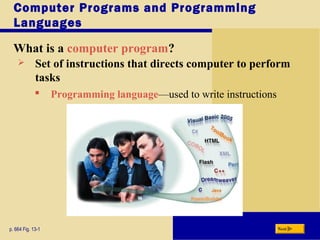
What is a computer program?
p. 664 Fig. 13-1 Next
 Set of instructions that directs computer to perform
tasks
 Programming language—used to write instructions
Computer Programs and Programming
Languages
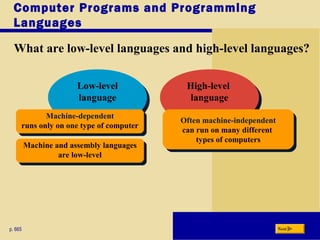
What are low-level languages and high-level languages?
p. 665 Next
High-level
language
High-level
language
Low-level
language
Low-level
language
Machine-dependent
runs only on one type of computer
Machine-dependent
runs only on one type of computer Often machine-independent
can run on many different
types of computers
Often machine-independent
can run on many different
types of computers
Machine and assembly languages
are low-level
Machine and assembly languages
are low-level
Low-Level Languages
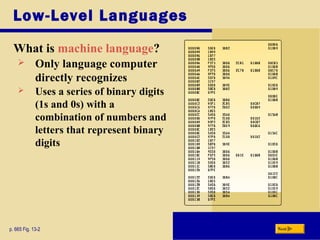
What is machine language?
p. 665 Fig. 13-2 Next
 Only language computer
directly recognizes
 Uses a series of binary digits
(1s and 0s) with a
combination of numbers and
letters that represent binary
digits
Low-Level Languages
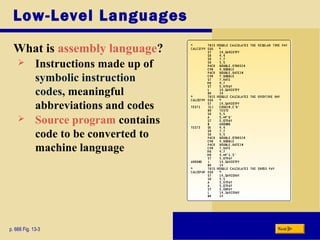
What is assembly language?
p. 666 Fig. 13-3 Next
 Instructions made up of
symbolic instruction
codes, meaningful
abbreviations and codes
 Source program contains
code to be converted to
machine language
Procedural Languages
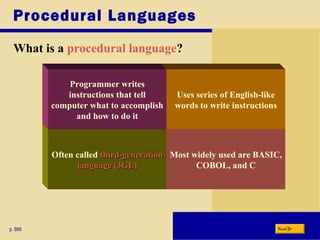
What is a procedural language?
p. 666 Next
Most widely used are BASIC,
COBOL, and C
Uses series of English-like
words to write instructions
Often called third-generationthird-generation
language (3GL)language (3GL)
Programmer writes
instructions that tell
computer what to accomplish
and how to do it
Procedural Languages
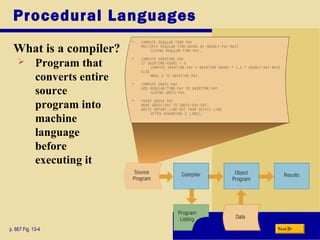
What is a compiler?
p. 667 Fig. 13-4 Next
 Program that
converts entire
source
program into
machine
language
before
executing it
Procedural Languages
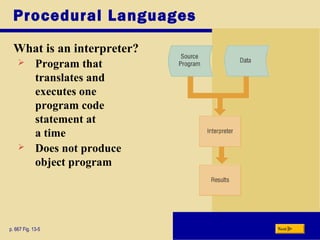
What is an interpreter?
p. 667 Fig. 13-5 Next
 Program that
translates and
executes one
program code
statement at
a time
 Does not produce
object program
Procedural Languages
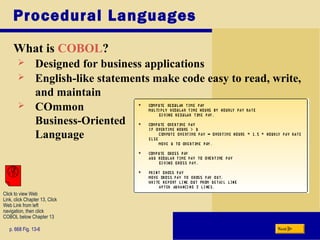
What is COBOL?
p. 668 Fig. 13-6 Next
 Designed for business applications
 English-like statements make code easy to read, write,
and maintain
 COmmon
Business-Oriented
Language
Click to view Web
Link, click Chapter 13, Click
Web Link from left
navigation, then click
COBOL below Chapter 13
Procedural Languages
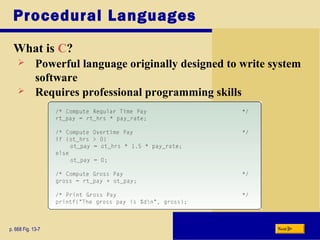
What is C?
p. 668 Fig. 13-7 Next
 Powerful language originally designed to write system
software
 Requires professional programming skills
Object-Oriented Programming
Languages
What is an object-oriented programming (OOP) language?
p. 669 Next
Used to
implement
object-oriented
design
Major benefit
is ability to
reuse existing
objects
Event-drivenEvent-driven—
checks for
and responds
to set of events
C++ and Java
are complete
object-oriented
languages
Object is
item that
contains
data and
procedures
that act on
data
Event is
action to
which
program
responds
Object-Oriented Programming
Languages
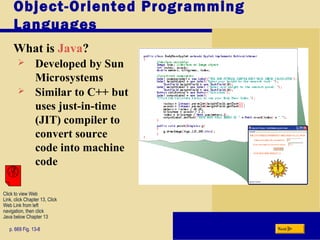
What is Java?
p. 669 Fig. 13-8 Next
 Developed by Sun
Microsystems
 Similar to C++ but
uses just-in-time
(JIT) compiler to
convert source
code into machine
code
Click to view Web
Link, click Chapter 13, Click
Web Link from left
navigation, then click
Java below Chapter 13
Object-Oriented Programming
Languages
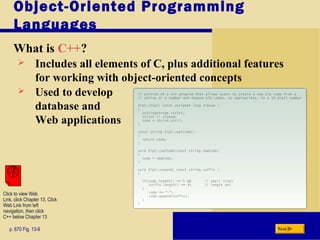
What is C++?
p. 670 Fig. 13-9 Next
 Includes all elements of C, plus additional features
for working with object-oriented concepts
 Used to develop
database and
Web applications
Click to view Web
Link, click Chapter 13, Click
Web Link from left
navigation, then click
C++ below Chapter 13
Object-Oriented Programming
Languages
What is C#?
p. 670 Next
 Object-oriented programming language based on C++
 Accepted as a standard for Web applications and
XML-based Web services
 Uses a JIT compiler
 Resulting code is called Microsoft Intermediate
Language (MSIL)
Object-Oriented Programming
Languages
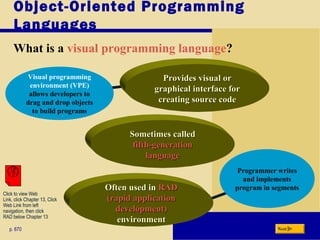
What is a visual programming language?
p. 670 Next
Programmer writes
and implements
program in segments
Visual programming
environment (VPE)
allows developers to
drag and drop objects
to build programs
Often used inOften used in RADRAD
(rapid application(rapid application
development)development)
environmentenvironment
Sometimes calledSometimes called
fifth-generationfifth-generation
languagelanguage
Provides visual orProvides visual or
graphical interface forgraphical interface for
creating source codecreating source code
Click to view Web
Link, click Chapter 13, Click
Web Link from left
navigation, then click
RAD below Chapter 13
Object-Oriented Programming
Languages
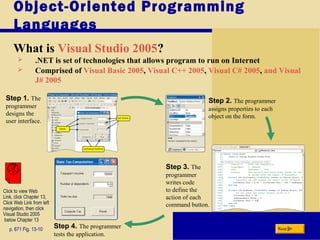
What is Visual Studio 2005?
p. 671 Fig. 13-10 Next
 .NET is set of technologies that allows program to run on Internet
 Comprised of Visual Basic 2005, Visual C++ 2005, Visual C# 2005, and Visual
J# 2005
Step 1. The
programmer
designs the
user interface.
Step 2. The programmer
assigns properties to each
object on the form.
Step 4. The programmer
tests the application.
Step 3. The
programmer
writes code
to define the
action of each
command button.
Click to view Web
Link, click Chapter 13,
Click Web Link from left
navigation, then click
Visual Studio 2005
below Chapter 13
Object-Oriented Programming
Languages
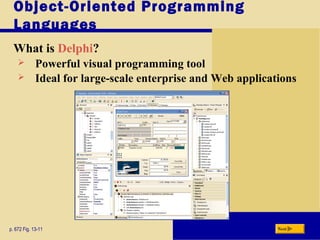
What is Delphi?
p. 672 Fig. 13-11 Next
 Powerful visual programming tool
 Ideal for large-scale enterprise and Web applications
Object-Oriented Programming
Languages
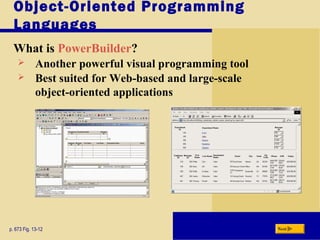
What is PowerBuilder?
p. 673 Fig. 13-12 Next
 Another powerful visual programming tool
 Best suited for Web-based and large-scale
object-oriented applications
Nonprocedural Languages
and Program Development Tools
 What are nonprocedural languages and program
development tools?
p. 670 and 674 Next
Nonprocedural
Language
The programmer writes English-
like instructions or interacts
with a visual environment to
retrieve data from files or a
database
Nonprocedural
Language
The programmer writes English-
like instructions or interacts
with a visual environment to
retrieve data from files or a
database
Program Development
Tools
User-friendly programs
designed to assist both
programmers and users in
creating programs
Program Development
Tools
User-friendly programs
designed to assist both
programmers and users in
creating programs
Other Programming Languages
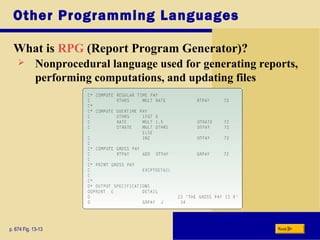
What is RPG (Report Program Generator)?
p. 674 Fig. 13-13 Next
 Nonprocedural language used for generating reports,
performing computations, and updating files
Other Programming Languages
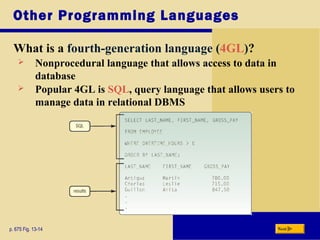
What is a fourth-generation language (4GL)?
p. 675 Fig. 13-14 Next
 Nonprocedural language that allows access to data in
database
 Popular 4GL is SQL, query language that allows users to
manage data in relational DBMS
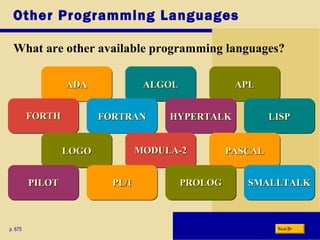
Other Programming Languages
What are other available programming languages?
p. 675 Next
ALGOLALGOLALGOLALGOLADAADAADAADA APLAPLAPLAPL
FORTHFORTHFORTHFORTH LISPLISPLISPLISPHYPERTALKHYPERTALKHYPERTALKHYPERTALKFORTRANFORTRANFORTRANFORTRAN
LOGOLOGOLOGOLOGO PASCALPASCALPASCALPASCALMODULA-2MODULA-2MODULA-2MODULA-2
PILOTPILOTPILOTPILOT SMALLTALKSMALLTALKSMALLTALKSMALLTALKPROLOGPROLOGPROLOGPROLOGPL/IPL/IPL/IPL/I
Other Program Development Tools
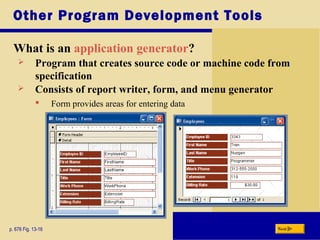
What is an application generator?
p. 676 Fig. 13-16 Next
 Program that creates source code or machine code from
specification
 Consists of report writer, form, and menu generator
 Form provides areas for entering data
Other Program Development Tools
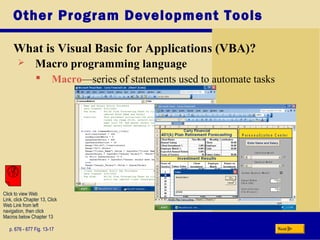
What is Visual Basic for Applications (VBA)?
p. 676 - 677 Fig. 13-17 Next
 Macro programming language
 Macro—series of statements used to automate tasks
Click to view Web
Link, click Chapter 13, Click
Web Link from left
navigation, then click
Macros below Chapter 13
Web Page Development
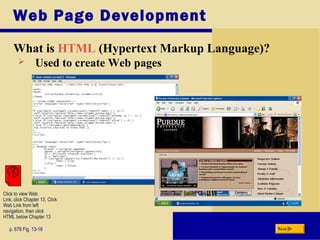
What is HTML (Hypertext Markup Language)?
p. 678 Fig. 13-18 Next
 Used to create Web pages
Click to view Web
Link, click Chapter 13, Click
Web Link from left
navigation, then click
HTML below Chapter 13
Web Page Development
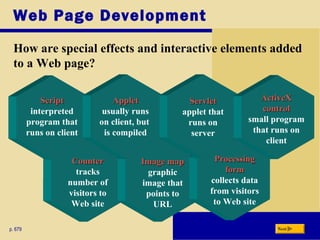
How are special effects and interactive elements added
to a Web page?
p. 679 Next
CounterCounter
tracks
number of
visitors to
Web site
Image mapImage map
graphic
image that
points to
URL
ScriptScript
interpreted
program that
runs on client
AppletApplet
usually runs
on client, but
is compiled
ProcessingProcessing
formform
collects data
from visitors
to Web site
ServletServlet
applet that
runs on
server
ActiveXActiveX
controlcontrol
small program
that runs on
client
Web Page Development
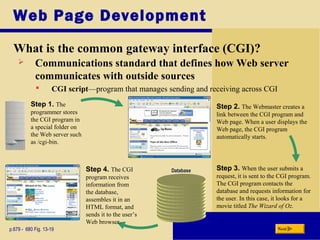
What is the common gateway interface (CGI)?
p.679 - 680 Fig. 13-19 Next
 Communications standard that defines how Web server
communicates with outside sources
Step 3. When the user submits a
request, it is sent to the CGI program.
The CGI program contacts the
database and requests information for
the user. In this case, it looks for a
movie titled The Wizard of Oz.
Step 1. The
programmer stores
the CGI program in
a special folder on
the Web server such
as /cgi-bin.
Database
 CGI script—program that manages sending and receiving across CGI
Step 2. The Webmaster creates a
link between the CGI program and
Web page. When a user displays the
Web page, the CGI program
automatically starts.
Step 4. The CGI
program receives
information from
the database,
assembles it in an
HTML format, and
sends it to the user’s
Web browser.
Web Page Development
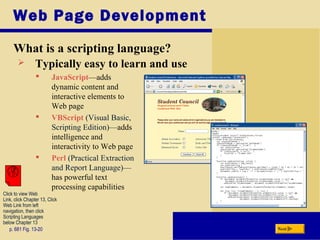
What is a scripting language?
p. 681 Fig. 13-20 Next
 Typically easy to learn and use
 JavaScript—adds
dynamic content and
interactive elements to
Web page
 VBScript (Visual Basic,
Scripting Edition)—adds
intelligence and
interactivity to Web page
 Perl (Practical Extraction
and Report Language)—
has powerful text
processing capabilities
Click to view Web
Link, click Chapter 13, Click
Web Link from left
navigation, then click
Scripting Languages
below Chapter 13
Web Page Development
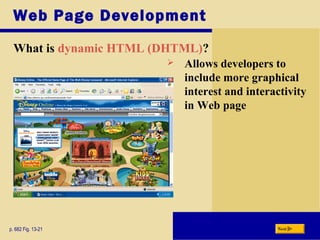
What is dynamic HTML (DHTML)?
p. 682 Fig. 13-21 Next
 Allows developers to
include more graphical
interest and interactivity
in Web page
Web Page Development
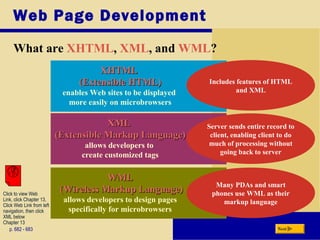
What are XHTML, XML, and WML?
p. 682 - 683 Next
XHTMLXHTML
(Extensible HTML)(Extensible HTML)
enables Web sites to be displayed
more easily on microbrowsers
XMLXML
(Extensible Markup Language)(Extensible Markup Language)
allows developers to
create customized tags
WMLWML
(Wireless Markup Language)(Wireless Markup Language)
allows developers to design pages
specifically for microbrowsers
Includes features of HTML
and XML
Many PDAs and smart
phones use WML as their
markup language
Server sends entire record to
client, enabling client to do
much of processing without
going back to server
Click to view Web
Link, click Chapter 13,
Click Web Link from left
navigation, then click
XML below
Chapter 13
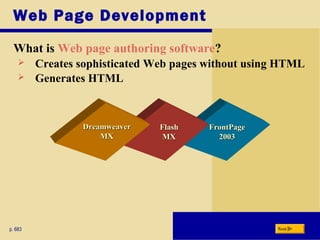
FrontPageFrontPage
20032003
FlashFlash
MXMX
Web Page Development
What is Web page authoring software?
p. 683 Next
 Creates sophisticated Web pages without using HTML
 Generates HTML
DreamweaverDreamweaver
MXMX
Multimedia Program Development
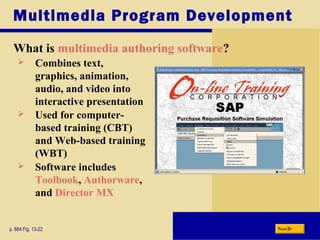
What is multimedia authoring software?
p. 684 Fig. 13-22 Next
 Combines text,
graphics, animation,
audio, and video into
interactive presentation
 Used for computer-
based training (CBT)
and Web-based training
(WBT)
 Software includes
Toolbook, Authorware,
and Director MX
The Program Development Cycle
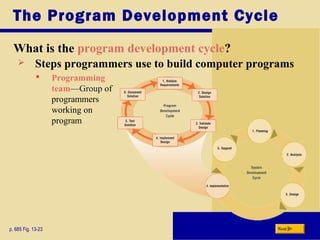
What is the program development cycle?
p. 685 Fig. 13-23 Next
 Steps programmers use to build computer programs
 Programming
team—Group of
programmers
working on
program
Step 1 — Analyze Requirements
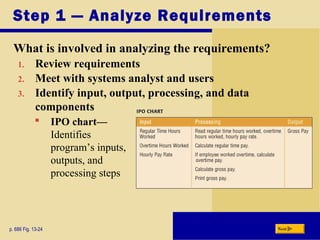
What is involved in analyzing the requirements?
p. 686 Fig. 13-24 Next
1. Review requirements
2. Meet with systems analyst and users
3. Identify input, output, processing, and data
components
 IPO chart—
Identifies
program’s inputs,
outputs, and
processing steps
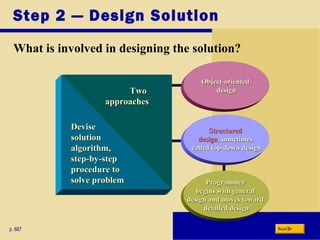
ProgrammerProgrammer
begins with generalbegins with general
design and moves towarddesign and moves toward
detailed designdetailed design
Step 2 — Design Solution
What is involved in designing the solution?
p. 687 Next
Object-orientedObject-oriented
designdesign
StructuredStructured
designdesign, sometimes, sometimes
called top-down designcalled top-down design
TwoTwo
approachesapproaches
DeviseDevise
solutionsolution
algorithm,algorithm,
step-by-stepstep-by-step
procedure toprocedure to
solve problemsolve problem
Step 2 — Design Solution
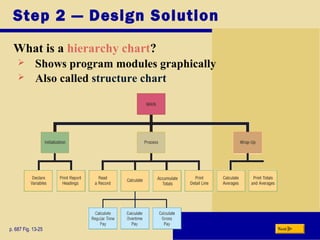
What is a hierarchy chart?
p. 687 Fig. 13-25 Next
 Shows program modules graphically
 Also called structure chart
Step 2 — Design Solution
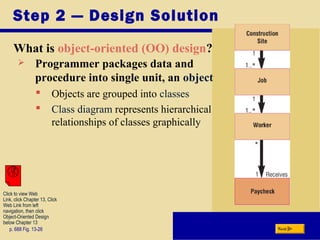
What is object-oriented (OO) design?
p. 688 Fig. 13-26 Next
 Programmer packages data and
procedure into single unit, an object
 Objects are grouped into classes
 Class diagram represents hierarchical
relationships of classes graphically
Click to view Web
Link, click Chapter 13, Click
Web Link from left
navigation, then click
Object-Oriented Design
below Chapter 13
Step 2 — Design Solution
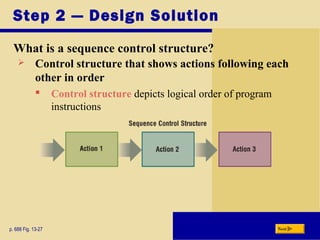
What is a sequence control structure?
p. 688 Fig. 13-27 Next
 Control structure that shows actions following each
other in order
 Control structure depicts logical order of program
instructions
Step 2 — Design Solution
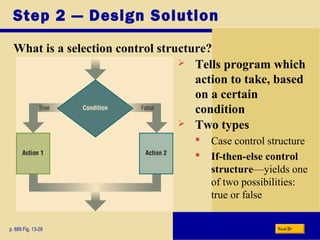
What is a selection control structure?
p. 689 Fig. 13-28 Next
 Tells program which
action to take, based
on a certain
condition
 Two types
 Case control structure
 If-then-else control
structure—yields one
of two possibilities:
true or false
Step 2 — Design Solution
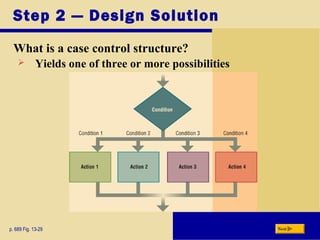
What is a case control structure?
p. 689 Fig. 13-29 Next
 Yields one of three or more possibilities
Step 2 — Design Solution
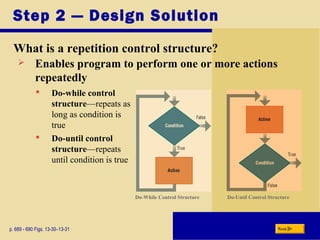
What is a repetition control structure?
p. 689 - 690 Figs. 13-30–13-31 Next
 Enables program to perform one or more actions
repeatedly
 Do-while control
structure—repeats as
long as condition is
true
 Do-until control
structure—repeats
until condition is true
Do-While Control Structure Do-Until Control Structure
Step 2 — Design Solution
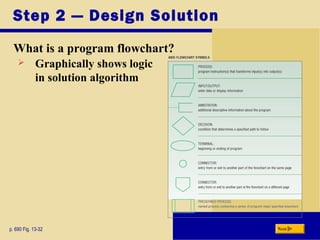
What is a program flowchart?
p. 690 Fig. 13-32 Next
 Graphically shows logic
in solution algorithm
Step 2 — Design Solution
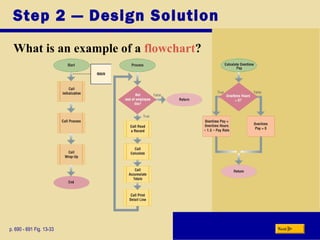
What is an example of a flowchart?
p. 690 - 691 Fig. 13-33 Next
Step 2 — Design Solution
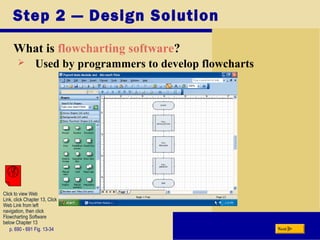
What is flowcharting software?
p. 690 - 691 Fig. 13-34 Next
 Used by programmers to develop flowcharts
Click to view Web
Link, click Chapter 13, Click
Web Link from left
navigation, then click
Flowcharting Software
below Chapter 13
Step 2 — Design Solution
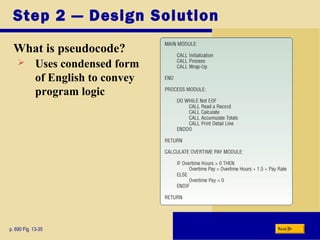
What is pseudocode?
p. 690 Fig. 13-35 Next
 Uses condensed form
of English to convey
program logic
Step 3 — Validate Design
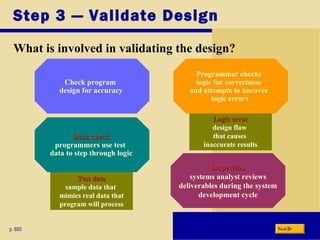
What is involved in validating the design?
p. 693 Next
Check program
design for accuracy
Logic errorLogic error
design flaw
that causes
inaccurate results
Test dataTest data
sample data that
mimics real data that
program will process
Programmer checks
logic for correctness
and attempts to uncover
logic errors
Desk checkDesk check
programmers use test
data to step through logic
InspectionInspection
systems analyst reviews
deliverables during the system
development cycle
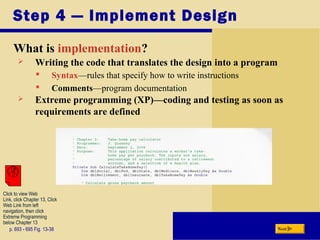
Step 4 — Implement Design
What is implementation?
p. 693 - 695 Fig. 13-38 Next
 Writing the code that translates the design into a program
 Syntax—rules that specify how to write instructions
 Comments—program documentation
 Extreme programming (XP)—coding and testing as soon as
requirements are defined
Click to view Web
Link, click Chapter 13, Click
Web Link from left
navigation, then click
Extreme Programming
below Chapter 13
Step 5 — Test Solution
What is involved in testing the solution?
p. 695 - 696 Next
Ensure program runs correctlyEnsure program runs correctly
and is error freeand is error free
DebuggingDebugging—locating and—locating and
correcting syntax and logiccorrecting syntax and logic
errors, orerrors, or bugsbugs
Test copy of program,Test copy of program,
calledcalled betabeta, sometimes, sometimes
used to find bugsused to find bugs
Step 6 — Document Solution
What is involved in documenting the solution?
p. 696 Next
 Programmer performs two activities
Reviews program code
—removes dead code,
program instructions
that program never
executes
Reviews program code
—removes dead code,
program instructions
that program never
executes
Reviews
documentation
Reviews
documentation
Summary of Programming Languages and Program
Development
Various programming languages
used to write and develop
computer programs
Various programming languages
used to write and develop
computer programs
The program development
cycle and the tools used to make
this process efficient
The program development
cycle and the tools used to make
this process efficient
Web development and multimedia
development tools
Web development and multimedia
development tools
Chapter 13 Complete

Programming language

  • 1.
  • 2.
    Chapter 13 Objectives Next Describevarious ways to develop Web pages including HTML, scripting languages, DHTML, XML, WML, and Web page authoring software Describe various ways to develop Web pages including HTML, scripting languages, DHTML, XML, WML, and Web page authoring software Differentiate between machine and assembly languages Differentiate between machine and assembly languages Identify and discuss the purpose of procedural programming languages Identify and discuss the purpose of procedural programming languages Identify and discuss the characteristics of object-oriented programming languages Identify and discuss the characteristics of object-oriented programming languages Discuss the advantages and uses of visual programming languages Discuss the advantages and uses of visual programming languages Identify the uses of other programming languages and other program development tools Identify the uses of other programming languages and other program development tools Identify the uses of popular multimedia authoring programs Identify the uses of popular multimedia authoring programs List the six steps in the program development cycle List the six steps in the program development cycle Differentiate between structured design and object-oriented design Differentiate between structured design and object-oriented design Explain the basic control structures and design tools used in designing solutions to programming problems Explain the basic control structures and design tools used in designing solutions to programming problems
  • 3.
    Computer Programs andProgramming Languages What is a computer program? p. 664 Fig. 13-1 Next  Set of instructions that directs computer to perform tasks  Programming language—used to write instructions
  • 4.
    Computer Programs andProgramming Languages What are low-level languages and high-level languages? p. 665 Next High-level language High-level language Low-level language Low-level language Machine-dependent runs only on one type of computer Machine-dependent runs only on one type of computer Often machine-independent can run on many different types of computers Often machine-independent can run on many different types of computers Machine and assembly languages are low-level Machine and assembly languages are low-level
  • 5.
    Low-Level Languages What ismachine language? p. 665 Fig. 13-2 Next  Only language computer directly recognizes  Uses a series of binary digits (1s and 0s) with a combination of numbers and letters that represent binary digits
  • 6.
    Low-Level Languages What isassembly language? p. 666 Fig. 13-3 Next  Instructions made up of symbolic instruction codes, meaningful abbreviations and codes  Source program contains code to be converted to machine language
  • 7.
    Procedural Languages What isa procedural language? p. 666 Next Most widely used are BASIC, COBOL, and C Uses series of English-like words to write instructions Often called third-generationthird-generation language (3GL)language (3GL) Programmer writes instructions that tell computer what to accomplish and how to do it
  • 8.
    Procedural Languages What isa compiler? p. 667 Fig. 13-4 Next  Program that converts entire source program into machine language before executing it
  • 9.
    Procedural Languages What isan interpreter? p. 667 Fig. 13-5 Next  Program that translates and executes one program code statement at a time  Does not produce object program
  • 10.
    Procedural Languages What isCOBOL? p. 668 Fig. 13-6 Next  Designed for business applications  English-like statements make code easy to read, write, and maintain  COmmon Business-Oriented Language Click to view Web Link, click Chapter 13, Click Web Link from left navigation, then click COBOL below Chapter 13
  • 11.
    Procedural Languages What isC? p. 668 Fig. 13-7 Next  Powerful language originally designed to write system software  Requires professional programming skills
  • 12.
    Object-Oriented Programming Languages What isan object-oriented programming (OOP) language? p. 669 Next Used to implement object-oriented design Major benefit is ability to reuse existing objects Event-drivenEvent-driven— checks for and responds to set of events C++ and Java are complete object-oriented languages Object is item that contains data and procedures that act on data Event is action to which program responds
  • 13.
    Object-Oriented Programming Languages What isJava? p. 669 Fig. 13-8 Next  Developed by Sun Microsystems  Similar to C++ but uses just-in-time (JIT) compiler to convert source code into machine code Click to view Web Link, click Chapter 13, Click Web Link from left navigation, then click Java below Chapter 13
  • 14.
    Object-Oriented Programming Languages What isC++? p. 670 Fig. 13-9 Next  Includes all elements of C, plus additional features for working with object-oriented concepts  Used to develop database and Web applications Click to view Web Link, click Chapter 13, Click Web Link from left navigation, then click C++ below Chapter 13
  • 15.
    Object-Oriented Programming Languages What isC#? p. 670 Next  Object-oriented programming language based on C++  Accepted as a standard for Web applications and XML-based Web services  Uses a JIT compiler  Resulting code is called Microsoft Intermediate Language (MSIL)
  • 16.
    Object-Oriented Programming Languages What isa visual programming language? p. 670 Next Programmer writes and implements program in segments Visual programming environment (VPE) allows developers to drag and drop objects to build programs Often used inOften used in RADRAD (rapid application(rapid application development)development) environmentenvironment Sometimes calledSometimes called fifth-generationfifth-generation languagelanguage Provides visual orProvides visual or graphical interface forgraphical interface for creating source codecreating source code Click to view Web Link, click Chapter 13, Click Web Link from left navigation, then click RAD below Chapter 13
  • 17.
    Object-Oriented Programming Languages What isVisual Studio 2005? p. 671 Fig. 13-10 Next  .NET is set of technologies that allows program to run on Internet  Comprised of Visual Basic 2005, Visual C++ 2005, Visual C# 2005, and Visual J# 2005 Step 1. The programmer designs the user interface. Step 2. The programmer assigns properties to each object on the form. Step 4. The programmer tests the application. Step 3. The programmer writes code to define the action of each command button. Click to view Web Link, click Chapter 13, Click Web Link from left navigation, then click Visual Studio 2005 below Chapter 13
  • 18.
    Object-Oriented Programming Languages What isDelphi? p. 672 Fig. 13-11 Next  Powerful visual programming tool  Ideal for large-scale enterprise and Web applications
  • 19.
    Object-Oriented Programming Languages What isPowerBuilder? p. 673 Fig. 13-12 Next  Another powerful visual programming tool  Best suited for Web-based and large-scale object-oriented applications
  • 20.
    Nonprocedural Languages and ProgramDevelopment Tools  What are nonprocedural languages and program development tools? p. 670 and 674 Next Nonprocedural Language The programmer writes English- like instructions or interacts with a visual environment to retrieve data from files or a database Nonprocedural Language The programmer writes English- like instructions or interacts with a visual environment to retrieve data from files or a database Program Development Tools User-friendly programs designed to assist both programmers and users in creating programs Program Development Tools User-friendly programs designed to assist both programmers and users in creating programs
  • 21.
    Other Programming Languages Whatis RPG (Report Program Generator)? p. 674 Fig. 13-13 Next  Nonprocedural language used for generating reports, performing computations, and updating files
  • 22.
    Other Programming Languages Whatis a fourth-generation language (4GL)? p. 675 Fig. 13-14 Next  Nonprocedural language that allows access to data in database  Popular 4GL is SQL, query language that allows users to manage data in relational DBMS
  • 23.
    Other Programming Languages Whatare other available programming languages? p. 675 Next ALGOLALGOLALGOLALGOLADAADAADAADA APLAPLAPLAPL FORTHFORTHFORTHFORTH LISPLISPLISPLISPHYPERTALKHYPERTALKHYPERTALKHYPERTALKFORTRANFORTRANFORTRANFORTRAN LOGOLOGOLOGOLOGO PASCALPASCALPASCALPASCALMODULA-2MODULA-2MODULA-2MODULA-2 PILOTPILOTPILOTPILOT SMALLTALKSMALLTALKSMALLTALKSMALLTALKPROLOGPROLOGPROLOGPROLOGPL/IPL/IPL/IPL/I
  • 24.
    Other Program DevelopmentTools What is an application generator? p. 676 Fig. 13-16 Next  Program that creates source code or machine code from specification  Consists of report writer, form, and menu generator  Form provides areas for entering data
  • 25.
    Other Program DevelopmentTools What is Visual Basic for Applications (VBA)? p. 676 - 677 Fig. 13-17 Next  Macro programming language  Macro—series of statements used to automate tasks Click to view Web Link, click Chapter 13, Click Web Link from left navigation, then click Macros below Chapter 13
  • 26.
    Web Page Development Whatis HTML (Hypertext Markup Language)? p. 678 Fig. 13-18 Next  Used to create Web pages Click to view Web Link, click Chapter 13, Click Web Link from left navigation, then click HTML below Chapter 13
  • 27.
    Web Page Development Howare special effects and interactive elements added to a Web page? p. 679 Next CounterCounter tracks number of visitors to Web site Image mapImage map graphic image that points to URL ScriptScript interpreted program that runs on client AppletApplet usually runs on client, but is compiled ProcessingProcessing formform collects data from visitors to Web site ServletServlet applet that runs on server ActiveXActiveX controlcontrol small program that runs on client
  • 28.
    Web Page Development Whatis the common gateway interface (CGI)? p.679 - 680 Fig. 13-19 Next  Communications standard that defines how Web server communicates with outside sources Step 3. When the user submits a request, it is sent to the CGI program. The CGI program contacts the database and requests information for the user. In this case, it looks for a movie titled The Wizard of Oz. Step 1. The programmer stores the CGI program in a special folder on the Web server such as /cgi-bin. Database  CGI script—program that manages sending and receiving across CGI Step 2. The Webmaster creates a link between the CGI program and Web page. When a user displays the Web page, the CGI program automatically starts. Step 4. The CGI program receives information from the database, assembles it in an HTML format, and sends it to the user’s Web browser.
  • 29.
    Web Page Development Whatis a scripting language? p. 681 Fig. 13-20 Next  Typically easy to learn and use  JavaScript—adds dynamic content and interactive elements to Web page  VBScript (Visual Basic, Scripting Edition)—adds intelligence and interactivity to Web page  Perl (Practical Extraction and Report Language)— has powerful text processing capabilities Click to view Web Link, click Chapter 13, Click Web Link from left navigation, then click Scripting Languages below Chapter 13
  • 30.
    Web Page Development Whatis dynamic HTML (DHTML)? p. 682 Fig. 13-21 Next  Allows developers to include more graphical interest and interactivity in Web page
  • 31.
    Web Page Development Whatare XHTML, XML, and WML? p. 682 - 683 Next XHTMLXHTML (Extensible HTML)(Extensible HTML) enables Web sites to be displayed more easily on microbrowsers XMLXML (Extensible Markup Language)(Extensible Markup Language) allows developers to create customized tags WMLWML (Wireless Markup Language)(Wireless Markup Language) allows developers to design pages specifically for microbrowsers Includes features of HTML and XML Many PDAs and smart phones use WML as their markup language Server sends entire record to client, enabling client to do much of processing without going back to server Click to view Web Link, click Chapter 13, Click Web Link from left navigation, then click XML below Chapter 13
  • 32.
    FrontPageFrontPage 20032003 FlashFlash MXMX Web Page Development Whatis Web page authoring software? p. 683 Next  Creates sophisticated Web pages without using HTML  Generates HTML DreamweaverDreamweaver MXMX
  • 33.
    Multimedia Program Development Whatis multimedia authoring software? p. 684 Fig. 13-22 Next  Combines text, graphics, animation, audio, and video into interactive presentation  Used for computer- based training (CBT) and Web-based training (WBT)  Software includes Toolbook, Authorware, and Director MX
  • 34.
    The Program DevelopmentCycle What is the program development cycle? p. 685 Fig. 13-23 Next  Steps programmers use to build computer programs  Programming team—Group of programmers working on program
  • 35.
    Step 1 —Analyze Requirements What is involved in analyzing the requirements? p. 686 Fig. 13-24 Next 1. Review requirements 2. Meet with systems analyst and users 3. Identify input, output, processing, and data components  IPO chart— Identifies program’s inputs, outputs, and processing steps
  • 36.
    ProgrammerProgrammer begins with generalbeginswith general design and moves towarddesign and moves toward detailed designdetailed design Step 2 — Design Solution What is involved in designing the solution? p. 687 Next Object-orientedObject-oriented designdesign StructuredStructured designdesign, sometimes, sometimes called top-down designcalled top-down design TwoTwo approachesapproaches DeviseDevise solutionsolution algorithm,algorithm, step-by-stepstep-by-step procedure toprocedure to solve problemsolve problem
  • 37.
    Step 2 —Design Solution What is a hierarchy chart? p. 687 Fig. 13-25 Next  Shows program modules graphically  Also called structure chart
  • 38.
    Step 2 —Design Solution What is object-oriented (OO) design? p. 688 Fig. 13-26 Next  Programmer packages data and procedure into single unit, an object  Objects are grouped into classes  Class diagram represents hierarchical relationships of classes graphically Click to view Web Link, click Chapter 13, Click Web Link from left navigation, then click Object-Oriented Design below Chapter 13
  • 39.
    Step 2 —Design Solution What is a sequence control structure? p. 688 Fig. 13-27 Next  Control structure that shows actions following each other in order  Control structure depicts logical order of program instructions
  • 40.
    Step 2 —Design Solution What is a selection control structure? p. 689 Fig. 13-28 Next  Tells program which action to take, based on a certain condition  Two types  Case control structure  If-then-else control structure—yields one of two possibilities: true or false
  • 41.
    Step 2 —Design Solution What is a case control structure? p. 689 Fig. 13-29 Next  Yields one of three or more possibilities
  • 42.
    Step 2 —Design Solution What is a repetition control structure? p. 689 - 690 Figs. 13-30–13-31 Next  Enables program to perform one or more actions repeatedly  Do-while control structure—repeats as long as condition is true  Do-until control structure—repeats until condition is true Do-While Control Structure Do-Until Control Structure
  • 43.
    Step 2 —Design Solution What is a program flowchart? p. 690 Fig. 13-32 Next  Graphically shows logic in solution algorithm
  • 44.
    Step 2 —Design Solution What is an example of a flowchart? p. 690 - 691 Fig. 13-33 Next
  • 45.
    Step 2 —Design Solution What is flowcharting software? p. 690 - 691 Fig. 13-34 Next  Used by programmers to develop flowcharts Click to view Web Link, click Chapter 13, Click Web Link from left navigation, then click Flowcharting Software below Chapter 13
  • 46.
    Step 2 —Design Solution What is pseudocode? p. 690 Fig. 13-35 Next  Uses condensed form of English to convey program logic
  • 47.
    Step 3 —Validate Design What is involved in validating the design? p. 693 Next Check program design for accuracy Logic errorLogic error design flaw that causes inaccurate results Test dataTest data sample data that mimics real data that program will process Programmer checks logic for correctness and attempts to uncover logic errors Desk checkDesk check programmers use test data to step through logic InspectionInspection systems analyst reviews deliverables during the system development cycle
  • 48.
    Step 4 —Implement Design What is implementation? p. 693 - 695 Fig. 13-38 Next  Writing the code that translates the design into a program  Syntax—rules that specify how to write instructions  Comments—program documentation  Extreme programming (XP)—coding and testing as soon as requirements are defined Click to view Web Link, click Chapter 13, Click Web Link from left navigation, then click Extreme Programming below Chapter 13
  • 49.
    Step 5 —Test Solution What is involved in testing the solution? p. 695 - 696 Next Ensure program runs correctlyEnsure program runs correctly and is error freeand is error free DebuggingDebugging—locating and—locating and correcting syntax and logiccorrecting syntax and logic errors, orerrors, or bugsbugs Test copy of program,Test copy of program, calledcalled betabeta, sometimes, sometimes used to find bugsused to find bugs
  • 50.
    Step 6 —Document Solution What is involved in documenting the solution? p. 696 Next  Programmer performs two activities Reviews program code —removes dead code, program instructions that program never executes Reviews program code —removes dead code, program instructions that program never executes Reviews documentation Reviews documentation
  • 51.
    Summary of ProgrammingLanguages and Program Development Various programming languages used to write and develop computer programs Various programming languages used to write and develop computer programs The program development cycle and the tools used to make this process efficient The program development cycle and the tools used to make this process efficient Web development and multimedia development tools Web development and multimedia development tools Chapter 13 Complete