Computer Fundamentals Lecture 10 Software Programming  and Development
Creating Computer Programs
What Is a Computer Program? Computer programs Also called software Are a list of instructions Instructions are called code CPU performs the instructions Three types Operating system Utility Application
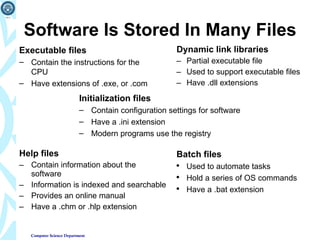
Software Is Stored In Many Files Dynamic link libraries Partial executable file Used to support executable files Have .dll extensions Help files Contain information about the software Information is indexed and searchable Provides an online manual Have a .chm or .hlp extension Executable files Contain the instructions for the CPU Have extensions of .exe, or .com Initialization files Contain configuration settings for software Have a .ini extension Modern programs use the registry Batch files Used to automate tasks Hold a series of OS commands Have a .bat extension
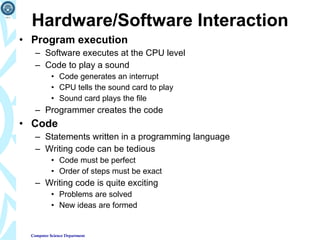
Hardware/Software Interaction Program execution Software executes at the CPU level Code to play a sound Code generates an interrupt CPU tells the sound card to play Sound card plays the file Programmer creates the code Code Statements written in a programming language Writing code can be tedious Code must be perfect Order of steps must be exact Writing code is quite exciting Problems are solved New ideas are formed
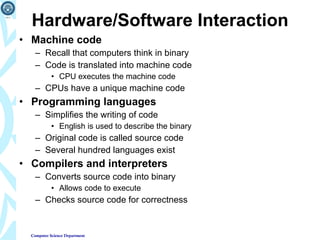
Hardware/Software Interaction Machine code Recall that computers think in binary Code is translated into machine code CPU executes the machine code CPUs have a unique machine code Programming languages Simplifies the writing of code English is used to describe the binary Original code is called source code Several hundred languages exist Compilers and interpreters Converts source code into binary Allows code to execute Checks source code for correctness
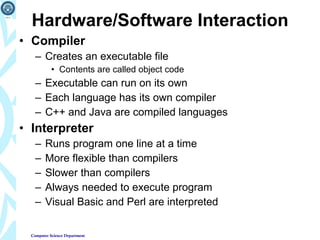
Hardware/Software Interaction Compiler Creates an executable file Contents are called object code Executable can run on its own Each language has its own compiler C++ and Java are compiled languages Interpreter Runs program one line at a time More flexible than compilers Slower than compilers Always needed to execute program Visual Basic and Perl are interpreted
Planning a Computer Program Plans The steps to solve a problem Describe the expected results Programming without a plan is difficult Pseudo code Natural language statements that resemble code Describes what must be done Can be written by non programmers Programmers develop unique versions
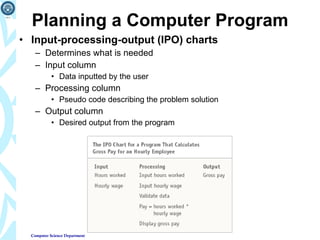
Planning a Computer Program Input-processing-output (IPO) charts Determines what is needed Input column Data inputted by the user Processing column Pseudo code describing the problem solution Output column Desired output from the program
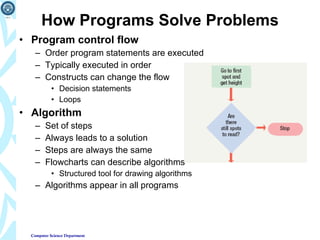
How Programs Solve Problems Program control flow Order program statements are executed Typically executed in order Constructs can change the flow Decision statements Loops Algorithm Set of steps Always leads to a solution Steps are always the same Flowcharts can describe algorithms Structured tool for drawing algorithms Algorithms appear in all programs
How Programs Solve Problems Heuristic Set of steps Solution is usually found Solution may not be optimal Used when algorithms fail Algorithm is nonexistent or too complex Appear in more complex applications Data mining Anti-virus software
Structured Programming Building programs out of small modules Creates easy to read code Programs are efficient and run fast Programming using defined structures Several defined structures
Structured Programming Sequence structure Describes the flow of the program Typically executed in order Branching statements allow multiple flows Selection statement Also called conditional statement Performs a true or false test Determines which code to execute next Repetition statements Also called looping structures Repeats a section of code Until an exit condition is reached
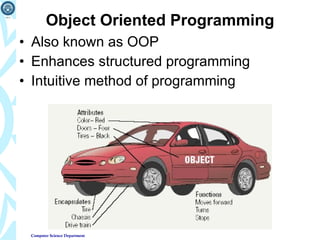
Object Oriented Programming Also known as OOP Enhances structured programming Intuitive method of programming
Object Oriented Programming Code reuse Code used in many projects Speeds up program development Simplifies program development Develops objects All real world items are objects Contains data about the item Contains functionality Object encapsulates both into one package
Programming Languages
Programming Languages Used to generate source code Avoids using machine code Have strict rules of syntax Symbols and punctuation have meaning Spelling must be exact Code is converted into machine language
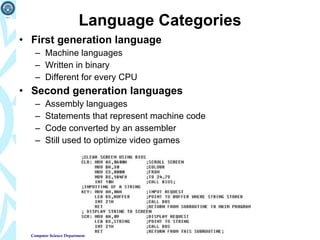
Language Categories First generation language Machine languages Written in binary Different for every CPU Second generation languages Assembly languages Statements that represent machine code Code converted by an assembler Still used to optimize video games
Language Categories Third generation languages (3GL) First higher level language Supports structured and OOP Code is reusable Code is portable Typically written in an IDE C/C++ creates games and applications Java creates web applets ActiveX creates Web and Windows applets Fourth generation languages (4GL) Easier to use than 3GL Coded in a visual IDE Tools reduce the amount of code Object oriented programming Microsoft Visual Studio and Dream Weaver are 4GL IDE
Web Development Languages Hyper Text Markup Language (HTML) Basis of all web pages Defines web structure using tags Easy to learn and use Created with a text editor Extensible Markup Language (XML) Stores data in a readable format Looks like HTML Allows developers to create tags Depends on HTML for formatting Extensible HTML (XHTML) Newer version of HTML Stricter rules Based on XML rules
Web Development Languages Extensible Style Sheet Language (XSL) Format and displays XML documents Rules that dictate formatting Create a standard web page Extensible HTML Mobile Profile (XHTML MP) Initially Wireless Markup Language (WML) Creates pages viewable on a handheld Cascading Style Sheets (CSS) Format HTML, XHTML and XSL Applies consistent formatting to all pages
Web Development Languages Web authoring environments Reduces tedium for creating pages Tools that simplify web site creation Macromedia Dream weaver Simplifies large sites CSS support is exceptional Microsoft FrontPage simplifies large sites Macromedia Flash creates web animations
Web Development Languages Scripting languages Create dynamic web pages Change based on user input HTML can create static pages Page is generated as needed JavaScript Developed by Netscape Works inside of HTML Page verification and simple animation Based on Java
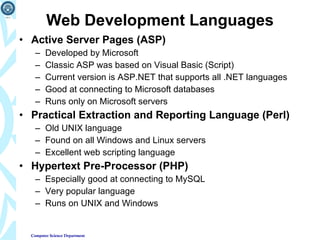
Web Development Languages Active Server Pages (ASP) Developed by Microsoft Classic ASP was based on Visual Basic (Script) Current version is ASP.NET that supports all .NET languages Good at connecting to Microsoft databases Runs only on Microsoft servers Practical Extraction and Reporting Language (Perl) Old UNIX language Found on all Windows and Linux servers Excellent web scripting language Hypertext Pre-Processor (PHP) Especially good at connecting to MySQL Very popular language Runs on UNIX and Windows
Systems Development Life Cycle
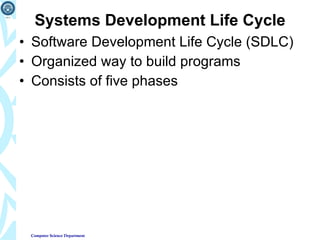
Systems Development Life Cycle Software Development Life Cycle (SDLC) Organized way to build programs Consists of five phases
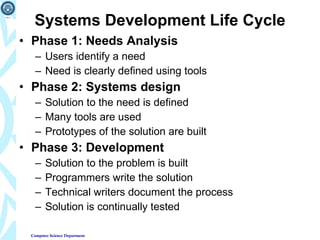
Systems Development Life Cycle Phase 1: Needs Analysis Users identify a need Need is clearly defined using tools Phase 2: Systems design Solution to the need is defined Many tools are used Prototypes of the solution are built Phase 3: Development Solution to the problem is built Programmers write the solution Technical writers document the process Solution is continually tested
Systems Development Life Cycle Phase 4: Implementation The solution is installed Users are converted to the new system Trainers are important in this phase Phase 5: Maintenance IT professionals monitor the product Bugs are found and fixed New features are added

Lecture 10 software development

  • 1.
    Computer Fundamentals Lecture10 Software Programming and Development
  • 2.
  • 3.
    What Is aComputer Program? Computer programs Also called software Are a list of instructions Instructions are called code CPU performs the instructions Three types Operating system Utility Application
  • 4.
    Software Is StoredIn Many Files Dynamic link libraries Partial executable file Used to support executable files Have .dll extensions Help files Contain information about the software Information is indexed and searchable Provides an online manual Have a .chm or .hlp extension Executable files Contain the instructions for the CPU Have extensions of .exe, or .com Initialization files Contain configuration settings for software Have a .ini extension Modern programs use the registry Batch files Used to automate tasks Hold a series of OS commands Have a .bat extension
  • 5.
    Hardware/Software Interaction Programexecution Software executes at the CPU level Code to play a sound Code generates an interrupt CPU tells the sound card to play Sound card plays the file Programmer creates the code Code Statements written in a programming language Writing code can be tedious Code must be perfect Order of steps must be exact Writing code is quite exciting Problems are solved New ideas are formed
  • 6.
    Hardware/Software Interaction Machinecode Recall that computers think in binary Code is translated into machine code CPU executes the machine code CPUs have a unique machine code Programming languages Simplifies the writing of code English is used to describe the binary Original code is called source code Several hundred languages exist Compilers and interpreters Converts source code into binary Allows code to execute Checks source code for correctness
  • 7.
    Hardware/Software Interaction CompilerCreates an executable file Contents are called object code Executable can run on its own Each language has its own compiler C++ and Java are compiled languages Interpreter Runs program one line at a time More flexible than compilers Slower than compilers Always needed to execute program Visual Basic and Perl are interpreted
  • 8.
    Planning a ComputerProgram Plans The steps to solve a problem Describe the expected results Programming without a plan is difficult Pseudo code Natural language statements that resemble code Describes what must be done Can be written by non programmers Programmers develop unique versions
  • 9.
    Planning a ComputerProgram Input-processing-output (IPO) charts Determines what is needed Input column Data inputted by the user Processing column Pseudo code describing the problem solution Output column Desired output from the program
  • 10.
    How Programs SolveProblems Program control flow Order program statements are executed Typically executed in order Constructs can change the flow Decision statements Loops Algorithm Set of steps Always leads to a solution Steps are always the same Flowcharts can describe algorithms Structured tool for drawing algorithms Algorithms appear in all programs
  • 11.
    How Programs SolveProblems Heuristic Set of steps Solution is usually found Solution may not be optimal Used when algorithms fail Algorithm is nonexistent or too complex Appear in more complex applications Data mining Anti-virus software
  • 12.
    Structured Programming Buildingprograms out of small modules Creates easy to read code Programs are efficient and run fast Programming using defined structures Several defined structures
  • 13.
    Structured Programming Sequencestructure Describes the flow of the program Typically executed in order Branching statements allow multiple flows Selection statement Also called conditional statement Performs a true or false test Determines which code to execute next Repetition statements Also called looping structures Repeats a section of code Until an exit condition is reached
  • 14.
    Object Oriented ProgrammingAlso known as OOP Enhances structured programming Intuitive method of programming
  • 15.
    Object Oriented ProgrammingCode reuse Code used in many projects Speeds up program development Simplifies program development Develops objects All real world items are objects Contains data about the item Contains functionality Object encapsulates both into one package
  • 16.
  • 17.
    Programming Languages Usedto generate source code Avoids using machine code Have strict rules of syntax Symbols and punctuation have meaning Spelling must be exact Code is converted into machine language
  • 18.
    Language Categories Firstgeneration language Machine languages Written in binary Different for every CPU Second generation languages Assembly languages Statements that represent machine code Code converted by an assembler Still used to optimize video games
  • 19.
    Language Categories Thirdgeneration languages (3GL) First higher level language Supports structured and OOP Code is reusable Code is portable Typically written in an IDE C/C++ creates games and applications Java creates web applets ActiveX creates Web and Windows applets Fourth generation languages (4GL) Easier to use than 3GL Coded in a visual IDE Tools reduce the amount of code Object oriented programming Microsoft Visual Studio and Dream Weaver are 4GL IDE
  • 20.
    Web Development LanguagesHyper Text Markup Language (HTML) Basis of all web pages Defines web structure using tags Easy to learn and use Created with a text editor Extensible Markup Language (XML) Stores data in a readable format Looks like HTML Allows developers to create tags Depends on HTML for formatting Extensible HTML (XHTML) Newer version of HTML Stricter rules Based on XML rules
  • 21.
    Web Development LanguagesExtensible Style Sheet Language (XSL) Format and displays XML documents Rules that dictate formatting Create a standard web page Extensible HTML Mobile Profile (XHTML MP) Initially Wireless Markup Language (WML) Creates pages viewable on a handheld Cascading Style Sheets (CSS) Format HTML, XHTML and XSL Applies consistent formatting to all pages
  • 22.
    Web Development LanguagesWeb authoring environments Reduces tedium for creating pages Tools that simplify web site creation Macromedia Dream weaver Simplifies large sites CSS support is exceptional Microsoft FrontPage simplifies large sites Macromedia Flash creates web animations
  • 23.
    Web Development LanguagesScripting languages Create dynamic web pages Change based on user input HTML can create static pages Page is generated as needed JavaScript Developed by Netscape Works inside of HTML Page verification and simple animation Based on Java
  • 24.
    Web Development LanguagesActive Server Pages (ASP) Developed by Microsoft Classic ASP was based on Visual Basic (Script) Current version is ASP.NET that supports all .NET languages Good at connecting to Microsoft databases Runs only on Microsoft servers Practical Extraction and Reporting Language (Perl) Old UNIX language Found on all Windows and Linux servers Excellent web scripting language Hypertext Pre-Processor (PHP) Especially good at connecting to MySQL Very popular language Runs on UNIX and Windows
  • 25.
  • 26.
    Systems Development LifeCycle Software Development Life Cycle (SDLC) Organized way to build programs Consists of five phases
  • 27.
    Systems Development LifeCycle Phase 1: Needs Analysis Users identify a need Need is clearly defined using tools Phase 2: Systems design Solution to the need is defined Many tools are used Prototypes of the solution are built Phase 3: Development Solution to the problem is built Programmers write the solution Technical writers document the process Solution is continually tested
  • 28.
    Systems Development LifeCycle Phase 4: Implementation The solution is installed Users are converted to the new system Trainers are important in this phase Phase 5: Maintenance IT professionals monitor the product Bugs are found and fixed New features are added

Editor's Notes

  • #5 Teaching tip Open a folder and demonstrate each file. Show what happens when you open each file type.
  • #6 Teaching tip Open a folder and demonstrate each file. Show what happens when you open each file type.
  • #7 Teaching tip Open a folder and demonstrate each file. Show what happens when you open each file type.
  • #8 Teaching tip Open a folder and demonstrate each file. Show what happens when you open each file type.
  • #9 Teaching tip Open a folder and demonstrate each file. Show what happens when you open each file type.
  • #10 Teaching tip Open a folder and demonstrate each file. Show what happens when you open each file type.
  • #11 Teaching tip Open a folder and demonstrate each file. Show what happens when you open each file type.
  • #12 Teaching tip Open a folder and demonstrate each file. Show what happens when you open each file type.
  • #13 Teaching tip Open a folder and demonstrate each file. Show what happens when you open each file type.
  • #14 Teaching tip Open a folder and demonstrate each file. Show what happens when you open each file type.
  • #15 Teaching tip Open a folder and demonstrate each file. Show what happens when you open each file type.
  • #16 Teaching tip Open a folder and demonstrate each file. Show what happens when you open each file type.
  • #18 Teaching tip Open a folder and demonstrate each file. Show what happens when you open each file type.
  • #19 Teaching tip Open a folder and demonstrate each file. Show what happens when you open each file type.
  • #20 Teaching tip Open a folder and demonstrate each file. Show what happens when you open each file type.
  • #21 Teaching tip Open a folder and demonstrate each file. Show what happens when you open each file type.
  • #22 Teaching tip Open a folder and demonstrate each file. Show what happens when you open each file type.
  • #23 Teaching tip Open a folder and demonstrate each file. Show what happens when you open each file type.
  • #24 Teaching tip Open a folder and demonstrate each file. Show what happens when you open each file type.
  • #25 Teaching tip Open a folder and demonstrate each file. Show what happens when you open each file type.
  • #27 Teaching tip Open a folder and demonstrate each file. Show what happens when you open each file type.
  • #28 Teaching tip Open a folder and demonstrate each file. Show what happens when you open each file type.
  • #29 Teaching tip Open a folder and demonstrate each file. Show what happens when you open each file type.