IT 226
APPLICATIONS DEVELOPMENT
AND EMERGING TECHNOLOGIES
What is a
Software?
Lesson Objectives:
At the end of this lesson, you will be able to:
• Define what is a software and its classes
• Identify the basic principles of a software
• Identify the software evolution and laws
Software
• Software is capable of performing many
tasks, as opposed to hardware which
can only perform mechanical tasks that
they are designed for. Software provides
the means for accomplishing many different
tasks with the same basic hardware
Classes of
Software
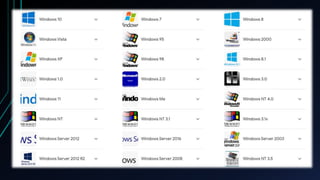
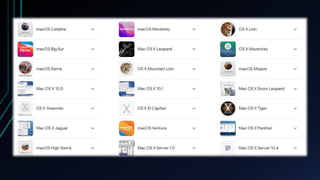
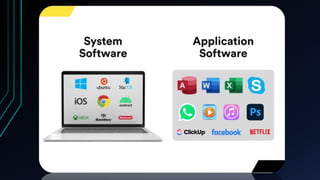
System Software
• Helps run the computer hardware and computer system itself.
System software includes operating systems, device drivers,
diagnostic tools and more. System software is almost always
pre-installed on your computer.
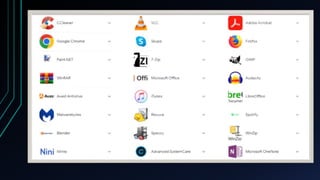
Application software
• Allows users to accomplish one or more
tasks. It includes word processing, web
browsing and almost any other task for
which you might install software. (Some
application software is pre- installed on
most computer systems.)
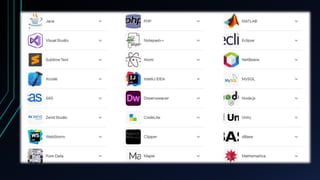
Programming software
• A set of tools to aid developers in writing
programs. The various tools available are
compilers, linkers, debuggers, interpreters
and text editors.
Basic Principles
1. Software, commonly known as programs
or apps, consists of all the instructions that
tell the hardware how to perform a task.
2. These instructions come from a software
developer in the form that will be accepted
by the platform (operating system + CPU)
that they are based on.
Basic Principles
For example, a program that is designed for
the Windows operating system will only
work for that specific operating system.
Compatibility of software will vary as the
design of the software and the operating
system differ. Software that is designed for
Windows XP may experience a
compatibility issue when running under
Windows 2000 or NT.
Basic Principles
3. Software, in its most general sense, is a set
of instructions or programs instructing a
computer to do specific tasks. Software is a
generic term used to describe computer
programs. Scripts, applications, programs
and a set of instructions are all terms often
used to describe software.
Software
Evolution
Software Evolution
The process of developing a software
product using software engineering principles
and methods is referred to as software
evolution. This includes the initial development
of software and its maintenance and updates, till
desired software product is developed, which
satisfies the expected requirements.
Software Evolution
Evolution starts from the requirement
gathering process. After which developers
create a prototype of the intended software and
show it to the users to get their feedback at the
early stage of software product development.
The users suggest changes, on which several
consecutive updates and maintenance keep on
changing too.
Software Evolution
This process changes to the original
software, till the desired software is accomplished.
Even after the user has desired software in hand,
the advancing technology and the changing
requirements force the software product to
change accordingly. Re-creating software from
scratch and to go one-on-one with requirement is
not feasible. The only feasible and economical
solution is to update the existing software so that
it matches the latest requirements.
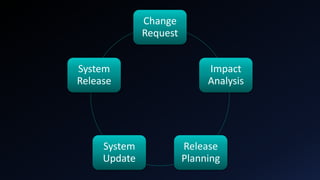
Change
Request
Impact
Analysis
Release
Planning
System
Update
System
Release
Laws in Software
Evolution
Eight Laws for
Software Evolution
Eight laws for software evolution
1. Continuing Change
A software system must continue to adapt to
the real world changes, else it becomes
progressively less useful.
Eight laws for software evolution
2. Increasing Complexity
A software system evolves, its complexity
tends to increase unless work is done to
maintain or reduce it.
Eight laws for software evolution
3. Conservation of familiarity
The familiarity with the software or the
knowledge about how it was developed, why
was it developed in that particular manner
etc. must be retained at any cost, to
implement the changes in the system.
Eight laws for software evolution
4. Continuing Growth
In order for a system intended to resolve
some business problem, its size of
implementing the changes grows
according to the lifestyle changes of the
business.
Eight laws for software evolution
5. Reducing Quality
A software system declines in quality
unless rigorously maintained and
adapted to a changing operational
environment.
Eight laws for software evolution
6. Feedback Systems
The software systems constitute multi-loop,
multi-level feedback systems and must be
treated as such to be successfully modified or
improved.
Eight laws for software evolution
7. Self-regulation
A system evolution processes are self-
regulating with the distribution of
product and process measures close to
normal.
Eight laws for software evolution
8. Organization Stability
The average effective global activity rate
in an evolving a system is invariant over
the lifetime of the product.

Application Development and Emerging Technologies.pptx

  • 1.
  • 2.
  • 3.
    Lesson Objectives: At theend of this lesson, you will be able to: • Define what is a software and its classes • Identify the basic principles of a software • Identify the software evolution and laws
  • 4.
    Software • Software iscapable of performing many tasks, as opposed to hardware which can only perform mechanical tasks that they are designed for. Software provides the means for accomplishing many different tasks with the same basic hardware
  • 6.
  • 7.
    System Software • Helpsrun the computer hardware and computer system itself. System software includes operating systems, device drivers, diagnostic tools and more. System software is almost always pre-installed on your computer.
  • 12.
    Application software • Allowsusers to accomplish one or more tasks. It includes word processing, web browsing and almost any other task for which you might install software. (Some application software is pre- installed on most computer systems.)
  • 14.
    Programming software • Aset of tools to aid developers in writing programs. The various tools available are compilers, linkers, debuggers, interpreters and text editors.
  • 16.
    Basic Principles 1. Software,commonly known as programs or apps, consists of all the instructions that tell the hardware how to perform a task. 2. These instructions come from a software developer in the form that will be accepted by the platform (operating system + CPU) that they are based on.
  • 17.
    Basic Principles For example,a program that is designed for the Windows operating system will only work for that specific operating system. Compatibility of software will vary as the design of the software and the operating system differ. Software that is designed for Windows XP may experience a compatibility issue when running under Windows 2000 or NT.
  • 19.
    Basic Principles 3. Software,in its most general sense, is a set of instructions or programs instructing a computer to do specific tasks. Software is a generic term used to describe computer programs. Scripts, applications, programs and a set of instructions are all terms often used to describe software.
  • 20.
  • 21.
    Software Evolution The processof developing a software product using software engineering principles and methods is referred to as software evolution. This includes the initial development of software and its maintenance and updates, till desired software product is developed, which satisfies the expected requirements.
  • 22.
    Software Evolution Evolution startsfrom the requirement gathering process. After which developers create a prototype of the intended software and show it to the users to get their feedback at the early stage of software product development. The users suggest changes, on which several consecutive updates and maintenance keep on changing too.
  • 23.
    Software Evolution This processchanges to the original software, till the desired software is accomplished. Even after the user has desired software in hand, the advancing technology and the changing requirements force the software product to change accordingly. Re-creating software from scratch and to go one-on-one with requirement is not feasible. The only feasible and economical solution is to update the existing software so that it matches the latest requirements.
  • 24.
  • 25.
  • 26.
  • 27.
    Eight laws forsoftware evolution 1. Continuing Change A software system must continue to adapt to the real world changes, else it becomes progressively less useful.
  • 28.
    Eight laws forsoftware evolution 2. Increasing Complexity A software system evolves, its complexity tends to increase unless work is done to maintain or reduce it.
  • 29.
    Eight laws forsoftware evolution 3. Conservation of familiarity The familiarity with the software or the knowledge about how it was developed, why was it developed in that particular manner etc. must be retained at any cost, to implement the changes in the system.
  • 30.
    Eight laws forsoftware evolution 4. Continuing Growth In order for a system intended to resolve some business problem, its size of implementing the changes grows according to the lifestyle changes of the business.
  • 31.
    Eight laws forsoftware evolution 5. Reducing Quality A software system declines in quality unless rigorously maintained and adapted to a changing operational environment.
  • 32.
    Eight laws forsoftware evolution 6. Feedback Systems The software systems constitute multi-loop, multi-level feedback systems and must be treated as such to be successfully modified or improved.
  • 33.
    Eight laws forsoftware evolution 7. Self-regulation A system evolution processes are self- regulating with the distribution of product and process measures close to normal.
  • 34.
    Eight laws forsoftware evolution 8. Organization Stability The average effective global activity rate in an evolving a system is invariant over the lifetime of the product.