Experiments
Your Name
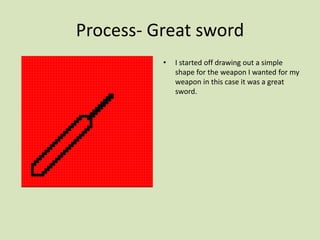
Process- Great sword
• I started off drawing out a simple
shape for the weapon I wanted for my
weapon in this case it was a great
sword.
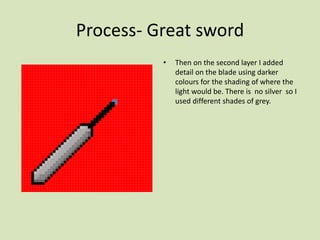
Process- Great sword
• Then on the second layer I added
detail on the blade using darker
colours for the shading of where the
light would be. There is no silver so I
used different shades of grey.
Process- Great sword
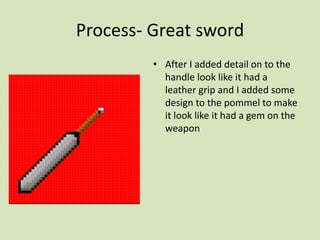
• After I added detail on to the
handle look like it had a
leather grip and I added some
design to the pommel to make
it look like it had a gem on the
weapon
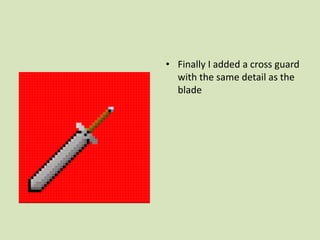
• Finally I added a cross guard
with the same detail as the
blade
Process-halberd
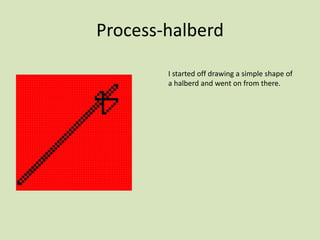
I started off drawing a simple shape of
a halberd and went on from there.
Process- halberd
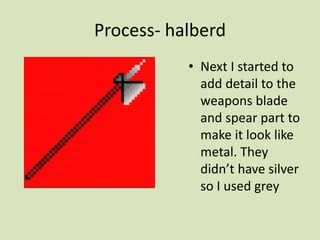
• Next I started to
add detail to the
weapons blade
and spear part to
make it look like
metal. They
didn’t have silver
so I used grey
Process- halberd
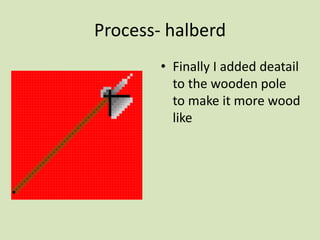
• Finally I added deatail
to the wooden pole
to make it more wood
like
Process-Ghost animation
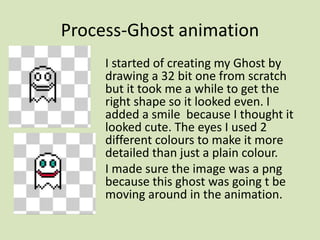
I started of creating my Ghost by
drawing a 32 bit one from scratch
but it took me a while to get the
right shape so it looked even. I
added a smile because I thought it
looked cute. The eyes I used 2
different colours to make it more
detailed than just a plain colour.
I made sure the image was a png
because this ghost was going t be
moving around in the animation.
Process-Ghost animation
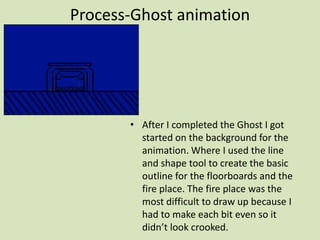
• After I completed the Ghost I got
started on the background for the
animation. Where I used the line
and shape tool to create the basic
outline for the floorboards and the
fire place. The fire place was the
most difficult to draw up because I
had to make each bit even so it
didn’t look crooked.
Process-Ghost animation
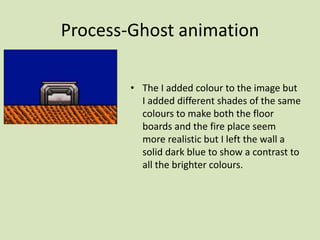
• The I added colour to the image but
I added different shades of the same
colours to make both the floor
boards and the fire place seem
more realistic but I left the wall a
solid dark blue to show a contrast to
all the brighter colours.
Process-Ghost animation
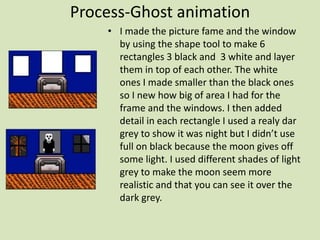
• I made the picture fame and the window
by using the shape tool to make 6
rectangles 3 black and 3 white and layer
them in top of each other. The white
ones I made smaller than the black ones
so I new how big of area I had for the
frame and the windows. I then added
detail in each rectangle I used a realy dar
grey to show it was night but I didn’t use
full on black because the moon gives off
some light. I used different shades of light
grey to make the moon seem more
realistic and that you can see it over the
dark grey.
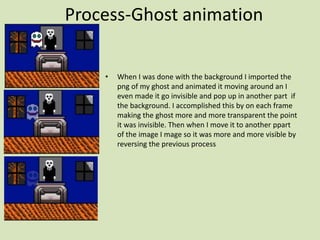
Process-Ghost animation
• When I was done with the background I imported the
png of my ghost and animated it moving around an I
even made it go invisible and pop up in another part if
the background. I accomplished this by on each frame
making the ghost more and more transparent the point
it was invisible. Then when I move it to another ppart
of the image I mage so it was more and more visible by
reversing the previous process
Reflection
What elements of your experiments will you
include in your final product?
• When I make the animation of my game I will include the level of detail I
have used and the techniques I used to animate the ghost including
making it go transparent
• I do think when I di the picture frame id didn’t use as much detail as I
would have wanted this was either due to time constrains or I was
rushing that part of the background to get it done as quickly a possible.

production experiments (interactive)

  • 1.
  • 2.
    Process- Great sword •I started off drawing out a simple shape for the weapon I wanted for my weapon in this case it was a great sword.
  • 3.
    Process- Great sword •Then on the second layer I added detail on the blade using darker colours for the shading of where the light would be. There is no silver so I used different shades of grey.
  • 4.
    Process- Great sword •After I added detail on to the handle look like it had a leather grip and I added some design to the pommel to make it look like it had a gem on the weapon
  • 5.
    • Finally Iadded a cross guard with the same detail as the blade
  • 6.
    Process-halberd I started offdrawing a simple shape of a halberd and went on from there.
  • 7.
    Process- halberd • NextI started to add detail to the weapons blade and spear part to make it look like metal. They didn’t have silver so I used grey
  • 8.
    Process- halberd • FinallyI added deatail to the wooden pole to make it more wood like
  • 9.
    Process-Ghost animation I startedof creating my Ghost by drawing a 32 bit one from scratch but it took me a while to get the right shape so it looked even. I added a smile because I thought it looked cute. The eyes I used 2 different colours to make it more detailed than just a plain colour. I made sure the image was a png because this ghost was going t be moving around in the animation.
  • 10.
    Process-Ghost animation • AfterI completed the Ghost I got started on the background for the animation. Where I used the line and shape tool to create the basic outline for the floorboards and the fire place. The fire place was the most difficult to draw up because I had to make each bit even so it didn’t look crooked.
  • 11.
    Process-Ghost animation • TheI added colour to the image but I added different shades of the same colours to make both the floor boards and the fire place seem more realistic but I left the wall a solid dark blue to show a contrast to all the brighter colours.
  • 12.
    Process-Ghost animation • Imade the picture fame and the window by using the shape tool to make 6 rectangles 3 black and 3 white and layer them in top of each other. The white ones I made smaller than the black ones so I new how big of area I had for the frame and the windows. I then added detail in each rectangle I used a realy dar grey to show it was night but I didn’t use full on black because the moon gives off some light. I used different shades of light grey to make the moon seem more realistic and that you can see it over the dark grey.
  • 13.
    Process-Ghost animation • WhenI was done with the background I imported the png of my ghost and animated it moving around an I even made it go invisible and pop up in another part if the background. I accomplished this by on each frame making the ghost more and more transparent the point it was invisible. Then when I move it to another ppart of the image I mage so it was more and more visible by reversing the previous process
  • 14.
    Reflection What elements ofyour experiments will you include in your final product? • When I make the animation of my game I will include the level of detail I have used and the techniques I used to animate the ghost including making it go transparent • I do think when I di the picture frame id didn’t use as much detail as I would have wanted this was either due to time constrains or I was rushing that part of the background to get it done as quickly a possible.

Editor's Notes

  • #3 Discuss the tools and processes used in your experiments – Add more slides