Production Reflection
Your Name
Process- Finding good audio
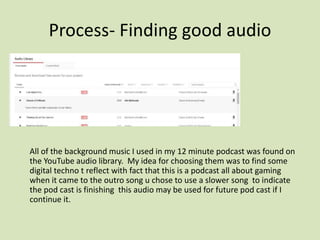
All of the background music I used in my 12 minute podcast was found on
the YouTube audio library. My idea for choosing them was to find some
digital techno t reflect with fact that this is a podcast all about gaming
when it came to the outro song u chose to use a slower song to indicate
the pod cast is finishing this audio may be used for future pod cast if I
continue it.
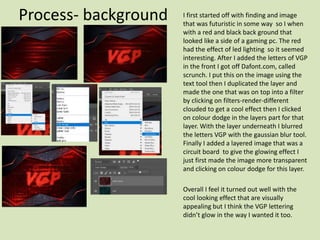
Process- background I first started off with finding and image
that was futuristic in some way so I when
with a red and black back ground that
looked like a side of a gaming pc. The red
had the effect of led lighting so it seemed
interesting. After I added the letters of VGP
in the front I got off Dafont.com, called
scrunch. I put this on the image using the
text tool then I duplicated the layer and
made the one that was on top into a filter
by clicking on filters-render-different
clouded to get a cool effect then I clicked
on colour dodge in the layers part for that
layer. With the layer underneath I blurred
the letters VGP with the gaussian blur tool.
Finally I added a layered image that was a
circuit board to give the glowing effect I
just first made the image more transparent
and clicking on colour dodge for this layer.
Overall I feel it turned out well with the
cool looking effect that are visually
appealing but I think the VGP lettering
didn’t glow in the way I wanted it too.
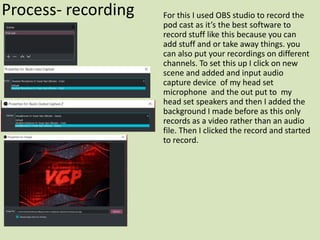
Process- recording For this I used OBS studio to record the
pod cast as it’s the best software to
record stuff like this because you can
add stuff and or take away things. you
can also put your recordings on different
channels. To set this up I click on new
scene and added and input audio
capture device of my head set
microphone and the out put to my
head set speakers and then I added the
background I made before as this only
records as a video rather than an audio
file. Then I clicked the record and started
to record.
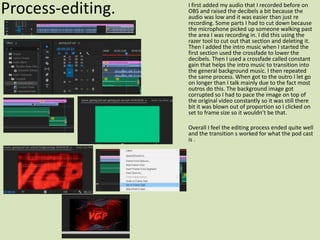
Process-editing. I first added my audio that I recorded before on
OBS and raised the decibels a bit because the
audio was low and it was easier than just re
recording. Some parts I had to cut down because
the microphone picked up someone walking past
the area I was recording in. I did this using the
razer tool to cut out that section and deleting it.
Then I added the intro music when I started the
first section used the crossfade to lower the
decibels. Then I used a crossfade called constant
gain that helps the intro music to transition into
the general background music. I then repeated
the same process. When got to the outro I let go
on longer than I talk mainly due to the fact most
outros do this. The background image got
corrupted so I had to pace the image on top of
the original video constantly so it was still there
bit it was blown out of proportion so I clicked on
set to frame size so it wouldn’t be that.
Overall I feel the editing process ended quite well
and the transition s worked for what the pod cast
is .

production reflection

  • 1.
  • 2.
    Process- Finding goodaudio All of the background music I used in my 12 minute podcast was found on the YouTube audio library. My idea for choosing them was to find some digital techno t reflect with fact that this is a podcast all about gaming when it came to the outro song u chose to use a slower song to indicate the pod cast is finishing this audio may be used for future pod cast if I continue it.
  • 3.
    Process- background Ifirst started off with finding and image that was futuristic in some way so I when with a red and black back ground that looked like a side of a gaming pc. The red had the effect of led lighting so it seemed interesting. After I added the letters of VGP in the front I got off Dafont.com, called scrunch. I put this on the image using the text tool then I duplicated the layer and made the one that was on top into a filter by clicking on filters-render-different clouded to get a cool effect then I clicked on colour dodge in the layers part for that layer. With the layer underneath I blurred the letters VGP with the gaussian blur tool. Finally I added a layered image that was a circuit board to give the glowing effect I just first made the image more transparent and clicking on colour dodge for this layer. Overall I feel it turned out well with the cool looking effect that are visually appealing but I think the VGP lettering didn’t glow in the way I wanted it too.
  • 4.
    Process- recording Forthis I used OBS studio to record the pod cast as it’s the best software to record stuff like this because you can add stuff and or take away things. you can also put your recordings on different channels. To set this up I click on new scene and added and input audio capture device of my head set microphone and the out put to my head set speakers and then I added the background I made before as this only records as a video rather than an audio file. Then I clicked the record and started to record.
  • 5.
    Process-editing. I firstadded my audio that I recorded before on OBS and raised the decibels a bit because the audio was low and it was easier than just re recording. Some parts I had to cut down because the microphone picked up someone walking past the area I was recording in. I did this using the razer tool to cut out that section and deleting it. Then I added the intro music when I started the first section used the crossfade to lower the decibels. Then I used a crossfade called constant gain that helps the intro music to transition into the general background music. I then repeated the same process. When got to the outro I let go on longer than I talk mainly due to the fact most outros do this. The background image got corrupted so I had to pace the image on top of the original video constantly so it was still there bit it was blown out of proportion so I clicked on set to frame size so it wouldn’t be that. Overall I feel the editing process ended quite well and the transition s worked for what the pod cast is .

Editor's Notes

  • #3 Discuss the tools and processes used in your production. Log your thoughts and feelings about your work.
  • #4 Discuss the tools and processes used in your production. Log your thoughts and feelings about your work.
  • #5 Discuss the tools and processes used in your production. Log your thoughts and feelings about your work.
  • #6 Discuss the tools and processes used in your production. Log your thoughts and feelings about your work.