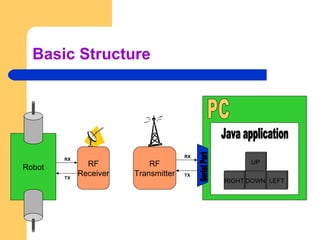
Basic Structure
DOWN LEFTRIGHT
UP
RX
TX
RF
Receiver
Robot
RX
RF
Transmitter
RX
TX
RX
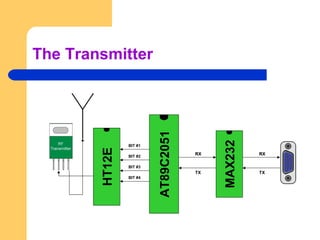
The Transmitter
MAX232
RX
TX
RXRX
TX
RX
AT89C2051
HT12E
BIT #1
BIT #2
BIT #3
BIT #4
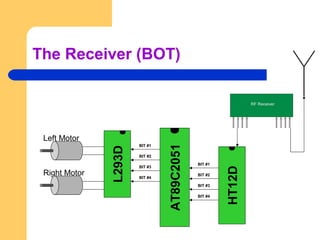
The Receiver (BOT)
L293D
AT89C2051
BIT #1
BIT #2
BIT #3
BIT #4
HT12D
BIT #1
BIT #2
BIT #3
BIT #4
Left Motor
Right Motor
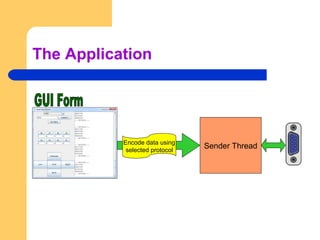
The Application
Sender ThreadEncode data using
selected protocol
Data flow
 The software encodes the motor data using the selected
protocols upon receiving interrupt from the user and then the
sender thread transfers this data to the serial port.
 The 8051 receiving serial data converts it into parallel and
passes it to ht12e encoder.
 The encoder then encodes this 4 bit data into transferable
format and transfers the data to the transmitter.
 The receiver receives this data and ht12d decoder decodes it
into 4-bit parallel data.
 This data is recognized by the 8051 microcontroller and it thus
controls the motors using the l293d motor driver ic.
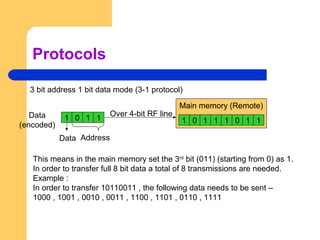
Protocols
3 bit address 1 bit data mode (3-1 protocol)
1 0 1 1
Address
Main memory (Remote)
1 0 1 1 1 0 1 1
Main memory (Remote)
Data
(encoded)
Data
This means in the main memory set the 3rd
bit (011) (starting from 0) as 1.
In order to transfer full 8 bit data a total of 8 transmissions are needed.
Example :
In order to transfer 10110011 , the following data needs to be sent –
1000 , 1001 , 0010 , 0011 , 1100 , 1101 , 0110 , 1111
Over 4-bit RF line
Protocols
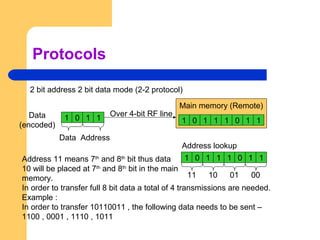
2 bit address 2 bit data mode (2-2 protocol)
1 0 1 1
Address
Main memory (Remote)
1 0 1 1 1 0 1 1
Data
(encoded)
Data
Address 11 means 7th
and 8th
bit thus data
10 will be placed at 7th
and 8th
bit in the main
memory.
In order to transfer full 8 bit data a total of 4 transmissions are needed.
Example :
In order to transfer 10110011 , the following data needs to be sent –
1100 , 0001 , 1110 , 1011
Over 4-bit RF line
1 0 1 1 1 0 1 1
Address lookup
0000011011
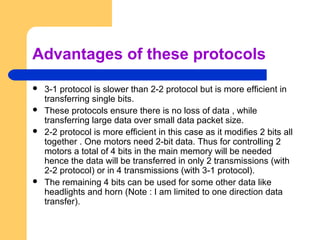
Advantages of these protocols
 3-1 protocol is slower than 2-2 protocol but is more efficient in
transferring single bits.
 These protocols ensure there is no loss of data , while
transferring large data over small data packet size.
 2-2 protocol is more efficient in this case as it modifies 2 bits all
together . One motors need 2-bit data. Thus for controlling 2
motors a total of 4 bits in the main memory will be needed
hence the data will be transferred in only 2 transmissions (with
2-2 protocol) or in 4 transmissions (with 3-1 protocol).
 The remaining 4 bits can be used for some other data like
headlights and horn (Note : I am limited to one direction data
transfer).
Software architecture
Sender ThreadEncode data using
selected protocol
Sender ThreadEncode data using
selected protocol
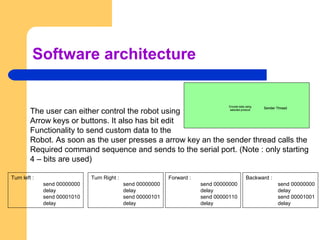
The user can either control the robot using
Arrow keys or buttons. It also has bit edit
Functionality to send custom data to the
Robot. As soon as the user presses a arrow key an the sender thread calls the
Required command sequence and sends to the serial port. (Note : only starting
4 – bits are used)
Turn left :
send 00000000
delay
send 00001010
delay
Turn Right :
send 00000000
delay
send 00000101
delay
Forward :
send 00000000
delay
send 00000110
delay
Backward :
send 00000000
delay
send 00001001
delay
Precautions of motor control
 The dc motors connected to the motor driver
cannot be turned instantaneously rather a
delay (minimum of 50 ms) is required while
turning from one direction to another.
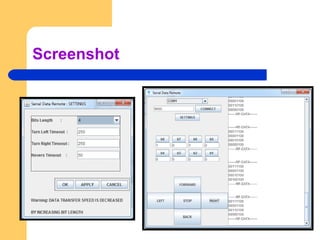
Screenshot

RC Car detailed analysis

  • 2.
  • 3.
  • 4.
    The Receiver (BOT) L293D AT89C2051 BIT#1 BIT #2 BIT #3 BIT #4 HT12D BIT #1 BIT #2 BIT #3 BIT #4 Left Motor Right Motor
  • 5.
    The Application Sender ThreadEncodedata using selected protocol
  • 6.
    Data flow  Thesoftware encodes the motor data using the selected protocols upon receiving interrupt from the user and then the sender thread transfers this data to the serial port.  The 8051 receiving serial data converts it into parallel and passes it to ht12e encoder.  The encoder then encodes this 4 bit data into transferable format and transfers the data to the transmitter.  The receiver receives this data and ht12d decoder decodes it into 4-bit parallel data.  This data is recognized by the 8051 microcontroller and it thus controls the motors using the l293d motor driver ic.
  • 7.
    Protocols 3 bit address1 bit data mode (3-1 protocol) 1 0 1 1 Address Main memory (Remote) 1 0 1 1 1 0 1 1 Main memory (Remote) Data (encoded) Data This means in the main memory set the 3rd bit (011) (starting from 0) as 1. In order to transfer full 8 bit data a total of 8 transmissions are needed. Example : In order to transfer 10110011 , the following data needs to be sent – 1000 , 1001 , 0010 , 0011 , 1100 , 1101 , 0110 , 1111 Over 4-bit RF line
  • 8.
    Protocols 2 bit address2 bit data mode (2-2 protocol) 1 0 1 1 Address Main memory (Remote) 1 0 1 1 1 0 1 1 Data (encoded) Data Address 11 means 7th and 8th bit thus data 10 will be placed at 7th and 8th bit in the main memory. In order to transfer full 8 bit data a total of 4 transmissions are needed. Example : In order to transfer 10110011 , the following data needs to be sent – 1100 , 0001 , 1110 , 1011 Over 4-bit RF line 1 0 1 1 1 0 1 1 Address lookup 0000011011
  • 9.
    Advantages of theseprotocols  3-1 protocol is slower than 2-2 protocol but is more efficient in transferring single bits.  These protocols ensure there is no loss of data , while transferring large data over small data packet size.  2-2 protocol is more efficient in this case as it modifies 2 bits all together . One motors need 2-bit data. Thus for controlling 2 motors a total of 4 bits in the main memory will be needed hence the data will be transferred in only 2 transmissions (with 2-2 protocol) or in 4 transmissions (with 3-1 protocol).  The remaining 4 bits can be used for some other data like headlights and horn (Note : I am limited to one direction data transfer).
  • 10.
    Software architecture Sender ThreadEncodedata using selected protocol Sender ThreadEncode data using selected protocol The user can either control the robot using Arrow keys or buttons. It also has bit edit Functionality to send custom data to the Robot. As soon as the user presses a arrow key an the sender thread calls the Required command sequence and sends to the serial port. (Note : only starting 4 – bits are used) Turn left : send 00000000 delay send 00001010 delay Turn Right : send 00000000 delay send 00000101 delay Forward : send 00000000 delay send 00000110 delay Backward : send 00000000 delay send 00001001 delay
  • 11.
    Precautions of motorcontrol  The dc motors connected to the motor driver cannot be turned instantaneously rather a delay (minimum of 50 ms) is required while turning from one direction to another.
  • 12.