





SHANTARAM MAYADEO 
DEON REYNDERS 
EDWIN WRIGHT 
PRACTICAL 
TROUBLESHOOTING & 
PROBLEM SOLVING OF 
ETHERNET NETWORKS 
PRACTICAL TROUBLESHOOTING & 
PROBLEM SOLVING OF ETHERNET NETWORKS 
SHANTARAM MAYADEO 
DEON REYNDERS 
EDWIN WRIGHT 
REV
1 
Introduction to Ethernet 
Objectives 
In this first chapter you will learn about: 
• The history of Ethernet 
• Relevant standards and standards institutions 
• Networking basics 
• The OSI reference model 
• The various TCP/IP protocols and their position within the OSI model 
1.1 Introduction 
This workshop is aimed at practicing technicians, engineers, and others in commerce and industry 
that have been associated with the design, maintenance, or administration of Ethernet networks. 
The broad objective of this workshop is to make you current and confident in the basics as well as 
in the practical knowledge of computer networking in general, and Ethernet (including its industrial 
implementation) in particular. Associated topics that do not strictly fall under Ethernet, but can help 
to improve your knowledge in this area, have also been covered. 
This first chapter starts with a brief overview of some networking history, standards, standards 
organizations, and semantics related to Ethernet. The remaining sections of this chapter delve into 
some basics, and give you a conceptual framework for computer networks. 
1.1.1 The origins of Ethernet 
University of Hawaii researcher Norman Abramson was one of the first to experiment with 
computer networking. In the late sixties, he experimented with the Aloha network, a radio-based 
communications network. 
The Aloha protocol allowed a station to transmit without deferring to any other transmissions. The 
transmitting station then waited for an acknowledgment and, if none was received, a collision with 
another station was assumed. The transmission station then backed off for a random time and re-transmitted.
2 Practical Troubleshooting and Problem Solving of Ethernet Networks 
This kind of system resulted in approximately 18% utilization of the channel. Abramson next 
introduced assigned transmission slots synchronized by a master clock, which improved utilization 
to 37%. 
In the early seventies Bob Metcalfe (Xerox) improved on the Aloha system by using a mechanism 
that listened for channel activity before transmitting, and detected collisions. He used this new 
system to connect Alto computers and called the Alto Aloha network. 
In 1973 the name was changed to Ethernet. The name was derived from the ‘ether’ used by 
Alohanet as a transmission medium. ‘Ethernet’ became a registered trademark of Xerox. 
For a technology to become universally usable, its rules cannot be controlled by any single 
commercial enterprise. The technology has to be usable across a wide variety of equipment, and 
therefore has to be vendor-neutral. 
Realizing that Ethernet had immense potential for worldwide use, Metcalfe persuaded Xerox in 
1979 to join with Digital (DEC) and Intel to form a consortium for standardizing such an open 
system. The joint efforts of Xerox, Digital and Intel, led by Metcalfe, refined the original 
technology into what was known as DIX Ethernet, Bluebook Ethernet or Ethernet II. Xerox agreed 
to let anybody use its patented technology for a small fee. Xerox even gave up its right to the 
trademark on the Ethernet name. Metcalfe started a company ‘3COM’ in 1979, to promote 
computer communications compatibility. 
Thus, Ethernet became the first vendor-neutral open LAN standard. The idea of sharing open 
source computer expertise for the benefit of everyone was a very radical notion at that time. 
The success of DIX Ethernet proved that the open source environment worked. Requirements 
began to emerge for an even more open environment to attain more and more capabilities, cross-vendor 
usability, and cost reductions. Cross-vendor usability required different platforms to 
recognize each other for communications and sharing of data. 
1.1.2 Developments through the Eighties and Nineties 
The original Ethernet II used thick coaxial cable as a transmission medium, and although the use of 
Ethernet was spreading fast, there were problems in installing, connecting and troubleshooting 
thick coaxial cables. On a bus topology a cable fault will pull down the entire network. 
The twisted pair cable medium was developed in the late eighties, and enabled the use of a star 
topology. Such systems were now much easier and quicker to install and troubleshoot. This 
development really gave a boost to the Ethernet market. The structured cabling standard (using 
twisted pairs) developed in early nineties made it possible to provide highly reliable LANs. 
The original Ethernet networks were operating at 10 Mbps. This was fast at the time; in fact, 
Ethernet was faster than the computers connected to it. However, as computer speeds doubled 
every two years, traffic loads became heavy for 10 Mbps networks. This spurred development of 
higher speed versions and the standard for 100 Mbps was adopted in 1995. This was now based on 
twisted pair and fiber optic media systems. The new interfaces for such systems use an Auto- 
Negotiation protocol to automatically set speeds in consonance with the hubs to which the 
workstations are attached. As computer chips raced ahead in terms of clock speeds, developments 
in Ethernet kept pace and the 1000 Mbps (1Gbps) standard was launched around 1998. 
While the speeds kept increasing, there were developments in other relevant areas as well. The 
original half-duplex Ethernet could either transmit or receive data at a given time, but could not do 
both simultaneously. The full-duplex standard now made this possible, resulting in an effective 
bandwidth of 200 Mbps on 100 Mbps network. 
The latest development, 10 Gbps Ethernet, was released at the beginning of 2002.
Introduction to Ethernet 3 
1.1.3 Which Ethernet are we talking about? 
The term Ethernet originally referred to the original LAN implementation by Xerox, Digital, and 
Intel. The IEEE 802.3 working group standardized operation of a CSMA/CD network that was 
functionally equivalent to (DIX) Ethernet II. There were, however, distinct differences between 
Ethernet II and IEEE 802.3. However, both are referred to as ‘Ethernet’. The only real legacy of 
Ethernet II to be dealt with today is the difference in the frame composition, specifically the 
‘Type/Length’ field. Although it is normally dealt with by the software, it could nevertheless 
confuse the novice. 
Ethernet originally expanded and prospered in office environments. However, Ethernet networks in 
the industrial environment also gained importance. In these types of networks some of the shared 
and intercommunicating devices are not conventional computers, but industrial controllers and 
sensors for the measurement of process parameters. These industrial Ethernet networks have their 
own peculiarities, and will be dealt with under the ambit of ‘Industrial Ethernet’. 
Data transmission speeds of 100 Mbps (IEEE802.3u standard, a.k.a. Fast Ethernet) and 1000 Mbps 
(IEEE802.3z, a.k.a. Gigabit Ethernet) have been achieved. These faster versions will also be dealt 
with later in this manual. 
1.2 Standards and Standards Institutions 
1.2.1 Standards institutions 
ANSI, or the American National Standards Institute, is a non-profit private organization with the 
objectives of development, coordination, and publication of voluntary national standards. Although 
ANSI standards are voluntary, and since ANSI participates in global bodies such as the ISO, IEC 
etc., non-compliance with ANSI standards becomes non-compliance with world standards. 
The IEEE, or the Institute of Electrical and Electronic Engineers, develops standards for 
acceptance by ANSI, and ANSI in turn participates in the global standards bodies. The IEEE has 
been responsible for telecommunication and data communication standards for LANs, of which the 
most relevant for our purposes are the IEEE 802 series. 
The ISO, or International Organization for Standardization, located in Geneva, is a UN 
organization chartered to define standards in virtually all subjects except electrical or electronic 
subjects. The acronym for this organization is derived from its French name. The OSI model has 
been developed by the ISO, and lays down a common organizational scheme for network 
standardization. 
The IAB, or Internet Architecture Board, oversees technical development of the Internet. The IETF 
and IRTF, two task forces set up by IAB, were responsible for standards such as the Internet 
Protocol (IP). 
The IEC, or International Electro-technical Commission, located in Geneva, sets international 
standards on electric and electronic subjects. 
1.2.2 Compliance with standards 
Not all Ethernet equipment necessarily conform to the official IEEE standard. For example, 
twisted-pair media systems were vendor innovations (de facto standards), which later became 
specified media systems (de jure standards) in the IEEE standard. However, if you are a network 
manager responsible for maximum stability and predictability given different vendor equipment 
and traffic loads, then preference should be given to compliant and standard specified equipment. 
Having said this, users often have to settle for de facto standards. This is often the case with 
equipment such as routers, switches and Industrial Ethernet where the official standard is lacking 
and vendors have to innovate out of necessity. This is particularly true for the leading innovators. 
A good example is the RJ-45 connector, which is unsuitable for Industrial applications but where a
4 Practical Troubleshooting and Problem Solving of Ethernet Networks 
suitable alternative is not (yet) included in the standard. In this case vendors often use DB or M12 
connectors. 
1.3 Networking basics 
1.3.1 Introduction 
An overview of the basics of networking in general will now be given so that readers get (a) a 
broad perspective of the basic concepts underlying networking technologies, and (b) a sense of the 
interrelationships between the various aspects of networking technologies. 
Network definition 
A ‘network’ is a system comprising software, hardware, and rules that allow computers, computer 
peripherals, and other electronic devices to communicate with each other so as to share information 
and resources, collaborate on a task, and even communicate directly with each other through 
individually addressed messages. 
Classifications of computer networks 
There is no generally accepted classification of computer networks, but transmission technology 
and physical/geographical areas of coverage are two ways to classify them. 
1.3.2 Classification based on transmission technology 
There are two broad types of transmission technology. They are ‘broadcast’ and ‘point-to point’. 
A broadcast network has a single communication channel, shared by all devices on that network. 
The sent messages contain an address field specifying the device for which they are intended, and 
is received by all devices. They check the address field and discard the message if it is not 
specifically intended for them. If the address in the address field matches with the device address, 
the message is processed. LAN systems using coaxial cable as medium are examples of broadcast 
networks. 
A point-to-point network involves dedicated transmission paths between individual pairs of 
devices. A message or a packet on this network may have to go to its destination via one or more 
intermediate devices. Multiple routes to the destination are possible, and routing algorithms often 
play an important role. IBM Token Ring and FDDI are examples of networks using point-to-point 
technology. 
1.3.3 Classification based on geographical area covered 
Networks can be classified based on the geographical area that they cover. Physical locations and 
distances are important because different methods are used for different distances. 
Local Area Networks (LANs) are located in a single building or on a campus of a few kilometers 
in radius. LANs differ from other networks in terms of their size, transmission technology, and 
their topology. The limits of worst-case transmission time are known in advance, as the LAN is 
restricted in size. The transmission technique is primarily based on broadcast methods and 
topologies can be bus, star or ring. In these configurations only one machine is allowed to 
broadcast at a given time. An arbitration mechanism, either centrally located or distributed, 
resolves conflicts when two or more stations want to transmit at the same time. 
Metropolitan Area Networks, MANs, cover a greater area than LANs and can extend to a whole 
city or, say, a circle with a radius of 50 km. A MAN typically has two fiber optic rings or uni-directional 
buses to which all computers are connected. The direction of transmission on the two 
buses could be opposite to each other. 
Wide Area Networks or WANs incorporate LANs that are great distances apart; distances ranging 
from a few kilometers to thousands of kilometers. WANs normally use public telecommunication 
systems to provide cost-effective communication between LANs. Since such communication links 
are provided by independent third party utilities, they are referred as a communications cloud. 
Routers accept messages at LAN speed and transmit them across the communications cloud at the
Introduction to Ethernet 5 
speed of the communication link to the LAN at the other end. The remote LAN then takes over and 
passes on the message at LAN speed once more. For mission-critical and time-critical applications, 
WANs are considered less reliable due to the delays in transmission through the communication 
cloud. 
Virtual Private Networks or VPNs are WANs that use the Internet infrastructure to interconnect 
two or more LANs. Since Internet traffic is visible to all other users, encryption technology has to 
be used to maintain privacy of communication. 
1.4 Interoperability and internetworking 
Interoperability refers to the ability of a network to transfer information between different 
communication systems, irrespective of the way those systems are supported. It has also been 
defined as the capability of using similar devices from different manufacturers as effective 
replacements for each other without losing functionality or sacrificing the degree of integration 
with the host system. 
Internetworking is a term used to describe the interconnection of different networks in such a way 
as to retain their own status as networks. What is important in this concept is that internetworking 
devices be made available so that the exclusivity of each of the linked networks is retained, but that 
the ability to share information and physical resources, if necessary, becomes both seamless and 
transparent to the end user. 
1.5 Network architecture and protocols 
A protocol is defined as a set of rules for exchanging data in a manner that is understandable to 
both the transmitter and the receiver. There must be a formal and agreed set of rules if the 
communication is to be successful. The rules generally relate to such responsibilities as error 
detection and correction methods, flow control methods, and voltage and current standards. In 
addition, other properties such as the size of data packets are important in LAN protocols. 
Another important responsibility of protocols is the method of routing the packet, once it has been 
assembled. In a self-contained LAN this is not a problem since all packets will eventually reach 
their destinations. However, if the packet is to be routed across networks, i.e., on an internetwork 
(such as a WAN) then routing decisions must be made. 
Network protocols are conceptually organized as a series of layers, one above the other. The 
names, the number of layers and the function(s) of each layer can vary from one type of network 
type to another. In any type of network, however, the purpose of any layer is to provide certain 
services to higher layers, hiding from these higher layers the details of the lower layers. 
Layer ‘n’ of a computer communicates with layer ‘n’ of another computer, the communication 
being carried out as per the rules of the layer ‘n’ protocol. The communication carried out between 
the two ‘n’ layers takes place on a logical plane. Physically, data is not directly transferred between 
these layers. Instead, each layer passes data and control information to the layer immediately below 
it, until the lowest layer is reached. The data is then transmitted across the medium to the receiving 
side, where it is passed upwards layer by layer until it reaches layer ‘n’. 
Between each pair of layers is an interface that specifies which services the lower layer offers to 
the upper layer. A clean and unambiguous interface simplifies replacement, substituting 
implementation of one layer with a completely different implementation (if the need arises), 
because all that is required of the new implementation is that it offers exactly the same services to 
its upper layer as was done in the previous case. 
A network architecture is nothing but a set of layers and protocols. The specifications of the 
architecture must contain sufficient information to allow implementers to write code or specify 
hardware for each layer so that it will correctly obey the appropriate protocol. Details of 
implementation and specification of interfaces are, however, not part of the network architecture. It
6 Practical Troubleshooting and Problem Solving of Ethernet Networks 
is not even necessary that interfaces on all machines be the same, as long as each machine correctly 
uses and obeys all protocols. 
A group of layered protocols is called a protocol stack. 
1.6 Layer design parameters 
There are some parameters or design aspects that are common to the design of several layers. Some 
of these parameters are as follows: 
• In a network with many computers, some of which may be carrying out multiple 
processes, a method is needed for a process on one machine to identify the process on 
another machine with whom it wishes to communicate. A method of addressing 
specific processes is therefore needed. 
• Direction of data transfer is another design aspect that needs to be addressed. Data 
may travel in one direction only (as in simplex transmission), or it may travel in both 
directions but not simultaneously (as in half-duplex transmission), or in both directions 
simultaneously (as in full-duplex transmission). The number of logical channels and 
their prioritizing also needs to be determined 
• Error control involves error detection, error correction, informing the sender about 
correct or incorrect receipt of the message, and re-transmitting the message if a 
previous copy has been ‘lost’ 
• Sequencing parts of a message in correct order while sending and their correct 
reassembly on receipt is another design issue. The matching of a fast sender of data and 
a slow receiver of data by methods such as agreed-upon transmission rate also needs to 
be taken into account 
• Routing decisions in the case of multiple paths between source and destination is 
another aspect of layer design. Sometimes this decision is split over two or three layers 
1.7 Entities, SAPs, IDUs/ SDUs 
Entities are active elements in each layer. They can be software entities (such as processes) or 
hardware entities (such as intelligent I/O chips). Entities on the same layer on different machines 
are called peer entities. Entities in layer ‘n’ implement services used by layer (n +1). Here layer n is 
the service provider and layer n+1 is the service user. Services are rendered and received at SAPs 
(Service Access Points) that have unique addresses. 
When two layers exchange information, the layer (n+1) entity passes on an IDU (Interface Data 
Unit) to the entity in layer n. An IDU consists of an SDU (Service Data Unit) and control 
information. It is this SDU that is passed on to the peer entity of the destination machine. 
1.8 Connectionless and connection-oriented service 
These are types of services offered to a given layer by the layer below it. A connection-oriented 
service is like a telephone system that involves establishing a connection, using the connection, and 
releasing the connection. A connectionless service, on the other hand is like a postal service where 
messages are ‘sent and forgotten’. 
These services are classified according to quality or reliability. A reliable service involves getting 
an acknowledgment from the receiver, which may be necessary in some cases, but will cause more 
traffic and delay, for example as in the case of a registered post parcel. An unreliable service is not 
necessarily ‘bad’, but simply one in which acknowledgements are not obtained. 
1.9 The Open Systems Interconnection (OSI) model 
1.9.1 Overview 
Computer networks are complex systems made up of hardware and software components 
performing various functions. These functions have to be performed in conformity with certain
Introduction to Ethernet 7 
rules so that functional conflicts are avoided. The rules have to be such that the interfacing 
interconnections between all these hardware and software components are open, transparent, and 
vendor neutral. 
A model or framework is necessary to understand how the various hardware and software 
components mesh with each other. The Open Systems Interconnection (OSI) reference model was 
developed for this purpose. The International Organization for Standardization (OSI) developed 
this model in 1977-1978 and it predates efforts by the IEEE on the Ethernet standard. 
The OSI model is a conceptual framework to explain how the complex interactions take place 
among the various subsystems of a network. It defines rules governing the following issues: 
• Methods by which network components contact and communicate with each other 
• Methods by which a network component knows when to transmit a message 
• Mechanisms to ensure correct receipt of a message by a specific recipient 
• Logical and physical arrangement of the physical transmission media and its 
connections 
• Ensuring a proper flow of data 
• Arrangement of bits that make up the data 
The OSI model defines seven conceptual layers arranged hierarchically (see Figure 1.1). The 
functional jurisdiction of each layer is made separate and distinct from that of any other layer. Each 
layer performs a task or some sub-task. The rule-based computer processes that perform these tasks 
are called ‘protocols’. 
Since the layers are arranged hierarchically above each other, the protocols corresponding to each 
of the layers also are arranged in similar hierarchical stacks. When two computers are connected to 
a network to communicate, both must have the same stack of protocols running on it, even if the 
computers are dissimilar in other aspects such as operating system, hardware configuration etc. 
When a message is sent from an application (e.g. a client) on one computer to an application (e.g. a 
server) on another computer, the client passes the message down the stack of protocols from top to 
bottom on the first computer, then the message passes across the medium between the two 
computers, and finally it proceeds up the stack on the receiving computer, where it is delivered to 
the server. 
Figure 1.1 
OSI layers 
A message is composed in the sending application and then passed down to the Application layer, 
from where it travels down to the bottom layer of the stack. As it travels down, each intermediate 
layer adds its own header (consisting of relevant control information) until it reaches the lowest 
layer. From here, the message with headers travels to the destination machine. As it proceeds up 
the stack of the receiving machine, each successive layer strips off the header of its corresponding
8 Practical Troubleshooting and Problem Solving of Ethernet Networks 
peer layer on the sending computer until it reaches the Application layer. From there it is delivered 
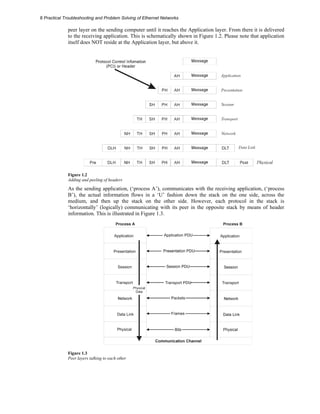
to the receiving application. This is schematically shown in Figure 1.2. Please note that application 
itself does NOT reside at the Application layer, but above it. 
Figure 1.2 
Adding and peeling of headers 
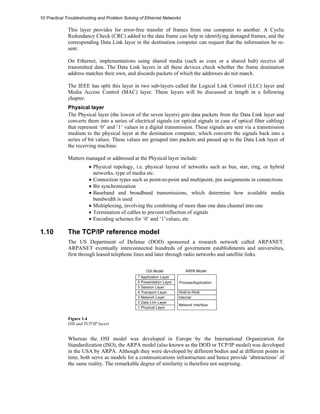
As the sending application, (‘process A’), communicates with the receiving application, (‘process 
B’), the actual information flows in a ‘U’ fashion down the stack on the one side, across the 
medium, and then up the stack on the other side. However, each protocol in the stack is 
‘horizontally’ (logically) communicating with its peer in the opposite stack by means of header 
information. This is illustrated in Figure 1.3. 
Figure 1.3 
Peer layers talking to each other
Introduction to Ethernet 9 
1.9.2 Functions of the OSI layers 
Application layer 
This is the uppermost layer and the end user really ‘sees’ this layer only, although all other layers 
are working in the background to bring the communication to its final form. This layer provides 
services directly for user applications such as clients and servers for file transfers, web services, e-mail, 
etc. It allows applications on one machine to talk to applications on another machine. The 
Application layer services are more varied than those in other layers are because the entire range of 
application possibilities is available here. 
Presentation layer 
This layer is responsible for presenting information in a manner suitable for the Application or the 
user dealing with the information. It translates data between the formats the network requires and 
the format the user expects. Its services include protocol conversion, data translation, encryption, 
compression, character set conversion, interpretation of graphic commands etc. 
In practice, this layer rarely appears in a pure form, and is not very well defined amongst the OSI 
layers. Some of its functions are encroached upon by the Application and Session layers. 
Session layer 
This layer provides services such as synchronization and sequencing of the packets in a network 
connection, maintaining the session until transmission is complete, and inserting checkpoints so 
that, in the event of a network failure, only the data sent after the point of failure need be re-sent. 
Transport layer 
The Transport layer is responsible for providing data transfer at an agreed-upon level of quality 
such as transmission rates and error rates. To ensure delivery, outgoing packets could be assigned 
numbers in sequence. The numbers would be included in packets that are transmitted by the lower 
layers. The Transport layer at the receiving end would then check the packet numbers to ensure that 
all packets have been delivered, and put the packets in the correct sequence for the recipient. Thus, 
this layer ensures that packets are delivered error free, in sequence, and with no losses or 
duplications. It breaks large messages from the Session layer into packets to be sent to the 
destination and reassembles these packets to be presented to the Session layer. 
This layer also typically sends acknowledgments to the originator for messages received. 
The Transport layer uses the network layer below to establish a route between the source and 
destination. The transport layer is crucial in many ways, because it sits between the heavily 
application-dependent upper layers and the application-independent lower layers. It provides an 
end-to-end check of the message integrity, above the level of the routing and packet handling. 
Network layer 
Layers below the Transport layer are sometimes called subnet layers, and the Network layer is the 
first among these. The Network layer decides on routes and sends packets to destinations that are 
on different subnets, i.e. separated from the sending device by one or more routers. 
Routing decisions are implemented here. This layer may choose a certain route to avoid congested 
routes. Routers operate in the Network layer. 
Data Link layer 
The Data Link layer is responsible for creating, transmitting, and receiving data packets. It provides 
services for the various protocols at the Network layer, and uses the Physical layer to transmit or 
receive messages. It creates packets appropriate for the network architecture being used. Requests 
and data from the Network layer are part of data in these packets (or, frames as they are called). 
Network architectures such as Ethernet, ARCnet, Token Ring, and FDDI encompass the Data Link 
and Physical layers, which is why these architectures are said to support services at the Data Link 
level.
10 Practical Troubleshooting and Problem Solving of Ethernet Networks 
This layer provides for error-free transfer of frames from one computer to another. A Cyclic 
Redundancy Check (CRC) added to the data frame can help in identifying damaged frames, and the 
corresponding Data Link layer in the destination computer can request that the information be re-sent. 
On Ethernet, implementations using shared media (such as coax or a shared hub) receive all 
transmitted data. The Data Link layers in all these devices check whether the frame destination 
address matches their own, and discards packets of which the addresses do not match. 
The IEEE has split this layer in two sub-layers called the Logical Link Control (LLC) layer and 
Media Access Control (MAC) layer. These layers will be discussed at length in a following 
chapter. 
Physical layer 
The Physical layer (the lowest of the seven layers) gets data packets from the Data Link layer and 
converts them into a series of electrical signals (or optical signals in case of optical fiber cabling) 
that represent ‘0’ and ‘1’ values in a digital transmission. These signals are sent via a transmission 
medium to the physical layer at the destination computer, which converts the signals back into a 
series of bit values. These values are grouped into packets and passed up to the Data Link layer of 
the receiving machine: 
Matters managed or addressed at the Physical layer include: 
• Physical topology, i.e. physical layout of networks such as bus, star, ring, or hybrid 
networks, type of media etc. 
• Connection types such as point-to-point and multipoint, pin assignments in connections 
• Bit synchronization 
• Baseband and broadband transmissions, which determine how available media 
bandwidth is used 
• Multiplexing, involving the combining of more than one data channel into one 
• Termination of cables to prevent reflection of signals 
• Encoding schemes for ‘0’ and ‘1’values, etc 
1.10 The TCP/IP reference model 
The US Department of Defense (DOD) sponsored a research network called ARPANET. 
ARPANET eventually interconnected hundreds of government establishments and universities, 
first through leased telephone lines and later through radio networks and satellite links. 
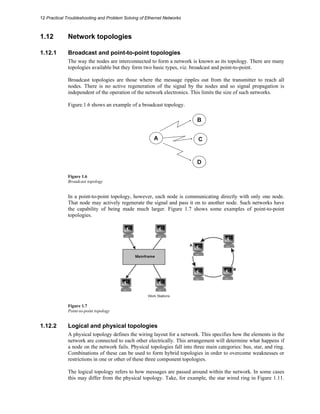
Figure 1.4 
OSI and TCP/IP layers 
Whereas the OSI model was developed in Europe by the International Organization for 
Standardization (ISO), the ARPA model (also known as the DOD or TCP/IP model) was developed 
in the USA by ARPA. Although they were developed by different bodies and at different points in 
time, both serve as models for a communications infrastructure and hence provide ‘abstractions’ of 
the same reality. The remarkable degree of similarity is therefore not surprising.
Introduction to Ethernet 11 
Whereas the OSI model has 7 layers, the ARPA model has 4 layers. The OSI layers map onto the 
ARPA model as follows: 
• The OSI Session, Presentation and Applications layers are contained in the ARPA 
Process/Application layer 
• The OSI Transport layer maps onto the ARPA Host-to-host layer (a.k.a. the Service 
layer) 
• The OSI Network layer maps onto the ARPA Internet layer 
• The OSI Physical and Data Link layers map onto the ARPA Network 
Interface layer 
1.11 OSI and IEEE sub-layers 
The Ethernet standard concerns itself with the Data Link layer in the OSI model and the Physical 
layer below it. The IEEE thought it fit to subdivide in the Data Link and Physical layers to add 
more clarity. 
The mapping of the IEEE/Ethernet sub-layers to the OSI layers is shown schematically in 
Figure.1.5. 
Figure 1.5 
IEEE sub-layers 
The Data Link layer is subdivided into the Logical Link Control (LLC) and Media Access Control 
(MAC) sub-layers. 
The LLC sub-layer (IEEE 802.2) identifies the data carried in a frame and is used with all IEEE 
802 LAN standards. 
The MAC sub-layer provides for shared access to the network and implements the Medium Access 
Control required for a specific LAN standard, such as CSMA/CD for Ethernet. One of the well-known 
attributes of the MAC function is the unique 48-bit MAC address of each network interface, 
typically assigned by the manufacturer. These MAC addresses are used to facilitate communication 
between computers on all IEEE 802 LAN systems. 
The Physical layer is divided into a Physical Signaling sub-layer and a Media Specification sub-layer. 
The implementation of these sub-layers differs between 10 Mbps, 100 Mbps, Gigabit, and 10 
Gigabit Ethernet. Each IEEE 802.3 Physical sub-layer implementation specification has a three-part 
name that identifies its characteristics. These are (a) LAN speed in Mbps, (b) whether 
transmission is baseband or broadband and (c) the physical media type.
12 Practical Troubleshooting and Problem Solving of Ethernet Networks 
1.12 Network topologies 
1.12.1 Broadcast and point-to-point topologies 
The way the nodes are interconnected to form a network is known as its topology. There are many 
topologies available but they form two basic types, viz. broadcast and point-to-point. 
Broadcast topologies are those where the message ripples out from the transmitter to reach all 
nodes. There is no active regeneration of the signal by the nodes and so signal propagation is 
independent of the operation of the network electronics. This limits the size of such networks. 
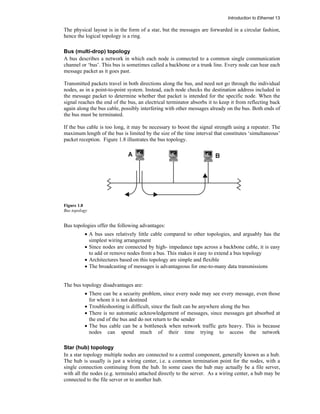
Figure.1.6 shows an example of a broadcast topology. 
Figure 1.6 
Broadcast topology 
In a point-to-point topology, however, each node is communicating directly with only one node. 
That node may actively regenerate the signal and pass it on to another node. Such networks have 
the capability of being made much larger. Figure 1.7 shows some examples of point-to-point 
topologies. 
Figure 1.7 
Point-to-point topology 
1.12.2 Logical and physical topologies 
A physical topology defines the wiring layout for a network. This specifies how the elements in the 
network are connected to each other electrically. This arrangement will determine what happens if 
a node on the network fails. Physical topologies fall into three main categories: bus, star, and ring. 
Combinations of these can be used to form hybrid topologies in order to overcome weaknesses or 
restrictions in one or other of these three component topologies. 
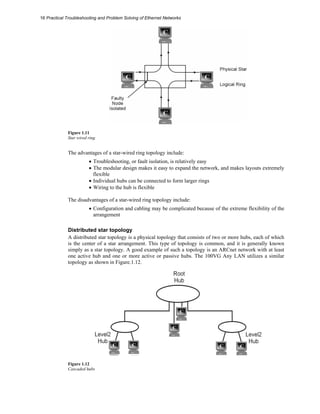
The logical topology refers to how messages are passed around within the network. In some cases 
this may differ from the physical topology. Take, for example, the star wired ring in Figure 1.11.
Introduction to Ethernet 13 
The physical layout is in the form of a star, but the messages are forwarded in a circular fashion, 
hence the logical topology is a ring. 
Bus (multi-drop) topology 
A bus describes a network in which each node is connected to a common single communication 
channel or ‘bus’. This bus is sometimes called a backbone or a trunk line. Every node can hear each 
message packet as it goes past. 
Transmitted packets travel in both directions along the bus, and need not go through the individual 
nodes, as in a point-to-point system. Instead, each node checks the destination address included in 
the message packet to determine whether that packet is intended for the specific node. When the 
signal reaches the end of the bus, an electrical terminator absorbs it to keep it from reflecting back 
again along the bus cable, possibly interfering with other messages already on the bus. Both ends of 
the bus must be terminated. 
If the bus cable is too long, it may be necessary to boost the signal strength using a repeater. The 
maximum length of the bus is limited by the size of the time interval that constitutes ‘simultaneous’ 
packet reception. Figure 1.8 illustrates the bus topology. 
Figure 1.8 
Bus topology 
Bus topologies offer the following advantages: 
• A bus uses relatively little cable compared to other topologies, and arguably has the 
simplest wiring arrangement 
• Since nodes are connected by high- impedance taps across a backbone cable, it is easy 
to add or remove nodes from a bus. This makes it easy to extend a bus topology 
• Architectures based on this topology are simple and flexible 
• The broadcasting of messages is advantageous for one-to-many data transmissions 
The bus topology disadvantages are: 
• There can be a security problem, since every node may see every message, even those 
for whom it is not destined 
• Troubleshooting is difficult, since the fault can be anywhere along the bus 
• There is no automatic acknowledgement of messages, since messages get absorbed at 
the end of the bus and do not return to the sender 
• The bus cable can be a bottleneck when network traffic gets heavy. This is because 
nodes can spend much of their time trying to access the network 
Star (hub) topology 
In a star topology multiple nodes are connected to a central component, generally known as a hub. 
The hub is usually is just a wiring center, i.e. a common termination point for the nodes, with a 
single connection continuing from the hub. In some cases the hub may actually be a file server, 
with all the nodes (e.g. terminals) attached directly to the server. As a wiring center, a hub may be 
connected to the file server or to another hub.
14 Practical Troubleshooting and Problem Solving of Ethernet Networks 
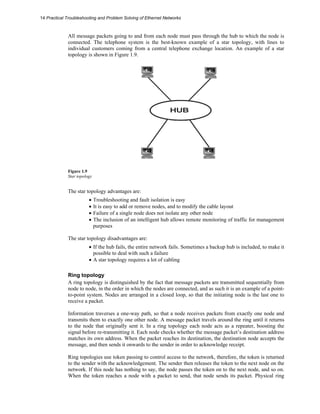
All message packets going to and from each node must pass through the hub to which the node is 
connected. The telephone system is the best-known example of a star topology, with lines to 
individual customers coming from a central telephone exchange location. An example of a star 
topology is shown in Figure 1.9. 
Figure 1.9 
Star topology 
The star topology advantages are: 
• Troubleshooting and fault isolation is easy 
• It is easy to add or remove nodes, and to modify the cable layout 
• Failure of a single node does not isolate any other node 
• The inclusion of an intelligent hub allows remote monitoring of traffic for management 
purposes 
The star topology disadvantages are: 
• If the hub fails, the entire network fails. Sometimes a backup hub is included, to make it 
possible to deal with such a failure 
• A star topology requires a lot of cabling 
Ring topology 
A ring topology is distinguished by the fact that message packets are transmitted sequentially from 
node to node, in the order in which the nodes are connected, and as such it is an example of a point-to- 
point system. Nodes are arranged in a closed loop, so that the initiating node is the last one to 
receive a packet. 
Information traverses a one-way path, so that a node receives packets from exactly one node and 
transmits them to exactly one other node. A message packet travels around the ring until it returns 
to the node that originally sent it. In a ring topology each node acts as a repeater, boosting the 
signal before re-transmitting it. Each node checks whether the message packet’s destination address 
matches its own address. When the packet reaches its destination, the destination node accepts the 
message, and then sends it onwards to the sender in order to acknowledge receipt. 
Ring topologies use token passing to control access to the network, therefore, the token is returned 
to the sender with the acknowledgement. The sender then releases the token to the next node on the 
network. If this node has nothing to say, the node passes the token on to the next node, and so on. 
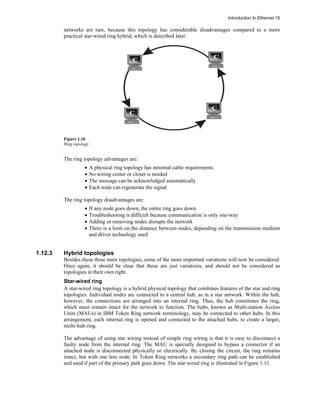
When the token reaches a node with a packet to send, that node sends its packet. Physical ring
Introduction to Ethernet 15 
networks are rare, because this topology has considerable disadvantages compared to a more 
practical star-wired ring hybrid, which is described later. 
Figure 1.10 
Ring topology 
The ring topology advantages are: 
• A physical ring topology has minimal cable requirements 
• No wiring center or closet is needed 
• The message can be acknowledged automatically 
• Each node can regenerate the signal 
The ring topology disadvantages are: 
• If any node goes down, the entire ring goes down 
• Troubleshooting is difficult because communication is only one-way 
• Adding or removing nodes disrupts the network 
• There is a limit on the distance between nodes, depending on the transmission medium 
and driver technology used 
1.12.3 Hybrid topologies 
Besides these three main topologies, some of the more important variations will now be considered. 
Once again, it should be clear that these are just variations, and should not be considered as 
topologies in their own right. 
Star-wired ring 
A star-wired ring topology is a hybrid physical topology that combines features of the star and ring 
topologies. Individual nodes are connected to a central hub, as in a star network. Within the hub, 
however, the connections are arranged into an internal ring. Thus, the hub constitutes the ring, 
which must remain intact for the network to function. The hubs, known as Multi-station Access 
Units (MAUs) in IBM Token Ring network terminology, may be connected to other hubs. In this 
arrangement, each internal ring is opened and connected to the attached hubs, to create a larger, 
multi-hub ring. 
The advantage of using star wiring instead of simple ring wiring is that it is easy to disconnect a 
faulty node from the internal ring. The MAU is specially designed to bypass a connector if an 
attached node is disconnected physically or electrically. By closing the circuit, the ring remains 
intact, but with one less node. In Token Ring networks a secondary ring path can be established 
and used if part of the primary path goes down. The star-wired ring is illustrated in Figure 1.11.
16 Practical Troubleshooting and Problem Solving of Ethernet Networks 
Figure 1.11 
Star wired ring 
The advantages of a star-wired ring topology include: 
• Troubleshooting, or fault isolation, is relatively easy 
• The modular design makes it easy to expand the network, and makes layouts extremely 
flexible 
• Individual hubs can be connected to form larger rings 
• Wiring to the hub is flexible 
The disadvantages of a star-wired ring topology include: 
• Configuration and cabling may be complicated because of the extreme flexibility of the 
arrangement 
Distributed star topology 
A distributed star topology is a physical topology that consists of two or more hubs, each of which 
is the center of a star arrangement. This type of topology is common, and it is generally known 
simply as a star topology. A good example of such a topology is an ARCnet network with at least 
one active hub and one or more active or passive hubs. The 100VG Any LAN utilizes a similar 
topology as shown in Figure.1.12. 
Figure 1.12 
Cascaded hubs
Introduction to Ethernet 17 
Mesh topology 
A mesh topology is a physical topology in which there are at least two paths to and from every 
node. This type of topology is advantageous in hostile environments in which connections are 
easily broken. If a connection is broken, at least one substitute path is always available. A more 
restrictive definition requires each node to be connected directly to every other node. Because of 
the severe connection requirements, such restrictive mesh topologies are feasible only for small 
networks. The mesh topology is becoming very popular fir wireless networks. 
Figure 1.13 
Mesh topology 
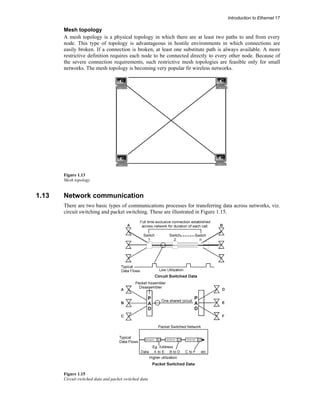
1.13 Network communication 
There are two basic types of communications processes for transferring data across networks, viz. 
circuit switching and packet switching. These are illustrated in Figure 1.15. 
Figure 1.15 
Circuit switched data and packet switched data
18 Practical Troubleshooting and Problem Solving of Ethernet Networks 
1.13.1 Circuit switching 
In a circuit switched process, a continuous connection is made across the network between the two 
different points. This is a temporary connection that remains in place as long as both parties wish to 
communicate, i.e. until the connection is terminated. All the network resources are available for the 
exclusive use of these two parties whether they are sending data or not. When the connection is 
terminated, the network resources are released for other users. A telephone call is an example of a 
circuit switched connection. 
The advantage of circuit switching is that the users have an exclusive channel available for the 
transfer of their data at any time while the connection is made. The obvious disadvantage is the cost 
of maintaining the connection when there is little or no data being transferred. Such connections 
can be very inefficient for the bursts of data that are typical of many computer applications. 
Packet switching 
Packet switching systems improve the efficiency of the data transmission by sharing one 
communications channel amongst many users. This is analogous to the efficiencies of the mail 
system. 
When you send a letter by mail, you post it in your local mailbox. At regular intervals the mail 
company collects all the letters and takes them to a central sorting facility where they are sorted in 
accordance with the addresses of their destinations. Letters for each destination are sent off in 
common mailbags to those locations, and are subsequently delivered in accordance with their 
addresses. Here we have economies of scale where many letters are carried at one time and are 
delivered by the one visit to the recipient’s street/locality. Efficiency is more important than speed, 
and some delay is normal, within acceptable limits. 
Messages are broken into a series of packets of a certain maximum size, each containing the 
destination and source addresses and a packet sequence number. The packets are sent over a 
common communications channel, possibly interleaved with those of other users. All the receivers 
on the channel check the destination addresses of all packets and accept only those carrying their 
address. Messages sent in multiple packets are reassembled in the correct order by the destination 
node. 
All packets for a specific destination do not necessarily all follow the same path. As they travel 
through the network they may be separated and handled independently from each other, but they 
eventually arrive at their correct destination. For this reason, packets often arrive at the destination 
node out of their transmitted sequence. Some packets may even be held up temporarily (stored) at a 
node, due to unavailable lines or technical problems that might arise on the network. When the time 
is right, the node then allows the packet to pass or to be ‘forwarded’.

Practical Troubleshooting and Problem Solving of Ethernet Networks

  • 1.
    SHANTARAM MAYADEO DEONREYNDERS EDWIN WRIGHT PRACTICAL TROUBLESHOOTING & PROBLEM SOLVING OF ETHERNET NETWORKS PRACTICAL TROUBLESHOOTING & PROBLEM SOLVING OF ETHERNET NETWORKS SHANTARAM MAYADEO DEON REYNDERS EDWIN WRIGHT REV
  • 2.
    1 Introduction toEthernet Objectives In this first chapter you will learn about: • The history of Ethernet • Relevant standards and standards institutions • Networking basics • The OSI reference model • The various TCP/IP protocols and their position within the OSI model 1.1 Introduction This workshop is aimed at practicing technicians, engineers, and others in commerce and industry that have been associated with the design, maintenance, or administration of Ethernet networks. The broad objective of this workshop is to make you current and confident in the basics as well as in the practical knowledge of computer networking in general, and Ethernet (including its industrial implementation) in particular. Associated topics that do not strictly fall under Ethernet, but can help to improve your knowledge in this area, have also been covered. This first chapter starts with a brief overview of some networking history, standards, standards organizations, and semantics related to Ethernet. The remaining sections of this chapter delve into some basics, and give you a conceptual framework for computer networks. 1.1.1 The origins of Ethernet University of Hawaii researcher Norman Abramson was one of the first to experiment with computer networking. In the late sixties, he experimented with the Aloha network, a radio-based communications network. The Aloha protocol allowed a station to transmit without deferring to any other transmissions. The transmitting station then waited for an acknowledgment and, if none was received, a collision with another station was assumed. The transmission station then backed off for a random time and re-transmitted.
  • 3.
    2 Practical Troubleshootingand Problem Solving of Ethernet Networks This kind of system resulted in approximately 18% utilization of the channel. Abramson next introduced assigned transmission slots synchronized by a master clock, which improved utilization to 37%. In the early seventies Bob Metcalfe (Xerox) improved on the Aloha system by using a mechanism that listened for channel activity before transmitting, and detected collisions. He used this new system to connect Alto computers and called the Alto Aloha network. In 1973 the name was changed to Ethernet. The name was derived from the ‘ether’ used by Alohanet as a transmission medium. ‘Ethernet’ became a registered trademark of Xerox. For a technology to become universally usable, its rules cannot be controlled by any single commercial enterprise. The technology has to be usable across a wide variety of equipment, and therefore has to be vendor-neutral. Realizing that Ethernet had immense potential for worldwide use, Metcalfe persuaded Xerox in 1979 to join with Digital (DEC) and Intel to form a consortium for standardizing such an open system. The joint efforts of Xerox, Digital and Intel, led by Metcalfe, refined the original technology into what was known as DIX Ethernet, Bluebook Ethernet or Ethernet II. Xerox agreed to let anybody use its patented technology for a small fee. Xerox even gave up its right to the trademark on the Ethernet name. Metcalfe started a company ‘3COM’ in 1979, to promote computer communications compatibility. Thus, Ethernet became the first vendor-neutral open LAN standard. The idea of sharing open source computer expertise for the benefit of everyone was a very radical notion at that time. The success of DIX Ethernet proved that the open source environment worked. Requirements began to emerge for an even more open environment to attain more and more capabilities, cross-vendor usability, and cost reductions. Cross-vendor usability required different platforms to recognize each other for communications and sharing of data. 1.1.2 Developments through the Eighties and Nineties The original Ethernet II used thick coaxial cable as a transmission medium, and although the use of Ethernet was spreading fast, there were problems in installing, connecting and troubleshooting thick coaxial cables. On a bus topology a cable fault will pull down the entire network. The twisted pair cable medium was developed in the late eighties, and enabled the use of a star topology. Such systems were now much easier and quicker to install and troubleshoot. This development really gave a boost to the Ethernet market. The structured cabling standard (using twisted pairs) developed in early nineties made it possible to provide highly reliable LANs. The original Ethernet networks were operating at 10 Mbps. This was fast at the time; in fact, Ethernet was faster than the computers connected to it. However, as computer speeds doubled every two years, traffic loads became heavy for 10 Mbps networks. This spurred development of higher speed versions and the standard for 100 Mbps was adopted in 1995. This was now based on twisted pair and fiber optic media systems. The new interfaces for such systems use an Auto- Negotiation protocol to automatically set speeds in consonance with the hubs to which the workstations are attached. As computer chips raced ahead in terms of clock speeds, developments in Ethernet kept pace and the 1000 Mbps (1Gbps) standard was launched around 1998. While the speeds kept increasing, there were developments in other relevant areas as well. The original half-duplex Ethernet could either transmit or receive data at a given time, but could not do both simultaneously. The full-duplex standard now made this possible, resulting in an effective bandwidth of 200 Mbps on 100 Mbps network. The latest development, 10 Gbps Ethernet, was released at the beginning of 2002.
  • 4.
    Introduction to Ethernet3 1.1.3 Which Ethernet are we talking about? The term Ethernet originally referred to the original LAN implementation by Xerox, Digital, and Intel. The IEEE 802.3 working group standardized operation of a CSMA/CD network that was functionally equivalent to (DIX) Ethernet II. There were, however, distinct differences between Ethernet II and IEEE 802.3. However, both are referred to as ‘Ethernet’. The only real legacy of Ethernet II to be dealt with today is the difference in the frame composition, specifically the ‘Type/Length’ field. Although it is normally dealt with by the software, it could nevertheless confuse the novice. Ethernet originally expanded and prospered in office environments. However, Ethernet networks in the industrial environment also gained importance. In these types of networks some of the shared and intercommunicating devices are not conventional computers, but industrial controllers and sensors for the measurement of process parameters. These industrial Ethernet networks have their own peculiarities, and will be dealt with under the ambit of ‘Industrial Ethernet’. Data transmission speeds of 100 Mbps (IEEE802.3u standard, a.k.a. Fast Ethernet) and 1000 Mbps (IEEE802.3z, a.k.a. Gigabit Ethernet) have been achieved. These faster versions will also be dealt with later in this manual. 1.2 Standards and Standards Institutions 1.2.1 Standards institutions ANSI, or the American National Standards Institute, is a non-profit private organization with the objectives of development, coordination, and publication of voluntary national standards. Although ANSI standards are voluntary, and since ANSI participates in global bodies such as the ISO, IEC etc., non-compliance with ANSI standards becomes non-compliance with world standards. The IEEE, or the Institute of Electrical and Electronic Engineers, develops standards for acceptance by ANSI, and ANSI in turn participates in the global standards bodies. The IEEE has been responsible for telecommunication and data communication standards for LANs, of which the most relevant for our purposes are the IEEE 802 series. The ISO, or International Organization for Standardization, located in Geneva, is a UN organization chartered to define standards in virtually all subjects except electrical or electronic subjects. The acronym for this organization is derived from its French name. The OSI model has been developed by the ISO, and lays down a common organizational scheme for network standardization. The IAB, or Internet Architecture Board, oversees technical development of the Internet. The IETF and IRTF, two task forces set up by IAB, were responsible for standards such as the Internet Protocol (IP). The IEC, or International Electro-technical Commission, located in Geneva, sets international standards on electric and electronic subjects. 1.2.2 Compliance with standards Not all Ethernet equipment necessarily conform to the official IEEE standard. For example, twisted-pair media systems were vendor innovations (de facto standards), which later became specified media systems (de jure standards) in the IEEE standard. However, if you are a network manager responsible for maximum stability and predictability given different vendor equipment and traffic loads, then preference should be given to compliant and standard specified equipment. Having said this, users often have to settle for de facto standards. This is often the case with equipment such as routers, switches and Industrial Ethernet where the official standard is lacking and vendors have to innovate out of necessity. This is particularly true for the leading innovators. A good example is the RJ-45 connector, which is unsuitable for Industrial applications but where a
  • 5.
    4 Practical Troubleshootingand Problem Solving of Ethernet Networks suitable alternative is not (yet) included in the standard. In this case vendors often use DB or M12 connectors. 1.3 Networking basics 1.3.1 Introduction An overview of the basics of networking in general will now be given so that readers get (a) a broad perspective of the basic concepts underlying networking technologies, and (b) a sense of the interrelationships between the various aspects of networking technologies. Network definition A ‘network’ is a system comprising software, hardware, and rules that allow computers, computer peripherals, and other electronic devices to communicate with each other so as to share information and resources, collaborate on a task, and even communicate directly with each other through individually addressed messages. Classifications of computer networks There is no generally accepted classification of computer networks, but transmission technology and physical/geographical areas of coverage are two ways to classify them. 1.3.2 Classification based on transmission technology There are two broad types of transmission technology. They are ‘broadcast’ and ‘point-to point’. A broadcast network has a single communication channel, shared by all devices on that network. The sent messages contain an address field specifying the device for which they are intended, and is received by all devices. They check the address field and discard the message if it is not specifically intended for them. If the address in the address field matches with the device address, the message is processed. LAN systems using coaxial cable as medium are examples of broadcast networks. A point-to-point network involves dedicated transmission paths between individual pairs of devices. A message or a packet on this network may have to go to its destination via one or more intermediate devices. Multiple routes to the destination are possible, and routing algorithms often play an important role. IBM Token Ring and FDDI are examples of networks using point-to-point technology. 1.3.3 Classification based on geographical area covered Networks can be classified based on the geographical area that they cover. Physical locations and distances are important because different methods are used for different distances. Local Area Networks (LANs) are located in a single building or on a campus of a few kilometers in radius. LANs differ from other networks in terms of their size, transmission technology, and their topology. The limits of worst-case transmission time are known in advance, as the LAN is restricted in size. The transmission technique is primarily based on broadcast methods and topologies can be bus, star or ring. In these configurations only one machine is allowed to broadcast at a given time. An arbitration mechanism, either centrally located or distributed, resolves conflicts when two or more stations want to transmit at the same time. Metropolitan Area Networks, MANs, cover a greater area than LANs and can extend to a whole city or, say, a circle with a radius of 50 km. A MAN typically has two fiber optic rings or uni-directional buses to which all computers are connected. The direction of transmission on the two buses could be opposite to each other. Wide Area Networks or WANs incorporate LANs that are great distances apart; distances ranging from a few kilometers to thousands of kilometers. WANs normally use public telecommunication systems to provide cost-effective communication between LANs. Since such communication links are provided by independent third party utilities, they are referred as a communications cloud. Routers accept messages at LAN speed and transmit them across the communications cloud at the
  • 6.
    Introduction to Ethernet5 speed of the communication link to the LAN at the other end. The remote LAN then takes over and passes on the message at LAN speed once more. For mission-critical and time-critical applications, WANs are considered less reliable due to the delays in transmission through the communication cloud. Virtual Private Networks or VPNs are WANs that use the Internet infrastructure to interconnect two or more LANs. Since Internet traffic is visible to all other users, encryption technology has to be used to maintain privacy of communication. 1.4 Interoperability and internetworking Interoperability refers to the ability of a network to transfer information between different communication systems, irrespective of the way those systems are supported. It has also been defined as the capability of using similar devices from different manufacturers as effective replacements for each other without losing functionality or sacrificing the degree of integration with the host system. Internetworking is a term used to describe the interconnection of different networks in such a way as to retain their own status as networks. What is important in this concept is that internetworking devices be made available so that the exclusivity of each of the linked networks is retained, but that the ability to share information and physical resources, if necessary, becomes both seamless and transparent to the end user. 1.5 Network architecture and protocols A protocol is defined as a set of rules for exchanging data in a manner that is understandable to both the transmitter and the receiver. There must be a formal and agreed set of rules if the communication is to be successful. The rules generally relate to such responsibilities as error detection and correction methods, flow control methods, and voltage and current standards. In addition, other properties such as the size of data packets are important in LAN protocols. Another important responsibility of protocols is the method of routing the packet, once it has been assembled. In a self-contained LAN this is not a problem since all packets will eventually reach their destinations. However, if the packet is to be routed across networks, i.e., on an internetwork (such as a WAN) then routing decisions must be made. Network protocols are conceptually organized as a series of layers, one above the other. The names, the number of layers and the function(s) of each layer can vary from one type of network type to another. In any type of network, however, the purpose of any layer is to provide certain services to higher layers, hiding from these higher layers the details of the lower layers. Layer ‘n’ of a computer communicates with layer ‘n’ of another computer, the communication being carried out as per the rules of the layer ‘n’ protocol. The communication carried out between the two ‘n’ layers takes place on a logical plane. Physically, data is not directly transferred between these layers. Instead, each layer passes data and control information to the layer immediately below it, until the lowest layer is reached. The data is then transmitted across the medium to the receiving side, where it is passed upwards layer by layer until it reaches layer ‘n’. Between each pair of layers is an interface that specifies which services the lower layer offers to the upper layer. A clean and unambiguous interface simplifies replacement, substituting implementation of one layer with a completely different implementation (if the need arises), because all that is required of the new implementation is that it offers exactly the same services to its upper layer as was done in the previous case. A network architecture is nothing but a set of layers and protocols. The specifications of the architecture must contain sufficient information to allow implementers to write code or specify hardware for each layer so that it will correctly obey the appropriate protocol. Details of implementation and specification of interfaces are, however, not part of the network architecture. It
  • 7.
    6 Practical Troubleshootingand Problem Solving of Ethernet Networks is not even necessary that interfaces on all machines be the same, as long as each machine correctly uses and obeys all protocols. A group of layered protocols is called a protocol stack. 1.6 Layer design parameters There are some parameters or design aspects that are common to the design of several layers. Some of these parameters are as follows: • In a network with many computers, some of which may be carrying out multiple processes, a method is needed for a process on one machine to identify the process on another machine with whom it wishes to communicate. A method of addressing specific processes is therefore needed. • Direction of data transfer is another design aspect that needs to be addressed. Data may travel in one direction only (as in simplex transmission), or it may travel in both directions but not simultaneously (as in half-duplex transmission), or in both directions simultaneously (as in full-duplex transmission). The number of logical channels and their prioritizing also needs to be determined • Error control involves error detection, error correction, informing the sender about correct or incorrect receipt of the message, and re-transmitting the message if a previous copy has been ‘lost’ • Sequencing parts of a message in correct order while sending and their correct reassembly on receipt is another design issue. The matching of a fast sender of data and a slow receiver of data by methods such as agreed-upon transmission rate also needs to be taken into account • Routing decisions in the case of multiple paths between source and destination is another aspect of layer design. Sometimes this decision is split over two or three layers 1.7 Entities, SAPs, IDUs/ SDUs Entities are active elements in each layer. They can be software entities (such as processes) or hardware entities (such as intelligent I/O chips). Entities on the same layer on different machines are called peer entities. Entities in layer ‘n’ implement services used by layer (n +1). Here layer n is the service provider and layer n+1 is the service user. Services are rendered and received at SAPs (Service Access Points) that have unique addresses. When two layers exchange information, the layer (n+1) entity passes on an IDU (Interface Data Unit) to the entity in layer n. An IDU consists of an SDU (Service Data Unit) and control information. It is this SDU that is passed on to the peer entity of the destination machine. 1.8 Connectionless and connection-oriented service These are types of services offered to a given layer by the layer below it. A connection-oriented service is like a telephone system that involves establishing a connection, using the connection, and releasing the connection. A connectionless service, on the other hand is like a postal service where messages are ‘sent and forgotten’. These services are classified according to quality or reliability. A reliable service involves getting an acknowledgment from the receiver, which may be necessary in some cases, but will cause more traffic and delay, for example as in the case of a registered post parcel. An unreliable service is not necessarily ‘bad’, but simply one in which acknowledgements are not obtained. 1.9 The Open Systems Interconnection (OSI) model 1.9.1 Overview Computer networks are complex systems made up of hardware and software components performing various functions. These functions have to be performed in conformity with certain
  • 8.
    Introduction to Ethernet7 rules so that functional conflicts are avoided. The rules have to be such that the interfacing interconnections between all these hardware and software components are open, transparent, and vendor neutral. A model or framework is necessary to understand how the various hardware and software components mesh with each other. The Open Systems Interconnection (OSI) reference model was developed for this purpose. The International Organization for Standardization (OSI) developed this model in 1977-1978 and it predates efforts by the IEEE on the Ethernet standard. The OSI model is a conceptual framework to explain how the complex interactions take place among the various subsystems of a network. It defines rules governing the following issues: • Methods by which network components contact and communicate with each other • Methods by which a network component knows when to transmit a message • Mechanisms to ensure correct receipt of a message by a specific recipient • Logical and physical arrangement of the physical transmission media and its connections • Ensuring a proper flow of data • Arrangement of bits that make up the data The OSI model defines seven conceptual layers arranged hierarchically (see Figure 1.1). The functional jurisdiction of each layer is made separate and distinct from that of any other layer. Each layer performs a task or some sub-task. The rule-based computer processes that perform these tasks are called ‘protocols’. Since the layers are arranged hierarchically above each other, the protocols corresponding to each of the layers also are arranged in similar hierarchical stacks. When two computers are connected to a network to communicate, both must have the same stack of protocols running on it, even if the computers are dissimilar in other aspects such as operating system, hardware configuration etc. When a message is sent from an application (e.g. a client) on one computer to an application (e.g. a server) on another computer, the client passes the message down the stack of protocols from top to bottom on the first computer, then the message passes across the medium between the two computers, and finally it proceeds up the stack on the receiving computer, where it is delivered to the server. Figure 1.1 OSI layers A message is composed in the sending application and then passed down to the Application layer, from where it travels down to the bottom layer of the stack. As it travels down, each intermediate layer adds its own header (consisting of relevant control information) until it reaches the lowest layer. From here, the message with headers travels to the destination machine. As it proceeds up the stack of the receiving machine, each successive layer strips off the header of its corresponding
  • 9.
    8 Practical Troubleshootingand Problem Solving of Ethernet Networks peer layer on the sending computer until it reaches the Application layer. From there it is delivered to the receiving application. This is schematically shown in Figure 1.2. Please note that application itself does NOT reside at the Application layer, but above it. Figure 1.2 Adding and peeling of headers As the sending application, (‘process A’), communicates with the receiving application, (‘process B’), the actual information flows in a ‘U’ fashion down the stack on the one side, across the medium, and then up the stack on the other side. However, each protocol in the stack is ‘horizontally’ (logically) communicating with its peer in the opposite stack by means of header information. This is illustrated in Figure 1.3. Figure 1.3 Peer layers talking to each other
  • 10.
    Introduction to Ethernet9 1.9.2 Functions of the OSI layers Application layer This is the uppermost layer and the end user really ‘sees’ this layer only, although all other layers are working in the background to bring the communication to its final form. This layer provides services directly for user applications such as clients and servers for file transfers, web services, e-mail, etc. It allows applications on one machine to talk to applications on another machine. The Application layer services are more varied than those in other layers are because the entire range of application possibilities is available here. Presentation layer This layer is responsible for presenting information in a manner suitable for the Application or the user dealing with the information. It translates data between the formats the network requires and the format the user expects. Its services include protocol conversion, data translation, encryption, compression, character set conversion, interpretation of graphic commands etc. In practice, this layer rarely appears in a pure form, and is not very well defined amongst the OSI layers. Some of its functions are encroached upon by the Application and Session layers. Session layer This layer provides services such as synchronization and sequencing of the packets in a network connection, maintaining the session until transmission is complete, and inserting checkpoints so that, in the event of a network failure, only the data sent after the point of failure need be re-sent. Transport layer The Transport layer is responsible for providing data transfer at an agreed-upon level of quality such as transmission rates and error rates. To ensure delivery, outgoing packets could be assigned numbers in sequence. The numbers would be included in packets that are transmitted by the lower layers. The Transport layer at the receiving end would then check the packet numbers to ensure that all packets have been delivered, and put the packets in the correct sequence for the recipient. Thus, this layer ensures that packets are delivered error free, in sequence, and with no losses or duplications. It breaks large messages from the Session layer into packets to be sent to the destination and reassembles these packets to be presented to the Session layer. This layer also typically sends acknowledgments to the originator for messages received. The Transport layer uses the network layer below to establish a route between the source and destination. The transport layer is crucial in many ways, because it sits between the heavily application-dependent upper layers and the application-independent lower layers. It provides an end-to-end check of the message integrity, above the level of the routing and packet handling. Network layer Layers below the Transport layer are sometimes called subnet layers, and the Network layer is the first among these. The Network layer decides on routes and sends packets to destinations that are on different subnets, i.e. separated from the sending device by one or more routers. Routing decisions are implemented here. This layer may choose a certain route to avoid congested routes. Routers operate in the Network layer. Data Link layer The Data Link layer is responsible for creating, transmitting, and receiving data packets. It provides services for the various protocols at the Network layer, and uses the Physical layer to transmit or receive messages. It creates packets appropriate for the network architecture being used. Requests and data from the Network layer are part of data in these packets (or, frames as they are called). Network architectures such as Ethernet, ARCnet, Token Ring, and FDDI encompass the Data Link and Physical layers, which is why these architectures are said to support services at the Data Link level.
  • 11.
    10 Practical Troubleshootingand Problem Solving of Ethernet Networks This layer provides for error-free transfer of frames from one computer to another. A Cyclic Redundancy Check (CRC) added to the data frame can help in identifying damaged frames, and the corresponding Data Link layer in the destination computer can request that the information be re-sent. On Ethernet, implementations using shared media (such as coax or a shared hub) receive all transmitted data. The Data Link layers in all these devices check whether the frame destination address matches their own, and discards packets of which the addresses do not match. The IEEE has split this layer in two sub-layers called the Logical Link Control (LLC) layer and Media Access Control (MAC) layer. These layers will be discussed at length in a following chapter. Physical layer The Physical layer (the lowest of the seven layers) gets data packets from the Data Link layer and converts them into a series of electrical signals (or optical signals in case of optical fiber cabling) that represent ‘0’ and ‘1’ values in a digital transmission. These signals are sent via a transmission medium to the physical layer at the destination computer, which converts the signals back into a series of bit values. These values are grouped into packets and passed up to the Data Link layer of the receiving machine: Matters managed or addressed at the Physical layer include: • Physical topology, i.e. physical layout of networks such as bus, star, ring, or hybrid networks, type of media etc. • Connection types such as point-to-point and multipoint, pin assignments in connections • Bit synchronization • Baseband and broadband transmissions, which determine how available media bandwidth is used • Multiplexing, involving the combining of more than one data channel into one • Termination of cables to prevent reflection of signals • Encoding schemes for ‘0’ and ‘1’values, etc 1.10 The TCP/IP reference model The US Department of Defense (DOD) sponsored a research network called ARPANET. ARPANET eventually interconnected hundreds of government establishments and universities, first through leased telephone lines and later through radio networks and satellite links. Figure 1.4 OSI and TCP/IP layers Whereas the OSI model was developed in Europe by the International Organization for Standardization (ISO), the ARPA model (also known as the DOD or TCP/IP model) was developed in the USA by ARPA. Although they were developed by different bodies and at different points in time, both serve as models for a communications infrastructure and hence provide ‘abstractions’ of the same reality. The remarkable degree of similarity is therefore not surprising.
  • 12.
    Introduction to Ethernet11 Whereas the OSI model has 7 layers, the ARPA model has 4 layers. The OSI layers map onto the ARPA model as follows: • The OSI Session, Presentation and Applications layers are contained in the ARPA Process/Application layer • The OSI Transport layer maps onto the ARPA Host-to-host layer (a.k.a. the Service layer) • The OSI Network layer maps onto the ARPA Internet layer • The OSI Physical and Data Link layers map onto the ARPA Network Interface layer 1.11 OSI and IEEE sub-layers The Ethernet standard concerns itself with the Data Link layer in the OSI model and the Physical layer below it. The IEEE thought it fit to subdivide in the Data Link and Physical layers to add more clarity. The mapping of the IEEE/Ethernet sub-layers to the OSI layers is shown schematically in Figure.1.5. Figure 1.5 IEEE sub-layers The Data Link layer is subdivided into the Logical Link Control (LLC) and Media Access Control (MAC) sub-layers. The LLC sub-layer (IEEE 802.2) identifies the data carried in a frame and is used with all IEEE 802 LAN standards. The MAC sub-layer provides for shared access to the network and implements the Medium Access Control required for a specific LAN standard, such as CSMA/CD for Ethernet. One of the well-known attributes of the MAC function is the unique 48-bit MAC address of each network interface, typically assigned by the manufacturer. These MAC addresses are used to facilitate communication between computers on all IEEE 802 LAN systems. The Physical layer is divided into a Physical Signaling sub-layer and a Media Specification sub-layer. The implementation of these sub-layers differs between 10 Mbps, 100 Mbps, Gigabit, and 10 Gigabit Ethernet. Each IEEE 802.3 Physical sub-layer implementation specification has a three-part name that identifies its characteristics. These are (a) LAN speed in Mbps, (b) whether transmission is baseband or broadband and (c) the physical media type.
  • 13.
    12 Practical Troubleshootingand Problem Solving of Ethernet Networks 1.12 Network topologies 1.12.1 Broadcast and point-to-point topologies The way the nodes are interconnected to form a network is known as its topology. There are many topologies available but they form two basic types, viz. broadcast and point-to-point. Broadcast topologies are those where the message ripples out from the transmitter to reach all nodes. There is no active regeneration of the signal by the nodes and so signal propagation is independent of the operation of the network electronics. This limits the size of such networks. Figure.1.6 shows an example of a broadcast topology. Figure 1.6 Broadcast topology In a point-to-point topology, however, each node is communicating directly with only one node. That node may actively regenerate the signal and pass it on to another node. Such networks have the capability of being made much larger. Figure 1.7 shows some examples of point-to-point topologies. Figure 1.7 Point-to-point topology 1.12.2 Logical and physical topologies A physical topology defines the wiring layout for a network. This specifies how the elements in the network are connected to each other electrically. This arrangement will determine what happens if a node on the network fails. Physical topologies fall into three main categories: bus, star, and ring. Combinations of these can be used to form hybrid topologies in order to overcome weaknesses or restrictions in one or other of these three component topologies. The logical topology refers to how messages are passed around within the network. In some cases this may differ from the physical topology. Take, for example, the star wired ring in Figure 1.11.
  • 14.
    Introduction to Ethernet13 The physical layout is in the form of a star, but the messages are forwarded in a circular fashion, hence the logical topology is a ring. Bus (multi-drop) topology A bus describes a network in which each node is connected to a common single communication channel or ‘bus’. This bus is sometimes called a backbone or a trunk line. Every node can hear each message packet as it goes past. Transmitted packets travel in both directions along the bus, and need not go through the individual nodes, as in a point-to-point system. Instead, each node checks the destination address included in the message packet to determine whether that packet is intended for the specific node. When the signal reaches the end of the bus, an electrical terminator absorbs it to keep it from reflecting back again along the bus cable, possibly interfering with other messages already on the bus. Both ends of the bus must be terminated. If the bus cable is too long, it may be necessary to boost the signal strength using a repeater. The maximum length of the bus is limited by the size of the time interval that constitutes ‘simultaneous’ packet reception. Figure 1.8 illustrates the bus topology. Figure 1.8 Bus topology Bus topologies offer the following advantages: • A bus uses relatively little cable compared to other topologies, and arguably has the simplest wiring arrangement • Since nodes are connected by high- impedance taps across a backbone cable, it is easy to add or remove nodes from a bus. This makes it easy to extend a bus topology • Architectures based on this topology are simple and flexible • The broadcasting of messages is advantageous for one-to-many data transmissions The bus topology disadvantages are: • There can be a security problem, since every node may see every message, even those for whom it is not destined • Troubleshooting is difficult, since the fault can be anywhere along the bus • There is no automatic acknowledgement of messages, since messages get absorbed at the end of the bus and do not return to the sender • The bus cable can be a bottleneck when network traffic gets heavy. This is because nodes can spend much of their time trying to access the network Star (hub) topology In a star topology multiple nodes are connected to a central component, generally known as a hub. The hub is usually is just a wiring center, i.e. a common termination point for the nodes, with a single connection continuing from the hub. In some cases the hub may actually be a file server, with all the nodes (e.g. terminals) attached directly to the server. As a wiring center, a hub may be connected to the file server or to another hub.
  • 15.
    14 Practical Troubleshootingand Problem Solving of Ethernet Networks All message packets going to and from each node must pass through the hub to which the node is connected. The telephone system is the best-known example of a star topology, with lines to individual customers coming from a central telephone exchange location. An example of a star topology is shown in Figure 1.9. Figure 1.9 Star topology The star topology advantages are: • Troubleshooting and fault isolation is easy • It is easy to add or remove nodes, and to modify the cable layout • Failure of a single node does not isolate any other node • The inclusion of an intelligent hub allows remote monitoring of traffic for management purposes The star topology disadvantages are: • If the hub fails, the entire network fails. Sometimes a backup hub is included, to make it possible to deal with such a failure • A star topology requires a lot of cabling Ring topology A ring topology is distinguished by the fact that message packets are transmitted sequentially from node to node, in the order in which the nodes are connected, and as such it is an example of a point-to- point system. Nodes are arranged in a closed loop, so that the initiating node is the last one to receive a packet. Information traverses a one-way path, so that a node receives packets from exactly one node and transmits them to exactly one other node. A message packet travels around the ring until it returns to the node that originally sent it. In a ring topology each node acts as a repeater, boosting the signal before re-transmitting it. Each node checks whether the message packet’s destination address matches its own address. When the packet reaches its destination, the destination node accepts the message, and then sends it onwards to the sender in order to acknowledge receipt. Ring topologies use token passing to control access to the network, therefore, the token is returned to the sender with the acknowledgement. The sender then releases the token to the next node on the network. If this node has nothing to say, the node passes the token on to the next node, and so on. When the token reaches a node with a packet to send, that node sends its packet. Physical ring
  • 16.
    Introduction to Ethernet15 networks are rare, because this topology has considerable disadvantages compared to a more practical star-wired ring hybrid, which is described later. Figure 1.10 Ring topology The ring topology advantages are: • A physical ring topology has minimal cable requirements • No wiring center or closet is needed • The message can be acknowledged automatically • Each node can regenerate the signal The ring topology disadvantages are: • If any node goes down, the entire ring goes down • Troubleshooting is difficult because communication is only one-way • Adding or removing nodes disrupts the network • There is a limit on the distance between nodes, depending on the transmission medium and driver technology used 1.12.3 Hybrid topologies Besides these three main topologies, some of the more important variations will now be considered. Once again, it should be clear that these are just variations, and should not be considered as topologies in their own right. Star-wired ring A star-wired ring topology is a hybrid physical topology that combines features of the star and ring topologies. Individual nodes are connected to a central hub, as in a star network. Within the hub, however, the connections are arranged into an internal ring. Thus, the hub constitutes the ring, which must remain intact for the network to function. The hubs, known as Multi-station Access Units (MAUs) in IBM Token Ring network terminology, may be connected to other hubs. In this arrangement, each internal ring is opened and connected to the attached hubs, to create a larger, multi-hub ring. The advantage of using star wiring instead of simple ring wiring is that it is easy to disconnect a faulty node from the internal ring. The MAU is specially designed to bypass a connector if an attached node is disconnected physically or electrically. By closing the circuit, the ring remains intact, but with one less node. In Token Ring networks a secondary ring path can be established and used if part of the primary path goes down. The star-wired ring is illustrated in Figure 1.11.
  • 17.
    16 Practical Troubleshootingand Problem Solving of Ethernet Networks Figure 1.11 Star wired ring The advantages of a star-wired ring topology include: • Troubleshooting, or fault isolation, is relatively easy • The modular design makes it easy to expand the network, and makes layouts extremely flexible • Individual hubs can be connected to form larger rings • Wiring to the hub is flexible The disadvantages of a star-wired ring topology include: • Configuration and cabling may be complicated because of the extreme flexibility of the arrangement Distributed star topology A distributed star topology is a physical topology that consists of two or more hubs, each of which is the center of a star arrangement. This type of topology is common, and it is generally known simply as a star topology. A good example of such a topology is an ARCnet network with at least one active hub and one or more active or passive hubs. The 100VG Any LAN utilizes a similar topology as shown in Figure.1.12. Figure 1.12 Cascaded hubs
  • 18.
    Introduction to Ethernet17 Mesh topology A mesh topology is a physical topology in which there are at least two paths to and from every node. This type of topology is advantageous in hostile environments in which connections are easily broken. If a connection is broken, at least one substitute path is always available. A more restrictive definition requires each node to be connected directly to every other node. Because of the severe connection requirements, such restrictive mesh topologies are feasible only for small networks. The mesh topology is becoming very popular fir wireless networks. Figure 1.13 Mesh topology 1.13 Network communication There are two basic types of communications processes for transferring data across networks, viz. circuit switching and packet switching. These are illustrated in Figure 1.15. Figure 1.15 Circuit switched data and packet switched data
  • 19.
    18 Practical Troubleshootingand Problem Solving of Ethernet Networks 1.13.1 Circuit switching In a circuit switched process, a continuous connection is made across the network between the two different points. This is a temporary connection that remains in place as long as both parties wish to communicate, i.e. until the connection is terminated. All the network resources are available for the exclusive use of these two parties whether they are sending data or not. When the connection is terminated, the network resources are released for other users. A telephone call is an example of a circuit switched connection. The advantage of circuit switching is that the users have an exclusive channel available for the transfer of their data at any time while the connection is made. The obvious disadvantage is the cost of maintaining the connection when there is little or no data being transferred. Such connections can be very inefficient for the bursts of data that are typical of many computer applications. Packet switching Packet switching systems improve the efficiency of the data transmission by sharing one communications channel amongst many users. This is analogous to the efficiencies of the mail system. When you send a letter by mail, you post it in your local mailbox. At regular intervals the mail company collects all the letters and takes them to a central sorting facility where they are sorted in accordance with the addresses of their destinations. Letters for each destination are sent off in common mailbags to those locations, and are subsequently delivered in accordance with their addresses. Here we have economies of scale where many letters are carried at one time and are delivered by the one visit to the recipient’s street/locality. Efficiency is more important than speed, and some delay is normal, within acceptable limits. Messages are broken into a series of packets of a certain maximum size, each containing the destination and source addresses and a packet sequence number. The packets are sent over a common communications channel, possibly interleaved with those of other users. All the receivers on the channel check the destination addresses of all packets and accept only those carrying their address. Messages sent in multiple packets are reassembled in the correct order by the destination node. All packets for a specific destination do not necessarily all follow the same path. As they travel through the network they may be separated and handled independently from each other, but they eventually arrive at their correct destination. For this reason, packets often arrive at the destination node out of their transmitted sequence. Some packets may even be held up temporarily (stored) at a node, due to unavailable lines or technical problems that might arise on the network. When the time is right, the node then allows the packet to pass or to be ‘forwarded’.