Networking
contents
 Basic intro
 Routing and routed protocols – RIP
 Redistribution of protocols –EIGRP & OSPF
 NAT
 ACL
 Frame-Relay
 VPN
 BGP
 Implementation on project
Basic Introduction to
Technology
What is Network?
In one network more than one computer connected with each other through centralized device. They can
share files and resources with each other.
What is networking ?
Networking, also known as computer networking, is the practice of transporting and exchanging data
between nodes over a shared medium in an information system.
Networking Devices
Hub
Hub is centralized device, which is used to
connect multiple workstations. it has no
special kind of memory. It simply receives the
frame (data) and forwards it to all its nodes
except the receiving node. It always performs
broadcasting.
Switch
Switch is also used to connect multiple workstations. Switch is
more intelligent than hub. It has special kind of memory called
mac address/filter/lookup table. Switch reads mac addresses.
Switch stores mac addresses in its filter address table. Switch
when receives frame, it reads the destination mac address and
consult with its filter table. If he has entry in its filter table
then he forwards the frame to that particular mac address, if
not found then it performs broadcasting to all its connected
nodes.
Networking Devices
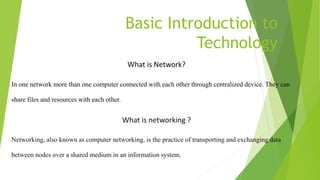
Router
Router is hardware device, which is used to
communicate two different networks. Router
performs routing and path determination. It does
not perform broadcast information. It is is a
network layer device which also tells us the best
path to the destination
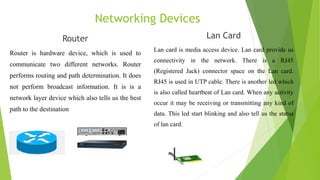
Lan Card
Lan card is media access device. Lan card provide us
connectivity in the network. There is a RJ45
(Registered Jack) connector space on the Lan card.
RJ45 is used in UTP cable. There is another led which
is also called heartbeat of Lan card. When any activity
occur it may be receiving or transmitting any kind of
data. This led start blinking and also tell us the status
of lan card.
Networking Cables
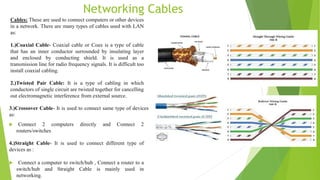
Cables: These are used to connect computers or other devices
in a network. There are many types of cables used with LAN
as:
1.)Coaxial Cable- Coaxial cable or Coax is a type of cable
that has an inner conductor surrounded by insulating layer
and enclosed by conducting shield. It is used as a
transmission line for radio frequency signals. It is difficult too
install coaxial cabling.
2.)Twisted Pair Cable: It is a type of cabling in which
conductors of single circuit are twisted together for cancelling
out electromagnetic interference from external source.
3.)Crossover Cable- It is used to connect same type of devices
as:
 Connect 2 computers directly and Connect 2
routers/switches
4.)Straight Cable- It is used to connect different type of
devices as :
 Connect a computer to switch/hub , Connect a router to a
switch/hub and Straight Cable is mainly used in
networking.
IPv4
IP address : An IP address is a unique address
that identifies a device on the internet or a local
network. IP stands for "Internet Protocol," which is
the set of rules governing the format of data sent via
the internet or local network.
IPv4:It is 32 bit numerical number value which we assign to
every node ports in a network. It has two parts network part
and host part. Network part could not change and host part
cannot be sane in a network. There are mainly 5 classes of
IPv4 addresses:
What is Routing ?
 The process of transferring data from one local area network to another
 Layer 3 devices
 Routed protocol Enables to forward packet from one router to another – Ex – IP, IPX
 Routing protocol sends and receives routing information packets to and from other routers
– Ex -RIP, OSPF , IGRP
 Routing protocols gather and share the routing information used to maintain and update
routing tables.
 That routing information is in turn used to route a routed protocol to its final destination
Types of Routing
 Static routing - network administrator configures information
about remote networks manually. They are used to reduce overhead
and for security.
 R1(config)#ip route network [mask]
{address | interface}[distance] [permanent]
 Dynamic routing - information is learned from other routers, and
routing protocols adjust routes automatically.
 Default routing:A default route defines where packets will be sent
if no specific route for the destination network is listed in the
routing table. If no default route is set, the router will discard all
packets with destination addresses not found its routing table.
RIP
 Routing Information Protocol (RIP) is a true distance-vector routing protocol.
 It sends the complete routing table out to all active interfaces every 30 seconds
 RIP only uses hop count to determine the best way to a remote network
 It has a maximum allowable hop count of 15
 AD is 120
 Bellman-ford algorithm
 Works well in small networks, but it’s inefficient on large networks
 RIP version 1 uses only classful routing, which means that all devices in the
network must use the same subnet mask
 RIP version 2 does send subnet mask information with the route updates. This
is called classless routing.
RIP commands and Routing Table
EIGRP
 Enhanced Interior Gateway Routing Protocol (EIGRP) is a Cisco-proprietary
routing protocol based on Interior Gateway Routing Protocol (IGRP).
 EIGRP supports:
 Rapid convergence
 Reduced bandwidth usage
 Multiple network-layer protocols
 Released in 1994, Unlike IGRP, which is a classful routing protocol, EIGRP
supports CIDR and VLSM.
 it is probably one of the two most popular routing protocols in use today.
 Compared to IGRP, EIGRP boasts faster convergence times, improved
scalability, and superior handling of routing loops.
 EIGRP is often described as a hybrid routing protocol, offering the best of
distance vector and link-state algorithms.
eigrp commands
 Configure EIGRP:
 Use the following command to enable EIGRP on RouterA:
RouterA(config)#router EIGRP 100
 Use the following commands to specify the networks directly
connected to the router:
RouterA(config-router)#network 192.168.11.0
RouterA(config-router)#network 192.168.22.0
ospf
 OSPF is an open standards routing protocol
 This works by using the Dijkstra algorithm
 OSPF provides the following features:
 Minimizes routing update traffic
 Allows scalability
 Has unlimited hop count
 Supports VLSM/CIDR
Ospf design
 Each router connects to the backbone called area 0, or
the backbone area.
 Routers that connect other areas to the backbone within
an AS are called Area Border Routers (ABRs). One
interface must be in area 0.
 OSPF runs inside an autonomous system, but can also
connect multiple autonomous systems together. The
router that connects these ASes together is called an
Autonomous System Boundary Router (ASBR).
OSPF Commands
 Configure OSPF:
 Use the following command to enable EIGRP on RouterA:
RouterA(config)#router ospf 100
 Use the following commands to specify the networks directly
connected to the router:
RouterA(config-router)#network 192.168.11.0 0.0.0.255
RouterA(config-router)#network 192.168.22.0 0.0.0.255
Routing Table of OSPF
Access Control Lists (ACL)
Access-list (ACL) is a set of rules defined for controlling network traffic and
reducing network attacks. ACLs are used to filter traffic based on the set of
rules defined for the incoming or outgoing of the network.
Type of ACL –
There are two main different types of Access-list namely:
Standard Access-list –
These are the Access-list that are made using the source IP address only.
These ACLs permit or deny the entire protocol suite. They don’t distinguish
between the IP traffic such as TCP, UDP, HTTPS, etc. By using numbers 1-99
or 1300-1999, the router will understand it as a standard ACL and the
specified address as the source IP address.
Extended Access-list –
These are the ACL that uses source IP, Destination IP, source port, and
Destination port. These types of ACL, we can also mention which IP traffic
should be allowed or denied. These use range 100-199 and 2000-2699.
Conf t
access-list 99 deny 192.168.10.0 0.0.0.255
Access-list 99 permit any
Int s 0/0/1
Ip access-group 99 in
NAT
 To access the Internet, one public IP address is
needed, but we can use a private IP address in our
private network. The idea of NAT is to allow
multiple devices to access the Internet through a
single public address. To achieve this, the
translation of a private IP address to a public IP
address is required. Network Address Translation
(NAT) is a process in which one or more local IP
address is translated into one or more Global IP
address and vice versa in order to provide Internet
access to the local hosts.
Types of NAT
 There are different types of NAT that can be
used, which are
 Static NAT
 Dynamic NAT
 Overloading NAT with PAT (NAPT)
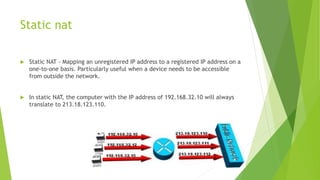
Static nat
 Static NAT - Mapping an unregistered IP address to a registered IP address on a
one-to-one basis. Particularly useful when a device needs to be accessible
from outside the network.
 In static NAT, the computer with the IP address of 192.168.32.10 will always
translate to 213.18.123.110.
Dynamic NAT
 Dynamic NAT - Maps an unregistered IP address to a registered IP address from
a group of registered IP addresses.
 In dynamic NAT, the computer with the IP address 192.168.32.10 will translate
to the first available address in the range from 213.18.123.100 to
213.18.123.150.
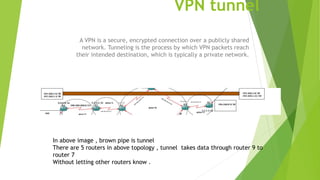
VPN tunnel
A VPN is a secure, encrypted connection over a publicly shared
network. Tunneling is the process by which VPN packets reach
their intended destination, which is typically a private network.
In above image , brown pipe is tunnel
There are 5 routers in above topology , tunnel takes data through router 9 to
router 7
Without letting other routers know .
Implementation of tunnel
At router 9 :
interface Tunnel100
ip address 10.0.0.1 255.0.0.0
tunnel source Serial0/0
tunnel destination 200.200.206.1
At router 7:
interface Tunnel100
ip address 10.0.0.2 255.0.0.0
tunnel source Serial0/0
tunnel destination 200.200.208.1
NAT IMPLEMENTETATION
 NAT(Network Address Translation) is done at R8.
It is applied on it to provide the security to the
connected branch. A Local PC is connected with it.
 That local PC can ping the entire network but the
entire network can’t ping that private PC.
 Commands that applied on R8:
 access-list 1 permit 192.168.10.0 0.0.0.255
 ip nat inside source list 1 interface Serial0/0
overload
 ip nat inside source static 192.168.10.100
200.200.207.3
 Enabling the NAT on interfaces:
interface FastEthernet1/0
ip nat inside
interface Serial0/0
ip nat outside
ACL implementation
 We have Applied standard ACL on the Router 8 to deny
the network of 200.200.209.0 which is in the interface of
R10.
 access-list 7 deny 200.200.209.0 0.0.0.255
 access-list 7 permit any
 Enabling the ACL on interfaces
interface Serial0/0
ip access-group 7 in
This ACL will block the given network from R8 means R10
cannot ping to R8 because of Access Control List.
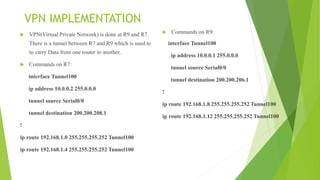
VPN IMPLEMENTATION
 VPN(Virtual Private Network) is done at R9 and R7.
There is a tunnel between R7 and R9 which is used to
to carry Data from one router to another.
 Commands on R7:
interface Tunnel100
ip address 10.0.0.2 255.0.0.0
tunnel source Serial0/0
tunnel destination 200.200.208.1
!
ip route 192.168.1.0 255.255.255.252 Tunnel100
ip route 192.168.1.4 255.255.255.252 Tunnel100
 Commands on R9:
interface Tunnel100
ip address 10.0.0.1 255.0.0.0
tunnel source Serial0/0
tunnel destination 200.200.206.1
!
ip route 192.168.1.8 255.255.255.252 Tunnel100
ip route 192.168.1.12 255.255.255.252 Tunnel100
 Tunnel
 Ping from R9 to R7 through tunnel
Implementation on project -

Basic Introduction to Technology (networking).pdf

  • 1.
  • 2.
    contents  Basic intro Routing and routed protocols – RIP  Redistribution of protocols –EIGRP & OSPF  NAT  ACL  Frame-Relay  VPN  BGP  Implementation on project
  • 3.
    Basic Introduction to Technology Whatis Network? In one network more than one computer connected with each other through centralized device. They can share files and resources with each other. What is networking ? Networking, also known as computer networking, is the practice of transporting and exchanging data between nodes over a shared medium in an information system.
  • 4.
    Networking Devices Hub Hub iscentralized device, which is used to connect multiple workstations. it has no special kind of memory. It simply receives the frame (data) and forwards it to all its nodes except the receiving node. It always performs broadcasting. Switch Switch is also used to connect multiple workstations. Switch is more intelligent than hub. It has special kind of memory called mac address/filter/lookup table. Switch reads mac addresses. Switch stores mac addresses in its filter address table. Switch when receives frame, it reads the destination mac address and consult with its filter table. If he has entry in its filter table then he forwards the frame to that particular mac address, if not found then it performs broadcasting to all its connected nodes.
  • 5.
    Networking Devices Router Router ishardware device, which is used to communicate two different networks. Router performs routing and path determination. It does not perform broadcast information. It is is a network layer device which also tells us the best path to the destination Lan Card Lan card is media access device. Lan card provide us connectivity in the network. There is a RJ45 (Registered Jack) connector space on the Lan card. RJ45 is used in UTP cable. There is another led which is also called heartbeat of Lan card. When any activity occur it may be receiving or transmitting any kind of data. This led start blinking and also tell us the status of lan card.
  • 6.
    Networking Cables Cables: Theseare used to connect computers or other devices in a network. There are many types of cables used with LAN as: 1.)Coaxial Cable- Coaxial cable or Coax is a type of cable that has an inner conductor surrounded by insulating layer and enclosed by conducting shield. It is used as a transmission line for radio frequency signals. It is difficult too install coaxial cabling. 2.)Twisted Pair Cable: It is a type of cabling in which conductors of single circuit are twisted together for cancelling out electromagnetic interference from external source. 3.)Crossover Cable- It is used to connect same type of devices as:  Connect 2 computers directly and Connect 2 routers/switches 4.)Straight Cable- It is used to connect different type of devices as :  Connect a computer to switch/hub , Connect a router to a switch/hub and Straight Cable is mainly used in networking.
  • 7.
    IPv4 IP address :An IP address is a unique address that identifies a device on the internet or a local network. IP stands for "Internet Protocol," which is the set of rules governing the format of data sent via the internet or local network. IPv4:It is 32 bit numerical number value which we assign to every node ports in a network. It has two parts network part and host part. Network part could not change and host part cannot be sane in a network. There are mainly 5 classes of IPv4 addresses:
  • 8.
    What is Routing?  The process of transferring data from one local area network to another  Layer 3 devices  Routed protocol Enables to forward packet from one router to another – Ex – IP, IPX  Routing protocol sends and receives routing information packets to and from other routers – Ex -RIP, OSPF , IGRP  Routing protocols gather and share the routing information used to maintain and update routing tables.  That routing information is in turn used to route a routed protocol to its final destination
  • 9.
    Types of Routing Static routing - network administrator configures information about remote networks manually. They are used to reduce overhead and for security.  R1(config)#ip route network [mask] {address | interface}[distance] [permanent]  Dynamic routing - information is learned from other routers, and routing protocols adjust routes automatically.  Default routing:A default route defines where packets will be sent if no specific route for the destination network is listed in the routing table. If no default route is set, the router will discard all packets with destination addresses not found its routing table.
  • 11.
    RIP  Routing InformationProtocol (RIP) is a true distance-vector routing protocol.  It sends the complete routing table out to all active interfaces every 30 seconds  RIP only uses hop count to determine the best way to a remote network  It has a maximum allowable hop count of 15  AD is 120  Bellman-ford algorithm  Works well in small networks, but it’s inefficient on large networks  RIP version 1 uses only classful routing, which means that all devices in the network must use the same subnet mask  RIP version 2 does send subnet mask information with the route updates. This is called classless routing.
  • 12.
    RIP commands andRouting Table
  • 13.
    EIGRP  Enhanced InteriorGateway Routing Protocol (EIGRP) is a Cisco-proprietary routing protocol based on Interior Gateway Routing Protocol (IGRP).  EIGRP supports:  Rapid convergence  Reduced bandwidth usage  Multiple network-layer protocols  Released in 1994, Unlike IGRP, which is a classful routing protocol, EIGRP supports CIDR and VLSM.  it is probably one of the two most popular routing protocols in use today.  Compared to IGRP, EIGRP boasts faster convergence times, improved scalability, and superior handling of routing loops.  EIGRP is often described as a hybrid routing protocol, offering the best of distance vector and link-state algorithms.
  • 14.
    eigrp commands  ConfigureEIGRP:  Use the following command to enable EIGRP on RouterA: RouterA(config)#router EIGRP 100  Use the following commands to specify the networks directly connected to the router: RouterA(config-router)#network 192.168.11.0 RouterA(config-router)#network 192.168.22.0
  • 16.
    ospf  OSPF isan open standards routing protocol  This works by using the Dijkstra algorithm  OSPF provides the following features:  Minimizes routing update traffic  Allows scalability  Has unlimited hop count  Supports VLSM/CIDR
  • 17.
    Ospf design  Eachrouter connects to the backbone called area 0, or the backbone area.  Routers that connect other areas to the backbone within an AS are called Area Border Routers (ABRs). One interface must be in area 0.  OSPF runs inside an autonomous system, but can also connect multiple autonomous systems together. The router that connects these ASes together is called an Autonomous System Boundary Router (ASBR).
  • 18.
    OSPF Commands  ConfigureOSPF:  Use the following command to enable EIGRP on RouterA: RouterA(config)#router ospf 100  Use the following commands to specify the networks directly connected to the router: RouterA(config-router)#network 192.168.11.0 0.0.0.255 RouterA(config-router)#network 192.168.22.0 0.0.0.255
  • 19.
  • 20.
    Access Control Lists(ACL) Access-list (ACL) is a set of rules defined for controlling network traffic and reducing network attacks. ACLs are used to filter traffic based on the set of rules defined for the incoming or outgoing of the network. Type of ACL – There are two main different types of Access-list namely: Standard Access-list – These are the Access-list that are made using the source IP address only. These ACLs permit or deny the entire protocol suite. They don’t distinguish between the IP traffic such as TCP, UDP, HTTPS, etc. By using numbers 1-99 or 1300-1999, the router will understand it as a standard ACL and the specified address as the source IP address. Extended Access-list – These are the ACL that uses source IP, Destination IP, source port, and Destination port. These types of ACL, we can also mention which IP traffic should be allowed or denied. These use range 100-199 and 2000-2699.
  • 21.
    Conf t access-list 99deny 192.168.10.0 0.0.0.255 Access-list 99 permit any Int s 0/0/1 Ip access-group 99 in
  • 22.
    NAT  To accessthe Internet, one public IP address is needed, but we can use a private IP address in our private network. The idea of NAT is to allow multiple devices to access the Internet through a single public address. To achieve this, the translation of a private IP address to a public IP address is required. Network Address Translation (NAT) is a process in which one or more local IP address is translated into one or more Global IP address and vice versa in order to provide Internet access to the local hosts.
  • 23.
    Types of NAT There are different types of NAT that can be used, which are  Static NAT  Dynamic NAT  Overloading NAT with PAT (NAPT)
  • 24.
    Static nat  StaticNAT - Mapping an unregistered IP address to a registered IP address on a one-to-one basis. Particularly useful when a device needs to be accessible from outside the network.  In static NAT, the computer with the IP address of 192.168.32.10 will always translate to 213.18.123.110.
  • 25.
    Dynamic NAT  DynamicNAT - Maps an unregistered IP address to a registered IP address from a group of registered IP addresses.  In dynamic NAT, the computer with the IP address 192.168.32.10 will translate to the first available address in the range from 213.18.123.100 to 213.18.123.150.
  • 26.
    VPN tunnel A VPNis a secure, encrypted connection over a publicly shared network. Tunneling is the process by which VPN packets reach their intended destination, which is typically a private network. In above image , brown pipe is tunnel There are 5 routers in above topology , tunnel takes data through router 9 to router 7 Without letting other routers know .
  • 27.
    Implementation of tunnel Atrouter 9 : interface Tunnel100 ip address 10.0.0.1 255.0.0.0 tunnel source Serial0/0 tunnel destination 200.200.206.1 At router 7: interface Tunnel100 ip address 10.0.0.2 255.0.0.0 tunnel source Serial0/0 tunnel destination 200.200.208.1
  • 28.
    NAT IMPLEMENTETATION  NAT(NetworkAddress Translation) is done at R8. It is applied on it to provide the security to the connected branch. A Local PC is connected with it.  That local PC can ping the entire network but the entire network can’t ping that private PC.  Commands that applied on R8:  access-list 1 permit 192.168.10.0 0.0.0.255  ip nat inside source list 1 interface Serial0/0 overload  ip nat inside source static 192.168.10.100 200.200.207.3  Enabling the NAT on interfaces: interface FastEthernet1/0 ip nat inside interface Serial0/0 ip nat outside
  • 29.
    ACL implementation  Wehave Applied standard ACL on the Router 8 to deny the network of 200.200.209.0 which is in the interface of R10.  access-list 7 deny 200.200.209.0 0.0.0.255  access-list 7 permit any  Enabling the ACL on interfaces interface Serial0/0 ip access-group 7 in This ACL will block the given network from R8 means R10 cannot ping to R8 because of Access Control List.
  • 30.
    VPN IMPLEMENTATION  VPN(VirtualPrivate Network) is done at R9 and R7. There is a tunnel between R7 and R9 which is used to to carry Data from one router to another.  Commands on R7: interface Tunnel100 ip address 10.0.0.2 255.0.0.0 tunnel source Serial0/0 tunnel destination 200.200.208.1 ! ip route 192.168.1.0 255.255.255.252 Tunnel100 ip route 192.168.1.4 255.255.255.252 Tunnel100  Commands on R9: interface Tunnel100 ip address 10.0.0.1 255.0.0.0 tunnel source Serial0/0 tunnel destination 200.200.206.1 ! ip route 192.168.1.8 255.255.255.252 Tunnel100 ip route 192.168.1.12 255.255.255.252 Tunnel100
  • 31.
     Tunnel  Pingfrom R9 to R7 through tunnel
  • 32.