AD and LDAP
Active Directory
Lightweight Directory Access Protocol
Active Directory
 It is a common interface for organizing and maintaining
information related to resources connected to a variety of
network directories.
 Directories tend to contain descriptive, attribute-based
information. It support filtering capabilities. Examples
address books (attributes such as name, address, phone
number etc.)
 It is a database that keeps track of all the user accounts and
passwords in your organization. It allows you to store user
accounts and passwords in location, improving your
organization's security.
LDAP
1. Lightweight Directory Access Protocol (LDAP) is an Internet
protocol used to access information directories.
2. A directory service is a distributed database application
designed to manage the entries and attributes in a directory.
3. Runs over TCP/IP
LDAP vs Active Directory
 Ad is a Database
 Ldap is a protocol to access AD.
Eg. Microsoft Outlook work with directory services.
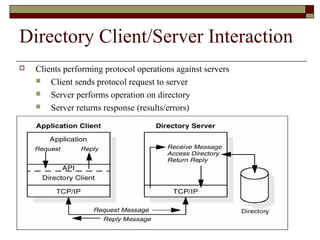
Directory Client/Server Interaction
 Clients performing protocol operations against servers
 Client sends protocol request to server
 Server performs operation on directory
 Server returns response (results/errors)
LDAP server and client
How do you make an LDAP server?
There are many options, like Microsoft, OpenLDAP(free), Sun,
Netscape, QUALCOMM. If you don't want to install your own
directory service, but just want to use LDAP, instructions for
using available LDAP servers, such as four11 and bigfootetc.
How do you make an LDAP client?
There are SDKs in many languages including C, C++, perl, and
Java, to help you make an LDAP client. Go get the SDK for your
language and use the functions that it provides to connect to and
operate on an LDAP server.
LDAP
 Directory
 A set of objects with similar attributes
 Organized in a logical and hierarchical manner
 Example:
 Telephone directory
 Series of names (either of persons or organizations)
 Organized alphabetically
 Each name has an address and phone number
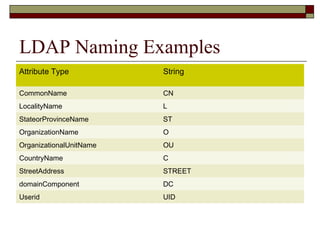
LDAP Naming Examples
Attribute Type String
CommonName CN
LocalityName L
StateorProvinceName ST
OrganizationName O
OrganizationalUnitName OU
CountryName C
StreetAddress STREET
domainComponent DC
Userid UID
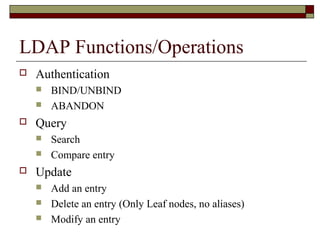
LDAP Functions/Operations
 Authentication
 BIND/UNBIND
 ABANDON
 Query
 Search
 Compare entry
 Update
 Add an entry
 Delete an entry (Only Leaf nodes, no aliases)
 Modify an entry
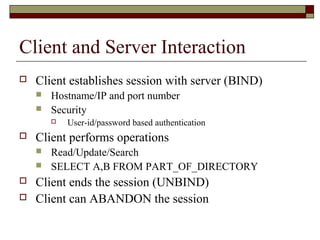
Client and Server Interaction
 Client establishes session with server (BIND)
 Hostname/IP and port number
 Security
 User-id/password based authentication
 Client performs operations
 Read/Update/Search
 SELECT A,B FROM PART_OF_DIRECTORY
 Client ends the session (UNBIND)
 Client can ABANDON the session
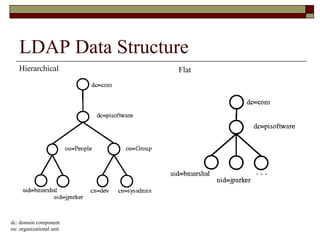
LDAP Data Structure
Hierarchical Flat
dc: domain component
ou: organizational unit
Directory structure
 Protocol accesses LDAP directories
 directory is a tree of directory entries
 Entry consists of a set of attributes
 An attribute has
 a name
 an attribute type or attribute description
 one or more values
 Attributes are defined in a schema
 Each entry has a unique identifier:
 Distinguished Name (DN)
 Consists of its Relative Distinguished Name (RDN) constructed from some
attribute(s) in the entry
 Followed by the parent entry's DN
 Think of the DN as a full filename and the RDN as a relative
filename in a folder
Directory structure
 An entry can look like this when represented in LDAP Data Interchange Format
(LDIF) (LDAP itself is a binary protocol):
 dn: cn=John mark,dc=exp,dc=com
cn: John mark
givenName: John
sn: mark
telephoneNumber: +1 888 555 6889
telephoneNumber: +1 888 555 1534
mail: johny@example.com
manager: cn=Barbara jack,dc=example,dc=com
objectClass: inetOrgPerson
objectClass: organizationalPerson
objectClass: person
objectClass: top
 dn (distinguished name) is the name of the entry; it's not an attribute nor part of the
entry
 "cn=John Mark" is the entry's RDN
 "dc=example,dc=com" is the DN of the parent entry.
 Other lines show the attributes in the entry
 Attribute names are typically mnemonic strings
 "cn" for common name,
 "dc" for domain component
 "mail" for e-mail address
 "sn" for surname
Directory structure
 A server holds a subtree starting from a specific entry, e.g.
"dc=example,dc=com" and its children.
 Servers may also hold references to other servers
 An attempt to access "ou=department,dc=example,dc=com" could
return a referral or continuation reference to a server which holds
that part of the directory tree.
 Client can then contact the other server
 Some servers also support chaining
 Server contacts other server(s) and returns the results to the client
Directory structure
 LDAP rarely defines any ordering:
 Server may return
 the values in an attribute
 the attributes in an entry
 the entries found by a search operation
in any order
 Follows from the formal definitions
 an entry is defined as a set of attributes
 an attribute is a set of values
 sets need not be ordered
Operations: Search and Compare
 The Search operation is used to both search for and read entries
 Its parameters are:
 baseObject
 The DN (Distinguished Name) of the entry at which to start the search,
 scope
 BaseObject (search just the named entry, typically used to read one entry), singleLevel
(entries immediately below the base DN), or wholeSubtree (the entire subtree starting at
the base DN).
 filter
 How to examine each entry in the scope. E.g. (&(objectClass=person)(|
(givenName=John)(mail=john*))) - search for persons who either have given name John
or an e-mail address starting with john.
 derefAliases
 Whether and how to follow alias entries (entries which refer to other entries),
 attributes
 Which attributes to return in result entries.
 sizeLimit, timeLimit
 Max number of entries, and max search time.
 typesOnly
 Return attribute types only, not attribute values.
Operations: Search and Compare
 The server returns
 Matching entries
 Maybe continuation references (in any order)
 Followed by the final result with the result code
 The Compare operation
 Takes
 a DN
 an attribute name
 an attribute value
 Checks if the named entry contains that attribute with that
value
Operations: Update operations
 Add, Delete, and Modify DN
 All require the DN of the entry that is to be
changed
 Modify takes a list of attributes to modify and
the modifications to each:
 Add new values, delete the attribute or some
values,, or replace the current values with the new
ones.
 Add operations also can have additional
attributes and values for those attributes.
Operations: Extended operations
 Extended Operation
 A generic LDAP operation can be used to define
new operations
 Examples include the
 Cancel
 Password Modify
Usage
 Applications
 Reasons to choose LDAP for a service
 Widely supported
 Data presented in LDAP is available to many clients and libraries
 LDAP is very general and includes basic security
 Can support many types of applications
 Choosing a few general protocols like LDAP and HTTP for various services
 Allows focusing on a few protocols
 Instead of having to maintain and upgrade many specialized protocols
 Some tasks LDAP does not handle well:
 Model a relational database

AD & LDAP

  • 1.
    AD and LDAP ActiveDirectory Lightweight Directory Access Protocol
  • 2.
    Active Directory  Itis a common interface for organizing and maintaining information related to resources connected to a variety of network directories.  Directories tend to contain descriptive, attribute-based information. It support filtering capabilities. Examples address books (attributes such as name, address, phone number etc.)  It is a database that keeps track of all the user accounts and passwords in your organization. It allows you to store user accounts and passwords in location, improving your organization's security.
  • 3.
    LDAP 1. Lightweight DirectoryAccess Protocol (LDAP) is an Internet protocol used to access information directories. 2. A directory service is a distributed database application designed to manage the entries and attributes in a directory. 3. Runs over TCP/IP
  • 4.
    LDAP vs ActiveDirectory  Ad is a Database  Ldap is a protocol to access AD. Eg. Microsoft Outlook work with directory services.
  • 5.
    Directory Client/Server Interaction Clients performing protocol operations against servers  Client sends protocol request to server  Server performs operation on directory  Server returns response (results/errors)
  • 6.
    LDAP server andclient How do you make an LDAP server? There are many options, like Microsoft, OpenLDAP(free), Sun, Netscape, QUALCOMM. If you don't want to install your own directory service, but just want to use LDAP, instructions for using available LDAP servers, such as four11 and bigfootetc. How do you make an LDAP client? There are SDKs in many languages including C, C++, perl, and Java, to help you make an LDAP client. Go get the SDK for your language and use the functions that it provides to connect to and operate on an LDAP server.
  • 7.
    LDAP  Directory  Aset of objects with similar attributes  Organized in a logical and hierarchical manner  Example:  Telephone directory  Series of names (either of persons or organizations)  Organized alphabetically  Each name has an address and phone number
  • 8.
    LDAP Naming Examples AttributeType String CommonName CN LocalityName L StateorProvinceName ST OrganizationName O OrganizationalUnitName OU CountryName C StreetAddress STREET domainComponent DC Userid UID
  • 9.
    LDAP Functions/Operations  Authentication BIND/UNBIND  ABANDON  Query  Search  Compare entry  Update  Add an entry  Delete an entry (Only Leaf nodes, no aliases)  Modify an entry
  • 10.
    Client and ServerInteraction  Client establishes session with server (BIND)  Hostname/IP and port number  Security  User-id/password based authentication  Client performs operations  Read/Update/Search  SELECT A,B FROM PART_OF_DIRECTORY  Client ends the session (UNBIND)  Client can ABANDON the session
  • 11.
    LDAP Data Structure HierarchicalFlat dc: domain component ou: organizational unit
  • 12.
    Directory structure  Protocolaccesses LDAP directories  directory is a tree of directory entries  Entry consists of a set of attributes  An attribute has  a name  an attribute type or attribute description  one or more values  Attributes are defined in a schema  Each entry has a unique identifier:  Distinguished Name (DN)  Consists of its Relative Distinguished Name (RDN) constructed from some attribute(s) in the entry  Followed by the parent entry's DN  Think of the DN as a full filename and the RDN as a relative filename in a folder
  • 13.
    Directory structure  Anentry can look like this when represented in LDAP Data Interchange Format (LDIF) (LDAP itself is a binary protocol):  dn: cn=John mark,dc=exp,dc=com cn: John mark givenName: John sn: mark telephoneNumber: +1 888 555 6889 telephoneNumber: +1 888 555 1534 mail: johny@example.com manager: cn=Barbara jack,dc=example,dc=com objectClass: inetOrgPerson objectClass: organizationalPerson objectClass: person objectClass: top  dn (distinguished name) is the name of the entry; it's not an attribute nor part of the entry  "cn=John Mark" is the entry's RDN  "dc=example,dc=com" is the DN of the parent entry.  Other lines show the attributes in the entry  Attribute names are typically mnemonic strings  "cn" for common name,  "dc" for domain component  "mail" for e-mail address  "sn" for surname
  • 14.
    Directory structure  Aserver holds a subtree starting from a specific entry, e.g. "dc=example,dc=com" and its children.  Servers may also hold references to other servers  An attempt to access "ou=department,dc=example,dc=com" could return a referral or continuation reference to a server which holds that part of the directory tree.  Client can then contact the other server  Some servers also support chaining  Server contacts other server(s) and returns the results to the client
  • 15.
    Directory structure  LDAPrarely defines any ordering:  Server may return  the values in an attribute  the attributes in an entry  the entries found by a search operation in any order  Follows from the formal definitions  an entry is defined as a set of attributes  an attribute is a set of values  sets need not be ordered
  • 16.
    Operations: Search andCompare  The Search operation is used to both search for and read entries  Its parameters are:  baseObject  The DN (Distinguished Name) of the entry at which to start the search,  scope  BaseObject (search just the named entry, typically used to read one entry), singleLevel (entries immediately below the base DN), or wholeSubtree (the entire subtree starting at the base DN).  filter  How to examine each entry in the scope. E.g. (&(objectClass=person)(| (givenName=John)(mail=john*))) - search for persons who either have given name John or an e-mail address starting with john.  derefAliases  Whether and how to follow alias entries (entries which refer to other entries),  attributes  Which attributes to return in result entries.  sizeLimit, timeLimit  Max number of entries, and max search time.  typesOnly  Return attribute types only, not attribute values.
  • 17.
    Operations: Search andCompare  The server returns  Matching entries  Maybe continuation references (in any order)  Followed by the final result with the result code  The Compare operation  Takes  a DN  an attribute name  an attribute value  Checks if the named entry contains that attribute with that value
  • 18.
    Operations: Update operations Add, Delete, and Modify DN  All require the DN of the entry that is to be changed  Modify takes a list of attributes to modify and the modifications to each:  Add new values, delete the attribute or some values,, or replace the current values with the new ones.  Add operations also can have additional attributes and values for those attributes.
  • 19.
    Operations: Extended operations Extended Operation  A generic LDAP operation can be used to define new operations  Examples include the  Cancel  Password Modify
  • 20.
    Usage  Applications  Reasonsto choose LDAP for a service  Widely supported  Data presented in LDAP is available to many clients and libraries  LDAP is very general and includes basic security  Can support many types of applications  Choosing a few general protocols like LDAP and HTTP for various services  Allows focusing on a few protocols  Instead of having to maintain and upgrade many specialized protocols  Some tasks LDAP does not handle well:  Model a relational database