Introduction to LDAP


Yousry Ibrahim Mabrouk

   ©2009 Hewlett-Packard Development Company, L.P.
   The information contained herein is subject to change without notice.
AGENDA
• Understanding LDAP.
• LDAP Servers.
• Information Structure.
• Protocol overview.
• LDAP Operations.
• How to use LDAP?
• Using JNDI For LDAP


    Thursday, October 25,
2   2012
Understanding LDAP
•   Lightweight Directory Access Protocol.
•   open network protocol standard designed to provide
    access to distributed directories.
•   using TCP/IP protocols.
•   The phrase “write once read many times“ describes
    the best use of LDAP.
•   standard and allowing directories to be managed.
•   No transactions, No rollback


     Thursday, October 25,
3    2012
LDAP Servers
• 389 Directory Server (formerly Fedora/Red Hat Directory Server)
• Active Directory from Microsoft
• Apache Directory Server
• Apple Open Directory
• FreeIPA
• IBM Tivoli Directory Server
• Mandriva Directory Server
• Novell eDirectory
• OpenDJ - A fork of the OpenDS project
• OpenDS
• OpenLDAP
• Optimal IdM
• Oracle Internet Directory
• Radiant Logic VDS
• Sun Java System Directory Server
    Thursday, October 25,
4   2012
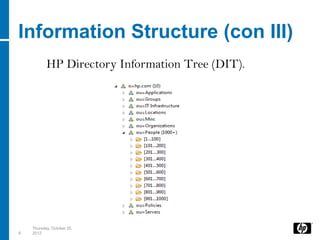
Information Structure
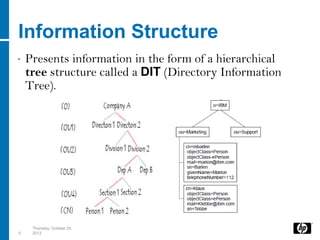
•   Presents information in the form of a hierarchical
    tree structure called a DIT (Directory Information
    Tree).


     Thursday, October 25,
5    2012
Information Structure (con)
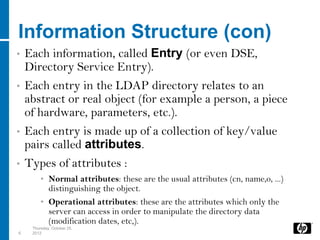
•   Each information, called Entry (or even DSE,
    Directory Service Entry).
•   Each entry in the LDAP directory relates to an
    abstract or real object (for example a person, a piece
    of hardware, parameters, etc.).
•   Each entry is made up of a collection of key/value
    pairs called attributes.
•   Types of attributes :
         • Normal attributes: these are the usual attributes (cn, name,o, ...)
           distinguishing the object.
         • Operational attributes: these are the attributes which only the
           server can access in order to manipulate the directory data
           (modification dates, etc,).
     Thursday, October 25,
6    2012
Information Structure (con II)
•   Every entry in the directory has a distinguished name
    (DN).
•    DN is made up of attribute=value pairs, separated by
    commas, for example:
         • dn:o=hp,ou=people,uid=yousry.ibrahim@hp.com

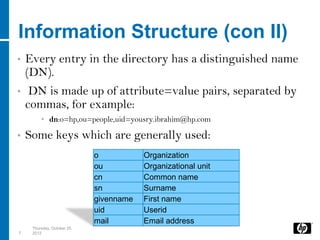
•   Some keys which are generally used:
                             o           Organization
                             ou          Organizational unit
                             cn          Common name
                             sn          Surname
                             givenname   First name
                             uid         Userid
                             mail        Email address
     Thursday, October 25,
7    2012
Information Structure (con III)
           HP Directory Information Tree (DIT).


    Thursday, October 25,
8   2012
Protocol overview

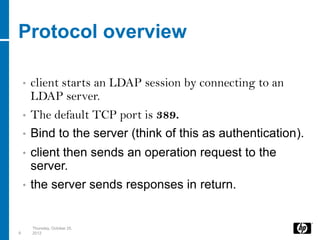
    •   client starts an LDAP session by connecting to an
        LDAP server.
    •   The default TCP port is 389.
    •   Bind to the server (think of this as authentication).
    •   client then sends an operation request to the
        server.
    •   the server sends responses in return.


        Thursday, October 25,
9       2012
LDAP Operations
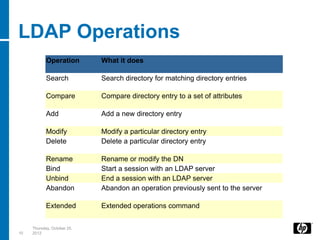
            Operation        What it does

            Search           Search directory for matching directory entries

            Compare          Compare directory entry to a set of attributes

            Add              Add a new directory entry

            Modify           Modify a particular directory entry
            Delete           Delete a particular directory entry

            Rename           Rename or modify the DN
            Bind             Start a session with an LDAP server
            Unbind           End a session with an LDAP server
            Abandon          Abandon an operation previously sent to the server

            Extended         Extended operations command


     Thursday, October 25,
10   2012
How to use LDAP?

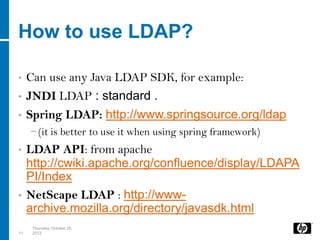
•    Can use any Java LDAP SDK, for example:
•    JNDI LDAP : standard .
•    Spring LDAP: http://www.springsource.org/ldap
     − (it is better to use it when using spring framework)
• LDAP API: from apache
  http://cwiki.apache.org/confluence/display/LDAPA
  PI/Index
• NetScape LDAP : http://www-
  archive.mozilla.org/directory/javasdk.html
      Thursday, October 25,
11    2012
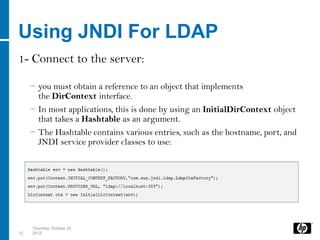
Using JNDI For LDAP
1- Connect to the server:

     − you must obtain a reference to an object that implements
       the DirContext interface.
     − In most applications, this is done by using an InitialDirContext object
       that takes a Hashtable as an argument.
     − The Hashtable contains various entries, such as the hostname, port, and
       JNDI service provider classes to use:


     Thursday, October 25,
12   2012
Using JNDI For LDAP (con)
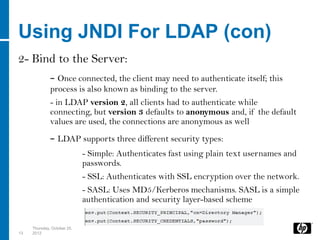
2- Bind to the Server:
              - Once connected, the client may need to authenticate itself; this
              process is also known as binding to the server.
              - in LDAP version 2, all clients had to authenticate while
              connecting, but version 3 defaults to anonymous and, if the default
              values are used, the connections are anonymous as well
              - LDAP supports three different security types:
                             - Simple: Authenticates fast using plain text usernames and
                             passwords.
                             - SSL: Authenticates with SSL encryption over the network.
                             - SASL: Uses MD5/Kerberos mechanisms. SASL is a simple
                             authentication and security layer-based scheme


     Thursday, October 25,
13   2012
Using JNDI For LDAP (conII)
3- Search:
              -Search Scopes:
                             - Sub Tree Scope: search of   the entire subtree searches the
                                     named object and all of its descendants.
                             - Object Scope: search the named object. This is useful, for
                             example, to test whether the named object satisfies a search
                             filter
                             -OnLevel Scope (default): specifies that the search is to be
                             performed in the named context
              -Filters :Used to filter the search results according to
              attribute’s value.


     Thursday, October 25,
14   2012
Examples ….. Let’s work.


     Thursday, October 25,
15   2012
Thursday, October 25,
16   2012

Ldap intro

  • 1.
    Introduction to LDAP YousryIbrahim Mabrouk ©2009 Hewlett-Packard Development Company, L.P. The information contained herein is subject to change without notice.
  • 2.
    AGENDA • Understanding LDAP. •LDAP Servers. • Information Structure. • Protocol overview. • LDAP Operations. • How to use LDAP? • Using JNDI For LDAP Thursday, October 25, 2 2012
  • 3.
    Understanding LDAP • Lightweight Directory Access Protocol. • open network protocol standard designed to provide access to distributed directories. • using TCP/IP protocols. • The phrase “write once read many times“ describes the best use of LDAP. • standard and allowing directories to be managed. • No transactions, No rollback Thursday, October 25, 3 2012
  • 4.
    LDAP Servers • 389Directory Server (formerly Fedora/Red Hat Directory Server) • Active Directory from Microsoft • Apache Directory Server • Apple Open Directory • FreeIPA • IBM Tivoli Directory Server • Mandriva Directory Server • Novell eDirectory • OpenDJ - A fork of the OpenDS project • OpenDS • OpenLDAP • Optimal IdM • Oracle Internet Directory • Radiant Logic VDS • Sun Java System Directory Server Thursday, October 25, 4 2012
  • 5.
    Information Structure • Presents information in the form of a hierarchical tree structure called a DIT (Directory Information Tree). Thursday, October 25, 5 2012
  • 6.
    Information Structure (con) • Each information, called Entry (or even DSE, Directory Service Entry). • Each entry in the LDAP directory relates to an abstract or real object (for example a person, a piece of hardware, parameters, etc.). • Each entry is made up of a collection of key/value pairs called attributes. • Types of attributes : • Normal attributes: these are the usual attributes (cn, name,o, ...) distinguishing the object. • Operational attributes: these are the attributes which only the server can access in order to manipulate the directory data (modification dates, etc,). Thursday, October 25, 6 2012
  • 7.
    Information Structure (conII) • Every entry in the directory has a distinguished name (DN). • DN is made up of attribute=value pairs, separated by commas, for example: • dn:o=hp,ou=people,uid=yousry.ibrahim@hp.com • Some keys which are generally used: o Organization ou Organizational unit cn Common name sn Surname givenname First name uid Userid mail Email address Thursday, October 25, 7 2012
  • 8.
    Information Structure (conIII) HP Directory Information Tree (DIT). Thursday, October 25, 8 2012
  • 9.
    Protocol overview • client starts an LDAP session by connecting to an LDAP server. • The default TCP port is 389. • Bind to the server (think of this as authentication). • client then sends an operation request to the server. • the server sends responses in return. Thursday, October 25, 9 2012
  • 10.
    LDAP Operations Operation What it does Search Search directory for matching directory entries Compare Compare directory entry to a set of attributes Add Add a new directory entry Modify Modify a particular directory entry Delete Delete a particular directory entry Rename Rename or modify the DN Bind Start a session with an LDAP server Unbind End a session with an LDAP server Abandon Abandon an operation previously sent to the server Extended Extended operations command Thursday, October 25, 10 2012
  • 11.
    How to useLDAP? • Can use any Java LDAP SDK, for example: • JNDI LDAP : standard . • Spring LDAP: http://www.springsource.org/ldap − (it is better to use it when using spring framework) • LDAP API: from apache http://cwiki.apache.org/confluence/display/LDAPA PI/Index • NetScape LDAP : http://www- archive.mozilla.org/directory/javasdk.html Thursday, October 25, 11 2012
  • 12.
    Using JNDI ForLDAP 1- Connect to the server: − you must obtain a reference to an object that implements the DirContext interface. − In most applications, this is done by using an InitialDirContext object that takes a Hashtable as an argument. − The Hashtable contains various entries, such as the hostname, port, and JNDI service provider classes to use: Thursday, October 25, 12 2012
  • 13.
    Using JNDI ForLDAP (con) 2- Bind to the Server: - Once connected, the client may need to authenticate itself; this process is also known as binding to the server. - in LDAP version 2, all clients had to authenticate while connecting, but version 3 defaults to anonymous and, if the default values are used, the connections are anonymous as well - LDAP supports three different security types: - Simple: Authenticates fast using plain text usernames and passwords. - SSL: Authenticates with SSL encryption over the network. - SASL: Uses MD5/Kerberos mechanisms. SASL is a simple authentication and security layer-based scheme Thursday, October 25, 13 2012
  • 14.
    Using JNDI ForLDAP (conII) 3- Search: -Search Scopes: - Sub Tree Scope: search of the entire subtree searches the named object and all of its descendants. - Object Scope: search the named object. This is useful, for example, to test whether the named object satisfies a search filter -OnLevel Scope (default): specifies that the search is to be performed in the named context -Filters :Used to filter the search results according to attribute’s value. Thursday, October 25, 14 2012
  • 15.
    Examples ….. Let’swork. Thursday, October 25, 15 2012
  • 16.