LDAP<br />(Lightweight Directory Access Protocol)<br />What is LDAP?<br />LDAP is the Lighweight Directory Access Protocol. LDAP is designed to be a standard way of providing access to directory services.
A directory service is just a database that has been designed to be read from more than it is designed to written to.
A directory is a specialized list that lets you quickly look up information about the things the directory references.
At its most basic definition, a directory is any database specialized more for reading than forwriting.
For example, a telephone directory is an alphabetic list of people and organizations with phone numbers, and often addresses, too. A corporate directory is a database of people, network resources, organizations, and so forth.
The corporate database probably holds not just phone numbers, but also other information like email addresses, employee and department numbers, and application configuration data.
The corporate directory is managed by a directory server, which takes requests from client applications and serves them back directory data from the database.

LDAP

  • 1.
    LDAP<br />(Lightweight DirectoryAccess Protocol)<br />What is LDAP?<br />LDAP is the Lighweight Directory Access Protocol. LDAP is designed to be a standard way of providing access to directory services.
  • 2.
    A directory serviceis just a database that has been designed to be read from more than it is designed to written to.
  • 3.
    A directory isa specialized list that lets you quickly look up information about the things the directory references.
  • 4.
    At its mostbasic definition, a directory is any database specialized more for reading than forwriting.
  • 5.
    For example, atelephone directory is an alphabetic list of people and organizations with phone numbers, and often addresses, too. A corporate directory is a database of people, network resources, organizations, and so forth.
  • 6.
    The corporate databaseprobably holds not just phone numbers, but also other information like email addresses, employee and department numbers, and application configuration data.
  • 7.
    The corporate directoryis managed by a directory server, which takes requests from client applications and serves them back directory data from the database.
  • 8.
    LDAP, Lightweight DirectoryAccess Protocol, provides a standard language that directory client applications and directory servers use to communicate with one another about data in directories.
  • 9.
    LDAP applications cansearch, add, delete and modify directory data.LDAP with respect to RDBMS:<br />Why do I need LDAP if I have a RDBMS?
  • 10.
    Servers that arebuilt to be LDAP servers are usually optimized for read access and will likely be much faster than a RDBMS in providing read access to information. (If a system must be distributed, LDAP is really the only choice.)
  • 11.
    LDAP directories differfrom relational databases. In LDAP, you do not look data up in tables. Instead, you look data up in trees, similar to the tree you get if you diagram the contents of a file system.
  • 12.
    The data isnot in rows and columns, but in what are called entries. These entries are much like entries in the phone book.
  • 13.
    Strictly speaking, though,LDAP isn't a database at all, but a protocol used to access information stored in an information directory (also known as an LDAP directory).
  • 14.
    LDAP is aprotocol definition for accessing specialized databases called directories.
  • 15.
    It is similarto SQL in that it is a language for interacting with databases without specifying a particular database. In fact, the back-end for LDAP directories is nearly always a more general RDBMS system, such as LDBM or Oracle.
  • 16.
    An LDAP entryis composed of attributes and their values.What is a distinguished name?<br />A Distinguished Name is a special attribute in a LDAP entry and is referenced with the mnemonic dn.
  • 17.
    The dn mustbe unique in the LDAP namespace.
  • 18.
    Its components mustbe parts of the LDAP entry.
  • 19.
    The components ofthe dn are referred to as Relative Distinguished Names (rdn). The dn is always indexed and will always be returned in any search.
  • 20.
    Every dn mustbe unique. To insure uniqueness in a global space, the uniqueness must start with the base of the dn.What is an Entry?<br />A LDAP entry is basically a record in the LDAP database, it is the same as a record in the traditional database.
  • 21.
    LDAP entries arecomposed of attributes and values. Attributes are divided into name/value pairs, these attributes are the same as fields in a traditional database.
  • 22.
    An attribute willhave only one name but it can have more then one value, the value can be text or binary.
  • 23.
    Each entry hasan special attribute called distinguished name, which is the unique name of the entry.What is an Object class?<br />Object classes determine what attributes are available for an entry.
  • 24.
    They are thesame as tables in a traditional database. They differ from tables in a database because they are extensible.
  • 25.
    You can addschema definitions to LDAP directories, making the LDAP entries easily extensible.
  • 26.
    Each server willhave a schema.
  • 27.
    The schema isthe blue print of the server and it specifies all the object classes and attributes that are available to be searched and stored in a LDAP server.
  • 28.
    The directory serviceis accessed like a tree and is reffered to as a Directory Information tree (DIT). The directory server itself is called a Directory Service Agent (DSA).Operational Attribute:<br />In addition to regular attributes, the directory server may also attach special operational attributes to an entry
  • 29.
    Operational attributes areused by the directory it self to store information about entries
  • 30.
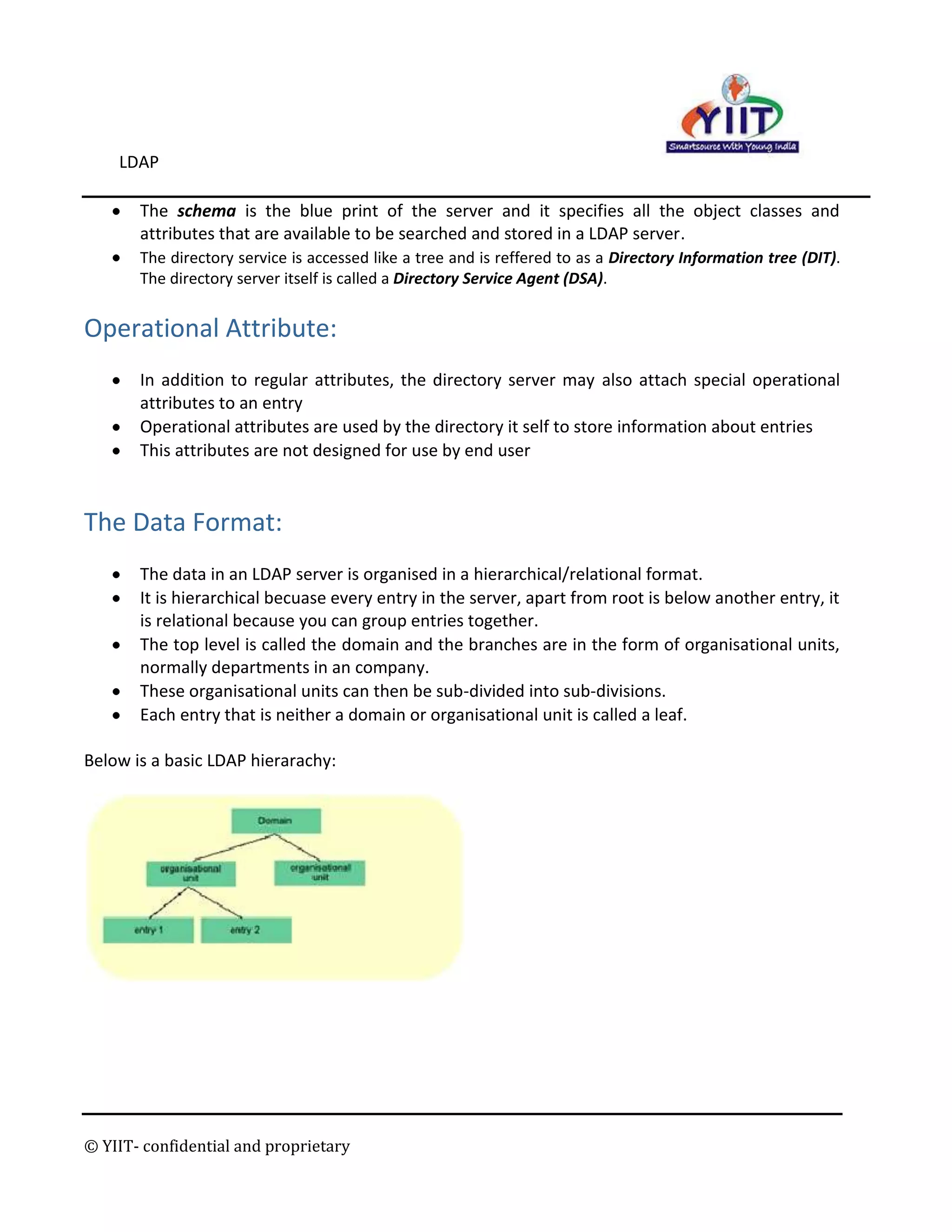
    This attributes arenot designed for use by end userThe Data Format:<br />The data in an LDAP server is organised in a hierarchical/relational format.
  • 31.
    It is hierarchicalbecuase every entry in the server, apart from root is below another entry, it is relational because you can group entries together.
  • 32.
    The top levelis called the domain and the branches are in the form of organisational units, normally departments in an company.
  • 33.
    These organisational unitscan then be sub-divided into sub-divisions.
  • 34.
    Each entry thatis neither a domain or organisational unit is called a leaf. Below is a basic LDAP hierarachy:<br />The Directory Information Tree:<br />Information in an LDAP directory is organized into one or more hierarchies where, at the top of the hierarchy, this is a base entry, and other entries are organized in tree-like structures beneath the base entry
  • 35.
    Each node onthe hierarchy is an entry, with a DN and more than one attributesThe protocol accesses LDAP directories:<br />A directory is a tree of directory entries.
  • 36.
    An entry consistsof a set of attributes.
  • 37.
    An attribute hasa name (an attribute type or attribute description) and one or more values.
  • 38.
    The attributes aredefined in a schema An Example of an LDAP Directory (In text form): <br />dn: uid=bjensen, ou=People, dc=example,dc=com<br />cn: Barbara Jensen<br />cn: Babs Jensen<br />sn: Jensen<br />givenname: Barbara<br />objectclass: top<br />objectclass: person<br />objectclass: organizationalPerson<br />objectclass: inetOrgPerson<br />ou: Product Development<br />ou: People<br />l: Cupertino<br />uid: bjensen<br />mail: bjensen@example.com<br />telephonenumber: +1 408 555 1862<br />facsimiletelephonenumber: +1 408 555 1992<br />roomnumber: 0209<br />userpassword: hifalutin<br />At the outset of the text representation you see the DN, Distinguished Name, uid=bjensen, ou=People, dc=example,dc=com. The DN is a distinguished name, because it distinguishes the entry from all others in the directory.
  • 39.
    You also seeattributes like CN, Common Name, which takes values Barbara Jensen and Babs Jensen. You further see attributes like SN, surname, which takes the value Jensen, and mail, which takes the value bjensen@example.com.
  • 40.
    The objectClass attributetells you what other attribute types the entry can have. Object class definitions are found in directory schema.
  • 41.
    Schema specify allthe known object classes and attribute types available for entries in the directory.
  • 42.
    You can addschema definitions to LDAP directories, making the LDAP entries easily extensible.
  • 43.
    When you wantto look up something in a directory, you typically know the values of one of the attributes. By analogy, if you want to look up a phone number, you already know the name of the person or organization whose telephone number you want.
  • 44.
    If you arelooking up a phone number, you also probably have some idea where the person or organization is located. The same is the case for LDAP directories. You typically need to have some idea where the entry is located.
  • 45.
    For example, assumeyou want to look up Barbara Jensen’s phone number in the LDAP directory holding the entry shown previously. You need to know one of the attributes. In this case, you know Barbara’s name. You also need to know approximately where her entry is located. If you know that she is in the directory at Example.com, and that the root of their tree starts at dc=example,dc=com, that is enough.
  • 46.
    There are GUItools out there for LDAP lookups, but many systems also have a command called ldapsearch, ldapsearch is for searching LDAP directories.For example, here is an ldapsearch command that searches the entries under dc=example,dc=com for entries having common name Barbara Jensen.<br />$ ldapsearch -b dc=example,dc=com \" (cn=Barbara Jensen)\" <br />The argument to the -b option is the base DN for the search. By default, the ldapsearch command searches through all the entries in the tree below the base DN.
  • 47.
    The "(cn=Barbara Jensen)"is called the filter, because it tells me the criteria for filtering through the entries found under the base DN.
  • 48.
    You can alsonarrow the search results to see only the DN of the entry and the telephone number. You do this by adding the attribute or attributes you want returned after the filter. $ ldapsearch -b dc=example,dc=com \" (cn=Barbara Jensen)\" telephoneNumber<br /> <br />In the above example there are attributes each representing the following :<br />Organization Name (o)<br />Mailing address (postal Address)<br />Locality (l), which may be the name of a city, town, village, and so forth<br />State or Province (st)<br />Postal Code or ZIP Code (postalCode)<br />Country (c)<br />Telephone Number (telephone Number)<br />Object Class (object class), which specifies what type (or types) of record this entry is<br />Attribute names, like “o” the organization name and postalAddress, refer to well-defined attribute definitions contained in an LDAP schema. They cannot be \" invented\" on the fly, or made up as you go.<br />Creating new attributes requires writing a schema<br />The Basic Operations in LDAP:<br />Bind - authenticate, and specify LDAP protocol version, <br />Start TLS - protect the connection with Transport Layer Security (TLS), to have a more secure connection, <br />Search - search for and/or retrieve directory entries, <br />Compare - test if a named entry contains a given attribute value, <br />Add a new entry, <br />Delete/ Modify an entry, <br />Modify DN - move or rename an entry, <br />Abandon - abort a previous request, <br />Extended Operation - generic operation used to define other operations, <br />Unbind - close the connection, not the inverse of Bind. <br />