DYNAMICS 365
MARKETING MODULE
Agenda
1. Introduction
2. Marketing Entities
3. Marketing List
3.1 Why Marketing List?
3.2 Static Marketing List
3.3 Dynamic Marketing List
4. Campaigns
5. Quick Campaigns
6. Quick Campaigns vs. Campaigns
7. Email Template
8. Campaign Report
8.1 Campaign Performance Report
8.2 Campaign Activity Status
8.3 Campaign Caparison Report
1. Introduction
Dynamics 365 for Marketing allows you to
automate much of the marketing process so that
you can concentrate on targeting the right people
and crafting the right message. The Marketing
module helps your marketing team to assign,
schedule, and track marketing campaign activities
and measure campaign performance.
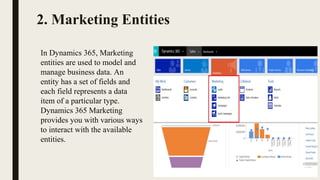
2. Marketing Entities
In Dynamics 365, Marketing
entities are used to model and
manage business data. An
entity has a set of fields and
each field represents a data
item of a particular type.
Dynamics 365 Marketing
provides you with various ways
to interact with the available
entities.
3. Marketing List
 A list of People that you would like to send the letter, email etc.
 Marketing lists in Microsoft Dynamics 365 provide a way for you to
group your accounts, contacts and leads so that you can market to
specific segments more effectively.
 Marketing lists contain “members”—lead, contact, or account records—
that meet a specific criteria or are managed manually by users. They can
be either static or dynamic.
3.1 Why Marketing List?
 To send out company newsletters
 To distribute promotional emails
 To send event information and updates
 To use in mail merges
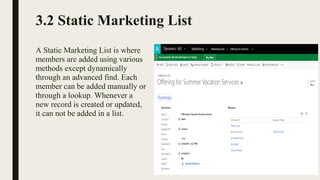
3.2 Static Marketing List
A Static Marketing List is where
members are added using various
methods except dynamically
through an advanced find. Each
member can be added manually or
through a lookup. Whenever a
new record is created or updated,
it can not be added in a list.
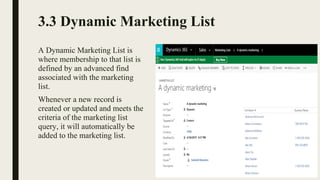
3.3 Dynamic Marketing List
A Dynamic Marketing List is
where membership to that list is
defined by an advanced find
associated with the marketing
list.
Whenever a new record is
created or updated and meets the
criteria of the marketing list
query, it will automatically be
added to the marketing list.
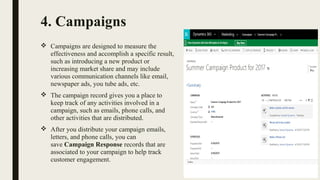
4. Campaigns
 Campaigns are designed to measure the
effectiveness and accomplish a specific result,
such as introducing a new product or
increasing market share and may include
various communication channels like email,
newspaper ads, you tube ads, etc.
 The campaign record gives you a place to
keep track of any activities involved in a
campaign, such as emails, phone calls, and
other activities that are distributed.
 After you distribute your campaign emails,
letters, and phone calls, you can
save Campaign Response records that are
associated to your campaign to help track
customer engagement.
Activities related to Campaign :
 Planning Activities : Planning activities are tasks you can add that are
intended to help you organize and operate your campaign.
 Activities: Campaign activities as touch points to your customers that are
distributed. They can be phone calls, appointments, emails or letters. They are
distributed to members of any marketing lists associated with the campaign.
You cannot distribute a campaign activity unless there is a marketing list
associated with that activity.
 Responses : Once you have distributed a campaign activity, you can start to
collect the results as Campaign Responses.
5. Quick Campaigns
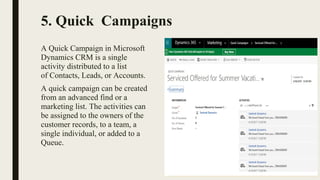
A Quick Campaign in Microsoft 
Dynamics CRM is a single 
activity distributed to a list 
of Contacts, Leads, or Accounts. 
A quick campaign can be created 
from an advanced find or a 
marketing list. The activities can 
be assigned to the owners of the 
customer records, to a team, a 
single individual, or added to a 
Queue.
6. Quick Campaigns vs. Campaigns
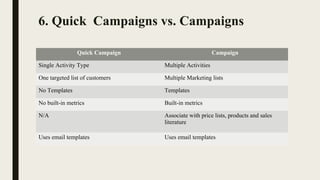
Quick Campaign Campaign
Single Activity Type Multiple Activities
One targeted list of customers Multiple Marketing lists
No Templates Templates
No built-in metrics Built-in metrics
N/A Associate with price lists, products and sales 
literature
Uses email templates Uses email templates
7. Email Template
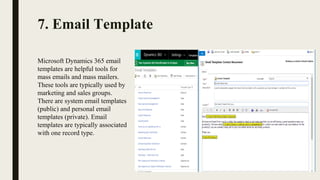
Microsoft Dynamics 365 email 
templates are helpful tools for 
mass emails and mass mailers. 
These tools are typically used by 
marketing and sales groups.
There are system email templates 
(public) and personal email 
templates (private). Email 
templates are typically associated 
with one record type.
8. Campaign Report
8.1 Campaign Performance Report
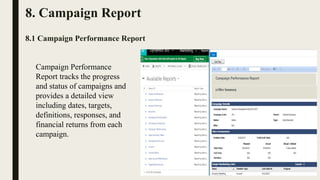
Campaign Performance 
Report tracks the progress 
and status of campaigns and 
provides a detailed view 
including dates, targets, 
definitions, responses, and 
financial returns from each 
campaign.
8.2 Campaign Activity Status
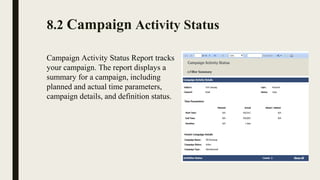
Campaign Activity Status Report tracks 
your campaign. The report displays a 
summary for a campaign, including 
planned and actual time parameters, 
campaign details, and definition status.
8.3 Campaign Comparison Report
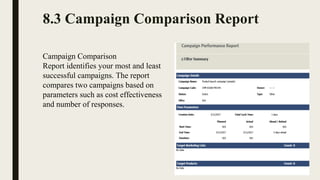
Campaign Comparison
Report identifies your most and least
successful campaigns. The report
compares two campaigns based on
parameters such as cost effectiveness
and number of responses.
Contact handles
www.cynoteck.com
Contact No: +1-612-800-9092,+918272014440,
+918430155522s
Website : www.cynoteck.com
Email : sales@Cynoteck.com
Microsoft Dynamics 365 for Marketing

Microsoft Dynamics 365 for Marketing