Microsoft
Virtual
Academy
Active Directory Domain Services
(AD DS)
Atif Mushtaq
• Overview of AD DS
• AD DS Physical Components
• AD DS Logical Components
Module Overview
• Protocol
• What is Authentication?
• What is Authorization?
• Why Deploy AD DS?
• Centralized Network Management
• Requirements for Installing AD DS
• Overview of AD DS and DNS
• Overview of AD DS Components
Lesson 1: Overview of AD DS
Protocol
• Lightweight Directory Access Protocol (LDAP)
– X.500 Standard
• X. 500 Directory Service is a standard way to develop an electronic directory of people in an organization so that it can
be part of a global directory available to anyone in the world with Internet access.
– Based on TCP/IP
– A method for accessing, searching, and modifying a directory service
– A client-server model
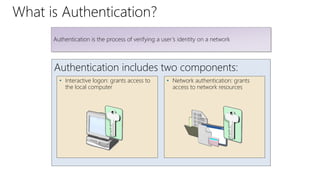
What is Authentication?
Authentication includes two components:
Authentication is the process of verifying a user’s identity on a network
• Network authentication: grants
access to network resources
• Interactive logon: grants access to
the local computer
What is Authorization?
Security principals are issued
security identifiers (SIDs) when the
account is created
User accounts are issued security
tokens during authentication that
include the user’s SID and all
related group SIDs
Shared resources on a network
include access control lists (ACL)
that define who can access the
resource
Authorization is a process of verifying that an authenticated user has permission to
perform an action
The security token is compared
against the Discretionary Access
Control List (DACL) on the
resource and access is granted or
denied
Why Deploy AD DS?
AD DS features include:
• Centralized directory
• Single sign-on access
• Integrated security
• Scalability
AD DS provides a centralized system for managing users, computers, and other
resources on a network
• Common management interface
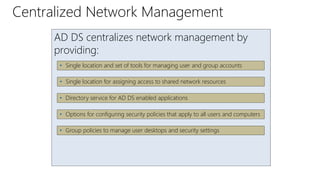
Centralized Network Management
AD DS centralizes network management by
providing:
• Single location and set of tools for managing user and group accounts
• Single location for assigning access to shared network resources
• Directory service for AD DS enabled applications
• Options for configuring security policies that apply to all users and computers
• Group policies to manage user desktops and security settings
Object Description
TCP/IP • Configure appropriate TCP/IP and DNS server addresses.
Credentials
• To install a new AD DS forest, you need to be local
Administrator on the server. To install an additional domain
controller in an existing domain, you need to be a member of
the Domain Admins group.
Domain Name
System )DNS)
Infrastructure
• Verify that a DNS infrastructure is in place. When you install AD
DS, you can include DNS server installation, if it is needed.
• When you create a new domain, a DNS delegation is created
automatically during the installation process. Creating a DNS
delegation requires credentials that have permissions to update
the parent DNS zones.
Requirements for Installing AD DS
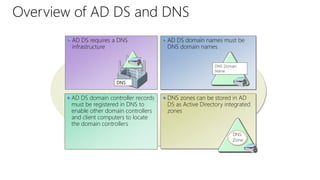
Overview of AD DS and DNS
AD DS domain controller records
must be registered in DNS to
enable other domain controllers
and client computers to locate
the domain controllers
AD DS domain names must be
DNS domain names
DNS Domain
Name
AD DS requires a DNS
infrastructure
DNS
DNS zones can be stored in AD
DS as Active Directory integrated
zones
DNS
Zone
Physical Components Logical Components
• Data store
• Domain controllers
• Global catalog server
• Read-Only Domain Controller
(RODC)
• Partitions
• Schema
• Domains
• Domain trees
• Forests
• Sites
• Organizational units (OUs)
AD DS is composed of both physical and logical components
Component Overview
Lesson 2: Overview of AD DS Physical Components
• Domain Controllers
• Global Catalog Servers
• Data Store
• Replication
• Sites
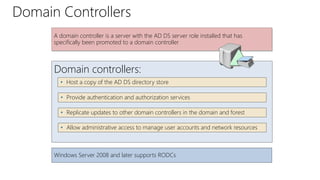
Domain Controllers
Domain controllers:
• Host a copy of the AD DS directory store
• Provide authentication and authorization services
• Replicate updates to other domain controllers in the domain and forest
A domain controller is a server with the AD DS server role installed that has
specifically been promoted to a domain controller
• Allow administrative access to manage user accounts and network resources
Windows Server 2008 and later supports RODCs
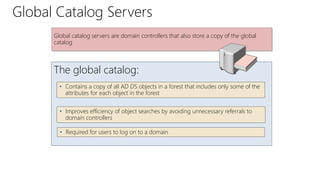
Global Catalog Servers
The global catalog:
• Contains a copy of all AD DS objects in a forest that includes only some of the
attributes for each object in the forest
• Improves efficiency of object searches by avoiding unnecessary referrals to
domain controllers
• Required for users to log on to a domain
Global catalog servers are domain controllers that also store a copy of the global
catalog
What is the AD DS Data Store?
The AD DS data store:
• Consists of the Ntds.dit file
• Is stored by default in the %SystemRoot%NTDS folder on all domain
controllers
• Is accessible only through the domain controller processes and protocols
The AD DS data store contains the database files and processes that store and
manage directory information for users, services, and applications
What is AD DS Replication?
AD DS replication:
• Ensures that all domain controllers have the same information
• Uses a multimaster replication model
• Can be managed by creating AD DS sites
AD DS replication copies all updates of the AD DS database to all other domain
controllers in a domain or forest
The AD DS replication topology is created automatically as new domain controllers
are added to the domain
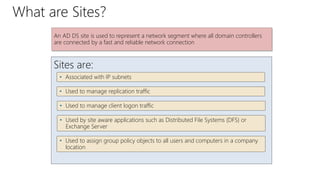
What are Sites?
Sites are:
• Associated with IP subnets
• Used to manage replication traffic
• Used to manage client logon traffic
An AD DS site is used to represent a network segment where all domain controllers
are connected by a fast and reliable network connection
• Used by site aware applications such as Distributed File Systems (DFS) or
Exchange Server
• Used to assign group policy objects to all users and computers in a company
location
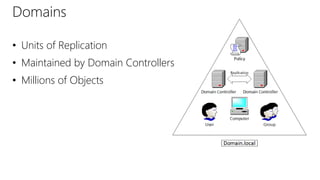
• Units of Replication
• Maintained by Domain Controllers
• Millions of Objects
Domains
Trees
Lesson 3: Overview of AD DS Logical Components
• AD DS Schema
• The Basics
• Trusts
• AD DS Objects
• Demo: Installation and Management
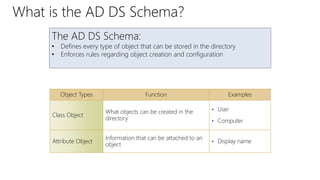
The AD DS Schema:
• Defines every type of object that can be stored in the directory
• Enforces rules regarding object creation and configuration
Object Types Function Examples
Class Object
What objects can be created in the
directory
• User
• Computer
Attribute Object
Information that can be attached to an
object
• Display name
What is the AD DS Schema?
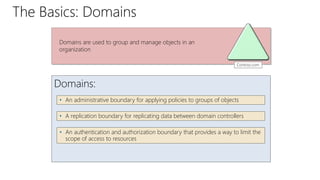
The Basics: Domains
Domains:
• An administrative boundary for applying policies to groups of objects
• A replication boundary for replicating data between domain controllers
• An authentication and authorization boundary that provides a way to limit the
scope of access to resources
Contoso.com
Domains are used to group and manage objects in an
organization
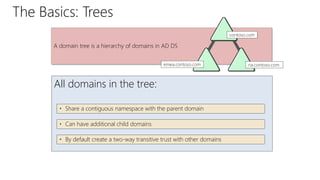
The Basics: Trees
All domains in the tree:
• Share a contiguous namespace with the parent domain
• Can have additional child domains
• By default create a two-way transitive trust with other domains
A domain tree is a hierarchy of domains in AD DS
contoso.com
na.contoso.com
emea.contoso.com
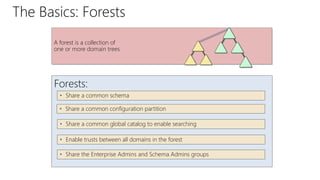
The Basics: Forests
Forests:
• Share a common schema
• Share a common configuration partition
• Share a common global catalog to enable searching
A forest is a collection of
one or more domain trees
• Enable trusts between all domains in the forest
• Share the Enterprise Admins and Schema Admins groups
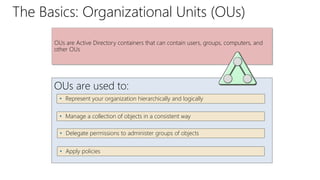
The Basics: Organizational Units (OUs)
OUs are used to:
• Represent your organization hierarchically and logically
• Manage a collection of objects in a consistent way
• Delegate permissions to administer groups of objects
OUs are Active Directory containers that can contain users, groups, computers, and
other OUs
• Apply policies
Trusts provide a mechanism for users to gain access to resources in another domain
Types of Trusts Description Diagram
Directional
The trust direction flows from
trusting domain to the trusted
domain
Transitive
The trust relationship is extended
beyond a two-domain trust to
include other trusted domains
• All domains in a forest trust all other domains in the forest
• Trusts can extend outside the forest
Access
TRUST
Trust &
Access
Trusts
Object Description
User • Enables network resource access for a user
InetOrgPerson
• Similar to a user account
• Used for compatibility with other directory services
Contacts
• Used primarily to assign e-mail addresses to external users
• Does not enable network access
Groups • Used to simplify the administration of access control
Computers
• Enables authentication and auditing of computer access to
resources
Printers
• Used to simplify the process of locating and connecting to
printers
Shared folders • Enables users to search for shared folders based on properties
AD DS Objects
DEMO: Installation and Management
• Observe the installation of AD DS
– Installation occurs without promotion to a domain controller
• Domain Controller Promotion
• Active Directory Users and Computers
• Active Directory Administrative Center
• Active Directory Sites and Services
Module Review and Takeaways
• Review Questions
• Summary of AD DS
Thanks for Watching!

Active Directory Domain Services.pptx

  • 1.
  • 2.
    • Overview ofAD DS • AD DS Physical Components • AD DS Logical Components Module Overview
  • 3.
    • Protocol • Whatis Authentication? • What is Authorization? • Why Deploy AD DS? • Centralized Network Management • Requirements for Installing AD DS • Overview of AD DS and DNS • Overview of AD DS Components Lesson 1: Overview of AD DS
  • 4.
    Protocol • Lightweight DirectoryAccess Protocol (LDAP) – X.500 Standard • X. 500 Directory Service is a standard way to develop an electronic directory of people in an organization so that it can be part of a global directory available to anyone in the world with Internet access. – Based on TCP/IP – A method for accessing, searching, and modifying a directory service – A client-server model
  • 5.
    What is Authentication? Authenticationincludes two components: Authentication is the process of verifying a user’s identity on a network • Network authentication: grants access to network resources • Interactive logon: grants access to the local computer
  • 6.
    What is Authorization? Securityprincipals are issued security identifiers (SIDs) when the account is created User accounts are issued security tokens during authentication that include the user’s SID and all related group SIDs Shared resources on a network include access control lists (ACL) that define who can access the resource Authorization is a process of verifying that an authenticated user has permission to perform an action The security token is compared against the Discretionary Access Control List (DACL) on the resource and access is granted or denied
  • 7.
    Why Deploy ADDS? AD DS features include: • Centralized directory • Single sign-on access • Integrated security • Scalability AD DS provides a centralized system for managing users, computers, and other resources on a network • Common management interface
  • 8.
    Centralized Network Management ADDS centralizes network management by providing: • Single location and set of tools for managing user and group accounts • Single location for assigning access to shared network resources • Directory service for AD DS enabled applications • Options for configuring security policies that apply to all users and computers • Group policies to manage user desktops and security settings
  • 9.
    Object Description TCP/IP •Configure appropriate TCP/IP and DNS server addresses. Credentials • To install a new AD DS forest, you need to be local Administrator on the server. To install an additional domain controller in an existing domain, you need to be a member of the Domain Admins group. Domain Name System )DNS) Infrastructure • Verify that a DNS infrastructure is in place. When you install AD DS, you can include DNS server installation, if it is needed. • When you create a new domain, a DNS delegation is created automatically during the installation process. Creating a DNS delegation requires credentials that have permissions to update the parent DNS zones. Requirements for Installing AD DS
  • 10.
    Overview of ADDS and DNS AD DS domain controller records must be registered in DNS to enable other domain controllers and client computers to locate the domain controllers AD DS domain names must be DNS domain names DNS Domain Name AD DS requires a DNS infrastructure DNS DNS zones can be stored in AD DS as Active Directory integrated zones DNS Zone
  • 11.
    Physical Components LogicalComponents • Data store • Domain controllers • Global catalog server • Read-Only Domain Controller (RODC) • Partitions • Schema • Domains • Domain trees • Forests • Sites • Organizational units (OUs) AD DS is composed of both physical and logical components Component Overview
  • 12.
    Lesson 2: Overviewof AD DS Physical Components • Domain Controllers • Global Catalog Servers • Data Store • Replication • Sites
  • 13.
    Domain Controllers Domain controllers: •Host a copy of the AD DS directory store • Provide authentication and authorization services • Replicate updates to other domain controllers in the domain and forest A domain controller is a server with the AD DS server role installed that has specifically been promoted to a domain controller • Allow administrative access to manage user accounts and network resources Windows Server 2008 and later supports RODCs
  • 14.
    Global Catalog Servers Theglobal catalog: • Contains a copy of all AD DS objects in a forest that includes only some of the attributes for each object in the forest • Improves efficiency of object searches by avoiding unnecessary referrals to domain controllers • Required for users to log on to a domain Global catalog servers are domain controllers that also store a copy of the global catalog
  • 15.
    What is theAD DS Data Store? The AD DS data store: • Consists of the Ntds.dit file • Is stored by default in the %SystemRoot%NTDS folder on all domain controllers • Is accessible only through the domain controller processes and protocols The AD DS data store contains the database files and processes that store and manage directory information for users, services, and applications
  • 16.
    What is ADDS Replication? AD DS replication: • Ensures that all domain controllers have the same information • Uses a multimaster replication model • Can be managed by creating AD DS sites AD DS replication copies all updates of the AD DS database to all other domain controllers in a domain or forest The AD DS replication topology is created automatically as new domain controllers are added to the domain
  • 17.
    What are Sites? Sitesare: • Associated with IP subnets • Used to manage replication traffic • Used to manage client logon traffic An AD DS site is used to represent a network segment where all domain controllers are connected by a fast and reliable network connection • Used by site aware applications such as Distributed File Systems (DFS) or Exchange Server • Used to assign group policy objects to all users and computers in a company location
  • 18.
    • Units ofReplication • Maintained by Domain Controllers • Millions of Objects Domains
  • 19.
  • 20.
    Lesson 3: Overviewof AD DS Logical Components • AD DS Schema • The Basics • Trusts • AD DS Objects • Demo: Installation and Management
  • 21.
    The AD DSSchema: • Defines every type of object that can be stored in the directory • Enforces rules regarding object creation and configuration Object Types Function Examples Class Object What objects can be created in the directory • User • Computer Attribute Object Information that can be attached to an object • Display name What is the AD DS Schema?
  • 22.
    The Basics: Domains Domains: •An administrative boundary for applying policies to groups of objects • A replication boundary for replicating data between domain controllers • An authentication and authorization boundary that provides a way to limit the scope of access to resources Contoso.com Domains are used to group and manage objects in an organization
  • 23.
    The Basics: Trees Alldomains in the tree: • Share a contiguous namespace with the parent domain • Can have additional child domains • By default create a two-way transitive trust with other domains A domain tree is a hierarchy of domains in AD DS contoso.com na.contoso.com emea.contoso.com
  • 24.
    The Basics: Forests Forests: •Share a common schema • Share a common configuration partition • Share a common global catalog to enable searching A forest is a collection of one or more domain trees • Enable trusts between all domains in the forest • Share the Enterprise Admins and Schema Admins groups
  • 25.
    The Basics: OrganizationalUnits (OUs) OUs are used to: • Represent your organization hierarchically and logically • Manage a collection of objects in a consistent way • Delegate permissions to administer groups of objects OUs are Active Directory containers that can contain users, groups, computers, and other OUs • Apply policies
  • 26.
    Trusts provide amechanism for users to gain access to resources in another domain Types of Trusts Description Diagram Directional The trust direction flows from trusting domain to the trusted domain Transitive The trust relationship is extended beyond a two-domain trust to include other trusted domains • All domains in a forest trust all other domains in the forest • Trusts can extend outside the forest Access TRUST Trust & Access Trusts
  • 27.
    Object Description User •Enables network resource access for a user InetOrgPerson • Similar to a user account • Used for compatibility with other directory services Contacts • Used primarily to assign e-mail addresses to external users • Does not enable network access Groups • Used to simplify the administration of access control Computers • Enables authentication and auditing of computer access to resources Printers • Used to simplify the process of locating and connecting to printers Shared folders • Enables users to search for shared folders based on properties AD DS Objects
  • 28.
    DEMO: Installation andManagement • Observe the installation of AD DS – Installation occurs without promotion to a domain controller • Domain Controller Promotion • Active Directory Users and Computers • Active Directory Administrative Center • Active Directory Sites and Services
  • 29.
    Module Review andTakeaways • Review Questions • Summary of AD DS
  • 30.

Editor's Notes

  • #6 Course 6424A
  • #7 Course 6424A
  • #8 Course 6424A
  • #9 Course 6424A
  • #10 Course 6424A
  • #11 Course 6424A
  • #12 Course 6424A
  • #13 Course 6424A
  • #14 Course 6424A
  • #15 Course 6424A
  • #16 Course 6424A
  • #17 Course 6424A
  • #18 Course 6424A
  • #19 All of the domain controllers in a particular domain can receive changes and replicate those changes to all other domain controllers in the domain. Each domain in Active Directory is identified by a Domain Name System (DNS) domain name and requires one or more domain controllers.
  • #21 Course 6424A
  • #22 Course 6424A
  • #23 Course 6424A
  • #24 Course 6424A
  • #25 Course 6424A
  • #26 Course 6424A
  • #27 Course 6424A
  • #28 Course 6424A
  • #30 Course 6424A
  • #31 30