LDAP
(Lightweight Directory Access Protocol)
R&D AND PRESENTED BY:
S. HASNAIN RAZA
PIMSAT – KARACHI
PAKISTAN
Agenda
• Background
• Introduction to LDAP
• Directory Structure
• Distinguish Name
• Sample DIT
• Sample User Object
• Attribute and ObjectClass
• ObjectType examples
• Basic Operations of LDAP
• LDAP application
• Microsoft Active Directory
• MS Active Directory and LDAP
• MS Outlook and LDAP
Background
• Applications might interact with computers on the same local area network,
within a corporate intranet, within extranets linking up partners and
suppliers, or anywhere on the worldwide Internet.
• To improve functionality and ease-of-use, and to enable cost-effective administration of
distributed applications:
• information about the services, resources, users, and other objects accessible from the
applications needs to be organized in a clear and consistent manner.
• Much of this information can be shared among many applications.
• But it must also be protected
• Such information is often collected into a special database that is
sometimes called a directory.
Background (cont.)
What is directory?
• A directory is a specialized list that lets you quickly look up information
about the things the directory references
 At its most basic definition, a directory is any database specialized more for
reading than for writing.
 Directory server is used to maintain information about some set of entities
(entities like people or organizations), and it provides for accessing that
information
Background (cont.)
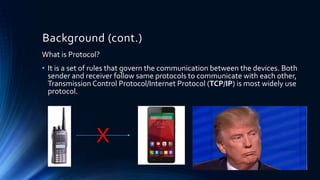
What is Protocol?
• It is a set of rules that govern the communication between the devices. Both
sender and receiver follow same protocols to communicate with each other,
Transmission Control Protocol/Internet Protocol (TCP/IP) is most widely use
protocol.
X
Introduction to LDAP
 Lightweight Directory Access Protocol, LDAP is an Internet protocol that email and
other programs use to look up information from a server
 LDAP is a protocol for accessing specialized databases called directories.
 LDAP is designed to be a standard way of providing access to directory services.
 In computer networking, LDAP is a protocol for querying and modifying directory
services running over network. Fundamentally it is a Network Protocol.
 LDAP, provides a standard language that directory client applications and directory
servers use to communicate with one another about data in directories.
Introduction to LDAP (cont.)
• A message protocol used by directory clients and servers.
• There is LDAP API to be used by C and Java programs
• With Microsoft it can by accessed via ADSI
• All modern LDAP servers are based on LDAP version 3.
• Clients and servers may or may not be on the same machine
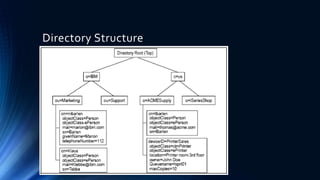
Directory Structure
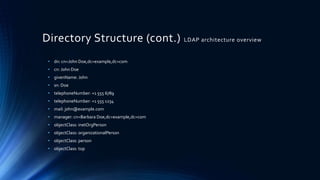
Directory Structure (cont.) LDAP architecture overview
• dn: cn=John Doe,dc=example,dc=com
• cn: John Doe
• givenName: John
• sn: Doe
• telephoneNumber: +1 555 6789
• telephoneNumber: +1 555 1234
• mail: john@example.com
• manager: cn=Barbara Doe,dc=example,dc=com
• objectClass: inetOrgPerson
• objectClass: organizationalPerson
• objectClass: person
• objectClass: top
Directory Structure (cont.)
PIMSAT
ABC Bldg, Near regent
plaza, Karachi
74000
(+92) 21-2371234
Organization Name: PIMSAT
Street Adress:ABC Bldg, Near regent plaza
City: Karachi
Province: Sind
Postal Code: 74000
Country: Pakistan
Phone Number: (+92) 21-2371234
Organization Name: PIMSAT
Street Adress: XYZ Bldg,Thandi Sarak,
City: Hyderabad
Province: Sind
Postal Code: 85123
Country: Pakistan
Phone Number: (+92) xxx-xxxxxxx
Our Institute is located in Karachi, and
another branch/campus of the
institute located in another place
Hyderabad.
How can we distinguish between
these records?
Distinguish Name
• One way of distinguishing between two very similar records is to create a
unique name for each record in the directory
• Strategy adopted by LDAP ; each record in the directory has a
distinguished name (DN).
• The DN is always indexed and will always be returned in any search.
• A DN is composed of a combination of directory information, and looks
something like this :
• dn: o=PIMSAT, l=Karachi, st=Sindh, c=PAKISTAN
• dn: o=PIMSAT, l=Hyderabad, st=Sindh, c=PAKISTAN
Distinguish Name (cont.)
• Another format of writing DN
• uid=jheiss,ou=people,dc=example,dc=com
• cn=users,ou=group,dc=example,dc=com
• Notice that the DNS name is example.com (specified by DC=Domain
Component entries) for the domain
• OU is organizational unit
• Each domain subdomain could create a tree structure in LDAP
(engr.example.com, sales.example.com, pre.engr.example.com,
support.engr.example.com, etc)
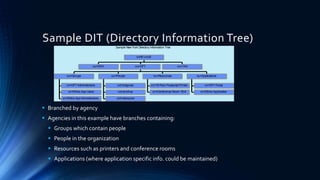
Sample DIT (Directory Information Tree)
 Branched by agency
 Agencies in this example have branches containing:
 Groups which contain people
 People in the organization
 Resources such as printers and conference rooms
 Applications (where application specific info. could be maintained)
Sample NewYork Directory Information Tree
ou=DOH
cn=OFT Administrators
cn=Ethics App Users
cn=Ethics AppAdministrators
ou=Groups
uid=bdigman
uid=jnortrup
uid=dstrazzeri
ou=People
cn=1B Floor Postscript Printer
cn=Conference Room 1B-A
ou=Resources
cn=OFT Portal
cn=Ethics Application
ou=Applications
ou=OFT ou=TAX
o=NY,c=US
Sample User Object
• Objects contain attributes, e.g.,
• uid (user ID)
• cn (common name)
• sn (surname)
• mail (e-mail address)
• Attributes can be multi-valued, e.g.,
givenname of both James and Jim
• This object contains
• white-pages information
• X.509 certificate for PKI
Sample User Object
uid=jnortrup
cn: Jim Nortrup
cn: James Nortrup
givenname: Jim
givenname: James
sn: Nortrup
mail: jnort@oft.state.ny.us
ou: NYSOFT
telephonenumber: 518-402-2018
facsimiletelephonenumber: 518-457-2019
streetaddress:
NYSOFT$Executive Chamber, State Capitol
usercertificate: X.509 Certificate
dn: uid=jnortrup,ou=People,ou=NYSOFT,o=NY,c=US
Attributes and ObjectClass
• Attributes hold the data for an entry.
• A commonly used attribute is "objectClass".
• Each record represents an object, and the attributes associated with that
object are defined according to it's objectClass
• The value of the objectClass attribute.
Object Type examples
• Examples of objectClass:
• organization (needs a name and address)
• person (needs name, email, phone & address)
• course (needs a CRN, instructor, mascot)
• cookie (needs name, cost & taste index)
Basic Operations of LDAP
 Bind - authenticate, and specify LDAP protocol version,
 Start TLS - protect the connection with Transport Layer Security (TLS), to have a more
secure connection,
 Search - search for and/or retrieve directory entries,
 Compare - test if a named entry contains a given attribute value,
 Add a new entry,
 Delete/ Modify an entry,
 Modify DN - move or rename an entry,
 Abandon - abort a previous request,
 Extended Operation - generic operation used to define other operations,
Enough LDAP!!!!!!
OK Fine We understood LDAP and the LDAP server
(directory) but where do we use it????
LDAP Application
• MicrosoftActive Directory
• Oracle Internet Directory
• Oracle Unified Directory
• Oracle Directory Server Enterprise Edition
• Apache Directory Server
• IBMTivoli Directory Server
• Red Hat Directory Server
Microsoft Active Directory
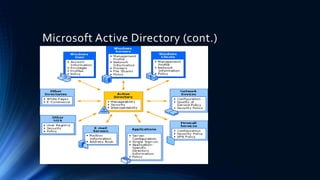
• Active Directory is Microsoft's trademarked directory service, an integral
part of theWindows 2000 architecture. Like other directory services, such
as Novell Directory Services (NDS), Active Directory is a centralized and
standardized system that automates network management of user data,
security, and distributed resources, and enables interoperation with other
directories. Active Directory is designed especially for distributed
networking environments.
Microsoft Active Directory (cont.)
MS Active Directory and LDAP
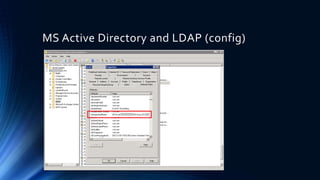
MS Active Directory and LDAP (config)
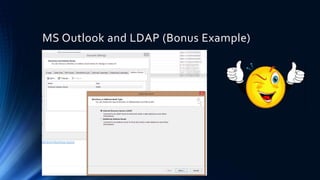
MS Outlook and LDAP (Bonus Example)
THANKYOU!
QUESTIONS?

LDAP - Lightweight Directory Access Protocol

  • 1.
    LDAP (Lightweight Directory AccessProtocol) R&D AND PRESENTED BY: S. HASNAIN RAZA PIMSAT – KARACHI PAKISTAN
  • 2.
    Agenda • Background • Introductionto LDAP • Directory Structure • Distinguish Name • Sample DIT • Sample User Object • Attribute and ObjectClass • ObjectType examples • Basic Operations of LDAP • LDAP application • Microsoft Active Directory • MS Active Directory and LDAP • MS Outlook and LDAP
  • 3.
    Background • Applications mightinteract with computers on the same local area network, within a corporate intranet, within extranets linking up partners and suppliers, or anywhere on the worldwide Internet. • To improve functionality and ease-of-use, and to enable cost-effective administration of distributed applications: • information about the services, resources, users, and other objects accessible from the applications needs to be organized in a clear and consistent manner. • Much of this information can be shared among many applications. • But it must also be protected • Such information is often collected into a special database that is sometimes called a directory.
  • 4.
    Background (cont.) What isdirectory? • A directory is a specialized list that lets you quickly look up information about the things the directory references  At its most basic definition, a directory is any database specialized more for reading than for writing.  Directory server is used to maintain information about some set of entities (entities like people or organizations), and it provides for accessing that information
  • 5.
    Background (cont.) What isProtocol? • It is a set of rules that govern the communication between the devices. Both sender and receiver follow same protocols to communicate with each other, Transmission Control Protocol/Internet Protocol (TCP/IP) is most widely use protocol. X
  • 6.
    Introduction to LDAP Lightweight Directory Access Protocol, LDAP is an Internet protocol that email and other programs use to look up information from a server  LDAP is a protocol for accessing specialized databases called directories.  LDAP is designed to be a standard way of providing access to directory services.  In computer networking, LDAP is a protocol for querying and modifying directory services running over network. Fundamentally it is a Network Protocol.  LDAP, provides a standard language that directory client applications and directory servers use to communicate with one another about data in directories.
  • 7.
    Introduction to LDAP(cont.) • A message protocol used by directory clients and servers. • There is LDAP API to be used by C and Java programs • With Microsoft it can by accessed via ADSI • All modern LDAP servers are based on LDAP version 3. • Clients and servers may or may not be on the same machine
  • 8.
  • 9.
    Directory Structure (cont.)LDAP architecture overview • dn: cn=John Doe,dc=example,dc=com • cn: John Doe • givenName: John • sn: Doe • telephoneNumber: +1 555 6789 • telephoneNumber: +1 555 1234 • mail: john@example.com • manager: cn=Barbara Doe,dc=example,dc=com • objectClass: inetOrgPerson • objectClass: organizationalPerson • objectClass: person • objectClass: top
  • 10.
    Directory Structure (cont.) PIMSAT ABCBldg, Near regent plaza, Karachi 74000 (+92) 21-2371234 Organization Name: PIMSAT Street Adress:ABC Bldg, Near regent plaza City: Karachi Province: Sind Postal Code: 74000 Country: Pakistan Phone Number: (+92) 21-2371234 Organization Name: PIMSAT Street Adress: XYZ Bldg,Thandi Sarak, City: Hyderabad Province: Sind Postal Code: 85123 Country: Pakistan Phone Number: (+92) xxx-xxxxxxx Our Institute is located in Karachi, and another branch/campus of the institute located in another place Hyderabad. How can we distinguish between these records?
  • 11.
    Distinguish Name • Oneway of distinguishing between two very similar records is to create a unique name for each record in the directory • Strategy adopted by LDAP ; each record in the directory has a distinguished name (DN). • The DN is always indexed and will always be returned in any search. • A DN is composed of a combination of directory information, and looks something like this : • dn: o=PIMSAT, l=Karachi, st=Sindh, c=PAKISTAN • dn: o=PIMSAT, l=Hyderabad, st=Sindh, c=PAKISTAN
  • 12.
    Distinguish Name (cont.) •Another format of writing DN • uid=jheiss,ou=people,dc=example,dc=com • cn=users,ou=group,dc=example,dc=com • Notice that the DNS name is example.com (specified by DC=Domain Component entries) for the domain • OU is organizational unit • Each domain subdomain could create a tree structure in LDAP (engr.example.com, sales.example.com, pre.engr.example.com, support.engr.example.com, etc)
  • 13.
    Sample DIT (DirectoryInformation Tree)  Branched by agency  Agencies in this example have branches containing:  Groups which contain people  People in the organization  Resources such as printers and conference rooms  Applications (where application specific info. could be maintained) Sample NewYork Directory Information Tree ou=DOH cn=OFT Administrators cn=Ethics App Users cn=Ethics AppAdministrators ou=Groups uid=bdigman uid=jnortrup uid=dstrazzeri ou=People cn=1B Floor Postscript Printer cn=Conference Room 1B-A ou=Resources cn=OFT Portal cn=Ethics Application ou=Applications ou=OFT ou=TAX o=NY,c=US
  • 14.
    Sample User Object •Objects contain attributes, e.g., • uid (user ID) • cn (common name) • sn (surname) • mail (e-mail address) • Attributes can be multi-valued, e.g., givenname of both James and Jim • This object contains • white-pages information • X.509 certificate for PKI Sample User Object uid=jnortrup cn: Jim Nortrup cn: James Nortrup givenname: Jim givenname: James sn: Nortrup mail: jnort@oft.state.ny.us ou: NYSOFT telephonenumber: 518-402-2018 facsimiletelephonenumber: 518-457-2019 streetaddress: NYSOFT$Executive Chamber, State Capitol usercertificate: X.509 Certificate dn: uid=jnortrup,ou=People,ou=NYSOFT,o=NY,c=US
  • 15.
    Attributes and ObjectClass •Attributes hold the data for an entry. • A commonly used attribute is "objectClass". • Each record represents an object, and the attributes associated with that object are defined according to it's objectClass • The value of the objectClass attribute.
  • 16.
    Object Type examples •Examples of objectClass: • organization (needs a name and address) • person (needs name, email, phone & address) • course (needs a CRN, instructor, mascot) • cookie (needs name, cost & taste index)
  • 17.
    Basic Operations ofLDAP  Bind - authenticate, and specify LDAP protocol version,  Start TLS - protect the connection with Transport Layer Security (TLS), to have a more secure connection,  Search - search for and/or retrieve directory entries,  Compare - test if a named entry contains a given attribute value,  Add a new entry,  Delete/ Modify an entry,  Modify DN - move or rename an entry,  Abandon - abort a previous request,  Extended Operation - generic operation used to define other operations,
  • 18.
    Enough LDAP!!!!!! OK FineWe understood LDAP and the LDAP server (directory) but where do we use it????
  • 19.
    LDAP Application • MicrosoftActiveDirectory • Oracle Internet Directory • Oracle Unified Directory • Oracle Directory Server Enterprise Edition • Apache Directory Server • IBMTivoli Directory Server • Red Hat Directory Server
  • 20.
    Microsoft Active Directory •Active Directory is Microsoft's trademarked directory service, an integral part of theWindows 2000 architecture. Like other directory services, such as Novell Directory Services (NDS), Active Directory is a centralized and standardized system that automates network management of user data, security, and distributed resources, and enables interoperation with other directories. Active Directory is designed especially for distributed networking environments.
  • 21.
  • 22.
  • 23.
    MS Active Directoryand LDAP (config)
  • 24.
    MS Outlook andLDAP (Bonus Example)
  • 25.