Postfix on Linux
What is Postfix?
Introduction
• E-mail is easily the most popular and
  important Internet service today, which
  has made it a popular target of cyber-
  criminals and spam-happy miscreants.

• It facilitates us to communicate easily
  and effectively.
Introduction (cont.)
• Internet e-mail is built from several standards and
  protocols that define how messages are composed
  and transferred from a sender to a recipient. There
  are many different pieces of software involved, each
  one handling a different step in message delivery.
  Postfix handles only a portion of the whole process.
  Most e-mail users are only familiar with the software
  they use for reading composing messages, known as
  a Mail User Agent (MUA). Examples of some common
  MUAs include Pine, Netscape Communicator and
  Outlook Express. MUAs are good for reading and
  composing e-mail messages, but they don't do much
  for mail delivery. That's what Postfix fits in.
What is a Mail Transfer Agent -MTA?

• MTAs move e-mail from one host or network
  to another. These are in contrast to Mail
  Delivery Agents, which move mail within a
  system (i.e., from an MTA to a local user's
  mailbox, or from a mailbox to a file or
  directory). In other words, MTAs are like the
  mail trucks (and airplanes, trains, etc.) that
  move mail between post offices; Mail
  Delivery Agents are like the letter-carriers who
  distribute the mail to their destination mail
  boxes.
What is a Mail Transfer Agent (cont.)

• In addition to MTAs and MDAs, there are also
  various kinds of e-mail readers, including POP,
  POP3, and IMAP clients for retrieving e-mail
  from remote systems. These are also known as
  Mail User Agents, or MUAs. (There is no real-
  life simile for these, unless your mail is handed
  to you each day by a minion whose sole duty
  is to check your mail box now and then!) But
  we're not concerned with these or with
  MDAs, except to mention how they relate to
  MTAs.
What is Postfix?

• Postfix is a free open source mail transfer agent
  (MTA), a computer program for the routing and
  delivery of email.

• Postfix is the default MTA for a number of Unix(-
  like) operating systems such as Ubuntu Linux.

• This mail transfer agent postfix, provides an
  alternative to send mail that is simpler in design,
  more modular, easier to configure and less work
  to administer. Equally important, it's been
  designed with scalability, reliability and sound
  security as fundamental requirements.
What is Postfix? (cont.)
• Postfix is a Mail Transfer Agent and it is the default
  Mail Transfer Agent (MTA) for Ubuntu. It is in Ubuntu's
  main repository, which means that it receives security
  updates. This is supporting LDAP, SMTP AUTH (SASL),
  and TLS and running in a chroot environment. Postfix
  is Wietse Venema's mailer that started life as an
  alternative to the widely-used Send mail program.
  Postfix attempts to be fast, easy to administer, and
  secure, while at the same time being send mail
  compatible enough to not upset existing users. Thus,
  the outside has a sendmail-ish flavor, but the inside is
  completely different. This software was formerly
  known as VMailer. It was released by the end of 1998
  as the IBM Secure Mailer. From then on it has lived on
  as Postfix. This rpm supports LDAP, SMTP AUTH (trough
  cyrus-sasl) and TLS. If you need MySQL too, rebuild
  the srpm --with mysql.
Founder of Postfix
• POSTFIX was originally written by Wietse
  Venema during a stay at the IBM Thomas J.
  Watson Research Center. Postfix was first
  released in mid-1999.
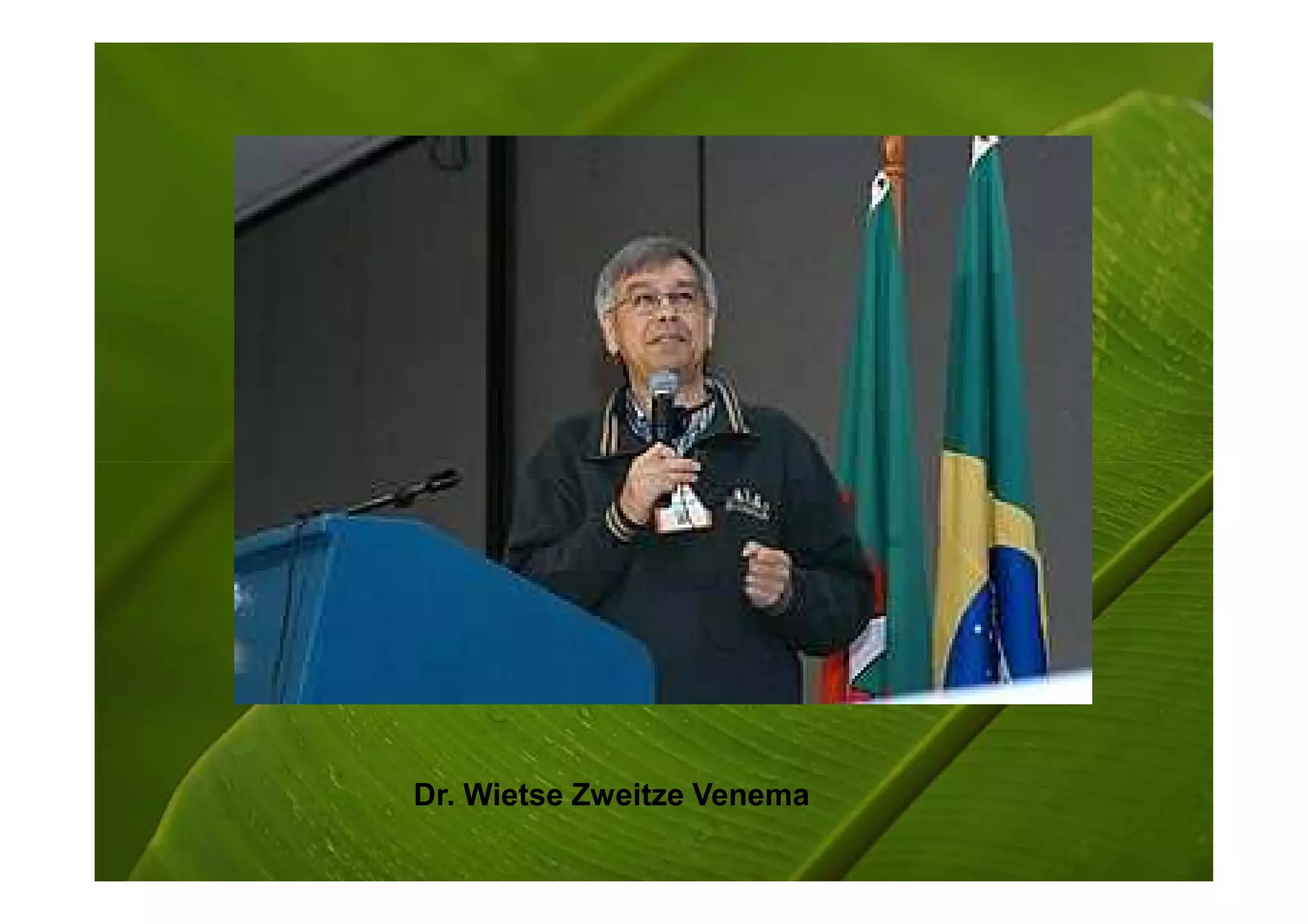
• Dr. Wietse Zweitze Venema (born 1951) is a
  Dutch programmer and physicist best known
  for writing the Postfix mail system. He has also
  written numerous other security related tools,
  such as SATAN and The Coroner's Toolkit,
  both in co-operation with Dan Farmer, and
  TCP Wrapper.
Dr. Wietse Zweitze Venema
• He studied physics at the University of
  Groningen, graduating with a PhD. He
  spent 12 years at Eindhoven University
  as a systems architect in the
  Mathematics and Computer Science
  department, and spent part of this time
                       `
  writing tools for Electronic Data
  Interchange. Since emigrating to the
  U.S. in 1996 he has been working for the
  IBM Thomas J. Watson Research Center
  in New York.
He was awarded in many awards such
                 as;

• Security Summit Hall of Fame Award
  (July 1998)
• SAGE Outstanding Achievement Award
  (November 1999)
• NLUUG Award (November 2000)
• Sendmail Milter Innovation Award
  (November 2006)
Developed      Wietse Venema and many
    by          others

Latest release 2.5.3 / July 29, 2008

   Preview
                2.6-20080726 / July 26, 2008
   release

     OS         Cross-platform

    Type        Mail transfer agent

   License      IBM Public License

   Website      http://www.postfix.org/
Structure
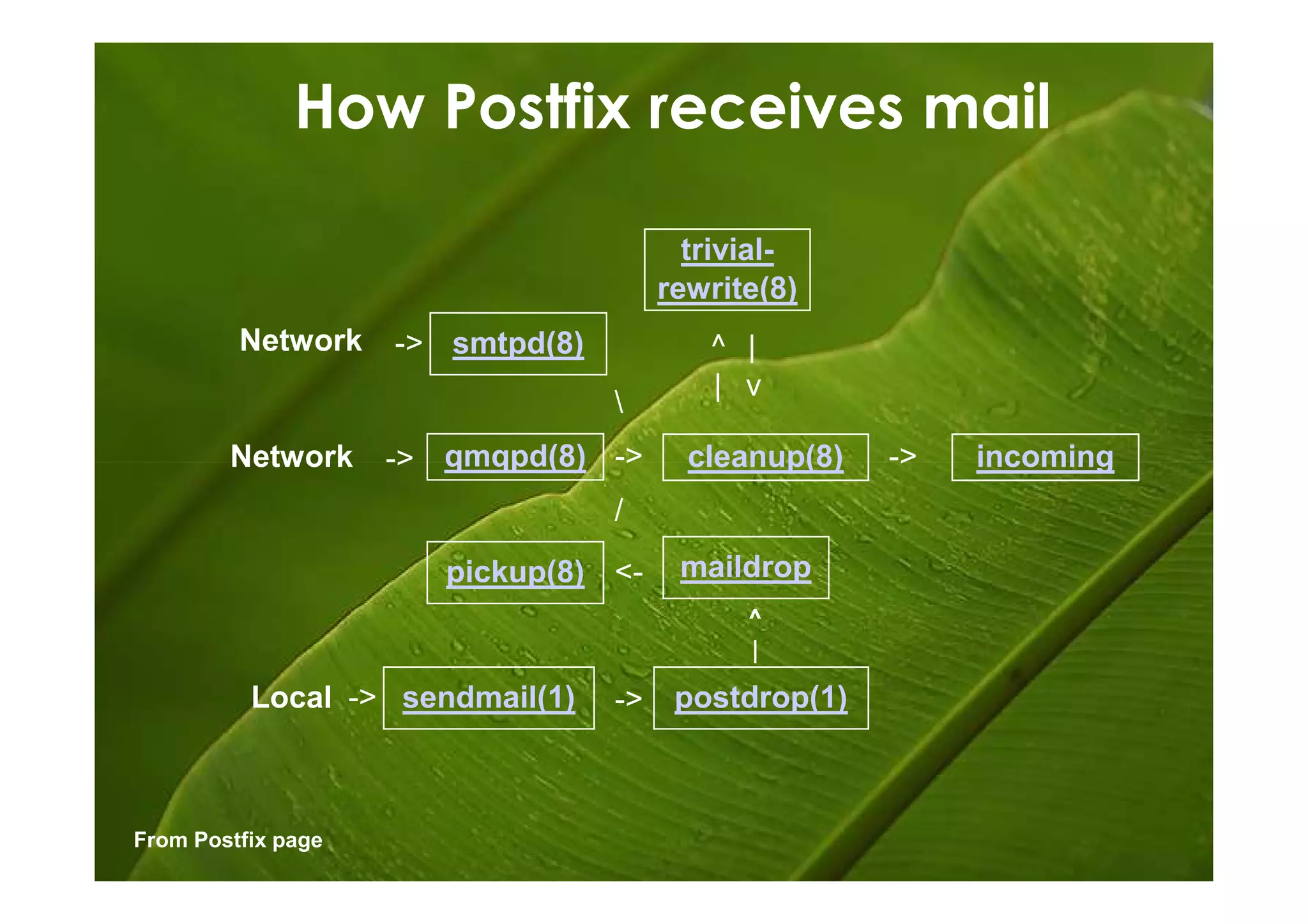
 •How Postfix receives mail
 •How Postfix delivers mail


From Postfix page
Receives


           Delivers
How Postfix receives mail

                                         trivial-
                                       rewrite(8)
         Network    -> smtpd(8)           ^ |
                                          | v
                                  
        Network     -> qmqpd(8) ->       cleanup(8)   ->   incoming
                                  /
                       pickup(8) <-     maildrop
                                             ^
                                             |
          Local -> sendmail(1)    ->    postdrop(1)


From Postfix page
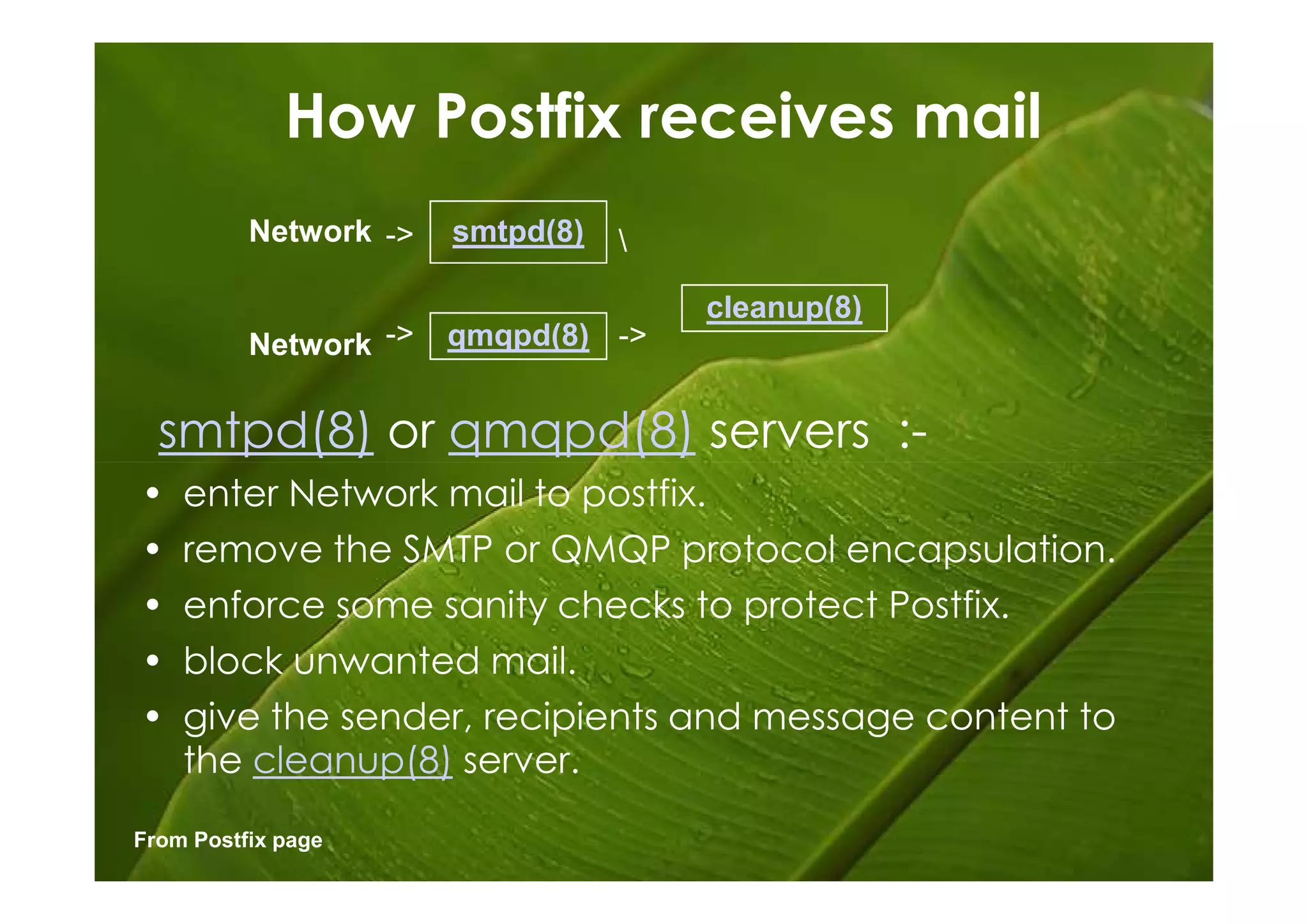
How Postfix receives mail
          Network ->   smtpd(8)   

                                      cleanup(8)
          Network ->   qmqpd(8) ->


  smtpd(8) or qmqpd(8) servers :-
•   enter Network mail to postfix.
•   remove the SMTP or QMQP protocol encapsulation.
•   enforce some sanity checks to protect Postfix.
•   block unwanted mail.
•   give the sender, recipients and message content to
    the cleanup(8) server.
From Postfix page
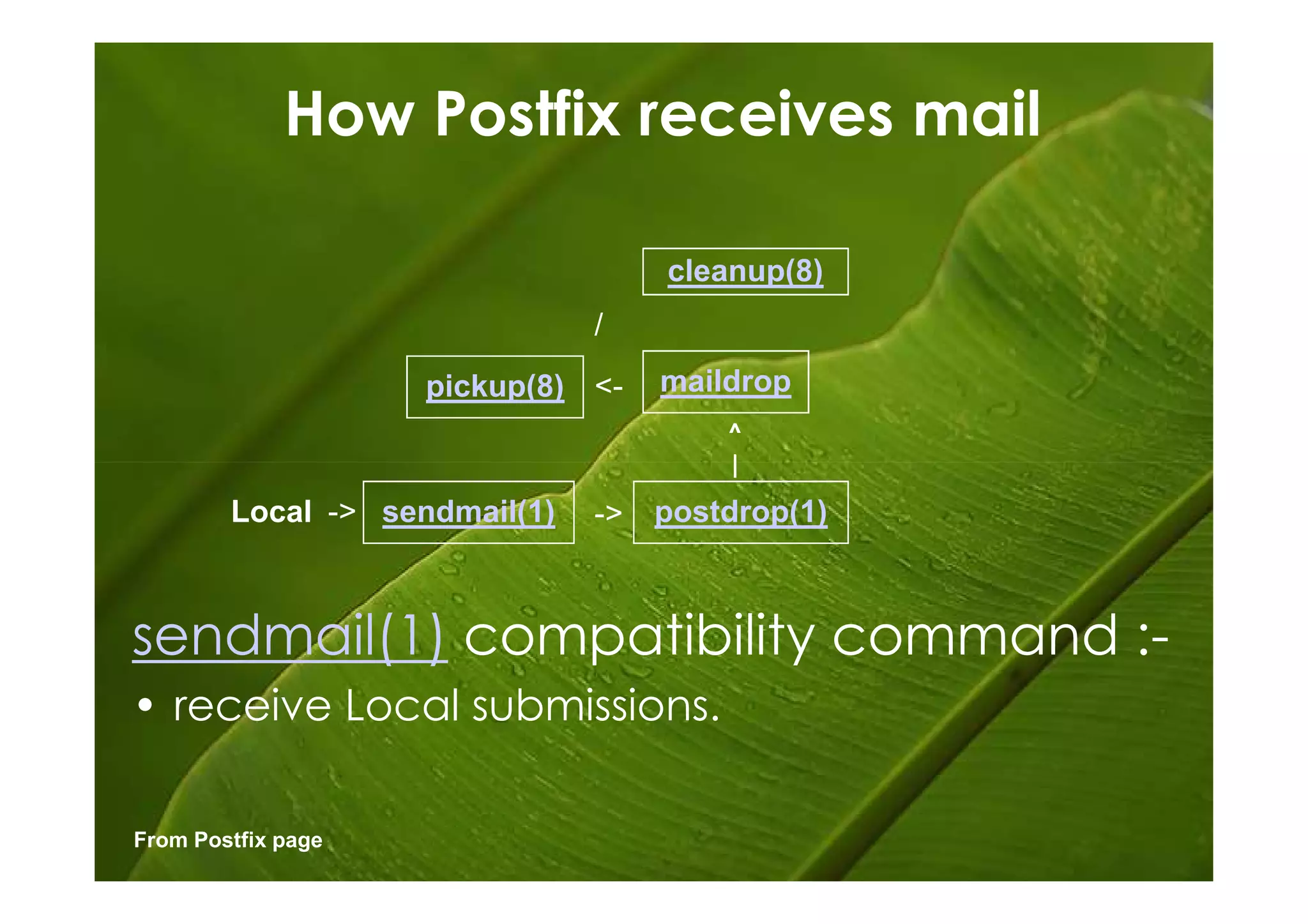
How Postfix receives mail

                                    cleanup(8)
                               /
                    pickup(8) <-    maildrop
                                        ^
                                        |
        Local -> sendmail(1)   ->   postdrop(1)


sendmail(1) compatibility command :-
• receive Local submissions.

From Postfix page
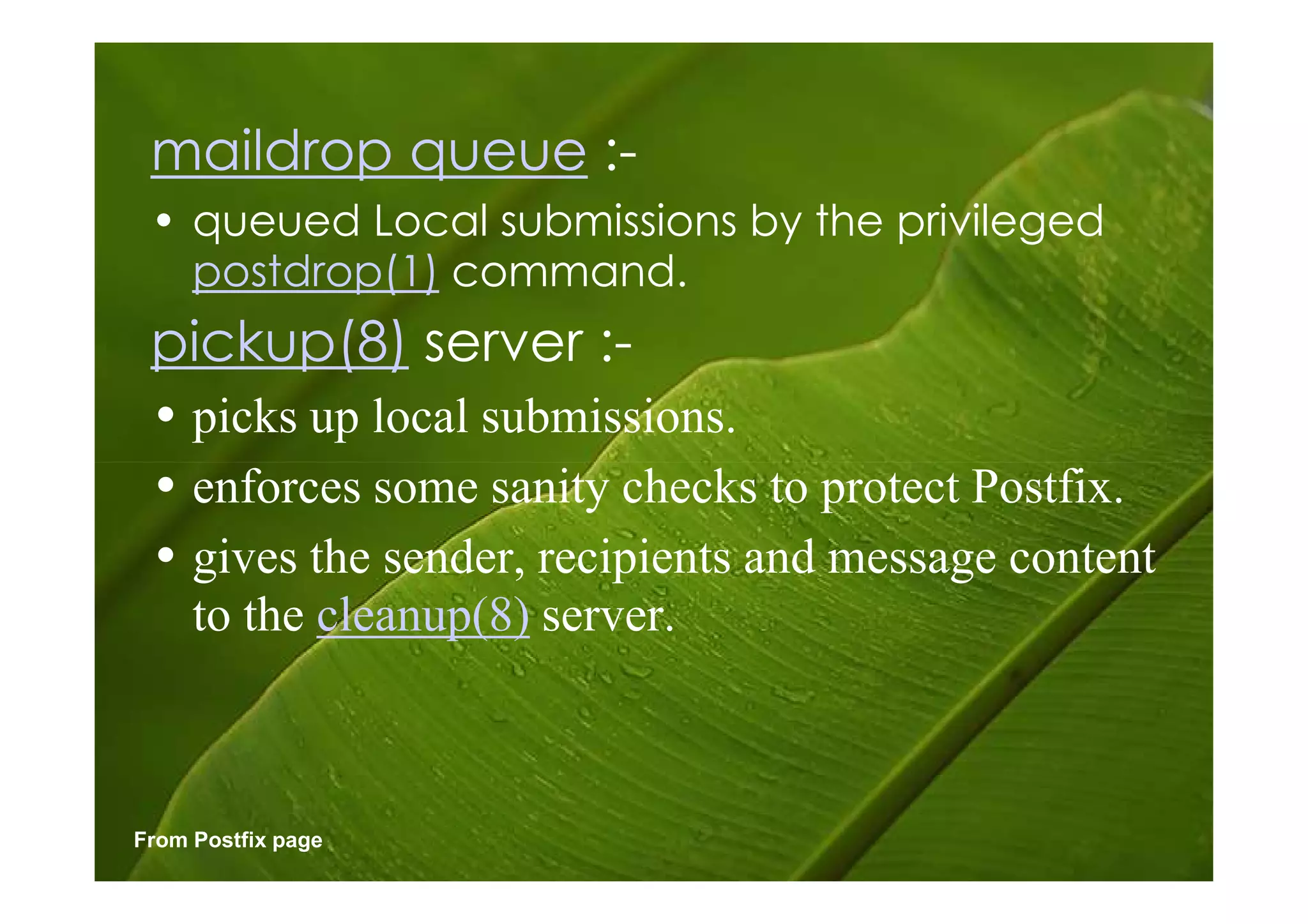
maildrop queue :-
 • queued Local submissions by the privileged
   postdrop(1) command.
 pickup(8) server :-
 • picks up local submissions.
 • enforces some sanity checks to protect Postfix.
 • gives the sender, recipients and message content
   to the cleanup(8) server.


From Postfix page
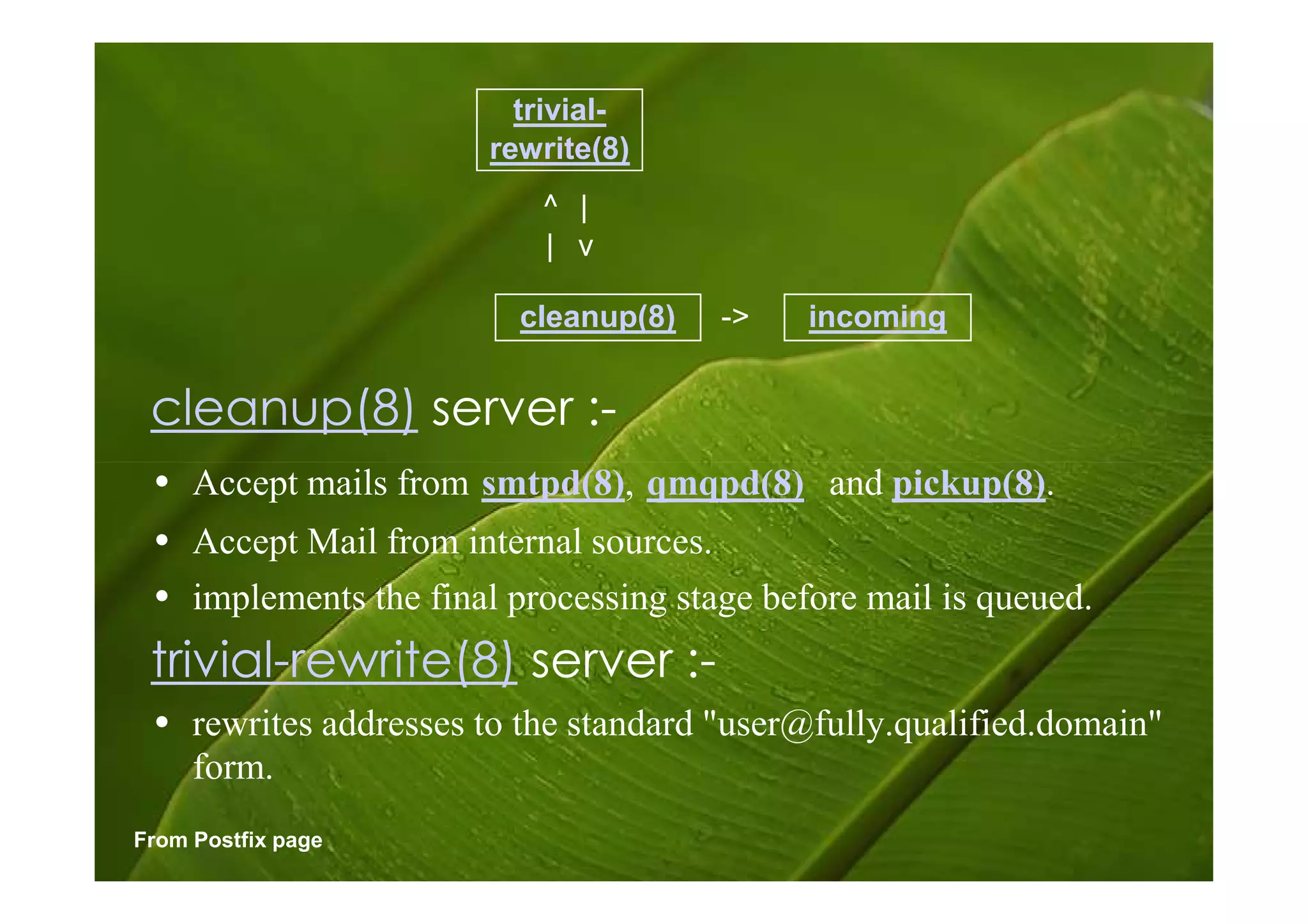
trivial-
                       rewrite(8)
                          ^ |
                          | v

                         cleanup(8)   ->    incoming


 cleanup(8) server :-
 • Accept mails from smtpd(8), qmqpd(8) and pickup(8).
 • Accept Mail from internal sources.
 • implements the final processing stage before mail is queued.
 trivial-rewrite(8) server :-
 • rewrites addresses to the standard "user@fully.qualified.domain"
   form.
From Postfix page
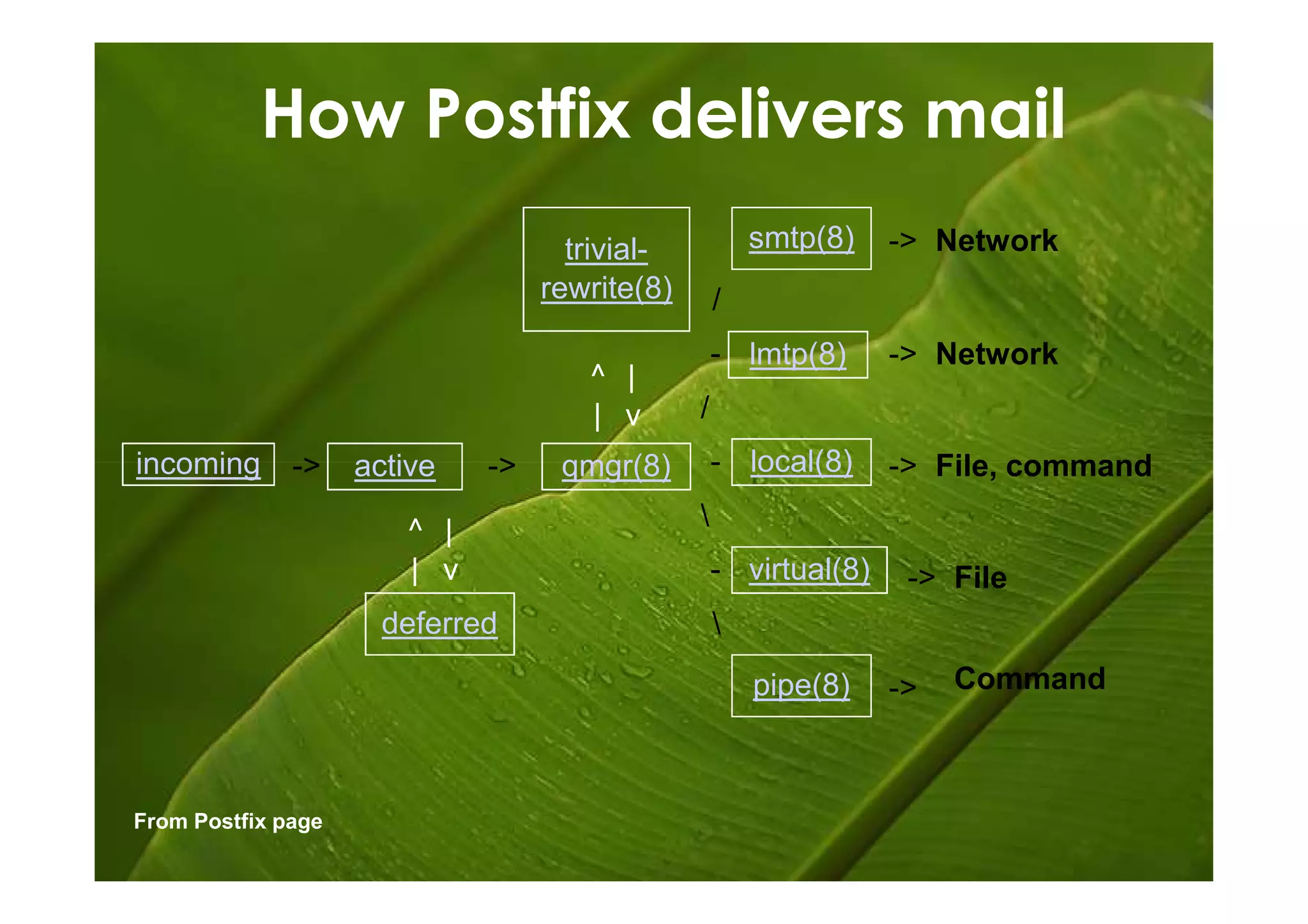
How Postfix delivers mail
                                    trivial-           smtp(8)    -> Network
                                  rewrite(8)       /
                                                   - lmtp(8)      -> Network
                                     ^ |
                                     | v       /
incoming      ->    active   ->    qmgr(8)         - local(8)     -> File, command

                       ^ |                     
                       | v                         - virtual(8)    -> File
                      deferred                     
                                                       pipe(8)    ->   Command


From Postfix page
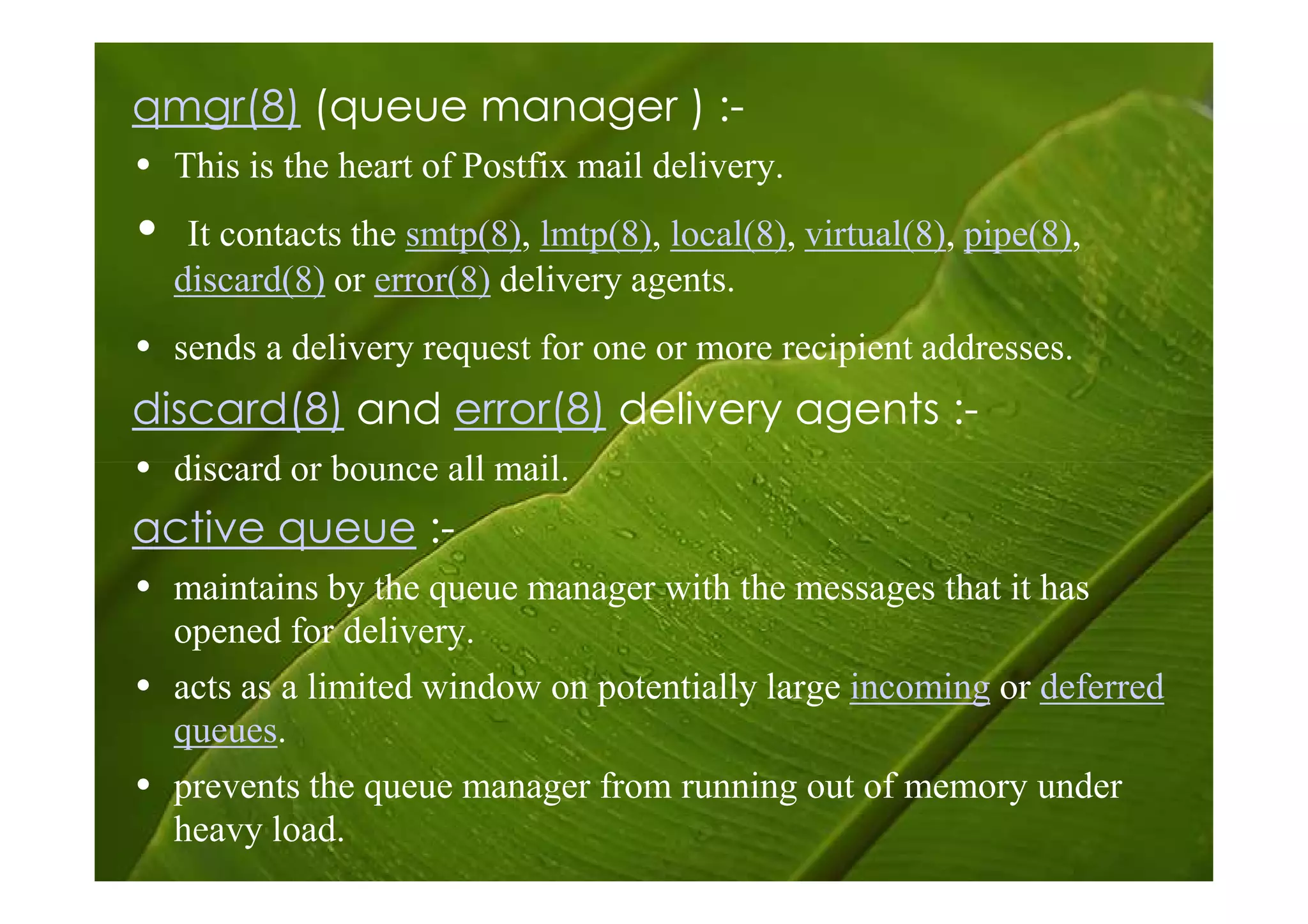
qmgr(8) (queue manager ) :-
• This is the heart of Postfix mail delivery.
•    It contacts the smtp(8), lmtp(8), local(8), virtual(8), pipe(8),
    discard(8) or error(8) delivery agents.
• sends a delivery request for one or more recipient addresses.
discard(8) and error(8) delivery agents :-
• discard or bounce all mail.
active queue :-
• maintains by the queue manager with the messages that it has
  opened for delivery.
• acts as a limited window on potentially large incoming or deferred
  queues.
• prevents the queue manager from running out of memory under
  heavy load.
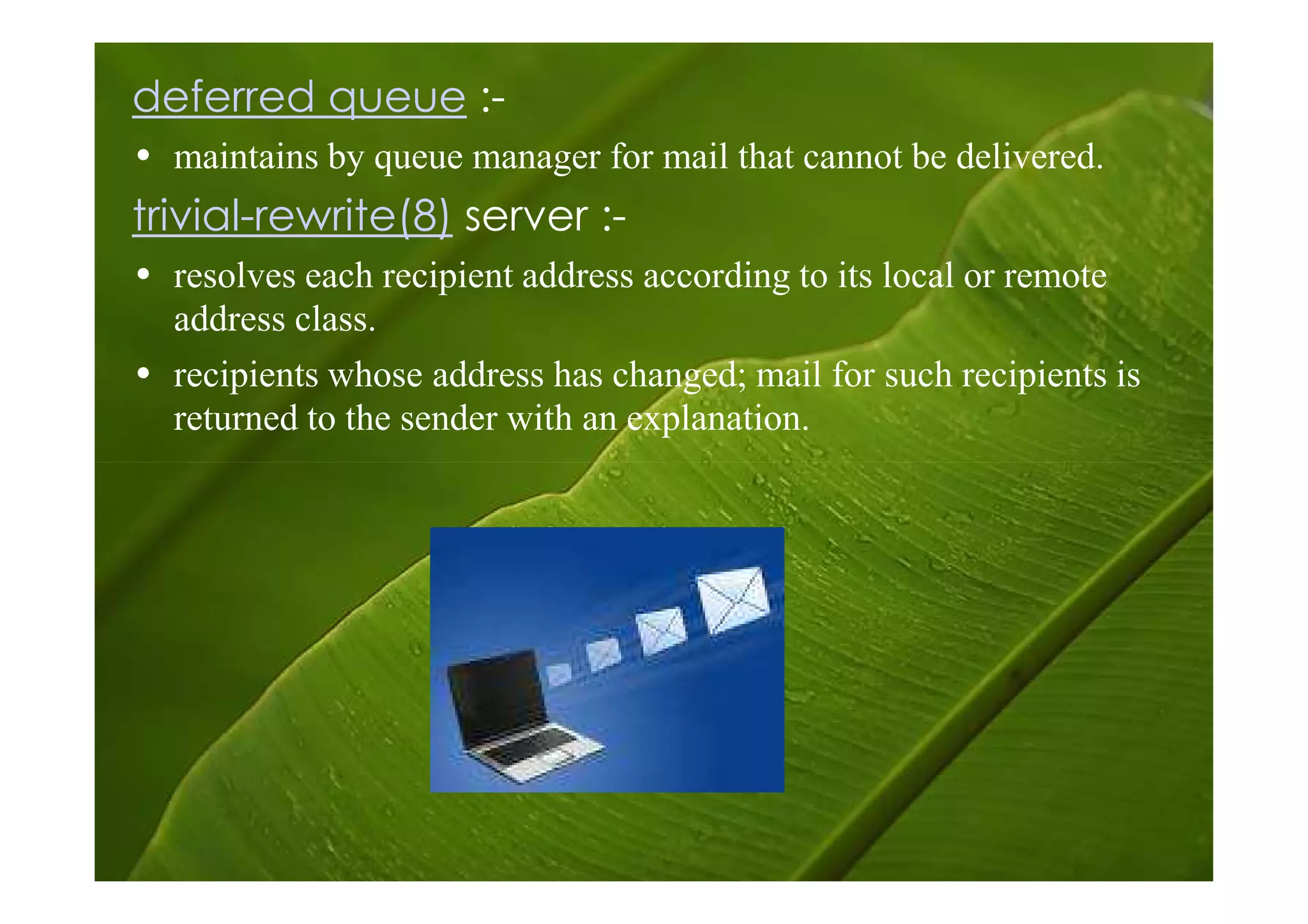
deferred queue :-
• maintains by queue manager for mail that cannot be delivered.
trivial-rewrite(8) server :-
• resolves each recipient address according to its local or remote
  address class.
• recipients whose address has changed; mail for such recipients is
  returned to the sender with an explanation.
Behind the scene
 These server processes rely on other
server processes that do things behind
             the scenes.

As before, names followed by a number
   are Postfix commands or server
 programs, while unnumbered names
inside shaded areas represent Postfix
                queues.
– The resident master server is the supervisor that
  keeps an eye on the well-being of the Postfix mail
  system.
– The bounce, defer and trace services each
  maintain their own queue directory trees with per-
  message log files.
– The proxy map servers provide read-only and
  read-write table lookup service to Postfix
  processes.
– The scache server maintains the connection
  cache for the Postfix smtp cleint.
When delivering mail to a destination
with multiple mail servers, connection
caching can help to skip over a non-
responding server, and thus
dramatically speed up delivery.
Postfix Queue
• A key contributor to the stability and
  the speed of postfix is the intelligent
  way in which it queues mail.
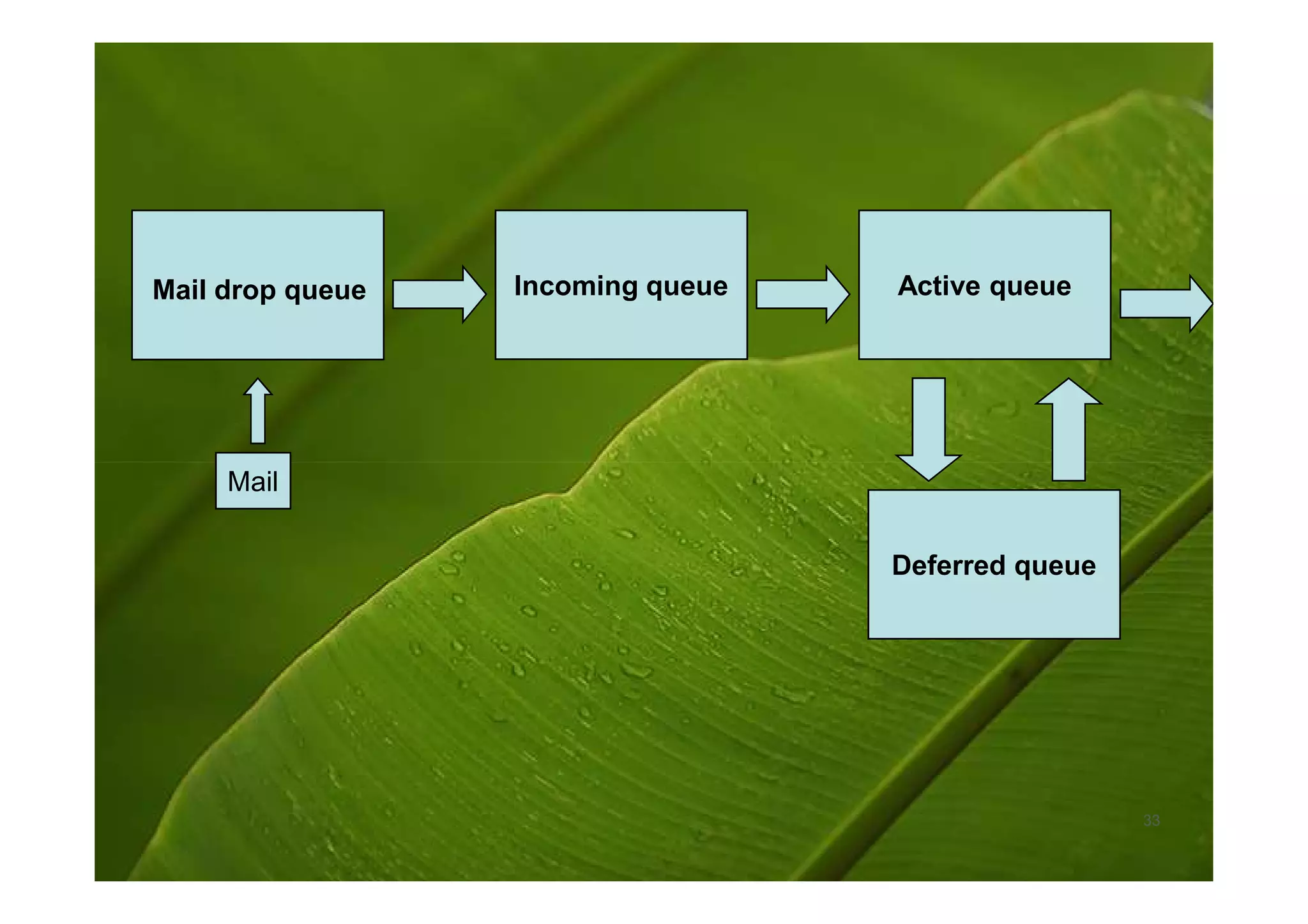
• Postfix uses four different queues,
         »   Mail drop queue.
         »   Incoming queue.
         »   Active queue.
         »   Deferred queue.


                                            27
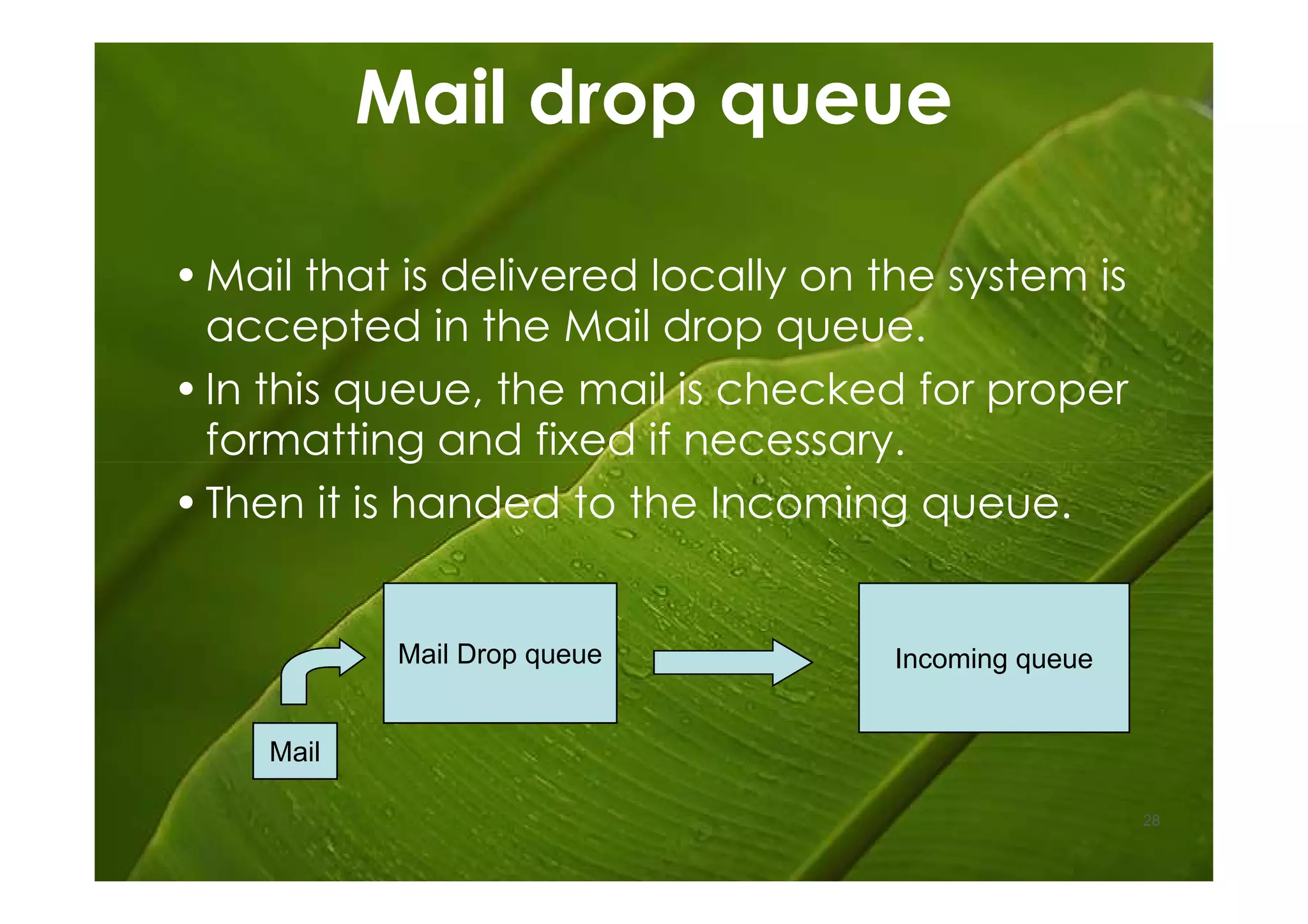
Mail drop queue

• Mail that is delivered locally on the system is
  accepted in the Mail drop queue.
• In this queue, the mail is checked for proper
  formatting and fixed if necessary.
• Then it is handed to the Incoming queue.


            Mail Drop queue          Incoming queue


    Mail

                                                      28
Incoming queue
•The Incoming queue receives mail from
 other hosts, clients or the Mail drop
 queue.
• As long as e-mail is still arriving and as
 long as postfix hasn't really handled the
 e-mail, this queue is the place where
 the e-mails are kept.


                                           29
Active queue
•The Active queue is the queue that is
 used to actually deliver messages and
 therefore has the greatest potential risk
 of something going wrong.
•This queue has a limited size, and
 messages will be accepted only if
 there is space for them.
•That means e-mail in the Incoming and
 deferred queues have to wait until the
 Active queue can accept them.
                                         30
Deferred queue
•E-mail that cannot be delivered is
 placed in the deferred queue.
•This prevents the system from
 continuously trying to deliver e-mail
 and keeps the Active queue as short
 as possible in order to give newer
 messages priority.
•This also enhances stability of the mail.
                                             31
Deferred queue continued…
•If the MTA cannot reach a domain, all
 the e-mail for that domain is placed in
 the deferred queue, so that those
 messages will not needlessly
 monopolize system resources.
•Retry is scheduled with an increasing
 waiting time. When the waiting time
 expires, the e-mail is again placed in
 the Active queue for delivery.
•The system keeps track of retry history.   32
Mail drop queue   Incoming queue   Active queue


     Mail

                                   Deferred queue


                                                    33
Postfix Commands
•The most common invocations of the
 postfix command are postfix start,
 postfix stop and postfix reload.
  •Postfix Start- This command will start the postfix. If
   you already not installed postfix, terminal will
   display an error.
  •Postfix Stop- This command will stop postfix
   through the action.
  •Postfix Reload- This will reload its configuration
   files without stopping and restarting.

                                                        34
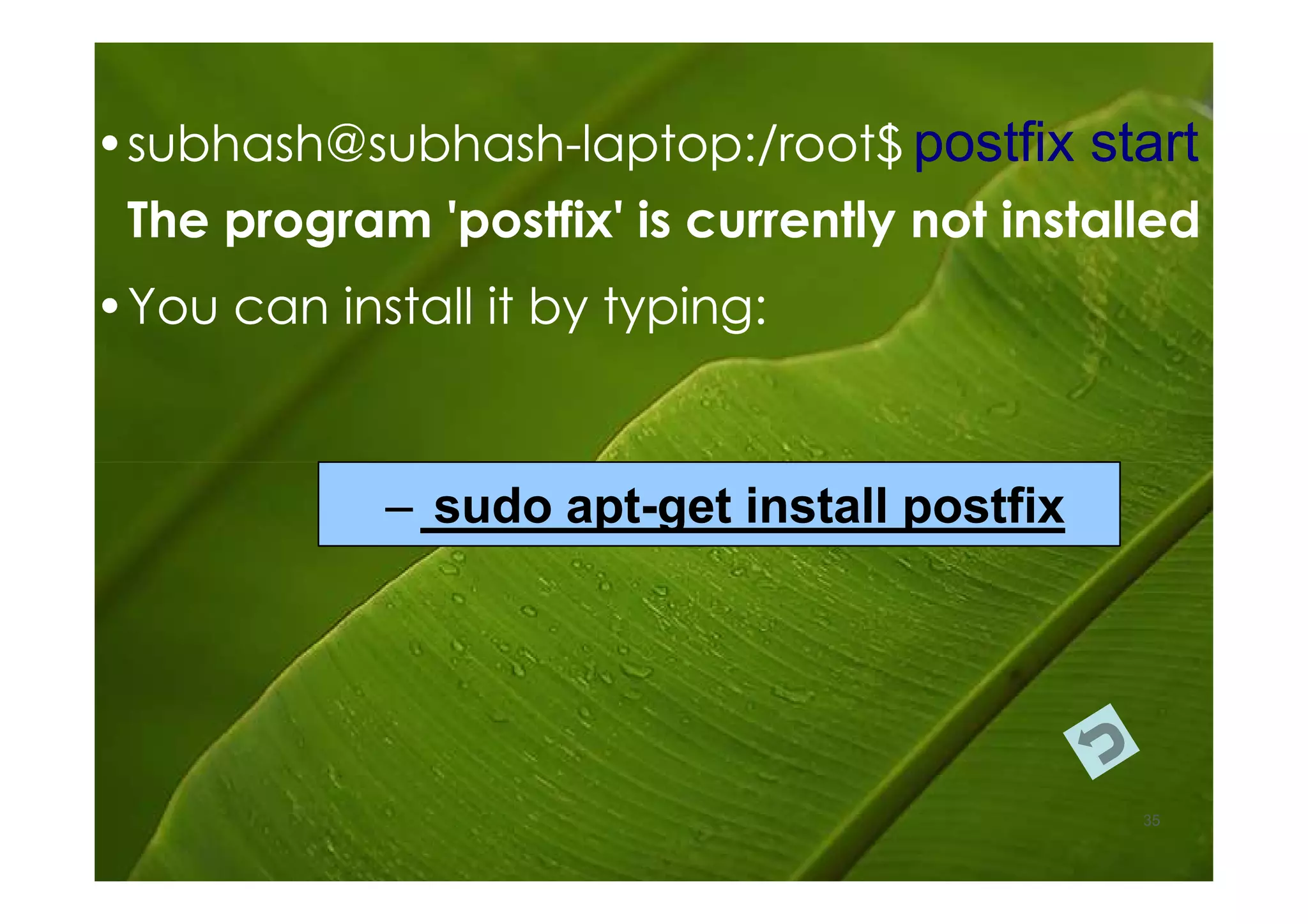
• subhash@subhash-laptop:/root$ postfix start
  subhash@subhash-
 The program 'postfix' is currently not installed
• You can install it by typing:


             – sudo apt-get install postfix
                    apt-


                                              35
Postfix Commands
          continued…
•There are also some other commands,
  •Postfix flush- This will immediately attempt to
   send all queued messages.
  •Postalias- Maintains Postfix alias databases.
  •Postcat- Displays the contents of Postfix queue
   files.
  •Postkick- Makes some internal communication
   channels available for use in.
  •Postlock- Provides Postfix-compatible mailbox
   locking for use in.

                                                     36
Features of Postfix
Security
Simplicity
Compatability
Robustness
Stability
Postfix Content Inspection

Postfix supports three content inspection
   methods

1. Before queue, built-in, light-weight
2. After queue, external, heavy-weight
3. Before queue, external, medium-
   weight
Certain Limitations
Content Inspection Software must finish
in a limited amount of time
Content Inspection Software must run
in a limited amount of memory
Befor queue inspection limits the
sophistication of the content filter that
you can use
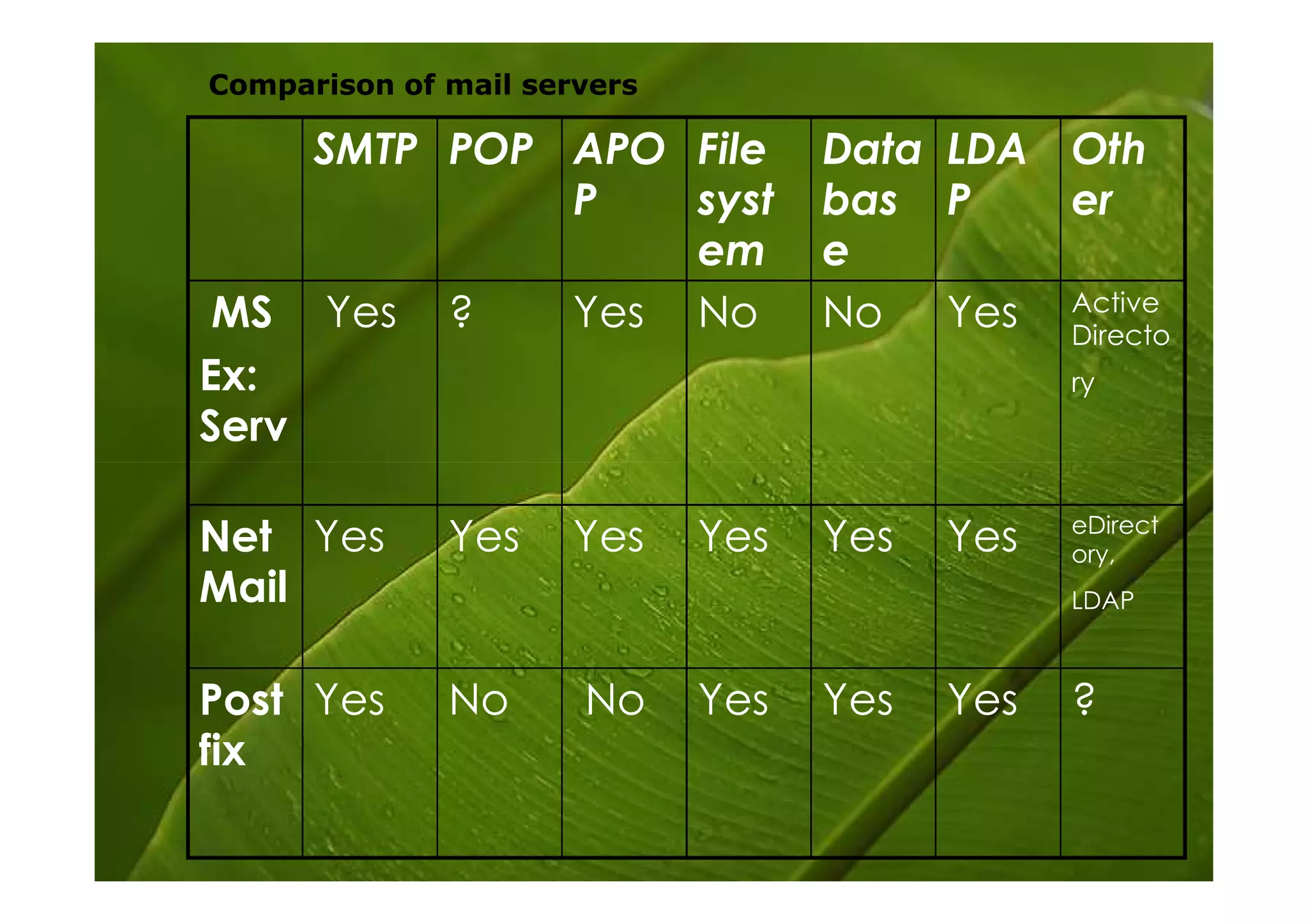
Comparison of mail servers

     SMTP POP APO File             Data LDA Oth
              P   syst             bas P    er
                  em               e
 MS Yes ?     Yes No               No Yes Active
                                            Directo
Ex:                                            ry
Serv

                                               eDirect
Net Yes       Yes     Yes    Yes   Yes   Yes   ory,
Mail                                           LDAP


Post Yes      No      No     Yes   Yes   Yes   ?
fix
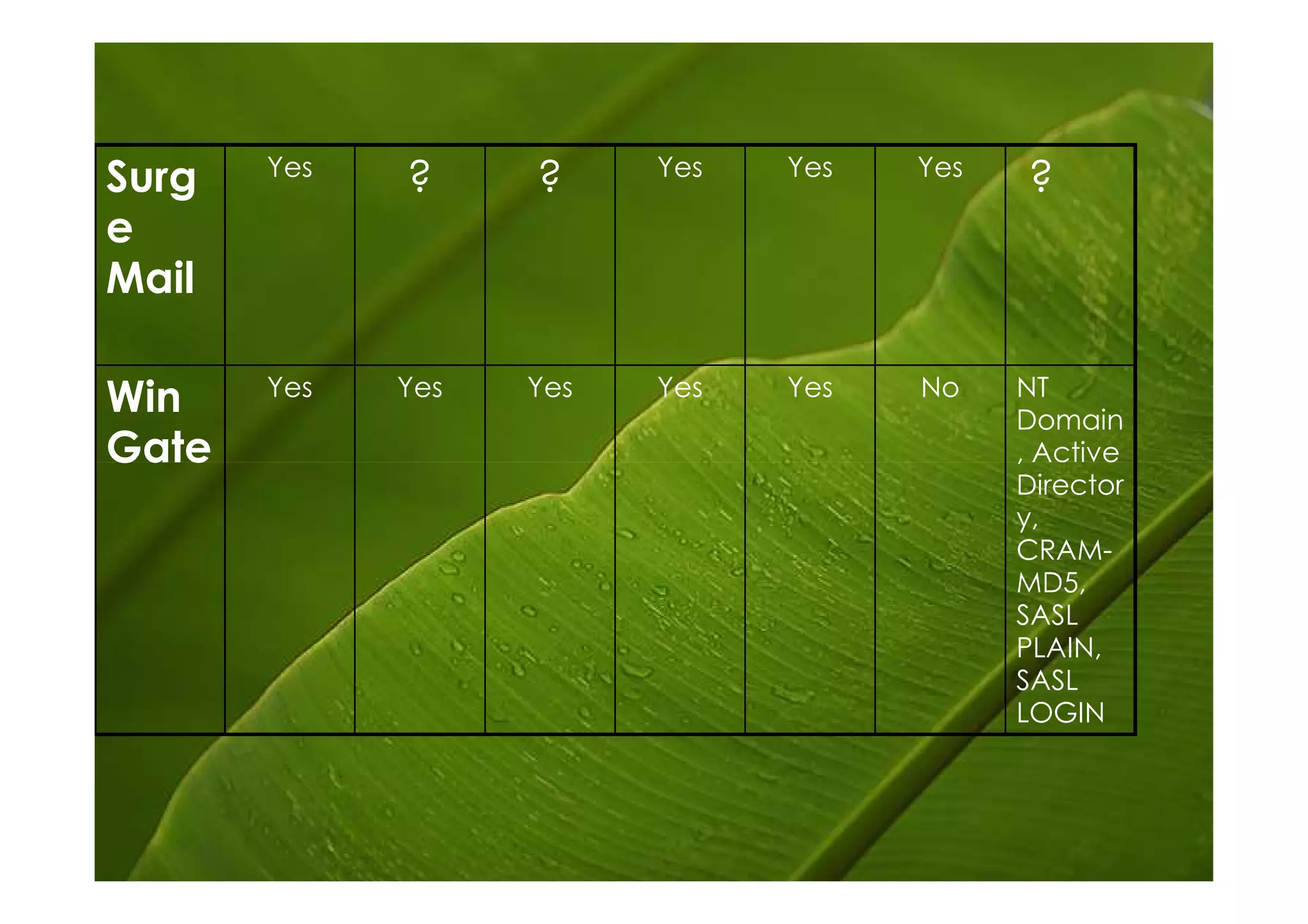
Yes               Yes   Yes   Yes
Surg         ?     ?                       ?
e
Mail

       Yes   Yes   Yes   Yes   Yes   No    NT
Win                                        Domain
Gate                                       , Active
                                           Director
                                           y,
                                           CRAM-
                                           MD5,
                                           SASL
                                           PLAIN,
                                           SASL
                                           LOGIN
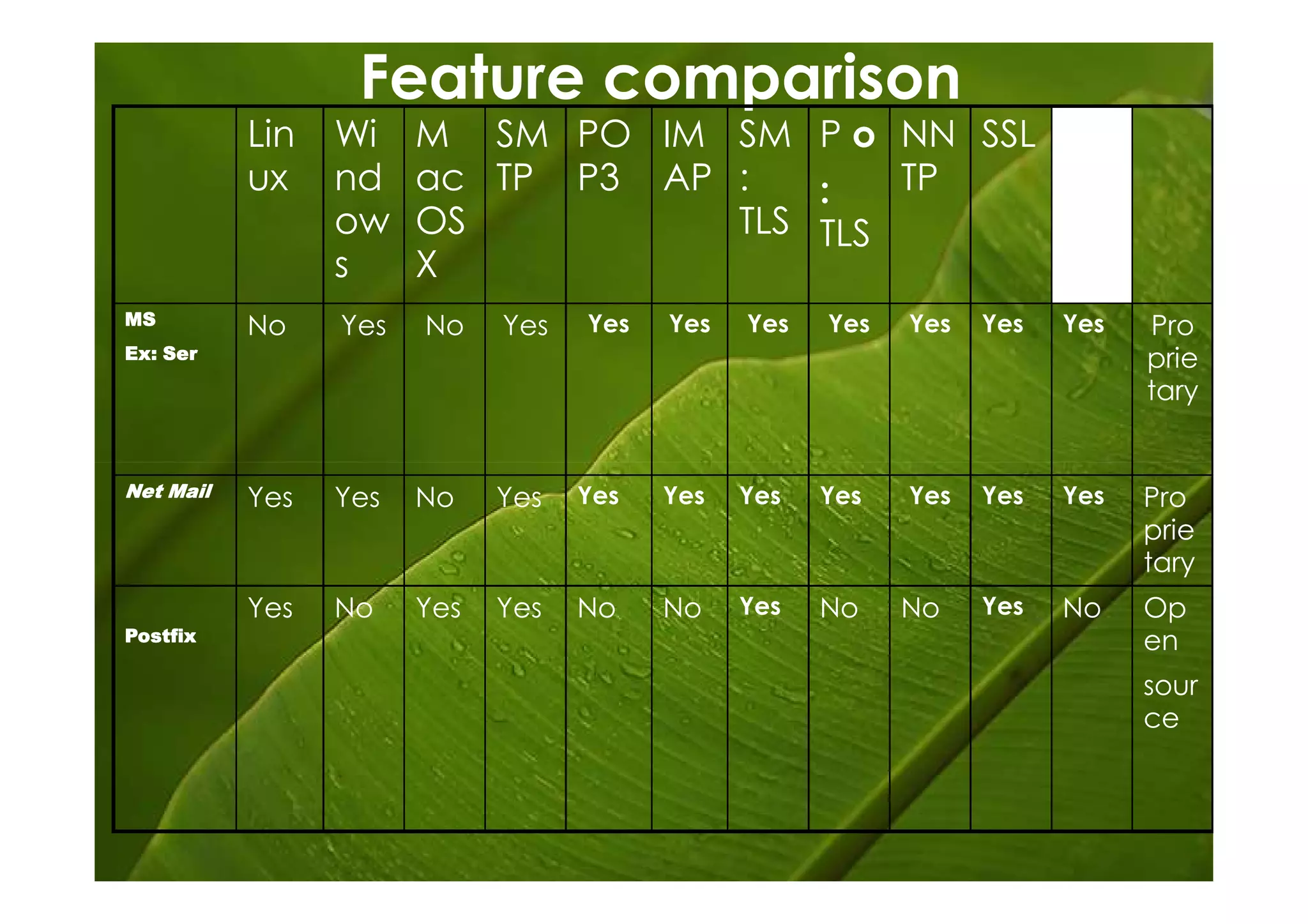
Feature comparison
           Lin   Wi    M SM PO IM SM P o NN SSL W
           ux    nd    ac TP P3 AP :   :   TP   eb
                 ow    OS          TLS TLS      m
                 s     X                        ail
MS         No    Yes   No    Yes   Yes   Yes   Yes   Yes   Yes   Yes   Yes   Pro
Ex: Ser                                                                      prie
                                                                             tary


Net Mail   Yes   Yes   No    Yes   Yes   Yes   Yes   Yes   Yes   Yes   Yes   Pro
                                                                             prie
                                                                             tary
           Yes   No    Yes   Yes   No    No    Yes   No    No    Yes   No    Op
Postfix                                                                      en
                                                                             sour
                                                                             ce
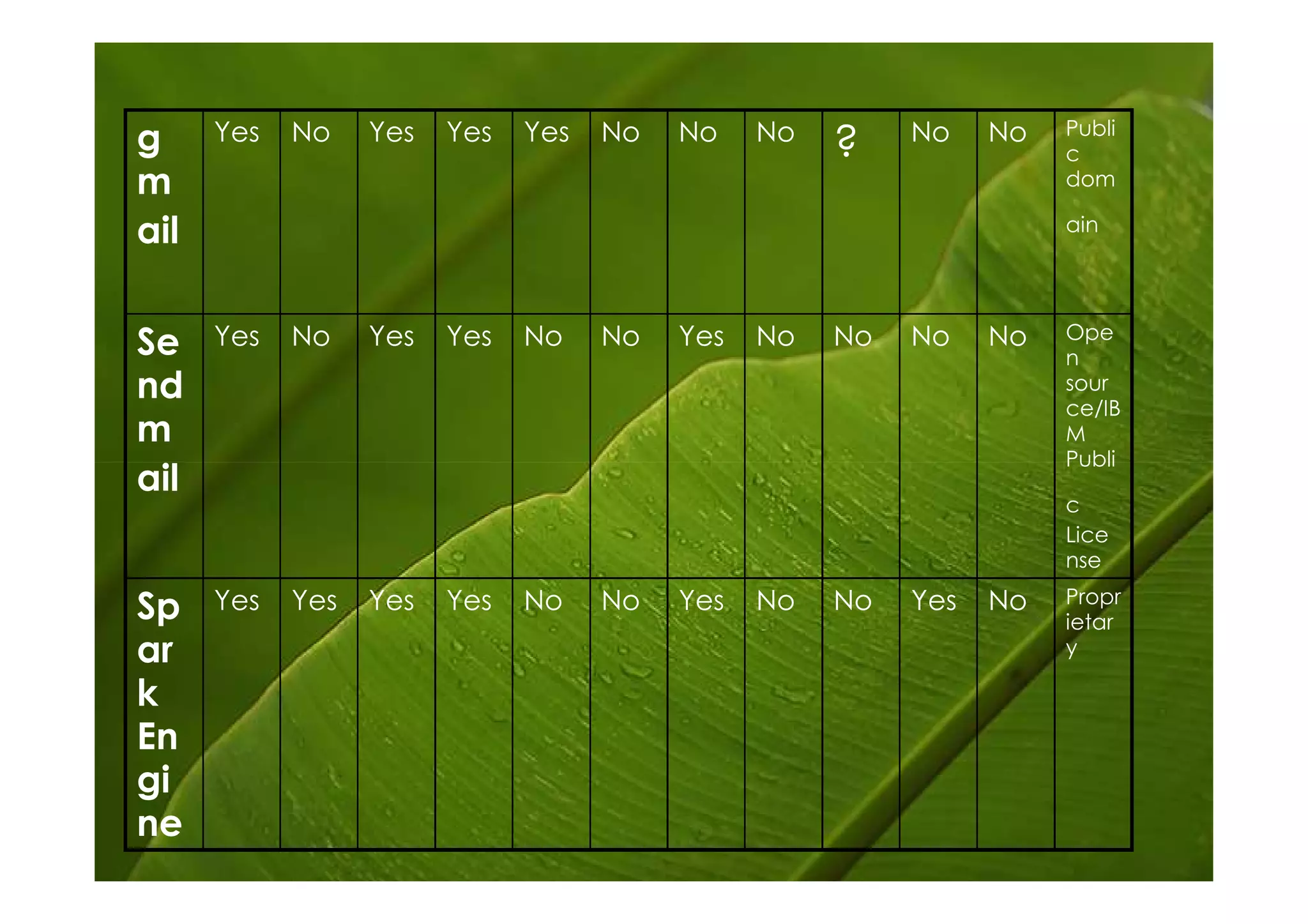
Publi
g     Yes   No    Yes   Yes   Yes   No   No    No
                                                    ?    No    No
                                                                    c
m                                                                   dom

ail                                                                 ain


                                                                    Ope
Se    Yes   No    Yes   Yes   No    No   Yes   No   No   No    No
                                                                    n
nd                                                                  sour
                                                                    ce/IB
m                                                                   M
                                                                    Publi
ail
                                                                    c
                                                                    Lice
                                                                    nse
                                                                    Propr
Sp    Yes   Yes   Yes   Yes   No    No   Yes   No   No   Yes   No
                                                                    ietar
ar                                                                  y

k
En
gi
ne
Conclusion
• is a Mail Transfer Agent

• use to route email

• simple to configure

• Highly respect by expert for its secure design & facts

• Use to troubleshooting
Thank you

Postfix

  • 1.
  • 2.
  • 3.
    Introduction • E-mail iseasily the most popular and important Internet service today, which has made it a popular target of cyber- criminals and spam-happy miscreants. • It facilitates us to communicate easily and effectively.
  • 4.
    Introduction (cont.) • Internete-mail is built from several standards and protocols that define how messages are composed and transferred from a sender to a recipient. There are many different pieces of software involved, each one handling a different step in message delivery. Postfix handles only a portion of the whole process. Most e-mail users are only familiar with the software they use for reading composing messages, known as a Mail User Agent (MUA). Examples of some common MUAs include Pine, Netscape Communicator and Outlook Express. MUAs are good for reading and composing e-mail messages, but they don't do much for mail delivery. That's what Postfix fits in.
  • 5.
    What is aMail Transfer Agent -MTA? • MTAs move e-mail from one host or network to another. These are in contrast to Mail Delivery Agents, which move mail within a system (i.e., from an MTA to a local user's mailbox, or from a mailbox to a file or directory). In other words, MTAs are like the mail trucks (and airplanes, trains, etc.) that move mail between post offices; Mail Delivery Agents are like the letter-carriers who distribute the mail to their destination mail boxes.
  • 6.
    What is aMail Transfer Agent (cont.) • In addition to MTAs and MDAs, there are also various kinds of e-mail readers, including POP, POP3, and IMAP clients for retrieving e-mail from remote systems. These are also known as Mail User Agents, or MUAs. (There is no real- life simile for these, unless your mail is handed to you each day by a minion whose sole duty is to check your mail box now and then!) But we're not concerned with these or with MDAs, except to mention how they relate to MTAs.
  • 7.
    What is Postfix? •Postfix is a free open source mail transfer agent (MTA), a computer program for the routing and delivery of email. • Postfix is the default MTA for a number of Unix(- like) operating systems such as Ubuntu Linux. • This mail transfer agent postfix, provides an alternative to send mail that is simpler in design, more modular, easier to configure and less work to administer. Equally important, it's been designed with scalability, reliability and sound security as fundamental requirements.
  • 8.
    What is Postfix?(cont.) • Postfix is a Mail Transfer Agent and it is the default Mail Transfer Agent (MTA) for Ubuntu. It is in Ubuntu's main repository, which means that it receives security updates. This is supporting LDAP, SMTP AUTH (SASL), and TLS and running in a chroot environment. Postfix is Wietse Venema's mailer that started life as an alternative to the widely-used Send mail program. Postfix attempts to be fast, easy to administer, and secure, while at the same time being send mail compatible enough to not upset existing users. Thus, the outside has a sendmail-ish flavor, but the inside is completely different. This software was formerly known as VMailer. It was released by the end of 1998 as the IBM Secure Mailer. From then on it has lived on as Postfix. This rpm supports LDAP, SMTP AUTH (trough cyrus-sasl) and TLS. If you need MySQL too, rebuild the srpm --with mysql.
  • 9.
    Founder of Postfix •POSTFIX was originally written by Wietse Venema during a stay at the IBM Thomas J. Watson Research Center. Postfix was first released in mid-1999. • Dr. Wietse Zweitze Venema (born 1951) is a Dutch programmer and physicist best known for writing the Postfix mail system. He has also written numerous other security related tools, such as SATAN and The Coroner's Toolkit, both in co-operation with Dan Farmer, and TCP Wrapper.
  • 10.
  • 11.
    • He studiedphysics at the University of Groningen, graduating with a PhD. He spent 12 years at Eindhoven University as a systems architect in the Mathematics and Computer Science department, and spent part of this time ` writing tools for Electronic Data Interchange. Since emigrating to the U.S. in 1996 he has been working for the IBM Thomas J. Watson Research Center in New York.
  • 12.
    He was awardedin many awards such as; • Security Summit Hall of Fame Award (July 1998) • SAGE Outstanding Achievement Award (November 1999) • NLUUG Award (November 2000) • Sendmail Milter Innovation Award (November 2006)
  • 13.
    Developed Wietse Venema and many by others Latest release 2.5.3 / July 29, 2008 Preview 2.6-20080726 / July 26, 2008 release OS Cross-platform Type Mail transfer agent License IBM Public License Website http://www.postfix.org/
  • 14.
    Structure •How Postfixreceives mail •How Postfix delivers mail From Postfix page
  • 15.
    Receives Delivers
  • 16.
    How Postfix receivesmail trivial- rewrite(8) Network -> smtpd(8) ^ | | v Network -> qmqpd(8) -> cleanup(8) -> incoming / pickup(8) <- maildrop ^ | Local -> sendmail(1) -> postdrop(1) From Postfix page
  • 17.
    How Postfix receivesmail Network -> smtpd(8) cleanup(8) Network -> qmqpd(8) -> smtpd(8) or qmqpd(8) servers :- • enter Network mail to postfix. • remove the SMTP or QMQP protocol encapsulation. • enforce some sanity checks to protect Postfix. • block unwanted mail. • give the sender, recipients and message content to the cleanup(8) server. From Postfix page
  • 18.
    How Postfix receivesmail cleanup(8) / pickup(8) <- maildrop ^ | Local -> sendmail(1) -> postdrop(1) sendmail(1) compatibility command :- • receive Local submissions. From Postfix page
  • 19.
    maildrop queue :- • queued Local submissions by the privileged postdrop(1) command. pickup(8) server :- • picks up local submissions. • enforces some sanity checks to protect Postfix. • gives the sender, recipients and message content to the cleanup(8) server. From Postfix page
  • 20.
    trivial- rewrite(8) ^ | | v cleanup(8) -> incoming cleanup(8) server :- • Accept mails from smtpd(8), qmqpd(8) and pickup(8). • Accept Mail from internal sources. • implements the final processing stage before mail is queued. trivial-rewrite(8) server :- • rewrites addresses to the standard "user@fully.qualified.domain" form. From Postfix page
  • 21.
    How Postfix deliversmail trivial- smtp(8) -> Network rewrite(8) / - lmtp(8) -> Network ^ | | v / incoming -> active -> qmgr(8) - local(8) -> File, command ^ | | v - virtual(8) -> File deferred pipe(8) -> Command From Postfix page
  • 22.
    qmgr(8) (queue manager) :- • This is the heart of Postfix mail delivery. • It contacts the smtp(8), lmtp(8), local(8), virtual(8), pipe(8), discard(8) or error(8) delivery agents. • sends a delivery request for one or more recipient addresses. discard(8) and error(8) delivery agents :- • discard or bounce all mail. active queue :- • maintains by the queue manager with the messages that it has opened for delivery. • acts as a limited window on potentially large incoming or deferred queues. • prevents the queue manager from running out of memory under heavy load.
  • 23.
    deferred queue :- •maintains by queue manager for mail that cannot be delivered. trivial-rewrite(8) server :- • resolves each recipient address according to its local or remote address class. • recipients whose address has changed; mail for such recipients is returned to the sender with an explanation.
  • 24.
    Behind the scene These server processes rely on other server processes that do things behind the scenes. As before, names followed by a number are Postfix commands or server programs, while unnumbered names inside shaded areas represent Postfix queues.
  • 25.
    – The residentmaster server is the supervisor that keeps an eye on the well-being of the Postfix mail system. – The bounce, defer and trace services each maintain their own queue directory trees with per- message log files. – The proxy map servers provide read-only and read-write table lookup service to Postfix processes. – The scache server maintains the connection cache for the Postfix smtp cleint.
  • 26.
    When delivering mailto a destination with multiple mail servers, connection caching can help to skip over a non- responding server, and thus dramatically speed up delivery.
  • 27.
    Postfix Queue • Akey contributor to the stability and the speed of postfix is the intelligent way in which it queues mail. • Postfix uses four different queues, » Mail drop queue. » Incoming queue. » Active queue. » Deferred queue. 27
  • 28.
    Mail drop queue •Mail that is delivered locally on the system is accepted in the Mail drop queue. • In this queue, the mail is checked for proper formatting and fixed if necessary. • Then it is handed to the Incoming queue. Mail Drop queue Incoming queue Mail 28
  • 29.
    Incoming queue •The Incomingqueue receives mail from other hosts, clients or the Mail drop queue. • As long as e-mail is still arriving and as long as postfix hasn't really handled the e-mail, this queue is the place where the e-mails are kept. 29
  • 30.
    Active queue •The Activequeue is the queue that is used to actually deliver messages and therefore has the greatest potential risk of something going wrong. •This queue has a limited size, and messages will be accepted only if there is space for them. •That means e-mail in the Incoming and deferred queues have to wait until the Active queue can accept them. 30
  • 31.
    Deferred queue •E-mail thatcannot be delivered is placed in the deferred queue. •This prevents the system from continuously trying to deliver e-mail and keeps the Active queue as short as possible in order to give newer messages priority. •This also enhances stability of the mail. 31
  • 32.
    Deferred queue continued… •Ifthe MTA cannot reach a domain, all the e-mail for that domain is placed in the deferred queue, so that those messages will not needlessly monopolize system resources. •Retry is scheduled with an increasing waiting time. When the waiting time expires, the e-mail is again placed in the Active queue for delivery. •The system keeps track of retry history. 32
  • 33.
    Mail drop queue Incoming queue Active queue Mail Deferred queue 33
  • 34.
    Postfix Commands •The mostcommon invocations of the postfix command are postfix start, postfix stop and postfix reload. •Postfix Start- This command will start the postfix. If you already not installed postfix, terminal will display an error. •Postfix Stop- This command will stop postfix through the action. •Postfix Reload- This will reload its configuration files without stopping and restarting. 34
  • 35.
    • subhash@subhash-laptop:/root$ postfixstart subhash@subhash- The program 'postfix' is currently not installed • You can install it by typing: – sudo apt-get install postfix apt- 35
  • 36.
    Postfix Commands continued… •There are also some other commands, •Postfix flush- This will immediately attempt to send all queued messages. •Postalias- Maintains Postfix alias databases. •Postcat- Displays the contents of Postfix queue files. •Postkick- Makes some internal communication channels available for use in. •Postlock- Provides Postfix-compatible mailbox locking for use in. 36
  • 37.
  • 38.
    Postfix Content Inspection Postfixsupports three content inspection methods 1. Before queue, built-in, light-weight 2. After queue, external, heavy-weight 3. Before queue, external, medium- weight
  • 39.
    Certain Limitations Content InspectionSoftware must finish in a limited amount of time Content Inspection Software must run in a limited amount of memory Befor queue inspection limits the sophistication of the content filter that you can use
  • 40.
    Comparison of mailservers SMTP POP APO File Data LDA Oth P syst bas P er em e MS Yes ? Yes No No Yes Active Directo Ex: ry Serv eDirect Net Yes Yes Yes Yes Yes Yes ory, Mail LDAP Post Yes No No Yes Yes Yes ? fix
  • 41.
    Yes Yes Yes Yes Surg ? ? ? e Mail Yes Yes Yes Yes Yes No NT Win Domain Gate , Active Director y, CRAM- MD5, SASL PLAIN, SASL LOGIN
  • 42.
    Feature comparison Lin Wi M SM PO IM SM P o NN SSL W ux nd ac TP P3 AP : : TP eb ow OS TLS TLS m s X ail MS No Yes No Yes Yes Yes Yes Yes Yes Yes Yes Pro Ex: Ser prie tary Net Mail Yes Yes No Yes Yes Yes Yes Yes Yes Yes Yes Pro prie tary Yes No Yes Yes No No Yes No No Yes No Op Postfix en sour ce
  • 43.
    Publi g Yes No Yes Yes Yes No No No ? No No c m dom ail ain Ope Se Yes No Yes Yes No No Yes No No No No n nd sour ce/IB m M Publi ail c Lice nse Propr Sp Yes Yes Yes Yes No No Yes No No Yes No ietar ar y k En gi ne
  • 44.
    Conclusion • is aMail Transfer Agent • use to route email • simple to configure • Highly respect by expert for its secure design & facts • Use to troubleshooting
  • 45.