Massive emailing
With Linux, Postfix and Ruby on Rails


            Iván Belmonte <http://ibelmonte.com>
The problem
Your internet app is offering user registration with newsletter
subscription and alerts


Almost 90% of your registered users use free email accounts
from Hotmail, Gmail or Yahoo.


Why your email messages can be marked as Spam:
     * The context
     * The content type
     * The amount of users getting the same message
     * Other antispam tests: SMTP headers, DNS stuff, networking...
The problem
The systems detect you as a spammer
=> marks you as SPAMMER

Users get your emails in INBOX, but move them to junk folder
=> they report you are a SPAMMER
=> system marks you as SPAMMER


Things you can do in a non technical way
 - Refine your contents and target
 - Personalize your emails, don't send the same to everyone
 - Send each user that info affecting him, or that you think
   he will be interested in
The technical solution
  Most important concept: REPUTATION

  Focus on:
   * Sysadmining: DNS, MTA (postfix)
   * Programming: rails plugin ar_mailer
   * Networking: routing (netfilter)
The technical solution
The concept behind IP REPUTATION

It's like a credit score. One provider knows what type of email can
expect from you (IP), based on the history of email received from
you along the time.

             ↓↓ emails = neutral reputation
             ↑↑ emails ↓↓ spam = ↑↑ reputation


Domain REPUTATION also affects

↑↑ spam links to your domain = ↓↓ domain reputation
The technical solution
Most important provider LIMITS

  Amount of emails             i.e: Hotmail ~15.000 eml/day
                               It differs on each provider, and may vary
                               depending on the spam hits

  Trap hits                    Mailbox unavailable bounces

  Complaint rates              Amount of users tagging your emails
                               as SPAM or Junk


                                   - 1%        acceptable
  Trap hits + complaint rate       + 1%        suspicious
                                   + 10% spammer
The technical solution
 ↓↓ emails = neutral rep                        hard limits
 Spam! = bad rep                                ***SPAM***
 ↑↑ emails ↓↓ spam = ↑↑ rep                     relaxed limits


        Email authetication                   Helps good scoring on AS tests


  SPF        Sender ID      DKIM


WHO can send email using   Identifies the server which
your domain name           the email is coming from
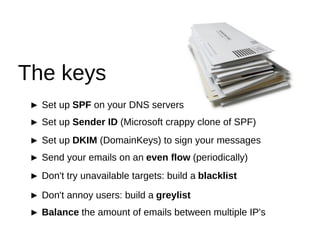
The keys
 ► Set up SPF on your DNS servers
 ► Set up Sender ID (Microsoft crappy clone of SPF)
 ► Set up DKIM (DomainKeys) to sign your messages
 ► Send your emails on an even flow (periodically)
 ► Don't try unavailable targets: build a blacklist

 ► Don't annoy users: build a greylist
 ► Balance the amount of emails between multiple IP's
The keys:

SPF
(Sender Policy Framework)
The keys: SPF
SPF is a DNS technique: a record saying WHO can send emails
using your domain name.


         ivanhq.net.   TXT "v=spf1 ip4:213.27.212.191 ip4:213.27.212.208 
                            a mx ptr include:aspmx.googlemail.com ~all"


v=spf1                                 SPF version 1
ip4:aa.bb.cc.dd                        Ipv4 IP's allowed to send email using this domain

a mx ptr                               DNS resource records where these IP's can appear

include:aspmx.googlemail.com           Also inherit SPF from aspmx.googlemail.com's DNS zone

~all                                   The rest of the IP's on the internet are prohibited
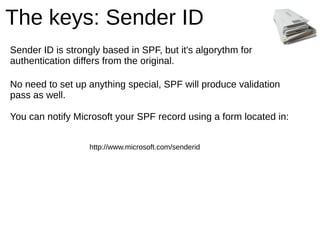
The keys: Sender ID
Sender ID is strongly based in SPF, but it's algorythm for
authentication differs from the original.

No need to set up anything special, SPF will produce validation
pass as well.

You can notify Microsoft your SPF record using a form located in:


                   http://www.microsoft.com/senderid
The keys:

DKIM
(DomainKeys Identified Mail)
The keys: DKIM
DKIM is an evolution of DomainKeys
Signs your messages with a unique SSL key for your domain

Quick setup for Postfix

►Install the milter and generate a key
     aptitude install dkim-filter
     mkdir /etc/dkim
     cd /etc/dkim
     dkim-genkey


►Edit     /etc/dkim-filter.conf
     Domain yourdomain.com
     KeyFile /etc/dkim/default.private
     Selector Default
The keys: DKIM
►Enable the milter local socket               /etc/default/dkim-filter
     SOCKET="local:/var/run/dkim-filter/dkim-filter.sock"


►Tell Postfix about the milter           /etc/postfix/main.cf
     milter_default_action = accept
     milter_protocol = 2
     smtpd_milters = local:/var/run/dkim-filter/dkim-filter.sock
     non_smtpd_milters = local:/var/run/dkim-filter/dkim-filter.sock


►Restart postfix and dkim-filter
     /etc/init.d/dkim-filter restart
     /etc/init.d/postfix restart
The keys: DKIM
►Setup a TXT record on your DNS zone with the contents of
/etc/dkim/default.txt
    default._domainkey   IN TXT "v=DKIM1; g=*; k=rsa; p=MIGfMA0GC
    SqGSIb3DQEBAQUAA4GNADCBiQKBgQDKMSawPqz66qFjWQqPv1IftH5
    Xki5tGBqOMKtdv6v1oRQauHmCIrMmXXtNajsxdcifQKKKQPD4s4k5tMVha
    BfiUH8i69nIbfUsOaso0fhVU7/YLlbe5dyQscFgbFwgPU2mMMcXuQgDipwx
    cedGjQYYM0u+JXbDw0BthXELDIkfQwIDAQAB"
The keys:

Sending flow
(ar_mailer rails plugin)
The keys: sending flow


Don't send your email all at once: send it on an even flow
during all the period.
The keys: ar_mailer
ar_mailer stores your emails in a DB, and lets you send them
in batches.

►Install ar_mailer plugin (the is people having compatibility
problems with gem version and Rails 2.2.2)
     script/plugin install git://github.com/seattlerb/ar_mailer.git

►Generate a model for the emails
     script/generate model email


►Setup a simple validation for the emails
     class Email < ActiveRecord::Base
      validates_presence_of :from, :to, :mail
     end
The keys: ar_mailer
►Change application ActionMailer's delivery method
 environment.rb
     ActionMailer::Base.delivery_method = :activerecord


►If you don't have one, create a mailer class
     class Newsletter < ActionMailer::ARMailer
     end


►If you already had one, simply replace

     # class Alerts < ActionMailer::Base

     class Alerts < ActionMailer::ARMailer
     [...]
     end
The keys: ar_mailer
Plugin comes with a script called ar_sendmail used for
managing the queue of messages stored in DB.
►You can see your queued mails
     ruby /usr/bin/ar_sendmail --mailq --chdir /path/to/your/app/ 
     --environment production

►I usually prefer a script for these things
     #!/bin/bash
     #
     # super hacker script for looking the ar_mailer queue
     # place it in /usr/local/bin/ar_queue.sh or something

     RUBY="/usr/local/bin/ruby"
     AR_SENDMAIL="/usr/bin/ar_sendmail"
     PATH="/path/to/your/app/"
     ENVIRONMENT="production"

     $RUBY $AR_SENDMAIL --mailq --chdir $PATH --environment $ENVIRONMENT
The keys: ar_mailer
►Run ar_sendmail in verbose mode to see if it works
     ruby /usr/bin/ar_sendmail -ov


►Run ar_sendmail daemon mode if you like it...
     ruby /usr/bin/ar_sendmail -d --batch-size 20 --delay 300

     # 20 emails per batch
     # 300s between batches


►...or from the cron if you prefer
     */5 * * * *    /usr/local/bin/ruby /usr/bin/ar_sendmail -o --batch-size 20 
                   --chdir /path/to/your/app/ --environment production
The keys: ar_mailer
►If you need a mailer class to send messages inmediately
  you can set up ar_mailer individually
     # environment.rb
     ActionMailer::Base.delivery_method = :sendmail


     # quick sending class

     class QuickClass < ActionMailer::Base
     end


     # ar_mailer class

     class QuickClass < ActionMailer::ARMailer
      self.delivery_method = :activerecord
     end
The keys:

Manage trap hits and complaint rates
(blacklist and greylist)
The keys: building lists
Show an UNSUBSCRIBE button on each email you send
Show also a No more emails from you button
The easier/quicker they are, the better for you

►Use a token based authentication (i.e. Atuhlogic plugin)
►When someone unsubscribes, you put him on the greylist
►When someone clicks No more emails, put him on the blacklist


           greylist                             blacklist


 You can't send newsletters              You send NOTHING
    You may send alerts
You may send platform notices
The keys: log parsing
►Build a log parser for blacklisting trap hits
►look for “user unknown”, “mailbox unavailable”, “mailbox is full”...
     #!/bin/bash
     #
     # super hacker script for blacklisting unavailable mailboxes
     # place it in /usr/local/bin/blacklist_log_parser.sh or something

     STRING=”user unknown”
     DBNAME=”my_app”
     DBUSER=”h4cker”
     DBPW=”god”

     UNKNOWN_USERS=`grep -ir "$STRING" /var/log/mail.log | cut -f 2 
     -d "=" | cut -f 1 -d ">" | cut -f 2 -d "<" | sort -u`

     for USER in $UNKNOWN_USERS; do
          mysql -u$DBUSER -p$DBPW $DBNAME -e 
          “INSERT INTO blacklist VALUES('','$USER')”
     done
The keys:

Sending limits
(netfilter routing)
The keys: routing
Limit your sending to not more than 50.000 eml/week per IP
Solution: send your eml from multiple IP's (2 or more)
►The hard way: multiple MTA instances, maintaining routing decision
►The easy way: route outgoing traffic with netfilter
     #!/bin/bash
     #
     # super hacker script for balancing traffic on two IP's
     # place it in /etc/init.d/mxload or something

     MX1_IP="74.207.246.203"
     MX2_IP="74.207.246.205"

     /sbin/iptables -X
     /sbin/iptables -F
     /sbin/iptables -t nat -X
     /sbin/iptables -t nat -F                                  (part 1)
The keys: routing
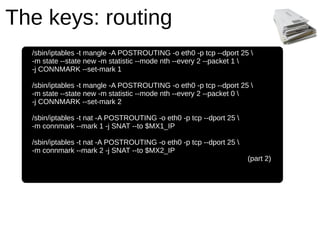
  /sbin/iptables -t mangle -A POSTROUTING -o eth0 -p tcp --dport 25 
  -m state --state new -m statistic --mode nth --every 2 --packet 1 
  -j CONNMARK --set-mark 1

  /sbin/iptables -t mangle -A POSTROUTING -o eth0 -p tcp --dport 25 
  -m state --state new -m statistic --mode nth --every 2 --packet 0 
  -j CONNMARK --set-mark 2

  /sbin/iptables -t nat -A POSTROUTING -o eth0 -p tcp --dport 25 
  -m connmark --mark 1 -j SNAT --to $MX1_IP

  /sbin/iptables -t nat -A POSTROUTING -o eth0 -p tcp --dport 25 
  -m connmark --mark 2 -j SNAT --to $MX2_IP
                                                                     (part 2)


  class Email < ActiveRecord::Base
   validates_presence_of :from, :to, :mail
  end
Massive emailing
With Linux, Postfix and Ruby on Rails


            Iván Belmonte <http://ibelmonte.com>

Massive emailing with Linux, Postfix and Ruby on Rails

  • 1.
    Massive emailing With Linux,Postfix and Ruby on Rails Iván Belmonte <http://ibelmonte.com>
  • 2.
    The problem Your internetapp is offering user registration with newsletter subscription and alerts Almost 90% of your registered users use free email accounts from Hotmail, Gmail or Yahoo. Why your email messages can be marked as Spam: * The context * The content type * The amount of users getting the same message * Other antispam tests: SMTP headers, DNS stuff, networking...
  • 3.
    The problem The systemsdetect you as a spammer => marks you as SPAMMER Users get your emails in INBOX, but move them to junk folder => they report you are a SPAMMER => system marks you as SPAMMER Things you can do in a non technical way - Refine your contents and target - Personalize your emails, don't send the same to everyone - Send each user that info affecting him, or that you think he will be interested in
  • 4.
    The technical solution Most important concept: REPUTATION Focus on: * Sysadmining: DNS, MTA (postfix) * Programming: rails plugin ar_mailer * Networking: routing (netfilter)
  • 5.
    The technical solution Theconcept behind IP REPUTATION It's like a credit score. One provider knows what type of email can expect from you (IP), based on the history of email received from you along the time. ↓↓ emails = neutral reputation ↑↑ emails ↓↓ spam = ↑↑ reputation Domain REPUTATION also affects ↑↑ spam links to your domain = ↓↓ domain reputation
  • 6.
    The technical solution Mostimportant provider LIMITS Amount of emails i.e: Hotmail ~15.000 eml/day It differs on each provider, and may vary depending on the spam hits Trap hits Mailbox unavailable bounces Complaint rates Amount of users tagging your emails as SPAM or Junk - 1% acceptable Trap hits + complaint rate + 1% suspicious + 10% spammer
  • 7.
    The technical solution ↓↓ emails = neutral rep hard limits Spam! = bad rep ***SPAM*** ↑↑ emails ↓↓ spam = ↑↑ rep relaxed limits Email authetication Helps good scoring on AS tests SPF Sender ID DKIM WHO can send email using Identifies the server which your domain name the email is coming from
  • 8.
    The keys ►Set up SPF on your DNS servers ► Set up Sender ID (Microsoft crappy clone of SPF) ► Set up DKIM (DomainKeys) to sign your messages ► Send your emails on an even flow (periodically) ► Don't try unavailable targets: build a blacklist ► Don't annoy users: build a greylist ► Balance the amount of emails between multiple IP's
  • 9.
  • 10.
    The keys: SPF SPFis a DNS technique: a record saying WHO can send emails using your domain name. ivanhq.net. TXT "v=spf1 ip4:213.27.212.191 ip4:213.27.212.208 a mx ptr include:aspmx.googlemail.com ~all" v=spf1 SPF version 1 ip4:aa.bb.cc.dd Ipv4 IP's allowed to send email using this domain a mx ptr DNS resource records where these IP's can appear include:aspmx.googlemail.com Also inherit SPF from aspmx.googlemail.com's DNS zone ~all The rest of the IP's on the internet are prohibited
  • 11.
    The keys: SenderID Sender ID is strongly based in SPF, but it's algorythm for authentication differs from the original. No need to set up anything special, SPF will produce validation pass as well. You can notify Microsoft your SPF record using a form located in: http://www.microsoft.com/senderid
  • 12.
  • 13.
    The keys: DKIM DKIMis an evolution of DomainKeys Signs your messages with a unique SSL key for your domain Quick setup for Postfix ►Install the milter and generate a key aptitude install dkim-filter mkdir /etc/dkim cd /etc/dkim dkim-genkey ►Edit /etc/dkim-filter.conf Domain yourdomain.com KeyFile /etc/dkim/default.private Selector Default
  • 14.
    The keys: DKIM ►Enablethe milter local socket /etc/default/dkim-filter SOCKET="local:/var/run/dkim-filter/dkim-filter.sock" ►Tell Postfix about the milter /etc/postfix/main.cf milter_default_action = accept milter_protocol = 2 smtpd_milters = local:/var/run/dkim-filter/dkim-filter.sock non_smtpd_milters = local:/var/run/dkim-filter/dkim-filter.sock ►Restart postfix and dkim-filter /etc/init.d/dkim-filter restart /etc/init.d/postfix restart
  • 15.
    The keys: DKIM ►Setupa TXT record on your DNS zone with the contents of /etc/dkim/default.txt default._domainkey IN TXT "v=DKIM1; g=*; k=rsa; p=MIGfMA0GC SqGSIb3DQEBAQUAA4GNADCBiQKBgQDKMSawPqz66qFjWQqPv1IftH5 Xki5tGBqOMKtdv6v1oRQauHmCIrMmXXtNajsxdcifQKKKQPD4s4k5tMVha BfiUH8i69nIbfUsOaso0fhVU7/YLlbe5dyQscFgbFwgPU2mMMcXuQgDipwx cedGjQYYM0u+JXbDw0BthXELDIkfQwIDAQAB"
  • 16.
  • 17.
    The keys: sendingflow Don't send your email all at once: send it on an even flow during all the period.
  • 18.
    The keys: ar_mailer ar_mailerstores your emails in a DB, and lets you send them in batches. ►Install ar_mailer plugin (the is people having compatibility problems with gem version and Rails 2.2.2) script/plugin install git://github.com/seattlerb/ar_mailer.git ►Generate a model for the emails script/generate model email ►Setup a simple validation for the emails class Email < ActiveRecord::Base validates_presence_of :from, :to, :mail end
  • 19.
    The keys: ar_mailer ►Changeapplication ActionMailer's delivery method environment.rb ActionMailer::Base.delivery_method = :activerecord ►If you don't have one, create a mailer class class Newsletter < ActionMailer::ARMailer end ►If you already had one, simply replace # class Alerts < ActionMailer::Base class Alerts < ActionMailer::ARMailer [...] end
  • 20.
    The keys: ar_mailer Plugincomes with a script called ar_sendmail used for managing the queue of messages stored in DB. ►You can see your queued mails ruby /usr/bin/ar_sendmail --mailq --chdir /path/to/your/app/ --environment production ►I usually prefer a script for these things #!/bin/bash # # super hacker script for looking the ar_mailer queue # place it in /usr/local/bin/ar_queue.sh or something RUBY="/usr/local/bin/ruby" AR_SENDMAIL="/usr/bin/ar_sendmail" PATH="/path/to/your/app/" ENVIRONMENT="production" $RUBY $AR_SENDMAIL --mailq --chdir $PATH --environment $ENVIRONMENT
  • 21.
    The keys: ar_mailer ►Runar_sendmail in verbose mode to see if it works ruby /usr/bin/ar_sendmail -ov ►Run ar_sendmail daemon mode if you like it... ruby /usr/bin/ar_sendmail -d --batch-size 20 --delay 300 # 20 emails per batch # 300s between batches ►...or from the cron if you prefer */5 * * * * /usr/local/bin/ruby /usr/bin/ar_sendmail -o --batch-size 20 --chdir /path/to/your/app/ --environment production
  • 22.
    The keys: ar_mailer ►Ifyou need a mailer class to send messages inmediately you can set up ar_mailer individually # environment.rb ActionMailer::Base.delivery_method = :sendmail # quick sending class class QuickClass < ActionMailer::Base end # ar_mailer class class QuickClass < ActionMailer::ARMailer self.delivery_method = :activerecord end
  • 23.
    The keys: Manage traphits and complaint rates (blacklist and greylist)
  • 24.
    The keys: buildinglists Show an UNSUBSCRIBE button on each email you send Show also a No more emails from you button The easier/quicker they are, the better for you ►Use a token based authentication (i.e. Atuhlogic plugin) ►When someone unsubscribes, you put him on the greylist ►When someone clicks No more emails, put him on the blacklist greylist blacklist You can't send newsletters You send NOTHING You may send alerts You may send platform notices
  • 25.
    The keys: logparsing ►Build a log parser for blacklisting trap hits ►look for “user unknown”, “mailbox unavailable”, “mailbox is full”... #!/bin/bash # # super hacker script for blacklisting unavailable mailboxes # place it in /usr/local/bin/blacklist_log_parser.sh or something STRING=”user unknown” DBNAME=”my_app” DBUSER=”h4cker” DBPW=”god” UNKNOWN_USERS=`grep -ir "$STRING" /var/log/mail.log | cut -f 2 -d "=" | cut -f 1 -d ">" | cut -f 2 -d "<" | sort -u` for USER in $UNKNOWN_USERS; do mysql -u$DBUSER -p$DBPW $DBNAME -e “INSERT INTO blacklist VALUES('','$USER')” done
  • 26.
  • 27.
    The keys: routing Limityour sending to not more than 50.000 eml/week per IP Solution: send your eml from multiple IP's (2 or more) ►The hard way: multiple MTA instances, maintaining routing decision ►The easy way: route outgoing traffic with netfilter #!/bin/bash # # super hacker script for balancing traffic on two IP's # place it in /etc/init.d/mxload or something MX1_IP="74.207.246.203" MX2_IP="74.207.246.205" /sbin/iptables -X /sbin/iptables -F /sbin/iptables -t nat -X /sbin/iptables -t nat -F (part 1)
  • 28.
    The keys: routing /sbin/iptables -t mangle -A POSTROUTING -o eth0 -p tcp --dport 25 -m state --state new -m statistic --mode nth --every 2 --packet 1 -j CONNMARK --set-mark 1 /sbin/iptables -t mangle -A POSTROUTING -o eth0 -p tcp --dport 25 -m state --state new -m statistic --mode nth --every 2 --packet 0 -j CONNMARK --set-mark 2 /sbin/iptables -t nat -A POSTROUTING -o eth0 -p tcp --dport 25 -m connmark --mark 1 -j SNAT --to $MX1_IP /sbin/iptables -t nat -A POSTROUTING -o eth0 -p tcp --dport 25 -m connmark --mark 2 -j SNAT --to $MX2_IP (part 2) class Email < ActiveRecord::Base validates_presence_of :from, :to, :mail end
  • 29.
    Massive emailing With Linux,Postfix and Ruby on Rails Iván Belmonte <http://ibelmonte.com>