










Exchange Server 2013
Architecture Deep Dive
Scott Schnoll
Principal Technical Writer
Microsoft Corporation
Serveurs / Entreprise / Réseaux / IT
Twitter: Schnoll
Blog: http://aka.ms/Schnoll
• Exchange Server Evolution
• Architecture Changes
• Client Access Server Role
• Mailbox Server Role
Agenda
EXCHANGE SERVER EVOLUTION
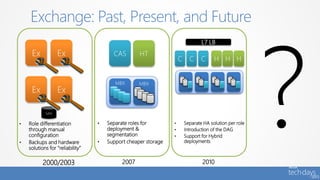
Exchange: Past, Present, and Future
C C C H H H
L7 LB
2010
• Separate HA solution per role
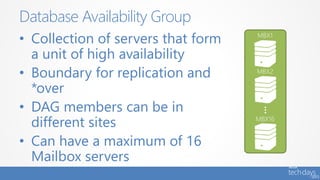
• Introduction of the DAG
• Support for Hybrid
deployments
CAS HT
MBX MBX
2007
• Separate roles for
deployment &
segmentation
• Support cheaper storage
Ex Ex
SAN
Ex Ex
2000/2003
• Role differentiation
through manual
configuration
• Backups and hardware
solutions for “reliability”
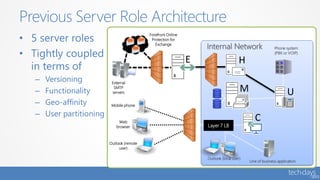
• 5 server roles
• Tightly coupled
in terms of
– Versioning
– Functionality
– Geo-affinity
– User partitioning
Previous Server Role Architecture
Internal Network Phone system
(PBX or VOIP)
Web
browser
Outlook (remote
user)
Mobile phone
Line of business application
Outlook (local user)
Layer 7 LB
External
SMTP
servers
Forefront Online
Protection for
Exchange
E H
UM
C
• Exchange deployments can be complicated
• Load balancing is difficult and can require
expensive solutions
• When dedicated server roles are deployed,
hardware can go unutilized or under-
utilized
• Too many namespaces required
Challenges with Existing Model
ARCHITECTURAL CHANGES
• Use Building Blocks to facilitate
deployments at all scales – from self-
hosted, small organizations to Office 365
– Server role evolution
– Network layer improvements
– Versioning and inter-op principles
Exchange Server 2013 Architecture Theme
• Hardware efficiency
• Deployment simplicity
• Cross-version inter-op
• Failure isolation
Exchange Server 2013 Architecture Benefits
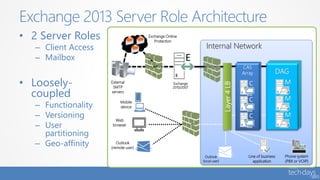
• 2 Server Roles
– Client Access
– Mailbox
• Loosely-
coupled
– Functionality
– Versioning
– User
partitioning
– Geo-affinity
Exchange 2013 Server Role Architecture
Internal Network
External
SMTP
servers
Phone system
(PBX or VOIP)
Web
browser
Outlook
(remote user)
Mobile
device
Line of business
application
DAG
Layer4LB
CAS
Array
Exchange Online
Protection
Outlook
(local user)
Exchange
2010/2007
E
C
C
C
M
M
M
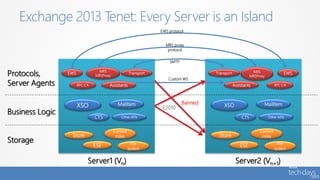
Exchange 2013 Tenet: Every Server is an Island
Protocols,
Server Agents
Business Logic
Storage
EWS
RPC CA
Transport
Assistants
MRS
MRSProxy
EWS
RPC CA
Transport
Assistants
MRS
MRSProxy
Server1 (Vn) Server2 (Vn+1)
XSO MailItem
Other APIsCTS
Store
ESE
Content
index
File
system
XSO MailItem
Other APIsCTS
Store
ESE
Content
index
File
system
SMTP
MRS proxy
protocol
EWS protocol
Custom WS
Banned
E2010
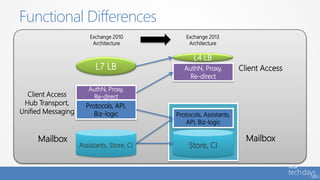
Functional Differences
AuthN, Proxy,
Re-direct
Protocols, API,
Biz-logic
Assistants, Store, CI
Exchange 2010
Architecture
AuthN, Proxy,
Re-direct
Store, CI
Protocols, Assistants,
API, Biz-logic
Exchange 2013
Architecture
Client Access
Mailbox
Client Access
Hub Transport,
Unified Messaging
Mailbox
L4 LB
L7 LB
CLIENT ACCESS SERVER ROLE
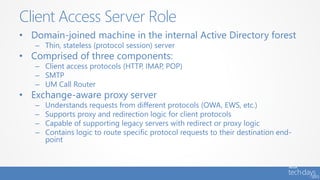
• Domain-joined machine in the internal Active Directory forest
– Thin, stateless (protocol session) server
• Comprised of three components:
– Client access protocols (HTTP, IMAP, POP)
– SMTP
– UM Call Router
• Exchange-aware proxy server
– Understands requests from different protocols (OWA, EWS, etc.)
– Supports proxy and redirection logic for client protocols
– Capable of supporting legacy servers with redirect or proxy logic
– Contains logic to route specific protocol requests to their destination end-
point
Client Access Server Role
• A group of CAS organized in a load-balanced
configuration
• Designed to work with TCP affinity (aka, layer
4 LB)
– Does not require application-level session affinity (aka, layer
7 LB)
• Provides a unified namespace and
authentication
– Similar to Exchange 2010 in terms of providing a unified
endpoint for client connectivity and authentication
Client Access Array
• Exchange 2013 supports RPC/HTTP only
– No RPC/TCP
• Benefits
– Simplifies the protocol stack
– Provides an extremely reliable and stable connectivity model
– RPC session is always on Mailbox server hosting active copy
– Eliminates need for RPC CAS Array and RPC CAS Array
namespace(s)
– Eliminates end user interruptions like “The Exchange
administrator has made a change that requires you to quit
and restart Outlook” during mailbox moves or *overs
Outlook Connectivity to Exchange 2013
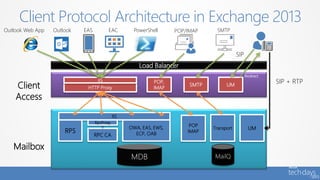
Client Protocol Architecture in Exchange 2013
Load Balancer
MDB
HTTP Proxy
IIS
Client
Access
RPC CA
Mailbox
IIS
RPS
OWA, EAS, EWS,
ECP, OAB
POP,
IMAP
SMTP UM
POP
IMAP
Transport UM
SMTPPOP, IMAPHTTP
MailQ
RpcProxy
SMTP
SIP
Redirect
SIP + RTP
POP/IMAPOutlook Web App Outlook EAS EAC PowerShell
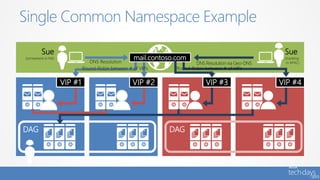
• No longer requires multiple namespaces
for site resilient solutions or site-specific
scenarios
• Easy to setup a single, worldwide client
access namespace
• Can be used in coexistence with Exchange
2010
Namespace Simplification
Single Common Namespace Example
Sue
(somewhere in NA)
DNS Resolution
DAG
VIP #1 VIP #2
Sue
(traveling
in APAC)DNS Resolution via Geo-DNS
Round-Robin between # of VIPs
DAG
VIP #3 VIP #4
mail.contoso.com
Round-Robin between # of VIPs
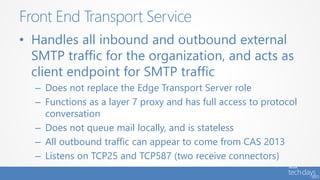
FRONT END TRANSPORT SERVICE
• Handles all inbound and outbound external
SMTP traffic for the organization, and acts as
client endpoint for SMTP traffic
– Does not replace the Edge Transport Server role
– Functions as a layer 7 proxy and has full access to protocol
conversation
– Does not queue mail locally, and is stateless
– All outbound traffic can appear to come from CAS 2013
– Listens on TCP25 and TCP587 (two receive connectors)
Front End Transport Service
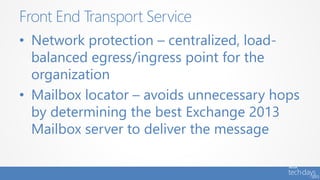
• Network protection – centralized, load-
balanced egress/ingress point for the
organization
• Mailbox locator – avoids unnecessary hops
by determining the best Exchange 2013
Mailbox server to deliver the message
Front End Transport Service
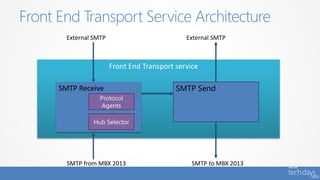
Front End Transport Service Architecture
Front End Transport service
SMTP Receive
Protocol
Agents
SMTP to MBX 2013SMTP from MBX 2013
External SMTP External SMTP
Hub Selector
SMTP Send
Inbound Mail Flow
1. FET accepts initial SMTP
connection
2. After DATA command is
issued, FET determines the
next destination for the
recipients in the message
3. FET starts the SMTP proxy
session to the appropriate
destination
Outbound Mail Flow
1. MBX 2013 determines if mail
recipient is a remote destination
and selects a FET within local
site when FrontEndProxyEnabled
parameter on Send Connector is
set to $true
2. MBX 2013 connects to FET and
initiates SMTP conversation
3. FET proxies outbound
connection to appropriate
destination
Inbound | Outbound Mail Flow
• FET uses delivery groups: DAG, mailbox, AD site
• Bifurcation does not occur on FET
– Only one DAG or Mailbox server is selected, regardless of the
number of recipients in a message
• Server selection within the delivery group is based
on recipient type
– If message only has a single mailbox recipient, select MBX server
within delivery group based on proximity of AD site
– If multiple mailbox recipients, select MBX server in closest delivery
group, factoring in site proximity
– If there are no mailbox recipients (DG, MEUs, etc.), select a random
MBX 2013, giving preference to local AD site
Entry Point Routing
• CAS
– Simplifies the network layer
– Removes need for RPC CAS Array and RPC CAS Array
Namespaces
– Provides deployment flexibility
• FET
– Provides centralized, load-balanced egress/ingress point for
the organization and for client/application SMTP
submissions
– Avoids unnecessary hops by determining the best place to
deliver the message
Benefits of CAS and FET Architecture
MAILBOX SERVER ROLE
• Server that hosts components that process,
render and store Exchange data
• Includes components previously found in
separate roles
• Connectivity to a mailbox is always
provided by the protocol instance on the
server hosting the active database copy
Mailbox Server Role
• Collection of servers that form
a unit of high availability
• Boundary for replication and
*over
• DAG members can be in
different sites
• Can have a maximum of 16
Mailbox servers
Database Availability Group
• Managed Store
• Larger Mailbox Support
• Modern Public Folders
• Search Foundation Integration
• Mailbox Transport Changes
Mailbox Server Changes
MANAGED STORE
• Unmanaged code
• Nested, difficult to debug
• Single process creates SPOF
Previous Information Store
• Store service process
(Microsoft.Exchange.Store.Service.exe)
– Manages worker process lifetime based on mount/dismount
– Logs failure item when store worker process problems detected
– Terminates store worker process in response to “dirty” dismount
during failover
• Store worker process
(Microsoft.Exchange.Store.Worker.exe)
– One process per database, RPC endpoint instance is database GUID
– Responsible for block-mode replication for passive databases
– Fast transition to active when mounted
– Transition from passive to active increases ESE cache size 5X
Managed Store
LARGER MAILBOX SUPPORT
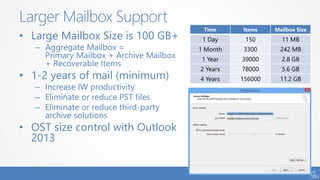
• Large Mailbox Size is 100 GB+
– Aggregate Mailbox =
Primary Mailbox + Archive Mailbox
+ Recoverable Items
• 1-2 years of mail (minimum)
– Increase IW productivity
– Eliminate or reduce PST files
– Eliminate or reduce third-party
archive solutions
• OST size control with Outlook
2013
Larger Mailbox Support
Time Items Mailbox Size
1 Day 150 11 MB
1 Month 3300 242 MB
1 Year 39000 2.8 GB
2 Years 78000 5.6 GB
4 Years 156000 11.2 GB
MODERN PUBLIC FOLDERS
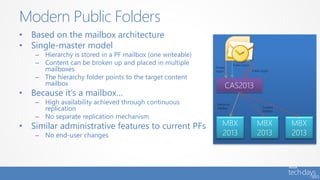
• Based on the mailbox architecture
• Single-master model
– Hierarchy is stored in a PF mailbox (one writeable)
– Content can be broken up and placed in multiple
mailboxes
– The hierarchy folder points to the target content
mailbox
• Because it’s a mailbox…
– High availability achieved through continuous
replication
– No separate replication mechanism
• Similar administrative features to current PFs
– No end-user changes
Modern Public Folders
MBX
2013
CAS2013
MBX
2013
MBX
2013
Public logon
Private
logon
Public logon
Content
Mailbox
Hierarchy
Mailbox
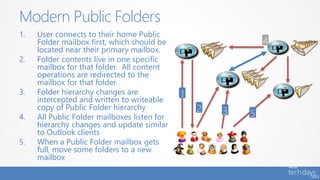
1. User connects to their home Public
Folder mailbox first, which should be
located near their primary mailbox.
2. Folder contents live in one specific
mailbox for that folder. All content
operations are redirected to the
mailbox for that folder
3. Folder hierarchy changes are
intercepted and written to writeable
copy of Public Folder hierarchy
4. All Public Folder mailboxes listen for
hierarchy changes and update similar
to Outlook clients
5. When a Public Folder mailbox gets
full, move some folders to a new
mailbox
Modern Public Folders
SEARCH FOUNDATION INTEGRATION
• Formerly known as FAST Search
• Significant improvements in query and
indexing performance
• Significant reduction in number of times an
item is indexed
• Leveraged by SharePoint and Office 2013
Search Foundation Integration
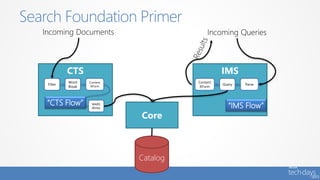
Search Foundation Primer
Core
Catalog
CTS
Incoming Documents
Filter
Word
Break
Content
XForm
MARS
Writer
Incoming Queries
“CTS Flow”
IMS
Content
XForm
Query Parse
“IMS Flow”
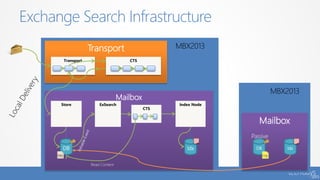
Exchange Search Infrastructure
Mailbox
DB Idx
Passive
Transport
Transport CTS
Mailbox
Store
DB
Index Node
Idx
ExSearch
CTS
Read Content
LogLog
MAILBOX TRANSPORT CHANGES
• Transport on Mailbox server is three services
– Microsoft Exchange Transport - Stateful and handles SMTP mail flow for the
organization and performs content inspection
– Microsoft Exchange Mailbox Transport Delivery - Receives mail from the
Transport service and deliveries to the mailbox database
– Microsoft Exchange Mailbox Transport Submission - Takes mail from the
mailbox databases and submits to the Transport service
• Transport has the following responsibilities
– Receives all inbound mail to the organization
– Submits all outbound mail from the organization
– Handles all internal message processing such as transport rules, content
filtering, and antivirus
– Performs mail flow routing
– Queue messages
– Supports SMTP extensibility
Mailbox Transport Changes
• Two separate services to handle mail submissions
(from the store) and mail delivery (from the
Transport service)
– Mailbox Assistant and Store Driver combined
• Leverages SMTP (encrypted) for communication
with the Transport component and TCP465 for
inbound traffic
• Leverages local RPC for delivery to store
• Is stateless and does not have a persistent storage
mechanism
Mailbox Transport Service
Transport Service Architecture
Transport Service
SMTP to Mailbox Transport Delivery service
SMTP from FET or the Mailbox
Transport service on other servers
SMTP to FET or Mailbox Transport
service on other servers
Submission
Queue
Delivery Queue
Pickup/Replay
Directory
Categorizer
Routing
Agents
SMTP Receive
Protocol
Agents
SMTP Send
SMTP from Mailbox Transport Submission service
Mailbox Transport Service Architecture
Mailbox Transport SubmissionMailbox Transport Delivery
Mailbox Transport service
SMTP SendSMTP Receive
Hub Selector (Router)
Store Driver Submit
Mailbox
Assistants
Mailbox
Submit
Agents
MAPI MAPI
Mailbox Database
SMTP to Transport ServiceSMTP from Transport Service
Store Driver Deliver
Mailbox
Deliver
Agents
• When receiving a message, the Mailbox
Transport component can either deliver the
message or not deliver the message
• If non-delivery is chosen, then the Mailbox
Transport component must provide a
response back to Transport
– Retry delivery
– Generate an NDR
– Reroute the message
Message Delivery
• Introduced in Office 365 to redundantly store all mail for a
configured time span to protect against mailbox irrecoverable
failures
• Now has a “shadow” equivalent and is no longer a Single Point
of Failure (SPOF)
• Consolidates, improves and replaces Exchange 2010 Transport
Dumpster functionality
• SafetyNet retains data for a set period of time, regardless of
whether the message has been successfully replicated to all
database copies or delivered to final destination
• Processes replay requests from “primary” or “shadow”
SafetyNet for lossy mailbox failovers
Safety Net
SUMMARY
• Exchange Server 2013 uses Building Blocks
to facilitate deployments at all scales – from
self-hosted, small organizations to Office 365
• Exchange Server 2013 provides you with an
architecture that is Flexible, Scalable, and
Simpler and helps customers reduce costs
Key Takeaways
Scott Schnoll
Principal Technical Writer
scott.schnoll@microsoft.com
http://aka.ms/schnoll
schnoll
Questions?
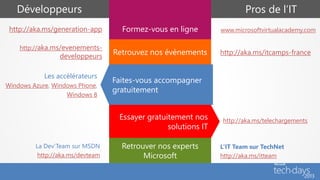
Formez-vous en ligne
Retrouvez nos évènements
Faites-vous accompagner
gratuitement
Essayer gratuitement nos
solutions IT
Retrouver nos experts
Microsoft
Pros de l’ITDéveloppeurs
www.microsoftvirtualacademy.comhttp://aka.ms/generation-app
http://aka.ms/evenements-
developpeurs
http://aka.ms/itcamps-france
Les accélérateurs
Windows Azure, Windows Phone,
Windows 8
http://aka.ms/telechargements
La Dev’Team sur MSDN
http://aka.ms/devteam
L’IT Team sur TechNet
http://aka.ms/itteam

Plongée en eaux profondes dans l'architecture du nouvel Exchange 2013

  • 1.
    Exchange Server 2013 ArchitectureDeep Dive Scott Schnoll Principal Technical Writer Microsoft Corporation Serveurs / Entreprise / Réseaux / IT Twitter: Schnoll Blog: http://aka.ms/Schnoll
  • 2.
    • Exchange ServerEvolution • Architecture Changes • Client Access Server Role • Mailbox Server Role Agenda
  • 3.
  • 4.
    Exchange: Past, Present,and Future C C C H H H L7 LB 2010 • Separate HA solution per role • Introduction of the DAG • Support for Hybrid deployments CAS HT MBX MBX 2007 • Separate roles for deployment & segmentation • Support cheaper storage Ex Ex SAN Ex Ex 2000/2003 • Role differentiation through manual configuration • Backups and hardware solutions for “reliability”
  • 5.
    • 5 serverroles • Tightly coupled in terms of – Versioning – Functionality – Geo-affinity – User partitioning Previous Server Role Architecture Internal Network Phone system (PBX or VOIP) Web browser Outlook (remote user) Mobile phone Line of business application Outlook (local user) Layer 7 LB External SMTP servers Forefront Online Protection for Exchange E H UM C
  • 6.
    • Exchange deploymentscan be complicated • Load balancing is difficult and can require expensive solutions • When dedicated server roles are deployed, hardware can go unutilized or under- utilized • Too many namespaces required Challenges with Existing Model
  • 7.
  • 8.
    • Use BuildingBlocks to facilitate deployments at all scales – from self- hosted, small organizations to Office 365 – Server role evolution – Network layer improvements – Versioning and inter-op principles Exchange Server 2013 Architecture Theme
  • 9.
    • Hardware efficiency •Deployment simplicity • Cross-version inter-op • Failure isolation Exchange Server 2013 Architecture Benefits
  • 10.
    • 2 ServerRoles – Client Access – Mailbox • Loosely- coupled – Functionality – Versioning – User partitioning – Geo-affinity Exchange 2013 Server Role Architecture Internal Network External SMTP servers Phone system (PBX or VOIP) Web browser Outlook (remote user) Mobile device Line of business application DAG Layer4LB CAS Array Exchange Online Protection Outlook (local user) Exchange 2010/2007 E C C C M M M
  • 11.
    Exchange 2013 Tenet:Every Server is an Island Protocols, Server Agents Business Logic Storage EWS RPC CA Transport Assistants MRS MRSProxy EWS RPC CA Transport Assistants MRS MRSProxy Server1 (Vn) Server2 (Vn+1) XSO MailItem Other APIsCTS Store ESE Content index File system XSO MailItem Other APIsCTS Store ESE Content index File system SMTP MRS proxy protocol EWS protocol Custom WS Banned E2010
  • 12.
    Functional Differences AuthN, Proxy, Re-direct Protocols,API, Biz-logic Assistants, Store, CI Exchange 2010 Architecture AuthN, Proxy, Re-direct Store, CI Protocols, Assistants, API, Biz-logic Exchange 2013 Architecture Client Access Mailbox Client Access Hub Transport, Unified Messaging Mailbox L4 LB L7 LB
  • 13.
  • 14.
    • Domain-joined machinein the internal Active Directory forest – Thin, stateless (protocol session) server • Comprised of three components: – Client access protocols (HTTP, IMAP, POP) – SMTP – UM Call Router • Exchange-aware proxy server – Understands requests from different protocols (OWA, EWS, etc.) – Supports proxy and redirection logic for client protocols – Capable of supporting legacy servers with redirect or proxy logic – Contains logic to route specific protocol requests to their destination end- point Client Access Server Role
  • 15.
    • A groupof CAS organized in a load-balanced configuration • Designed to work with TCP affinity (aka, layer 4 LB) – Does not require application-level session affinity (aka, layer 7 LB) • Provides a unified namespace and authentication – Similar to Exchange 2010 in terms of providing a unified endpoint for client connectivity and authentication Client Access Array
  • 16.
    • Exchange 2013supports RPC/HTTP only – No RPC/TCP • Benefits – Simplifies the protocol stack – Provides an extremely reliable and stable connectivity model – RPC session is always on Mailbox server hosting active copy – Eliminates need for RPC CAS Array and RPC CAS Array namespace(s) – Eliminates end user interruptions like “The Exchange administrator has made a change that requires you to quit and restart Outlook” during mailbox moves or *overs Outlook Connectivity to Exchange 2013
  • 17.
    Client Protocol Architecturein Exchange 2013 Load Balancer MDB HTTP Proxy IIS Client Access RPC CA Mailbox IIS RPS OWA, EAS, EWS, ECP, OAB POP, IMAP SMTP UM POP IMAP Transport UM SMTPPOP, IMAPHTTP MailQ RpcProxy SMTP SIP Redirect SIP + RTP POP/IMAPOutlook Web App Outlook EAS EAC PowerShell
  • 18.
    • No longerrequires multiple namespaces for site resilient solutions or site-specific scenarios • Easy to setup a single, worldwide client access namespace • Can be used in coexistence with Exchange 2010 Namespace Simplification
  • 19.
    Single Common NamespaceExample Sue (somewhere in NA) DNS Resolution DAG VIP #1 VIP #2 Sue (traveling in APAC)DNS Resolution via Geo-DNS Round-Robin between # of VIPs DAG VIP #3 VIP #4 mail.contoso.com Round-Robin between # of VIPs
  • 20.
  • 21.
    • Handles allinbound and outbound external SMTP traffic for the organization, and acts as client endpoint for SMTP traffic – Does not replace the Edge Transport Server role – Functions as a layer 7 proxy and has full access to protocol conversation – Does not queue mail locally, and is stateless – All outbound traffic can appear to come from CAS 2013 – Listens on TCP25 and TCP587 (two receive connectors) Front End Transport Service
  • 22.
    • Network protection– centralized, load- balanced egress/ingress point for the organization • Mailbox locator – avoids unnecessary hops by determining the best Exchange 2013 Mailbox server to deliver the message Front End Transport Service
  • 23.
    Front End TransportService Architecture Front End Transport service SMTP Receive Protocol Agents SMTP to MBX 2013SMTP from MBX 2013 External SMTP External SMTP Hub Selector SMTP Send
  • 24.
    Inbound Mail Flow 1.FET accepts initial SMTP connection 2. After DATA command is issued, FET determines the next destination for the recipients in the message 3. FET starts the SMTP proxy session to the appropriate destination Outbound Mail Flow 1. MBX 2013 determines if mail recipient is a remote destination and selects a FET within local site when FrontEndProxyEnabled parameter on Send Connector is set to $true 2. MBX 2013 connects to FET and initiates SMTP conversation 3. FET proxies outbound connection to appropriate destination Inbound | Outbound Mail Flow
  • 25.
    • FET usesdelivery groups: DAG, mailbox, AD site • Bifurcation does not occur on FET – Only one DAG or Mailbox server is selected, regardless of the number of recipients in a message • Server selection within the delivery group is based on recipient type – If message only has a single mailbox recipient, select MBX server within delivery group based on proximity of AD site – If multiple mailbox recipients, select MBX server in closest delivery group, factoring in site proximity – If there are no mailbox recipients (DG, MEUs, etc.), select a random MBX 2013, giving preference to local AD site Entry Point Routing
  • 26.
    • CAS – Simplifiesthe network layer – Removes need for RPC CAS Array and RPC CAS Array Namespaces – Provides deployment flexibility • FET – Provides centralized, load-balanced egress/ingress point for the organization and for client/application SMTP submissions – Avoids unnecessary hops by determining the best place to deliver the message Benefits of CAS and FET Architecture
  • 27.
  • 28.
    • Server thathosts components that process, render and store Exchange data • Includes components previously found in separate roles • Connectivity to a mailbox is always provided by the protocol instance on the server hosting the active database copy Mailbox Server Role
  • 29.
    • Collection ofservers that form a unit of high availability • Boundary for replication and *over • DAG members can be in different sites • Can have a maximum of 16 Mailbox servers Database Availability Group
  • 30.
    • Managed Store •Larger Mailbox Support • Modern Public Folders • Search Foundation Integration • Mailbox Transport Changes Mailbox Server Changes
  • 31.
  • 32.
    • Unmanaged code •Nested, difficult to debug • Single process creates SPOF Previous Information Store
  • 33.
    • Store serviceprocess (Microsoft.Exchange.Store.Service.exe) – Manages worker process lifetime based on mount/dismount – Logs failure item when store worker process problems detected – Terminates store worker process in response to “dirty” dismount during failover • Store worker process (Microsoft.Exchange.Store.Worker.exe) – One process per database, RPC endpoint instance is database GUID – Responsible for block-mode replication for passive databases – Fast transition to active when mounted – Transition from passive to active increases ESE cache size 5X Managed Store
  • 34.
  • 35.
    • Large MailboxSize is 100 GB+ – Aggregate Mailbox = Primary Mailbox + Archive Mailbox + Recoverable Items • 1-2 years of mail (minimum) – Increase IW productivity – Eliminate or reduce PST files – Eliminate or reduce third-party archive solutions • OST size control with Outlook 2013 Larger Mailbox Support Time Items Mailbox Size 1 Day 150 11 MB 1 Month 3300 242 MB 1 Year 39000 2.8 GB 2 Years 78000 5.6 GB 4 Years 156000 11.2 GB
  • 36.
  • 37.
    • Based onthe mailbox architecture • Single-master model – Hierarchy is stored in a PF mailbox (one writeable) – Content can be broken up and placed in multiple mailboxes – The hierarchy folder points to the target content mailbox • Because it’s a mailbox… – High availability achieved through continuous replication – No separate replication mechanism • Similar administrative features to current PFs – No end-user changes Modern Public Folders MBX 2013 CAS2013 MBX 2013 MBX 2013 Public logon Private logon Public logon Content Mailbox Hierarchy Mailbox
  • 38.
    1. User connectsto their home Public Folder mailbox first, which should be located near their primary mailbox. 2. Folder contents live in one specific mailbox for that folder. All content operations are redirected to the mailbox for that folder 3. Folder hierarchy changes are intercepted and written to writeable copy of Public Folder hierarchy 4. All Public Folder mailboxes listen for hierarchy changes and update similar to Outlook clients 5. When a Public Folder mailbox gets full, move some folders to a new mailbox Modern Public Folders
  • 39.
  • 40.
    • Formerly knownas FAST Search • Significant improvements in query and indexing performance • Significant reduction in number of times an item is indexed • Leveraged by SharePoint and Office 2013 Search Foundation Integration
  • 41.
    Search Foundation Primer Core Catalog CTS IncomingDocuments Filter Word Break Content XForm MARS Writer Incoming Queries “CTS Flow” IMS Content XForm Query Parse “IMS Flow”
  • 42.
    Exchange Search Infrastructure Mailbox DBIdx Passive Transport Transport CTS Mailbox Store DB Index Node Idx ExSearch CTS Read Content LogLog
  • 43.
  • 44.
    • Transport onMailbox server is three services – Microsoft Exchange Transport - Stateful and handles SMTP mail flow for the organization and performs content inspection – Microsoft Exchange Mailbox Transport Delivery - Receives mail from the Transport service and deliveries to the mailbox database – Microsoft Exchange Mailbox Transport Submission - Takes mail from the mailbox databases and submits to the Transport service • Transport has the following responsibilities – Receives all inbound mail to the organization – Submits all outbound mail from the organization – Handles all internal message processing such as transport rules, content filtering, and antivirus – Performs mail flow routing – Queue messages – Supports SMTP extensibility Mailbox Transport Changes
  • 45.
    • Two separateservices to handle mail submissions (from the store) and mail delivery (from the Transport service) – Mailbox Assistant and Store Driver combined • Leverages SMTP (encrypted) for communication with the Transport component and TCP465 for inbound traffic • Leverages local RPC for delivery to store • Is stateless and does not have a persistent storage mechanism Mailbox Transport Service
  • 46.
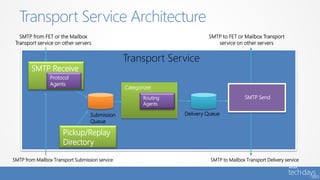
    Transport Service Architecture TransportService SMTP to Mailbox Transport Delivery service SMTP from FET or the Mailbox Transport service on other servers SMTP to FET or Mailbox Transport service on other servers Submission Queue Delivery Queue Pickup/Replay Directory Categorizer Routing Agents SMTP Receive Protocol Agents SMTP Send SMTP from Mailbox Transport Submission service
  • 47.
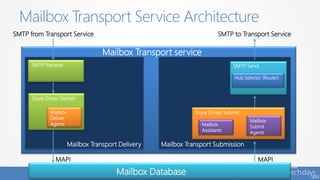
    Mailbox Transport ServiceArchitecture Mailbox Transport SubmissionMailbox Transport Delivery Mailbox Transport service SMTP SendSMTP Receive Hub Selector (Router) Store Driver Submit Mailbox Assistants Mailbox Submit Agents MAPI MAPI Mailbox Database SMTP to Transport ServiceSMTP from Transport Service Store Driver Deliver Mailbox Deliver Agents
  • 48.
    • When receivinga message, the Mailbox Transport component can either deliver the message or not deliver the message • If non-delivery is chosen, then the Mailbox Transport component must provide a response back to Transport – Retry delivery – Generate an NDR – Reroute the message Message Delivery
  • 49.
    • Introduced inOffice 365 to redundantly store all mail for a configured time span to protect against mailbox irrecoverable failures • Now has a “shadow” equivalent and is no longer a Single Point of Failure (SPOF) • Consolidates, improves and replaces Exchange 2010 Transport Dumpster functionality • SafetyNet retains data for a set period of time, regardless of whether the message has been successfully replicated to all database copies or delivered to final destination • Processes replay requests from “primary” or “shadow” SafetyNet for lossy mailbox failovers Safety Net
  • 50.
  • 51.
    • Exchange Server2013 uses Building Blocks to facilitate deployments at all scales – from self-hosted, small organizations to Office 365 • Exchange Server 2013 provides you with an architecture that is Flexible, Scalable, and Simpler and helps customers reduce costs Key Takeaways
  • 52.
    Scott Schnoll Principal TechnicalWriter scott.schnoll@microsoft.com http://aka.ms/schnoll schnoll Questions?
  • 53.
    Formez-vous en ligne Retrouveznos évènements Faites-vous accompagner gratuitement Essayer gratuitement nos solutions IT Retrouver nos experts Microsoft Pros de l’ITDéveloppeurs www.microsoftvirtualacademy.comhttp://aka.ms/generation-app http://aka.ms/evenements- developpeurs http://aka.ms/itcamps-france Les accélérateurs Windows Azure, Windows Phone, Windows 8 http://aka.ms/telechargements La Dev’Team sur MSDN http://aka.ms/devteam L’IT Team sur TechNet http://aka.ms/itteam