OPENSTACK 101
GETTING STARTED WITH RDO
Dan Radez
dradez@redhat.com
irc: radez
@radez
Overview
PackStack: Installation
Red Hat developed OpenStack installer
Deployment options
● Interactively
● Answer file
● Quick Start
● All-in-one
Features
● Single-host install
● Multi-host install
● RDO
PackStack: Installation
[root@workstation ~]# ssh 192.168.122.101
[root@control ~]# yum install -y openstack-packstack
[root@control ~]# packstack --gen-answer-file packstack.txt
[root@control ~]# packstack --answer-file packstack.txt
Updates
● CONFIG_COMPUTE_HOSTS=192.168.122.102
● CONFIG_PROVISION_DEMO=n
● CONFIG_CINDER_VOLUMES_CREATE=n
What is OpenStack?
● Cloud/Virtualization Platform
● Designed for standard hardware
● OpenSource
Red Hat's Community OpenStack
openstack.redhat.com
PackStack: Installation
Install OpenStack
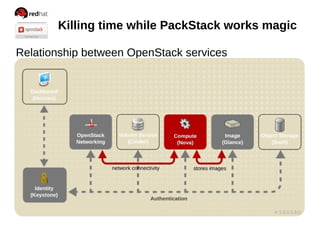
Killing time while PackStack works magic
Relationship between OpenStack services
Killing time while PackStack works magic
Relationship between OpenStack services
Killing time while PackStack works magic
Relationship between OpenStack services
Killing time while PackStack works magic
Relationship between OpenStack services
Killing time while PackStack works magic
Relationship between OpenStack services
Killing time while PackStack works magic
Relationship between OpenStack services
Killing time while PackStack works magic
Relationship between OpenStack services
Killing time while PackStack works magic
Relationship between OpenStack services
Help!
$ keystone help
$ keystone help user-create
$ glance help
$ glance help image-create
$ nova help
$ nova help boot
Keystone: Identity Management
● centralized identity service
● central catalog of services
Multiple forms of authentication
● User name and password
● Token-based systems
● Amazon Web Services style logins
Keystone: Identity Management
Login as admin
[root@control ~]# cat keystonerc_admin
export OS_USERNAME=admin
export OS_TENANT_NAME=admin
export OS_PASSWORD=5ffbe9d2a38d4a48
export OS_AUTH_URL=http://192.168.122.101:5000/v2.0/
export OS_REGION_NAME=RegionOne
export PS1="[u@h W(keystone_admin)]$ "
[root@control ~]# source keystonerc_admin
[root@control ~(keystone_admin)]#
Keystone: Identity Management
Get a token / troubleshooting auth
[root@control ~(keystone_admin)]# keystone token-get
+­­­­­­­­­­­+­­­­­­­­­­­­­­­­­­­­­­­­­­­­­­­­­­+
|  Property |              Value               |
+­­­­­­­­­­­+­­­­­­­­­­­­­­­­­­­­­­­­­­­­­­­­­­+
|  expires  |       2013­06­07T19:22:06Z       |
|     id    | e50158f737f14791ae7831c955524de2 |
| tenant_id | 70784578887b4468adacd92f2f376bc9 |
|  user_id  | f4270a7b46af467892173a02d9cd49d4 |
+­­­­­­­­­­­+­­­­­­­­­­­­­­­­­­­­­­­­­­­­­­­­­­+
Keystone: Identity Management
Add a User
[root@control ~]# keystone user-create --name radez
--pass supersecretpass
id: 849616035d654b9b9a8cc38b10284a52
[root@control ~]# keystone role-create --name role1
id: 8ab4a27031084100afbafc0f95a47170
[root@control ~]# keystone tenant-create --name tenant1
Id: 427c01f33fcf4feb930f26dd550a14e0
Keystone: Identity Management
Add a User
[root@control ~]# keystone user-role-add
--user-id radez --role-id _member_ --tenant-id radez
[root@control ~]# keystone user-list
[root@control ~]# keystone role-list
[root@control ~]# keystone tenant-list
[root@control ~]# keystone user-role-list
[root@control ~]# keystone endpoint-list
Keystone: Identity Management
Login as user
[root@control ~]# cp keystonerc_admin keystonerc_radez
export OS_USERNAME=radez
export OS_TENANT_NAME=tenant1
export OS_PASSWORD=supersecretpass
export OS_AUTH_URL=http://192.168.122.101:5000/v2.0/
export OS_REGION_NAME=RegionOne
export PS1="[u@h W(keystone_radez)]$ "
[root@control ~]# source keystonerc_radez
[root@control ~(keystone_radez)]# keystone token-get
[root@control ~(keystone_radez)]# source keystonerc_admin
[root@control ~(keystonerc_admin)]#
Keystone: Identity Management
Add a user
Glance: Image Management
● registry for virtual machine images
● images used as templates for new servers
Add an image
[root@control ~]# glance image-create --name centos7
--is-public 1 --disk-format qcow2 --container-format bare
--file /mnt/CentOS-7-x86_64-GenericCloud.qcow2c
id: d3d1f38e-3f2c-4f45-91e1-cb4535f62d10
[root@control ~]# glance image-list
Glance: Image Management
Downloading Images
● Search for “Cloud Image”
● Fedora, CentOS, RHEL, Ubuntu, CirrOS
Image Building
● Virt-install / kickstart
● Manually (launch installer, import before first boot)
Build Notes:
● Include cloudinit for post boot configuration
Glance: Image Management
Add an image
Neutron: Networking
Neutron: Networking
● networking as a service
● built in modular architecture
Features
● Single or Multiple host deployment
● virtual network, subnet, and port abstractions
● Plugin architecture supports many network technologies
Neutron: Networking
Create networks, subnets and routers
[root@control ~]# neutron net-create internal
id: cc6052d8-2a6d-40e7-85ab-b7c8bb5b3a8c
[root@control ~]# neutron subnet-create internal 172.16.37.0/24
id: c6c4ded5-ac0a-4f7c-8f54-9218f2cf8ecc
[root@control ~]# neutron router-create router1
id: 30f385f0-8f1d-453e-b4ab-26ee6f8e80fe
[root@control ~]# neutron router-interface-add router1 c6c4ded5-
ac0a-4f7c-8f54-9218f2cf8ecc
Neutron: Networking
Create a Network
Neutron: Networking
OpenVSwitch External Bridge (control node)
/etc/sysconfig/network-scripts/ifcfg-eth0
● Remove: IPADDR=192.168.122.101
● Remove: GATEWAY=192.168.122.1
/etc/sysconfig/network-scripts/ifcfg-br-ex
● ONBOOT=yes
[root@control ~]# ovs-vsctl add-br br-ex
[root@control ~]# ovs-vsctl add-port br-ex eth0 && service network
restart
Neutron: Networking
Create networks, subnets and routers
[root@control ~]# keystone tenant-list
4ee4f1d7d5ba46318885dd82520d748f | services
[root@control ~]# neutron net-create --tenant-id services ext --
--router:external=True
id: 4cbcc3c7-4a40-4101-afca-ca9782ff7f04
[root@control ~]# neutron subnet-create --tenant-id services
external 192.168.122.0/24 -- --enable_dhcp=False
id: a4ba8c13-2a67-4402-bb0d-7e55f253de44
[root@rhos ~]$ neutron router-gateway-set router1 external
Neutron: Networking
Add Provider Network
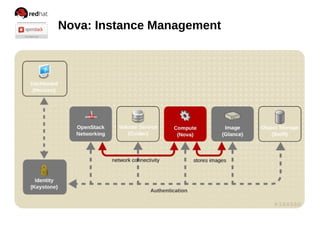
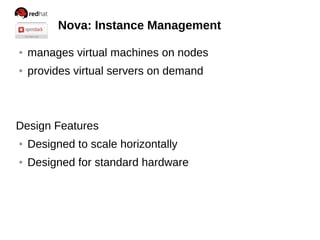
Nova: Instance Management
● manages virtual machines on nodes
● provides virtual servers on demand
Design Features
● Designed to scale horizontally
● Designed for standard hardware
Nova: Instance Management
Boot an instance
[root@control ~]# nova flavor-list
[root@control ~]# nova keypair-add --pub-key .ssh/id_rsa.pub mykey
[root@control ~]# nova keypair-list
mykey | 84:6e:28:d3:75:17:ab:25:4d:f3:0d:61:93:55:ee:e2
[root@control ~]# nova image-list
[root@control ~]# nova boot --flavor 1 --key_name mykey
--image cirros my_instance
[root@control ~]# nova list
Nova: Instance Management
Associate a floating ip to an instance
[root@control ~]# neutron floatingip-create external
id: 2b815236-f5f6-4d48-9860-4abbaec15990
[root@control ~]# nova list
Id: ip_address: 172.16.37.3
[root@control ~]# neutron port-list
id: 1abd07c4-8c7b-4701-92a3-482f69e5a4ee
ip_address: 172.16.37.3
[root@control ~]# neutron floatingip-associate 2b815236-f5f6-4d48-
9860-4abbaec15990 1abd07c4-8c7b-4701-92a3-482f69e5a4ee
Associated floatingip 2b815236-f5f6-4d48-9860-4abbaec15990
Neutron: Networking
Add security group rules
[root@control ~]# keystone tenant-list
70784578887b4468adacd92f2f376bc9 | radez
[root@control ~]# neutron security-group-list --tenant-id
70784578887b4468adacd92f2f376bc9
| 049ca2a9-7dc0-417c-9092-640e8a47a585 | default | default |
[root@control ~]# neutron security-group-rule-create --protocol tcp
--port-range-min 22 --port-range-max 22 --remote-ip-prefix 0.0.0.0/0
049ca2a9-7dc0-417c-9092-640e8a47a585
[root@control ~]# neutron security-group-rule-create --protocol icmp
--remote-ip-prefix 0.0.0.0/0 049ca2a9-7dc0-417c-9092-
640e8a47a585
Nova: Instance Management
Communicate with the instance
[root@control ~]# ping 192.168.122.3
PING 192.168.122.3 (192.168.122.3) 56(84) bytes of data.
64 bytes from 192.168.122.3: icmp_seq=2 ttl=63 time=0.668 ms
[root@control ~]# ssh centos@192.168.122.3
The authenticity of host '192.168.122.3 (192.168.122.3)' can't be
established.
RSA key fingerprint is
38:49:f2:67:80:11:31:84:1f:b1:79:df:5f:e4:e5:f7.
Are you sure you want to continue connecting (yes/no)? Yes
Warning: Permanently added '192.168.122.3' (RSA) to the list of
known hosts.
$
Nova: Instance Management
Boot an Instance
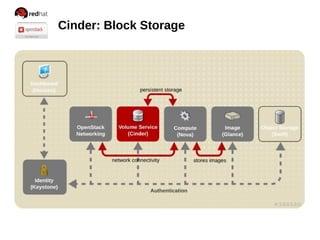
Cinder: Block Storage
● manages persistent block storage volumes
● snapshots can be taken
Create and attach a volume
[root@control ~]# cinder create 1
id: 4d6cbb1f-5873-4357-99c7-8ae0502e6de5
[root@control ~]# nova volume-attach my_instance
4d6cbb1f-5873-4357-99c7-8ae0502e6de5 auto
Cinder: Block Storage
Mount a volume
[root@control ~]# ssh -i .ssh/id_rsa root@192.168.122.3
my_instance$ sudo -i
my_instance# mkfs.ext4 /dev/vdb
my_instance# mkdir -p /mnt/volume
my_instance# mount /dev/vdb /mnt/volume
my_instance# touch /mnt/volume/test.txt
my_instance# umount /mnt/volume
[root@control ~]# nova volume-detach my_instance
4d6cbb1f-5873-4357-99c7-8ae0502e6de5
Cinder: Block Storage
Create and attach a volume
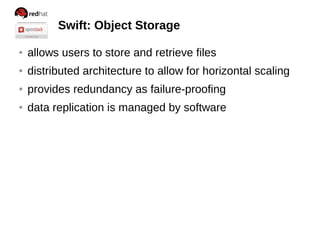
Swift: Object Storage
● allows users to store and retrieve files
● distributed architecture to allow for horizontal scaling
● provides redundancy as failure-proofing
● data replication is managed by software
Swift: Object Storage
Upload an object
[root@control ~]# swift stat
[root@control ~]# swift list
[root@control ~]# swift upload test packstack-answers.txt
[root@control ~]# swift list
[root@control ~]# swift list test
[root@control ~]# swift upload test /etc/motd
[root@control ~]# swift list test
Swift: Object Storage
Create a container & upload an object
Dashboard: Web Interface
● web-based interface for managing OpenStack services
● modular design for interfacing with other projects
● includes interface for all core components
Review
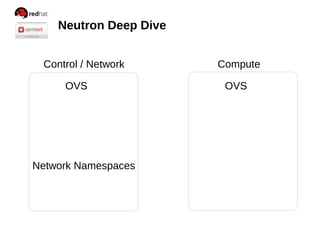
Neutron Deep Dive
Control / Network Compute
Neutron Deep Dive
Control / Network Compute
OVS OVS
Network Namespaces
Neutron Deep Dive
Control / Network Compute
OVS OVS
netns
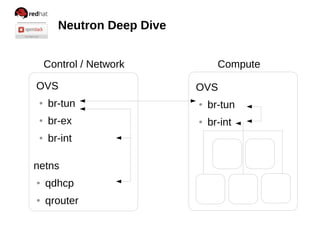
Neutron Deep Dive
Control / Network Compute
OVS
● br-tun
● br-ex
● br-int
netns
OVS
● br-tun
● br-int
Neutron Deep Dive
Control / Network Compute
OVS
● br-tun
● br-ex
● br-int
netns
● qdhcp
● qrouter
OVS
● br-tun
● br-int
Neutron Deep Dive
Control / Network Compute
OVS
● br-tun
● br-ex
● br-int
netns
● qdhcp
● qrouter
OVS
● br-tun
● br-int
Neutron Deep Dive
Control / Network Compute
OVS
● br-tun
● br-ex
● br-int
netns
● qdhcp
● qrouter
OVS
● br-tun
● br-int
Neutron Deep Dive
Control / Network Compute
OVS
● br-tun
● br-ex
● br-int
netns
● qdhcp
● qrouter
OVS
● br-tun
● br-int
Neutron Deep Dive
Control / Network Compute
OVS
● br-tun
● br-ex
● br-int
netns
● qdhcp
● qrouter
OVS
● br-tun
● br-int
Neutron Deep Dive
Control / Network Compute
OVS
● br-tun
● br-ex
● br-int
netns
● qdhcp
● qrouter
OVS
● br-tun
● br-int
Neutron Deep Dive
Control / Network Compute
OVS
● br-tun
● br-ex
● br-int
netns
● qdhcp
● qrouter
OVS
● br-tun
● br-int
Neutron Deep Dive
Control / Network Compute
OVS
● br-tun
● br-ex
● br-int
netns
● qdhcp
● qrouter
OVS
● br-tun
● br-int
Neutron Deep Dive
Control / Network Compute
OVS
● br-tun
● br-ex
● br-int
netns
● qdhcp
● qrouter
OVS
● br-tun
● br-int
Resources
● RDO: openstack.redhat.com
● RH KB: https://access.redhat.com/
● OpenStack.org
● TryStack.org
● http://radez.fedorapeople.org/POSSCON2015.pdf

Openstack 101

  • 1.
    OPENSTACK 101 GETTING STARTEDWITH RDO Dan Radez dradez@redhat.com irc: radez @radez
  • 2.
  • 3.
    PackStack: Installation Red Hatdeveloped OpenStack installer Deployment options ● Interactively ● Answer file ● Quick Start ● All-in-one Features ● Single-host install ● Multi-host install ● RDO
  • 4.
    PackStack: Installation [root@workstation ~]#ssh 192.168.122.101 [root@control ~]# yum install -y openstack-packstack [root@control ~]# packstack --gen-answer-file packstack.txt [root@control ~]# packstack --answer-file packstack.txt Updates ● CONFIG_COMPUTE_HOSTS=192.168.122.102 ● CONFIG_PROVISION_DEMO=n ● CONFIG_CINDER_VOLUMES_CREATE=n
  • 5.
    What is OpenStack? ●Cloud/Virtualization Platform ● Designed for standard hardware ● OpenSource
  • 6.
    Red Hat's CommunityOpenStack openstack.redhat.com
  • 7.
  • 8.
    Killing time whilePackStack works magic Relationship between OpenStack services
  • 9.
    Killing time whilePackStack works magic Relationship between OpenStack services
  • 10.
    Killing time whilePackStack works magic Relationship between OpenStack services
  • 11.
    Killing time whilePackStack works magic Relationship between OpenStack services
  • 12.
    Killing time whilePackStack works magic Relationship between OpenStack services
  • 13.
    Killing time whilePackStack works magic Relationship between OpenStack services
  • 14.
    Killing time whilePackStack works magic Relationship between OpenStack services
  • 15.
    Killing time whilePackStack works magic Relationship between OpenStack services
  • 16.
    Help! $ keystone help $keystone help user-create $ glance help $ glance help image-create $ nova help $ nova help boot
  • 17.
  • 18.
    Keystone: Identity Management ●centralized identity service ● central catalog of services Multiple forms of authentication ● User name and password ● Token-based systems ● Amazon Web Services style logins
  • 19.
    Keystone: Identity Management Loginas admin [root@control ~]# cat keystonerc_admin export OS_USERNAME=admin export OS_TENANT_NAME=admin export OS_PASSWORD=5ffbe9d2a38d4a48 export OS_AUTH_URL=http://192.168.122.101:5000/v2.0/ export OS_REGION_NAME=RegionOne export PS1="[u@h W(keystone_admin)]$ " [root@control ~]# source keystonerc_admin [root@control ~(keystone_admin)]#
  • 20.
    Keystone: Identity Management Geta token / troubleshooting auth [root@control ~(keystone_admin)]# keystone token-get +­­­­­­­­­­­+­­­­­­­­­­­­­­­­­­­­­­­­­­­­­­­­­­+ |  Property |              Value               | +­­­­­­­­­­­+­­­­­­­­­­­­­­­­­­­­­­­­­­­­­­­­­­+ |  expires  |       2013­06­07T19:22:06Z       | |     id    | e50158f737f14791ae7831c955524de2 | | tenant_id | 70784578887b4468adacd92f2f376bc9 | |  user_id  | f4270a7b46af467892173a02d9cd49d4 | +­­­­­­­­­­­+­­­­­­­­­­­­­­­­­­­­­­­­­­­­­­­­­­+
  • 21.
    Keystone: Identity Management Adda User [root@control ~]# keystone user-create --name radez --pass supersecretpass id: 849616035d654b9b9a8cc38b10284a52 [root@control ~]# keystone role-create --name role1 id: 8ab4a27031084100afbafc0f95a47170 [root@control ~]# keystone tenant-create --name tenant1 Id: 427c01f33fcf4feb930f26dd550a14e0
  • 22.
    Keystone: Identity Management Adda User [root@control ~]# keystone user-role-add --user-id radez --role-id _member_ --tenant-id radez [root@control ~]# keystone user-list [root@control ~]# keystone role-list [root@control ~]# keystone tenant-list [root@control ~]# keystone user-role-list [root@control ~]# keystone endpoint-list
  • 23.
    Keystone: Identity Management Loginas user [root@control ~]# cp keystonerc_admin keystonerc_radez export OS_USERNAME=radez export OS_TENANT_NAME=tenant1 export OS_PASSWORD=supersecretpass export OS_AUTH_URL=http://192.168.122.101:5000/v2.0/ export OS_REGION_NAME=RegionOne export PS1="[u@h W(keystone_radez)]$ " [root@control ~]# source keystonerc_radez [root@control ~(keystone_radez)]# keystone token-get [root@control ~(keystone_radez)]# source keystonerc_admin [root@control ~(keystonerc_admin)]#
  • 24.
  • 25.
  • 26.
    Glance: Image Management ●registry for virtual machine images ● images used as templates for new servers Add an image [root@control ~]# glance image-create --name centos7 --is-public 1 --disk-format qcow2 --container-format bare --file /mnt/CentOS-7-x86_64-GenericCloud.qcow2c id: d3d1f38e-3f2c-4f45-91e1-cb4535f62d10 [root@control ~]# glance image-list
  • 27.
    Glance: Image Management DownloadingImages ● Search for “Cloud Image” ● Fedora, CentOS, RHEL, Ubuntu, CirrOS Image Building ● Virt-install / kickstart ● Manually (launch installer, import before first boot) Build Notes: ● Include cloudinit for post boot configuration
  • 28.
  • 29.
  • 30.
    Neutron: Networking ● networkingas a service ● built in modular architecture Features ● Single or Multiple host deployment ● virtual network, subnet, and port abstractions ● Plugin architecture supports many network technologies
  • 31.
    Neutron: Networking Create networks,subnets and routers [root@control ~]# neutron net-create internal id: cc6052d8-2a6d-40e7-85ab-b7c8bb5b3a8c [root@control ~]# neutron subnet-create internal 172.16.37.0/24 id: c6c4ded5-ac0a-4f7c-8f54-9218f2cf8ecc [root@control ~]# neutron router-create router1 id: 30f385f0-8f1d-453e-b4ab-26ee6f8e80fe [root@control ~]# neutron router-interface-add router1 c6c4ded5- ac0a-4f7c-8f54-9218f2cf8ecc
  • 32.
  • 33.
    Neutron: Networking OpenVSwitch ExternalBridge (control node) /etc/sysconfig/network-scripts/ifcfg-eth0 ● Remove: IPADDR=192.168.122.101 ● Remove: GATEWAY=192.168.122.1 /etc/sysconfig/network-scripts/ifcfg-br-ex ● ONBOOT=yes [root@control ~]# ovs-vsctl add-br br-ex [root@control ~]# ovs-vsctl add-port br-ex eth0 && service network restart
  • 34.
    Neutron: Networking Create networks,subnets and routers [root@control ~]# keystone tenant-list 4ee4f1d7d5ba46318885dd82520d748f | services [root@control ~]# neutron net-create --tenant-id services ext -- --router:external=True id: 4cbcc3c7-4a40-4101-afca-ca9782ff7f04 [root@control ~]# neutron subnet-create --tenant-id services external 192.168.122.0/24 -- --enable_dhcp=False id: a4ba8c13-2a67-4402-bb0d-7e55f253de44 [root@rhos ~]$ neutron router-gateway-set router1 external
  • 35.
  • 36.
  • 37.
    Nova: Instance Management ●manages virtual machines on nodes ● provides virtual servers on demand Design Features ● Designed to scale horizontally ● Designed for standard hardware
  • 38.
    Nova: Instance Management Bootan instance [root@control ~]# nova flavor-list [root@control ~]# nova keypair-add --pub-key .ssh/id_rsa.pub mykey [root@control ~]# nova keypair-list mykey | 84:6e:28:d3:75:17:ab:25:4d:f3:0d:61:93:55:ee:e2 [root@control ~]# nova image-list [root@control ~]# nova boot --flavor 1 --key_name mykey --image cirros my_instance [root@control ~]# nova list
  • 39.
    Nova: Instance Management Associatea floating ip to an instance [root@control ~]# neutron floatingip-create external id: 2b815236-f5f6-4d48-9860-4abbaec15990 [root@control ~]# nova list Id: ip_address: 172.16.37.3 [root@control ~]# neutron port-list id: 1abd07c4-8c7b-4701-92a3-482f69e5a4ee ip_address: 172.16.37.3 [root@control ~]# neutron floatingip-associate 2b815236-f5f6-4d48- 9860-4abbaec15990 1abd07c4-8c7b-4701-92a3-482f69e5a4ee Associated floatingip 2b815236-f5f6-4d48-9860-4abbaec15990
  • 40.
    Neutron: Networking Add securitygroup rules [root@control ~]# keystone tenant-list 70784578887b4468adacd92f2f376bc9 | radez [root@control ~]# neutron security-group-list --tenant-id 70784578887b4468adacd92f2f376bc9 | 049ca2a9-7dc0-417c-9092-640e8a47a585 | default | default | [root@control ~]# neutron security-group-rule-create --protocol tcp --port-range-min 22 --port-range-max 22 --remote-ip-prefix 0.0.0.0/0 049ca2a9-7dc0-417c-9092-640e8a47a585 [root@control ~]# neutron security-group-rule-create --protocol icmp --remote-ip-prefix 0.0.0.0/0 049ca2a9-7dc0-417c-9092- 640e8a47a585
  • 41.
    Nova: Instance Management Communicatewith the instance [root@control ~]# ping 192.168.122.3 PING 192.168.122.3 (192.168.122.3) 56(84) bytes of data. 64 bytes from 192.168.122.3: icmp_seq=2 ttl=63 time=0.668 ms [root@control ~]# ssh centos@192.168.122.3 The authenticity of host '192.168.122.3 (192.168.122.3)' can't be established. RSA key fingerprint is 38:49:f2:67:80:11:31:84:1f:b1:79:df:5f:e4:e5:f7. Are you sure you want to continue connecting (yes/no)? Yes Warning: Permanently added '192.168.122.3' (RSA) to the list of known hosts. $
  • 42.
  • 43.
  • 44.
    Cinder: Block Storage ●manages persistent block storage volumes ● snapshots can be taken Create and attach a volume [root@control ~]# cinder create 1 id: 4d6cbb1f-5873-4357-99c7-8ae0502e6de5 [root@control ~]# nova volume-attach my_instance 4d6cbb1f-5873-4357-99c7-8ae0502e6de5 auto
  • 45.
    Cinder: Block Storage Mounta volume [root@control ~]# ssh -i .ssh/id_rsa root@192.168.122.3 my_instance$ sudo -i my_instance# mkfs.ext4 /dev/vdb my_instance# mkdir -p /mnt/volume my_instance# mount /dev/vdb /mnt/volume my_instance# touch /mnt/volume/test.txt my_instance# umount /mnt/volume [root@control ~]# nova volume-detach my_instance 4d6cbb1f-5873-4357-99c7-8ae0502e6de5
  • 46.
    Cinder: Block Storage Createand attach a volume
  • 47.
  • 48.
    Swift: Object Storage ●allows users to store and retrieve files ● distributed architecture to allow for horizontal scaling ● provides redundancy as failure-proofing ● data replication is managed by software
  • 49.
    Swift: Object Storage Uploadan object [root@control ~]# swift stat [root@control ~]# swift list [root@control ~]# swift upload test packstack-answers.txt [root@control ~]# swift list [root@control ~]# swift list test [root@control ~]# swift upload test /etc/motd [root@control ~]# swift list test
  • 50.
    Swift: Object Storage Createa container & upload an object
  • 51.
  • 52.
    Dashboard: Web Interface ●web-based interface for managing OpenStack services ● modular design for interfacing with other projects ● includes interface for all core components
  • 53.
  • 54.
    Neutron Deep Dive Control/ Network Compute
  • 55.
    Neutron Deep Dive Control/ Network Compute OVS OVS Network Namespaces
  • 56.
    Neutron Deep Dive Control/ Network Compute OVS OVS netns
  • 57.
    Neutron Deep Dive Control/ Network Compute OVS ● br-tun ● br-ex ● br-int netns OVS ● br-tun ● br-int
  • 58.
    Neutron Deep Dive Control/ Network Compute OVS ● br-tun ● br-ex ● br-int netns ● qdhcp ● qrouter OVS ● br-tun ● br-int
  • 59.
    Neutron Deep Dive Control/ Network Compute OVS ● br-tun ● br-ex ● br-int netns ● qdhcp ● qrouter OVS ● br-tun ● br-int
  • 60.
    Neutron Deep Dive Control/ Network Compute OVS ● br-tun ● br-ex ● br-int netns ● qdhcp ● qrouter OVS ● br-tun ● br-int
  • 61.
    Neutron Deep Dive Control/ Network Compute OVS ● br-tun ● br-ex ● br-int netns ● qdhcp ● qrouter OVS ● br-tun ● br-int
  • 62.
    Neutron Deep Dive Control/ Network Compute OVS ● br-tun ● br-ex ● br-int netns ● qdhcp ● qrouter OVS ● br-tun ● br-int
  • 63.
    Neutron Deep Dive Control/ Network Compute OVS ● br-tun ● br-ex ● br-int netns ● qdhcp ● qrouter OVS ● br-tun ● br-int
  • 64.
    Neutron Deep Dive Control/ Network Compute OVS ● br-tun ● br-ex ● br-int netns ● qdhcp ● qrouter OVS ● br-tun ● br-int
  • 65.
    Neutron Deep Dive Control/ Network Compute OVS ● br-tun ● br-ex ● br-int netns ● qdhcp ● qrouter OVS ● br-tun ● br-int
  • 66.
    Neutron Deep Dive Control/ Network Compute OVS ● br-tun ● br-ex ● br-int netns ● qdhcp ● qrouter OVS ● br-tun ● br-int
  • 67.
    Resources ● RDO: openstack.redhat.com ●RH KB: https://access.redhat.com/ ● OpenStack.org ● TryStack.org ● http://radez.fedorapeople.org/POSSCON2015.pdf