DEPLOYING RDO ON
RED HAT ENTERPRISE LINUX
Please login and start the 2 RDO VMs
User/Password: RDO/openstack
Applications -> System Tools -> Virt Manager
DEPLOYING RDO ON
RED HAT ENTERPRISE LINUX
Dan Radez
Sr. Software Engineer, Red Hat
dradez@redhat.com
irc: radez
What is OpenStack?
● Cloud/Virtualization Platform
● Designed for standard hardware
● OpenSource
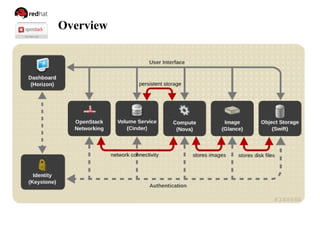
Overview
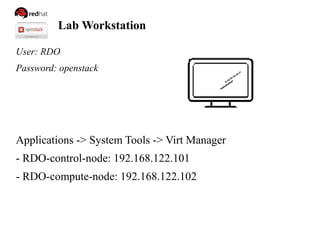
Lab Workstation
User: RDO
Password: openstack
Applications -> System Tools -> Virt Manager
- RDO-control-node: 192.168.122.101
- RDO-compute-node: 192.168.122.102
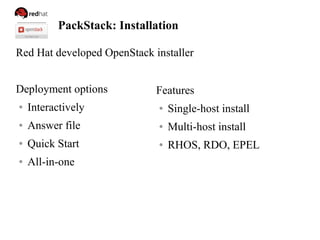
PackStack: Installation
Red Hat developed OpenStack installer
Deployment options
● Interactively
● Answer file
● Quick Start
● All-in-one
Features
● Single-host install
● Multi-host install
● RHOS, RDO, EPEL
PackStack: Installation
[RDO@workstation ~]# ssh 192.168.122.101
[root@control ~]# yum install -y openstack-packstack
[root@control ~]# packstack --use-epel=n --install-hosts
192.168.122.101,192.168.122.102 --os-quantum-install=n
Install Defaults
● MySQL
● Qpid
● Swift Not Installed (--os-swift-install=y)
● Quantum/Neutron (--os-quantum-install=n)
PackStack: Installation
Exercise: Install OpenStack
file:///home/RDO/slides/index.html
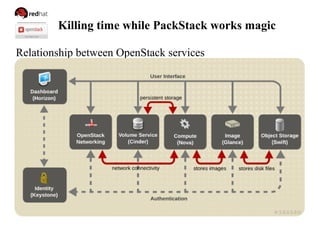
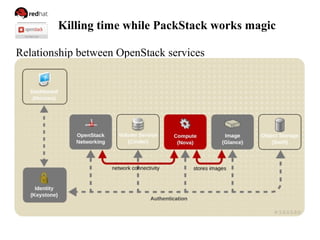
Killing time while PackStack works magic
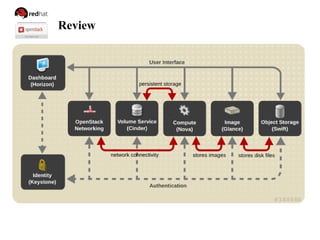
Relationship between OpenStack services
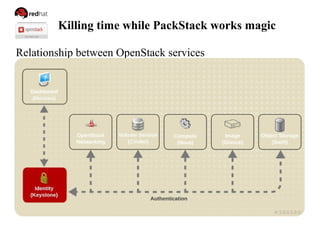
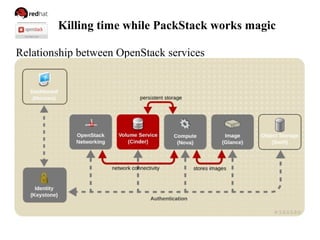
Killing time while PackStack works magic
Relationship between OpenStack services
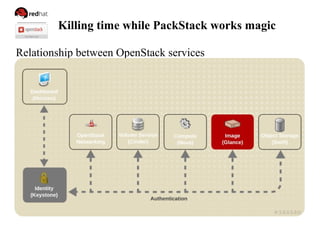
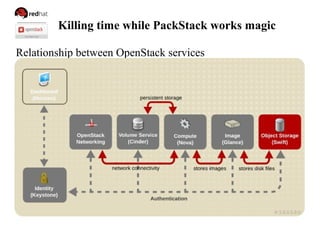
Killing time while PackStack works magic
Relationship between OpenStack services
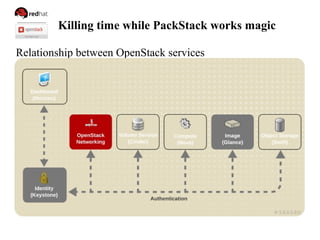
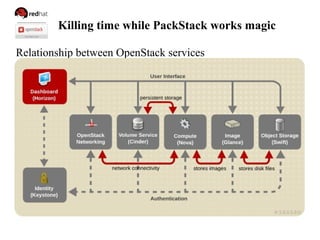
Killing time while PackStack works magic
Relationship between OpenStack services
Killing time while PackStack works magic
Relationship between OpenStack services
Killing time while PackStack works magic
Relationship between OpenStack services
Killing time while PackStack works magic
Relationship between OpenStack services
Killing time while PackStack works magic
Relationship between OpenStack services
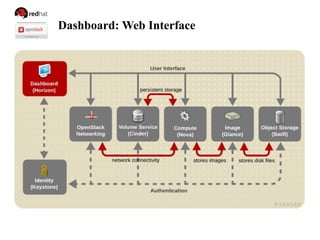
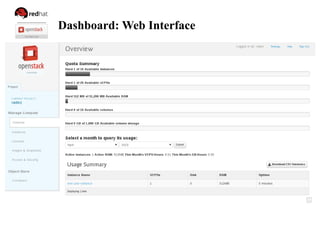
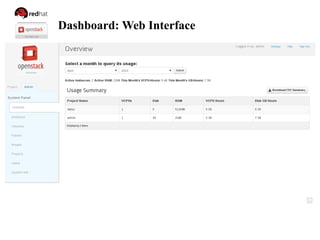
Dashboard: Web Interface
● web-based interface for managing OpenStack services
● modular design for interfacing with other projects
● includes interface for all core components
Dashboard: Web Interface
Exercise: Explore the Dashboard
http://192.168.122.101/dashboard/
Help!
$ keystone help
$ keystone help user-create
$ glance help
$ glance help image-create
$ nova help
$ nova help boot
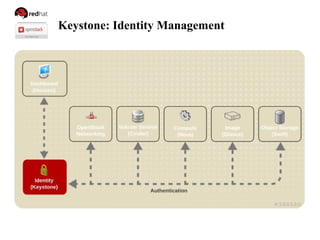
Keystone: Identity Management
● centralized identity service
● central catalog of services
Multiple forms of authentication
● User name and password
● Token-based systems
● Amazon Web Services style logins
Keystone: Identity Management
Login as admin
[root@control ~]# cat keystonerc_admin
export OS_USERNAME=admin
export OS_TENANT_NAME=admin
export OS_PASSWORD=5ffbe9d2a38d4a48
export OS_AUTH_URL=http://192.168.122.101:35357/v2.0/
export PS1="[u@h W(keystone_admin)]$ "
[root@control ~]# source keystonerc_admin
[root@control ~(keystone_admin)]#
Keystone: Identity Management
Get a token / troubleshooting auth
[root@control ~(keystone_admin)]# keystone token-get
+­­­­­­­­­­­+­­­­­­­­­­­­­­­­­­­­­­­­­­­­­­­­­­+
|  Property |              Value               |
+­­­­­­­­­­­+­­­­­­­­­­­­­­­­­­­­­­­­­­­­­­­­­­+
|  expires  |       2013­06­07T19:22:06Z       |
|     id    | e50158f737f14791ae7831c955524de2 |
| tenant_id | 70784578887b4468adacd92f2f376bc9 |
|  user_id  | f4270a7b46af467892173a02d9cd49d4 |
+­­­­­­­­­­­+­­­­­­­­­­­­­­­­­­­­­­­­­­­­­­­­­­+
Keystone: Identity Management
Add a User
[root@control ~]# keystone user-create --name radez --pass
supersecretpass
id: 849616035d654b9b9a8cc38b10284a52
[root@control ~]# keystone role-create --name role1
id: 8ab4a27031084100afbafc0f95a47170
[root@control ~]# keystone tenant-create --name tenant1
Id: 427c01f33fcf4feb930f26dd550a14e0
Keystone: Identity Management
Add a User
[root@control ~]# keystone user-role-add
--user-id radez --role-id role1 --tenant-id tenant1
[root@control ~]# keystone user-list
[root@control ~]# keystone role-list
[root@control ~]# keystone tenant-list
[root@control ~]# keystone user-role-list
[root@control ~]# keystone endpoint-list
Keystone: Identity Management
Login as user
[root@control ~]# cp keystonerc_admin keystonerc_radez
export OS_USERNAME=radez
export OS_TENANT_NAME=tenant1
export OS_PASSWORD=supersecretpass
export OS_AUTH_URL=http://192.168.122.101:35357/v2.0/
export PS1="[u@h W(keystone_radez)]$ "
[root@control ~]# source keystonerc_radez
[root@control ~(keystone_radez)]# keystone token-get
[root@control ~(keystone_radez)]# source keystonerc_admin
[root@control ~(keystonerc_admin)]#
Keystone: Identity Management
Exercise: Add a user
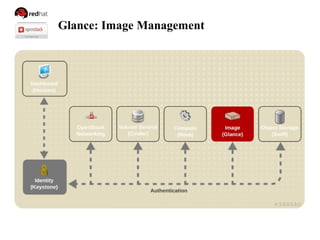
Glance: Image Management
● registry for virtual machine images
● images used as templates for new servers
Add an image
[root@control ~]# glance image-create --name cirros
--is-public 1 --disk-format qcow2 --container-format bare
--file /mnt/cirros-0.3.0-x86_64-disk.img
id: d3d1f38e-3f2c-4f45-91e1-cb4535f62d10
[root@control ~]# glance image-list
Glance: Image Management
Image Building
● Oz
● appliance-creator
● Native glance builder in the works
● Manually (launch installer, import before first boot)
Build Notes:
● Include cloudinit for post boot configuration
Glance: Image Management
Exercise: Add an image
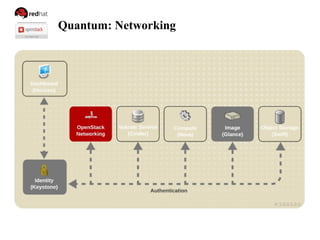
Quantum: Networking
Quantum: Networking
● networking as a service
● built in modular architecture
Features
● Single or Multiple host deployment
● virtual network, subnet, and port abstractions
● Plugin architecture supports many network technologies
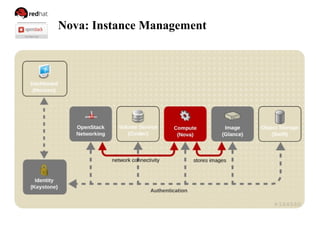
Nova: Instance Management
● manages virtual machines on nodes
● provides virtual servers on demand
Design Features
● Designed to scale horizontally
● Designed for standard hardware
Nova: Instance Management
Boot an instance
[root@control ~]# nova flavor-list
[root@control ~]# nova keypair-add --pub-key .ssh/id_rsa.pub mykey
[root@control ~]# nova keypair-list
mykey | 84:6e:28:d3:75:17:ab:25:4d:f3:0d:61:93:55:ee:e2
[root@control ~]# nova image-list
[root@control ~]# nova boot --flavor 1 --key_name mykey
--image cirros my_instance
[root@control ~]# nova list
Nova: Instance Management
Communicate with the instance
[root@control ~]# ping 192.168.122.3
PING 192.168.122.3 (192.168.122.3) 56(84) bytes of data.
64 bytes from 192.168.122.3: icmp_seq=2 ttl=63 time=0.668 ms
[root@control ~]# ssh cirros@192.168.122.3
The authenticity of host '192.168.122.3 (192.168.122.3)' can't be
established.
RSA key fingerprint is 38:49:f2:67:80:11:31:84:1f:b1:79:df:5f:e4:e5:f7.
Are you sure you want to continue connecting (yes/no)? Yes
Warning: Permanently added '192.168.122.3' (RSA) to the list of known
hosts.
$
Nova: Instance Management
Exercise: Boot an Instance
Cinder: Block Storage
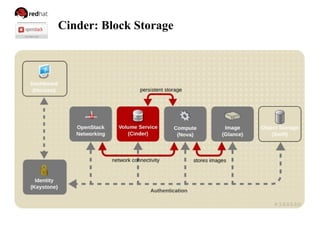
● manages persistent block storage volumes
● snapshots can be taken
Create and attach a volume
[root@control ~]# cinder create 1
id: 4d6cbb1f-5873-4357-99c7-8ae0502e6de5
[root@control ~]# nova volume-attach my_instance
4d6cbb1f-5873-4357-99c7-8ae0502e6de5 auto
Cinder: Block Storage
Mount a volume
[root@control ~]# ssh -i .ssh/id_rsa root@192.168.122.3
my_instance$ sudo -i
my_instance# mkfs.ext4 /dev/vdb
my_instance# mkdir -p /mnt/volume
my_instance# mount /dev/vdb /mnt/volume
my_instance# touch /mnt/volume/test.txt
my_instance# umount /mnt/volume
[root@control ~]# nova volume-detach my_instance
4d6cbb1f-5873-4357-99c7-8ae0502e6de5
Cinder: Block Storage
Exercise: Create, attach and mount a volume
Swift: Object Storage
Install Swift
/root/packstack-answers-20130614-091000.txt
CONFIG_SWIFT_INSTALL=n
[root@control ~]# packstack --answer-file packstack-answers-20130614-
091000.txt
Generating a packstack answer file
[root@control ~]# packstack --gen-answer-file answers.txt
Swift: Object Storage
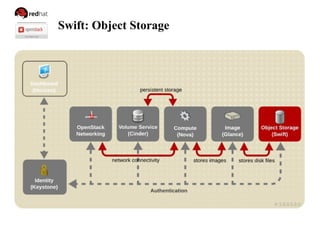
● allows users to store and retrieve files
● distributed architecture to allow for horizontal scaling
● provides redundancy as failure-proofing
● data replication is managed by software
Swift: Object Storage
Upload an object
[root@control ~]# swift stat
[root@control ~]# swift list
[root@control ~]# swift upload test packstack-answers.txt
[root@control ~]# swift list
[root@control ~]# swift list test
[root@control ~]# swift upload test /etc/motd
[root@control ~]# swift list test
Swift: Object Storage
Exercise: Create a container & upload an object
Review
Resources
● RDO: openstack.redhat.com
● https://access.redhat.com/knowledge/docs/en-
US/Red_Hat_OpenStack
● OpenStack.org
● TryStack.org
● Puppetlabs.com
● Djangoproject.com
● Oz: https://github.com/clalancette/oz/
● https://github.com/redhat-openstack/image-building-poc
● http://radez.fedorapeople.org/slides.tar.gz

Triangle OpenStack meetup 09 2013

  • 1.
    DEPLOYING RDO ON REDHAT ENTERPRISE LINUX Please login and start the 2 RDO VMs User/Password: RDO/openstack Applications -> System Tools -> Virt Manager
  • 2.
    DEPLOYING RDO ON REDHAT ENTERPRISE LINUX Dan Radez Sr. Software Engineer, Red Hat dradez@redhat.com irc: radez
  • 3.
    What is OpenStack? ●Cloud/Virtualization Platform ● Designed for standard hardware ● OpenSource
  • 4.
  • 5.
    Lab Workstation User: RDO Password:openstack Applications -> System Tools -> Virt Manager - RDO-control-node: 192.168.122.101 - RDO-compute-node: 192.168.122.102
  • 6.
    PackStack: Installation Red Hatdeveloped OpenStack installer Deployment options ● Interactively ● Answer file ● Quick Start ● All-in-one Features ● Single-host install ● Multi-host install ● RHOS, RDO, EPEL
  • 7.
    PackStack: Installation [RDO@workstation ~]#ssh 192.168.122.101 [root@control ~]# yum install -y openstack-packstack [root@control ~]# packstack --use-epel=n --install-hosts 192.168.122.101,192.168.122.102 --os-quantum-install=n Install Defaults ● MySQL ● Qpid ● Swift Not Installed (--os-swift-install=y) ● Quantum/Neutron (--os-quantum-install=n)
  • 8.
    PackStack: Installation Exercise: InstallOpenStack file:///home/RDO/slides/index.html
  • 9.
    Killing time whilePackStack works magic Relationship between OpenStack services
  • 10.
    Killing time whilePackStack works magic Relationship between OpenStack services
  • 11.
    Killing time whilePackStack works magic Relationship between OpenStack services
  • 12.
    Killing time whilePackStack works magic Relationship between OpenStack services
  • 13.
    Killing time whilePackStack works magic Relationship between OpenStack services
  • 14.
    Killing time whilePackStack works magic Relationship between OpenStack services
  • 15.
    Killing time whilePackStack works magic Relationship between OpenStack services
  • 16.
    Killing time whilePackStack works magic Relationship between OpenStack services
  • 17.
  • 18.
    Dashboard: Web Interface ●web-based interface for managing OpenStack services ● modular design for interfacing with other projects ● includes interface for all core components
  • 19.
  • 20.
  • 21.
    Dashboard: Web Interface Exercise:Explore the Dashboard http://192.168.122.101/dashboard/
  • 22.
    Help! $ keystone help $keystone help user-create $ glance help $ glance help image-create $ nova help $ nova help boot
  • 23.
  • 24.
    Keystone: Identity Management ●centralized identity service ● central catalog of services Multiple forms of authentication ● User name and password ● Token-based systems ● Amazon Web Services style logins
  • 25.
    Keystone: Identity Management Loginas admin [root@control ~]# cat keystonerc_admin export OS_USERNAME=admin export OS_TENANT_NAME=admin export OS_PASSWORD=5ffbe9d2a38d4a48 export OS_AUTH_URL=http://192.168.122.101:35357/v2.0/ export PS1="[u@h W(keystone_admin)]$ " [root@control ~]# source keystonerc_admin [root@control ~(keystone_admin)]#
  • 26.
    Keystone: Identity Management Geta token / troubleshooting auth [root@control ~(keystone_admin)]# keystone token-get +­­­­­­­­­­­+­­­­­­­­­­­­­­­­­­­­­­­­­­­­­­­­­­+ |  Property |              Value               | +­­­­­­­­­­­+­­­­­­­­­­­­­­­­­­­­­­­­­­­­­­­­­­+ |  expires  |       2013­06­07T19:22:06Z       | |     id    | e50158f737f14791ae7831c955524de2 | | tenant_id | 70784578887b4468adacd92f2f376bc9 | |  user_id  | f4270a7b46af467892173a02d9cd49d4 | +­­­­­­­­­­­+­­­­­­­­­­­­­­­­­­­­­­­­­­­­­­­­­­+
  • 27.
    Keystone: Identity Management Adda User [root@control ~]# keystone user-create --name radez --pass supersecretpass id: 849616035d654b9b9a8cc38b10284a52 [root@control ~]# keystone role-create --name role1 id: 8ab4a27031084100afbafc0f95a47170 [root@control ~]# keystone tenant-create --name tenant1 Id: 427c01f33fcf4feb930f26dd550a14e0
  • 28.
    Keystone: Identity Management Adda User [root@control ~]# keystone user-role-add --user-id radez --role-id role1 --tenant-id tenant1 [root@control ~]# keystone user-list [root@control ~]# keystone role-list [root@control ~]# keystone tenant-list [root@control ~]# keystone user-role-list [root@control ~]# keystone endpoint-list
  • 29.
    Keystone: Identity Management Loginas user [root@control ~]# cp keystonerc_admin keystonerc_radez export OS_USERNAME=radez export OS_TENANT_NAME=tenant1 export OS_PASSWORD=supersecretpass export OS_AUTH_URL=http://192.168.122.101:35357/v2.0/ export PS1="[u@h W(keystone_radez)]$ " [root@control ~]# source keystonerc_radez [root@control ~(keystone_radez)]# keystone token-get [root@control ~(keystone_radez)]# source keystonerc_admin [root@control ~(keystonerc_admin)]#
  • 30.
  • 31.
  • 32.
    Glance: Image Management ●registry for virtual machine images ● images used as templates for new servers Add an image [root@control ~]# glance image-create --name cirros --is-public 1 --disk-format qcow2 --container-format bare --file /mnt/cirros-0.3.0-x86_64-disk.img id: d3d1f38e-3f2c-4f45-91e1-cb4535f62d10 [root@control ~]# glance image-list
  • 33.
    Glance: Image Management ImageBuilding ● Oz ● appliance-creator ● Native glance builder in the works ● Manually (launch installer, import before first boot) Build Notes: ● Include cloudinit for post boot configuration
  • 34.
  • 35.
  • 36.
    Quantum: Networking ● networkingas a service ● built in modular architecture Features ● Single or Multiple host deployment ● virtual network, subnet, and port abstractions ● Plugin architecture supports many network technologies
  • 37.
  • 38.
    Nova: Instance Management ●manages virtual machines on nodes ● provides virtual servers on demand Design Features ● Designed to scale horizontally ● Designed for standard hardware
  • 39.
    Nova: Instance Management Bootan instance [root@control ~]# nova flavor-list [root@control ~]# nova keypair-add --pub-key .ssh/id_rsa.pub mykey [root@control ~]# nova keypair-list mykey | 84:6e:28:d3:75:17:ab:25:4d:f3:0d:61:93:55:ee:e2 [root@control ~]# nova image-list [root@control ~]# nova boot --flavor 1 --key_name mykey --image cirros my_instance [root@control ~]# nova list
  • 40.
    Nova: Instance Management Communicatewith the instance [root@control ~]# ping 192.168.122.3 PING 192.168.122.3 (192.168.122.3) 56(84) bytes of data. 64 bytes from 192.168.122.3: icmp_seq=2 ttl=63 time=0.668 ms [root@control ~]# ssh cirros@192.168.122.3 The authenticity of host '192.168.122.3 (192.168.122.3)' can't be established. RSA key fingerprint is 38:49:f2:67:80:11:31:84:1f:b1:79:df:5f:e4:e5:f7. Are you sure you want to continue connecting (yes/no)? Yes Warning: Permanently added '192.168.122.3' (RSA) to the list of known hosts. $
  • 41.
  • 42.
  • 43.
    Cinder: Block Storage ●manages persistent block storage volumes ● snapshots can be taken Create and attach a volume [root@control ~]# cinder create 1 id: 4d6cbb1f-5873-4357-99c7-8ae0502e6de5 [root@control ~]# nova volume-attach my_instance 4d6cbb1f-5873-4357-99c7-8ae0502e6de5 auto
  • 44.
    Cinder: Block Storage Mounta volume [root@control ~]# ssh -i .ssh/id_rsa root@192.168.122.3 my_instance$ sudo -i my_instance# mkfs.ext4 /dev/vdb my_instance# mkdir -p /mnt/volume my_instance# mount /dev/vdb /mnt/volume my_instance# touch /mnt/volume/test.txt my_instance# umount /mnt/volume [root@control ~]# nova volume-detach my_instance 4d6cbb1f-5873-4357-99c7-8ae0502e6de5
  • 45.
    Cinder: Block Storage Exercise:Create, attach and mount a volume
  • 46.
  • 47.
    Swift: Object Storage InstallSwift /root/packstack-answers-20130614-091000.txt CONFIG_SWIFT_INSTALL=n [root@control ~]# packstack --answer-file packstack-answers-20130614- 091000.txt Generating a packstack answer file [root@control ~]# packstack --gen-answer-file answers.txt
  • 48.
    Swift: Object Storage ●allows users to store and retrieve files ● distributed architecture to allow for horizontal scaling ● provides redundancy as failure-proofing ● data replication is managed by software
  • 49.
    Swift: Object Storage Uploadan object [root@control ~]# swift stat [root@control ~]# swift list [root@control ~]# swift upload test packstack-answers.txt [root@control ~]# swift list [root@control ~]# swift list test [root@control ~]# swift upload test /etc/motd [root@control ~]# swift list test
  • 50.
    Swift: Object Storage Exercise:Create a container & upload an object
  • 51.
  • 52.
    Resources ● RDO: openstack.redhat.com ●https://access.redhat.com/knowledge/docs/en- US/Red_Hat_OpenStack ● OpenStack.org ● TryStack.org ● Puppetlabs.com ● Djangoproject.com ● Oz: https://github.com/clalancette/oz/ ● https://github.com/redhat-openstack/image-building-poc ● http://radez.fedorapeople.org/slides.tar.gz

Editor's Notes

  • #2 Name, title, role 5 years, Raleigh HQ. - Mysterious - complex - make simple lecture/exercise questions any time Lots content take notes
  • #3 Name, title, role 5 years, Raleigh HQ. - Mysterious - complex - make simple lecture/exercise questions any time Lots content take notes
  • #4 - attend earlier? - know - used, using
  • #7 PackStack is suitable for deploying both single node proof of concept installations and more complex multi-node installations
  • #28 Existing admin and member roles
  • #34 Important: The image must be sealed Static Ips MAC references Hostname SSH host keys SSL Certificates Kerb Keytabs RHN System ID One method: firstboot + reconfigSys
  • #36 built in a modular architecture to allow advanced network services (open and closed source) plug into Openstack tenant networks.
  • #37 built in a modular architecture to allow advanced network services (open and closed source) plug into Openstack tenant networks.
  • #47 data replication is managed by software, allowing greater scalability and redundancy than dedicated hardware.
  • #49 data replication is managed by software, allowing greater scalability and redundancy than dedicated hardware.
  • #52 Action/Remember: Now you have installed and configured OpenStack. Use these directions to do it again.