DEEP DIVE: OPENSTACK COMPUTE
Stephen Gordon <sgordon@redhat.com>
Technical Product Manager, Red Hat
@xsgordon
AGENDA
•OpenStack architecture refresher
•Compute architecture
•Instance life cycle
•Scaling compute
•Segregating compute
•Upcoming features
OPENSTACK MISSION STATEMENT
“To produce the ubiquitous Open Source Cloud Computing
platform that will meet the needs of public and private clouds
regardless of size, by being simple to implement and
massively scalable.”
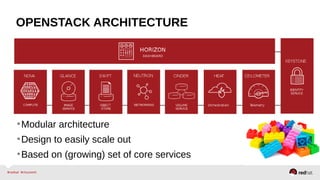
OPENSTACK ARCHITECTURE
•Modular architecture
•Design to easily scale out
•Based on (growing) set of core services
OPENSTACK ARCHITECTURE
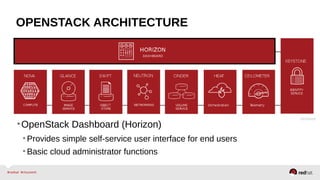
•OpenStack Dashboard (Horizon)
•Provides simple self-service user interface for end users
•Basic cloud administrator functions
OPENSTACK ARCHITECTURE
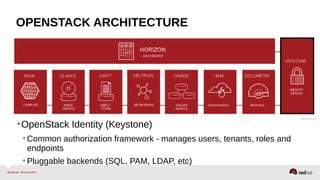
•OpenStack Identity (Keystone)
•Common authorization framework - manages users, tenants, roles and
endpoints
•Pluggable backends (SQL, PAM, LDAP, etc)
OPENSTACK ARCHITECTURE
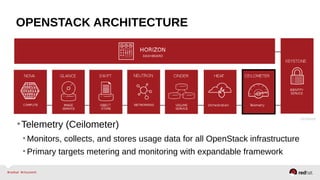
•Telemetry (Ceilometer)
•Monitors, collects, and stores usage data for all OpenStack infrastructure
•Primary targets metering and monitoring with expandable framework
OPENSTACK ARCHITECTURE
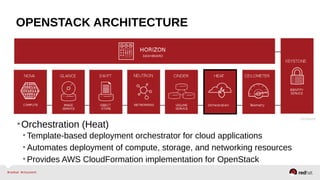
•Orchestration (Heat)
•Template-based deployment orchestrator for cloud applications
•Automates deployment of compute, storage, and networking resources
•Provides AWS CloudFormation implementation for OpenStack
OPENSTACK ARCHITECTURE
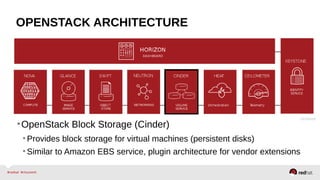
•OpenStack Block Storage (Cinder)
•Provides block storage for virtual machines (persistent disks)
•Similar to Amazon EBS service, plugin architecture for vendor extensions
OPENSTACK ARCHITECTURE
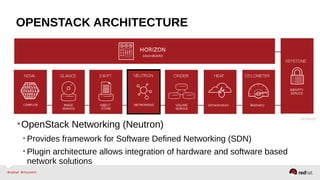
•OpenStack Networking (Neutron)
•Provides framework for Software Defined Networking (SDN)
•Plugin architecture allows integration of hardware and software based
network solutions
OPENSTACK ARCHITECTURE
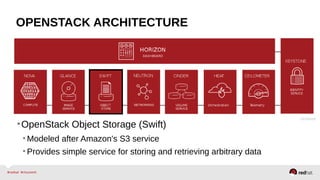
•OpenStack Object Storage (Swift)
•Modeled after Amazon's S3 service
•Provides simple service for storing and retrieving arbitrary data
OPENSTACK ARCHITECTURE
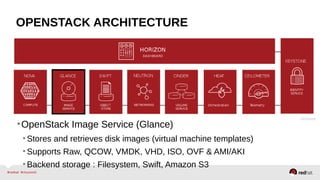
•OpenStack Image Service (Glance)
•Stores and retrieves disk images (virtual machine templates)
•Supports Raw, QCOW, VMDK, VHD, ISO, OVF & AMI/AKI
•Backend storage : Filesystem, Swift, Amazon S3
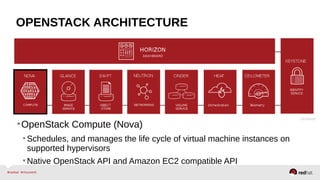
OPENSTACK ARCHITECTURE
•OpenStack Compute (Nova)
•Schedules, and manages the life cycle of virtual machine instances on
supported hypervisors
•Native OpenStack API and Amazon EC2 compatible API
COMPUTE ARCHITECTURE
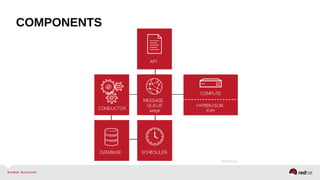
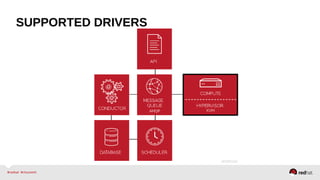
COMPONENTS
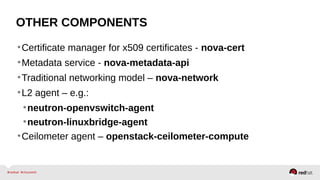
OTHER COMPONENTS
•Certificate manager for x509 certificates - nova-cert
•Metadata service - nova-metadata-api
•Traditional networking model – nova-network
•L2 agent – e.g.:
•neutron-openvswitch-agent
•neutron-linuxbridge-agent
•Ceilometer agent – openstack-ceilometer-compute
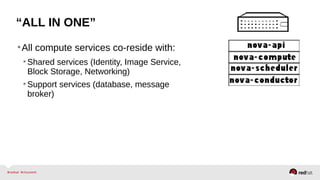
“ALL IN ONE”
•All compute services co-reside with:
•Shared services (Identity, Image Service,
Block Storage, Networking)
•Support services (database, message
broker)
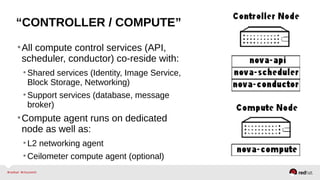
“CONTROLLER / COMPUTE”
•All compute control services (API,
scheduler, conductor) co-reside with:
•Shared services (Identity, Image Service,
Block Storage, Networking)
•Support services (database, message
broker)
•Compute agent runs on dedicated
node as well as:
•L2 networking agent
•Ceilometer compute agent (optional)
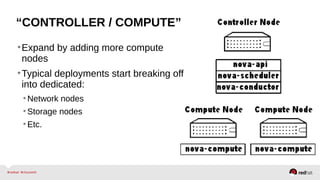
“CONTROLLER / COMPUTE”
•Expand by adding more compute
nodes
•Typical deployments start breaking off
into dedicated:
•Network nodes
•Storage nodes
•Etc.
ARCHITECTURE
•OpenStack Compute itself can also be broken off into dedicated:
•API nodes
•Conductors
•Schedulers
•Compute Nodes
•Etc.
•Same approach applies to other projects.
REDHAT ENTERPRISE LINUXOPENSTACKPLATFORMDOC144908
●
Assurance that 3rd
party products have been tested with and supported
on Red Hat Enterprise Linux OpenStack Platform
●Documented Best practices, Installation, configuration, known issues
●Collaborative support agreements between Red Hat and partners to
jointly solve customer issues
●Alignment on SLA, Lifecycle, roadmap and upstream engagement
SUPPORTED DRIVERS
SUPPORTED DRIVERS
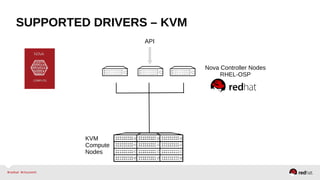
SUPPORTED DRIVERS – KVM
Nova Controller Nodes
RHEL-OSP
API
KVM
Compute
Nodes
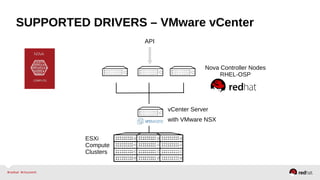
SUPPORTED DRIVERS – VMware vCenter
Nova Controller Nodes
RHEL-OSP
vCenter Server
API
ESXi
Compute
Clusters
with VMware NSX
INSTANCE LIFE CYCLE
AUTHENTICATION
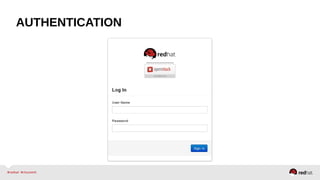
•Nova obtains an authentication token on your behalf from
Keystone
•Credentials provided when user logs in to dashboard or via
environment variables for command line:
$ source keystonerc_admin
AUTHENTICATION
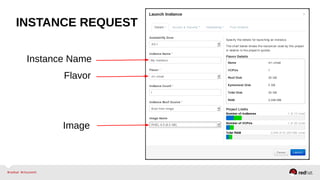
INSTANCE REQUEST
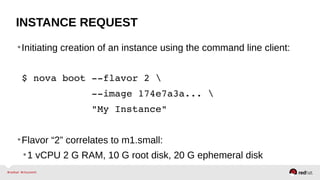
•Initiating creation of an instance using the command line client:
$ nova boot ­­flavor 2 
            ­­image 174e7a3a... 
            "My Instance"
•Flavor “2” correlates to m1.small:
•1 vCPU 2 G RAM, 10 G root disk, 20 G ephemeral disk
INSTANCE REQUEST
Instance Name
Flavor
Image
INSTANCE FLAVORS
•Flavors define instance sizes:
•Number of vCPUs
•Memory
•Root disk space
•Ephemeral disk space
•Arbitrary extra specifications
•Five default flavors available, are customizable or more can be
added.
API
•Initial request hits Compute API in XML or JSON format:
•Endpoint like http://192.168.122.161:8774/v2/%(tenant_id)s 
•Parameters are extracted from API call for basic validation
•Some nova extensions are called (e.g. os­config­drive)
•Retrieves a reference to the selected flavor
API
•Identifies boot media:
•Retrieves a reference to the selected image using Glance client; OR
•Retrieves a reference to the selected volume using Cinder client
•Performs further parameter validation and applies defaults to
optional parameters
•Saves instance state to database
•Puts a message on the queue for the scheduler
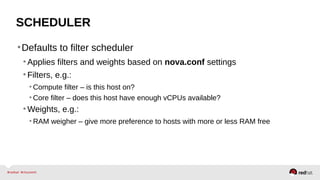
SCHEDULER
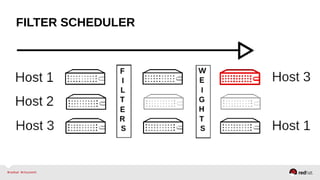
•Defaults to filter scheduler
•Applies filters and weights based on nova.conf settings
•Filters, e.g.:
• Compute filter – is this host on?
• Core filter – does this host have enough vCPUs available?
•Weights, e.g.:
• RAM weigher – give more preference to hosts with more or less RAM free
FILTER SCHEDULER
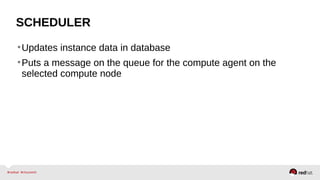
SCHEDULER
•Updates instance data in database
•Puts a message on the queue for the compute agent on the
selected compute node
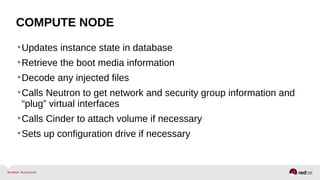
COMPUTE NODE
•Updates instance state in database
•Retrieve the boot media information
•Decode any injected files
•Calls Neutron to get network and security group information and
“plug” virtual interfaces
•Calls Cinder to attach volume if necessary
•Sets up configuration drive if necessary
COMPUTE NODE
•Use hypervisor APIs to create virtual machine!
SCALING COMPUTE
COMPONENTS
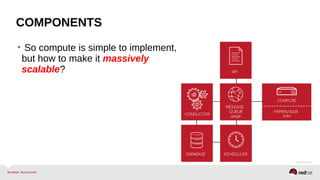
• So compute is simple to implement,
but how to make it massively
scalable?
SCALING
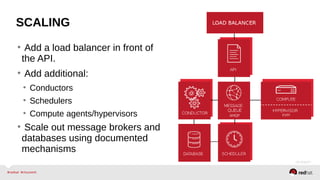
• Add a load balancer in front of
the API.
• Add additional:
• Conductors
• Schedulers
• Compute agents/hypervisors
• Scale out message brokers and
databases using documented
mechanisms
CELLS
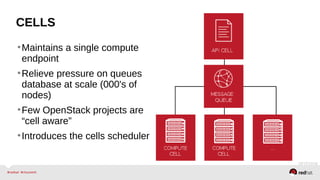
•Maintains a single compute
endpoint
•Relieve pressure on queues
database at scale (000's of
nodes)
•Few OpenStack projects are
“cell aware”
•Introduces the cells scheduler
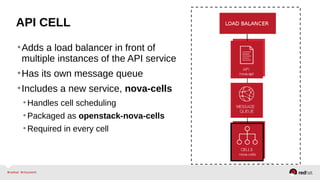
API CELL
•Adds a load balancer in front of
multiple instances of the API service
•Has its own message queue
•Includes a new service, nova-cells
•Handles cell scheduling
•Packaged as openstack-nova-cells
•Required in every cell
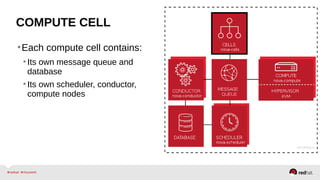
COMPUTE CELL
•Each compute cell contains:
•Its own message queue and
database
•Its own scheduler, conductor,
compute nodes
SEGREGATING COMPUTE
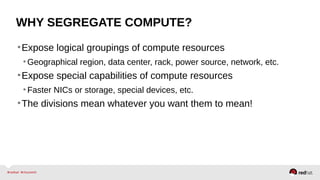
WHY SEGREGATE COMPUTE?
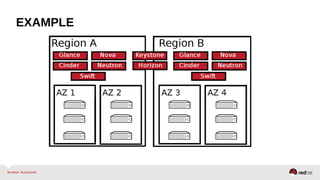
•Expose logical groupings of compute resources
•Geographical region, data center, rack, power source, network, etc.
•Expose special capabilities of compute resources
•Faster NICs or storage, special devices, etc.
•The divisions mean whatever you want them to mean!
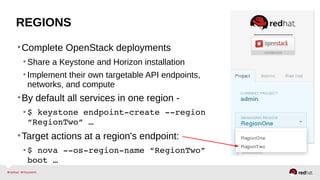
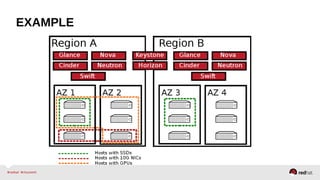
REGIONS
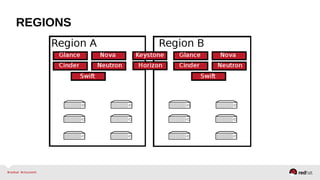
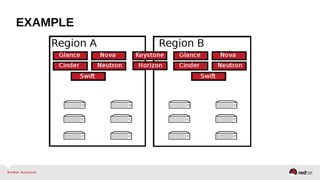
•Complete OpenStack deployments
•Share a Keystone and Horizon installation
•Implement their own targetable API endpoints,
networks, and compute
•By default all services in one region -
•$ keystone endpoint­create ­­region 
“RegionTwo” …
•Target actions at a region's endpoint:
•$ nova ­­os­region­name “RegionTwo” 
boot …
REGIONS
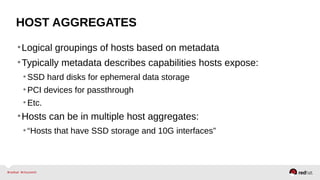
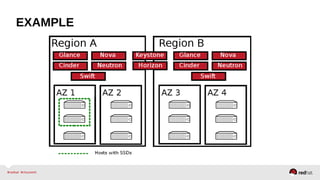
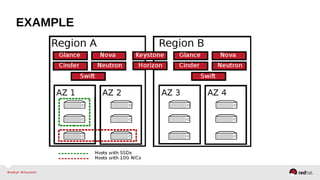
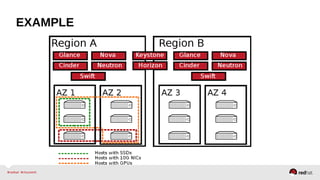
HOST AGGREGATES
•Logical groupings of hosts based on metadata
•Typically metadata describes capabilities hosts expose:
•SSD hard disks for ephemeral data storage
•PCI devices for passthrough
•Etc.
•Hosts can be in multiple host aggregates:
•“Hosts that have SSD storage and 10G interfaces”
HOST AGGREGATES
•Implicitly user targetable:
•Admin defines host aggregate with metadata, and a flavor that matches it
• $ nova aggregate­create hypervisors­with­SSD
• $ nova aggregate­set­metadata 1 SSDs=true
• $ nova aggregate­add­host 1 hypervisor­1
• $ nova flavor­key 1 set SSDs=true
•User selects flavor when requesting instance
•Scheduler places on host aggregate matching host aggregate(s)
• AggregateInstanceExtraSpecsFilter
AVAILABILITY ZONES
•Logical groupings of hosts based on arbitrary factors like:
•Location (country, data center, rack, etc.)
•Network layout
•Power source
•Explicitly user targetable:
•$ nova boot ­­availability­zone “rack­1”
AVAILABILITY ZONES
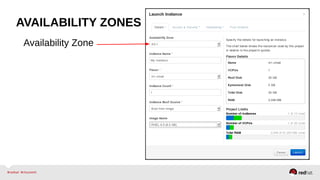
Availability Zone
AVAILABILITY ZONES
•Host aggregates are made explicitly user targetable by creating
them as an AZ:
•$ nova aggregate­create tier­1 us­east­tier­1 
•tier­1 is the aggregate name, us­east­tier­1 is the AZ name
•Host aggregate is the availability zone in this case
•Hosts can not be in multiple availability zones
•Hosts can be in multiple host aggregates
EXAMPLE
EXAMPLE
EXAMPLE
EXAMPLE
EXAMPLE
EXAMPLE
NEW FEATURES
ROLLING UPGRADES
•Improved version interoperability
•Facilitates “rolling upgrades”
•Upgrade control services independently of compute nodes
•Allows operators to take a more gradual approach to upgrading
an OpenStack cloud.
INSTANCE GROUPS API
•Allows cloud users to create and apply policies to groups of
instances (also referred to as server groups)
•Allows intelligent placement of workloads that interact with each
other
•Apply scheduling policies to instance groups:
•Affinity
•Anti-Affinity
NOTIFICATIONS
•Additional notifications for:
•Compute host lifecycle operations:
• Shutdown
• Reboot
• Maintenance mode (in/out)
•Creation and deletion of keypairs.
•Support enhanced monitoring from Telemetry (Ceilometer)
VIRTIO RNG
•Para-virtualized random number generator.
•Default entropy pool is /dev/random on compute node
•Use of a hardware random number generator (RNG) or entropy gathering
daemon (EGD) also supported
•Allows cloud users to run workloads requiring random data (E..g.
cryptographic applications) while avoiding guest entropy
starvation
VIRTIO WATCHDOG
•Triggers instance lifecycle events for Linux guests on crash or
panic
•Enabled using hw_watchdog_action image property.
•hw_watchdog_action=<disabled|poweroff|reset|pause|none>
•Defaults to disabled
•Allows users to:
•Automatically reset or power off crashed instances, resuming quota
•Automatically pause crashed instances, for debugging
VIRTIO SCSI
•Para-virtualized SCSI controller.
•Designed as a future successor to VirtIO Block:
•Improved scalability – instances can connect to more storage devices
•Standard command set – uses standard SCSI command, simplifies
expansion
•Standard device naming – disks use same paths as bare-metal
•Enabled using hw_disk_bus_model image property:
•hw_disk_bus_model=virtio-scsi
VCENTER DRIVER
•Now supports boot from ISO
•Now supports diagnostics API:
•Returns a variety of details and statistics over and above those from 
`nova show`
•$ nova diagnostics <instance>
COMING UP
● Red Hat Cloud Infrastructure networking deep dive
– Cloud Deep Dive
– 11:00 a.m. - 12:00 p.m.
QUESTIONS?

Deep Dive: OpenStack Summit (Red Hat Summit 2014)

  • 1.
    DEEP DIVE: OPENSTACKCOMPUTE Stephen Gordon <sgordon@redhat.com> Technical Product Manager, Red Hat @xsgordon
  • 2.
    AGENDA •OpenStack architecture refresher •Computearchitecture •Instance life cycle •Scaling compute •Segregating compute •Upcoming features
  • 3.
    OPENSTACK MISSION STATEMENT “Toproduce the ubiquitous Open Source Cloud Computing platform that will meet the needs of public and private clouds regardless of size, by being simple to implement and massively scalable.”
  • 4.
    OPENSTACK ARCHITECTURE •Modular architecture •Designto easily scale out •Based on (growing) set of core services
  • 5.
    OPENSTACK ARCHITECTURE •OpenStack Dashboard(Horizon) •Provides simple self-service user interface for end users •Basic cloud administrator functions
  • 6.
    OPENSTACK ARCHITECTURE •OpenStack Identity(Keystone) •Common authorization framework - manages users, tenants, roles and endpoints •Pluggable backends (SQL, PAM, LDAP, etc)
  • 7.
    OPENSTACK ARCHITECTURE •Telemetry (Ceilometer) •Monitors,collects, and stores usage data for all OpenStack infrastructure •Primary targets metering and monitoring with expandable framework
  • 8.
    OPENSTACK ARCHITECTURE •Orchestration (Heat) •Template-baseddeployment orchestrator for cloud applications •Automates deployment of compute, storage, and networking resources •Provides AWS CloudFormation implementation for OpenStack
  • 9.
    OPENSTACK ARCHITECTURE •OpenStack BlockStorage (Cinder) •Provides block storage for virtual machines (persistent disks) •Similar to Amazon EBS service, plugin architecture for vendor extensions
  • 10.
    OPENSTACK ARCHITECTURE •OpenStack Networking(Neutron) •Provides framework for Software Defined Networking (SDN) •Plugin architecture allows integration of hardware and software based network solutions
  • 11.
    OPENSTACK ARCHITECTURE •OpenStack ObjectStorage (Swift) •Modeled after Amazon's S3 service •Provides simple service for storing and retrieving arbitrary data
  • 12.
    OPENSTACK ARCHITECTURE •OpenStack ImageService (Glance) •Stores and retrieves disk images (virtual machine templates) •Supports Raw, QCOW, VMDK, VHD, ISO, OVF & AMI/AKI •Backend storage : Filesystem, Swift, Amazon S3
  • 13.
    OPENSTACK ARCHITECTURE •OpenStack Compute(Nova) •Schedules, and manages the life cycle of virtual machine instances on supported hypervisors •Native OpenStack API and Amazon EC2 compatible API
  • 14.
  • 15.
  • 16.
    OTHER COMPONENTS •Certificate managerfor x509 certificates - nova-cert •Metadata service - nova-metadata-api •Traditional networking model – nova-network •L2 agent – e.g.: •neutron-openvswitch-agent •neutron-linuxbridge-agent •Ceilometer agent – openstack-ceilometer-compute
  • 17.
    “ALL IN ONE” •Allcompute services co-reside with: •Shared services (Identity, Image Service, Block Storage, Networking) •Support services (database, message broker)
  • 18.
    “CONTROLLER / COMPUTE” •Allcompute control services (API, scheduler, conductor) co-reside with: •Shared services (Identity, Image Service, Block Storage, Networking) •Support services (database, message broker) •Compute agent runs on dedicated node as well as: •L2 networking agent •Ceilometer compute agent (optional)
  • 19.
    “CONTROLLER / COMPUTE” •Expandby adding more compute nodes •Typical deployments start breaking off into dedicated: •Network nodes •Storage nodes •Etc.
  • 20.
    ARCHITECTURE •OpenStack Compute itselfcan also be broken off into dedicated: •API nodes •Conductors •Schedulers •Compute Nodes •Etc. •Same approach applies to other projects.
  • 21.
    REDHAT ENTERPRISE LINUXOPENSTACKPLATFORMDOC144908 ● Assurancethat 3rd party products have been tested with and supported on Red Hat Enterprise Linux OpenStack Platform ●Documented Best practices, Installation, configuration, known issues ●Collaborative support agreements between Red Hat and partners to jointly solve customer issues ●Alignment on SLA, Lifecycle, roadmap and upstream engagement SUPPORTED DRIVERS
  • 22.
  • 23.
    SUPPORTED DRIVERS –KVM Nova Controller Nodes RHEL-OSP API KVM Compute Nodes
  • 24.
    SUPPORTED DRIVERS –VMware vCenter Nova Controller Nodes RHEL-OSP vCenter Server API ESXi Compute Clusters with VMware NSX
  • 25.
  • 26.
    AUTHENTICATION •Nova obtains anauthentication token on your behalf from Keystone •Credentials provided when user logs in to dashboard or via environment variables for command line: $ source keystonerc_admin
  • 27.
  • 28.
    INSTANCE REQUEST •Initiating creationof an instance using the command line client: $ nova boot ­­flavor 2              ­­image 174e7a3a...              "My Instance" •Flavor “2” correlates to m1.small: •1 vCPU 2 G RAM, 10 G root disk, 20 G ephemeral disk
  • 29.
  • 30.
    INSTANCE FLAVORS •Flavors defineinstance sizes: •Number of vCPUs •Memory •Root disk space •Ephemeral disk space •Arbitrary extra specifications •Five default flavors available, are customizable or more can be added.
  • 31.
    API •Initial request hitsCompute API in XML or JSON format: •Endpoint like http://192.168.122.161:8774/v2/%(tenant_id)s  •Parameters are extracted from API call for basic validation •Some nova extensions are called (e.g. os­config­drive) •Retrieves a reference to the selected flavor
  • 32.
    API •Identifies boot media: •Retrievesa reference to the selected image using Glance client; OR •Retrieves a reference to the selected volume using Cinder client •Performs further parameter validation and applies defaults to optional parameters •Saves instance state to database •Puts a message on the queue for the scheduler
  • 33.
    SCHEDULER •Defaults to filterscheduler •Applies filters and weights based on nova.conf settings •Filters, e.g.: • Compute filter – is this host on? • Core filter – does this host have enough vCPUs available? •Weights, e.g.: • RAM weigher – give more preference to hosts with more or less RAM free
  • 34.
  • 35.
    SCHEDULER •Updates instance datain database •Puts a message on the queue for the compute agent on the selected compute node
  • 36.
    COMPUTE NODE •Updates instancestate in database •Retrieve the boot media information •Decode any injected files •Calls Neutron to get network and security group information and “plug” virtual interfaces •Calls Cinder to attach volume if necessary •Sets up configuration drive if necessary
  • 37.
    COMPUTE NODE •Use hypervisorAPIs to create virtual machine!
  • 38.
  • 39.
    COMPONENTS • So computeis simple to implement, but how to make it massively scalable?
  • 40.
    SCALING • Add aload balancer in front of the API. • Add additional: • Conductors • Schedulers • Compute agents/hypervisors • Scale out message brokers and databases using documented mechanisms
  • 41.
    CELLS •Maintains a singlecompute endpoint •Relieve pressure on queues database at scale (000's of nodes) •Few OpenStack projects are “cell aware” •Introduces the cells scheduler
  • 42.
    API CELL •Adds aload balancer in front of multiple instances of the API service •Has its own message queue •Includes a new service, nova-cells •Handles cell scheduling •Packaged as openstack-nova-cells •Required in every cell
  • 43.
    COMPUTE CELL •Each computecell contains: •Its own message queue and database •Its own scheduler, conductor, compute nodes
  • 44.
  • 45.
    WHY SEGREGATE COMPUTE? •Exposelogical groupings of compute resources •Geographical region, data center, rack, power source, network, etc. •Expose special capabilities of compute resources •Faster NICs or storage, special devices, etc. •The divisions mean whatever you want them to mean!
  • 46.
    REGIONS •Complete OpenStack deployments •Sharea Keystone and Horizon installation •Implement their own targetable API endpoints, networks, and compute •By default all services in one region - •$ keystone endpoint­create ­­region  “RegionTwo” … •Target actions at a region's endpoint: •$ nova ­­os­region­name “RegionTwo”  boot …
  • 47.
  • 48.
    HOST AGGREGATES •Logical groupingsof hosts based on metadata •Typically metadata describes capabilities hosts expose: •SSD hard disks for ephemeral data storage •PCI devices for passthrough •Etc. •Hosts can be in multiple host aggregates: •“Hosts that have SSD storage and 10G interfaces”
  • 49.
    HOST AGGREGATES •Implicitly usertargetable: •Admin defines host aggregate with metadata, and a flavor that matches it • $ nova aggregate­create hypervisors­with­SSD • $ nova aggregate­set­metadata 1 SSDs=true • $ nova aggregate­add­host 1 hypervisor­1 • $ nova flavor­key 1 set SSDs=true •User selects flavor when requesting instance •Scheduler places on host aggregate matching host aggregate(s) • AggregateInstanceExtraSpecsFilter
  • 50.
    AVAILABILITY ZONES •Logical groupingsof hosts based on arbitrary factors like: •Location (country, data center, rack, etc.) •Network layout •Power source •Explicitly user targetable: •$ nova boot ­­availability­zone “rack­1”
  • 51.
  • 52.
    AVAILABILITY ZONES •Host aggregatesare made explicitly user targetable by creating them as an AZ: •$ nova aggregate­create tier­1 us­east­tier­1  •tier­1 is the aggregate name, us­east­tier­1 is the AZ name •Host aggregate is the availability zone in this case •Hosts can not be in multiple availability zones •Hosts can be in multiple host aggregates
  • 53.
  • 54.
  • 55.
  • 56.
  • 57.
  • 58.
  • 59.
  • 60.
    ROLLING UPGRADES •Improved versioninteroperability •Facilitates “rolling upgrades” •Upgrade control services independently of compute nodes •Allows operators to take a more gradual approach to upgrading an OpenStack cloud.
  • 61.
    INSTANCE GROUPS API •Allowscloud users to create and apply policies to groups of instances (also referred to as server groups) •Allows intelligent placement of workloads that interact with each other •Apply scheduling policies to instance groups: •Affinity •Anti-Affinity
  • 62.
    NOTIFICATIONS •Additional notifications for: •Computehost lifecycle operations: • Shutdown • Reboot • Maintenance mode (in/out) •Creation and deletion of keypairs. •Support enhanced monitoring from Telemetry (Ceilometer)
  • 63.
    VIRTIO RNG •Para-virtualized randomnumber generator. •Default entropy pool is /dev/random on compute node •Use of a hardware random number generator (RNG) or entropy gathering daemon (EGD) also supported •Allows cloud users to run workloads requiring random data (E..g. cryptographic applications) while avoiding guest entropy starvation
  • 64.
    VIRTIO WATCHDOG •Triggers instancelifecycle events for Linux guests on crash or panic •Enabled using hw_watchdog_action image property. •hw_watchdog_action=<disabled|poweroff|reset|pause|none> •Defaults to disabled •Allows users to: •Automatically reset or power off crashed instances, resuming quota •Automatically pause crashed instances, for debugging
  • 65.
    VIRTIO SCSI •Para-virtualized SCSIcontroller. •Designed as a future successor to VirtIO Block: •Improved scalability – instances can connect to more storage devices •Standard command set – uses standard SCSI command, simplifies expansion •Standard device naming – disks use same paths as bare-metal •Enabled using hw_disk_bus_model image property: •hw_disk_bus_model=virtio-scsi
  • 66.
    VCENTER DRIVER •Now supportsboot from ISO •Now supports diagnostics API: •Returns a variety of details and statistics over and above those from  `nova show` •$ nova diagnostics <instance>
  • 67.
    COMING UP ● RedHat Cloud Infrastructure networking deep dive – Cloud Deep Dive – 11:00 a.m. - 12:00 p.m.
  • 68.

Editor's Notes

  • #5 Core and Integrated projects circa Havana release. Basis for Red Hat Enterprise Linux OpenStack Platform 4.