Another introduction to Docker
Tibor Vass
Who Am I?
• Core maintainer on Docker Engine

• Previously Ops @ StumbleUpon

• I ♡ Go

2
Tibor Vass, Chapel Hill, NC
IRC #docker: tibor
Twitter: @tiborvass
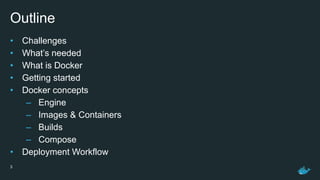
Outline
• Challenges
• What’s needed
• What is Docker
• Getting started
• Docker concepts
– Engine
– Images & Containers
– Builds
– Compose
• Deployment Workflow
3
Challenges
1. Deployment & Guarantees
1. Separation of concerns (Dev vs Ops)
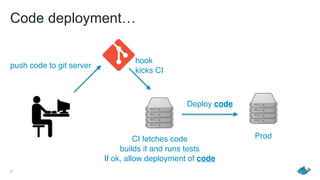
Code deployment…
7
CI fetches code
builds it and runs tests
If ok, allow deployment of code
push code to git server
Prod
Deploy code
hook
kicks CI
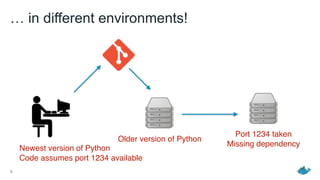
… in different environments!
8
Newest version of Python
Code assumes port 1234 available
Older version of Python
Port 1234 taken
Missing dependency
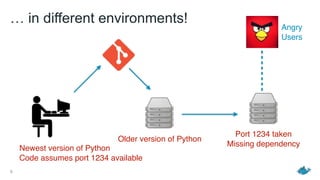
… in different environments!
9
Newest version of Python
Code assumes port 1234 available
Older version of Python
Port 1234 taken
Missing dependency
Angry
Users
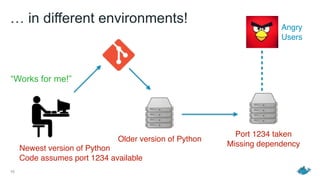
… in different environments!
10
Newest version of Python
Code assumes port 1234 available
Older version of Python
Port 1234 taken
Missing dependency
Angry
Users
“Works for me!”
11
Code deployment
12
Code deployment
13
Code deployment
Need “Code + environment” deployment
14
Code deployment
Need “Code + environment” deployment
Need a portable unit of deployment
(guaranteed to work everywhere)
15
Virtual Machines?
2. Density & Resource usage
Density & Resource usage
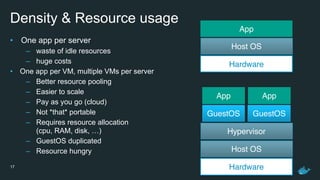
• One app per server
– waste of idle resources
– huge costs
• One app per VM, multiple VMs per server
– Better resource pooling
– Easier to scale
– Pay as you go (cloud)
– Not *that* portable
– Requires resource allocation

(cpu, RAM, disk, …)
– GuestOS duplicated
– Resource hungry
17 Hardware
Host OS
Hypervisor
GuestOS GuestOS
AppApp
Hardware
Host OS
App
3. Move fast, and don’t break things
19
Make your product better faster (stronger♫)
to gain competitive advantage
What’s needed
What’s needed
• Something like VMs…
• Isolates processes from storage, networking, memory, cpu (sandboxing)
• …but lighter
• Lightweight portable unit of deployment (packaging & distribution)
21
22
Docker container/image
23
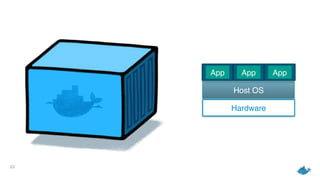
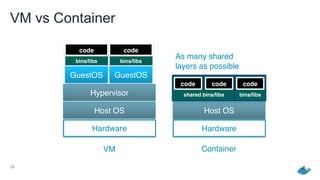
Hardware
Host OS
App App App
24
Hardware
Host OS
Hardware
Host OS
Hypervisor
GuestOS GuestOS
code
bins/libs
code
bins/libs
code code code
bins/libsshared bins/libs
As many shared
layers as possible
VM Container
VM vs Container
What is Docker?
Challenge #0: Satisfying Users’
expectation of reliability and availability
27
Dream: what if, you could build distributed apps

easily, and focus on your product?
28
Distributed and scalable services gotta be
independent from the machines they run on
29
Containers are part of the answer
30
Docker’s greatest value does not lie

in its technology
31
It lies in its ability to get people

agree on something
32
Open platform inviting you to
help make the dream happen
33
Or simply enjoy and contribute to
each independent piece along the way
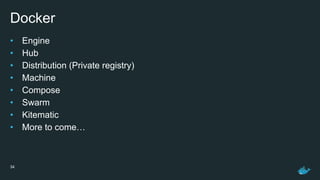
Docker
• Engine
• Hub
• Distribution (Private registry)
• Machine
• Compose
• Swarm
• Kitematic
• More to come…
34
Getting Started
36
Install Docker:
https://docs.docker.com/installation/
37
(install Machine and Compose as well)
Docker concepts
1. Engine
Engine
• Docker Daemon + REST(ish) API
• Docker Client (CLI) talks to the API

• Daemon manages the Docker containers
• Start it with: docker -d
• docker version to test if docker is set up correctly
40
2. Images & Containers
Images vs Containers
• Images: About storing or moving your app
• Containers: About running your app
42
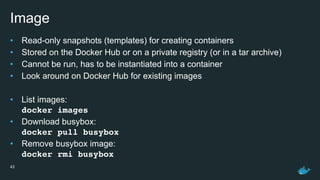
Image
• Read-only snapshots (templates) for creating containers
• Stored on the Docker Hub or on a private registry (or in a tar archive)
• Cannot be run, has to be instantiated into a container
• Look around on Docker Hub for existing images
• List images:

docker images
• Download busybox:

docker pull busybox
• Remove busybox image:

docker rmi busybox
43
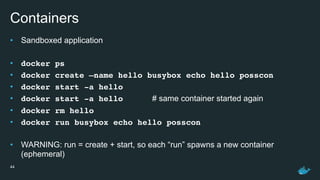
Containers
• Sandboxed application
• docker ps
• docker create —name hello busybox echo hello posscon
• docker start -a hello
• docker start -a hello # same container started again
• docker rm hello
• docker run busybox echo hello posscon
• WARNING: run = create + start, so each “run” spawns a new container
(ephemeral)
44
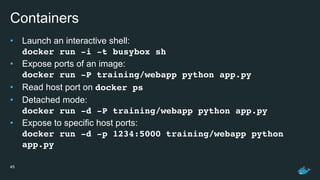
Containers
• Launch an interactive shell:

docker run -i -t busybox sh
• Expose ports of an image:

docker run -P training/webapp python app.py
• Read host port on docker ps
• Detached mode:

docker run -d -P training/webapp python app.py
• Expose to specific host ports:

docker run -d -p 1234:5000 training/webapp python
app.py
45
3. Builds aka Dockerizing
Build images
• Example layout of a Dockerfile placed alongside with the code

• FROM ubuntu:14.04
• RUN apt-get update && apt-get install -y golang
• ENV GOPATH=/go
• COPY . /go/src/myapp
• EXPOSE 8080
• RUN go build myapp
• CMD [“/go/bin/myapp”]
• Build new image named myapp: docker build -t myapp .
• Change code, and rerun the build command: notice that Docker cached the dependencies and
won’t fetch them again by default (use —no-cache if desired)
47
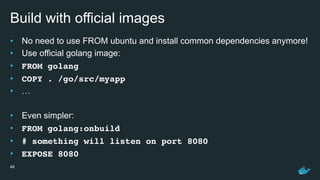
Build with official images
• No need to use FROM ubuntu and install common dependencies anymore!
• Use official golang image:
• FROM golang
• COPY . /go/src/myapp
• …
• Even simpler:
• FROM golang:onbuild
• # something will listen on port 8080
• EXPOSE 8080
48
4. Compose
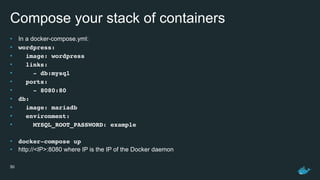
Compose your stack of containers
• In a docker-compose.yml:
• wordpress:
• image: wordpress
• links:
• - db:mysql
• ports:
• - 8080:80
• db:
• image: mariadb
• environment:
• MYSQL_ROOT_PASSWORD: example
• docker-compose up
• http://<IP>:8080 where IP is the IP of the Docker daemon
50
Deployment Workflow
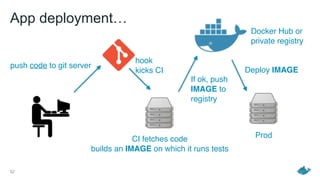
App deployment…
52
CI fetches code
builds an IMAGE on which it runs tests
push code to git server
hook
kicks CI
Prod
Docker Hub or

private registry
If ok, push
IMAGE to
registry
Deploy IMAGE
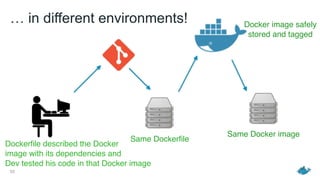
… in different environments!
53
Dockerfile described the Docker

image with its dependencies and

Dev tested his code in that Docker image
Same Dockerfile
Same Docker image
Docker image safely

stored and tagged
Learn more
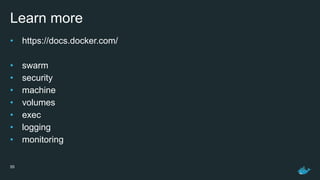
Learn more
• https://docs.docker.com/
• swarm
• security
• machine
• volumes
• exec
• logging
• monitoring
55
THANK YOU

Docker 101: An Introduction

  • 1.
    Another introduction toDocker Tibor Vass
  • 2.
    Who Am I? •Core maintainer on Docker Engine
 • Previously Ops @ StumbleUpon
 • I ♡ Go
 2 Tibor Vass, Chapel Hill, NC IRC #docker: tibor Twitter: @tiborvass
  • 3.
    Outline • Challenges • What’sneeded • What is Docker • Getting started • Docker concepts – Engine – Images & Containers – Builds – Compose • Deployment Workflow 3
  • 4.
  • 5.
    1. Deployment &Guarantees
  • 6.
    1. Separation ofconcerns (Dev vs Ops)
  • 7.
    Code deployment… 7 CI fetchescode builds it and runs tests If ok, allow deployment of code push code to git server Prod Deploy code hook kicks CI
  • 8.
    … in differentenvironments! 8 Newest version of Python Code assumes port 1234 available Older version of Python Port 1234 taken Missing dependency
  • 9.
    … in differentenvironments! 9 Newest version of Python Code assumes port 1234 available Older version of Python Port 1234 taken Missing dependency Angry Users
  • 10.
    … in differentenvironments! 10 Newest version of Python Code assumes port 1234 available Older version of Python Port 1234 taken Missing dependency Angry Users “Works for me!”
  • 11.
  • 12.
  • 13.
    13 Code deployment Need “Code+ environment” deployment
  • 14.
    14 Code deployment Need “Code+ environment” deployment Need a portable unit of deployment (guaranteed to work everywhere)
  • 15.
  • 16.
    2. Density &Resource usage
  • 17.
    Density & Resourceusage • One app per server – waste of idle resources – huge costs • One app per VM, multiple VMs per server – Better resource pooling – Easier to scale – Pay as you go (cloud) – Not *that* portable – Requires resource allocation
 (cpu, RAM, disk, …) – GuestOS duplicated – Resource hungry 17 Hardware Host OS Hypervisor GuestOS GuestOS AppApp Hardware Host OS App
  • 18.
    3. Move fast,and don’t break things
  • 19.
    19 Make your productbetter faster (stronger♫) to gain competitive advantage
  • 20.
  • 21.
    What’s needed • Somethinglike VMs… • Isolates processes from storage, networking, memory, cpu (sandboxing) • …but lighter • Lightweight portable unit of deployment (packaging & distribution) 21
  • 22.
  • 23.
  • 24.
    24 Hardware Host OS Hardware Host OS Hypervisor GuestOSGuestOS code bins/libs code bins/libs code code code bins/libsshared bins/libs As many shared layers as possible VM Container VM vs Container
  • 25.
  • 26.
    Challenge #0: SatisfyingUsers’ expectation of reliability and availability
  • 27.
    27 Dream: what if,you could build distributed apps
 easily, and focus on your product?
  • 28.
    28 Distributed and scalableservices gotta be independent from the machines they run on
  • 29.
  • 30.
    30 Docker’s greatest valuedoes not lie
 in its technology
  • 31.
    31 It lies inits ability to get people
 agree on something
  • 32.
    32 Open platform invitingyou to help make the dream happen
  • 33.
    33 Or simply enjoyand contribute to each independent piece along the way
  • 34.
    Docker • Engine • Hub •Distribution (Private registry) • Machine • Compose • Swarm • Kitematic • More to come… 34
  • 35.
  • 36.
  • 37.
    37 (install Machine andCompose as well)
  • 38.
  • 39.
  • 40.
    Engine • Docker Daemon+ REST(ish) API • Docker Client (CLI) talks to the API
 • Daemon manages the Docker containers • Start it with: docker -d • docker version to test if docker is set up correctly 40
  • 41.
    2. Images &Containers
  • 42.
    Images vs Containers •Images: About storing or moving your app • Containers: About running your app 42
  • 43.
    Image • Read-only snapshots(templates) for creating containers • Stored on the Docker Hub or on a private registry (or in a tar archive) • Cannot be run, has to be instantiated into a container • Look around on Docker Hub for existing images • List images:
 docker images • Download busybox:
 docker pull busybox • Remove busybox image:
 docker rmi busybox 43
  • 44.
    Containers • Sandboxed application •docker ps • docker create —name hello busybox echo hello posscon • docker start -a hello • docker start -a hello # same container started again • docker rm hello • docker run busybox echo hello posscon • WARNING: run = create + start, so each “run” spawns a new container (ephemeral) 44
  • 45.
    Containers • Launch aninteractive shell:
 docker run -i -t busybox sh • Expose ports of an image:
 docker run -P training/webapp python app.py • Read host port on docker ps • Detached mode:
 docker run -d -P training/webapp python app.py • Expose to specific host ports:
 docker run -d -p 1234:5000 training/webapp python app.py 45
  • 46.
    3. Builds akaDockerizing
  • 47.
    Build images • Examplelayout of a Dockerfile placed alongside with the code
 • FROM ubuntu:14.04 • RUN apt-get update && apt-get install -y golang • ENV GOPATH=/go • COPY . /go/src/myapp • EXPOSE 8080 • RUN go build myapp • CMD [“/go/bin/myapp”] • Build new image named myapp: docker build -t myapp . • Change code, and rerun the build command: notice that Docker cached the dependencies and won’t fetch them again by default (use —no-cache if desired) 47
  • 48.
    Build with officialimages • No need to use FROM ubuntu and install common dependencies anymore! • Use official golang image: • FROM golang • COPY . /go/src/myapp • … • Even simpler: • FROM golang:onbuild • # something will listen on port 8080 • EXPOSE 8080 48
  • 49.
  • 50.
    Compose your stackof containers • In a docker-compose.yml: • wordpress: • image: wordpress • links: • - db:mysql • ports: • - 8080:80 • db: • image: mariadb • environment: • MYSQL_ROOT_PASSWORD: example • docker-compose up • http://<IP>:8080 where IP is the IP of the Docker daemon 50
  • 51.
  • 52.
    App deployment… 52 CI fetchescode builds an IMAGE on which it runs tests push code to git server hook kicks CI Prod Docker Hub or
 private registry If ok, push IMAGE to registry Deploy IMAGE
  • 53.
    … in differentenvironments! 53 Dockerfile described the Docker
 image with its dependencies and
 Dev tested his code in that Docker image Same Dockerfile Same Docker image Docker image safely
 stored and tagged
  • 54.
  • 55.
    Learn more • https://docs.docker.com/ •swarm • security • machine • volumes • exec • logging • monitoring 55
  • 56.