Assembling an Open Source Tool
Chain for the Hybrid Cloud
Isaac Christoffersen
Bit Herder & Cloud Wrangler
@ichristo
Bit Herder, Cloud Wrangler
● Geek, Insomniac,
Tinkerer
● Wearer of Many
Hats
● Delivering Open
Source Solutions
for 10+ years
● Solution Architect
at Vizuri
Why the Hybrid Cloud?
Our App is going to
change the world
as we know it!
“The best way to predict the
future is to invent it”
-- Ed Catmull
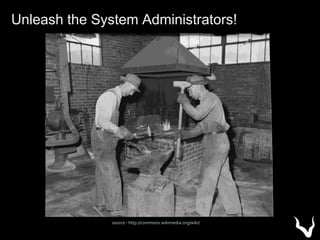
Unleash the System Administrators!
source - http://commons.wikimedia.org/wiki/
Word of Mouth Spreads. Popularity Rises.
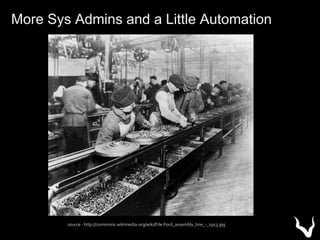
source - http://commons.wikimedia.org/wiki/File:Ford_assembly_line_-_1913.jpg
More Sys Admins and a Little Automation
SlashDot / Oprah / Twitter Effect ...
We Need More DevOps!
Your App Has Gone Global!
All Hail the Fail Whale!
source - http://www.whatisfailwhale.info/
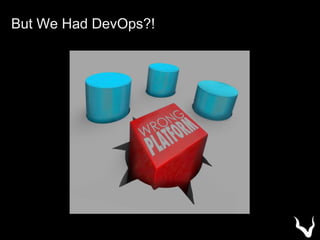
But We Had DevOps?!
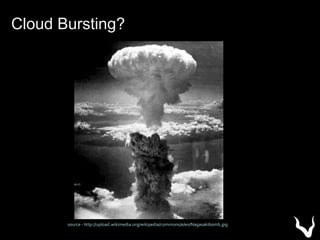
source - http://upload.wikimedia.org/wikipedia/commons/e/e0/Nagasakibomb.jpg
Cloud Bursting?
Assembling the Hybrid Cloud
Tool Chain
Automatically create
machine images for
multiple platforms
from a single blueprint
AWS: AMI
VMware: VMX + disks
VirtualBox: OVF + disks
DigitalOcean: Snapshots
and many more …
http://www.packer.io/docs/templates/builders.html
BoxCutter (github.com/boxcutter)
• Build VirtualBox, VMWare, and Parallels Images
• Choose your desired CM tool (Puppet, Chef,
Ansible)
Bento (https://github.com/chef/bento)
• Used by Chef Release Team for Testing
• Chef specific Configuration Managment
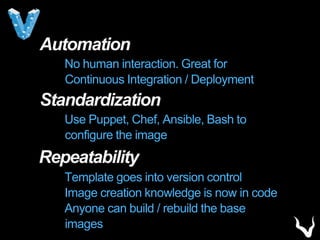
Automation
No human interaction. Great for
Continuous Integration / Deployment
Standardization
Use Puppet, Chef, Ansible, Bash to
configure the image
Repeatability
Template goes into version control
Image creation knowledge is now in code
Anyone can build / rebuild the base images
EXAMPLE
CentOS Image in both AWS
& Digital Ocean
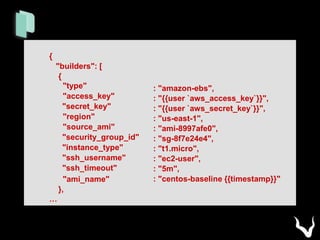
{
"builders": [
{
"type"
"access_key"
"secret_key"
"region"
"source_ami"
"security_group_id"
"instance_type"
"ssh_username"
"ssh_timeout"
"ami_name"
},
…
: "amazon-ebs",
: "{{user `aws_access_key`}}",
: "{{user `aws_secret_key`}}",
: "us-east-1",
: "ami-8997afe0",
: "sg-8f7e24e4",
: "t1.micro",
: "ec2-user",
: "5m",
: "centos-baseline {{timestamp}}"
…
{
"type"
"api_key"
"client_id"
"image_id"
: "digitalocean",
: "{{user `do_api_key`}}",
: "{{user `do_client_id`}}",
: "562354",
"snapshot_name" : "centos-baseline {{timestamp}}"
}
]
…
}
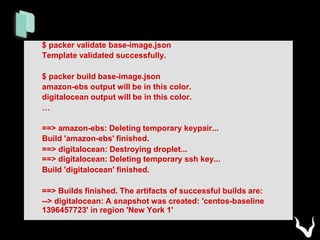
$ packer validate base-image.json
Template validated successfully.
$ packer build base-image.json
amazon-ebs output will be in this color.
digitalocean output will be in this color.
…
==> amazon-ebs: Deleting temporary keypair...
Build 'amazon-ebs' finished.
==> digitalocean: Destroying droplet...
==> digitalocean: Deleting temporary ssh key...
Build 'digitalocean' finished.
==> Builds finished. The artifacts of successful builds are:
--> digitalocean: A snapshot was created: 'centos-baseline
1396457723' in region 'New York 1'
EXAMPLE
BoxCutter Provisioning of
Centos to VMWare
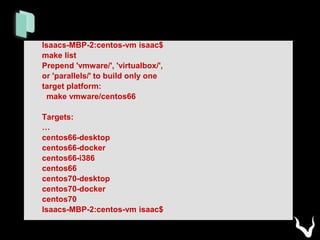
Isaacs-MBP-2:centos-vm isaac$
make list
Prepend 'vmware/', 'virtualbox/',
or 'parallels/' to build only one
target platform:
make vmware/centos66
Targets:
…
centos66-desktop
centos66-docker
centos66-i386
centos66
centos70-desktop
centos70-docker
centos70
Isaacs-MBP-2:centos-vm isaac$
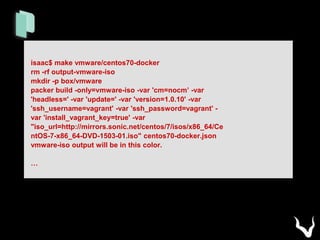
isaac$ make vmware/centos70-docker
rm -rf output-vmware-iso
mkdir -p box/vmware
packer build -only=vmware-iso -var 'cm=nocm’ -var
'headless=' -var 'update=' -var 'version=1.0.10' -var
'ssh_username=vagrant' -var 'ssh_password=vagrant' -
var 'install_vagrant_key=true' -var
"iso_url=http://mirrors.sonic.net/centos/7/isos/x86_64/Ce
ntOS-7-x86_64-DVD-1503-01.iso" centos70-docker.json
vmware-iso output will be in this color.
…
…
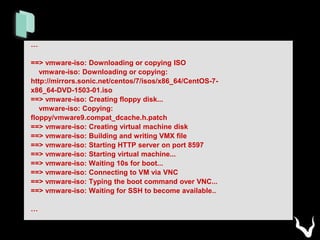
==> vmware-iso: Downloading or copying ISO
vmware-iso: Downloading or copying:
http://mirrors.sonic.net/centos/7/isos/x86_64/CentOS-7-
x86_64-DVD-1503-01.iso
==> vmware-iso: Creating floppy disk...
vmware-iso: Copying:
floppy/vmware9.compat_dcache.h.patch
==> vmware-iso: Creating virtual machine disk
==> vmware-iso: Building and writing VMX file
==> vmware-iso: Starting HTTP server on port 8597
==> vmware-iso: Starting virtual machine...
==> vmware-iso: Waiting 10s for boot...
==> vmware-iso: Connecting to VM via VNC
==> vmware-iso: Typing the boot command over VNC...
==> vmware-iso: Waiting for SSH to become available..
…
+
Mature, stable, proven. Development
since Jan 2010. Used by thousands
of companies.
Deploy to Multiple Providers
vagrant up --provider=foo
AWS, DigitalOcean, HP Cloud,
Joyent, KVM, libvirt, lxc,
OpenStack, Rackspace,
Vmware, VirtualBox
Leverage your own
Packer Images
• Base image as starting point.
• Integrates with multiple
“provisioners” including Puppet,
Chef, Ansible, Bash
Automation
No human interaction. Great for
Continuous Integration / Deployment
Standardization
Use Puppet, Chef, Ansible, Bash to
configure the image
Repeatability
Template goes into version control
Image creation knowledge is now in code
Anyone can build / rebuild the base
images
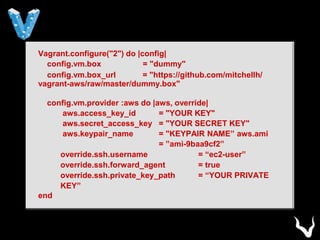
Vagrant.configure("2") do |config|
config.vm.box = "dummy"
config.vm.box_url = "https://github.com/mitchellh/
vagrant-aws/raw/master/dummy.box"
config.vm.provider :aws do |aws, override|
aws.access_key_id = "YOUR KEY"
aws.secret_access_key = "YOUR SECRET KEY"
aws.keypair_name = "KEYPAIR NAME” aws.ami
= ”ami-9baa9cf2”
override.ssh.username = “ec2-user”
override.ssh.forward_agent = true
override.ssh.private_key_path = “YOUR PRIVATE
KEY”
end
EXAMPLE
Multiple CentOS Images
created in AWS from base AMI
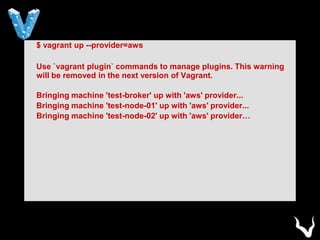
$ vagrant up --provider=aws
Use `vagrant plugin` commands to manage plugins. This warning
will be removed in the next version of Vagrant.
Bringing machine 'test-broker' up with 'aws' provider...
Bringing machine 'test-node-01' up with 'aws' provider...
Bringing machine 'test-node-02' up with 'aws' provider…
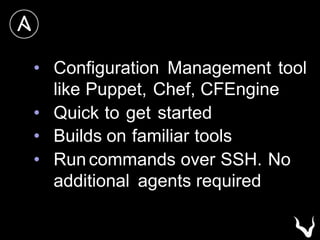
• Configuration Management tool
like Puppet, Chef, CFEngine
• Quick to get started
• Builds on familiar tools
• Run commands over SSH. No
additional agents required
…
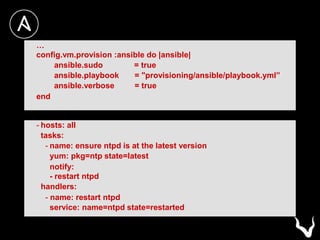
config.vm.provision :ansible do |ansible|
ansible.sudo = true
ansible.playbook = "provisioning/ansible/playbook.yml”
ansible.verbose = true
end
- hosts: all
tasks:
- name: ensure ntpd is at the latest version
yum: pkg=ntp state=latest
notify:
- restart ntpd
handlers:
- name: restart ntpd
service: name=ntpd state=restarted
EXAMPLE
Provision a CentOS
LAMP Stack in AWS
Vagrant.configure(VAGRANTFILE_API_VERSION) do |config|
boxes.each do |box|
config.vm.define box[:name], primary: box[:primary] do |config|
config.vm.box = "aws-centos"
config.vm.box_url =
https://github.com/mitchellh/vagrant-aws/raw/master/dummy.box
…
config.vm.provision :shell, :privileged => false, :inline => "sudo
yum -y install screen"
config.vm.provision :ansible do |ansible|
ansible.sudo
ansible.playbook
lamp.yml"
ansible.verbose
end
…
= true
= "provisioning/ansible/playbook-
= true
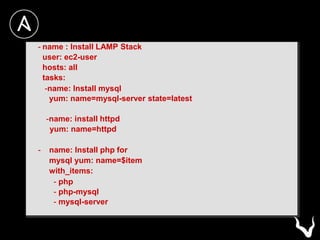
- name : Install LAMP Stack
user: ec2-user
hosts: all
tasks:
-name: Install mysql
yum: name=mysql-server state=latest
-name: install httpd
yum: name=httpd
- name: Install php for
mysql yum: name=$item
with_items:
- php
- php-mysql
- mysql-server
Only Scratching the Surface
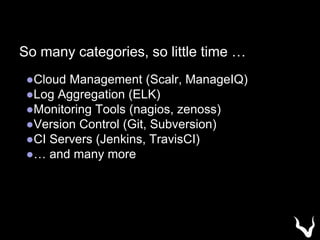
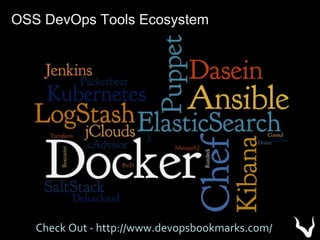
So many categories, so little time …
●Cloud Management (Scalr, ManageIQ)
●Log Aggregation (ELK)
●Monitoring Tools (nagios, zenoss)
●Version Control (Git, Subversion)
●CI Servers (Jenkins, TravisCI)
●… and many more
OSS DevOps Tools Ecosystem
Check Out - http://www.devopsbookmarks.com/
Thank You
Isaac Christoffersen
www.vizuri.com
ichristoffersen@vizuri.com
@ichristo
vagrantup.com packer.io ansible.com

Assembling an Open Source Toolchain to Manage Public, Private and Hybrid Cloud Deployments

  • 1.
    Assembling an OpenSource Tool Chain for the Hybrid Cloud Isaac Christoffersen Bit Herder & Cloud Wrangler @ichristo
  • 2.
    Bit Herder, CloudWrangler ● Geek, Insomniac, Tinkerer ● Wearer of Many Hats ● Delivering Open Source Solutions for 10+ years ● Solution Architect at Vizuri
  • 3.
  • 4.
    Our App isgoing to change the world as we know it! “The best way to predict the future is to invent it” -- Ed Catmull
  • 5.
    Unleash the SystemAdministrators! source - http://commons.wikimedia.org/wiki/
  • 6.
    Word of MouthSpreads. Popularity Rises.
  • 7.
  • 8.
    SlashDot / Oprah/ Twitter Effect ...
  • 9.
    We Need MoreDevOps!
  • 10.
    Your App HasGone Global!
  • 11.
    All Hail theFail Whale! source - http://www.whatisfailwhale.info/
  • 12.
    But We HadDevOps?!
  • 13.
  • 14.
    Assembling the HybridCloud Tool Chain
  • 16.
    Automatically create machine imagesfor multiple platforms from a single blueprint
  • 17.
    AWS: AMI VMware: VMX+ disks VirtualBox: OVF + disks DigitalOcean: Snapshots and many more … http://www.packer.io/docs/templates/builders.html
  • 18.
    BoxCutter (github.com/boxcutter) • BuildVirtualBox, VMWare, and Parallels Images • Choose your desired CM tool (Puppet, Chef, Ansible) Bento (https://github.com/chef/bento) • Used by Chef Release Team for Testing • Chef specific Configuration Managment
  • 19.
    Automation No human interaction.Great for Continuous Integration / Deployment Standardization Use Puppet, Chef, Ansible, Bash to configure the image Repeatability Template goes into version control Image creation knowledge is now in code Anyone can build / rebuild the base images
  • 20.
    EXAMPLE CentOS Image inboth AWS & Digital Ocean
  • 21.
    { "builders": [ { "type" "access_key" "secret_key" "region" "source_ami" "security_group_id" "instance_type" "ssh_username" "ssh_timeout" "ami_name" }, … : "amazon-ebs", :"{{user `aws_access_key`}}", : "{{user `aws_secret_key`}}", : "us-east-1", : "ami-8997afe0", : "sg-8f7e24e4", : "t1.micro", : "ec2-user", : "5m", : "centos-baseline {{timestamp}}"
  • 22.
    … { "type" "api_key" "client_id" "image_id" : "digitalocean", : "{{user`do_api_key`}}", : "{{user `do_client_id`}}", : "562354", "snapshot_name" : "centos-baseline {{timestamp}}" } ] … }
  • 23.
    $ packer validatebase-image.json Template validated successfully. $ packer build base-image.json amazon-ebs output will be in this color. digitalocean output will be in this color. … ==> amazon-ebs: Deleting temporary keypair... Build 'amazon-ebs' finished. ==> digitalocean: Destroying droplet... ==> digitalocean: Deleting temporary ssh key... Build 'digitalocean' finished. ==> Builds finished. The artifacts of successful builds are: --> digitalocean: A snapshot was created: 'centos-baseline 1396457723' in region 'New York 1'
  • 24.
  • 25.
    Isaacs-MBP-2:centos-vm isaac$ make list Prepend'vmware/', 'virtualbox/', or 'parallels/' to build only one target platform: make vmware/centos66 Targets: … centos66-desktop centos66-docker centos66-i386 centos66 centos70-desktop centos70-docker centos70 Isaacs-MBP-2:centos-vm isaac$
  • 26.
    isaac$ make vmware/centos70-docker rm-rf output-vmware-iso mkdir -p box/vmware packer build -only=vmware-iso -var 'cm=nocm’ -var 'headless=' -var 'update=' -var 'version=1.0.10' -var 'ssh_username=vagrant' -var 'ssh_password=vagrant' - var 'install_vagrant_key=true' -var "iso_url=http://mirrors.sonic.net/centos/7/isos/x86_64/Ce ntOS-7-x86_64-DVD-1503-01.iso" centos70-docker.json vmware-iso output will be in this color. …
  • 27.
    … ==> vmware-iso: Downloadingor copying ISO vmware-iso: Downloading or copying: http://mirrors.sonic.net/centos/7/isos/x86_64/CentOS-7- x86_64-DVD-1503-01.iso ==> vmware-iso: Creating floppy disk... vmware-iso: Copying: floppy/vmware9.compat_dcache.h.patch ==> vmware-iso: Creating virtual machine disk ==> vmware-iso: Building and writing VMX file ==> vmware-iso: Starting HTTP server on port 8597 ==> vmware-iso: Starting virtual machine... ==> vmware-iso: Waiting 10s for boot... ==> vmware-iso: Connecting to VM via VNC ==> vmware-iso: Typing the boot command over VNC... ==> vmware-iso: Waiting for SSH to become available.. …
  • 28.
  • 29.
    Mature, stable, proven.Development since Jan 2010. Used by thousands of companies.
  • 30.
    Deploy to MultipleProviders vagrant up --provider=foo AWS, DigitalOcean, HP Cloud, Joyent, KVM, libvirt, lxc, OpenStack, Rackspace, Vmware, VirtualBox
  • 31.
    Leverage your own PackerImages • Base image as starting point. • Integrates with multiple “provisioners” including Puppet, Chef, Ansible, Bash
  • 32.
    Automation No human interaction.Great for Continuous Integration / Deployment Standardization Use Puppet, Chef, Ansible, Bash to configure the image Repeatability Template goes into version control Image creation knowledge is now in code Anyone can build / rebuild the base images
  • 33.
    Vagrant.configure("2") do |config| config.vm.box= "dummy" config.vm.box_url = "https://github.com/mitchellh/ vagrant-aws/raw/master/dummy.box" config.vm.provider :aws do |aws, override| aws.access_key_id = "YOUR KEY" aws.secret_access_key = "YOUR SECRET KEY" aws.keypair_name = "KEYPAIR NAME” aws.ami = ”ami-9baa9cf2” override.ssh.username = “ec2-user” override.ssh.forward_agent = true override.ssh.private_key_path = “YOUR PRIVATE KEY” end
  • 34.
  • 35.
    $ vagrant up--provider=aws Use `vagrant plugin` commands to manage plugins. This warning will be removed in the next version of Vagrant. Bringing machine 'test-broker' up with 'aws' provider... Bringing machine 'test-node-01' up with 'aws' provider... Bringing machine 'test-node-02' up with 'aws' provider…
  • 37.
    • Configuration Managementtool like Puppet, Chef, CFEngine • Quick to get started • Builds on familiar tools • Run commands over SSH. No additional agents required
  • 38.
    … config.vm.provision :ansible do|ansible| ansible.sudo = true ansible.playbook = "provisioning/ansible/playbook.yml” ansible.verbose = true end - hosts: all tasks: - name: ensure ntpd is at the latest version yum: pkg=ntp state=latest notify: - restart ntpd handlers: - name: restart ntpd service: name=ntpd state=restarted
  • 39.
  • 40.
    Vagrant.configure(VAGRANTFILE_API_VERSION) do |config| boxes.eachdo |box| config.vm.define box[:name], primary: box[:primary] do |config| config.vm.box = "aws-centos" config.vm.box_url = https://github.com/mitchellh/vagrant-aws/raw/master/dummy.box … config.vm.provision :shell, :privileged => false, :inline => "sudo yum -y install screen" config.vm.provision :ansible do |ansible| ansible.sudo ansible.playbook lamp.yml" ansible.verbose end … = true = "provisioning/ansible/playbook- = true
  • 41.
    - name :Install LAMP Stack user: ec2-user hosts: all tasks: -name: Install mysql yum: name=mysql-server state=latest -name: install httpd yum: name=httpd - name: Install php for mysql yum: name=$item with_items: - php - php-mysql - mysql-server
  • 42.
  • 43.
    So many categories,so little time … ●Cloud Management (Scalr, ManageIQ) ●Log Aggregation (ELK) ●Monitoring Tools (nagios, zenoss) ●Version Control (Git, Subversion) ●CI Servers (Jenkins, TravisCI) ●… and many more
  • 44.
    OSS DevOps ToolsEcosystem Check Out - http://www.devopsbookmarks.com/
  • 45.