Siemens S7-200 PLC training courses
PLC history Classical control -  More complicated - Longer time for maintenance  - Time consuming troubleshooting - Occupies larger area in switchboards  - Requires more wiring - Standard reliability
History Large projects requirements - More inputs and outputs points -Large program memory -Several programming instructions -Communication with other equipments -Deal with analogue signals -Deal with large number of counters, timers  and  markers
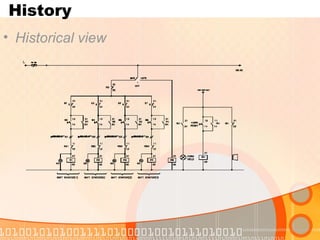
History  Historical view
Course contents Introduction to PLC Bit logic compare Timers Counters Memory instructions Analog I/O Move , shift  Practical examples
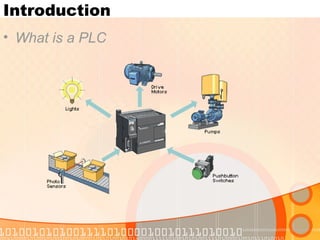
Introduction What is a PLC
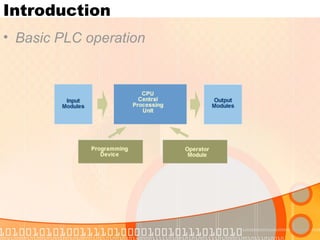
Introduction Basic PLC operation
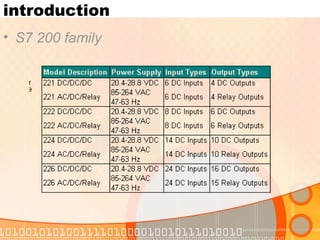
introduction S7 200 family
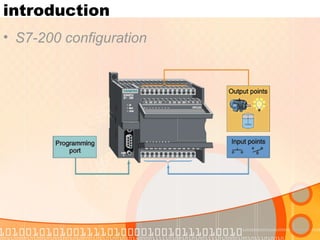
introduction S7-200 configuration
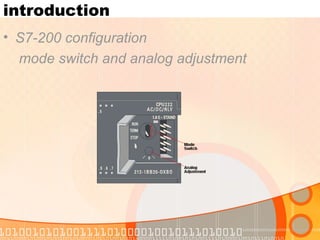
introduction S7-200 configuration mode switch and analog adjustment
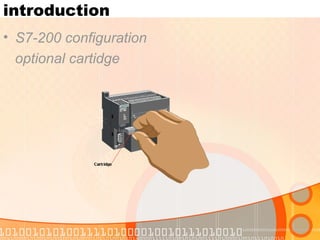
introduction S7-200 configuration optional cartidge
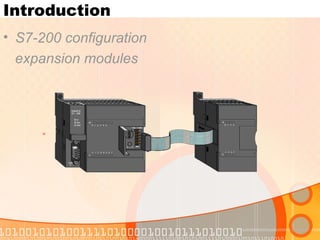
Introduction S7-200 configuration expansion modules
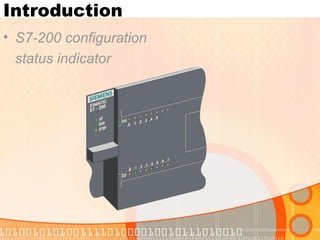
Introduction S7-200 configuration status indicator
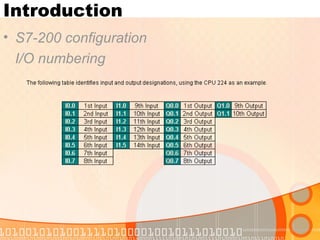
Introduction S7-200 configuration I/O numbering
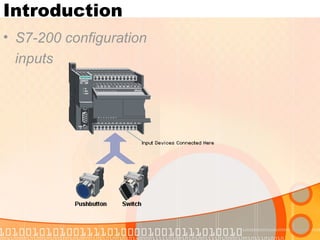
Introduction S7-200 configuration inputs
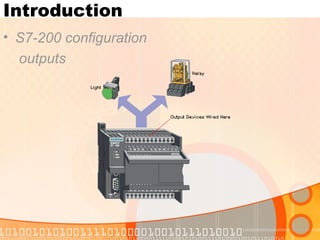
Introduction S7-200 configuration outputs
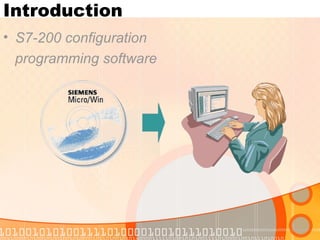
Introduction S7-200 configuration programming software
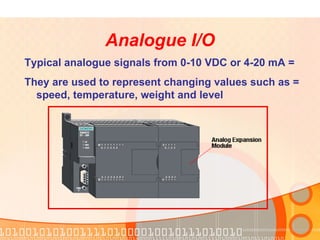
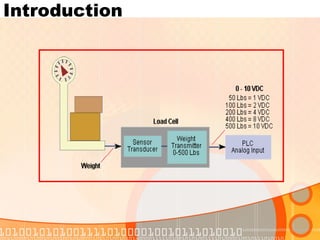
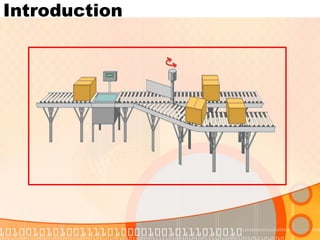
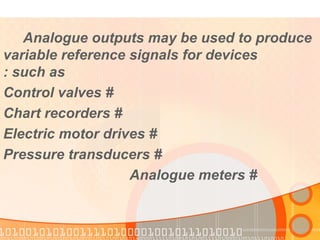
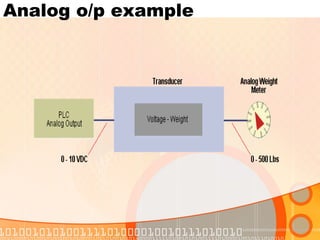
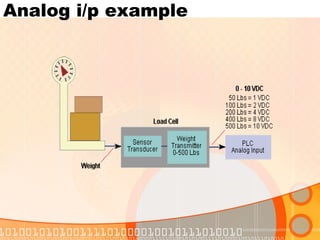
Analogue I/O = Typical analogue signals from 0-10 VDC or 4-20 mA = They are used to represent changing values such as  speed, temperature, weight and level
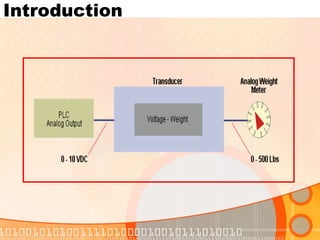
Introduction Analogue outputs may be used to produce  variable reference signals for devices  such as: # Control valves # Chart recorders # Electric motor drives # Pressure transducers # Analogue meters
Introduction
Introduction
Introduction
PLC Programming
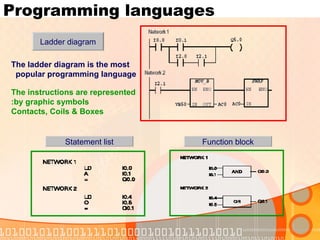
Programming languages Statement list Function block Ladder diagram The instructions are represented by graphic symbols: Contacts, Coils & Boxes The ladder diagram is the most popular programming language
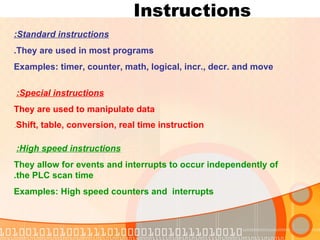
Instructions  Standard instructions: They are used in most programs. Examples: timer, counter, math, logical, incr., decr. and move High speed instructions:   They allow for events and interrupts to occur independently of the PLC scan time. Examples: High speed counters and  interrupts Special instructions:   They are used to manipulate data Shift, table, conversion, real time instruction .
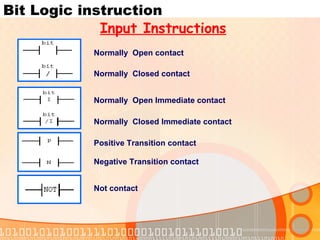
Bit Logic instruction Normally  Open contact Normally  Open Immediate contact Normally  Closed contact Not contact Normally  Closed Immediate contact Positive Transition contact Negative Transition contact Input Instructions
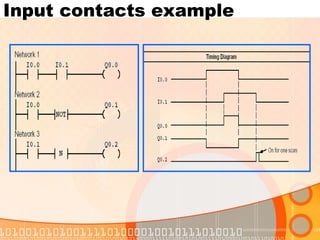
Input contacts example
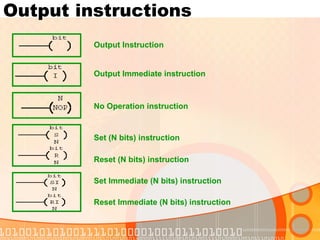
Output instructions Output Instruction No Operation instruction Output Immediate instruction Set (N bits) instruction Reset (N bits) instruction Set Immediate (N bits) instruction Reset Immediate (N bits) instruction
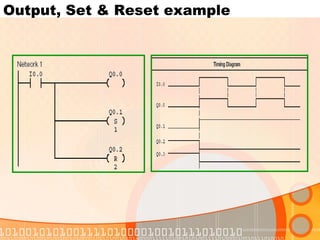
Output, Set & Reset example
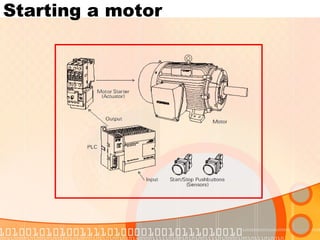
Starting a motor
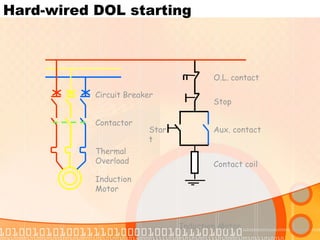
Hard-wired DOL starting Induction Motor Circuit Breaker Contactor Thermal Overload Induction Motor Aux. contact Contact coil Stop O.L. contact Start
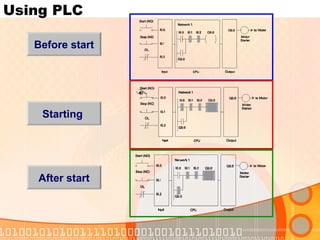
Using PLC Before start Starting After start
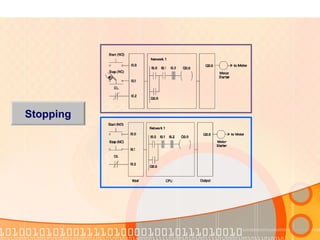
Stopping
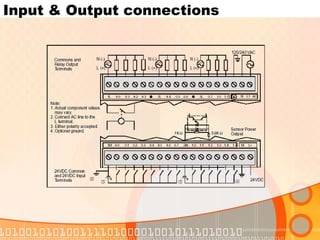
Input & Output connections
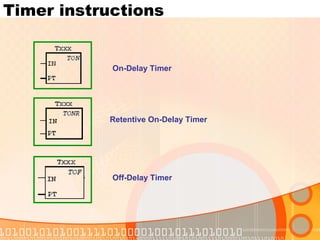
Timer instructions On-Delay Timer Retentive   On-Delay   Timer Off-Delay Timer
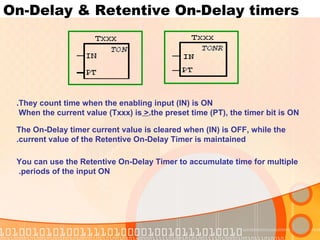
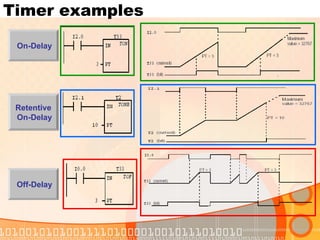
On-Delay & Retentive On-Delay timers They count time when the enabling input (IN) is ON. When the current value (Txxx) is  >  the preset time (PT), the timer bit is ON. The On-Delay timer current value is cleared when (IN) is OFF, while the current value of the Retentive On-Delay Timer is maintained. You can use the Retentive On-Delay Timer to accumulate time for multiple periods of the input ON.
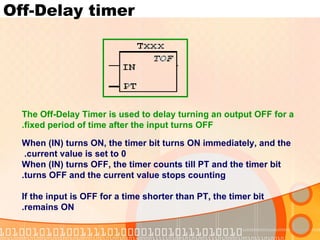
Off-Delay timer The Off-Delay Timer is used to delay turning an output OFF for a fixed period of time after the input turns OFF. When (IN) turns ON, the timer bit turns ON immediately, and the current value is set to 0.  When (IN) turns OFF, the timer counts till PT and the timer bit turns OFF and the current value stops counting. If the input is OFF for a time shorter than PT, the timer bit remains ON.
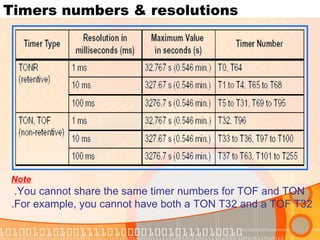
Timers numbers & resolutions Note You cannot share the same timer numbers for TOF and TON.  For example, you cannot have both a TON T32 and a TOF T32.
Timer examples On-Delay  Off-Delay  Retentive On-Delay
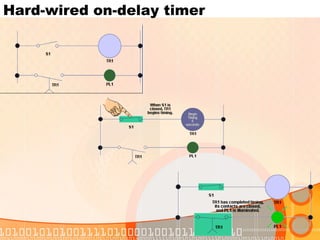
Hard-wired on-delay timer
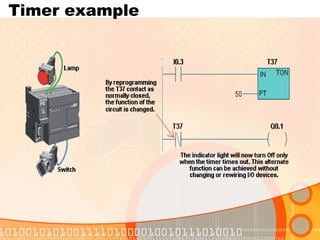
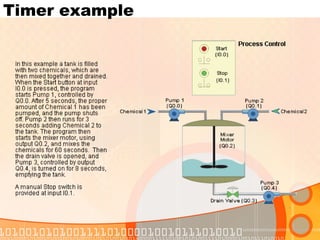
Timer example
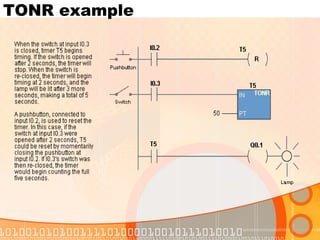
TONR example
Timer example
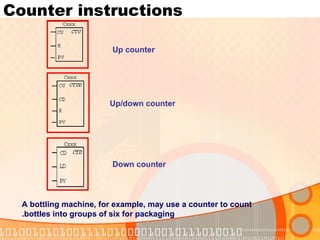
Counter instructions Up counter Up/down counter Down counter A bottling machine, for example, may use a counter to count bottles into groups of six for packaging.
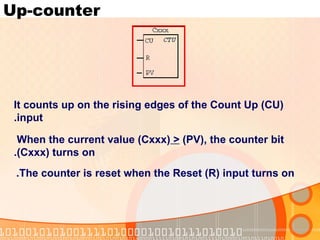
Up-counter It counts up on the rising edges of the Count Up (CU) input. When the current value (Cxxx)  >  (PV), the counter bit (Cxxx) turns on. The counter is reset when the Reset (R) input turns on.
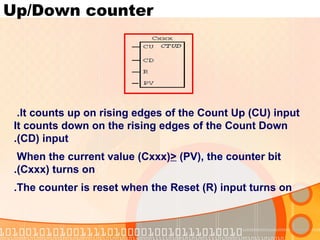
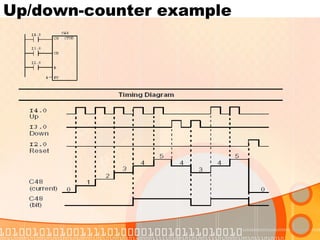
Up/Down counter It counts up on rising edges of the Count Up (CU) input.  It counts down on the rising edges of the Count Down (CD) input. When the current value (Cxxx)  >  (PV), the counter bit (Cxxx) turns on. The counter is reset when the Reset (R) input turns on.
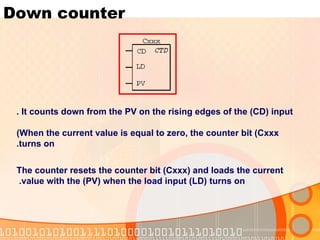
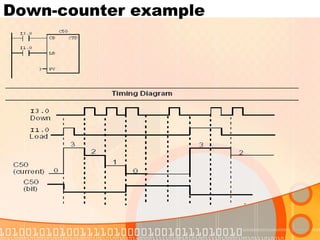
Down counter It counts down from the PV on the rising edges of the (CD) input . When the current value is equal to zero, the counter bit (Cxxx) turns on. The counter resets the counter bit (Cxxx) and loads the current value with the (PV) when the load input (LD) turns on.
Down-counter example
Up/down-counter example
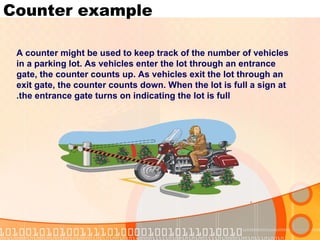
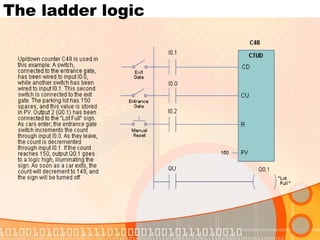
Counter example A counter might be used to keep track of the number of vehicles in a parking lot. As vehicles enter the lot through an entrance gate, the counter counts up. As vehicles exit the lot through an exit gate, the counter counts down. When the lot is full a sign at the entrance gate turns on indicating the lot is full.
The ladder logic
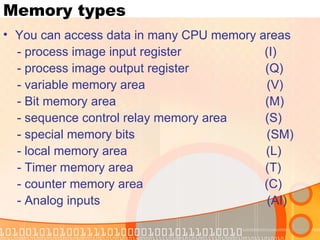
Memory types You can access data in many CPU memory areas - process image input register  (I) - process image output register  (Q) - variable memory area  (V) - Bit memory area  (M) - sequence control relay memory area  (S) - special memory bits  (SM) - local memory area  (L) - Timer memory area  (T) - counter memory area  (C) - Analog inputs  (AI)
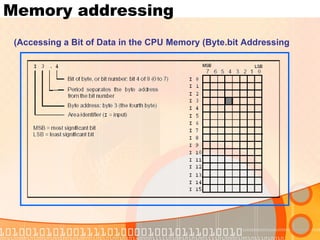
Accessing a Bit of Data in the CPU Memory (Byte.bit Addressing) Memory addressing
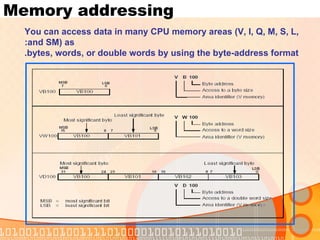
Memory addressing You can access data in many CPU memory areas (V, I, Q, M, S, L, and SM) as: bytes, words, or double words by using the byte-address format.
Memory types Process-image input register  (I) Format: Bit  I[byte address].[bit address] I0.1 Byte, Word, Double Word  I[size][starting byte address] IB4 Process-image output register  (Q) Format: Bit  Q[byte address].[bit address] Q1.1 Byte, Word, Double Word  Q[size][starting byte address] QB5 Variable memory area (V) You can use V memory to: store intermediate results of the control logic operations.  store other data pertaining to your process or task.  Format: Bit  V[byte address].[bit address] V10.2 Byte, Word, Double Word  V[size][starting byte address] VW100
Memory types Sequence control relay area  (S) They are used to organize machine operations or steps into equivalent program segments. SCRs allow logical  segmentation of the control Format: Bit  S[byte address].[bit address] S3.1 Byte, Word, Double Word  S[size][starting byte address] SB4 Special memory bits (SM) The SM bits provide a means for communicating information between the CPU and your program. You can use these bits to select and control some of the special functions of the S7-200 CPU, such as: •  A bit that turns on for the first scan cycle •  Bits that toggle at fixed rates •  Bits that show the status of math or operational instructions Format: Bit  SM[byte address].[bit address] SM0.1 Byte, Word, Double Word SM[size][starting byte address] SMB86
Memory types Local memory area (L) The S7-200 PLCs provide 64 bytes of local (L) memory of which 60 can be  used as scratchpad memory or for passing formal parameters to subroutines.  Format: Bit  L [byte address].[bit address] L0.0 Byte, Word, Double Word  L [size] [starting byte address] LB33
Memory types Analog inputs  (AI) The S7-200 converts a real-world, analog value (such as temperature or voltage) into a word-length (16-bit) digital value. You access these values by the area identifier (AI), size of the data (W), and the starting byte address. Since analog inputs are words and always start on even-number bytes (such as 0, 2, or 4), you access them with even-number byte addresses (such as AIW0, AIW2, or AIW4),as shown in Figure Analog input values are read-only values. Format:   AIW [starting byte address] AIW4
Memory types The S7-200 converts a word-length (16-bit) digital value into a current or voltage, proportional to the digital value (such as for a current or voltage). You write these values by the area identifier (AQ), size of the data (W), and the starting by address. Since analog outputs are words and always start on even-number bytes (such as 0, 2, or 4), you write them with even-number byte addresses (AQW0, AQW2, AQW4),  Format: AQW [starting byte address] AQW4 Analog outputs  (AQ)
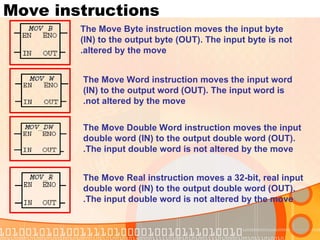
Move instructions The Move Byte instruction moves the input byte (IN) to the output byte (OUT). The input byte is not altered by the move. The Move Word instruction moves the input word (IN) to the output word (OUT). The input word is not altered by the move. The Move Double Word instruction moves the input double word (IN) to the output double word (OUT). The input double word is not altered by the move. The Move Real instruction moves a 32-bit, real input double word (IN) to the output double word (OUT). The input double word is not altered by the move.
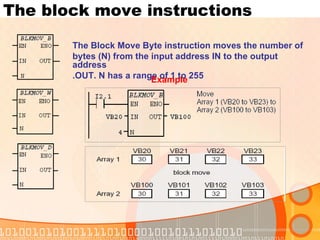
The block move instructions The Block Move Byte instruction moves the number of bytes (N) from the input address IN to the output address OUT. N has a range of 1 to 255. Example
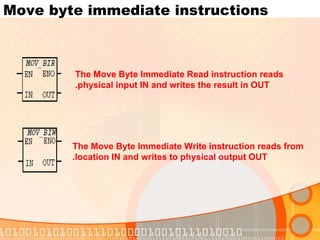
Move byte immediate instructions The Move Byte Immediate Write instruction reads from location IN and writes to physical output OUT. The Move Byte Immediate Read instruction reads physical input IN and writes the result in OUT.
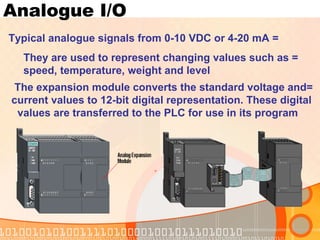
Analogue I/O = Typical analogue signals from 0-10 VDC or 4-20 mA = They are used to represent changing values such as    speed, temperature, weight and level  =The expansion module converts the standard voltage and  current values to 12-bit digital representation. These digital  values are transferred to the PLC for use in its program
Analogue outputs may be used to produce  variable reference signals for devices  such as: # Control valves # Chart recorders # Electric motor drives # Pressure transducers # Analogue meters
Analog o/p example
Analog i/p example
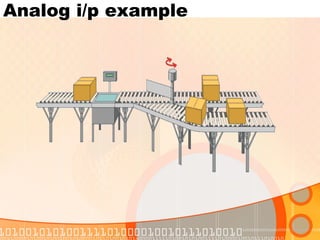
Analog i/p example

Plc Siemens Training Notes

  • 1.
    Siemens S7-200 PLCtraining courses
  • 2.
    PLC history Classicalcontrol - More complicated - Longer time for maintenance - Time consuming troubleshooting - Occupies larger area in switchboards - Requires more wiring - Standard reliability
  • 3.
    History Large projectsrequirements - More inputs and outputs points -Large program memory -Several programming instructions -Communication with other equipments -Deal with analogue signals -Deal with large number of counters, timers and markers
  • 4.
  • 5.
    Course contents Introductionto PLC Bit logic compare Timers Counters Memory instructions Analog I/O Move , shift Practical examples
  • 6.
  • 7.
  • 8.
  • 9.
  • 10.
    introduction S7-200 configurationmode switch and analog adjustment
  • 11.
  • 12.
  • 13.
  • 14.
  • 15.
  • 16.
  • 17.
  • 18.
    Analogue I/O =Typical analogue signals from 0-10 VDC or 4-20 mA = They are used to represent changing values such as speed, temperature, weight and level
  • 19.
    Introduction Analogue outputsmay be used to produce variable reference signals for devices such as: # Control valves # Chart recorders # Electric motor drives # Pressure transducers # Analogue meters
  • 20.
  • 21.
  • 22.
  • 23.
  • 24.
    Programming languages Statementlist Function block Ladder diagram The instructions are represented by graphic symbols: Contacts, Coils & Boxes The ladder diagram is the most popular programming language
  • 25.
    Instructions Standardinstructions: They are used in most programs. Examples: timer, counter, math, logical, incr., decr. and move High speed instructions: They allow for events and interrupts to occur independently of the PLC scan time. Examples: High speed counters and interrupts Special instructions: They are used to manipulate data Shift, table, conversion, real time instruction .
  • 26.
    Bit Logic instructionNormally Open contact Normally Open Immediate contact Normally Closed contact Not contact Normally Closed Immediate contact Positive Transition contact Negative Transition contact Input Instructions
  • 27.
  • 28.
    Output instructions OutputInstruction No Operation instruction Output Immediate instruction Set (N bits) instruction Reset (N bits) instruction Set Immediate (N bits) instruction Reset Immediate (N bits) instruction
  • 29.
    Output, Set &Reset example
  • 30.
  • 31.
    Hard-wired DOL startingInduction Motor Circuit Breaker Contactor Thermal Overload Induction Motor Aux. contact Contact coil Stop O.L. contact Start
  • 32.
    Using PLC Beforestart Starting After start
  • 33.
  • 34.
    Input & Outputconnections
  • 35.
    Timer instructions On-DelayTimer Retentive On-Delay Timer Off-Delay Timer
  • 36.
    On-Delay & RetentiveOn-Delay timers They count time when the enabling input (IN) is ON. When the current value (Txxx) is > the preset time (PT), the timer bit is ON. The On-Delay timer current value is cleared when (IN) is OFF, while the current value of the Retentive On-Delay Timer is maintained. You can use the Retentive On-Delay Timer to accumulate time for multiple periods of the input ON.
  • 37.
    Off-Delay timer TheOff-Delay Timer is used to delay turning an output OFF for a fixed period of time after the input turns OFF. When (IN) turns ON, the timer bit turns ON immediately, and the current value is set to 0. When (IN) turns OFF, the timer counts till PT and the timer bit turns OFF and the current value stops counting. If the input is OFF for a time shorter than PT, the timer bit remains ON.
  • 38.
    Timers numbers &resolutions Note You cannot share the same timer numbers for TOF and TON. For example, you cannot have both a TON T32 and a TOF T32.
  • 39.
    Timer examples On-Delay Off-Delay Retentive On-Delay
  • 40.
  • 41.
  • 42.
  • 43.
  • 44.
    Counter instructions Upcounter Up/down counter Down counter A bottling machine, for example, may use a counter to count bottles into groups of six for packaging.
  • 45.
    Up-counter It countsup on the rising edges of the Count Up (CU) input. When the current value (Cxxx) > (PV), the counter bit (Cxxx) turns on. The counter is reset when the Reset (R) input turns on.
  • 46.
    Up/Down counter Itcounts up on rising edges of the Count Up (CU) input. It counts down on the rising edges of the Count Down (CD) input. When the current value (Cxxx) > (PV), the counter bit (Cxxx) turns on. The counter is reset when the Reset (R) input turns on.
  • 47.
    Down counter Itcounts down from the PV on the rising edges of the (CD) input . When the current value is equal to zero, the counter bit (Cxxx) turns on. The counter resets the counter bit (Cxxx) and loads the current value with the (PV) when the load input (LD) turns on.
  • 48.
  • 49.
  • 50.
    Counter example Acounter might be used to keep track of the number of vehicles in a parking lot. As vehicles enter the lot through an entrance gate, the counter counts up. As vehicles exit the lot through an exit gate, the counter counts down. When the lot is full a sign at the entrance gate turns on indicating the lot is full.
  • 51.
  • 52.
    Memory types Youcan access data in many CPU memory areas - process image input register (I) - process image output register (Q) - variable memory area (V) - Bit memory area (M) - sequence control relay memory area (S) - special memory bits (SM) - local memory area (L) - Timer memory area (T) - counter memory area (C) - Analog inputs (AI)
  • 53.
    Accessing a Bitof Data in the CPU Memory (Byte.bit Addressing) Memory addressing
  • 54.
    Memory addressing Youcan access data in many CPU memory areas (V, I, Q, M, S, L, and SM) as: bytes, words, or double words by using the byte-address format.
  • 55.
    Memory types Process-imageinput register (I) Format: Bit I[byte address].[bit address] I0.1 Byte, Word, Double Word I[size][starting byte address] IB4 Process-image output register (Q) Format: Bit Q[byte address].[bit address] Q1.1 Byte, Word, Double Word Q[size][starting byte address] QB5 Variable memory area (V) You can use V memory to: store intermediate results of the control logic operations. store other data pertaining to your process or task. Format: Bit V[byte address].[bit address] V10.2 Byte, Word, Double Word V[size][starting byte address] VW100
  • 56.
    Memory types Sequencecontrol relay area (S) They are used to organize machine operations or steps into equivalent program segments. SCRs allow logical segmentation of the control Format: Bit S[byte address].[bit address] S3.1 Byte, Word, Double Word S[size][starting byte address] SB4 Special memory bits (SM) The SM bits provide a means for communicating information between the CPU and your program. You can use these bits to select and control some of the special functions of the S7-200 CPU, such as: • A bit that turns on for the first scan cycle • Bits that toggle at fixed rates • Bits that show the status of math or operational instructions Format: Bit SM[byte address].[bit address] SM0.1 Byte, Word, Double Word SM[size][starting byte address] SMB86
  • 57.
    Memory types Localmemory area (L) The S7-200 PLCs provide 64 bytes of local (L) memory of which 60 can be used as scratchpad memory or for passing formal parameters to subroutines. Format: Bit L [byte address].[bit address] L0.0 Byte, Word, Double Word L [size] [starting byte address] LB33
  • 58.
    Memory types Analoginputs (AI) The S7-200 converts a real-world, analog value (such as temperature or voltage) into a word-length (16-bit) digital value. You access these values by the area identifier (AI), size of the data (W), and the starting byte address. Since analog inputs are words and always start on even-number bytes (such as 0, 2, or 4), you access them with even-number byte addresses (such as AIW0, AIW2, or AIW4),as shown in Figure Analog input values are read-only values. Format: AIW [starting byte address] AIW4
  • 59.
    Memory types TheS7-200 converts a word-length (16-bit) digital value into a current or voltage, proportional to the digital value (such as for a current or voltage). You write these values by the area identifier (AQ), size of the data (W), and the starting by address. Since analog outputs are words and always start on even-number bytes (such as 0, 2, or 4), you write them with even-number byte addresses (AQW0, AQW2, AQW4), Format: AQW [starting byte address] AQW4 Analog outputs (AQ)
  • 60.
    Move instructions TheMove Byte instruction moves the input byte (IN) to the output byte (OUT). The input byte is not altered by the move. The Move Word instruction moves the input word (IN) to the output word (OUT). The input word is not altered by the move. The Move Double Word instruction moves the input double word (IN) to the output double word (OUT). The input double word is not altered by the move. The Move Real instruction moves a 32-bit, real input double word (IN) to the output double word (OUT). The input double word is not altered by the move.
  • 61.
    The block moveinstructions The Block Move Byte instruction moves the number of bytes (N) from the input address IN to the output address OUT. N has a range of 1 to 255. Example
  • 62.
    Move byte immediateinstructions The Move Byte Immediate Write instruction reads from location IN and writes to physical output OUT. The Move Byte Immediate Read instruction reads physical input IN and writes the result in OUT.
  • 63.
    Analogue I/O =Typical analogue signals from 0-10 VDC or 4-20 mA = They are used to represent changing values such as speed, temperature, weight and level =The expansion module converts the standard voltage and current values to 12-bit digital representation. These digital values are transferred to the PLC for use in its program
  • 64.
    Analogue outputs maybe used to produce variable reference signals for devices such as: # Control valves # Chart recorders # Electric motor drives # Pressure transducers # Analogue meters
  • 65.
  • 66.
  • 67.