AUTOMATION

      What is AUTOMATION ?

• As the name suggest ―Automation‖ means to
  perform automatic operations by means of different
  kinds of machines.

• Automation is the use of control systems and
  information technologies to reduce the need for
  human work in the production of goods and services.
  In the scope of industrialization, automation is a step
  beyond mechanization.

• It is used to reduce human interference and an efforts.
AUTOMATION
     Tools of Automation

• Programmable Logic Controller (PLC)

• Supervisory Control And Data Acquisition (SCADA)

• Human Machine Interface (HMI) or Touch Screen (TS)

• Variable Frequency Drive (VFD)
AUTOMATION

     ADVANTAGES : ~
• Replacing human operators in tasks that involve
  hard physical or monotonous work.

• Replacing humans in tasks done in dangerous
  environments.

• Performing tasks that are beyond human
  capabilities of size, weight, speed, endurance, etc.

• Economy improvement: Automation may improve
  in economy of enterprises, society or most of
  humanity.
AUTOMATION

     DISADVANTAGES : ~

• Unemployment rate increases due to machines
  replacing humans and putting those humans out of
   their jobs.

• Technical Limitation

• Security Threats

• High initial cost.
PLC
   What is PLC ?

• PLC - programmable logic controller

• A Programmable Logic Controller, or PLC for short,
  is simply a special computer device used for
  industrial control systems. They are used in many
  industries such as oil refineries, manufacturing lines,
  conveyor systems and so on.

• PLC implements logic control functions by means of
  a program.
PLC
  How does a PLC differ from a computer ?
• A computer is optimized for calculation and
  display tasks.

• A computer is programmed by specialists

• A PLC is designed for (logic) control and
  regulation tasks.

• A PLC is programmed by non-specialists

• A PLC is       well   adapted   to   industrial
  environment.
PLC
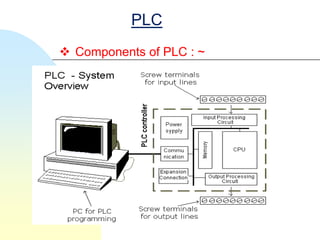
 Components of PLC : ~
PLC
   Components of PLC : ~

1. Inputs Circuits
2. Outputs Circuits
3. CPU (Central Processing Unit )
4. Memory for program and data storage
5. Programming device
6. Communication Device
7. Power Supply
PLC
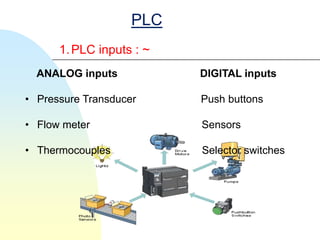
      1. PLC inputs : ~
  ANALOG inputs           DIGITAL inputs

• Pressure Transducer     Push buttons

• Flow meter              Sensors

• Thermocouples           Selector switches
PLC

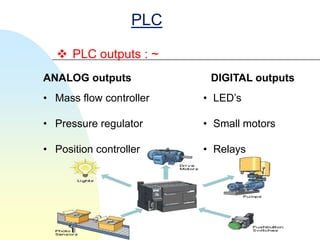
   PLC outputs : ~
ANALOG outputs            DIGITAL outputs
• Mass flow controller   • LED’s

• Pressure regulator     • Small motors

• Position controller    • Relays
PLC

  Memory for program and data storage : ~

Memories used: -

• RAM – Random access memory

        Volatile
        Made up of metal oxide semiconductor
        lose it's information if power is removed.
• ROM – Read only memory

        Non-volatile
        don't need an external power source to
         keep information
PLC
   Power Supply : ~

• A power supply of 120v ac is typically used to drive
  the PLC (some units operate on 240v ac).
• The power supply converts the 120v ac into dc
  voltages of +5v.
• These low voltages are used to operate equipment
  that many have much higher voltage and power
  ratings than the PLC itself.
PLC
        Programming In PLC :~
Languages used in PLC for the purpose of programming are

1. Ladder language
2. Functional Block Diagram (FBD)
3. Instructional List (IL)
4. Drive Functional Block (DFB)
5. Structural test language
PLC
  Ladder language used in PLC programming
There are two PLC in which ladder programming
is used : -
• ZELIO PLC : - It uses Zelio soft 2 software for
  the programming.

• DELTA PLC : - It uses WPL soft software for
  their programming.
PLC
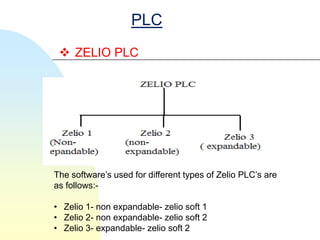
  ZELIO PLC


The software’s used for different types of Zelio PLC’s are
as follows:-

• Zelio 1- non expandable- zelio soft 1
• Zelio 2- non expandable- zelio soft 2
• Zelio 3- expandable- zelio soft 2
PLC
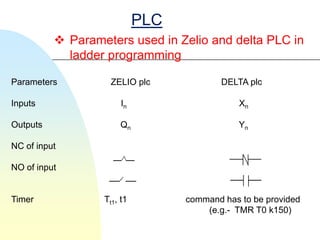
           Parameters used in Zelio and delta PLC in
            ladder programming

Parameters          ZELIO plc             DELTA plc

Inputs                 In                     Xn

Outputs               Qn                      Yn

NC of input

NO of input


Timer             Tt1, t1         command has to be provided
                                      (e.g.- TMR T0 k150)
PLC
  Zelio soft 2 ladder programming

The various parameters used in zelio soft 2 while
operating ladder program and their relationship
amongst them are as follows:-
• INPUT CONTACT
• OUTPUT CONTACT
• INTERLOCKING
• MEMORY COIL
• LATCHING
• TIMER
• COUNTER
PLC

  INPUT AND OUTPUT CONTACT

• Inputs in Zelio soft 2 is represented by I1, I2, I3,I5,I6.

• Inputs are further classified as: -

        NORMALLY CLOSED

        NORMALLY OPEN
PLC

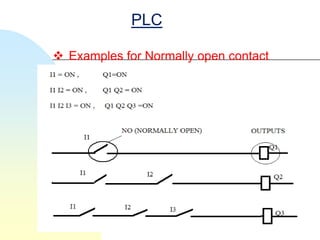
 Examples for Normally open contact
PLC

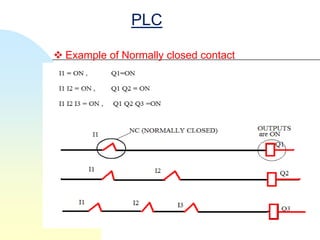
 Example of Normally closed contact
PLC

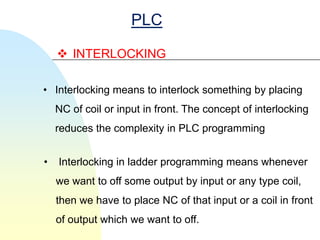
     INTERLOCKING

• Interlocking means to interlock something by placing
    NC of coil or input in front. The concept of interlocking
    reduces the complexity in PLC programming


•   Interlocking in ladder programming means whenever
    we want to off some output by input or any type coil,
    then we have to place NC of that input or a coil in front
    of output which we want to off.
PLC

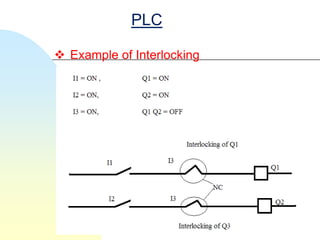
 Example of Interlocking
PLC

 MEMORY COIL

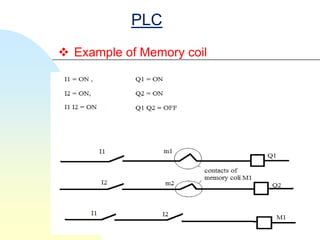
•   Memory coil in ladder programming is used for
    reversing the contacts whenever coil is get
    energized.
• In ladder programming memory coil is represented
    by M1 and its contact is represented by m1.
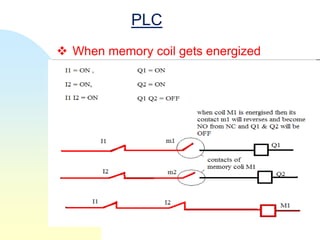
• When memory coil M1 gets the signal it gets
    energized and then it reverses the terminal of its
    contact m1 which reverses the operation.
PLC
 Example of Memory coil
PLC
 When memory coil gets energized
PLC

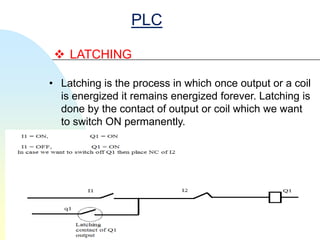
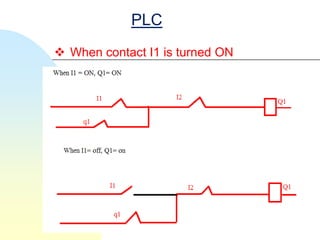
  LATCHING

• Latching is the process in which once output or a coil
  is energized it remains energized forever. Latching is
  done by the contact of output or coil which we want
  to switch ON permanently.
PLC
 When contact I1 is turned ON
PLC
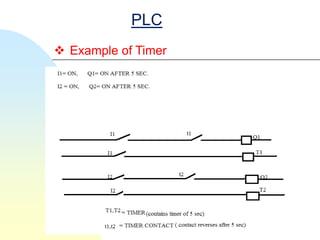
 TIMER

• Timer is basically used add some delay in the
  programming circuit by adding a particular time to
  each circuit.
Types of timers : -

• ON delay timer

• OFF delay timer
PLC
 Example of Timer
PLC
  COUNTER

 •    Counter is same as timer. Counter works on the
      method of counting the number of pulse.
      Types of counter : -


• UP counter- UP counter counts in increment order.
     Ex . 1, 2, 4….n.


• DOWN counter- DOWN counter counts in
     decrement order. Ex. 5,4,3,2,1
PLC
  DELTA PLC

• It is high-speed, stable and highly reliable PLC's are
   applied in various automation machines.

• it is totally similar to zelio plc programming but the
  specifications of DELTA plc are different from zelio plc
  as shown above.

• In DELTA plc memory space has been allotted
  according to the types of plc.
PLC
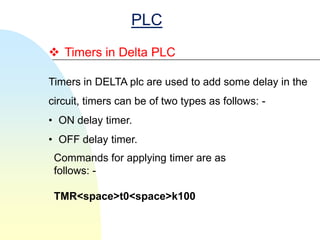
 Timers in Delta PLC

Timers in DELTA plc are used to add some delay in the
circuit, timers can be of two types as follows: -
• ON delay timer.
• OFF delay timer.
 Commands for applying timer are as
 follows: -

 TMR<space>t0<space>k100
PLC
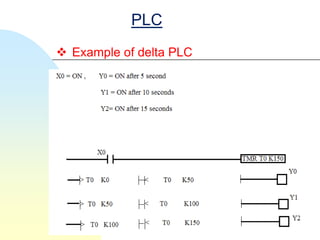
 Example of delta PLC
PLC
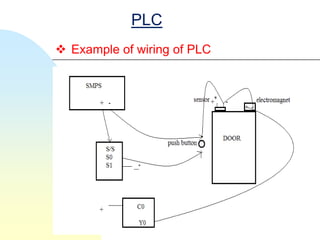
 WIRING OF PLC

• The operating voltage of plc is 220v (Ac) / 24v
  (dc)/10v (dc). The operating voltage of plc is 220v
  (Ac) / 24v (dc)/10v (dc).


Components used in wiring of plc are: -
• SMPS- Switch Mode Power Supply
• OUTPUT- Y0 ,C0
• SOURCE/SINK (S/S)- S0,S1.........
PLC

      COMPONENTS

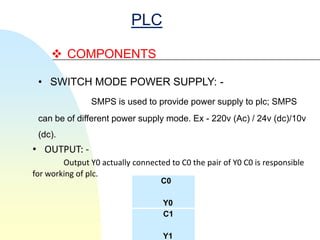
 • SWITCH MODE POWER SUPPLY: -
                SMPS is used to provide power supply to plc; SMPS
 can be of different power supply mode. Ex - 220v (Ac) / 24v (dc)/10v
 (dc).
• OUTPUT: -
        Output Y0 actually connected to C0 the pair of Y0 C0 is responsible
for working of plc.
                                   C0

                                    Y0
                                    C1

                                    Y1
PLC
 Example of wiring of PLC
PLC
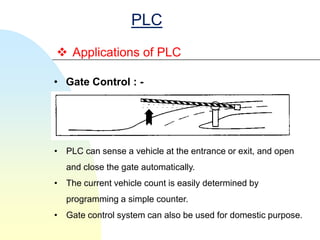
 Applications of PLC

• Gate Control : -


• PLC can sense a vehicle at the entrance or exit, and open
  and close the gate automatically.
• The current vehicle count is easily determined by
  programming a simple counter.
• Gate control system can also be used for domestic purpose.
PLC
 Applications of PLC

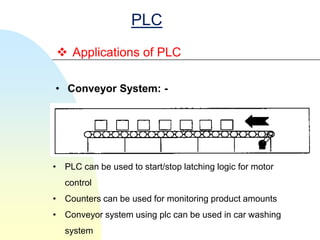
• Conveyor System: -


• PLC can be used to start/stop latching logic for motor
   control
• Counters can be used for monitoring product amounts
• Conveyor system using plc can be used in car washing
   system
VFD
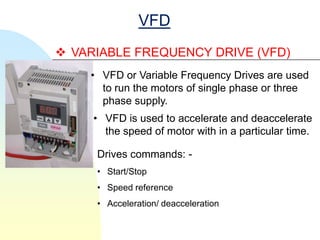
 VARIABLE FREQUENCY DRIVE (VFD)
    • VFD or Variable Frequency Drives are used
      to run the motors of single phase or three
      phase supply.
     • VFD is used to accelerate and deaccelerate
       the speed of motor with in a particular time.

     Drives commands: -
     • Start/Stop
     • Speed reference
     • Acceleration/ deacceleration
VFD
 Parameters of VFD
P = 2—00 = 0 (digital keypad)
                      = 3 (potentiometer on drive)
            P = 2—01 = 0 (digital keypad)
                      = 1 (external terminal) / keypad stop/enable
                      = 2 (external terminal)/keypad stop/disable
START/STOP command
                     = 0 (on board)
                    = 1 (ext M0=forward, M1= reverse)
                   = 3(M0=forward, M1= reverse, M2=stop)
          P = 1—09 = acceleration time
         P = 1—10 = deacceleration time
VFD
     Advantages of VFD

• Dynamic braking : -Dynamic braking stops the
   system more quickly than coasting
• Highly efficient
• Low power consumption
• Small space consumption
• Low cost
• Easy to use
• Highly specific
SCADA
              SCADA System
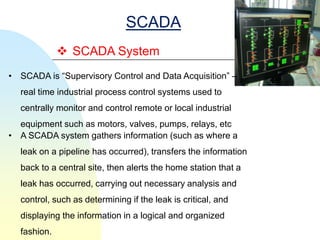
• SCADA is ―Supervisory Control and Data Acquisition‖ –
  real time industrial process control systems used to
  centrally monitor and control remote or local industrial
  equipment such as motors, valves, pumps, relays, etc
• A SCADA system gathers information (such as where a
  leak on a pipeline has occurred), transfers the information
  back to a central site, then alerts the home station that a
  leak has occurred, carrying out necessary analysis and
  control, such as determining if the leak is critical, and
  displaying the information in a logical and organized
  fashion.
SCADA
 Why SCADA?

• Saves Time and Money
    •   Less traveling for workers (e.g. helicopter
        ride)
    •   Reduces man-power needs
    •   Increases production efficiency of a
        company
    •   Cost effective for power systems
    •   Saves energy
•   Reliable
•   Supervisory control over a particular system
HMI
 HUMAN MACHINE INTERFACE (HMI)

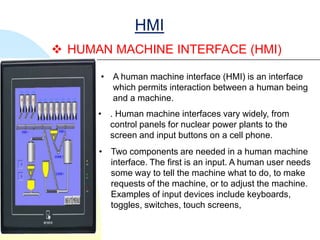
      • A human machine interface (HMI) is an interface
        which permits interaction between a human being
        and a machine.
      • . Human machine interfaces vary widely, from
        control panels for nuclear power plants to the
        screen and input buttons on a cell phone.
      • Two components are needed in a human machine
        interface. The first is an input. A human user needs
        some way to tell the machine what to do, to make
        requests of the machine, or to adjust the machine.
        Examples of input devices include keyboards,
        toggles, switches, touch screens,

automation slides,plc,scada,HMI

  • 2.
    AUTOMATION  What is AUTOMATION ? • As the name suggest ―Automation‖ means to perform automatic operations by means of different kinds of machines. • Automation is the use of control systems and information technologies to reduce the need for human work in the production of goods and services. In the scope of industrialization, automation is a step beyond mechanization. • It is used to reduce human interference and an efforts.
  • 3.
    AUTOMATION  Tools of Automation • Programmable Logic Controller (PLC) • Supervisory Control And Data Acquisition (SCADA) • Human Machine Interface (HMI) or Touch Screen (TS) • Variable Frequency Drive (VFD)
  • 4.
    AUTOMATION  ADVANTAGES : ~ • Replacing human operators in tasks that involve hard physical or monotonous work. • Replacing humans in tasks done in dangerous environments. • Performing tasks that are beyond human capabilities of size, weight, speed, endurance, etc. • Economy improvement: Automation may improve in economy of enterprises, society or most of humanity.
  • 5.
    AUTOMATION  DISADVANTAGES : ~ • Unemployment rate increases due to machines replacing humans and putting those humans out of their jobs. • Technical Limitation • Security Threats • High initial cost.
  • 6.
    PLC What is PLC ? • PLC - programmable logic controller • A Programmable Logic Controller, or PLC for short, is simply a special computer device used for industrial control systems. They are used in many industries such as oil refineries, manufacturing lines, conveyor systems and so on. • PLC implements logic control functions by means of a program.
  • 7.
    PLC  Howdoes a PLC differ from a computer ? • A computer is optimized for calculation and display tasks. • A computer is programmed by specialists • A PLC is designed for (logic) control and regulation tasks. • A PLC is programmed by non-specialists • A PLC is well adapted to industrial environment.
  • 8.
  • 9.
    PLC Components of PLC : ~ 1. Inputs Circuits 2. Outputs Circuits 3. CPU (Central Processing Unit ) 4. Memory for program and data storage 5. Programming device 6. Communication Device 7. Power Supply
  • 10.
    PLC 1. PLC inputs : ~ ANALOG inputs DIGITAL inputs • Pressure Transducer Push buttons • Flow meter Sensors • Thermocouples Selector switches
  • 11.
    PLC PLC outputs : ~ ANALOG outputs DIGITAL outputs • Mass flow controller • LED’s • Pressure regulator • Small motors • Position controller • Relays
  • 12.
    PLC  Memoryfor program and data storage : ~ Memories used: - • RAM – Random access memory  Volatile  Made up of metal oxide semiconductor  lose it's information if power is removed. • ROM – Read only memory  Non-volatile  don't need an external power source to keep information
  • 13.
    PLC Power Supply : ~ • A power supply of 120v ac is typically used to drive the PLC (some units operate on 240v ac). • The power supply converts the 120v ac into dc voltages of +5v. • These low voltages are used to operate equipment that many have much higher voltage and power ratings than the PLC itself.
  • 14.
    PLC  Programming In PLC :~ Languages used in PLC for the purpose of programming are 1. Ladder language 2. Functional Block Diagram (FBD) 3. Instructional List (IL) 4. Drive Functional Block (DFB) 5. Structural test language
  • 15.
    PLC  Ladderlanguage used in PLC programming There are two PLC in which ladder programming is used : - • ZELIO PLC : - It uses Zelio soft 2 software for the programming. • DELTA PLC : - It uses WPL soft software for their programming.
  • 16.
    PLC  ZELIOPLC The software’s used for different types of Zelio PLC’s are as follows:- • Zelio 1- non expandable- zelio soft 1 • Zelio 2- non expandable- zelio soft 2 • Zelio 3- expandable- zelio soft 2
  • 17.
    PLC  Parameters used in Zelio and delta PLC in ladder programming Parameters ZELIO plc DELTA plc Inputs In Xn Outputs Qn Yn NC of input NO of input Timer Tt1, t1 command has to be provided (e.g.- TMR T0 k150)
  • 18.
    PLC  Zeliosoft 2 ladder programming The various parameters used in zelio soft 2 while operating ladder program and their relationship amongst them are as follows:- • INPUT CONTACT • OUTPUT CONTACT • INTERLOCKING • MEMORY COIL • LATCHING • TIMER • COUNTER
  • 19.
    PLC  INPUTAND OUTPUT CONTACT • Inputs in Zelio soft 2 is represented by I1, I2, I3,I5,I6. • Inputs are further classified as: -  NORMALLY CLOSED  NORMALLY OPEN
  • 20.
    PLC  Examples forNormally open contact
  • 21.
    PLC  Example ofNormally closed contact
  • 22.
    PLC  INTERLOCKING • Interlocking means to interlock something by placing NC of coil or input in front. The concept of interlocking reduces the complexity in PLC programming • Interlocking in ladder programming means whenever we want to off some output by input or any type coil, then we have to place NC of that input or a coil in front of output which we want to off.
  • 23.
    PLC  Example ofInterlocking
  • 24.
    PLC  MEMORY COIL • Memory coil in ladder programming is used for reversing the contacts whenever coil is get energized. • In ladder programming memory coil is represented by M1 and its contact is represented by m1. • When memory coil M1 gets the signal it gets energized and then it reverses the terminal of its contact m1 which reverses the operation.
  • 25.
    PLC  Example ofMemory coil
  • 26.
    PLC  When memorycoil gets energized
  • 27.
    PLC  LATCHING •Latching is the process in which once output or a coil is energized it remains energized forever. Latching is done by the contact of output or coil which we want to switch ON permanently.
  • 28.
    PLC  When contactI1 is turned ON
  • 29.
    PLC  TIMER • Timeris basically used add some delay in the programming circuit by adding a particular time to each circuit. Types of timers : - • ON delay timer • OFF delay timer
  • 30.
  • 31.
    PLC  COUNTER • Counter is same as timer. Counter works on the method of counting the number of pulse. Types of counter : - • UP counter- UP counter counts in increment order. Ex . 1, 2, 4….n. • DOWN counter- DOWN counter counts in decrement order. Ex. 5,4,3,2,1
  • 32.
    PLC  DELTAPLC • It is high-speed, stable and highly reliable PLC's are applied in various automation machines. • it is totally similar to zelio plc programming but the specifications of DELTA plc are different from zelio plc as shown above. • In DELTA plc memory space has been allotted according to the types of plc.
  • 33.
    PLC  Timers inDelta PLC Timers in DELTA plc are used to add some delay in the circuit, timers can be of two types as follows: - • ON delay timer. • OFF delay timer. Commands for applying timer are as follows: - TMR<space>t0<space>k100
  • 34.
  • 35.
    PLC  WIRING OFPLC • The operating voltage of plc is 220v (Ac) / 24v (dc)/10v (dc). The operating voltage of plc is 220v (Ac) / 24v (dc)/10v (dc). Components used in wiring of plc are: - • SMPS- Switch Mode Power Supply • OUTPUT- Y0 ,C0 • SOURCE/SINK (S/S)- S0,S1.........
  • 36.
    PLC  COMPONENTS • SWITCH MODE POWER SUPPLY: - SMPS is used to provide power supply to plc; SMPS can be of different power supply mode. Ex - 220v (Ac) / 24v (dc)/10v (dc). • OUTPUT: - Output Y0 actually connected to C0 the pair of Y0 C0 is responsible for working of plc. C0 Y0 C1 Y1
  • 37.
    PLC  Example ofwiring of PLC
  • 38.
    PLC  Applications ofPLC • Gate Control : - • PLC can sense a vehicle at the entrance or exit, and open and close the gate automatically. • The current vehicle count is easily determined by programming a simple counter. • Gate control system can also be used for domestic purpose.
  • 39.
    PLC  Applications ofPLC • Conveyor System: - • PLC can be used to start/stop latching logic for motor control • Counters can be used for monitoring product amounts • Conveyor system using plc can be used in car washing system
  • 40.
    VFD  VARIABLE FREQUENCYDRIVE (VFD) • VFD or Variable Frequency Drives are used to run the motors of single phase or three phase supply. • VFD is used to accelerate and deaccelerate the speed of motor with in a particular time. Drives commands: - • Start/Stop • Speed reference • Acceleration/ deacceleration
  • 41.
    VFD  Parameters ofVFD P = 2—00 = 0 (digital keypad) = 3 (potentiometer on drive) P = 2—01 = 0 (digital keypad) = 1 (external terminal) / keypad stop/enable = 2 (external terminal)/keypad stop/disable START/STOP command = 0 (on board) = 1 (ext M0=forward, M1= reverse) = 3(M0=forward, M1= reverse, M2=stop) P = 1—09 = acceleration time P = 1—10 = deacceleration time
  • 42.
    VFD  Advantages of VFD • Dynamic braking : -Dynamic braking stops the system more quickly than coasting • Highly efficient • Low power consumption • Small space consumption • Low cost • Easy to use • Highly specific
  • 43.
    SCADA  SCADA System • SCADA is ―Supervisory Control and Data Acquisition‖ – real time industrial process control systems used to centrally monitor and control remote or local industrial equipment such as motors, valves, pumps, relays, etc • A SCADA system gathers information (such as where a leak on a pipeline has occurred), transfers the information back to a central site, then alerts the home station that a leak has occurred, carrying out necessary analysis and control, such as determining if the leak is critical, and displaying the information in a logical and organized fashion.
  • 44.
    SCADA  Why SCADA? •Saves Time and Money • Less traveling for workers (e.g. helicopter ride) • Reduces man-power needs • Increases production efficiency of a company • Cost effective for power systems • Saves energy • Reliable • Supervisory control over a particular system
  • 45.
    HMI  HUMAN MACHINEINTERFACE (HMI) • A human machine interface (HMI) is an interface which permits interaction between a human being and a machine. • . Human machine interfaces vary widely, from control panels for nuclear power plants to the screen and input buttons on a cell phone. • Two components are needed in a human machine interface. The first is an input. A human user needs some way to tell the machine what to do, to make requests of the machine, or to adjust the machine. Examples of input devices include keyboards, toggles, switches, touch screens,