
 Automation
 PLC
 What is PLC
 History
 Elements of PLC
 Advantages & Disadvantages
 Applications
 SCADA
 What is SCADA
 History
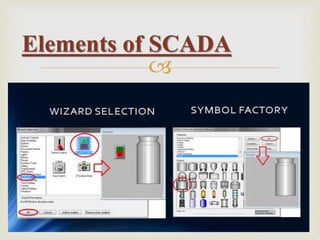
 Elements of SCADA
 Advantages & Disadvantages
 Applications
CONTENTS

AUTOMATION

 Automation is derived from Greek words Auto (self)
& Matos (moving)
 Making products under the control of computers &
programmable controllers
 It is used to reduce human interface
What is Automation

 Programmable logic controller (PLC)
 Supervisory control and data acquisition(SCADA)
 Human machine interface (HMI)
 Robotics
 Distributed control systems (DCS)
Tools of Automation

 Increased productivity
 Improved quality
 Reduce direct human labor
 Reduces operation time
 Increased consistency of output
Advantages

 Security threats / vulnerability
 High initial cost
 Unpredictable development cost
Disadvantages

PLC
(Programmable
Logic
Controller)

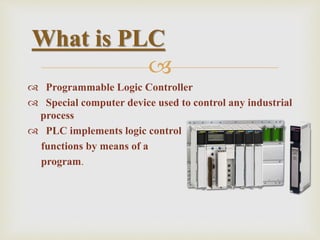
 Programmable Logic Controller
 Special computer device used to control any industrial
process
 PLC implements logic control
functions by means of a
program.
What is PLC

 Before PLCs the only way to control machinery was
through the use of relays
 To control a motor , relays are used
 To control a machinery , a large no. of relays are used
 If any one relay have issues, the whole system would
not work
 To overcome these problems PLCs were introduced
Need for PLC

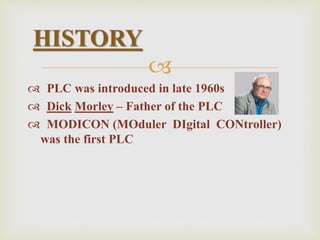
 PLC was introduced in late 1960s
 Dick Morley – Father of the PLC
 MODICON (MOduler DIgital CONtroller)
was the first PLC
HISTORY
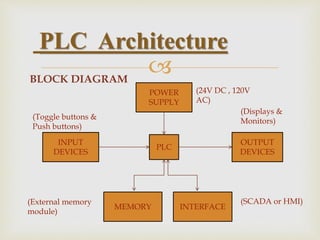
BLOCK DIAGRAM
PLC Architecture
PLC
MEMORY INTERFACE
INPUT
DEVICES
OUTPUT
DEVICES
POWER
SUPPLY
(Toggle buttons &
Push buttons)
(External memory
module)
(24V DC , 120V
AC)
(Displays &
Monitors)
(SCADA or HMI)

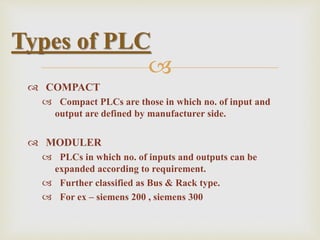
 COMPACT
 Compact PLCs are those in which no. of input and
output are defined by manufacturer side.
 MODULER
 PLCs in which no. of inputs and outputs can be
expanded according to requirement.
 Further classified as Bus & Rack type.
 For ex – siemens 200 , siemens 300
Types of PLC

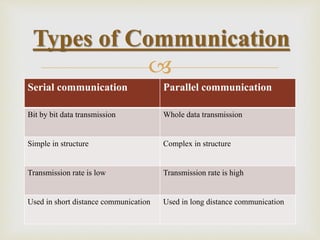
Serial communication Parallel communication
Bit by bit data transmission Whole data transmission
Simple in structure Complex in structure
Transmission rate is low Transmission rate is high
Used in short distance communication Used in long distance communication
Types of Communication

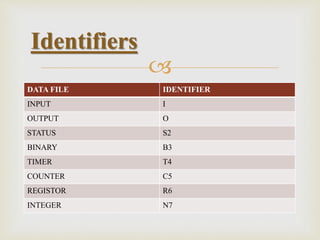
Identifiers
DATA FILE IDENTIFIER
INPUT I
OUTPUT O
STATUS S2
BINARY B3
TIMER T4
COUNTER C5
REGISTOR R6
INTEGER N7

 Ladder logic (LD)
 Function block diagram (FBD)
 Statement list (ST)
 Instruction list (IL)
 Structure list (STL)
Languages in PLC

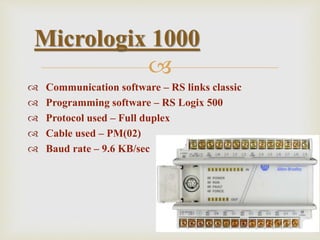
 Communication software – RS links classic
 Programming software – RS Logix 500
 Protocol used – Full duplex
 Cable used – PM(02)
 Baud rate – 9.6 KB/sec
Micrologix 1000

 FOR INPUT
 --[ ]-- {EXAMIN IF CLOSED}
 --[/]-- {EXAMINE IF OPEN }
 FOR OUTPUT
 --( )-- Output{OTE}
 --(L)-- Output latch{OTL}
 --(U)-- Output unlatch{OTU}
Symbols used in PLC

 It provide time delays
 They need continuous power supply
 Addressing of timers
 Identifier : Timer number
 Bits of timer
 Enable (EN) bit
 Done (DN) bit
 Timer time (TT)bit
 Micrologix 1000 has its own 40 timers
Timers

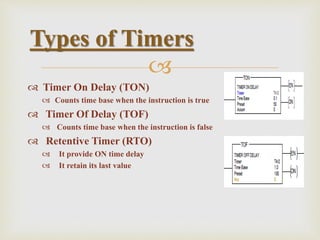
 Timer On Delay (TON)
 Counts time base when the instruction is true
 Timer Of Delay (TOF)
 Counts time base when the instruction is false
 Retentive Timer (RTO)
 It provide ON time delay
 It retain its last value
Types of Timers

 Counters doesn’t need continuous power supply
 Counters depends on pulse/count/click
 Addressing of counters
 Identifier : Counter number
 BITS OF COUNTER
 Counter up (CU)/ Counter down (CD) bit
 Overflow (OV)/ Underflow (UN) bit
 Done (DN) bit
Counters

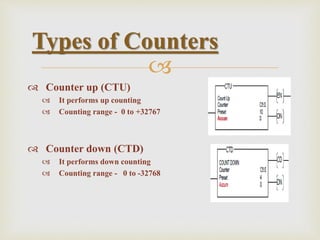
 Counter up (CTU)
 It performs up counting
 Counting range - 0 to +32767
 Counter down (CTD)
 It performs down counting
 Counting range - 0 to -32768
Types of Counters

 Reliable
 Communication ability
 Accuracy
 Speed of operation
 Easy to operate
Advantages

 Initial cost is high
 PLC devices part or software of one manufacturer
can’t be used in communication with parts of another
manufacturer
 Limited designs , Fixed circuits
Disadvantages

 Car park control
 Train control station
 Conveyer system
 Robot manufacturing and control
 Traffic lights
Applications

SCADA
(Supervisory
Control &
Data Acquisition)

 SCADA stands for Supervisory Control And Data
Acquisition
 It is a software to control any running industrial
process
 It is software used to monitor the running industrial
process
What is SCADA

 Wonderware – InTouch
 Rockwell - RS View32
 Siemens - winCC
 GE - Intellation
SCADA Software

Elements of SCADA

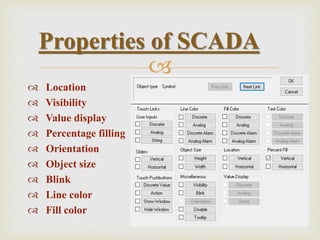
 Location
 Visibility
 Value display
 Percentage filling
 Orientation
 Object size
 Blink
 Line color
 Fill color
Properties of SCADA

 Window script
 Recipe management
 Security
 Alarms
 Database connectivity
 Real time trends
Features of SCADA

 Every SCADA software has various levels of security
for securing the application by avoiding unauthorized
access
 Depending upon the access level given the
operator/engineers is allowed to do the task. In most of
the cases, operators are allowed only to operate the
plant while maintenance engineers can do the
application modifications
 The security can be given for individual as well as for
groups
Security

 In many cases we use the same plant for
manufacturing different product range. For example
an oil blending plant can manufacture power oil,
transformer oil, automobile oil.
 The recipe management is facility used for maintain
various recipes of different products and implement it
on the process
 The recipe can be stored in a single server and it can be
fetched by any client server from any area to run the
process
Recipe Management

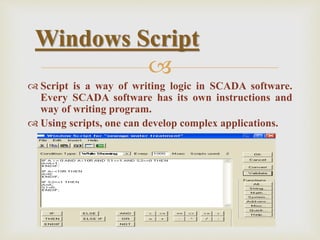
 Script is a way of writing logic in SCADA software.
Every SCADA software has its own instructions and
way of writing program.
 Using scripts, one can develop complex applications.
Windows Script

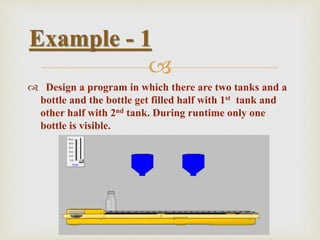
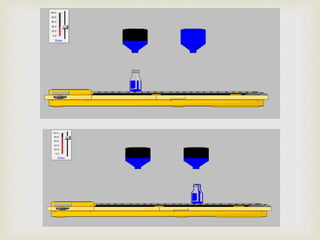
 Design a program in which there are two tanks and a
bottle and the bottle get filled half with 1st tank and
other half with 2nd tank. During runtime only one
bottle is visible.
Example - 1


 Saves Time and Money
 Less traveling for workers (e.g. helicopter ride)
 Reduces man-power needs
 Increases production efficiency of a company
 Cost effective for power systems
 Saves energy
 Reliable
 Supervisory control over a particular system
Advantages of SCADA

 Multiple excess point
 Chances of external interference (Hacking)
 Complex system
Disadvantages

 Security systems
 Transportation
 Water treatment
 Manufacturing
 Electric power generation
Applications

THANK YOU

PLC AND SCADA

  • 2.
      Automation  PLC What is PLC  History  Elements of PLC  Advantages & Disadvantages  Applications  SCADA  What is SCADA  History  Elements of SCADA  Advantages & Disadvantages  Applications CONTENTS
  • 3.
  • 4.
      Automation isderived from Greek words Auto (self) & Matos (moving)  Making products under the control of computers & programmable controllers  It is used to reduce human interface What is Automation
  • 5.
      Programmable logiccontroller (PLC)  Supervisory control and data acquisition(SCADA)  Human machine interface (HMI)  Robotics  Distributed control systems (DCS) Tools of Automation
  • 6.
      Increased productivity Improved quality  Reduce direct human labor  Reduces operation time  Increased consistency of output Advantages
  • 7.
      Security threats/ vulnerability  High initial cost  Unpredictable development cost Disadvantages
  • 8.
  • 9.
      Programmable LogicController  Special computer device used to control any industrial process  PLC implements logic control functions by means of a program. What is PLC
  • 10.
      Before PLCsthe only way to control machinery was through the use of relays  To control a motor , relays are used  To control a machinery , a large no. of relays are used  If any one relay have issues, the whole system would not work  To overcome these problems PLCs were introduced Need for PLC
  • 11.
      PLC wasintroduced in late 1960s  Dick Morley – Father of the PLC  MODICON (MOduler DIgital CONtroller) was the first PLC HISTORY
  • 12.
    BLOCK DIAGRAM PLC Architecture PLC MEMORYINTERFACE INPUT DEVICES OUTPUT DEVICES POWER SUPPLY (Toggle buttons & Push buttons) (External memory module) (24V DC , 120V AC) (Displays & Monitors) (SCADA or HMI)
  • 13.
      COMPACT  CompactPLCs are those in which no. of input and output are defined by manufacturer side.  MODULER  PLCs in which no. of inputs and outputs can be expanded according to requirement.  Further classified as Bus & Rack type.  For ex – siemens 200 , siemens 300 Types of PLC
  • 14.
     Serial communication Parallelcommunication Bit by bit data transmission Whole data transmission Simple in structure Complex in structure Transmission rate is low Transmission rate is high Used in short distance communication Used in long distance communication Types of Communication
  • 15.
     Identifiers DATA FILE IDENTIFIER INPUTI OUTPUT O STATUS S2 BINARY B3 TIMER T4 COUNTER C5 REGISTOR R6 INTEGER N7
  • 16.
      Ladder logic(LD)  Function block diagram (FBD)  Statement list (ST)  Instruction list (IL)  Structure list (STL) Languages in PLC
  • 17.
      Communication software– RS links classic  Programming software – RS Logix 500  Protocol used – Full duplex  Cable used – PM(02)  Baud rate – 9.6 KB/sec Micrologix 1000
  • 18.
      FOR INPUT --[ ]-- {EXAMIN IF CLOSED}  --[/]-- {EXAMINE IF OPEN }  FOR OUTPUT  --( )-- Output{OTE}  --(L)-- Output latch{OTL}  --(U)-- Output unlatch{OTU} Symbols used in PLC
  • 19.
      It providetime delays  They need continuous power supply  Addressing of timers  Identifier : Timer number  Bits of timer  Enable (EN) bit  Done (DN) bit  Timer time (TT)bit  Micrologix 1000 has its own 40 timers Timers
  • 20.
      Timer OnDelay (TON)  Counts time base when the instruction is true  Timer Of Delay (TOF)  Counts time base when the instruction is false  Retentive Timer (RTO)  It provide ON time delay  It retain its last value Types of Timers
  • 21.
      Counters doesn’tneed continuous power supply  Counters depends on pulse/count/click  Addressing of counters  Identifier : Counter number  BITS OF COUNTER  Counter up (CU)/ Counter down (CD) bit  Overflow (OV)/ Underflow (UN) bit  Done (DN) bit Counters
  • 22.
      Counter up(CTU)  It performs up counting  Counting range - 0 to +32767  Counter down (CTD)  It performs down counting  Counting range - 0 to -32768 Types of Counters
  • 23.
      Reliable  Communicationability  Accuracy  Speed of operation  Easy to operate Advantages
  • 24.
      Initial costis high  PLC devices part or software of one manufacturer can’t be used in communication with parts of another manufacturer  Limited designs , Fixed circuits Disadvantages
  • 25.
      Car parkcontrol  Train control station  Conveyer system  Robot manufacturing and control  Traffic lights Applications
  • 26.
  • 27.
      SCADA standsfor Supervisory Control And Data Acquisition  It is a software to control any running industrial process  It is software used to monitor the running industrial process What is SCADA
  • 28.
      Wonderware –InTouch  Rockwell - RS View32  Siemens - winCC  GE - Intellation SCADA Software
  • 29.
  • 30.
      Location  Visibility Value display  Percentage filling  Orientation  Object size  Blink  Line color  Fill color Properties of SCADA
  • 31.
      Window script Recipe management  Security  Alarms  Database connectivity  Real time trends Features of SCADA
  • 32.
      Every SCADAsoftware has various levels of security for securing the application by avoiding unauthorized access  Depending upon the access level given the operator/engineers is allowed to do the task. In most of the cases, operators are allowed only to operate the plant while maintenance engineers can do the application modifications  The security can be given for individual as well as for groups Security
  • 33.
      In manycases we use the same plant for manufacturing different product range. For example an oil blending plant can manufacture power oil, transformer oil, automobile oil.  The recipe management is facility used for maintain various recipes of different products and implement it on the process  The recipe can be stored in a single server and it can be fetched by any client server from any area to run the process Recipe Management
  • 34.
      Script isa way of writing logic in SCADA software. Every SCADA software has its own instructions and way of writing program.  Using scripts, one can develop complex applications. Windows Script
  • 35.
      Design aprogram in which there are two tanks and a bottle and the bottle get filled half with 1st tank and other half with 2nd tank. During runtime only one bottle is visible. Example - 1
  • 36.
  • 37.
      Saves Timeand Money  Less traveling for workers (e.g. helicopter ride)  Reduces man-power needs  Increases production efficiency of a company  Cost effective for power systems  Saves energy  Reliable  Supervisory control over a particular system Advantages of SCADA
  • 38.
      Multiple excesspoint  Chances of external interference (Hacking)  Complex system Disadvantages
  • 39.
      Security systems Transportation  Water treatment  Manufacturing  Electric power generation Applications
  • 40.