PITR made easy


       Joshua Drake
 United States PostgreSQL
Software in the Public Interest
   Command Prompt, Inc.
What is PITR


Log shipping/Warm Standby/Replication
What can you do with it?


Simple asynchornous failover scenarios
         Low impact backups
           Simple archivals
What can't you do with it?


       Read only slave
Why is PITR hard?


It was written by open source engineers.
Uses the many tools to one solution


               rsync?
                nfs?
              walmgr?
                scp?
            Push or pull?
           Something else?
What makes PITR easy?


           PITR tools
          BSD Licensed
         Written in Python
   (theoretically cross platform)
What is PITRTools


A simple wrapper around all the utilities you
              already have.

     ssh,rsync,pg_standby,postgresql
Features?


       Warm standby
        Cold Storage
   Fail over (actionable)
Arbitrary alerts (monitoring)
How does it work?


               success
Master                       Slave
                 else


                Queue
The process on the archiver/master

On the archiver/Master:
 ● Configure ssh key for postgres user to


   standby/slave
 ● Configure archiver.ini

 ● cmd_archiver -C /path/to/archiver.ini -I

 ● Edit the postgresql.conf change:

   ● archive_mode to on

   ● archive_command to:

     ● cmd_archiver -C /path/to/archiver.ini -F %p

   ● restart postgresql

   ● apply cmd_standby.sql to database of pitr user


     (usually postgres)
     ● psql -U postgres < /path/to/cmd_standby/sql
The archiver


The archiver calls cmd_archive.py which calls rsync to “push” the
file to the slave or queue.

Usage: cmd_archiver [options] arg1 arg2

Options:
  -h, --help            show this help message and exit
  -F FILE, --file=FILE Archive file
  -C FILE, --config=FILE
                        the name of the archiver config file
  -f, --flush           Flush all remaining archives to slave
  -I, --init            Initialize master environment
The archiver config file


            Useful but obvious parameters


[DEFAULT]
state: online
pgdata: /var/lib/postgresql/8.3/main
rsync_bin: /usr/bin/rsync
rsync_version = 2 # Because RH ships old software
user: postgres
timeout: 10
debug: on
ssh_debug: off
The “other” archiver options


r_archivedir: /var/lib/postgresql/archive
l_archivedir: /var/lib/postgresql/archive
rsync_version = 2
slaves: 192.168.1.201,192.168.1.202
notify_ok: /var/lib/postgresql/etc/archiver_ok.sh
notify_warning: /var/lib/postgresql/etc/archiver_warning.sh
notify_critical: /var/lib/postgresql/etc/archiver_critical.sh
cmd_standby.py

   Works in conjunction with pg_standby
   Supports failover
   Supports recovery to a point in time
   Included with 8.3, available for 8.1 and 8.2 (8.1
    is flaky)
The process on the slave


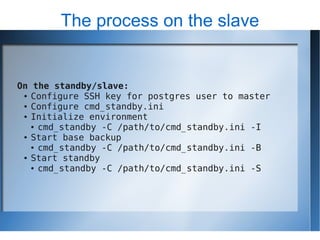
On the standby/slave:
 ● Configure SSH key for postgres user to master

 ● Configure cmd_standby.ini

 ● Initialize environment

   ● cmd_standby -C /path/to/cmd_standby.ini -I

 ● Start base backup

   ● cmd_standby -C /path/to/cmd_standby.ini -B

 ● Start standby

   ● cmd_standby -C /path/to/cmd_standby.ini -S
The standby configuration

[DEFAULT]
pgversion: 8.2
numarchives: 10
ssh: /usr/bin/ssh
rsync: /usr/bin/rsync
pg_standby: /usr/lib/postgresql/8.3/bin/pg_standby
pg_ctl: /usr/lib/postgresql/8.3/bin/pg_ctl
r_psql: /usr/lib/postgresql/8.3/bin/psql
port: 6000
master_public_ip: 192.168.3.254
master_local_ip: 127.0.0.1
user: postgres
debug: off
ssh_timeout: 30
Configuring the standby cont...


archivedir: /data2/pgsql/archive/
pgdata: /data1/pgsql/data/
postgresql_conf: /var/lib/postgresql/etc/postgresql.conf
pg_hba_conf: /var/lib/postgresql/etc/pg_hba.conf
notify_critical: /var/lib/postgresql/etc/standby_critical.sh
notify_warning: /var/lib/postgresql/etc/standby_warning.sh
notify_ok: /var/lib/postgresql/etc/standby_ok.sh
action_failover: /var/lib/postgresql/pitr_tools/failover.sh
Start the standby

Usage: cmd_standby [options] arg1 arg2

Options:
  -h, --help            show this help message and exit
  -A start|stop, --action=start|stop|stop_basebackup
                        Start or Stop PostgreSQL
  -B, --basebackup      Start/Stop a base backup
  -C FILE, --config=FILE
                        Name of the archiver config file
  -F VALUE, --failover=VALUE
                        If you are serious, set -F999
  -I, --dbinit          Use before -B
  -P, --ping            Is my master alive?
  -R TIMESTAMP, --recovertotime=TIMESTAMP
                        To restore to a specific point in time
  -S, --standby         Enter standby mode
Is the archiver working?
Is the standby is working?
How do I?

   Use PITRTools to simplify backups?
   Take the archiver offline?
   Configure send_nsca (nagios) for alerts
   Donate to PostgreSQL?
Simplify backups

On the standby/slave:



       cmd_standby -C
        /var/lib/postgresql/etc/cmd_standby.ini -Astop
       tar -czvf /backups/database.`date +%a`.tar.gz
        /var/lib/pgsql/data
       cmd_standby -C
        /var/lib/postgresql/etc/cmd_standby.ini -S


You could also use rsync with a network volume to make
the backup more efficient (after stopping the standby)
Take the archiver offline

   Edit /var/lib/postgresql/etc/cmd_archiver.ini
    [DEFAULT]
    ; online or offline
    state: offline


     When you are ready to bring it back online, just change to
         online. No restarts on archiver or standby required.
Configure send_nsca

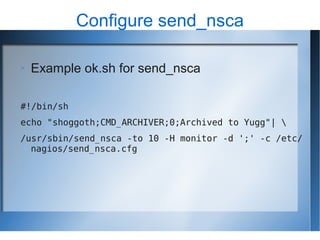
   Example ok.sh for send_nsca

#!/bin/sh
echo "shoggoth;CMD_ARCHIVER;0;Archived to Yugg"| 
/usr/sbin/send_nsca -to 10 -H monitor -d ';' -c /etc/
  nagios/send_nsca.cfg
Donate to PostgreSQL

   For United States PostgreSQL:
     https://www.postgresql.us/donate

   For PostgreSQL Generally:
     http://www.postgresql.org/about/donate
Questions


  Hit me

configuring a warm standby, the easy way

  • 1.
    PITR made easy Joshua Drake United States PostgreSQL Software in the Public Interest Command Prompt, Inc.
  • 2.
    What is PITR Logshipping/Warm Standby/Replication
  • 3.
    What can youdo with it? Simple asynchornous failover scenarios Low impact backups Simple archivals
  • 4.
    What can't youdo with it? Read only slave
  • 5.
    Why is PITRhard? It was written by open source engineers.
  • 6.
    Uses the manytools to one solution rsync? nfs? walmgr? scp? Push or pull? Something else?
  • 7.
    What makes PITReasy? PITR tools BSD Licensed Written in Python (theoretically cross platform)
  • 8.
    What is PITRTools Asimple wrapper around all the utilities you already have. ssh,rsync,pg_standby,postgresql
  • 9.
    Features? Warm standby Cold Storage Fail over (actionable) Arbitrary alerts (monitoring)
  • 10.
    How does itwork? success Master Slave else Queue
  • 11.
    The process onthe archiver/master On the archiver/Master: ● Configure ssh key for postgres user to standby/slave ● Configure archiver.ini ● cmd_archiver -C /path/to/archiver.ini -I ● Edit the postgresql.conf change: ● archive_mode to on ● archive_command to: ● cmd_archiver -C /path/to/archiver.ini -F %p ● restart postgresql ● apply cmd_standby.sql to database of pitr user (usually postgres) ● psql -U postgres < /path/to/cmd_standby/sql
  • 12.
    The archiver The archivercalls cmd_archive.py which calls rsync to “push” the file to the slave or queue. Usage: cmd_archiver [options] arg1 arg2 Options: -h, --help show this help message and exit -F FILE, --file=FILE Archive file -C FILE, --config=FILE the name of the archiver config file -f, --flush Flush all remaining archives to slave -I, --init Initialize master environment
  • 13.
    The archiver configfile Useful but obvious parameters [DEFAULT] state: online pgdata: /var/lib/postgresql/8.3/main rsync_bin: /usr/bin/rsync rsync_version = 2 # Because RH ships old software user: postgres timeout: 10 debug: on ssh_debug: off
  • 14.
    The “other” archiveroptions r_archivedir: /var/lib/postgresql/archive l_archivedir: /var/lib/postgresql/archive rsync_version = 2 slaves: 192.168.1.201,192.168.1.202 notify_ok: /var/lib/postgresql/etc/archiver_ok.sh notify_warning: /var/lib/postgresql/etc/archiver_warning.sh notify_critical: /var/lib/postgresql/etc/archiver_critical.sh
  • 15.
    cmd_standby.py  Works in conjunction with pg_standby  Supports failover  Supports recovery to a point in time  Included with 8.3, available for 8.1 and 8.2 (8.1 is flaky)
  • 16.
    The process onthe slave On the standby/slave: ● Configure SSH key for postgres user to master ● Configure cmd_standby.ini ● Initialize environment ● cmd_standby -C /path/to/cmd_standby.ini -I ● Start base backup ● cmd_standby -C /path/to/cmd_standby.ini -B ● Start standby ● cmd_standby -C /path/to/cmd_standby.ini -S
  • 17.
    The standby configuration [DEFAULT] pgversion:8.2 numarchives: 10 ssh: /usr/bin/ssh rsync: /usr/bin/rsync pg_standby: /usr/lib/postgresql/8.3/bin/pg_standby pg_ctl: /usr/lib/postgresql/8.3/bin/pg_ctl r_psql: /usr/lib/postgresql/8.3/bin/psql port: 6000 master_public_ip: 192.168.3.254 master_local_ip: 127.0.0.1 user: postgres debug: off ssh_timeout: 30
  • 18.
    Configuring the standbycont... archivedir: /data2/pgsql/archive/ pgdata: /data1/pgsql/data/ postgresql_conf: /var/lib/postgresql/etc/postgresql.conf pg_hba_conf: /var/lib/postgresql/etc/pg_hba.conf notify_critical: /var/lib/postgresql/etc/standby_critical.sh notify_warning: /var/lib/postgresql/etc/standby_warning.sh notify_ok: /var/lib/postgresql/etc/standby_ok.sh action_failover: /var/lib/postgresql/pitr_tools/failover.sh
  • 19.
    Start the standby Usage:cmd_standby [options] arg1 arg2 Options: -h, --help show this help message and exit -A start|stop, --action=start|stop|stop_basebackup Start or Stop PostgreSQL -B, --basebackup Start/Stop a base backup -C FILE, --config=FILE Name of the archiver config file -F VALUE, --failover=VALUE If you are serious, set -F999 -I, --dbinit Use before -B -P, --ping Is my master alive? -R TIMESTAMP, --recovertotime=TIMESTAMP To restore to a specific point in time -S, --standby Enter standby mode
  • 20.
  • 21.
    Is the standbyis working?
  • 22.
    How do I?  Use PITRTools to simplify backups?  Take the archiver offline?  Configure send_nsca (nagios) for alerts  Donate to PostgreSQL?
  • 23.
    Simplify backups On thestandby/slave:   cmd_standby -C /var/lib/postgresql/etc/cmd_standby.ini -Astop  tar -czvf /backups/database.`date +%a`.tar.gz /var/lib/pgsql/data  cmd_standby -C /var/lib/postgresql/etc/cmd_standby.ini -S You could also use rsync with a network volume to make the backup more efficient (after stopping the standby)
  • 24.
    Take the archiveroffline  Edit /var/lib/postgresql/etc/cmd_archiver.ini [DEFAULT] ; online or offline state: offline When you are ready to bring it back online, just change to online. No restarts on archiver or standby required.
  • 25.
    Configure send_nsca  Example ok.sh for send_nsca #!/bin/sh echo "shoggoth;CMD_ARCHIVER;0;Archived to Yugg"| /usr/sbin/send_nsca -to 10 -H monitor -d ';' -c /etc/ nagios/send_nsca.cfg
  • 26.
    Donate to PostgreSQL  For United States PostgreSQL:  https://www.postgresql.us/donate  For PostgreSQL Generally:  http://www.postgresql.org/about/donate
  • 27.