Software Packaging for
Cross OS Distribution
Build Debian Package in Container for Example
Jian-Hong Pan (StarNight)
@ COSCUP 2019
Outline
● History
● Packaging tools
● Have a Debian in a
Container
● Hello World Example
○ Prepare
○ Build
○ Install
● Advanced Example
○ nvidia-graphics-drivers
○ Don’t use root by default
● Infrastructure as Code
○ Script by Dockerfile
○ Code, Config, Data
● Docker to Podman
● Further Usage …
Who am I
潘建宏 / Jian-Hong Pan (StarNight)
Work in Endless Mobile now.
You can find me at ~
http://www.slideshare.net/chienhungpan/
GitHub : starnight
Email : starnight [AT] g.ncu.edu.tw
History
● Used Red Hat, then Ubuntu for few years, then ...
● [TOSSUG] Debian 套件打包工作坊 / Debian packaging
workshop (1) ~ 11 in 2015
● Packaging Workshop by Shih-Yuan Lee in DebConf 2018
○ Debian Package
But I use Arch Linux,
not Debian based distribution
教練,我好想打 球 包 package!
I still need to build debian package
How to build deb on none Debian based?
● Creating packages for other distributions
○ dpkg, devscripts, debootstrap … are in AUR, except quilt
○ No isolation (user space) and messes up my computer (not clean)
● Virtual Machine
○ Debian in a VM. It works, but heavy.
● Container
○ Light weight, but frustrates me in some procedure. Try to accomplish it.
Use docker as the container tool
(temporarily)
$ systemctl start docker
Debian Releases
● stable
○ The stable distribution contains the latest officially released distribution of
Debian.
○ The current "stable" distribution of Debian is version 10, codenamed
buster.
● testing
○ The testing distribution contains packages that haven't been accepted
into a stable release yet, but they are in the queue for that.
○ The current "testing" distribution is bullseye.
● unstable
○ The unstable distribution is where active development of Debian occurs.
○ The "unstable" distribution is always called sid.
Reference: Debian Releases
Let’s Play with Latest Environment
● debian on docker hub
● Have the docker image
○ $ docker pull debian:sid
○ $ docker run -it --name test debian:sid bash
root@4e45f0e12843:/#
$ docker run --help
Usage: docker run [OPTIONS] IMAGE [COMMAND] [ARG...]
Run a command in a new container
Options:
...
-i, --interactive Keep STDIN open even if not attached
…
--name string Assign a name to the container
...
-t, --tty Allocate a pseudo-TTY
● Have an isolated debian environment with root now
The APT Source List
● The apt source list:
# cat /etc/apt/sources.list
deb http://deb.debian.org/debian sid main
● Update and upgrade packages:
○ # apt update -y && apt upgrade -y
● Install some packages
○ # apt install vim -y
Install Debian Package Tools
● # apt install debhelper devscripts build-essential -y --no-install-recommends
● # apt search debhelper
debhelper/unstable,now 12.1.1 all [installed]
helper programs for debian/rules
● # apt search devscripts
devscripts/unstable,now 2.19.5 amd64 [installed]
scripts to make the life of a Debian Package maintainer easier
● # apt search build-essential
build-essential/unstable,now 12.6 amd64 [installed]
Informational list of build-essential packages
If you do not plan to build Debian packages, you don't need this package.
Starting with dpkg (>= 1.14.18) this package is required for building Debian
packages.
Start from a Simple Hello World Package
1. Have a working directory
a. # mkdir -p ~/helloworld/helloworld-0.1 && cd ~/helloworld/helloworld-0.1
2. Get source code
a. # vim helloworld
#!/bin/sh
echo "Hello world!"
echo "Now is "`date`
Debian Source Package
+
Original
upstream
code
debian/
…
...
3. debian package configuration - debian/control
a. # mkdir debian && vim debian/control
Source: helloworld
Maintainer: Real Name <Real E-mail address>
Section: misc
Priority: extra
Standards-Version: 4.3.0
Package: helloworld
Architecture: all
Description: Simple hello world
4. Have the build script - debian/rules
a. # cp /usr/share/doc/debhelper/examples/rules.tiny debian/rules
5. Where to install the application - debian/install
a. # echo $'helloworldt/usr/bin/' > debian/install
6. debhelper compatibility level - debian/compat
a. # echo 10 > debian/compat
7. Write the change log - debian/changelog
a. # dch --create --package helloworld -v 0.1 -D experimental
helloworld (0.1) experimental; urgency=medium
* Initial release.
-- Real Name <Real E-mail address> Sun, 09 Jun 2019 08:04:23 +0000
8. Build deb package
a. # dpkg-buildpackage -rfakeroot -uc -us
Install the Built deb Package
● Install
# cd ~ && dpkg -i ~/helloworld/helloworld_0.1_all.deb
● List the installed package
# dpkg -l | grep helloworld
ii helloworld 0.1 all Simple hello world
● Test
# helloworld
Hello world!
Now is Sun Jun 9 09:38:29 UTC 2019
Try to modify existed package
nvidia-graphics-drivers for example
nvidia-graphics-drivers Source Package
1. # mkdir ~/nvidia && cd ~/nvidia
2. # apt source nvidia-graphics-drivers
Reading package lists... Done
E: You must put some 'source' URIs in your sources.list
3. # cat /etc/apt/sources.list
# deb http://snapshot.debian.org/archive/debian/2019... sid main
deb http://deb.debian.org/debian sid main ??
nvdia-graphics-drivers in non-free component
Add Source Entry and Component
1. Edit source.list:
# vim /etc/apt/sources.list
deb http://deb.debian.org/debian sid main contrib non-free
deb-src http://deb.debian.org/debian sid main contrib non-free
2. Update list of available packages
# apt update
nvidia-graphics-drivers source package
# cd ~/nvidia && apt source nvidia-graphics-drivers
Reading package lists... Done
NOTICE: 'nvidia-graphics-drivers' packaging is maintained in the 'Git' version control system at:
https://salsa.debian.org/nvidia-team/nvidia-graphics-drivers.git
Please use:
git clone https://salsa.debian.org/nvidia-team/nvidia-graphics-drivers.git
to retrieve the latest (possibly unreleased) updates to the package.
Need to get 107 MB of source archives.
Get:1 http://deb.debian.org/debian sid/non-free nvidia-graphics-drivers 418.74-1 (dsc) [6624 B]
Get:2 http://deb.debian.org/debian sid/non-free nvidia-graphics-drivers 418.74-1 (tar) [107 MB]
Get:3 http://deb.debian.org/debian sid/non-free nvidia-graphics-drivers 418.74-1 (tar) [137 B]
Get:4 http://deb.debian.org/debian sid/non-free nvidia-graphics-drivers 418.74-1 (diff) [186 kB]
Fetched 107 MB in 32s (3322 kB/s)
dpkg-source: info: extracting nvidia-graphics-drivers in nvidia-graphics-drivers-418.74
dpkg-source: info: unpacking nvidia-graphics-drivers_418.74.orig.tar.gz
dpkg-source: info: unpacking nvidia-graphics-drivers_418.74.orig-amd64.tar.gz
dpkg-source: info: unpacking nvidia-graphics-drivers_418.74-1.debian.tar.xz
W: Download is performed unsandboxed as root as file 'nvidia-graphics-drivers_418.74-1.dsc' couldn't be
accessed by user '_apt'. - pkgAcquire::Run (13: Permission denied)
See helloworld Building Message Again
root@4e45f0e12843:~/helloworld/helloworld-0.1# dpkg-buildpackage -rfakeroot -uc -us
dpkg-buildpackage: warning: using a gain-root-command while being root
dpkg-buildpackage: info: source package helloworld
dpkg-buildpackage: info: source version 0.1
dpkg-buildpackage: info: source distribution experimental
dpkg-buildpackage: info: source changed by Jian-Hong Pan <starnight@g.ncu.edu.tw>
dpkg-buildpackage: info: host architecture amd64
…
“Do not” use as root by default in container!!!
Add a New User
1. Sudo: execute a command as another user
a. # apt install sudo
2. Add a new user, and change to it
a. # useradd -m -G sudo <user name> && passwd <user name>
b. # sudo -u <user name> sh
3. Have the helloworld again
a. $ sudo cp -r /root/helloworld ~/
b. $ cd ~
c. $ sudo chown -R <user name>:<user name> helloworld
4. Build the packages with new user again
a. $ cd helloworld/helloworld-0.1 && dpkg-buildpackage -rfakeroot -uc -us
Wrap up! Infrastructure as Code!
Dockerfile
Dockerfile
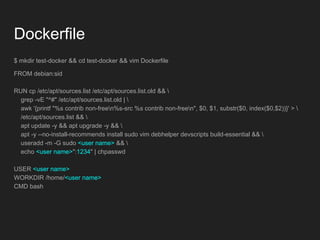
$ mkdir test-docker && cd test-docker && vim Dockerfile
FROM debian:sid
RUN cp /etc/apt/sources.list /etc/apt/sources.list.old && 
grep -vE "^#" /etc/apt/sources.list.old | 
awk '{printf "%s contrib non-freen%s-src %s contrib non-freen", $0, $1, substr($0, index($0,$2))}' > 
/etc/apt/sources.list && 
apt update -y && apt upgrade -y && 
apt -y --no-install-recommends install sudo vim debhelper devscripts build-essential && 
useradd -m -G sudo <user name> && 
echo <user name>":1234" | chpasswd
USER <user name>
WORKDIR /home/<user name>
CMD bash
Have a Container from Dockerfile
1. Build image from the Dockerfile
$ docker build -t $(id -nu)/debian . --no-cache
$ docker build --help
Usage: docker build [OPTIONS] PATH | URL | -
Build an image from a Dockerfile
Options:
...
--no-cache Do not use cache when building the image
...
-t, --tag list Name and optionally a tag in the
2. Run a container with the image as a base
$ docker run -it --name mycontainer $(id -nu)/debian bash
Code
Config Data
In Container
Out Container
Mount Host user’s HOME to Container
Before mount host user’s HOME directory:
● File’s owner and group must be the same for inside and
outside container
● Grant privileges to general user in container
Final Dockerfile
FROM debian:sid
ARG USER_NAME
ARG USER_ID
ARG GROUP_NAME
ARG GROUP_ID
RUN cp /etc/apt/sources.list /etc/apt/sources.list.old && 
grep -vE "^#" /etc/apt/sources.list.old | 
awk '{printf "%s contrib non-freen%s-src %s contrib non-freen", $0, $1, substr($0, index($0,$2))}' > 
/etc/apt/sources.list && 
apt update -y && apt upgrade -y && 
apt -y --no-install-recommends install sudo vim debhelper devscripts build-essential && 
apt clean && 
echo "set number" >> /etc/vim/vimrc && 
groupadd -g ${GROUP_ID} ${GROUP_NAME} && 
useradd -g ${GROUP_NAME} -G sudo -u ${USER_ID} ${USER_NAME} && 
echo ${USER_NAME}":1234" | chpasswd && 
rm /etc/localtime && 
ln -s /usr/share/zoneinfo/Asia/Taipei /etc/localtime
USER ${USER_NAME}
CMD bash
Also Pass Arguments to Dockerfile
$ docker build --build-arg USER_ID=$(id -u) --build-arg GROUP_ID=$(id -g)
--build-arg USER_NAME=$(id -nu) --build-arg GROUP_NAME=$(id -ng) -t $(id
-nu)/debian . --no-cache
$ docker build --help
Usage: docker build [OPTIONS] PATH | URL | -
Build an image from a Dockerfile
Options:
…
--build-arg list Set build-time variables
Run as User and Mount Host Folder
$ docker run -it -v ~:/home/$(id -nu) -w /home/$(id -nu) --user $(id -nu) --name
mycontainer $(id -nu)/debian bash
$ docker run --help
Usage: docker run [OPTIONS] IMAGE [COMMAND] [ARG...]
Run a command in a new container
Options:
…
-u, --user string Username or UID (format: <name|uid>[:<group|gid>])
…
-v, --volume list Bind mount a volume
…
-w, --workdir string Working directory inside the container
Use Podman instead of docker
● Podman is a daemonless container engine for developing,
managing, and running OCI Containers on your Linux
System.
● Containers can either be run as root or in rootless mode.
● `alias docker=podman`
● All of the commands mentioned above, the “docker” can
be changed to “podman” directly.
● Replacing Docker With Podman by Dan Walsh (video)
● Podman 介紹 by Gene Kuo
Reference: https://podman.io/
CI & CD
Customized
Packaging
Environment
Packaging script
Package
Source Code
Container
Code 進得去,
Submit code,
Package 出得來,
Get package,
大家一起開源發大財!
Open Source enriches your life!
Keep True Freedom
Reference
● Packaging
● Introduction to Debian Packaging
● Building tutorial
● Debian Packaging Tutorial by Lucas Nussbaum
● Podman
Software Packaging for Cross OS Distribution

Software Packaging for Cross OS Distribution

  • 1.
    Software Packaging for CrossOS Distribution Build Debian Package in Container for Example Jian-Hong Pan (StarNight) @ COSCUP 2019
  • 2.
    Outline ● History ● Packagingtools ● Have a Debian in a Container ● Hello World Example ○ Prepare ○ Build ○ Install ● Advanced Example ○ nvidia-graphics-drivers ○ Don’t use root by default ● Infrastructure as Code ○ Script by Dockerfile ○ Code, Config, Data ● Docker to Podman ● Further Usage …
  • 3.
    Who am I 潘建宏/ Jian-Hong Pan (StarNight) Work in Endless Mobile now. You can find me at ~ http://www.slideshare.net/chienhungpan/ GitHub : starnight Email : starnight [AT] g.ncu.edu.tw
  • 4.
    History ● Used RedHat, then Ubuntu for few years, then ... ● [TOSSUG] Debian 套件打包工作坊 / Debian packaging workshop (1) ~ 11 in 2015 ● Packaging Workshop by Shih-Yuan Lee in DebConf 2018 ○ Debian Package
  • 5.
    But I useArch Linux, not Debian based distribution 教練,我好想打 球 包 package! I still need to build debian package
  • 6.
    How to builddeb on none Debian based? ● Creating packages for other distributions ○ dpkg, devscripts, debootstrap … are in AUR, except quilt ○ No isolation (user space) and messes up my computer (not clean) ● Virtual Machine ○ Debian in a VM. It works, but heavy. ● Container ○ Light weight, but frustrates me in some procedure. Try to accomplish it.
  • 7.
    Use docker asthe container tool (temporarily) $ systemctl start docker
  • 8.
    Debian Releases ● stable ○The stable distribution contains the latest officially released distribution of Debian. ○ The current "stable" distribution of Debian is version 10, codenamed buster. ● testing ○ The testing distribution contains packages that haven't been accepted into a stable release yet, but they are in the queue for that. ○ The current "testing" distribution is bullseye. ● unstable ○ The unstable distribution is where active development of Debian occurs. ○ The "unstable" distribution is always called sid. Reference: Debian Releases
  • 9.
    Let’s Play withLatest Environment ● debian on docker hub ● Have the docker image ○ $ docker pull debian:sid ○ $ docker run -it --name test debian:sid bash root@4e45f0e12843:/# $ docker run --help Usage: docker run [OPTIONS] IMAGE [COMMAND] [ARG...] Run a command in a new container Options: ... -i, --interactive Keep STDIN open even if not attached … --name string Assign a name to the container ... -t, --tty Allocate a pseudo-TTY ● Have an isolated debian environment with root now
  • 10.
    The APT SourceList ● The apt source list: # cat /etc/apt/sources.list deb http://deb.debian.org/debian sid main ● Update and upgrade packages: ○ # apt update -y && apt upgrade -y ● Install some packages ○ # apt install vim -y
  • 11.
    Install Debian PackageTools ● # apt install debhelper devscripts build-essential -y --no-install-recommends ● # apt search debhelper debhelper/unstable,now 12.1.1 all [installed] helper programs for debian/rules ● # apt search devscripts devscripts/unstable,now 2.19.5 amd64 [installed] scripts to make the life of a Debian Package maintainer easier ● # apt search build-essential build-essential/unstable,now 12.6 amd64 [installed] Informational list of build-essential packages If you do not plan to build Debian packages, you don't need this package. Starting with dpkg (>= 1.14.18) this package is required for building Debian packages.
  • 12.
    Start from aSimple Hello World Package 1. Have a working directory a. # mkdir -p ~/helloworld/helloworld-0.1 && cd ~/helloworld/helloworld-0.1 2. Get source code a. # vim helloworld #!/bin/sh echo "Hello world!" echo "Now is "`date`
  • 13.
  • 14.
    3. debian packageconfiguration - debian/control a. # mkdir debian && vim debian/control Source: helloworld Maintainer: Real Name <Real E-mail address> Section: misc Priority: extra Standards-Version: 4.3.0 Package: helloworld Architecture: all Description: Simple hello world 4. Have the build script - debian/rules a. # cp /usr/share/doc/debhelper/examples/rules.tiny debian/rules 5. Where to install the application - debian/install a. # echo $'helloworldt/usr/bin/' > debian/install
  • 15.
    6. debhelper compatibilitylevel - debian/compat a. # echo 10 > debian/compat 7. Write the change log - debian/changelog a. # dch --create --package helloworld -v 0.1 -D experimental helloworld (0.1) experimental; urgency=medium * Initial release. -- Real Name <Real E-mail address> Sun, 09 Jun 2019 08:04:23 +0000 8. Build deb package a. # dpkg-buildpackage -rfakeroot -uc -us
  • 16.
    Install the Builtdeb Package ● Install # cd ~ && dpkg -i ~/helloworld/helloworld_0.1_all.deb ● List the installed package # dpkg -l | grep helloworld ii helloworld 0.1 all Simple hello world ● Test # helloworld Hello world! Now is Sun Jun 9 09:38:29 UTC 2019
  • 17.
    Try to modifyexisted package nvidia-graphics-drivers for example
  • 18.
    nvidia-graphics-drivers Source Package 1.# mkdir ~/nvidia && cd ~/nvidia 2. # apt source nvidia-graphics-drivers Reading package lists... Done E: You must put some 'source' URIs in your sources.list 3. # cat /etc/apt/sources.list # deb http://snapshot.debian.org/archive/debian/2019... sid main deb http://deb.debian.org/debian sid main ?? nvdia-graphics-drivers in non-free component
  • 19.
    Add Source Entryand Component 1. Edit source.list: # vim /etc/apt/sources.list deb http://deb.debian.org/debian sid main contrib non-free deb-src http://deb.debian.org/debian sid main contrib non-free 2. Update list of available packages # apt update
  • 20.
    nvidia-graphics-drivers source package #cd ~/nvidia && apt source nvidia-graphics-drivers Reading package lists... Done NOTICE: 'nvidia-graphics-drivers' packaging is maintained in the 'Git' version control system at: https://salsa.debian.org/nvidia-team/nvidia-graphics-drivers.git Please use: git clone https://salsa.debian.org/nvidia-team/nvidia-graphics-drivers.git to retrieve the latest (possibly unreleased) updates to the package. Need to get 107 MB of source archives. Get:1 http://deb.debian.org/debian sid/non-free nvidia-graphics-drivers 418.74-1 (dsc) [6624 B] Get:2 http://deb.debian.org/debian sid/non-free nvidia-graphics-drivers 418.74-1 (tar) [107 MB] Get:3 http://deb.debian.org/debian sid/non-free nvidia-graphics-drivers 418.74-1 (tar) [137 B] Get:4 http://deb.debian.org/debian sid/non-free nvidia-graphics-drivers 418.74-1 (diff) [186 kB] Fetched 107 MB in 32s (3322 kB/s) dpkg-source: info: extracting nvidia-graphics-drivers in nvidia-graphics-drivers-418.74 dpkg-source: info: unpacking nvidia-graphics-drivers_418.74.orig.tar.gz dpkg-source: info: unpacking nvidia-graphics-drivers_418.74.orig-amd64.tar.gz dpkg-source: info: unpacking nvidia-graphics-drivers_418.74-1.debian.tar.xz W: Download is performed unsandboxed as root as file 'nvidia-graphics-drivers_418.74-1.dsc' couldn't be accessed by user '_apt'. - pkgAcquire::Run (13: Permission denied)
  • 21.
    See helloworld BuildingMessage Again root@4e45f0e12843:~/helloworld/helloworld-0.1# dpkg-buildpackage -rfakeroot -uc -us dpkg-buildpackage: warning: using a gain-root-command while being root dpkg-buildpackage: info: source package helloworld dpkg-buildpackage: info: source version 0.1 dpkg-buildpackage: info: source distribution experimental dpkg-buildpackage: info: source changed by Jian-Hong Pan <starnight@g.ncu.edu.tw> dpkg-buildpackage: info: host architecture amd64 … “Do not” use as root by default in container!!!
  • 22.
    Add a NewUser 1. Sudo: execute a command as another user a. # apt install sudo 2. Add a new user, and change to it a. # useradd -m -G sudo <user name> && passwd <user name> b. # sudo -u <user name> sh 3. Have the helloworld again a. $ sudo cp -r /root/helloworld ~/ b. $ cd ~ c. $ sudo chown -R <user name>:<user name> helloworld 4. Build the packages with new user again a. $ cd helloworld/helloworld-0.1 && dpkg-buildpackage -rfakeroot -uc -us
  • 23.
    Wrap up! Infrastructureas Code! Dockerfile
  • 24.
    Dockerfile $ mkdir test-docker&& cd test-docker && vim Dockerfile FROM debian:sid RUN cp /etc/apt/sources.list /etc/apt/sources.list.old && grep -vE "^#" /etc/apt/sources.list.old | awk '{printf "%s contrib non-freen%s-src %s contrib non-freen", $0, $1, substr($0, index($0,$2))}' > /etc/apt/sources.list && apt update -y && apt upgrade -y && apt -y --no-install-recommends install sudo vim debhelper devscripts build-essential && useradd -m -G sudo <user name> && echo <user name>":1234" | chpasswd USER <user name> WORKDIR /home/<user name> CMD bash
  • 25.
    Have a Containerfrom Dockerfile 1. Build image from the Dockerfile $ docker build -t $(id -nu)/debian . --no-cache $ docker build --help Usage: docker build [OPTIONS] PATH | URL | - Build an image from a Dockerfile Options: ... --no-cache Do not use cache when building the image ... -t, --tag list Name and optionally a tag in the 2. Run a container with the image as a base $ docker run -it --name mycontainer $(id -nu)/debian bash
  • 26.
  • 27.
    Mount Host user’sHOME to Container Before mount host user’s HOME directory: ● File’s owner and group must be the same for inside and outside container ● Grant privileges to general user in container
  • 28.
    Final Dockerfile FROM debian:sid ARGUSER_NAME ARG USER_ID ARG GROUP_NAME ARG GROUP_ID RUN cp /etc/apt/sources.list /etc/apt/sources.list.old && grep -vE "^#" /etc/apt/sources.list.old | awk '{printf "%s contrib non-freen%s-src %s contrib non-freen", $0, $1, substr($0, index($0,$2))}' > /etc/apt/sources.list && apt update -y && apt upgrade -y && apt -y --no-install-recommends install sudo vim debhelper devscripts build-essential && apt clean && echo "set number" >> /etc/vim/vimrc && groupadd -g ${GROUP_ID} ${GROUP_NAME} && useradd -g ${GROUP_NAME} -G sudo -u ${USER_ID} ${USER_NAME} && echo ${USER_NAME}":1234" | chpasswd && rm /etc/localtime && ln -s /usr/share/zoneinfo/Asia/Taipei /etc/localtime USER ${USER_NAME} CMD bash
  • 29.
    Also Pass Argumentsto Dockerfile $ docker build --build-arg USER_ID=$(id -u) --build-arg GROUP_ID=$(id -g) --build-arg USER_NAME=$(id -nu) --build-arg GROUP_NAME=$(id -ng) -t $(id -nu)/debian . --no-cache $ docker build --help Usage: docker build [OPTIONS] PATH | URL | - Build an image from a Dockerfile Options: … --build-arg list Set build-time variables
  • 30.
    Run as Userand Mount Host Folder $ docker run -it -v ~:/home/$(id -nu) -w /home/$(id -nu) --user $(id -nu) --name mycontainer $(id -nu)/debian bash $ docker run --help Usage: docker run [OPTIONS] IMAGE [COMMAND] [ARG...] Run a command in a new container Options: … -u, --user string Username or UID (format: <name|uid>[:<group|gid>]) … -v, --volume list Bind mount a volume … -w, --workdir string Working directory inside the container
  • 31.
    Use Podman insteadof docker ● Podman is a daemonless container engine for developing, managing, and running OCI Containers on your Linux System. ● Containers can either be run as root or in rootless mode. ● `alias docker=podman` ● All of the commands mentioned above, the “docker” can be changed to “podman” directly. ● Replacing Docker With Podman by Dan Walsh (video) ● Podman 介紹 by Gene Kuo Reference: https://podman.io/
  • 32.
    CI & CD Customized Packaging Environment Packagingscript Package Source Code Container
  • 33.
    Code 進得去, Submit code, Package出得來, Get package, 大家一起開源發大財! Open Source enriches your life!
  • 34.
  • 35.
    Reference ● Packaging ● Introductionto Debian Packaging ● Building tutorial ● Debian Packaging Tutorial by Lucas Nussbaum ● Podman