Protecting your data with Patroni and pgBackRest
PGDay Russia 2021
Federico Campoli
Somewhere in the time vortex
Federico Campoli Protecting your data with Patroni and pgBackRest Somewhere in the time vortex 1 / 59
Few words about the speaker
Born in 1972
Passionate about IT since 1982
Joined the Oracle DBA secret society in 2004
In love with PostgreSQL since 2006
PostgreSQL tattoo on the right shoulder
Freelance devops and data engineer
Federico Campoli Protecting your data with Patroni and pgBackRest Somewhere in the time vortex 2 / 59
Getting in touch
Blog: https://pgdba.org
Twitter: @4thdoctor scarf
Github: https://github.com/the4thdoctor
Linkedin: https://www.linkedin.com/in/federicocampoli/
Youtube: https://www.youtube.com/c/FedericoCampoli
Federico Campoli Protecting your data with Patroni and pgBackRest Somewhere in the time vortex 3 / 59
Table of contents
1 Greetings, programs!
2 The grid
3 The light cycle maze
4 End of line
5 I fight for the users
Federico Campoli Protecting your data with Patroni and pgBackRest Somewhere in the time vortex 4 / 59
Greetings, programs!
Copyright Walt Disney LTD
Image source
https://liveforfilms.wordpress.com/2009/07/09/greetings-program-tron-2-synopsis/
Federico Campoli Protecting your data with Patroni and pgBackRest Somewhere in the time vortex 5 / 59
PostgreSQL
https://www.postgresql.org/
Enteprise class RDBMS
ACID compliant
HA and DR
With one tiny little catch...
No built in mechanism for automating backups or failover
Federico Campoli Protecting your data with Patroni and pgBackRest Somewhere in the time vortex 6 / 59
Some PostgreSQL auto failover options
B.Y.O.T, shell script, manually operated, Cthulhu summoning...
Automated with third party tools
repmgr
pg auto failover
PostgreSQL Automatic Failover (PAF)
Patroni
Federico Campoli Protecting your data with Patroni and pgBackRest Somewhere in the time vortex 7 / 59
Patroni
https://github.com/zalando/patroni
Patroni is an auto failover system developed in python by Zalando.
The tool relies on a distributed consensus store (DCS) to maintain the cluster status.
Patroni is available in the pgdg official repository
Federico Campoli Protecting your data with Patroni and pgBackRest Somewhere in the time vortex 8 / 59
Patroni
Developed in Python
Supports for DCS etcd,consul,zookeper
Support for python RAFT (requires pysyncobj module)
Automated boostrap and replica setup
Automated failover/switchover
Centralised configuration for PostgreSQL stored in DCS
Very resilient to split brain
HAProxy or pgbouncer for connection routed via api check
Federico Campoli Protecting your data with Patroni and pgBackRest Somewhere in the time vortex 9 / 59
Caveats
Everything is managed by Patroni
Some parts of the documentation is unclear (yes, standby cluster I’m talking of you)
Client only in interactive mode, you need to build your api call (e.g. via ansible uri
module)
Federico Campoli Protecting your data with Patroni and pgBackRest Somewhere in the time vortex 10 / 59
Some PostgreSQL backup options
logical with pg dump
physical with tools like
pg basebackup
barman
WAL-E/WAL-G
pgBackRest
Federico Campoli Protecting your data with Patroni and pgBackRest Somewhere in the time vortex 11 / 59
pgBackRest
https://pgbackrest.org/
pgBackRest is a simple and reliable solution for automatic the backups.
pgBackRest is a community driven project.
Federico Campoli Protecting your data with Patroni and pgBackRest Somewhere in the time vortex 12 / 59
pgBackRest
Physical backup tool
Implements HA/DR
Differential,incremental and full backup
Parallel jobs configurable
Can backup from the standby servers
Async WAL push and pull
Developed initially in perl now fully migrated to C
ini style configuration
Available in deb/yum pgdg repositories
Cloud backup options GCP/S3/Azure
Multiple repositories configurable
Self contained backup repository
Federico Campoli Protecting your data with Patroni and pgBackRest Somewhere in the time vortex 13 / 59
Caveats
Configuring remote backups via SSH may be complex
Beware of when configuring archive-push-queue-max.
There is the risk of wal files not being archived if the limit is reached.
Federico Campoli Protecting your data with Patroni and pgBackRest Somewhere in the time vortex 14 / 59
The rule of thumb
RTFM
Federico Campoli Protecting your data with Patroni and pgBackRest Somewhere in the time vortex 15 / 59
Advanced pgBackRest
For advanced topics on pgBackRest please check Stefan Fercot’s Talk
Unleash the Power within pgBackRest
https://pgday.ru/en/2021/papers/297
Federico Campoli Protecting your data with Patroni and pgBackRest Somewhere in the time vortex 16 / 59
The grid
Copyright Walt Disney LTD
Image source
https://siftingthroughpatterns.wordpress.com/2012/05/12/why-kevin-flynn-is-the-true-villain-behind-tron-legacy/
Federico Campoli Protecting your data with Patroni and pgBackRest Somewhere in the time vortex 17 / 59
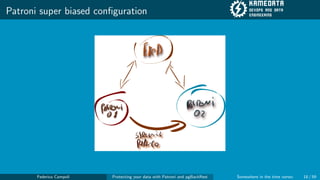
Patroni super biased configuration
Federico Campoli Protecting your data with Patroni and pgBackRest Somewhere in the time vortex 18 / 59
Setup
For our example we’ll use CentOS 7 and a GCP bucket
etcd01
patroni01
patroni02
Federico Campoli Protecting your data with Patroni and pgBackRest Somewhere in the time vortex 19 / 59
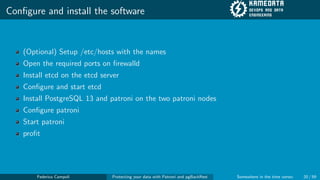
Configure and install the software
(Optional) Setup /etc/hosts with the names
Open the required ports on firewalld
Install etcd on the etcd server
Configure and start etcd
Install PostgreSQL 13 and patroni on the two patroni nodes
Configure patroni
Start patroni
profit
Federico Campoli Protecting your data with Patroni and pgBackRest Somewhere in the time vortex 20 / 59
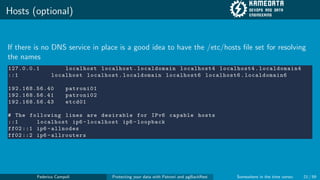
Hosts (optional)
If there is no DNS service in place is a good idea to have the /etc/hosts file set for resolving
the names
127.0.0.1 localhost localhost. localdomain localhost4 localhost4. localdomain4
::1 localhost localhost. localdomain localhost6 localhost6. localdomain6
192.168.56.40 patroni01
192.168.56.41 patroni02
192.168.56.43 etcd01
# The following lines are desirable for IPv6 capable hosts
::1 localhost ip6 -localhost ip6 -loopback
ff02 ::1 ip6 -allnodes
ff02 ::2 ip6 -allrouters
Federico Campoli Protecting your data with Patroni and pgBackRest Somewhere in the time vortex 21 / 59
Firewalld
etcd01
sudo firewall -cmd --permanent --zone=public --add -port =2380/ tcp
sudo firewall -cmd --permanent --zone=public --add -port =2379/ tcp
sudo systemctl reload firewalld
patroni01, patroni02
sudo firewall -cmd --permanent --zone=public --add -port =5432/ tcp
sudo firewall -cmd --permanent --zone=public --add -port =8008/ tcp
sudo systemctl reload firewalld
Federico Campoli Protecting your data with Patroni and pgBackRest Somewhere in the time vortex 22 / 59
etcd01 setup
Install etcd
sudo yum install etcd
Federico Campoli Protecting your data with Patroni and pgBackRest Somewhere in the time vortex 23 / 59
etcd01 setup
Then configure the environment file
/etc/etcd/etcd.conf
ETCD_LISTEN_PEER_URLS="http://192.168.56.43:2380"
ETCD_LISTEN_CLIENT_URLS="http://192.168.56.43:2379"
ETCD_NAME="etcd01"
ETCD_INITIAL_ADVERTISE_PEER_URLS="http://192.168.56.43:2380"
ETCD_ADVERTISE_CLIENT_URLS="http://192.168.56.43:2379"
ETCD_INITIAL_CLUSTER="etcd01=http://192.168.56.43:2380"
ETCD_INITIAL_CLUSTER_STATE=new
Federico Campoli Protecting your data with Patroni and pgBackRest Somewhere in the time vortex 24 / 59
etcd01 setup
Start the service and check the cluster is healty
sudo systemctl start etcd
etcdctl --endpoints "http ://192.168.56.43:2379" cluster -health
member 6 bf749bb3ab16843 is healthy: got healthy result from http
://192.168.56.43:2379
cluster is healthy
Federico Campoli Protecting your data with Patroni and pgBackRest Somewhere in the time vortex 25 / 59
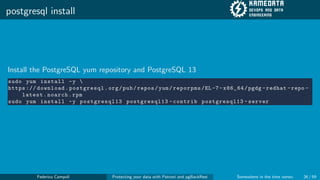
postgresql install
Install the PostgreSQL yum repository and PostgreSQL 13
sudo yum install -y 
https :// download.postgresql.org/pub/repos/yum/reporpms/EL -7- x86_64/pgdg -redhat -repo -
latest.noarch.rpm
sudo yum install -y postgresql13 postgresql13 -contrib postgresql13 -server
Federico Campoli Protecting your data with Patroni and pgBackRest Somewhere in the time vortex 26 / 59
patroni install
Install the epel-release first then patroni and patroni-etcd
sudo yum install -y epel -release
sudo yum install -y patroni patroni -etcd
Federico Campoli Protecting your data with Patroni and pgBackRest Somewhere in the time vortex 27 / 59
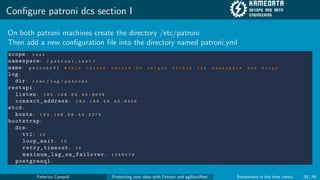
Configure patroni dcs section I
On both patroni machines create the directory /etc/patroni
Then add a new configuration file into the directory named patroni.yml
scope: t e s t
namespace: / p a t r o n i _ t e s t /
name: p a t r o n i 0 1 # t h i s v a l u e s s h o u l d b e u n i q u e w i t h i n t h e n a m e s p a c e a n d s c o p e
log:
dir: / v a r / l o g / p a t r o n i
restapi:
listen: 1 9 2 . 1 6 8 . 5 6 . 4 0 : 8 0 0 8
connect_address: 1 9 2 . 1 6 8 . 5 6 . 4 0 : 8 0 0 8
etcd:
hosts: 1 9 2 . 1 6 8 . 5 6 . 4 3 : 2 3 7 9
bootstrap:
dcs:
ttl: 1 0
loop_wait: 1 0
retry_timeout: 1 0
maximum_lag_on_failover: 1 0 4 8 5 7 6
postgresql:
Federico Campoli Protecting your data with Patroni and pgBackRest Somewhere in the time vortex 28 / 59
Configure patroni dcs section II
use_pg_rewind: t r u e
use_slots: f a l s e
parameters:
wal_level: ’ r e p l i c a ’
archive_mode: ’ o f f ’
unix_socket_directories: ’ / v a r / r u n / p o s t g r e s q l / . ’
method: i n i t d b
initdb: # N o t e : I t n e e d s t o b e a l i s t ( s o m e o p t i o n s n e e d v a l u e s , o t h e r s a r e
s w i t c h e s )
- encoding: U T F 8
- data -checksums
pg_hba: # A d d f o l l o w i n g l i n e s t o p g _ h b a . c o n f a f t e r r u n n i n g ’ i n i t d b ’
- host replication replicator 0.0.0.0/0 md5
- host all all 0.0.0.0/0 md5
users:
Federico Campoli Protecting your data with Patroni and pgBackRest Somewhere in the time vortex 29 / 59
Configure patroni postgresql section I
postgresql:
listen: " * : 5 4 3 2 "
connect_address: p a t r o n i 0 1 : 5 4 3 2 # t h i s i s t h e l o c a l m a c h i n e n a m e , s h o u l d b e s e t
a c c o r d i n g l y
data_dir: / v a r / l i b / p g s q l / d a t a / p o s t g r e s q l 0
bin_dir: / u s r / p g s q l - 1 3 / b i n /
pgpass: / t m p / p g p a s s 0
authentication:
replication:
username: r e p l i c a t o r
password: p o s t g r e s _ r e p l i c a
superuser:
username: p o s t g r e s
password: p o s t g r e s _ s u p e r
rewind: # H a s n o e f f e c t o n p o s t g r e s 1 0 a n d l o w e r
username: r e w i n d _ u s e r
password: p o s t g r e s _ r e w i n d
parameters:
wal_level: ’ r e p l i c a ’
archive_mode: ’ o f f ’
Federico Campoli Protecting your data with Patroni and pgBackRest Somewhere in the time vortex 30 / 59
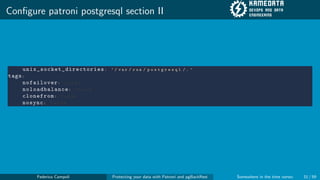
Configure patroni postgresql section II
unix_socket_directories: ’ / v a r / r u n / p o s t g r e s q l / . ’
tags:
nofailover: f a l s e
noloadbalance: f a l s e
clonefrom: f a l s e
nosync: f a l s e
Federico Campoli Protecting your data with Patroni and pgBackRest Somewhere in the time vortex 31 / 59
Create the systemd service file I
In /etc/systemd/system create the file patroni.service
[Unit]
Description=Runners to orchestrate a high-availability PostgreSQL
After=syslog.target network.target
[Service]
Type=simple
User=postgres
Group=postgres
# Read in configuration file if it exists, otherwise proceed
EnvironmentFile=-/etc/patroni_env.conf
WorkingDirectory=/var/lib/pgsql
# Start the patroni process
ExecStart=/bin/patroni /etc/patroni/patroni.yml
Federico Campoli Protecting your data with Patroni and pgBackRest Somewhere in the time vortex 32 / 59
Create the systemd service file II
# Send HUP to reload from patroni.yml
ExecReload=/bin/kill -s HUP $MAINPID
# only kill the patroni process, not it’s children, so it will gracefully stop postgres
KillMode=process
# Give a reasonable amount of time for the server to start up/shut down
TimeoutSec=30
# Do not restart the service if it crashes, we want to manually inspect database on failure
Restart=no
[Install]
WantedBy=multi-user.target
Federico Campoli Protecting your data with Patroni and pgBackRest Somewhere in the time vortex 33 / 59
Enable and start the patroni service
On both patroni machines
sudo systemctl daemon -reload
sudo systemctl enable patroni
sudo systemctl start patroni
Federico Campoli Protecting your data with Patroni and pgBackRest Somewhere in the time vortex 34 / 59
Patroni bootstrap
[ root@patroni01 patroni ]# patronictl -c /etc/patroni/patroni.yml list
+ Cluster: test (6981078877725420504) -----+----+-----------+
| Member | Host | Role | State | TL | Lag in MB |
+-----------+-----------+--------+---------+----+-----------+
| patroni01 | patroni01 | Leader | running | 1 | |
+-----------+-----------+--------+---------+----+-----------+
Federico Campoli Protecting your data with Patroni and pgBackRest Somewhere in the time vortex 35 / 59
Patroni cloning
[ root@patroni01 patroni ]# patronictl -c /etc/patroni/patroni.yml list
+ Cluster: test (6981078877725420504) ------+----+-----------+
| Member | Host | Role | State | TL | Lag in MB |
+-----------+-----------+---------+---------+----+-----------+
| patroni01 | patroni01 | Leader | running | 1 | |
| patroni02 | patroni02 | Replica | running | 1 | 0 |
+-----------+-----------+---------+---------+----+-----------+
Federico Campoli Protecting your data with Patroni and pgBackRest Somewhere in the time vortex 36 / 59
The light cycle maze
Copyright Walt Disney LTD
Image source
https://geektyrant.com/news/the-history-of-the-tron-lightcycle-infographic
Federico Campoli Protecting your data with Patroni and pgBackRest Somewhere in the time vortex 37 / 59
Patroni and pgBackRest
Federico Campoli Protecting your data with Patroni and pgBackRest Somewhere in the time vortex 38 / 59
Configure and install the software
Install pgBackRest on both patroni servers
Create the GCP bucket
Create the shared key json file and grant access to the GCP bucket
Configure pgBackRest for using the GCP bucket
Configure patroni to use pgBackRest
Run the pgBackRest first backup
profit
Federico Campoli Protecting your data with Patroni and pgBackRest Somewhere in the time vortex 39 / 59
Configure pgbackrest
On both patroni machines edit the file /etc/pgbackrest.conf
[global]
repo1-type=gcs
repo1-path=/repo
repo1-gcs-bucket=patroni-pgbackrest
repo1-gcs-key=/etc/gcp_files/gcp-key.json
repo1-retention-full=1
log-level-console=info
log-level-file=debug
log-path=/var/log/patroni/
[test]
pg1-path=/var/lib/pgsql/data/postgresql0
pg1-port=5432
pg1-user=postgres
Federico Campoli Protecting your data with Patroni and pgBackRest Somewhere in the time vortex 40 / 59
Optional, configure .pgpass
If the local login is made with password authentication it may be necessary to configure the
.pgpass file in the PostgreSQL data directory.
patroni01:5432:*:postgres:postgres_super
Federico Campoli Protecting your data with Patroni and pgBackRest Somewhere in the time vortex 41 / 59
Save the gcp-key.json
Create the directory /etc/gcp files and save into it the file gcp-key.json generated by the GCP
console.
Directoy and file must be accessible by the user running pgbackrest.
{
"type": "service_account",
"project_id": "XXXXXXXXXXXXX",
"private_key_id": "XXXXXXXXXXXXX",
"private_key": "-----BEGIN PRIVATE KEY-----
XXXXXXXXXXXXXXXXXXXX
-----END PRIVATE KEY-----
",
"client_email": "XXXXXXXXXXXXX",
"client_id": "XXXXXXXXXXXXX",
"auth_uri": "https://accounts.google.com/o/oauth2/auth",
"token_uri": "https://oauth2.googleapis.com/token",
"auth_provider_x509_cert_url": "https://www.googleapis.com/oauth2/v1/certs",
"client_x509_cert_url": "https://www.googleapis.com/robot/v1/metadata/x509/XXXXXXXXXXXXXXX"
}
Federico Campoli Protecting your data with Patroni and pgBackRest Somewhere in the time vortex 42 / 59
Configure patroni for using pgbackrest
patronictl -c /etc/patroni/patroni.yml edit -config
##add the following lines
postgresql:
parameters:
archive_command : pgbackrest --stanza=test archive -push %p
archive_mode : ’on ’
After saving the command patronictl -c /etc/patroni/patroni.yml list will show the pending
restart status
+ Cluster: test (6981352535078471124) ------+----+-----------+-----------------+
| Member | Host | Role | State | TL | Lag in MB | Pending restart |
+-----------+-----------+---------+---------+----+-----------+-----------------+
| patroni01 | patroni01 | Leader | running | 1 | | * |
| patroni02 | patroni02 | Replica | running | 1 | 0 | * |
+-----------+-----------+---------+---------+----+-----------+-----------------+
Federico Campoli Protecting your data with Patroni and pgBackRest Somewhere in the time vortex 43 / 59
Restart patroni for applying the changes
patronictl -c /etc/patroni/patroni.yml restart test
+ Cluster: test (6981352535078471124) ------+----+-----------+-----------------+
| Member | Host | Role | State | TL | Lag in MB | Pending restart |
+-----------+-----------+---------+---------+----+-----------+-----------------+
| patroni01 | patroni01 | Leader | running | 1 | | * |
| patroni02 | patroni02 | Replica | running | 1 | 0 | * |
+-----------+-----------+---------+---------+----+-----------+-----------------+
When should the restart take place (e.g. 2021 -07 -05 T10 :39) [now]:
Are you sure you want to restart members patroni01 , patroni02? [y/N]: y
Restart if the PostgreSQL version is less than provided (e.g. 9.5.2) []:
Success: restart on member patroni01
Success: restart on member patroni02
Federico Campoli Protecting your data with Patroni and pgBackRest Somewhere in the time vortex 44 / 59
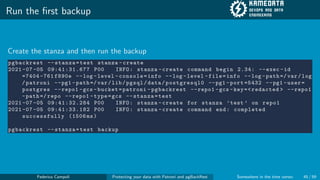
Run the first backup
Create the stanza and then run the backup
pgbackrest --stanza=test stanza -create
2021 -07 -05 09:41:31.677 P00 INFO: stanza -create command begin 2.34: --exec -id
=7404 -761 f890e --log -level -console=info --log -level -file=info --log -path =/ var/log
/patroni --pg1 -path =/var/lib/pgsql/data/postgresql0 --pg1 -port =5432 --pg1 -user=
postgres --repo1 -gcs -bucket=patroni -pgbackrest --repo1 -gcs -key=<redacted > --repo1
-path =/ repo --repo1 -type=gcs --stanza=test
2021 -07 -05 09:41:32.284 P00 INFO: stanza -create for stanza ’test ’ on repo1
2021 -07 -05 09:41:33.182 P00 INFO: stanza -create command end: completed
successfully (1506 ms)
pgbackrest --stanza=test backup
Federico Campoli Protecting your data with Patroni and pgBackRest Somewhere in the time vortex 45 / 59
Check the backup status
pgbackrest info
stanza: test
status: ok
cipher: none
db (current)
wal archive min/max (13): 000000010000000000000004/000000010000000000000004
full backup: 20210705 -145357F
timestamp start/stop: 2021 -07 -05 14:53:57 / 2021 -07 -05 14:54:44
wal start/stop: 000000010000000000000004 / 000000010000000000000004
database size: 24.0MB , database backup size: 24.0 MB
repo1: backup set size: 2.9MB , backup size: 2.9MB
Federico Campoli Protecting your data with Patroni and pgBackRest Somewhere in the time vortex 46 / 59
End of line
Copyright Walt Disney LTD
Image source
https://tron.fandom.com/wiki/Master Control Program
Federico Campoli Protecting your data with Patroni and pgBackRest Somewhere in the time vortex 47 / 59
Recovering from a complete datacenter loss
Install and configure etcd
Install and configure pgBackRest
Install PostgreSQL and patroni
Configure patroni to bootstrap and clone from pgBackRest
Start patroni
profit
Federico Campoli Protecting your data with Patroni and pgBackRest Somewhere in the time vortex 48 / 59
Check the pgbackrest can access the repository
pgbackrest info
stanza: test
status: ok
cipher: none
db (current)
wal archive min/max (13): 000000010000000000000004/000000010000000000000004
full backup: 20210705 -145357F
timestamp start/stop: 2021 -07 -05 14:53:57 / 2021 -07 -05 14:54:44
wal start/stop: 000000010000000000000004 / 000000010000000000000004
database size: 24.0MB , database backup size: 24.0 MB
repo1: backup set size: 2.9MB , backup size: 2.9MB
Federico Campoli Protecting your data with Patroni and pgBackRest Somewhere in the time vortex 49 / 59
Configure the custom bootstrap script for patroni
Create the file /etc/patroni/boot pgbackrest.sh
#!/ usr/bin/env bash
while getopts ": -:" optchar; do
[[ "${optchar }" == "-" ]] || continue
case "${OPTARG }" in
datadir =* )
DATA_DIR=${OPTARG #*=}
;;
scope =* )
SCOPE=${OPTARG #*=}
;;
esac
done
/usr/bin/pgbackrest --stanza=$SCOPE --link -all restore
Make the file executable
Federico Campoli Protecting your data with Patroni and pgBackRest Somewhere in the time vortex 50 / 59
Configure the patroni boostrap section
bootstrap:
.....
postgresql:
use_pg_rewind: t r u e
use_slots: f a l s e
parameters:
wal_level: ’ r e p l i c a ’
archive_mode: ’ o n ’
archive_command: ’ p g b a c k r e s t - - s t a n z a = t e s t a r c h i v e - p u s h % p ’
unix_socket_directories: ’ / v a r / r u n / p o s t g r e s q l / . ’
recovery_conf:
recovery_target_timeline: l a t e s t
restore_command: / u s r / b i n / p g b a c k r e s t - - s t a n z a = t e s t a r c h i v e - g e t % f " % p "
method: p g b a c k r e s t
pgbackrest:
command: / e t c / p a t r o n i / b o o t _ p g b a c k r e s t . s h
keep_existing_recovery_conf: F a l s e
recovery_conf:
recovery_target_timeline: l a t e s t
restore_command: / u s r / b i n / p g b a c k r e s t - - s t a n z a = t e s t a r c h i v e - g e t % f " % p "
Federico Campoli Protecting your data with Patroni and pgBackRest Somewhere in the time vortex 51 / 59
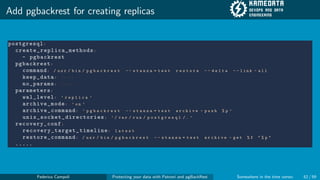
Add pgbackrest for creating replicas
postgresql:
create_replica_methods:
- pgbackrest
pgbackrest:
command: / u s r / b i n / p g b a c k r e s t - - s t a n z a = t e s t r e s t o r e - - d e l t a - - l i n k - a l l
keep_data: T r u e
no_params: T r u e
parameters:
wal_level: ’ r e p l i c a ’
archive_mode: ’ o n ’
archive_command: ’ p g b a c k r e s t - - s t a n z a = t e s t a r c h i v e - p u s h % p ’
unix_socket_directories: ’ / v a r / r u n / p o s t g r e s q l / . ’
recovery_conf:
recovery_target_timeline: l a t e s t
restore_command: / u s r / b i n / p g b a c k r e s t - - s t a n z a = t e s t a r c h i v e - g e t % f " % p "
.....
Federico Campoli Protecting your data with Patroni and pgBackRest Somewhere in the time vortex 52 / 59
Create the empty PGDATA on the patroni machines
mkdir -p /var/lib/pgsql/data/ postgresql0
chown postgres:postgres /var/lib/pgsql/data/ postgresql0
chmod 0700 /var/lib/pgsql/data/postgresql0
Federico Campoli Protecting your data with Patroni and pgBackRest Somewhere in the time vortex 53 / 59
Start patroni and wait for the bootstrap to complete
sudo systemctl start patroni
patronictl -c /etc/patroni/patroni.yml list
+ Cluster: test ( initializing ) ---+---------------------------------+----+-----------+
| Member | Host | Role | State | TL | Lag in MB |
+-----------+-----------+---------+---------------------------------+----+-----------+
| patroni01 | patroni01 | Replica | running custom bootstrap script | | unknown |
+-----------+-----------+---------+---------------------------------+----+-----------+
patronictl -c /etc/patroni/patroni.yml list
+ Cluster: test (6981439838068958622) -----+----+-----------+
| Member | Host | Role | State | TL | Lag in MB |
+-----------+-----------+--------+---------+----+-----------+
| patroni01 | patroni01 | Leader | running | 2 | |
+-----------+-----------+--------+---------+----+-----------+
Federico Campoli Protecting your data with Patroni and pgBackRest Somewhere in the time vortex 54 / 59
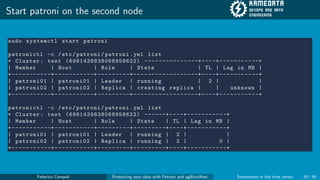
Start patroni on the second node
sudo systemctl start patroni
patronictl -c /etc/patroni/patroni.yml list
+ Cluster: test (6981439838068958622) ---------------+----+-----------+
| Member | Host | Role | State | TL | Lag in MB |
+-----------+-----------+---------+------------------+----+-----------+
| patroni01 | patroni01 | Leader | running | 2 | |
| patroni02 | patroni02 | Replica | creating replica | | unknown |
+-----------+-----------+---------+------------------+----+-----------+
patronictl -c /etc/patroni/patroni.yml list
+ Cluster: test (6981439838068958622) ------+----+-----------+
| Member | Host | Role | State | TL | Lag in MB |
+-----------+-----------+---------+---------+----+-----------+
| patroni01 | patroni01 | Leader | running | 2 | |
| patroni02 | patroni02 | Replica | running | 2 | 0 |
+-----------+-----------+---------+---------+----+-----------+
Federico Campoli Protecting your data with Patroni and pgBackRest Somewhere in the time vortex 55 / 59
I fight for the users
Copyright Walt Disney LTD
Image source
https://disney.fandom.com/wiki/Tron (character)
Federico Campoli Protecting your data with Patroni and pgBackRest Somewhere in the time vortex 56 / 59
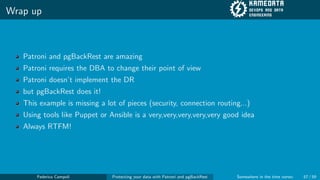
Wrap up
Patroni and pgBackRest are amazing
Patroni requires the DBA to change their point of view
Patroni doesn’t implement the DR
but pgBackRest does it!
This example is missing a lot of pieces (security, connection routing...)
Using tools like Puppet or Ansible is a very,very,very,very,very good idea
Always RTFM!
Federico Campoli Protecting your data with Patroni and pgBackRest Somewhere in the time vortex 57 / 59
Thank you for listening!
Any questions?
Copyright by dan232323 http://dan232323.deviantart.com/art/Pinkie-Pie-Thats-All-Folks-454693000
Federico Campoli Protecting your data with Patroni and pgBackRest Somewhere in the time vortex 58 / 59
Protecting your data with Patroni and pgBackRest
PGDay Russia 2021
Federico Campoli
Somewhere in the time vortex
Federico Campoli Protecting your data with Patroni and pgBackRest Somewhere in the time vortex 59 / 59

60f04d9ae4105.pdf

  • 1.
    Protecting your datawith Patroni and pgBackRest PGDay Russia 2021 Federico Campoli Somewhere in the time vortex Federico Campoli Protecting your data with Patroni and pgBackRest Somewhere in the time vortex 1 / 59
  • 2.
    Few words aboutthe speaker Born in 1972 Passionate about IT since 1982 Joined the Oracle DBA secret society in 2004 In love with PostgreSQL since 2006 PostgreSQL tattoo on the right shoulder Freelance devops and data engineer Federico Campoli Protecting your data with Patroni and pgBackRest Somewhere in the time vortex 2 / 59
  • 3.
    Getting in touch Blog:https://pgdba.org Twitter: @4thdoctor scarf Github: https://github.com/the4thdoctor Linkedin: https://www.linkedin.com/in/federicocampoli/ Youtube: https://www.youtube.com/c/FedericoCampoli Federico Campoli Protecting your data with Patroni and pgBackRest Somewhere in the time vortex 3 / 59
  • 4.
    Table of contents 1Greetings, programs! 2 The grid 3 The light cycle maze 4 End of line 5 I fight for the users Federico Campoli Protecting your data with Patroni and pgBackRest Somewhere in the time vortex 4 / 59
  • 5.
    Greetings, programs! Copyright WaltDisney LTD Image source https://liveforfilms.wordpress.com/2009/07/09/greetings-program-tron-2-synopsis/ Federico Campoli Protecting your data with Patroni and pgBackRest Somewhere in the time vortex 5 / 59
  • 6.
    PostgreSQL https://www.postgresql.org/ Enteprise class RDBMS ACIDcompliant HA and DR With one tiny little catch... No built in mechanism for automating backups or failover Federico Campoli Protecting your data with Patroni and pgBackRest Somewhere in the time vortex 6 / 59
  • 7.
    Some PostgreSQL autofailover options B.Y.O.T, shell script, manually operated, Cthulhu summoning... Automated with third party tools repmgr pg auto failover PostgreSQL Automatic Failover (PAF) Patroni Federico Campoli Protecting your data with Patroni and pgBackRest Somewhere in the time vortex 7 / 59
  • 8.
    Patroni https://github.com/zalando/patroni Patroni is anauto failover system developed in python by Zalando. The tool relies on a distributed consensus store (DCS) to maintain the cluster status. Patroni is available in the pgdg official repository Federico Campoli Protecting your data with Patroni and pgBackRest Somewhere in the time vortex 8 / 59
  • 9.
    Patroni Developed in Python Supportsfor DCS etcd,consul,zookeper Support for python RAFT (requires pysyncobj module) Automated boostrap and replica setup Automated failover/switchover Centralised configuration for PostgreSQL stored in DCS Very resilient to split brain HAProxy or pgbouncer for connection routed via api check Federico Campoli Protecting your data with Patroni and pgBackRest Somewhere in the time vortex 9 / 59
  • 10.
    Caveats Everything is managedby Patroni Some parts of the documentation is unclear (yes, standby cluster I’m talking of you) Client only in interactive mode, you need to build your api call (e.g. via ansible uri module) Federico Campoli Protecting your data with Patroni and pgBackRest Somewhere in the time vortex 10 / 59
  • 11.
    Some PostgreSQL backupoptions logical with pg dump physical with tools like pg basebackup barman WAL-E/WAL-G pgBackRest Federico Campoli Protecting your data with Patroni and pgBackRest Somewhere in the time vortex 11 / 59
  • 12.
    pgBackRest https://pgbackrest.org/ pgBackRest is asimple and reliable solution for automatic the backups. pgBackRest is a community driven project. Federico Campoli Protecting your data with Patroni and pgBackRest Somewhere in the time vortex 12 / 59
  • 13.
    pgBackRest Physical backup tool ImplementsHA/DR Differential,incremental and full backup Parallel jobs configurable Can backup from the standby servers Async WAL push and pull Developed initially in perl now fully migrated to C ini style configuration Available in deb/yum pgdg repositories Cloud backup options GCP/S3/Azure Multiple repositories configurable Self contained backup repository Federico Campoli Protecting your data with Patroni and pgBackRest Somewhere in the time vortex 13 / 59
  • 14.
    Caveats Configuring remote backupsvia SSH may be complex Beware of when configuring archive-push-queue-max. There is the risk of wal files not being archived if the limit is reached. Federico Campoli Protecting your data with Patroni and pgBackRest Somewhere in the time vortex 14 / 59
  • 15.
    The rule ofthumb RTFM Federico Campoli Protecting your data with Patroni and pgBackRest Somewhere in the time vortex 15 / 59
  • 16.
    Advanced pgBackRest For advancedtopics on pgBackRest please check Stefan Fercot’s Talk Unleash the Power within pgBackRest https://pgday.ru/en/2021/papers/297 Federico Campoli Protecting your data with Patroni and pgBackRest Somewhere in the time vortex 16 / 59
  • 17.
    The grid Copyright WaltDisney LTD Image source https://siftingthroughpatterns.wordpress.com/2012/05/12/why-kevin-flynn-is-the-true-villain-behind-tron-legacy/ Federico Campoli Protecting your data with Patroni and pgBackRest Somewhere in the time vortex 17 / 59
  • 18.
    Patroni super biasedconfiguration Federico Campoli Protecting your data with Patroni and pgBackRest Somewhere in the time vortex 18 / 59
  • 19.
    Setup For our examplewe’ll use CentOS 7 and a GCP bucket etcd01 patroni01 patroni02 Federico Campoli Protecting your data with Patroni and pgBackRest Somewhere in the time vortex 19 / 59
  • 20.
    Configure and installthe software (Optional) Setup /etc/hosts with the names Open the required ports on firewalld Install etcd on the etcd server Configure and start etcd Install PostgreSQL 13 and patroni on the two patroni nodes Configure patroni Start patroni profit Federico Campoli Protecting your data with Patroni and pgBackRest Somewhere in the time vortex 20 / 59
  • 21.
    Hosts (optional) If thereis no DNS service in place is a good idea to have the /etc/hosts file set for resolving the names 127.0.0.1 localhost localhost. localdomain localhost4 localhost4. localdomain4 ::1 localhost localhost. localdomain localhost6 localhost6. localdomain6 192.168.56.40 patroni01 192.168.56.41 patroni02 192.168.56.43 etcd01 # The following lines are desirable for IPv6 capable hosts ::1 localhost ip6 -localhost ip6 -loopback ff02 ::1 ip6 -allnodes ff02 ::2 ip6 -allrouters Federico Campoli Protecting your data with Patroni and pgBackRest Somewhere in the time vortex 21 / 59
  • 22.
    Firewalld etcd01 sudo firewall -cmd--permanent --zone=public --add -port =2380/ tcp sudo firewall -cmd --permanent --zone=public --add -port =2379/ tcp sudo systemctl reload firewalld patroni01, patroni02 sudo firewall -cmd --permanent --zone=public --add -port =5432/ tcp sudo firewall -cmd --permanent --zone=public --add -port =8008/ tcp sudo systemctl reload firewalld Federico Campoli Protecting your data with Patroni and pgBackRest Somewhere in the time vortex 22 / 59
  • 23.
    etcd01 setup Install etcd sudoyum install etcd Federico Campoli Protecting your data with Patroni and pgBackRest Somewhere in the time vortex 23 / 59
  • 24.
    etcd01 setup Then configurethe environment file /etc/etcd/etcd.conf ETCD_LISTEN_PEER_URLS="http://192.168.56.43:2380" ETCD_LISTEN_CLIENT_URLS="http://192.168.56.43:2379" ETCD_NAME="etcd01" ETCD_INITIAL_ADVERTISE_PEER_URLS="http://192.168.56.43:2380" ETCD_ADVERTISE_CLIENT_URLS="http://192.168.56.43:2379" ETCD_INITIAL_CLUSTER="etcd01=http://192.168.56.43:2380" ETCD_INITIAL_CLUSTER_STATE=new Federico Campoli Protecting your data with Patroni and pgBackRest Somewhere in the time vortex 24 / 59
  • 25.
    etcd01 setup Start theservice and check the cluster is healty sudo systemctl start etcd etcdctl --endpoints "http ://192.168.56.43:2379" cluster -health member 6 bf749bb3ab16843 is healthy: got healthy result from http ://192.168.56.43:2379 cluster is healthy Federico Campoli Protecting your data with Patroni and pgBackRest Somewhere in the time vortex 25 / 59
  • 26.
    postgresql install Install thePostgreSQL yum repository and PostgreSQL 13 sudo yum install -y https :// download.postgresql.org/pub/repos/yum/reporpms/EL -7- x86_64/pgdg -redhat -repo - latest.noarch.rpm sudo yum install -y postgresql13 postgresql13 -contrib postgresql13 -server Federico Campoli Protecting your data with Patroni and pgBackRest Somewhere in the time vortex 26 / 59
  • 27.
    patroni install Install theepel-release first then patroni and patroni-etcd sudo yum install -y epel -release sudo yum install -y patroni patroni -etcd Federico Campoli Protecting your data with Patroni and pgBackRest Somewhere in the time vortex 27 / 59
  • 28.
    Configure patroni dcssection I On both patroni machines create the directory /etc/patroni Then add a new configuration file into the directory named patroni.yml scope: t e s t namespace: / p a t r o n i _ t e s t / name: p a t r o n i 0 1 # t h i s v a l u e s s h o u l d b e u n i q u e w i t h i n t h e n a m e s p a c e a n d s c o p e log: dir: / v a r / l o g / p a t r o n i restapi: listen: 1 9 2 . 1 6 8 . 5 6 . 4 0 : 8 0 0 8 connect_address: 1 9 2 . 1 6 8 . 5 6 . 4 0 : 8 0 0 8 etcd: hosts: 1 9 2 . 1 6 8 . 5 6 . 4 3 : 2 3 7 9 bootstrap: dcs: ttl: 1 0 loop_wait: 1 0 retry_timeout: 1 0 maximum_lag_on_failover: 1 0 4 8 5 7 6 postgresql: Federico Campoli Protecting your data with Patroni and pgBackRest Somewhere in the time vortex 28 / 59
  • 29.
    Configure patroni dcssection II use_pg_rewind: t r u e use_slots: f a l s e parameters: wal_level: ’ r e p l i c a ’ archive_mode: ’ o f f ’ unix_socket_directories: ’ / v a r / r u n / p o s t g r e s q l / . ’ method: i n i t d b initdb: # N o t e : I t n e e d s t o b e a l i s t ( s o m e o p t i o n s n e e d v a l u e s , o t h e r s a r e s w i t c h e s ) - encoding: U T F 8 - data -checksums pg_hba: # A d d f o l l o w i n g l i n e s t o p g _ h b a . c o n f a f t e r r u n n i n g ’ i n i t d b ’ - host replication replicator 0.0.0.0/0 md5 - host all all 0.0.0.0/0 md5 users: Federico Campoli Protecting your data with Patroni and pgBackRest Somewhere in the time vortex 29 / 59
  • 30.
    Configure patroni postgresqlsection I postgresql: listen: " * : 5 4 3 2 " connect_address: p a t r o n i 0 1 : 5 4 3 2 # t h i s i s t h e l o c a l m a c h i n e n a m e , s h o u l d b e s e t a c c o r d i n g l y data_dir: / v a r / l i b / p g s q l / d a t a / p o s t g r e s q l 0 bin_dir: / u s r / p g s q l - 1 3 / b i n / pgpass: / t m p / p g p a s s 0 authentication: replication: username: r e p l i c a t o r password: p o s t g r e s _ r e p l i c a superuser: username: p o s t g r e s password: p o s t g r e s _ s u p e r rewind: # H a s n o e f f e c t o n p o s t g r e s 1 0 a n d l o w e r username: r e w i n d _ u s e r password: p o s t g r e s _ r e w i n d parameters: wal_level: ’ r e p l i c a ’ archive_mode: ’ o f f ’ Federico Campoli Protecting your data with Patroni and pgBackRest Somewhere in the time vortex 30 / 59
  • 31.
    Configure patroni postgresqlsection II unix_socket_directories: ’ / v a r / r u n / p o s t g r e s q l / . ’ tags: nofailover: f a l s e noloadbalance: f a l s e clonefrom: f a l s e nosync: f a l s e Federico Campoli Protecting your data with Patroni and pgBackRest Somewhere in the time vortex 31 / 59
  • 32.
    Create the systemdservice file I In /etc/systemd/system create the file patroni.service [Unit] Description=Runners to orchestrate a high-availability PostgreSQL After=syslog.target network.target [Service] Type=simple User=postgres Group=postgres # Read in configuration file if it exists, otherwise proceed EnvironmentFile=-/etc/patroni_env.conf WorkingDirectory=/var/lib/pgsql # Start the patroni process ExecStart=/bin/patroni /etc/patroni/patroni.yml Federico Campoli Protecting your data with Patroni and pgBackRest Somewhere in the time vortex 32 / 59
  • 33.
    Create the systemdservice file II # Send HUP to reload from patroni.yml ExecReload=/bin/kill -s HUP $MAINPID # only kill the patroni process, not it’s children, so it will gracefully stop postgres KillMode=process # Give a reasonable amount of time for the server to start up/shut down TimeoutSec=30 # Do not restart the service if it crashes, we want to manually inspect database on failure Restart=no [Install] WantedBy=multi-user.target Federico Campoli Protecting your data with Patroni and pgBackRest Somewhere in the time vortex 33 / 59
  • 34.
    Enable and startthe patroni service On both patroni machines sudo systemctl daemon -reload sudo systemctl enable patroni sudo systemctl start patroni Federico Campoli Protecting your data with Patroni and pgBackRest Somewhere in the time vortex 34 / 59
  • 35.
    Patroni bootstrap [ root@patroni01patroni ]# patronictl -c /etc/patroni/patroni.yml list + Cluster: test (6981078877725420504) -----+----+-----------+ | Member | Host | Role | State | TL | Lag in MB | +-----------+-----------+--------+---------+----+-----------+ | patroni01 | patroni01 | Leader | running | 1 | | +-----------+-----------+--------+---------+----+-----------+ Federico Campoli Protecting your data with Patroni and pgBackRest Somewhere in the time vortex 35 / 59
  • 36.
    Patroni cloning [ root@patroni01patroni ]# patronictl -c /etc/patroni/patroni.yml list + Cluster: test (6981078877725420504) ------+----+-----------+ | Member | Host | Role | State | TL | Lag in MB | +-----------+-----------+---------+---------+----+-----------+ | patroni01 | patroni01 | Leader | running | 1 | | | patroni02 | patroni02 | Replica | running | 1 | 0 | +-----------+-----------+---------+---------+----+-----------+ Federico Campoli Protecting your data with Patroni and pgBackRest Somewhere in the time vortex 36 / 59
  • 37.
    The light cyclemaze Copyright Walt Disney LTD Image source https://geektyrant.com/news/the-history-of-the-tron-lightcycle-infographic Federico Campoli Protecting your data with Patroni and pgBackRest Somewhere in the time vortex 37 / 59
  • 38.
    Patroni and pgBackRest FedericoCampoli Protecting your data with Patroni and pgBackRest Somewhere in the time vortex 38 / 59
  • 39.
    Configure and installthe software Install pgBackRest on both patroni servers Create the GCP bucket Create the shared key json file and grant access to the GCP bucket Configure pgBackRest for using the GCP bucket Configure patroni to use pgBackRest Run the pgBackRest first backup profit Federico Campoli Protecting your data with Patroni and pgBackRest Somewhere in the time vortex 39 / 59
  • 40.
    Configure pgbackrest On bothpatroni machines edit the file /etc/pgbackrest.conf [global] repo1-type=gcs repo1-path=/repo repo1-gcs-bucket=patroni-pgbackrest repo1-gcs-key=/etc/gcp_files/gcp-key.json repo1-retention-full=1 log-level-console=info log-level-file=debug log-path=/var/log/patroni/ [test] pg1-path=/var/lib/pgsql/data/postgresql0 pg1-port=5432 pg1-user=postgres Federico Campoli Protecting your data with Patroni and pgBackRest Somewhere in the time vortex 40 / 59
  • 41.
    Optional, configure .pgpass Ifthe local login is made with password authentication it may be necessary to configure the .pgpass file in the PostgreSQL data directory. patroni01:5432:*:postgres:postgres_super Federico Campoli Protecting your data with Patroni and pgBackRest Somewhere in the time vortex 41 / 59
  • 42.
    Save the gcp-key.json Createthe directory /etc/gcp files and save into it the file gcp-key.json generated by the GCP console. Directoy and file must be accessible by the user running pgbackrest. { "type": "service_account", "project_id": "XXXXXXXXXXXXX", "private_key_id": "XXXXXXXXXXXXX", "private_key": "-----BEGIN PRIVATE KEY----- XXXXXXXXXXXXXXXXXXXX -----END PRIVATE KEY----- ", "client_email": "XXXXXXXXXXXXX", "client_id": "XXXXXXXXXXXXX", "auth_uri": "https://accounts.google.com/o/oauth2/auth", "token_uri": "https://oauth2.googleapis.com/token", "auth_provider_x509_cert_url": "https://www.googleapis.com/oauth2/v1/certs", "client_x509_cert_url": "https://www.googleapis.com/robot/v1/metadata/x509/XXXXXXXXXXXXXXX" } Federico Campoli Protecting your data with Patroni and pgBackRest Somewhere in the time vortex 42 / 59
  • 43.
    Configure patroni forusing pgbackrest patronictl -c /etc/patroni/patroni.yml edit -config ##add the following lines postgresql: parameters: archive_command : pgbackrest --stanza=test archive -push %p archive_mode : ’on ’ After saving the command patronictl -c /etc/patroni/patroni.yml list will show the pending restart status + Cluster: test (6981352535078471124) ------+----+-----------+-----------------+ | Member | Host | Role | State | TL | Lag in MB | Pending restart | +-----------+-----------+---------+---------+----+-----------+-----------------+ | patroni01 | patroni01 | Leader | running | 1 | | * | | patroni02 | patroni02 | Replica | running | 1 | 0 | * | +-----------+-----------+---------+---------+----+-----------+-----------------+ Federico Campoli Protecting your data with Patroni and pgBackRest Somewhere in the time vortex 43 / 59
  • 44.
    Restart patroni forapplying the changes patronictl -c /etc/patroni/patroni.yml restart test + Cluster: test (6981352535078471124) ------+----+-----------+-----------------+ | Member | Host | Role | State | TL | Lag in MB | Pending restart | +-----------+-----------+---------+---------+----+-----------+-----------------+ | patroni01 | patroni01 | Leader | running | 1 | | * | | patroni02 | patroni02 | Replica | running | 1 | 0 | * | +-----------+-----------+---------+---------+----+-----------+-----------------+ When should the restart take place (e.g. 2021 -07 -05 T10 :39) [now]: Are you sure you want to restart members patroni01 , patroni02? [y/N]: y Restart if the PostgreSQL version is less than provided (e.g. 9.5.2) []: Success: restart on member patroni01 Success: restart on member patroni02 Federico Campoli Protecting your data with Patroni and pgBackRest Somewhere in the time vortex 44 / 59
  • 45.
    Run the firstbackup Create the stanza and then run the backup pgbackrest --stanza=test stanza -create 2021 -07 -05 09:41:31.677 P00 INFO: stanza -create command begin 2.34: --exec -id =7404 -761 f890e --log -level -console=info --log -level -file=info --log -path =/ var/log /patroni --pg1 -path =/var/lib/pgsql/data/postgresql0 --pg1 -port =5432 --pg1 -user= postgres --repo1 -gcs -bucket=patroni -pgbackrest --repo1 -gcs -key=<redacted > --repo1 -path =/ repo --repo1 -type=gcs --stanza=test 2021 -07 -05 09:41:32.284 P00 INFO: stanza -create for stanza ’test ’ on repo1 2021 -07 -05 09:41:33.182 P00 INFO: stanza -create command end: completed successfully (1506 ms) pgbackrest --stanza=test backup Federico Campoli Protecting your data with Patroni and pgBackRest Somewhere in the time vortex 45 / 59
  • 46.
    Check the backupstatus Check the backup status pgbackrest info stanza: test status: ok cipher: none db (current) wal archive min/max (13): 000000010000000000000004/000000010000000000000004 full backup: 20210705 -145357F timestamp start/stop: 2021 -07 -05 14:53:57 / 2021 -07 -05 14:54:44 wal start/stop: 000000010000000000000004 / 000000010000000000000004 database size: 24.0MB , database backup size: 24.0 MB repo1: backup set size: 2.9MB , backup size: 2.9MB Federico Campoli Protecting your data with Patroni and pgBackRest Somewhere in the time vortex 46 / 59
  • 47.
    End of line CopyrightWalt Disney LTD Image source https://tron.fandom.com/wiki/Master Control Program Federico Campoli Protecting your data with Patroni and pgBackRest Somewhere in the time vortex 47 / 59
  • 48.
    Recovering from acomplete datacenter loss Install and configure etcd Install and configure pgBackRest Install PostgreSQL and patroni Configure patroni to bootstrap and clone from pgBackRest Start patroni profit Federico Campoli Protecting your data with Patroni and pgBackRest Somewhere in the time vortex 48 / 59
  • 49.
    Check the pgbackrestcan access the repository Check the pgbackrest can access the repository pgbackrest info stanza: test status: ok cipher: none db (current) wal archive min/max (13): 000000010000000000000004/000000010000000000000004 full backup: 20210705 -145357F timestamp start/stop: 2021 -07 -05 14:53:57 / 2021 -07 -05 14:54:44 wal start/stop: 000000010000000000000004 / 000000010000000000000004 database size: 24.0MB , database backup size: 24.0 MB repo1: backup set size: 2.9MB , backup size: 2.9MB Federico Campoli Protecting your data with Patroni and pgBackRest Somewhere in the time vortex 49 / 59
  • 50.
    Configure the custombootstrap script for patroni Create the file /etc/patroni/boot pgbackrest.sh #!/ usr/bin/env bash while getopts ": -:" optchar; do [[ "${optchar }" == "-" ]] || continue case "${OPTARG }" in datadir =* ) DATA_DIR=${OPTARG #*=} ;; scope =* ) SCOPE=${OPTARG #*=} ;; esac done /usr/bin/pgbackrest --stanza=$SCOPE --link -all restore Make the file executable Federico Campoli Protecting your data with Patroni and pgBackRest Somewhere in the time vortex 50 / 59
  • 51.
    Configure the patroniboostrap section bootstrap: ..... postgresql: use_pg_rewind: t r u e use_slots: f a l s e parameters: wal_level: ’ r e p l i c a ’ archive_mode: ’ o n ’ archive_command: ’ p g b a c k r e s t - - s t a n z a = t e s t a r c h i v e - p u s h % p ’ unix_socket_directories: ’ / v a r / r u n / p o s t g r e s q l / . ’ recovery_conf: recovery_target_timeline: l a t e s t restore_command: / u s r / b i n / p g b a c k r e s t - - s t a n z a = t e s t a r c h i v e - g e t % f " % p " method: p g b a c k r e s t pgbackrest: command: / e t c / p a t r o n i / b o o t _ p g b a c k r e s t . s h keep_existing_recovery_conf: F a l s e recovery_conf: recovery_target_timeline: l a t e s t restore_command: / u s r / b i n / p g b a c k r e s t - - s t a n z a = t e s t a r c h i v e - g e t % f " % p " Federico Campoli Protecting your data with Patroni and pgBackRest Somewhere in the time vortex 51 / 59
  • 52.
    Add pgbackrest forcreating replicas postgresql: create_replica_methods: - pgbackrest pgbackrest: command: / u s r / b i n / p g b a c k r e s t - - s t a n z a = t e s t r e s t o r e - - d e l t a - - l i n k - a l l keep_data: T r u e no_params: T r u e parameters: wal_level: ’ r e p l i c a ’ archive_mode: ’ o n ’ archive_command: ’ p g b a c k r e s t - - s t a n z a = t e s t a r c h i v e - p u s h % p ’ unix_socket_directories: ’ / v a r / r u n / p o s t g r e s q l / . ’ recovery_conf: recovery_target_timeline: l a t e s t restore_command: / u s r / b i n / p g b a c k r e s t - - s t a n z a = t e s t a r c h i v e - g e t % f " % p " ..... Federico Campoli Protecting your data with Patroni and pgBackRest Somewhere in the time vortex 52 / 59
  • 53.
    Create the emptyPGDATA on the patroni machines mkdir -p /var/lib/pgsql/data/ postgresql0 chown postgres:postgres /var/lib/pgsql/data/ postgresql0 chmod 0700 /var/lib/pgsql/data/postgresql0 Federico Campoli Protecting your data with Patroni and pgBackRest Somewhere in the time vortex 53 / 59
  • 54.
    Start patroni andwait for the bootstrap to complete sudo systemctl start patroni patronictl -c /etc/patroni/patroni.yml list + Cluster: test ( initializing ) ---+---------------------------------+----+-----------+ | Member | Host | Role | State | TL | Lag in MB | +-----------+-----------+---------+---------------------------------+----+-----------+ | patroni01 | patroni01 | Replica | running custom bootstrap script | | unknown | +-----------+-----------+---------+---------------------------------+----+-----------+ patronictl -c /etc/patroni/patroni.yml list + Cluster: test (6981439838068958622) -----+----+-----------+ | Member | Host | Role | State | TL | Lag in MB | +-----------+-----------+--------+---------+----+-----------+ | patroni01 | patroni01 | Leader | running | 2 | | +-----------+-----------+--------+---------+----+-----------+ Federico Campoli Protecting your data with Patroni and pgBackRest Somewhere in the time vortex 54 / 59
  • 55.
    Start patroni onthe second node sudo systemctl start patroni patronictl -c /etc/patroni/patroni.yml list + Cluster: test (6981439838068958622) ---------------+----+-----------+ | Member | Host | Role | State | TL | Lag in MB | +-----------+-----------+---------+------------------+----+-----------+ | patroni01 | patroni01 | Leader | running | 2 | | | patroni02 | patroni02 | Replica | creating replica | | unknown | +-----------+-----------+---------+------------------+----+-----------+ patronictl -c /etc/patroni/patroni.yml list + Cluster: test (6981439838068958622) ------+----+-----------+ | Member | Host | Role | State | TL | Lag in MB | +-----------+-----------+---------+---------+----+-----------+ | patroni01 | patroni01 | Leader | running | 2 | | | patroni02 | patroni02 | Replica | running | 2 | 0 | +-----------+-----------+---------+---------+----+-----------+ Federico Campoli Protecting your data with Patroni and pgBackRest Somewhere in the time vortex 55 / 59
  • 56.
    I fight forthe users Copyright Walt Disney LTD Image source https://disney.fandom.com/wiki/Tron (character) Federico Campoli Protecting your data with Patroni and pgBackRest Somewhere in the time vortex 56 / 59
  • 57.
    Wrap up Patroni andpgBackRest are amazing Patroni requires the DBA to change their point of view Patroni doesn’t implement the DR but pgBackRest does it! This example is missing a lot of pieces (security, connection routing...) Using tools like Puppet or Ansible is a very,very,very,very,very good idea Always RTFM! Federico Campoli Protecting your data with Patroni and pgBackRest Somewhere in the time vortex 57 / 59
  • 58.
    Thank you forlistening! Any questions? Copyright by dan232323 http://dan232323.deviantart.com/art/Pinkie-Pie-Thats-All-Folks-454693000 Federico Campoli Protecting your data with Patroni and pgBackRest Somewhere in the time vortex 58 / 59
  • 59.
    Protecting your datawith Patroni and pgBackRest PGDay Russia 2021 Federico Campoli Somewhere in the time vortex Federico Campoli Protecting your data with Patroni and pgBackRest Somewhere in the time vortex 59 / 59