

Hot Stand By
Setup, Failover and Rebuilding the Master
3/6/2014
Confidentialinformation,forinternaluseonly
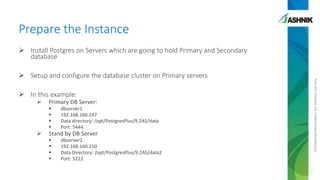
Prepare the Instance
 Install Postgres on Servers which are going to hold Primary and Secondary
database
 Setup and configure the database cluster on Primary servers
 In this example:
 Primary DB Server:
 dbserver1
 192.168.160.147
 Data directory: /opt/PostgresPlus/9.2AS/data
 Port: 5444
 Stand by DB Server
 dbserver2
 192.168.160.150
 Data Directory: /opt/PostgresPlus/9.2AS/data2
 Port: 5222
2
Confidentialinformation,forinternaluseonly
Edit postgresql.conf and pg_hba.conf on
master
 wal_level = hot_standby (mandatory)
 max_wal_senders = 3 (mandatory to be set to a positive integer)
 wal_keep_segments = 128 (optional/depending on load)
 replication_timeout = 5 sec (optional)
 hot_standby = on (effective only for hot stand by server)
Add entry in pg_hba.conf
• host replication all 192.168.0.0/16 trust
3
Confidentialinformation,forinternaluseonly
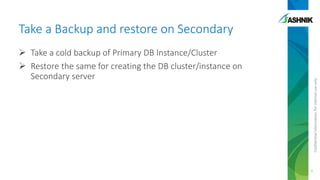
Take a Backup and restore on Secondary
 Take a cold backup of Primary DB Instance/Cluster
 Restore the same for creating the DB cluster/instance on
Secondary server
4
Confidentialinformation,forinternaluseonly
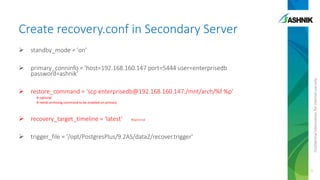
Create recovery.conf in Secondary Server
 standby_mode = 'on'
 primary_conninfo = 'host=192.168.160.147 port=5444 user=enterprisedb
password=ashnik'
 restore_command = 'scp enterprisedb@192.168.160.147:/mnt/arch/%f %p'
# optional
# needs archiving command to be enabled on primary
 recovery_target_timeline = 'latest' #optional
 trigger_file = '/opt/PostgresPlus/9.2AS/data2/recover.trigger'
5
Confidentialinformation,forinternaluseonly
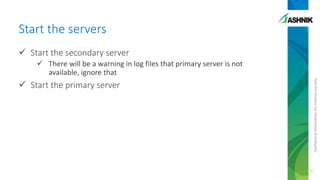
Start the servers
 Start the secondary server
 There will be a warning in log files that primary server is not
available, ignore that
 Start the primary server
6
Confidentialinformation,forinternaluseonly
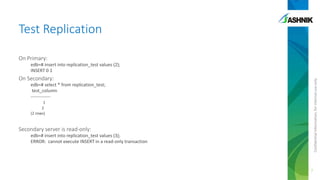
Test Replication
On Primary:
edb=# insert into replication_test values (2);
INSERT 0 1
On Secondary:
edb=# select * from replication_test;
test_column
-------------
1
2
(2 rows)
Secondary server is read-only:
edb=# insert into replication_test values (3);
ERROR: cannot execute INSERT in a read-only transaction
7
Confidentialinformation,forinternaluseonly
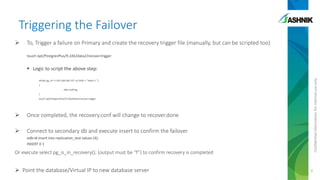
Triggering the Failover
 To, Trigger a failure on Primary and create the recovery trigger file (manually, but can be scripted too)
touch opt/PostgresPlus/9.2AS/data2/recover.trigger
 Logic to script the above step:
while( pg_ctl -h 192.168.160.147 –p 5444 -c "select 1 “)
{
; #do nothing
}
touch opt/PostgresPlus/9.2AS/data2/recover.trigger
 Once completed, the recovery.conf will change to recover.done
 Connect to secondary db and execute insert to confirm the failover
edb=# insert into replication_test values (4);
INSERT 0 1
Or execute select pg_is_in_recovery(); (output must be “f”) to confirm recovery is completed
 Point the database/Virtual IP to new database server 8
Confidentialinformation,forinternaluseonly
Triggering the Switchover
 Disconnect all the application from Primary Node
 Shutdown the primary database
 To, Trigger a failure on Primary and create the recovery trigger file
touch opt/PostgresPlus/9.2AS/data2/recover.trigger
 Once completed, the recovery.conf will change to recover.done
 Connect to secondary db and execute insert
edb=# insert into replication_test values (4);
INSERT 0 1
Or execute select pg_is_in_recovery(); (output must be “f”) to confirm recovery is completed
 Point the database/Virtual IP to new database server
9
Confidentialinformation,forinternaluseonly
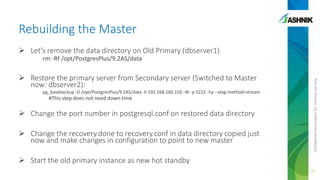
Rebuilding the Master
 Let’s remove the data directory on Old Primary (dbserver1)
rm -Rf /opt/PostgresPlus/9.2AS/data
 Restore the primary server from Secondary server (Switched to Master
now: dbserver2):
pg_basebackup -D /opt/PostgresPlus/9.2AS/data -h 192.168.160.150 -W -p 5222 -Fp --xlog-method=stream
#This step does not need down time
 Change the port number in postgresql.conf on restored data directory
 Change the recovery.done to recovery.conf in data directory copied just
now and make changes in configuration to point to new master
 Start the old primary instance as new hot standby
10
Confidentialinformation,forinternaluseonly
Monitoring the Replication
Check if the current node is master or slave:
• SELECT pg_is_in_recovery();
See the current snapshot on master and slave:
• SELECT txid_current_snapshot();
11
12
Sameer Kumar
Ashnik Pte Ltd, Singapore
www.ashnik.com | sameer.kumar@ashnik.com

Streaming replication in PostgreSQL

  • 1.
    Hot Stand By Setup,Failover and Rebuilding the Master 3/6/2014
  • 2.
    Confidentialinformation,forinternaluseonly Prepare the Instance Install Postgres on Servers which are going to hold Primary and Secondary database  Setup and configure the database cluster on Primary servers  In this example:  Primary DB Server:  dbserver1  192.168.160.147  Data directory: /opt/PostgresPlus/9.2AS/data  Port: 5444  Stand by DB Server  dbserver2  192.168.160.150  Data Directory: /opt/PostgresPlus/9.2AS/data2  Port: 5222 2
  • 3.
    Confidentialinformation,forinternaluseonly Edit postgresql.conf andpg_hba.conf on master  wal_level = hot_standby (mandatory)  max_wal_senders = 3 (mandatory to be set to a positive integer)  wal_keep_segments = 128 (optional/depending on load)  replication_timeout = 5 sec (optional)  hot_standby = on (effective only for hot stand by server) Add entry in pg_hba.conf • host replication all 192.168.0.0/16 trust 3
  • 4.
    Confidentialinformation,forinternaluseonly Take a Backupand restore on Secondary  Take a cold backup of Primary DB Instance/Cluster  Restore the same for creating the DB cluster/instance on Secondary server 4
  • 5.
    Confidentialinformation,forinternaluseonly Create recovery.conf inSecondary Server  standby_mode = 'on'  primary_conninfo = 'host=192.168.160.147 port=5444 user=enterprisedb password=ashnik'  restore_command = 'scp enterprisedb@192.168.160.147:/mnt/arch/%f %p' # optional # needs archiving command to be enabled on primary  recovery_target_timeline = 'latest' #optional  trigger_file = '/opt/PostgresPlus/9.2AS/data2/recover.trigger' 5
  • 6.
    Confidentialinformation,forinternaluseonly Start the servers Start the secondary server  There will be a warning in log files that primary server is not available, ignore that  Start the primary server 6
  • 7.
    Confidentialinformation,forinternaluseonly Test Replication On Primary: edb=#insert into replication_test values (2); INSERT 0 1 On Secondary: edb=# select * from replication_test; test_column ------------- 1 2 (2 rows) Secondary server is read-only: edb=# insert into replication_test values (3); ERROR: cannot execute INSERT in a read-only transaction 7
  • 8.
    Confidentialinformation,forinternaluseonly Triggering the Failover To, Trigger a failure on Primary and create the recovery trigger file (manually, but can be scripted too) touch opt/PostgresPlus/9.2AS/data2/recover.trigger  Logic to script the above step: while( pg_ctl -h 192.168.160.147 –p 5444 -c "select 1 “) { ; #do nothing } touch opt/PostgresPlus/9.2AS/data2/recover.trigger  Once completed, the recovery.conf will change to recover.done  Connect to secondary db and execute insert to confirm the failover edb=# insert into replication_test values (4); INSERT 0 1 Or execute select pg_is_in_recovery(); (output must be “f”) to confirm recovery is completed  Point the database/Virtual IP to new database server 8
  • 9.
    Confidentialinformation,forinternaluseonly Triggering the Switchover Disconnect all the application from Primary Node  Shutdown the primary database  To, Trigger a failure on Primary and create the recovery trigger file touch opt/PostgresPlus/9.2AS/data2/recover.trigger  Once completed, the recovery.conf will change to recover.done  Connect to secondary db and execute insert edb=# insert into replication_test values (4); INSERT 0 1 Or execute select pg_is_in_recovery(); (output must be “f”) to confirm recovery is completed  Point the database/Virtual IP to new database server 9
  • 10.
    Confidentialinformation,forinternaluseonly Rebuilding the Master Let’s remove the data directory on Old Primary (dbserver1) rm -Rf /opt/PostgresPlus/9.2AS/data  Restore the primary server from Secondary server (Switched to Master now: dbserver2): pg_basebackup -D /opt/PostgresPlus/9.2AS/data -h 192.168.160.150 -W -p 5222 -Fp --xlog-method=stream #This step does not need down time  Change the port number in postgresql.conf on restored data directory  Change the recovery.done to recovery.conf in data directory copied just now and make changes in configuration to point to new master  Start the old primary instance as new hot standby 10
  • 11.
    Confidentialinformation,forinternaluseonly Monitoring the Replication Checkif the current node is master or slave: • SELECT pg_is_in_recovery(); See the current snapshot on master and slave: • SELECT txid_current_snapshot(); 11
  • 12.
    12 Sameer Kumar Ashnik PteLtd, Singapore www.ashnik.com | sameer.kumar@ashnik.com