On The
Building Of A
PostgreSQL
Cluster
Srihari Sriraman | nilenso
Stories
Each story shall cover
• Problem
• Quick fix
• Root cause
• Correct fix
• Lessons learnt
Context
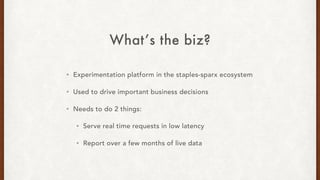
What’s the biz?
• Experimentation platform in the staples-sparx ecosystem
• Used to drive important business decisions
• Needs to do 2 things:
• Serve real time requests in low latency
• Report over a few months of live data
Why PostgreSQL?
• Data integrity is paramount
• Tight performance constraints
• Medium sized data warehouse
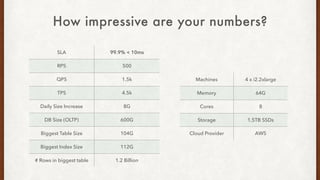
How impressive are your numbers?
SLA 99.9% < 10ms
RPS 500
QPS 1.5k
TPS 4.5k
Daily Size Increase 8G
DB Size (OLTP) 600G
Biggest Table Size 104G
Biggest Index Size 112G
# Rows in biggest table 1.2 Billion
Machines 4 x i2.2xlarge
Memory 64G
Cores 8
Storage 1.5TB SSDs
Cloud Provider AWS
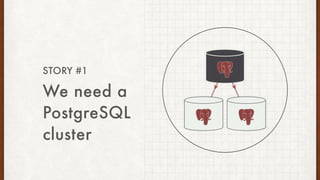
We need a
PostgreSQL
cluster
STORY #1
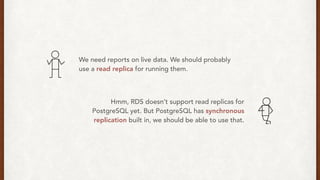
We need reports on live data. We should probably
use a read replica for running them.
Hmm, RDS doesn’t support read replicas for
PostgreSQL yet. But PostgreSQL has synchronous
replication built in, we should be able to use that.
Also, we can’t be down for more than 5 seconds.
So not only do we need read replicas, we also need
automatic failovers. What tools can I use to do this?
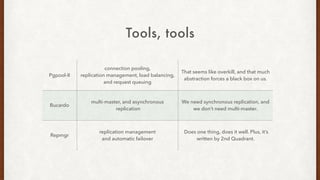
Pgpool-II
connection pooling,
replication management, load balancing,
and request queuing
That seems like overkill, and that much
abstraction forces a black box on us.
Bucardo
multi-master, and asynchronous
replication
We need synchronous replication, and
we don’t need multi-master.
Repmgr
replication management
and automatic failover
Does one thing, does it well. Plus, it’s
written by 2nd Quadrant.
Tools, tools
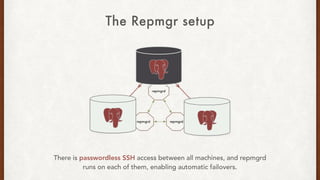
The Repmgr setup
There is passwordless SSH access between all machines, and repmgrd
runs on each of them, enabling automatic failovers.
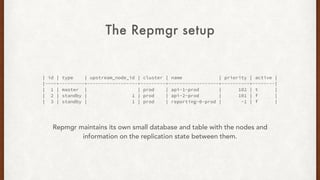
| id | type | upstream_node_id | cluster | name | priority | active |
|----+---------+------------------+---------+------------------+----------+--------|
| 1 | master | | prod | api-1-prod | 102 | t |
| 2 | standby | 1 | prod | api-2-prod | 101 | f |
| 3 | standby | 1 | prod | reporting-0-prod | -1 | f |
The Repmgr setup
Repmgr maintains its own small database and table with the nodes and
information on the replication state between them.
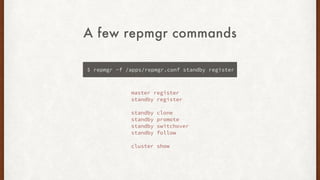
A few repmgr commands
$ repmgr -f /apps/repmgr.conf standby register
master register
standby register
standby clone
standby promote
standby switchover
standby follow
cluster show
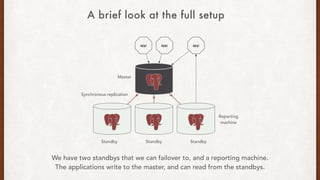
Reporting
machine
Master
Standby Standby Standby
Synchronous replication
We have two standbys that we can failover to, and a reporting machine.
The applications write to the master, and can read from the standbys.
A brief look at the full setup
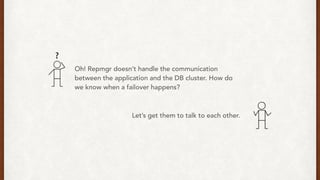
Oh! Repmgr doesn’t handle the communication
between the application and the DB cluster. How do
we know when a failover happens?
Let’s get them to talk to each other.
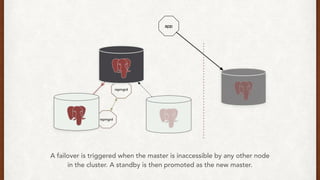
A failover is triggered when the master is inaccessible by any other node
in the cluster. A standby is then promoted as the new master.
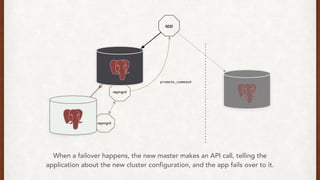
When a failover happens, the new master makes an API call, telling the
application about the new cluster configuration, and the app fails over to it.
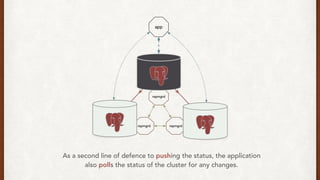
As a second line of defence to pushing the status, the application
also polls the status of the cluster for any changes.
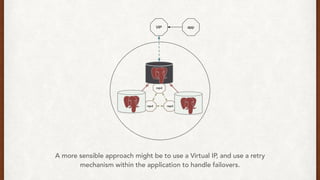
A more sensible approach might be to use a Virtual IP, and use a retry
mechanism within the application to handle failovers.
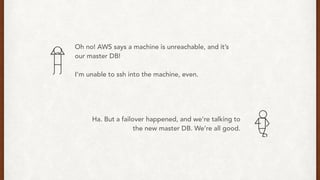
Oh no! AWS says a machine is unreachable, and it’s
our master DB!
I’m unable to ssh into the machine, even.
Ha. But a failover happened, and we’re talking to
the new master DB. We’re all good.
What have we learnt?
• Repmgr does one thing, and does it well.
• We can use push and pull strategies, or a virtual IP
mechanism to communicate failovers directly to the
application.
• AWS might drop your box.
• Test failovers rigorously.
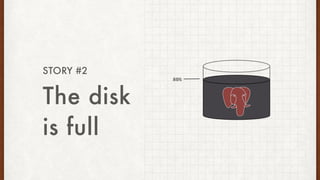
The disk
is full
STORY #2
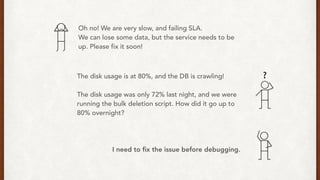
Oh no! We are very slow, and failing SLA.
We can lose some data, but the service needs to be
up. Please fix it soon!
The disk usage is at 80%, and the DB is crawling!
The disk usage was only 72% last night, and we were
running the bulk deletion script. How did it go up to
80% overnight?
I need to fix the issue before debugging.
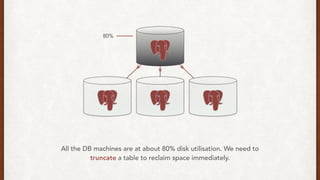
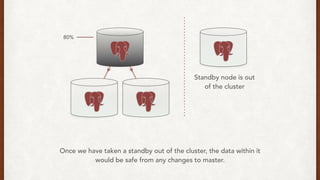
80%
All the DB machines are at about 80% disk utilisation. We need to
truncate a table to reclaim space immediately.
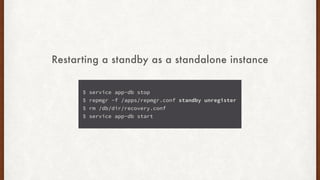
$ service app-db stop
$ repmgr -f /apps/repmgr.conf standby unregister
$ rm /db/dir/recovery.conf
$ service app-db start
Restarting a standby as a standalone instance
80%
Once we have taken a standby out of the cluster, the data within it
would be safe from any changes to master.
Standby node is out
of the cluster
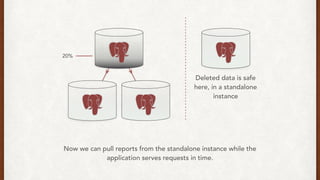
Deleted data is safe
here, in a standalone
instance
20%
Now we can pull reports from the standalone instance while the
application serves requests in time.
We thought we'd fail at 90%, and that wasn't going
to happen for another week at least. So, why did we
fail at 80%?
Oh, it’s ZFS! ZFS best practices say"Keep pool space
under 80% utilization to maintain pool performance”.
Never go over 80% on ZFS.
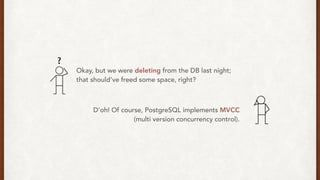
Okay, but we were deleting from the DB last night;
that should’ve freed some space, right?
D’oh! Of course, PostgreSQL implements MVCC
(multi version concurrency control).
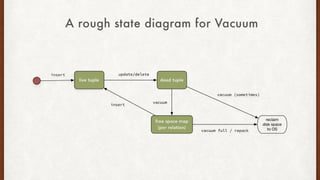
PostgreSQL MVCC implies
• DELETEs and UPDATEs just mark the row invisible to future transactions.
• AUTOVACUUM “removes” the invisible rows over time and adds them to the
free space map per relation.
• Actual disk space is not reclaimed to the OS during routine operations **.
• The default AUTOVACUUM worker configurations are ineffective for big
tables. We have no choice but to make them far more aggressive.
A rough state diagram for Vacuum
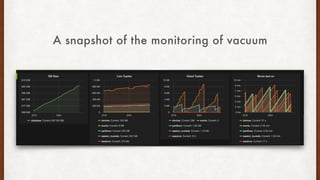
A snapshot of the monitoring of vacuum
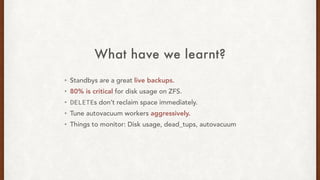
What have we learnt?
• Standbys are a great live backups.
• 80% is critical for disk usage on ZFS.
• DELETEs don’t reclaim space immediately.
• Tune autovacuum workers aggressively.
• Things to monitor: Disk usage, dead_tups, autovacuum
Unable to
add a
standby
STORY #3
Let’s get a better reporting box.
We have way more data now and more report queries
too. So we need more IOPS, and more cores.
Easy Peasy! I’ll start the clone tonight.
LOG: started streaming WAL from primary at
4038/29000000 on timeline 2
There, it’s transferring the data at 40MB/s. We should
have our shiny new box up and running in the morning.
> FATAL: could not receive data from WAL
stream: ERROR: requested WAL segment
000000020000403800000029 has already been
removed
Oh no. I had to run reports on this machine today!
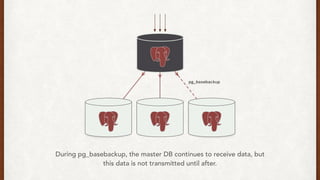
During pg_basebackup, the master DB continues to receive data, but
this data is not transmitted until after.
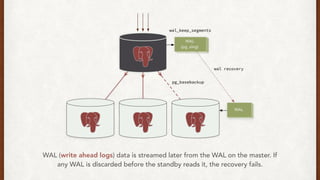
WAL (write ahead logs) data is streamed later from the WAL on the master. If
any WAL is discarded before the standby reads it, the recovery fails.
Hmm, it looks like we generated more than 8G last
night while the clone was happening, and
wal_keep_segments wasn’t high enough.
I think the ——rsync-only option in Repmgr should
help here, since I have most of the data on this
machine already.
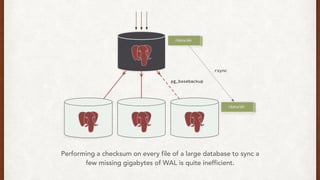
Performing a checksum on every file of a large database to sync a
few missing gigabytes of WAL is quite inefficient.
Oh well. It’s almost the weekend, and traffic is low. I
could probably start a fresh clone, and keep
wal_keep_segments higher for now.
Okay, that should work for now.
But how do we fix it so it doesn’t happen again?
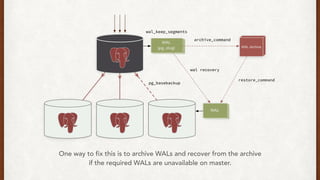
One way to fix this is to archive WALs and recover from the archive
if the required WALs are unavailable on master.
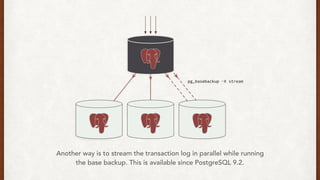
Another way is to stream the transaction log in parallel while running
the base backup. This is available since PostgreSQL 9.2.
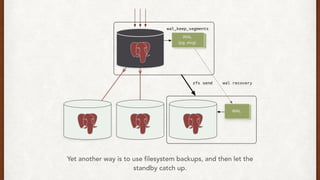
Yet another way is to use filesystem backups, and then let the
standby catch up.
What have we learnt?
• WAL recovery is an integral part of setting a standby. Think about it.
• We can prevent against WAL recovery issues using:
• WAL archives
• Rsync
• Filesystem backups
• Things to monitor: network throughput, DB load and disk i/o on master
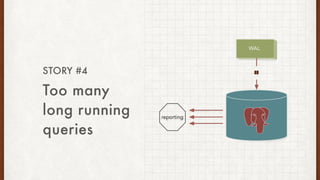
Too many
long running
queries
STORY #4
Hey, we’re getting many 500s while running reports
now. What’s going on?
ERROR: canceling statement due to conflict with recovery
Detail: User query might have needed to see row versions
that must be removed
Oh no, too many long queries!
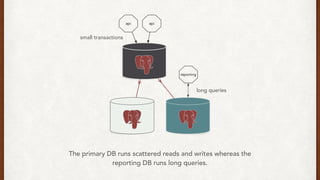
The primary DB runs scattered reads and writes whereas the
reporting DB runs long queries.
small transactions
long queries
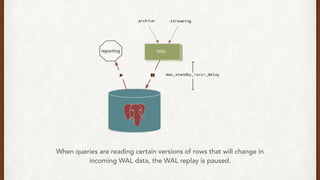
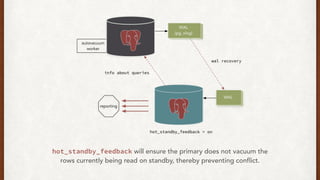
When queries are reading certain versions of rows that will change in
incoming WAL data, the WAL replay is paused.
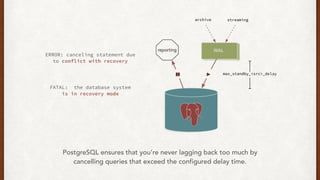
ERROR: canceling statement due
to conflict with recovery
FATAL: the database system
is in recovery mode
PostgreSQL ensures that you’re never lagging back too much by
cancelling queries that exceed the configured delay time.
Fix it quick, and fix it forever.
For now, we can just increase
max_standby_streaming_delay. But, is it okay if the
primary gets bloated a bit based on the queries we run?
hot_standby_feedback will ensure the primary does not vacuum the
rows currently being read on standby, thereby preventing conflict.
No, let’s not do that. We have enough bloat already.
Then we don’t have much choice; we’ll have to
make our queries much faster.
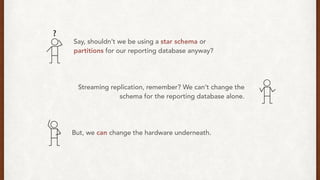
Say, shouldn’t we be using a star schema or
partitions for our reporting database anyway?
Streaming replication, remember? We can’t change the
schema for the reporting database alone.
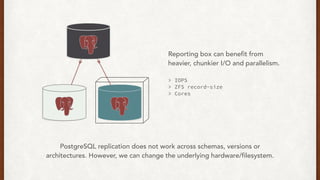
But, we can change the hardware underneath.
Reporting box can benefit from
heavier, chunkier I/O and parallelism.
> IOPS
> ZFS record-size
> Cores
PostgreSQL replication does not work across schemas, versions or
architectures. However, we can change the underlying hardware/filesystem.
What have we learnt?
• Standby queries might be cancelled due to recovery conflicts.
• Applying back pressure on primary is an option but causes bloat.
• We cannot use different schemas while using synchronous replication.
• We can change the filesystem or hardware without affecting replication.
• Things to monitor: replication lag, slow queries, bloat, vacuum
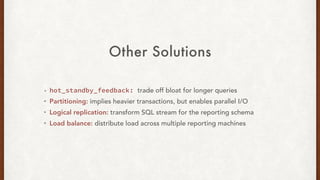
Other Solutions
• hot_standby_feedback: trade off bloat for longer queries
• Partitioning: implies heavier transactions, but enables parallel I/O
• Logical replication: transform SQL stream for the reporting schema
• Load balance: distribute load across multiple reporting machines
Split
Brain
SMALL #1
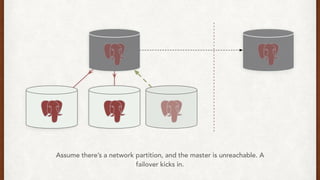
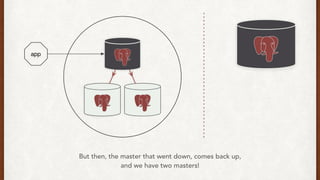
Assume there’s a network partition, and the master is unreachable. A
failover kicks in.
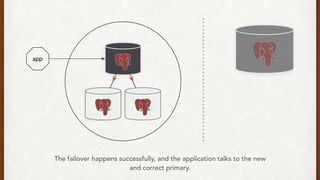
The failover happens successfully, and the application talks to the new
and correct primary.
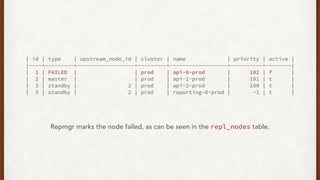
| id | type | upstream_node_id | cluster | name | priority | active |
|----+---------+------------------+---------+------------------+----------+--------|
| 1 | FAILED | | prod | api-0-prod | 102 | f |
| 2 | master | | prod | api-1-prod | 101 | t |
| 3 | standby | 2 | prod | api-2-prod | 100 | t |
| 3 | standby | 2 | prod | reporting-0-prod | -1 | t |
Repmgr marks the node failed, as can be seen in the repl_nodes table.
But then, the master that went down, comes back up,
and we have two masters!
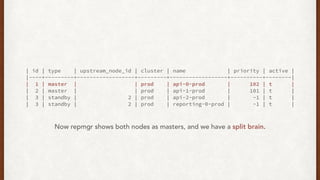
| id | type | upstream_node_id | cluster | name | priority | active |
|----+---------+------------------+---------+------------------+----------+--------|
| 1 | master | | prod | api-0-prod | 102 | t |
| 2 | master | | prod | api-1-prod | 101 | t |
| 3 | standby | 2 | prod | api-2-prod | -1 | t |
| 3 | standby | 2 | prod | reporting-0-prod | -1 | t |
Now repmgr shows both nodes as masters, and we have a split brain.
Shoot The Other
Node In The Head
STONITH
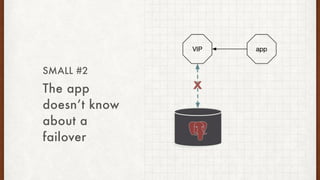
The app
doesn’t know
about a
failover
SMALL #2
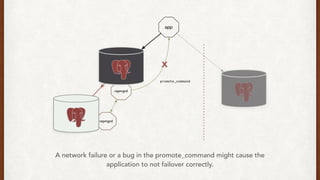
A network failure or a bug in the promote_command might cause the
application to not failover correctly.
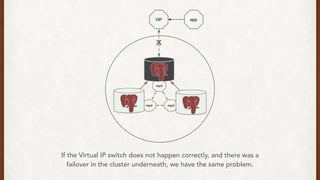
If the Virtual IP switch does not happen correctly, and there was a
failover in the cluster underneath, we have the same problem.
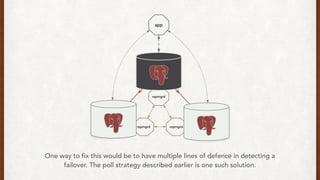
One way to fix this would be to have multiple lines of defence in detecting a
failover. The poll strategy described earlier is one such solution.
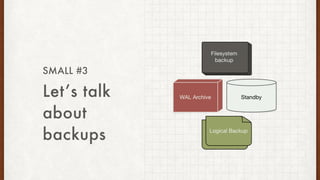
Let’s talk
about
backups
SMALL #3
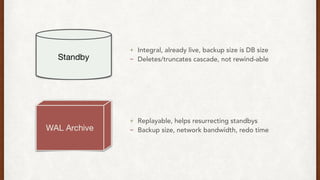
+ Integral, already live, backup size is DB size
- Deletes/truncates cascade, not rewind-able
+ Replayable, helps resurrecting standbys
- Backup size, network bandwidth, redo time
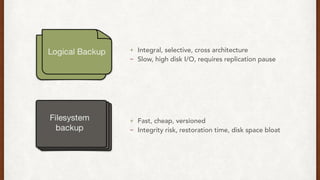
+ Integral, selective, cross architecture
- Slow, high disk I/O, requires replication pause
+ Fast, cheap, versioned
- Integrity risk, restoration time, disk space bloat
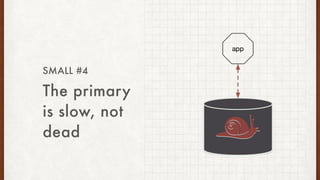
The primary
is slow, not
dead
SMALL #4
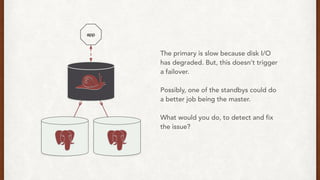
The primary is slow because disk I/O
has degraded. But, this doesn’t trigger
a failover.
Possibly, one of the standbys could do
a better job being the master.
What would you do, to detect and fix
the issue?
Thank you!
On The
Building Of A
PostgreSQL
Cluster
Srihari Sriraman | nilenso

On The Building Of A PostgreSQL Cluster

  • 1.
    On The Building OfA PostgreSQL Cluster Srihari Sriraman | nilenso
  • 2.
  • 3.
    Each story shallcover • Problem • Quick fix • Root cause • Correct fix • Lessons learnt
  • 4.
  • 5.
    What’s the biz? •Experimentation platform in the staples-sparx ecosystem • Used to drive important business decisions • Needs to do 2 things: • Serve real time requests in low latency • Report over a few months of live data
  • 6.
    Why PostgreSQL? • Dataintegrity is paramount • Tight performance constraints • Medium sized data warehouse
  • 7.
    How impressive areyour numbers? SLA 99.9% < 10ms RPS 500 QPS 1.5k TPS 4.5k Daily Size Increase 8G DB Size (OLTP) 600G Biggest Table Size 104G Biggest Index Size 112G # Rows in biggest table 1.2 Billion Machines 4 x i2.2xlarge Memory 64G Cores 8 Storage 1.5TB SSDs Cloud Provider AWS
  • 8.
  • 9.
    We need reportson live data. We should probably use a read replica for running them. Hmm, RDS doesn’t support read replicas for PostgreSQL yet. But PostgreSQL has synchronous replication built in, we should be able to use that.
  • 10.
    Also, we can’tbe down for more than 5 seconds. So not only do we need read replicas, we also need automatic failovers. What tools can I use to do this?
  • 11.
    Pgpool-II connection pooling, replication management,load balancing, and request queuing That seems like overkill, and that much abstraction forces a black box on us. Bucardo multi-master, and asynchronous replication We need synchronous replication, and we don’t need multi-master. Repmgr replication management and automatic failover Does one thing, does it well. Plus, it’s written by 2nd Quadrant. Tools, tools
  • 12.
    The Repmgr setup Thereis passwordless SSH access between all machines, and repmgrd runs on each of them, enabling automatic failovers.
  • 13.
    | id |type | upstream_node_id | cluster | name | priority | active | |----+---------+------------------+---------+------------------+----------+--------| | 1 | master | | prod | api-1-prod | 102 | t | | 2 | standby | 1 | prod | api-2-prod | 101 | f | | 3 | standby | 1 | prod | reporting-0-prod | -1 | f | The Repmgr setup Repmgr maintains its own small database and table with the nodes and information on the replication state between them.
  • 14.
    A few repmgrcommands $ repmgr -f /apps/repmgr.conf standby register master register standby register standby clone standby promote standby switchover standby follow cluster show
  • 15.
    Reporting machine Master Standby Standby Standby Synchronousreplication We have two standbys that we can failover to, and a reporting machine. The applications write to the master, and can read from the standbys. A brief look at the full setup
  • 16.
    Oh! Repmgr doesn’thandle the communication between the application and the DB cluster. How do we know when a failover happens? Let’s get them to talk to each other.
  • 17.
    A failover istriggered when the master is inaccessible by any other node in the cluster. A standby is then promoted as the new master.
  • 18.
    When a failoverhappens, the new master makes an API call, telling the application about the new cluster configuration, and the app fails over to it.
  • 19.
    As a secondline of defence to pushing the status, the application also polls the status of the cluster for any changes.
  • 20.
    A more sensibleapproach might be to use a Virtual IP, and use a retry mechanism within the application to handle failovers.
  • 21.
    Oh no! AWSsays a machine is unreachable, and it’s our master DB! I’m unable to ssh into the machine, even. Ha. But a failover happened, and we’re talking to the new master DB. We’re all good.
  • 22.
    What have welearnt? • Repmgr does one thing, and does it well. • We can use push and pull strategies, or a virtual IP mechanism to communicate failovers directly to the application. • AWS might drop your box. • Test failovers rigorously.
  • 23.
  • 24.
    Oh no! Weare very slow, and failing SLA. We can lose some data, but the service needs to be up. Please fix it soon! The disk usage is at 80%, and the DB is crawling! The disk usage was only 72% last night, and we were running the bulk deletion script. How did it go up to 80% overnight? I need to fix the issue before debugging.
  • 25.
    80% All the DBmachines are at about 80% disk utilisation. We need to truncate a table to reclaim space immediately.
  • 26.
    $ service app-dbstop $ repmgr -f /apps/repmgr.conf standby unregister $ rm /db/dir/recovery.conf $ service app-db start Restarting a standby as a standalone instance
  • 27.
    80% Once we havetaken a standby out of the cluster, the data within it would be safe from any changes to master. Standby node is out of the cluster
  • 28.
    Deleted data issafe here, in a standalone instance 20% Now we can pull reports from the standalone instance while the application serves requests in time.
  • 29.
    We thought we'dfail at 90%, and that wasn't going to happen for another week at least. So, why did we fail at 80%? Oh, it’s ZFS! ZFS best practices say"Keep pool space under 80% utilization to maintain pool performance”. Never go over 80% on ZFS.
  • 30.
    Okay, but wewere deleting from the DB last night; that should’ve freed some space, right? D’oh! Of course, PostgreSQL implements MVCC (multi version concurrency control).
  • 31.
    PostgreSQL MVCC implies •DELETEs and UPDATEs just mark the row invisible to future transactions. • AUTOVACUUM “removes” the invisible rows over time and adds them to the free space map per relation. • Actual disk space is not reclaimed to the OS during routine operations **. • The default AUTOVACUUM worker configurations are ineffective for big tables. We have no choice but to make them far more aggressive.
  • 32.
    A rough statediagram for Vacuum
  • 33.
    A snapshot ofthe monitoring of vacuum
  • 34.
    What have welearnt? • Standbys are a great live backups. • 80% is critical for disk usage on ZFS. • DELETEs don’t reclaim space immediately. • Tune autovacuum workers aggressively. • Things to monitor: Disk usage, dead_tups, autovacuum
  • 35.
  • 36.
    Let’s get abetter reporting box. We have way more data now and more report queries too. So we need more IOPS, and more cores. Easy Peasy! I’ll start the clone tonight. LOG: started streaming WAL from primary at 4038/29000000 on timeline 2 There, it’s transferring the data at 40MB/s. We should have our shiny new box up and running in the morning.
  • 37.
    > FATAL: couldnot receive data from WAL stream: ERROR: requested WAL segment 000000020000403800000029 has already been removed Oh no. I had to run reports on this machine today!
  • 38.
    During pg_basebackup, themaster DB continues to receive data, but this data is not transmitted until after.
  • 39.
    WAL (write aheadlogs) data is streamed later from the WAL on the master. If any WAL is discarded before the standby reads it, the recovery fails.
  • 40.
    Hmm, it lookslike we generated more than 8G last night while the clone was happening, and wal_keep_segments wasn’t high enough. I think the ——rsync-only option in Repmgr should help here, since I have most of the data on this machine already.
  • 41.
    Performing a checksumon every file of a large database to sync a few missing gigabytes of WAL is quite inefficient.
  • 42.
    Oh well. It’salmost the weekend, and traffic is low. I could probably start a fresh clone, and keep wal_keep_segments higher for now. Okay, that should work for now. But how do we fix it so it doesn’t happen again?
  • 43.
    One way tofix this is to archive WALs and recover from the archive if the required WALs are unavailable on master.
  • 44.
    Another way isto stream the transaction log in parallel while running the base backup. This is available since PostgreSQL 9.2.
  • 45.
    Yet another wayis to use filesystem backups, and then let the standby catch up.
  • 46.
    What have welearnt? • WAL recovery is an integral part of setting a standby. Think about it. • We can prevent against WAL recovery issues using: • WAL archives • Rsync • Filesystem backups • Things to monitor: network throughput, DB load and disk i/o on master
  • 47.
  • 48.
    Hey, we’re gettingmany 500s while running reports now. What’s going on? ERROR: canceling statement due to conflict with recovery Detail: User query might have needed to see row versions that must be removed Oh no, too many long queries!
  • 49.
    The primary DBruns scattered reads and writes whereas the reporting DB runs long queries. small transactions long queries
  • 50.
    When queries arereading certain versions of rows that will change in incoming WAL data, the WAL replay is paused.
  • 51.
    ERROR: canceling statementdue to conflict with recovery FATAL: the database system is in recovery mode PostgreSQL ensures that you’re never lagging back too much by cancelling queries that exceed the configured delay time.
  • 52.
    Fix it quick,and fix it forever. For now, we can just increase max_standby_streaming_delay. But, is it okay if the primary gets bloated a bit based on the queries we run?
  • 53.
    hot_standby_feedback will ensurethe primary does not vacuum the rows currently being read on standby, thereby preventing conflict.
  • 54.
    No, let’s notdo that. We have enough bloat already. Then we don’t have much choice; we’ll have to make our queries much faster.
  • 55.
    Say, shouldn’t webe using a star schema or partitions for our reporting database anyway? Streaming replication, remember? We can’t change the schema for the reporting database alone. But, we can change the hardware underneath.
  • 56.
    Reporting box canbenefit from heavier, chunkier I/O and parallelism. > IOPS > ZFS record-size > Cores PostgreSQL replication does not work across schemas, versions or architectures. However, we can change the underlying hardware/filesystem.
  • 57.
    What have welearnt? • Standby queries might be cancelled due to recovery conflicts. • Applying back pressure on primary is an option but causes bloat. • We cannot use different schemas while using synchronous replication. • We can change the filesystem or hardware without affecting replication. • Things to monitor: replication lag, slow queries, bloat, vacuum
  • 58.
    Other Solutions • hot_standby_feedback:trade off bloat for longer queries • Partitioning: implies heavier transactions, but enables parallel I/O • Logical replication: transform SQL stream for the reporting schema • Load balance: distribute load across multiple reporting machines
  • 59.
  • 60.
    Assume there’s anetwork partition, and the master is unreachable. A failover kicks in.
  • 61.
    The failover happenssuccessfully, and the application talks to the new and correct primary.
  • 62.
    | id |type | upstream_node_id | cluster | name | priority | active | |----+---------+------------------+---------+------------------+----------+--------| | 1 | FAILED | | prod | api-0-prod | 102 | f | | 2 | master | | prod | api-1-prod | 101 | t | | 3 | standby | 2 | prod | api-2-prod | 100 | t | | 3 | standby | 2 | prod | reporting-0-prod | -1 | t | Repmgr marks the node failed, as can be seen in the repl_nodes table.
  • 63.
    But then, themaster that went down, comes back up, and we have two masters!
  • 64.
    | id |type | upstream_node_id | cluster | name | priority | active | |----+---------+------------------+---------+------------------+----------+--------| | 1 | master | | prod | api-0-prod | 102 | t | | 2 | master | | prod | api-1-prod | 101 | t | | 3 | standby | 2 | prod | api-2-prod | -1 | t | | 3 | standby | 2 | prod | reporting-0-prod | -1 | t | Now repmgr shows both nodes as masters, and we have a split brain.
  • 65.
    Shoot The Other NodeIn The Head STONITH
  • 66.
    The app doesn’t know abouta failover SMALL #2
  • 67.
    A network failureor a bug in the promote_command might cause the application to not failover correctly.
  • 68.
    If the VirtualIP switch does not happen correctly, and there was a failover in the cluster underneath, we have the same problem.
  • 69.
    One way tofix this would be to have multiple lines of defence in detecting a failover. The poll strategy described earlier is one such solution.
  • 70.
  • 71.
    + Integral, alreadylive, backup size is DB size - Deletes/truncates cascade, not rewind-able + Replayable, helps resurrecting standbys - Backup size, network bandwidth, redo time
  • 72.
    + Integral, selective,cross architecture - Slow, high disk I/O, requires replication pause + Fast, cheap, versioned - Integrity risk, restoration time, disk space bloat
  • 73.
    The primary is slow,not dead SMALL #4
  • 74.
    The primary isslow because disk I/O has degraded. But, this doesn’t trigger a failover. Possibly, one of the standbys could do a better job being the master. What would you do, to detect and fix the issue?
  • 75.
  • 76.
    On The Building OfA PostgreSQL Cluster Srihari Sriraman | nilenso