3
    1                        5
                             1
              1
              4
2
1
    Five Steps
    to PostgreSQL
1      Performance
                       Josh Berkus
           PostgreSQL Experts Inc.
         JDCon West - October 2009
3
                  1                     5
                                        1
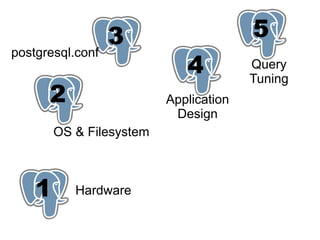
postgresql.conf
                             1
                             4          Query
                                        Tuning
      2
      1                   Application
                           Design
        OS & Filesystem


    1      Hardware
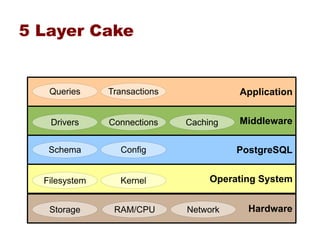
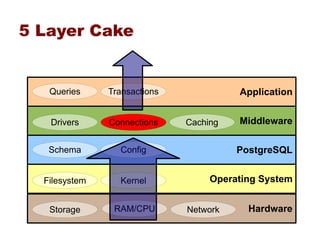
5 Layer Cake


   Queries     Transactions             Application


   Drivers     Connections    Caching   Middleware

   Schema        Config                 PostgreSQL


  Filesystem     Kernel            Operating System


   Storage      RAM/CPU       Network     Hardware
5 Layer Cake


   Queries     Transactions             Application


   Drivers     Connections    Caching   Middleware

   Schema        Config                 PostgreSQL


  Filesystem     Kernel            Operating System


   Storage      RAM/CPU       Network     Hardware
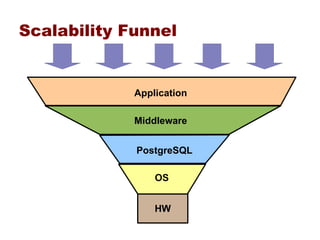
Scalability Funnel


             Application

             Middleware


             PostgreSQL

                 OS


                 HW
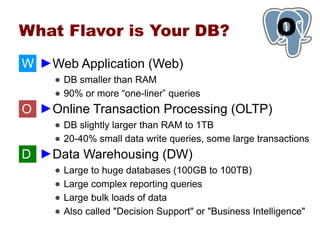
What Flavor is Your DB?                                    O
                                                           1
W â–şWeb Application (Web)
     â—Ź DB smaller than RAM
     ● 90% or more “one-liner” queries
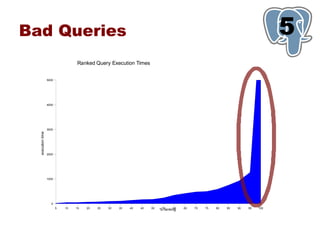
O â–şOnline Transaction Processing (OLTP)
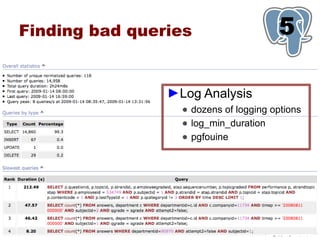
     â—Ź DB slightly larger than RAM to 1TB
     â—Ź 20-40% small data write queries, some large transactions
D â–şData Warehousing (DW)
     â—Ź   Large to huge databases (100GB to 100TB)
     â—Ź   Large complex reporting queries
     â—Ź   Large bulk loads of data
     â—Ź   Also called "Decision Support" or "Business Intelligence"
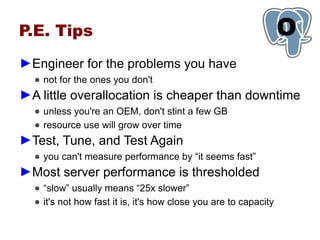
P.E. Tips                                                         O
                                                                  1
â–şEngineer for the problems you have
  â—Ź not for the ones you don't
â–şA little overallocation is cheaper than downtime
  â—Ź unless you're an OEM, don't stint a few GB
  â—Ź resource use will grow over time
â–şTest, Tune, and Test Again
  ● you can't measure performance by “it seems fast”
â–şMost server performance is thresholded
  ● “slow” usually means “25x slower”
  â—Ź it's not how fast it is, it's how close you are to capacity
1   Hardware
Hardware Basics
â–şFour basic components:
  â—Ź   CPU
  â—Ź   RAM
  â—Ź   I/O: Disks and disk bandwidth
  â—Ź   Network
â–şDifferent priorities for different applications
  â—Ź Web: CPU, Netowrk, RAM, ... I/O W
  â—Ź OLTP: balance all O
  â—Ź DW: I/O, CPU, RAM D
Getting Enough CPU                                             1
â–şMost applications today are CPU-bound
  â—Ź even I/O takes CPU
â–şOne Core, One Query
  â—Ź PostgreSQL is a multi-process application
     â–¬   Except for IOwaits, each core can only process one query at a
         time.
     â–¬   How many concurrent queries do you need?
  â—Ź Best performance at 1 core per no more than two concurrent
    queries
â–şSo if you can up your core count, do
  â—Ź you don't have to pay for licenses for the extra cores!
CPU Tips                                                      1
â–şCPU
 â—Ź SMP scaling isn't perfect; fewer faster cores is usually better
   than more slower ones
     â–¬ exception: highly cachable web applications W

    â–¬   more processors with less cores each should perform better
 â—Ź CPU features which matter
    â–¬   Speed
    â–¬   Large L2 cache helps with large data
    â–¬   64-bit performance can be 5-20% better
         –   especially since it lets you use large RAM
         –   but sometimes it isn't an improvement
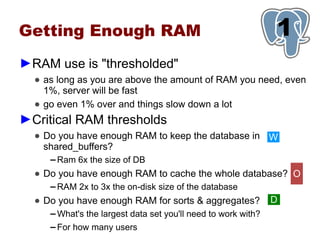
Getting Enough RAM                                               1
â–şRAM use is "thresholded"
  â—Ź as long as you are above the amount of RAM you need, even
    1%, server will be fast
  â—Ź go even 1% over and things slow down a lot
â–şCritical RAM thresholds
  â—Ź Do you have enough RAM to keep the database in W
    shared_buffers?
     â–¬   Ram 6x the size of DB
  â—Ź Do you have enough RAM to cache the whole database? O
     â–¬   RAM 2x to 3x the on-disk size of the database
  â—Ź Do you have enough RAM for sorts & aggregates?               D
     â–¬   What's the largest data set you'll need to work with?
     â–¬   For how many users
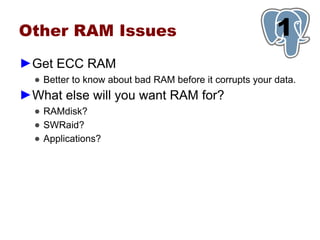
Other RAM Issues                                         1
â–şGet ECC RAM
  â—Ź Better to know about bad RAM before it corrupts your data.
â–şWhat else will you want RAM for?
  â—Ź RAMdisk?
  â—Ź SWRaid?
  â—Ź Applications?
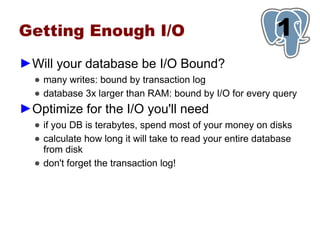
Getting Enough I/O                                          1
â–şWill your database be I/O Bound?
  â—Ź many writes: bound by transaction log
  â—Ź database 3x larger than RAM: bound by I/O for every query
â–şOptimize for the I/O you'll need
  â—Ź if you DB is terabytes, spend most of your money on disks
  â—Ź calculate how long it will take to read your entire database
    from disk
  â—Ź don't forget the transaction log!
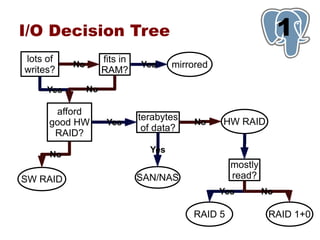
I/O Decision Tree                                                 1
lots of              fits in
           No                  Yes     mirrored
writes?              RAM?

     Yes        No

      afford
                               terabytes          HW RAID
     good HW          Yes                   No
                                of data?
      RAID?
                                 Yes
     No
                                                    mostly
SW RAID                        SAN/NAS              read?
                                                  Yes        No

                                           RAID 5             RAID 1+0
I/O Tips                                             1
â–şRAID
 â—Ź get battery backup and turn your write cache on
 â—Ź SAS has 2x the real throughput of SATA
 â—Ź more spindles = faster database
     â–¬   big disks are generally slow
â–şSAN/NAS
 â—Ź measure lag time: it can kill response time
 â—Ź how many channels?
     ▬   “gigabit” is only 100mb/s
     â–¬   make sure multipath works
 â—Ź use fiber if you can afford it
SSD: Not There Yet                                1
â–şFast
  â—Ź 1 SSD as fast as a 4-drive RAID
  â—Ź low-energy and low-profile
â–şBut not reliable
  â—Ź MTF in months or weeks
  â—Ź Mainly good for static data
  ● Seeks are supposed to be as fast as scans …
     â–¬   but they're not
â–şDon't rely on SSD now
  â—Ź but you will be using it next year
Network                                                  1
â–şNetwork can be your bottleneck
  â—Ź lag time
  â—Ź bandwith
  â—Ź oversubscribed switches
â–şHave dedicated connections
  â—Ź between appserver and database server
  â—Ź between database server and failover server
  â—Ź multiple interfaces!
â–şData Transfers
  â—Ź Gigabit is 100MB/s
  â—Ź Calculate capacity for data copies, standby, dumps
The Most Important
Hardware Advice:
                                                            1
â–şQuality matters
  â—Ź   not all CPUs are the same
  â—Ź   not all RAID cards are the same
  â—Ź   not all server systems are the same
  â—Ź   one bad piece of hardware, or bad driver, can destroy your
      application performance
â–şHigh-performance databases means hardware
 expertise
  â—Ź   the statistics don't tell you everything
  â—Ź   vendors lie
  â—Ź   you will need to research different models and combinations
  â—Ź   read the pgsql-performance mailing list
The Most Important
Hardware Advice:
                                               1
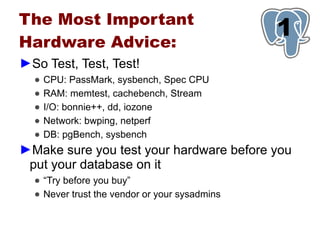
â–şSo Test, Test, Test!
  â—Ź   CPU: PassMark, sysbench, Spec CPU
  â—Ź   RAM: memtest, cachebench, Stream
  â—Ź   I/O: bonnie++, dd, iozone
  â—Ź   Network: bwping, netperf
  â—Ź   DB: pgBench, sysbench
â–şMake sure you test your hardware before you
 put your database on it
  ● “Try before you buy”
  â—Ź Never trust the vendor or your sysadmins
2
1
OS & Filesystem
Spread Your Files Around                                  1
                                                          2
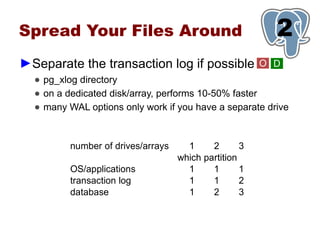
â–şSeparate the transaction log if possible               O D
  â—Ź pg_xlog directory
  â—Ź on a dedicated disk/array, performs 10-50% faster
  â—Ź many WAL options only work if you have a separate drive


          number of drives/arrays     1     2       3
                                    which partition
          OS/applications             1     1       1
          transaction log             1     1       2
          database                    1     2       3
Spread Your Files Around                                       1
                                                               2
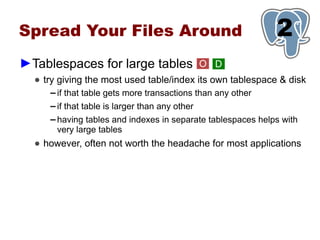
â–şTablespaces for large tables                     O D
  â—Ź try giving the most used table/index its own tablespace & disk
     â–¬   if that table gets more transactions than any other
     â–¬   if that table is larger than any other
     â–¬   having tables and indexes in separate tablespaces helps with
         very large tables
  â—Ź however, often not worth the headache for most applications
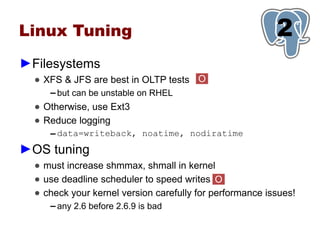
Linux Tuning                                              1
                                                          2
â–şFilesystems
  â—Ź XFS & JFS are best in OLTP tests O
     â–¬   but can be unstable on RHEL
  â—Ź Otherwise, use Ext3
  â—Ź Reduce logging
     â–¬   data=writeback, noatime, nodiratime
â–şOS tuning
  â—Ź must increase shmmax, shmall in kernel
  â—Ź use deadline scheduler to speed writes O
  â—Ź check your kernel version carefully for performance issues!
     â–¬   any 2.6 before 2.6.9 is bad
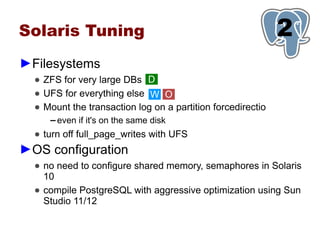
Solaris Tuning                                               1
                                                             2
â–şFilesystems
  â—Ź ZFS for very large DBs D
  â—Ź UFS for everything else W O
  â—Ź Mount the transaction log on a partition forcedirectio
     â–¬   even if it's on the same disk
  â—Ź turn off full_page_writes with UFS
â–şOS configuration
  â—Ź no need to configure shared memory, semaphores in Solaris
    10
  â—Ź compile PostgreSQL with aggressive optimization using Sun
    Studio 11/12
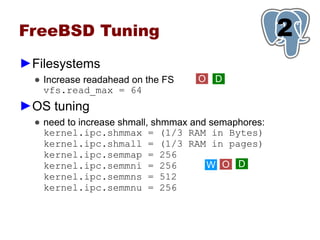
FreeBSD Tuning                                        1
                                                      2
â–şFilesystems
  â—Ź Increase readahead on the FS    O D
    vfs.read_max = 64
â–şOS tuning
  â—Ź need to increase shmall, shmmax and semaphores:
    kernel.ipc.shmmax = (1/3 RAM in Bytes)
    kernel.ipc.shmall = (1/3 RAM in pages)
    kernel.ipc.semmap = 256
    kernel.ipc.semmni = 256            W O D
    kernel.ipc.semmns = 512
    kernel.ipc.semmnu = 256
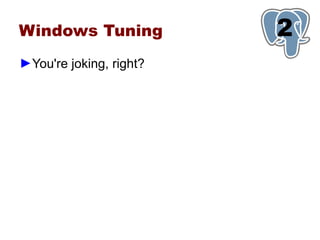
Windows Tuning           1
                         2
â–şYou're joking, right?
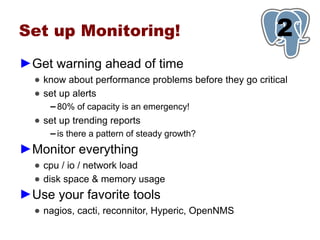
Set up Monitoring!                                      1
                                                        2
â–şGet warning ahead of time
  â—Ź know about performance problems before they go critical
  â—Ź set up alerts
     â–¬   80% of capacity is an emergency!
  â—Ź set up trending reports
     â–¬   is there a pattern of steady growth?
â–şMonitor everything
  â—Ź cpu / io / network load
  â—Ź disk space & memory usage
â–şUse your favorite tools
  â—Ź nagios, cacti, reconnitor, Hyperic, OpenNMS
3
                  1
postgresql.conf
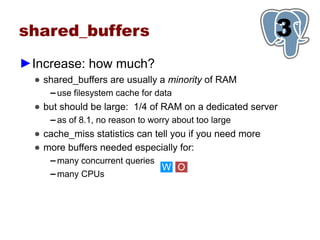
shared_buffers                                            3
                                                          1
â–şIncrease: how much?
  â—Ź shared_buffers are usually a minority of RAM
     â–¬   use filesystem cache for data
  â—Ź but should be large: 1/4 of RAM on a dedicated server
     â–¬   as of 8.1, no reason to worry about too large
  â—Ź cache_miss statistics can tell you if you need more
  â—Ź more buffers needed especially for:
     â–¬   many concurrent queries
                                    W O
     â–¬   many CPUs
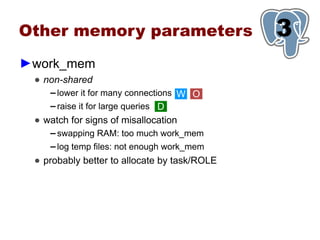
Other memory parameters                       3
                                              1
â–şwork_mem
 â—Ź non-shared
    â–¬ lower it for many connections W O
    â–¬ raise it for large queries D

 â—Ź watch for signs of misallocation
    â–¬   swapping RAM: too much work_mem
    â–¬   log temp files: not enough work_mem
 â—Ź probably better to allocate by task/ROLE
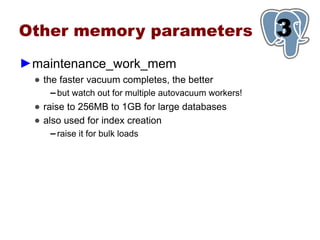
Other memory parameters                                  3
                                                         1
â–şmaintenance_work_mem
 â—Ź the faster vacuum completes, the better
    â–¬   but watch out for multiple autovacuum workers!
 â—Ź raise to 256MB to 1GB for large databases
 â—Ź also used for index creation
    â–¬   raise it for bulk loads
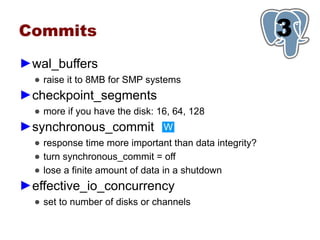
Commits                                                 3
                                                        1
â–şwal_buffers
  â—Ź raise it to 8MB for SMP systems
â–şcheckpoint_segments
  â—Ź more if you have the disk: 16, 64, 128
â–şsynchronous_commit             W
  â—Ź response time more important than data integrity?
  â—Ź turn synchronous_commit = off
  â—Ź lose a finite amount of data in a shutdown
â–şeffective_io_concurrency
  â—Ź set to number of disks or channels
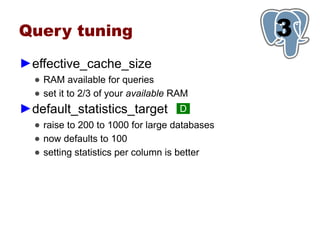
Query tuning                                   3
                                               1
â–şeffective_cache_size
  â—Ź RAM available for queries
  â—Ź set it to 2/3 of your available RAM
â–şdefault_statistics_target           D
  â—Ź raise to 200 to 1000 for large databases
  â—Ź now defaults to 100
  â—Ź setting statistics per column is better
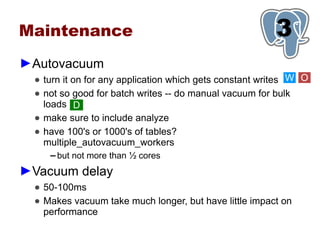
Maintenance                                              3
                                                         1
â–şAutovacuum
  â—Ź turn it on for any application which gets constant writes W O
  â—Ź not so good for batch writes -- do manual vacuum for bulk
    loads D
  â—Ź make sure to include analyze
  â—Ź have 100's or 1000's of tables?
    multiple_autovacuum_workers
     ▬   but not more than ½ cores
â–şVacuum delay
  â—Ź 50-100ms
  â—Ź Makes vacuum take much longer, but have little impact on
    performance
1
   4
Application
 Design
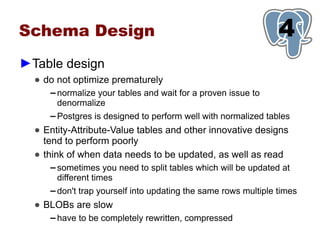
Schema Design                                                     1
                                                                  4
â–şTable design
  â—Ź do not optimize prematurely
     â–¬   normalize your tables and wait for a proven issue to
         denormalize
     â–¬   Postgres is designed to perform well with normalized tables
  â—Ź Entity-Attribute-Value tables and other innovative designs
    tend to perform poorly
  â—Ź think of when data needs to be updated, as well as read
     â–¬   sometimes you need to split tables which will be updated at
         different times
     â–¬   don't trap yourself into updating the same rows multiple times
  â—Ź BLOBs are slow
     â–¬   have to be completely rewritten, compressed
Schema Design                                                   1
                                                                4
â–şIndexing
  â—Ź   index most foreign keys
  â—Ź   index common WHERE criteria
  â—Ź   index common aggregated columns
  â—Ź   learn to use special index types: expressions, full text, partial
â–şNot Indexing
  â—Ź indexes cost you on updates, deletes
       â–¬   especially with HOT
  â—Ź too many indexes can confuse the planner
  â—Ź don't index: tiny tables, low-cardinality columns
Right indexes?                                       5
                                                     1
â–şpg_stat_user_indexes
  â—Ź shows indexes not being used
  â—Ź note that it doesn't record unique index usage
â–şpg_stat_user_tables
  â—Ź shows seq scans: index candidates?
  â—Ź shows heavy update/delete tables: index less
Partitioning                                             5
                                                         1
â–şPartition large or growing tables
  â—Ź historical data
     â–¬   data will be purged
     â–¬   massive deletes are server-killers
  â—Ź very large tables
     â–¬   anything over 1GB / 10m rows
     â–¬   partition by active/passive
â–şApplication must be partition-compliant
  â—Ź every query should call the partition key
  â—Ź pre-create your partitions
     ▬   do not create them on demand … they will lock
Query design                                           1
                                                       4
â–şDo more with each query
  â—Ź PostgreSQL does well with fewer larger queries
  â—Ź not as well with many small queries
  â—Ź avoid doing joins, tree-walking in middleware
â–şDo more with each transaction
  â—Ź batch related writes into large transactions
â–şKnow the query gotchas (per version)
  â—Ź   try swapping NOT IN and NOT EXISTS for bad queries
  â—Ź   avoid multiple outer joins before 8.2 if you can
  â—Ź   try to make sure that index/key types match
  â—Ź   avoid unanchored text searches "ILIKE '%josh%'"
But I use ORM!                                            1
                                                          4
â–şObject-Relational Management
                    != high performance
  â—Ź ORM is for ease of development
  â—Ź make sure your ORM allows "tweaking" queries
  â—Ź applications which are pushing the limits of performance
    probably can't use ORM
     â–¬   but most don't have a problem
It's All About Caching                              1
                                                    4
â–şUse prepared queries W O
â–şCache, cache everywhere                      W O
  â—Ź plan caching: on the PostgreSQL server
  â—Ź parse caching: in some drivers
  â—Ź data caching:
     â–¬   in the appserver
     â–¬   in memcached
     â–¬   in the client (javascript, etc.)
  â—Ź use as many kinds of caching as you can
â–şthink carefully about cache invalidation
  ● and avoid “cache storms”
Connection Management                                    1
                                                         4
â–şConnections take resources                W O
  â—Ź RAM, CPU
  â—Ź transaction checking
â–şMake sure you're only using connections you
 need
  ● look for “<IDLE>” and “<IDLE> in Transaction”
  â—Ź log and check for a pattern of connection growth
     ▬   may indicate a “connecion leak”
  â—Ź make sure that database and appserver timeouts are
    synchronized
  â—Ź if your app requires > 500 database connections, you need
    better pooling
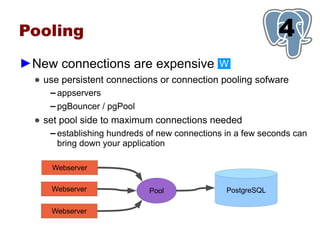
Pooling                                                        1
                                                               4
â–şNew connections are expensive                  W
  â—Ź use persistent connections or connection pooling sofware
     â–¬   appservers
     â–¬   pgBouncer / pgPool
  â—Ź set pool side to maximum connections needed
     â–¬   establishing hundreds of new connections in a few seconds can
         bring down your application

      Webserver

     Webserver                 Pool               PostgreSQL

     Webserver
5
1
Query
Tuning
Optimize Your Queries
                                            5
                                            1
in Test
â–şBefore you go production
  â—Ź simulate user load on the application
  â—Ź monitor and fix slow queries
  â—Ź look for worst procedures
►Look for “bad queries”
  â—Ź   queries which take too long
  â—Ź   data updates which never complete
  â—Ź   long-running stored procedures
  â—Ź   interfaces issuing too many queries
  â—Ź   queries which block
Bad Queries                                                                                                                      5
                                                                                                                                 1
                                   Ranked Query Execution Times


                   5000


                   4000


                   3000
  execution time


                   2000


                   1000


                     0
                          5   10   15   20   25   30   35   40   45   50
                                                                           %55     60
                                                                             ranking    65   70   75   80   85   90   95   100
Finding bad queries                    5
                                       1

                â–şLog Analysis
                  â—Ź dozens of logging options
                  â—Ź log_min_duration
                  â—Ź pgfouine
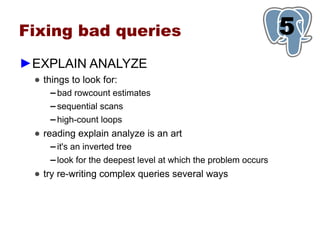
Fixing bad queries                                                5
                                                                  1
â–şEXPLAIN ANALYZE
 â—Ź things to look for:
     â–¬   bad rowcount estimates
     â–¬   sequential scans
     â–¬   high-count loops
 â—Ź reading explain analyze is an art
     â–¬   it's an inverted tree
     â–¬   look for the deepest level at which the problem occurs
 â—Ź try re-writing complex queries several ways
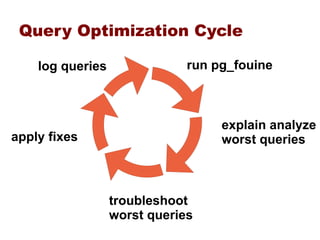
Query Optimization Cycle

    log queries               run pg_fouine


                                   explain analyze
apply fixes                        worst queries


                  troubleshoot
                  worst queries
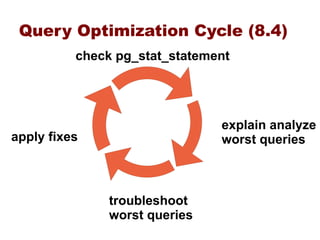
Query Optimization Cycle (8.4)
          check pg_stat_statement


                               explain analyze
apply fixes                    worst queries


              troubleshoot
              worst queries
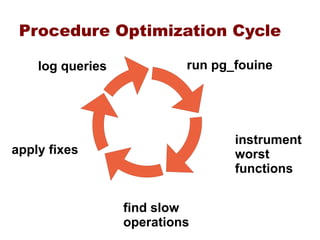
Procedure Optimization Cycle

    log queries            run pg_fouine


                                  instrument
apply fixes                       worst
                                  functions


                  find slow
                  operations
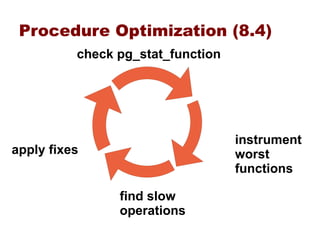
Procedure Optimization (8.4)
          check pg_stat_function


                                   instrument
apply fixes                        worst
                                   functions

                find slow
                operations
Questions?                                                                                               6
                                                                                                         1
â–şJosh Berkus                                          â–şMore Advice
  â—Ź josh@pgexperts.com                                       â—Ź www.postgresql.org/docs
  â—Ź www.pgexperts.com                                        â—Ź pgsql-performance mailing
     â–¬   /presentations.html                                   list
  â—Ź it.toolbox.com/blogs/datab                               â—Ź planet.postgresql.org
    ase-soup                                                 â—Ź irc.freenode.net
                                                                    â–¬   #postgresql


                This talk is copyright 2009 Josh Berkus, and is licensed under the creative commons attribution license

5 Steps to PostgreSQL Performance

  • 1.
    3 1 5 1 1 4 2 1 Five Steps to PostgreSQL 1 Performance Josh Berkus PostgreSQL Experts Inc. JDCon West - October 2009
  • 2.
    3 1 5 1 postgresql.conf 1 4 Query Tuning 2 1 Application Design OS & Filesystem 1 Hardware
  • 3.
    5 Layer Cake Queries Transactions Application Drivers Connections Caching Middleware Schema Config PostgreSQL Filesystem Kernel Operating System Storage RAM/CPU Network Hardware
  • 4.
    5 Layer Cake Queries Transactions Application Drivers Connections Caching Middleware Schema Config PostgreSQL Filesystem Kernel Operating System Storage RAM/CPU Network Hardware
  • 5.
    Scalability Funnel Application Middleware PostgreSQL OS HW
  • 6.
    What Flavor isYour DB? O 1 W ►Web Application (Web) ● DB smaller than RAM ● 90% or more “one-liner” queries O ►Online Transaction Processing (OLTP) ● DB slightly larger than RAM to 1TB ● 20-40% small data write queries, some large transactions D ►Data Warehousing (DW) ● Large to huge databases (100GB to 100TB) ● Large complex reporting queries ● Large bulk loads of data ● Also called "Decision Support" or "Business Intelligence"
  • 7.
    P.E. Tips O 1 ►Engineer for the problems you have ● not for the ones you don't ►A little overallocation is cheaper than downtime ● unless you're an OEM, don't stint a few GB ● resource use will grow over time ►Test, Tune, and Test Again ● you can't measure performance by “it seems fast” ►Most server performance is thresholded ● “slow” usually means “25x slower” ● it's not how fast it is, it's how close you are to capacity
  • 8.
    1 Hardware
  • 9.
    Hardware Basics â–şFour basiccomponents: â—Ź CPU â—Ź RAM â—Ź I/O: Disks and disk bandwidth â—Ź Network â–şDifferent priorities for different applications â—Ź Web: CPU, Netowrk, RAM, ... I/O W â—Ź OLTP: balance all O â—Ź DW: I/O, CPU, RAM D
  • 10.
    Getting Enough CPU 1 â–şMost applications today are CPU-bound â—Ź even I/O takes CPU â–şOne Core, One Query â—Ź PostgreSQL is a multi-process application â–¬ Except for IOwaits, each core can only process one query at a time. â–¬ How many concurrent queries do you need? â—Ź Best performance at 1 core per no more than two concurrent queries â–şSo if you can up your core count, do â—Ź you don't have to pay for licenses for the extra cores!
  • 11.
    CPU Tips 1 ►CPU ● SMP scaling isn't perfect; fewer faster cores is usually better than more slower ones ▬ exception: highly cachable web applications W ▬ more processors with less cores each should perform better ● CPU features which matter ▬ Speed ▬ Large L2 cache helps with large data ▬ 64-bit performance can be 5-20% better – especially since it lets you use large RAM – but sometimes it isn't an improvement
  • 12.
    Getting Enough RAM 1 â–şRAM use is "thresholded" â—Ź as long as you are above the amount of RAM you need, even 1%, server will be fast â—Ź go even 1% over and things slow down a lot â–şCritical RAM thresholds â—Ź Do you have enough RAM to keep the database in W shared_buffers? â–¬ Ram 6x the size of DB â—Ź Do you have enough RAM to cache the whole database? O â–¬ RAM 2x to 3x the on-disk size of the database â—Ź Do you have enough RAM for sorts & aggregates? D â–¬ What's the largest data set you'll need to work with? â–¬ For how many users
  • 13.
    Other RAM Issues 1 â–şGet ECC RAM â—Ź Better to know about bad RAM before it corrupts your data. â–şWhat else will you want RAM for? â—Ź RAMdisk? â—Ź SWRaid? â—Ź Applications?
  • 14.
    Getting Enough I/O 1 â–şWill your database be I/O Bound? â—Ź many writes: bound by transaction log â—Ź database 3x larger than RAM: bound by I/O for every query â–şOptimize for the I/O you'll need â—Ź if you DB is terabytes, spend most of your money on disks â—Ź calculate how long it will take to read your entire database from disk â—Ź don't forget the transaction log!
  • 15.
    I/O Decision Tree 1 lots of fits in No Yes mirrored writes? RAM? Yes No afford terabytes HW RAID good HW Yes No of data? RAID? Yes No mostly SW RAID SAN/NAS read? Yes No RAID 5 RAID 1+0
  • 16.
    I/O Tips 1 ►RAID ● get battery backup and turn your write cache on ● SAS has 2x the real throughput of SATA ● more spindles = faster database ▬ big disks are generally slow ►SAN/NAS ● measure lag time: it can kill response time ● how many channels? ▬ “gigabit” is only 100mb/s ▬ make sure multipath works ● use fiber if you can afford it
  • 17.
    SSD: Not ThereYet 1 ►Fast ● 1 SSD as fast as a 4-drive RAID ● low-energy and low-profile ►But not reliable ● MTF in months or weeks ● Mainly good for static data ● Seeks are supposed to be as fast as scans … ▬ but they're not ►Don't rely on SSD now ● but you will be using it next year
  • 18.
    Network 1 â–şNetwork can be your bottleneck â—Ź lag time â—Ź bandwith â—Ź oversubscribed switches â–şHave dedicated connections â—Ź between appserver and database server â—Ź between database server and failover server â—Ź multiple interfaces! â–şData Transfers â—Ź Gigabit is 100MB/s â—Ź Calculate capacity for data copies, standby, dumps
  • 19.
    The Most Important HardwareAdvice: 1 â–şQuality matters â—Ź not all CPUs are the same â—Ź not all RAID cards are the same â—Ź not all server systems are the same â—Ź one bad piece of hardware, or bad driver, can destroy your application performance â–şHigh-performance databases means hardware expertise â—Ź the statistics don't tell you everything â—Ź vendors lie â—Ź you will need to research different models and combinations â—Ź read the pgsql-performance mailing list
  • 20.
    The Most Important HardwareAdvice: 1 ►So Test, Test, Test! ● CPU: PassMark, sysbench, Spec CPU ● RAM: memtest, cachebench, Stream ● I/O: bonnie++, dd, iozone ● Network: bwping, netperf ● DB: pgBench, sysbench ►Make sure you test your hardware before you put your database on it ● “Try before you buy” ● Never trust the vendor or your sysadmins
  • 21.
  • 22.
    Spread Your FilesAround 1 2 â–şSeparate the transaction log if possible O D â—Ź pg_xlog directory â—Ź on a dedicated disk/array, performs 10-50% faster â—Ź many WAL options only work if you have a separate drive number of drives/arrays 1 2 3 which partition OS/applications 1 1 1 transaction log 1 1 2 database 1 2 3
  • 23.
    Spread Your FilesAround 1 2 â–şTablespaces for large tables O D â—Ź try giving the most used table/index its own tablespace & disk â–¬ if that table gets more transactions than any other â–¬ if that table is larger than any other â–¬ having tables and indexes in separate tablespaces helps with very large tables â—Ź however, often not worth the headache for most applications
  • 24.
    Linux Tuning 1 2 â–şFilesystems â—Ź XFS & JFS are best in OLTP tests O â–¬ but can be unstable on RHEL â—Ź Otherwise, use Ext3 â—Ź Reduce logging â–¬ data=writeback, noatime, nodiratime â–şOS tuning â—Ź must increase shmmax, shmall in kernel â—Ź use deadline scheduler to speed writes O â—Ź check your kernel version carefully for performance issues! â–¬ any 2.6 before 2.6.9 is bad
  • 25.
    Solaris Tuning 1 2 â–şFilesystems â—Ź ZFS for very large DBs D â—Ź UFS for everything else W O â—Ź Mount the transaction log on a partition forcedirectio â–¬ even if it's on the same disk â—Ź turn off full_page_writes with UFS â–şOS configuration â—Ź no need to configure shared memory, semaphores in Solaris 10 â—Ź compile PostgreSQL with aggressive optimization using Sun Studio 11/12
  • 26.
    FreeBSD Tuning 1 2 â–şFilesystems â—Ź Increase readahead on the FS O D vfs.read_max = 64 â–şOS tuning â—Ź need to increase shmall, shmmax and semaphores: kernel.ipc.shmmax = (1/3 RAM in Bytes) kernel.ipc.shmall = (1/3 RAM in pages) kernel.ipc.semmap = 256 kernel.ipc.semmni = 256 W O D kernel.ipc.semmns = 512 kernel.ipc.semmnu = 256
  • 27.
    Windows Tuning 1 2 â–şYou're joking, right?
  • 28.
    Set up Monitoring! 1 2 â–şGet warning ahead of time â—Ź know about performance problems before they go critical â—Ź set up alerts â–¬ 80% of capacity is an emergency! â—Ź set up trending reports â–¬ is there a pattern of steady growth? â–şMonitor everything â—Ź cpu / io / network load â—Ź disk space & memory usage â–şUse your favorite tools â—Ź nagios, cacti, reconnitor, Hyperic, OpenNMS
  • 29.
    3 1 postgresql.conf
  • 30.
    shared_buffers 3 1 â–şIncrease: how much? â—Ź shared_buffers are usually a minority of RAM â–¬ use filesystem cache for data â—Ź but should be large: 1/4 of RAM on a dedicated server â–¬ as of 8.1, no reason to worry about too large â—Ź cache_miss statistics can tell you if you need more â—Ź more buffers needed especially for: â–¬ many concurrent queries W O â–¬ many CPUs
  • 31.
    Other memory parameters 3 1 â–şwork_mem â—Ź non-shared â–¬ lower it for many connections W O â–¬ raise it for large queries D â—Ź watch for signs of misallocation â–¬ swapping RAM: too much work_mem â–¬ log temp files: not enough work_mem â—Ź probably better to allocate by task/ROLE
  • 32.
    Other memory parameters 3 1 â–şmaintenance_work_mem â—Ź the faster vacuum completes, the better â–¬ but watch out for multiple autovacuum workers! â—Ź raise to 256MB to 1GB for large databases â—Ź also used for index creation â–¬ raise it for bulk loads
  • 33.
    Commits 3 1 â–şwal_buffers â—Ź raise it to 8MB for SMP systems â–şcheckpoint_segments â—Ź more if you have the disk: 16, 64, 128 â–şsynchronous_commit W â—Ź response time more important than data integrity? â—Ź turn synchronous_commit = off â—Ź lose a finite amount of data in a shutdown â–şeffective_io_concurrency â—Ź set to number of disks or channels
  • 34.
    Query tuning 3 1 â–şeffective_cache_size â—Ź RAM available for queries â—Ź set it to 2/3 of your available RAM â–şdefault_statistics_target D â—Ź raise to 200 to 1000 for large databases â—Ź now defaults to 100 â—Ź setting statistics per column is better
  • 35.
    Maintenance 3 1 ►Autovacuum ● turn it on for any application which gets constant writes W O ● not so good for batch writes -- do manual vacuum for bulk loads D ● make sure to include analyze ● have 100's or 1000's of tables? multiple_autovacuum_workers ▬ but not more than ½ cores ►Vacuum delay ● 50-100ms ● Makes vacuum take much longer, but have little impact on performance
  • 36.
    1 4 Application Design
  • 37.
    Schema Design 1 4 â–şTable design â—Ź do not optimize prematurely â–¬ normalize your tables and wait for a proven issue to denormalize â–¬ Postgres is designed to perform well with normalized tables â—Ź Entity-Attribute-Value tables and other innovative designs tend to perform poorly â—Ź think of when data needs to be updated, as well as read â–¬ sometimes you need to split tables which will be updated at different times â–¬ don't trap yourself into updating the same rows multiple times â—Ź BLOBs are slow â–¬ have to be completely rewritten, compressed
  • 38.
    Schema Design 1 4 â–şIndexing â—Ź index most foreign keys â—Ź index common WHERE criteria â—Ź index common aggregated columns â—Ź learn to use special index types: expressions, full text, partial â–şNot Indexing â—Ź indexes cost you on updates, deletes â–¬ especially with HOT â—Ź too many indexes can confuse the planner â—Ź don't index: tiny tables, low-cardinality columns
  • 39.
    Right indexes? 5 1 â–şpg_stat_user_indexes â—Ź shows indexes not being used â—Ź note that it doesn't record unique index usage â–şpg_stat_user_tables â—Ź shows seq scans: index candidates? â—Ź shows heavy update/delete tables: index less
  • 40.
    Partitioning 5 1 ►Partition large or growing tables ● historical data ▬ data will be purged ▬ massive deletes are server-killers ● very large tables ▬ anything over 1GB / 10m rows ▬ partition by active/passive ►Application must be partition-compliant ● every query should call the partition key ● pre-create your partitions ▬ do not create them on demand … they will lock
  • 41.
    Query design 1 4 â–şDo more with each query â—Ź PostgreSQL does well with fewer larger queries â—Ź not as well with many small queries â—Ź avoid doing joins, tree-walking in middleware â–şDo more with each transaction â—Ź batch related writes into large transactions â–şKnow the query gotchas (per version) â—Ź try swapping NOT IN and NOT EXISTS for bad queries â—Ź avoid multiple outer joins before 8.2 if you can â—Ź try to make sure that index/key types match â—Ź avoid unanchored text searches "ILIKE '%josh%'"
  • 42.
    But I useORM! 1 4 â–şObject-Relational Management != high performance â—Ź ORM is for ease of development â—Ź make sure your ORM allows "tweaking" queries â—Ź applications which are pushing the limits of performance probably can't use ORM â–¬ but most don't have a problem
  • 43.
    It's All AboutCaching 1 4 ►Use prepared queries W O ►Cache, cache everywhere W O ● plan caching: on the PostgreSQL server ● parse caching: in some drivers ● data caching: ▬ in the appserver ▬ in memcached ▬ in the client (javascript, etc.) ● use as many kinds of caching as you can ►think carefully about cache invalidation ● and avoid “cache storms”
  • 44.
    Connection Management 1 4 ►Connections take resources W O ● RAM, CPU ● transaction checking ►Make sure you're only using connections you need ● look for “<IDLE>” and “<IDLE> in Transaction” ● log and check for a pattern of connection growth ▬ may indicate a “connecion leak” ● make sure that database and appserver timeouts are synchronized ● if your app requires > 500 database connections, you need better pooling
  • 45.
    Pooling 1 4 â–şNew connections are expensive W â—Ź use persistent connections or connection pooling sofware â–¬ appservers â–¬ pgBouncer / pgPool â—Ź set pool side to maximum connections needed â–¬ establishing hundreds of new connections in a few seconds can bring down your application Webserver Webserver Pool PostgreSQL Webserver
  • 46.
  • 47.
    Optimize Your Queries 5 1 in Test ►Before you go production ● simulate user load on the application ● monitor and fix slow queries ● look for worst procedures ►Look for “bad queries” ● queries which take too long ● data updates which never complete ● long-running stored procedures ● interfaces issuing too many queries ● queries which block
  • 48.
    Bad Queries 5 1 Ranked Query Execution Times 5000 4000 3000 execution time 2000 1000 0 5 10 15 20 25 30 35 40 45 50 %55 60 ranking 65 70 75 80 85 90 95 100
  • 49.
    Finding bad queries 5 1 â–şLog Analysis â—Ź dozens of logging options â—Ź log_min_duration â—Ź pgfouine
  • 50.
    Fixing bad queries 5 1 â–şEXPLAIN ANALYZE â—Ź things to look for: â–¬ bad rowcount estimates â–¬ sequential scans â–¬ high-count loops â—Ź reading explain analyze is an art â–¬ it's an inverted tree â–¬ look for the deepest level at which the problem occurs â—Ź try re-writing complex queries several ways
  • 51.
    Query Optimization Cycle log queries run pg_fouine explain analyze apply fixes worst queries troubleshoot worst queries
  • 52.
    Query Optimization Cycle(8.4) check pg_stat_statement explain analyze apply fixes worst queries troubleshoot worst queries
  • 53.
    Procedure Optimization Cycle log queries run pg_fouine instrument apply fixes worst functions find slow operations
  • 54.
    Procedure Optimization (8.4) check pg_stat_function instrument apply fixes worst functions find slow operations
  • 55.
    Questions? 6 1 â–şJosh Berkus â–şMore Advice â—Ź josh@pgexperts.com â—Ź www.postgresql.org/docs â—Ź www.pgexperts.com â—Ź pgsql-performance mailing â–¬ /presentations.html list â—Ź it.toolbox.com/blogs/datab â—Ź planet.postgresql.org ase-soup â—Ź irc.freenode.net â–¬ #postgresql This talk is copyright 2009 Josh Berkus, and is licensed under the creative commons attribution license