Recipe of a Linux LiveCD
By
Buddhika Siddhisena
2
Agenda
What is a LiveCD
Why run a LiveCD
Understanding the Linux Boot process
Understanding the Linux LiveCD Boot process
How hardware detection could work
Achieving Data Persistence on LiveCD
Short survey of popular LiveCDs
3
What is a LiveCD
Is a CD that contains an Operating System (OS), capable of booting off
directly, without first having to be installed.
Will generally have automatic hardware detection, as the OS boots.
May contain more data than the physical size of a CDROM (~700MB) by
using on-the-fly decompression of the file system.
Generally slower to boot when compared to HDD, mainly due to slower
access times of CDROM drives.
May offer the ability to remember configuration settings by saving them
on to a drive (USB, floppy or HDD).
May offer it to be installed to the hard disk permanently
4
Why run a LiveCD
Provides an alternative way to try out a new OS/distribution.
Can be used to instantly convert any desktop to your desktop! And you
can't get blamed for doing so.
Can be a valuable resource for recovering data, resetting passwords etc.
Can be used to distribute a demo versions of software thats guaranteed to
work with minimum hassle.
And endless other possibilities....
5
Understanding the Linux Boot process
As the machine boots the BIOS looks for a bootable media depending on
the boot sequence.
BIOS loads the bootloader from a special area in the disk called the
Master Boot Record (MBR). On linux it is usually either LILO or GRUB.
LILO (or GRUB) will attempt to load the kernel and optionally an initial
RAM disk (initrd), if specified.
Control is passed to the kernel as it decompresses the initrd and mounts it
as the root device.
6
Understanding the Linux Boot process
The kernel executes /linuxrc from the root device. It will perform various
pre-boot tasks such as loading of additional drivers.
Once linuxrc exits control is passed back to the kernel which will then
mount the real root device as the root file system.
/sbin/init from the real root system is executed which uses /etc/inittab
configuration to boot rest of the system.
/etc/inittab defines the default runlevel (usually 3 or 5) and as part of
the boot process all scripts in /etc/rcX.d/ are executed.
7
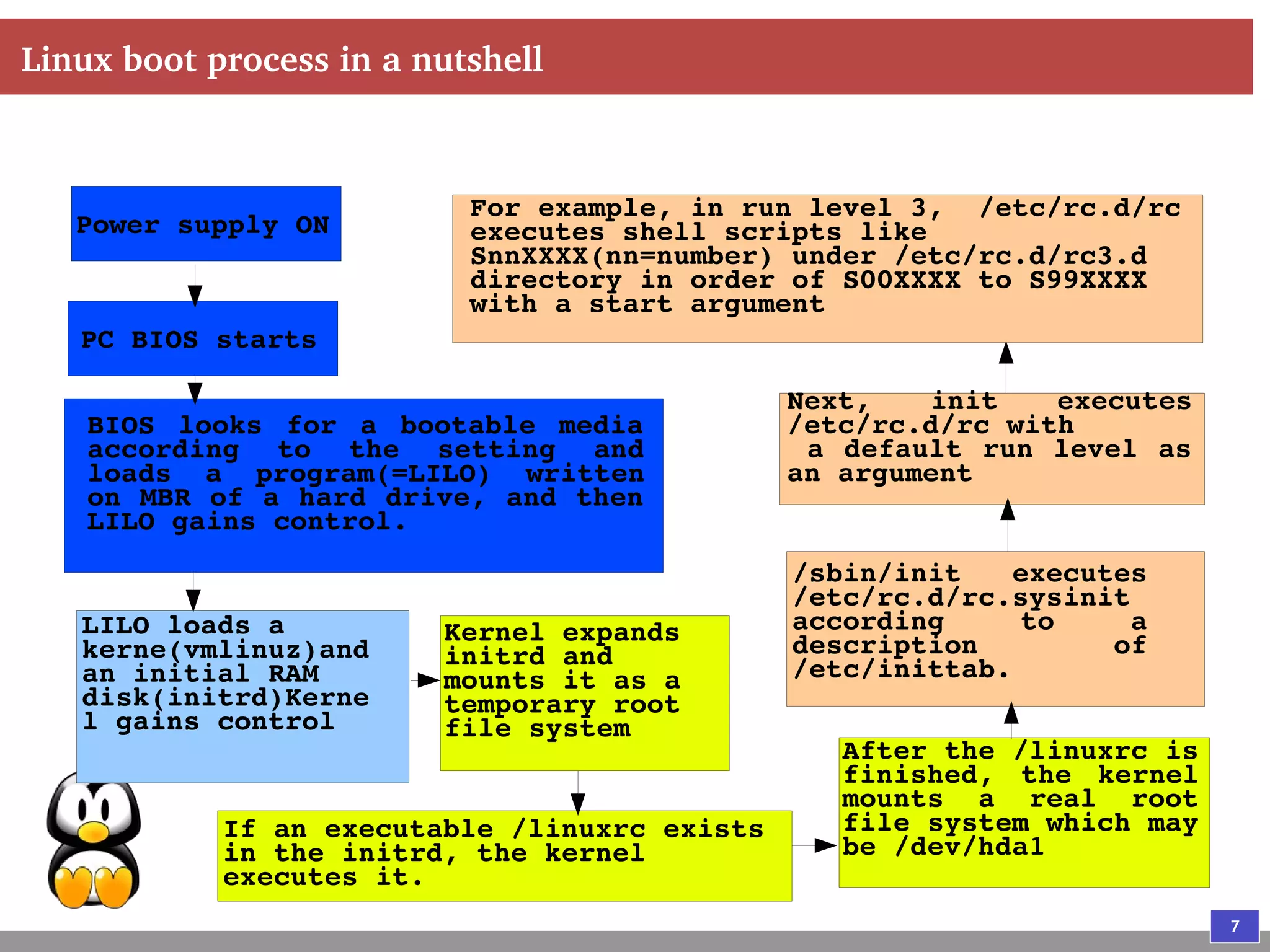
Linux boot process in a nutshell
Power supply ON
PC BIOS starts
BIOS looks for a bootable media
according to the setting and
loads a program(=LILO) written
on MBR of a hard drive, and then
LILO gains control.
LILO loads a
kerne(vmlinuz)and
an initial RAM
disk(initrd)Kerne
l gains control
Kernel expands
initrd and
mounts it as a
temporary root
file system
If an executable /linuxrc exists
in the initrd, the kernel
executes it.
After the /linuxrc is
finished, the kernel
mounts a real root
file system which may
be /dev/hda1
/sbin/init executes
/etc/rc.d/rc.sysinit
according to a
description of
/etc/inittab.
Next, init executes
/etc/rc.d/rc with
a default run level as
an argument
For example, in run level 3, /etc/rc.d/rc
executes shell scripts like
SnnXXXX(nn=number) under /etc/rc.d/rc3.d
directory in order of S00XXXX to S99XXXX
with a start argument
8
Understanding the Linux LiveCD Boot process
BIOS finds a bootable CDROM and loads the bootloader (usually
ISOLINUX which is based on the Syslinux bootloader)
ISOLINUX will load the initrd and the kernel image and transfer control
to the kernel.
The kernel decompresses initrd and mounts it as root and executes the
/linuxrc script from the LiveCD.
9
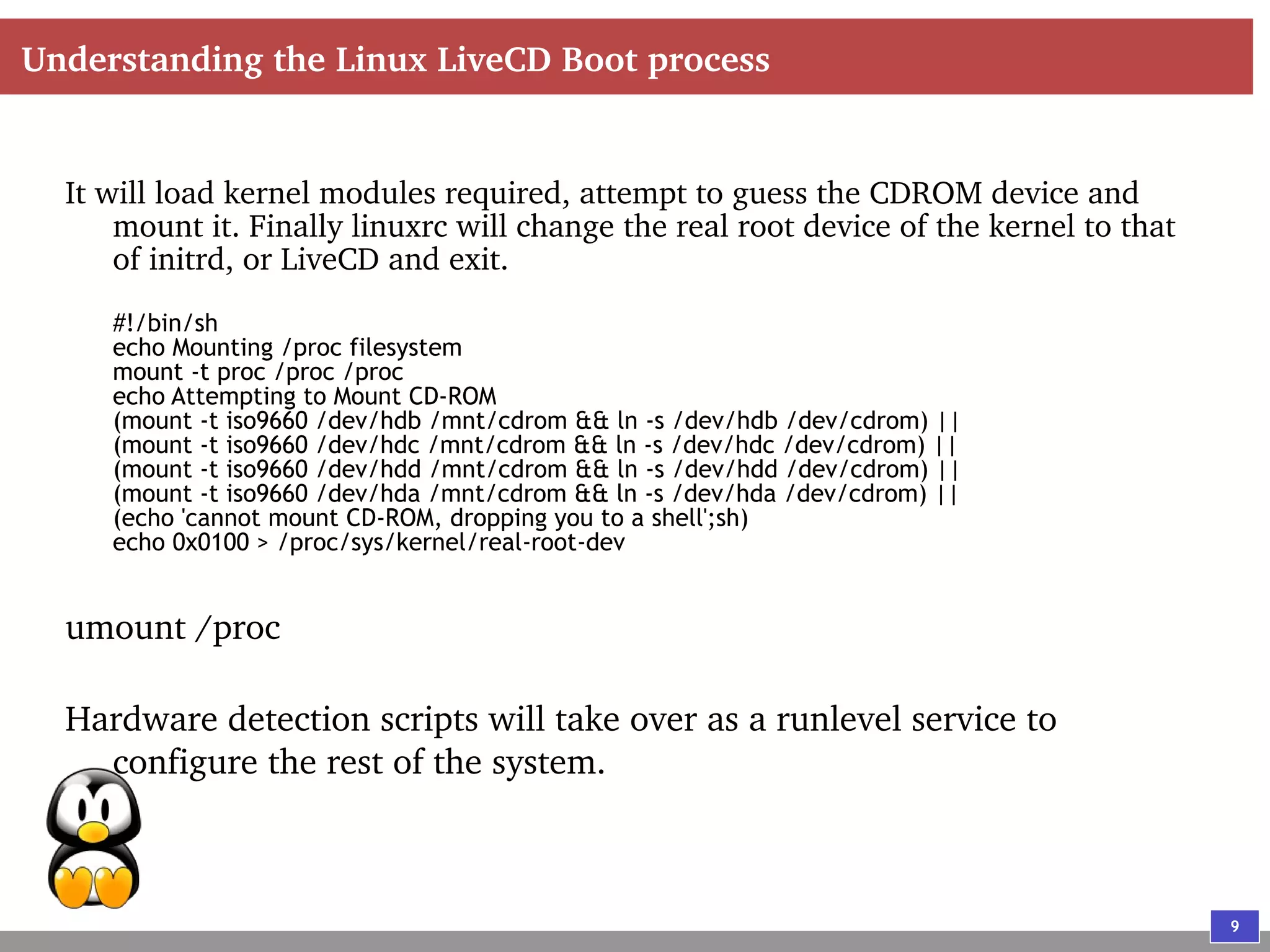
Understanding the Linux LiveCD Boot process
It will load kernel modules required, attempt to guess the CDROM device and
mount it. Finally linuxrc will change the real root device of the kernel to that
of initrd, or LiveCD and exit.
#!/bin/sh
echo Mounting /proc filesystem
mount -t proc /proc /proc
echo Attempting to Mount CD-ROM
(mount -t iso9660 /dev/hdb /mnt/cdrom && ln -s /dev/hdb /dev/cdrom) ||
(mount -t iso9660 /dev/hdc /mnt/cdrom && ln -s /dev/hdc /dev/cdrom) ||
(mount -t iso9660 /dev/hdd /mnt/cdrom && ln -s /dev/hdd /dev/cdrom) ||
(mount -t iso9660 /dev/hda /mnt/cdrom && ln -s /dev/hda /dev/cdrom) ||
(echo 'cannot mount CD-ROM, dropping you to a shell';sh)
echo 0x0100 > /proc/sys/kernel/real-root-dev
umount /proc
Hardware detection scripts will take over as a runlevel service to
configure the rest of the system.
10
Hardware detection process
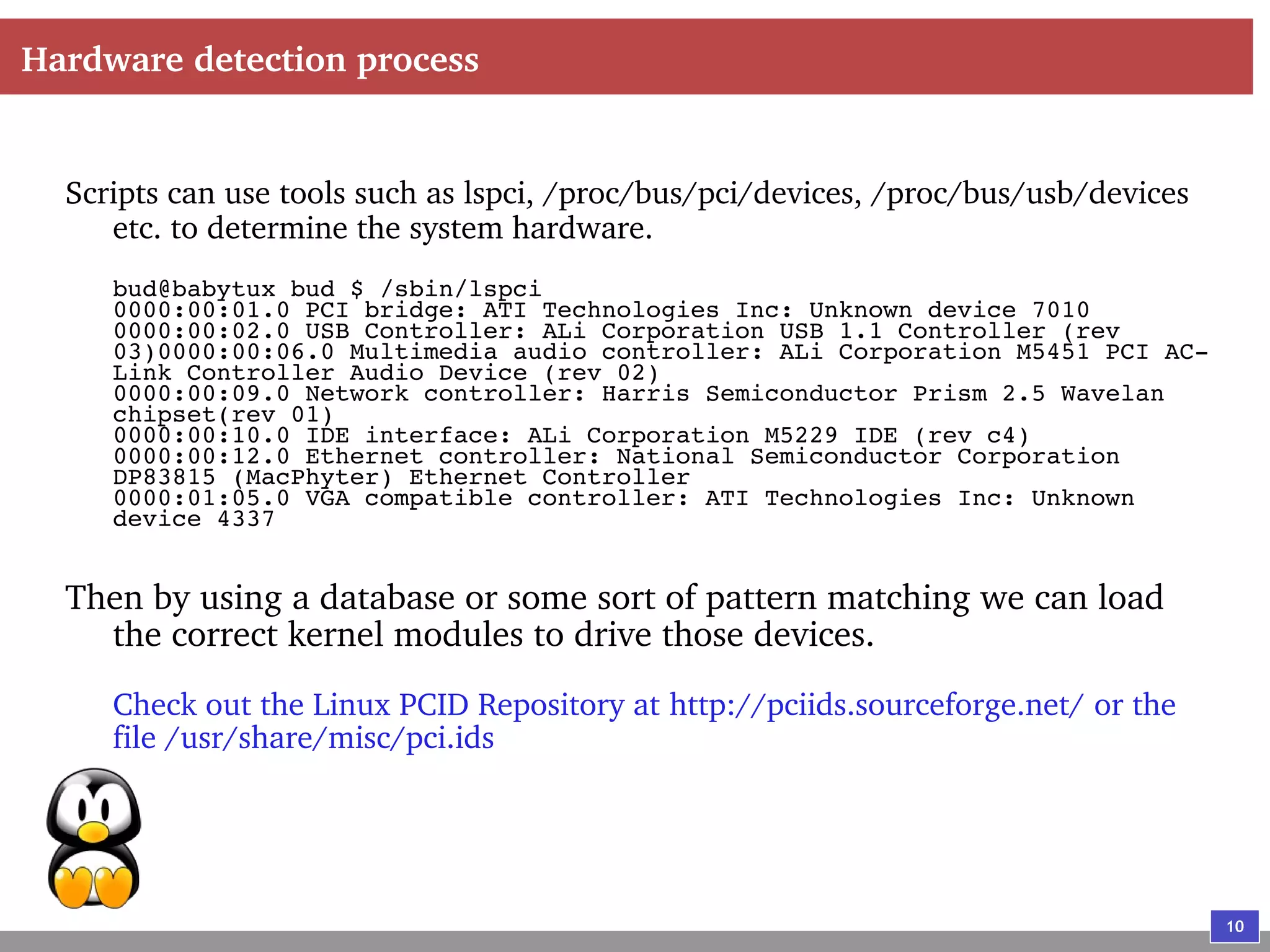
Scripts can use tools such as lspci, /proc/bus/pci/devices, /proc/bus/usb/devices
etc. to determine the system hardware.
bud@babytux bud $ /sbin/lspci
0000:00:01.0 PCI bridge: ATI Technologies Inc: Unknown device 7010
0000:00:02.0 USB Controller: ALi Corporation USB 1.1 Controller (rev
03)0000:00:06.0 Multimedia audio controller: ALi Corporation M5451 PCI AC-
Link Controller Audio Device (rev 02)
0000:00:09.0 Network controller: Harris Semiconductor Prism 2.5 Wavelan
chipset(rev 01)
0000:00:10.0 IDE interface: ALi Corporation M5229 IDE (rev c4)
0000:00:12.0 Ethernet controller: National Semiconductor Corporation
DP83815 (MacPhyter) Ethernet Controller
0000:01:05.0 VGA compatible controller: ATI Technologies Inc: Unknown
device 4337
Then by using a database or some sort of pattern matching we can load
the correct kernel modules to drive those devices.
Check out the Linux PCID Repository at http://pciids.sourceforge.net/ or the
file /usr/share/misc/pci.ids
11
Hardware detection process
Other tools such as kudzu(http://rhlinux.redhat.com/kudzu/) that comes
with Redhat or discover(http://hackers.progeny.com/discover/) can
also be used
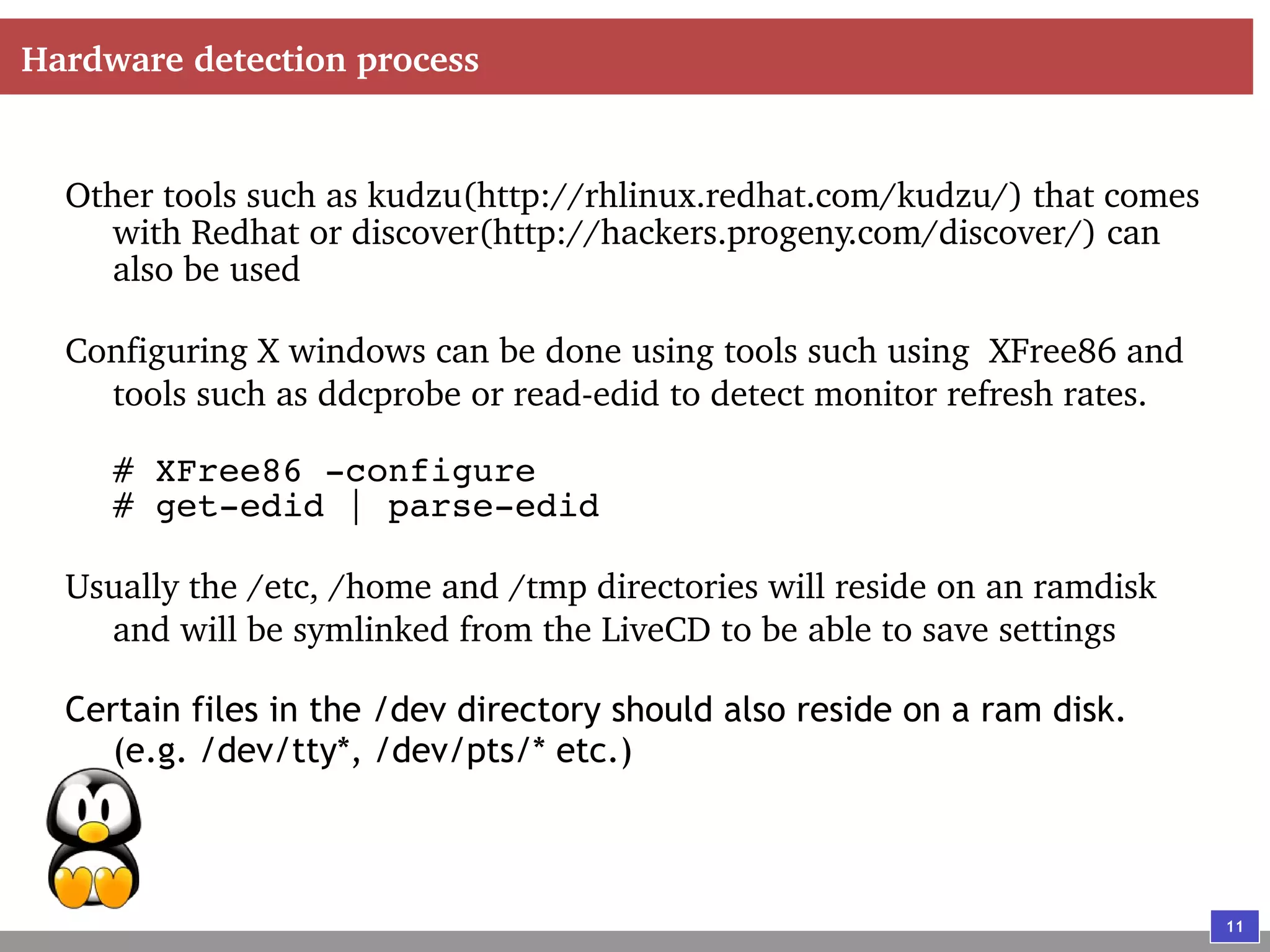
Configuring X windows can be done using tools such using XFree86 and
tools such as ddcprobe or read-edid to detect monitor refresh rates.
# XFree86 -configure
# get-edid | parse-edid
Usually the /etc, /home and /tmp directories will reside on an ramdisk
and will be symlinked from the LiveCD to be able to save settings
Certain files in the /dev directory should also reside on a ram disk.
(e.g. /dev/tty*, /dev/pts/* etc.)
12
Achieving Data Persistence on LiveCD
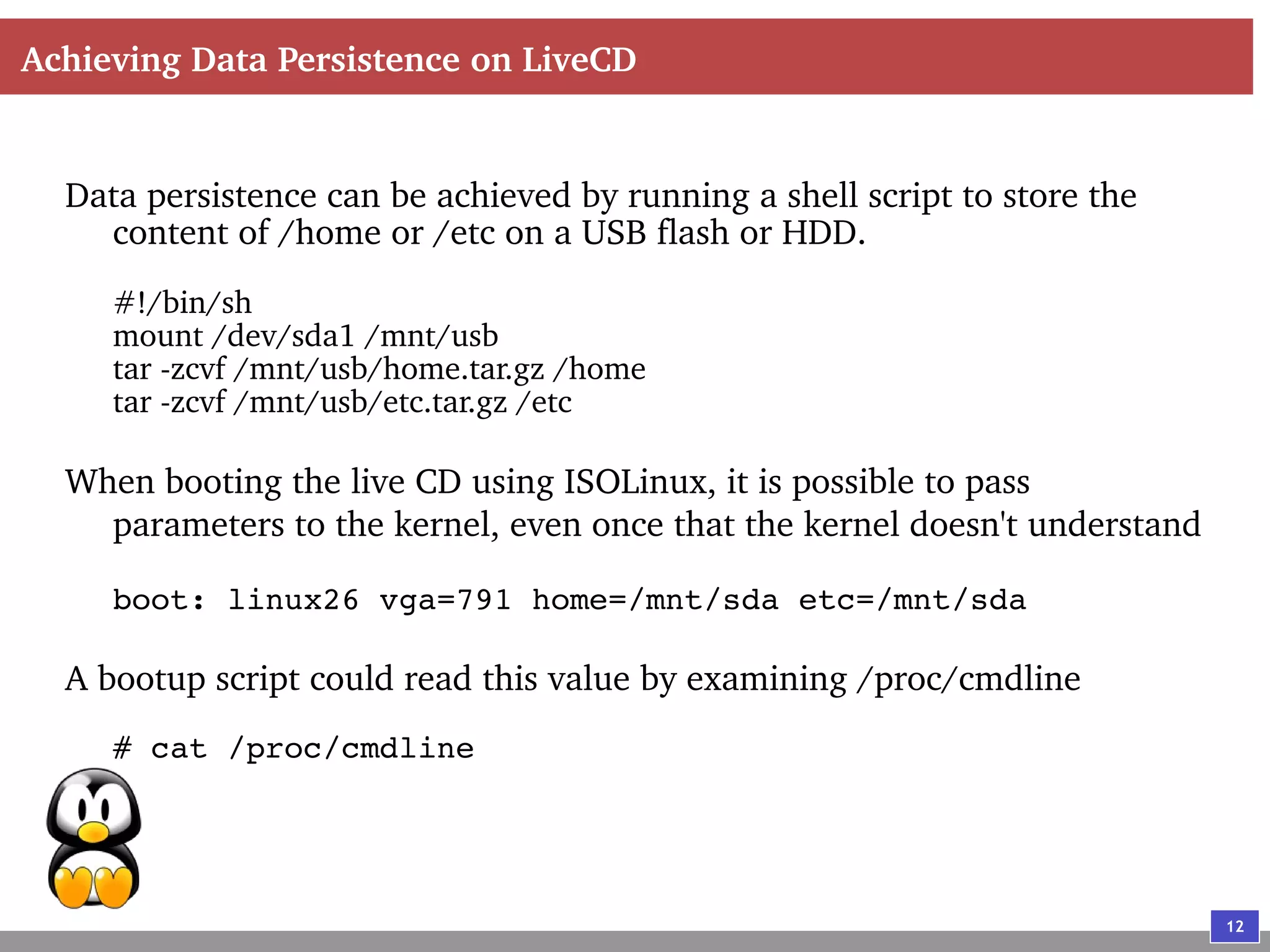
Data persistence can be achieved by running a shell script to store the
content of /home or /etc on a USB flash or HDD.
#!/bin/sh
mount /dev/sda1 /mnt/usb
tar -zcvf /mnt/usb/home.tar.gz /home
tar -zcvf /mnt/usb/etc.tar.gz /etc
When booting the live CD using ISOLinux, it is possible to pass
parameters to the kernel, even once that the kernel doesn't understand
boot: linux26 vga=791 home=/mnt/sda etc=/mnt/sda
A bootup script could read this value by examining /proc/cmdline
# cat /proc/cmdline
13
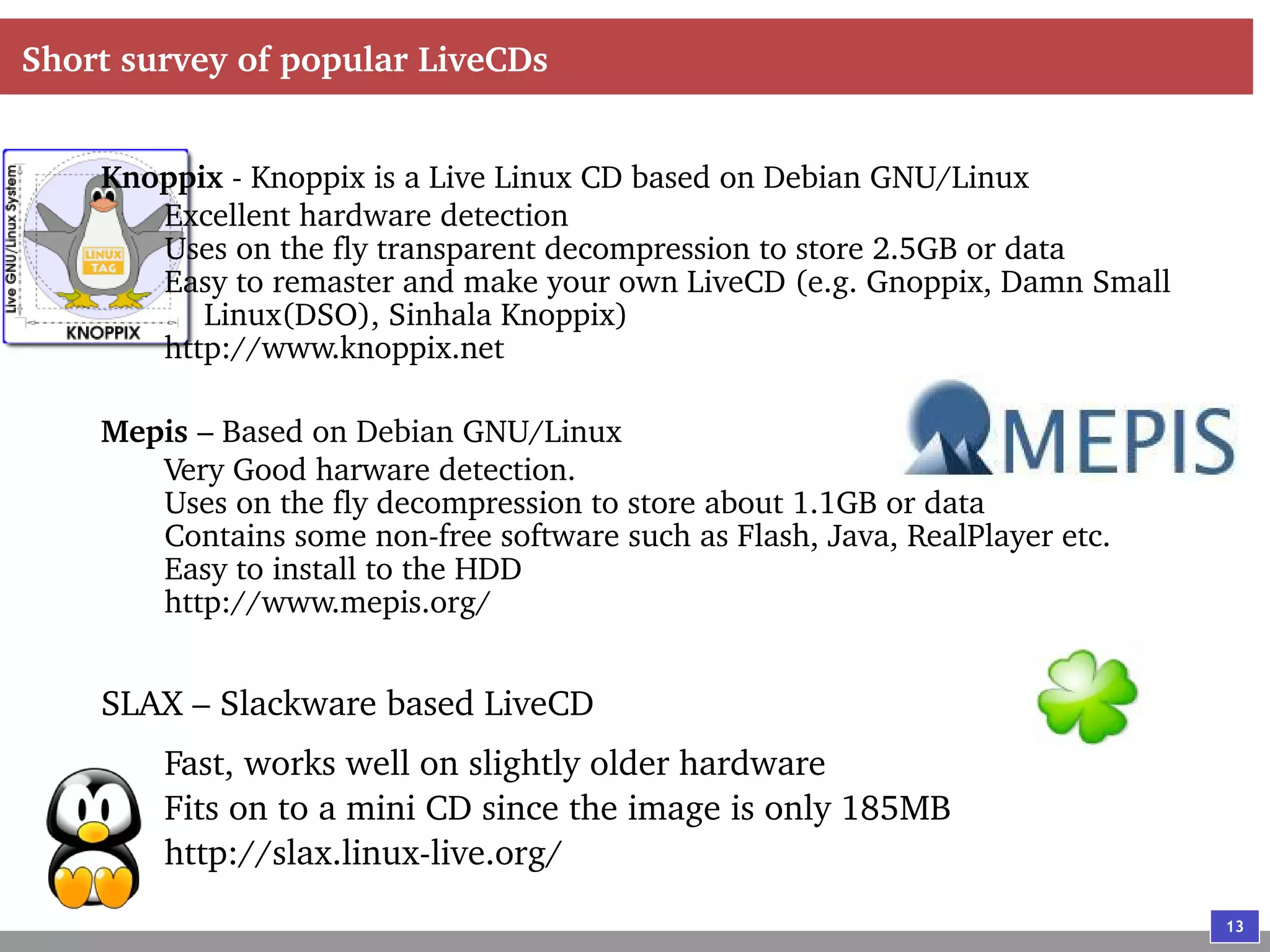
Short survey of popular LiveCDs
Knoppix - Knoppix is a Live Linux CD based on Debian GNU/Linux
Excellent hardware detection
Uses on the fly transparent decompression to store 2.5GB or data
Easy to remaster and make your own LiveCD (e.g. Gnoppix, Damn Small
Linux(DSO), Sinhala Knoppix)
http://www.knoppix.net
Mepis – Based on Debian GNU/Linux
Very Good harware detection.
Uses on the fly decompression to store about 1.1GB or data
Contains some non-free software such as Flash, Java, RealPlayer etc.
Easy to install to the HDD
http://www.mepis.org/
SLAX – Slackware based LiveCD
Fast, works well on slightly older hardware
Fits on to a mini CD since the image is only 185MB
http://slax.linux-live.org/
14
Short survey of popular LiveCDs
LNX/BBC – Portable card-sized distribution
Design to fit to a credit card size CD
http://www.lnx-bbc.org
Mandrake Move – A live CD based on Mandrake Linux
Commercial and free edition available.
http://www.mandrakesoft.com/products/mandrakemove
FreeBSD LiveCD – A LiveCD based FreeBSD OS
http://livecd.sourceforge.net/
15
Thank You!

Recipe of a linux Live CD (archived)

  • 1.
    Recipe of aLinux LiveCD By Buddhika Siddhisena
  • 2.
    2 Agenda What is aLiveCD Why run a LiveCD Understanding the Linux Boot process Understanding the Linux LiveCD Boot process How hardware detection could work Achieving Data Persistence on LiveCD Short survey of popular LiveCDs
  • 3.
    3 What is aLiveCD Is a CD that contains an Operating System (OS), capable of booting off directly, without first having to be installed. Will generally have automatic hardware detection, as the OS boots. May contain more data than the physical size of a CDROM (~700MB) by using on-the-fly decompression of the file system. Generally slower to boot when compared to HDD, mainly due to slower access times of CDROM drives. May offer the ability to remember configuration settings by saving them on to a drive (USB, floppy or HDD). May offer it to be installed to the hard disk permanently
  • 4.
    4 Why run aLiveCD Provides an alternative way to try out a new OS/distribution. Can be used to instantly convert any desktop to your desktop! And you can't get blamed for doing so. Can be a valuable resource for recovering data, resetting passwords etc. Can be used to distribute a demo versions of software thats guaranteed to work with minimum hassle. And endless other possibilities....
  • 5.
    5 Understanding the LinuxBoot process As the machine boots the BIOS looks for a bootable media depending on the boot sequence. BIOS loads the bootloader from a special area in the disk called the Master Boot Record (MBR). On linux it is usually either LILO or GRUB. LILO (or GRUB) will attempt to load the kernel and optionally an initial RAM disk (initrd), if specified. Control is passed to the kernel as it decompresses the initrd and mounts it as the root device.
  • 6.
    6 Understanding the LinuxBoot process The kernel executes /linuxrc from the root device. It will perform various pre-boot tasks such as loading of additional drivers. Once linuxrc exits control is passed back to the kernel which will then mount the real root device as the root file system. /sbin/init from the real root system is executed which uses /etc/inittab configuration to boot rest of the system. /etc/inittab defines the default runlevel (usually 3 or 5) and as part of the boot process all scripts in /etc/rcX.d/ are executed.
  • 7.
    7 Linux boot processin a nutshell Power supply ON PC BIOS starts BIOS looks for a bootable media according to the setting and loads a program(=LILO) written on MBR of a hard drive, and then LILO gains control. LILO loads a kerne(vmlinuz)and an initial RAM disk(initrd)Kerne l gains control Kernel expands initrd and mounts it as a temporary root file system If an executable /linuxrc exists in the initrd, the kernel executes it. After the /linuxrc is finished, the kernel mounts a real root file system which may be /dev/hda1 /sbin/init executes /etc/rc.d/rc.sysinit according to a description of /etc/inittab. Next, init executes /etc/rc.d/rc with a default run level as an argument For example, in run level 3, /etc/rc.d/rc executes shell scripts like SnnXXXX(nn=number) under /etc/rc.d/rc3.d directory in order of S00XXXX to S99XXXX with a start argument
  • 8.
    8 Understanding the LinuxLiveCD Boot process BIOS finds a bootable CDROM and loads the bootloader (usually ISOLINUX which is based on the Syslinux bootloader) ISOLINUX will load the initrd and the kernel image and transfer control to the kernel. The kernel decompresses initrd and mounts it as root and executes the /linuxrc script from the LiveCD.
  • 9.
    9 Understanding the LinuxLiveCD Boot process It will load kernel modules required, attempt to guess the CDROM device and mount it. Finally linuxrc will change the real root device of the kernel to that of initrd, or LiveCD and exit. #!/bin/sh echo Mounting /proc filesystem mount -t proc /proc /proc echo Attempting to Mount CD-ROM (mount -t iso9660 /dev/hdb /mnt/cdrom && ln -s /dev/hdb /dev/cdrom) || (mount -t iso9660 /dev/hdc /mnt/cdrom && ln -s /dev/hdc /dev/cdrom) || (mount -t iso9660 /dev/hdd /mnt/cdrom && ln -s /dev/hdd /dev/cdrom) || (mount -t iso9660 /dev/hda /mnt/cdrom && ln -s /dev/hda /dev/cdrom) || (echo 'cannot mount CD-ROM, dropping you to a shell';sh) echo 0x0100 > /proc/sys/kernel/real-root-dev umount /proc Hardware detection scripts will take over as a runlevel service to configure the rest of the system.
  • 10.
    10 Hardware detection process Scriptscan use tools such as lspci, /proc/bus/pci/devices, /proc/bus/usb/devices etc. to determine the system hardware. bud@babytux bud $ /sbin/lspci 0000:00:01.0 PCI bridge: ATI Technologies Inc: Unknown device 7010 0000:00:02.0 USB Controller: ALi Corporation USB 1.1 Controller (rev 03)0000:00:06.0 Multimedia audio controller: ALi Corporation M5451 PCI AC- Link Controller Audio Device (rev 02) 0000:00:09.0 Network controller: Harris Semiconductor Prism 2.5 Wavelan chipset(rev 01) 0000:00:10.0 IDE interface: ALi Corporation M5229 IDE (rev c4) 0000:00:12.0 Ethernet controller: National Semiconductor Corporation DP83815 (MacPhyter) Ethernet Controller 0000:01:05.0 VGA compatible controller: ATI Technologies Inc: Unknown device 4337 Then by using a database or some sort of pattern matching we can load the correct kernel modules to drive those devices. Check out the Linux PCID Repository at http://pciids.sourceforge.net/ or the file /usr/share/misc/pci.ids
  • 11.
    11 Hardware detection process Othertools such as kudzu(http://rhlinux.redhat.com/kudzu/) that comes with Redhat or discover(http://hackers.progeny.com/discover/) can also be used Configuring X windows can be done using tools such using XFree86 and tools such as ddcprobe or read-edid to detect monitor refresh rates. # XFree86 -configure # get-edid | parse-edid Usually the /etc, /home and /tmp directories will reside on an ramdisk and will be symlinked from the LiveCD to be able to save settings Certain files in the /dev directory should also reside on a ram disk. (e.g. /dev/tty*, /dev/pts/* etc.)
  • 12.
    12 Achieving Data Persistenceon LiveCD Data persistence can be achieved by running a shell script to store the content of /home or /etc on a USB flash or HDD. #!/bin/sh mount /dev/sda1 /mnt/usb tar -zcvf /mnt/usb/home.tar.gz /home tar -zcvf /mnt/usb/etc.tar.gz /etc When booting the live CD using ISOLinux, it is possible to pass parameters to the kernel, even once that the kernel doesn't understand boot: linux26 vga=791 home=/mnt/sda etc=/mnt/sda A bootup script could read this value by examining /proc/cmdline # cat /proc/cmdline
  • 13.
    13 Short survey ofpopular LiveCDs Knoppix - Knoppix is a Live Linux CD based on Debian GNU/Linux Excellent hardware detection Uses on the fly transparent decompression to store 2.5GB or data Easy to remaster and make your own LiveCD (e.g. Gnoppix, Damn Small Linux(DSO), Sinhala Knoppix) http://www.knoppix.net Mepis – Based on Debian GNU/Linux Very Good harware detection. Uses on the fly decompression to store about 1.1GB or data Contains some non-free software such as Flash, Java, RealPlayer etc. Easy to install to the HDD http://www.mepis.org/ SLAX – Slackware based LiveCD Fast, works well on slightly older hardware Fits on to a mini CD since the image is only 185MB http://slax.linux-live.org/
  • 14.
    14 Short survey ofpopular LiveCDs LNX/BBC – Portable card-sized distribution Design to fit to a credit card size CD http://www.lnx-bbc.org Mandrake Move – A live CD based on Mandrake Linux Commercial and free edition available. http://www.mandrakesoft.com/products/mandrakemove FreeBSD LiveCD – A LiveCD based FreeBSD OS http://livecd.sourceforge.net/
  • 15.