P1-Explain the function of
computer hardware components
22/06/2014 1
P1- Explain the function of
computer hardware
components
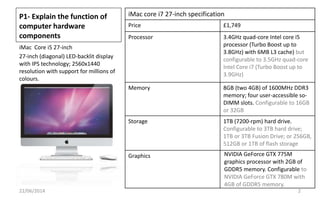
iMac Core i5 27-inch
27-inch (diagonal) LED-backlit display
with IPS technology; 2560x1440
resolution with support for millions of
colours.
22/06/2014 2
iMac core i7 27-inch specification
Price £1,749
Processor 3.4GHz quad-core Intel core i5
processor (Turbo Boost up to
3.8GHz) with 6MB L3 cache) but
configurable to 3.5GHz quad-core
Intel Core i7 (Turbo Boost up to
3.9GHz)
Memory 8GB (two 4GB) of 1600MHz DDR3
memory; four user-accessible so-
DIMM slots. Configurable to 16GB
or 32GB
Storage 1TB (7200-rpm) hard drive.
Configurable to 3TB hard drive;
1TB or 3TB Fusion Drive; or 256GB,
512GB or 1TB of flash storage
Graphics NVIDIA GeForce GTX 775M
graphics processor with 2GB of
GDDR5 memory. Configurable to
NVIDIA GeForce GTX 780M with
4GB of GDDR5 memory.
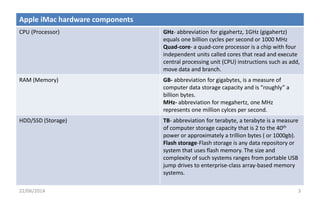
Apple iMac hardware components
CPU (Processor) GHz- abbreviation for gigahertz, 1GHz (gigahertz)
equals one billion cycles per second or 1000 MHz
Quad-core- a quad-core processor is a chip with four
independent units called cores that read and execute
central processing unit (CPU) instructions such as add,
move data and branch.
RAM (Memory) GB- abbreviation for gigabytes, is a measure of
computer data storage capacity and is “roughly” a
billion bytes.
MHz- abbreviation for megahertz, one MHz
represents one million cylces per second.
HDD/SSD (Storage) TB- abbreviation for terabyte, a terabyte is a measure
of computer storage capacity that is 2 to the 40th
power or approximately a trillion bytes ( or 1000gb).
Flash storage-Flash storage is any data repository or
system that uses flash memory. The size and
complexity of such systems ranges from portable USB
jump drives to enterprise-class array-based memory
systems.
22/06/2014 3
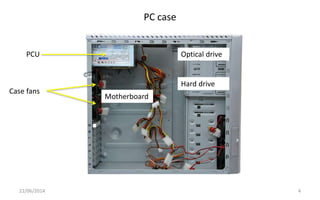
PC case
22/06/2014 4
PCU
Case fans
Motherboard
Optical drive
Hard drive
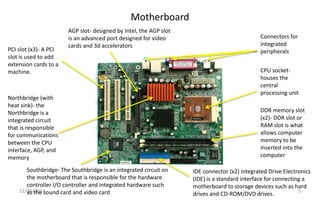
Motherboard
22/06/2014 5
PCI slot (x3)- A PCI
slot is used to add
extension cards to a
machine. CPU socket-
houses the
central
processing unit
DDR memory slot
(x2)- DDR slot or
RAM slot is what
allows computer
memory to be
inserted into the
computer
Northbridge (with
heat sink)- the
Northbridge is a
integrated circuit
that is responsible
for communications
between the CPU
interface, AGP, and
memory
IDE connector (x2) integrated Drive Electronics
(IDE) is a standard interface for connecting a
motherboard to storage devices such as hard
drives and CD-ROM/DVD drives.
Southbridge- The Southbridge is an integrated circuit on
the motherboard that is responsible for the hardware
controller I/O controller and integrated hardware such
as the sound card and video card
Connectors for
integrated
peripherals
AGP slot- designed by Intel, the AGP slot
is an advanced port designed for video
cards and 3d accelerators
About the motherboard
22/06/2014 6
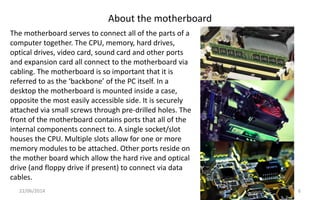
The motherboard serves to connect all of the parts of a
computer together. The CPU, memory, hard drives,
optical drives, video card, sound card and other ports
and expansion card all connect to the motherboard via
cabling. The motherboard is so important that it is
referred to as the ‘backbone’ of the PC itself. In a
desktop the motherboard is mounted inside a case,
opposite the most easily accessible side. It is securely
attached via small screws through pre-drilled holes. The
front of the motherboard contains ports that all of the
internal components connect to. A single socket/slot
houses the CPU. Multiple slots allow for one or more
memory modules to be attached. Other ports reside on
the mother board which allow the hard rive and optical
drive (and floppy drive if present) to connect via data
cables.
CPU
22/06/2014 7
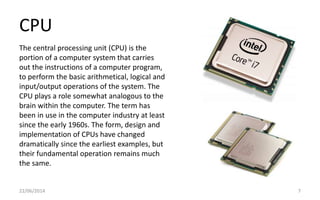
The central processing unit (CPU) is the
portion of a computer system that carries
out the instructions of a computer program,
to perform the basic arithmetical, logical and
input/output operations of the system. The
CPU plays a role somewhat analogous to the
brain within the computer. The term has
been in use in the computer industry at least
since the early 1960s. The form, design and
implementation of CPUs have changed
dramatically since the earliest examples, but
their fundamental operation remains much
the same.
BIOS
22/06/2014 8
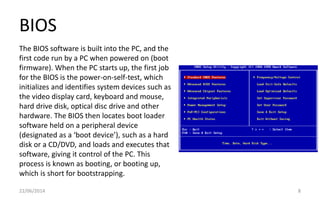
The BIOS software is built into the PC, and the
first code run by a PC when powered on (boot
firmware). When the PC starts up, the first job
for the BIOS is the power-on-self-test, which
initializes and identifies system devices such as
the video display card, keyboard and mouse,
hard drive disk, optical disc drive and other
hardware. The BIOS then locates boot loader
software held on a peripheral device
(designated as a ‘boot device’), such as a hard
disk or a CD/DVD, and loads and executes that
software, giving it control of the PC. This
process is known as booting, or booting up,
which is short for bootstrapping.
Case fans
22/06/2014 9
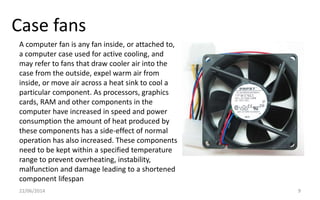
A computer fan is any fan inside, or attached to,
a computer case used for active cooling, and
may refer to fans that draw cooler air into the
case from the outside, expel warm air from
inside, or move air across a heat sink to cool a
particular component. As processors, graphics
cards, RAM and other components in the
computer have increased in speed and power
consumption the amount of heat produced by
these components has a side-effect of normal
operation has also increased. These components
need to be kept within a specified temperature
range to prevent overheating, instability,
malfunction and damage leading to a shortened
component lifespan
Graphics card
22/06/2014 10
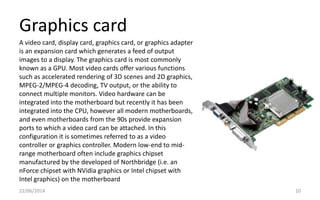
A video card, display card, graphics card, or graphics adapter
is an expansion card which generates a feed of output
images to a display. The graphics card is most commonly
known as a GPU. Most video cards offer various functions
such as accelerated rendering of 3D scenes and 2D graphics,
MPEG-2/MPEG-4 decoding, TV output, or the ability to
connect multiple monitors. Video hardware can be
integrated into the motherboard but recently it has been
integrated into the CPU, however all modern motherboards,
and even motherboards from the 90s provide expansion
ports to which a video card can be attached. In this
configuration it is sometimes referred to as a video
controller or graphics controller. Modern low-end to mid-
range motherboard often include graphics chipset
manufactured by the developed of Northbridge (i.e. an
nForce chipset with NVidia graphics or Intel chipset with
Intel graphics) on the motherboard
RAM
22/06/2014 11
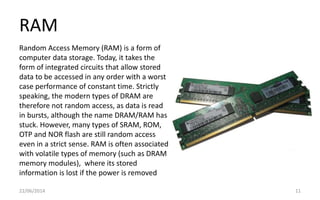
Random Access Memory (RAM) is a form of
computer data storage. Today, it takes the
form of integrated circuits that allow stored
data to be accessed in any order with a worst
case performance of constant time. Strictly
speaking, the modern types of DRAM are
therefore not random access, as data is read
in bursts, although the name DRAM/RAM has
stuck. However, many types of SRAM, ROM,
OTP and NOR flash are still random access
even in a strict sense. RAM is often associated
with volatile types of memory (such as DRAM
memory modules), where its stored
information is lost if the power is removed
Sound card
22/06/2014 12
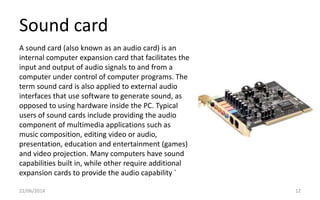
A sound card (also known as an audio card) is an
internal computer expansion card that facilitates the
input and output of audio signals to and from a
computer under control of computer programs. The
term sound card is also applied to external audio
interfaces that use software to generate sound, as
opposed to using hardware inside the PC. Typical
users of sound cards include providing the audio
component of multimedia applications such as
music composition, editing video or audio,
presentation, education and entertainment (games)
and video projection. Many computers have sound
capabilities built in, while other require additional
expansion cards to provide the audio capability `
Power supply
22/06/2014 13
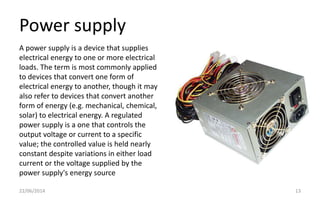
A power supply is a device that supplies
electrical energy to one or more electrical
loads. The term is most commonly applied
to devices that convert one form of
electrical energy to another, though it may
also refer to devices that convert another
form of energy (e.g. mechanical, chemical,
solar) to electrical energy. A regulated
power supply is a one that controls the
output voltage or current to a specific
value; the controlled value is held nearly
constant despite variations in either load
current or the voltage supplied by the
power supply's energy source
ROM
22/06/2014 14
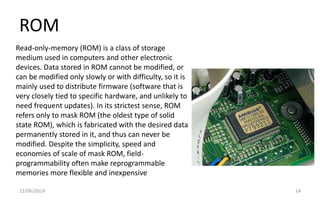
Read-only-memory (ROM) is a class of storage
medium used in computers and other electronic
devices. Data stored in ROM cannot be modified, or
can be modified only slowly or with difficulty, so it is
mainly used to distribute firmware (software that is
very closely tied to specific hardware, and unlikely to
need frequent updates). In its strictest sense, ROM
refers only to mask ROM (the oldest type of solid
state ROM), which is fabricated with the desired data
permanently stored in it, and thus can never be
modified. Despite the simplicity, speed and
economies of scale of mask ROM, field-
programmability often make reprogrammable
memories more flexible and inexpensive
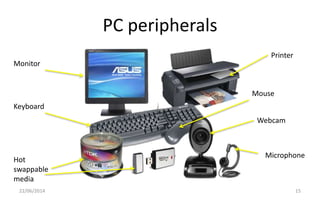
PC peripherals
22/06/2014 15
Printer
Microphone
Webcam
Monitor
Keyboard
Hot
swappable
media
Mouse
Monitor
22/06/2014 16
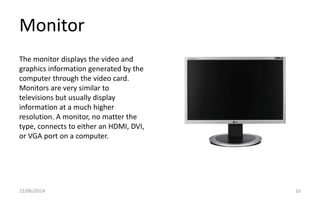
The monitor displays the video and
graphics information generated by the
computer through the video card.
Monitors are very similar to
televisions but usually display
information at a much higher
resolution. A monitor, no matter the
type, connects to either an HDMI, DVI,
or VGA port on a computer.
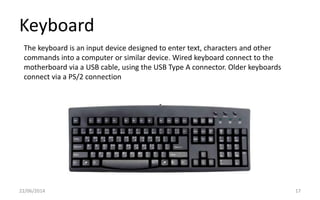
Keyboard
22/06/2014 17
The keyboard is an input device designed to enter text, characters and other
commands into a computer or similar device. Wired keyboard connect to the
motherboard via a USB cable, using the USB Type A connector. Older keyboards
connect via a PS/2 connection
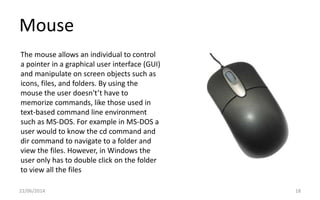
Mouse
22/06/2014 18
The mouse allows an individual to control
a pointer in a graphical user interface (GUI)
and manipulate on screen objects such as
icons, files, and folders. By using the
mouse the user doesn't’t have to
memorize commands, like those used in
text-based command line environment
such as MS-DOS. For example in MS-DOS a
user would to know the cd command and
dir command to navigate to a folder and
view the files. However, in Windows the
user only has to double click on the folder
to view all the files
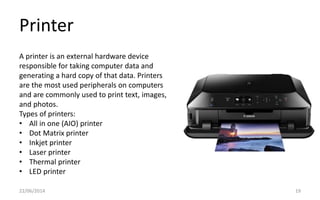
Printer
22/06/2014 19
A printer is an external hardware device
responsible for taking computer data and
generating a hard copy of that data. Printers
are the most used peripherals on computers
and are commonly used to print text, images,
and photos.
Types of printers:
• All in one (AIO) printer
• Dot Matrix printer
• Inkjet printer
• Laser printer
• Thermal printer
• LED printer
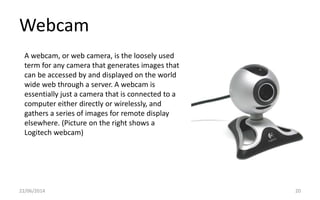
Webcam
22/06/2014 20
A webcam, or web camera, is the loosely used
term for any camera that generates images that
can be accessed by and displayed on the world
wide web through a server. A webcam is
essentially just a camera that is connected to a
computer either directly or wirelessly, and
gathers a series of images for remote display
elsewhere. (Picture on the right shows a
Logitech webcam)
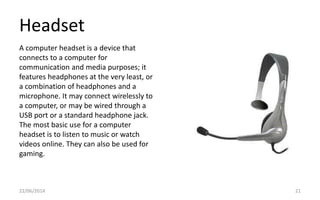
Headset
22/06/2014 21
A computer headset is a device that
connects to a computer for
communication and media purposes; it
features headphones at the very least, or
a combination of headphones and a
microphone. It may connect wirelessly to
a computer, or may be wired through a
USB port or a standard headphone jack.
The most basic use for a computer
headset is to listen to music or watch
videos online. They can also be used for
gaming.

P1 unit 2

  • 1.
    P1-Explain the functionof computer hardware components 22/06/2014 1
  • 2.
    P1- Explain thefunction of computer hardware components iMac Core i5 27-inch 27-inch (diagonal) LED-backlit display with IPS technology; 2560x1440 resolution with support for millions of colours. 22/06/2014 2 iMac core i7 27-inch specification Price £1,749 Processor 3.4GHz quad-core Intel core i5 processor (Turbo Boost up to 3.8GHz) with 6MB L3 cache) but configurable to 3.5GHz quad-core Intel Core i7 (Turbo Boost up to 3.9GHz) Memory 8GB (two 4GB) of 1600MHz DDR3 memory; four user-accessible so- DIMM slots. Configurable to 16GB or 32GB Storage 1TB (7200-rpm) hard drive. Configurable to 3TB hard drive; 1TB or 3TB Fusion Drive; or 256GB, 512GB or 1TB of flash storage Graphics NVIDIA GeForce GTX 775M graphics processor with 2GB of GDDR5 memory. Configurable to NVIDIA GeForce GTX 780M with 4GB of GDDR5 memory.
  • 3.
    Apple iMac hardwarecomponents CPU (Processor) GHz- abbreviation for gigahertz, 1GHz (gigahertz) equals one billion cycles per second or 1000 MHz Quad-core- a quad-core processor is a chip with four independent units called cores that read and execute central processing unit (CPU) instructions such as add, move data and branch. RAM (Memory) GB- abbreviation for gigabytes, is a measure of computer data storage capacity and is “roughly” a billion bytes. MHz- abbreviation for megahertz, one MHz represents one million cylces per second. HDD/SSD (Storage) TB- abbreviation for terabyte, a terabyte is a measure of computer storage capacity that is 2 to the 40th power or approximately a trillion bytes ( or 1000gb). Flash storage-Flash storage is any data repository or system that uses flash memory. The size and complexity of such systems ranges from portable USB jump drives to enterprise-class array-based memory systems. 22/06/2014 3
  • 4.
    PC case 22/06/2014 4 PCU Casefans Motherboard Optical drive Hard drive
  • 5.
    Motherboard 22/06/2014 5 PCI slot(x3)- A PCI slot is used to add extension cards to a machine. CPU socket- houses the central processing unit DDR memory slot (x2)- DDR slot or RAM slot is what allows computer memory to be inserted into the computer Northbridge (with heat sink)- the Northbridge is a integrated circuit that is responsible for communications between the CPU interface, AGP, and memory IDE connector (x2) integrated Drive Electronics (IDE) is a standard interface for connecting a motherboard to storage devices such as hard drives and CD-ROM/DVD drives. Southbridge- The Southbridge is an integrated circuit on the motherboard that is responsible for the hardware controller I/O controller and integrated hardware such as the sound card and video card Connectors for integrated peripherals AGP slot- designed by Intel, the AGP slot is an advanced port designed for video cards and 3d accelerators
  • 6.
    About the motherboard 22/06/20146 The motherboard serves to connect all of the parts of a computer together. The CPU, memory, hard drives, optical drives, video card, sound card and other ports and expansion card all connect to the motherboard via cabling. The motherboard is so important that it is referred to as the ‘backbone’ of the PC itself. In a desktop the motherboard is mounted inside a case, opposite the most easily accessible side. It is securely attached via small screws through pre-drilled holes. The front of the motherboard contains ports that all of the internal components connect to. A single socket/slot houses the CPU. Multiple slots allow for one or more memory modules to be attached. Other ports reside on the mother board which allow the hard rive and optical drive (and floppy drive if present) to connect via data cables.
  • 7.
    CPU 22/06/2014 7 The centralprocessing unit (CPU) is the portion of a computer system that carries out the instructions of a computer program, to perform the basic arithmetical, logical and input/output operations of the system. The CPU plays a role somewhat analogous to the brain within the computer. The term has been in use in the computer industry at least since the early 1960s. The form, design and implementation of CPUs have changed dramatically since the earliest examples, but their fundamental operation remains much the same.
  • 8.
    BIOS 22/06/2014 8 The BIOSsoftware is built into the PC, and the first code run by a PC when powered on (boot firmware). When the PC starts up, the first job for the BIOS is the power-on-self-test, which initializes and identifies system devices such as the video display card, keyboard and mouse, hard drive disk, optical disc drive and other hardware. The BIOS then locates boot loader software held on a peripheral device (designated as a ‘boot device’), such as a hard disk or a CD/DVD, and loads and executes that software, giving it control of the PC. This process is known as booting, or booting up, which is short for bootstrapping.
  • 9.
    Case fans 22/06/2014 9 Acomputer fan is any fan inside, or attached to, a computer case used for active cooling, and may refer to fans that draw cooler air into the case from the outside, expel warm air from inside, or move air across a heat sink to cool a particular component. As processors, graphics cards, RAM and other components in the computer have increased in speed and power consumption the amount of heat produced by these components has a side-effect of normal operation has also increased. These components need to be kept within a specified temperature range to prevent overheating, instability, malfunction and damage leading to a shortened component lifespan
  • 10.
    Graphics card 22/06/2014 10 Avideo card, display card, graphics card, or graphics adapter is an expansion card which generates a feed of output images to a display. The graphics card is most commonly known as a GPU. Most video cards offer various functions such as accelerated rendering of 3D scenes and 2D graphics, MPEG-2/MPEG-4 decoding, TV output, or the ability to connect multiple monitors. Video hardware can be integrated into the motherboard but recently it has been integrated into the CPU, however all modern motherboards, and even motherboards from the 90s provide expansion ports to which a video card can be attached. In this configuration it is sometimes referred to as a video controller or graphics controller. Modern low-end to mid- range motherboard often include graphics chipset manufactured by the developed of Northbridge (i.e. an nForce chipset with NVidia graphics or Intel chipset with Intel graphics) on the motherboard
  • 11.
    RAM 22/06/2014 11 Random AccessMemory (RAM) is a form of computer data storage. Today, it takes the form of integrated circuits that allow stored data to be accessed in any order with a worst case performance of constant time. Strictly speaking, the modern types of DRAM are therefore not random access, as data is read in bursts, although the name DRAM/RAM has stuck. However, many types of SRAM, ROM, OTP and NOR flash are still random access even in a strict sense. RAM is often associated with volatile types of memory (such as DRAM memory modules), where its stored information is lost if the power is removed
  • 12.
    Sound card 22/06/2014 12 Asound card (also known as an audio card) is an internal computer expansion card that facilitates the input and output of audio signals to and from a computer under control of computer programs. The term sound card is also applied to external audio interfaces that use software to generate sound, as opposed to using hardware inside the PC. Typical users of sound cards include providing the audio component of multimedia applications such as music composition, editing video or audio, presentation, education and entertainment (games) and video projection. Many computers have sound capabilities built in, while other require additional expansion cards to provide the audio capability `
  • 13.
    Power supply 22/06/2014 13 Apower supply is a device that supplies electrical energy to one or more electrical loads. The term is most commonly applied to devices that convert one form of electrical energy to another, though it may also refer to devices that convert another form of energy (e.g. mechanical, chemical, solar) to electrical energy. A regulated power supply is a one that controls the output voltage or current to a specific value; the controlled value is held nearly constant despite variations in either load current or the voltage supplied by the power supply's energy source
  • 14.
    ROM 22/06/2014 14 Read-only-memory (ROM)is a class of storage medium used in computers and other electronic devices. Data stored in ROM cannot be modified, or can be modified only slowly or with difficulty, so it is mainly used to distribute firmware (software that is very closely tied to specific hardware, and unlikely to need frequent updates). In its strictest sense, ROM refers only to mask ROM (the oldest type of solid state ROM), which is fabricated with the desired data permanently stored in it, and thus can never be modified. Despite the simplicity, speed and economies of scale of mask ROM, field- programmability often make reprogrammable memories more flexible and inexpensive
  • 15.
  • 16.
    Monitor 22/06/2014 16 The monitordisplays the video and graphics information generated by the computer through the video card. Monitors are very similar to televisions but usually display information at a much higher resolution. A monitor, no matter the type, connects to either an HDMI, DVI, or VGA port on a computer.
  • 17.
    Keyboard 22/06/2014 17 The keyboardis an input device designed to enter text, characters and other commands into a computer or similar device. Wired keyboard connect to the motherboard via a USB cable, using the USB Type A connector. Older keyboards connect via a PS/2 connection
  • 18.
    Mouse 22/06/2014 18 The mouseallows an individual to control a pointer in a graphical user interface (GUI) and manipulate on screen objects such as icons, files, and folders. By using the mouse the user doesn't’t have to memorize commands, like those used in text-based command line environment such as MS-DOS. For example in MS-DOS a user would to know the cd command and dir command to navigate to a folder and view the files. However, in Windows the user only has to double click on the folder to view all the files
  • 19.
    Printer 22/06/2014 19 A printeris an external hardware device responsible for taking computer data and generating a hard copy of that data. Printers are the most used peripherals on computers and are commonly used to print text, images, and photos. Types of printers: • All in one (AIO) printer • Dot Matrix printer • Inkjet printer • Laser printer • Thermal printer • LED printer
  • 20.
    Webcam 22/06/2014 20 A webcam,or web camera, is the loosely used term for any camera that generates images that can be accessed by and displayed on the world wide web through a server. A webcam is essentially just a camera that is connected to a computer either directly or wirelessly, and gathers a series of images for remote display elsewhere. (Picture on the right shows a Logitech webcam)
  • 21.
    Headset 22/06/2014 21 A computerheadset is a device that connects to a computer for communication and media purposes; it features headphones at the very least, or a combination of headphones and a microphone. It may connect wirelessly to a computer, or may be wired through a USB port or a standard headphone jack. The most basic use for a computer headset is to listen to music or watch videos online. They can also be used for gaming.