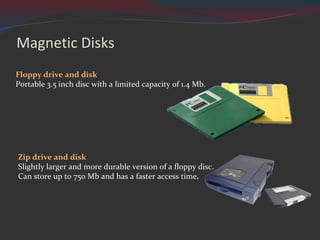
Magnetic Disks Floppy drive and disk Portable 3.5 inch disc with a limited capacity of 1.4 Mb. Zip drive and disk Slightly larger and more durable version of a floppy disc.  Can store up to 750 Mb and has a faster access time .
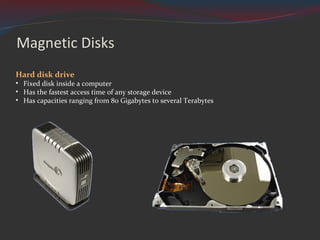
Magnetic Disks Hard disk drive Fixed disk inside a computer Has the fastest access time of any storage device Has capacities ranging from 80 Gigabytes to several Terabytes
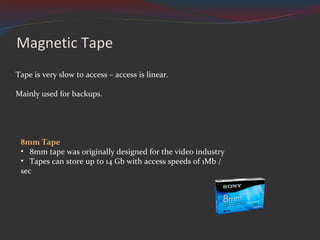
Magnetic Tape Tape is very slow to access – access is linear. Mainly used for backups. 8mm Tape 8mm tape was originally designed for the video industry  Tapes can store up to 14 Gb with access speeds of 1Mb / sec
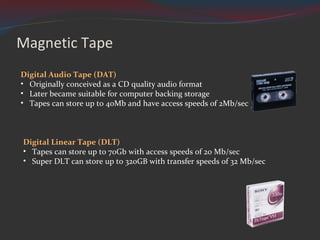
Magnetic Tape Digital Linear Tape (DLT)  Tapes can store up to 70Gb with access speeds of 20 Mb/sec Super DLT can store up to 320GB with transfer speeds of 32 Mb/sec Digital Audio Tape (DAT) Originally conceived as a CD quality audio format Later became suitable for computer backing storage Tapes can store up to 40Mb and have access speeds of 2Mb/sec
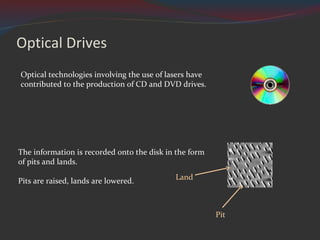
Optical Drives The information is recorded onto the disk in the form of pits and lands. Pits are raised, lands are lowered. Optical technologies involving the use of lasers have contributed to the production of CD and DVD drives. Land Pit
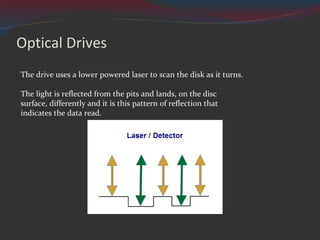
Optical Drives The drive uses a lower powered laser to scan the disk as it turns.  The light is reflected from the pits and lands, on the disc surface, differently and it is this pattern of reflection that indicates the data read.
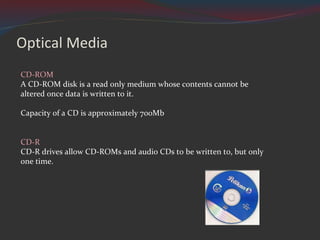
Optical Media CD-ROM  A CD-ROM disk is a read only medium whose contents cannot be altered once data is written to it. Capacity of a CD is approximately 700Mb CD-R  CD-R drives allow CD-ROMs and audio CDs to be written to, but only one time.
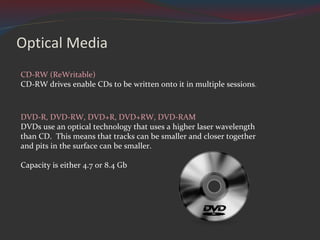
Optical Media CD-RW (ReWritable) CD-RW drives enable CDs to be written onto it in multiple sessions . DVD-R, DVD-RW, DVD+R, DVD+RW, DVD-RAM DVDs use an optical technology that uses a higher laser wavelength than CD.  This means that tracks can be smaller and closer together and pits in the surface can be smaller. Capacity is either 4.7 or 8.4 Gb
Data Transfer Rates CD-ROMs 150 Kb/sec DVD-ROMs 1.32 Mb/sec This is the transfer rate for  1 x  CD-ROMs / DVD-ROMs But most CD-ROMs / DVD-ROMs run faster than this e.g.  4 x,  32 x,  48 x
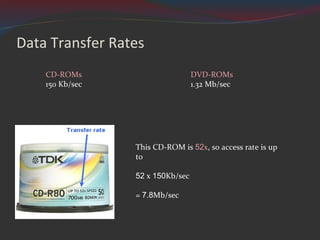
Data Transfer Rates CD-ROMs 150 Kb/sec DVD-ROMs 1.32 Mb/sec This CD-ROM is  52 x , so access rate is up to 52  x  150 Kb/sec =  7.8 Mb/sec
Blu-Ray Blu-Ray  is the next generation of optical storage device It uses a narrower laser ( blue ) than the laser used for CD / DVD ( red ) Capacity is 27Gb or 54Gb Access speeds range from 4.5 Mb per second to 54Mb per second
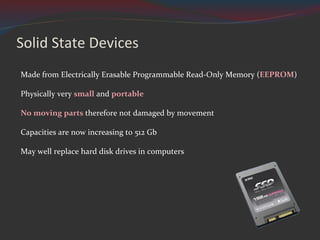
Solid State Devices Made from Electrically Erasable Programmable Read-Only Memory ( EEPROM ) Physically very  small  and  portable No moving parts  therefore not damaged by movement Capacities are now increasing to 512 Gb May well replace hard disk drives in computers
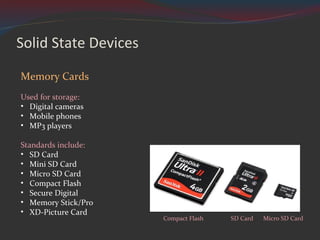
Solid State Devices Memory Cards Used for storage: Digital cameras Mobile phones MP3 players Standards include:  SD Card Mini SD Card Micro SD Card Compact Flash Secure Digital Memory Stick/Pro XD-Picture Card Compact Flash SD Card Micro SD Card
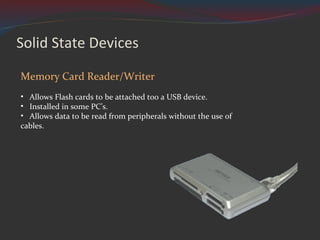
Solid State Devices Memory Card Reader/Writer Allows Flash cards to be attached too a USB device. Installed in some PC’s. Allows data to be read from peripherals without the use of cables.
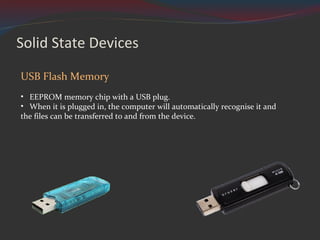
Solid State Devices USB Flash Memory EEPROM memory chip with a USB plug. When it is plugged in, the computer will automatically recognise it and the files can be transferred to and from the device.
Development Trends in Storage devices Increased capacity Investigate: Hard drive capacity Flash drive capacity Optical media capacity
Development Trends in Storage devices Increased read / write speeds Investigate: Hard drive speeds Flash drive speeds Optical media speeds DLT tape speeds USB 2.0 speeds Firewire speeds
Development Trends in Storage devices Reduced physical size Investigate: Hard drive size Flash card size
Development Trends in Storage devices Cost per unit of storage (ÂŁ per Gigabyte) Investigate: Internal Hard drive storage cost External Hard drive storage cost USB Flash drive storage cost DVD-R storage cost CD-R storage cost
Credits Higher Computing – Peripherals – Types of Storage Produced by P. Greene for the City of Edinburgh Council 2004 Adapted by M. Cunningham 2010 All images licenced under Creative Commons 3.0 Hard Disk by Jeff Kubina 1.44mb Floppy Disk by FreeFoto.com 100 MB ZIP drive by Benutzer KMJ 100 MB ZIP disk by Benutzer KMJ Hard disk (opened) by Toshiyuki IMAI Disco compacto 80 minutos y 700Mb by  Mary Mozqueda "Black-white 2 Vista" icon theme by DBGthekafu Blu-ray disc logo by Sony & Panasonic Multiple memory card reader writer by Quirren Magnifying glass icon by G Ambrus USB drive by Evan Amos

Backing Storage

  • 1.
  • 2.
    Magnetic Disks Floppydrive and disk Portable 3.5 inch disc with a limited capacity of 1.4 Mb. Zip drive and disk Slightly larger and more durable version of a floppy disc. Can store up to 750 Mb and has a faster access time .
  • 3.
    Magnetic Disks Harddisk drive Fixed disk inside a computer Has the fastest access time of any storage device Has capacities ranging from 80 Gigabytes to several Terabytes
  • 4.
    Magnetic Tape Tapeis very slow to access – access is linear. Mainly used for backups. 8mm Tape 8mm tape was originally designed for the video industry Tapes can store up to 14 Gb with access speeds of 1Mb / sec
  • 5.
    Magnetic Tape DigitalLinear Tape (DLT) Tapes can store up to 70Gb with access speeds of 20 Mb/sec Super DLT can store up to 320GB with transfer speeds of 32 Mb/sec Digital Audio Tape (DAT) Originally conceived as a CD quality audio format Later became suitable for computer backing storage Tapes can store up to 40Mb and have access speeds of 2Mb/sec
  • 6.
    Optical Drives Theinformation is recorded onto the disk in the form of pits and lands. Pits are raised, lands are lowered. Optical technologies involving the use of lasers have contributed to the production of CD and DVD drives. Land Pit
  • 7.
    Optical Drives Thedrive uses a lower powered laser to scan the disk as it turns. The light is reflected from the pits and lands, on the disc surface, differently and it is this pattern of reflection that indicates the data read.
  • 8.
    Optical Media CD-ROM A CD-ROM disk is a read only medium whose contents cannot be altered once data is written to it. Capacity of a CD is approximately 700Mb CD-R CD-R drives allow CD-ROMs and audio CDs to be written to, but only one time.
  • 9.
    Optical Media CD-RW(ReWritable) CD-RW drives enable CDs to be written onto it in multiple sessions . DVD-R, DVD-RW, DVD+R, DVD+RW, DVD-RAM DVDs use an optical technology that uses a higher laser wavelength than CD. This means that tracks can be smaller and closer together and pits in the surface can be smaller. Capacity is either 4.7 or 8.4 Gb
  • 10.
    Data Transfer RatesCD-ROMs 150 Kb/sec DVD-ROMs 1.32 Mb/sec This is the transfer rate for 1 x CD-ROMs / DVD-ROMs But most CD-ROMs / DVD-ROMs run faster than this e.g. 4 x, 32 x, 48 x
  • 11.
    Data Transfer RatesCD-ROMs 150 Kb/sec DVD-ROMs 1.32 Mb/sec This CD-ROM is 52 x , so access rate is up to 52 x 150 Kb/sec = 7.8 Mb/sec
  • 12.
    Blu-Ray Blu-Ray is the next generation of optical storage device It uses a narrower laser ( blue ) than the laser used for CD / DVD ( red ) Capacity is 27Gb or 54Gb Access speeds range from 4.5 Mb per second to 54Mb per second
  • 13.
    Solid State DevicesMade from Electrically Erasable Programmable Read-Only Memory ( EEPROM ) Physically very small and portable No moving parts therefore not damaged by movement Capacities are now increasing to 512 Gb May well replace hard disk drives in computers
  • 14.
    Solid State DevicesMemory Cards Used for storage: Digital cameras Mobile phones MP3 players Standards include: SD Card Mini SD Card Micro SD Card Compact Flash Secure Digital Memory Stick/Pro XD-Picture Card Compact Flash SD Card Micro SD Card
  • 15.
    Solid State DevicesMemory Card Reader/Writer Allows Flash cards to be attached too a USB device. Installed in some PC’s. Allows data to be read from peripherals without the use of cables.
  • 16.
    Solid State DevicesUSB Flash Memory EEPROM memory chip with a USB plug. When it is plugged in, the computer will automatically recognise it and the files can be transferred to and from the device.
  • 17.
    Development Trends inStorage devices Increased capacity Investigate: Hard drive capacity Flash drive capacity Optical media capacity
  • 18.
    Development Trends inStorage devices Increased read / write speeds Investigate: Hard drive speeds Flash drive speeds Optical media speeds DLT tape speeds USB 2.0 speeds Firewire speeds
  • 19.
    Development Trends inStorage devices Reduced physical size Investigate: Hard drive size Flash card size
  • 20.
    Development Trends inStorage devices Cost per unit of storage (ÂŁ per Gigabyte) Investigate: Internal Hard drive storage cost External Hard drive storage cost USB Flash drive storage cost DVD-R storage cost CD-R storage cost
  • 21.
    Credits Higher Computing– Peripherals – Types of Storage Produced by P. Greene for the City of Edinburgh Council 2004 Adapted by M. Cunningham 2010 All images licenced under Creative Commons 3.0 Hard Disk by Jeff Kubina 1.44mb Floppy Disk by FreeFoto.com 100 MB ZIP drive by Benutzer KMJ 100 MB ZIP disk by Benutzer KMJ Hard disk (opened) by Toshiyuki IMAI Disco compacto 80 minutos y 700Mb by Mary Mozqueda "Black-white 2 Vista" icon theme by DBGthekafu Blu-ray disc logo by Sony & Panasonic Multiple memory card reader writer by Quirren Magnifying glass icon by G Ambrus USB drive by Evan Amos